
鸿蒙NDK UI之文本自定义样式
本文介绍了鸿蒙应用中自定义文本样式的方法,主要涉及段落样式和文本样式的设置。段落样式通过OH_Drawing_TypographyStyle结构体实现,可设置文本方向、对齐方式、最大行数等属性。文本样式则使用OH_Drawing_TextStyle对象来定义颜色、字号、字重等特性。两者通过ArkUI_StyledString格式化字符串数据对象整合,并最终由文本引擎渲染。文章还提供了代码实践指导,
文本自定义样式
〇、前言
先看一张图片: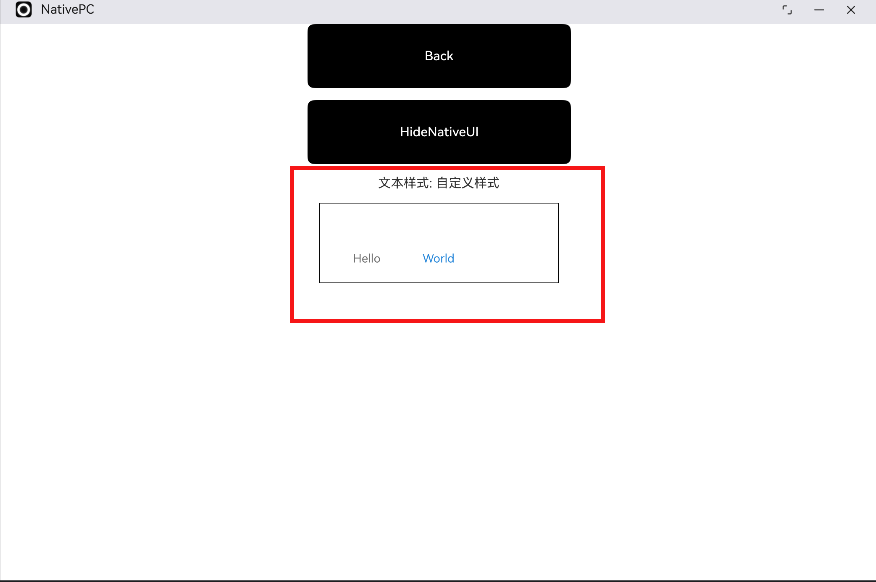
图片上的文字样式,是不是很像之前学习PPT或Word时使用的艺术字?
在鸿蒙应用中,除了使用常规样式的文本外,还能通过一系列文本相关的API,实现字体样式的自定义,下面开始一一讲解。
一、段落与文本样式
一般来说,段落是文本的体现方式,即文本都成段成段出现,只不过段落长度可以很长、也可以用很短,所以,实现文本样式的自定义,都是按照先段落后文本的顺序进行设置的。
1、段落样式
设置段落样式,需要借助 OH_Drawing_TypographyStyle 结构体来完成,该结构体定义在 drawing_text_declaration. h 中,结构体的具体成员,目前SDK相关源码文件中尚未披露,然而,通过浏览 drawing_text_typography. h 中,包含 SetTypographyText的一组方法,便不难推断 OH_Drawing_TypographyStyle 结构体的成员。
在drawing_text_typography. h 中,用于设置段落样式的方法有如下:
1)OH_Drawing_SetTypographyTextDirection(OH_Drawing_TypographyStyle* style, int direction):设置指定排版样式中的文本方向。
2)void OH_Drawing_SetTypographyTextAlign(OH_Drawing_TypographyStyle* style, int align):设置文本对齐方式。
3)void OH_Drawing_SetTypographyTextMaxLines(OH_Drawing_TypographyStyle* style, int lineNumber):设置文本最大行数。
4)void OH_Drawing_SetTypographyTextBreakStrategy(OH_Drawing_TypographyStyle* style, int breakStrategy):设置文本的中断策略。
5)void OH_Drawing_SetTypographyTextWordBreakType(OH_Drawing_TypographyStyle* style, int wordBreakType):设置单词的断词方式。
6)void OH_Drawing_SetTypographyTextEllipsisModal(OH_Drawing_TypographyStyle* style, int ellipsisModal):设置文本的省略模式。
7)void OH_Drawing_SetTypographyTextEllipsis(OH_Drawing_TypographyStyle* style, const char* ellipsis):设置排版样式省略号文本。
8)void OH_Drawing_SetTypographyTextSplitRatio(OH_Drawing_TypographyStyle* style, float textSplitRatio) 设置文本划分比率。
……
考虑篇幅,这里就不一一罗列出来了,想了解的话,可以访问官方文档进行学习。
获取 OH_Drawing_TypographyStyle 实例,通过专门的方法 OH_Drawing_CreateTypographyStyle() 去创建。
2、文本样式
设置好段落样式之后,便可以就段落中不同位置处的文本设置具体的样式。文本样式的设置,需要使用 OH_Drawing_CreateTextStyle() 方法创建一个 OH_Drawing_TextStyle 对象,而为 OH_Drawing_TextStyle 对象设置具体的值、也就是具体的文本样式的相关方法,同样定义在 drawing_text_typography. h 中:
1)void OH_Drawing_SetTextStyleColor(OH_Drawing_TextStyle* style, uint32_t color):设置文本颜色
2)void OH_Drawing_SetTextStyleFontSize(OH_Drawing_TextStyle* style, double fontSize):设置文本字号
3)void OH_Drawing_SetTextStyleFontWeight(OH_Drawing_TextStyle* style, int fontWeight):设置字重。目前只有系统默认字体支持字重的调节,其他字体设置字重值小于semi-bold时字体粗细无变化,当设置字重值大于等于semi-bold时可能会触发伪加粗效果。
4)void OH_Drawing_SetTextStyleBaseLine(OH_Drawing_TextStyle* style, int baseline):设置文本样式的字体基线位置。
6)void OH_Drawing_SetTextStyleDecoration(OH_Drawing_TextStyle* style, int decoration):设置指定文本样式中的装饰线类型,只能设置一个装饰线类型,添加多个需要使用OH_Drawing_AddTextStyleDecoration。
……
3、格式化字符串数据对象
要将段落样式和文本样式串联起来,需要一个格式化字符串数据对象ArkUI_StyledString作为『粘合剂』,该对象可以使用 API 方法 OH_ArkUI_StyledString_Create 进行创建。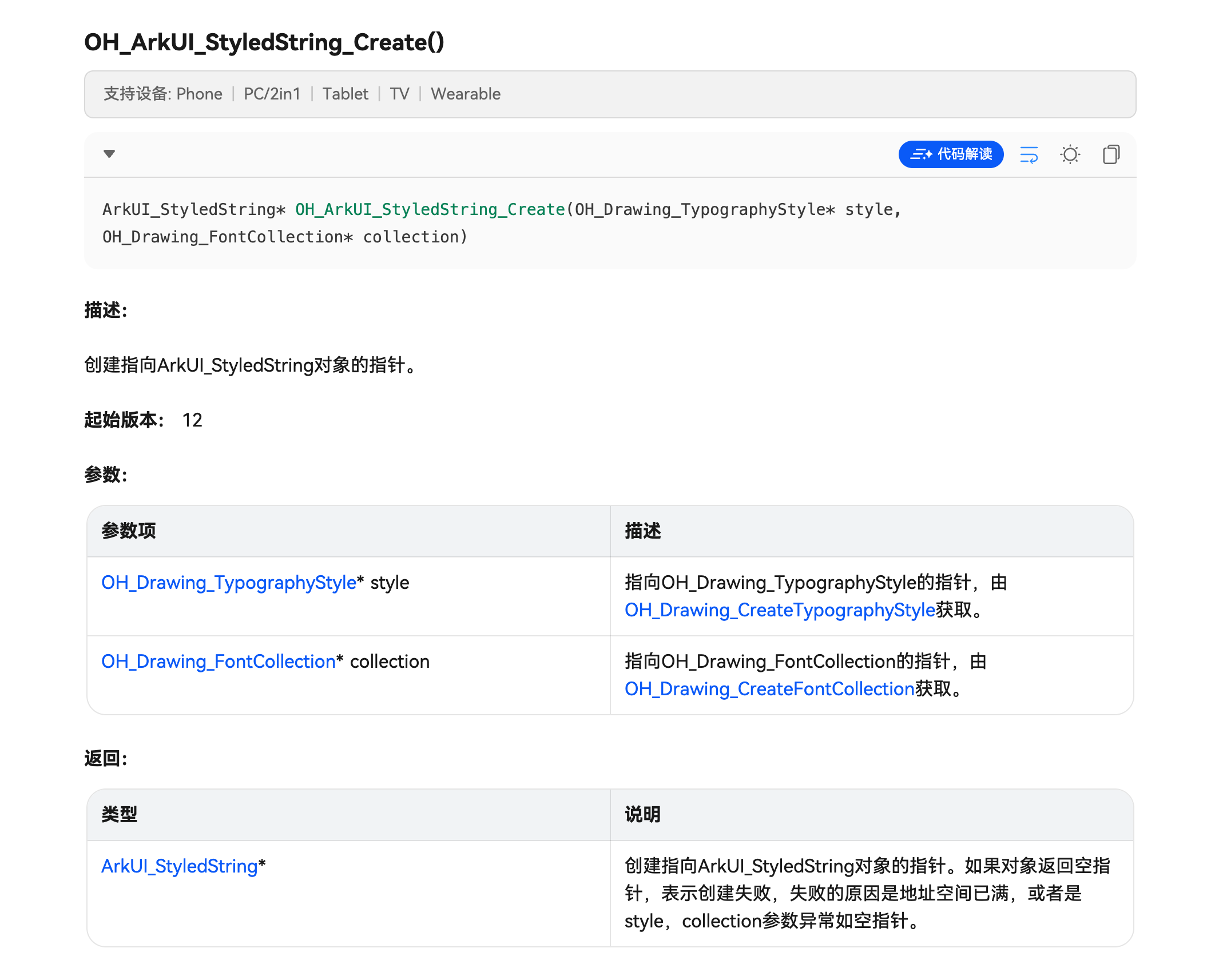
这个格式化字符串数据对象,在完成段落样式和文本样式的设置与整合之后,需要手动销毁以释放内存: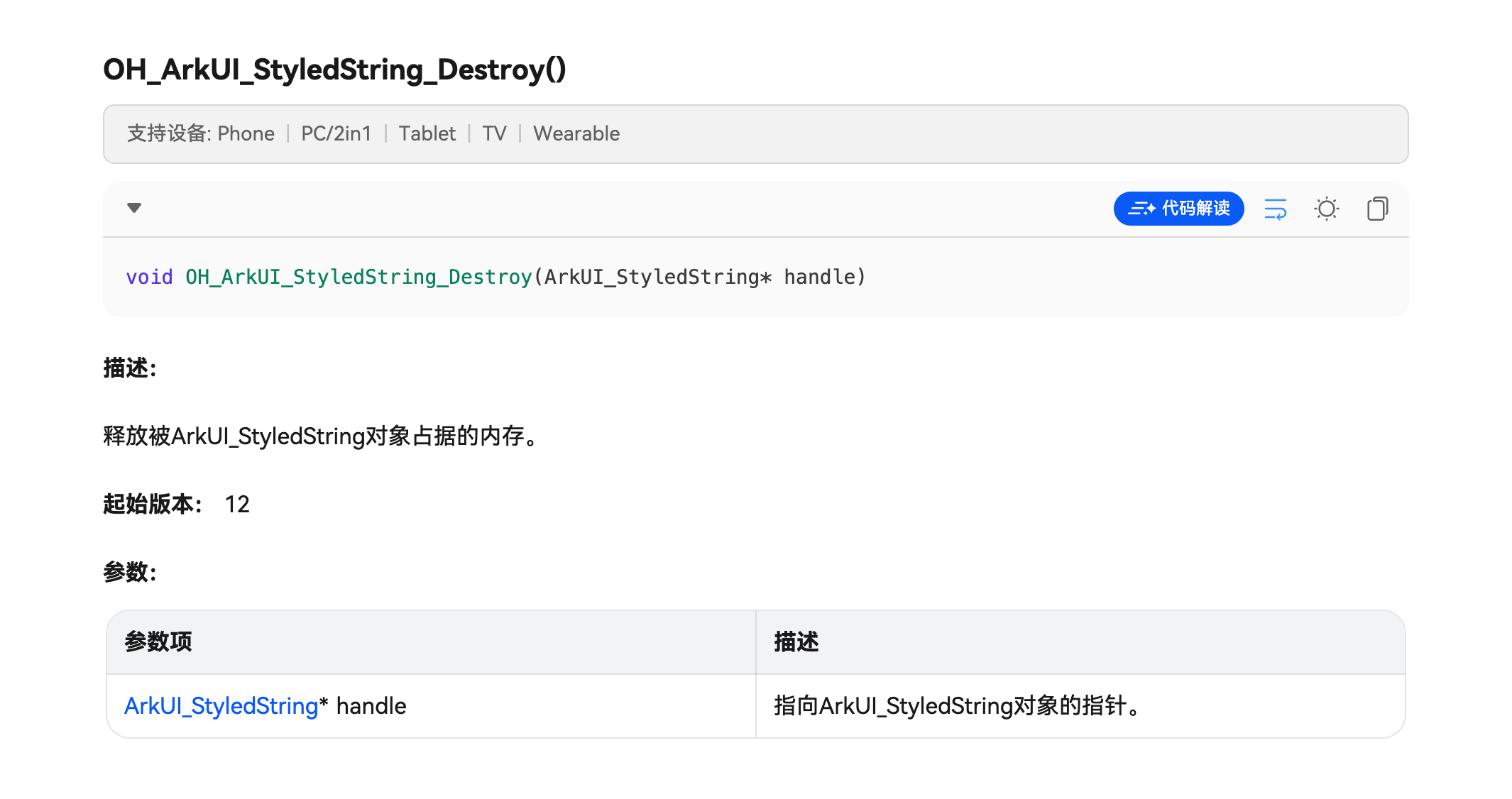
4、字体引擎接口
文本组件Text,有一个特殊的属性 NODE_TEXT_CONTENT_WITH_STYLED_STRING,它是用于渲染方舟文本引擎生成的文本,上面那些API都会使用到方舟2D图形服务的文本引擎的相关能力。
二、代码实践
认识了相关API后,下面可以开始真正地编写代码去实现文本样式的自定义。
1、添加依赖
自定义文本样式使用到的相关API,在专门的模块libnative_drawing.so 中,因此,如果没有手动在 CMakeLists.txt 中添加一句target_link_libraries(entry PUBLIC libnative_drawing.so),那么,在链接阶段就会报错。
target_link_libraries(entry PUBLIC libace_napi.z.so libace_ndk.z.so libhilog_ndk.z.so libudmf.so libpixelmap.so librawfile.z.so libnative_drawing.so)
2、更新 ArkUITextNode
考虑到代码的可重用,不妨在ArkUITextNode类中新增一批用于设置段落样式和文本样式的方法:
void SetTypographyTextAlign(OH_Drawing_TypographyStyle *typographyStyle, OH_Drawing_TextAlign textAlign){
    // OH_Drawing_开头的API是字体引擎提供的,typographyStyle表示段落样式。
    OH_Drawing_SetTypographyTextAlign(typographyStyle, textAlign);
}
void SetTypographyTextMaxLines(OH_Drawing_TypographyStyle *typographyStyle, int32_t maxLine){
    OH_Drawing_SetTypographyTextMaxLines(typographyStyle, maxLine);
}
void SetTextStyleFontSize(OH_Drawing_TextStyle *textStyle, float fontSize){
    OH_Drawing_SetTextStyleFontSize(textStyle, fontSize);
}
void SetTextStyleColor(OH_Drawing_TextStyle *textStyle, std::uint32_t color){
    OH_Drawing_SetTextStyleColor(textStyle, color);
}
void SetStyleString(ArkUI_StyledString *styledString, OH_Drawing_TextStyle *textStyle, std::string content){
    // 文本样式的设置顺序push -> add -> pop.
    OH_ArkUI_StyledString_PushTextStyle(styledString, textStyle);
    OH_ArkUI_StyledString_AddText(styledString, content.c_str());
    OH_ArkUI_StyledString_PopTextStyle(styledString);
}
void SetStyledStringPlaceholder(ArkUI_StyledString *styledString, float  width, float  height){
    OH_Drawing_PlaceholderSpan placeHolder{.width = width, .height = height};
    OH_ArkUI_StyledString_AddPlaceholder(styledString, &placeHolder);
}
void SetTypographyLayout(OH_Drawing_Typography *typography, ArkUI_StyledString *styledString, float width){
    assert(handle_);
    OH_Drawing_TypographyLayout(typography, width);
    ArkUI_AttributeItem styledStringItem = {.object = styledString};
    nativeModule_->setAttribute(handle_, NODE_TEXT_CONTENT_WITH_STYLED_STRING, &styledStringItem);
}
之所以进行二次封装,是因为那些 OH 开头的鸿蒙SDK C++ 库方法很难记住,又没办法通过 -> 符合去调用,比较费劲,将它们二次封装作为 ArkUITextNode 的成员方法之后,调用起来就方便很多。
3、编写 CreateTextStyleExample()
新建一个头文件,并命名为TextStyleExample.h,在里面实现 CreateTextStyleExample 方法:
/*
 * Copyright (c) 2026 彭友聪
 * nativePC is licensed under Mulan PSL v2.
 * You can use this software according to the terms and conditions of the Mulan PSL v2.
 * You may obtain a copy of Mulan PSL v2 at:
            http://license.coscl.org.cn/MulanPSL2
 * THIS SOFTWARE IS PROVIDED ON AN "AS IS" BASIS, WITHOUT WARRANTIES OF ANY KIND,
 * EITHER EXPRESS OR IMPLIED, INCLUDING BUT NOT LIMITED TO NON-INFRINGEMENT,
 * MERCHANTABILITY OR FIT FOR A PARTICULAR PURPOSE.
 * See the Mulan PSL v2 for more details.
 *
 * Author: 彭友聪
 * email:2923616405@qq.com
 * date: 2026/1/18 10:02
 * file: ${FILE_NAME}
 * product: DevEco Studio
 * LICENSE: MulanPSL-2.0
 * */
//
// Created on 2026/1/18.
//
// Node APIs are not fully supported. To solve the compilation error of the interface cannot be found,
// please include "napi/native_api.h".

#ifndef NATIVEPC_TEXTSTYLEEXAMPLE_H
#define NATIVEPC_TEXTSTYLEEXAMPLE_H
#include "ArkUIBaseNode.h"
#include "ArkUIColumnNode.h"
#include "ArkUITextNode.h"
#include <native_drawing/drawing_text_typography.h>
#include <native_drawing/drawing_font_collection.h>
#include <native_drawing/drawing_text_declaration.h>

namespace NativeModule {
std::shared_ptr<ArkUIBaseNode> CreateTextStyleExample() {
    showUITextCallback("文本样式", "自定义样式");
    auto column = std::make_shared<ArkUIColumnNode>();
    column->SetPercentHeight(1.0);
    column->SetPercentWidth(1.0);
    column->SetItemAlign(ARKUI_HORIZONTAL_ALIGNMENT_CENTER);
    column->SetJustifyContent(ARKUI_FLEX_ALIGNMENT_START);
    auto text = std::make_shared<ArkUITextNode>();
    text->SetWidth(300);
    text->SetHeight(100);
    text->SetBorderWidth(1);
    // OH_Drawing_开头的API是字体引擎提供的,typographyStyle表示段落样式。
    OH_Drawing_TypographyStyle *typographyStyle = OH_Drawing_CreateTypographyStyle();
    text->SetTypographyTextAlign(typographyStyle, OH_Drawing_TextAlign::TEXT_ALIGN_CENTER);
    text->SetTypographyTextMaxLines(typographyStyle, 10);
    // 创建 ArkUI_StyledString。
    ArkUI_StyledString *styledString = OH_ArkUI_StyledString_Create(typographyStyle, OH_Drawing_CreateFontCollection());
    // 创建文本样式,设置字体和颜色。
    OH_Drawing_TextStyle *textStyle = OH_Drawing_CreateTextStyle();
    text->SetTextStyleFontSize(textStyle, 28);
    text->SetTextStyleColor(textStyle, OH_Drawing_ColorSetArgb(0xFF, 0x70, 0x70, 0x70));
    text->SetStyleString(styledString, textStyle, "Hello");
    // 设置占位符,不显示任何文本
    text->SetStyledStringPlaceholder(styledString, 100, 100);
    // 设置不同样式的文字
    OH_Drawing_TextStyle *worldTextStyle = OH_Drawing_CreateTextStyle();
    text->SetTextStyleFontSize(worldTextStyle, 28);
    text->SetTextStyleColor(worldTextStyle, OH_Drawing_ColorSetArgb(0xFF, 0x27, 0x87, 0xD9));
    text->SetStyleString(styledString, worldTextStyle, "World");
    // 依赖StyledString对象创建字体引擎的Typography,此时它已经包含了设置的文本及其样式。
    OH_Drawing_Typography *typography = OH_ArkUI_StyledString_CreateTypography(styledString);
    text->SetTypographyLayout(typography, styledString, 400);
    // 资源释放,应用侧可以自由决定何时释放。
    OH_ArkUI_StyledString_Destroy(styledString);
    column->AddChild(text);
    return column;
}
}

#endif //NATIVEPC_TEXTSTYLEEXAMPLE_H
4、真机运行
在运行之前,需要在 NativeEntry.cpp的CreateNativeRoot 中使用 CreateTextStyleExample():
/*
 * Copyright (c) 2025 彭友聪
 * nativePC is licensed under Mulan PSL v2.
 * You can use this software according to the terms and conditions of the Mulan PSL v2.
 * You may obtain a copy of Mulan PSL v2 at:
            http://license.coscl.org.cn/MulanPSL2
 * THIS SOFTWARE IS PROVIDED ON AN "AS IS" BASIS, WITHOUT WARRANTIES OF ANY KIND,
 * EITHER EXPRESS OR IMPLIED, INCLUDING BUT NOT LIMITED TO NON-INFRINGEMENT,
 * MERCHANTABILITY OR FIT FOR A PARTICULAR PURPOSE.
 * See the Mulan PSL v2 for more details.
 *
 * Author: 彭友聪
 * email:2923616405@qq.com
 * date: 2025/10/8 09:27
 * file: ${FILE_NAME}
 * product: DevEco Studio
 * LICENSE: MulanPSL-2.0
 * */
//
// Created on 2025/10/8.
//
// Node APIs are not fully supported. To solve the compilation error of the interface cannot be found,
// please include "napi/native_api.h".
#include "CreateWaterflowExample.h"
#include "LazyTextListExample.h"
#include "TestDragImageExample.h"
#include "TestGestureExample.h"
#include "TextAreaEventExample.h"
#include "TextStyleExample.h"
#include "napi/native_api.h"
#include <arkui/native_node_napi.h>
#include <js_native_api.h>
#include "NativeEntry.h"
#include "NormalTextListExample.h"
#include "testAnimate.h"
extern napi_env g_env;
namespace NativeModule {
napi_value CreateNativeRoot(napi_env env, napi_callback_info info) {
    size_t argc = 1;
    napi_value args[1] = {nullptr};

    napi_get_cb_info(env, info, &argc, args, nullptr, nullptr);

    // 获取 NodeContent
    ArkUI_NodeContentHandle contentHandle;
    OH_ArkUI_GetNodeContentFromNapiValue(env, args[0], &contentHandle);
    NativeEntry::GetInstance()->SetContentHandle(contentHandle);

    // 创建文本列表
//    auto list = CreateTextListExample();
//    NativeEntry::GetInstance()->SetRootNode(list);
    // 创建 Column
//    auto column = testGestureExample();
//    NativeEntry::GetInstance()->SetRootNode(column);
    // 创建 image
//        auto image = CreateDragImageExample();
//        NativeEntry::GetInstance()->SetRootNode(image);
    // 演示动画
//        auto column = testFrameAnimate();
//        NativeEntry::GetInstance()->SetRootNode(column);
//        auto column = testPropertiesAnimate();
//        NativeEntry::GetInstance()->SetRootNode(column);
//        auto column = testTransitionAnimate();
//        NativeEntry::GetInstance()->SetRootNode(column);
//        auto column = testKeyFrameAnimate();
//        NativeEntry::GetInstance()->SetRootNode(column);
    // 创建懒加载分组列表
//    auto list_group = CreateLazyTextListExample();
//    NativeEntry::GetInstance()->SetRootNode(list_group);
    // 创建瀑布流
//    auto waterflow = CreateWaterflowExample();
//    NativeEntry::GetInstance()->SetRootNode(waterflow);
    // 创建自定义字体样式的文本
    auto column = CreateTextStyleExample();
    // 演示文本框事件
//    auto column = CreateTextAreaEventExample();
    NativeEntry::GetInstance()->SetRootNode(column);
    return nullptr;
}

napi_value DestroyNativeRoot(napi_env env, napi_callback_info info) {
    NativeEntry::GetInstance()->DisposeRootNode();
    return nullptr;
}
void showUITextCallback(std::string tip, std::string content) {
    globalParams->value = &content;
    globalParams->desc = tip;
    std::string data = globalParams->desc + ": " + *globalParams->value;
    napi_env env = g_env; // 获取当前napi环境
    napi_value callback;
    napi_get_reference_value(env, g_clickCallbackRef, &callback);

    // 构造传递参数
    napi_value argv;
    napi_create_string_utf8(env, data.c_str(), data.length(), &argv);

    // 调用ArkTS回调
    napi_value result;
    napi_call_function(env, nullptr, callback, 1, &argv, &result);
}
ArkUI_ContextHandle getGlobalUIContext() { return globalUIContext; }
}
完整项目请访问源码

作为“人工智能6S店”的官方数字引擎,为AI开发者与企业提供一个覆盖软硬件全栈、一站式门户。
更多推荐


 8
8 0
0- 0


 已为社区贡献12条内容

所有评论(0)