
Flutter for OpenHarmony 实战:汉诺塔游戏完整开发指南
本文详细介绍了使用Flutter for OpenHarmony开发汉诺塔游戏的完整过程。文章从汉诺塔问题的数学原理入手,讲解了递归算法的实现方法,包括3.1节的递归思想和3.2节的具体算法代码。在开发实现方面,重点阐述了数据模型设计(2.2节的栈结构实现)、游戏逻辑(4.2节的圆盘移动规则)以及自动演示功能(5.1节的步骤生成)。通过本项目,开发者可以学习到如何将经典算法问题转化为可视化应用,同
欢迎加入开源鸿蒙跨平台社区:开源鸿蒙跨平台开发者社区
Flutter for OpenHarmony 实战:汉诺塔游戏完整开发指南
文章目录
摘要
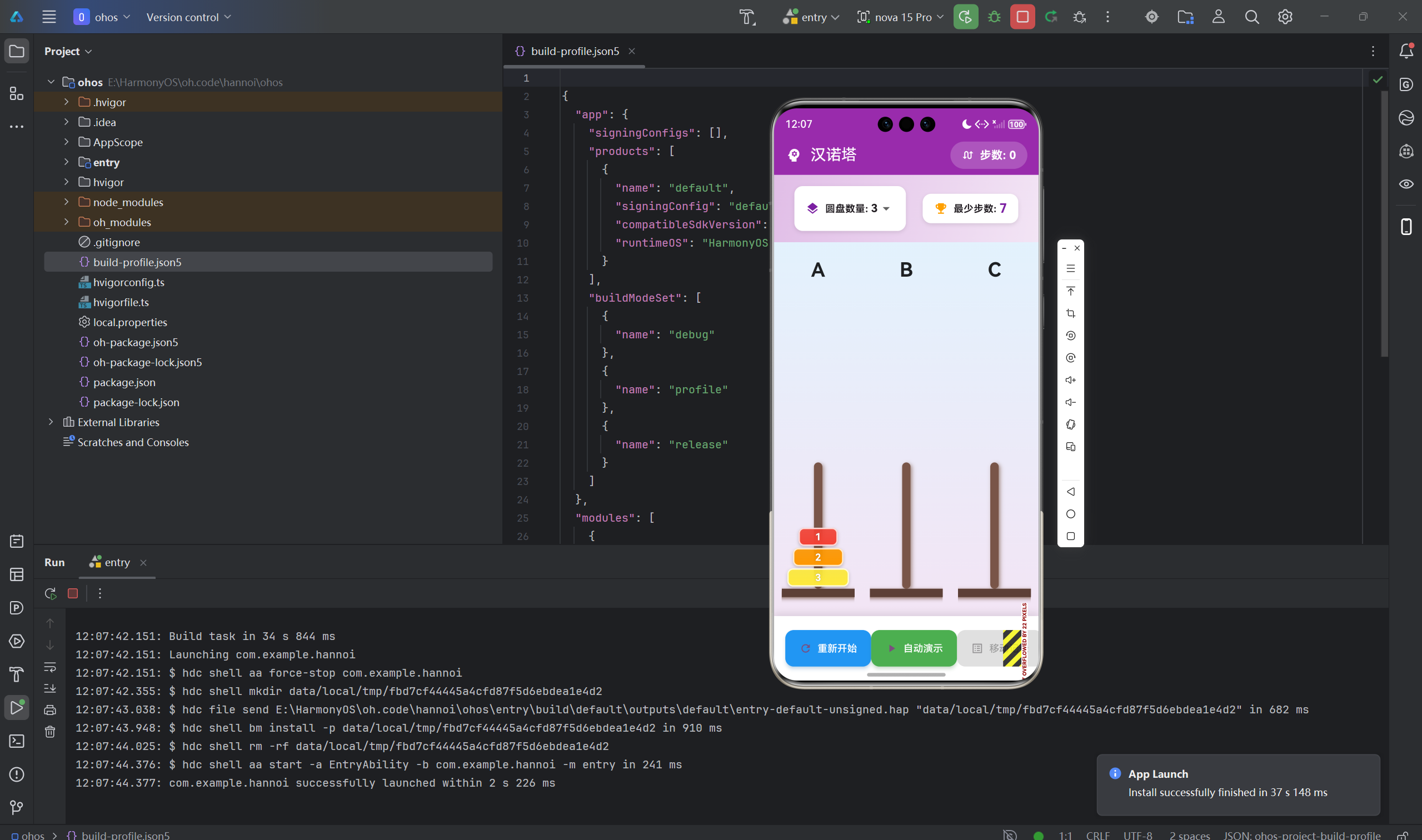
汉诺塔(Tower of Hanoi)是经典的递归问题,由法国数学家Édouard Lucas在1883年发明。本文将详细介绍如何使用Flutter for OpenHarmony框架开发一款功能完整的汉诺塔游戏。文章涵盖了递归算法实现、栈数据结构应用、动画控制、最小步数计算等核心技术点。通过本文学习,读者将掌握Flutter在鸿蒙平台上开发算法类游戏的完整流程,了解递归思想和数据结构的实际应用。
一、项目背景与功能概述
1.1 汉诺塔问题介绍
汉诺塔是一个经典的数学谜题:
- 目标:将所有圆盘从源塔移到目标塔
- 规则:
- 一次只能移动一个圆盘
- 大圆盘不能放在小圆盘上面
- 可以使用辅助塔
1.2 数学原理
最少移动次数:n个圆盘需要 2^n - 1 次移动
| 圆盘数 | 最少步数 |
|---|---|
| 3 | 7 |
| 4 | 15 |
| 5 | 31 |
| 6 | 63 |
| 7 | 127 |
1.3 应用功能规划
| 功能模块 | 具体功能 |
|---|---|
| 圆盘设置 | 3-7个圆盘可选 |
| 手动移动 | 点击塔移动圆盘 |
| 自动演示 | 递归算法自动求解 |
| 移动记录 | 记录每步操作 |
| 步数统计 | 实时显示移动次数 |
| 最优判断 | 对比最少步数 |
二、数据模型设计
2.1 圆盘类
class Disk {
  final int size;      // 圆盘大小(1-7)
  final Color color;   // 圆盘颜色

  Disk({required this.size, required this.color});
}
2.2 塔类(栈结构)
class Tower {
  final List<Disk> disks = [];  // 使用List模拟栈
  final String name;            // 塔的名称(A/B/C)

  Tower(this.name);

  // 压栈(添加圆盘到顶部)
  void push(Disk disk) {
    disks.add(disk);
  }

  // 出栈(移除顶部圆盘)
  Disk pop() {
    if (disks.isEmpty) {
      throw StateError('Cannot pop from empty tower');
    }
    return disks.removeLast();
  }

  // 查看顶部圆盘
  Disk get top => disks.isNotEmpty
      ? disks.last
      : throw StateError('Tower is empty');

  // 判断是否为空
  bool get isEmpty => disks.isEmpty;

  // 获取圆盘数量
  int get length => disks.length;
}
2.3 游戏状态
class _GamePageState extends State<GamePage> {
  late Tower _source;      // 源塔(A)
  late Tower _auxiliary;   // 辅助塔(B)
  late Tower _target;      // 目标塔(C)

  int _diskCount = 3;      // 圆盘数量
  int _moveCount = 0;      // 移动次数
  bool _isSolving = false; // 是否正在自动求解

  final List<String> _moveLog = [];  // 移动记录
  Timer? _animationTimer;            // 动画定时器
}
三、递归算法实现
3.1 递归思想
将n个圆盘从源塔移到目标塔的步骤:
- 将n-1个圆盘从源塔移到辅助塔
- 将第n个圆盘(最大的)从源塔移到目标塔
- 将n-1个圆盘从辅助塔移到目标塔
3.2 算法实现
void _hanoi(int n, String source, String target, String auxiliary, List<List<String>> moves) {
  // 基础情况:只有一个圆盘
  if (n == 1) {
    moves.add([source, target]);
    return;
  }

  // 递归步骤1:将 n-1 个圆盘从源塔移到辅助塔
  _hanoi(n - 1, source, auxiliary, target, moves);

  // 步骤2:将最大的圆盘从源塔移到目标塔
  moves.add([source, target]);

  // 递归步骤3:将 n-1 个圆盘从辅助塔移到目标塔
  _hanoi(n - 1, auxiliary, target, source, moves);
}
3.3 算法流程图
hanoi(3, A, C, B)
    │
    ├─ hanoi(2, A, B, C)
    │   │
    │   ├─ hanoi(1, A, C, B) → A→C
    │   ├─ A→B
    │   └─ hanoi(1, C, B, A) → C→B
    │
    ├─ A→C
    │
    └─ hanoi(2, B, C, A)
        │
        ├─ hanoi(1, B, A, C) → B→A
        ├─ B→C
        └─ hanoi(1, A, C, B) → A→C
四、游戏逻辑实现
4.1 初始化游戏
void _initGame() {
  _source = Tower('A');
  _auxiliary = Tower('B');
  _target = Tower('C');
  _moveCount = 0;
  _moveLog.clear();
  _isSolving = false;

  // 在源塔上创建圆盘(大的在下面)
  for (int i = _diskCount; i >= 1; i--) {
    _source.push(Disk(
      size: i,
      color: _getDiskColor(i),
    ));
  }

  setState(() {});
}
4.2 移动圆盘
void _moveDisk(Tower from, Tower to) {
  // 检查源塔是否有圆盘
  if (from.isEmpty) {
    ScaffoldMessenger.of(context).showSnackBar(
      SnackBar(content: Text('${from.name}塔没有圆盘可以移动')),
    );
    return;
  }

  // 检查移动是否合法
  if (to.isEmpty || from.top.size < to.top.size) {
    final disk = from.pop();
    to.push(disk);
    _moveCount++;
    _moveLog.add('将圆盘 ${disk.size} 从 ${from.name} 移到 ${to.name}');

    setState(() {});
    _checkWin();
  } else {
    ScaffoldMessenger.of(context).showSnackBar(
      const SnackBar(content: Text('不能将大圆盘放在小圆盘上')),
    );
  }
}
4.3 胜利判断
void _checkWin() {
  if (_target.length == _diskCount) {
    Future.delayed(const Duration(milliseconds: 300), () {
      if (!mounted) return;
      _showWinDialog();
    });
  }
}
五、自动演示功能
5.1 生成移动步骤
void _autoSolve() {
  if (_isSolving) return;

  setState(() {
    _isSolving = true;
  });

  // 重置游戏
  _initGame();

  // 生成移动步骤
  final moves = <List<String>>[];
  _hanoi(_diskCount, _source.name, _target.name, _auxiliary.name, moves);

  // 执行移动动画
  _executeMoves(moves, 0);
}
5.2 执行动画
void _executeMoves(List<List<String>> moves, int index) {
  // 所有步骤执行完毕
  if (index >= moves.length) {
    setState(() {
      _isSolving = false;
    });
    return;
  }

  final fromName = moves[index][0];
  final toName = moves[index][1];

  final from = _getTowerByName(fromName);
  final to = _getTowerByName(toName);

  if (from != null && to != null) {
    final disk = from.pop();
    to.push(disk);
    _moveCount++;
    _moveLog.add('将圆盘 ${disk.size} 从 $fromName 移到 $toName');

    setState(() {});

    // 继续下一步
    _animationTimer = Timer(const Duration(milliseconds: 500), () {
      _executeMoves(moves, index + 1);
    });
  }
}
5.3 停止演示
void _stopSolving() {
  _animationTimer?.cancel();
  setState(() {
    _isSolving = false;
  });
}
六、UI界面实现
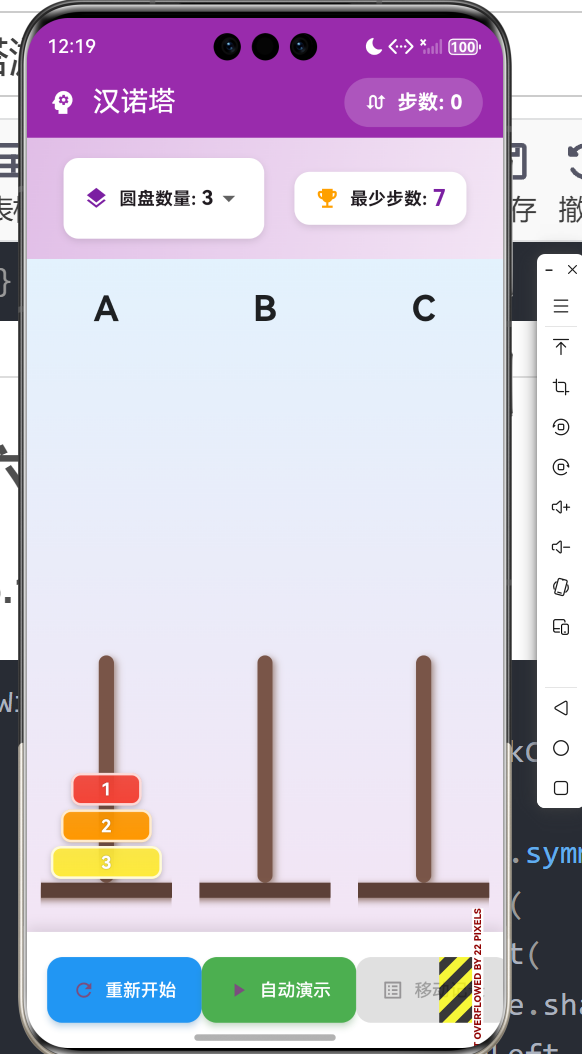
6.1 设置区域
Widget _buildSettings() {
  final minMoves = (1 << _diskCount) - 1;
  return Container(
    padding: const EdgeInsets.symmetric(horizontal: 24, vertical: 16),
    decoration: BoxDecoration(
      gradient: LinearGradient(
        colors: [Colors.purple.shade100, Colors.purple.shade50],
        begin: Alignment.topLeft,
        end: Alignment.bottomRight,
      ),
      boxShadow: [
        BoxShadow(
          color: Colors.purple.withOpacity(0.2),
          blurRadius: 8,
          offset: const Offset(0, 4),
        ),
      ],
    ),
    child: Row(
      mainAxisAlignment: MainAxisAlignment.center,
      children: [
        Container(
          padding: const EdgeInsets.symmetric(horizontal: 16, vertical: 8),
          decoration: BoxDecoration(
            color: Colors.white,
            borderRadius: BorderRadius.circular(12),
            boxShadow: [
              BoxShadow(
                color: Colors.black.withOpacity(0.1),
                blurRadius: 4,
                offset: const Offset(0, 2),
              ),
            ],
          ),
          child: Row(
            children: [
              Icon(Icons.layers, color: Colors.purple.shade700, size: 20),
              const SizedBox(width: 8),
              const Text('圆盘数量: ',
                  style: TextStyle(fontWeight: FontWeight.bold)),
              DropdownButton<int>(
                value: _diskCount,
                underline: const SizedBox(),
                items: List.generate(5, (index) => index + 3)
                    .map((count) => DropdownMenuItem(
                          value: count,
                          child: Text(
                            '$count',
                            style: const TextStyle(
                              fontWeight: FontWeight.bold,
                              fontSize: 16,
                            ),
                          ),
                        ))
                    .toList(),
                onChanged: _isSolving
                    ? null
                    : (value) {
                        if (value != null) {
                          setState(() {
                            _diskCount = value;
                            _initGame();
                          });
                        }
                      },
              ),
            ],
          ),
        ),
        const SizedBox(width: 24),
        Container(
          padding: const EdgeInsets.symmetric(horizontal: 16, vertical: 8),
          decoration: BoxDecoration(
            color: Colors.white,
            borderRadius: BorderRadius.circular(12),
            boxShadow: [
              BoxShadow(
                color: Colors.black.withOpacity(0.1),
                blurRadius: 4,
                offset: const Offset(0, 2),
              ),
            ],
          ),
          child: Row(
            children: [
              Icon(Icons.emoji_events, color: Colors.amber.shade700, size: 20),
              const SizedBox(width: 8),
              const Text('最少步数: ',
                  style: TextStyle(fontWeight: FontWeight.bold)),
              Text(
                '$minMoves',
                style: TextStyle(
                  fontWeight: FontWeight.bold,
                  fontSize: 18,
                  color: Colors.purple.shade700,
                ),
              ),
            ],
          ),
        ),
      ],
    ),
  );
}
6.5 游戏区域布局
// 构建游戏区域
Widget _buildGameArea() {
  return Container(
    decoration: BoxDecoration(
      gradient: LinearGradient(
        begin: Alignment.topCenter,
        end: Alignment.bottomCenter,
        colors: [
          Colors.blue.shade50,
          Colors.purple.shade50,
        ],
      ),
    ),
    child: Row(
      mainAxisAlignment: MainAxisAlignment.spaceEvenly,
      children: [
        _buildTower(_source),
        _buildTower(_auxiliary),
        _buildTower(_target),
      ],
    ),
  );
}
6.6 AppBar样式
Widget build(BuildContext context) {
return Scaffold(
appBar: AppBar(
title: const Row(
children: [
Icon(Icons.psychology, color: Colors.white),
SizedBox(width: 12),
Text('汉诺塔'),
],
),
backgroundColor: Colors.purple,
foregroundColor: Colors.white,
elevation: 4,
actions: [
Container(
margin: const EdgeInsets.only(right: 16),
padding: const EdgeInsets.symmetric(horizontal: 16, vertical: 8),
decoration: BoxDecoration(
color: Colors.white.withOpacity(0.2),
borderRadius: BorderRadius.circular(20),
),
child: Row(
children: [
const Icon(Icons.swap_calls, size: 18),
const SizedBox(width: 8),
Text(
'步数: $_moveCount',
style: const TextStyle(
fontWeight: FontWeight.bold,
fontSize: 16,
),
),
],
),
),
],
),
body: Column(
children: [
_buildSettings(),
Expanded(child: _buildGameArea()),
_buildControls(),
],
),
);
}
6.7 胜利对话框
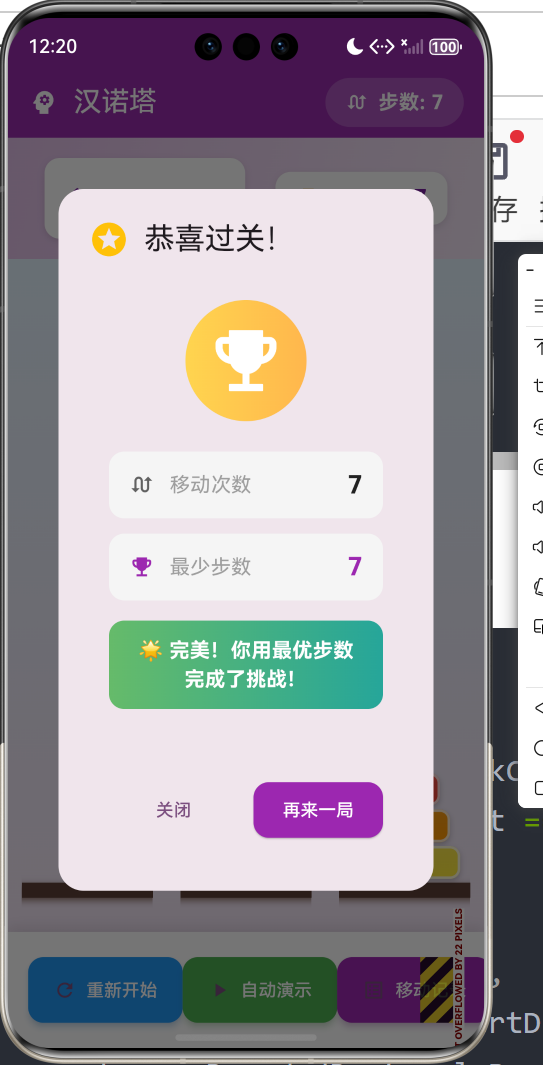
// 显示胜利对话框
void _showWinDialog() {
  final minMoves = (1 << _diskCount) - 1;
  final isPerfect = _moveCount == minMoves;
  showDialog(
    context: context,
    barrierDismissible: false,
    builder: (context) => AlertDialog(
      shape: RoundedRectangleBorder(
        borderRadius: BorderRadius.circular(20),
      ),
      title: Row(
        children: [
          Icon(
            isPerfect ? Icons.stars : Icons.celebration,
            color: isPerfect ? Colors.amber : Colors.purple,
            size: 32,
          ),
          const SizedBox(width: 12),
          const Text('恭喜过关!'),
        ],
      ),
      content: Container(
        padding: const EdgeInsets.all(16),
        child: Column(
          mainAxisSize: MainAxisSize.min,
          children: [
            // 胜利动画图标
            Container(
              padding: const EdgeInsets.all(16),
              decoration: BoxDecoration(
                gradient: LinearGradient(
                  colors: isPerfect
                      ? [Colors.amber.shade300, Colors.orange.shade300]
                      : [Colors.purple.shade300, Colors.pink.shade300],
                ),
                shape: BoxShape.circle,
              ),
              child: Icon(
                isPerfect ? Icons.emoji_events : Icons.check_circle,
                size: 64,
                color: Colors.white,
              ),
            ),
            const SizedBox(height: 24),
            // 统计信息
            _buildStatRow('移动次数', '$_moveCount', Icons.swap_calls),
            const SizedBox(height: 12),
            _buildStatRow('最少步数', '$minMoves', Icons.emoji_events,
                color: Colors.purple),
            const SizedBox(height: 16),
            // 评价
            Container(
              padding: const EdgeInsets.symmetric(horizontal: 20, vertical: 12),
              decoration: BoxDecoration(
                gradient: LinearGradient(
                  colors: isPerfect
                      ? [Colors.green.shade400, Colors.teal.shade400]
                      : [Colors.orange.shade400, Colors.deepOrange.shade400],
                ),
                borderRadius: BorderRadius.circular(12),
              ),
              child: Text(
                isPerfect ? '🌟 完美!你用最优步数完成了挑战!' : '继续努力!尝试达到最优步数吧!',
                style: const TextStyle(
                  color: Colors.white,
                  fontWeight: FontWeight.bold,
                  fontSize: 16,
                ),
                textAlign: TextAlign.center,
              ),
            ),
          ],
        ),
      ),
      actions: [
        Padding(
          padding: const EdgeInsets.all(16),
          child: Row(
            children: [
              Expanded(
                child: TextButton(
                  onPressed: () {
                    Navigator.pop(context);
                  },
                  style: TextButton.styleFrom(
                    padding: const EdgeInsets.symmetric(vertical: 12),
                    shape: RoundedRectangleBorder(
                      borderRadius: BorderRadius.circular(12),
                    ),
                  ),
                  child: const Text('关闭'),
                ),
              ),
              const SizedBox(width: 12),
              Expanded(
                child: ElevatedButton(
                  onPressed: () {
                    Navigator.pop(context);
                    _initGame();
                  },
                  style: ElevatedButton.styleFrom(
                    backgroundColor: Colors.purple,
                    foregroundColor: Colors.white,
                    padding: const EdgeInsets.symmetric(vertical: 12),
                    shape: RoundedRectangleBorder(
                      borderRadius: BorderRadius.circular(12),
                    ),
                  ),
                  child: const Text('再来一局'),
                ),
              ),
            ],
          ),
        ),
      ],
    ),
  );
}

Widget _buildStatRow(String label, String value, IconData icon,
    {Color? color}) {
  return Container(
    padding: const EdgeInsets.symmetric(horizontal: 16, vertical: 12),
    decoration: BoxDecoration(
      color: Colors.grey.shade100,
      borderRadius: BorderRadius.circular(12),
    ),
    child: Row(
      mainAxisAlignment: MainAxisAlignment.spaceBetween,
      children: [
        Row(
          children: [
            Icon(icon, size: 20, color: color ?? Colors.grey.shade700),
            const SizedBox(width: 12),
            Text(
              label,
              style: const TextStyle(
                fontSize: 16,
                color: Colors.grey,
              ),
            ),
          ],
        ),
        Text(
          value,
          style: TextStyle(
            fontSize: 20,
            fontWeight: FontWeight.bold,
            color: color ?? Colors.black87,
          ),
        ),
      ],
    ),
  );
}
6.8 移动记录对话框
// 显示移动记录
void _showMoveLog() {
  final minMoves = (1 << _diskCount) - 1;
  showDialog(
    context: context,
    builder: (context) => AlertDialog(
      shape: RoundedRectangleBorder(
        borderRadius: BorderRadius.circular(20),
      ),
      title: Row(
        children: [
          const Icon(Icons.history, color: Colors.purple),
          const SizedBox(width: 12),
          const Text('移动记录'),
          const Spacer(),
          Container(
            padding: const EdgeInsets.symmetric(horizontal: 12, vertical: 6),
            decoration: BoxDecoration(
              color: _moveCount <= minMoves
                  ? Colors.green.shade100
                  : Colors.orange.shade100,
              borderRadius: BorderRadius.circular(12),
            ),
            child: Text(
              '$_moveCount / $minMoves',
              style: TextStyle(
                fontWeight: FontWeight.bold,
                color: _moveCount <= minMoves
                    ? Colors.green.shade700
                    : Colors.orange.shade700,
              ),
            ),
          ),
        ],
      ),
      content: SizedBox(
        width: double.maxFinite,
        height: 350,
        child: _moveLog.isEmpty
            ? Center(
                child: Column(
                  mainAxisAlignment: MainAxisAlignment.center,
                  children: [
                    Icon(Icons.inbox, size: 64, color: Colors.grey.shade400),
                    const SizedBox(height: 16),
                    Text(
                      '暂无移动记录',
                      style: TextStyle(
                        color: Colors.grey.shade600,
                        fontSize: 16,
                      ),
                    ),
                  ],
                ),
              )
            : ListView.separated(
                padding: const EdgeInsets.all(8),
                itemCount: _moveLog.length,
                separatorBuilder: (context, index) => Divider(
                  color: Colors.grey.shade200,
                  height: 1,
                ),
                itemBuilder: (context, index) {
                  return Container(
                    padding: const EdgeInsets.symmetric(
                      horizontal: 12,
                      vertical: 8,
                    ),
                    decoration: BoxDecoration(
                      color: index == _moveLog.length - 1
                          ? Colors.purple.shade50
                          : Colors.transparent,
                      borderRadius: BorderRadius.circular(8),
                    ),
                    child: Row(
                      children: [
                        Container(
                          width: 32,
                          height: 32,
                          decoration: BoxDecoration(
                            color: Colors.purple,
                            borderRadius: BorderRadius.circular(16),
                          ),
                          child: Center(
                            child: Text(
                              '${index + 1}',
                              style: const TextStyle(
                                color: Colors.white,
                                fontWeight: FontWeight.bold,
                                fontSize: 14,
                              ),
                            ),
                          ),
                        ),
                        const SizedBox(width: 12),
                        Expanded(
                          child: Text(
                            _moveLog[index],
                            style: const TextStyle(fontSize: 14),
                          ),
                        ),
                      ],
                    ),
                  );
                },
              ),
      ),
      actions: [
        TextButton(
          onPressed: () => Navigator.pop(context),
          style: TextButton.styleFrom(
            padding: const EdgeInsets.symmetric(horizontal: 24, vertical: 12),
            shape: RoundedRectangleBorder(
              borderRadius: BorderRadius.circular(12),
            ),
          ),
          child: const Text('关闭'),
        ),
      ],
    ),
  );
}
6.3 圆盘颜色
Color _getDiskColor(int size) {
  final colors = [
    Colors.red,
    Colors.orange,
    Colors.yellow,
    Colors.green,
    Colors.blue,
    Colors.indigo,
    Colors.purple,
  ];
  return colors[(size - 1) % colors.length];
}
6.4 控制按钮
// 构建控制按钮
Widget _buildControls() {
  return Container(
    padding: const EdgeInsets.symmetric(horizontal: 16, vertical: 20),
    decoration: BoxDecoration(
      color: Colors.white,
      boxShadow: [
        BoxShadow(
          color: Colors.black.withOpacity(0.1),
          blurRadius: 8,
          offset: const Offset(0, -4),
        ),
      ],
    ),
    child: Row(
      mainAxisAlignment: MainAxisAlignment.spaceEvenly,
      children: [
        _buildControlButton(
          icon: Icons.refresh,
          label: '重新开始',
          color: Colors.blue,
          onPressed: _isSolving ? null : () => _initGame(),
        ),
        _buildControlButton(
          icon: _isSolving ? Icons.stop : Icons.play_arrow,
          label: _isSolving ? '停止' : '自动演示',
          color: _isSolving ? Colors.red : Colors.green,
          onPressed: _isSolving ? _stopSolving : _autoSolve,
        ),
        _buildControlButton(
          icon: Icons.list_alt,
          label: '移动记录',
          color: Colors.purple,
          onPressed: _moveLog.isEmpty ? null : () => _showMoveLog(),
        ),
      ],
    ),
  );
}

Widget _buildControlButton({
  required IconData icon,
  required String label,
  required Color color,
  VoidCallback? onPressed,
}) {
  return ElevatedButton.icon(
    onPressed: onPressed,
    icon: Icon(icon),
    label: Text(label),
    style: ElevatedButton.styleFrom(
      backgroundColor: onPressed == null ? Colors.grey.shade300 : color,
      foregroundColor: Colors.white,
      disabledBackgroundColor: Colors.grey.shade300,
      disabledForegroundColor: Colors.grey.shade500,
      padding: const EdgeInsets.symmetric(horizontal: 20, vertical: 16),
      shape: RoundedRectangleBorder(
        borderRadius: BorderRadius.circular(12),
      ),
      elevation: onPressed != null ? 4 : 0,
      shadowColor: color.withOpacity(0.4),
    ),
  );
}
七、栈数据结构应用
7.1 栈的基本操作
class Tower {
  final List<Disk> disks = [];

  // 压栈 - O(1)
  void push(Disk disk) {
    disks.add(disk);
  }

  // 出栈 - O(1)
  Disk pop() {
    return disks.removeLast();
  }

  // 查看栈顶 - O(1)
  Disk get top => disks.last;

  // 判断空栈 - O(1)
  bool get isEmpty => disks.isEmpty;

  // 获取栈大小 - O(1)
  int get length => disks.length;
}
7.2 为什么用栈?
汉诺塔问题的特性:
- 后进先出(LIFO)
- 只能操作顶部圆盘
- 大圆盘必须在下面
栈的天然特性完美匹配汉诺塔规则!
八、最小步数计算
8.1 数学公式
n个圆盘的最少移动次数:2^n - 1
int minMoves = (1 << _diskCount) - 1;
8.2 位运算解释
// 左移运算相当于2的n次方
1 << 3 = 8    // 2^3 = 8
1 << 4 = 16   // 2^4 = 16

// 减1得到最少步数
8 - 1 = 7     // 3个圆盘最少7步
16 - 1 = 15   // 4个圆盘最少15步
8.3 数学证明
使用数学归纳法:
- 基础情况:n=1时,需要1步 = 2^1 - 1 ✓
- 归纳假设:n=k时,需要2^k - 1步
- 归纳步骤:n=k+1时
- 移动k个圆盘到辅助塔:2^k - 1步
- 移动第k+1个圆盘到目标塔:1步
- 移动k个圆盘到目标塔:2^k - 1步
- 总计:2*(2^k - 1) + 1 = 2^(k+1) - 1 ✓
九、扩展功能
9.1 拖拽移动
// 使用Draggable实现拖拽
Draggable<Disk>(
  data: disk,
  child: _buildDisk(disk),
  feedback: _buildDisk(disk),
  childWhenDragging: Container(),
  onDragCompleted: () {
    // 完成拖拽后的处理
  },
)
9.2 速度调节
double _animationSpeed = 500; // 毫秒

Widget _buildSpeedControl() {
  return Slider(
    value: _animationSpeed,
    min: 100,
    max: 1000,
    divisions: 9,
    label: '${_animationSpeed.toInt()}ms',
    onChanged: (value) {
      setState(() {
        _animationSpeed = value;
      });
    },
  );
}
9.3 撤销功能
final List<List<Tower>> _history = [];

void _moveDisk(Tower from, Tower to) {
  // 保存当前状态
  _history.add([
    List<Disk>.from(_source.disks),
    List<Disk>.from(_auxiliary.disks),
    List<Disk>.from(_target.disks),
  ]);

  // 执行移动...
}

void _undo() {
  if (_history.isEmpty) return;

  final lastState = _history.removeLast();
  _source.disks.clear();
  _auxiliary.disks.clear();
  _target.disks.clear();

  _source.disks.addAll(lastState[0]);
  _auxiliary.disks.addAll(lastState[1]);
  _target.disks.addAll(lastState[2]);

  setState(() {});
}
十、运行效果与测试
10.1 项目运行命令
cd E:\HarmonyOS\oh.code\hannoi
flutter run -d ohos
10.2 功能测试清单
基本移动测试
- 点击塔可移动圆盘
- 不能移动空塔
- 大圆盘不能放小圆盘上
自动演示测试
- 自动演示正常执行
- 可中途停止
- 步骤记录正确
设置测试
- 圆盘数量可切换
- 最少步数正确显示
- 切换后游戏重置
胜利测试
- 所有圆盘移到目标塔触发胜利
- 显示移动次数
- 对比最少步数
十一、算法复杂度分析
11.1 时间复杂度
汉诺塔递归算法的时间复杂度:O(2^n)
T(n) = 2*T(n-1) + 1
     = 2*(2*T(n-2) + 1) + 1
     = 4*T(n-2) + 2 + 1
     = ...
     = 2^n * T(0) + 2^n - 1
     = O(2^n)
11.2 空间复杂度
递归调用栈的空间复杂度:O(n)
最大递归深度 = n
11.3 移动次数
n个圆盘的移动次数:2^n - 1
| n | 移动次数 |
|---|---|
| 3 | 7 |
| 4 | 15 |
| 5 | 31 |
| 6 | 63 |
| 7 | 127 |
| 64 | 2^64 - 1 ≈ 1.8×10^19 |
十二、总结
本文详细介绍了使用Flutter for OpenHarmony开发汉诺塔游戏的完整过程,涵盖了以下核心技术点:
- 递归算法:分治思想、递归实现
- 栈数据结构:后进先出、栈操作
- 游戏逻辑:移动规则、胜利判断
- 动画控制:定时器、状态管理
- UI实现:塔的绘制、圆盘渲染
- 数学原理:最小步数、复杂度分析
- 自动求解:递归算法、动画演示
这个项目展示了Flutter在算法类游戏开发中的完整流程。读者可以基于此项目添加更多功能:
- 拖拽移动圆盘
- 动画速度调节
- 撤销/重做功能
- 多种主题选择
- 排行榜功能
- 更多圆盘数量
- 步骤回放功能
通过本文的学习,读者应该能够:
- 理解递归算法的思想
- 掌握栈数据结构的应用
- 了解算法复杂度的分析
- 学会将算法转化为实际应用
欢迎加入开源鸿蒙跨平台社区: 开源鸿蒙跨平台开发者社区

作为“人工智能6S店”的官方数字引擎,为AI开发者与企业提供一个覆盖软硬件全栈、一站式门户。
更多推荐

 3
3 0
0- 0


 已为社区贡献16条内容

所有评论(0)