
使用专业的 Flutter 天气图标库weather_icons统一风格的图标,提升鸿蒙版天气预报应用专业度
Flutter天气图标库使用指南 本文介绍了weather_icons库在Flutter天气应用中的使用方法。该库提供200+专业天气图标,支持晴雨雪雾等多种气象状态,具有视觉统一、覆盖全面、性能优化等优势。文章详细说明了库的安装步骤、项目目录结构以及核心工具类WeatherIconUtil的功能,包括根据天气描述、图标代码、生活指数和预警类型获取对应图标的方法。通过流程图展示了图标映射过程,帮助
1. 概述
1.1 什么是 Weather Icons?
weather_icons 是一个专业的 Flutter 天气图标库,提供了:
- ✅ 200+ 专业图标:覆盖晴、雨、雪、雾、雷暴等所有气象状态
- ✅ 视觉统一性:基于 Erik Flowers Weather Icons,设计风格统一
- ✅ 易于使用:简单的 API,直接使用
WeatherIcons类访问图标 - ✅ 跨平台支持:支持 Android、iOS、Web、HarmonyOS 等平台
- ✅ 图标字体:使用字体图标,体积小、缩放不失真
1.2 为什么在天气应用中使用 Weather Icons?
在天气应用中,使用专业的天气图标库可以:
| 优势 | 说明 |
|---|---|
| 🎨 视觉统一 | 所有天气状态使用统一风格的图标,提升应用专业度 |
| 📦 覆盖全面 | 200+ 图标覆盖所有气象状态,无需自定义图标 |
| 🚀 性能优化 | 字体图标体积小,加载快,缩放不失真 |
| 🔧 易于维护 | 统一的图标管理,便于后续更新和维护 |
1.3 应用场景
在天气应用中,我们使用 Weather Icons 实现:
- 🌤️ 天气状态图标:根据天气文字描述或图标代码显示对应图标
- 📊 生活指数图标:穿衣、紫外线、洗车、运动等指数图标
- ⚠️ 预警图标:暴雨、台风、雷电、高温等预警图标
- 🎯 统一视觉:所有天气相关图标使用同一套图标集
1.4 功能流程图
2. 引入三方库
2.1 添加依赖
在 pubspec.yaml 文件的 dependencies 部分添加:
dependencies:
  flutter:
    sdk: flutter

  # 天气图标库(专业天气图标集)
  weather_icons: ^3.0.0
2.2 安装依赖
在项目根目录运行:
flutter pub get
预期输出:
Resolving dependencies...
Downloading packages...
+ weather_icons 3.0.0
Got dependencies!
2.3 依赖说明
| 依赖包 | 版本 | 用途 |
|---|---|---|
weather_icons |
^3.0.0 | 专业天气图标库,提供 200+ 天气图标,基于 Erik Flowers Weather Icons |
2.4 导入库
在需要使用天气图标的文件中导入:
import 'package:weather_icons/weather_icons.dart';
3. 目录结构
3.1 项目结构
lib/
├── utils/
│   └── weather_icon_util.dart    # 🌤️ 天气图标工具类(封装 weather_icons)
├── screens/
│   ├── home_page.dart            # 首页(使用天气图标)
│   ├── weather_detail_page.dart  # 天气详情页(使用天气图标)
│   └── weather_calendar_page.dart # 天气日历页(使用天气图标)
└── models/
    └── weather_models.dart       # 天气数据模型
3.2 文件说明
| 文件 | 说明 |
|---|---|
weather_icon_util.dart |
🌤️ 天气图标工具类:封装 weather_icons 库,提供统一的图标接口(根据文字描述、图标代码、生活指数类型、预警类型获取图标) |
home_page.dart |
🏠 首页:使用 WeatherIconUtil.getWeatherIcon() 显示当前天气图标 |
weather_detail_page.dart |
📊 天气详情页:使用 WeatherIconUtil.getWeatherIconByCode() 显示预报天气图标 |
weather_calendar_page.dart |
📅 天气日历页:使用 WeatherIconUtil.getLifeIndexIcon() 显示生活指数图标 |
4. 核心代码解读
4.1 Weather Icons 图标架构
4.2 WeatherIconUtil 工具类结构
/// 🌤️ 天气图标工具类
///
/// **封装说明:** 统一封装 weather_icons 库,提供简洁易用的 API
class WeatherIconUtil {
  /// 🌤️ 根据天气文字描述获取天气图标
  ///
  /// **参数说明:**
  /// - `weatherText`: 天气文字描述(如:"晴"、"雨"、"雪"、"多云"等)
  /// - `size`: 图标尺寸,默认 24
  /// - `color`: 图标颜色,默认 null(使用主题色)
  ///
  /// **返回值:** Icon Widget
  static Widget getWeatherIcon(String weatherText, {double size = 24, Color? color})

  /// 📊 根据天气图标代码获取天气图标
  ///
  /// **参数说明:**
  /// - `iconCode`: 和风天气图标代码(如:"100"、"300"、"400"等)
  /// - `size`: 图标尺寸,默认 24
  /// - `color`: 图标颜色,默认 null(使用主题色)
  ///
  /// **返回值:** Icon Widget
  static Widget getWeatherIconByCode(String iconCode, {double size = 24, Color? color})

  /// 👕 获取生活指数图标
  ///
  /// **参数说明:**
  /// - `indexType`: 指数类型(如:"dressing"、"uv"、"carWashing"等)
  /// - `size`: 图标尺寸,默认 24
  /// - `color`: 图标颜色,默认 null
  ///
  /// **返回值:** Icon Widget
  static Widget getLifeIndexIcon(String indexType, {double size = 24, Color? color})

  /// ⚠️ 获取预警图标
  ///
  /// **参数说明:**
  /// - `alertType`: 预警类型(如:"rain"、"typhoon"、"thunder"等)
  /// - `size`: 图标尺寸,默认 24
  /// - `color`: 图标颜色,默认 null
  ///
  /// **返回值:** Icon Widget
  static Widget getAlertIcon(String alertType, {double size = 24, Color? color})
}
核心方法说明:
| 方法 | 用途 | 示例 |
|---|---|---|
getWeatherIcon |
🌤️ 根据天气文字描述获取图标 | getWeatherIcon('晴') → ☀️ |
getWeatherIconByCode |
📊 根据和风天气图标代码获取图标 | getWeatherIconByCode('100') → ☀️ |
getLifeIndexIcon |
👕 根据生活指数类型获取图标 | getLifeIndexIcon('uv') → ☀️ |
getAlertIcon |
⚠️ 根据预警类型获取图标 | getAlertIcon('rain') → ⛈️ |
4.3 天气文字描述映射
/// 根据天气文字描述获取图标数据
static IconData _getWeatherIconData(String weatherText) {
  if (weatherText.contains('晴')) {
    return WeatherIcons.wiDaySunny;        // ☀️ 晴天
  } else if (weatherText.contains('多云')) {
    return WeatherIcons.wiDayCloudy;       // ⛅ 多云
  } else if (weatherText.contains('阴')) {
    return WeatherIcons.wiCloudy;         // ☁️ 阴天
  } else if (weatherText.contains('小雨')) {
    return WeatherIcons.wiDayRain;        // 🌦️ 小雨
  } else if (weatherText.contains('中雨')) {
    return WeatherIcons.wiRain;           // 🌧️ 中雨
  } else if (weatherText.contains('大雨') || weatherText.contains('暴雨')) {
    return WeatherIcons.wiRainWind;       // ⛈️ 大雨/暴雨
  } else if (weatherText.contains('雪')) {
    return WeatherIcons.wiSnow;           // ❄️ 雪
  } else if (weatherText.contains('雾')) {
    return WeatherIcons.wiFog;            // 🌫️ 雾
  } else if (weatherText.contains('霾')) {
    return WeatherIcons.wiDust;           // 💨 霾
  } else if (weatherText.contains('雷')) {
    return WeatherIcons.wiThunderstorm;   // ⚡ 雷暴
  } else if (weatherText.contains('风')) {
    return WeatherIcons.wiStrongWind;     // 💨 风
  } else if (weatherText.contains('沙')) {
    return WeatherIcons.wiSandstorm;      // 🌪️ 沙尘
  } else {
    return WeatherIcons.wiDaySunnyOvercast; // 🌤️ 默认
  }
}
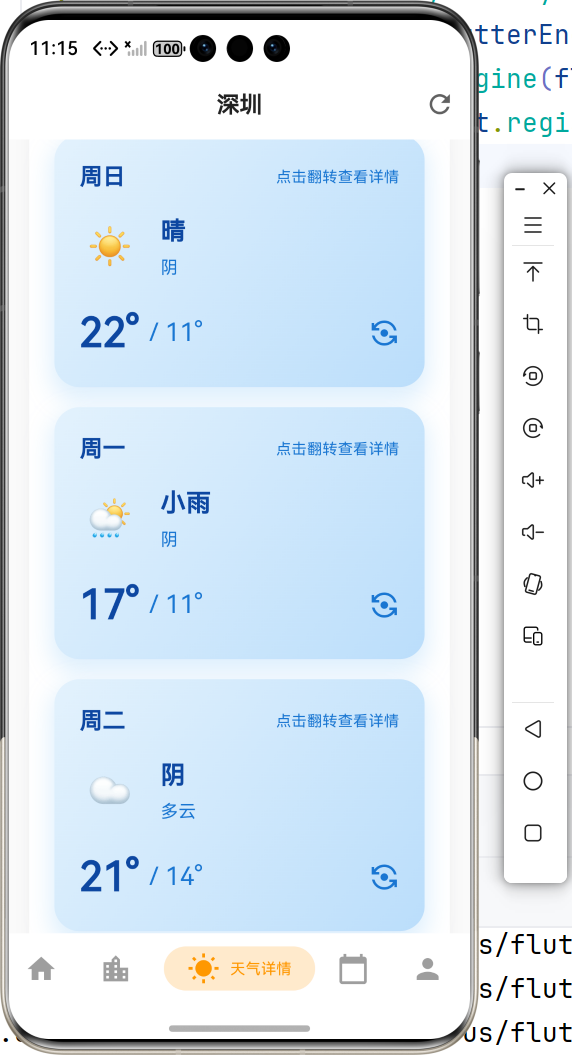
4.4 和风天气图标代码映射
代码映射示例:
/// 根据天气图标代码获取图标数据
static IconData _getWeatherIconDataByCode(String iconCode) {
  final code = int.tryParse(iconCode) ?? 100;

  switch (code) {
    // 晴天系列 (100-150)
    case 100:
      return WeatherIcons.wiDaySunny;      // ☀️ 晴
    case 101:
    case 102:
    case 103:
      return WeatherIcons.wiDayCloudy;     // ⛅ 多云
    case 104:
      return WeatherIcons.wiCloudy;        // ☁️ 阴

    // 雨天系列 (300-399)
    case 300:
    case 301:
    case 302:
    case 303:
      return WeatherIcons.wiDayRain;      // 🌦️ 小雨
    case 304:
    case 305:
    case 306:
    case 307:
    case 308:
    case 309:
      return WeatherIcons.wiRain;          // 🌧️ 中雨
    case 310:
    case 311:
    case 312:
    case 313:
      return WeatherIcons.wiRainWind;      // ⛈️ 大雨
    case 314:
    case 315:
    case 316:
    case 317:
    case 318:
      return WeatherIcons.wiShowers;       // 🌦️ 阵雨

    // 雪天系列 (400-499)
    case 400:
    case 401:
    case 402:
    case 403:
      return WeatherIcons.wiSnow;          // ❄️ 雪
    case 404:
    case 405:
    case 406:
    case 407:
      return WeatherIcons.wiSnowWind;     // ❄️💨 雪+风
    case 410:
      return WeatherIcons.wiSnowflakeCold; // ❄️ 冷

    // 雾/霾系列 (500-599)
    case 500:
    case 501:
    case 502:
    case 503:
    case 504:
      return WeatherIcons.wiFog;           // 🌫️ 雾
    case 507:
    case 508:
      return WeatherIcons.wiDust;          // 💨 霾

    // 高温/台风系列 (900-999)
    case 900:
      return WeatherIcons.wiHot;           // 🔥 高温
    case 901:
      return WeatherIcons.wiHurricane;     // 🌪️ 台风

    default:
      return WeatherIcons.wiDaySunnyOvercast; // 🌤️ 默认
  }
}
4.5 生活指数图标映射
/// 根据生活指数类型获取图标数据
static IconData _getLifeIndexIconData(String indexType) {
  switch (indexType) {
    case 'dressing':
      return WeatherIcons.wiThermometer;        // 🌡️ 穿衣指数
    case 'uv':
      return WeatherIcons.wiDaySunny;           // ☀️ 紫外线指数
    case 'carWashing':
      return WeatherIcons.wiRaindrops;          // 💧 洗车指数
    case 'sport':
      return WeatherIcons.wiRun;                // 🏃 运动指数
    case 'travel':
      return WeatherIcons.wiPlane;              // ✈️ 出行指数
    case 'comfort':
      return WeatherIcons.wiThermometerInner;   // 🌡️ 舒适度指数
    case 'coldRisk':
      return WeatherIcons.wiSnowflakeCold;      // ❄️ 感冒风险指数
    case 'air':
      return WeatherIcons.wiWind;               // 💨 空气质量指数
    default:
      return WeatherIcons.wiDaySunnyOvercast;  // 🌤️ 默认
  }
}
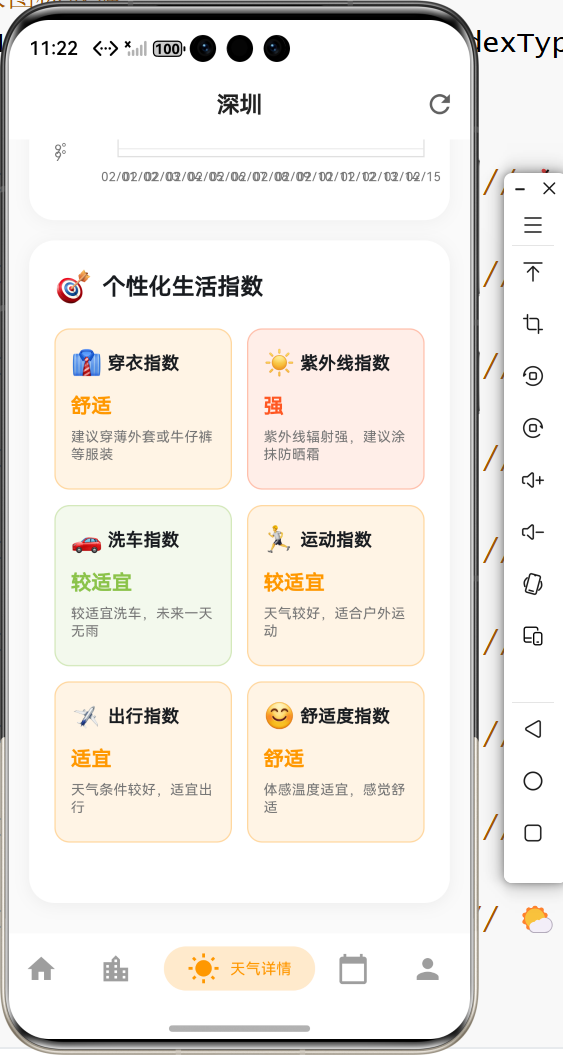
4.6 预警图标映射
/// 根据预警类型获取图标数据
static IconData _getAlertIconData(String alertType) {
  switch (alertType) {
    case 'rain':
      return WeatherIcons.wiRainWind;           // ⛈️ 暴雨预警
    case 'typhoon':
      return WeatherIcons.wiHurricane;         // 🌪️ 台风预警
    case 'thunder':
      return WeatherIcons.wiThunderstorm;      // ⚡ 雷电预警
    case 'heat':
      return WeatherIcons.wiHot;                // 🔥 高温预警
    case 'cold':
      return WeatherIcons.wiSnowflakeCold;     // ❄️ 寒潮预警
    case 'wind':
      return WeatherIcons.wiStrongWind;        // 💨 大风预警
    case 'fog':
      return WeatherIcons.wiFog;               // 🌫️ 大雾预警
    case 'snow':
      return WeatherIcons.wiSnow;              // ❄️ 暴雪预警
    default:
      return WeatherIcons.wiAlert;             // ⚠️ 默认预警
  }
}
5. 实际步骤
5.1 步骤1:添加依赖
在 pubspec.yaml 中添加:
dependencies:
  weather_icons: ^3.0.0
运行 flutter pub get 安装依赖。
5.2 步骤2:导入库
在需要使用天气图标的文件中导入:
import 'package:weather_icons/weather_icons.dart';
或者使用封装好的工具类:
import '../utils/weather_icon_util.dart';
5.3 步骤3:使用天气图标
方式1:直接使用 WeatherIcons
import 'package:weather_icons/weather_icons.dart';

Icon(
  WeatherIcons.wiDaySunny,  // ☀️ 晴天图标
  size: 48,
  color: Colors.orange,
)
方式2:使用 WeatherIconUtil 工具类(推荐)
import '../utils/weather_icon_util.dart';

// 根据天气文字描述获取图标
WeatherIconUtil.getWeatherIcon(
  '晴',
  size: 48,
  color: Colors.orange,
)

// 根据和风天气图标代码获取图标
WeatherIconUtil.getWeatherIconByCode(
  '100',  // 和风天气图标代码
  size: 48,
  color: Colors.orange,
)

// 获取生活指数图标
WeatherIconUtil.getLifeIndexIcon(
  'uv',  // 紫外线指数
  size: 32,
  color: Colors.yellow,
)

// 获取预警图标
WeatherIconUtil.getAlertIcon(
  'rain',  // 暴雨预警
  size: 32,
  color: Colors.red,
)
5.4 步骤4:在首页显示天气图标
// 在 home_page.dart 中
import '../utils/weather_icon_util.dart';

/// 🌤️ 构建天气图标
Widget _buildWeatherIcon(Now now) {
  return WeatherIconUtil.getWeatherIconByCode(
    now.icon,  // 和风天气图标代码(如:"100"、"300"等)
    size: 80,
    color: _getWeatherIconColor(now.icon),
  );
}

/// 🎨 根据天气状态获取图标颜色
Color _getWeatherIconColor(String iconCode) {
  final code = int.tryParse(iconCode) ?? 100;
  if (code == 100) {
    return Colors.orange;        // ☀️ 晴天:橙色
  } else if (code >= 300 && code < 400) {
    return Colors.blue;          // 🌧️ 雨天:蓝色
  } else if (code >= 400 && code < 500) {
    return Colors.grey.shade400; // ❄️ 雪天:灰色
  } else if (code >= 500 && code < 600) {
    return Colors.grey.shade600; // 🌫️ 雾/霾:深灰色
  } else if (code == 900) {
    return Colors.red;           // 🔥 高温:红色
  } else {
    return Colors.grey.shade600; // 默认:深灰色
  }
}
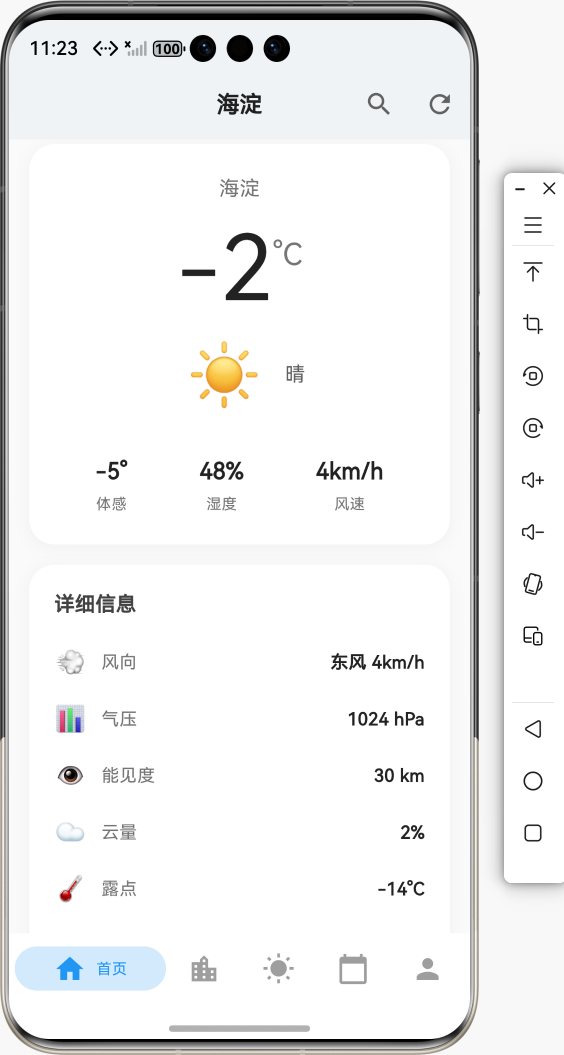
使用效果:
- ☀️ 晴天:橙色太阳图标,尺寸 80
- 🌧️ 雨天:蓝色雨滴图标,尺寸 80
- ❄️ 雪天:灰色雪花图标,尺寸 80
- 🌫️ 雾/霾:深灰色雾图标,尺寸 80
5.5 步骤5:在天气详情页显示预报图标
// 在 weather_detail_page.dart 中
import '../utils/weather_icon_util.dart';

/// 📅 构建预报天气图标
Widget _buildForecastIcon(Daily daily) {
  return Column(
    children: [
      // 白天图标
      WeatherIconUtil.getWeatherIconByCode(
        daily.iconDay,  // 白天图标代码(如:"100"、"300"等)
        size: 40,
        color: Colors.blue,
      ),
      const SizedBox(height: 8),
      // 夜间图标(可选)
      WeatherIconUtil.getWeatherIconByCode(
        daily.iconNight,  // 夜间图标代码
        size: 32,
        color: Colors.grey.shade600,
      ),
    ],
  );
}
使用效果:
- 📊 预报卡片:显示白天和夜间天气图标
- 🎨 颜色区分:白天图标使用蓝色,夜间图标使用灰色
- 📏 尺寸区分:白天图标 40px,夜间图标 32px
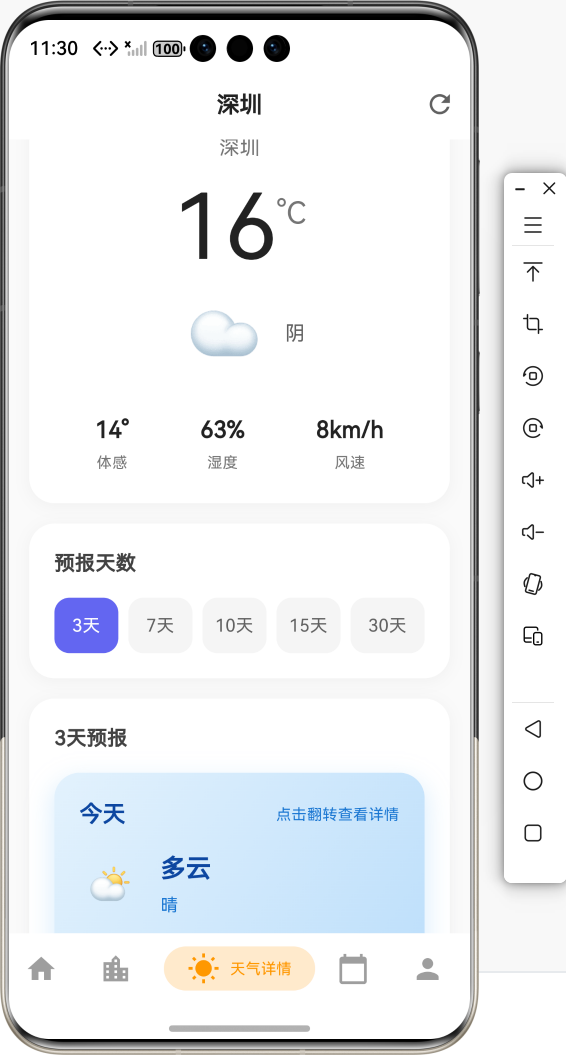
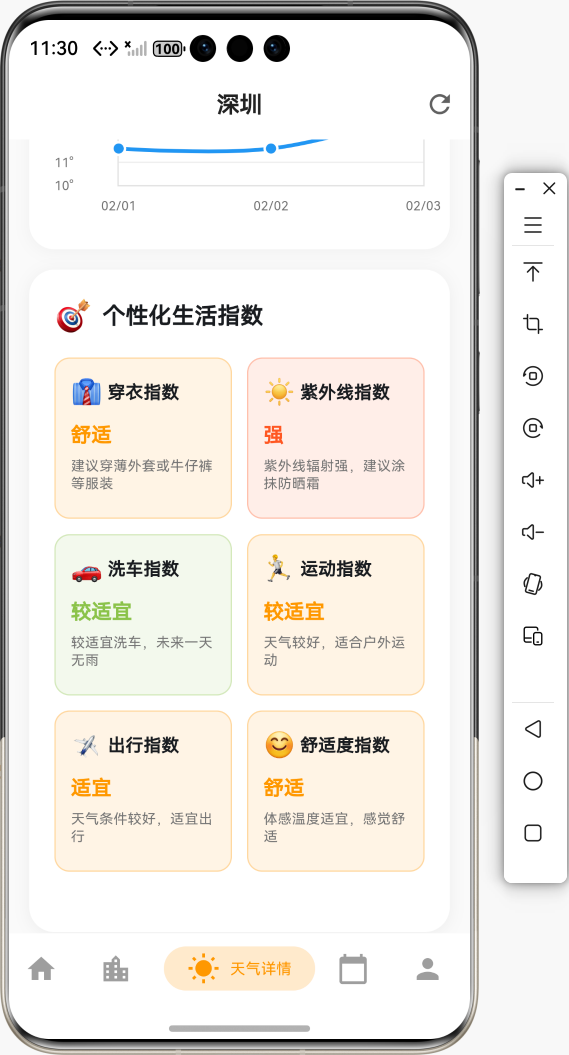
5.6 步骤6:在生活指数卡片中显示图标
// 在 weather_detail_page.dart 中
import '../utils/weather_icon_util.dart';

/// 👕 构建生活指数卡片
Widget _buildLifeIndexCard(LifeIndex index) {
  return Card(
    margin: const EdgeInsets.symmetric(horizontal: 16, vertical: 8),
    child: ListTile(
      leading: Container(
        width: 48,
        height: 48,
        decoration: BoxDecoration(
          color: _getIndexColor(index.category).withValues(alpha: 0.1),
          borderRadius: BorderRadius.circular(12),
        ),
        child: Center(
          child: WeatherIconUtil.getLifeIndexIcon(
            index.category,  // 'dressing', 'uv', 'carWashing' 等
            size: 28,
            color: _getIndexColor(index.category),
          ),
        ),
      ),
      title: Text(
        index.name,
        style: const TextStyle(fontWeight: FontWeight.w600),
      ),
      subtitle: Text(index.text),
      trailing: Text(
        index.levelText,
        style: TextStyle(
          color: _getIndexColor(index.category),
          fontWeight: FontWeight.bold,
        ),
      ),
    ),
  );
}

/// 🎨 根据指数类型获取颜色
Color _getIndexColor(String category) {
  switch (category) {
    case 'dressing':
      return Colors.blue;      // 👔 穿衣指数:蓝色
    case 'uv':
      return Colors.orange;    // ☀️ 紫外线指数:橙色
    case 'carWashing':
      return Colors.green;     // 🚗 洗车指数:绿色
    case 'sport':
      return Colors.purple;    // 🏃 运动指数:紫色
    case 'travel':
      return Colors.teal;      // ✈️ 出行指数:青色
    case 'comfort':
      return Colors.pink;      // 😊 舒适度指数:粉色
    default:
      return Colors.grey;
  }
}
使用效果:
- 👔 穿衣指数:蓝色温度计图标
- ☀️ 紫外线指数:橙色太阳图标
- 🚗 洗车指数:绿色雨滴图标
- 🏃 运动指数:紫色跑步图标
- ✈️ 出行指数:青色飞机图标
- 😊 舒适度指数:粉色温度计图标
5.7 步骤7:在预警提示中显示图标
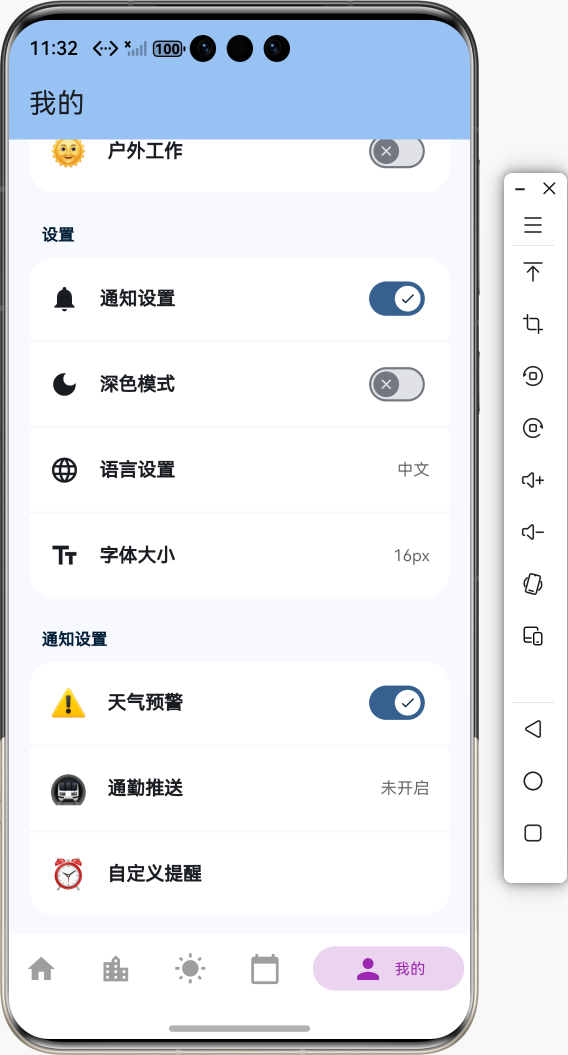
// 在 weather_detail_page.dart 中
import '../utils/weather_icon_util.dart';

Widget _buildAlertBanner(WeatherAlert alert) {
  return Container(
    padding: EdgeInsets.all(16),
    color: Colors.red.shade50,
    child: Row(
      children: [
        WeatherIconUtil.getAlertIcon(
          alert.type,  // 'rain', 'typhoon', 'thunder' 等
          size: 32,
          color: Colors.red,
        ),
        SizedBox(width: 12),
        Expanded(
          child: Text(
            alert.title,
            style: TextStyle(fontWeight: FontWeight.bold),
          ),
        ),
      ],
    ),
  );
}
6. 常见错误与解决方案
📌 常见错误模板说明:以下每个错误均按「错误现象 → 可能原因 → 解决方案 → 代码示例」组织,便于快速排查。
6.1 错误:图标不显示
| 项目 | 说明 |
|---|---|
| 🔴 错误现象 | 天气图标显示为空白或方块 |
| 🔍 可能原因 | 未正确导入 weather_icons 库;字体文件未加载;图标名称错误 |
| ✅ 解决方案 | 确保 pubspec.yaml 中添加了 weather_icons: ^3.0.0,运行 flutter pub get,并正确导入库 |
解决方案代码:
// ✅ 正确:导入 weather_icons 库
import 'package:weather_icons/weather_icons.dart';

Icon(
  WeatherIcons.wiDaySunny,  // 使用正确的图标名称
  size: 48,
)

// ❌ 错误:未导入库或图标名称错误
Icon(
  Icons.wiDaySunny,  // Icons 中没有 wiDaySunny
  size: 48,
)
6.2 错误:图标颜色不正确
| 项目 | 说明 |
|---|---|
| 🔴 错误现象 | 图标颜色与预期不符,或无法自定义颜色 |
| 🔍 可能原因 | 未设置 color 参数;使用了 IconTheme 但被覆盖 |
| ✅ 解决方案 | 在 Icon Widget 中显式设置 color 参数,或使用 WeatherIconUtil 的 color 参数 |
解决方案代码:
// ✅ 正确:显式设置颜色
WeatherIconUtil.getWeatherIcon(
  '晴',
  size: 48,
  color: Colors.orange,  // 显式设置颜色
)

// ❌ 错误:未设置颜色,使用默认主题色
WeatherIconUtil.getWeatherIcon(
  '晴',
  size: 48,
  // 未设置 color,可能显示为默认主题色
)
6.3 错误:图标代码映射错误
| 项目 | 说明 |
|---|---|
| 🔴 错误现象 | 使用和风天气图标代码时,显示的图标与实际天气不符 |
| 🔍 可能原因 | 图标代码映射不完整;代码范围判断错误;未处理未知代码 |
| ✅ 解决方案 | 检查 _getWeatherIconDataByCode 方法中的映射逻辑,确保覆盖所有代码范围,并提供默认图标 |
解决方案代码:
// ✅ 正确:完整的代码映射 + 默认值
static IconData _getWeatherIconDataByCode(String iconCode) {
  final code = int.tryParse(iconCode) ?? 100;  // 解析失败时使用默认值 100

  switch (code) {
    case 100:
      return WeatherIcons.wiDaySunny;
    // ... 其他映射
    default:
      return WeatherIcons.wiDaySunnyOvercast;  // 提供默认图标
  }
}

// ❌ 错误:缺少默认值或代码范围不完整
static IconData _getWeatherIconDataByCode(String iconCode) {
  final code = int.tryParse(iconCode);  // 可能返回 null
  switch (code) {  // code 可能为 null,导致错误
    case 100:
      return WeatherIcons.wiDaySunny;
    // 缺少 default,未知代码会返回 null
  }
}
6.4 错误:天气文字描述匹配不准确
| 项目 | 说明 |
|---|---|
| 🔴 错误现象 | 根据天气文字描述获取图标时,匹配到错误的图标 |
| 🔍 可能原因 | 文字匹配逻辑不完整;匹配顺序错误;未处理特殊情况 |
| ✅ 解决方案 | 优化匹配逻辑,先匹配具体描述(如"暴雨"),再匹配通用描述(如"雨"),并添加更多匹配规则 |
解决方案代码:
// ✅ 正确:先匹配具体描述,再匹配通用描述
static IconData _getWeatherIconData(String weatherText) {
  // 先匹配具体描述
  if (weatherText.contains('暴雨')) {
    return WeatherIcons.wiRainWind;  // ⛈️ 暴雨
  } else if (weatherText.contains('大雨')) {
    return WeatherIcons.wiRainWind;  // ⛈️ 大雨
  } else if (weatherText.contains('中雨')) {
    return WeatherIcons.wiRain;     // 🌧️ 中雨
  } else if (weatherText.contains('小雨')) {
    return WeatherIcons.wiDayRain;   // 🌦️ 小雨
  } else if (weatherText.contains('雨')) {
    return WeatherIcons.wiRain;      // 🌧️ 通用雨
  }
  // ... 其他匹配
}

// ❌ 错误:匹配顺序错误,通用描述在前
static IconData _getWeatherIconData(String weatherText) {
  if (weatherText.contains('雨')) {  // 通用匹配在前
    return WeatherIcons.wiRain;      // "暴雨" 会匹配到这里,而不是暴雨图标
  } else if (weatherText.contains('暴雨')) {
    return WeatherIcons.wiRainWind;  // 永远不会执行
  }
}
6.5 错误:图标尺寸不一致
| 项目 | 说明 |
|---|---|
| 🔴 错误现象 | 不同位置的天气图标大小不一致,影响视觉效果 |
| 🔍 可能原因 | 未统一设置图标尺寸;在不同页面使用了不同的默认尺寸 |
| ✅ 解决方案 | 使用 WeatherIconUtil 统一管理图标尺寸,或定义常量统一尺寸值 |
解决方案代码:
// ✅ 正确:定义统一的尺寸常量
class WeatherIconUtil {
  static const double defaultSize = 24;
  static const double smallSize = 16;
  static const double mediumSize = 32;
  static const double largeSize = 48;
  static const double xlargeSize = 80;

  static Widget getWeatherIcon(
    String weatherText, {
    double size = defaultSize,  // 使用默认尺寸
    Color? color,
  }) {
    // ...
  }
}

// ❌ 错误:在不同地方使用不同的默认尺寸
WeatherIconUtil.getWeatherIcon('晴', size: 24);  // 首页
WeatherIconUtil.getWeatherIcon('晴', size: 32);  // 详情页
WeatherIconUtil.getWeatherIcon('晴', size: 48);  // 卡片
7. 进阶功能
7.1 自定义图标映射
如果需要添加自定义的天气状态映射,可以扩展 WeatherIconUtil:
/// 扩展天气文字描述映射
static IconData _getWeatherIconData(String weatherText) {
  // 添加自定义映射
  if (weatherText.contains('冰雹')) {
    return WeatherIcons.wiHail;  // 冰雹
  } else if (weatherText.contains('龙卷风')) {
    return WeatherIcons.wiTornado;  // 龙卷风
  }
  // ... 原有映射逻辑
}
7.2 动态图标颜色
根据天气状态动态设置图标颜色:
/// 根据天气状态获取图标颜色
static Color getWeatherIconColor(String iconCode) {
  final code = int.tryParse(iconCode) ?? 100;

  if (code == 100) {
    return Colors.orange;        // ☀️ 晴天:橙色
  } else if (code >= 300 && code < 400) {
    return Colors.blue;          // 🌧️ 雨天:蓝色
  } else if (code >= 400 && code < 500) {
    return Colors.grey.shade400; // ❄️ 雪天:灰色
  } else if (code >= 500 && code < 600) {
    return Colors.grey.shade600; // 🌫️ 雾/霾:深灰色
  } else if (code == 900) {
    return Colors.red;           // 🔥 高温:红色
  } else {
    return Colors.grey.shade600; // 默认:深灰色
  }
}

// 使用
WeatherIconUtil.getWeatherIconByCode(
  '100',
  size: 48,
  color: WeatherIconUtil.getWeatherIconColor('100'),
)
7.3 图标动画效果
为天气图标添加动画效果:
import 'package:flutter/material.dart';
import '../utils/weather_icon_util.dart';
/// 带动画的天气图标
class AnimatedWeatherIcon extends StatefulWidget {
final String weatherText;
final double size;
final Color? color;
const AnimatedWeatherIcon({
super.key,
required this.weatherText,
this.size = 48,
this.color,
});
State<AnimatedWeatherIcon> createState() => _AnimatedWeatherIconState();
}
class _AnimatedWeatherIconState extends State<AnimatedWeatherIcon>
with SingleTickerProviderStateMixin {
late AnimationController _controller;
late Animation<double> _animation;
void initState() {
super.initState();
_controller = AnimationController(
duration: const Duration(seconds: 2),
vsync: this,
)..repeat();
_animation = Tween<double>(begin: 0.8, end: 1.2).animate(
CurvedAnimation(parent: _controller, curve: Curves.easeInOut),
);
}
void dispose() {
_controller.dispose();
super.dispose();
}
Widget build(BuildContext context) {
return AnimatedBuilder(
animation: _animation,
builder: (context, child) {
return Transform.scale(
scale: _animation.value,
child: WeatherIconUtil.getWeatherIcon(
widget.weatherText,
size: widget.size,
color: widget.color,
),
);
},
);
}
}
7.4 图标预览工具
创建一个图标预览页面,方便查看所有可用图标:
/// 天气图标预览页面
class WeatherIconPreviewPage extends StatelessWidget {
const WeatherIconPreviewPage({super.key});
Widget build(BuildContext context) {
return Scaffold(
appBar: AppBar(title: const Text('天气图标预览')),
body: ListView(
padding: const EdgeInsets.all(16),
children: [
_buildIconSection('晴天系列', [
WeatherIcons.wiDaySunny,
WeatherIcons.wiDayCloudy,
WeatherIcons.wiDaySunnyOvercast,
]),
_buildIconSection('雨天系列', [
WeatherIcons.wiDayRain,
WeatherIcons.wiRain,
WeatherIcons.wiRainWind,
WeatherIcons.wiShowers,
]),
_buildIconSection('雪天系列', [
WeatherIcons.wiSnow,
WeatherIcons.wiSnowWind,
WeatherIcons.wiSnowflakeCold,
]),
_buildIconSection('其他', [
WeatherIcons.wiFog,
WeatherIcons.wiThunderstorm,
WeatherIcons.wiStrongWind,
WeatherIcons.wiHot,
]),
],
),
);
}
Widget _buildIconSection(String title, List<IconData> icons) {
return Column(
crossAxisAlignment: CrossAxisAlignment.start,
children: [
Text(
title,
style: const TextStyle(fontSize: 18, fontWeight: FontWeight.bold),
),
const SizedBox(height: 12),
Wrap(
spacing: 16,
runSpacing: 16,
children: icons.map((icon) {
return Column(
children: [
Icon(icon, size: 48),
const SizedBox(height: 4),
Text(
icon.toString().split('.').last,
style: const TextStyle(fontSize: 12),
),
],
);
}).toList(),
),
const SizedBox(height: 24),
],
);
}
}
8. 总结
8.1 实现的功能
本教程详细介绍了如何使用 weather_icons 实现专业的天气图标功能,已完成的功能包括:
- ✅ 引入三方库:添加
weather_icons: ^3.0.0依赖 - ✅ 封装工具类:创建
WeatherIconUtil统一管理天气图标 - ✅ 天气状态图标:根据文字描述或图标代码显示对应图标
- ✅ 生活指数图标:穿衣、紫外线、洗车、运动等指数图标
- ✅ 预警图标:暴雨、台风、雷电、高温等预警图标
- ✅ 统一视觉:所有天气相关图标使用同一套图标集
8.2 核心功能
- 🌤️ 天气状态图标:覆盖晴、雨、雪、雾、雷暴等所有气象状态
- 📊 生活指数图标:穿衣、紫外线、洗车、运动、出行、舒适度等
- ⚠️ 预警图标:暴雨、台风、雷电、高温、寒潮、大风、大雾、暴雪等
- 🎨 视觉统一性:200+ 专业图标,设计风格统一
- 🔧 易于使用:简单的 API,封装好的工具类
8.3 使用示例总结
// 🌤️ 根据天气文字描述获取图标
WeatherIconUtil.getWeatherIcon(
  '晴',
  size: 48,
  color: Colors.orange,
)

// 📊 根据和风天气图标代码获取图标
WeatherIconUtil.getWeatherIconByCode(
  '100',
  size: 48,
  color: Colors.orange,
)

// 👕 获取生活指数图标
WeatherIconUtil.getLifeIndexIcon(
  'dressing',
  size: 32,
  color: Colors.blue,
)

// ⚠️ 获取预警图标
WeatherIconUtil.getAlertIcon(
  'rain',
  size: 32,
  color: Colors.red,
)
8.4 最佳实践
-
统一管理
- 使用
WeatherIconUtil工具类统一管理所有天气图标 - 避免在代码中直接使用
WeatherIcons,便于后续维护
- 使用
-
图标映射
- 完善天气文字描述和图标代码的映射逻辑
- 提供默认图标,避免显示空白
-
尺寸统一
- 定义统一的图标尺寸常量
- 在不同页面使用一致的图标尺寸
-
颜色管理
- 根据天气状态动态设置图标颜色
- 使用统一的颜色方案,提升视觉效果
8.5 完整使用流程图
9. 参考资料
10. 功能演示流程图
🎉 祝你开发顺利! 🚀
欢迎加入开源鸿蒙跨平台社区

作为“人工智能6S店”的官方数字引擎,为AI开发者与企业提供一个覆盖软硬件全栈、一站式门户。
更多推荐

 6
6 0
0- 0


 已为社区贡献21条内容

所有评论(0)