
React Native 鸿蒙跨平台开发:LinearGradient 径向渐变
径向渐变(Radial Gradient)是一种从中心点向外辐射的渐变效果,它能够创建出圆形或椭圆形的色彩过渡。在 React Native for Harmony 中,虽然主要用于线性渐变,但我们可以通过巧妙的配置模拟出类似径向渐变的效果。为什么需要模拟径向渐变?在 React Native for Harmony 中,我们可以通过以下方式模拟径向渐变:方法一:使用对角线渐变方法二:使用角度渐变
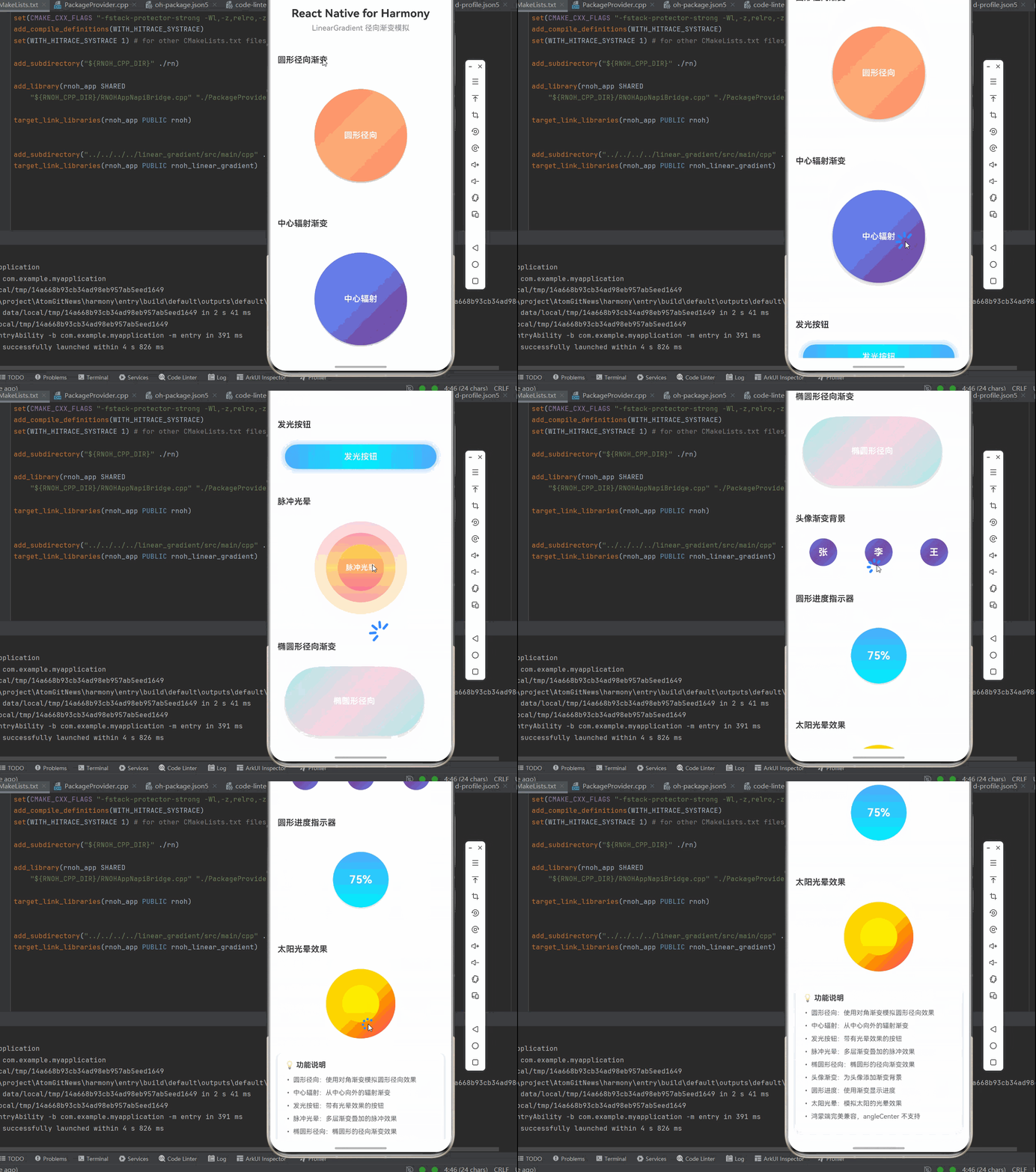
一、径向渐变的核心原理
径向渐变(Radial Gradient)是一种从中心点向外辐射的渐变效果,它能够创建出圆形或椭圆形的色彩过渡。在 React Native for Harmony 中,虽然 react-native-linear-gradient 主要用于线性渐变,但我们可以通过巧妙的配置模拟出类似径向渐变的效果。
1.1 径向渐变与线性渐变的区别
| 特性 | 线性渐变 | 径向渐变模拟 |
|---|---|---|
| 渐变方向 | 沿直线方向 | 从中心向外辐射 |
| 适用场景 | 按钮、背景、进度条 | 圆形按钮、头像背景、光晕效果 |
| 控制方式 | start/end 坐标 | 对角线渐变或多层叠加 |
| 视觉效果 | 线性过渡 | 放射性过渡 |
为什么需要模拟径向渐变?
- 视觉效果独特:圆形辐射效果更适合某些设计场景
- 光晕效果:模拟光源照射的效果
- 按钮装饰:为圆形按钮添加深度感
1.2 模拟径向渐变的原理
在 React Native for Harmony 中,我们可以通过以下方式模拟径向渐变:
方法一:使用对角线渐变
- 从一个角到对角设置渐变
- 使用首尾相同的颜色创建循环效果
- 适合矩形区域的径向渐变效果
方法二:使用角度渐变
- 通过 360 度的角度变化
- 模拟圆形辐射效果
方法三:多层渐变叠加
- 使用多个方向的线性渐变层叠
- 通过透明度控制叠加效果
- 创建出类似径向渐变的视觉效果
1.3 鸿蒙平台的限制
根据官方文档,angleCenter 属性在鸿蒙平台暂不支持。这意味着我们无法精确控制渐变角度的中心点,但可以通过其他方式实现类似效果。
二、圆形径向渐变模拟
2.1 基础圆形径向渐变
使用对角线性渐变模拟圆形径向渐变效果:
import React, { memo } from 'react';
import { View, Text, StyleSheet } from 'react-native';
import LinearGradient from "react-native-linear-gradient";

const RadialCircleGradient = memo(() => {
  return (
    <View style={styles.radialContainer}>
      <LinearGradient
        colors={['#ff7e5f', '#feb47b', '#ff7e5f']}
        start={{ x: 0, y: 0 }}
        end={{ x: 1, y: 1 }}
        style={styles.radialCircle}
      >
        <Text style={styles.radialText}>圆形径向</Text>
      </LinearGradient>
    </View>
  );
});
样式实现:
const styles = StyleSheet.create({
  radialContainer: {
    padding: 20,
    backgroundColor: '#FFFFFF',
    borderRadius: 12,
    margin: 16,
    alignItems: 'center',
  },
  radialCircle: {
    width: 200,
    height: 200,
    borderRadius: 100,
    justifyContent: 'center',
    alignItems: 'center',
    shadowColor: '#000000',
    shadowOffset: { width: 0, height: 4 },
    shadowOpacity: 0.2,
    shadowRadius: 8,
    elevation: 8,
  },
  radialText: {
    fontSize: 18,
    fontWeight: '600',
    color: '#FFFFFF',
  },
});
为什么这样设计?
- 对角渐变:从左上到右下,模拟从中心向外的辐射
- 首尾颜色相同:创建循环效果,增强径向感
- 圆形容器:通过
borderRadius: 100创建完美的圆形 - 阴影效果:增强立体感和深度
2.2 中心辐射渐变
使用多层渐变创建更强的中心辐射效果:
const CenterRadialGradient = memo(() => {
  return (
    <View style={styles.radialContainer}>
      <LinearGradient
        colors={['#667eea', '#764ba2', '#667eea']}
        start={{ x: 0.5, y: 0.5 }}
        end={{ x: 1, y: 1 }}
        style={styles.radialCircle}
      >
        <Text style={styles.radialText}>中心辐射</Text>
      </LinearGradient>
    </View>
  );
});
渐变起点设置:
start={{ x: 0.5, y: 0.5 }}:从中心开始end={{ x: 1, y: 1 }}:向右下角扩散- 创建出从中心向外的辐射效果
2.3 多色中心辐射
使用多个颜色创建更丰富的辐射效果:
const MultiColorRadialGradient = memo(() => {
  return (
    <View style={styles.radialContainer}>
      <LinearGradient
        colors={['#f093fb', '#f5576c', '#4facfe', '#00f2fe', '#f093fb']}
        start={{ x: 0.5, y: 0.5 }}
        end={{ x: 1, y: 1 }}
        style={styles.radialCircle}
      >
        <Text style={styles.radialText}>多色辐射</Text>
      </LinearGradient>
    </View>
  );
});
多色渐变的特点:
- 颜色从中心向外逐渐变化
- 首尾颜色相同,形成循环
- 创建出彩虹般的辐射效果
三、光晕效果模拟
3.1 发光按钮效果
使用渐变创建发光的按钮效果:
import { TouchableOpacity } from 'react-native';

const GlowButton = memo(({ title, onPress }) => {
  return (
    <TouchableOpacity onPress={onPress} activeOpacity={0.8}>
      <LinearGradient
        colors={['#4facfe', '#00f2fe', '#4facfe']}
        start={{ x: 0, y: 0 }}
        end={{ x: 1, y: 0 }}
        style={styles.glowButton}
      >
        <Text style={styles.glowButtonText}>{title}</Text>
      </LinearGradient>
    </TouchableOpacity>
  );
});
样式实现:
const styles = StyleSheet.create({
  glowButton: {
    paddingVertical: 16,
    paddingHorizontal: 48,
    borderRadius: 30,
    margin: 16,
    shadowColor: '#4facfe',
    shadowOffset: { width: 0, height: 0 },
    shadowOpacity: 0.6,
    shadowRadius: 20,
    elevation: 12,
  },
  glowButtonText: {
    color: '#FFFFFF',
    fontSize: 18,
    fontWeight: '600',
    textAlign: 'center',
  },
});
光晕效果的实现:
- 首尾颜色相同,创建循环
shadowOpacity和shadowRadius创建发光效果elevation在 Android 上增强阴影
3.2 脉冲光晕效果
使用多个渐变层创建脉冲光晕效果:
const PulseGlow = memo(() => {
  return (
    <View style={styles.pulseContainer}>
      <LinearGradient
        colors={['#fa709a', '#fee140']}
        style={styles.pulseOuter}
      />
      <LinearGradient
        colors={['#fa709a', '#fee140', '#fa709a']}
        style={styles.pulseMiddle}
      />
      <LinearGradient
        colors={['#fee140', '#fa709a']}
        style={styles.pulseInner}
      />
      <Text style={styles.pulseText}>脉冲光晕</Text>
    </View>
  );
});
样式实现:
const styles = StyleSheet.create({
  pulseContainer: {
    width: 200,
    height: 200,
    justifyContent: 'center',
    alignItems: 'center',
    margin: 16,
  },
  pulseOuter: {
    position: 'absolute',
    width: 200,
    height: 200,
    borderRadius: 100,
    opacity: 0.3,
  },
  pulseMiddle: {
    position: 'absolute',
    width: 150,
    height: 150,
    borderRadius: 75,
    opacity: 0.6,
  },
  pulseInner: {
    position: 'absolute',
    width: 100,
    height: 100,
    borderRadius: 50,
    opacity: 0.9,
  },
  pulseText: {
    fontSize: 16,
    fontWeight: '600',
    color: '#FFFFFF',
    zIndex: 1,
  },
});
脉冲光晕的特点:
- 使用三层渐变叠加
- 通过
opacity控制透明度 - 创建出层次分明的光晕效果
四、椭圆形径向渐变模拟
4.1 椭圆形渐变
使用矩形容器和特定的渐变方向模拟椭圆形径向渐变:
const EllipticalRadialGradient = memo(() => {
  return (
    <LinearGradient
      colors={['#a8edea', '#fed6e3', '#a8edea']}
      start={{ x: 0, y: 0 }}
      end={{ x: 1, y: 1 }}
      style={styles.ellipticalGradient}
    >
      <Text style={styles.ellipticalText}>椭圆形径向</Text>
    </LinearGradient>
  );
});
样式实现:
const styles = StyleSheet.create({
  ellipticalGradient: {
    width: 300,
    height: 150,
    borderRadius: 75,
    justifyContent: 'center',
    alignItems: 'center',
    margin: 16,
    shadowColor: '#000000',
    shadowOffset: { width: 0, height: 4 },
    shadowOpacity: 0.15,
    shadowRadius: 12,
    elevation: 8,
  },
  ellipticalText: {
    fontSize: 18,
    fontWeight: '600',
    color: '#FFFFFF',
  },
});
椭圆形渐变的特点:
- 宽度大于高度,形成椭圆
borderRadius为高度的一半,形成椭圆形- 对角渐变模拟径向效果
4.2 水平椭圆形渐变
const HorizontalEllipticalGradient = memo(() => {
  return (
    <LinearGradient
      colors={['#89f7fe', '#66a6ff', '#89f7fe']}
      start={{ x: 0, y: 0.5 }}
      end={{ x: 1, y: 0.5 }}
      style={styles.horizontalEllipticalGradient}
    >
      <Text style={styles.ellipticalText}>水平椭圆</Text>
    </LinearGradient>
  );
});
渐变方向:
start={{ x: 0, y: 0.5 }}:左侧中心end={{ x: 1, y: 0.5 }}:右侧中心- 水平方向的渐变,配合椭圆形状
五、角度径向渐变模拟
5.1 360度角度渐变
使用角度渐变模拟圆形径向效果:
const AngleRadialGradient = memo(() => {
  return (
    <LinearGradient
      colors={['#ff9a9e', '#fecfef', '#fecfef', '#ff9a9e']}
      useAngle={true}
      angle={0}
      style={styles.angleRadialCircle}
    >
      <Text style={styles.radialText}>角度径向</Text>
    </LinearGradient>
  );
});
角度渐变说明:
useAngle={true}:启用角度模式angle={0}:从下到上- 四个颜色创建循环效果
5.2 多角度渐变
const MultiAngleGradient = memo(() => {
  return (
    <View style={styles.angleContainer}>
      <LinearGradient
        colors={['#4facfe', '#00f2fe']}
        useAngle={true}
        angle={45}
        style={styles.angleGradient}
      >
        <Text style={styles.angleText}>45°</Text>
      </LinearGradient>
      <LinearGradient
        colors={['#fa709a', '#fee140']}
        useAngle={true}
        angle={135}
        style={styles.angleGradient}
      >
        <Text style={styles.angleText}>135°</Text>
      </LinearGradient>
      <LinearGradient
        colors={['#667eea', '#764ba2']}
        useAngle={true}
        angle={225}
        style={styles.angleGradient}
      >
        <Text style={styles.angleText}>225°</Text>
      </LinearGradient>
      <LinearGradient
        colors={['#a8edea', '#fed6e3']}
        useAngle={true}
        angle={315}
        style={styles.angleGradient}
      >
        <Text style={styles.angleText}>315°</Text>
      </LinearGradient>
    </View>
  );
});
样式实现:
const styles = StyleSheet.create({
  angleContainer: {
    flexDirection: 'row',
    flexWrap: 'wrap',
    justifyContent: 'center',
    padding: 16,
  },
  angleGradient: {
    width: 100,
    height: 100,
    borderRadius: 50,
    justifyContent: 'center',
    alignItems: 'center',
    margin: 8,
  },
  angleText: {
    fontSize: 14,
    fontWeight: '600',
    color: '#FFFFFF',
  },
});
六、径向渐变的应用场景
6.1 头像背景渐变
为头像添加径向渐变背景:
const AvatarGradient = memo(({ name }) => {
  const initials = name.split(' ').map(n => n[0]).join('').substring(0, 2);

  return (
    <LinearGradient
      colors={['#667eea', '#764ba2', '#667eea']}
      start={{ x: 0, y: 0 }}
      end={{ x: 1, y: 1 }}
      style={styles.avatarGradient}
    >
      <Text style={styles.avatarText}>{initials}</Text>
    </LinearGradient>
  );
});
样式实现:
const styles = StyleSheet.create({
  avatarGradient: {
    width: 60,
    height: 60,
    borderRadius: 30,
    justifyContent: 'center',
    alignItems: 'center',
  },
  avatarText: {
    fontSize: 20,
    fontWeight: '700',
    color: '#FFFFFF',
  },
});
6.2 圆形进度指示器
使用径向渐变创建圆形进度指示器:
const CircularProgress = memo(({ progress, colors }) => {
  return (
    <View style={styles.circularProgressContainer}>
      <LinearGradient
        colors={colors}
        style={styles.circularProgress}
      >
        <Text style={styles.progressText}>{progress}%</Text>
      </LinearGradient>
    </View>
  );
});
样式实现:
const styles = StyleSheet.create({
  circularProgressContainer: {
    padding: 20,
    backgroundColor: '#FFFFFF',
    borderRadius: 12,
    margin: 16,
    alignItems: 'center',
  },
  circularProgress: {
    width: 120,
    height: 120,
    borderRadius: 60,
    justifyContent: 'center',
    alignItems: 'center',
    shadowColor: '#000000',
    shadowOffset: { width: 0, height: 4 },
    shadowOpacity: 0.1,
    shadowRadius: 8,
    elevation: 4,
  },
  progressText: {
    fontSize: 24,
    fontWeight: '700',
    color: '#FFFFFF',
  },
});
6.3 太阳光晕效果
const SunGlow = memo(() => {
  return (
    <View style={styles.sunContainer}>
      <LinearGradient
        colors={['#ffd700', '#ff8c00', '#ff6347', '#ffd700']}
        start={{ x: 0.5, y: 0.5 }}
        end={{ x: 1, y: 1 }}
        style={styles.sunOuter}
      />
      <LinearGradient
        colors={['#ffff00', '#ffd700']}
        style={styles.sunInner}
      />
    </View>
  );
});
样式实现:
const styles = StyleSheet.create({
  sunContainer: {
    width: 150,
    height: 150,
    justifyContent: 'center',
    alignItems: 'center',
    margin: 16,
  },
  sunOuter: {
    position: 'absolute',
    width: 150,
    height: 150,
    borderRadius: 75,
  },
  sunInner: {
    position: 'absolute',
    width: 80,
    height: 80,
    borderRadius: 40,
  },
});
七、性能优化与最佳实践
7.1 避免过度使用渐变层
尽量减少渐变层的叠加:
// 不推荐:过多渐变层
<LinearGradient colors={['#a', '#b']}>
  <LinearGradient colors={['#c', '#d']}>
    <LinearGradient colors={['#e', '#f']}>
      <Text>内容</Text>
    </LinearGradient>
  </LinearGradient>
</LinearGradient>

// 推荐:使用单一渐变
<LinearGradient colors={['#a', '#b', '#c', '#a']}>
  <Text>内容</Text>
</LinearGradient>
7.2 使用预定义的渐变配置
const radialPresets = {
  sun: {
    colors: ['#ffd700', '#ff8c00', '#ff6347', '#ffd700'],
    start: { x: 0.5, y: 0.5 },
    end: { x: 1, y: 1 },
  },
  ocean: {
    colors: ['#4facfe', '#00f2fe', '#4facfe'],
    start: { x: 0, y: 0 },
    end: { x: 1, y: 1 },
  },
  fire: {
    colors: ['#fa709a', '#fee140', '#fa709a'],
    start: { x: 0.5, y: 0.5 },
    end: { x: 1, y: 1 },
  },
};

const PresetRadialGradient = memo(({ preset, children }) => {
  const config = radialPresets[preset];
  return (
    <LinearGradient {...config} style={styles.radialCircle}>
      {children}
    </LinearGradient>
  );
});
7.3 使用 memo 优化
const OptimizedRadialGradient = memo<RadialGradientProps>(({ children, colors }) => {
  return (
    <LinearGradient
      colors={colors}
      start={{ x: 0, y: 0 }}
      end={{ x: 1, y: 1 }}
      style={styles.radialCircle}
    >
      {children}
    </LinearGradient>
  );
});

OptimizedRadialGradient.displayName = 'OptimizedRadialGradient';
八、常见问题与解决方案
8.1 径向效果不明显
问题现象: 渐变看起来像普通的线性渐变
解决方案:
// 确保首尾颜色相同
<LinearGradient
  colors={['#a', '#b', '#a']}  // ✅ 首尾相同
  start={{ x: 0, y: 0 }}
  end={{ x: 1, y: 1 }}
/>

// 使用多层渐变增强效果
<View>
  <LinearGradient colors={['#a', '#b']} opacity={0.5} />
  <LinearGradient colors={['#b', '#c']} opacity={0.5} />
</View>
8.2 光晕效果太弱
问题现象: 发光效果不明显
解决方案:
// 增加阴影强度
<LinearGradient
  colors={['#a', '#b', '#a']}
  style={{
    shadowColor: '#a',
    shadowOpacity: 0.8,  // 增加不透明度
    shadowRadius: 30,    // 增加半径
    elevation: 15,       // 增加 elevation
  }}
/>
8.3 圆形不完美
问题现象: 圆形看起来不够圆
解决方案:
// 确保 borderRadius 为宽度/高度的一半
<View style={{
  width: 200,
  height: 200,
  borderRadius: 100,  // ✅ 正确:200 / 2
}} />

// 使用固定尺寸
const styles = StyleSheet.create({
  radialCircle: {
    width: 200,
    height: 200,
    borderRadius: 100,  // 宽度的一半
  },
});
8.4 angleCenter 不支持
问题现象: 使用 angleCenter 在鸿蒙平台没有效果
解决方案:
根据官方文档,angleCenter 在鸿蒙平台暂不支持。使用 start 和 end 替代:
// ❌ 不支持
<LinearGradient
  colors={['#a', '#b']}
  useAngle={true}
  angle={90}
  angleCenter={{ x: 0.3, y: 0.5 }}
/>

// ✅ 替代方案
<LinearGradient
  colors={['#a', '#b']}
  start={{ x: 0.3, y: 0.5 }}
  end={{ x: 0.7, y: 0.5 }}
/>
九、完整实战代码
import React, { memo } from 'react';
import {
  View,
  Text,
  StyleSheet,
  TouchableOpacity,
  ScrollView,
} from 'react-native';
import LinearGradient from "react-native-linear-gradient";

// 圆形径向渐变组件
const RadialCircleGradient = memo(() => {
  return (
    <View style={styles.radialContainer}>
      <LinearGradient
        colors={['#ff7e5f', '#feb47b', '#ff7e5f']}
        start={{ x: 0, y: 0 }}
        end={{ x: 1, y: 1 }}
        style={styles.radialCircle}
      >
        <Text style={styles.radialText}>圆形径向</Text>
      </LinearGradient>
    </View>
  );
});

RadialCircleGradient.displayName = 'RadialCircleGradient';

// 中心辐射渐变组件
const CenterRadialGradient = memo(() => {
  return (
    <View style={styles.radialContainer}>
      <LinearGradient
        colors={['#667eea', '#764ba2', '#667eea']}
        start={{ x: 0.5, y: 0.5 }}
        end={{ x: 1, y: 1 }}
        style={styles.radialCircle}
      >
        <Text style={styles.radialText}>中心辐射</Text>
      </LinearGradient>
    </View>
  );
});

CenterRadialGradient.displayName = 'CenterRadialGradient';

// 发光按钮组件
interface GlowButtonProps {
  title: string;
  onPress: () => void;
}

const GlowButton = memo<GlowButtonProps>(({ title, onPress }) => {
  return (
    <TouchableOpacity onPress={onPress} activeOpacity={0.8}>
      <LinearGradient
        colors={['#4facfe', '#00f2fe', '#4facfe']}
        start={{ x: 0, y: 0 }}
        end={{ x: 1, y: 0 }}
        style={styles.glowButton}
      >
        <Text style={styles.glowButtonText}>{title}</Text>
      </LinearGradient>
    </TouchableOpacity>
  );
});

GlowButton.displayName = 'GlowButton';

// 脉冲光晕组件
const PulseGlow = memo(() => {
  return (
    <View style={styles.pulseContainer}>
      <LinearGradient
        colors={['#fa709a', '#fee140']}
        style={styles.pulseOuter}
      />
      <LinearGradient
        colors={['#fa709a', '#fee140', '#fa709a']}
        style={styles.pulseMiddle}
      />
      <LinearGradient
        colors={['#fee140', '#fa709a']}
        style={styles.pulseInner}
      />
      <Text style={styles.pulseText}>脉冲光晕</Text>
    </View>
  );
});

PulseGlow.displayName = 'PulseGlow';

// 椭圆形径向渐变组件
const EllipticalRadialGradient = memo(() => {
  return (
    <LinearGradient
      colors={['#a8edea', '#fed6e3', '#a8edea']}
      start={{ x: 0, y: 0 }}
      end={{ x: 1, y: 1 }}
      style={styles.ellipticalGradient}
    >
      <Text style={styles.ellipticalText}>椭圆形径向</Text>
    </LinearGradient>
  );
});

EllipticalRadialGradient.displayName = 'EllipticalRadialGradient';

// 头像渐变组件
interface AvatarGradientProps {
  name: string;
}

const AvatarGradient = memo<AvatarGradientProps>(({ name }) => {
  const initials = name.split(' ').map(n => n[0]).join('').substring(0, 2);

  return (
    <LinearGradient
      colors={['#667eea', '#764ba2', '#667eea']}
      start={{ x: 0, y: 0 }}
      end={{ x: 1, y: 1 }}
      style={styles.avatarGradient}
    >
      <Text style={styles.avatarText}>{initials}</Text>
    </LinearGradient>
  );
});

AvatarGradient.displayName = 'AvatarGradient';

// 圆形进度指示器组件
interface CircularProgressProps {
  progress: number;
  colors: (string | number)[];
}

const CircularProgress = memo<CircularProgressProps>(({ progress, colors }) => {
  return (
    <View style={styles.circularProgressContainer}>
      <LinearGradient
        colors={colors}
        style={styles.circularProgress}
      >
        <Text style={styles.progressText}>{progress}%</Text>
      </LinearGradient>
    </View>
  );
});

CircularProgress.displayName = 'CircularProgress';

// 太阳光晕组件
const SunGlow = memo(() => {
  return (
    <View style={styles.sunContainer}>
      <LinearGradient
        colors={['#ffd700', '#ff8c00', '#ff6347', '#ffd700']}
        start={{ x: 0.5, y: 0.5 }}
        end={{ x: 1, y: 1 }}
        style={styles.sunOuter}
      />
      <LinearGradient
        colors={['#ffff00', '#ffd700']}
        style={styles.sunInner}
      />
    </View>
  );
});

SunGlow.displayName = 'SunGlow';

const App = () => {
  const handlePress = () => {
    console.log('按钮被点击');
  };

  return (
    <View style={styles.container}>
      <ScrollView style={styles.scrollView} showsVerticalScrollIndicator={false}>
        {/* 标题区域 */}
        <View style={styles.header}>
          <Text style={styles.pageTitle}>React Native for Harmony</Text>
          <Text style={styles.subtitle}>LinearGradient 径向渐变模拟</Text>
        </View>

        {/* 圆形径向渐变 */}
        <View style={styles.section}>
          <Text style={styles.sectionTitle}>圆形径向渐变</Text>
          <RadialCircleGradient />
        </View>

        {/* 中心辐射渐变 */}
        <View style={styles.section}>
          <Text style={styles.sectionTitle}>中心辐射渐变</Text>
          <CenterRadialGradient />
        </View>

        {/* 发光按钮 */}
        <View style={styles.section}>
          <Text style={styles.sectionTitle}>发光按钮</Text>
          <GlowButton title="发光按钮" onPress={handlePress} />
        </View>

        {/* 脉冲光晕 */}
        <View style={styles.section}>
          <Text style={styles.sectionTitle}>脉冲光晕</Text>
          <View style={styles.pulseSection}>
            <PulseGlow />
          </View>
        </View>

        {/* 椭圆形径向 */}
        <View style={styles.section}>
          <Text style={styles.sectionTitle}>椭圆形径向渐变</Text>
          <EllipticalRadialGradient />
        </View>

        {/* 头像渐变 */}
        <View style={styles.section}>
          <Text style={styles.sectionTitle}>头像渐变背景</Text>
          <View style={styles.avatarRow}>
            <AvatarGradient name="张三" />
            <AvatarGradient name="李四" />
            <AvatarGradient name="王五" />
          </View>
        </View>

        {/* 圆形进度指示器 */}
        <View style={styles.section}>
          <Text style={styles.sectionTitle}>圆形进度指示器</Text>
          <CircularProgress progress={75} colors={['#4facfe', '#00f2fe']} />
        </View>

        {/* 太阳光晕 */}
        <View style={styles.section}>
          <Text style={styles.sectionTitle}>太阳光晕效果</Text>
          <View style={styles.sunSection}>
            <SunGlow />
          </View>
        </View>

        {/* 说明区域 */}
        <View style={styles.infoCard}>
          <Text style={styles.infoTitle}>💡 功能说明</Text>
          <Text style={styles.infoText}>• 圆形径向:使用对角渐变模拟圆形径向效果</Text>
          <Text style={styles.infoText}>• 中心辐射:从中心向外的辐射渐变</Text>
          <Text style={styles.infoText}>• 发光按钮:带有光晕效果的按钮</Text>
          <Text style={styles.infoText}>• 脉冲光晕:多层渐变叠加的脉冲效果</Text>
          <Text style={styles.infoText}>• 椭圆形径向:椭圆形的径向渐变效果</Text>
          <Text style={styles.infoText}>• 头像渐变:为头像添加渐变背景</Text>
          <Text style={styles.infoText}>• 圆形进度:使用渐变显示进度</Text>
          <Text style={styles.infoText}>• 太阳光晕:模拟太阳的光晕效果</Text>
          <Text style={styles.infoText}>• 鸿蒙端完美兼容,angleCenter 不支持</Text>
        </View>
      </ScrollView>
    </View>
  );
};

const styles = StyleSheet.create({
  container: {
    flex: 1,
    backgroundColor: '#F5F7FA',
  },
  scrollView: {
    flex: 1,
  },

  // ======== 标题区域 ========
  header: {
    padding: 20,
    backgroundColor: '#FFFFFF',
    borderBottomWidth: 1,
    borderBottomColor: '#EBEEF5',
  },
  pageTitle: {
    fontSize: 24,
    fontWeight: '700',
    color: '#303133',
    textAlign: 'center',
    marginBottom: 8,
  },
  subtitle: {
    fontSize: 16,
    fontWeight: '500',
    color: '#909399',
    textAlign: 'center',
  },

  // ======== 区域 ========
  section: {
    marginTop: 12,
    backgroundColor: '#FFFFFF',
    padding: 16,
  },
  sectionTitle: {
    fontSize: 18,
    fontWeight: '600',
    color: '#303133',
    marginBottom: 16,
  },

  // ======== 径向容器 ========
  radialContainer: {
    padding: 20,
    backgroundColor: '#FFFFFF',
    borderRadius: 12,
    margin: 16,
    alignItems: 'center',
  },
  radialCircle: {
    width: 200,
    height: 200,
    borderRadius: 100,
    justifyContent: 'center',
    alignItems: 'center',
    shadowColor: '#000000',
    shadowOffset: { width: 0, height: 4 },
    shadowOpacity: 0.2,
    shadowRadius: 8,
    elevation: 8,
  },
  radialText: {
    fontSize: 18,
    fontWeight: '600',
    color: '#FFFFFF',
  },

  // ======== 发光按钮 ========
  glowButton: {
    paddingVertical: 16,
    paddingHorizontal: 48,
    borderRadius: 30,
    margin: 16,
    shadowColor: '#4facfe',
    shadowOffset: { width: 0, height: 0 },
    shadowOpacity: 0.6,
    shadowRadius: 20,
    elevation: 12,
  },
  glowButtonText: {
    color: '#FFFFFF',
    fontSize: 18,
    fontWeight: '600',
    textAlign: 'center',
  },

  // ======== 脉冲光晕 ========
  pulseSection: {
    alignItems: 'center',
  },
  pulseContainer: {
    width: 200,
    height: 200,
    justifyContent: 'center',
    alignItems: 'center',
    margin: 16,
  },
  pulseOuter: {
    position: 'absolute',
    width: 200,
    height: 200,
    borderRadius: 100,
    opacity: 0.3,
  },
  pulseMiddle: {
    position: 'absolute',
    width: 150,
    height: 150,
    borderRadius: 75,
    opacity: 0.6,
  },
  pulseInner: {
    position: 'absolute',
    width: 100,
    height: 100,
    borderRadius: 50,
    opacity: 0.9,
  },
  pulseText: {
    fontSize: 16,
    fontWeight: '600',
    color: '#FFFFFF',
    zIndex: 1,
  },

  // ======== 椭圆形渐变 ========
  ellipticalGradient: {
    width: 300,
    height: 150,
    borderRadius: 75,
    justifyContent: 'center',
    alignItems: 'center',
    margin: 16,
    shadowColor: '#000000',
    shadowOffset: { width: 0, height: 4 },
    shadowOpacity: 0.15,
    shadowRadius: 12,
    elevation: 8,
  },
  ellipticalText: {
    fontSize: 18,
    fontWeight: '600',
    color: '#FFFFFF',
  },

  // ======== 头像渐变 ========
  avatarRow: {
    flexDirection: 'row',
    justifyContent: 'space-around',
    paddingVertical: 16,
  },
  avatarGradient: {
    width: 60,
    height: 60,
    borderRadius: 30,
    justifyContent: 'center',
    alignItems: 'center',
  },
  avatarText: {
    fontSize: 20,
    fontWeight: '700',
    color: '#FFFFFF',
  },

  // ======== 圆形进度 ========
  circularProgressContainer: {
    padding: 20,
    backgroundColor: '#FFFFFF',
    borderRadius: 12,
    margin: 16,
    alignItems: 'center',
  },
  circularProgress: {
    width: 120,
    height: 120,
    borderRadius: 60,
    justifyContent: 'center',
    alignItems: 'center',
    shadowColor: '#000000',
    shadowOffset: { width: 0, height: 4 },
    shadowOpacity: 0.1,
    shadowRadius: 8,
    elevation: 4,
  },
  progressText: {
    fontSize: 24,
    fontWeight: '700',
    color: '#FFFFFF',
  },

  // ======== 太阳光晕 ========
  sunSection: {
    alignItems: 'center',
  },
  sunContainer: {
    width: 150,
    height: 150,
    justifyContent: 'center',
    alignItems: 'center',
    margin: 16,
  },
  sunOuter: {
    position: 'absolute',
    width: 150,
    height: 150,
    borderRadius: 75,
  },
  sunInner: {
    position: 'absolute',
    width: 80,
    height: 80,
    borderRadius: 40,
  },

  // ======== 信息卡片 ========
  infoCard: {
    backgroundColor: '#FFFFFF',
    borderRadius: 12,
    padding: 16,
    margin: 16,
    marginTop: 0,
    shadowColor: '#000000',
    shadowOffset: { width: 0, height: 2 },
    shadowOpacity: 0.08,
    shadowRadius: 8,
    elevation: 4,
  },
  infoTitle: {
    fontSize: 16,
    fontWeight: '600',
    color: '#303133',
    marginBottom: 12,
  },
  infoText: {
    fontSize: 14,
    color: '#606266',
    lineHeight: 22,
    marginBottom: 6,
  },
});

export default App;
欢迎加入开源鸿蒙跨平台社区:https://openharmonycrossplatform.csdn.net

作为“人工智能6S店”的官方数字引擎,为AI开发者与企业提供一个覆盖软硬件全栈、一站式门户。
更多推荐
 7
7 0
0- 0


 已为社区贡献26条内容

所有评论(0)