
Flutter 框架跨平台鸿蒙开发 - 校园生活一站式:打造智慧校园服务平台
命名规范:使用有意义的变量名和函数名注释规范:为复杂逻辑添加注释文件组织:按功能模块组织代码校园生活一站式应用是一个集成多种校园服务的综合性平台,通过Flutter技术实现了跨平台开发,为学生提供了便捷的校园生活体验。本项目展示了Flutter的强大功能和移动应用开发的最佳实践。便捷性:一个APP解决所有校园需求实用性:解决学生日常生活痛点智能化:提供智能提醒和推荐扩展性:清晰的架构便于功能扩展掌
Flutter校园生活一站式:打造智慧校园服务平台
项目概述
在数字化校园建设的浪潮中,大学生的日常生活涉及课程学习、食堂就餐、图书借阅、快递收发、社团活动、校园资讯等多个方面。然而,这些服务往往分散在不同的平台和系统中,给学生带来诸多不便。本项目开发了一款基于Flutter的校园生活一站式服务应用,整合校园各类服务资源,为学生提供便捷、高效、智能的校园生活体验。
应用以"一个APP,搞定校园生活"为核心理念,通过统一的入口和界面,让学生能够快速访问各类校园服务,查询实时信息,完成日常事务,真正实现校园生活的数字化、智能化管理。
运行效果图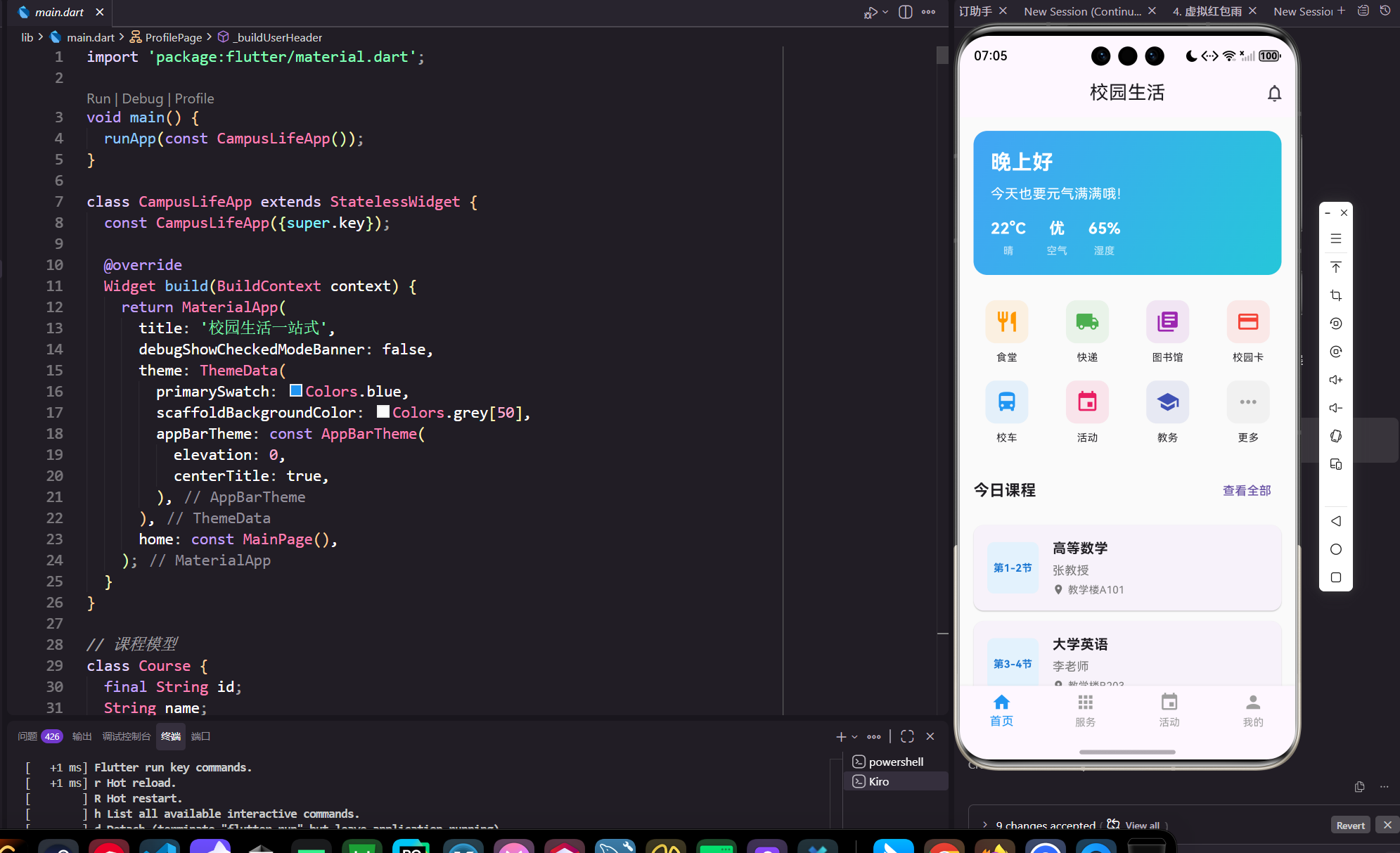
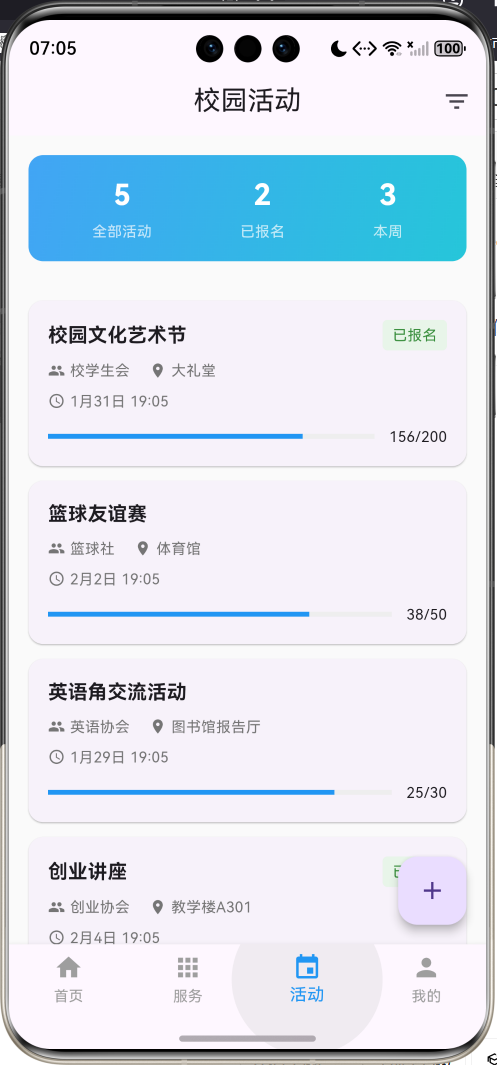
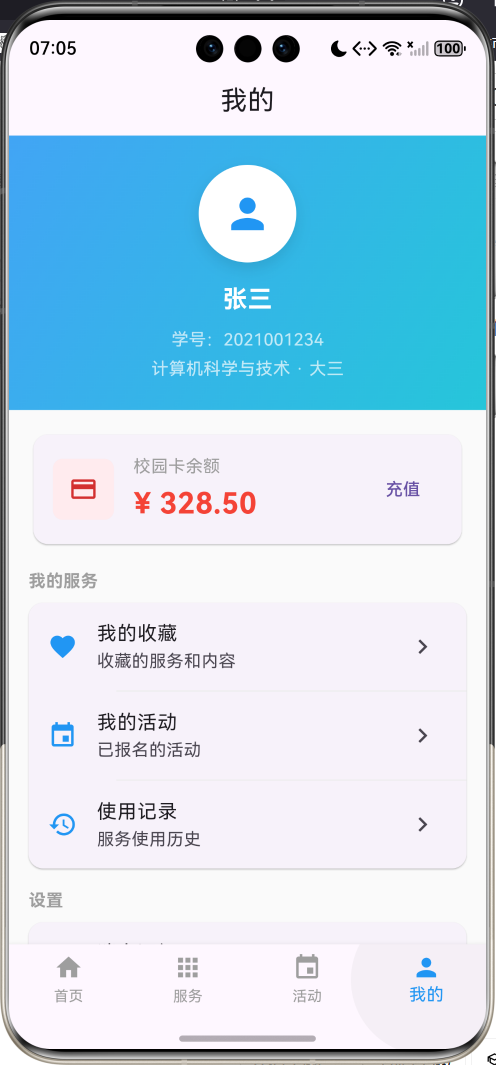
核心功能特性
- 课程表管理:查看课程安排、教室位置、考试时间,支持课程提醒
- 食堂服务:实时查看食堂菜单、价格、营业时间,支持在线订餐
- 图书馆服务:图书检索、借阅记录、座位预约、开馆时间查询
- 快递服务:快递查询、取件提醒、代取服务、快递柜位置
- 校园卡管理:余额查询、消费记录、充值缴费、挂失补办
- 社团活动:活动发布、报名参与、社团管理、活动签到
- 校园资讯:校园新闻、通知公告、失物招领、二手交易
- 生活服务:天气查询、校车时刻、教务系统、成绩查询
- 个人中心:个人信息、设置管理、消息通知、意见反馈
应用价值
- 便捷高效:一站式服务,减少切换应用的麻烦
- 信息集成:整合校园各类信息,实时更新
- 智能提醒:课程提醒、快递提醒、活动提醒
- 社交互动:社团活动、二手交易、失物招领
- 数据分析:消费统计、学习分析、生活规律
开发环境配置
系统要求
开发本应用需要满足以下环境要求:
- 操作系统:Windows 10/11、macOS 10.14+、或 Ubuntu 18.04+
- Flutter SDK:3.0.0 或更高版本
- Dart SDK:2.17.0 或更高版本
- 开发工具:Android Studio、VS Code 或 IntelliJ IDEA
- 设备要求:Android 5.0+ 或 iOS 11.0+
Flutter环境搭建
1. 安装Flutter SDK
# Windows
# 下载flutter_windows_3.x.x-stable.zip并解压

# macOS
curl -O https://storage.googleapis.com/flutter_infra_release/releases/stable/macos/flutter_macos_3.x.x-stable.zip
unzip flutter_macos_3.x.x-stable.zip

# Linux
wget https://storage.googleapis.com/flutter_infra_release/releases/stable/linux/flutter_linux_3.x.x-stable.tar.xz
tar xf flutter_linux_3.x.x-stable.tar.xz
2. 配置环境变量
# Windows (系统环境变量)
C:\flutter\bin

# macOS/Linux (添加到~/.bashrc或~/.zshrc)
export PATH="$PATH:/path/to/flutter/bin"
3. 验证安装
flutter doctor
项目初始化
1. 创建项目
flutter create campus_life
cd campus_life
2. 配置依赖
编辑pubspec.yaml文件:
name: campus_life
description: 校园生活一站式服务应用

publish_to: 'none'

version: 1.0.0+1

environment:
  sdk: '>=3.0.0 <4.0.0'

dependencies:
  flutter:
    sdk: flutter
  cupertino_icons: ^1.0.2

dev_dependencies:
  flutter_test:
    sdk: flutter
  flutter_lints: ^2.0.0

flutter:
  uses-material-design: true
3. 安装依赖
flutter pub get
核心数据模型设计
Course 课程模型
课程模型用于管理学生的课程信息:
class Course {
  final String id;              // 课程唯一标识
  String name;                  // 课程名称
  String teacher;               // 授课教师
  String classroom;             // 教室位置
  int weekday;                  // 星期几(1-7)
  int startSection;             // 开始节次
  int endSection;               // 结束节次
  List<int> weeks;              // 上课周次
  String courseCode;            // 课程代码
  double credit;                // 学分

  Course({
    required this.id,
    required this.name,
    required this.teacher,
    required this.classroom,
    required this.weekday,
    required this.startSection,
    required this.endSection,
    required this.weeks,
    required this.courseCode,
    required this.credit,
  });

  // 计算属性:课程时间段
  String get timeSlot {
    return '第$startSection-$endSection节';
  }

  // 计算属性:是否在指定周上课
  bool isInWeek(int week) {
    return weeks.contains(week);
  }

  // JSON序列化
  Map<String, dynamic> toJson() => {
        'id': id,
        'name': name,
        'teacher': teacher,
        'classroom': classroom,
        'weekday': weekday,
        'startSection': startSection,
        'endSection': endSection,
        'weeks': weeks,
        'courseCode': courseCode,
        'credit': credit,
      };

  // JSON反序列化
  factory Course.fromJson(Map<String, dynamic> json) => Course(
        id: json['id'],
        name: json['name'],
        teacher: json['teacher'],
        classroom: json['classroom'],
        weekday: json['weekday'],
        startSection: json['startSection'],
        endSection: json['endSection'],
        weeks: List<int>.from(json['weeks']),
        courseCode: json['courseCode'],
        credit: json['credit'],
      );
}
Canteen 食堂模型
食堂模型用于管理食堂信息和菜品:
class Canteen {
  final String id;              // 食堂唯一标识
  String name;                  // 食堂名称
  String location;              // 位置
  String openTime;              // 营业时间
  int floor;                    // 楼层
  List<Dish> dishes;            // 菜品列表
  double rating;                // 评分
  bool isOpen;                  // 是否营业

  Canteen({
    required this.id,
    required this.name,
    required this.location,
    required this.openTime,
    required this.floor,
    required this.dishes,
    this.rating = 0.0,
    this.isOpen = true,
  });

  // 计算属性:菜品数量
  int get dishCount => dishes.length;

  // 计算属性:价格区间
  String get priceRange {
    if (dishes.isEmpty) return '暂无菜品';
    final prices = dishes.map((d) => d.price).toList();
    final min = prices.reduce((a, b) => a < b ? a : b);
    final max = prices.reduce((a, b) => a > b ? a : b);
    return '¥${min.toStringAsFixed(0)}-¥${max.toStringAsFixed(0)}';
  }
}

class Dish {
  final String id;              // 菜品唯一标识
  String name;                  // 菜品名称
  double price;                 // 价格
  String category;              // 分类
  List<String> tags;            // 标签
  bool isRecommended;           // 是否推荐

  Dish({
    required this.id,
    required this.name,
    required this.price,
    required this.category,
    required this.tags,
    this.isRecommended = false,
  });
}
Express 快递模型
快递模型用于管理快递信息:
class Express {
  final String id;              // 快递唯一标识
  String trackingNumber;        // 快递单号
  String company;               // 快递公司
  String location;              // 取件地点
  String status;                // 状态
  DateTime arrivalTime;         // 到达时间
  DateTime? pickupTime;         // 取件时间
  String recipient;             // 收件人
  String phone;                 // 联系电话

  Express({
    required this.id,
    required this.trackingNumber,
    required this.company,
    required this.location,
    required this.status,
    required this.arrivalTime,
    this.pickupTime,
    required this.recipient,
    required this.phone,
  });

  // 计算属性:是否已取件
  bool get isPicked => pickupTime != null;

  // 计算属性:等待天数
  int get waitingDays {
    if (isPicked) return 0;
    return DateTime.now().difference(arrivalTime).inDays;
  }

  // 计算属性:状态颜色
  Color get statusColor {
    switch (status) {
      case '待取件':
        return Colors.orange;
      case '已取件':
        return Colors.green;
      case '超时':
        return Colors.red;
      default:
        return Colors.grey;
    }
  }
}
Activity 活动模型
活动模型用于管理社团活动:
class Activity {
  final String id;              // 活动唯一标识
  String title;                 // 活动标题
  String organizer;             // 主办方
  String location;              // 活动地点
  DateTime startTime;           // 开始时间
  DateTime endTime;             // 结束时间
  String description;           // 活动描述
  int maxParticipants;          // 最大参与人数
  int currentParticipants;      // 当前参与人数
  List<String> tags;            // 活动标签
  bool isRegistered;            // 是否已报名

  Activity({
    required this.id,
    required this.title,
    required this.organizer,
    required this.location,
    required this.startTime,
    required this.endTime,
    required this.description,
    required this.maxParticipants,
    this.currentParticipants = 0,
    required this.tags,
    this.isRegistered = false,
  });

  // 计算属性:是否已满员
  bool get isFull => currentParticipants >= maxParticipants;

  // 计算属性:剩余名额
  int get remainingSlots => maxParticipants - currentParticipants;

  // 计算属性:报名进度
  double get registrationProgress => currentParticipants / maxParticipants;

  // 计算属性:活动状态
  String get activityStatus {
    final now = DateTime.now();
    if (now.isBefore(startTime)) {
      return '未开始';
    } else if (now.isAfter(endTime)) {
      return '已结束';
    } else {
      return '进行中';
    }
  }
}
CampusCard 校园卡模型
校园卡模型用于管理校园卡信息:
class CampusCard {
  final String id;              // 卡号
  String studentName;           // 学生姓名
  String studentId;             // 学号
  double balance;               // 余额
  List<Transaction> transactions; // 消费记录
  DateTime lastUpdateTime;      // 最后更新时间

  CampusCard({
    required this.id,
    required this.studentName,
    required this.studentId,
    required this.balance,
    required this.transactions,
    required this.lastUpdateTime,
  });

  // 计算属性:今日消费
  double get todayExpense {
    final today = DateTime.now();
    return transactions
        .where((t) =>
            t.time.year == today.year &&
            t.time.month == today.month &&
            t.time.day == today.day)
        .fold(0.0, (sum, t) => sum + t.amount);
  }

  // 计算属性:本月消费
  double get monthExpense {
    final now = DateTime.now();
    return transactions
        .where((t) => t.time.year == now.year && t.time.month == now.month)
        .fold(0.0, (sum, t) => sum + t.amount);
  }
}

class Transaction {
  final String id;              // 交易唯一标识
  String location;              // 消费地点
  double amount;                // 消费金额
  DateTime time;                // 消费时间
  String type;                  // 消费类型

  Transaction({
    required this.id,
    required this.location,
    required this.amount,
    required this.time,
    required this.type,
  });
}
应用架构设计
整体架构
应用采用底部导航栏 + 多页面的架构设计:
MainPage (主页面)
├── HomePage (首页)
│   ├── 快捷服务入口
│   ├── 课程提醒
│   ├── 校园资讯
│   └── 常用功能
├── ServicesPage (服务页)
│   ├── 课程表
│   ├── 食堂服务
│   ├── 图书馆
│   ├── 快递查询
│   ├── 校园卡
│   └── 更多服务
├── ActivityPage (活动页)
│   ├── 活动列表
│   ├── 我的活动
│   └── 活动详情
└── ProfilePage (我的)
    ├── 个人信息
    ├── 我的服务
    ├── 设置中心
    └── 关于应用
页面层级结构
-
首页(HomePage)
- 欢迎卡片:显示问候语和天气信息
- 快捷服务:常用功能快速入口
- 今日课程:显示当天课程安排
- 校园资讯:最新通知和新闻
-
服务页(ServicesPage)
- 服务分类:按类型分组展示服务
- 服务卡片:图标、名称、描述
- 搜索功能:快速查找服务
- 常用服务:收藏的服务
-
活动页(ActivityPage)
- 活动列表:展示所有活动
- 筛选功能:按时间、类型筛选
- 活动详情:查看活动详细信息
- 报名管理:报名、取消报名
-
我的(ProfilePage)
- 个人信息:头像、姓名、学号
- 我的服务:常用服务快捷入口
- 设置中心:应用设置和偏好
- 关于应用:版本信息和帮助
状态管理
应用使用StatefulWidget进行状态管理:
class _HomePageState extends State<HomePage> {
List<Course> _courses = []; // 课程列表
List<Express> _expresses = []; // 快递列表
List<Activity> _activities = []; // 活动列表
CampusCard? _campusCard; // 校园卡信息
void initState() {
super.initState();
_loadData(); // 加载数据
}
}
用户界面实现
首页设计
首页是用户最常访问的页面,包含欢迎卡片、快捷服务、今日课程、待取快递和校园资讯等模块。
欢迎卡片
Widget _buildWelcomeCard() {
  final hour = DateTime.now().hour;
  String greeting = '早上好';
  if (hour >= 12 && hour < 18) {
    greeting = '下午好';
  } else if (hour >= 18) {
    greeting = '晚上好';
  }

  return Container(
    margin: const EdgeInsets.all(16),
    padding: const EdgeInsets.all(20),
    decoration: BoxDecoration(
      gradient: LinearGradient(
        colors: [Colors.blue.shade400, Colors.cyan.shade400],
        begin: Alignment.topLeft,
        end: Alignment.bottomRight,
      ),
      borderRadius: BorderRadius.circular(16),
    ),
    child: Column(
      crossAxisAlignment: CrossAxisAlignment.start,
      children: [
        Text(
          greeting,
          style: const TextStyle(
            color: Colors.white,
            fontSize: 24,
            fontWeight: FontWeight.bold,
          ),
        ),
        const SizedBox(height: 8),
        const Text(
          '今天也要元气满满哦!',
          style: TextStyle(color: Colors.white, fontSize: 16),
        ),
        const SizedBox(height: 16),
        Row(
          children: [
            _buildWeatherInfo('晴', '22°C'),
            const SizedBox(width: 24),
            _buildWeatherInfo('空气', '优'),
            const SizedBox(width: 24),
            _buildWeatherInfo('湿度', '65%'),
          ],
        ),
      ],
    ),
  );
}
快捷服务
Widget _buildQuickServices() {
  final services = [
    {'icon': Icons.restaurant, 'label': '食堂', 'color': Colors.orange},
    {'icon': Icons.local_shipping, 'label': '快递', 'color': Colors.green},
    {'icon': Icons.library_books, 'label': '图书馆', 'color': Colors.purple},
    {'icon': Icons.credit_card, 'label': '校园卡', 'color': Colors.red},
    // 更多服务...
  ];

  return GridView.builder(
    shrinkWrap: true,
    physics: const NeverScrollableScrollPhysics(),
    gridDelegate: const SliverGridDelegateWithFixedCrossAxisCount(
      crossAxisCount: 4,
      mainAxisSpacing: 16,
      crossAxisSpacing: 16,
      childAspectRatio: 1,
    ),
    itemCount: services.length,
    itemBuilder: (context, index) {
      final service = services[index];
      return GestureDetector(
        onTap: () {
          // 处理点击事件
        },
        child: Column(
          mainAxisAlignment: MainAxisAlignment.center,
          children: [
            Container(
              width: 50,
              height: 50,
              decoration: BoxDecoration(
                color: (service['color'] as Color).withOpacity(0.1),
                borderRadius: BorderRadius.circular(12),
              ),
              child: Icon(
                service['icon'] as IconData,
                color: service['color'] as Color,
                size: 28,
              ),
            ),
            const SizedBox(height: 8),
            Text(
              service['label'] as String,
              style: const TextStyle(fontSize: 12),
            ),
          ],
        ),
      );
    },
  );
}
服务页设计
服务页展示所有校园服务,采用网格布局:
Widget _buildServiceCard(ServiceItem service) {
  return Card(
    child: InkWell(
      onTap: () {
        // 处理点击事件
      },
      borderRadius: BorderRadius.circular(12),
      child: Padding(
        padding: const EdgeInsets.all(12),
        child: Column(
          mainAxisAlignment: MainAxisAlignment.center,
          children: [
            Container(
              width: 50,
              height: 50,
              decoration: BoxDecoration(
                color: service.color.withOpacity(0.1),
                borderRadius: BorderRadius.circular(12),
              ),
              child: Icon(
                service.icon,
                color: service.color,
                size: 28,
              ),
            ),
            const SizedBox(height: 12),
            Text(
              service.name,
              style: const TextStyle(
                fontSize: 14,
                fontWeight: FontWeight.bold,
              ),
              textAlign: TextAlign.center,
            ),
            const SizedBox(height: 4),
            Text(
              service.description,
              style: TextStyle(
                fontSize: 10,
                color: Colors.grey[600],
              ),
              textAlign: TextAlign.center,
              maxLines: 2,
              overflow: TextOverflow.ellipsis,
            ),
          ],
        ),
      ),
    ),
  );
}
活动页设计
活动页展示校园活动,支持报名和查看详情:
Widget _buildActivityCard(Activity activity) {
  return Card(
    margin: const EdgeInsets.only(bottom: 12),
    child: InkWell(
      onTap: () => _showActivityDetail(activity),
      borderRadius: BorderRadius.circular(12),
      child: Padding(
        padding: const EdgeInsets.all(16),
        child: Column(
          crossAxisAlignment: CrossAxisAlignment.start,
          children: [
            Row(
              children: [
                Expanded(
                  child: Text(
                    activity.title,
                    style: const TextStyle(
                      fontSize: 16,
                      fontWeight: FontWeight.bold,
                    ),
                  ),
                ),
                if (activity.isRegistered)
                  Container(
                    padding: const EdgeInsets.symmetric(
                      horizontal: 8,
                      vertical: 4,
                    ),
                    decoration: BoxDecoration(
                      color: Colors.green[50],
                      borderRadius: BorderRadius.circular(4),
                    ),
                    child: Text(
                      '已报名',
                      style: TextStyle(
                        fontSize: 12,
                        color: Colors.green[700],
                      ),
                    ),
                  ),
              ],
            ),
            const SizedBox(height: 8),
            // 活动信息...
            const SizedBox(height: 12),
            Row(
              children: [
                Expanded(
                  child: LinearProgressIndicator(
                    value: activity.currentParticipants /
                        activity.maxParticipants,
                    backgroundColor: Colors.grey[200],
                    valueColor: AlwaysStoppedAnimation<Color>(
                      activity.isFull ? Colors.red : Colors.blue,
                    ),
                  ),
                ),
                const SizedBox(width: 12),
                Text(
                  '${activity.currentParticipants}/${activity.maxParticipants}',
                  style: const TextStyle(fontSize: 12),
                ),
              ],
            ),
          ],
        ),
      ),
    ),
  );
}
核心功能实现
课程提醒功能
根据当前时间显示今日课程:
void _loadTodayCourses() {
  final now = DateTime.now();
  final weekday = now.weekday;

  _todayCourses = _allCourses
      .where((course) => course.weekday == weekday)
      .toList();

  setState(() {});
}
快递提醒功能
显示待取快递并计算等待天数:
int get waitingDays {
  return DateTime.now().difference(arrivalTime).inDays;
}
活动报名功能
处理活动报名逻辑:
void _registerActivity(Activity activity) {
  if (activity.isFull) {
    ScaffoldMessenger.of(context).showSnackBar(
      const SnackBar(content: Text('活动已满员')),
    );
    return;
  }

  setState(() {
    activity.isRegistered = true;
    activity.currentParticipants++;
  });

  ScaffoldMessenger.of(context).showSnackBar(
    const SnackBar(content: Text('报名成功')),
  );
}
性能优化
列表优化
使用ListView.builder实现懒加载:
ListView.builder(
  itemCount: items.length,
  itemBuilder: (context, index) {
    return _buildItemCard(items[index]);
  },
)
状态管理优化
合理使用setState,避免不必要的重建:
void _updateData() {
  setState(() {
    // 只更新需要变化的数据
  });
}
最佳实践总结
代码规范
- 命名规范:使用有意义的变量名和函数名
- 注释规范:为复杂逻辑添加注释
- 文件组织:按功能模块组织代码
用户体验
- 即时反馈:操作后立即给予反馈
- 加载状态:显示加载指示器
- 错误处理:友好的错误提示
安全建议
- 数据验证:验证用户输入
- 权限管理:合理申请权限
- 隐私保护:保护用户隐私
功能扩展建议
短期扩展
- 数据持久化:使用SharedPreferences或SQLite
- 推送通知:课程提醒、快递提醒
- 地图导航:校园地图和导航
- 在线支付:校园卡充值
中期扩展
- 社交功能:好友系统、动态分享
- 智能推荐:个性化服务推荐
- 数据分析:消费分析、学习分析
- 多语言支持:国际化
长期扩展
- AI助手:智能问答、语音助手
- AR导航:AR校园导览
- 区块链:学分认证、成绩存证
- 物联网:智能设备控制
结语
校园生活一站式应用是一个集成多种校园服务的综合性平台,通过Flutter技术实现了跨平台开发,为学生提供了便捷的校园生活体验。本项目展示了Flutter的强大功能和移动应用开发的最佳实践。
应用的核心价值在于:
- 便捷性:一个APP解决所有校园需求
- 实用性:解决学生日常生活痛点
- 智能化:提供智能提醒和推荐
- 扩展性:清晰的架构便于功能扩展
希望这个项目能够帮助你:
- 掌握Flutter跨平台开发技术
- 理解移动应用设计原则
- 学习最佳实践和优化技巧
- 提升应用开发能力
让我们一起用技术改善校园生活,用代码创造价值!
欢迎加入开源鸿蒙跨平台社区:https://openharmonycrossplatform.csdn.net

作为“人工智能6S店”的官方数字引擎,为AI开发者与企业提供一个覆盖软硬件全栈、一站式门户。
更多推荐


 20
20 0
0- 0



 已为社区贡献31条内容

所有评论(0)