
Flutter 框架跨平台鸿蒙开发 - 校园打印店打卡应用开发教程
pending, // 等待中printing, // 打印中completed, // 已完成failed, // 失败cancelled, // 已取消pending, // 处理中completed, // 已完成failed, // 失败refunded, // 已退款qrCode, // 二维码manual, // 手动location, // 位置bronze, // 青铜silver
Flutter校园打印店打卡应用开发教程
项目概述
本教程将带你开发一个功能完整的Flutter校园打印店打卡应用。这款应用专为校园打印店设计,提供学生打卡签到、打印任务管理、消费记录追踪和店铺运营统计功能,让打印店管理更加智能化和便捷化。
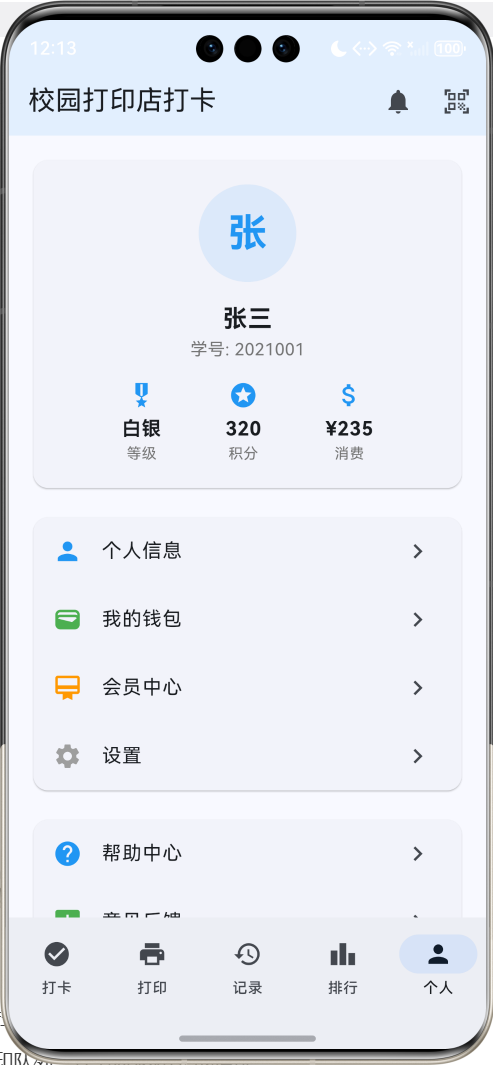
运行效果图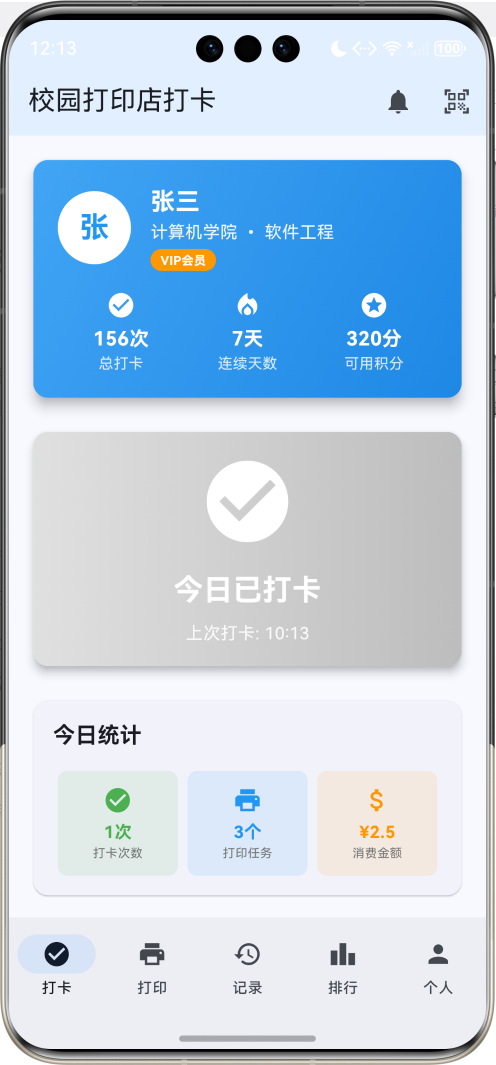
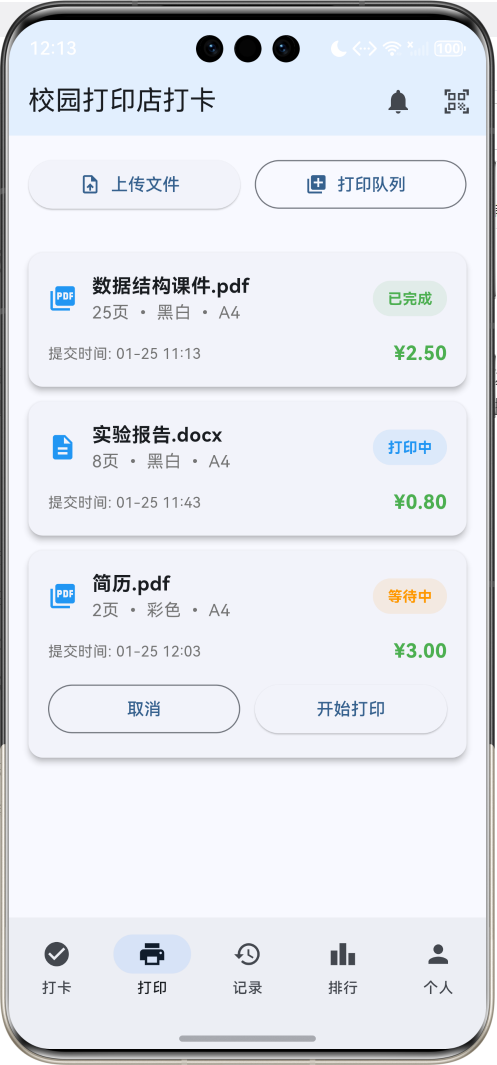
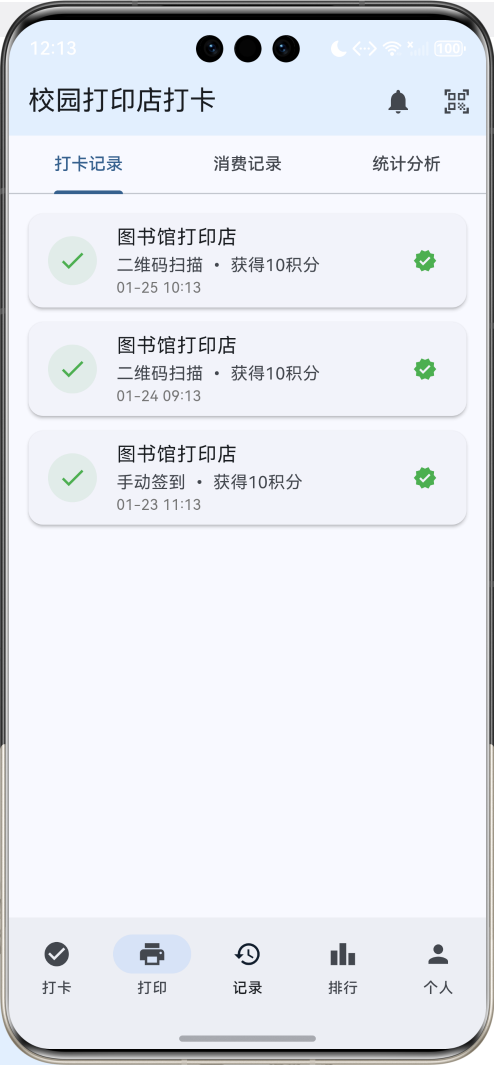
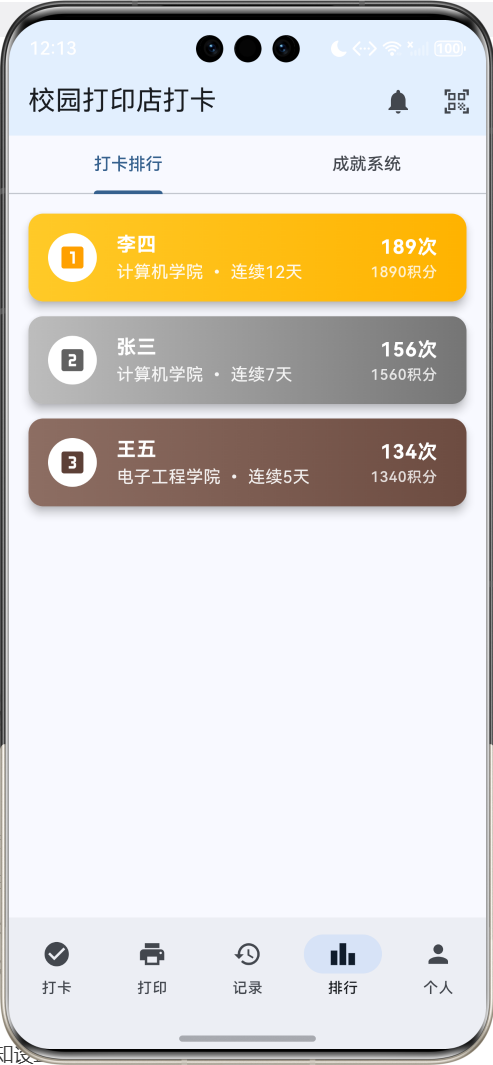
应用特色
- 智能打卡系统:支持二维码扫码打卡、手动签到等多种方式
- 打印任务管理:实时查看打印队列、任务状态和完成情况
- 消费记录追踪:详细记录每次打印的费用、页数和时间
- 会员积分系统:打卡获得积分,积分可兑换打印优惠
- 店铺运营统计:客流量分析、收入统计、热门时段分析
- 个性化设置:主题颜色、通知设置、打卡提醒等可自定义
- 社交功能:打卡排行榜、成就系统、好友互动
技术栈
- 框架:Flutter 3.x
- 语言:Dart
- UI组件:Material Design 3
- 状态管理:StatefulWidget
- 动画:AnimationController + Tween
- 数据存储:内存存储(可扩展为本地数据库)
项目结构设计
核心数据模型
1. 用户模型(User)
class User {
  final String id;              // 唯一标识
  final String studentId;       // 学号
  final String name;            // 姓名
  final String phone;           // 手机号
  final String email;           // 邮箱
  final String avatar;          // 头像
  final String college;         // 学院
  final String major;           // 专业
  final int grade;              // 年级
  final DateTime registerDate;  // 注册日期
  int totalCheckIns;           // 总打卡次数
  int currentStreak;           // 连续打卡天数
  int maxStreak;               // 最长连续打卡
  int totalPoints;             // 总积分
  int availablePoints;         // 可用积分
  double totalSpent;           // 总消费金额
  bool isVip;                  // 是否VIP会员
  DateTime? lastCheckIn;       // 最后打卡时间
}
2. 打卡记录模型(CheckInRecord)
class CheckInRecord {
  final String id;
  final String userId;
  final DateTime checkInTime;
  final String location;
  final String method;          // 打卡方式:扫码、手动等
  final int pointsEarned;       // 获得积分
  final String notes;           // 备注
  final bool isValid;           // 是否有效
  final Map<String, dynamic> metadata; // 额外信息
}
3. 打印任务模型(PrintJob)
class PrintJob {
  final String id;
  final String userId;
  final String fileName;
  final String fileType;
  final int pageCount;
  final String printType;       // 黑白、彩色
  final String paperSize;       // A4、A3等
  final int copies;             // 份数
  final double price;           // 价格
  final DateTime submitTime;
  final DateTime? startTime;
  final DateTime? completeTime;
  final PrintStatus status;
  final String notes;
  final List<String> tags;
}
4. 消费记录模型(Transaction)
class Transaction {
  final String id;
  final String userId;
  final String type;            // 打印、充值、积分兑换等
  final double amount;
  final int pointsUsed;
  final int pointsEarned;
  final DateTime timestamp;
  final String description;
  final String relatedJobId;    // 关联的打印任务ID
  final TransactionStatus status;
}
5. 店铺统计模型(ShopStats)
class ShopStats {
  final DateTime date;
  final int totalCheckIns;
  final int uniqueUsers;
  final int totalPrintJobs;
  final double totalRevenue;
  final Map<String, int> hourlyCheckIns;
  final Map<String, int> printTypeStats;
  final List<User> topUsers;
  final double averageJobPrice;
  final int newUsers;
}
枚举定义
enum PrintStatus {
  pending,      // 等待中
  printing,     // 打印中
  completed,    // 已完成
  failed,       // 失败
  cancelled,    // 已取消
}

enum TransactionStatus {
  pending,      // 处理中
  completed,    // 已完成
  failed,       // 失败
  refunded,     // 已退款
}

enum CheckInMethod {
  qrCode,       // 二维码
  manual,       // 手动
  nfc,          // NFC
  location,     // 位置
}

enum UserLevel {
  bronze,       // 青铜
  silver,       // 白银
  gold,         // 黄金
  platinum,     // 铂金
  diamond,      // 钻石
}
页面架构
应用采用底部导航栏设计,包含五个主要页面:
- 打卡页面:扫码打卡、签到记录、积分展示
- 打印页面:上传文件、查看打印队列、任务管理
- 记录页面:消费记录、打卡历史、统计分析
- 排行页面:打卡排行榜、成就系统、好友互动
- 个人页面:个人信息、设置、会员中心
详细实现步骤
第一步:项目初始化
创建新的Flutter项目:
flutter create campus_print_shop
cd campus_print_shop
第二步:主应用结构
class MyApp extends StatelessWidget {
const MyApp({super.key});
Widget build(BuildContext context) {
return MaterialApp(
title: '校园打印店打卡',
theme: ThemeData(
colorScheme: ColorScheme.fromSeed(seedColor: Colors.blue),
useMaterial3: true,
),
home: const PrintShopHomePage(),
);
}
}
第三步:数据初始化
创建示例用户和打卡数据:
void _initializeData() {
  _currentUser = User(
    id: '1',
    studentId: '2021001',
    name: '张三',
    phone: '13800138001',
    email: 'zhangsan@university.edu.cn',
    avatar: '',
    college: '计算机学院',
    major: '软件工程',
    grade: 3,
    registerDate: DateTime.now().subtract(const Duration(days: 365)),
    totalCheckIns: 156,
    currentStreak: 7,
    maxStreak: 23,
    totalPoints: 1560,
    availablePoints: 320,
    totalSpent: 234.50,
    isVip: true,
    lastCheckIn: DateTime.now().subtract(const Duration(hours: 2)),
  );

  _checkInRecords = [
    CheckInRecord(
      id: '1',
      userId: '1',
      checkInTime: DateTime.now().subtract(const Duration(hours: 2)),
      location: '图书馆打印店',
      method: '二维码扫描',
      pointsEarned: 10,
      notes: '连续打卡第7天',
      isValid: true,
      metadata: {'streak': 7, 'bonus': true},
    ),
    // 更多打卡记录...
  ];
}
第四步:打卡页面实现
打卡主界面
Widget _buildCheckInPage() {
  return SingleChildScrollView(
    padding: const EdgeInsets.all(16),
    child: Column(
      children: [
        // 用户信息卡片
        _buildUserInfoCard(),

        const SizedBox(height: 20),

        // 打卡按钮
        _buildCheckInButton(),

        const SizedBox(height: 20),

        // 今日统计
        _buildTodayStats(),

        const SizedBox(height: 20),

        // 最近打卡记录
        _buildRecentCheckIns(),
      ],
    ),
  );
}

Widget _buildUserInfoCard() {
  return Card(
    elevation: 8,
    child: Container(
      padding: const EdgeInsets.all(20),
      decoration: BoxDecoration(
        borderRadius: BorderRadius.circular(12),
        gradient: LinearGradient(
          colors: [Colors.blue.shade400, Colors.blue.shade600],
          begin: Alignment.topLeft,
          end: Alignment.bottomRight,
        ),
      ),
      child: Column(
        children: [
          Row(
            children: [
              CircleAvatar(
                radius: 30,
                backgroundColor: Colors.white,
                child: Text(
                  _currentUser!.name.substring(0, 1),
                  style: const TextStyle(
                    fontSize: 24,
                    fontWeight: FontWeight.bold,
                    color: Colors.blue,
                  ),
                ),
              ),
              const SizedBox(width: 16),
              Expanded(
                child: Column(
                  crossAxisAlignment: CrossAxisAlignment.start,
                  children: [
                    Text(
                      _currentUser!.name,
                      style: const TextStyle(
                        fontSize: 20,
                        fontWeight: FontWeight.bold,
                        color: Colors.white,
                      ),
                    ),
                    Text(
                      '${_currentUser!.college} • ${_currentUser!.major}',
                      style: TextStyle(
                        fontSize: 14,
                        color: Colors.white.withOpacity(0.9),
                      ),
                    ),
                    const SizedBox(height: 4),
                    Container(
                      padding: const EdgeInsets.symmetric(horizontal: 8, vertical: 2),
                      decoration: BoxDecoration(
                        color: Colors.orange,
                        borderRadius: BorderRadius.circular(10),
                      ),
                      child: Text(
                        _currentUser!.isVip ? 'VIP会员' : '普通会员',
                        style: const TextStyle(
                          fontSize: 10,
                          color: Colors.white,
                          fontWeight: FontWeight.bold,
                        ),
                      ),
                    ),
                  ],
                ),
              ),
            ],
          ),

          const SizedBox(height: 16),

          // 统计信息
          Row(
            children: [
              Expanded(child: _buildStatItem('总打卡', '${_currentUser!.totalCheckIns}次', Icons.check_circle)),
              Expanded(child: _buildStatItem('连续天数', '${_currentUser!.currentStreak}天', Icons.local_fire_department)),
              Expanded(child: _buildStatItem('可用积分', '${_currentUser!.availablePoints}分', Icons.stars)),
            ],
          ),
        ],
      ),
    ),
  );
}

Widget _buildStatItem(String label, String value, IconData icon) {
  return Column(
    children: [
      Icon(icon, color: Colors.white, size: 24),
      const SizedBox(height: 4),
      Text(value, style: const TextStyle(fontSize: 16, fontWeight: FontWeight.bold, color: Colors.white)),
      Text(label, style: TextStyle(fontSize: 12, color: Colors.white.withOpacity(0.8))),
    ],
  );
}
打卡按钮组件
Widget _buildCheckInButton() {
  final canCheckIn = _canCheckInToday();
  final lastCheckIn = _currentUser?.lastCheckIn;

  return Container(
    width: double.infinity,
    height: 200,
    child: Card(
      elevation: 6,
      child: InkWell(
        onTap: canCheckIn ? _performCheckIn : null,
        borderRadius: BorderRadius.circular(12),
        child: Container(
          decoration: BoxDecoration(
            borderRadius: BorderRadius.circular(12),
            gradient: canCheckIn
                ? LinearGradient(
                    colors: [Colors.green.shade400, Colors.green.shade600],
                    begin: Alignment.topCenter,
                    end: Alignment.bottomCenter,
                  )
                : LinearGradient(
                    colors: [Colors.grey.shade300, Colors.grey.shade400],
                  ),
          ),
          child: Column(
            mainAxisAlignment: MainAxisAlignment.center,
            children: [
              AnimatedBuilder(
                animation: _pulseAnimation,
                builder: (context, child) {
                  return Transform.scale(
                    scale: canCheckIn ? 1.0 + (_pulseAnimation.value * 0.1) : 1.0,
                    child: Icon(
                      canCheckIn ? Icons.qr_code_scanner : Icons.check_circle,
                      size: 80,
                      color: Colors.white,
                    ),
                  );
                },
              ),
              const SizedBox(height: 16),
              Text(
                canCheckIn ? '点击打卡' : '今日已打卡',
                style: const TextStyle(
                  fontSize: 24,
                  fontWeight: FontWeight.bold,
                  color: Colors.white,
                ),
              ),
              const SizedBox(height: 8),
              if (lastCheckIn != null)
                Text(
                  '上次打卡: ${_formatTime(lastCheckIn)}',
                  style: TextStyle(
                    fontSize: 14,
                    color: Colors.white.withOpacity(0.9),
                  ),
                ),
            ],
          ),
        ),
      ),
    ),
  );
}
第五步:打印任务管理
打印页面实现
Widget _buildPrintPage() {
  return Column(
    children: [
      // 快速操作栏
      Container(
        padding: const EdgeInsets.all(16),
        child: Row(
          children: [
            Expanded(
              child: ElevatedButton.icon(
                onPressed: _uploadFile,
                icon: const Icon(Icons.upload_file),
                label: const Text('上传文件'),
              ),
            ),
            const SizedBox(width: 12),
            Expanded(
              child: OutlinedButton.icon(
                onPressed: _showPrintQueue,
                icon: const Icon(Icons.queue),
                label: const Text('打印队列'),
              ),
            ),
          ],
        ),
      ),

      // 打印任务列表
      Expanded(
        child: _printJobs.isEmpty
            ? _buildEmptyState('暂无打印任务')
            : ListView.builder(
                padding: const EdgeInsets.all(16),
                itemCount: _printJobs.length,
                itemBuilder: (context, index) => _buildPrintJobCard(_printJobs[index]),
              ),
      ),
    ],
  );
}

Widget _buildPrintJobCard(PrintJob job) {
  final statusColor = _getPrintStatusColor(job.status);
  final statusText = _getPrintStatusText(job.status);

  return Card(
    elevation: 4,
    margin: const EdgeInsets.only(bottom: 12),
    child: Padding(
      padding: const EdgeInsets.all(16),
      child: Column(
        crossAxisAlignment: CrossAxisAlignment.start,
        children: [
          Row(
            children: [
              Icon(_getFileTypeIcon(job.fileType), size: 24, color: Colors.blue),
              const SizedBox(width: 12),
              Expanded(
                child: Column(
                  crossAxisAlignment: CrossAxisAlignment.start,
                  children: [
                    Text(
                      job.fileName,
                      style: const TextStyle(fontSize: 16, fontWeight: FontWeight.bold),
                      maxLines: 1,
                      overflow: TextOverflow.ellipsis,
                    ),
                    Text(
                      '${job.pageCount}页 • ${job.printType} • ${job.paperSize}',
                      style: TextStyle(color: Colors.grey.shade600, fontSize: 14),
                    ),
                  ],
                ),
              ),
              Container(
                padding: const EdgeInsets.symmetric(horizontal: 12, vertical: 6),
                decoration: BoxDecoration(
                  color: statusColor.withOpacity(0.1),
                  borderRadius: BorderRadius.circular(16),
                ),
                child: Text(
                  statusText,
                  style: TextStyle(color: statusColor, fontSize: 12, fontWeight: FontWeight.bold),
                ),
              ),
            ],
          ),

          const SizedBox(height: 12),

          Row(
            mainAxisAlignment: MainAxisAlignment.spaceBetween,
            children: [
              Text('提交时间: ${_formatDateTime(job.submitTime)}',
                   style: TextStyle(color: Colors.grey.shade600, fontSize: 12)),
              Text('¥${job.price.toStringAsFixed(2)}',
                   style: const TextStyle(fontSize: 16, fontWeight: FontWeight.bold, color: Colors.green)),
            ],
          ),

          if (job.status == PrintStatus.pending) ...[
            const SizedBox(height: 12),
            Row(
              children: [
                Expanded(
                  child: OutlinedButton(
                    onPressed: () => _cancelPrintJob(job),
                    child: const Text('取消'),
                  ),
                ),
                const SizedBox(width: 12),
                Expanded(
                  child: ElevatedButton(
                    onPressed: () => _startPrintJob(job),
                    child: const Text('开始打印'),
                  ),
                ),
              ],
            ),
          ],
        ],
      ),
    ),
  );
}
第六步:消费记录和统计
记录页面实现
Widget _buildRecordsPage() {
  return DefaultTabController(
    length: 3,
    child: Column(
      children: [
        const TabBar(
          tabs: [
            Tab(text: '打卡记录'),
            Tab(text: '消费记录'),
            Tab(text: '统计分析'),
          ],
        ),
        Expanded(
          child: TabBarView(
            children: [
              _buildCheckInRecords(),
              _buildTransactionRecords(),
              _buildStatistics(),
            ],
          ),
        ),
      ],
    ),
  );
}

Widget _buildCheckInRecords() {
  return ListView.builder(
    padding: const EdgeInsets.all(16),
    itemCount: _checkInRecords.length,
    itemBuilder: (context, index) {
      final record = _checkInRecords[index];
      return Card(
        elevation: 2,
        margin: const EdgeInsets.only(bottom: 12),
        child: ListTile(
          leading: CircleAvatar(
            backgroundColor: Colors.green.withOpacity(0.1),
            child: const Icon(Icons.check, color: Colors.green),
          ),
          title: Text(record.location),
          subtitle: Column(
            crossAxisAlignment: CrossAxisAlignment.start,
            children: [
              Text('${record.method} • 获得${record.pointsEarned}积分'),
              Text(_formatDateTime(record.checkInTime),
                   style: TextStyle(color: Colors.grey.shade600, fontSize: 12)),
            ],
          ),
          trailing: record.isValid
              ? const Icon(Icons.verified, color: Colors.green, size: 20)
              : const Icon(Icons.error, color: Colors.red, size: 20),
        ),
      );
    },
  );
}

Widget _buildStatistics() {
  return SingleChildScrollView(
    padding: const EdgeInsets.all(16),
    child: Column(
      children: [
        // 本月统计
        Card(
          child: Padding(
            padding: const EdgeInsets.all(16),
            child: Column(
              crossAxisAlignment: CrossAxisAlignment.start,
              children: [
                const Text('本月统计', style: TextStyle(fontSize: 18, fontWeight: FontWeight.bold)),
                const SizedBox(height: 16),
                Row(
                  children: [
                    Expanded(child: _buildStatCard('打卡次数', '23次', Icons.check_circle, Colors.green)),
                    const SizedBox(width: 12),
                    Expanded(child: _buildStatCard('打印任务', '15个', Icons.print, Colors.blue)),
                  ],
                ),
                const SizedBox(height: 12),
                Row(
                  children: [
                    Expanded(child: _buildStatCard('消费金额', '¥89.50', Icons.attach_money, Colors.orange)),
                    const SizedBox(width: 12),
                    Expanded(child: _buildStatCard('获得积分', '230分', Icons.stars, Colors.purple)),
                  ],
                ),
              ],
            ),
          ),
        ),

        const SizedBox(height: 16),

        // 打卡趋势图
        Card(
          child: Padding(
            padding: const EdgeInsets.all(16),
            child: Column(
              crossAxisAlignment: CrossAxisAlignment.start,
              children: [
                const Text('打卡趋势', style: TextStyle(fontSize: 18, fontWeight: FontWeight.bold)),
                const SizedBox(height: 16),
                Container(
                  height: 200,
                  child: _buildCheckInChart(),
                ),
              ],
            ),
          ),
        ),
      ],
    ),
  );
}

Widget _buildStatCard(String title, String value, IconData icon, Color color) {
  return Container(
    padding: const EdgeInsets.all(16),
    decoration: BoxDecoration(
      color: color.withOpacity(0.1),
      borderRadius: BorderRadius.circular(12),
    ),
    child: Column(
      children: [
        Icon(icon, color: color, size: 32),
        const SizedBox(height: 8),
        Text(value, style: TextStyle(fontSize: 18, fontWeight: FontWeight.bold, color: color)),
        Text(title, style: TextStyle(fontSize: 12, color: Colors.grey.shade600)),
      ],
    ),
  );
}
第七步:排行榜和成就系统
排行页面实现
Widget _buildRankingPage() {
  return DefaultTabController(
    length: 2,
    child: Column(
      children: [
        const TabBar(
          tabs: [
            Tab(text: '打卡排行'),
            Tab(text: '成就系统'),
          ],
        ),
        Expanded(
          child: TabBarView(
            children: [
              _buildCheckInRanking(),
              _buildAchievements(),
            ],
          ),
        ),
      ],
    ),
  );
}

Widget _buildCheckInRanking() {
  return ListView.builder(
    padding: const EdgeInsets.all(16),
    itemCount: _topUsers.length,
    itemBuilder: (context, index) {
      final user = _topUsers[index];
      final rank = index + 1;

      return Card(
        elevation: rank <= 3 ? 6 : 2,
        margin: const EdgeInsets.only(bottom: 12),
        child: Container(
          decoration: BoxDecoration(
            borderRadius: BorderRadius.circular(12),
            gradient: rank <= 3
                ? LinearGradient(
                    colors: _getRankGradient(rank),
                    begin: Alignment.centerLeft,
                    end: Alignment.centerRight,
                  )
                : null,
          ),
          child: ListTile(
            leading: CircleAvatar(
              backgroundColor: rank <= 3 ? Colors.white : Colors.blue.withOpacity(0.1),
              child: rank <= 3
                  ? Icon(_getRankIcon(rank), color: _getRankColor(rank))
                  : Text('$rank', style: const TextStyle(fontWeight: FontWeight.bold)),
            ),
            title: Text(
              user.name,
              style: TextStyle(
                fontWeight: FontWeight.bold,
                color: rank <= 3 ? Colors.white : null,
              ),
            ),
            subtitle: Text(
              '${user.college} • 连续${user.currentStreak}天',
              style: TextStyle(
                color: rank <= 3 ? Colors.white.withOpacity(0.9) : Colors.grey.shade600,
              ),
            ),
            trailing: Column(
              mainAxisAlignment: MainAxisAlignment.center,
              crossAxisAlignment: CrossAxisAlignment.end,
              children: [
                Text(
                  '${user.totalCheckIns}次',
                  style: TextStyle(
                    fontSize: 16,
                    fontWeight: FontWeight.bold,
                    color: rank <= 3 ? Colors.white : Colors.blue,
                  ),
                ),
                Text(
                  '${user.totalPoints}积分',
                  style: TextStyle(
                    fontSize: 12,
                    color: rank <= 3 ? Colors.white.withOpacity(0.8) : Colors.grey.shade600,
                  ),
                ),
              ],
            ),
          ),
        ),
      );
    },
  );
}

Widget _buildAchievements() {
  return GridView.builder(
    padding: const EdgeInsets.all(16),
    gridDelegate: const SliverGridDelegateWithFixedCrossAxisCount(
      crossAxisCount: 2,
      childAspectRatio: 1.2,
      crossAxisSpacing: 12,
      mainAxisSpacing: 12,
    ),
    itemCount: _achievements.length,
    itemBuilder: (context, index) {
      final achievement = _achievements[index];
      return Card(
        elevation: 4,
        child: Container(
          padding: const EdgeInsets.all(16),
          decoration: BoxDecoration(
            borderRadius: BorderRadius.circular(12),
            gradient: achievement.isUnlocked
                ? LinearGradient(
                    colors: [Colors.amber.shade300, Colors.amber.shade500],
                    begin: Alignment.topLeft,
                    end: Alignment.bottomRight,
                  )
                : null,
          ),
          child: Column(
            mainAxisAlignment: MainAxisAlignment.center,
            children: [
              Icon(
                achievement.icon,
                size: 40,
                color: achievement.isUnlocked ? Colors.white : Colors.grey,
              ),
              const SizedBox(height: 8),
              Text(
                achievement.title,
                style: TextStyle(
                  fontSize: 14,
                  fontWeight: FontWeight.bold,
                  color: achievement.isUnlocked ? Colors.white : Colors.black,
                ),
                textAlign: TextAlign.center,
              ),
              const SizedBox(height: 4),
              Text(
                achievement.description,
                style: TextStyle(
                  fontSize: 10,
                  color: achievement.isUnlocked ? Colors.white.withOpacity(0.9) : Colors.grey.shade600,
                ),
                textAlign: TextAlign.center,
                maxLines: 2,
                overflow: TextOverflow.ellipsis,
              ),
              if (!achievement.isUnlocked) ...[
                const SizedBox(height: 8),
                LinearProgressIndicator(
                  value: achievement.progress,
                  backgroundColor: Colors.grey.shade300,
                  valueColor: AlwaysStoppedAnimation<Color>(Colors.amber.shade400),
                ),
                const SizedBox(height: 4),
                Text(
                  '${(achievement.progress * 100).toInt()}%',
                  style: TextStyle(fontSize: 10, color: Colors.grey.shade600),
                ),
              ],
            ],
          ),
        ),
      );
    },
  );
}
核心功能详解
1. 打卡系统
实现多种打卡方式和验证机制:
Future<void> _performCheckIn() async {
  if (!_canCheckInToday()) {
    _showMessage('今日已打卡,请明天再来!');
    return;
  }

  try {
    // 显示打卡动画
    _showCheckInAnimation();

    // 模拟打卡过程
    await Future.delayed(const Duration(seconds: 2));

    final now = DateTime.now();
    final pointsEarned = _calculateCheckInPoints();

    final record = CheckInRecord(
      id: DateTime.now().millisecondsSinceEpoch.toString(),
      userId: _currentUser!.id,
      checkInTime: now,
      location: '图书馆打印店',
      method: '二维码扫描',
      pointsEarned: pointsEarned,
      notes: _getCheckInNotes(),
      isValid: true,
      metadata: {
        'streak': _currentUser!.currentStreak + 1,
        'bonus': _isConsecutiveCheckIn(),
      },
    );

    setState(() {
      _checkInRecords.insert(0, record);
      _updateUserAfterCheckIn(pointsEarned);
    });

    _showCheckInSuccess(pointsEarned);

  } catch (e) {
    _showMessage('打卡失败,请重试');
  }
}

int _calculateCheckInPoints() {
  int basePoints = 10;

  // 连续打卡奖励
  if (_currentUser!.currentStreak >= 7) {
    basePoints += 5; // 连续7天额外5分
  }
  if (_currentUser!.currentStreak >= 30) {
    basePoints += 10; // 连续30天额外10分
  }

  // VIP会员双倍积分
  if (_currentUser!.isVip) {
    basePoints *= 2;
  }

  return basePoints;
}
2. 积分系统
实现积分获取、消费和兑换机制:
class PointsManager {
  static void earnPoints(User user, int points, String reason) {
    user.totalPoints += points;
    user.availablePoints += points;

    // 记录积分获取
    _recordPointsTransaction(user.id, points, 0, reason, TransactionType.earn);

    // 检查等级升级
    _checkLevelUp(user);
  }

  static bool spendPoints(User user, int points, String reason) {
    if (user.availablePoints < points) {
      return false;
    }

    user.availablePoints -= points;

    // 记录积分消费
    _recordPointsTransaction(user.id, 0, points, reason, TransactionType.spend);

    return true;
  }

  static UserLevel getUserLevel(int totalPoints) {
    if (totalPoints >= 10000) return UserLevel.diamond;
    if (totalPoints >= 5000) return UserLevel.platinum;
    if (totalPoints >= 2000) return UserLevel.gold;
    if (totalPoints >= 500) return UserLevel.silver;
    return UserLevel.bronze;
  }
}
3. 数据统计
实现多维度数据分析:
class StatsCalculator {
  static ShopStats calculateDailyStats(DateTime date, List<CheckInRecord> checkIns, List<PrintJob> printJobs) {
    final dayCheckIns = checkIns.where((record) =>
        record.checkInTime.year == date.year &&
        record.checkInTime.month == date.month &&
        record.checkInTime.day == date.day).toList();

    final dayPrintJobs = printJobs.where((job) =>
        job.submitTime.year == date.year &&
        job.submitTime.month == date.month &&
        job.submitTime.day == date.day).toList();

    final hourlyStats = <String, int>{};
    for (int hour = 0; hour < 24; hour++) {
      final hourKey = hour.toString().padLeft(2, '0');
      hourlyStats[hourKey] = dayCheckIns.where((record) =>
          record.checkInTime.hour == hour).length;
    }

    final printTypeStats = <String, int>{};
    for (final job in dayPrintJobs) {
      printTypeStats[job.printType] = (printTypeStats[job.printType] ?? 0) + 1;
    }

    return ShopStats(
      date: date,
      totalCheckIns: dayCheckIns.length,
      uniqueUsers: dayCheckIns.map((r) => r.userId).toSet().length,
      totalPrintJobs: dayPrintJobs.length,
      totalRevenue: dayPrintJobs.fold(0.0, (sum, job) => sum + job.price),
      hourlyCheckIns: hourlyStats,
      printTypeStats: printTypeStats,
      topUsers: _getTopUsers(dayCheckIns),
      averageJobPrice: dayPrintJobs.isNotEmpty
          ? dayPrintJobs.fold(0.0, (sum, job) => sum + job.price) / dayPrintJobs.length
          : 0.0,
      newUsers: _getNewUsersCount(date, dayCheckIns),
    );
  }
}
性能优化
1. 列表优化
使用ListView.builder实现虚拟滚动:
ListView.builder(
  padding: const EdgeInsets.all(16),
  itemCount: _checkInRecords.length,
  itemBuilder: (context, index) {
    final record = _checkInRecords[index];
    return _buildCheckInRecordCard(record);
  },
)
2. 状态管理优化
合理使用setState,避免不必要的重建:
void _updateCheckInData() {
  setState(() {
    // 只更新必要的数据
    _todayCheckIns = _getTodayCheckIns();
    _currentStreak = _calculateCurrentStreak();
  });
}
3. 动画优化
使用AnimationController管理动画:
void initState() {
super.initState();
_pulseController = AnimationController(
duration: const Duration(seconds: 1),
vsync: this,
)..repeat(reverse: true);
_pulseAnimation = Tween<double>(
begin: 0.0,
end: 1.0,
).animate(CurvedAnimation(
parent: _pulseController,
curve: Curves.easeInOut,
));
}
void dispose() {
_pulseController.dispose();
super.dispose();
}
扩展功能
1. 二维码扫描
可以集成qr_code_scanner插件实现二维码扫描:
dependencies:
  flutter:
    sdk: flutter
  qr_code_scanner: ^1.0.1
2. 本地通知
使用flutter_local_notifications实现打卡提醒:
dependencies:
  flutter_local_notifications: ^16.1.0
3. 数据持久化
集成sqflite插件实现本地数据库存储:
dependencies:
  sqflite: ^2.3.0
  path: ^1.8.3
总结
本教程详细介绍了Flutter校园打印店打卡应用的完整开发过程,涵盖了:
- 数据模型设计:用户信息、打卡记录、打印任务、消费记录的合理建模
- UI界面开发:Material Design 3风格的现代化界面
- 功能实现:打卡系统、积分管理、任务管理、统计分析
- 交互设计:动画效果、排行榜、成就系统
- 性能优化:虚拟滚动、状态管理、动画优化
- 扩展功能:二维码扫描、本地通知、数据持久化
这款应用不仅功能完整,而且代码结构清晰,易于维护和扩展。通过本教程的学习,你可以掌握Flutter应用开发的核心技能,为后续开发更复杂的校园服务类应用打下坚实基础。
欢迎加入开源鸿蒙跨平台社区:https://openharmonycrossplatform.csdn.net

作为“人工智能6S店”的官方数字引擎,为AI开发者与企业提供一个覆盖软硬件全栈、一站式门户。
更多推荐

 17
17 0
0- 0


 已为社区贡献30条内容

所有评论(0)