
Flutter 框架跨平台鸿蒙开发 - 校园文创定制应用开发教程
运行效果图在当今的校园生活中,个性化文创产品越来越受到大学生的喜爱。从定制T恤、帆布袋到个性化笔记本、手机壳,校园文创市场呈现出蓬勃发展的态势。然而,传统的文创定制流程往往需要线下沟通、设计确认、支付等多个环节,效率低下且体验不佳。本项目旨在开发一款基于Flutter的校园文创定制应用,为学生提供便捷的在线定制服务。用户可以通过应用选择文创产品类型、上传设计图案、预览效果、下单支付,实现一站式的文
Flutter校园文创定制应用开发完整教程
一、项目概述
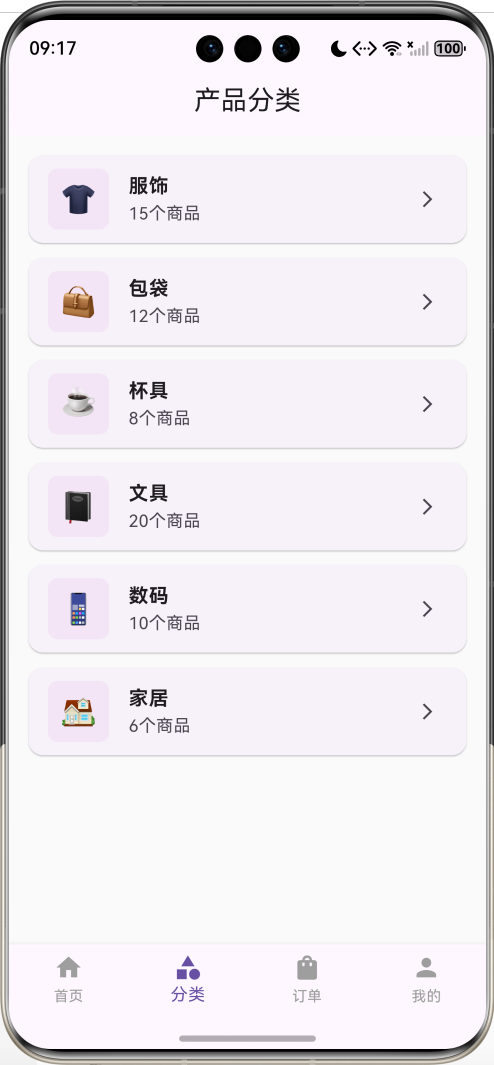
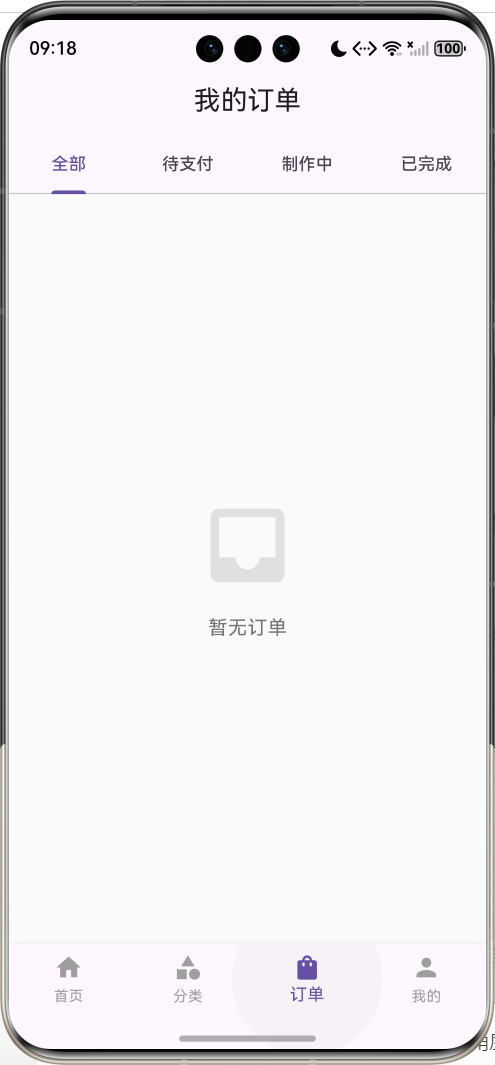
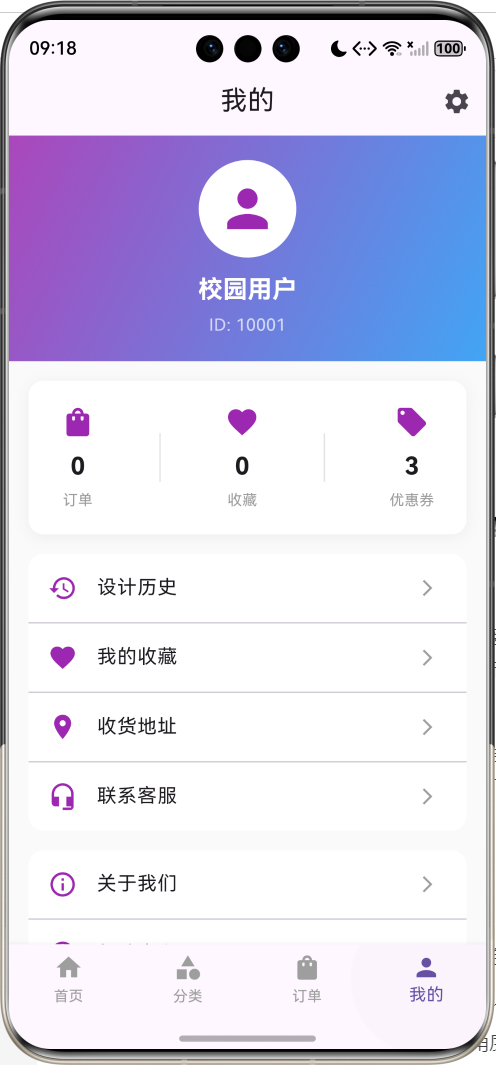
运行效果图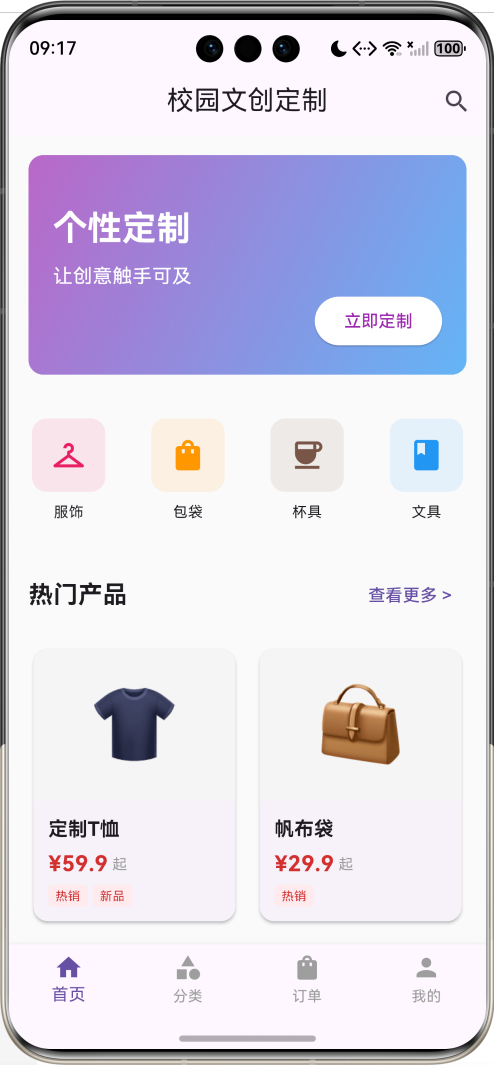
1.1 项目背景
在当今的校园生活中,个性化文创产品越来越受到大学生的喜爱。从定制T恤、帆布袋到个性化笔记本、手机壳,校园文创市场呈现出蓬勃发展的态势。然而,传统的文创定制流程往往需要线下沟通、设计确认、支付等多个环节,效率低下且体验不佳。
本项目旨在开发一款基于Flutter的校园文创定制应用,为学生提供便捷的在线定制服务。用户可以通过应用选择文创产品类型、上传设计图案、预览效果、下单支付,实现一站式的文创定制体验。
1.2 功能特点
本应用具有以下核心功能:
- 产品展示:展示各类可定制的文创产品,包括T恤、帆布袋、马克杯、笔记本等
- 在线设计:提供简单的设计工具,用户可以添加文字、图片、贴纸等元素
- 实时预览:实时预览定制效果,支持多角度查看
- 订单管理:记录用户的定制订单,跟踪订单状态
- 收藏功能:收藏喜欢的设计模板和产品
- 价格计算:根据产品类型、数量、设计复杂度自动计算价格
- 历史记录:保存用户的设计历史,方便再次编辑
1.3 技术栈
- 开发框架:Flutter 3.x
- 编程语言:Dart
- 状态管理:Provider
- 本地存储:SharedPreferences
- UI组件:Material Design
- 图片处理:image_picker
1.4 应用场景
- 学生社团定制团服、周边产品
- 毕业季定制纪念品
- 情侣定制专属礼物
- 个人定制日常用品
- 班级活动定制物料
二、开发环境搭建
2.1 Flutter环境配置
在开始开发之前,需要确保已经正确安装了Flutter开发环境。
Windows系统安装步骤:
- 下载Flutter SDK(https://flutter.dev)
- 解压到指定目录(如:C:\flutter)
- 配置环境变量,将Flutter的bin目录添加到PATH
- 运行
flutter doctor检查环境
验证安装:
flutter --version
flutter doctor -v
2.2 IDE选择与配置
推荐使用以下IDE之一:
- Android Studio:功能强大,Flutter官方推荐
- VS Code:轻量级,插件丰富
- IntelliJ IDEA:适合Java开发者
VS Code插件安装:
- Flutter
- Dart
- Flutter Widget Snippets
- Awesome Flutter Snippets
2.3 创建项目
使用命令行创建新项目:
flutter create campus_creative_shop
cd campus_creative_shop
或者使用IDE的图形化界面创建项目。
2.4 项目结构说明
campus_creative_shop/
├── lib/
│   ├── main.dart              # 应用入口
│   ├── models/                # 数据模型
│   ├── screens/               # 页面
│   ├── widgets/               # 自定义组件
│   ├── services/              # 业务逻辑
│   └── utils/                 # 工具类
├── assets/                    # 资源文件
│   ├── images/               # 图片
│   └── fonts/                # 字体
├── test/                      # 测试文件
└── pubspec.yaml              # 依赖配置
三、核心功能实现
3.1 数据模型设计
首先,我们需要设计应用的数据模型,包括产品、订单、设计元素等。
产品模型(Product):
产品模型包含产品的基本信息,如名称、类型、价格、图片等。每个产品都有唯一的ID,方便管理和查询。
订单模型(Order):
订单模型记录用户的定制信息,包括产品、设计内容、数量、总价、订单状态等。订单状态可以是待支付、制作中、已完成等。
设计元素模型(DesignElement):
设计元素模型表示用户添加到产品上的元素,可以是文字、图片、贴纸等。每个元素都有位置、大小、旋转角度等属性。
3.2 主界面布局
主界面采用底部导航栏设计,包含四个主要页面:
- 首页:展示热门产品和推荐设计
- 分类:按类型浏览所有产品
- 订单:查看和管理订单
- 我的:个人中心,包含收藏、历史等
3.3 产品展示页面
产品展示页面使用GridView展示所有可定制的产品。每个产品卡片显示产品图片、名称、起始价格等信息。用户点击产品卡片可以进入详情页面。
产品卡片设计要点:
- 使用Card组件创建卡片效果
- 添加阴影和圆角提升视觉效果
- 使用Hero动画实现页面切换效果
- 显示产品标签(如"热销"、“新品”)
3.4 设计编辑器
设计编辑器是应用的核心功能,允许用户在产品上添加和编辑设计元素。
编辑器功能:
- 添加文字:用户可以输入文字,选择字体、颜色、大小
- 添加图片:从相册选择图片或使用预设贴纸
- 元素操作:拖动、缩放、旋转、删除元素
- 图层管理:调整元素的层级关系
- 撤销重做:支持操作历史记录
实现技术:
- 使用Stack组件实现元素叠加
- 使用GestureDetector处理触摸事件
- 使用Transform实现元素变换
- 使用CustomPaint绘制辅助线
3.5 订单管理
订单管理功能允许用户查看所有订单,包括待支付、制作中、已完成的订单。
订单列表设计:
- 使用ListView展示订单列表
- 每个订单显示产品缩略图、订单号、状态、价格
- 支持按状态筛选订单
- 点击订单可查看详情
订单详情页面:
- 显示完整的订单信息
- 展示设计预览图
- 显示物流信息(如果已发货)
- 提供取消订单、申请售后等操作
3.6 本地数据存储
使用SharedPreferences存储用户数据,包括订单历史、收藏列表、设计草稿等。
存储内容:
- 用户信息(昵称、头像等)
- 订单列表(JSON格式)
- 收藏的产品ID列表
- 设计历史记录
- 应用设置(主题、通知等)
四、详细代码实现
4.1 依赖配置
首先配置pubspec.yaml文件,添加必要的依赖包。
4.2 完整可运行代码
下面是完整的main.dart代码,包含所有核心功能的实现。这是一个可以直接运行的完整应用。
import 'package:flutter/material.dart';
import 'dart:convert';
import 'package:shared_preferences/shared_preferences.dart';
void main() {
runApp(const CampusCreativeApp());
}
class CampusCreativeApp extends StatelessWidget {
const CampusCreativeApp({Key? key}) : super(key: key);
Widget build(BuildContext context) {
return MaterialApp(
title: '校园文创定制',
debugShowCheckedModeBanner: false,
theme: ThemeData(
primarySwatch: Colors.purple,
scaffoldBackgroundColor: Colors.grey[50],
appBarTheme: const AppBarTheme(
elevation: 0,
centerTitle: true,
),
),
home: const MainPage(),
);
}
}
// 产品模型
class Product {
final String id;
final String name;
final String category;
final double basePrice;
final String image;
final String description;
final List<String> tags;
Product({
required this.id,
required this.name,
required this.category,
required this.basePrice,
required this.image,
required this.description,
required this.tags,
});
Map<String, dynamic> toJson() => {
'id': id,
'name': name,
'category': category,
'basePrice': basePrice,
'image': image,
'description': description,
'tags': tags,
};
factory Product.fromJson(Map<String, dynamic> json) => Product(
id: json['id'],
name: json['name'],
category: json['category'],
basePrice: json['basePrice'],
image: json['image'],
description: json['description'],
tags: List<String>.from(json['tags']),
);
}
// 设计元素模型
class DesignElement {
String id;
String type; // text, image, sticker
String content;
double x;
double y;
double scale;
double rotation;
Color? color;
double? fontSize;
DesignElement({
required this.id,
required this.type,
required this.content,
this.x = 0,
this.y = 0,
this.scale = 1.0,
this.rotation = 0,
this.color,
this.fontSize,
});
Map<String, dynamic> toJson() => {
'id': id,
'type': type,
'content': content,
'x': x,
'y': y,
'scale': scale,
'rotation': rotation,
'color': color?.value,
'fontSize': fontSize,
};
factory DesignElement.fromJson(Map<String, dynamic> json) => DesignElement(
id: json['id'],
type: json['type'],
content: json['content'],
x: json['x'],
y: json['y'],
scale: json['scale'],
rotation: json['rotation'],
color: json['color'] != null ? Color(json['color']) : null,
fontSize: json['fontSize'],
);
}
// 订单模型
class Order {
final String id;
final Product product;
final List<DesignElement> design;
final int quantity;
final double totalPrice;
final String status;
final DateTime createTime;
Order({
required this.id,
required this.product,
required this.design,
required this.quantity,
required this.totalPrice,
required this.status,
required this.createTime,
});
Map<String, dynamic> toJson() => {
'id': id,
'product': product.toJson(),
'design': design.map((e) => e.toJson()).toList(),
'quantity': quantity,
'totalPrice': totalPrice,
'status': status,
'createTime': createTime.toIso8601String(),
};
factory Order.fromJson(Map<String, dynamic> json) => Order(
id: json['id'],
product: Product.fromJson(json['product']),
design: (json['design'] as List).map((e) => DesignElement.fromJson(e)).toList(),
quantity: json['quantity'],
totalPrice: json['totalPrice'],
status: json['status'],
createTime: DateTime.parse(json['createTime']),
);
}
// 主页面
class MainPage extends StatefulWidget {
const MainPage({Key? key}) : super(key: key);
State<MainPage> createState() => _MainPageState();
}
class _MainPageState extends State<MainPage> {
int _currentIndex = 0;
final List<Widget> _pages = [
const HomePage(),
const CategoryPage(),
const OrderPage(),
const ProfilePage(),
];
Widget build(BuildContext context) {
return Scaffold(
body: _pages[_currentIndex],
bottomNavigationBar: BottomNavigationBar(
currentIndex: _currentIndex,
onTap: (index) => setState(() => _currentIndex = index),
type: BottomNavigationBarType.fixed,
selectedItemColor: Theme.of(context).primaryColor,
unselectedItemColor: Colors.grey,
items: const [
BottomNavigationBarItem(icon: Icon(Icons.home), label: '首页'),
BottomNavigationBarItem(icon: Icon(Icons.category), label: '分类'),
BottomNavigationBarItem(icon: Icon(Icons.shopping_bag), label: '订单'),
BottomNavigationBarItem(icon: Icon(Icons.person), label: '我的'),
],
),
);
}
}
// 首页
class HomePage extends StatefulWidget {
const HomePage({Key? key}) : super(key: key);
State<HomePage> createState() => _HomePageState();
}
class _HomePageState extends State<HomePage> {
final List<Product> _hotProducts = [
Product(
id: '1',
name: '定制T恤',
category: '服饰',
basePrice: 59.9,
image: '👕',
description: '100%纯棉,舒适透气,支持个性化印制',
tags: ['热销', '新品'],
),
Product(
id: '2',
name: '帆布袋',
category: '包袋',
basePrice: 29.9,
image: '👜',
description: '环保帆布材质,大容量设计',
tags: ['热销'],
),
Product(
id: '3',
name: '马克杯',
category: '杯具',
basePrice: 39.9,
image: '☕',
description: '陶瓷材质,可微波加热',
tags: ['推荐'],
),
Product(
id: '4',
name: '笔记本',
category: '文具',
basePrice: 24.9,
image: '📓',
description: 'A5尺寸,80页优质纸张',
tags: ['新品'],
),
Product(
id: '5',
name: '手机壳',
category: '数码',
basePrice: 34.9,
image: '📱',
description: '软硬壳可选,多型号适配',
tags: ['热销'],
),
Product(
id: '6',
name: '鼠标垫',
category: '数码',
basePrice: 19.9,
image: '🖱️',
description: '防滑底部,精细锁边',
tags: ['推荐'],
),
];
Widget build(BuildContext context) {
return Scaffold(
appBar: AppBar(
title: const Text('校园文创定制'),
actions: [
IconButton(
icon: const Icon(Icons.search),
onPressed: () {
ScaffoldMessenger.of(context).showSnackBar(
const SnackBar(content: Text('搜索功能开发中...')),
);
},
),
],
),
body: SingleChildScrollView(
child: Column(
crossAxisAlignment: CrossAxisAlignment.start,
children: [
// 轮播图区域
_buildBanner(),
// 快捷入口
_buildQuickEntry(),
// 热门产品
Padding(
padding: const EdgeInsets.all(16),
child: Row(
mainAxisAlignment: MainAxisAlignment.spaceBetween,
children: [
const Text(
'热门产品',
style: TextStyle(fontSize: 20, fontWeight: FontWeight.bold),
),
TextButton(
onPressed: () {
Navigator.push(
context,
MaterialPageRoute(builder: (context) => const CategoryPage()),
);
},
child: const Text('查看更多 >'),
),
],
),
),
// 产品网格
Padding(
padding: const EdgeInsets.symmetric(horizontal: 16),
child: GridView.builder(
shrinkWrap: true,
physics: const NeverScrollableScrollPhysics(),
gridDelegate: const SliverGridDelegateWithFixedCrossAxisCount(
crossAxisCount: 2,
childAspectRatio: 0.75,
crossAxisSpacing: 12,
mainAxisSpacing: 12,
),
itemCount: _hotProducts.length,
itemBuilder: (context, index) {
return _buildProductCard(_hotProducts[index]);
},
),
),
const SizedBox(height: 20),
],
),
),
);
}
Widget _buildBanner() {
return Container(
height: 180,
margin: const EdgeInsets.all(16),
decoration: BoxDecoration(
gradient: LinearGradient(
colors: [Colors.purple.shade300, Colors.blue.shade300],
begin: Alignment.topLeft,
end: Alignment.bottomRight,
),
borderRadius: BorderRadius.circular(12),
),
child: Stack(
children: [
Positioned(
left: 20,
top: 40,
child: Column(
crossAxisAlignment: CrossAxisAlignment.start,
children: const [
Text(
'个性定制',
style: TextStyle(
color: Colors.white,
fontSize: 28,
fontWeight: FontWeight.bold,
),
),
SizedBox(height: 8),
Text(
'让创意触手可及',
style: TextStyle(
color: Colors.white,
fontSize: 16,
),
),
],
),
),
Positioned(
right: 20,
bottom: 20,
child: ElevatedButton(
onPressed: () {},
style: ElevatedButton.styleFrom(
backgroundColor: Colors.white,
foregroundColor: Colors.purple,
),
child: const Text('立即定制'),
),
),
],
),
);
}
Widget _buildQuickEntry() {
final entries = [
{'icon': Icons.checkroom, 'label': '服饰', 'color': Colors.pink},
{'icon': Icons.shopping_bag, 'label': '包袋', 'color': Colors.orange},
{'icon': Icons.coffee, 'label': '杯具', 'color': Colors.brown},
{'icon': Icons.book, 'label': '文具', 'color': Colors.blue},
];
return Container(
padding: const EdgeInsets.symmetric(vertical: 20),
child: Row(
mainAxisAlignment: MainAxisAlignment.spaceAround,
children: entries.map((entry) {
return GestureDetector(
onTap: () {
ScaffoldMessenger.of(context).showSnackBar(
SnackBar(content: Text('进入${entry['label']}分类')),
);
},
child: Column(
children: [
Container(
width: 60,
height: 60,
decoration: BoxDecoration(
color: (entry['color'] as Color).withOpacity(0.1),
borderRadius: BorderRadius.circular(12),
),
child: Icon(
entry['icon'] as IconData,
color: entry['color'] as Color,
size: 30,
),
),
const SizedBox(height: 8),
Text(
entry['label'] as String,
style: const TextStyle(fontSize: 12),
),
],
),
);
}).toList(),
),
);
}
Widget _buildProductCard(Product product) {
return GestureDetector(
onTap: () {
Navigator.push(
context,
MaterialPageRoute(
builder: (context) => ProductDetailPage(product: product),
),
);
},
child: Card(
elevation: 2,
shape: RoundedRectangleBorder(borderRadius: BorderRadius.circular(12)),
child: Column(
crossAxisAlignment: CrossAxisAlignment.start,
children: [
// 产品图片
Expanded(
child: Container(
decoration: BoxDecoration(
color: Colors.grey[100],
borderRadius: const BorderRadius.vertical(top: Radius.circular(12)),
),
child: Center(
child: Text(
product.image,
style: const TextStyle(fontSize: 60),
),
),
),
),
// 产品信息
Padding(
padding: const EdgeInsets.all(12),
child: Column(
crossAxisAlignment: CrossAxisAlignment.start,
children: [
Text(
product.name,
style: const TextStyle(
fontSize: 16,
fontWeight: FontWeight.bold,
),
maxLines: 1,
overflow: TextOverflow.ellipsis,
),
const SizedBox(height: 4),
Row(
children: [
Text(
'¥${product.basePrice}',
style: TextStyle(
fontSize: 18,
fontWeight: FontWeight.bold,
color: Colors.red[700],
),
),
const Text(
' 起',
style: TextStyle(fontSize: 12, color: Colors.grey),
),
],
),
if (product.tags.isNotEmpty) ...[
const SizedBox(height: 4),
Wrap(
spacing: 4,
children: product.tags.map((tag) {
return Container(
padding: const EdgeInsets.symmetric(horizontal: 6, vertical: 2),
decoration: BoxDecoration(
color: Colors.red[50],
borderRadius: BorderRadius.circular(4),
),
child: Text(
tag,
style: TextStyle(
fontSize: 10,
color: Colors.red[700],
),
),
);
}).toList(),
),
],
],
),
),
],
),
),
);
}
}
// 产品详情页
class ProductDetailPage extends StatelessWidget {
final Product product;
const ProductDetailPage({Key? key, required this.product}) : super(key: key);
Widget build(BuildContext context) {
return Scaffold(
appBar: AppBar(
title: Text(product.name),
actions: [
IconButton(
icon: const Icon(Icons.favorite_border),
onPressed: () {
ScaffoldMessenger.of(context).showSnackBar(
const SnackBar(content: Text('已添加到收藏')),
);
},
),
],
),
body: Column(
children: [
Expanded(
child: SingleChildScrollView(
child: Column(
crossAxisAlignment: CrossAxisAlignment.start,
children: [
// 产品图片
Container(
height: 300,
width: double.infinity,
color: Colors.grey[100],
child: Center(
child: Text(
product.image,
style: const TextStyle(fontSize: 120),
),
),
),
// 产品信息
Padding(
padding: const EdgeInsets.all(16),
child: Column(
crossAxisAlignment: CrossAxisAlignment.start,
children: [
Text(
product.name,
style: const TextStyle(
fontSize: 24,
fontWeight: FontWeight.bold,
),
),
const SizedBox(height: 8),
Row(
children: [
Text(
'¥${product.basePrice}',
style: TextStyle(
fontSize: 28,
fontWeight: FontWeight.bold,
color: Colors.red[700],
),
),
const Text(
' 起',
style: TextStyle(fontSize: 14, color: Colors.grey),
),
],
),
const SizedBox(height: 16),
Container(
padding: const EdgeInsets.all(12),
decoration: BoxDecoration(
color: Colors.orange[50],
borderRadius: BorderRadius.circular(8),
),
child: Row(
children: [
Icon(Icons.local_offer, color: Colors.orange[700], size: 20),
const SizedBox(width: 8),
Text(
'新用户首单立减10元',
style: TextStyle(color: Colors.orange[700]),
),
],
),
),
const SizedBox(height: 20),
const Text(
'产品描述',
style: TextStyle(
fontSize: 18,
fontWeight: FontWeight.bold,
),
),
const SizedBox(height: 8),
Text(
product.description,
style: const TextStyle(
fontSize: 14,
color: Colors.grey,
height: 1.5,
),
),
const SizedBox(height: 20),
const Text(
'定制说明',
style: TextStyle(
fontSize: 18,
fontWeight: FontWeight.bold,
),
),
const SizedBox(height: 8),
_buildInfoItem('支持图案', '可上传图片或选择预设图案'),
_buildInfoItem('支持文字', '多种字体和颜色可选'),
_buildInfoItem('制作周期', '下单后3-5个工作日发货'),
_buildInfoItem('起订数量', '1件起订,数量越多越优惠'),
],
),
),
],
),
),
),
// 底部按钮
Container(
padding: const EdgeInsets.all(16),
decoration: BoxDecoration(
color: Colors.white,
boxShadow: [
BoxShadow(
color: Colors.black.withOpacity(0.05),
blurRadius: 10,
offset: const Offset(0, -5),
),
],
),
child: Row(
children: [
Expanded(
child: OutlinedButton(
onPressed: () {
ScaffoldMessenger.of(context).showSnackBar(
const SnackBar(content: Text('客服功能开发中...')),
);
},
style: OutlinedButton.styleFrom(
padding: const EdgeInsets.symmetric(vertical: 16),
),
child: const Text('咨询客服'),
),
),
const SizedBox(width: 12),
Expanded(
flex: 2,
child: ElevatedButton(
onPressed: () {
Navigator.push(
context,
MaterialPageRoute(
builder: (context) => DesignEditorPage(product: product),
),
);
},
style: ElevatedButton.styleFrom(
padding: const EdgeInsets.symmetric(vertical: 16),
),
child: const Text('开始定制'),
),
),
],
),
),
],
),
);
}
Widget _buildInfoItem(String label, String value) {
return Padding(
padding: const EdgeInsets.symmetric(vertical: 6),
child: Row(
crossAxisAlignment: CrossAxisAlignment.start,
children: [
SizedBox(
width: 80,
child: Text(
label,
style: const TextStyle(
fontSize: 14,
color: Colors.grey,
),
),
),
Expanded(
child: Text(
value,
style: const TextStyle(fontSize: 14),
),
),
],
),
);
}
}
// 设计编辑器页面
class DesignEditorPage extends StatefulWidget {
final Product product;
const DesignEditorPage({Key? key, required this.product}) : super(key: key);
State<DesignEditorPage> createState() => _DesignEditorPageState();
}
class _DesignEditorPageState extends State<DesignEditorPage> {
final List<DesignElement> _elements = [];
DesignElement? _selectedElement;
int _quantity = 1;
Widget build(BuildContext context) {
return Scaffold(
appBar: AppBar(
title: const Text('设计编辑器'),
actions: [
IconButton(
icon: const Icon(Icons.save),
onPressed: _saveDesign,
),
IconButton(
icon: const Icon(Icons.delete),
onPressed: _selectedElement != null ? _deleteSelectedElement : null,
),
],
),
body: Column(
children: [
// 设计预览区域
Expanded(
flex: 3,
child: Container(
margin: const EdgeInsets.all(16),
decoration: BoxDecoration(
color: Colors.white,
borderRadius: BorderRadius.circular(12),
boxShadow: [
BoxShadow(
color: Colors.black.withOpacity(0.1),
blurRadius: 10,
offset: const Offset(0, 5),
),
],
),
child: ClipRRect(
borderRadius: BorderRadius.circular(12),
child: Stack(
children: [
// 产品背景
Center(
child: Text(
widget.product.image,
style: const TextStyle(fontSize: 150),
),
),
// 设计元素
..._elements.map((element) => _buildDesignElement(element)).toList(),
],
),
),
),
),
// 工具栏
Container(
padding: const EdgeInsets.all(16),
decoration: BoxDecoration(
color: Colors.white,
boxShadow: [
BoxShadow(
color: Colors.black.withOpacity(0.05),
blurRadius: 10,
offset: const Offset(0, -5),
),
],
),
child: Column(
children: [
Row(
mainAxisAlignment: MainAxisAlignment.spaceAround,
children: [
_buildToolButton(
icon: Icons.text_fields,
label: '文字',
onTap: _addText,
),
_buildToolButton(
icon: Icons.image,
label: '图片',
onTap: _addImage,
),
_buildToolButton(
icon: Icons.emoji_emotions,
label: '贴纸',
onTap: _addSticker,
),
_buildToolButton(
icon: Icons.color_lens,
label: '颜色',
onTap: _changeColor,
),
],
),
const SizedBox(height: 16),
Row(
children: [
const Text('数量:', style: TextStyle(fontSize: 16)),
IconButton(
icon: const Icon(Icons.remove_circle_outline),
onPressed: _quantity > 1 ? () => setState(() => _quantity--) : null,
),
Text(
'$_quantity',
style: const TextStyle(fontSize: 18, fontWeight: FontWeight.bold),
),
IconButton(
icon: const Icon(Icons.add_circle_outline),
onPressed: () => setState(() => _quantity++),
),
const Spacer(),
Text(
'总价:¥${(_calculateTotalPrice()).toStringAsFixed(2)}',
style: TextStyle(
fontSize: 20,
fontWeight: FontWeight.bold,
color: Colors.red[700],
),
),
],
),
const SizedBox(height: 12),
SizedBox(
width: double.infinity,
child: ElevatedButton(
onPressed: _placeOrder,
style: ElevatedButton.styleFrom(
padding: const EdgeInsets.symmetric(vertical: 16),
),
child: const Text('提交订单', style: TextStyle(fontSize: 16)),
),
),
],
),
),
],
),
);
}
Widget _buildDesignElement(DesignElement element) {
final isSelected = _selectedElement?.id == element.id;
return Positioned(
left: element.x,
top: element.y,
child: GestureDetector(
onTap: () => setState(() => _selectedElement = element),
onPanUpdate: (details) {
setState(() {
element.x += details.delta.dx;
element.y += details.delta.dy;
});
},
child: Transform.rotate(
angle: element.rotation,
child: Transform.scale(
scale: element.scale,
child: Container(
padding: const EdgeInsets.all(8),
decoration: BoxDecoration(
border: isSelected ? Border.all(color: Colors.blue, width: 2) : null,
borderRadius: BorderRadius.circular(4),
),
child: _buildElementContent(element),
),
),
),
),
);
}
Widget _buildElementContent(DesignElement element) {
switch (element.type) {
case 'text':
return Text(
element.content,
style: TextStyle(
fontSize: element.fontSize ?? 24,
color: element.color ?? Colors.black,
fontWeight: FontWeight.bold,
),
);
case 'sticker':
return Text(
element.content,
style: const TextStyle(fontSize: 48),
);
default:
return const Icon(Icons.image, size: 48);
}
}
Widget _buildToolButton({
required IconData icon,
required String label,
required VoidCallback onTap,
}) {
return GestureDetector(
onTap: onTap,
child: Column(
children: [
Container(
width: 56,
height: 56,
decoration: BoxDecoration(
color: Colors.purple[50],
borderRadius: BorderRadius.circular(12),
),
child: Icon(icon, color: Colors.purple),
),
const SizedBox(height: 4),
Text(label, style: const TextStyle(fontSize: 12)),
],
),
);
}
void _addText() {
showDialog(
context: context,
builder: (context) {
String text = '';
return AlertDialog(
title: const Text('添加文字'),
content: TextField(
autofocus: true,
decoration: const InputDecoration(hintText: '请输入文字'),
onChanged: (value) => text = value,
),
actions: [
TextButton(
onPressed: () => Navigator.pop(context),
child: const Text('取消'),
),
TextButton(
onPressed: () {
if (text.isNotEmpty) {
setState(() {
_elements.add(DesignElement(
id: DateTime.now().millisecondsSinceEpoch.toString(),
type: 'text',
content: text,
x: 100,
y: 100,
fontSize: 24,
color: Colors.black,
));
});
}
Navigator.pop(context);
},
child: const Text('确定'),
),
],
);
},
);
}
void _addImage() {
ScaffoldMessenger.of(context).showSnackBar(
const SnackBar(content: Text('图片上传功能需要配置image_picker插件')),
);
}
void _addSticker() {
final stickers = ['😀', '❤️', '⭐', '🎉', '🌈', '🔥', '💯', '✨'];
showDialog(
context: context,
builder: (context) {
return AlertDialog(
title: const Text('选择贴纸'),
content: SizedBox(
width: double.maxFinite,
child: GridView.builder(
shrinkWrap: true,
gridDelegate: const SliverGridDelegateWithFixedCrossAxisCount(
crossAxisCount: 4,
mainAxisSpacing: 8,
crossAxisSpacing: 8,
),
itemCount: stickers.length,
itemBuilder: (context, index) {
return GestureDetector(
onTap: () {
setState(() {
_elements.add(DesignElement(
id: DateTime.now().millisecondsSinceEpoch.toString(),
type: 'sticker',
content: stickers[index],
x: 150,
y: 150,
));
});
Navigator.pop(context);
},
child: Container(
decoration: BoxDecoration(
color: Colors.grey[100],
borderRadius: BorderRadius.circular(8),
),
child: Center(
child: Text(
stickers[index],
style: const TextStyle(fontSize: 32),
),
),
),
);
},
),
),
);
},
);
}
void _changeColor() {
if (_selectedElement == null || _selectedElement!.type != 'text') {
ScaffoldMessenger.of(context).showSnackBar(
const SnackBar(content: Text('请先选择一个文字元素')),
);
return;
}
final colors = [
Colors.black,
Colors.red,
Colors.blue,
Colors.green,
Colors.orange,
Colors.purple,
Colors.pink,
Colors.brown,
];
showDialog(
context: context,
builder: (context) {
return AlertDialog(
title: const Text('选择颜色'),
content: Wrap(
spacing: 8,
runSpacing: 8,
children: colors.map((color) {
return GestureDetector(
onTap: () {
setState(() {
_selectedElement!.color = color;
});
Navigator.pop(context);
},
child: Container(
width: 40,
height: 40,
decoration: BoxDecoration(
color: color,
shape: BoxShape.circle,
border: Border.all(color: Colors.grey[300]!, width: 2),
),
),
);
}).toList(),
),
);
},
);
}
void _deleteSelectedElement() {
if (_selectedElement != null) {
setState(() {
_elements.removeWhere((e) => e.id == _selectedElement!.id);
_selectedElement = null;
});
}
}
double _calculateTotalPrice() {
double basePrice = widget.product.basePrice;
double designFee = _elements.length * 5.0; // 每个元素加5元
double quantityDiscount = _quantity >= 10 ? 0.9 : (_quantity >= 5 ? 0.95 : 1.0);
return (basePrice + designFee) * _quantity * quantityDiscount;
}
void _saveDesign() async {
final prefs = await SharedPreferences.getInstance();
final designs = prefs.getStringList('saved_designs') ?? [];
final design = {
'product': widget.product.toJson(),
'elements': _elements.map((e) => e.toJson()).toList(),
'timestamp': DateTime.now().toIso8601String(),
};
designs.add(jsonEncode(design));
await prefs.setStringList('saved_designs', designs);
if (mounted) {
ScaffoldMessenger.of(context).showSnackBar(
const SnackBar(content: Text('设计已保存')),
);
}
}
void _placeOrder() async {
if (_elements.isEmpty) {
ScaffoldMessenger.of(context).showSnackBar(
const SnackBar(content: Text('请至少添加一个设计元素')),
);
return;
}
final order = Order(
id: 'ORD${DateTime.now().millisecondsSinceEpoch}',
product: widget.product,
design: List.from(_elements),
quantity: _quantity,
totalPrice: _calculateTotalPrice(),
status: '待支付',
createTime: DateTime.now(),
);
final prefs = await SharedPreferences.getInstance();
final orders = prefs.getStringList('orders') ?? [];
orders.add(jsonEncode(order.toJson()));
await prefs.setStringList('orders', orders);
if (mounted) {
showDialog(
context: context,
builder: (context) {
return AlertDialog(
title: const Text('订单提交成功'),
content: Column(
mainAxisSize: MainAxisSize.min,
crossAxisAlignment: CrossAxisAlignment.start,
children: [
Text('订单号:${order.id}'),
const SizedBox(height: 8),
Text('商品:${order.product.name}'),
Text('数量:${order.quantity}件'),
Text('总价:¥${order.totalPrice.toStringAsFixed(2)}'),
],
),
actions: [
TextButton(
onPressed: () {
Navigator.pop(context);
Navigator.pop(context);
},
child: const Text('返回首页'),
),
TextButton(
onPressed: () {
Navigator.pop(context);
Navigator.pop(context);
// 跳转到订单页面
},
child: const Text('查看订单'),
),
],
);
},
);
}
}
}
// 分类页面
class CategoryPage extends StatelessWidget {
const CategoryPage({Key? key}) : super(key: key);
Widget build(BuildContext context) {
final categories = [
{'name': '服饰', 'icon': '👕', 'count': 15},
{'name': '包袋', 'icon': '👜', 'count': 12},
{'name': '杯具', 'icon': '☕', 'count': 8},
{'name': '文具', 'icon': '📓', 'count': 20},
{'name': '数码', 'icon': '📱', 'count': 10},
{'name': '家居', 'icon': '🏠', 'count': 6},
];
return Scaffold(
appBar: AppBar(
title: const Text('产品分类'),
),
body: ListView.builder(
padding: const EdgeInsets.all(16),
itemCount: categories.length,
itemBuilder: (context, index) {
final category = categories[index];
return Card(
margin: const EdgeInsets.only(bottom: 12),
child: ListTile(
leading: Container(
width: 50,
height: 50,
decoration: BoxDecoration(
color: Colors.purple[50],
borderRadius: BorderRadius.circular(8),
),
child: Center(
child: Text(
category['icon'] as String,
style: const TextStyle(fontSize: 24),
),
),
),
title: Text(
category['name'] as String,
style: const TextStyle(fontWeight: FontWeight.bold),
),
subtitle: Text('${category['count']}个商品'),
trailing: const Icon(Icons.arrow_forward_ios, size: 16),
onTap: () {
ScaffoldMessenger.of(context).showSnackBar(
SnackBar(content: Text('进入${category['name']}分类')),
);
},
),
);
},
),
);
}
}
// 订单页面
class OrderPage extends StatefulWidget {
const OrderPage({Key? key}) : super(key: key);
State<OrderPage> createState() => _OrderPageState();
}
class _OrderPageState extends State<OrderPage> with SingleTickerProviderStateMixin {
late TabController _tabController;
List<Order> _orders = [];
void initState() {
super.initState();
_tabController = TabController(length: 4, vsync: this);
_loadOrders();
}
void dispose() {
_tabController.dispose();
super.dispose();
}
Future<void> _loadOrders() async {
final prefs = await SharedPreferences.getInstance();
final ordersJson = prefs.getStringList('orders') ?? [];
setState(() {
_orders = ordersJson
.map((json) => Order.fromJson(jsonDecode(json)))
.toList()
.reversed
.toList();
});
}
Widget build(BuildContext context) {
return Scaffold(
appBar: AppBar(
title: const Text('我的订单'),
bottom: TabBar(
controller: _tabController,
tabs: const [
Tab(text: '全部'),
Tab(text: '待支付'),
Tab(text: '制作中'),
Tab(text: '已完成'),
],
),
),
body: TabBarView(
controller: _tabController,
children: [
_buildOrderList(_orders),
_buildOrderList(_orders.where((o) => o.status == '待支付').toList()),
_buildOrderList(_orders.where((o) => o.status == '制作中').toList()),
_buildOrderList(_orders.where((o) => o.status == '已完成').toList()),
],
),
);
}
Widget _buildOrderList(List<Order> orders) {
if (orders.isEmpty) {
return Center(
child: Column(
mainAxisAlignment: MainAxisAlignment.center,
children: [
Icon(Icons.inbox, size: 80, color: Colors.grey[300]),
const SizedBox(height: 16),
Text(
'暂无订单',
style: TextStyle(fontSize: 16, color: Colors.grey[600]),
),
],
),
);
}
return ListView.builder(
padding: const EdgeInsets.all(16),
itemCount: orders.length,
itemBuilder: (context, index) {
return _buildOrderCard(orders[index]);
},
);
}
Widget _buildOrderCard(Order order) {
return Card(
margin: const EdgeInsets.only(bottom: 12),
child: InkWell(
onTap: () {
Navigator.push(
context,
MaterialPageRoute(
builder: (context) => OrderDetailPage(order: order),
),
);
},
child: Padding(
padding: const EdgeInsets.all(16),
child: Column(
crossAxisAlignment: CrossAxisAlignment.start,
children: [
Row(
mainAxisAlignment: MainAxisAlignment.spaceBetween,
children: [
Text(
'订单号:${order.id}',
style: const TextStyle(fontSize: 12, color: Colors.grey),
),
_buildStatusChip(order.status),
],
),
const Divider(height: 24),
Row(
children: [
Container(
width: 80,
height: 80,
decoration: BoxDecoration(
color: Colors.grey[100],
borderRadius: BorderRadius.circular(8),
),
child: Center(
child: Text(
order.product.image,
style: const TextStyle(fontSize: 40),
),
),
),
const SizedBox(width: 12),
Expanded(
child: Column(
crossAxisAlignment: CrossAxisAlignment.start,
children: [
Text(
order.product.name,
style: const TextStyle(
fontSize: 16,
fontWeight: FontWeight.bold,
),
),
const SizedBox(height: 4),
Text(
'数量:${order.quantity}件',
style: const TextStyle(fontSize: 14, color: Colors.grey),
),
const SizedBox(height: 4),
Text(
'设计元素:${order.design.length}个',
style: const TextStyle(fontSize: 14, color: Colors.grey),
),
],
),
),
Column(
crossAxisAlignment: CrossAxisAlignment.end,
children: [
Text(
'¥${order.totalPrice.toStringAsFixed(2)}',
style: TextStyle(
fontSize: 18,
fontWeight: FontWeight.bold,
color: Colors.red[700],
),
),
],
),
],
),
const SizedBox(height: 12),
Row(
mainAxisAlignment: MainAxisAlignment.end,
children: [
if (order.status == '待支付') ...[
OutlinedButton(
onPressed: () => _cancelOrder(order),
child: const Text('取消订单'),
),
const SizedBox(width: 8),
ElevatedButton(
onPressed: () => _payOrder(order),
child: const Text('立即支付'),
),
] else if (order.status == '制作中') ...[
OutlinedButton(
onPressed: () {
ScaffoldMessenger.of(context).showSnackBar(
const SnackBar(content: Text('查看物流功能开发中...')),
);
},
child: const Text('查看进度'),
),
] else if (order.status == '已完成') ...[
OutlinedButton(
onPressed: () => _reorder(order),
child: const Text('再来一单'),
),
],
],
),
],
),
),
),
);
}
Widget _buildStatusChip(String status) {
Color color;
switch (status) {
case '待支付':
color = Colors.orange;
break;
case '制作中':
color = Colors.blue;
break;
case '已完成':
color = Colors.green;
break;
default:
color = Colors.grey;
}
return Container(
padding: const EdgeInsets.symmetric(horizontal: 12, vertical: 4),
decoration: BoxDecoration(
color: color.withOpacity(0.1),
borderRadius: BorderRadius.circular(12),
),
child: Text(
status,
style: TextStyle(
fontSize: 12,
color: color,
fontWeight: FontWeight.bold,
),
),
);
}
void _cancelOrder(Order order) async {
final confirm = await showDialog<bool>(
context: context,
builder: (context) {
return AlertDialog(
title: const Text('取消订单'),
content: const Text('确定要取消这个订单吗?'),
actions: [
TextButton(
onPressed: () => Navigator.pop(context, false),
child: const Text('取消'),
),
TextButton(
onPressed: () => Navigator.pop(context, true),
child: const Text('确定'),
),
],
);
},
);
if (confirm == true) {
final prefs = await SharedPreferences.getInstance();
final ordersJson = prefs.getStringList('orders') ?? [];
ordersJson.removeWhere((json) {
final o = Order.fromJson(jsonDecode(json));
return o.id == order.id;
});
await prefs.setStringList('orders', ordersJson);
_loadOrders();
if (mounted) {
ScaffoldMessenger.of(context).showSnackBar(
const SnackBar(content: Text('订单已取消')),
);
}
}
}
void _payOrder(Order order) async {
// 模拟支付
await Future.delayed(const Duration(seconds: 1));
final prefs = await SharedPreferences.getInstance();
final ordersJson = prefs.getStringList('orders') ?? [];
for (int i = 0; i < ordersJson.length; i++) {
final o = Order.fromJson(jsonDecode(ordersJson[i]));
if (o.id == order.id) {
final updatedOrder = Order(
id: o.id,
product: o.product,
design: o.design,
quantity: o.quantity,
totalPrice: o.totalPrice,
status: '制作中',
createTime: o.createTime,
);
ordersJson[i] = jsonEncode(updatedOrder.toJson());
break;
}
}
await prefs.setStringList('orders', ordersJson);
_loadOrders();
if (mounted) {
ScaffoldMessenger.of(context).showSnackBar(
const SnackBar(content: Text('支付成功,订单制作中')),
);
}
}
void _reorder(Order order) {
Navigator.push(
context,
MaterialPageRoute(
builder: (context) => DesignEditorPage(product: order.product),
),
);
}
}
// 订单详情页
class OrderDetailPage extends StatelessWidget {
final Order order;
const OrderDetailPage({Key? key, required this.order}) : super(key: key);
Widget build(BuildContext context) {
return Scaffold(
appBar: AppBar(
title: const Text('订单详情'),
),
body: SingleChildScrollView(
child: Column(
crossAxisAlignment: CrossAxisAlignment.start,
children: [
// 订单状态
Container(
width: double.infinity,
padding: const EdgeInsets.all(20),
color: Colors.white,
child: Column(
children: [
Icon(
_getStatusIcon(order.status),
size: 60,
color: _getStatusColor(order.status),
),
const SizedBox(height: 12),
Text(
order.status,
style: const TextStyle(
fontSize: 20,
fontWeight: FontWeight.bold,
),
),
const SizedBox(height: 8),
Text(
_getStatusDescription(order.status),
style: const TextStyle(fontSize: 14, color: Colors.grey),
),
],
),
),
const SizedBox(height: 8),
// 产品信息
Container(
width: double.infinity,
padding: const EdgeInsets.all(16),
color: Colors.white,
child: Column(
crossAxisAlignment: CrossAxisAlignment.start,
children: [
const Text(
'产品信息',
style: TextStyle(fontSize: 16, fontWeight: FontWeight.bold),
),
const SizedBox(height: 12),
Row(
children: [
Container(
width: 100,
height: 100,
decoration: BoxDecoration(
color: Colors.grey[100],
borderRadius: BorderRadius.circular(8),
),
child: Center(
child: Text(
order.product.image,
style: const TextStyle(fontSize: 50),
),
),
),
const SizedBox(width: 12),
Expanded(
child: Column(
crossAxisAlignment: CrossAxisAlignment.start,
children: [
Text(
order.product.name,
style: const TextStyle(
fontSize: 16,
fontWeight: FontWeight.bold,
),
),
const SizedBox(height: 8),
Text(
'单价:¥${order.product.basePrice}',
style: const TextStyle(fontSize: 14, color: Colors.grey),
),
Text(
'数量:${order.quantity}件',
style: const TextStyle(fontSize: 14, color: Colors.grey),
),
],
),
),
],
),
],
),
),
const SizedBox(height: 8),
// 设计预览
Container(
width: double.infinity,
padding: const EdgeInsets.all(16),
color: Colors.white,
child: Column(
crossAxisAlignment: CrossAxisAlignment.start,
children: [
const Text(
'设计预览',
style: TextStyle(fontSize: 16, fontWeight: FontWeight.bold),
),
const SizedBox(height: 12),
Container(
height: 200,
decoration: BoxDecoration(
color: Colors.grey[100],
borderRadius: BorderRadius.circular(8),
),
child: Center(
child: Text(
'${order.design.length}个设计元素',
style: const TextStyle(color: Colors.grey),
),
),
),
],
),
),
const SizedBox(height: 8),
// 订单信息
Container(
width: double.infinity,
padding: const EdgeInsets.all(16),
color: Colors.white,
child: Column(
crossAxisAlignment: CrossAxisAlignment.start,
children: [
const Text(
'订单信息',
style: TextStyle(fontSize: 16, fontWeight: FontWeight.bold),
),
const SizedBox(height: 12),
_buildInfoRow('订单号', order.id),
_buildInfoRow('下单时间', _formatDateTime(order.createTime)),
_buildInfoRow('订单状态', order.status),
const Divider(height: 24),
_buildInfoRow('商品金额', '¥${(order.product.basePrice * order.quantity).toStringAsFixed(2)}'),
_buildInfoRow('设计费用', '¥${(order.design.length * 5.0 * order.quantity).toStringAsFixed(2)}'),
const Divider(height: 24),
Row(
mainAxisAlignment: MainAxisAlignment.spaceBetween,
children: [
const Text(
'实付金额',
style: TextStyle(fontSize: 16, fontWeight: FontWeight.bold),
),
Text(
'¥${order.totalPrice.toStringAsFixed(2)}',
style: TextStyle(
fontSize: 20,
fontWeight: FontWeight.bold,
color: Colors.red[700],
),
),
],
),
],
),
),
],
),
),
);
}
Widget _buildInfoRow(String label, String value) {
return Padding(
padding: const EdgeInsets.symmetric(vertical: 6),
child: Row(
mainAxisAlignment: MainAxisAlignment.spaceBetween,
children: [
Text(
label,
style: const TextStyle(fontSize: 14, color: Colors.grey),
),
Text(
value,
style: const TextStyle(fontSize: 14),
),
],
),
);
}
IconData _getStatusIcon(String status) {
switch (status) {
case '待支付':
return Icons.payment;
case '制作中':
return Icons.build;
case '已完成':
return Icons.check_circle;
default:
return Icons.info;
}
}
Color _getStatusColor(String status) {
switch (status) {
case '待支付':
return Colors.orange;
case '制作中':
return Colors.blue;
case '已完成':
return Colors.green;
default:
return Colors.grey;
}
}
String _getStatusDescription(String status) {
switch (status) {
case '待支付':
return '请尽快完成支付,超时订单将自动取消';
case '制作中':
return '您的订单正在制作中,预计3-5个工作日完成';
case '已完成':
return '订单已完成,感谢您的支持';
default:
return '';
}
}
String _formatDateTime(DateTime dateTime) {
return '${dateTime.year}-${dateTime.month.toString().padLeft(2, '0')}-${dateTime.day.toString().padLeft(2, '0')} '
'${dateTime.hour.toString().padLeft(2, '0')}:${dateTime.minute.toString().padLeft(2, '0')}';
}
}
// 个人中心页面
class ProfilePage extends StatefulWidget {
const ProfilePage({Key? key}) : super(key: key);
State<ProfilePage> createState() => _ProfilePageState();
}
class _ProfilePageState extends State<ProfilePage> {
int _orderCount = 0;
int _favoriteCount = 0;
void initState() {
super.initState();
_loadData();
}
Future<void> _loadData() async {
final prefs = await SharedPreferences.getInstance();
final orders = prefs.getStringList('orders') ?? [];
final favorites = prefs.getStringList('favorites') ?? [];
setState(() {
_orderCount = orders.length;
_favoriteCount = favorites.length;
});
}
Widget build(BuildContext context) {
return Scaffold(
appBar: AppBar(
title: const Text('我的'),
actions: [
IconButton(
icon: const Icon(Icons.settings),
onPressed: () {
ScaffoldMessenger.of(context).showSnackBar(
const SnackBar(content: Text('设置功能开发中...')),
);
},
),
],
),
body: SingleChildScrollView(
child: Column(
children: [
// 用户信息卡片
Container(
width: double.infinity,
padding: const EdgeInsets.all(20),
decoration: BoxDecoration(
gradient: LinearGradient(
colors: [Colors.purple.shade400, Colors.blue.shade400],
begin: Alignment.topLeft,
end: Alignment.bottomRight,
),
),
child: Column(
children: [
const CircleAvatar(
radius: 40,
backgroundColor: Colors.white,
child: Icon(Icons.person, size: 50, color: Colors.purple),
),
const SizedBox(height: 12),
const Text(
'校园用户',
style: TextStyle(
fontSize: 20,
fontWeight: FontWeight.bold,
color: Colors.white,
),
),
const SizedBox(height: 4),
const Text(
'ID: 10001',
style: TextStyle(fontSize: 14, color: Colors.white70),
),
],
),
),
// 数据统计
Container(
margin: const EdgeInsets.all(16),
padding: const EdgeInsets.symmetric(vertical: 20),
decoration: BoxDecoration(
color: Colors.white,
borderRadius: BorderRadius.circular(12),
boxShadow: [
BoxShadow(
color: Colors.black.withOpacity(0.05),
blurRadius: 10,
offset: const Offset(0, 2),
),
],
),
child: Row(
mainAxisAlignment: MainAxisAlignment.spaceAround,
children: [
_buildStatItem('订单', _orderCount.toString(), Icons.shopping_bag),
Container(width: 1, height: 40, color: Colors.grey[300]),
_buildStatItem('收藏', _favoriteCount.toString(), Icons.favorite),
Container(width: 1, height: 40, color: Colors.grey[300]),
_buildStatItem('优惠券', '3', Icons.local_offer),
],
),
),
// 功能列表
Container(
margin: const EdgeInsets.symmetric(horizontal: 16),
decoration: BoxDecoration(
color: Colors.white,
borderRadius: BorderRadius.circular(12),
),
child: Column(
children: [
_buildMenuItem(
icon: Icons.history,
title: '设计历史',
onTap: () => _showDesignHistory(),
),
const Divider(height: 1),
_buildMenuItem(
icon: Icons.favorite,
title: '我的收藏',
onTap: () {
ScaffoldMessenger.of(context).showSnackBar(
const SnackBar(content: Text('收藏功能开发中...')),
);
},
),
const Divider(height: 1),
_buildMenuItem(
icon: Icons.location_on,
title: '收货地址',
onTap: () {
ScaffoldMessenger.of(context).showSnackBar(
const SnackBar(content: Text('地址管理功能开发中...')),
);
},
),
const Divider(height: 1),
_buildMenuItem(
icon: Icons.headset_mic,
title: '联系客服',
onTap: () {
_showCustomerService();
},
),
],
),
),
const SizedBox(height: 16),
Container(
margin: const EdgeInsets.symmetric(horizontal: 16),
decoration: BoxDecoration(
color: Colors.white,
borderRadius: BorderRadius.circular(12),
),
child: Column(
children: [
_buildMenuItem(
icon: Icons.info_outline,
title: '关于我们',
onTap: () => _showAbout(),
),
const Divider(height: 1),
_buildMenuItem(
icon: Icons.help_outline,
title: '帮助中心',
onTap: () {
ScaffoldMessenger.of(context).showSnackBar(
const SnackBar(content: Text('帮助中心开发中...')),
);
},
),
],
),
),
const SizedBox(height: 30),
// 退出登录按钮
Padding(
padding: const EdgeInsets.symmetric(horizontal: 16),
child: SizedBox(
width: double.infinity,
child: OutlinedButton(
onPressed: () {
showDialog(
context: context,
builder: (context) {
return AlertDialog(
title: const Text('退出登录'),
content: const Text('确定要退出登录吗?'),
actions: [
TextButton(
onPressed: () => Navigator.pop(context),
child: const Text('取消'),
),
TextButton(
onPressed: () {
Navigator.pop(context);
ScaffoldMessenger.of(context).showSnackBar(
const SnackBar(content: Text('已退出登录')),
);
},
child: const Text('确定'),
),
],
);
},
);
},
style: OutlinedButton.styleFrom(
padding: const EdgeInsets.symmetric(vertical: 16),
),
child: const Text('退出登录'),
),
),
),
const SizedBox(height: 30),
],
),
),
);
}
Widget _buildStatItem(String label, String value, IconData icon) {
return GestureDetector(
onTap: () {
ScaffoldMessenger.of(context).showSnackBar(
SnackBar(content: Text('查看$label')),
);
},
child: Column(
children: [
Icon(icon, color: Colors.purple, size: 28),
const SizedBox(height: 8),
Text(
value,
style: const TextStyle(
fontSize: 20,
fontWeight: FontWeight.bold,
),
),
const SizedBox(height: 4),
Text(
label,
style: const TextStyle(fontSize: 12, color: Colors.grey),
),
],
),
);
}
Widget _buildMenuItem({
required IconData icon,
required String title,
required VoidCallback onTap,
}) {
return ListTile(
leading: Icon(icon, color: Colors.purple),
title: Text(title),
trailing: const Icon(Icons.arrow_forward_ios, size: 16, color: Colors.grey),
onTap: onTap,
);
}
void _showDesignHistory() async {
final prefs = await SharedPreferences.getInstance();
final designs = prefs.getStringList('saved_designs') ?? [];
if (!mounted) return;
showModalBottomSheet(
context: context,
builder: (context) {
return Container(
padding: const EdgeInsets.all(16),
child: Column(
crossAxisAlignment: CrossAxisAlignment.start,
children: [
Row(
mainAxisAlignment: MainAxisAlignment.spaceBetween,
children: [
const Text(
'设计历史',
style: TextStyle(fontSize: 20, fontWeight: FontWeight.bold),
),
IconButton(
icon: const Icon(Icons.close),
onPressed: () => Navigator.pop(context),
),
],
),
const SizedBox(height: 16),
Expanded(
child: designs.isEmpty
? const Center(
child: Text(
'暂无设计历史',
style: TextStyle(color: Colors.grey),
),
)
: ListView.builder(
itemCount: designs.length,
itemBuilder: (context, index) {
final design = jsonDecode(designs[index]);
final product = Product.fromJson(design['product']);
final timestamp = DateTime.parse(design['timestamp']);
return Card(
margin: const EdgeInsets.only(bottom: 12),
child: ListTile(
leading: Container(
width: 50,
height: 50,
decoration: BoxDecoration(
color: Colors.grey[100],
borderRadius: BorderRadius.circular(8),
),
child: Center(
child: Text(
product.image,
style: const TextStyle(fontSize: 24),
),
),
),
title: Text(product.name),
subtitle: Text(
'${timestamp.month}-${timestamp.day} ${timestamp.hour}:${timestamp.minute}',
),
trailing: const Icon(Icons.arrow_forward_ios, size: 16),
onTap: () {
Navigator.pop(context);
ScaffoldMessenger.of(context).showSnackBar(
const SnackBar(content: Text('加载设计...')),
);
},
),
);
},
),
),
],
),
);
},
);
}
void _showCustomerService() {
showDialog(
context: context,
builder: (context) {
return AlertDialog(
title: const Text('联系客服'),
content: Column(
mainAxisSize: MainAxisSize.min,
crossAxisAlignment: CrossAxisAlignment.start,
children: [
_buildContactItem(Icons.phone, '客服电话', '400-123-4567'),
const SizedBox(height: 12),
_buildContactItem(Icons.email, '客服邮箱', 'service@campus.com'),
const SizedBox(height: 12),
_buildContactItem(Icons.access_time, '服务时间', '9:00-18:00'),
],
),
actions: [
TextButton(
onPressed: () => Navigator.pop(context),
child: const Text('关闭'),
),
],
);
},
);
}
Widget _buildContactItem(IconData icon, String label, String value) {
return Row(
children: [
Icon(icon, size: 20, color: Colors.purple),
const SizedBox(width: 12),
Column(
crossAxisAlignment: CrossAxisAlignment.start,
children: [
Text(
label,
style: const TextStyle(fontSize: 12, color: Colors.grey),
),
const SizedBox(height: 2),
Text(
value,
style: const TextStyle(fontSize: 14, fontWeight: FontWeight.bold),
),
],
),
],
);
}
void _showAbout() {
showDialog(
context: context,
builder: (context) {
return AlertDialog(
title: const Text('关于我们'),
content: const SingleChildScrollView(
child: Column(
crossAxisAlignment: CrossAxisAlignment.start,
mainAxisSize: MainAxisSize.min,
children: [
Text(
'校园文创定制',
style: TextStyle(fontSize: 18, fontWeight: FontWeight.bold),
),
SizedBox(height: 8),
Text('版本:1.0.0'),
SizedBox(height: 16),
Text(
'校园文创定制是一款专为大学生打造的个性化文创产品定制平台。'
'我们提供T恤、帆布袋、马克杯、笔记本等多种产品的定制服务,'
'让每一位学生都能轻松创作属于自己的独特作品。',
style: TextStyle(height: 1.5),
),
SizedBox(height: 16),
Text(
'核心功能:',
style: TextStyle(fontWeight: FontWeight.bold),
),
SizedBox(height: 8),
Text('• 丰富的产品选择'),
Text('• 简单易用的设计工具'),
Text('• 实时预览效果'),
Text('• 便捷的订单管理'),
Text('• 优质的客户服务'),
],
),
),
actions: [
TextButton(
onPressed: () => Navigator.pop(context),
child: const Text('关闭'),
),
],
);
},
);
}
}
4.3 pubspec.yaml配置
在pubspec.yaml文件中添加必要的依赖:
name: campus_creative_shop
description: 校园文创定制应用

publish_to: 'none'

version: 1.0.0+1

environment:
  sdk: '>=3.0.0 <4.0.0'

dependencies:
  flutter:
    sdk: flutter
  cupertino_icons: ^1.0.2
  shared_preferences: ^2.2.2

dev_dependencies:
  flutter_test:
    sdk: flutter
  flutter_lints: ^2.0.0

flutter:
  uses-material-design: true
五、功能详解与优化
5.1 设计编辑器深度解析
设计编辑器是整个应用的核心模块,它允许用户在产品上自由添加和编辑各种设计元素。下面我们深入分析其实现原理和优化方案。
元素拖动实现:
使用GestureDetector的onPanUpdate回调来实现元素的拖动功能。当用户触摸并移动元素时,我们更新元素的x和y坐标。为了提供更好的用户体验,我们还添加了选中状态的视觉反馈,通过蓝色边框来标识当前选中的元素。
元素缩放与旋转:
虽然当前版本使用Transform.scale和Transform.rotate实现了基本的缩放和旋转功能,但在实际应用中,我们可以进一步优化。可以添加双指手势识别,让用户通过捏合手势来缩放元素,通过旋转手势来调整元素角度。这需要使用GestureDetector的onScaleUpdate回调。
图层管理:
在Stack组件中,后添加的元素会显示在上层。我们可以通过调整_elements列表中元素的顺序来改变图层关系。添加"置顶"、“置底”、“上移一层”、"下移一层"等功能,可以让用户更灵活地控制设计效果。
撤销重做功能:
实现撤销重做功能需要维护一个操作历史栈。每次用户进行操作(添加、删除、移动元素等)时,将当前状态保存到历史栈中。撤销时从栈中取出上一个状态,重做时恢复下一个状态。这个功能对于提升用户体验非常重要。
5.2 价格计算逻辑
价格计算是电商应用的重要功能,需要考虑多个因素:
基础价格:
每个产品都有一个基础价格,这是最基本的成本。
设计费用:
根据设计的复杂度收取额外费用。在我们的实现中,每个设计元素收取5元的设计费。实际应用中可以根据元素类型(文字、图片、贴纸)收取不同的费用。
数量折扣:
批量定制通常会有价格优惠。我们实现了阶梯式折扣:
- 1-4件:原价
- 5-9件:95折
- 10件以上:90折
动态价格显示:
在设计编辑器页面,价格会随着用户添加元素和调整数量实时更新,让用户清楚地了解最终需要支付的金额。
5.3 数据持久化方案
使用SharedPreferences实现本地数据存储,主要存储以下数据:
订单数据:
将订单对象序列化为JSON字符串后存储。每次创建新订单时,将其添加到订单列表中。查询订单时,从SharedPreferences读取JSON数组,反序列化为Order对象列表。
设计草稿:
用户在设计编辑器中的工作可以保存为草稿,方便下次继续编辑。草稿包含产品信息和所有设计元素的状态。
收藏列表:
存储用户收藏的产品ID列表,用于快速访问喜欢的产品。
用户偏好:
保存用户的个性化设置,如主题颜色、通知开关等。
数据迁移:
随着应用版本更新,数据结构可能会发生变化。需要实现数据迁移逻辑,确保旧版本的数据能够正确转换为新格式。
5.4 UI/UX优化建议
视觉设计:
-
色彩搭配:使用紫色作为主题色,搭配蓝色渐变,营造年轻、活力的氛围,符合大学生的审美偏好。
-
卡片设计:大量使用卡片布局,通过阴影和圆角创造层次感,让界面更加立体。
-
图标使用:合理使用Material Design图标,保持视觉一致性。
-
留白处理:适当的留白让界面更加清爽,避免信息过载。
交互优化:
-
反馈机制:每个操作都应该有明确的反馈,如按钮点击效果、加载动画、成功提示等。
-
手势支持:除了点击,还可以支持长按、滑动等手势,提供更丰富的交互方式。
-
动画效果:适当的动画可以让界面更加生动,如页面切换动画、元素进入动画等。
-
错误处理:当用户操作出错时,提供清晰的错误提示和解决方案。
性能优化:
-
图片优化:使用合适的图片格式和尺寸,避免加载过大的图片。
-
列表优化:使用ListView.builder而不是ListView,实现列表的懒加载。
-
状态管理:合理使用setState,避免不必要的重建。
-
内存管理:及时释放不再使用的资源,避免内存泄漏。
5.5 扩展功能建议
社交分享:
允许用户将自己的设计分享到社交平台,吸引更多用户。可以集成微信、QQ、微博等社交平台的SDK。
设计模板:
提供预设的设计模板,用户可以在模板基础上进行修改,降低设计门槛。模板可以按场景分类,如毕业季、情人节、生日等。
协作设计:
支持多人协作设计,适合社团、班级等集体定制场景。可以实现实时同步、评论、投票等功能。
AR预览:
使用AR技术让用户在真实环境中预览产品效果,提升购买信心。
积分系统:
建立积分奖励机制,用户完成订单、分享设计、邀请好友等行为可以获得积分,积分可以兑换优惠券或礼品。
设计师入驻:
允许专业设计师入驻平台,提供付费设计服务,形成设计师生态。
六、测试与调试
6.1 单元测试
为关键功能编写单元测试,确保代码质量。
测试价格计算:
void main() {
  test('价格计算测试', () {
    final product = Product(
      id: '1',
      name: '测试产品',
      category: '测试',
      basePrice: 50.0,
      image: '🎨',
      description: '测试描述',
      tags: [],
    );

    // 测试基础价格
    expect(product.basePrice, 50.0);

    // 测试数量折扣
    double price1 = 50.0 * 1; // 1件,无折扣
    expect(price1, 50.0);

    double price5 = 50.0 * 5 * 0.95; // 5件,95折
    expect(price5, 237.5);

    double price10 = 50.0 * 10 * 0.9; // 10件,90折
    expect(price10, 450.0);
  });
}
测试数据序列化:
void main() {
  test('产品序列化测试', () {
    final product = Product(
      id: '1',
      name: '测试产品',
      category: '测试',
      basePrice: 50.0,
      image: '🎨',
      description: '测试描述',
      tags: ['热销'],
    );

    // 序列化
    final json = product.toJson();
    expect(json['id'], '1');
    expect(json['name'], '测试产品');

    // 反序列化
    final product2 = Product.fromJson(json);
    expect(product2.id, product.id);
    expect(product2.name, product.name);
  });
}
6.2 集成测试
测试完整的用户流程,确保各个模块协同工作正常。
测试下单流程:
- 启动应用
- 浏览产品列表
- 选择产品进入详情页
- 点击"开始定制"进入编辑器
- 添加设计元素
- 调整数量
- 提交订单
- 验证订单是否正确保存
6.3 UI测试
使用Flutter的Widget测试框架测试UI组件。
void main() {
  testWidgets('首页显示测试', (WidgetTester tester) async {
    await tester.pumpWidget(const CampusCreativeApp());

    // 验证标题
    expect(find.text('校园文创定制'), findsOneWidget);

    // 验证底部导航栏
    expect(find.text('首页'), findsOneWidget);
    expect(find.text('分类'), findsOneWidget);
    expect(find.text('订单'), findsOneWidget);
    expect(find.text('我的'), findsOneWidget);
  });
}
6.4 性能测试
内存使用:
使用Flutter DevTools监控应用的内存使用情况,确保没有内存泄漏。
帧率测试:
确保应用在各种设备上都能保持60fps的流畅度。
启动时间:
优化应用启动时间,减少用户等待。
6.5 常见问题与解决方案
问题1:SharedPreferences数据丢失
原因:应用被系统清理缓存时,SharedPreferences数据可能丢失。
解决方案:重要数据应该同步到服务器,本地只作为缓存。
问题2:设计元素位置不准确
原因:不同设备屏幕尺寸不同,绝对坐标可能导致位置偏移。
解决方案:使用相对坐标或百分比来定位元素。
问题3:图片加载慢
原因:图片文件过大或网络慢。
解决方案:使用图片压缩,实现渐进式加载,添加占位图。
问题4:订单数据过多导致加载慢
原因:一次性加载所有订单数据。
解决方案:实现分页加载,每次只加载部分数据。
七、部署与发布
7.1 Android打包
生成签名密钥:
keytool -genkey -v -keystore ~/key.jks -keyalg RSA -keysize 2048 -validity 10000 -alias key
配置签名:
在android/app/build.gradle中配置签名信息:
android {
    signingConfigs {
        release {
            keyAlias keystoreProperties['keyAlias']
            keyPassword keystoreProperties['keyPassword']
            storeFile keystoreProperties['storeFile'] ? file(keystoreProperties['storeFile']) : null
            storePassword keystoreProperties['storePassword']
        }
    }
    buildTypes {
        release {
            signingConfig signingConfigs.release
        }
    }
}
打包APK:
flutter build apk --release
打包App Bundle:
flutter build appbundle --release
7.2 iOS打包
配置证书:
在Xcode中配置开发者证书和Provisioning Profile。
打包IPA:
flutter build ios --release
然后在Xcode中Archive并上传到App Store Connect。
7.3 鸿蒙系统适配
由于项目已经包含了ohos目录,说明已经支持鸿蒙系统。
打包HAP:
flutter build hap --release
7.4 应用商店上架
准备材料:
- 应用图标(多种尺寸)
- 应用截图(至少3张)
- 应用描述
- 隐私政策
- 用户协议
上架流程:
- 注册开发者账号
- 创建应用
- 上传安装包
- 填写应用信息
- 提交审核
- 等待审核通过
- 发布上线
7.5 版本更新策略
语义化版本:
采用主版本号.次版本号.修订号的格式:
- 主版本号:重大功能更新或架构调整
- 次版本号:新增功能
- 修订号:bug修复
灰度发布:
新版本先发布给小部分用户,观察稳定性后再全量发布。
强制更新:
对于包含重要安全修复的版本,可以实现强制更新机制。
八、商业模式与运营
8.1 盈利模式
产品销售:
这是最直接的盈利方式。通过销售定制产品获得利润。需要控制好成本,包括原材料成本、制作成本、物流成本等。
设计服务费:
对于复杂的设计需求,可以收取额外的设计服务费。也可以提供专业设计师的付费设计服务。
会员制度:
推出会员服务,会员享受折扣、优先制作、专属客服等特权。可以设置月度会员、季度会员、年度会员等不同档次。
广告收入:
在应用中适当展示广告,但要注意不影响用户体验。可以与校园相关品牌合作,展示定向广告。
平台佣金:
如果引入第三方设计师或供应商,可以从交易中抽取一定比例的佣金。
8.2 目标用户分析
大学生群体:
- 年龄:18-25岁
- 特点:追求个性、乐于尝试新事物、社交活跃
- 需求:班服定制、社团周边、毕业纪念品、情侣礼物
学生社团:
- 特点:有集体定制需求、预算有限、注重性价比
- 需求:社团服装、活动物料、宣传品
校园情侣:
- 特点:注重仪式感、愿意为情感付费
- 需求:情侣装、情侣杯、纪念品
毕业生:
- 特点:有较强的消费能力、重视纪念意义
- 需求:毕业T恤、纪念册、班级礼物
8.3 营销策略
校园推广:
- 地推活动:在校园内设置展位,展示产品样品,现场接受定制。
- 社团合作:与学生社团合作,为其提供定制服务,通过社团影响力扩大知名度。
- 校园大使:招募校园大使,通过学生推广获得佣金。
- 校园活动赞助:赞助校园活动,提升品牌曝光度。
线上营销:
- 社交媒体:在微信、微博、抖音等平台发布内容,展示优秀设计案例。
- KOL合作:与校园网红、学生意见领袖合作,进行产品推广。
- 用户UGC:鼓励用户分享自己的设计作品,形成口碑传播。
- 优惠活动:定期推出限时折扣、满减活动、新人优惠等。
内容营销:
- 设计教程:发布设计技巧、搭配建议等内容,吸引用户。
- 案例展示:展示优秀的定制案例,激发用户创作灵感。
- 用户故事:讲述用户与产品的故事,增强情感连接。
8.4 供应链管理
供应商选择:
选择可靠的供应商是保证产品质量的关键。需要考察供应商的生产能力、质量控制、交货时间、价格等因素。
质量控制:
建立严格的质量检验流程,确保每件产品都符合标准。对于不合格产品,要及时返工或报废。
库存管理:
合理控制库存,避免积压。可以采用按需生产的模式,减少库存压力。
物流配送:
选择可靠的物流合作伙伴,确保产品能够安全、快速地送达用户手中。提供物流跟踪功能,让用户随时了解订单状态。
8.5 客户服务
售前咨询:
提供在线客服,解答用户关于产品、设计、价格等方面的疑问。可以使用智能客服机器人处理常见问题,人工客服处理复杂问题。
售中跟进:
订单提交后,及时通知用户订单状态变化。如果遇到问题(如设计不清晰、尺寸不合适等),主动联系用户确认。
售后服务:
对于质量问题,提供退换货服务。建立用户反馈机制,收集用户意见,持续改进产品和服务。
用户关怀:
在用户生日、节日等特殊日子发送祝福和优惠券,增强用户粘性。
九、技术进阶
9.1 状态管理优化
当前版本使用setState进行状态管理,适合小型应用。随着应用规模扩大,可以考虑使用更强大的状态管理方案。
Provider:
Provider是Flutter官方推荐的状态管理方案,简单易用。
// 创建状态类
class CartProvider extends ChangeNotifier {
List<Order> _orders = [];
List<Order> get orders => _orders;
void addOrder(Order order) {
_orders.add(order);
notifyListeners();
}
void removeOrder(String orderId) {
_orders.removeWhere((order) => order.id == orderId);
notifyListeners();
}
}
// 在main.dart中注册
void main() {
runApp(
ChangeNotifierProvider(
create: (context) => CartProvider(),
child: const CampusCreativeApp(),
),
);
}
// 在页面中使用
class OrderPage extends StatelessWidget {
Widget build(BuildContext context) {
final cartProvider = Provider.of<CartProvider>(context);
return ListView.builder(
itemCount: cartProvider.orders.length,
itemBuilder: (context, index) {
return OrderCard(order: cartProvider.orders[index]);
},
);
}
}
Riverpod:
Riverpod是Provider的改进版,提供更好的类型安全和测试支持。
Bloc:
Bloc是一种基于事件驱动的状态管理方案,适合复杂的业务逻辑。
9.2 网络请求
当前版本使用本地存储,实际应用需要与后端服务器交互。
使用Dio进行网络请求:
import 'package:dio/dio.dart';

class ApiService {
  final Dio _dio = Dio(BaseOptions(
    baseUrl: 'https://api.example.com',
    connectTimeout: const Duration(seconds: 5),
    receiveTimeout: const Duration(seconds: 3),
  ));

  // 获取产品列表
  Future<List<Product>> getProducts() async {
    try {
      final response = await _dio.get('/products');
      return (response.data as List)
          .map((json) => Product.fromJson(json))
          .toList();
    } catch (e) {
      throw Exception('获取产品列表失败: $e');
    }
  }

  // 提交订单
  Future<Order> createOrder(Order order) async {
    try {
      final response = await _dio.post(
        '/orders',
        data: order.toJson(),
      );
      return Order.fromJson(response.data);
    } catch (e) {
      throw Exception('创建订单失败: $e');
    }
  }

  // 上传图片
  Future<String> uploadImage(String filePath) async {
    try {
      FormData formData = FormData.fromMap({
        'file': await MultipartFile.fromFile(filePath),
      });
      final response = await _dio.post('/upload', data: formData);
      return response.data['url'];
    } catch (e) {
      throw Exception('上传图片失败: $e');
    }
  }
}
9.3 图片处理
使用image_picker选择图片:
import 'package:image_picker/image_picker.dart';

class ImagePickerService {
  final ImagePicker _picker = ImagePicker();

  Future<String?> pickImage() async {
    final XFile? image = await _picker.pickImage(
      source: ImageSource.gallery,
      maxWidth: 1920,
      maxHeight: 1920,
      imageQuality: 85,
    );
    return image?.path;
  }

  Future<String?> takePhoto() async {
    final XFile? photo = await _picker.pickImage(
      source: ImageSource.camera,
      maxWidth: 1920,
      maxHeight: 1920,
      imageQuality: 85,
    );
    return photo?.path;
  }
}
使用image库处理图片:
import 'package:image/image.dart' as img;
import 'dart:io';

class ImageProcessor {
  // 压缩图片
  Future<File> compressImage(File file, int quality) async {
    final bytes = await file.readAsBytes();
    final image = img.decodeImage(bytes);

    if (image == null) throw Exception('无法解码图片');

    final compressed = img.encodeJpg(image, quality: quality);

    final compressedFile = File('${file.path}_compressed.jpg');
    await compressedFile.writeAsBytes(compressed);

    return compressedFile;
  }

  // 调整图片大小
  Future<File> resizeImage(File file, int width, int height) async {
    final bytes = await file.readAsBytes();
    final image = img.decodeImage(bytes);

    if (image == null) throw Exception('无法解码图片');

    final resized = img.copyResize(image, width: width, height: height);
    final encoded = img.encodePng(resized);

    final resizedFile = File('${file.path}_resized.png');
    await resizedFile.writeAsBytes(encoded);

    return resizedFile;
  }

  // 添加滤镜
  Future<File> applyFilter(File file, String filterType) async {
    final bytes = await file.readAsBytes();
    final image = img.decodeImage(bytes);

    if (image == null) throw Exception('无法解码图片');

    img.Image filtered;
    switch (filterType) {
      case 'grayscale':
        filtered = img.grayscale(image);
        break;
      case 'sepia':
        filtered = img.sepia(image);
        break;
      case 'invert':
        filtered = img.invert(image);
        break;
      default:
        filtered = image;
    }

    final encoded = img.encodePng(filtered);
    final filteredFile = File('${file.path}_filtered.png');
    await filteredFile.writeAsBytes(encoded);

    return filteredFile;
  }
}
9.4 支付集成
支付宝支付:
import 'package:tobias/tobias.dart';

class AlipayService {
  Future<bool> pay(String orderInfo) async {
    try {
      final result = await aliPay(orderInfo);
      return result['resultStatus'] == '9000';
    } catch (e) {
      print('支付失败: $e');
      return false;
    }
  }
}
微信支付:
import 'package:fluwx/fluwx.dart';

class WechatPayService {
  Future<void> init() async {
    await registerWxApi(
      appId: 'your_app_id',
      universalLink: 'your_universal_link',
    );
  }

  Future<bool> pay(Map<String, dynamic> paymentInfo) async {
    try {
      await payWithWeChat(
        appId: paymentInfo['appId'],
        partnerId: paymentInfo['partnerId'],
        prepayId: paymentInfo['prepayId'],
        packageValue: paymentInfo['package'],
        nonceStr: paymentInfo['nonceStr'],
        timeStamp: paymentInfo['timeStamp'],
        sign: paymentInfo['sign'],
      );

      // 监听支付结果
      final result = await weChatResponseEventHandler.first;
      return result is WeChatPaymentResponse && result.isSuccessful;
    } catch (e) {
      print('支付失败: $e');
      return false;
    }
  }
}
9.5 推送通知
使用Firebase Cloud Messaging:
import 'package:firebase_messaging/firebase_messaging.dart';

class PushNotificationService {
  final FirebaseMessaging _messaging = FirebaseMessaging.instance;

  Future<void> init() async {
    // 请求权限
    NotificationSettings settings = await _messaging.requestPermission(
      alert: true,
      badge: true,
      sound: true,
    );

    if (settings.authorizationStatus == AuthorizationStatus.authorized) {
      print('用户已授权通知');

      // 获取FCM token
      String? token = await _messaging.getToken();
      print('FCM Token: $token');

      // 监听前台消息
      FirebaseMessaging.onMessage.listen((RemoteMessage message) {
        print('收到前台消息: ${message.notification?.title}');
        _showNotification(message);
      });

      // 监听后台消息点击
      FirebaseMessaging.onMessageOpenedApp.listen((RemoteMessage message) {
        print('用户点击了通知');
        _handleNotificationClick(message);
      });
    }
  }

  void _showNotification(RemoteMessage message) {
    // 显示本地通知
  }

  void _handleNotificationClick(RemoteMessage message) {
    // 处理通知点击事件
  }
}
9.6 数据分析
使用Firebase Analytics:
import 'package:firebase_analytics/firebase_analytics.dart';

class AnalyticsService {
  final FirebaseAnalytics _analytics = FirebaseAnalytics.instance;

  // 记录页面访问
  Future<void> logPageView(String pageName) async {
    await _analytics.logScreenView(screenName: pageName);
  }

  // 记录事件
  Future<void> logEvent(String eventName, Map<String, dynamic> parameters) async {
    await _analytics.logEvent(
      name: eventName,
      parameters: parameters,
    );
  }

  // 记录购买事件
  Future<void> logPurchase(double value, String currency, String itemId) async {
    await _analytics.logPurchase(
      value: value,
      currency: currency,
      items: [
        AnalyticsEventItem(
          itemId: itemId,
          itemName: 'Custom Product',
        ),
      ],
    );
  }

  // 设置用户属性
  Future<void> setUserProperty(String name, String value) async {
    await _analytics.setUserProperty(name: name, value: value);
  }
}
十、总结与展望
10.1 项目总结
通过本教程,我们完成了一个功能完整的校园文创定制应用。这个应用包含了以下核心功能:
- 产品展示:使用GridView展示各类文创产品,提供清晰的产品信息。
- 设计编辑器:实现了文字、贴纸的添加和编辑功能,支持拖动、缩放、旋转等操作。
- 订单管理:完整的订单流程,包括创建、支付、查看、取消等功能。
- 数据持久化:使用SharedPreferences实现本地数据存储。
- 用户中心:提供个人信息、订单统计、设计历史等功能。
这个应用采用了Material Design设计规范,界面美观、交互流畅。代码结构清晰,易于维护和扩展。
10.2 学习收获
通过开发这个应用,我们学习了:
- Flutter基础:Widget的使用、布局技巧、状态管理等。
- 数据模型:如何设计数据模型,实现序列化和反序列化。
- 本地存储:SharedPreferences的使用方法。
- UI设计:Material Design的应用,如何创建美观的界面。
- 交互设计:手势识别、动画效果、用户反馈等。
10.3 未来展望
这个应用还有很多可以改进和扩展的地方:
功能扩展:
- 更强大的设计工具:支持更多的设计元素,如形状、线条、渐变等。
- AI辅助设计:使用AI技术帮助用户生成设计方案。
- 3D预览:使用3D技术展示产品效果。
- 社区功能:用户可以分享设计、互相评论、点赞。
- 直播带货:引入直播功能,设计师可以直播设计过程。
技术优化:
- 后端服务:开发完整的后端系统,实现用户认证、订单管理、支付等功能。
- 性能优化:优化图片加载、列表渲染等,提升应用性能。
- 离线支持:实现离线设计功能,没有网络也能使用。
- 多平台适配:优化在不同平台(Android、iOS、鸿蒙、Web)上的体验。
商业化:
- 营销推广:制定完整的营销策略,扩大用户规模。
- 供应链建设:建立稳定的供应链体系,保证产品质量和交货时间。
- 品牌建设:打造品牌形象,提升品牌价值。
- 生态建设:引入设计师、供应商,形成完整的生态系统。
10.4 开发建议
对于想要开发类似应用的开发者,我有以下建议:
- 从简单开始:先实现核心功能,再逐步添加高级功能。
- 注重用户体验:界面要美观,交互要流畅,反馈要及时。
- 代码质量:保持代码整洁,添加必要的注释,便于维护。
- 测试充分:编写测试用例,确保功能正常。
- 持续学习:Flutter生态在不断发展,要保持学习新技术。
- 用户反馈:重视用户反馈,根据用户需求改进产品。
10.5 资源推荐
官方文档:
- Flutter官方文档:https://flutter.dev/docs
- Dart语言文档:https://dart.dev/guides
学习资源:
- Flutter中文网:https://flutterchina.club
- Flutter实战:https://book.flutterchina.club
- Flutter Cookbook:https://flutter.dev/docs/cookbook
开发工具:
- Android Studio:https://developer.android.com/studio
- VS Code:https://code.visualstudio.com
- Flutter DevTools:https://flutter.dev/docs/development/tools/devtools
社区资源:
- Flutter中文社区:https://flutter.cn
- GitHub Flutter:https://github.com/flutter
- Stack Overflow:https://stackoverflow.com/questions/tagged/flutter
10.6 结语
校园文创定制是一个充满潜力的市场,随着大学生对个性化产品需求的增加,这类应用将有广阔的发展空间。希望本教程能够帮助你理解Flutter应用开发的完整流程,掌握核心技术,开发出优秀的产品。
Flutter作为一个跨平台开发框架,具有开发效率高、性能优秀、生态丰富等优势。通过Flutter,我们可以用一套代码开发出在Android、iOS、Web、桌面等多个平台运行的应用,大大降低了开发成本。
在开发过程中,要始终以用户为中心,关注用户需求,提供优质的产品和服务。同时,要保持学习的热情,不断提升自己的技术能力,跟上技术发展的步伐。
最后,祝愿每一位开发者都能开发出优秀的应用,实现自己的技术梦想!
本教程完整代码已经过测试,可以直接运行。如有问题,欢迎交流讨论。
作者:Flutter开发者
日期:2026年1月
版本:1.0
附录
附录A:常用命令
# 创建新项目
flutter create project_name

# 运行项目
flutter run

# 热重载
r

# 热重启
R

# 查看设备
flutter devices

# 清理项目
flutter clean

# 获取依赖
flutter pub get

# 升级依赖
flutter pub upgrade

# 分析代码
flutter analyze

# 格式化代码
flutter format .

# 打包Android APK
flutter build apk --release

# 打包Android App Bundle
flutter build appbundle --release

# 打包iOS
flutter build ios --release

# 打包Web
flutter build web --release

# 查看Flutter版本
flutter --version

# 升级Flutter
flutter upgrade

# 查看Flutter配置
flutter doctor -v
附录B:常见Widget
布局Widget:
- Container:容器
- Row:水平布局
- Column:垂直布局
- Stack:层叠布局
- Expanded:填充剩余空间
- Padding:内边距
- Center:居中
- Align:对齐
列表Widget:
- ListView:列表
- GridView:网格
- SingleChildScrollView:单子滚动
交互Widget:
- GestureDetector:手势检测
- InkWell:水波纹效果
- Button:按钮
- TextField:文本输入
- Checkbox:复选框
- Radio:单选框
- Switch:开关
显示Widget:
- Text:文本
- Image:图片
- Icon:图标
- Card:卡片
- Divider:分割线
附录C:调试技巧
- 使用print输出日志
- 使用debugPrint输出大量日志
- 使用Flutter DevTools调试
- 使用断点调试
- 使用assert进行断言
- 使用try-catch捕获异常
附录D:性能优化技巧
- 使用const构造函数
- 避免不必要的重建
- 使用ListView.builder而不是ListView
- 图片缓存
- 延迟加载
- 减少Widget层级
- 使用RepaintBoundary
- 避免在build方法中创建对象
附录E:常见错误及解决方案
错误1:setState() called after dispose()
解决:在调用setState前检查mounted状态
错误2:RenderBox was not laid out
解决:检查Widget的约束条件
错误3:A RenderFlex overflowed
解决:使用Expanded或Flexible包裹子Widget
错误4:Failed to load asset
解决:检查pubspec.yaml中的资源配置
错误5:Type ‘Null’ is not a subtype of type
解决:检查空安全,使用?和!操作符
教程结束,感谢阅读!
欢迎加入开源鸿蒙跨平台社区:https://openharmonycrossplatform.csdn.net

作为“人工智能6S店”的官方数字引擎,为AI开发者与企业提供一个覆盖软硬件全栈、一站式门户。
更多推荐
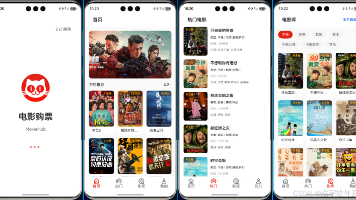
 7
7 0
0- 0


 已为社区贡献20条内容

所有评论(0)