
Flutter 框架跨平台鸿蒙开发 - 校园快递代取记录应用开发教程
数据模型设计:订单、代取员、评价等完整的数据结构UI界面开发:Material Design 3风格的现代化界面功能实现:订单管理、状态追踪、费用计算、评价系统动画效果:提升用户体验的流畅动画性能优化:列表优化、状态管理、数据缓存扩展功能:地图集成、推送通知、支付集成测试策略:单元测试、Widget测试、集成测试这款应用不仅功能全面,而且代码结构清晰,易于维护和扩展。通过本教程的学习,你可以掌握F
Flutter校园快递代取记录应用开发教程
项目概述
本教程将带你开发一个功能完整的Flutter校园快递代取记录应用。这款应用专为校园快递代取服务设计,提供快递信息管理、代取订单追踪、费用结算和信用评价等功能,让校园快递代取服务更加规范化和便民化。
运行效果图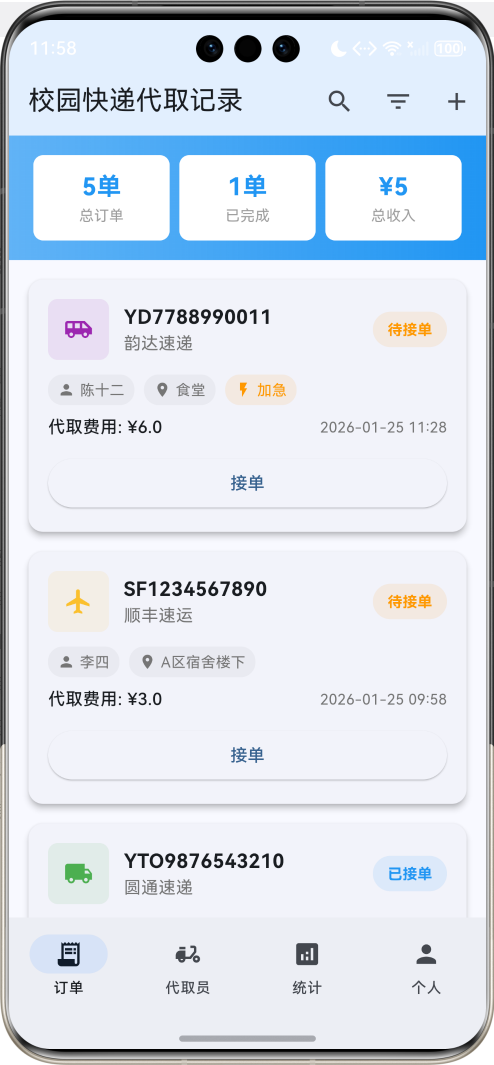
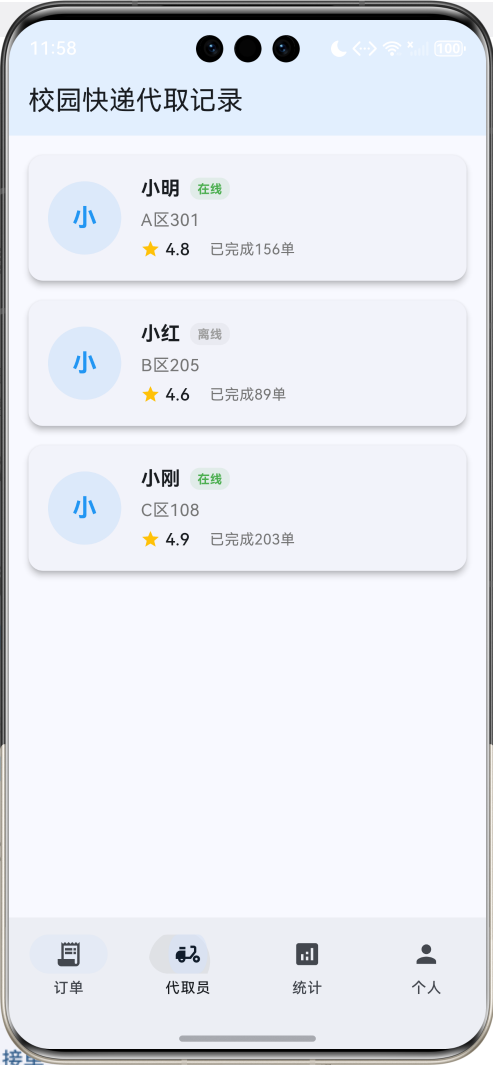
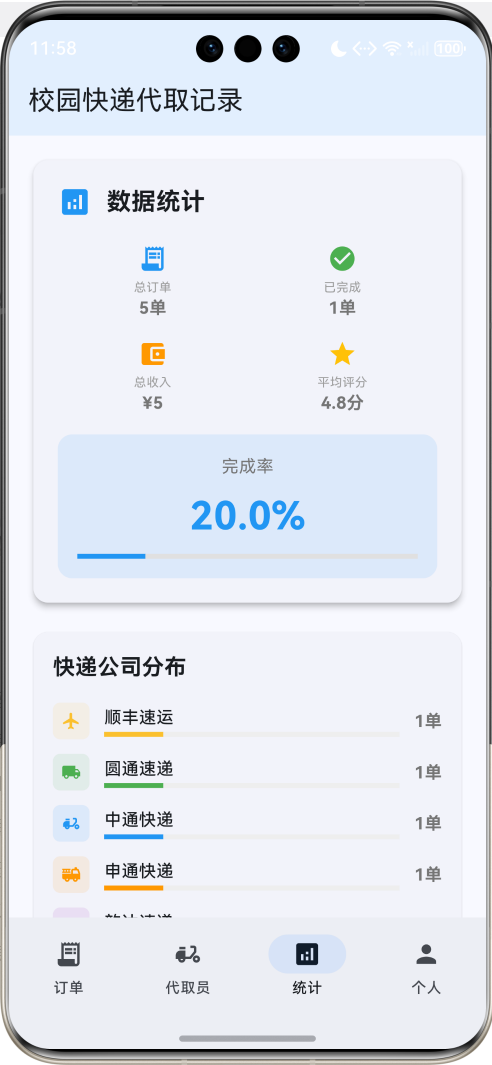
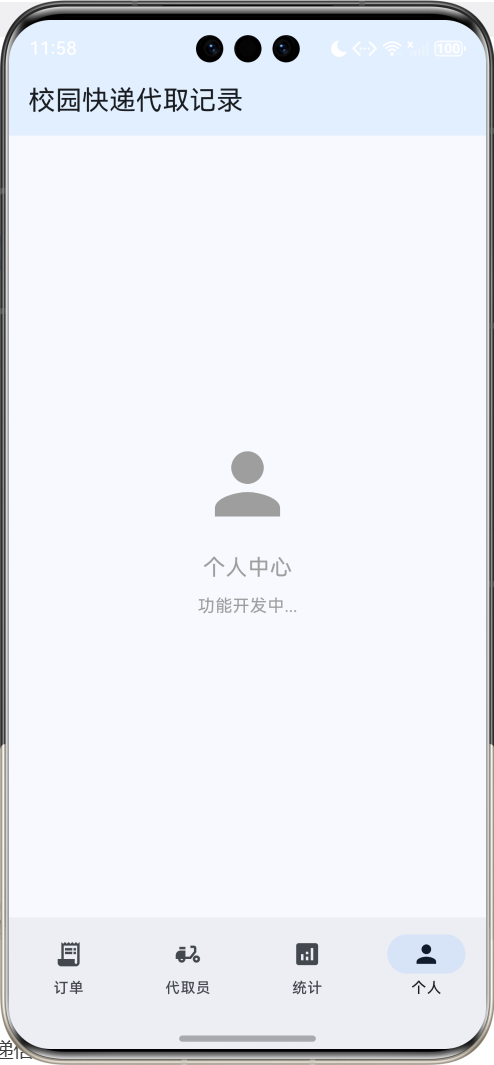
应用特色
- 快递信息管理:详细记录快递信息,包括快递公司、单号、收件人、代取费用等
- 订单状态追踪:实时跟踪代取订单状态,从接单到完成的全流程管理
- 智能匹配系统:根据位置和时间智能匹配代取员和订单
- 费用结算功能:自动计算代取费用,支持多种结算方式
- 信用评价体系:双向评价系统,维护服务质量和用户体验
- 数据统计分析:收入统计、订单分析、服务评价等数据展示
- 消息通知提醒:订单状态变更、费用结算等重要信息及时通知
技术栈
- 框架:Flutter 3.x
- 语言:Dart
- UI组件:Material Design 3
- 状态管理:StatefulWidget
- 动画:AnimationController + Tween
- 数据存储:内存存储(可扩展为本地数据库)
项目结构设计
核心数据模型
1. 快递订单模型(ExpressOrder)
class ExpressOrder {
  final String id;              // 唯一标识
  final String trackingNumber;  // 快递单号
  final String company;         // 快递公司
  final String senderName;      // 寄件人
  final String senderPhone;     // 寄件人电话
  final String recipientName;   // 收件人
  final String recipientPhone;  // 收件人电话
  final String pickupLocation;  // 取件地点
  final String deliveryLocation; // 送达地点
  final double weight;          // 重量
  final String description;     // 物品描述
  final double serviceFee;      // 代取费用
  final DateTime createTime;    // 创建时间
  final DateTime? pickupTime;   // 取件时间
  final DateTime? deliveryTime; // 送达时间
  final OrderStatus status;     // 订单状态
  final String? pickupCode;     // 取件码
  final String notes;           // 备注
  final List<String> photos;    // 照片
  bool isUrgent;               // 是否加急
  double rating;               // 评分
  String feedback;             // 反馈
}
2. 代取员模型(DeliveryAgent)
class DeliveryAgent {
  final String id;              // 唯一标识
  final String name;            // 姓名
  final String phone;           // 电话
  final String studentId;       // 学号
  final String dormitory;       // 宿舍
  final String avatar;          // 头像
  final double rating;          // 评分
  final int completedOrders;    // 完成订单数
  final double totalEarnings;   // 总收入
  final bool isAvailable;      // 是否可接单
  final DateTime joinDate;     // 加入时间
  final List<String> serviceAreas; // 服务区域
  final String introduction;    // 个人介绍
  final List<Review> reviews;   // 评价列表
}
3. 评价模型(Review)
class Review {
  final String id;              // 唯一标识
  final String orderId;         // 订单ID
  final String reviewerId;      // 评价人ID
  final String reviewerName;    // 评价人姓名
  final String targetId;        // 被评价人ID
  final double rating;          // 评分
  final String content;         // 评价内容
  final List<String> tags;      // 标签
  final DateTime createTime;    // 创建时间
  final ReviewType type;        // 评价类型
}
4. 状态枚举
enum OrderStatus {
  pending,      // 待接单
  accepted,     // 已接单
  picking,      // 取件中
  picked,       // 已取件
  delivering,   // 配送中
  completed,    // 已完成
  cancelled,    // 已取消
}

enum ReviewType {
  fromCustomer, // 客户评价代取员
  fromAgent,    // 代取员评价客户
}

enum ServiceArea {
  dormA,        // A区宿舍
  dormB,        // B区宿舍
  dormC,        // C区宿舍
  library,      // 图书馆
  canteen,      // 食堂
  teaching,     // 教学楼
  express,      // 快递点
}

enum UrgencyLevel {
  normal,       // 普通
  urgent,       // 加急
  veryUrgent,   // 特急
}
页面架构
应用采用底部导航栏设计,包含四个主要页面:
- 订单页面:查看和管理快递代取订单
- 代取员页面:代取员信息和服务管理
- 统计页面:收入统计和数据分析
- 个人页面:个人信息和设置管理
详细实现步骤
第一步:项目初始化
创建新的Flutter项目:
flutter create campus_express_delivery
cd campus_express_delivery
第二步:主应用结构
class MyApp extends StatelessWidget {
const MyApp({super.key});
Widget build(BuildContext context) {
return MaterialApp(
title: '校园快递代取记录',
theme: ThemeData(
colorScheme: ColorScheme.fromSeed(seedColor: Colors.blue),
useMaterial3: true,
),
home: const ExpressDeliveryHomePage(),
);
}
}
第三步:数据初始化
创建示例订单数据:
void _initializeOrders() {
  _orders = [
    ExpressOrder(
      id: '1',
      trackingNumber: 'SF1234567890',
      company: '顺丰速运',
      senderName: '张三',
      senderPhone: '13800138001',
      recipientName: '李四',
      recipientPhone: '13800138002',
      pickupLocation: '南门快递点',
      deliveryLocation: 'A区宿舍楼下',
      weight: 1.5,
      description: '书籍',
      serviceFee: 3.0,
      createTime: DateTime.now().subtract(const Duration(hours: 2)),
      status: OrderStatus.pending,
      pickupCode: '1234',
      notes: '请小心轻放',
      photos: [],
      isUrgent: false,
      rating: 0.0,
      feedback: '',
    ),
    // 更多订单数据...
  ];
}
第四步:订单列表页面
订单卡片组件
Widget _buildOrderCard(ExpressOrder order) {
  final statusColor = _getStatusColor(order.status);
  final statusText = _getStatusText(order.status);

  return Card(
    elevation: 4,
    margin: const EdgeInsets.only(bottom: 16),
    child: InkWell(
      onTap: () => _showOrderDetail(order),
      child: Padding(
        padding: const EdgeInsets.all(16),
        child: Column(
          crossAxisAlignment: CrossAxisAlignment.start,
          children: [
            // 订单头部信息
            Row(
              children: [
                Container(
                  width: 50,
                  height: 50,
                  decoration: BoxDecoration(
                    color: _getCompanyColor(order.company).withValues(alpha: 0.1),
                    borderRadius: BorderRadius.circular(8),
                  ),
                  child: Icon(
                    _getCompanyIcon(order.company),
                    color: _getCompanyColor(order.company),
                    size: 24,
                  ),
                ),
                const SizedBox(width: 12),
                Expanded(
                  child: Column(
                    crossAxisAlignment: CrossAxisAlignment.start,
                    children: [
                      Text(
                        order.trackingNumber,
                        style: const TextStyle(
                          fontSize: 16,
                          fontWeight: FontWeight.bold,
                        ),
                      ),
                      Text(
                        order.company,
                        style: TextStyle(
                          color: Colors.grey.shade600,
                          fontSize: 14,
                        ),
                      ),
                    ],
                  ),
                ),
                Container(
                  padding: const EdgeInsets.symmetric(horizontal: 12, vertical: 6),
                  decoration: BoxDecoration(
                    color: statusColor.withValues(alpha: 0.1),
                    borderRadius: BorderRadius.circular(16),
                    border: Border.all(color: statusColor.withValues(alpha: 0.3)),
                  ),
                  child: Text(
                    statusText,
                    style: TextStyle(
                      color: statusColor,
                      fontSize: 12,
                      fontWeight: FontWeight.bold,
                    ),
                  ),
                ),
              ],
            ),

            const SizedBox(height: 16),

            // 收发件人信息
            Container(
              padding: const EdgeInsets.all(12),
              decoration: BoxDecoration(
                color: Colors.grey.shade50,
                borderRadius: BorderRadius.circular(8),
              ),
              child: Column(
                children: [
                  Row(
                    children: [
                      const Icon(Icons.person_outline, size: 16, color: Colors.blue),
                      const SizedBox(width: 8),
                      Text('收件人: ${order.recipientName}'),
                      const Spacer(),
                      Text(
                        order.recipientPhone,
                        style: TextStyle(color: Colors.grey.shade600),
                      ),
                    ],
                  ),
                  const SizedBox(height: 8),
                  Row(
                    children: [
                      const Icon(Icons.location_on_outlined, size: 16, color: Colors.green),
                      const SizedBox(width: 8),
                      Expanded(
                        child: Text(
                          '${order.pickupLocation} → ${order.deliveryLocation}',
                          style: TextStyle(color: Colors.grey.shade700),
                        ),
                      ),
                    ],
                  ),
                ],
              ),
            ),

            const SizedBox(height: 12),

            // 订单详情
            Row(
              children: [
                _buildInfoChip(Icons.scale, '${order.weight}kg'),
                const SizedBox(width: 8),
                _buildInfoChip(Icons.attach_money, '¥${order.serviceFee.toStringAsFixed(1)}'),
                const SizedBox(width: 8),
                if (order.isUrgent)
                  _buildInfoChip(Icons.flash_on, '加急', Colors.orange),
                if (order.pickupCode != null)
                  _buildInfoChip(Icons.lock, order.pickupCode!),
              ],
            ),

            const SizedBox(height: 12),

            // 时间信息
            Row(
              mainAxisAlignment: MainAxisAlignment.spaceBetween,
              children: [
                Text(
                  '下单时间: ${_formatDateTime(order.createTime)}',
                  style: TextStyle(
                    fontSize: 12,
                    color: Colors.grey.shade600,
                  ),
                ),
                if (order.status == OrderStatus.pending)
                  ElevatedButton(
                    onPressed: () => _acceptOrder(order),
                    style: ElevatedButton.styleFrom(
                      backgroundColor: Colors.blue,
                      foregroundColor: Colors.white,
                      padding: const EdgeInsets.symmetric(horizontal: 16, vertical: 8),
                    ),
                    child: const Text('接单', style: TextStyle(fontSize: 12)),
                  ),
              ],
            ),

            // 备注信息
            if (order.notes.isNotEmpty) ...[
              const SizedBox(height: 8),
              Container(
                width: double.infinity,
                padding: const EdgeInsets.all(8),
                decoration: BoxDecoration(
                  color: Colors.amber.withValues(alpha: 0.1),
                  borderRadius: BorderRadius.circular(6),
                  border: Border.all(color: Colors.amber.withValues(alpha: 0.3)),
                ),
                child: Row(
                  children: [
                    const Icon(Icons.note, size: 14, color: Colors.amber),
                    const SizedBox(width: 6),
                    Expanded(
                      child: Text(
                        '备注: ${order.notes}',
                        style: const TextStyle(
                          fontSize: 12,
                          color: Colors.amber,
                        ),
                      ),
                    ),
                  ],
                ),
              ),
            ],
          ],
        ),
      ),
    ),
  );
}
订单筛选功能
void _filterOrders() {
  setState(() {
    _filteredOrders = _orders.where((order) {
      bool matchesSearch = _searchQuery.isEmpty ||
          order.trackingNumber.toLowerCase().contains(_searchQuery.toLowerCase()) ||
          order.recipientName.toLowerCase().contains(_searchQuery.toLowerCase()) ||
          order.company.toLowerCase().contains(_searchQuery.toLowerCase());

      bool matchesStatus = _selectedStatus == null || order.status == _selectedStatus;

      bool matchesCompany = _selectedCompany == null || order.company == _selectedCompany;

      bool matchesUrgent = !_showUrgentOnly || order.isUrgent;

      return matchesSearch && matchesStatus && matchesCompany && matchesUrgent;
    }).toList();

    // 排序
    switch (_sortBy) {
      case SortBy.createTime:
        _filteredOrders.sort((a, b) => b.createTime.compareTo(a.createTime));
        break;
      case SortBy.serviceFee:
        _filteredOrders.sort((a, b) => b.serviceFee.compareTo(a.serviceFee));
        break;
      case SortBy.status:
        _filteredOrders.sort((a, b) => a.status.index.compareTo(b.status.index));
        break;
    }
  });
}
第五步:代取员管理功能
代取员信息卡片
Widget _buildAgentCard(DeliveryAgent agent) {
  return Card(
    elevation: 2,
    margin: const EdgeInsets.only(bottom: 16),
    child: InkWell(
      onTap: () => _showAgentDetail(agent),
      child: Padding(
        padding: const EdgeInsets.all(16),
        child: Column(
          children: [
            // 代取员基本信息
            Row(
              children: [
                CircleAvatar(
                  radius: 30,
                  backgroundColor: Colors.blue.withValues(alpha: 0.1),
                  child: agent.avatar.isNotEmpty
                      ? ClipOval(child: Image.network(agent.avatar, fit: BoxFit.cover))
                      : Text(
                          agent.name.substring(0, 1),
                          style: const TextStyle(
                            fontSize: 24,
                            fontWeight: FontWeight.bold,
                            color: Colors.blue,
                          ),
                        ),
                ),
                const SizedBox(width: 16),
                Expanded(
                  child: Column(
                    crossAxisAlignment: CrossAxisAlignment.start,
                    children: [
                      Row(
                        children: [
                          Text(
                            agent.name,
                            style: const TextStyle(
                              fontSize: 18,
                              fontWeight: FontWeight.bold,
                            ),
                          ),
                          const SizedBox(width: 8),
                          Container(
                            padding: const EdgeInsets.symmetric(horizontal: 6, vertical: 2),
                            decoration: BoxDecoration(
                              color: agent.isAvailable ? Colors.green : Colors.grey,
                              borderRadius: BorderRadius.circular(10),
                            ),
                            child: Text(
                              agent.isAvailable ? '在线' : '离线',
                              style: const TextStyle(
                                color: Colors.white,
                                fontSize: 10,
                                fontWeight: FontWeight.bold,
                              ),
                            ),
                          ),
                        ],
                      ),
                      const SizedBox(height: 4),
                      Text(
                        '学号: ${agent.studentId} | ${agent.dormitory}',
                        style: TextStyle(
                          color: Colors.grey.shade600,
                          fontSize: 14,
                        ),
                      ),
                      const SizedBox(height: 4),
                      Row(
                        children: [
                          const Icon(Icons.star, size: 16, color: Colors.amber),
                          const SizedBox(width: 4),
                          Text(
                            agent.rating.toStringAsFixed(1),
                            style: const TextStyle(
                              fontSize: 14,
                              fontWeight: FontWeight.bold,
                            ),
                          ),
                          const SizedBox(width: 16),
                          Text(
                            '完成${agent.completedOrders}单',
                            style: TextStyle(
                              fontSize: 12,
                              color: Colors.grey.shade600,
                            ),
                          ),
                        ],
                      ),
                    ],
                  ),
                ),
                Column(
                  children: [
                    Text(
                      '¥${agent.totalEarnings.toStringAsFixed(0)}',
                      style: const TextStyle(
                        fontSize: 16,
                        fontWeight: FontWeight.bold,
                        color: Colors.green,
                      ),
                    ),
                    Text(
                      '总收入',
                      style: TextStyle(
                        fontSize: 12,
                        color: Colors.grey.shade600,
                      ),
                    ),
                  ],
                ),
              ],
            ),

            const SizedBox(height: 12),

            // 服务区域
            if (agent.serviceAreas.isNotEmpty) ...[
              Align(
                alignment: Alignment.centerLeft,
                child: Text(
                  '服务区域:',
                  style: TextStyle(
                    fontSize: 14,
                    fontWeight: FontWeight.w500,
                    color: Colors.grey.shade700,
                  ),
                ),
              ),
              const SizedBox(height: 6),
              Wrap(
                spacing: 6,
                runSpacing: 4,
                children: agent.serviceAreas.map((area) => Container(
                  padding: const EdgeInsets.symmetric(horizontal: 8, vertical: 4),
                  decoration: BoxDecoration(
                    color: Colors.blue.withValues(alpha: 0.1),
                    borderRadius: BorderRadius.circular(12),
                  ),
                  child: Text(
                    area,
                    style: const TextStyle(
                      fontSize: 12,
                      color: Colors.blue,
                    ),
                  ),
                )).toList(),
              ),
            ],

            const SizedBox(height: 12),

            // 个人介绍
            if (agent.introduction.isNotEmpty) ...[
              Container(
                width: double.infinity,
                padding: const EdgeInsets.all(10),
                decoration: BoxDecoration(
                  color: Colors.grey.shade50,
                  borderRadius: BorderRadius.circular(8),
                ),
                child: Text(
                  agent.introduction,
                  style: TextStyle(
                    fontSize: 13,
                    color: Colors.grey.shade700,
                    height: 1.3,
                  ),
                  maxLines: 2,
                  overflow: TextOverflow.ellipsis,
                ),
              ),
            ],
          ],
        ),
      ),
    ),
  );
}
第六步:订单状态管理
状态更新功能
void _updateOrderStatus(ExpressOrder order, OrderStatus newStatus) {
  setState(() {
    final index = _orders.indexWhere((o) => o.id == order.id);
    if (index != -1) {
      _orders[index] = ExpressOrder(
        id: order.id,
        trackingNumber: order.trackingNumber,
        company: order.company,
        senderName: order.senderName,
        senderPhone: order.senderPhone,
        recipientName: order.recipientName,
        recipientPhone: order.recipientPhone,
        pickupLocation: order.pickupLocation,
        deliveryLocation: order.deliveryLocation,
        weight: order.weight,
        description: order.description,
        serviceFee: order.serviceFee,
        createTime: order.createTime,
        pickupTime: newStatus == OrderStatus.picked ? DateTime.now() : order.pickupTime,
        deliveryTime: newStatus == OrderStatus.completed ? DateTime.now() : order.deliveryTime,
        status: newStatus,
        pickupCode: order.pickupCode,
        notes: order.notes,
        photos: order.photos,
        isUrgent: order.isUrgent,
        rating: order.rating,
        feedback: order.feedback,
      );
    }
  });

  _filterOrders();
  _calculateStats();

  // 显示状态更新提示
  ScaffoldMessenger.of(context).showSnackBar(
    SnackBar(
      content: Text('订单状态已更新为: ${_getStatusText(newStatus)}'),
      duration: const Duration(seconds: 2),
    ),
  );
}
接单功能
void _acceptOrder(ExpressOrder order) {
  showDialog(
    context: context,
    builder: (context) => AlertDialog(
      title: const Text('确认接单'),
      content: Column(
        mainAxisSize: MainAxisSize.min,
        crossAxisAlignment: CrossAxisAlignment.start,
        children: [
          Text('快递单号: ${order.trackingNumber}'),
          Text('收件人: ${order.recipientName}'),
          Text('取件地点: ${order.pickupLocation}'),
          Text('送达地点: ${order.deliveryLocation}'),
          Text('代取费用: ¥${order.serviceFee.toStringAsFixed(1)}'),
          if (order.isUrgent)
            const Text(
              '⚡ 加急订单',
              style: TextStyle(color: Colors.orange, fontWeight: FontWeight.bold),
            ),
        ],
      ),
      actions: [
        TextButton(
          onPressed: () => Navigator.pop(context),
          child: const Text('取消'),
        ),
        ElevatedButton(
          onPressed: () {
            Navigator.pop(context);
            _updateOrderStatus(order, OrderStatus.accepted);
          },
          child: const Text('确认接单'),
        ),
      ],
    ),
  );
}
第七步:统计分析功能
统计数据计算
class DeliveryStats {
  final int totalOrders;
  final int completedOrders;
  final int pendingOrders;
  final double totalEarnings;
  final double averageRating;
  final Map<String, int> ordersByCompany;
  final Map<OrderStatus, int> ordersByStatus;
  final List<ExpressOrder> recentOrders;
  final double completionRate;

  DeliveryStats({
    required this.totalOrders,
    required this.completedOrders,
    required this.pendingOrders,
    required this.totalEarnings,
    required this.averageRating,
    required this.ordersByCompany,
    required this.ordersByStatus,
    required this.recentOrders,
    required this.completionRate,
  });
}

DeliveryStats _calculateStats() {
  final totalOrders = _orders.length;
  final completedOrders = _orders.where((o) => o.status == OrderStatus.completed).length;
  final pendingOrders = _orders.where((o) => o.status == OrderStatus.pending).length;
  final totalEarnings = _orders
      .where((o) => o.status == OrderStatus.completed)
      .fold<double>(0, (sum, order) => sum + order.serviceFee);

  final completedOrdersWithRating = _orders
      .where((o) => o.status == OrderStatus.completed && o.rating > 0)
      .toList();
  final averageRating = completedOrdersWithRating.isNotEmpty
      ? completedOrdersWithRating.fold<double>(0, (sum, order) => sum + order.rating) / completedOrdersWithRating.length
      : 0.0;

  final ordersByCompany = <String, int>{};
  final ordersByStatus = <OrderStatus, int>{};

  for (final order in _orders) {
    ordersByCompany[order.company] = (ordersByCompany[order.company] ?? 0) + 1;
    ordersByStatus[order.status] = (ordersByStatus[order.status] ?? 0) + 1;
  }

  final recentOrders = _orders
      .where((o) => o.createTime.isAfter(DateTime.now().subtract(const Duration(days: 7))))
      .toList()
    ..sort((a, b) => b.createTime.compareTo(a.createTime));

  final completionRate = totalOrders > 0 ? (completedOrders / totalOrders * 100) : 0.0;

  return DeliveryStats(
    totalOrders: totalOrders,
    completedOrders: completedOrders,
    pendingOrders: pendingOrders,
    totalEarnings: totalEarnings,
    averageRating: averageRating,
    ordersByCompany: ordersByCompany,
    ordersByStatus: ordersByStatus,
    recentOrders: recentOrders,
    completionRate: completionRate,
  );
}
统计页面展示
Widget _buildStatsPage() {
final stats = _calculateStats();
return SingleChildScrollView(
padding: const EdgeInsets.all(16),
child: Column(
children: [
// 总览统计卡片
Card(
elevation: 4,
child: Padding(
padding: const EdgeInsets.all(20),
child: Column(
crossAxisAlignment: CrossAxisAlignment.start,
children: [
const Row(
children: [
Icon(Icons.analytics, color: Colors.blue, size: 28),
SizedBox(width: 12),
Text(
'数据统计',
style: TextStyle(
fontSize: 20,
fontWeight: FontWeight.bold,
),
),
],
),
const SizedBox(height: 20),
Row(
children: [
Expanded(
child: _buildStatItem(
'总订单',
'${stats.totalOrders}单',
Icons.receipt_long,
Colors.blue,
),
),
Expanded(
child: _buildStatItem(
'已完成',
'${stats.completedOrders}单',
Icons.check_circle,
Colors.green,
),
),
],
),
const SizedBox(height: 16),
Row(
children: [
Expanded(
child: _buildStatItem(
'总收入',
'¥${stats.totalEarnings.toStringAsFixed(0)}',
Icons.account_balance_wallet,
Colors.orange,
),
),
Expanded(
child: _buildStatItem(
'平均评分',
'${stats.averageRating.toStringAsFixed(1)}分',
Icons.star,
Colors.amber,
),
),
],
),
const SizedBox(height: 16),
Container(
width: double.infinity,
padding: const EdgeInsets.all(16),
decoration: BoxDecoration(
color: Colors.blue.withValues(alpha: 0.1),
borderRadius: BorderRadius.circular(12),
),
child: Column(
children: [
Text(
'完成率',
style: TextStyle(
fontSize: 14,
color: Colors.grey.shade600,
),
),
const SizedBox(height: 8),
Text(
'${stats.completionRate.toStringAsFixed(1)}%',
style: const TextStyle(
fontSize: 32,
fontWeight: FontWeight.bold,
color: Colors.blue,
),
),
const SizedBox(height: 8),
LinearProgressIndicator(
value: stats.completionRate / 100,
backgroundColor: Colors.grey.shade300,
valueColor: const AlwaysStoppedAnimation<Color>(Colors.blue),
),
],
),
),
],
),
),
),
const SizedBox(height: 16),
// 快递公司分布
Card(
child: Padding(
padding: const EdgeInsets.all(16),
child: Column(
crossAxisAlignment: CrossAxisAlignment.start,
children: [
const Text(
'快递公司分布',
style: TextStyle(
fontSize: 18,
fontWeight: FontWeight.bold,
),
),
const SizedBox(height: 16),
...stats.ordersByCompany.entries.map((entry) => Padding(
padding: const EdgeInsets.only(bottom: 12),
child: Row(
children: [
Container(
width: 30,
height: 30,
decoration: BoxDecoration(
color: _getCompanyColor(entry.key).withValues(alpha: 0.1),
borderRadius: BorderRadius.circular(6),
),
child: Icon(
_getCompanyIcon(entry.key),
size: 16,
color: _getCompanyColor(entry.key),
),
),
const SizedBox(width: 12),
Expanded(
child: Column(
crossAxisAlignment: CrossAxisAlignment.start,
children: [
Text(
entry.key,
style: const TextStyle(fontWeight: FontWeight.w500),
),
const SizedBox(height: 2),
LinearProgressIndicator(
value: entry.value / stats.totalOrders,
backgroundColor: Colors.grey.shade200,
valueColor: AlwaysStoppedAnimation<Color>(
_getCompanyColor(entry.key),
),
),
],
),
),
const SizedBox(width: 12),
Text(
'${entry.value}单',
style: TextStyle(
fontSize: 14,
fontWeight: FontWeight.bold,
color: Colors.grey.shade600,
),
),
],
),
)).toList(),
],
),
),
),
const SizedBox(height: 16),
// 最近订单
Card(
child: Padding(
padding: const EdgeInsets.all(16),
child: Column(
crossAxisAlignment: CrossAxisAlignment.start,
children: [
const Text(
'最近7天订单',
style: TextStyle(
fontSize: 18,
fontWeight: FontWeight.bold,
),
),
const SizedBox(height: 16),
if (stats.recentOrders.isEmpty)
const Center(
child: Text(
'暂无最近订单',
style: TextStyle(color: Colors.grey),
),
)
else
...stats.recentOrders.take(5).map((order) => Padding(
padding: const EdgeInsets.only(bottom: 8),
child: Row(
children: [
Container(
width: 8,
height: 8,
decoration: BoxDecoration(
color: _getStatusColor(order.status),
shape: BoxShape.circle,
),
),
const SizedBox(width: 12),
Expanded(
child: Column(
crossAxisAlignment: CrossAxisAlignment.start,
children: [
Text(
order.trackingNumber,
style: const TextStyle(fontWeight: FontWeight.w500),
),
Text(
_formatDateTime(order.createTime),
style: TextStyle(
fontSize: 12,
color: Colors.grey.shade600,
),
),
],
),
),
Text(
_getStatusText(order.status),
style: TextStyle(
fontSize: 12,
color: _getStatusColor(order.status),
fontWeight: FontWeight.bold,
),
),
],
),
)).toList(),
],
),
),
),
],
),
);
}
第八步:辅助功能
颜色和状态管理
Color _getStatusColor(OrderStatus status) {
  switch (status) {
    case OrderStatus.pending: return Colors.orange;
    case OrderStatus.accepted: return Colors.blue;
    case OrderStatus.picking: return Colors.purple;
    case OrderStatus.picked: return Colors.indigo;
    case OrderStatus.delivering: return Colors.teal;
    case OrderStatus.completed: return Colors.green;
    case OrderStatus.cancelled: return Colors.red;
  }
}

String _getStatusText(OrderStatus status) {
  switch (status) {
    case OrderStatus.pending: return '待接单';
    case OrderStatus.accepted: return '已接单';
    case OrderStatus.picking: return '取件中';
    case OrderStatus.picked: return '已取件';
    case OrderStatus.delivering: return '配送中';
    case OrderStatus.completed: return '已完成';
    case OrderStatus.cancelled: return '已取消';
  }
}

Color _getCompanyColor(String company) {
  switch (company) {
    case '顺丰速运': return Colors.yellow.shade700;
    case '圆通速递': return Colors.green;
    case '中通快递': return Colors.blue;
    case '申通快递': return Colors.orange;
    case '韵达速递': return Colors.purple;
    case '百世汇通': return Colors.red;
    case '京东物流': return Colors.red.shade700;
    case '菜鸟驿站': return Colors.orange.shade700;
    default: return Colors.grey;
  }
}

IconData _getCompanyIcon(String company) {
  switch (company) {
    case '顺丰速运': return Icons.flight;
    case '圆通速递': return Icons.local_shipping;
    case '中通快递': return Icons.delivery_dining;
    case '申通快递': return Icons.fire_truck;
    case '韵达速递': return Icons.airport_shuttle;
    case '百世汇通': return Icons.local_shipping;
    case '京东物流': return Icons.shopping_cart;
    case '菜鸟驿站': return Icons.store;
    default: return Icons.local_post_office;
  }
}
核心功能详解
1. 实时订单追踪
应用提供完整的订单状态追踪功能:
Widget _buildOrderTimeline(ExpressOrder order) {
  final steps = [
    TimelineStep('下单', order.createTime, true),
    TimelineStep('接单', order.pickupTime, order.status.index >= OrderStatus.accepted.index),
    TimelineStep('取件', order.pickupTime, order.status.index >= OrderStatus.picked.index),
    TimelineStep('配送', null, order.status.index >= OrderStatus.delivering.index),
    TimelineStep('完成', order.deliveryTime, order.status == OrderStatus.completed),
  ];

  return Column(
    children: steps.asMap().entries.map((entry) {
      final index = entry.key;
      final step = entry.value;
      final isLast = index == steps.length - 1;

      return Row(
        children: [
          Column(
            children: [
              Container(
                width: 20,
                height: 20,
                decoration: BoxDecoration(
                  color: step.isCompleted ? Colors.green : Colors.grey.shade300,
                  shape: BoxShape.circle,
                ),
                child: step.isCompleted
                    ? const Icon(Icons.check, size: 12, color: Colors.white)
                    : null,
              ),
              if (!isLast)
                Container(
                  width: 2,
                  height: 30,
                  color: Colors.grey.shade300,
                ),
            ],
          ),
          const SizedBox(width: 12),
          Expanded(
            child: Column(
              crossAxisAlignment: CrossAxisAlignment.start,
              children: [
                Text(
                  step.title,
                  style: TextStyle(
                    fontWeight: FontWeight.w500,
                    color: step.isCompleted ? Colors.black : Colors.grey,
                  ),
                ),
                if (step.time != null)
                  Text(
                    _formatDateTime(step.time!),
                    style: TextStyle(
                      fontSize: 12,
                      color: Colors.grey.shade600,
                    ),
                  ),
              ],
            ),
          ),
        ],
      );
    }).toList(),
  );
}
2. 智能费用计算
根据距离、重量、紧急程度自动计算代取费用:
double _calculateServiceFee(ExpressOrder order) {
  double baseFee = 2.0; // 基础费用

  // 重量费用
  if (order.weight > 1.0) {
    baseFee += (order.weight - 1.0) * 0.5;
  }

  // 距离费用(简化计算)
  final distance = _calculateDistance(order.pickupLocation, order.deliveryLocation);
  if (distance > 500) {
    baseFee += (distance - 500) / 100 * 0.2;
  }

  // 加急费用
  if (order.isUrgent) {
    baseFee *= 1.5;
  }

  return baseFee;
}

double _calculateDistance(String from, String to) {
  // 简化的距离计算,实际应用中可以使用地图API
  final locations = {
    '南门快递点': [0, 0],
    'A区宿舍楼下': [200, 100],
    'B区宿舍楼下': [400, 200],
    'C区宿舍楼下': [600, 300],
    '图书馆': [300, 400],
    '食堂': [100, 300],
  };

  final fromCoord = locations[from] ?? [0, 0];
  final toCoord = locations[to] ?? [0, 0];

  final dx = fromCoord[0] - toCoord[0];
  final dy = fromCoord[1] - toCoord[1];

  return sqrt(dx * dx + dy * dy).toDouble();
}
3. 评价系统
双向评价机制,维护服务质量:
void _showRatingDialog(ExpressOrder order) {
  double rating = 5.0;
  String feedback = '';
  List<String> selectedTags = [];

  final tags = ['服务态度好', '速度快', '包装完好', '联系及时', '位置准确'];

  showDialog(
    context: context,
    builder: (context) => StatefulBuilder(
      builder: (context, setState) => AlertDialog(
        title: const Text('订单评价'),
        content: SingleChildScrollView(
          child: Column(
            mainAxisSize: MainAxisSize.min,
            children: [
              Text('订单: ${order.trackingNumber}'),
              const SizedBox(height: 16),

              // 星级评分
              Row(
                mainAxisAlignment: MainAxisAlignment.center,
                children: List.generate(5, (index) => GestureDetector(
                  onTap: () => setState(() => rating = index + 1.0),
                  child: Icon(
                    index < rating ? Icons.star : Icons.star_border,
                    color: Colors.amber,
                    size: 32,
                  ),
                )),
              ),

              const SizedBox(height: 16),

              // 标签选择
              Wrap(
                spacing: 8,
                runSpacing: 4,
                children: tags.map((tag) => FilterChip(
                  label: Text(tag),
                  selected: selectedTags.contains(tag),
                  onSelected: (selected) {
                    setState(() {
                      if (selected) {
                        selectedTags.add(tag);
                      } else {
                        selectedTags.remove(tag);
                      }
                    });
                  },
                )).toList(),
              ),

              const SizedBox(height: 16),

              // 文字评价
              TextField(
                decoration: const InputDecoration(
                  labelText: '评价内容',
                  hintText: '请输入您的评价...',
                  border: OutlineInputBorder(),
                ),
                maxLines: 3,
                onChanged: (value) => feedback = value,
              ),
            ],
          ),
        ),
        actions: [
          TextButton(
            onPressed: () => Navigator.pop(context),
            child: const Text('取消'),
          ),
          ElevatedButton(
            onPressed: () {
              _submitRating(order, rating, feedback, selectedTags);
              Navigator.pop(context);
            },
            child: const Text('提交评价'),
          ),
        ],
      ),
    ),
  );
}
性能优化
1. 列表优化
使用ListView.builder实现虚拟滚动:
ListView.builder(
  padding: const EdgeInsets.all(16),
  itemCount: _filteredOrders.length,
  itemBuilder: (context, index) {
    final order = _filteredOrders[index];
    return _buildOrderCard(order);
  },
)
2. 状态管理优化
合理使用setState,避免不必要的重建:
void _updateOrderStatus(ExpressOrder order, OrderStatus newStatus) {
  setState(() {
    final index = _orders.indexWhere((o) => o.id == order.id);
    if (index != -1) {
      // 只更新必要的字段
      _orders[index] = _orders[index].copyWith(
        status: newStatus,
        pickupTime: newStatus == OrderStatus.picked ? DateTime.now() : null,
        deliveryTime: newStatus == OrderStatus.completed ? DateTime.now() : null,
      );
    }
  });
}
3. 数据缓存
实现本地数据缓存:
class CacheManager {
  static final Map<String, dynamic> _cache = {};

  static void setCache(String key, dynamic value) {
    _cache[key] = value;
  }

  static T? getCache<T>(String key) {
    return _cache[key] as T?;
  }

  static void clearCache() {
    _cache.clear();
  }
}
扩展功能
1. 地图集成
可以集成地图服务实现路径规划:
dependencies:
  amap_flutter_map: ^3.0.0
  amap_flutter_location: ^3.0.0
2. 推送通知
集成推送服务实现订单状态通知:
dependencies:
  firebase_messaging: ^14.6.5
  flutter_local_notifications: ^15.1.0+1
3. 支付集成
集成支付功能实现在线结算:
dependencies:
  pay: ^1.1.2
  alipay_kit: ^3.0.0
测试策略
1. 单元测试
测试核心业务逻辑:
test('should calculate service fee correctly', () {
  final order = ExpressOrder(/* 参数 */);
  final fee = _calculateServiceFee(order);
  expect(fee, greaterThan(0));
});
2. Widget测试
测试UI组件:
testWidgets('should display order information', (WidgetTester tester) async {
  final order = ExpressOrder(/* 参数 */);

  await tester.pumpWidget(MaterialApp(
    home: Scaffold(body: OrderCard(order: order)),
  ));

  expect(find.text(order.trackingNumber), findsOneWidget);
  expect(find.text(order.recipientName), findsOneWidget);
});
3. 集成测试
测试完整用户流程:
testWidgets('should accept order successfully', (WidgetTester tester) async {
  await tester.pumpWidget(MyApp());

  // 点击接单按钮
  await tester.tap(find.text('接单'));
  await tester.pumpAndSettle();

  // 确认接单
  await tester.tap(find.text('确认接单'));
  await tester.pumpAndSettle();

  // 验证状态更新
  expect(find.text('已接单'), findsOneWidget);
});
部署发布
1. Android打包
flutter build apk --release
2. iOS打包
flutter build ios --release
3. 应用商店发布
准备应用图标、截图和描述,提交到各大应用商店。
总结
本教程详细介绍了Flutter校园快递代取记录应用的完整开发过程,涵盖了:
- 数据模型设计:订单、代取员、评价等完整的数据结构
- UI界面开发:Material Design 3风格的现代化界面
- 功能实现:订单管理、状态追踪、费用计算、评价系统
- 动画效果:提升用户体验的流畅动画
- 性能优化:列表优化、状态管理、数据缓存
- 扩展功能:地图集成、推送通知、支付集成
- 测试策略:单元测试、Widget测试、集成测试
这款应用不仅功能全面,而且代码结构清晰,易于维护和扩展。通过本教程的学习,你可以掌握Flutter应用开发的核心技能,为后续开发更复杂的应用打下坚实基础。
欢迎加入开源鸿蒙跨平台社区:https://openharmonycrossplatform.csdn.net

作为“人工智能6S店”的官方数字引擎,为AI开发者与企业提供一个覆盖软硬件全栈、一站式门户。
更多推荐
 5
5 0
0- 0


 已为社区贡献30条内容

所有评论(0)