
Flutter 框架跨平台鸿蒙开发 - 拼豆作品记录本应用开发教程
Flutter拼豆作品记录本应用是一个功能全面的手工创作管理工具,涵盖了作品记录、图案管理、库存监控和技巧学习等核心功能。完整的数据模型设计:从作品记录到制作技巧的全面数据结构丰富的UI组件实现:进度可视化、颜色展示、状态标识等专业界面智能的筛选和搜索:多维度数据筛选和实时搜索功能直观的进度管理:作品完成进度和库存使用情况的可视化流畅的动画效果:页面切换和滑动动画的实现可扩展的架构设计:支持数据持
·
Flutter拼豆作品记录本应用开发教程
项目简介
拼豆作品记录本应用是一款专为拼豆手工爱好者设计的创作管理工具,帮助用户系统地记录和管理拼豆作品的制作过程。应用涵盖了作品记录、设计图案管理、珠子库存管理和制作技巧学习等功能,让拼豆爱好者能够更好地享受创作乐趣并提升制作技能。
运行效果图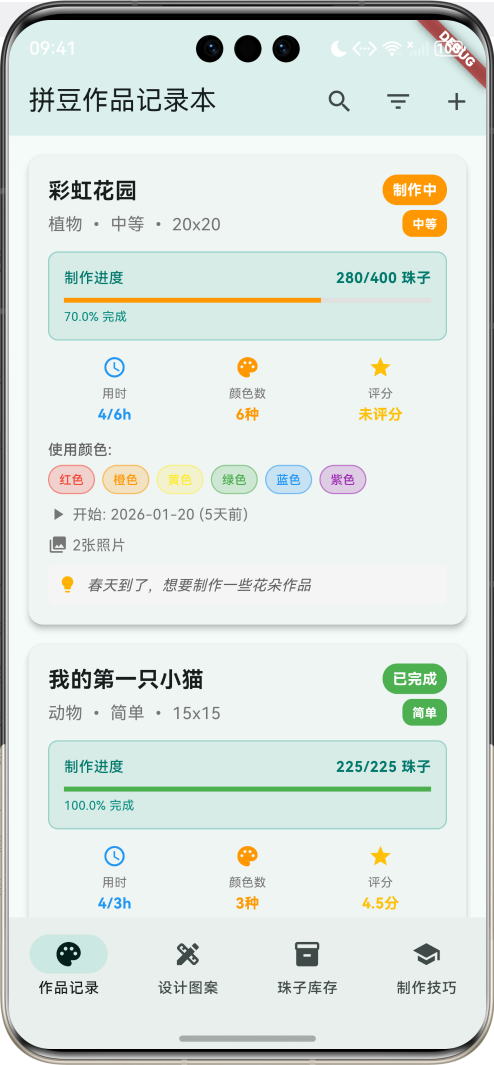
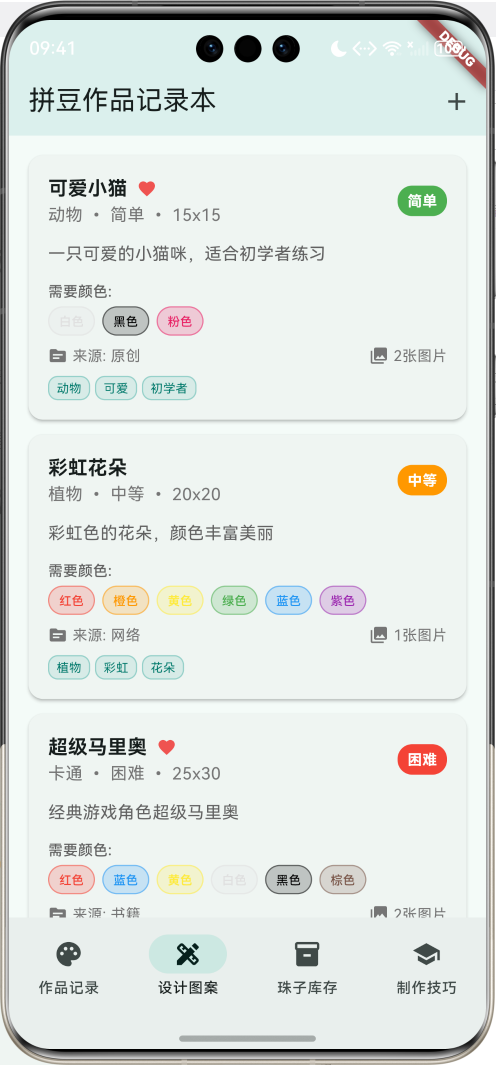
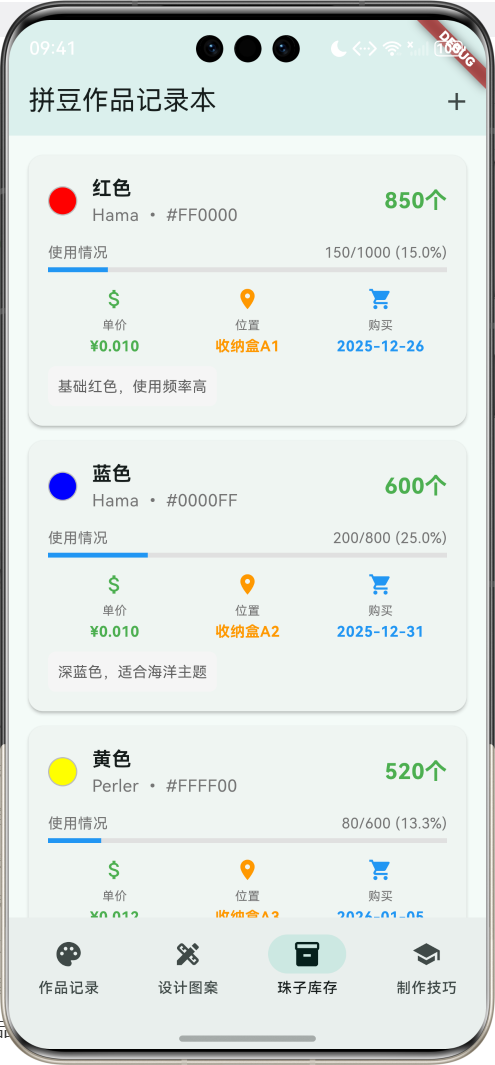
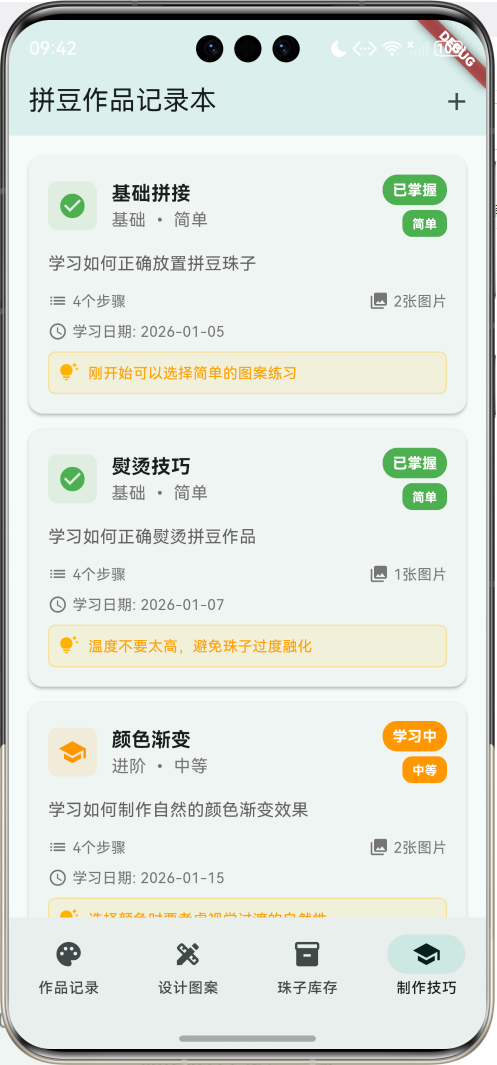
核心功能特性
- 作品记录管理:详细记录每个拼豆作品的制作过程、进度和完成情况
- 设计图案库:收集和管理各种拼豆设计图案,支持分类和收藏
- 珠子库存管理:追踪各种颜色珠子的库存状态和使用情况
- 制作技巧学习:记录和管理拼豆制作技巧,追踪学习进度
- 进度可视化:直观显示作品完成进度和珠子使用情况
- 多维度筛选:支持按分类、状态、难度等条件筛选作品
- 智能提醒功能:库存不足提醒、制作进度监控
- 创作灵感记录:记录每个作品的创作灵感和制作心得
技术架构
开发环境
- 框架:Flutter 3.x
- 开发语言:Dart
- UI组件:Material Design 3
- 状态管理:StatefulWidget
- 数据存储:内存存储(可扩展为本地数据库)
项目结构
lib/
├── main.dart                 # 应用入口和主要逻辑
├── models/                   # 数据模型(本教程中集成在main.dart)
│   ├── bead_work_record.dart
│   ├── work_step.dart
│   ├── bead_inventory.dart
│   ├── design_pattern.dart
│   └── technique_record.dart
├── pages/                    # 页面组件
│   ├── work_records_page.dart
│   ├── patterns_page.dart
│   ├── inventory_page.dart
│   └── techniques_page.dart
└── widgets/                  # 自定义组件
    ├── work_record_card.dart
    ├── pattern_card.dart
    ├── inventory_card.dart
    └── technique_card.dart
数据模型设计
1. 拼豆作品记录模型(BeadWorkRecord)
class BeadWorkRecord {
  final String id;              // 作品ID
  final String workName;        // 作品名称
  final String category;        // 作品分类:动物、植物、人物、建筑等
  final String difficulty;      // 难度等级:简单、中等、困难、专家
  final String size;            // 作品尺寸
  final DateTime startDate;     // 开始制作日期
  final DateTime? completionDate; // 完成日期
  final String status;          // 状态:设计中、制作中、已完成、暂停
  final int totalBeads;         // 总珠子数量
  final int completedBeads;     // 已完成珠子数量
  final List<String> colors;    // 使用的颜色列表
  final String designSource;    // 设计来源:原创、网络、书籍等
  final String notes;           // 制作备注
  final List<String> photos;    // 作品照片
  final List<WorkStep> workSteps; // 制作步骤
  final double rating;          // 作品评分(1-5)
  final String inspiration;     // 创作灵感
  final int estimatedHours;     // 预计制作时间
  final int actualHours;        // 实际制作时间
}
设计要点:
- 使用
totalBeads和completedBeads计算制作进度 workSteps列表记录详细的制作步骤inspiration字段记录创作灵感,增加作品的情感价值- 支持时间估算和实际用时对比,帮助提升时间管理能力
2. 制作步骤模型(WorkStep)
class WorkStep {
  final String id;              // 步骤ID
  final String stepName;        // 步骤名称
  final String description;     // 步骤描述
  final DateTime? completedDate; // 完成日期
  final bool isCompleted;       // 是否完成
  final String notes;           // 步骤备注
  final List<String> photos;    // 步骤照片
  final int beadsUsed;          // 本步骤使用的珠子数量
  final List<String> colorsUsed; // 本步骤使用的颜色
}
设计要点:
- 每个步骤可以独立记录使用的珠子数量和颜色
- 支持步骤级别的照片记录
isCompleted字段用于进度计算
3. 拼豆库存模型(BeadInventory)
class BeadInventory {
  final String id;              // 库存ID
  final String colorName;       // 颜色名称
  final String colorCode;       // 颜色代码,如#FF0000
  final String brand;           // 品牌:Hama、Perler等
  final int quantity;           // 总数量
  final int usedCount;          // 已使用数量
  final double unitPrice;       // 单价
  final DateTime purchaseDate;  // 购买日期
  final String storageLocation; // 存放位置
  final String notes;           // 备注
}
设计要点:
- 使用
colorCode支持精确的颜色显示 - 记录不同品牌的珠子,因为不同品牌可能有细微差别
usedCount帮助追踪使用情况和成本分析
4. 设计图案模型(DesignPattern)
class DesignPattern {
  final String id;              // 图案ID
  final String patternName;     // 图案名称
  final String category;        // 图案分类
  final String difficulty;      // 难度等级
  final String size;            // 图案尺寸
  final List<String> colors;    // 需要的颜色
  final String source;          // 来源:原创、网络、书籍等
  final String description;     // 图案描述
  final List<String> images;    // 设计图片
  final bool isFavorite;        // 是否收藏
  final DateTime createdDate;   // 创建日期
  final String tags;            // 标签
  final String notes;           // 备注
}
设计要点:
isFavorite支持收藏功能tags字段支持多标签分类- 记录所需颜色列表,便于材料准备
5. 制作技巧记录模型(TechniqueRecord)
class TechniqueRecord {
  final String id;              // 技巧ID
  final String techniqueName;   // 技巧名称
  final String category;        // 技巧分类:基础、进阶、高级
  final String description;     // 技巧描述
  final List<String> steps;     // 技巧步骤
  final List<String> images;    // 示例图片
  final String difficulty;      // 难度等级
  final String tips;            // 小贴士
  final DateTime learnedDate;   // 学习日期
  final bool isMastered;        // 是否掌握
  final String notes;           // 学习笔记
}
设计要点:
isMastered追踪技巧掌握情况tips字段记录实用小贴士- 支持分步骤的技巧说明
核心功能实现
1. 作品记录管理
作品卡片展示
Widget _buildWorkRecordCard(BeadWorkRecord record) {
  final progress = record.totalBeads > 0 ? record.completedBeads / record.totalBeads : 0.0;
  final daysSinceStart = DateTime.now().difference(record.startDate).inDays;

  return Card(
    elevation: 4,
    margin: const EdgeInsets.only(bottom: 16),
    child: InkWell(
      onTap: () => _showWorkRecordDetail(record),
      child: Padding(
        padding: const EdgeInsets.all(16),
        child: Column(
          crossAxisAlignment: CrossAxisAlignment.start,
          children: [
            // 标题和状态
            Row(
              children: [
                Expanded(
                  child: Column(
                    crossAxisAlignment: CrossAxisAlignment.start,
                    children: [
                      Text(record.workName, style: TextStyle(fontSize: 18, fontWeight: FontWeight.bold)),
                      Text('${record.category} • ${record.difficulty} • ${record.size}'),
                    ],
                  ),
                ),
                Container(
                  padding: EdgeInsets.symmetric(horizontal: 8, vertical: 4),
                  decoration: BoxDecoration(
                    color: _getStatusColor(record.status),
                    borderRadius: BorderRadius.circular(12),
                  ),
                  child: Text(record.status, style: TextStyle(color: Colors.white)),
                ),
              ],
            ),

            // 进度显示
            Container(
              padding: EdgeInsets.all(12),
              decoration: BoxDecoration(
                color: Colors.teal.withValues(alpha: 0.1),
                borderRadius: BorderRadius.circular(8),
              ),
              child: Column(
                children: [
                  Row(
                    mainAxisAlignment: MainAxisAlignment.spaceBetween,
                    children: [
                      Text('制作进度'),
                      Text('${record.completedBeads}/${record.totalBeads} 珠子'),
                    ],
                  ),
                  LinearProgressIndicator(value: progress),
                  Text('${(progress * 100).toStringAsFixed(1)}% 完成'),
                ],
              ),
            ),
          ],
        ),
      ),
    ),
  );
}
实现要点:
- 动态计算制作进度百分比
- 使用不同颜色表示制作状态
- 进度条直观显示完成情况
- 支持点击查看详细信息
颜色展示功能
Color _getColorFromName(String colorName) {
  switch (colorName) {
    case '红色': return Colors.red;
    case '蓝色': return Colors.blue;
    case '黄色': return Colors.yellow;
    case '绿色': return Colors.green;
    case '紫色': return Colors.purple;
    case '橙色': return Colors.orange;
    case '粉色': return Colors.pink;
    case '白色': return Colors.grey.shade300;
    case '黑色': return Colors.black;
    case '棕色': return Colors.brown;
    default: return Colors.grey;
  }
}

// 在卡片中展示颜色
Wrap(
  spacing: 6,
  runSpacing: 4,
  children: record.colors.take(8).map((color) => Container(
    padding: EdgeInsets.symmetric(horizontal: 8, vertical: 4),
    decoration: BoxDecoration(
      color: _getColorFromName(color).withValues(alpha: 0.2),
      borderRadius: BorderRadius.circular(12),
      border: Border.all(color: _getColorFromName(color).withValues(alpha: 0.5)),
    ),
    child: Text(color, style: TextStyle(color: _getColorFromName(color))),
  )).toList(),
)
实现要点:
- 将颜色名称映射为实际颜色
- 使用半透明背景和边框突出颜色
- 限制显示数量避免界面过于拥挤
2. 设计图案管理
图案卡片展示
Widget _buildPatternCard(DesignPattern pattern) {
  return Card(
    child: Padding(
      padding: const EdgeInsets.all(16),
      child: Column(
        crossAxisAlignment: CrossAxisAlignment.start,
        children: [
          Row(
            children: [
              Expanded(
                child: Column(
                  crossAxisAlignment: CrossAxisAlignment.start,
                  children: [
                    Row(
                      children: [
                        Text(pattern.patternName, style: TextStyle(fontSize: 16, fontWeight: FontWeight.bold)),
                        if (pattern.isFavorite)
                          Icon(Icons.favorite, color: Colors.red.shade400, size: 16),
                      ],
                    ),
                    Text('${pattern.category} • ${pattern.difficulty} • ${pattern.size}'),
                  ],
                ),
              ),
              Container(
                padding: EdgeInsets.symmetric(horizontal: 8, vertical: 4),
                decoration: BoxDecoration(
                  color: _getDifficultyColor(pattern.difficulty),
                  borderRadius: BorderRadius.circular(12),
                ),
                child: Text(pattern.difficulty, style: TextStyle(color: Colors.white)),
              ),
            ],
          ),

          // 标签展示
          if (pattern.tags.isNotEmpty)
            Wrap(
              spacing: 4,
              children: pattern.tags.split(',').map((tag) => Container(
                padding: EdgeInsets.symmetric(horizontal: 6, vertical: 2),
                decoration: BoxDecoration(
                  color: Colors.teal.withValues(alpha: 0.1),
                  borderRadius: BorderRadius.circular(8),
                ),
                child: Text(tag.trim(), style: TextStyle(fontSize: 10)),
              )).toList(),
            ),
        ],
      ),
    ),
  );
}
实现要点:
- 收藏状态用心形图标表示
- 标签支持多个关键词分类
- 难度等级用不同颜色区分
3. 珠子库存管理
库存状态监控
Widget _buildInventoryCard(BeadInventory item) {
  final remainingQuantity = item.quantity - item.usedCount;
  final isLowStock = remainingQuantity < 100;
  final usagePercentage = item.quantity > 0 ? item.usedCount / item.quantity : 0.0;

  return Card(
    child: Padding(
      padding: const EdgeInsets.all(16),
      child: Column(
        children: [
          Row(
            children: [
              Container(
                width: 24,
                height: 24,
                decoration: BoxDecoration(
                  color: Color(int.parse(item.colorCode.substring(1), radix: 16) + 0xFF000000),
                  shape: BoxShape.circle,
                  border: Border.all(color: Colors.grey.shade400),
                ),
              ),
              SizedBox(width: 12),
              Expanded(
                child: Column(
                  crossAxisAlignment: CrossAxisAlignment.start,
                  children: [
                    Text(item.colorName, style: TextStyle(fontSize: 16, fontWeight: FontWeight.bold)),
                    Text('${item.brand} • ${item.colorCode}'),
                  ],
                ),
              ),
              Column(
                crossAxisAlignment: CrossAxisAlignment.end,
                children: [
                  Text(
                    '$remainingQuantity个',
                    style: TextStyle(
                      fontSize: 18,
                      fontWeight: FontWeight.bold,
                      color: isLowStock ? Colors.red : Colors.green,
                    ),
                  ),
                  if (isLowStock)
                    Container(
                      padding: EdgeInsets.symmetric(horizontal: 6, vertical: 2),
                      decoration: BoxDecoration(
                        color: Colors.red,
                        borderRadius: BorderRadius.circular(8),
                      ),
                      child: Text('库存不足', style: TextStyle(color: Colors.white, fontSize: 10)),
                    ),
                ],
              ),
            ],
          ),

          // 使用情况进度条
          LinearProgressIndicator(
            value: usagePercentage,
            backgroundColor: Colors.grey.shade300,
            valueColor: AlwaysStoppedAnimation<Color>(
              usagePercentage > 0.8 ? Colors.red : Colors.blue,
            ),
          ),
        ],
      ),
    ),
  );
}
实现要点:
- 使用颜色代码显示真实颜色圆点
- 自动检测库存不足(剩余<100个)
- 使用进度条显示使用比例
- 高使用率时进度条变红色警示
4. 制作技巧学习
技巧卡片展示
Widget _buildTechniqueCard(TechniqueRecord technique) {
  return Card(
    child: Padding(
      padding: const EdgeInsets.all(16),
      child: Column(
        children: [
          Row(
            children: [
              Container(
                padding: EdgeInsets.all(8),
                decoration: BoxDecoration(
                  color: technique.isMastered
                      ? Colors.green.withValues(alpha: 0.1)
                      : Colors.orange.withValues(alpha: 0.1),
                  borderRadius: BorderRadius.circular(8),
                ),
                child: Icon(
                  technique.isMastered ? Icons.check_circle : Icons.school,
                  color: technique.isMastered ? Colors.green : Colors.orange,
                ),
              ),
              SizedBox(width: 12),
              Expanded(
                child: Column(
                  crossAxisAlignment: CrossAxisAlignment.start,
                  children: [
                    Text(technique.techniqueName, style: TextStyle(fontSize: 16, fontWeight: FontWeight.bold)),
                    Text('${technique.category} • ${technique.difficulty}'),
                  ],
                ),
              ),
              Container(
                padding: EdgeInsets.symmetric(horizontal: 8, vertical: 4),
                decoration: BoxDecoration(
                  color: technique.isMastered ? Colors.green : Colors.orange,
                  borderRadius: BorderRadius.circular(12),
                ),
                child: Text(
                  technique.isMastered ? '已掌握' : '学习中',
                  style: TextStyle(color: Colors.white, fontSize: 12),
                ),
              ),
            ],
          ),

          // 小贴士展示
          if (technique.tips.isNotEmpty)
            Container(
              padding: EdgeInsets.all(8),
              decoration: BoxDecoration(
                color: Colors.amber.withValues(alpha: 0.1),
                borderRadius: BorderRadius.circular(6),
              ),
              child: Row(
                children: [
                  Icon(Icons.tips_and_updates, color: Colors.amber.shade600, size: 16),
                  SizedBox(width: 8),
                  Expanded(child: Text(technique.tips, style: TextStyle(fontSize: 12))),
                ],
              ),
            ),
        ],
      ),
    ),
  );
}
实现要点:
- 使用不同图标区分掌握状态
- 小贴士用特殊样式突出显示
- 学习状态用颜色和文字双重标识
动画效果实现
1. 页面切换动画
void _setupAnimations() {
  _fadeAnimationController = AnimationController(
    duration: const Duration(milliseconds: 800),
    vsync: this,
  );

  _fadeAnimation = Tween<double>(
    begin: 0.0,
    end: 1.0,
  ).animate(CurvedAnimation(
    parent: _fadeAnimationController,
    curve: Curves.easeInOut,
  ));

  _slideAnimationController = AnimationController(
    duration: const Duration(milliseconds: 600),
    vsync: this,
  );

  _slideAnimation = Tween<Offset>(
    begin: const Offset(0.0, 0.3),
    end: Offset.zero,
  ).animate(CurvedAnimation(
    parent: _slideAnimationController,
    curve: Curves.easeOutCubic,
  ));

  _fadeAnimationController.forward();
  _slideAnimationController.forward();
}

// 在build方法中使用
FadeTransition(
  opacity: _fadeAnimation,
  child: SlideTransition(
    position: _slideAnimation,
    child: IndexedStack(
      index: _selectedIndex,
      children: [
        _buildWorkRecordsPage(),
        _buildPatternsPage(),
        _buildInventoryPage(),
        _buildTechniquesPage(),
      ],
    ),
  ),
)
动画特点:
- 淡入效果让页面切换更平滑
- 上滑动画增加层次感
- 使用不同的缓动曲线增强视觉效果
用户界面设计
1. 色彩方案
theme: ThemeData(
  colorScheme: ColorScheme.fromSeed(seedColor: Colors.teal),
  useMaterial3: true,
),
设计理念:
- 主色调使用青色(teal),符合手工创作的清新氛围
- 采用Material Design 3设计规范
- 状态颜色:绿色(已完成)、橙色(制作中)、蓝色(设计中)
2. 信息层次设计
Widget _buildInfoItem(IconData icon, String label, String value, Color color) {
  return Column(
    children: [
      Icon(icon, color: color, size: 20),
      SizedBox(height: 4),
      Text(label, style: TextStyle(fontSize: 10, color: Colors.grey.shade600)),
      SizedBox(height: 2),
      Text(value, style: TextStyle(fontSize: 12, fontWeight: FontWeight.bold, color: color)),
    ],
  );
}
设计原则:
- 图标+标签+数值的三层信息结构
- 使用颜色区分不同类型的信息
- 字体大小层次分明,便于快速阅读
3. 进度可视化
// 作品进度展示
Container(
  padding: EdgeInsets.all(12),
  decoration: BoxDecoration(
    color: Colors.teal.withValues(alpha: 0.1),
    borderRadius: BorderRadius.circular(8),
    border: Border.all(color: Colors.teal.withValues(alpha: 0.3)),
  ),
  child: Column(
    children: [
      Row(
        mainAxisAlignment: MainAxisAlignment.spaceBetween,
        children: [
          Text('制作进度'),
          Text('${record.completedBeads}/${record.totalBeads} 珠子'),
        ],
      ),
      LinearProgressIndicator(value: progress),
      Text('${(progress * 100).toStringAsFixed(1)}% 完成'),
    ],
  ),
)
设计要点:
- 使用特殊背景色突出进度信息
- 同时显示数值和百分比
- 进度条颜色与状态保持一致
数据管理策略
1. 示例数据初始化
void _initializeData() {
  // 初始化作品记录
  _workRecords = [
    BeadWorkRecord(
      id: '1',
      workName: '我的第一只小猫',
      category: '动物',
      difficulty: '简单',
      size: '15x15',
      startDate: DateTime.now().subtract(const Duration(days: 8)),
      completionDate: DateTime.now().subtract(const Duration(days: 3)),
      status: '已完成',
      totalBeads: 225,
      completedBeads: 225,
      colors: ['白色', '黑色', '粉色'],
      designSource: '原创',
      notes: '第一个完成的作品,很有成就感!',
      photos: ['my_cat_1.jpg', 'my_cat_2.jpg', 'my_cat_final.jpg'],
      workSteps: [
        WorkStep(
          id: '1-1',
          stepName: '设计草图',
          description: '在纸上画出小猫的基本轮廓',
          completedDate: DateTime.now().subtract(const Duration(days: 8)),
          isCompleted: true,
          notes: '参考了网上的图片,简化了一些细节',
          photos: ['cat_sketch.jpg'],
          beadsUsed: 0,
          colorsUsed: [],
        ),
        // 更多步骤...
      ],
      rating: 4.5,
      inspiration: '看到邻居家的小猫很可爱,想要制作一个纪念',
      estimatedHours: 3,
      actualHours: 4,
    ),
    // 更多作品记录...
  ];
}
2. 筛选功能实现
List<BeadWorkRecord> _getFilteredWorkRecords() {
  return _workRecords.where((record) {
    // 搜索过滤
    if (_searchQuery.isNotEmpty) {
      final query = _searchQuery.toLowerCase();
      if (!record.workName.toLowerCase().contains(query) &&
          !record.category.toLowerCase().contains(query) &&
          !record.inspiration.toLowerCase().contains(query)) {
        return false;
      }
    }

    // 分类过滤
    if (_selectedCategory != null && record.category != _selectedCategory) {
      return false;
    }

    // 状态过滤
    if (_selectedStatus != null && record.status != _selectedStatus) {
      return false;
    }

    // 难度过滤
    if (_selectedDifficulty != null && record.difficulty != _selectedDifficulty) {
      return false;
    }

    // 仅已完成过滤
    if (_showCompletedOnly && record.status != '已完成') {
      return false;
    }

    return true;
  }).toList()..sort((a, b) => b.startDate.compareTo(a.startDate));
}
扩展功能建议
1. 数据持久化
// 使用SharedPreferences存储数据
import 'package:shared_preferences/shared_preferences.dart';
import 'dart:convert';

class DataManager {
  static const String _workRecordsKey = 'work_records';
  static const String _patternsKey = 'patterns';
  static const String _inventoryKey = 'inventory';
  static const String _techniquesKey = 'techniques';

  static Future<void> saveWorkRecords(List<BeadWorkRecord> records) async {
    final prefs = await SharedPreferences.getInstance();
    final recordsJson = records.map((r) => r.toJson()).toList();
    await prefs.setString(_workRecordsKey, json.encode(recordsJson));
  }

  static Future<List<BeadWorkRecord>> loadWorkRecords() async {
    final prefs = await SharedPreferences.getInstance();
    final recordsString = prefs.getString(_workRecordsKey);
    if (recordsString != null) {
      final recordsJson = json.decode(recordsString) as List;
      return recordsJson.map((json) => BeadWorkRecord.fromJson(json)).toList();
    }
    return [];
  }
}
2. 图片管理
// 使用image_picker管理作品照片
import 'package:image_picker/image_picker.dart';
import 'dart:io';

class PhotoManager {
  static final ImagePicker _picker = ImagePicker();

  static Future<String?> takePhoto() async {
    final XFile? photo = await _picker.pickImage(source: ImageSource.camera);
    return photo?.path;
  }

  static Future<String?> pickFromGallery() async {
    final XFile? image = await _picker.pickImage(source: ImageSource.gallery);
    return image?.path;
  }

  static Future<List<String>> pickMultipleImages() async {
    final List<XFile> images = await _picker.pickMultiImage();
    return images.map((image) => image.path).toList();
  }

  static Widget buildPhotoGrid(List<String> photos) {
    return GridView.builder(
      shrinkWrap: true,
      physics: NeverScrollableScrollPhysics(),
      gridDelegate: SliverGridDelegateWithFixedCrossAxisCount(
        crossAxisCount: 3,
        crossAxisSpacing: 8,
        mainAxisSpacing: 8,
      ),
      itemCount: photos.length,
      itemBuilder: (context, index) {
        return Container(
          decoration: BoxDecoration(
            borderRadius: BorderRadius.circular(8),
            image: DecorationImage(
              image: FileImage(File(photos[index])),
              fit: BoxFit.cover,
            ),
          ),
        );
      },
    );
  }
}
3. 作品分享功能
// 使用share_plus分享作品
import 'package:share_plus/share_plus.dart';

class ShareManager {
  static Future<void> shareWork(BeadWorkRecord record) async {
    final text = '''
我完成了一个拼豆作品:${record.workName}
分类:${record.category}
难度:${record.difficulty}
尺寸:${record.size}
用时:${record.actualHours}小时
评分:${record.rating}分

创作灵感:${record.inspiration}

#拼豆 #手工 #创作
''';

    if (record.photos.isNotEmpty) {
      await Share.shareXFiles(
        record.photos.map((path) => XFile(path)).toList(),
        text: text,
      );
    } else {
      await Share.share(text);
    }
  }

  static Future<void> sharePattern(DesignPattern pattern) async {
    final text = '''
发现一个不错的拼豆图案:${pattern.patternName}
分类:${pattern.category}
难度:${pattern.difficulty}
尺寸:${pattern.size}
需要颜色:${pattern.colors.join('、')}

${pattern.description}

#拼豆图案 #设计 #手工
''';

    if (pattern.images.isNotEmpty) {
      await Share.shareXFiles(
        pattern.images.map((path) => XFile(path)).toList(),
        text: text,
      );
    } else {
      await Share.share(text);
    }
  }
}
4. 成本计算功能
class CostCalculator {
  static double calculateWorkCost(
    BeadWorkRecord record,
    List<BeadInventory> inventory,
  ) {
    double totalCost = 0.0;

    for (final color in record.colors) {
      final inventoryItem = inventory.firstWhere(
        (item) => item.colorName == color,
        orElse: () => BeadInventory(
          id: '',
          colorName: color,
          colorCode: '',
          brand: '',
          quantity: 0,
          usedCount: 0,
          unitPrice: 0.01, // 默认单价
          purchaseDate: DateTime.now(),
          storageLocation: '',
          notes: '',
        ),
      );

      // 估算每种颜色使用的珠子数量(简化计算)
      final estimatedBeadsPerColor = record.completedBeads ~/ record.colors.length;
      totalCost += estimatedBeadsPerColor * inventoryItem.unitPrice;
    }

    return totalCost;
  }

  static Map<String, double> calculateMonthlyCosts(
    List<BeadWorkRecord> records,
    List<BeadInventory> inventory,
  ) {
    final monthlyCosts = <String, double>{};

    for (final record in records) {
      if (record.completionDate != null) {
        final monthKey = '${record.completionDate!.year}-${record.completionDate!.month.toString().padLeft(2, '0')}';
        final workCost = calculateWorkCost(record, inventory);
        monthlyCosts[monthKey] = (monthlyCosts[monthKey] ?? 0.0) + workCost;
      }
    }

    return monthlyCosts;
  }
}
5. 智能推荐系统
class RecommendationEngine {
  static List<DesignPattern> recommendPatterns(
    List<BeadWorkRecord> completedWorks,
    List<DesignPattern> allPatterns,
    List<BeadInventory> inventory,
  ) {
    final recommendations = <DesignPattern>[];

    // 基于完成作品的分类推荐
    final completedCategories = completedWorks
        .where((work) => work.status == '已完成')
        .map((work) => work.category)
        .toSet();

    // 基于难度进阶推荐
    final maxCompletedDifficulty = _getMaxDifficulty(completedWorks);
    final nextDifficulty = _getNextDifficulty(maxCompletedDifficulty);

    // 基于库存颜色推荐
    final availableColors = inventory
        .where((item) => (item.quantity - item.usedCount) > 50)
        .map((item) => item.colorName)
        .toSet();

    for (final pattern in allPatterns) {
      var score = 0;

      // 分类匹配加分
      if (completedCategories.contains(pattern.category)) {
        score += 3;
      }

      // 难度适中加分
      if (pattern.difficulty == nextDifficulty) {
        score += 5;
      }

      // 颜色库存充足加分
      final patternColors = pattern.colors.toSet();
      final availablePatternColors = patternColors.intersection(availableColors);
      if (availablePatternColors.length >= patternColors.length * 0.8) {
        score += 4;
      }

      // 收藏图案优先
      if (pattern.isFavorite) {
        score += 2;
      }

      if (score >= 5) {
        recommendations.add(pattern);
      }
    }

    // 按评分排序,返回前5个
    recommendations.sort((a, b) => b.difficulty.compareTo(a.difficulty));
    return recommendations.take(5).toList();
  }

  static String _getMaxDifficulty(List<BeadWorkRecord> works) {
    final difficulties = ['简单', '中等', '困难', '专家'];
    var maxIndex = 0;

    for (final work in works) {
      if (work.status == '已完成') {
        final index = difficulties.indexOf(work.difficulty);
        if (index > maxIndex) {
          maxIndex = index;
        }
      }
    }

    return difficulties[maxIndex];
  }

  static String _getNextDifficulty(String currentMax) {
    switch (currentMax) {
      case '简单': return '中等';
      case '中等': return '困难';
      case '困难': return '专家';
      default: return '简单';
    }
  }
}
6. 统计分析功能
class StatisticsManager {
  static Map<String, dynamic> generateWorkStatistics(List<BeadWorkRecord> records) {
    final stats = <String, dynamic>{};

    // 基本统计
    stats['totalWorks'] = records.length;
    stats['completedWorks'] = records.where((r) => r.status == '已完成').length;
    stats['inProgressWorks'] = records.where((r) => r.status == '制作中').length;

    // 分类统计
    final categoryStats = <String, int>{};
    for (final record in records) {
      categoryStats[record.category] = (categoryStats[record.category] ?? 0) + 1;
    }
    stats['categoryDistribution'] = categoryStats;

    // 难度统计
    final difficultyStats = <String, int>{};
    for (final record in records) {
      difficultyStats[record.difficulty] = (difficultyStats[record.difficulty] ?? 0) + 1;
    }
    stats['difficultyDistribution'] = difficultyStats;

    // 时间统计
    final completedRecords = records.where((r) => r.status == '已完成').toList();
    if (completedRecords.isNotEmpty) {
      final totalHours = completedRecords.fold(0, (sum, r) => sum + r.actualHours);
      stats['totalHours'] = totalHours;
      stats['averageHours'] = totalHours / completedRecords.length;

      final totalBeads = completedRecords.fold(0, (sum, r) => sum + r.totalBeads);
      stats['totalBeads'] = totalBeads;
      stats['averageBeads'] = totalBeads / completedRecords.length;
    }

    // 评分统计
    final ratedRecords = records.where((r) => r.rating > 0).toList();
    if (ratedRecords.isNotEmpty) {
      final totalRating = ratedRecords.fold(0.0, (sum, r) => sum + r.rating);
      stats['averageRating'] = totalRating / ratedRecords.length;
    }

    return stats;
  }

  static Widget buildStatisticsChart(Map<String, dynamic> stats) {
    return Column(
      children: [
        // 总体统计卡片
        Card(
          child: Padding(
            padding: EdgeInsets.all(16),
            child: Column(
              children: [
                Text('作品统计', style: TextStyle(fontSize: 18, fontWeight: FontWeight.bold)),
                SizedBox(height: 16),
                Row(
                  children: [
                    Expanded(child: _buildStatItem('总作品', '${stats['totalWorks']}个', Icons.palette, Colors.blue)),
                    Expanded(child: _buildStatItem('已完成', '${stats['completedWorks']}个', Icons.check_circle, Colors.green)),
                  ],
                ),
                SizedBox(height: 16),
                Row(
                  children: [
                    Expanded(child: _buildStatItem('总用时', '${stats['totalHours'] ?? 0}小时', Icons.schedule, Colors.orange)),
                    Expanded(child: _buildStatItem('平均评分', '${(stats['averageRating'] ?? 0.0).toStringAsFixed(1)}分', Icons.star, Colors.amber)),
                  ],
                ),
              ],
            ),
          ),
        ),

        // 分类分布图表
        if (stats['categoryDistribution'] != null)
          Card(
            child: Padding(
              padding: EdgeInsets.all(16),
              child: Column(
                crossAxisAlignment: CrossAxisAlignment.start,
                children: [
                  Text('分类分布', style: TextStyle(fontSize: 16, fontWeight: FontWeight.bold)),
                  SizedBox(height: 12),
                  ...(stats['categoryDistribution'] as Map<String, int>).entries.map((entry) {
                    final percentage = entry.value / stats['totalWorks'];
                    return Padding(
                      padding: EdgeInsets.only(bottom: 8),
                      child: Column(
                        crossAxisAlignment: CrossAxisAlignment.start,
                        children: [
                          Row(
                            mainAxisAlignment: MainAxisAlignment.spaceBetween,
                            children: [
                              Text(entry.key),
                              Text('${entry.value}个 (${(percentage * 100).toStringAsFixed(1)}%)'),
                            ],
                          ),
                          SizedBox(height: 4),
                          LinearProgressIndicator(
                            value: percentage,
                            backgroundColor: Colors.grey.shade300,
                            valueColor: AlwaysStoppedAnimation<Color>(Colors.teal),
                          ),
                        ],
                      ),
                    );
                  }).toList(),
                ],
              ),
            ),
          ),
      ],
    );
  }

  static Widget _buildStatItem(String label, String value, IconData icon, Color color) {
    return Container(
      padding: EdgeInsets.all(12),
      decoration: BoxDecoration(
        color: color.withValues(alpha: 0.1),
        borderRadius: BorderRadius.circular(8),
      ),
      child: Column(
        children: [
          Icon(icon, color: color, size: 24),
          SizedBox(height: 8),
          Text(value, style: TextStyle(fontSize: 16, fontWeight: FontWeight.bold, color: color)),
          Text(label, style: TextStyle(fontSize: 12, color: Colors.grey.shade600)),
        ],
      ),
    );
  }
}
性能优化建议
1. 列表优化
// 使用ListView.builder进行懒加载
ListView.builder(
  itemCount: filteredRecords.length,
  itemBuilder: (context, index) {
    final record = filteredRecords[index];
    return _buildWorkRecordCard(record);
  },
)

// 对于大量图片,使用缓存
class ImageCacheManager {
  static final Map<String, Widget> _imageCache = {};

  static Widget getCachedImage(String imagePath) {
    if (_imageCache.containsKey(imagePath)) {
      return _imageCache[imagePath]!;
    }

    final image = Image.file(
      File(imagePath),
      width: 60,
      height: 60,
      fit: BoxFit.cover,
      errorBuilder: (context, error, stackTrace) {
        return Container(
          width: 60,
          height: 60,
          color: Colors.grey.shade300,
          child: Icon(Icons.error, color: Colors.grey.shade600),
        );
      },
    );

    _imageCache[imagePath] = image;
    return image;
  }

  static void clearCache() {
    _imageCache.clear();
  }
}
2. 状态管理优化
// 使用Provider进行状态管理
import 'package:provider/provider.dart';

class BeadWorkProvider extends ChangeNotifier {
  List<BeadWorkRecord> _workRecords = [];
  List<DesignPattern> _patterns = [];
  List<BeadInventory> _inventory = [];
  List<TechniqueRecord> _techniques = [];

  String _searchQuery = '';
  String? _selectedCategory;

  List<BeadWorkRecord> get filteredWorkRecords {
    return _workRecords.where((record) {
      if (_searchQuery.isNotEmpty) {
        final query = _searchQuery.toLowerCase();
        if (!record.workName.toLowerCase().contains(query)) {
          return false;
        }
      }
      if (_selectedCategory != null && record.category != _selectedCategory) {
        return false;
      }
      return true;
    }).toList();
  }

  void updateSearchQuery(String query) {
    _searchQuery = query;
    notifyListeners();
  }

  void updateCategoryFilter(String? category) {
    _selectedCategory = category;
    notifyListeners();
  }

  void addWorkRecord(BeadWorkRecord record) {
    _workRecords.add(record);
    notifyListeners();
  }

  void updateWorkProgress(String recordId, int completedBeads) {
    final index = _workRecords.indexWhere((r) => r.id == recordId);
    if (index != -1) {
      // 创建新的记录对象(因为字段是final)
      final oldRecord = _workRecords[index];
      final newRecord = BeadWorkRecord(
        id: oldRecord.id,
        workName: oldRecord.workName,
        category: oldRecord.category,
        difficulty: oldRecord.difficulty,
        size: oldRecord.size,
        startDate: oldRecord.startDate,
        completionDate: oldRecord.completionDate,
        status: oldRecord.status,
        totalBeads: oldRecord.totalBeads,
        completedBeads: completedBeads,
        colors: oldRecord.colors,
        designSource: oldRecord.designSource,
        notes: oldRecord.notes,
        photos: oldRecord.photos,
        workSteps: oldRecord.workSteps,
        rating: oldRecord.rating,
        inspiration: oldRecord.inspiration,
        estimatedHours: oldRecord.estimatedHours,
        actualHours: oldRecord.actualHours,
      );

      _workRecords[index] = newRecord;
      notifyListeners();
    }
  }
}
测试策略
1. 单元测试
// test/models/bead_work_record_test.dart
import 'package:flutter_test/flutter_test.dart';
import 'package:your_app/models/bead_work_record.dart';

void main() {
  group('BeadWorkRecord', () {
    test('should calculate progress correctly', () {
      final record = BeadWorkRecord(
        id: '1',
        workName: 'Test Work',
        totalBeads: 100,
        completedBeads: 50,
        // ... 其他必需字段
      );

      final progress = record.completedBeads / record.totalBeads;
      expect(progress, equals(0.5));
    });

    test('should identify completed works', () {
      final record = BeadWorkRecord(
        id: '1',
        status: '已完成',
        completionDate: DateTime.now(),
        // ... 其他字段
      );

      expect(record.status, equals('已完成'));
      expect(record.completionDate, isNotNull);
    });

    test('should calculate estimated vs actual time difference', () {
      final record = BeadWorkRecord(
        id: '1',
        estimatedHours: 5,
        actualHours: 7,
        // ... 其他字段
      );

      final timeDifference = record.actualHours - record.estimatedHours;
      expect(timeDifference, equals(2));
    });
  });
}
2. Widget测试
// test/widgets/work_record_card_test.dart
import 'package:flutter/material.dart';
import 'package:flutter_test/flutter_test.dart';
import 'package:your_app/widgets/work_record_card.dart';

void main() {
  group('WorkRecordCard', () {
    testWidgets('should display work information correctly', (WidgetTester tester) async {
      final record = BeadWorkRecord(
        id: '1',
        workName: 'Test Work',
        category: '动物',
        difficulty: '简单',
        status: '制作中',
        totalBeads: 100,
        completedBeads: 50,
        // ... 其他字段
      );

      await tester.pumpWidget(
        MaterialApp(
          home: Scaffold(
            body: WorkRecordCard(record: record),
          ),
        ),
      );

      expect(find.text('Test Work'), findsOneWidget);
      expect(find.text('动物'), findsOneWidget);
      expect(find.text('简单'), findsOneWidget);
      expect(find.text('制作中'), findsOneWidget);
    });

    testWidgets('should show progress indicator', (WidgetTester tester) async {
      final record = BeadWorkRecord(
        // ... 字段设置
        totalBeads: 100,
        completedBeads: 75,
      );

      await tester.pumpWidget(
        MaterialApp(
          home: Scaffold(
            body: WorkRecordCard(record: record),
          ),
        ),
      );

      expect(find.byType(LinearProgressIndicator), findsOneWidget);
      expect(find.text('75.0% 完成'), findsOneWidget);
    });
  });
}
3. 集成测试
// integration_test/app_test.dart
import 'package:flutter/material.dart';
import 'package:flutter_test/flutter_test.dart';
import 'package:integration_test/integration_test.dart';
import 'package:your_app/main.dart' as app;

void main() {
  IntegrationTestWidgetsFlutterBinding.ensureInitialized();

  group('App Integration Tests', () {
    testWidgets('should navigate between tabs', (WidgetTester tester) async {
      app.main();
      await tester.pumpAndSettle();

      // 测试底部导航
      expect(find.text('作品记录'), findsOneWidget);

      await tester.tap(find.text('设计图案'));
      await tester.pumpAndSettle();
      expect(find.text('设计图案'), findsOneWidget);

      await tester.tap(find.text('珠子库存'));
      await tester.pumpAndSettle();
      expect(find.text('珠子库存'), findsOneWidget);

      await tester.tap(find.text('制作技巧'));
      await tester.pumpAndSettle();
      expect(find.text('制作技巧'), findsOneWidget);
    });

    testWidgets('should filter works correctly', (WidgetTester tester) async {
      app.main();
      await tester.pumpAndSettle();

      // 打开筛选对话框
      await tester.tap(find.byIcon(Icons.filter_list));
      await tester.pumpAndSettle();

      // 选择分类筛选
      await tester.tap(find.text('动物'));
      await tester.pumpAndSettle();

      await tester.tap(find.text('应用'));
      await tester.pumpAndSettle();

      // 验证筛选结果
      expect(find.byType(Card), findsWidgets);
    });

    testWidgets('should add new work record', (WidgetTester tester) async {
      app.main();
      await tester.pumpAndSettle();

      // 点击添加按钮
      await tester.tap(find.byIcon(Icons.add));
      await tester.pumpAndSettle();

      // 验证添加对话框出现
      expect(find.text('添加作品记录功能开发中'), findsOneWidget);
    });
  });
}
部署和发布
1. Android打包
# 生成签名密钥
keytool -genkey -v -keystore ~/bead-work-key.jks -keyalg RSA -keysize 2048 -validity 10000 -alias bead-work

# 配置android/app/build.gradle
android {
    signingConfigs {
        release {
            keyAlias keystoreProperties['keyAlias']
            keyPassword keystoreProperties['keyPassword']
            storeFile keystoreProperties['storeFile'] ? file(keystoreProperties['storeFile']) : null
            storePassword keystoreProperties['storePassword']
        }
    }
    buildTypes {
        release {
            signingConfig signingConfigs.release
        }
    }
}

# 构建APK
flutter build apk --release
2. iOS打包
# 构建iOS应用
flutter build ios --release

# 使用Xcode进行最终打包和发布
open ios/Runner.xcworkspace
总结
Flutter拼豆作品记录本应用是一个功能全面的手工创作管理工具,涵盖了作品记录、图案管理、库存监控和技巧学习等核心功能。通过本教程,你学习了:
- 完整的数据模型设计:从作品记录到制作技巧的全面数据结构
- 丰富的UI组件实现:进度可视化、颜色展示、状态标识等专业界面
- 智能的筛选和搜索:多维度数据筛选和实时搜索功能
- 直观的进度管理:作品完成进度和库存使用情况的可视化
- 流畅的动画效果:页面切换和滑动动画的实现
- 可扩展的架构设计:支持数据持久化、图片管理、分享功能等扩展
这个应用不仅适用于拼豆创作,其设计模式和实现方法也可以应用到其他手工艺品制作、创作记录等相关领域。通过学习本教程,你掌握了Flutter应用开发的核心技能,能够独立开发类似的创作管理应用。
欢迎加入开源鸿蒙跨平台社区:https://openharmonycrossplatform.csdn.net

作为“人工智能6S店”的官方数字引擎,为AI开发者与企业提供一个覆盖软硬件全栈、一站式门户。
更多推荐

 12
12 0
0- 0


 已为社区贡献30条内容

所有评论(0)