
Flutter框架跨平台鸿蒙开发——面试问题生成APP的开发流程
Flutter跨平台鸿蒙开发:面试问题生成APP实现 本文介绍了使用Flutter框架开发跨平台面试问题生成APP的全流程,重点展示了在鸿蒙系统上的运行效果。该APP提供多分类支持(前端、后端、移动端等)、难度分级(简单/中等/困难)和随机问题生成功能,并附带参考答案。开发采用分层架构设计,包含数据模型、业务逻辑和UI界面三层。核心功能包括问题筛选算法、答案切换机制和现代化UI交互。文章详细讲解了
🚀运行效果展示
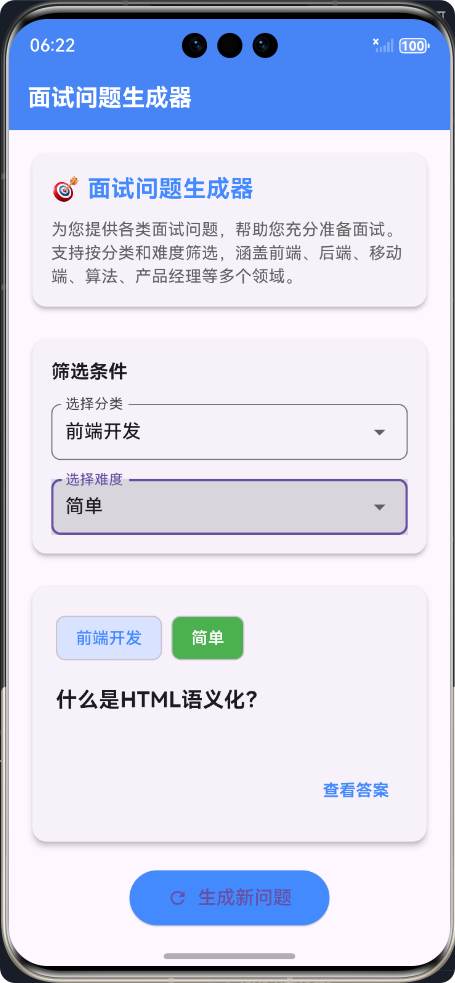
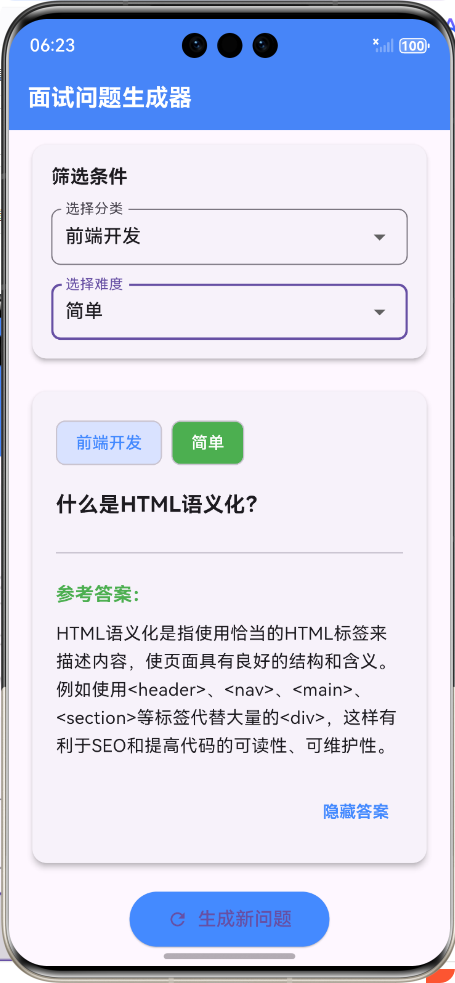
Flutter框架跨平台鸿蒙开发——面试问题生成APP的开发流程
📝 前言
随着移动应用开发技术的快速发展,跨平台开发框架逐渐成为开发者的首选。Flutter作为Google推出的跨平台UI框架,凭借其高性能、丰富的组件库和优秀的开发体验,在移动开发领域占据了重要地位。而鸿蒙系统作为华为自主研发的分布式操作系统,也在迅速崛起。本文将详细介绍如何使用Flutter框架开发一款跨平台的面试问题生成APP,并在鸿蒙系统上运行。
🎯 APP介绍
面试问题生成器APP是一款帮助用户准备面试的工具,它可以根据不同的分类和难度生成随机的面试问题,并提供参考答案。主要功能包括:
- 🏷️ 多分类支持:涵盖前端开发、后端开发、移动端开发、算法与数据结构、产品经理和通用问题等多个领域
- ⭐ 难度分级:分为简单、中等、困难三个难度级别
- 🎲 随机生成:支持随机生成符合条件的面试问题
- 💡 参考答案:提供详细的参考答案,帮助用户理解和准备
- 🎨 美观界面:采用现代化的UI设计,操作流畅,用户体验良好
🔧 开发流程
1. 项目初始化与环境配置
1.1 Flutter环境搭建
首先需要搭建Flutter开发环境,包括安装Flutter SDK、配置环境变量等。可以参考Flutter官方文档进行安装。
1.2 鸿蒙开发环境配置
为了在鸿蒙系统上运行Flutter应用,还需要配置鸿蒙开发环境,包括安装DevEco Studio、鸿蒙SDK等。
2. 项目结构设计
采用清晰的分层架构,将应用分为模型层、服务层和UI层:
lib/
├── models/          # 数据模型层
│   └── interview_question_model.dart
├── services/        # 业务逻辑层
│   └── interview_question_service.dart
├── screens/         # UI界面层
│   └── interview_question_screen.dart
└── main.dart        # 应用入口
3. 核心功能实现
3.1 数据模型设计
创建面试问题模型类,用于存储面试问题的基本信息:
/// 面试问题模型类
/// 用于存储面试问题的分类、难度和内容等信息
class InterviewQuestion {
  /// 问题ID
  final String id;

  /// 问题分类
  final String category;

  /// 问题难度(简单、中等、困难)
  final String difficulty;

  /// 问题内容
  final String question;

  /// 推荐答案
  final String answer;

  /// 创建时间
  final DateTime createdAt;

  // 构造函数和序列化方法...
}
3.2 业务逻辑实现
创建面试问题服务类,用于生成和管理面试问题:
/// 面试问题服务类
/// 用于生成和管理不同分类、难度的面试问题
class InterviewQuestionService {
  /// 预定义的面试问题库
  final List<InterviewQuestion> _questionLibrary = [
    // 预定义的面试问题...
  ];

  /// 获取所有问题分类
  List<String> getCategories() {
    return _questionLibrary.map((q) => q.category).toSet().toList();
  }

  /// 获取所有难度级别
  List<String> getDifficulties() {
    return _questionLibrary.map((q) => q.difficulty).toSet().toList();
  }

  /// 生成随机面试问题
  InterviewQuestion generateRandomQuestion({String? category, String? difficulty}) {
    // 筛选符合条件的问题...
    // 随机选择一个问题...
  }
}
3.3 UI界面开发
创建面试问题生成器页面,实现用户交互和界面展示:
/// 面试问题生成器页面
class InterviewQuestionScreen extends StatefulWidget {
_InterviewQuestionScreenState createState() => _InterviewQuestionScreenState();
}
class _InterviewQuestionScreenState extends State<InterviewQuestionScreen> {
/// 面试问题服务实例
final InterviewQuestionService _questionService = InterviewQuestionService();
/// 当前生成的问题
InterviewQuestion? _currentQuestion;
/// 选择的分类
String? _selectedCategory;
/// 选择的难度
String? _selectedDifficulty;
/// 是否显示答案
bool _showAnswer = false;
Widget build(BuildContext context) {
return Scaffold(
appBar: AppBar(
title: Text('面试问题生成器'),
backgroundColor: Colors.blueAccent,
),
body: SingleChildScrollView(
padding: EdgeInsets.all(16.0),
child: Column(
crossAxisAlignment: CrossAxisAlignment.start,
children: [
// 应用介绍
_buildIntroductionCard(),
// 筛选条件区域
_buildFilterSection(),
// 问题卡片
_buildQuestionCard(),
// 操作按钮区域
_buildActionButtons(),
],
),
),
);
}
// 各个组件的构建方法...
}
4. 应用流程设计
5. 核心功能实现
5.1 问题生成功能
/// 生成随机面试问题
InterviewQuestion generateRandomQuestion({String? category, String? difficulty}) {
  // 筛选符合条件的问题
  List<InterviewQuestion> filteredQuestions = _questionLibrary.where((question) {
    bool matchesCategory = category == null || question.category == category;
    bool matchesDifficulty = difficulty == null || question.difficulty == difficulty;
    return matchesCategory && matchesDifficulty;
  }).toList();

  // 如果没有符合条件的问题,返回所有问题中的随机一个
  if (filteredQuestions.isEmpty) {
    filteredQuestions = _questionLibrary;
  }

  // 随机选择一个问题
  final randomIndex = DateTime.now().millisecondsSinceEpoch % filteredQuestions.length;
  return filteredQuestions[randomIndex];
}
5.2 问题展示与答案切换
/// 构建问题卡片
Widget _buildQuestionCard() {
  if (_currentQuestion == null) {
    return Center(
      child: CircularProgressIndicator(),
    );
  }

  return Card(
    elevation: 4,
    shape: RoundedRectangleBorder(borderRadius: BorderRadius.circular(12)),
    child: Padding(
      padding: EdgeInsets.all(20.0),
      child: Column(
        crossAxisAlignment: CrossAxisAlignment.start,
        children: [
          // 问题分类和难度标签
          Row(
            children: [
              Chip(
                label: Text(_currentQuestion!.category),
                backgroundColor: Colors.blueAccent.withOpacity(0.2),
                labelStyle: TextStyle(color: Colors.blueAccent),
              ),
              SizedBox(width: 8),
              Chip(
                label: Text(_currentQuestion!.difficulty),
                backgroundColor: _getDifficultyColor(_currentQuestion!.difficulty),
                labelStyle: TextStyle(color: Colors.white),
              ),
            ],
          ),
          // 问题内容
          Text(
            _currentQuestion!.question,
            style: TextStyle(
              fontSize: 18,
              fontWeight: FontWeight.bold,
            ),
          ),
          // 答案区域
          if (_showAnswer) ...[
            Divider(),
            Text(
              '参考答案:',
              style: TextStyle(
                fontSize: 16,
                fontWeight: FontWeight.bold,
                color: Colors.green,
              ),
            ),
            Text(
              _currentQuestion!.answer,
              style: TextStyle(
                fontSize: 15,
                height: 1.6,
              ),
            ),
          ],
          // 显示/隐藏答案按钮
          Align(
            alignment: Alignment.centerRight,
            child: TextButton(
              onPressed: _toggleAnswer,
              child: Text(
                _showAnswer ? '隐藏答案' : '查看答案',
                style: TextStyle(
                  color: Colors.blueAccent,
                  fontWeight: FontWeight.bold,
                ),
              ),
            ),
          ),
        ],
      ),
    ),
  );
}
6. 鸿蒙系统适配与运行
6.1 项目配置
在Flutter项目中,需要添加鸿蒙相关的配置,包括在pubspec.yaml文件中添加依赖,以及配置鸿蒙相关的权限和参数。
6.2 构建与运行
使用以下命令构建鸿蒙应用:
flutter run
Flutter会自动构建鸿蒙应用并安装到设备上运行。
📊 性能优化
- 预加载问题库:将面试问题库预加载到内存中,减少用户等待时间
- 缓存机制:对生成的问题进行缓存,提高应用响应速度
- 懒加载组件:对于不常用的组件采用懒加载方式,减少初始加载时间
- 优化UI渲染:使用合适的Widget组合,避免不必要的重建
🎉 总结
本文详细介绍了使用Flutter框架开发跨平台鸿蒙应用的流程,包括项目初始化、环境配置、核心功能实现、应用流程设计和鸿蒙系统适配等方面。通过这个面试问题生成器APP的开发,我们可以看到Flutter在跨平台开发方面的强大能力和优势。
使用Flutter开发跨平台应用的主要优势包括:
- 🚀 高性能:Flutter使用Skia渲染引擎,性能接近原生应用
- 🎨 丰富的组件库:提供了大量的UI组件,方便开发者快速构建美观的界面
- 🔄 热重载:支持热重载,大大提高开发效率
- 🌐 跨平台:一套代码可以在Android、iOS、Web、鸿蒙等多个平台运行
- 📱 原生体验:提供原生级别的用户体验
随着鸿蒙系统的不断发展,Flutter在鸿蒙平台上的应用前景也越来越广阔。相信在不久的将来,Flutter将成为鸿蒙应用开发的重要工具之一。
📚 参考资料
欢迎加入开源鸿蒙跨平台社区:https://openharmonycrossplatform.csdn.net

作为“人工智能6S店”的官方数字引擎,为AI开发者与企业提供一个覆盖软硬件全栈、一站式门户。
更多推荐
 14
14 0
0- 0


 已为社区贡献6条内容

所有评论(0)