
【Harmonyos】开源鸿蒙跨平台训练营DAY3:HarmonyOS + Flutter + Dio:从零实现跨平台数据清单应用完整指南
本文详细介绍如何在开源鸿蒙系统上使用 Flutter 和 Dio 网络库实现一个功能完善的数据清单应用,包含完整的开发流程、核心代码解析及常见问题解决方案
HarmonyOS + Flutter + Dio:从零实现跨平台数据清单应用完整指南
本文详细介绍如何在开源鸿蒙系统上使用 Flutter 和 Dio 网络库实现一个功能完善的数据清单应用,包含完整的开发流程、核心代码解析及常见问题解决方案。
一、项目概述
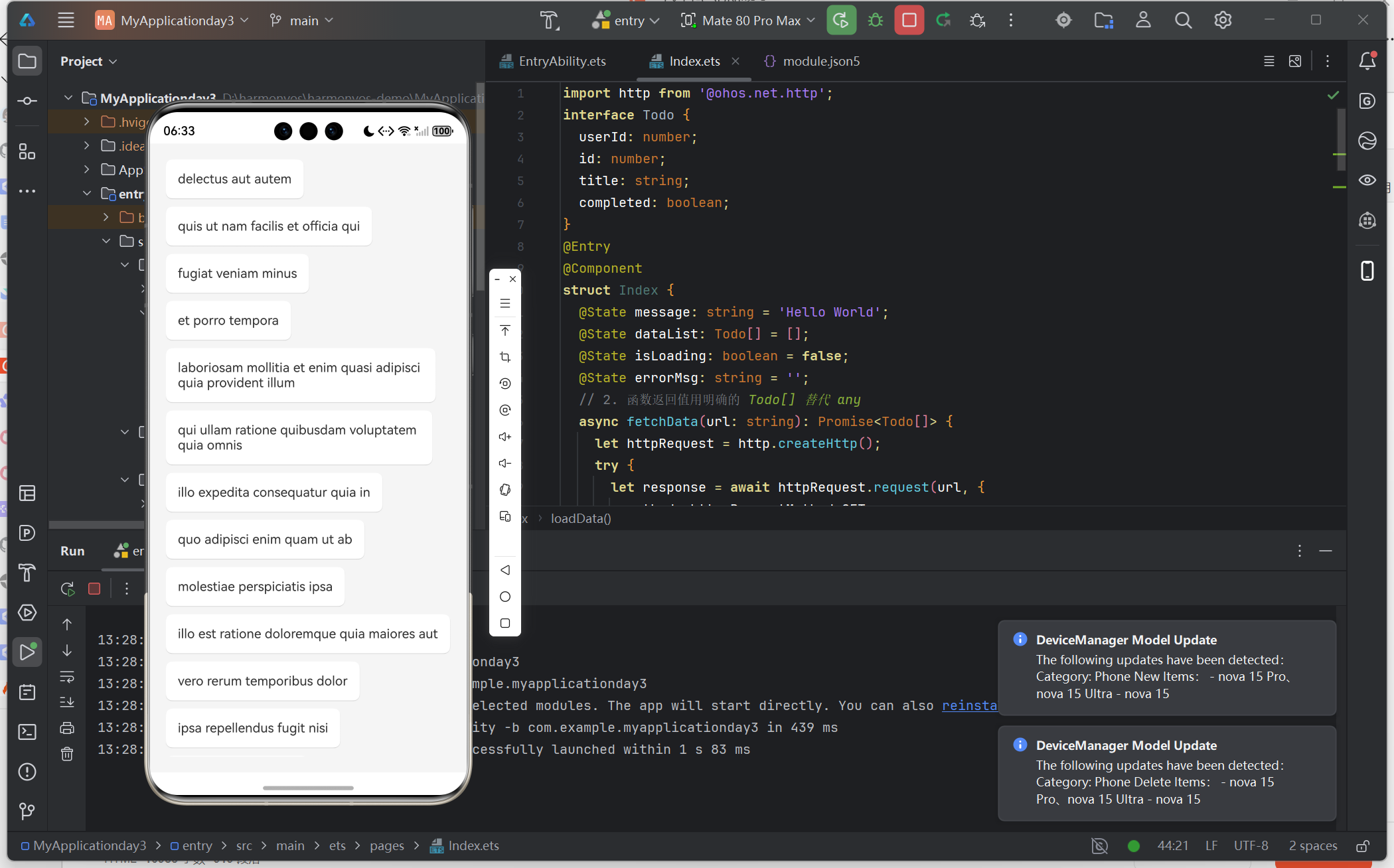
本项目是一个基于 Flutter 技术栈的跨平台应用,支持在 Android、iOS 和开源鸿蒙(OpenHarmony)系统上运行。应用集成了 Dio 网络请求库,实现了以下功能:
- 支持多种数据类型展示(文章、用户、评论、相册)
- 下拉刷新、上拉加载更多
- 完善的状态管理(加载中、空数据、错误处理)
- 统一的网络请求封装和异常处理
项目结构
harmony_dio_list/
├── lib/
│   ├── main.dart              # 应用入口
│   ├── models/
│   │   ├── data_item.dart     # 数据模型
│   │   └── data_item.g.dart   # JSON 序列化生成文件
│   ├── pages/
│   │   └── data_list_page.dart # 数据列表页面
│   ├── repositories/
│   │   └── data_repository.dart # 数据仓库层
│   ├── services/
│   │   └── dio_service.dart   # Dio 网络服务封装
│   └── widgets/
│       ├── empty_widget.dart  # 空状态组件
│       ├── error_widget.dart  # 错误状态组件
│       └── loading_widget.dart # 加载中组件
└── ohos/                      # 鸿蒙配置目录
    └── entry/src/main/module.json5  # 权限配置
二、开发流程
2.1 环境准备
Flutter 版本要求:
Flutter 3.19.0+ • channel stable
Dart 3.8.0+
HarmonyOS 开发环境:
- DevEco Studio 5.0+
- HarmonyOS API 11+
- 支持鸿蒙的 Flutter SDK
2.2 项目初始化
# 创建 Flutter 项目
flutter create harmony_dio_list

# 进入项目目录
cd harmony_dio_list

# 添加鸿蒙支持(如果 Flutter SDK 版本不支持,需要下载支持鸿蒙的版本)
flutter create --platforms ohos .
2.3 配置依赖
在 pubspec.yaml 中添加以下依赖:
dependencies:
  flutter:
    sdk: flutter
  # 网络请求库
  dio: ^5.4.0
  # 下拉刷新组件
  pull_to_refresh: ^2.0.0
  # JSON 序列化注解
  json_annotation: ^4.9.0
  # 状态管理(可选)
  provider: ^6.1.1

dev_dependencies:
  flutter_test:
    sdk: flutter
  # JSON 序列化代码生成
  build_runner: ^2.4.8
  json_serializable: ^6.7.1
执行依赖安装:
flutter pub get
2.4 配置鸿蒙网络权限
在 ohos/entry/src/main/module.json5 中添加网络权限:
{
  "module": {
    "requestPermissions": [
      {
        "name": "ohos.permission.INTERNET",
        "reason": "$string:internet_permission_reason",
        "usedScene": {
          "abilities": ["EntryAbility"],
          "when": "inuse"
        }
      },
      {
        "name": "ohos.permission.GET_NETWORK_INFO",
        "reason": "$string:network_info_permission_reason",
        "usedScene": {
          "abilities": ["EntryAbility"],
          "when": "inuse"
        }
      }
    ]
  }
}
同时在 ohos/entry/src/main/resources/base/element/string.json 中添加权限说明:
{
  "string": [
    {
      "name": "internet_permission_reason",
      "value": "需要网络权限以获取数据"
    },
    {
      "name": "network_info_permission_reason",
      "value": "需要获取网络信息以检查网络状态"
    }
  ]
}
三、核心代码实现
3.1 数据模型层
创建 lib/models/data_item.dart:
import 'package:json_annotation/json_annotation.dart';
part 'data_item.g.dart';
/// 数据项模型类
()
class DataItem {
final int? id;
final String? title;
final String? body;
final String? email;
final String? name;
final String? type;
final DateTime? createdAt;
DataItem({
this.id,
this.title,
this.body,
this.email,
this.name,
this.type,
this.createdAt,
});
factory DataItem.fromJson(Map<String, dynamic> json) =>
_$DataItemFromJson(json);
Map<String, dynamic> toJson() => _$DataItemToJson(this);
/// 从 JSON 数组创建列表
static List<DataItem> fromJsonList(List<dynamic> jsonList) {
return jsonList
.map((json) => DataItem.fromJson(json as Map<String, dynamic>))
.toList();
}
}
/// 统一的 API 响应模型
(genericArgumentFactories: true)
class ApiResponse<T> {
final int? code;
final String? message;
final T? data;
final bool success;
ApiResponse({
this.code,
this.message,
this.data,
this.success = true,
});
factory ApiResponse.fromJson(
Map<String, dynamic> json,
T Function(Object? json) fromJsonT,
) =>
_$ApiResponseFromJson(json);
Map<String, dynamic> toJson(Object? Function(T value) toJsonT) =>
_$ApiResponseToJson(this);
}
生成序列化代码:
flutter pub run build_runner build --delete-conflicting-outputs
3.2 Dio 网络服务封装
创建 lib/services/dio_service.dart:
import 'package:dio/dio.dart';
import '../models/data_item.dart';

/// Dio 网络请求服务类
/// 封装了请求拦截器、响应拦截器和异常处理
class DioService {
  static DioService? _instance;
  late Dio _dio;

  /// 获取单例实例
  static DioService get instance {
    _instance ??= DioService._internal();
    return _instance!;
  }

  /// 私有构造函数
  DioService._internal() {
    _dio = Dio(_createBaseOptions());
    _setupInterceptors();
  }

  /// 创建基础配置
  BaseOptions _createBaseOptions() {
    return BaseOptions(
      baseUrl: 'https://jsonplaceholder.typicode.com',
      connectTimeout: const Duration(seconds: 15),
      receiveTimeout: const Duration(seconds: 15),
      sendTimeout: const Duration(seconds: 15),
      headers: {
        'Content-Type': 'application/json',
        'Accept': 'application/json',
      },
    );
  }

  /// 设置拦截器
  void _setupInterceptors() {
    // 请求拦截器
    _dio.interceptors.add(InterceptorsWrapper(
      onRequest: (options, handler) {
        // 添加公共请求头
        options.headers['User-Agent'] = 'HarmonyOS-Flutter-Dio/1.0';
        // 添加时间戳防止缓存
        options.queryParameters['t'] = DateTime.now().millisecondsSinceEpoch;
        print('请求: ${options.method} ${options.uri}');
        return handler.next(options);
      },
      onResponse: (response, handler) {
        // 统一处理响应数据
        print('响应: ${response.statusCode} ${response.data}');
        return handler.next(response);
      },
      onError: (error, handler) {
        // 统一处理错误
        print('错误: ${error.message}');
        // 自定义错误处理
        if (error.response != null) {
          final statusCode = error.response?.statusCode;
          switch (statusCode) {
            case 401:
              error.message = '未授权,请重新登录';
              break;
            case 403:
              error.message = '拒绝访问';
              break;
            case 404:
              error.message = '请求的资源不存在';
              break;
            case 500:
              error.message = '服务器内部错误';
              break;
            case 503:
              error.message = '服务不可用';
              break;
            default:
              error.message = '网络请求失败: $statusCode';
          }
        } else {
          if (error.type == DioExceptionType.connectionTimeout) {
            error.message = '连接超时,请检查网络';
          } else if (error.type == DioExceptionType.receiveTimeout) {
            error.message = '接收数据超时';
          } else if (error.type == DioExceptionType.sendTimeout) {
            error.message = '发送数据超时';
          } else if (error.type == DioExceptionType.connectionError) {
            error.message = '网络连接失败,请检查网络设置';
          }
        }
        return handler.next(error);
      },
    ));

    // 日志拦截器(仅在调试模式)
    _dio.interceptors.add(LogInterceptor(
      request: true,
      requestHeader: true,
      requestBody: true,
      responseHeader: false,
      responseBody: true,
      error: true,
      logPrint: (obj) => print('Dio: $obj'),
    ));
  }

  /// 获取 Dio 实例
  Dio get dio => _dio;

  /// GET 请求
  Future<List<DataItem>> getDataList({
    required String path,
    Map<String, dynamic>? queryParameters,
    int page = 1,
    int pageSize = 20,
  }) async {
    try {
      final params = queryParameters ?? {};
      params['_page'] = page;
      params['_limit'] = pageSize;

      final response = await _dio.get(
        path,
        queryParameters: params,
      );

      if (response.statusCode == 200) {
        if (response.data is List) {
          return DataItem.fromJsonList(response.data as List);
        }
      }
      return [];
    } on DioException catch (e) {
      rethrow;
    }
  }

  /// POST 请求
  Future<DataItem?> postData({
    required String path,
    Map<String, dynamic>? data,
  }) async {
    try {
      final response = await _dio.post(
        path,
        data: data,
      );

      if (response.statusCode == 200 || response.statusCode == 201) {
        return DataItem.fromJson(response.data as Map<String, dynamic>);
      }
      return null;
    } on DioException catch (e) {
      rethrow;
    }
  }

  /// 通用 GET 请求
  Future<Response> get(
    String path, {
    Map<String, dynamic>? queryParameters,
    Options? options,
    CancelToken? cancelToken,
    ProgressCallback? onReceiveProgress,
  }) async {
    return await _dio.get(
      path,
      queryParameters: queryParameters,
      options: options,
      cancelToken: cancelToken,
      onReceiveProgress: onReceiveProgress,
    );
  }

  /// 通用 POST 请求
  Future<Response> post(
    String path, {
    data,
    Map<String, dynamic>? queryParameters,
    Options? options,
    CancelToken? cancelToken,
    ProgressCallback? onSendProgress,
    ProgressCallback? onReceiveProgress,
  }) async {
    return await _dio.post(
      path,
      data: data,
      queryParameters: queryParameters,
      options: options,
      cancelToken: cancelToken,
      onSendProgress: onSendProgress,
      onReceiveProgress: onReceiveProgress,
    );
  }
}
3.3 UI 组件封装
加载中组件 (lib/widgets/loading_widget.dart):
import 'package:flutter/material.dart';
class LoadingWidget extends StatelessWidget {
final String? message;
const LoadingWidget({super.key, this.message});
Widget build(BuildContext context) {
return Center(
child: Column(
mainAxisAlignment: MainAxisAlignment.center,
children: [
const CircularProgressIndicator(),
if (message != null) ...[
const SizedBox(height: 16),
Text(
message!,
style: TextStyle(color: Colors.grey[600]),
),
],
],
),
);
}
}
// 小尺寸加载指示器
class SmallLoadingWidget extends StatelessWidget {
const SmallLoadingWidget({super.key});
Widget build(BuildContext context) {
return const SizedBox(
width: 20,
height: 20,
child: CircularProgressIndicator(strokeWidth: 2),
);
}
}
空数据组件 (lib/widgets/empty_widget.dart):
import 'package:flutter/material.dart';
class EmptyWidget extends StatelessWidget {
final IconData? icon;
final String? message;
final VoidCallback? onRetry;
const EmptyWidget({
super.key,
this.icon,
this.message,
this.onRetry,
});
Widget build(BuildContext context) {
return Center(
child: Column(
mainAxisAlignment: MainAxisAlignment.center,
children: [
Icon(
icon ?? Icons.inbox_outlined,
size: 80,
color: Colors.grey[300],
),
const SizedBox(height: 16),
Text(
message ?? '暂无数据',
style: TextStyle(
fontSize: 16,
color: Colors.grey[600],
),
),
if (onRetry != null) ...[
const SizedBox(height: 24),
ElevatedButton.icon(
onPressed: onRetry,
icon: const Icon(Icons.refresh),
label: const Text('重新加载'),
),
],
],
),
);
}
}
错误状态组件 (lib/widgets/error_widget.dart):
import 'package:flutter/material.dart';
class CustomErrorWidget extends StatelessWidget {
final String message;
final VoidCallback? onRetry;
const CustomErrorWidget({
super.key,
required this.message,
this.onRetry,
});
Widget build(BuildContext context) {
return Center(
child: Padding(
padding: const EdgeInsets.all(32.0),
child: Column(
mainAxisAlignment: MainAxisAlignment.center,
children: [
Icon(
Icons.error_outline,
size: 64,
color: Colors.red[300],
),
const SizedBox(height: 16),
Text(
message,
textAlign: TextAlign.center,
style: TextStyle(
fontSize: 14,
color: Colors.grey[700],
),
),
if (onRetry != null) ...[
const SizedBox(height: 24),
ElevatedButton.icon(
onPressed: onRetry,
icon: const Icon(Icons.refresh),
label: const Text('重试'),
),
],
],
),
),
);
}
}
3.4 数据列表页面
创建 lib/pages/data_list_page.dart(核心页面代码):
import 'package:flutter/material.dart';
import 'package:pull_to_refresh/pull_to_refresh.dart';
import 'package:dio/dio.dart';
import '../models/data_item.dart';
import '../services/dio_service.dart';
import '../widgets/empty_widget.dart';
import '../widgets/error_widget.dart';
import '../widgets/loading_widget.dart';
/// 数据列表页面
/// 支持:下拉刷新、上拉加载、空数据、加载中、错误处理
class DataListPage extends StatefulWidget {
const DataListPage({super.key});
State<DataListPage> createState() => _DataListPageState();
}
class _DataListPageState extends State<DataListPage> {
final List<DataItem> _dataList = [];
int _currentPage = 1;
static const int _pageSize = 20;
bool _hasMore = true;
bool _isLoading = true;
String? _errorMessage;
final RefreshController _refreshController =
RefreshController(initialRefresh: true);
final List<String> _listTypes = ['文章', '用户', '评论', '相册'];
String _selectedType = '文章';
void dispose() {
_refreshController.dispose();
super.dispose();
}
String _getPathForType() {
switch (_selectedType) {
case '文章':
return '/posts';
case '用户':
return '/users';
case '评论':
return '/comments';
case '相册':
return '/albums';
default:
return '/posts';
}
}
Future<void> _loadData({bool isRefresh = false, bool isLoadMore = false}) async {
if (isLoadMore && !_hasMore) {
_refreshController.loadComplete();
return;
}
if (isRefresh) {
_currentPage = 1;
_hasMore = true;
}
setState(() {
if (!isLoadMore) {
_isLoading = true;
_errorMessage = null;
}
});
try {
final DioService dioService = DioService.instance;
final response = await dioService.get(
_getPathForType(),
queryParameters: {
'_page': _currentPage,
'_limit': _pageSize,
},
);
if (response.statusCode == 200) {
final List<DataItem> newData =
DataItem.fromJsonList(response.data as List);
setState(() {
if (isRefresh) {
_dataList.clear();
}
_dataList.addAll(newData);
_hasMore = newData.length >= _pageSize;
_isLoading = false;
_errorMessage = null;
});
}
} on DioException catch (e) {
setState(() {
_errorMessage = e.message ?? '网络请求失败';
_isLoading = false;
});
// 显示错误提示
ScaffoldMessenger.of(context).showSnackBar(
SnackBar(
content: Text('加载失败: ${e.message}'),
backgroundColor: Colors.red,
action: SnackBarAction(
label: '重试',
textColor: Colors.white,
onPressed: () => _onRefresh(),
),
),
);
} finally {
if (isRefresh) {
_refreshController.refreshCompleted();
}
if (isLoadMore && _hasMore) {
_refreshController.loadComplete();
}
}
}
void _onRefresh() {
_loadData(isRefresh: true);
}
void _onLoading() {
if (_hasMore) {
_currentPage++;
_loadData(isLoadMore: true);
} else {
_refreshController.loadNoData();
}
}
Widget build(BuildContext context) {
return Scaffold(
appBar: AppBar(
title: const Text('Dio 数据清单'),
backgroundColor: Theme.of(context).colorScheme.inversePrimary,
actions: [
// 列表类型选择器
PopupMenuButton<String>(
icon: const Icon(Icons.filter_list),
onSelected: (value) {
setState(() {
_selectedType = value;
});
_onRefresh();
},
itemBuilder: (context) => _listTypes
.map((type) => PopupMenuItem(
value: type,
child: Row(
children: [
Icon(_selectedType == type
? Icons.check_circle
: Icons.circle_outlined),
const SizedBox(width: 8),
Text(type),
],
),
))
.toList(),
),
],
),
body: _buildBody(),
);
}
Widget _buildBody() {
if (_isLoading && _dataList.isEmpty) {
return const LoadingWidget();
}
if (_errorMessage != null && _dataList.isEmpty) {
return CustomErrorWidget(
message: _errorMessage!,
onRetry: _onRefresh,
);
}
if (_dataList.isEmpty) {
return const EmptyWidget();
}
return SmartRefresher(
controller: _refreshController,
enablePullDown: true,
enablePullUp: true,
onRefresh: _onRefresh,
onLoading: _onLoading,
header: const WaterDropHeader(
complete: Text('刷新完成'),
failed: Text('刷新失败'),
waterDropColor: Colors.blue,
),
footer: CustomFooter(
builder: (BuildContext context, LoadStatus? mode) {
Widget body = const SizedBox();
if (mode == LoadStatus.idle) {
body = const Text('上拉加载更多');
} else if (mode == LoadStatus.loading) {
body = const CircularProgressIndicator();
} else if (mode == LoadStatus.failed) {
body = const Text('加载失败,点击重试');
} else if (mode == LoadStatus.canLoading) {
body = const Text('松手加载更多');
} else if (mode == LoadStatus.noMore) {
body = const Text('没有更多数据了');
}
return SizedBox(
height: 55.0,
child: Center(child: body),
);
},
),
child: ListView.separated(
itemCount: _dataList.length + (_hasMore ? 0 : 1),
separatorBuilder: (context, index) => Divider(
height: 1,
color: Colors.grey[200],
),
itemBuilder: (context, index) {
if (index >= _dataList.length) {
return const Center(
child: Padding(
padding: EdgeInsets.all(16.0),
child: Text('已加载全部数据'),
),
);
}
final item = _dataList[index];
return _buildListItem(item);
},
),
);
}
Widget _buildListItem(DataItem item) {
return ListTile(
contentPadding: const EdgeInsets.symmetric(horizontal: 16, vertical: 8),
leading: CircleAvatar(
backgroundColor: Colors.blue.shade100,
child: Text(
item.id?.toString() ?? '?',
style: const TextStyle(fontWeight: FontWeight.bold),
),
),
title: Text(
item.title ?? item.name ?? item.email ?? '无标题',
maxLines: 2,
overflow: TextOverflow.ellipsis,
style: const TextStyle(fontWeight: FontWeight.w500),
),
subtitle: Column(
crossAxisAlignment: CrossAxisAlignment.start,
children: [
if (item.body != null) ...[
const SizedBox(height: 4),
Text(
item.body!,
maxLines: 2,
overflow: TextOverflow.ellipsis,
style: TextStyle(color: Colors.grey[600], fontSize: 12),
),
],
if (item.email != null) ...[
const SizedBox(height: 4),
Text(
item.email!,
style: TextStyle(color: Colors.grey[500], fontSize: 12),
),
],
],
),
trailing: const Icon(Icons.chevron_right, color: Colors.grey),
onTap: () {
_showDetailDialog(item);
},
);
}
void _showDetailDialog(DataItem item) {
showDialog(
context: context,
builder: (context) => AlertDialog(
title: Text(item.title ?? item.name ?? '详情'),
content: SingleChildScrollView(
child: Column(
crossAxisAlignment: CrossAxisAlignment.start,
mainAxisSize: MainAxisSize.min,
children: [
if (item.id != null)
_buildDetailRow('ID', item.id.toString()),
if (item.name != null) _buildDetailRow('名称', item.name!),
if (item.email != null) _buildDetailRow('邮箱', item.email!),
if (item.title != null) _buildDetailRow('标题', item.title!),
if (item.body != null) _buildDetailRow('内容', item.body!),
if (item.type != null) _buildDetailRow('类型', item.type!),
],
),
),
actions: [
TextButton(
onPressed: () => Navigator.pop(context),
child: const Text('关闭'),
),
],
),
);
}
Widget _buildDetailRow(String label, String value) {
return Padding(
padding: const EdgeInsets.only(bottom: 8),
child: Row(
crossAxisAlignment: CrossAxisAlignment.start,
children: [
SizedBox(
width: 60,
child: Text(
'$label:',
style: const TextStyle(fontWeight: FontWeight.bold),
),
),
Expanded(child: Text(value)),
],
),
);
}
}
3.5 应用入口
修改 lib/main.dart:
import 'package:flutter/material.dart';
import 'pages/data_list_page.dart';
void main() {
runApp(const MyApp());
}
class MyApp extends StatelessWidget {
const MyApp({super.key});
Widget build(BuildContext context) {
return MaterialApp(
title: 'HarmonyOS Dio Demo',
debugShowCheckedModeBanner: false,
theme: ThemeData(
colorScheme: ColorScheme.fromSeed(seedColor: Colors.blue),
useMaterial3: true,
),
home: const DataListPage(),
);
}
}
四、运行与调试
4.1 运行命令
# 运行到 Android/iOS
flutter run

# 运行到鸿蒙设备/模拟器
flutter run -d ohos

# 查看可用设备
flutter devices
4.2 鸿蒙设备运行注意事项
- 确保鸿蒙设备已开启开发者模式和 USB 调试
- 首次运行可能需要
hdc工具授权连接:hdc shell pm grant <package_name> ohos.permission.INTERNET
五、常见问题与解决方案
5.1 网络请求失败
问题现象: 提示 “网络连接失败” 或 “connection error”
解决方案:
-
检查权限配置
- 确认
module.json5中已正确添加ohos.permission.INTERNET权限 - 检查权限的
usedScene配置是否正确
- 确认
-
检查网络状态
- 确保设备/模拟器已连接网络
- 尝试在应用中添加网络状态检测
-
调整超时时间
BaseOptions(
  connectTimeout: const Duration(seconds: 30), // 增加到 30 秒
  receiveTimeout: const Duration(seconds: 30),
  sendTimeout: const Duration(seconds: 30),
)
5.2 JSON 解析错误
问题现象: type 'List<dynamic>' is not a subtype of type 'Map<String, dynamic>'
解决方案:
-
确保使用
fromJsonList方法处理数组数据 -
检查 API 返回的数据结构是否与模型定义一致
-
添加类型判断:
if (response.data is List) {
  return DataItem.fromJsonList(response.data as List);
} else if (response.data is Map) {
  return [DataItem.fromJson(response.data as Map<String, dynamic>)];
}
5.3 鸿蒙平台适配问题
问题现象: 在鸿蒙设备上运行时出现各种适配错误
解决方案:
-
检查 Flutter 版本
flutter --version确保使用支持鸿蒙的 Flutter 版本(3.19+)
-
更新鸿蒙配置
- 确保
ohos目录配置正确 - 检查
app.json5和module.json5的配置格式
- 确保
-
清理构建缓存
flutter clean
cd ohos
hvigor clean
cd ..
flutter pub get
5.4 下拉刷新不工作
问题现象: 刷新控制器无响应
解决方案:
-
确保
RefreshController正确初始化并正确释放 -
在数据加载完成后调用对应的完成方法:
if (isRefresh) { _refreshController.refreshCompleted(); } else if (isLoadMore) { if (_hasMore) { _refreshController.loadComplete(); } else { _refreshController.loadNoData(); } } -
检查
SmartRefresher的配置:SmartRefresher( enablePullDown: true, enablePullUp: true, onRefresh: _onRefresh, onLoading: _onLoading, // ... )
5.5 生成代码失败
问题现象: 运行 build_runner 时报错
解决方案:
-
使用
--delete-conflicting-outputs参数:flutter pub run build_runner build --delete-conflicting-outputs -
检查模型类的
part声明是否正确 -
确保所有
@JsonSerializable()注解的类都正确实现了工厂方法
5.6 鸿蒙签名问题
问题现象: 安装时提示签名错误
解决方案:
- 在 DevEco Studio 中生成调试签名
- 配置
ohos/build-profile.json5中的签名信息 - 或使用自动签名(开发阶段推荐)
六、项目总结
本项目完整展示了在 HarmonyOS 平台上使用 Flutter 和 Dio 实现网络数据请求的全流程:
| 技术点 | 实现内容 |
|---|---|
| 网络请求 | Dio 单例封装、拦截器、统一错误处理 |
| 数据解析 | json_serializable 自动生成序列化代码 |
| UI 组件 | 下拉刷新、上拉加载、状态管理 |
| 平台适配 | 鸿蒙权限配置、平台特定设置 |
| 架构设计 | 分层架构(Service-Repository-Page) |
学习要点
- Dio 拦截器的使用:通过拦截器实现统一的请求头添加、响应处理和错误转换
- 状态管理:正确处理加载中、成功、失败、空数据等多种状态
- 鸿蒙适配:了解鸿蒙平台的特殊配置要求
- 代码生成:使用 build_runner 自动生成序列化代码
扩展建议
- 添加本地缓存功能(使用 shared_preferences 或 sqflite)
- 实现数据分页预加载优化
- 添加搜索和筛选功能
- 实现离线模式支持
项目源码: 将代码保存到对应文件即可直接运行
API 测试地址: https://jsonplaceholder.typicode.com
参考文档:

作为“人工智能6S店”的官方数字引擎,为AI开发者与企业提供一个覆盖软硬件全栈、一站式门户。
更多推荐
 2
2 0
0- 0


 已为社区贡献3条内容

所有评论(0)