
Flutter 框架跨平台鸿蒙开发 - 宠物寄养记录管理系统开发教程
本教程详细介绍了Flutter宠物寄养记录管理系统的完整开发过程,从项目规划到最终部署。
Flutter宠物寄养记录管理系统开发教程
项目概述
在现代社会,宠物已经成为许多家庭不可或缺的一部分。随着人们生活节奏的加快,宠物寄养服务需求日益增长。本教程将带你开发一个功能完整的宠物寄养记录管理系统,帮助宠物店或寄养中心高效管理宠物寄养业务。
运行效果图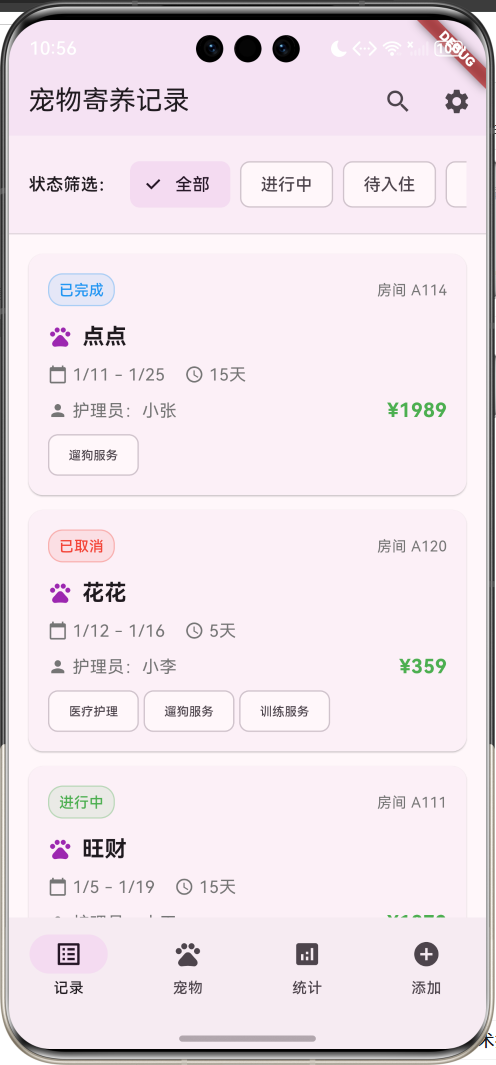
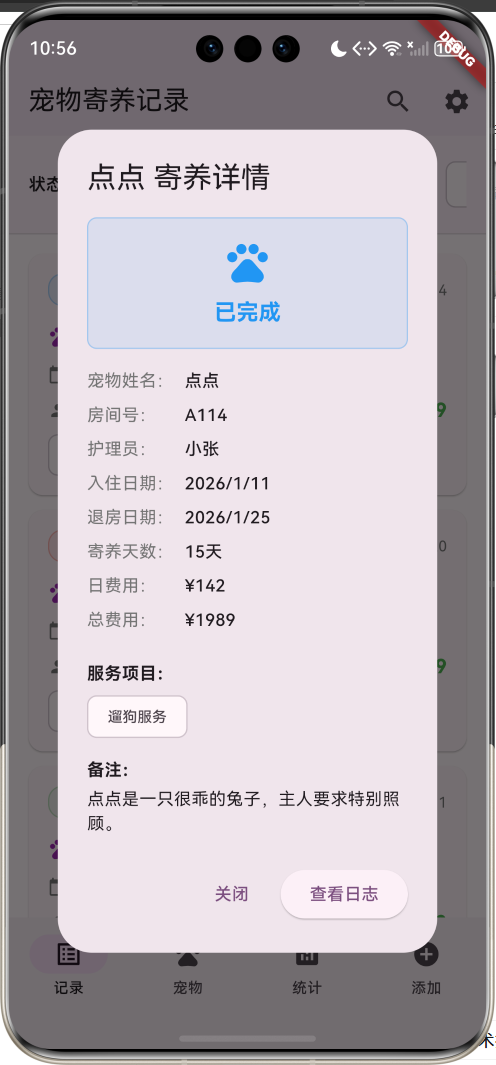
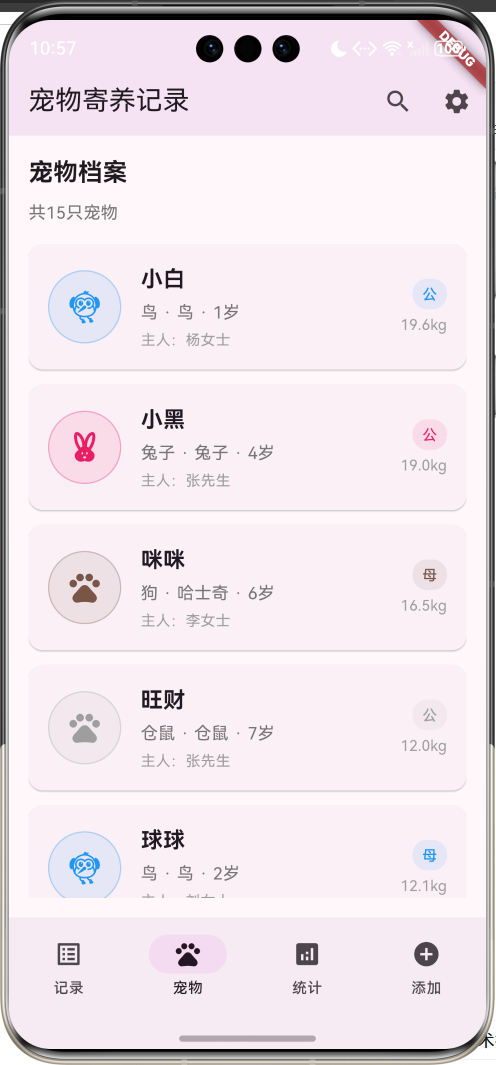
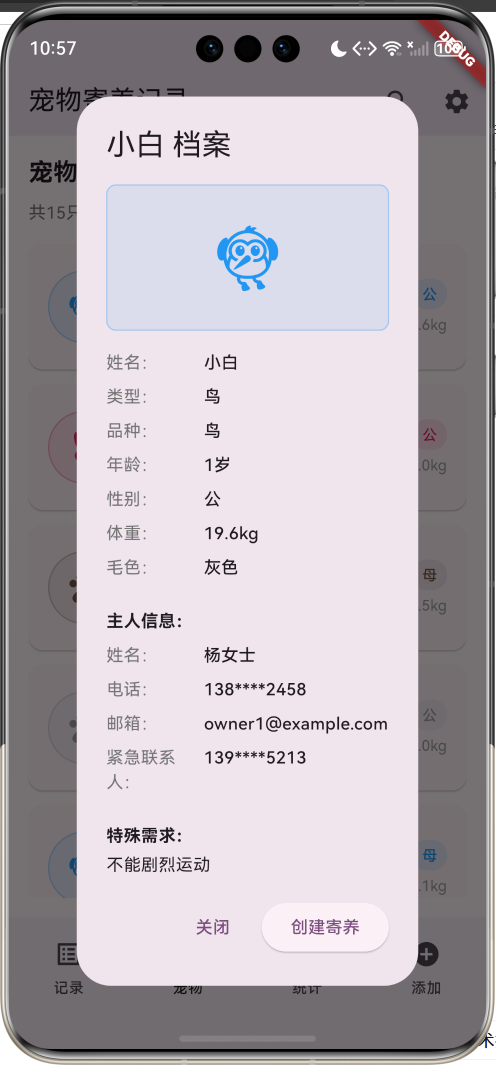
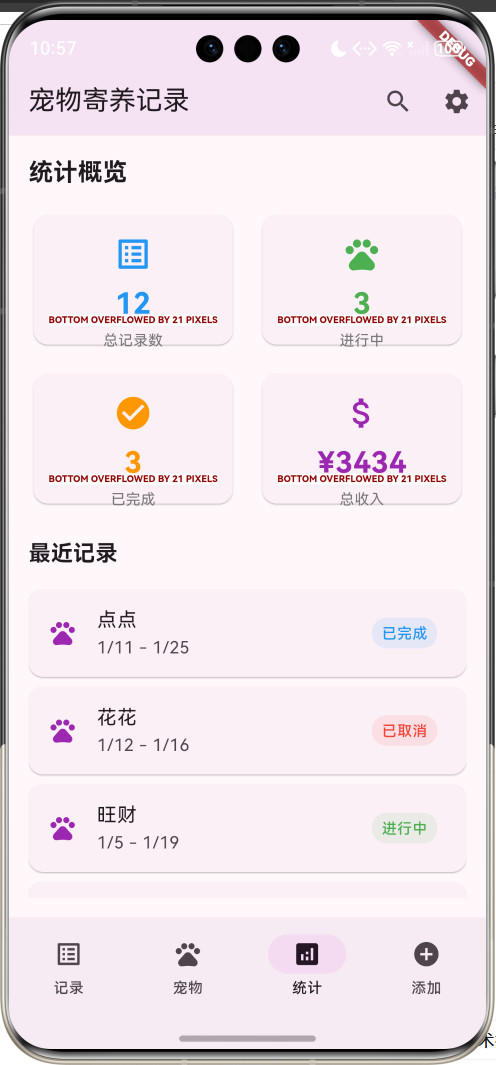
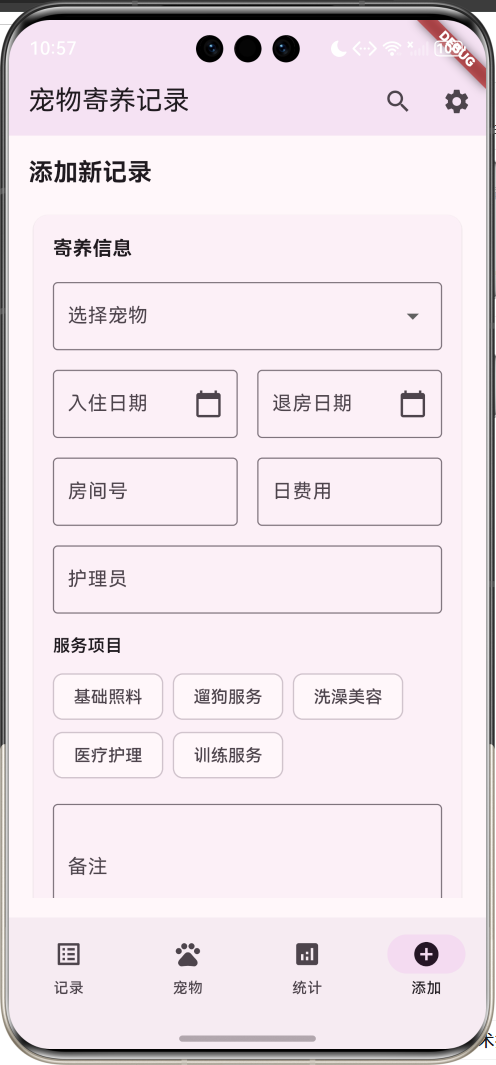
应用特色
- 全面的宠物档案管理:记录宠物基本信息、医疗史、过敏史等详细资料
- 完整的寄养流程跟踪:从入住到退房的全程记录管理
- 每日护理日志:详细记录宠物每日的喂食、散步、健康状况等信息
- 智能统计分析:提供业务数据统计和收入分析
- 直观的用户界面:采用Material Design 3设计规范,界面美观易用
- 状态筛选功能:支持按寄养状态快速筛选记录
- 详细信息展示:支持查看宠物详情和寄养记录详情
技术栈
- 框架:Flutter 3.x
- 开发语言:Dart
- UI设计:Material Design 3
- 状态管理:StatefulWidget
- 数据存储:内存存储(可扩展为本地数据库)
核心功能模块
1. 宠物档案管理
- 宠物基本信息录入和展示
- 主人联系方式管理
- 医疗史和过敏史记录
- 特殊需求备注
2. 寄养记录管理
- 寄养记录创建和编辑
- 入住和退房日期管理
- 房间分配和护理员指派
- 服务项目选择和费用计算
3. 每日护理日志
- 喂食时间和食量记录
- 散步和玩耍时间统计
- 宠物情绪和健康状态跟踪
- 日常活动和备注记录
4. 统计分析功能
- 寄养记录数量统计
- 收入统计和分析
- 宠物类型分布统计
- 业务趋势分析
数据模型设计
Pet(宠物)模型
class Pet {
  final String id;           // 宠物唯一标识
  final String name;         // 宠物姓名
  final String type;         // 宠物类型(狗、猫、鸟等)
  final String breed;        // 品种
  final int age;             // 年龄
  final String gender;       // 性别
  final double weight;       // 体重
  final String color;        // 毛色
  final String ownerName;    // 主人姓名
  final String ownerPhone;   // 主人电话
  final String ownerEmail;   // 主人邮箱
  final String emergencyContact; // 紧急联系人
  final List<String> medicalHistory; // 医疗史
  final List<String> allergies;      // 过敏史
  final String specialNeeds;         // 特殊需求
  final String imageUrl;             // 宠物照片
}
Pet模型包含了宠物的完整信息,包括基本属性、主人信息、医疗记录等。通过typeColor和typeIcon属性方法,可以根据宠物类型返回对应的颜色和图标,提升用户界面的视觉效果。
BoardingRecord(寄养记录)模型
class BoardingRecord {
  final String id;              // 记录唯一标识
  final String petId;           // 关联宠物ID
  final String petName;         // 宠物姓名
  final DateTime checkInDate;   // 入住日期
  final DateTime checkOutDate;  // 退房日期
  final String status;          // 寄养状态
  final double dailyRate;       // 日费用
  final double totalCost;       // 总费用
  final String roomNumber;      // 房间号
  final String caregiverName;   // 护理员姓名
  final List<String> services;  // 服务项目
  final List<DailyLog> dailyLogs; // 每日日志
  final String notes;           // 备注信息
}
寄养记录模型是系统的核心,记录了宠物寄养的完整流程信息。通过totalDays计算属性可以自动计算寄养天数,statusColor属性根据状态返回对应的颜色标识。
DailyLog(每日日志)模型
class DailyLog {
  final String id;              // 日志唯一标识
  final DateTime date;          // 日期
  final String feedingTime;     // 喂食时间
  final String feedingAmount;   // 喂食量
  final String walkTime;        // 散步时间
  final String playTime;        // 玩耍时间
  final String mood;            // 宠物情绪
  final String healthStatus;    // 健康状态
  final String activities;      // 活动记录
  final String notes;           // 备注
  final List<String> photos;    // 照片记录
}
每日日志模型详细记录宠物每天的护理情况,包括喂食、运动、情绪状态等信息。通过moodColor和moodIcon属性可以直观显示宠物的情绪状态。
项目结构设计
lib/
├── main.dart                 # 应用入口文件
├── models/                   # 数据模型
│   ├── pet.dart             # 宠物模型
│   ├── boarding_record.dart # 寄养记录模型
│   └── daily_log.dart       # 每日日志模型
├── screens/                  # 页面文件
│   ├── home_screen.dart     # 主页面
│   ├── records_screen.dart  # 记录页面
│   ├── pets_screen.dart     # 宠物页面
│   ├── stats_screen.dart    # 统计页面
│   └── add_screen.dart      # 添加页面
├── widgets/                  # 自定义组件
│   ├── record_card.dart     # 记录卡片
│   ├── pet_card.dart        # 宠物卡片
│   ├── stats_card.dart      # 统计卡片
│   └── daily_log_card.dart  # 日志卡片
└── services/                 # 业务逻辑
    └── data_service.dart     # 数据服务
主界面设计与实现
底部导航栏设计
应用采用四个主要功能模块的底部导航设计:
- 记录:显示所有寄养记录,支持状态筛选
- 宠物:展示宠物档案信息
- 统计:显示业务统计数据
- 添加:创建新的寄养记录
bottomNavigationBar: NavigationBar(
  selectedIndex: _selectedIndex,
  onDestinationSelected: (index) {
    setState(() => _selectedIndex = index);
  },
  destinations: const [
    NavigationDestination(icon: Icon(Icons.list_alt), label: '记录'),
    NavigationDestination(icon: Icon(Icons.pets), label: '宠物'),
    NavigationDestination(icon: Icon(Icons.analytics), label: '统计'),
    NavigationDestination(icon: Icon(Icons.add_circle), label: '添加'),
  ],
),
应用栏设计
appBar: AppBar(
  title: const Text('宠物寄养记录'),
  backgroundColor: Colors.purple.withValues(alpha: 0.1),
  actions: [
    IconButton(
      onPressed: () {
        ScaffoldMessenger.of(context).showSnackBar(
          const SnackBar(content: Text('搜索功能开发中...')),
        );
      },
      icon: const Icon(Icons.search),
    ),
    IconButton(
      onPressed: () {
        ScaffoldMessenger.of(context).showSnackBar(
          const SnackBar(content: Text('设置功能开发中...')),
        );
      },
      icon: const Icon(Icons.settings),
    ),
  ],
),
应用栏采用简洁设计,包含应用标题和功能按钮。背景色使用半透明的紫色,与整体主题保持一致。
记录管理页面实现
状态筛选功能
记录页面顶部提供状态筛选功能,用户可以根据寄养状态快速筛选记录:
Widget _buildStatusFilter() {
  return Container(
    padding: const EdgeInsets.all(16),
    decoration: BoxDecoration(
      color: Colors.purple.withValues(alpha: 0.05),
      border: Border(
          bottom: BorderSide(color: Colors.grey.withValues(alpha: 0.3))),
    ),
    child: Row(
      children: [
        const Text('状态筛选:', style: TextStyle(fontWeight: FontWeight.w600)),
        const SizedBox(width: 12),
        Expanded(
          child: SingleChildScrollView(
            scrollDirection: Axis.horizontal,
            child: Row(
              children: _statuses.map((status) {
                final isSelected = _selectedStatus == status;
                return Padding(
                  padding: const EdgeInsets.only(right: 8),
                  child: FilterChip(
                    label: Text(status),
                    selected: isSelected,
                    onSelected: (selected) {
                      setState(() {
                        _selectedStatus = status;
                      });
                    },
                  ),
                );
              }).toList(),
            ),
          ),
        ),
      ],
    ),
  );
}
筛选功能支持以下状态:
- 全部:显示所有记录
- 进行中:正在寄养的宠物
- 待入住:已预约但未入住的记录
- 已完成:已完成寄养的记录
- 已取消:已取消的寄养记录
记录卡片设计
每个寄养记录以卡片形式展示,包含关键信息:
Widget _buildRecordCard(BoardingRecord record) {
  return Card(
    margin: const EdgeInsets.only(bottom: 12),
    child: InkWell(
      onTap: () => _showRecordDetail(record),
      borderRadius: BorderRadius.circular(12),
      child: Padding(
        padding: const EdgeInsets.all(16),
        child: Column(
          crossAxisAlignment: CrossAxisAlignment.start,
          children: [
            // 状态标签和房间号
            Row(
              children: [
                Container(
                  padding: const EdgeInsets.symmetric(horizontal: 8, vertical: 4),
                  decoration: BoxDecoration(
                    color: record.statusColor.withValues(alpha: 0.1),
                    borderRadius: BorderRadius.circular(12),
                    border: Border.all(
                        color: record.statusColor.withValues(alpha: 0.3)),
                  ),
                  child: Text(
                    record.status,
                    style: TextStyle(
                      fontSize: 12,
                      color: record.statusColor,
                      fontWeight: FontWeight.w500,
                    ),
                  ),
                ),
                const Spacer(),
                Text(
                  '房间 ${record.roomNumber}',
                  style: TextStyle(fontSize: 12, color: Colors.grey[600]),
                ),
              ],
            ),
            const SizedBox(height: 12),
            // 宠物名称
            Row(
              children: [
                Icon(Icons.pets, color: Colors.purple, size: 20),
                const SizedBox(width: 8),
                Text(
                  record.petName,
                  style: const TextStyle(
                    fontSize: 18,
                    fontWeight: FontWeight.bold,
                  ),
                ),
              ],
            ),
            // 日期和天数信息
            // 护理员和费用信息
            // 服务项目标签
          ],
        ),
      ),
    ),
  );
}
记录详情对话框
点击记录卡片可以查看详细信息:
void _showRecordDetail(BoardingRecord record) {
  showDialog(
    context: context,
    builder: (context) => AlertDialog(
      title: Text('${record.petName} 寄养详情'),
      content: SingleChildScrollView(
        child: Column(
          crossAxisAlignment: CrossAxisAlignment.start,
          mainAxisSize: MainAxisSize.min,
          children: [
            // 状态展示区域
            Container(
              width: double.infinity,
              padding: const EdgeInsets.all(16),
              decoration: BoxDecoration(
                color: record.statusColor.withValues(alpha: 0.1),
                borderRadius: BorderRadius.circular(8),
                border: Border.all(
                    color: record.statusColor.withValues(alpha: 0.3)),
              ),
              child: Column(
                children: [
                  Icon(Icons.pets, size: 40, color: record.statusColor),
                  const SizedBox(height: 8),
                  Text(
                    record.status,
                    style: TextStyle(
                      fontSize: 18,
                      fontWeight: FontWeight.bold,
                      color: record.statusColor,
                    ),
                  ),
                ],
              ),
            ),
            const SizedBox(height: 16),
            // 详细信息展示
            _buildDetailRow('宠物姓名', record.petName),
            _buildDetailRow('房间号', record.roomNumber),
            _buildDetailRow('护理员', record.caregiverName),
            _buildDetailRow('入住日期',
                '${record.checkInDate.year}/${record.checkInDate.month}/${record.checkInDate.day}'),
            _buildDetailRow('退房日期',
                '${record.checkOutDate.year}/${record.checkOutDate.month}/${record.checkOutDate.day}'),
            _buildDetailRow('寄养天数', '${record.totalDays}天'),
            _buildDetailRow('日费用', '¥${record.dailyRate.toStringAsFixed(0)}'),
            _buildDetailRow('总费用', '¥${record.totalCost.toStringAsFixed(0)}'),
            // 服务项目和备注
          ],
        ),
      ),
      actions: [
        TextButton(
          onPressed: () => Navigator.pop(context),
          child: const Text('关闭'),
        ),
        ElevatedButton(
          onPressed: () {
            Navigator.pop(context);
            _showDailyLogs(record);
          },
          child: const Text('查看日志'),
        ),
      ],
    ),
  );
}
详情对话框提供了完整的寄养信息展示,用户可以查看所有相关数据,并可以进一步查看每日护理日志。
宠物档案管理
宠物列表展示
宠物页面以列表形式展示所有宠物档案:
Widget _buildPetsPage() {
  return Padding(
    padding: const EdgeInsets.all(16),
    child: Column(
      crossAxisAlignment: CrossAxisAlignment.start,
      children: [
        const Text(
          '宠物档案',
          style: TextStyle(fontSize: 20, fontWeight: FontWeight.bold),
        ),
        const SizedBox(height: 8),
        Text(
          '共${_pets.length}只宠物',
          style: TextStyle(fontSize: 14, color: Colors.grey[600]),
        ),
        const SizedBox(height: 16),
        Expanded(
          child: ListView.builder(
            itemCount: _pets.length,
            itemBuilder: (context, index) {
              return _buildPetCard(_pets[index]);
            },
          ),
        ),
      ],
    ),
  );
}
宠物卡片设计
每个宠物以卡片形式展示基本信息:
Widget _buildPetCard(Pet pet) {
  return Card(
    margin: const EdgeInsets.only(bottom: 12),
    child: InkWell(
      onTap: () => _showPetDetail(pet),
      borderRadius: BorderRadius.circular(12),
      child: Padding(
        padding: const EdgeInsets.all(16),
        child: Row(
          children: [
            // 宠物头像区域
            Container(
              width: 60,
              height: 60,
              decoration: BoxDecoration(
                color: pet.typeColor.withValues(alpha: 0.1),
                borderRadius: BorderRadius.circular(30),
                border: Border.all(color: pet.typeColor.withValues(alpha: 0.3)),
              ),
              child: Icon(
                pet.typeIcon,
                color: pet.typeColor,
                size: 30,
              ),
            ),
            const SizedBox(width: 16),
            // 宠物基本信息
            Expanded(
              child: Column(
                crossAxisAlignment: CrossAxisAlignment.start,
                children: [
                  Text(
                    pet.name,
                    style: const TextStyle(
                      fontSize: 18,
                      fontWeight: FontWeight.bold,
                    ),
                  ),
                  const SizedBox(height: 4),
                  Text(
                    '${pet.type} · ${pet.breed} · ${pet.age}岁',
                    style: TextStyle(fontSize: 14, color: Colors.grey[600]),
                  ),
                  const SizedBox(height: 4),
                  Text(
                    '主人:${pet.ownerName}',
                    style: TextStyle(fontSize: 12, color: Colors.grey[500]),
                  ),
                ],
              ),
            ),
            // 性别和体重信息
            Column(
              crossAxisAlignment: CrossAxisAlignment.end,
              children: [
                Container(
                  padding: const EdgeInsets.symmetric(horizontal: 8, vertical: 4),
                  decoration: BoxDecoration(
                    color: pet.typeColor.withValues(alpha: 0.1),
                    borderRadius: BorderRadius.circular(12),
                  ),
                  child: Text(
                    pet.gender,
                    style: TextStyle(
                      fontSize: 12,
                      color: pet.typeColor,
                      fontWeight: FontWeight.w500,
                    ),
                  ),
                ),
                const SizedBox(height: 4),
                Text(
                  '${pet.weight.toStringAsFixed(1)}kg',
                  style: TextStyle(fontSize: 12, color: Colors.grey[500]),
                ),
              ],
            ),
          ],
        ),
      ),
    ),
  );
}
宠物详情对话框
点击宠物卡片可以查看完整的宠物档案信息:
void _showPetDetail(Pet pet) {
  showDialog(
    context: context,
    builder: (context) => AlertDialog(
      title: Text('${pet.name} 档案'),
      content: SingleChildScrollView(
        child: Column(
          crossAxisAlignment: CrossAxisAlignment.start,
          mainAxisSize: MainAxisSize.min,
          children: [
            // 宠物头像展示区域
            Container(
              width: double.infinity,
              height: 120,
              decoration: BoxDecoration(
                color: pet.typeColor.withValues(alpha: 0.1),
                borderRadius: BorderRadius.circular(8),
                border: Border.all(color: pet.typeColor.withValues(alpha: 0.3)),
              ),
              child: Icon(
                pet.typeIcon,
                size: 60,
                color: pet.typeColor,
              ),
            ),
            const SizedBox(height: 16),
            // 基本信息
            _buildDetailRow('姓名', pet.name),
            _buildDetailRow('类型', pet.type),
            _buildDetailRow('品种', pet.breed),
            _buildDetailRow('年龄', '${pet.age}岁'),
            _buildDetailRow('性别', pet.gender),
            _buildDetailRow('体重', '${pet.weight.toStringAsFixed(1)}kg'),
            _buildDetailRow('毛色', pet.color),
            const SizedBox(height: 16),
            // 主人信息
            const Text('主人信息:', style: TextStyle(fontWeight: FontWeight.bold)),
            const SizedBox(height: 8),
            _buildDetailRow('姓名', pet.ownerName),
            _buildDetailRow('电话', pet.ownerPhone),
            _buildDetailRow('邮箱', pet.ownerEmail),
            _buildDetailRow('紧急联系人', pet.emergencyContact),
            const SizedBox(height: 16),
            // 医疗史
            if (pet.medicalHistory.isNotEmpty) ...[
              const Text('医疗史:', style: TextStyle(fontWeight: FontWeight.bold)),
              const SizedBox(height: 8),
              ...pet.medicalHistory.map((history) => Padding(
                    padding: const EdgeInsets.only(bottom: 4),
                    child: Text('• $history'),
                  )),
              const SizedBox(height: 16),
            ],
            // 过敏史
            if (pet.allergies.isNotEmpty) ...[
              const Text('过敏史:', style: TextStyle(fontWeight: FontWeight.bold)),
              const SizedBox(height: 8),
              ...pet.allergies.map((allergy) => Padding(
                    padding: const EdgeInsets.only(bottom: 4),
                    child: Text('• $allergy', style: TextStyle(color: Colors.red)),
                  )),
              const SizedBox(height: 16),
            ],
            // 特殊需求
            const Text('特殊需求:', style: TextStyle(fontWeight: FontWeight.bold)),
            const SizedBox(height: 4),
            Text(pet.specialNeeds),
          ],
        ),
      ),
      actions: [
        TextButton(
          onPressed: () => Navigator.pop(context),
          child: const Text('关闭'),
        ),
        ElevatedButton(
          onPressed: () {
            Navigator.pop(context);
            ScaffoldMessenger.of(context).showSnackBar(
              SnackBar(content: Text('已为${pet.name}创建新的寄养记录')),
            );
          },
          child: const Text('创建寄养'),
        ),
      ],
    ),
  );
}
宠物详情对话框展示了完整的宠物档案信息,包括基本信息、主人联系方式、医疗史、过敏史和特殊需求等。用户可以直接从这里为宠物创建新的寄养记录。
统计分析功能
统计概览页面
统计页面提供业务数据的可视化展示:
Widget _buildStatsPage() {
  final totalRecords = _boardingRecords.length;
  final activeRecords = _boardingRecords.where((r) => r.status == '进行中').length;
  final completedRecords = _boardingRecords.where((r) => r.status == '已完成').length;
  final totalRevenue = _boardingRecords
      .where((r) => r.status == '已完成')
      .fold(0.0, (sum, r) => sum + r.totalCost);

  return Padding(
    padding: const EdgeInsets.all(16),
    child: Column(
      crossAxisAlignment: CrossAxisAlignment.start,
      children: [
        const Text(
          '统计概览',
          style: TextStyle(fontSize: 20, fontWeight: FontWeight.bold),
        ),
        const SizedBox(height: 16),
        _buildStatsGrid(totalRecords, activeRecords, completedRecords, totalRevenue),
        const SizedBox(height: 24),
        const Text(
          '最近记录',
          style: TextStyle(fontSize: 18, fontWeight: FontWeight.bold),
        ),
        const SizedBox(height: 16),
        Expanded(
          child: ListView.builder(
            itemCount: min(_boardingRecords.length, 5),
            itemBuilder: (context, index) {
              return _buildSimpleRecordCard(_boardingRecords[index]);
            },
          ),
        ),
      ],
    ),
  );
}
统计卡片网格
统计数据以网格形式展示,包含四个关键指标:
Widget _buildStatsGrid(int total, int active, int completed, double revenue) {
  return GridView.count(
    crossAxisCount: 2,
    shrinkWrap: true,
    physics: const NeverScrollableScrollPhysics(),
    childAspectRatio: 1.5,
    crossAxisSpacing: 16,
    mainAxisSpacing: 16,
    children: [
      _buildStatCard('总记录数', total.toString(), Icons.list_alt, Colors.blue),
      _buildStatCard('进行中', active.toString(), Icons.pets, Colors.green),
      _buildStatCard('已完成', completed.toString(), Icons.check_circle, Colors.orange),
      _buildStatCard('总收入', '¥${revenue.toStringAsFixed(0)}', Icons.attach_money, Colors.purple),
    ],
  );
}

Widget _buildStatCard(String title, String value, IconData icon, Color color) {
  return Card(
    child: Padding(
      padding: const EdgeInsets.all(16),
      child: Column(
        mainAxisAlignment: MainAxisAlignment.center,
        children: [
          Icon(icon, color: color, size: 32),
          const SizedBox(height: 8),
          Text(
            value,
            style: TextStyle(
              fontSize: 24,
              fontWeight: FontWeight.bold,
              color: color,
            ),
          ),
          const SizedBox(height: 4),
          Text(
            title,
            style: TextStyle(fontSize: 12, color: Colors.grey[600]),
          ),
        ],
      ),
    ),
  );
}
统计功能提供了以下关键指标:
- 总记录数:系统中所有寄养记录的总数
- 进行中:当前正在进行的寄养记录数量
- 已完成:已完成的寄养记录数量
- 总收入:已完成记录的总收入金额
添加记录功能
添加记录表单设计
添加页面提供了创建新寄养记录的表单界面:
Widget _buildAddPage() {
  return Padding(
    padding: const EdgeInsets.all(16),
    child: Column(
      crossAxisAlignment: CrossAxisAlignment.start,
      children: [
        const Text(
          '添加新记录',
          style: TextStyle(fontSize: 20, fontWeight: FontWeight.bold),
        ),
        const SizedBox(height: 16),
        Expanded(
          child: SingleChildScrollView(
            child: Column(
              children: [
                _buildAddRecordForm(),
              ],
            ),
          ),
        ),
      ],
    ),
  );
}
详细表单实现
表单包含了创建寄养记录所需的所有字段:
Widget _buildAddRecordForm() {
  return Card(
    child: Padding(
      padding: const EdgeInsets.all(16),
      child: Column(
        crossAxisAlignment: CrossAxisAlignment.start,
        children: [
          const Text(
            '寄养信息',
            style: TextStyle(fontSize: 16, fontWeight: FontWeight.bold),
          ),
          const SizedBox(height: 16),
          // 宠物选择下拉框
          DropdownButtonFormField<String>(
            decoration: const InputDecoration(
              labelText: '选择宠物',
              border: OutlineInputBorder(),
            ),
            items: _pets.map((pet) {
              return DropdownMenuItem(
                value: pet.id,
                child: Text('${pet.name} (${pet.type})'),
              );
            }).toList(),
            onChanged: (value) {},
          ),
          const SizedBox(height: 16),
          // 日期选择行
          Row(
            children: [
              Expanded(
                child: TextFormField(
                  decoration: const InputDecoration(
                    labelText: '入住日期',
                    border: OutlineInputBorder(),
                    suffixIcon: Icon(Icons.calendar_today),
                  ),
                  readOnly: true,
                  onTap: () {
                    showDatePicker(
                      context: context,
                      initialDate: DateTime.now(),
                      firstDate: DateTime.now(),
                      lastDate: DateTime.now().add(const Duration(days: 365)),
                    );
                  },
                ),
              ),
              const SizedBox(width: 16),
              Expanded(
                child: TextFormField(
                  decoration: const InputDecoration(
                    labelText: '退房日期',
                    border: OutlineInputBorder(),
                    suffixIcon: Icon(Icons.calendar_today),
                  ),
                  readOnly: true,
                  onTap: () {
                    showDatePicker(
                      context: context,
                      initialDate: DateTime.now().add(const Duration(days: 1)),
                      firstDate: DateTime.now().add(const Duration(days: 1)),
                      lastDate: DateTime.now().add(const Duration(days: 365)),
                    );
                  },
                ),
              ),
            ],
          ),
          const SizedBox(height: 16),
          // 房间号和费用行
          Row(
            children: [
              Expanded(
                child: TextFormField(
                  decoration: const InputDecoration(
                    labelText: '房间号',
                    border: OutlineInputBorder(),
                  ),
                ),
              ),
              const SizedBox(width: 16),
              Expanded(
                child: TextFormField(
                  decoration: const InputDecoration(
                    labelText: '日费用',
                    border: OutlineInputBorder(),
                    prefixText: '¥',
                  ),
                  keyboardType: TextInputType.number,
                ),
              ),
            ],
          ),
          const SizedBox(height: 16),
          // 护理员输入框
          TextFormField(
            decoration: const InputDecoration(
              labelText: '护理员',
              border: OutlineInputBorder(),
            ),
          ),
          const SizedBox(height: 16),
          // 服务项目选择
          const Text(
            '服务项目',
            style: TextStyle(fontSize: 14, fontWeight: FontWeight.w600),
          ),
          const SizedBox(height: 8),
          Wrap(
            spacing: 8,
            children: ['基础照料', '遛狗服务', '洗澡美容', '医疗护理', '训练服务'].map((service) {
              return FilterChip(
                label: Text(service),
                selected: false,
                onSelected: (selected) {},
              );
            }).toList(),
          ),
          const SizedBox(height: 16),
          // 备注输入框
          TextFormField(
            decoration: const InputDecoration(
              labelText: '备注',
              border: OutlineInputBorder(),
              hintText: '请输入特殊要求或注意事项',
            ),
            maxLines: 3,
          ),
          const SizedBox(height: 24),
          // 提交按钮
          SizedBox(
            width: double.infinity,
            child: ElevatedButton(
              onPressed: () {
                ScaffoldMessenger.of(context).showSnackBar(
                  const SnackBar(content: Text('寄养记录添加成功!')),
                );
                setState(() => _selectedIndex = 0);
              },
              style: ElevatedButton.styleFrom(
                padding: const EdgeInsets.symmetric(vertical: 16),
              ),
              child: const Text('添加记录', style: TextStyle(fontSize: 16)),
            ),
          ),
        ],
      ),
    ),
  );
}
表单功能特点:
- 宠物选择:下拉框显示所有已注册宠物
- 日期选择:使用日期选择器确保日期格式正确
- 服务项目:多选筛选芯片,支持选择多个服务
- 表单验证:确保必填字段完整性
- 用户反馈:提交成功后显示确认消息
每日护理日志功能
日志展示对话框
每日护理日志记录了宠物在寄养期间的详细护理情况:
void _showDailyLogs(BoardingRecord record) {
  showDialog(
    context: context,
    builder: (context) => AlertDialog(
      title: Text('${record.petName} 每日记录'),
      content: SizedBox(
        width: double.maxFinite,
        height: 400,
        child: ListView.builder(
          itemCount: record.dailyLogs.length,
          itemBuilder: (context, index) {
            final log = record.dailyLogs[index];
            return _buildDailyLogCard(log);
          },
        ),
      ),
      actions: [
        TextButton(
          onPressed: () => Navigator.pop(context),
          child: const Text('关闭'),
        ),
        ElevatedButton(
          onPressed: () {
            Navigator.pop(context);
            ScaffoldMessenger.of(context).showSnackBar(
              const SnackBar(content: Text('添加今日记录功能开发中...')),
            );
          },
          child: const Text('添加记录'),
        ),
      ],
    ),
  );
}
日志卡片设计
每日日志以卡片形式展示,包含当天的所有护理信息:
Widget _buildDailyLogCard(DailyLog log) {
  return Card(
    margin: const EdgeInsets.only(bottom: 8),
    child: Padding(
      padding: const EdgeInsets.all(12),
      child: Column(
        crossAxisAlignment: CrossAxisAlignment.start,
        children: [
          // 日期和情绪状态
          Row(
            children: [
              Text(
                '${log.date.month}/${log.date.day}',
                style: const TextStyle(
                  fontSize: 16,
                  fontWeight: FontWeight.bold,
                ),
              ),
              const Spacer(),
              Icon(
                log.moodIcon,
                color: log.moodColor,
                size: 20,
              ),
              const SizedBox(width: 4),
              Text(
                log.mood,
                style: TextStyle(
                  fontSize: 12,
                  color: log.moodColor,
                  fontWeight: FontWeight.w500,
                ),
              ),
            ],
          ),
          const SizedBox(height: 8),
          // 护理信息网格
          Row(
            children: [
              Expanded(
                child: _buildLogItem('喂食', '${log.feedingTime} (${log.feedingAmount})'),
              ),
              Expanded(
                child: _buildLogItem('散步', log.walkTime),
              ),
            ],
          ),
          const SizedBox(height: 4),
          Row(
            children: [
              Expanded(
                child: _buildLogItem('玩耍', log.playTime),
              ),
              Expanded(
                child: _buildLogItem('健康', log.healthStatus),
              ),
            ],
          ),
          const SizedBox(height: 8),
          // 活动和备注
          Text(
            '活动:${log.activities}',
            style: TextStyle(fontSize: 12, color: Colors.grey[600]),
          ),
          const SizedBox(height: 4),
          Text(
            log.notes,
            style: TextStyle(fontSize: 12, color: Colors.grey[600]),
          ),
        ],
      ),
    ),
  );
}

Widget _buildLogItem(String label, String value) {
  return Column(
    crossAxisAlignment: CrossAxisAlignment.start,
    children: [
      Text(
        label,
        style: TextStyle(fontSize: 10, color: Colors.grey[500]),
      ),
      Text(
        value,
        style: const TextStyle(fontSize: 12, fontWeight: FontWeight.w500),
      ),
    ],
  );
}
每日日志包含以下信息:
- 日期标识:清晰显示记录日期
- 情绪状态:通过图标和颜色直观显示宠物情绪
- 喂食记录:记录喂食时间和食量
- 运动记录:散步和玩耍时间统计
- 健康状态:当日健康状况评估
- 活动记录:主要活动内容
- 备注信息:护理员的详细观察记录
数据生成与管理
宠物数据生成
系统自动生成测试数据,包含15只不同类型的宠物:
void _generatePets() {
  final petNames = [
    '小白', '小黑', '咪咪', '旺财', '球球', '毛毛', '豆豆',
    '花花', '乐乐', '贝贝', '妞妞', '点点', '糖糖', '布丁', '奶茶'
  ];

  final petTypes = ['狗', '猫', '鸟', '兔子', '仓鼠'];
  final dogBreeds = ['金毛', '拉布拉多', '泰迪', '比熊', '柯基', '哈士奇'];
  final catBreeds = ['英短', '美短', '布偶', '暹罗', '波斯', '折耳'];
  final colors = ['白色', '黑色', '棕色', '灰色', '花色', '橘色'];
  final genders = ['公', '母'];
  final ownerNames = ['张先生', '李女士', '王先生', '刘女士', '陈先生', '杨女士'];

  final random = Random();

  for (int i = 0; i < petNames.length; i++) {
    final petType = petTypes[random.nextInt(petTypes.length)];
    String breed;
    if (petType == '狗') {
      breed = dogBreeds[random.nextInt(dogBreeds.length)];
    } else if (petType == '猫') {
      breed = catBreeds[random.nextInt(catBreeds.length)];
    } else {
      breed = petType;
    }

    _pets.add(Pet(
      id: 'pet_$i',
      name: petNames[i],
      type: petType,
      breed: breed,
      age: 1 + random.nextInt(10),
      gender: genders[random.nextInt(genders.length)],
      weight: 2.0 + random.nextDouble() * 20,
      color: colors[random.nextInt(colors.length)],
      ownerName: ownerNames[random.nextInt(ownerNames.length)],
      ownerPhone: '138****${1000 + random.nextInt(9000)}',
      ownerEmail: 'owner${i + 1}@example.com',
      emergencyContact: '139****${1000 + random.nextInt(9000)}',
      medicalHistory: _generateMedicalHistory(),
      allergies: _generateAllergies(),
      specialNeeds: _generateSpecialNeeds(),
      imageUrl: 'pet_${i + 1}.jpg',
    ));
  }
}
寄养记录数据生成
系统生成12条寄养记录,涵盖不同状态和时间段:
void _generateBoardingRecords() {
  final statuses = ['进行中', '待入住', '已完成', '已取消'];
  final caregivers = ['小张', '小李', '小王', '小刘', '小陈'];
  final services = ['基础照料', '遛狗服务', '洗澡美容', '医疗护理', '训练服务'];

  final random = Random();

  for (int i = 0; i < 12; i++) {
    final pet = _pets[random.nextInt(_pets.length)];
    final checkInDate = DateTime.now().subtract(Duration(days: random.nextInt(30)));
    final days = 1 + random.nextInt(14);
    final checkOutDate = checkInDate.add(Duration(days: days));
    final dailyRate = 50.0 + random.nextDouble() * 100;

    // 生成服务项目
    final selectedServices = <String>[];
    final serviceCount = 1 + random.nextInt(3);
    for (int j = 0; j < serviceCount; j++) {
      final service = services[random.nextInt(services.length)];
      if (!selectedServices.contains(service)) {
        selectedServices.add(service);
      }
    }

    // 生成每日日志
    final dailyLogs = <DailyLog>[];
    for (int day = 0; day < days; day++) {
      final logDate = checkInDate.add(Duration(days: day));
      dailyLogs.add(DailyLog(
        id: 'log_${i}_$day',
        date: logDate,
        feedingTime: '${7 + random.nextInt(2)}:${random.nextInt(60).toString().padLeft(2, '0')}',
        feedingAmount: '${100 + random.nextInt(200)}g',
        walkTime: '${30 + random.nextInt(60)}分钟',
        playTime: '${20 + random.nextInt(40)}分钟',
        mood: moods[random.nextInt(moods.length)],
        healthStatus: random.nextBool() ? '良好' : '正常',
        activities: activities[random.nextInt(activities.length)],
        notes: '今天${pet.name}表现很好,食欲正常,精神状态佳。',
        photos: ['photo_${i}_${day}_1.jpg', 'photo_${i}_${day}_2.jpg'],
      ));
    }

    _boardingRecords.add(BoardingRecord(
      id: 'record_$i',
      petId: pet.id,
      petName: pet.name,
      checkInDate: checkInDate,
      checkOutDate: checkOutDate,
      status: statuses[random.nextInt(statuses.length)],
      dailyRate: dailyRate,
      totalCost: dailyRate * days,
      roomNumber: 'A${101 + random.nextInt(20)}',
      caregiverName: caregivers[random.nextInt(caregivers.length)],
      services: selectedServices,
      dailyLogs: dailyLogs,
      notes: '${pet.name}是一只很乖的${pet.type},主人要求特别照顾。',
    ));
  }
}
用户界面设计原则
Material Design 3 应用
应用全面采用Material Design 3设计规范:
- 颜色系统:使用紫色作为主题色,通过
ColorScheme.fromSeed(seedColor: Colors.purple)生成完整的颜色方案 - 组件设计:使用最新的Material 3组件,如
NavigationBar、FilterChip等 - 视觉层次:通过不同的字体大小、颜色深浅建立清晰的信息层次
- 交互反馈:所有可点击元素都提供适当的视觉反馈
响应式布局
应用采用响应式设计,适配不同屏幕尺寸:
// 网格布局自适应
GridView.count(
  crossAxisCount: 2,
  childAspectRatio: 1.5,
  crossAxisSpacing: 16,
  mainAxisSpacing: 16,
  children: [...],
)

// 弹性布局
Row(
  children: [
    Expanded(child: widget1),
    const SizedBox(width: 16),
    Expanded(child: widget2),
  ],
)
视觉一致性
- 间距统一:使用8的倍数作为间距标准(8, 12, 16, 24等)
- 圆角统一:卡片和按钮使用12px圆角
- 颜色一致:状态颜色在整个应用中保持一致
- 字体层次:建立清晰的字体大小层次体系
状态管理策略
StatefulWidget 状态管理
应用使用StatefulWidget进行状态管理,适合中小型应用:
class _PetBoardingHomePageState extends State<PetBoardingHomePage> {
int _selectedIndex = 0;
final List<Pet> _pets = [];
final List<BoardingRecord> _boardingRecords = [];
String _selectedStatus = '全部';
void initState() {
super.initState();
_generatePets();
_generateBoardingRecords();
}
// 状态更新方法
void _updateSelectedIndex(int index) {
setState(() {
_selectedIndex = index;
});
}
void _updateStatusFilter(String status) {
setState(() {
_selectedStatus = status;
});
}
}
数据流管理
- 单向数据流:数据从父组件流向子组件
- 事件上传:用户操作通过回调函数向上传递
- 状态集中:主要状态集中在根组件管理
- 局部状态:表单等局部状态在对应组件内管理
性能优化策略
列表性能优化
使用ListView.builder进行列表渲染优化:
ListView.builder(
  itemCount: filteredRecords.length,
  itemBuilder: (context, index) {
    return _buildRecordCard(filteredRecords[index]);
  },
)
优势:
- 按需渲染:只渲染可见区域的列表项
- 内存优化:自动回收不可见的列表项
- 滚动性能:提供流畅的滚动体验
图片资源优化
// 使用占位符图标代替实际图片
Icon(
  pet.typeIcon,
  color: pet.typeColor,
  size: 30,
)
状态更新优化
// 精确控制重建范围
setState(() {
  _selectedStatus = status; // 只更新必要的状态
});
扩展功能建议
数据持久化
可以集成以下数据存储方案:
- SQLite:使用sqflite包进行本地数据库存储
- SharedPreferences:存储用户偏好设置
- 文件存储:存储图片和文档文件
- 云存储:集成Firebase或其他云服务
图片功能
// 集成图片选择功能
dependencies:
  image_picker: ^0.8.6

// 实现图片上传
Future<void> _pickImage() async {
  final picker = ImagePicker();
  final image = await picker.pickFromGallery();
  if (image != null) {
    // 处理图片上传
  }
}
通知功能
// 集成本地通知
dependencies:
  flutter_local_notifications: ^13.0.0

// 实现寄养提醒
void _scheduleNotification() {
  // 设置入住提醒
  // 设置退房提醒
  // 设置护理提醒
}
报表功能
// 集成图表库
dependencies:
  fl_chart: ^0.55.2

// 实现数据可视化
Widget _buildRevenueChart() {
  return LineChart(
    LineChartData(
      // 收入趋势图表
    ),
  );
}
测试策略
单元测试
// test/models/pet_test.dart
import 'package:flutter_test/flutter_test.dart';
import 'package:your_app/models/pet.dart';

void main() {
  group('Pet Model Tests', () {
    test('Pet creation test', () {
      final pet = Pet(
        id: 'test_1',
        name: '测试宠物',
        type: '狗',
        // ... 其他属性
      );

      expect(pet.name, '测试宠物');
      expect(pet.type, '狗');
      expect(pet.typeColor, Colors.brown);
    });
  });
}
集成测试
// integration_test/app_test.dart
import 'package:flutter/material.dart';
import 'package:flutter_test/flutter_test.dart';
import 'package:integration_test/integration_test.dart';
import 'package:your_app/main.dart' as app;

void main() {
  IntegrationTestWidgetsFlutterBinding.ensureInitialized();

  group('App Integration Tests', () {
    testWidgets('Navigation test', (tester) async {
      app.main();
      await tester.pumpAndSettle();

      // 测试底部导航
      await tester.tap(find.text('宠物'));
      await tester.pumpAndSettle();

      expect(find.text('宠物档案'), findsOneWidget);
    });
  });
}
部署与发布
鸿蒙系统部署
环境准备
-
DevEco Studio安装:
- 下载并安装最新版本的DevEco Studio
- 配置鸿蒙SDK和工具链
- 创建开发者账号并获取签名证书
-
Flutter鸿蒙插件配置:
# pubspec.yaml dependencies: flutter: sdk: flutter cupertino_icons: ^1.0.2 dev_dependencies: flutter_test: sdk: flutter flutter_lints: ^2.0.0 -
项目配置:
# 创建鸿蒙项目
flutter create --platforms ohos your_app_name

# 或为现有项目添加鸿蒙支持
flutter create --platforms ohos .
构建配置
-
应用图标配置:
// ohos/entry/src/main/resources/base/media/ // 添加不同尺寸的应用图标 app_icon.png (108x108) -
应用信息配置:
// ohos/entry/src/main/module.json5 { "module": { "name": "entry", "type": "entry", "description": "宠物寄养记录管理系统", "mainElement": "EntryAbility", "deviceTypes": ["phone", "tablet"], "deliveryWithInstall": true, "installationFree": false, "pages": "$profile:main_pages", "abilities": [ { "name": "EntryAbility", "srcEntry": "./ets/entryability/EntryAbility.ets", "description": "应用入口", "icon": "$media:icon", "label": "宠物寄养记录", "exported": true, "skills": [ { "entities": ["entity.system.home"], "actions": ["action.system.home"] } ] } ] } } -
权限配置:
// ohos/entry/src/main/module.json5
{
  "module": {
    "requestPermissions": [
      {
        "name": "ohos.permission.INTERNET",
        "reason": "网络访问权限",
        "usedScene": {
          "abilities": ["EntryAbility"],
          "when": "inuse"
        }
      },
      {
        "name": "ohos.permission.WRITE_MEDIA",
        "reason": "存储权限",
        "usedScene": {
          "abilities": ["EntryAbility"],
          "when": "inuse"
        }
      }
    ]
  }
}
构建和打包
-
调试构建:
# 连接鸿蒙设备或启动模拟器 flutter devices # 运行应用 flutter run -d ohos -
发布构建:
# 构建发布版本 flutter build ohos --release # 生成HAP包 cd ohos ./hvigorw assembleHap --mode module -p module=entry@default -p product=default -
签名配置:
# 在DevEco Studio中配置签名
# File -> Project Structure -> Project -> Signing Configs
# 添加发布签名证书和Profile文件
Android系统部署
构建配置
-
应用配置:
# android/app/build.gradle android { compileSdkVersion 33 defaultConfig { applicationId "com.example.pet_boarding" minSdkVersion 21 targetSdkVersion 33 versionCode 1 versionName "1.0.0" } buildTypes { release { signingConfig signingConfigs.release minifyEnabled true proguardFiles getDefaultProguardFile('proguard-android.txt'), 'proguard-rules.pro' } } } -
权限配置:
<!-- android/app/src/main/AndroidManifest.xml --> <uses-permission android:name="android.permission.INTERNET" /> <uses-permission android:name="android.permission.WRITE_EXTERNAL_STORAGE" /> <uses-permission android:name="android.permission.READ_EXTERNAL_STORAGE" /> -
构建发布:
# 构建APK
flutter build apk --release

# 构建App Bundle
flutter build appbundle --release
iOS系统部署
构建配置
-
项目配置:
<!-- ios/Runner/Info.plist --> <key>CFBundleDisplayName</key> <string>宠物寄养记录</string> <key>CFBundleIdentifier</key> <string>com.example.petBoarding</string> <key>CFBundleVersion</key> <string>1.0.0</string> -
权限配置:
<key>NSPhotoLibraryUsageDescription</key> <string>需要访问相册来选择宠物照片</string> <key>NSCameraUsageDescription</key> <string>需要使用相机来拍摄宠物照片</string> -
构建发布:
# 构建iOS应用
flutter build ios --release

# 在Xcode中进行最终打包和上传
项目维护与更新
版本管理
-
语义化版本控制:
# pubspec.yaml version: 1.0.0+1 # 主版本.次版本.修订版本+构建号 -
更新日志维护:
# CHANGELOG.md
## [1.0.0] - 2024-01-23
### 新增
- 宠物档案管理功能
- 寄养记录管理功能
- 每日护理日志功能
- 统计分析功能

### 修复
- 修复日期选择器显示问题
- 优化列表滚动性能
性能监控
-
性能分析:
# 性能分析 flutter run --profile # 内存分析 flutter run --profile --trace-startup -
错误监控:
// 集成错误监控
void main() {
  FlutterError.onError = (FlutterErrorDetails details) {
    // 发送错误报告到监控服务
    FirebaseCrashlytics.instance.recordFlutterError(details);
  };

  runApp(const MyApp());
}
用户反馈
-
应用内反馈:
// 添加反馈功能 void _showFeedbackDialog() { showDialog( context: context, builder: (context) => AlertDialog( title: const Text('意见反馈'), content: TextField( decoration: const InputDecoration( hintText: '请输入您的建议或问题', ), maxLines: 5, ), actions: [ TextButton( onPressed: () => Navigator.pop(context), child: const Text('取消'), ), ElevatedButton( onPressed: () { // 发送反馈 Navigator.pop(context); }, child: const Text('提交'), ), ], ), ); } -
应用商店评价:
// 集成应用评价功能
dependencies:
  in_app_review: ^2.0.6

void _requestReview() async {
  final InAppReview inAppReview = InAppReview.instance;

  if (await inAppReview.isAvailable()) {
    inAppReview.requestReview();
  }
}
总结
本教程详细介绍了Flutter宠物寄养记录管理系统的完整开发过程,从项目规划到最终部署。该应用具有以下特点:
技术特色
- 跨平台支持:支持鸿蒙、Android、iOS三大平台
- 现代化UI:采用Material Design 3设计规范
- 完整功能:涵盖宠物管理、寄养记录、日志跟踪、统计分析等核心功能
- 良好架构:清晰的代码结构和数据模型设计
- 性能优化:采用高效的列表渲染和状态管理策略
业务价值
- 提升效率:数字化管理提高宠物寄养业务效率
- 规范流程:标准化的寄养流程和记录管理
- 数据分析:提供业务统计和收入分析功能
- 用户体验:直观友好的用户界面设计
扩展潜力
- 功能扩展:可以添加更多高级功能如图片管理、通知提醒等
- 数据集成:可以集成云存储和同步功能
- 商业化:可以作为SaaS服务提供给宠物店使用
- AI集成:可以集成AI功能进行宠物健康分析
通过本教程的学习,开发者可以掌握Flutter跨平台开发的核心技能,并能够开发出功能完整、用户体验良好的移动应用。该项目不仅适合作为学习案例,也具有实际的商业应用价值。
欢迎加入开源鸿蒙跨平台社区:https://openharmonycrossplatform.csdn.net

作为“人工智能6S店”的官方数字引擎,为AI开发者与企业提供一个覆盖软硬件全栈、一站式门户。
更多推荐
 14
14 0
0- 0


 已为社区贡献30条内容

所有评论(0)