
【开源鸿蒙跨平台开发先锋训练营】DAY8~DAY13底部导航栏Tab选项卡1


1.准备图片作为底部导航栏的图标
开始之前 我们需要准备8张底部导航栏图片,分别代表首页,水果百科,打卡,我的。
图片位置放在assets/images/icons文件夹下面。
assets/images/icons/
├── icon_home_no.png 首页未选中图标
├── icon_home_yes.png 首页选中图标
├── icon_book_no.png 水果百科未选中图标
├── icon_book_yes.png 水果百科选中图标
├── icon_diary_no.png 打卡未选中图标
├── icon_diary_yes.png 打卡选中图标
├── icon_person_no.png 我的未选中图标
└── icon_person_yes.png 我的选中图标
在 pubspec.yaml中添加
assets:
- assets/images/
- assets/images/icons/
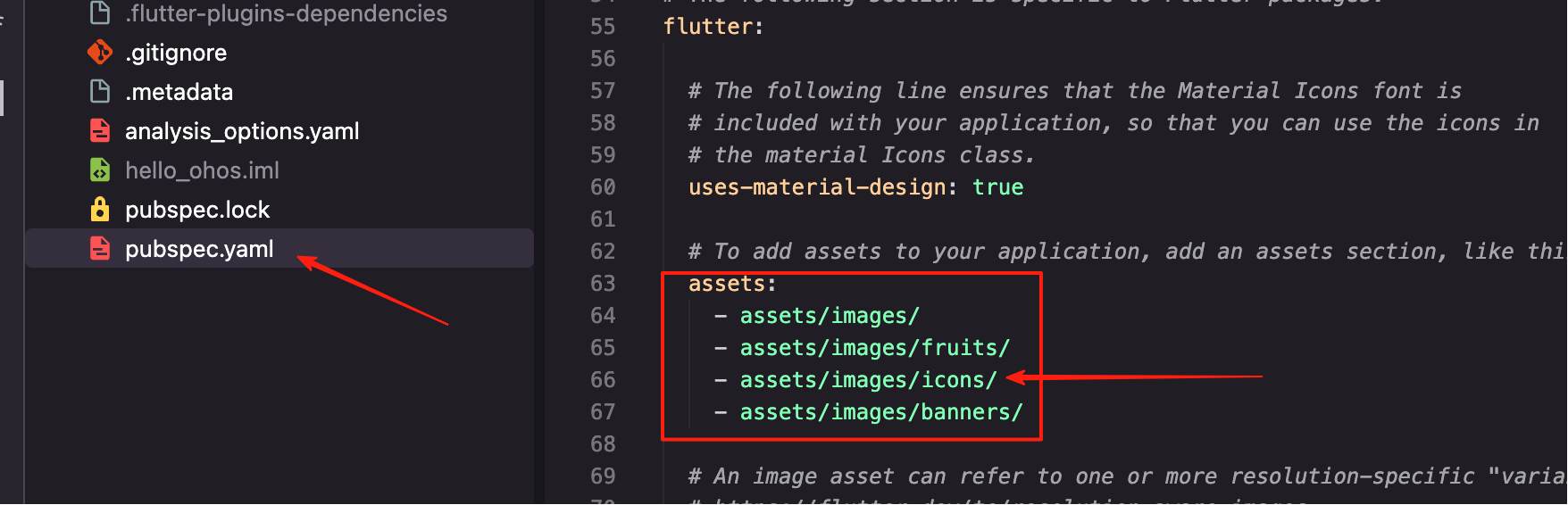
最后运行flutter pub get
2.创建图标路径常量管理图片路径
先创建文件 lib/core/constants/app_images.dart 统一管理图片路径方便修改和维护
/// 应用图片资源常量
class AppImages {
  // 私有构造函数,防止实例化
  AppImages._();

  // 基础路径
  static const String _basePath = 'assets/images';

  // 图标
  static const String _iconsPath = '$_basePath/icons';
  static const String homeIcon = '$_iconsPath/icon_home_no.png';
  static const String homeActiveIcon = '$_iconsPath/icon_home_yes.png';
  static const String bookIcon = '$_iconsPath/icon_book_no.png';
  static const String bookActiveIcon = '$_iconsPath/icon_book_yes.png';
  static const String checkIcon = '$_iconsPath/icon_diary_no.png';
  static const String checkActiveIcon = '$_iconsPath/icon_diary_yes.png';
  static const String profileIcon = '$_iconsPath/icon_person_no.png';
  static const String profileActiveIcon = '$_iconsPath/icon_person_yes.png';

  // 横幅图片
  static const String _bannersPath = '$_basePath/banners';
  static const String banner1 = '$_bannersPath/swiper_watermelon.jpg';
  static const String banner2 = '$_bannersPath/swiper_orange.jpg';

  // 默认用户图片
  static const String placeholder = '$_basePath/new_user_logo.png';
  static const String noImage = '$_basePath/user.png';
}
3.创建底部导航栏各个页面(Day4~6我们已有水果百科除外,无须创建)
创建首页 lib/pages/home/home_page.dart
import 'package:flutter/material.dart';

/// 首页
class HomePage extends StatelessWidget {
  const HomePage({super.key});

  @override
  Widget build(BuildContext context) {
    return const Scaffold(
      body: Center(
        child: Text(
          '首页',
          style: TextStyle(fontSize: 24, fontWeight: FontWeight.bold),
        ),
      ),
    );
  }
}
创建打卡页面 lib/pages/checkin/checkin_page.dart
import 'package:flutter/material.dart';

/// 打卡页面
class CheckInPage extends StatelessWidget {
  const CheckInPage({super.key});

  @override
  Widget build(BuildContext context) {
    return const Scaffold(
      body: Center(
        child: Text(
          '打卡',
          style: TextStyle(fontSize: 24, fontWeight: FontWeight.bold),
        ),
      ),
    );
  }
}
创建我的页面 lib/pages/profile/profile_page.dart
import 'package:flutter/material.dart';

/// 我的页面
class ProfilePage extends StatelessWidget {
  const ProfilePage({super.key});

  @override
  Widget build(BuildContext context) {
    return const Scaffold(
      body: Center(
        child: Text(
          '我的',
          style: TextStyle(
            fontSize: 24,
            fontWeight: FontWeight.bold,
          ),
        ),
      ),
    );
  }
}
4.创建自定义底部导航栏组件
创建文件 lib/widgets/custom_bottom_nav_item.dart
import 'package:flutter/material.dart';

/// 自定义底部导航栏项目
class CustomBottomNavItem extends StatelessWidget {
  final String iconPath;
  final String activeIconPath;
  final String label;
  final bool isSelected;
  final VoidCallback onTap;
  final Color? selectedColor;
  final Color? unselectedColor;

  const CustomBottomNavItem({
    super.key,
    required this.iconPath,
    required this.activeIconPath,
    required this.label,
    required this.isSelected,
    required this.onTap,
    this.selectedColor,
    this.unselectedColor,
  });

  @override
  Widget build(BuildContext context) {
    final color = isSelected
        ? (selectedColor ?? Theme.of(context).primaryColor)
        : (unselectedColor ?? Colors.grey);

    return Expanded(
      child: InkWell(
        onTap: onTap,
        splashColor: Colors.transparent,
        highlightColor: Colors.transparent,
        child: AnimatedContainer(
          duration: const Duration(milliseconds: 200),
          curve: Curves.easeInOut,
          padding: const EdgeInsets.symmetric(vertical: 6),
          child: Column(
            mainAxisSize: MainAxisSize.min,
            children: [
              // 图标
              AnimatedSwitcher(
                duration: const Duration(milliseconds: 150),
                child: Image.asset(
                  isSelected ? activeIconPath : iconPath,
                  key: ValueKey(isSelected),
                  width: 20,
                  height: 20,
                  color: color,
                  errorBuilder: (context, error, stackTrace) {
                    return Icon(
                      _getDefaultIcon(),
                      size: 20,
                      color: color,
                      key: ValueKey(isSelected),
                    );
                  },
                ),
              ),
              const SizedBox(height: 6),
              // 标签
              AnimatedDefaultTextStyle(
                duration: const Duration(milliseconds: 150),
                style: TextStyle(
                  fontSize: 11,
                  color: color,
                  fontWeight: isSelected ? FontWeight.w600 : FontWeight.normal,
                ),
                child: Text(label),
              ),
            ],
          ),
        ),
      ),
    );
  }

  IconData _getDefaultIcon() {
    switch (label) {
      case '首页':
        return isSelected ? Icons.home : Icons.home_outlined;
      case '水果百科':
        return isSelected ? Icons.book : Icons.book_outlined;
      case '打卡':
        return isSelected ? Icons.check_circle : Icons.check_circle_outline;
      case '我的':
        return isSelected ? Icons.person : Icons.person_outline;
      default:
        return Icons.circle;
    }
  }
}
5.创建main页面 lib/pages/main/main_page.dart
import 'package:flutter/material.dart';
import '../../core/utils/color_util.dart';
import '../../core/constants/app_images.dart';
import '../../widgets/custom_bottom_nav_item.dart';
import '../home/home_page.dart';
import '../encyclopedia/encyclopedia_page.dart';
import '../checkin/checkin_page.dart';
import '../profile/profile_page.dart';

/// 主页面 - 包含底部导航栏
class MainPage extends StatefulWidget {
  const MainPage({super.key});

  @override
  State<MainPage> createState() => _MainPageState();
}

class _MainPageState extends State<MainPage> {
  int _currentIndex = 0;

  final List<Widget> _pages = [
    const HomePage(),
    const EncyclopediaPage(),
    const CheckInPage(),
    const ProfilePage(),
  ];

  @override
  Widget build(BuildContext context) {
    return Scaffold(
      body: IndexedStack(index: _currentIndex, children: _pages),
      bottomNavigationBar: Container(
        decoration: BoxDecoration(
          color: Colors.white,
          boxShadow: [
            BoxShadow(
              color: Colors.black.withValues(alpha: 0.1),
              blurRadius: 10,
              offset: const Offset(0, -2),
            ),
          ],
        ),
        child: SafeArea(
          child: Padding(
            padding: const EdgeInsets.symmetric(horizontal: 8, vertical: 4),
            child: Row(
              children: [
                CustomBottomNavItem(
                  iconPath: AppImages.homeIcon,
                  activeIconPath: AppImages.homeActiveIcon,
                  label: '首页',
                  isSelected: _currentIndex == 0,
                  selectedColor: AppColors.primary,
                  unselectedColor: AppColors.grey,
                  onTap: () => _onTabTapped(0),
                ),
                CustomBottomNavItem(
                  iconPath: AppImages.bookIcon,
                  activeIconPath: AppImages.bookActiveIcon,
                  label: '水果百科',
                  isSelected: _currentIndex == 1,
                  selectedColor: AppColors.primary,
                  unselectedColor: AppColors.grey,
                  onTap: () => _onTabTapped(1),
                ),
                CustomBottomNavItem(
                  iconPath: AppImages.checkIcon,
                  activeIconPath: AppImages.checkActiveIcon,
                  label: '打卡',
                  isSelected: _currentIndex == 2,
                  selectedColor: AppColors.primary,
                  unselectedColor: AppColors.grey,
                  onTap: () => _onTabTapped(2),
                ),
                CustomBottomNavItem(
                  iconPath: AppImages.profileIcon,
                  activeIconPath: AppImages.profileActiveIcon,
                  label: '我的',
                  isSelected: _currentIndex == 3,
                  selectedColor: AppColors.primary,
                  unselectedColor: AppColors.grey,
                  onTap: () => _onTabTapped(3),
                ),
              ],
            ),
          ),
        ),
      ),
    );
  }

  void _onTabTapped(int index) {
    if (_currentIndex != index) {
      setState(() {
        _currentIndex = index;
      });
    }
  }
}
6.修改应用入口
import 'package:flutter/material.dart';
import 'package:google_fonts/google_fonts.dart';
import 'core/utils/color_util.dart';
import 'pages/main/main_page.dart';

void main() {
  runApp(const MyApp());
}

class MyApp extends StatelessWidget {
  const MyApp({super.key});

  @override
  Widget build(BuildContext context) {
    return MaterialApp(
      title: 'xxx',
      debugShowCheckedModeBanner: false,
      theme: ThemeData(
        colorScheme: ColorScheme.fromSeed(seedColor: AppColors.primary),
        appBarTheme: AppBarTheme(
          backgroundColor: AppColors.primary,
          foregroundColor: AppColors.white,
          titleTextStyle: GoogleFonts.poppins(
            color: AppColors.white,
            fontSize: 18,
            fontWeight: FontWeight.bold,
            letterSpacing: 1.5,
          ),
        ),
      ),
      home: const MainPage(),
    );
  }
}
关键点在于
import 'pages/main/main_page.dart' 导入主页面
home: const MainPage()
项目根目录/
项目根目录/
├── assets/
│ └── images/
│ └── icons/
│ ├── icon_home_no.png
│ ├── icon_home_yes.png
│ ├── icon_book_no.png
│ ├── icon_book_yes.png
│ ├── icon_diary_no.png
│ ├── icon_diary_yes.png
│ ├── icon_person_no.png
│ └── icon_person_yes.png
├── lib/
│ ├── core/
│ │ ├── constants/
│ │ │ └── app_images.dart
│ │ └── utils/
│ │ └── color_util.dart
│ ├── pages/
│ │ ├── main/
│ │ │ └── main_page.dart
│ │ ├── home/
│ │ │ └── home_page.dart
│ │ ├── encyclopedia/
│ │ │ └── encyclopedia_page.dart
│ │ ├── checkin/
│ │ │ └── checkin_page.dart
│ │ └── profile/
│ │ └── profile_page.dart
│ ├── widgets/
│ │ └── custom_bottom_nav_item.dart
│ └── main.dart
└── pubspec.yaml
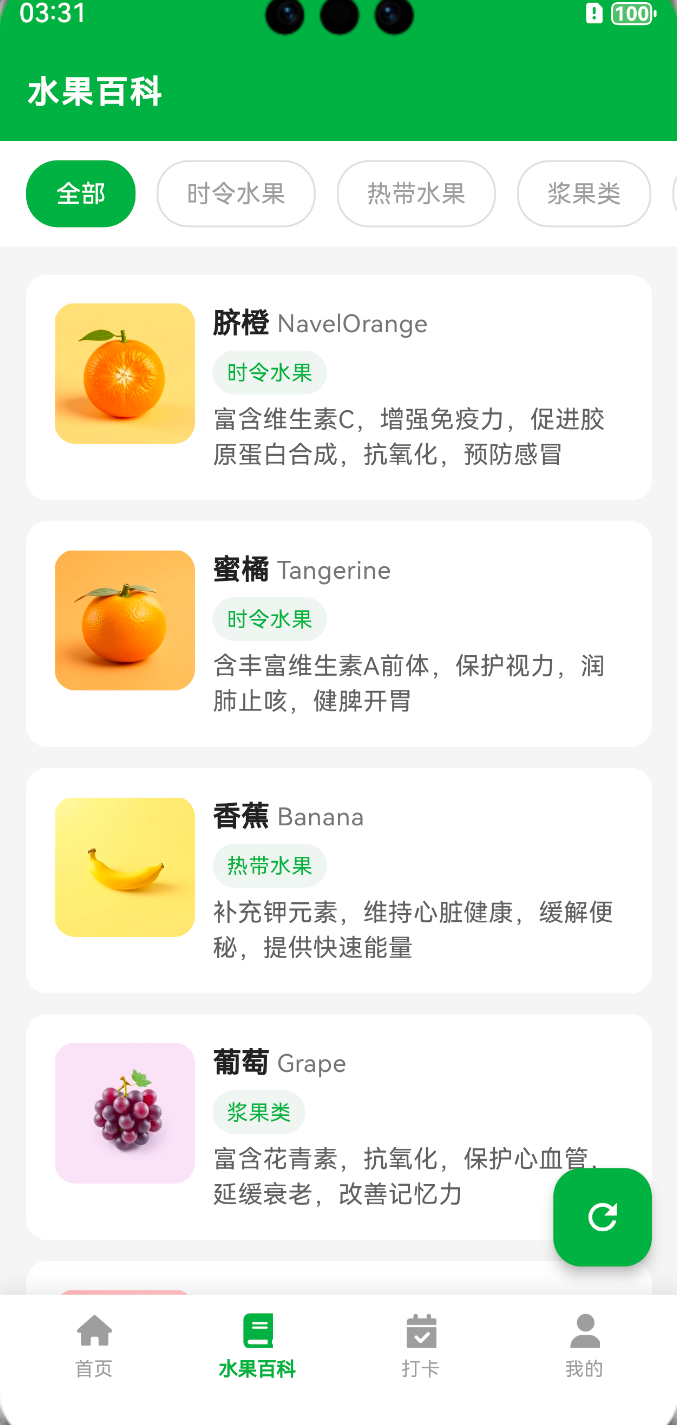
7.效果如下



8.最后
欢迎加入开源鸿蒙跨平台社区:
https://openharmonycrossplatform.csdn.net

作为“人工智能6S店”的官方数字引擎,为AI开发者与企业提供一个覆盖软硬件全栈、一站式门户。
更多推荐

 1
1 0
0- 0


 已为社区贡献3条内容

所有评论(0)