
Flutter框架跨平台鸿蒙开发——图书馆座位预约APP开发流程
本文介绍了使用Flutter框架开发跨平台鸿蒙图书馆座位预约APP的全流程。主要内容包括: 项目概述:一款提供座位查询、预约和管理功能的移动应用,核心功能包括座位列表展示、筛选、预约、记录查看和取消预约。 开发流程:从需求分析到上线发布的完整开发周期,重点采用Flutter框架实现跨平台兼容性。 核心技术实现: 项目结构设计 数据模型构建(座位和预约模型) 核心业务逻辑(座位初始化、预约服务等)
🚀运行效果展示
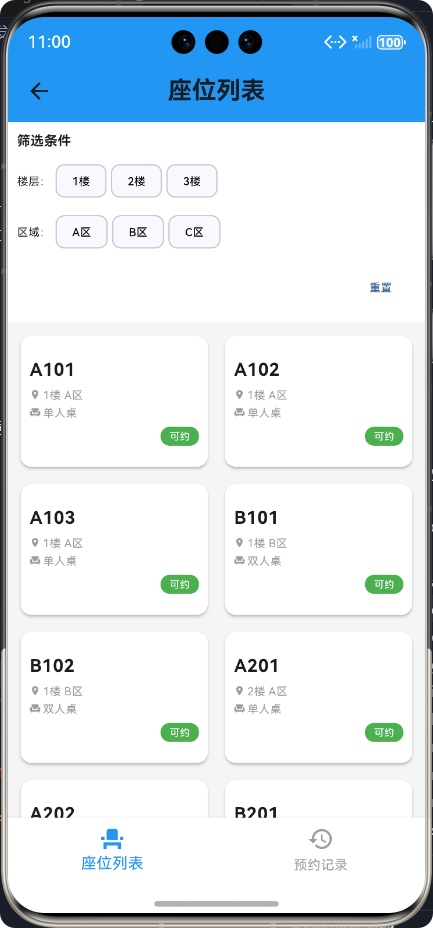
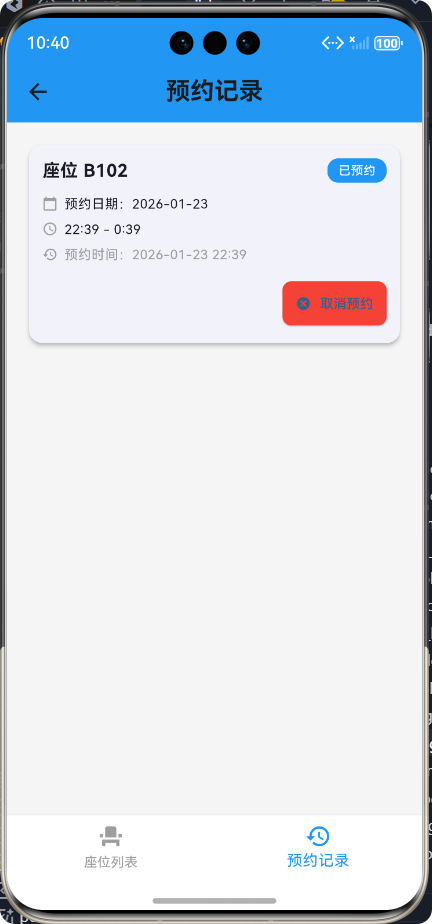
Flutter框架跨平台鸿蒙开发——图书馆座位预约APP开发流程
📝 前言
随着移动互联网的快速发展,跨平台开发框架已成为移动应用开发的重要趋势。Flutter作为Google推出的开源UI框架,以其"一次编写,处处运行"的特性,逐渐成为跨平台开发的主流选择。鸿蒙(HarmonyOS)作为华为自主研发的分布式操作系统,其生态系统也在不断壮大。本博客将详细介绍如何使用Flutter框架开发一款跨平台的图书馆座位预约APP,并成功运行在鸿蒙平台上。
📚 项目介绍
应用概述
图书馆座位预约APP是一款为图书馆读者提供座位查询、预约和管理功能的移动应用。用户可以通过该应用查看图书馆的座位分布情况,筛选可用座位,并进行预约操作,同时可以查看和管理自己的预约记录。
核心功能
| 功能模块 | 功能描述 | 图标 |
|---|---|---|
| 座位列表 | 展示图书馆所有座位的分布和状态 | 🪑 |
| 座位筛选 | 支持按楼层和区域筛选座位 | 🔍 |
| 座位预约 | 提供座位预约功能,选择日期和时间段 | 📅 |
| 预约记录 | 查看和管理自己的预约记录 | 📋 |
| 取消预约 | 支持取消未使用的预约 | ❌ |
🔄 开发流程
整体开发流程
详细开发步骤
- 需求分析:明确应用的核心功能、目标用户和使用场景
- 技术选型:选择Flutter框架作为开发技术栈
- 项目初始化:创建Flutter项目,配置开发环境
- UI设计:设计应用的界面布局和交互流程
- 功能实现:
- 座位数据管理
- 预约功能开发
- 数据存储方案
- UI组件开发
- 测试与调试:在鸿蒙模拟器上进行测试和调试
- 优化与部署:优化应用性能,解决兼容性问题
- 上线发布:打包应用,发布到鸿蒙应用市场
💡 核心功能实现
1. 项目结构设计
lib/
├── library_seat_booking/
│   ├── models/          # 数据模型
│   │   ├── seat.dart    # 座位模型
│   │   └── booking.dart  # 预约模型
│   ├── screens/         # 页面组件
│   │   ├── library_seat_main_screen.dart  # 主页面
│   │   ├── seat_list_screen.dart          # 座位列表
│   │   └── booking_history_screen.dart    # 预约记录
│   └── services/        # 业务逻辑
│       └── library_seat_service.dart      # 座位预约服务
└── main.dart            # 应用入口
2. 数据模型设计
座位模型 (seat.dart)
/// 图书馆座位模型
class Seat {
  /// 座位ID
  final int id;
  /// 座位编号
  final String seatNumber;
  /// 楼层
  final int floor;
  /// 区域
  final String area;
  /// 是否可预约
  bool isAvailable;
  /// 座位类型
  final String seatType;

  /// 构造函数
  Seat({
    required this.id,
    required this.seatNumber,
    required this.floor,
    required this.area,
    required this.isAvailable,
    required this.seatType,
  });

  /// 从Map转换为Seat对象
  factory Seat.fromMap(Map<String, dynamic> map) {
    return Seat(
      id: map['id'] ?? 0,
      seatNumber: map['seatNumber'] ?? '',
      floor: map['floor'] ?? 1,
      area: map['area'] ?? '',
      isAvailable: (map['isAvailable'] ?? 1) == 1,
      seatType: map['seatType'] ?? '单人桌',
    );
  }
}
预约模型 (booking.dart)
/// 图书馆预约记录模型
class Booking {
  /// 预约ID
  final int id;
  /// 座位ID
  final int seatId;
  /// 座位编号
  final String seatNumber;
  /// 预约日期
  final String bookingDate;
  /// 开始时间
  final String startTime;
  /// 结束时间
  final String endTime;
  /// 预约状态
  final String status;
  /// 创建时间
  final String createdAt;

  /// 构造函数
  Booking({
    required this.id,
    required this.seatId,
    required this.seatNumber,
    required this.bookingDate,
    required this.startTime,
    required this.endTime,
    required this.status,
    required this.createdAt,
  });
}
3. 核心业务逻辑
座位预约服务 (library_seat_service.dart)
/// 图书馆座位预约服务类
class LibrarySeatService {
  /// 内存存储的座位列表
  List<Seat> _seats = [];
  /// 内存存储的预约列表
  List<Booking> _bookings = [];
  /// 下一个预约ID
  int _nextBookingId = 1;

  /// 构造函数,初始化座位数据
  LibrarySeatService() {
    _initializeSeats();
  }

  /// 初始化座位数据
  void _initializeSeats() {
    _seats = [
      Seat(id: 1, seatNumber: 'A101', floor: 1, area: 'A区', isAvailable: true, seatType: '单人桌'),
      Seat(id: 2, seatNumber: 'A102', floor: 1, area: 'A区', isAvailable: true, seatType: '单人桌'),
      // ... 更多座位数据
    ];
  }

  /// 获取所有座位
  Future<List<Seat>> getAllSeats() async {
    try {
      return List.from(_seats);
    } catch (e) {
      return [];
    }
  }

  /// 预约座位
  Future<bool> bookSeat({
    required int seatId,
    required String seatNumber,
    required String bookingDate,
    required String startTime,
    required String endTime,
  }) async {
    try {
      // 检查座位是否可用
      final int seatIndex = _seats.indexWhere((seat) => seat.id == seatId);
      if (seatIndex == -1 || !_seats[seatIndex].isAvailable) {
        return false;
      }

      // 创建预约记录
      final Booking booking = Booking(
        id: _nextBookingId++,
        seatId: seatId,
        seatNumber: seatNumber,
        bookingDate: bookingDate,
        startTime: startTime,
        endTime: endTime,
        status: '已预约',
        createdAt: DateTime.now().toIso8601String(),
      );

      // 保存预约记录
      _bookings.add(booking);

      // 更新座位状态为不可用
      _seats[seatIndex].isAvailable = false;

      return true;
    } catch (e) {
      return false;
    }
  }

  /// 取消预约
  Future<bool> cancelBooking(int bookingId, int seatId) async {
    try {
      // 找到预约记录并更新状态
      final int bookingIndex = _bookings.indexWhere((booking) => booking.id == bookingId);
      if (bookingIndex != -1) {
        _bookings[bookingIndex] = Booking(
          id: _bookings[bookingIndex].id,
          seatId: _bookings[bookingIndex].seatId,
          seatNumber: _bookings[bookingIndex].seatNumber,
          bookingDate: _bookings[bookingIndex].bookingDate,
          startTime: _bookings[bookingIndex].startTime,
          endTime: _bookings[bookingIndex].endTime,
          status: '已取消',
          createdAt: _bookings[bookingIndex].createdAt,
        );
      }

      // 更新座位状态为可用
      final int seatIndex = _seats.indexWhere((seat) => seat.id == seatId);
      if (seatIndex != -1) {
        _seats[seatIndex].isAvailable = true;
      }

      return true;
    } catch (e) {
      return false;
    }
  }
}
4. 主要页面实现
座位列表页面 (seat_list_screen.dart)
/// 座位列表页面
class SeatListScreen extends StatefulWidget {
/// 构造函数
const SeatListScreen({super.key});
State<SeatListScreen> createState() => _SeatListScreenState();
}
class _SeatListScreenState extends State<SeatListScreen> {
/// 座位服务实例
final LibrarySeatService _seatService = LibrarySeatService();
/// 座位列表
List<Seat> _seats = [];
/// 筛选后的座位列表
List<Seat> _filteredSeats = [];
/// 加载状态
bool _isLoading = true;
/// 选中的楼层
int? _selectedFloor;
/// 选中的区域
String? _selectedArea;
/// 楼层列表
final List<int> _floors = [1, 2, 3];
/// 区域列表
final List<String> _areas = ['A区', 'B区', 'C区'];
void initState() {
super.initState();
_loadSeats();
}
/// 加载座位数据
Future<void> _loadSeats() async {
try {
setState(() {
_isLoading = true;
});
_seats = await _seatService.getAllSeats();
_filteredSeats = List.from(_seats);
} catch (e) {
if (mounted) {
ScaffoldMessenger.of(context).showSnackBar(
const SnackBar(content: Text('加载座位数据失败')),
);
}
} finally {
if (mounted) {
setState(() {
_isLoading = false;
});
}
}
}
/// 构建筛选栏
Widget _buildFilterBar() {
return Container(
color: Colors.white,
padding: const EdgeInsets.all(16),
child: Column(
crossAxisAlignment: CrossAxisAlignment.start,
children: [
const Text(
'筛选条件',
style: TextStyle(fontSize: 16, fontWeight: FontWeight.bold),
),
const SizedBox(height: 16),
// 楼层筛选
Row(
children: [
const Text('楼层:', style: TextStyle(fontSize: 14)),
const SizedBox(width: 12),
Expanded(
child: SingleChildScrollView(
scrollDirection: Axis.horizontal,
child: Row(
children: _floors.map((floor) {
return Padding(
padding: const EdgeInsets.only(right: 8),
child: ChoiceChip(
label: Text('$floor楼'),
selected: _selectedFloor == floor,
onSelected: (selected) {
setState(() {
_selectedFloor = selected ? floor : null;
_filterSeats();
});
},
selectedColor: Colors.blue,
),
);
}).toList(),
),
),
),
],
),
const SizedBox(height: 12),
// 区域筛选
Row(
children: [
const Text('区域:', style: TextStyle(fontSize: 14)),
const SizedBox(width: 12),
Expanded(
child: SingleChildScrollView(
scrollDirection: Axis.horizontal,
child: Row(
children: _areas.map((area) {
return Padding(
padding: const EdgeInsets.only(right: 8),
child: ChoiceChip(
label: Text(area),
selected: _selectedArea == area,
onSelected: (selected) {
setState(() {
_selectedArea = selected ? area : null;
_filterSeats();
});
},
selectedColor: Colors.blue,
),
);
}).toList(),
),
),
),
],
),
],
),
);
}
/// 构建座位卡片
Widget _buildSeatCard(Seat seat) {
return Card(
elevation: 3,
shape: RoundedRectangleBorder(borderRadius: BorderRadius.circular(12)),
child: InkWell(
onTap: seat.isAvailable ? () => _bookSeat(seat) : null,
borderRadius: BorderRadius.circular(12),
child: Container(
padding: const EdgeInsets.all(12),
decoration: BoxDecoration(
borderRadius: BorderRadius.circular(12),
color: seat.isAvailable ? Colors.white : Colors.grey[200],
),
child: Column(
crossAxisAlignment: CrossAxisAlignment.start,
mainAxisAlignment: MainAxisAlignment.center,
mainAxisSize: MainAxisSize.min,
children: [
// 座位编号
Text(
seat.seatNumber,
style: const TextStyle(
fontSize: 20,
fontWeight: FontWeight.bold,
),
maxLines: 1,
overflow: TextOverflow.ellipsis,
),
const SizedBox(height: 6),
// 座位信息
Row(
children: [
const Icon(Icons.location_on, size: 12, color: Colors.grey),
const SizedBox(width: 4),
Expanded(
child: Text(
'${seat.floor}楼 ${seat.area}',
style: const TextStyle(fontSize: 12, color: Colors.grey),
maxLines: 1,
overflow: TextOverflow.ellipsis,
),
),
],
),
const SizedBox(height: 4),
Row(
children: [
const Icon(Icons.chair, size: 12, color: Colors.grey),
const SizedBox(width: 4),
Expanded(
child: Text(
seat.seatType,
style: const TextStyle(fontSize: 12, color: Colors.grey),
maxLines: 1,
overflow: TextOverflow.ellipsis,
),
),
],
),
const SizedBox(height: 8),
// 座位状态
Align(
alignment: Alignment.centerRight,
child: Container(
padding: const EdgeInsets.symmetric(horizontal: 10, vertical: 3),
decoration: BoxDecoration(
borderRadius: BorderRadius.circular(10),
color: seat.isAvailable ? Colors.green : Colors.red,
),
child: Text(
seat.isAvailable ? '可预约' : '已预约',
style: const TextStyle(fontSize: 11, color: Colors.white),
),
),
),
],
),
),
),
);
}
Widget build(BuildContext context) {
return Scaffold(
body: Container(
color: Colors.grey[100],
child: Column(
children: [
// 筛选栏
_buildFilterBar(),
// 座位列表
Expanded(
child: _isLoading
? const Center(child: CircularProgressIndicator())
: _filteredSeats.isEmpty
? const Center(child: Text('没有找到匹配的座位'))
: GridView.builder(
padding: const EdgeInsets.all(16),
gridDelegate: const SliverGridDelegateWithFixedCrossAxisCount(
crossAxisCount: 2,
crossAxisSpacing: 16,
mainAxisSpacing: 16,
childAspectRatio: 1.5,
),
itemCount: _filteredSeats.length,
itemBuilder: (context, index) {
final Seat seat = _filteredSeats[index];
return _buildSeatCard(seat);
},
),
),
],
),
),
);
}
}
🚩 技术难点与解决方案
1. 鸿蒙平台数据库支持问题
问题描述
在开发过程中,我们发现Flutter的sqflite和sqflite_common_ffi数据库插件在鸿蒙平台上不被支持,导致应用启动时出现Bad state: databaseFactory not initialized和Unsupported operation: Unsupported platform: ohos错误。
解决方案
我们决定采用内存存储方案替代数据库存储,将座位数据和预约记录存储在内存中。这种方案虽然在应用重启后数据会丢失,但能够确保应用在鸿蒙平台上正常运行。
/// 内存存储的座位列表
List<Seat> _seats = [];
/// 内存存储的预约列表
List<Booking> _bookings = [];
2. UI布局溢出问题
问题描述
在不同屏幕尺寸的设备上,应用的UI组件容易出现溢出问题,导致RenderFlex overflowed错误。
解决方案
我们对UI布局进行了优化,主要包括:
- 减小组件内边距和外边距
- 减小字体大小和图标尺寸
- 为文本添加
maxLines和overflow属性 - 使用
Expanded组件确保子组件适应可用空间 - 设置
mainAxisSize: MainAxisSize.min让容器适应内容大小
3. 异步操作处理
问题描述
在进行座位预约等异步操作时,需要确保UI状态的正确更新和错误处理。
解决方案
我们使用async/await处理异步操作,并添加了完善的错误处理机制:
- 使用
try/catch捕获异常 - 使用
setState更新UI状态 - 使用
ScaffoldMessenger显示操作结果 - 检查
mounted属性确保组件未被销毁
📊 座位预约流程
📈 数据流程图
🎯 总结与展望
项目总结
本项目成功使用Flutter框架开发了一款跨平台的图书馆座位预约APP,并解决了鸿蒙平台上的数据库支持问题和UI布局问题。应用具有以下特点:
- 功能完整:实现了座位查询、筛选、预约和管理等核心功能
- 跨平台兼容:一份代码可运行在多个平台,包括鸿蒙系统
- 良好的用户体验:简洁直观的界面设计和流畅的交互体验
- 健壮的错误处理:完善的异常处理机制,确保应用稳定运行
未来改进方向
- 数据持久化:探索鸿蒙平台上的持久化存储方案,如使用Preferences或自定义文件存储
- 用户认证:添加用户登录功能,实现个性化的座位预约服务
- 实时数据更新:集成WebSocket实现座位状态的实时更新
- 分布式能力:利用鸿蒙的分布式特性,实现多设备协同功能
- 性能优化:进一步优化应用性能,提高响应速度
🤝 结语
通过本项目的开发,我们深入了解了Flutter框架在鸿蒙平台上的应用,掌握了跨平台开发的关键技术和解决方案。随着Flutter和鸿蒙生态的不断发展,跨平台开发将迎来更多的机遇和挑战。我们将继续探索Flutter在鸿蒙平台上的应用,为用户提供更多优质的跨平台应用。
感谢您阅读本博客,希望对您的Flutter跨平台开发之旅有所帮助!🚀
欢迎加入开源鸿蒙跨平台社区:https://openharmonycrossplatform.csdn.net

作为“人工智能6S店”的官方数字引擎,为AI开发者与企业提供一个覆盖软硬件全栈、一站式门户。
更多推荐
 21
21 0
0- 0


 已为社区贡献5条内容

所有评论(0)