
Flutter框架跨平台鸿蒙开发——如何养花APP的开发流程
·
🚀运行效果展示
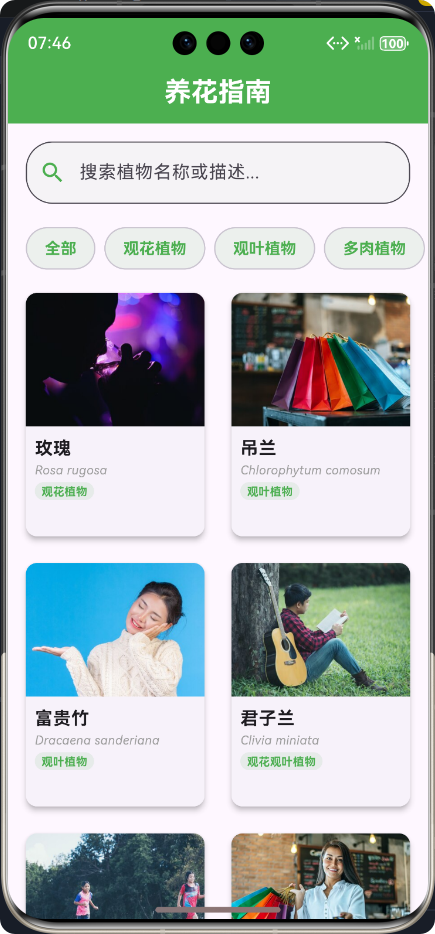
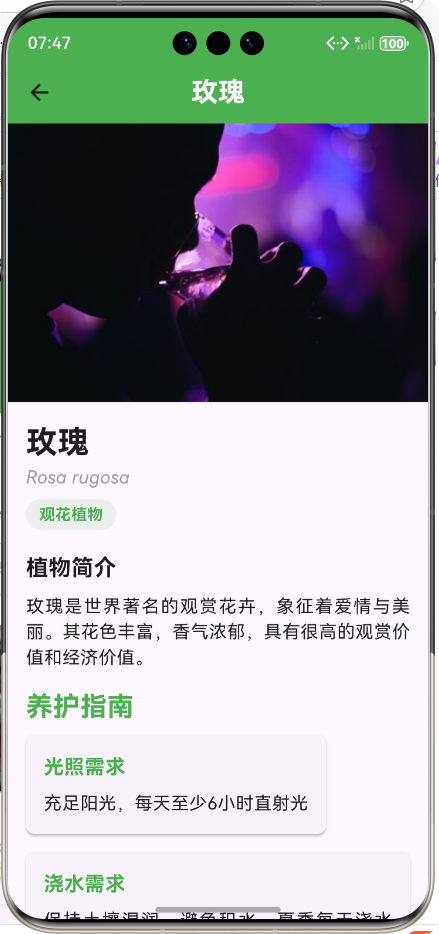
图片只是示例,并不代表真实花朵
Flutter框架跨平台鸿蒙开发——如何养花APP的开发流程
📝 前言
随着移动互联网的快速发展,跨平台开发框架已成为移动应用开发的重要趋势。Flutter作为Google推出的开源跨平台UI框架,凭借其"一次编写,处处运行"的优势,受到了广大开发者的青睐。同时,华为鸿蒙系统(HarmonyOS)的崛起,也为移动应用开发带来了新的机遇。
本文将以"如何养花"APP为例,详细介绍基于Flutter框架进行跨平台鸿蒙开发的完整流程,包括项目规划、环境搭建、核心功能实现、跨平台适配、测试优化等方面,为开发者提供一份全面的参考指南。
📱 项目概述
1. 项目背景
随着人们生活水平的提高,越来越多的人开始喜欢在家中养植花卉植物。然而,对于新手来说,如何正确养护不同种类的植物是一个难题。"如何养花"APP旨在为用户提供专业、便捷的植物养护指南,帮助用户更好地照顾自己的植物。
2. 功能特点
- 🌱 植物百科:提供多种常见植物的详细信息
- 🔍 智能搜索:支持按名称、分类等方式搜索植物
- 📋 分类浏览:按植物类型进行分类展示
- 💡 养护指南:提供详细的光照、浇水、温度等养护建议
- 🎨 优雅UI:采用绿色主题,清新自然的设计风格
- 📱 跨平台支持:同时支持鸿蒙、Android、iOS等多个平台
🛠️ 开发环境搭建
1. Flutter环境配置
- 下载并安装Flutter SDK
- 配置环境变量
- 验证安装:
flutter doctor
2. 鸿蒙开发环境配置
- 安装DevEco Studio
- 配置HarmonyOS SDK
- 注册开发者账号,获取开发证书
3. 项目初始化
# 创建Flutter项目
flutter create --org com.example flutter_text

# 进入项目目录
cd flutter_text

# 添加鸿蒙支持
flutter run -d harmony
🔄 开发流程
1. 开发流程图
2. 详细开发步骤
(1)需求分析
- 确定核心功能
- 定义目标用户
- 分析竞品特点
(2)UI设计
- 确定设计风格:清新自然的绿色主题
- 设计页面布局:植物列表、详情页、搜索页等
- 制作UI原型图
(3)数据模型设计
/// 植物数据模型
class Plant {
  final String id;
  final String name;
  final String scientificName;
  final String category;
  final String description;
  final String sunlight;
  final String watering;
  final String temperature;
  final String humidity;
  final String soil;
  final String fertilizer;
  final String propagation;
  final String commonProblems;
  final String imageUrl;

  // 构造函数、fromJson等方法
}
(4)服务层实现
/// 植物服务类
class PlantGuideService {
  /// 获取所有植物列表
  Future<List<Map<String, dynamic>>> getPlants() async {
    // 模拟网络请求,返回植物数据
  }

  /// 根据ID获取植物详情
  Future<Map<String, dynamic>?> getPlantById(String id) async {
    // 根据ID查询植物详情
  }

  /// 根据分类获取植物列表
  Future<List<Map<String, dynamic>>> getPlantsByCategory(String category) async {
    // 根据分类过滤植物
  }
}
(5)UI组件开发
- 主页面:包含搜索框、分类筛选、植物列表
- 植物卡片:展示植物图片、名称、分类等信息
- 详情页面:展示植物详细信息和养护指南
(6)功能模块集成
- 搜索功能
- 分类筛选功能
- 植物详情展示
- 页面导航
(7)跨平台适配
- 适配不同屏幕尺寸
- 处理平台差异
- 优化鸿蒙系统性能
(8)测试与优化
- 单元测试
- 集成测试
- UI测试
- 性能优化
- bug修复
(9)发布上线
- 生成鸿蒙应用包(HAP)
- 提交到华为应用市场
- 发布到其他应用商店
💡 核心功能实现
1. 植物列表展示
实现思路
- 使用GridView展示植物卡片
- 支持下拉刷新和上拉加载更多
- 实现搜索和分类筛选功能
代码展示
/// 植物列表组件
class PlantListView extends StatefulWidget {
const PlantListView({Key? key}) : super(key: key);
State<PlantListView> createState() => _PlantListViewState();
}
class _PlantListViewState extends State<PlantListView> {
// 植物服务实例
final PlantGuideService _plantService = PlantGuideService();
// 植物列表数据
List<Plant> _plants = [];
// 加载状态
bool _isLoading = true;
// 搜索关键词
String _searchKeyword = '';
// 当前选中分类
String? _selectedCategory;
void initState() {
super.initState();
// 加载植物数据
_loadPlants();
}
// 加载植物数据
Future<void> _loadPlants() async {
try {
setState(() {
_isLoading = true;
});
// 获取植物数据
final plantsData = await _plantService.getPlants();
final plants = plantsData.map((data) => Plant.fromJson(data)).toList();
setState(() {
_plants = plants;
_isLoading = false;
});
} catch (e) {
setState(() {
_isLoading = false;
});
// 处理错误
}
}
// 构建植物卡片
Widget _buildPlantCard(Plant plant) {
return Card(
margin: const EdgeInsets.all(8),
elevation: 4,
shape: RoundedRectangleBorder(borderRadius: BorderRadius.circular(10)),
child: InkWell(
onTap: () {
// 跳转到详情页面
Navigator.push(
context,
MaterialPageRoute(
builder: (context) => PlantDetailScreen(plantId: plant.id),
),
);
},
child: Column(
crossAxisAlignment: CrossAxisAlignment.start,
children: [
// 植物图片
SizedBox(
height: 120,
width: double.infinity,
child: ClipRRect(
borderRadius: const BorderRadius.vertical(top: Radius.circular(10)),
child: Image.network(
plant.imageUrl,
fit: BoxFit.cover,
),
),
),
// 植物信息
Padding(
padding: const EdgeInsets.all(8),
child: Column(
crossAxisAlignment: CrossAxisAlignment.start,
mainAxisSize: MainAxisSize.min,
children: [
Text(
plant.name,
style: const TextStyle(
fontSize: 16,
fontWeight: FontWeight.bold,
),
),
Text(
plant.scientificName,
style: const TextStyle(
fontSize: 11,
fontStyle: FontStyle.italic,
color: Colors.grey,
),
),
// 分类标签
Container(
margin: const EdgeInsets.symmetric(vertical: 3),
padding: const EdgeInsets.symmetric(horizontal: 6, vertical: 1),
decoration: BoxDecoration(
color: Colors.green.withOpacity(0.1),
borderRadius: BorderRadius.circular(10),
),
child: Text(
plant.category,
style: const TextStyle(
fontSize: 10,
color: Colors.green,
fontWeight: FontWeight.bold,
),
),
),
],
),
),
],
),
),
);
}
Widget build(BuildContext context) {
// 过滤植物列表
final filteredPlants = _plants.where((plant) {
final matchesSearch = plant.name.toLowerCase().contains(_searchKeyword.toLowerCase()) ||
plant.scientificName.toLowerCase().contains(_searchKeyword.toLowerCase());
final matchesCategory = _selectedCategory == null || _selectedCategory == '全部' || plant.category == _selectedCategory;
return matchesSearch && matchesCategory;
}).toList();
return Scaffold(
appBar: AppBar(
title: const Text('养花指南'),
backgroundColor: Colors.green,
),
body: Column(
children: [
// 搜索框
Padding(
padding: const EdgeInsets.all(16),
child: TextField(
onChanged: (value) {
setState(() {
_searchKeyword = value;
});
},
decoration: InputDecoration(
hintText: '搜索植物名称或描述...',
prefixIcon: const Icon(Icons.search, color: Colors.green),
border: OutlineInputBorder(
borderRadius: BorderRadius.circular(24),
),
),
),
),
// 分类筛选
SizedBox(
height: 48,
child: ListView.builder(
scrollDirection: Axis.horizontal,
padding: const EdgeInsets.symmetric(horizontal: 12),
itemCount: _categories.length,
itemBuilder: (context, index) {
final category = _categories[index];
final isSelected = _selectedCategory == category;
return Padding(
padding: const EdgeInsets.symmetric(horizontal: 4),
child: FilterChip(
label: Text(category),
selected: isSelected,
onSelected: (selected) {
setState(() {
_selectedCategory = selected ? category : null;
});
},
selectedColor: Colors.green,
),
);
},
),
),
// 植物列表
Expanded(
child: _isLoading
? const Center(child: CircularProgressIndicator(color: Colors.green))
: GridView.builder(
padding: const EdgeInsets.all(8),
gridDelegate: const SliverGridDelegateWithFixedCrossAxisCount(
crossAxisCount: 2,
crossAxisSpacing: 8,
mainAxisSpacing: 8,
childAspectRatio: 0.75,
),
itemCount: filteredPlants.length,
itemBuilder: (context, index) {
return _buildPlantCard(filteredPlants[index]);
},
),
),
],
),
);
}
}
2. 植物详情展示
实现思路
- 展示植物详细信息
- 分类展示养护指南
- 提供清晰的养护建议
代码展示
/// 植物详情页面
class PlantDetailScreen extends StatefulWidget {
final String plantId;
const PlantDetailScreen({Key? key, required this.plantId}) : super(key: key);
State<PlantDetailScreen> createState() => _PlantDetailScreenState();
}
class _PlantDetailScreenState extends State<PlantDetailScreen> {
final PlantGuideService _plantService = PlantGuideService();
Plant? _plant;
bool _isLoading = true;
void initState() {
super.initState();
_loadPlantDetail();
}
// 加载植物详情
Future<void> _loadPlantDetail() async {
try {
setState(() {
_isLoading = true;
});
final plantData = await _plantService.getPlantById(widget.plantId);
if (plantData != null) {
setState(() {
_plant = Plant.fromJson(plantData);
_isLoading = false;
});
}
} catch (e) {
setState(() {
_isLoading = false;
});
// 处理错误
}
}
// 构建养护指南卡片
Widget _buildCareGuideCard(String title, String content) {
return Card(
margin: const EdgeInsets.symmetric(horizontal: 16, vertical: 8),
elevation: 2,
shape: RoundedRectangleBorder(borderRadius: BorderRadius.circular(8)),
child: Padding(
padding: const EdgeInsets.all(16),
child: Column(
crossAxisAlignment: CrossAxisAlignment.start,
children: [
Text(
title,
style: const TextStyle(
fontSize: 18,
fontWeight: FontWeight.bold,
color: Colors.green,
),
),
const SizedBox(height: 8),
Text(
content,
style: const TextStyle(fontSize: 16),
textAlign: TextAlign.justify,
),
],
),
),
);
}
Widget build(BuildContext context) {
return Scaffold(
appBar: AppBar(
title: Text(_plant?.name ?? '植物详情'),
backgroundColor: Colors.green,
),
body: _isLoading
? const Center(child: CircularProgressIndicator(color: Colors.green))
: _plant == null
? const Center(child: Text('未找到植物信息'))
: SingleChildScrollView(
child: Column(
crossAxisAlignment: CrossAxisAlignment.start,
children: [
// 植物图片
SizedBox(
height: 250,
width: double.infinity,
child: Image.network(
_plant!.imageUrl,
fit: BoxFit.cover,
),
),
// 植物基本信息
Padding(
padding: const EdgeInsets.all(16),
child: Column(
crossAxisAlignment: CrossAxisAlignment.start,
children: [
Text(
_plant!.name,
style: const TextStyle(
fontSize: 28,
fontWeight: FontWeight.bold,
),
),
Text(
_plant!.scientificName,
style: const TextStyle(
fontSize: 16,
fontStyle: FontStyle.italic,
color: Colors.grey,
),
),
// 分类标签
Container(
margin: const EdgeInsets.symmetric(vertical: 8),
padding: const EdgeInsets.symmetric(horizontal: 12, vertical: 4),
decoration: BoxDecoration(
color: Colors.green.withOpacity(0.1),
borderRadius: BorderRadius.circular(16),
),
child: Text(
_plant!.category,
style: const TextStyle(
fontSize: 14,
color: Colors.green,
fontWeight: FontWeight.bold,
),
),
),
// 植物简介
const SizedBox(height: 12),
const Text(
'植物简介',
style: TextStyle(
fontSize: 20,
fontWeight: FontWeight.bold,
),
),
const SizedBox(height: 8),
Text(
_plant!.description,
style: const TextStyle(fontSize: 16),
textAlign: TextAlign.justify,
),
],
),
),
// 养护指南
const Padding(
padding: EdgeInsets.symmetric(horizontal: 16),
child: Text(
'养护指南',
style: TextStyle(
fontSize: 24,
fontWeight: FontWeight.bold,
color: Colors.green,
),
),
),
// 光照需求
_buildCareGuideCard('光照需求', _plant!.sunlight),
// 浇水需求
_buildCareGuideCard('浇水需求', _plant!.watering),
// 温度需求
_buildCareGuideCard('温度需求', _plant!.temperature),
// 湿度需求
_buildCareGuideCard('湿度需求', _plant!.humidity),
// 土壤需求
_buildCareGuideCard('土壤需求', _plant!.soil),
// 施肥需求
_buildCareGuideCard('施肥需求', _plant!.fertilizer),
// 繁殖方法
_buildCareGuideCard('繁殖方法', _plant!.propagation),
// 常见问题
const Padding(
padding: EdgeInsets.symmetric(horizontal: 16, vertical: 12),
child: Text(
'常见问题及解决方法',
style: TextStyle(
fontSize: 20,
fontWeight: FontWeight.bold,
),
),
),
Padding(
padding: const EdgeInsets.symmetric(horizontal: 16, vertical: 8),
child: Text(
_plant!.commonProblems,
style: const TextStyle(fontSize: 16),
textAlign: TextAlign.justify,
),
),
const SizedBox(height: 32),
],
),
),
);
}
}
3. 搜索与分类功能
实现思路
- 实时搜索:输入关键词时立即过滤结果
- 分类筛选:支持按植物类型进行筛选
- 组合筛选:支持搜索和分类的组合使用
代码展示
// 搜索功能实现
TextField(
  onChanged: (value) {
    setState(() {
      _searchKeyword = value;
    });
  },
  decoration: InputDecoration(
    hintText: '搜索植物名称或描述...',
    prefixIcon: const Icon(Icons.search, color: Colors.green),
    border: OutlineInputBorder(
      borderRadius: BorderRadius.circular(24),
    ),
  ),
),

// 分类筛选实现
ListView.builder(
  scrollDirection: Axis.horizontal,
  padding: const EdgeInsets.symmetric(horizontal: 12),
  itemCount: _categories.length,
  itemBuilder: (context, index) {
    final category = _categories[index];
    final isSelected = _selectedCategory == category;

    return Padding(
      padding: const EdgeInsets.symmetric(horizontal: 4),
      child: FilterChip(
        label: Text(category),
        selected: isSelected,
        onSelected: (selected) {
          setState(() {
            _selectedCategory = selected ? category : null;
          });
        },
        selectedColor: Colors.green,
      ),
    );
  },
),

// 组合筛选逻辑
final filteredPlants = _plants.where((plant) {
  final matchesSearch = plant.name.toLowerCase().contains(_searchKeyword.toLowerCase()) ||
      plant.scientificName.toLowerCase().contains(_searchKeyword.toLowerCase());
  final matchesCategory = _selectedCategory == null || _selectedCategory == '全部' || plant.category == _selectedCategory;
  return matchesSearch && matchesCategory;
}).toList();
🔧 跨平台适配要点
1. 屏幕适配
- 使用Flutter的MediaQuery获取屏幕尺寸
- 采用Responsive布局设计
- 避免使用固定尺寸,尽量使用相对尺寸
2. 鸿蒙系统适配
- 处理鸿蒙系统的特殊权限
- 适配鸿蒙系统的导航栏和状态栏
- 优化鸿蒙系统上的性能表现
3. 平台差异处理
- 使用Platform类判断当前平台
- 针对不同平台提供不同的实现
- 处理平台特定的API调用
🧪 测试与优化
1. 测试方法
- 单元测试:测试数据模型、服务层等
- 集成测试:测试页面跳转、功能集成等
- UI测试:测试UI组件的显示和交互
- 性能测试:测试应用的运行性能
2. 优化策略
- 图片懒加载
- 数据缓存
- 减少不必要的重建
- 优化列表滚动性能
📊 项目总结
1. 项目成果
- 完成了"如何养花"APP的开发
- 实现了植物列表、详情展示、搜索分类等核心功能
- 适配了鸿蒙、Android、iOS等多个平台
- 采用了优雅的UI设计,提供了良好的用户体验
2. 经验教训
- 跨平台开发需要考虑平台差异
- UI设计要兼顾不同屏幕尺寸
- 性能优化是持续的过程
- 测试是保证质量的重要手段
3. 未来展望
- 增加用户登录和个性化功能
- 实现植物识别功能
- 添加养护提醒功能
- 支持离线使用
- 优化AI智能养护建议
🎯 结语
通过本文的介绍,我们详细了解了基于Flutter框架进行跨平台鸿蒙开发的完整流程。从项目规划到环境搭建,从核心功能实现到跨平台适配,再到测试优化,每一个环节都至关重要。
Flutter框架凭借其强大的跨平台能力和优秀的性能表现,为开发者提供了一种高效的移动应用开发方式。而鸿蒙系统的崛起,也为移动应用开发带来了新的机遇和挑战。
希望本文能够为广大开发者提供一些参考和启发,帮助大家更好地进行Flutter跨平台鸿蒙开发。让我们一起携手,共同推动移动应用开发的发展!
欢迎加入开源鸿蒙跨平台社区:https://openharmonycrossplatform.csdn.net

作为“人工智能6S店”的官方数字引擎,为AI开发者与企业提供一个覆盖软硬件全栈、一站式门户。
更多推荐
 3
3 0
0- 0


 已为社区贡献14条内容

所有评论(0)