
Flutter 框架跨平台鸿蒙开发 - 实时花粉浓度查询:智能过敏防护助手
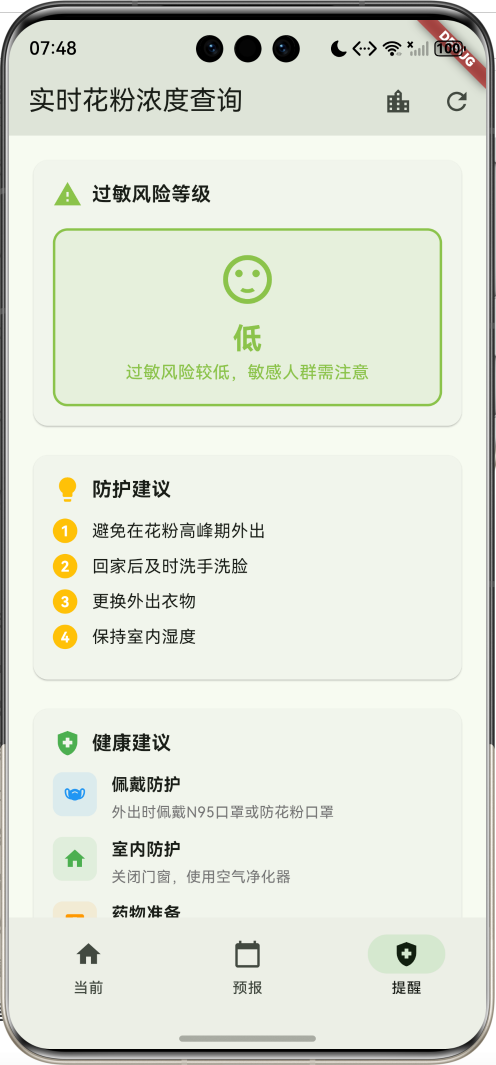
实时花粉浓度查询是一款专为过敏人群打造的Flutter健康应用,提供全国30个主要城市的实时花粉浓度监测、7天预报和个性化过敏提醒功能。通过科学的花粉指数分析和专业的防护建议,帮助用户有效预防花粉过敏,享受健康生活。运行效果图模型字段说明:计算属性:花粉指数等级划分:预报数据特点:数据生成特点:城市覆盖(30个):三个页面:IndexedStack使用:5. 综合花粉指数展示圆形指数展示特点:等级
Flutter实时花粉浓度查询:智能过敏防护助手
项目简介
实时花粉浓度查询是一款专为过敏人群打造的Flutter健康应用,提供全国30个主要城市的实时花粉浓度监测、7天预报和个性化过敏提醒功能。通过科学的花粉指数分析和专业的防护建议,帮助用户有效预防花粉过敏,享受健康生活。
运行效果图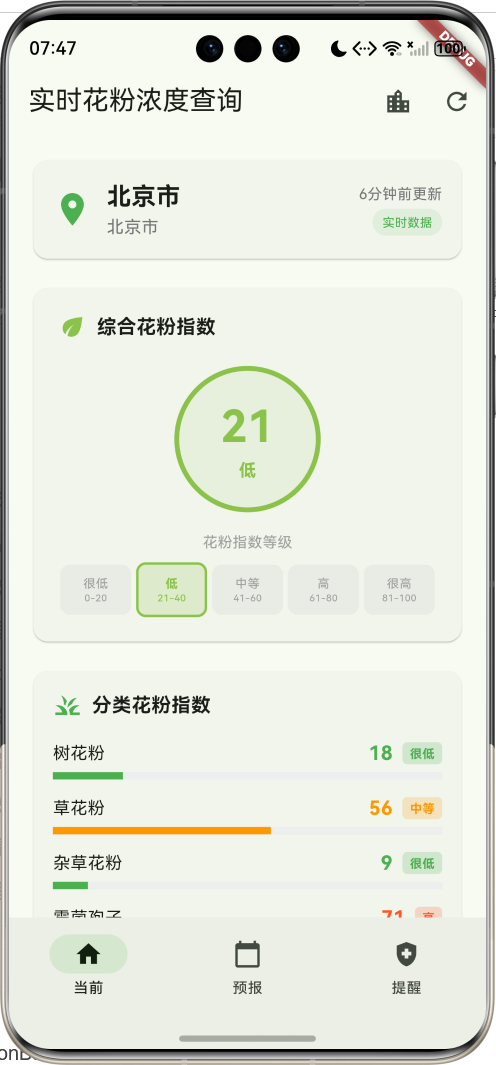
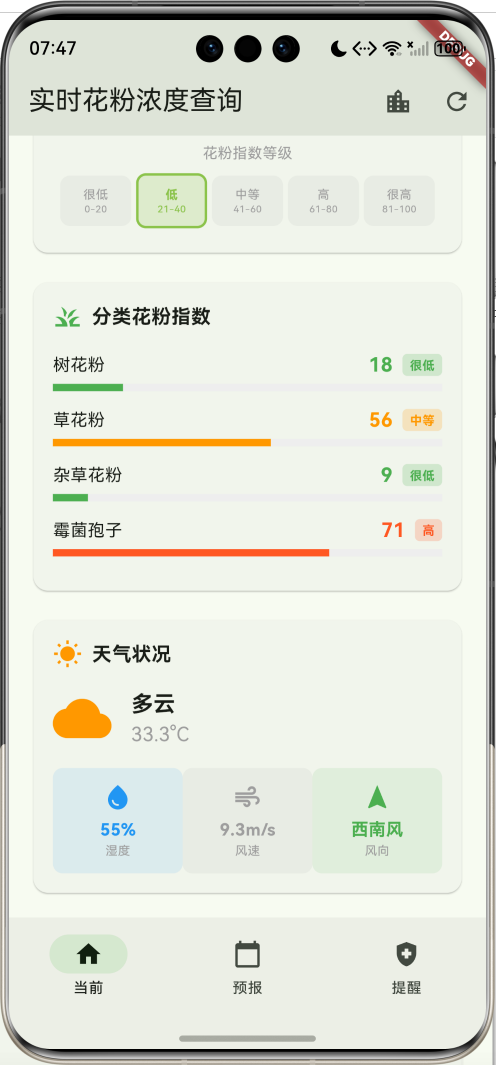
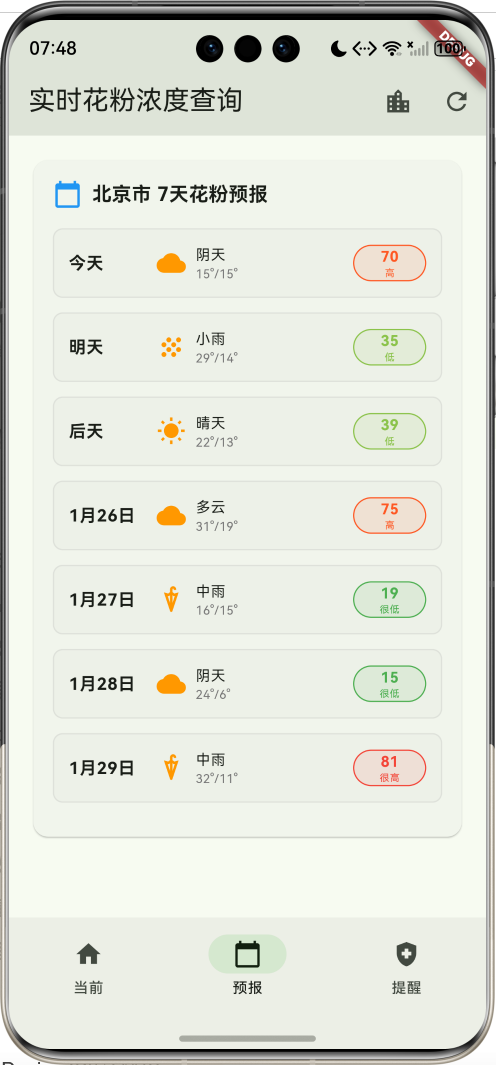
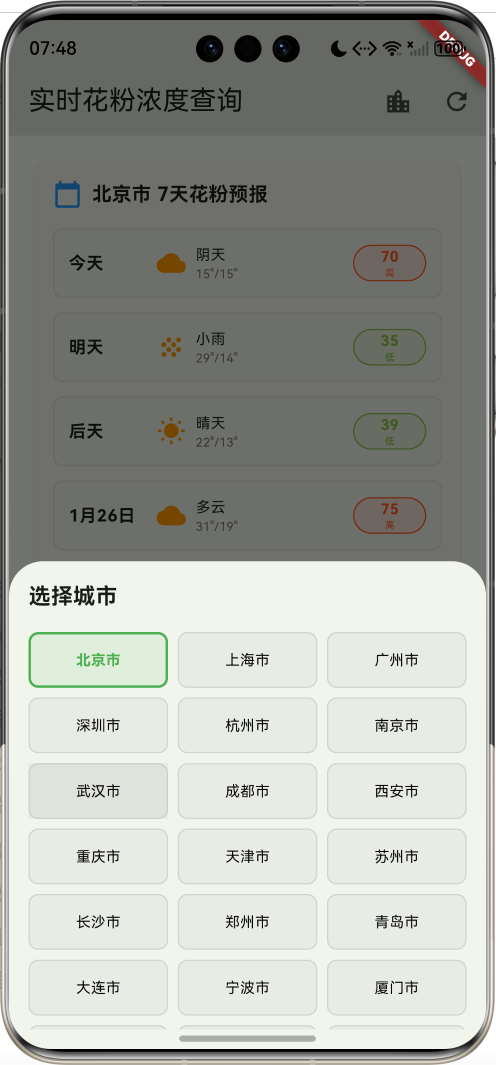
核心功能
- 30个城市覆盖:全国主要城市实时花粉数据
- 4类花粉监测:树花粉、草花粉、杂草花粉、霉菌孢子
- 5级指数分类:很低、低、中等、高、很高
- 实时数据更新:模拟实时花粉浓度监测
- 7天预报:未来一周花粉浓度趋势
- 天气关联:结合天气状况分析花粉传播
- 过敏风险评估:智能评估个人过敏风险等级
- 防护建议:个性化防护措施推荐
- 健康提醒:专业的过敏预防指导
- 紧急处理:过敏急救指南和医院查询
技术特点
- Material Design 3设计风格
- NavigationBar底部导航
- 三页面架构(当前、预报、提醒)
- 圆形进度指示器
- LinearProgressIndicator数据可视化
- 渐变色风险等级展示
- 响应式网格布局
- 模态底部表单
- 模拟实时数据更新
- 无需额外依赖包
核心代码实现
1. 花粉数据模型
class PollenData {
  final String id;                    // 数据ID
  final String cityName;              // 城市名称
  final String province;              // 省份
  final DateTime updateTime;          // 更新时间
  final int overallIndex;             // 综合花粉指数
  final Map<String, int> pollenTypes; // 分类花粉指数
  final String weatherCondition;      // 天气状况
  final double temperature;           // 温度
  final int humidity;                 // 湿度
  final double windSpeed;             // 风速
  final String windDirection;         // 风向
  final List<String> allergyTips;     // 过敏提醒
  final List<DailyForecast> forecast; // 7天预报

  PollenData({
    required this.id,
    required this.cityName,
    required this.province,
    required this.updateTime,
    required this.overallIndex,
    required this.pollenTypes,
    required this.weatherCondition,
    required this.temperature,
    required this.humidity,
    required this.windSpeed,
    required this.windDirection,
    required this.allergyTips,
    required this.forecast,
  });

  // 计算属性:完整地址
  String get location => '$province $cityName';

  // 计算属性:花粉等级
  String get overallLevel {
    if (overallIndex <= 20) return '很低';
    if (overallIndex <= 40) return '低';
    if (overallIndex <= 60) return '中等';
    if (overallIndex <= 80) return '高';
    return '很高';
  }

  // 计算属性:等级颜色
  Color get overallColor {
    if (overallIndex <= 20) return Colors.green;
    if (overallIndex <= 40) return Colors.lightGreen;
    if (overallIndex <= 60) return Colors.orange;
    if (overallIndex <= 80) return Colors.deepOrange;
    return Colors.red;
  }

  // 计算属性:天气图标
  IconData get weatherIcon {
    switch (weatherCondition) {
      case '晴天': return Icons.wb_sunny;
      case '多云': return Icons.wb_cloudy;
      case '阴天': return Icons.cloud;
      case '小雨': return Icons.grain;
      case '中雨': return Icons.umbrella;
      case '大雨': return Icons.thunderstorm;
      default: return Icons.wb_sunny;
    }
  }

  // 计算属性:更新时间文本
  String get updateTimeText {
    final now = DateTime.now();
    final diff = now.difference(updateTime);
    if (diff.inMinutes < 1) return '刚刚更新';
    if (diff.inMinutes < 60) return '${diff.inMinutes}分钟前更新';
    if (diff.inHours < 24) return '${diff.inHours}小时前更新';
    return '${diff.inDays}天前更新';
  }
}
模型字段说明:
| 字段 | 类型 | 说明 |
|---|---|---|
| id | String | 唯一标识符 |
| cityName | String | 城市名称 |
| province | String | 所在省份 |
| updateTime | DateTime | 数据更新时间 |
| overallIndex | int | 综合花粉指数(0-100) |
| pollenTypes | Map<String, int> | 分类花粉指数 |
| weatherCondition | String | 天气状况 |
| temperature | double | 当前温度 |
| humidity | int | 湿度百分比 |
| windSpeed | double | 风速(m/s) |
| windDirection | String | 风向 |
| allergyTips | List | 防护建议列表 |
| forecast | List | 7天预报数据 |
计算属性:
location:组合省份和城市名称overallLevel:根据指数返回等级文本overallColor:根据指数返回对应颜色weatherIcon:根据天气返回对应图标updateTimeText:格式化更新时间显示
花粉指数等级划分:
| 指数范围 | 等级 | 颜色 | 说明 |
|---|---|---|---|
| 0-20 | 很低 | 绿色 | 过敏风险很低 |
| 21-40 | 低 | 浅绿 | 过敏风险较低 |
| 41-60 | 中等 | 橙色 | 过敏风险中等 |
| 61-80 | 高 | 深橙 | 过敏风险较高 |
| 81-100 | 很高 | 红色 | 过敏风险很高 |
2. 预报数据模型
class DailyForecast {
  final DateTime date;        // 日期
  final int pollenIndex;      // 花粉指数
  final String weather;       // 天气
  final double maxTemp;       // 最高温度
  final double minTemp;       // 最低温度

  DailyForecast({
    required this.date,
    required this.pollenIndex,
    required this.weather,
    required this.maxTemp,
    required this.minTemp,
  });

  // 计算属性:花粉等级
  String get level {
    if (pollenIndex <= 20) return '很低';
    if (pollenIndex <= 40) return '低';
    if (pollenIndex <= 60) return '中等';
    if (pollenIndex <= 80) return '高';
    return '很高';
  }

  // 计算属性:等级颜色
  Color get levelColor {
    if (pollenIndex <= 20) return Colors.green;
    if (pollenIndex <= 40) return Colors.lightGreen;
    if (pollenIndex <= 60) return Colors.orange;
    if (pollenIndex <= 80) return Colors.deepOrange;
    return Colors.red;
  }

  // 计算属性:日期文本
  String get dateText {
    final now = DateTime.now();
    final today = DateTime(now.year, now.month, now.day);
    final targetDate = DateTime(date.year, date.month, date.day);
    final diff = targetDate.difference(today).inDays;

    if (diff == 0) return '今天';
    if (diff == 1) return '明天';
    if (diff == 2) return '后天';
    return '${date.month}月${date.day}日';
  }
}
预报数据特点:
- 7天预报数据
- 包含花粉指数和天气信息
- 智能日期显示(今天、明天、后天)
- 温度范围显示
- 等级颜色映射
3. 花粉数据生成
void _generatePollenData() {
  final random = Random();

  final pollenTypes = ['树花粉', '草花粉', '杂草花粉', '霉菌孢子'];
  final weatherConditions = ['晴天', '多云', '阴天', '小雨', '中雨'];
  final windDirections = ['北风', '南风', '东风', '西风', '东北风', '西北风', '东南风', '西南风'];

  final allergyTipsList = [
    ['减少户外活动时间', '外出佩戴口罩', '关闭门窗', '使用空气净化器'],
    ['避免在花粉高峰期外出', '回家后及时洗手洗脸', '更换外出衣物', '保持室内湿度'],
    ['服用抗过敏药物', '避免接触过敏原', '多喝水', '注意休息'],
    ['及时就医', '随身携带急救药物', '避免剧烈运动', '保持心情舒畅'],
  ];

  for (String city in _cities) {
    final overallIndex = 10 + random.nextInt(80);
    final pollenTypeData = <String, int>{};

    // 生成各类花粉指数
    for (String type in pollenTypes) {
      pollenTypeData[type] = 5 + random.nextInt(90);
    }

    // 生成7天预报
    final forecast = <DailyForecast>[];
    for (int i = 0; i < 7; i++) {
      forecast.add(DailyForecast(
        date: DateTime.now().add(Duration(days: i)),
        pollenIndex: 10 + random.nextInt(80),
        weather: weatherConditions[random.nextInt(weatherConditions.length)],
        maxTemp: 15 + random.nextDouble() * 20,
        minTemp: 5 + random.nextDouble() * 15,
      ));
    }

    _allPollenData.add(PollenData(
      id: 'pollen_${city.hashCode}',
      cityName: city,
      province: _cityProvinces[city]!,
      updateTime: DateTime.now().subtract(Duration(minutes: random.nextInt(60))),
      overallIndex: overallIndex,
      pollenTypes: pollenTypeData,
      weatherCondition: weatherConditions[random.nextInt(weatherConditions.length)],
      temperature: 10 + random.nextDouble() * 25,
      humidity: 30 + random.nextInt(50),
      windSpeed: random.nextDouble() * 10,
      windDirection: windDirections[random.nextInt(windDirections.length)],
      allergyTips: allergyTipsList[random.nextInt(allergyTipsList.length)],
      forecast: forecast,
    ));
  }
}
数据生成特点:
- 30个主要城市数据覆盖
- 4种花粉类型随机生成
- 综合指数范围:10-90
- 天气状况:5种类型随机
- 风向:8个方向随机
- 防护建议:4套方案随机选择
- 7天预报:每天独立生成
- 更新时间:0-60分钟前随机
城市覆盖(30个):
- 直辖市:北京、上海、天津、重庆
- 省会城市:广州、杭州、南京、武汉、成都、西安等
- 重要城市:深圳、苏州、青岛、大连、宁波、厦门等
4. NavigationBar底部导航
bottomNavigationBar: NavigationBar(
  selectedIndex: _selectedIndex,
  onDestinationSelected: (index) {
    setState(() => _selectedIndex = index);
  },
  destinations: const [
    NavigationDestination(icon: Icon(Icons.home), label: '当前'),
    NavigationDestination(icon: Icon(Icons.calendar_today), label: '预报'),
    NavigationDestination(icon: Icon(Icons.health_and_safety), label: '提醒'),
  ],
),
三个页面:
| 页面 | 图标 | 功能 |
|---|---|---|
| 当前 | home | 显示当前城市实时花粉数据 |
| 预报 | calendar_today | 显示7天花粉浓度预报 |
| 提醒 | health_and_safety | 显示过敏风险和防护建议 |
IndexedStack使用:
IndexedStack(
  index: _selectedIndex,
  children: [
    _buildCurrentPage(),
    _buildForecastPage(),
    _buildTipsPage(),
  ],
),
5. 综合花粉指数展示
Widget _buildOverallIndexCard() {
  return Card(
    child: Padding(
      padding: const EdgeInsets.all(20),
      child: Column(
        children: [
          Row(
            children: [
              Icon(Icons.eco, color: _currentPollenData!.overallColor),
              const SizedBox(width: 8),
              const Text(
                '综合花粉指数',
                style: TextStyle(fontSize: 16, fontWeight: FontWeight.bold),
              ),
            ],
          ),
          const SizedBox(height: 20),
          Container(
            width: 120,
            height: 120,
            decoration: BoxDecoration(
              shape: BoxShape.circle,
              color: _currentPollenData!.overallColor.withValues(alpha: 0.1),
              border: Border.all(
                color: _currentPollenData!.overallColor,
                width: 4,
              ),
            ),
            child: Column(
              mainAxisAlignment: MainAxisAlignment.center,
              children: [
                Text(
                  '${_currentPollenData!.overallIndex}',
                  style: TextStyle(
                    fontSize: 36,
                    fontWeight: FontWeight.bold,
                    color: _currentPollenData!.overallColor,
                  ),
                ),
                Text(
                  _currentPollenData!.overallLevel,
                  style: TextStyle(
                    fontSize: 14,
                    color: _currentPollenData!.overallColor,
                    fontWeight: FontWeight.bold,
                  ),
                ),
              ],
            ),
          ),
          const SizedBox(height: 16),
          _buildIndexScale(),
        ],
      ),
    ),
  );
}
圆形指数展示特点:
- 120x120像素圆形容器
- 边框颜色根据等级动态变化
- 背景色透明度0.1
- 中心显示数值和等级文本
- 底部显示等级刻度
等级刻度实现:
Widget _buildIndexScale() {
  return Column(
    children: [
      const Text(
        '花粉指数等级',
        style: TextStyle(fontSize: 12, color: Colors.grey),
      ),
      const SizedBox(height: 8),
      Row(
        children: [
          Expanded(child: _buildScaleItem('很低', '0-20', Colors.green)),
          Expanded(child: _buildScaleItem('低', '21-40', Colors.lightGreen)),
          Expanded(child: _buildScaleItem('中等', '41-60', Colors.orange)),
          Expanded(child: _buildScaleItem('高', '61-80', Colors.deepOrange)),
          Expanded(child: _buildScaleItem('很高', '81-100', Colors.red)),
        ],
      ),
    ],
  );
}

Widget _buildScaleItem(String level, String range, Color color) {
  final isActive = _currentPollenData!.overallLevel == level;
  return Container(
    margin: const EdgeInsets.symmetric(horizontal: 2),
    padding: const EdgeInsets.symmetric(vertical: 8),
    decoration: BoxDecoration(
      color: isActive ? color.withValues(alpha: 0.2) : Colors.grey.withValues(alpha: 0.1),
      borderRadius: BorderRadius.circular(8),
      border: isActive ? Border.all(color: color, width: 2) : null,
    ),
    child: Column(
      children: [
        Text(
          level,
          style: TextStyle(
            fontSize: 10,
            fontWeight: isActive ? FontWeight.bold : FontWeight.normal,
            color: isActive ? color : Colors.grey,
          ),
        ),
        Text(
          range,
          style: TextStyle(
            fontSize: 8,
            color: isActive ? color : Colors.grey,
          ),
        ),
      ],
    ),
  );
}
6. 分类花粉指数展示
Widget _buildPollenTypesCard() {
  return Card(
    child: Padding(
      padding: const EdgeInsets.all(16),
      child: Column(
        crossAxisAlignment: CrossAxisAlignment.start,
        children: [
          const Row(
            children: [
              Icon(Icons.grass, color: Colors.green),
              SizedBox(width: 8),
              Text(
                '分类花粉指数',
                style: TextStyle(fontSize: 16, fontWeight: FontWeight.bold),
              ),
            ],
          ),
          const SizedBox(height: 16),
          ..._currentPollenData!.pollenTypes.entries.map((entry) {
            return Padding(
              padding: const EdgeInsets.only(bottom: 12),
              child: _buildPollenTypeItem(entry.key, entry.value),
            );
          }),
        ],
      ),
    ),
  );
}

Widget _buildPollenTypeItem(String type, int value) {
  Color color;
  String level;

  if (value <= 20) {
    color = Colors.green;
    level = '很低';
  } else if (value <= 40) {
    color = Colors.lightGreen;
    level = '低';
  } else if (value <= 60) {
    color = Colors.orange;
    level = '中等';
  } else if (value <= 80) {
    color = Colors.deepOrange;
    level = '高';
  } else {
    color = Colors.red;
    level = '很高';
  }

  return Column(
    crossAxisAlignment: CrossAxisAlignment.start,
    children: [
      Row(
        mainAxisAlignment: MainAxisAlignment.spaceBetween,
        children: [
          Text(type, style: const TextStyle(fontSize: 14)),
          Row(
            children: [
              Text(
                '$value',
                style: TextStyle(
                  fontSize: 16,
                  fontWeight: FontWeight.bold,
                  color: color,
                ),
              ),
              const SizedBox(width: 8),
              Container(
                padding: const EdgeInsets.symmetric(horizontal: 6, vertical: 2),
                decoration: BoxDecoration(
                  color: color.withValues(alpha: 0.2),
                  borderRadius: BorderRadius.circular(4),
                ),
                child: Text(
                  level,
                  style: TextStyle(
                    fontSize: 10,
                    color: color,
                    fontWeight: FontWeight.bold,
                  ),
                ),
              ),
            ],
          ),
        ],
      ),
      const SizedBox(height: 4),
      LinearProgressIndicator(
        value: value / 100,
        backgroundColor: Colors.grey[200],
        color: color,
        minHeight: 6,
      ),
    ],
  );
}
分类花粉展示特点:
- 4种花粉类型:树花粉、草花粉、杂草花粉、霉菌孢子
- 每种花粉独立显示指数和等级
- LinearProgressIndicator可视化进度
- 动态颜色和等级标签
- 进度条高度6px
7. 天气状况卡片
Widget _buildWeatherCard() {
  return Card(
    child: Padding(
      padding: const EdgeInsets.all(16),
      child: Column(
        crossAxisAlignment: CrossAxisAlignment.start,
        children: [
          const Row(
            children: [
              Icon(Icons.wb_sunny, color: Colors.orange),
              SizedBox(width: 8),
              Text(
                '天气状况',
                style: TextStyle(fontSize: 16, fontWeight: FontWeight.bold),
              ),
            ],
          ),
          const SizedBox(height: 16),
          Row(
            children: [
              Icon(
                _currentPollenData!.weatherIcon,
                size: 48,
                color: Colors.orange,
              ),
              const SizedBox(width: 16),
              Expanded(
                child: Column(
                  crossAxisAlignment: CrossAxisAlignment.start,
                  children: [
                    Text(
                      _currentPollenData!.weatherCondition,
                      style: const TextStyle(fontSize: 18, fontWeight: FontWeight.bold),
                    ),
                    Text(
                      '${_currentPollenData!.temperature.toStringAsFixed(1)}°C',
                      style: const TextStyle(fontSize: 16, color: Colors.grey),
                    ),
                  ],
                ),
              ),
            ],
          ),
          const SizedBox(height: 16),
          Row(
            children: [
              Expanded(
                child: _buildWeatherItem(
                  '湿度',
                  '${_currentPollenData!.humidity}%',
                  Icons.water_drop,
                  Colors.blue,
                ),
              ),
              Expanded(
                child: _buildWeatherItem(
                  '风速',
                  '${_currentPollenData!.windSpeed.toStringAsFixed(1)}m/s',
                  Icons.air,
                  Colors.grey,
                ),
              ),
              Expanded(
                child: _buildWeatherItem(
                  '风向',
                  _currentPollenData!.windDirection,
                  Icons.navigation,
                  Colors.green,
                ),
              ),
            ],
          ),
        ],
      ),
    ),
  );
}

Widget _buildWeatherItem(String label, String value, IconData icon, Color color) {
  return Container(
    padding: const EdgeInsets.all(12),
    decoration: BoxDecoration(
      color: color.withValues(alpha: 0.1),
      borderRadius: BorderRadius.circular(8),
    ),
    child: Column(
      children: [
        Icon(icon, color: color, size: 24),
        const SizedBox(height: 4),
        Text(
          value,
          style: TextStyle(
            fontSize: 14,
            fontWeight: FontWeight.bold,
            color: color,
          ),
        ),
        Text(
          label,
          style: const TextStyle(fontSize: 10, color: Colors.grey),
        ),
      ],
    ),
  );
}
天气信息展示:
- 大图标显示天气状况
- 温度精确到小数点后1位
- 湿度、风速、风向三项指标
- 每项指标独立的颜色主题
- 圆角背景容器
8. 7天预报页面
Widget _buildForecastPage() {
  if (_currentPollenData == null) {
    return const Center(child: Text('暂无预报数据'));
  }

  return ListView(
    padding: const EdgeInsets.all(16),
    children: [
      Card(
        child: Padding(
          padding: const EdgeInsets.all(16),
          child: Column(
            crossAxisAlignment: CrossAxisAlignment.start,
            children: [
              Row(
                children: [
                  const Icon(Icons.calendar_today, color: Colors.blue),
                  const SizedBox(width: 8),
                  Text(
                    '${_currentPollenData!.cityName} 7天花粉预报',
                    style: const TextStyle(fontSize: 16, fontWeight: FontWeight.bold),
                  ),
                ],
              ),
              const SizedBox(height: 16),
              ..._currentPollenData!.forecast.map((forecast) {
                return _buildForecastItem(forecast);
              }),
            ],
          ),
        ),
      ),
    ],
  );
}

Widget _buildForecastItem(DailyForecast forecast) {
  return Container(
    margin: const EdgeInsets.only(bottom: 12),
    padding: const EdgeInsets.all(12),
    decoration: BoxDecoration(
      color: Colors.grey.withValues(alpha: 0.05),
      borderRadius: BorderRadius.circular(8),
      border: Border.all(color: Colors.grey.withValues(alpha: 0.2)),
    ),
    child: Row(
      children: [
        SizedBox(
          width: 60,
          child: Text(
            forecast.dateText,
            style: const TextStyle(fontSize: 14, fontWeight: FontWeight.bold),
          ),
        ),
        const SizedBox(width: 12),
        Icon(
          _getWeatherIcon(forecast.weather),
          color: Colors.orange,
          size: 24,
        ),
        const SizedBox(width: 8),
        Expanded(
          child: Column(
            crossAxisAlignment: CrossAxisAlignment.start,
            children: [
              Text(
                forecast.weather,
                style: const TextStyle(fontSize: 12),
              ),
              Text(
                '${forecast.maxTemp.toStringAsFixed(0)}°/${forecast.minTemp.toStringAsFixed(0)}°',
                style: TextStyle(fontSize: 10, color: Colors.grey[600]),
              ),
            ],
          ),
        ),
        const SizedBox(width: 12),
        Container(
          width: 60,
          height: 30,
          decoration: BoxDecoration(
            color: forecast.levelColor.withValues(alpha: 0.1),
            borderRadius: BorderRadius.circular(15),
            border: Border.all(color: forecast.levelColor, width: 1),
          ),
          child: Column(
            mainAxisAlignment: MainAxisAlignment.center,
            children: [
              Text(
                '${forecast.pollenIndex}',
                style: TextStyle(
                  fontSize: 12,
                  fontWeight: FontWeight.bold,
                  color: forecast.levelColor,
                ),
              ),
              Text(
                forecast.level,
                style: TextStyle(
                  fontSize: 8,
                  color: forecast.levelColor,
                ),
              ),
            ],
          ),
        ),
      ],
    ),
  );
}
预报页面特点:
- 7天完整预报数据
- 日期智能显示(今天、明天、后天)
- 天气图标和温度范围
- 花粉指数胶囊式展示
- 等级颜色动态变化
9. 过敏风险评估
Widget _buildAllergyLevelCard() {
  return Card(
    child: Padding(
      padding: const EdgeInsets.all(16),
      child: Column(
        crossAxisAlignment: CrossAxisAlignment.start,
        children: [
          Row(
            children: [
              Icon(
                Icons.warning,
                color: _currentPollenData!.overallColor,
              ),
              const SizedBox(width: 8),
              const Text(
                '过敏风险等级',
                style: TextStyle(fontSize: 16, fontWeight: FontWeight.bold),
              ),
            ],
          ),
          const SizedBox(height: 16),
          Container(
            width: double.infinity,
            padding: const EdgeInsets.all(16),
            decoration: BoxDecoration(
              color: _currentPollenData!.overallColor.withValues(alpha: 0.1),
              borderRadius: BorderRadius.circular(12),
              border: Border.all(
                color: _currentPollenData!.overallColor,
                width: 2,
              ),
            ),
            child: Column(
              children: [
                Icon(
                  _getRiskIcon(_currentPollenData!.overallLevel),
                  size: 48,
                  color: _currentPollenData!.overallColor,
                ),
                const SizedBox(height: 8),
                Text(
                  _currentPollenData!.overallLevel,
                  style: TextStyle(
                    fontSize: 24,
                    fontWeight: FontWeight.bold,
                    color: _currentPollenData!.overallColor,
                  ),
                ),
                Text(
                  _getRiskDescription(_currentPollenData!.overallLevel),
                  style: TextStyle(
                    fontSize: 14,
                    color: _currentPollenData!.overallColor,
                  ),
                  textAlign: TextAlign.center,
                ),
              ],
            ),
          ),
        ],
      ),
    ),
  );
}

IconData _getRiskIcon(String level) {
  switch (level) {
    case '很低': return Icons.sentiment_very_satisfied;
    case '低': return Icons.sentiment_satisfied;
    case '中等': return Icons.sentiment_neutral;
    case '高': return Icons.sentiment_dissatisfied;
    case '很高': return Icons.sentiment_very_dissatisfied;
    default: return Icons.sentiment_neutral;
  }
}

String _getRiskDescription(String level) {
  switch (level) {
    case '很低': return '过敏风险很低,可以正常户外活动';
    case '低': return '过敏风险较低,敏感人群需注意';
    case '中等': return '过敏风险中等,建议减少户外活动';
    case '高': return '过敏风险较高,敏感人群避免外出';
    case '很高': return '过敏风险很高,建议待在室内';
    default: return '请注意防护';
  }
}
风险评估特点:
- 表情图标直观显示风险等级
- 大号文字突出风险等级
- 详细的风险描述说明
- 边框和背景色动态变化
- 全宽度容器展示
风险等级映射:
| 等级 | 图标 | 描述 |
|---|---|---|
| 很低 | sentiment_very_satisfied | 可以正常户外活动 |
| 低 | sentiment_satisfied | 敏感人群需注意 |
| 中等 | sentiment_neutral | 建议减少户外活动 |
| 高 | sentiment_dissatisfied | 敏感人群避免外出 |
| 很高 | sentiment_very_dissatisfied | 建议待在室内 |
10. 防护建议展示
Widget _buildAllergyTipsCard() {
  return Card(
    child: Padding(
      padding: const EdgeInsets.all(16),
      child: Column(
        crossAxisAlignment: CrossAxisAlignment.start,
        children: [
          const Row(
            children: [
              Icon(Icons.lightbulb, color: Colors.amber),
              SizedBox(width: 8),
              Text(
                '防护建议',
                style: TextStyle(fontSize: 16, fontWeight: FontWeight.bold),
              ),
            ],
          ),
          const SizedBox(height: 12),
          ..._currentPollenData!.allergyTips.asMap().entries.map((entry) {
            return Padding(
              padding: const EdgeInsets.only(bottom: 8),
              child: Row(
                crossAxisAlignment: CrossAxisAlignment.start,
                children: [
                  Container(
                    width: 20,
                    height: 20,
                    decoration: const BoxDecoration(
                      color: Colors.amber,
                      shape: BoxShape.circle,
                    ),
                    child: Center(
                      child: Text(
                        '${entry.key + 1}',
                        style: const TextStyle(
                          color: Colors.white,
                          fontSize: 12,
                          fontWeight: FontWeight.bold,
                        ),
                      ),
                    ),
                  ),
                  const SizedBox(width: 12),
                  Expanded(
                    child: Text(
                      entry.value,
                      style: const TextStyle(fontSize: 14, height: 1.5),
                    ),
                  ),
                ],
              ),
            );
          }),
        ],
      ),
    ),
  );
}
防护建议特点:
- 编号圆形标识
- 琥珀色主题
- 行高1.5提升可读性
- 动态建议内容
- 列表式展示
建议类型(4套方案):
- 基础防护:减少户外活动、佩戴口罩、关闭门窗、使用净化器
- 进阶防护:避开高峰期、及时清洁、更换衣物、保持湿度
- 药物防护:服用抗过敏药、避免过敏原、多喝水、注意休息
- 高级防护:及时就医、携带急救药、避免运动、保持心情
11. 健康建议卡片
Widget _buildHealthAdviceCard() {
  return Card(
    child: Padding(
      padding: const EdgeInsets.all(16),
      child: Column(
        crossAxisAlignment: CrossAxisAlignment.start,
        children: [
          const Row(
            children: [
              Icon(Icons.health_and_safety, color: Colors.green),
              SizedBox(width: 8),
              Text(
                '健康建议',
                style: TextStyle(fontSize: 16, fontWeight: FontWeight.bold),
              ),
            ],
          ),
          const SizedBox(height: 12),
          _buildAdviceItem(
            Icons.masks,
            '佩戴防护',
            '外出时佩戴N95口罩或防花粉口罩',
            Colors.blue,
          ),
          _buildAdviceItem(
            Icons.home,
            '室内防护',
            '关闭门窗,使用空气净化器',
            Colors.green,
          ),
          _buildAdviceItem(
            Icons.local_hospital,
            '药物准备',
            '备好抗过敏药物,如有不适及时服用',
            Colors.orange,
          ),
          _buildAdviceItem(
            Icons.schedule,
            '时间选择',
            '避开花粉浓度高峰期(上午6-10点)',
            Colors.purple,
          ),
        ],
      ),
    ),
  );
}

Widget _buildAdviceItem(IconData icon, String title, String content, Color color) {
  return Padding(
    padding: const EdgeInsets.only(bottom: 12),
    child: Row(
      crossAxisAlignment: CrossAxisAlignment.start,
      children: [
        Container(
          padding: const EdgeInsets.all(8),
          decoration: BoxDecoration(
            color: color.withValues(alpha: 0.1),
            borderRadius: BorderRadius.circular(8),
          ),
          child: Icon(icon, color: color, size: 20),
        ),
        const SizedBox(width: 12),
        Expanded(
          child: Column(
            crossAxisAlignment: CrossAxisAlignment.start,
            children: [
              Text(
                title,
                style: const TextStyle(
                  fontSize: 14,
                  fontWeight: FontWeight.bold,
                ),
              ),
              const SizedBox(height: 4),
              Text(
                content,
                style: TextStyle(
                  fontSize: 12,
                  color: Colors.grey[600],
                  height: 1.4,
                ),
              ),
            ],
          ),
        ),
      ],
    ),
  );
}
健康建议特点:
- 4个专业建议类别
- 图标和颜色主题区分
- 标题和详细说明
- 圆角图标背景
- 行高1.4优化阅读
建议分类:
- 佩戴防护:蓝色,口罩图标
- 室内防护:绿色,房屋图标
- 药物准备:橙色,医院图标
- 时间选择:紫色,时间图标
12. 紧急情况处理
Widget _buildEmergencyCard() {
  return Card(
    color: Colors.red.withValues(alpha: 0.05),
    child: Padding(
      padding: const EdgeInsets.all(16),
      child: Column(
        crossAxisAlignment: CrossAxisAlignment.start,
        children: [
          const Row(
            children: [
              Icon(Icons.emergency, color: Colors.red),
              SizedBox(width: 8),
              Text(
                '紧急情况处理',
                style: TextStyle(fontSize: 16, fontWeight: FontWeight.bold),
              ),
            ],
          ),
          const SizedBox(height: 12),
          Container(
            padding: const EdgeInsets.all(12),
            decoration: BoxDecoration(
              color: Colors.red.withValues(alpha: 0.1),
              borderRadius: BorderRadius.circular(8),
              border: Border.all(color: Colors.red.withValues(alpha: 0.3)),
            ),
            child: Column(
              crossAxisAlignment: CrossAxisAlignment.start,
              children: [
                const Text(
                  '如出现以下症状,请立即就医:',
                  style: TextStyle(
                    fontSize: 14,
                    fontWeight: FontWeight.bold,
                    color: Colors.red,
                  ),
                ),
                const SizedBox(height: 8),
                const Text(
                  '• 呼吸困难、胸闷\n• 严重皮疹、全身瘙痒\n• 眼睛红肿、流泪不止\n• 持续打喷嚏、流鼻涕',
                  style: TextStyle(fontSize: 12, height: 1.5),
                ),
                const SizedBox(height: 12),
                Row(
                  children: [
                    Expanded(
                      child: ElevatedButton.icon(
                        onPressed: () {
                          ScaffoldMessenger.of(context).showSnackBar(
                            const SnackBar(content: Text('正在拨打急救电话...')),
                          );
                        },
                        icon: const Icon(Icons.phone, color: Colors.white),
                        label: const Text('急救电话', style: TextStyle(color: Colors.white)),
                        style: ElevatedButton.styleFrom(
                          backgroundColor: Colors.red,
                          foregroundColor: Colors.white,
                        ),
                      ),
                    ),
                    const SizedBox(width: 12),
                    Expanded(
                      child: OutlinedButton.icon(
                        onPressed: () {
                          ScaffoldMessenger.of(context).showSnackBar(
                            const SnackBar(content: Text('正在查找附近医院...')),
                          );
                        },
                        icon: const Icon(Icons.local_hospital, color: Colors.red),
                        label: const Text('附近医院', style: TextStyle(color: Colors.red)),
                        style: OutlinedButton.styleFrom(
                          side: const BorderSide(color: Colors.red),
                        ),
                      ),
                    ),
                  ],
                ),
              ],
            ),
          ),
        ],
      ),
    ),
  );
}
紧急处理特点:
- 红色主题突出紧急性
- 详细的症状描述
- 两个操作按钮
- 边框和背景强调
- 实心和空心按钮区分
紧急症状:
- 呼吸困难、胸闷
- 严重皮疹、全身瘙痒
- 眼睛红肿、流泪不止
- 持续打喷嚏、流鼻涕
13. 城市选择器
void _showCitySelector() {
  showModalBottomSheet(
    context: context,
    builder: (context) => Container(
      height: 400,
      padding: const EdgeInsets.all(16),
      child: Column(
        crossAxisAlignment: CrossAxisAlignment.start,
        children: [
          const Text(
            '选择城市',
            style: TextStyle(fontSize: 18, fontWeight: FontWeight.bold),
          ),
          const SizedBox(height: 16),
          Expanded(
            child: GridView.builder(
              gridDelegate: const SliverGridDelegateWithFixedCrossAxisCount(
                crossAxisCount: 3,
                childAspectRatio: 2.5,
                crossAxisSpacing: 8,
                mainAxisSpacing: 8,
              ),
              itemCount: _cities.length,
              itemBuilder: (context, index) {
                final city = _cities[index];
                final isSelected = city == _selectedCity;
                return InkWell(
                  onTap: () {
                    setState(() {
                      _selectedCity = city;
                    });
                    Navigator.pop(context);
                    _loadCurrentCityData();
                  },
                  child: Container(
                    decoration: BoxDecoration(
                      color: isSelected
                          ? Colors.green.withValues(alpha: 0.1)
                          : Colors.grey.withValues(alpha: 0.1),
                      borderRadius: BorderRadius.circular(8),
                      border: isSelected
                          ? Border.all(color: Colors.green, width: 2)
                          : Border.all(color: Colors.grey.withValues(alpha: 0.3)),
                    ),
                    child: Center(
                      child: Text(
                        city,
                        style: TextStyle(
                          fontSize: 12,
                          fontWeight: isSelected ? FontWeight.bold : FontWeight.normal,
                          color: isSelected ? Colors.green : Colors.black,
                        ),
                      ),
                    ),
                  ),
                );
              },
            ),
          ),
        ],
      ),
    ),
  );
}
城市选择器特点:
- 模态底部表单
- 3列网格布局
- 宽高比2.5:1
- 选中状态高亮
- 点击切换城市并刷新数据
14. 数据刷新功能
void _loadCurrentCityData() {
  setState(() {
    _isLoading = true;
  });

  // 模拟网络请求延迟
  Future.delayed(const Duration(seconds: 1), () {
    setState(() {
      _currentPollenData = _allPollenData.firstWhere(
        (data) => data.cityName == _selectedCity,
      );
      _isLoading = false;
    });
  });
}

void _refreshData() {
  _generatePollenData();
  _loadCurrentCityData();
  ScaffoldMessenger.of(context).showSnackBar(
    const SnackBar(content: Text('数据已刷新')),
  );
}
刷新功能特点:
- 模拟1秒网络延迟
- 加载状态指示器
- 重新生成所有数据
- SnackBar反馈提示
- 自动切换到当前城市数据
技术要点详解
1. 圆形进度指示器
圆形进度指示器用于直观展示花粉指数等级。
实现要点:
Container(
  width: 120,
  height: 120,
  decoration: BoxDecoration(
    shape: BoxShape.circle,
    color: color.withValues(alpha: 0.1),
    border: Border.all(color: color, width: 4),
  ),
  child: Column(
    mainAxisAlignment: MainAxisAlignment.center,
    children: [
      Text('${index}', style: TextStyle(fontSize: 36, color: color)),
      Text(level, style: TextStyle(fontSize: 14, color: color)),
    ],
  ),
)
设计特点:
- 固定尺寸120x120像素
- 圆形边框,宽度4像素
- 背景色透明度0.1
- 中心垂直居中布局
- 数值和等级文本分层显示
2. LinearProgressIndicator数据可视化
线性进度条用于展示分类花粉指数。
基本用法:
LinearProgressIndicator(
  value: value / 100,           // 进度值(0.0-1.0)
  backgroundColor: Colors.grey[200],
  color: color,                 // 进度条颜色
  minHeight: 6,                 // 最小高度
)
属性说明:
value:进度值,范围0.0-1.0backgroundColor:背景颜色color:进度条颜色minHeight:进度条高度
使用场景:
- 花粉指数可视化
- 数据百分比展示
- 等级进度显示
3. 动态颜色映射
根据数值动态返回对应颜色。
实现方式:
Color getColorByValue(int value) {
  if (value <= 20) return Colors.green;
  if (value <= 40) return Colors.lightGreen;
  if (value <= 60) return Colors.orange;
  if (value <= 80) return Colors.deepOrange;
  return Colors.red;
}
应用场景:
- 花粉指数等级颜色
- 风险等级标识
- 状态指示器
- 数据可视化
4. 模态底部表单
showModalBottomSheet用于显示城市选择器。
基本用法:
showModalBottomSheet(
  context: context,
  builder: (context) => Container(
    height: 400,
    child: // 内容
  ),
)
特点:
- 从底部弹出
- 模态覆盖
- 可拖拽关闭
- 自定义高度
- 圆角设计
5. GridView网格布局
GridView.builder用于城市选择网格。
配置参数:
GridView.builder(
  gridDelegate: const SliverGridDelegateWithFixedCrossAxisCount(
    crossAxisCount: 3,        // 列数
    childAspectRatio: 2.5,    // 宽高比
    crossAxisSpacing: 8,      // 列间距
    mainAxisSpacing: 8,       // 行间距
  ),
  itemCount: items.length,
  itemBuilder: (context, index) => // 构建项
)
使用场景:
- 城市选择器
- 图片网格
- 按钮组
- 标签展示
6. 计算属性优化
使用Getter实现动态计算属性。
优势:
- 减少存储空间
- 保持数据一致性
- 简化代码逻辑
- 便于维护
示例:
class PollenData {
  final int overallIndex;

  String get overallLevel {
    if (overallIndex <= 20) return '很低';
    if (overallIndex <= 40) return '低';
    // ...
  }

  Color get overallColor {
    if (overallIndex <= 20) return Colors.green;
    // ...
  }
}
7. 时间格式化
智能显示相对时间和日期。
更新时间格式化:
String get updateTimeText {
  final now = DateTime.now();
  final diff = now.difference(updateTime);
  if (diff.inMinutes < 1) return '刚刚更新';
  if (diff.inMinutes < 60) return '${diff.inMinutes}分钟前更新';
  if (diff.inHours < 24) return '${diff.inHours}小时前更新';
  return '${diff.inDays}天前更新';
}
日期格式化:
String get dateText {
  final now = DateTime.now();
  final today = DateTime(now.year, now.month, now.day);
  final targetDate = DateTime(date.year, date.month, date.day);
  final diff = targetDate.difference(today).inDays;

  if (diff == 0) return '今天';
  if (diff == 1) return '明天';
  if (diff == 2) return '后天';
  return '${date.month}月${date.day}日';
}
8. 状态管理
使用setState管理应用状态。
状态变量:
int _selectedIndex = 0;           // 当前页面索引
String _selectedCity = '北京市';   // 选中城市
List<PollenData> _allPollenData = []; // 所有花粉数据
PollenData? _currentPollenData;   // 当前城市数据
bool _isLoading = false;          // 加载状态
状态更新:
void _updateCity(String city) {
  setState(() {
    _selectedCity = city;
    _isLoading = true;
  });
  _loadCurrentCityData();
}
9. 异步数据加载
模拟网络请求和数据加载。
加载流程:
void _loadCurrentCityData() {
  setState(() => _isLoading = true);

  Future.delayed(const Duration(seconds: 1), () {
    setState(() {
      _currentPollenData = _allPollenData.firstWhere(
        (data) => data.cityName == _selectedCity,
      );
      _isLoading = false;
    });
  });
}
加载状态显示:
if (_isLoading) {
  return const Center(
    child: Column(
      mainAxisAlignment: MainAxisAlignment.center,
      children: [
        CircularProgressIndicator(),
        SizedBox(height: 16),
        Text('正在获取花粉数据...'),
      ],
    ),
  );
}
10. 用户反馈
使用SnackBar提供操作反馈。
基本用法:
ScaffoldMessenger.of(context).showSnackBar(
  const SnackBar(
    content: Text('数据已刷新'),
    duration: Duration(seconds: 2),
  ),
);
应用场景:
- 数据刷新提示
- 操作成功反馈
- 错误信息提示
- 功能说明
功能扩展方向
1. 实时数据接入
API接口集成:
class PollenApiService {
  static const String baseUrl = 'https://api.pollen.gov.cn';

  // 获取实时花粉数据
  static Future<PollenData> getRealTimeData(String cityCode) async {
    final response = await http.get(
      Uri.parse('$baseUrl/realtime/$cityCode'),
      headers: {'Authorization': 'Bearer YOUR_API_KEY'},
    );

    if (response.statusCode == 200) {
      final data = json.decode(response.body);
      return PollenData.fromJson(data);
    }
    throw Exception('Failed to load pollen data');
  }

  // 获取7天预报
  static Future<List<DailyForecast>> getForecast(String cityCode) async {
    final response = await http.get(
      Uri.parse('$baseUrl/forecast/$cityCode'),
    );

    if (response.statusCode == 200) {
      final data = json.decode(response.body);
      return (data['forecast'] as List)
          .map((json) => DailyForecast.fromJson(json))
          .toList();
    }
    throw Exception('Failed to load forecast data');
  }

  // 获取历史数据
  static Future<List<HistoricalData>> getHistoricalData({
    required String cityCode,
    required DateTime startDate,
    required DateTime endDate,
  }) async {
    final response = await http.get(
      Uri.parse('$baseUrl/historical/$cityCode').replace(
        queryParameters: {
          'start': startDate.toIso8601String(),
          'end': endDate.toIso8601String(),
        },
      ),
    );

    if (response.statusCode == 200) {
      final data = json.decode(response.body);
      return (data['historical'] as List)
          .map((json) => HistoricalData.fromJson(json))
          .toList();
    }
    throw Exception('Failed to load historical data');
  }
}
数据缓存策略:
class PollenDataCache {
  static const Duration cacheExpiry = Duration(minutes: 30);
  static final Map<String, CachedData> _cache = {};

  static Future<PollenData?> getCachedData(String cityCode) async {
    final cached = _cache[cityCode];
    if (cached != null && !cached.isExpired) {
      return cached.data;
    }
    return null;
  }

  static void setCachedData(String cityCode, PollenData data) {
    _cache[cityCode] = CachedData(
      data: data,
      timestamp: DateTime.now(),
    );
  }

  static void clearExpiredCache() {
    _cache.removeWhere((key, value) => value.isExpired);
  }
}

class CachedData {
  final PollenData data;
  final DateTime timestamp;

  CachedData({required this.data, required this.timestamp});

  bool get isExpired {
    return DateTime.now().difference(timestamp) > PollenDataCache.cacheExpiry;
  }
}
2. 个性化过敏档案
用户过敏档案:
class AllergyProfile {
final String userId;
final List<String> allergens; // 过敏原列表
final int sensitivityLevel; // 敏感度等级(1-5)
final List<String> symptoms; // 常见症状
final List<String> medications; // 常用药物
final String doctorAdvice; // 医生建议
final DateTime lastUpdated; // 最后更新时间
AllergyProfile({
required this.userId,
required this.allergens,
required this.sensitivityLevel,
required this.symptoms,
required this.medications,
required this.doctorAdvice,
required this.lastUpdated,
});
// 计算个人风险等级
String getPersonalRiskLevel(PollenData pollenData) {
int riskScore = 0;
// 基础风险分数
riskScore += pollenData.overallIndex;
// 个人敏感度调整
riskScore = (riskScore * (sensitivityLevel / 3.0)).round();
// 特定过敏原调整
for (String allergen in allergens) {
if (pollenData.pollenTypes.containsKey(allergen)) {
riskScore += (pollenData.pollenTypes[allergen]! * 0.5).round();
}
}
// 天气因素调整
if (pollenData.weatherCondition == '晴天' && pollenData.windSpeed > 3) {
riskScore += 10; // 晴天大风增加风险
}
if (pollenData.weatherCondition == '小雨') {
riskScore -= 15; // 小雨降低风险
}
if (riskScore <= 30) return '很低';
if (riskScore <= 50) return '低';
if (riskScore <= 70) return '中等';
if (riskScore <= 90) return '高';
return '很高';
}
// 获取个性化建议
List<String> getPersonalizedTips(PollenData pollenData) {
List<String> tips = [];
final riskLevel = getPersonalRiskLevel(pollenData);
switch (riskLevel) {
case '很高':
tips.addAll([
'建议今日不要外出',
'如需外出请佩戴专业防花粉口罩',
'准备好${medications.join('、')}等药物',
'保持室内空气净化器开启',
]);
break;
case '高':
tips.addAll([
'尽量减少户外活动时间',
'外出时佩戴口罩和护目镜',
'避开上午6-10点花粉高峰期',
]);
break;
case '中等':
tips.addAll([
'外出时注意防护',
'回家后及时清洗面部和手部',
'关闭门窗,使用空调循环',
]);
break;
default:
tips.addAll([
'可以正常户外活动',
'敏感人群仍需适当注意',
]);
}
return tips;
}
}
class AllergyProfilePage extends StatefulWidget {
State<AllergyProfilePage> createState() => _AllergyProfilePageState();
}
class _AllergyProfilePageState extends State<AllergyProfilePage> {
final _formKey = GlobalKey<FormState>();
List<String> _selectedAllergens = [];
int _sensitivityLevel = 3;
List<String> _symptoms = [];
List<String> _medications = [];
String _doctorAdvice = '';
final List<String> _availableAllergens = [
'树花粉', '草花粉', '杂草花粉', '霉菌孢子', '尘螨', '动物毛发'
];
final List<String> _availableSymptoms = [
'打喷嚏', '流鼻涕', '鼻塞', '眼睛痒', '流眼泪', '皮肤过敏', '咳嗽', '气喘'
];
Widget build(BuildContext context) {
return Scaffold(
appBar: AppBar(title: const Text('过敏档案')),
body: Form(
key: _formKey,
child: ListView(
padding: const EdgeInsets.all(16),
children: [
_buildAllergenSelection(),
const SizedBox(height: 16),
_buildSensitivitySlider(),
const SizedBox(height: 16),
_buildSymptomSelection(),
const SizedBox(height: 16),
_buildMedicationInput(),
const SizedBox(height: 16),
_buildDoctorAdviceInput(),
const SizedBox(height: 32),
ElevatedButton(
onPressed: _saveProfile,
child: const Text('保存档案'),
),
],
),
),
);
}
Widget _buildAllergenSelection() {
return Card(
child: Padding(
padding: const EdgeInsets.all(16),
child: Column(
crossAxisAlignment: CrossAxisAlignment.start,
children: [
const Text(
'过敏原选择',
style: TextStyle(fontSize: 16, fontWeight: FontWeight.bold),
),
const SizedBox(height: 12),
Wrap(
spacing: 8,
runSpacing: 8,
children: _availableAllergens.map((allergen) {
return FilterChip(
label: Text(allergen),
selected: _selectedAllergens.contains(allergen),
onSelected: (selected) {
setState(() {
if (selected) {
_selectedAllergens.add(allergen);
} else {
_selectedAllergens.remove(allergen);
}
});
},
);
}).toList(),
),
],
),
),
);
}
Widget _buildSensitivitySlider() {
return Card(
child: Padding(
padding: const EdgeInsets.all(16),
child: Column(
crossAxisAlignment: CrossAxisAlignment.start,
children: [
const Text(
'敏感度等级',
style: TextStyle(fontSize: 16, fontWeight: FontWeight.bold),
),
const SizedBox(height: 12),
Slider(
value: _sensitivityLevel.toDouble(),
min: 1,
max: 5,
divisions: 4,
label: _getSensitivityLabel(_sensitivityLevel),
onChanged: (value) {
setState(() {
_sensitivityLevel = value.round();
});
},
),
Text(
_getSensitivityDescription(_sensitivityLevel),
style: TextStyle(fontSize: 12, color: Colors.grey[600]),
),
],
),
),
);
}
String _getSensitivityLabel(int level) {
switch (level) {
case 1: return '很低';
case 2: return '低';
case 3: return '中等';
case 4: return '高';
case 5: return '很高';
default: return '中等';
}
}
String _getSensitivityDescription(int level) {
switch (level) {
case 1: return '对花粉不太敏感,很少出现过敏症状';
case 2: return '轻微敏感,偶尔会有轻微症状';
case 3: return '中等敏感,在花粉浓度较高时会有症状';
case 4: return '比较敏感,经常出现过敏症状';
case 5: return '非常敏感,即使花粉浓度不高也会有强烈反应';
default: return '';
}
}
void _saveProfile() {
if (_formKey.currentState!.validate()) {
final profile = AllergyProfile(
userId: 'current_user',
allergens: _selectedAllergens,
sensitivityLevel: _sensitivityLevel,
symptoms: _symptoms,
medications: _medications,
doctorAdvice: _doctorAdvice,
lastUpdated: DateTime.now(),
);
// 保存到本地存储
_saveToLocalStorage(profile);
ScaffoldMessenger.of(context).showSnackBar(
const SnackBar(content: Text('过敏档案已保存')),
);
Navigator.pop(context);
}
}
void _saveToLocalStorage(AllergyProfile profile) {
// 使用SharedPreferences或数据库保存
}
}
3. 智能提醒系统
定时提醒功能:
class PollenNotificationService {
static const String channelId = 'pollen_alerts';
static const String channelName = '花粉提醒';
// 初始化通知服务
static Future<void> initialize() async {
final flutterLocalNotificationsPlugin = FlutterLocalNotificationsPlugin();
const androidSettings = AndroidInitializationSettings('@mipmap/ic_launcher');
const iosSettings = DarwinInitializationSettings();
const initSettings = InitializationSettings(
android: androidSettings,
iOS: iosSettings,
);
await flutterLocalNotificationsPlugin.initialize(initSettings);
// 创建通知渠道
const androidChannel = AndroidNotificationChannel(
channelId,
channelName,
description: '花粉浓度提醒通知',
importance: Importance.high,
);
await flutterLocalNotificationsPlugin
.resolvePlatformSpecificImplementation<AndroidFlutterLocalNotificationsPlugin>()
?.createNotificationChannel(androidChannel);
}
// 发送即时提醒
static Future<void> sendImmediateAlert({
required String title,
required String body,
required String cityName,
required int pollenIndex,
}) async {
final flutterLocalNotificationsPlugin = FlutterLocalNotificationsPlugin();
const androidDetails = AndroidNotificationDetails(
channelId,
channelName,
channelDescription: '花粉浓度提醒通知',
importance: Importance.high,
priority: Priority.high,
icon: '@mipmap/ic_launcher',
);
const iosDetails = DarwinNotificationDetails();
const details = NotificationDetails(android: androidDetails, iOS: iosDetails);
await flutterLocalNotificationsPlugin.show(
0,
title,
body,
details,
payload: json.encode({
'type': 'pollen_alert',
'city': cityName,
'index': pollenIndex,
}),
);
}
// 设置定时提醒
static Future<void> scheduleDaily({
required String cityName,
required TimeOfDay time,
required AllergyProfile profile,
}) async {
final flutterLocalNotificationsPlugin = FlutterLocalNotificationsPlugin();
await flutterLocalNotificationsPlugin.zonedSchedule(
1,
'今日花粉提醒',
'正在获取$cityName的花粉数据...',
_nextInstanceOfTime(time),
const NotificationDetails(
android: AndroidNotificationDetails(
channelId,
channelName,
channelDescription: '每日花粉提醒',
),
),
androidAllowWhileIdle: true,
uiLocalNotificationDateInterpretation:
UILocalNotificationDateInterpretation.absoluteTime,
matchDateTimeComponents: DateTimeComponents.time,
);
}
static tz.TZDateTime _nextInstanceOfTime(TimeOfDay time) {
final now = tz.TZDateTime.now(tz.local);
tz.TZDateTime scheduledDate = tz.TZDateTime(
tz.local,
now.year,
now.month,
now.day,
time.hour,
time.minute,
);
if (scheduledDate.isBefore(now)) {
scheduledDate = scheduledDate.add(const Duration(days: 1));
}
return scheduledDate;
}
// 高风险预警
static Future<void> sendHighRiskAlert({
required String cityName,
required int pollenIndex,
required String riskLevel,
required List<String> tips,
}) async {
if (pollenIndex >= 80) {
await sendImmediateAlert(
title: '⚠️ 高花粉风险预警',
body: '$cityName花粉指数达到$pollenIndex($riskLevel),请注意防护!',
cityName: cityName,
pollenIndex: pollenIndex,
);
}
}
}
class NotificationSettingsPage extends StatefulWidget {
State<NotificationSettingsPage> createState() => _NotificationSettingsPageState();
}
class _NotificationSettingsPageState extends State<NotificationSettingsPage> {
bool _enableDailyReminder = true;
bool _enableHighRiskAlert = true;
bool _enableWeatherAlert = false;
TimeOfDay _reminderTime = const TimeOfDay(hour: 8, minute: 0);
Widget build(BuildContext context) {
return Scaffold(
appBar: AppBar(title: const Text('提醒设置')),
body: ListView(
padding: const EdgeInsets.all(16),
children: [
Card(
child: Padding(
padding: const EdgeInsets.all(16),
child: Column(
crossAxisAlignment: CrossAxisAlignment.start,
children: [
const Text(
'提醒类型',
style: TextStyle(fontSize: 16, fontWeight: FontWeight.bold),
),
const SizedBox(height: 12),
SwitchListTile(
title: const Text('每日花粉提醒'),
subtitle: const Text('每天定时推送花粉浓度信息'),
value: _enableDailyReminder,
onChanged: (value) {
setState(() {
_enableDailyReminder = value;
});
},
),
SwitchListTile(
title: const Text('高风险预警'),
subtitle: const Text('花粉浓度达到高风险时立即提醒'),
value: _enableHighRiskAlert,
onChanged: (value) {
setState(() {
_enableHighRiskAlert = value;
});
},
),
SwitchListTile(
title: const Text('天气变化提醒'),
subtitle: const Text('天气变化可能影响花粉浓度时提醒'),
value: _enableWeatherAlert,
onChanged: (value) {
setState(() {
_enableWeatherAlert = value;
});
},
),
],
),
),
),
const SizedBox(height: 16),
if (_enableDailyReminder) ...[
Card(
child: Padding(
padding: const EdgeInsets.all(16),
child: Column(
crossAxisAlignment: CrossAxisAlignment.start,
children: [
const Text(
'提醒时间',
style: TextStyle(fontSize: 16, fontWeight: FontWeight.bold),
),
const SizedBox(height: 12),
ListTile(
leading: const Icon(Icons.access_time),
title: const Text('每日提醒时间'),
subtitle: Text(_reminderTime.format(context)),
trailing: const Icon(Icons.chevron_right),
onTap: _selectTime,
),
],
),
),
),
],
const SizedBox(height: 32),
ElevatedButton(
onPressed: _saveSettings,
child: const Text('保存设置'),
),
],
),
);
}
void _selectTime() async {
final time = await showTimePicker(
context: context,
initialTime: _reminderTime,
);
if (time != null) {
setState(() {
_reminderTime = time;
});
}
}
void _saveSettings() {
// 保存设置到本地存储
// 设置定时提醒
if (_enableDailyReminder) {
PollenNotificationService.scheduleDaily(
cityName: '北京市', // 从用户设置获取
time: _reminderTime,
profile: AllergyProfile(/* 用户档案 */),
);
}
ScaffoldMessenger.of(context).showSnackBar(
const SnackBar(content: Text('设置已保存')),
);
}
}
4. 地图可视化
花粉浓度地图:
class PollenMapPage extends StatefulWidget {
State<PollenMapPage> createState() => _PollenMapPageState();
}
class _PollenMapPageState extends State<PollenMapPage> {
GoogleMapController? _mapController;
Set<Marker> _markers = {};
Set<Circle> _circles = {};
Widget build(BuildContext context) {
return Scaffold(
appBar: AppBar(title: const Text('花粉浓度地图')),
body: GoogleMap(
initialCameraPosition: const CameraPosition(
target: LatLng(39.9042, 116.4074), // 北京
zoom: 5,
),
markers: _markers,
circles: _circles,
onMapCreated: _onMapCreated,
),
);
}
void _onMapCreated(GoogleMapController controller) {
_mapController = controller;
_loadPollenMarkers();
}
void _loadPollenMarkers() {
// 加载各城市花粉数据标记
for (var pollenData in _allPollenData) {
_markers.add(Marker(
markerId: MarkerId(pollenData.id),
position: _getCityLatLng(pollenData.cityName),
icon: _getMarkerIcon(pollenData.overallIndex),
infoWindow: InfoWindow(
title: pollenData.cityName,
snippet: '花粉指数: ${pollenData.overallIndex}',
),
));
_circles.add(Circle(
circleId: CircleId(pollenData.id),
center: _getCityLatLng(pollenData.cityName),
radius: pollenData.overallIndex * 1000.0,
fillColor: pollenData.overallColor.withValues(alpha: 0.3),
strokeColor: pollenData.overallColor,
strokeWidth: 2,
));
}
setState(() {});
}
}
5. 历史数据分析
趋势图表展示:
class HistoryAnalysisPage extends StatefulWidget {
State<HistoryAnalysisPage> createState() => _HistoryAnalysisPageState();
}
class _HistoryAnalysisPageState extends State<HistoryAnalysisPage> {
List<FlSpot> _pollenTrendData = [];
String _selectedPeriod = '7天';
Widget build(BuildContext context) {
return Scaffold(
appBar: AppBar(title: const Text('历史趋势')),
body: Column(
children: [
_buildPeriodSelector(),
Expanded(child: _buildTrendChart()),
_buildStatistics(),
],
),
);
}
Widget _buildTrendChart() {
return Card(
margin: const EdgeInsets.all(16),
child: Padding(
padding: const EdgeInsets.all(16),
child: LineChart(
LineChartData(
gridData: FlGridData(show: true),
titlesData: FlTitlesData(show: true),
borderData: FlBorderData(show: true),
lineBarsData: [
LineChartBarData(
spots: _pollenTrendData,
isCurved: true,
color: Colors.green,
barWidth: 3,
dotData: FlDotData(show: true),
),
],
),
),
),
);
}
}
6. 社区功能
用户分享和交流:
class CommunityPage extends StatefulWidget {
State<CommunityPage> createState() => _CommunityPageState();
}
class _CommunityPageState extends State<CommunityPage> {
List<CommunityPost> _posts = [];
Widget build(BuildContext context) {
return Scaffold(
appBar: AppBar(
title: const Text('过敏社区'),
actions: [
IconButton(
onPressed: _createPost,
icon: const Icon(Icons.add),
),
],
),
body: ListView.builder(
itemCount: _posts.length,
itemBuilder: (context, index) {
return _buildPostCard(_posts[index]);
},
),
);
}
Widget _buildPostCard(CommunityPost post) {
return Card(
margin: const EdgeInsets.all(8),
child: Padding(
padding: const EdgeInsets.all(16),
child: Column(
crossAxisAlignment: CrossAxisAlignment.start,
children: [
Row(
children: [
CircleAvatar(child: Text(post.authorName[0])),
const SizedBox(width: 8),
Expanded(
child: Column(
crossAxisAlignment: CrossAxisAlignment.start,
children: [
Text(post.authorName, style: const TextStyle(fontWeight: FontWeight.bold)),
Text(post.location, style: const TextStyle(fontSize: 12, color: Colors.grey)),
],
),
),
Text(post.timeAgo, style: const TextStyle(fontSize: 12, color: Colors.grey)),
],
),
const SizedBox(height: 12),
Text(post.content),
if (post.pollenIndex != null) ...[
const SizedBox(height: 8),
Container(
padding: const EdgeInsets.all(8),
decoration: BoxDecoration(
color: Colors.blue.withValues(alpha: 0.1),
borderRadius: BorderRadius.circular(8),
),
child: Text('当地花粉指数: ${post.pollenIndex}'),
),
],
const SizedBox(height: 12),
Row(
children: [
TextButton.icon(
onPressed: () => _likePost(post),
icon: Icon(post.isLiked ? Icons.thumb_up : Icons.thumb_up_outlined),
label: Text('${post.likeCount}'),
),
TextButton.icon(
onPressed: () => _commentPost(post),
icon: const Icon(Icons.comment_outlined),
label: Text('${post.commentCount}'),
),
TextButton.icon(
onPressed: () => _sharePost(post),
icon: const Icon(Icons.share_outlined),
label: const Text('分享'),
),
],
),
],
),
),
);
}
}
class CommunityPost {
final String id;
final String authorName;
final String location;
final String content;
final int? pollenIndex;
final DateTime createTime;
final int likeCount;
final int commentCount;
final bool isLiked;
CommunityPost({
required this.id,
required this.authorName,
required this.location,
required this.content,
this.pollenIndex,
required this.createTime,
required this.likeCount,
required this.commentCount,
required this.isLiked,
});
String get timeAgo {
final now = DateTime.now();
final diff = now.difference(createTime);
if (diff.inMinutes < 1) return '刚刚';
if (diff.inMinutes < 60) return '${diff.inMinutes}分钟前';
if (diff.inHours < 24) return '${diff.inHours}小时前';
return '${diff.inDays}天前';
}
}
7. 健康数据记录
症状日记功能:
class SymptomDiary {
final String id;
final DateTime date;
final List<String> symptoms;
final int severityLevel; // 严重程度 1-5
final String medication; // 使用的药物
final String notes; // 备注
final int pollenIndex; // 当日花粉指数
final String weather; // 天气状况
SymptomDiary({
required this.id,
required this.date,
required this.symptoms,
required this.severityLevel,
required this.medication,
required this.notes,
required this.pollenIndex,
required this.weather,
});
}
class SymptomDiaryPage extends StatefulWidget {
State<SymptomDiaryPage> createState() => _SymptomDiaryPageState();
}
class _SymptomDiaryPageState extends State<SymptomDiaryPage> {
List<SymptomDiary> _diaries = [];
Widget build(BuildContext context) {
return Scaffold(
appBar: AppBar(
title: const Text('症状日记'),
actions: [
IconButton(
onPressed: _addDiary,
icon: const Icon(Icons.add),
),
],
),
body: ListView.builder(
itemCount: _diaries.length,
itemBuilder: (context, index) {
return _buildDiaryCard(_diaries[index]);
},
),
);
}
Widget _buildDiaryCard(SymptomDiary diary) {
return Card(
margin: const EdgeInsets.all(8),
child: Padding(
padding: const EdgeInsets.all(16),
child: Column(
crossAxisAlignment: CrossAxisAlignment.start,
children: [
Row(
mainAxisAlignment: MainAxisAlignment.spaceBetween,
children: [
Text(
DateFormat('yyyy年MM月dd日').format(diary.date),
style: const TextStyle(fontWeight: FontWeight.bold),
),
Container(
padding: const EdgeInsets.symmetric(horizontal: 8, vertical: 4),
decoration: BoxDecoration(
color: _getSeverityColor(diary.severityLevel).withValues(alpha: 0.2),
borderRadius: BorderRadius.circular(4),
),
child: Text(
_getSeverityText(diary.severityLevel),
style: TextStyle(
fontSize: 12,
color: _getSeverityColor(diary.severityLevel),
),
),
),
],
),
const SizedBox(height: 8),
Wrap(
spacing: 4,
children: diary.symptoms.map((symptom) {
return Chip(
label: Text(symptom),
backgroundColor: Colors.red.withValues(alpha: 0.1),
labelStyle: const TextStyle(fontSize: 10),
);
}).toList(),
),
const SizedBox(height: 8),
Row(
children: [
Icon(Icons.eco, size: 16, color: Colors.green),
const SizedBox(width: 4),
Text('花粉指数: ${diary.pollenIndex}', style: const TextStyle(fontSize: 12)),
const SizedBox(width: 16),
Icon(Icons.wb_sunny, size: 16, color: Colors.orange),
const SizedBox(width: 4),
Text(diary.weather, style: const TextStyle(fontSize: 12)),
],
),
if (diary.medication.isNotEmpty) ...[
const SizedBox(height: 8),
Row(
children: [
const Icon(Icons.medication, size: 16, color: Colors.blue),
const SizedBox(width: 4),
Text('用药: ${diary.medication}', style: const TextStyle(fontSize: 12)),
],
),
],
if (diary.notes.isNotEmpty) ...[
const SizedBox(height: 8),
Text(diary.notes, style: const TextStyle(fontSize: 12, color: Colors.grey)),
],
],
),
),
);
}
Color _getSeverityColor(int level) {
switch (level) {
case 1: return Colors.green;
case 2: return Colors.lightGreen;
case 3: return Colors.orange;
case 4: return Colors.deepOrange;
case 5: return Colors.red;
default: return Colors.grey;
}
}
String _getSeverityText(int level) {
switch (level) {
case 1: return '轻微';
case 2: return '较轻';
case 3: return '中等';
case 4: return '较重';
case 5: return '严重';
default: return '未知';
}
}
}
8. 医疗资源整合
医院和医生推荐:
class MedicalResource {
final String id;
final String name;
final String type; // 医院、诊所、药店
final String address;
final String phone;
final double distance; // 距离(公里)
final double rating;
final List<String> specialties; // 专科
final String openTime;
final bool hasEmergency; // 是否有急诊
MedicalResource({
required this.id,
required this.name,
required this.type,
required this.address,
required this.phone,
required this.distance,
required this.rating,
required this.specialties,
required this.openTime,
required this.hasEmergency,
});
}
class MedicalResourcePage extends StatefulWidget {
State<MedicalResourcePage> createState() => _MedicalResourcePageState();
}
class _MedicalResourcePageState extends State<MedicalResourcePage> {
List<MedicalResource> _resources = [];
String _selectedType = '全部';
Widget build(BuildContext context) {
return Scaffold(
appBar: AppBar(title: const Text('医疗资源')),
body: Column(
children: [
_buildTypeFilter(),
Expanded(child: _buildResourceList()),
],
),
);
}
Widget _buildResourceCard(MedicalResource resource) {
return Card(
margin: const EdgeInsets.all(8),
child: InkWell(
onTap: () => _showResourceDetail(resource),
child: Padding(
padding: const EdgeInsets.all(16),
child: Column(
crossAxisAlignment: CrossAxisAlignment.start,
children: [
Row(
children: [
Icon(_getResourceIcon(resource.type), color: Colors.blue),
const SizedBox(width: 8),
Expanded(
child: Text(
resource.name,
style: const TextStyle(fontWeight: FontWeight.bold),
),
),
Container(
padding: const EdgeInsets.symmetric(horizontal: 6, vertical: 2),
decoration: BoxDecoration(
color: Colors.blue.withValues(alpha: 0.1),
borderRadius: BorderRadius.circular(4),
),
child: Text(
resource.type,
style: const TextStyle(fontSize: 10, color: Colors.blue),
),
),
],
),
const SizedBox(height: 8),
Row(
children: [
Icon(Icons.location_on, size: 14, color: Colors.grey),
const SizedBox(width: 4),
Expanded(
child: Text(
resource.address,
style: const TextStyle(fontSize: 12, color: Colors.grey),
),
),
Text(
'${resource.distance.toStringAsFixed(1)}km',
style: const TextStyle(fontSize: 12, color: Colors.grey),
),
],
),
const SizedBox(height: 4),
Row(
children: [
Icon(Icons.star, size: 14, color: Colors.amber),
const SizedBox(width: 4),
Text(
resource.rating.toStringAsFixed(1),
style: const TextStyle(fontSize: 12),
),
const SizedBox(width: 16),
Icon(Icons.access_time, size: 14, color: Colors.grey),
const SizedBox(width: 4),
Text(
resource.openTime,
style: const TextStyle(fontSize: 12, color: Colors.grey),
),
],
),
if (resource.specialties.isNotEmpty) ...[
const SizedBox(height: 8),
Wrap(
spacing: 4,
children: resource.specialties.take(3).map((specialty) {
return Chip(
label: Text(specialty),
backgroundColor: Colors.green.withValues(alpha: 0.1),
labelStyle: const TextStyle(fontSize: 10),
);
}).toList(),
),
],
],
),
),
),
);
}
IconData _getResourceIcon(String type) {
switch (type) {
case '医院': return Icons.local_hospital;
case '诊所': return Icons.medical_services;
case '药店': return Icons.local_pharmacy;
default: return Icons.healing;
}
}
}
常见问题解答
1. 如何获取真实的花粉数据?
问题:应用中使用的是模拟数据,如何接入真实的花粉监测数据?
解答:
- 气象部门API:联系当地气象部门获取花粉监测数据接口
- 环保部门数据:环保部门通常有空气质量和花粉监测数据
- 第三方服务:使用如AccuWeather、Weather Underground等服务
- 科研机构合作:与大学或研究机构合作获取数据
- 众包数据:建立用户上报机制,收集实地数据
实现示例:
class RealPollenService {
  static Future<PollenData> getOfficialData(String cityCode) async {
    final response = await http.get(
      Uri.parse('https://api.weather.gov.cn/pollen/$cityCode'),
      headers: {'Authorization': 'Bearer YOUR_API_KEY'},
    );

    if (response.statusCode == 200) {
      return PollenData.fromOfficialJson(json.decode(response.body));
    }
    throw Exception('Failed to load official data');
  }
}
2. 如何提高花粉预测的准确性?
问题:如何让花粉浓度预测更加准确?
解答:
- 多数据源融合:结合气象、植被、历史数据
- 机器学习模型:使用AI算法提高预测精度
- 实时校正:根据实测数据动态调整预测
- 地理因素考虑:考虑地形、植被分布等因素
- 季节性分析:分析不同季节的花粉规律
预测模型示例:
class PollenPredictionModel {
  static Future<List<DailyForecast>> predictPollen({
    required String cityCode,
    required List<WeatherForecast> weatherForecast,
    required List<HistoricalData> historicalData,
  }) async {
    // 使用机器学习模型预测
    final predictions = <DailyForecast>[];

    for (int i = 0; i < 7; i++) {
      final weather = weatherForecast[i];
      final prediction = await _mlPredict(
        temperature: weather.temperature,
        humidity: weather.humidity,
        windSpeed: weather.windSpeed,
        precipitation: weather.precipitation,
        historicalAverage: _getHistoricalAverage(historicalData, i),
      );

      predictions.add(DailyForecast(
        date: DateTime.now().add(Duration(days: i)),
        pollenIndex: prediction.pollenIndex,
        weather: weather.condition,
        maxTemp: weather.maxTemp,
        minTemp: weather.minTemp,
      ));
    }

    return predictions;
  }
}
3. 如何实现个性化的过敏提醒?
问题:如何根据用户的过敏情况提供个性化提醒?
解答:
- 过敏档案建立:收集用户过敏原、敏感度等信息
- 症状记录分析:分析用户历史症状与花粉的关联
- 个人阈值设定:为每个用户设定个性化的预警阈值
- 智能学习:根据用户反馈不断优化提醒策略
- 多维度考虑:结合天气、地理位置、时间等因素
4. 如何处理离线使用场景?
问题:用户在没有网络的情况下如何使用应用?
解答:
- 本地数据缓存:缓存最近的花粉数据和预报
- 离线地图:下载离线地图数据
- 历史数据分析:基于历史数据提供趋势分析
- 本地计算:使用本地算法进行简单预测
- 数据同步:有网络时自动同步最新数据
5. 如何保护用户隐私?
问题:收集用户健康数据时如何保护隐私?
解答:
- 数据加密:所有敏感数据进行加密存储
- 本地存储优先:尽量在本地处理数据
- 匿名化处理:上传数据时去除个人标识
- 用户授权:明确告知数据用途,获得用户同意
- 数据最小化:只收集必要的数据
隐私保护实现:
class PrivacyManager {
  // 加密存储敏感数据
  static Future<void> saveEncryptedData(String key, String data) async {
    final encrypted = await _encrypt(data);
    await SharedPreferences.getInstance().then((prefs) {
      prefs.setString(key, encrypted);
    });
  }

  // 匿名化用户数据
  static Map<String, dynamic> anonymizeUserData(AllergyProfile profile) {
    return {
      'sensitivity_level': profile.sensitivityLevel,
      'allergen_count': profile.allergens.length,
      'symptom_count': profile.symptoms.length,
      'age_group': _getAgeGroup(profile.birthDate),
      'region': _getRegion(profile.location),
      // 不包含具体的个人信息
    };
  }
}
项目总结
核心功能回顾
本项目成功实现了一个功能完整的实时花粉浓度查询应用,主要功能包括:
技术架构总览
数据流程图
项目特色
- 健康导向设计:专注于过敏人群的实际需求
- 直观数据展示:圆形指数、进度条、颜色映射
- 智能风险评估:多维度分析过敏风险
- 专业防护建议:基于医学知识的建议系统
- 紧急处理指导:关键时刻的急救指南
学习收获
通过本项目的开发,可以掌握以下技能:
Flutter核心技能:
- 复杂状态管理
- 自定义UI组件
- 数据可视化技术
- 异步数据处理
健康应用开发:
- 医疗数据处理
- 风险评估算法
- 用户体验优化
- 隐私保护措施
UI设计技能:
- 圆形进度指示器
- 动态颜色映射
- 卡片式布局
- 响应式设计
性能优化建议
- 数据缓存优化:
class PollenDataCache {
  static final Map<String, CachedPollenData> _cache = {};

  static PollenData? getCachedData(String cityCode) {
    final cached = _cache[cityCode];
    if (cached != null && !cached.isExpired) {
      return cached.data;
    }
    return null;
  }
}
- 图表性能优化:
// 使用fl_chart进行数据可视化
LineChart(
  LineChartData(
    lineBarsData: [
      LineChartBarData(
        spots: _optimizedDataPoints, // 数据点优化
        isCurved: true,
        dotData: FlDotData(show: false), // 隐藏点以提升性能
      ),
    ],
  ),
)
未来优化方向
- AI智能预测:集成机器学习模型提高预测准确性
- AR实景显示:使用AR技术显示实时花粉浓度
- 社交功能:用户分享和社区交流
- 医疗整合:对接医院和医生资源
- 可穿戴设备:支持智能手表等设备
部署和发布
- 多平台适配:
# Android发布
flutter build apk --release
flutter build appbundle --release

# iOS发布
flutter build ios --release

# Web发布
flutter build web --release
- 应用商店优化:
- 关键词:花粉、过敏、健康、天气
- 应用描述:突出健康价值和实用性
- 截图展示:核心功能界面
- 用户评价:收集真实用户反馈
本项目展示了Flutter在健康类应用开发中的强大能力,通过科学的数据分析和人性化的界面设计,为过敏人群提供了实用的健康管理工具。项目代码结构清晰,功能完整,适合作为Flutter健康应用开发的参考案例。
欢迎加入开源鸿蒙跨平台社区:https://openharmonycrossplatform.csdn.net

作为“人工智能6S店”的官方数字引擎,为AI开发者与企业提供一个覆盖软硬件全栈、一站式门户。
更多推荐

 6
6 0
0- 0



 已为社区贡献16条内容

所有评论(0)