
鸿蒙 HarmonyOS 6 | 系统能力 (05):后台任务开发 长时任务、WorkScheduler 与代理提醒详解
为了平衡系统能效与业务需求,HarmonyOS 提供了分级的后台任务解决方案。开发者需要根据任务的紧迫性和持续时间,选择 短时任务、长时任务 (Continuous Task)、WorkScheduler 延迟调度 或 后台代理提醒 (Agent Powered Reminder)。
前言
移动应用的生命周期管理是操作系统资源调度的核心。在鸿蒙 HarmonyOS 6 (API 20) 中,为了保障设备的续航能力和流畅度,系统对后台应用实施了严格的资源管控。当应用退至后台数秒后,主线程会被挂起,网络请求与定时器也会随即暂停。
然而,实际业务场景往往要求应用在后台保持一定的活跃度,例如音乐播放器需要持续输出音频,下载工具需要完成大文件传输,日历应用需要在特定时间发送通知。
为了平衡系统能效与业务需求,HarmonyOS 提供了分级的后台任务解决方案。开发者需要根据任务的紧迫性和持续时间,选择 短时任务、长时任务 (Continuous Task)、WorkScheduler 延迟调度 或 后台代理提醒 (Agent Powered Reminder)。
一、 长时任务与后台模式配置
当应用需要在后台持续执行用户感知明显的任务(如音频播放、导航、文件下载)时,必须申请长时任务。这是一种豁免机制,允许应用在后台保持 CPU 唤醒和网络连接。
为了防止滥用,系统要求应用必须在 module.json5 中声明 backgroundModes,明确告知系统后台运行的理由。同时,长时任务运行时,应用必须在状态栏显示一个持续的通知(通过 WantAgent 实现),以确保用户知情。
核心机制解析:
- 权限声明:必须申请
ohos.permission.KEEP_BACKGROUND_RUNNING权限。 - 模式匹配:代码中申请的模式必须与配置文件一致。例如,申请了
DATA_TRANSFER模式,系统会监测应用是否有网络流量,若长时间无流量,系统仍可能挂起应用。 - 用户感知:必须绑定一个 Notification,点击该通知通常需要能拉起应用主界面。
配置文件示例 (module.json5):
{
  "module": {
    "abilities": [
      {
        "name": "EntryAbility",
        "srcEntry": "./ets/entryability/EntryAbility.ets",
        // 关键配置:声明后台模式
        "backgroundModes": [
          "dataTransfer",
          "audioPlayback"
        ]
      }
    ],
    "requestPermissions": [
      { "name": "ohos.permission.KEEP_BACKGROUND_RUNNING" }
    ]
  }
}
二、 WorkScheduler 延迟任务调度
对于实时性要求不高的维护类任务,如上传日志、同步云端数据、清理本地缓存,不建议使用长时任务,因为这会显著增加功耗。WorkScheduler 是鸿蒙提供的系统级任务调度器。
工作原理:
WorkScheduler 不会立即执行任务,而是将任务注册到系统队列中。开发者设定触发条件(如“连接 Wi-Fi 时”或“充电时”),系统会根据当前设备状态和所有应用的请求,统一计算最佳唤醒时机。当条件满足时,系统会拉起应用的 WorkSchedulerExtensionAbility 在后台执行逻辑。
约束条件:
- 频率限制:循环任务的最小间隔通常为 20 分钟。
- 执行时限:系统分配给回调的执行时间非常短,超时将被强制停止。
代码示例 (构建触发条件):
import { workScheduler } from '@kit.BackgroundTasksKit';

const workInfo: workScheduler.WorkInfo = {
  workId: 1001,
  bundleName: 'com.example.app',
  abilityName: 'MyWorkSchedulerAbility', // 必须对应一个 ExtensionAbility
  // 核心:设置触发条件
  networkType: workScheduler.NetworkType.NETWORK_TYPE_WIFI, // 仅 WiFi
  isCharging: true, // 仅充电
  repeatCycleTime: 30 * 60 * 1000 // 30分钟循环一次
};

// 注册任务
try {
  workScheduler.startWork(workInfo);
  console.info('延迟任务注册成功');
} catch (error) {
  console.error(`注册失败: ${error.code}`);
}
三、 后台代理提醒机制
对于闹钟、倒计时、日程提醒这类需要在未来某个精确时间点触发的功能,应用无法通过自身进程实现(因为进程可能已被回收)。后台代理提醒 (Agent Powered Reminder) 机制允许应用将“提醒”的意图托管给系统服务。
机制详解:
应用只需通过 reminderAgentManager 发布一个提醒对象。一旦发布成功,该提醒的生命周期便由系统接管。即使应用进程被杀,到了预定时间,系统服务会负责唤醒屏幕、播放铃声并弹出通知。用户点击通知后,系统会拉起应用,从而完成业务闭环。
代码示例 (发布倒计时提醒):
import { reminderAgentManager } from '@kit.BackgroundTasksKit';

async function publishTimer() {
  const targetTime = new Date().getTime() + 60 * 1000; // 1分钟后

  const timerReq: reminderAgentManager.ReminderRequestTimer = {
    reminderType: reminderAgentManager.ReminderType.REMINDER_TYPE_TIMER,
    triggerTimeInSeconds: 60,
    title: '任务完成',
    content: '您的后台下载已处理完毕',
    actionButton: [
      { title: '查看详情', type: reminderAgentManager.ActionButtonType.ACTION_BUTTON_TYPE_SHOW }
    ]
  };

  try {
    const reminderId = await reminderAgentManager.publishReminder(timerReq);
    console.info(`代理提醒发布成功,ID: ${reminderId}`);
  } catch (err) {
    console.error(`发布失败: ${err.message}`);
  }
}
四、 实战
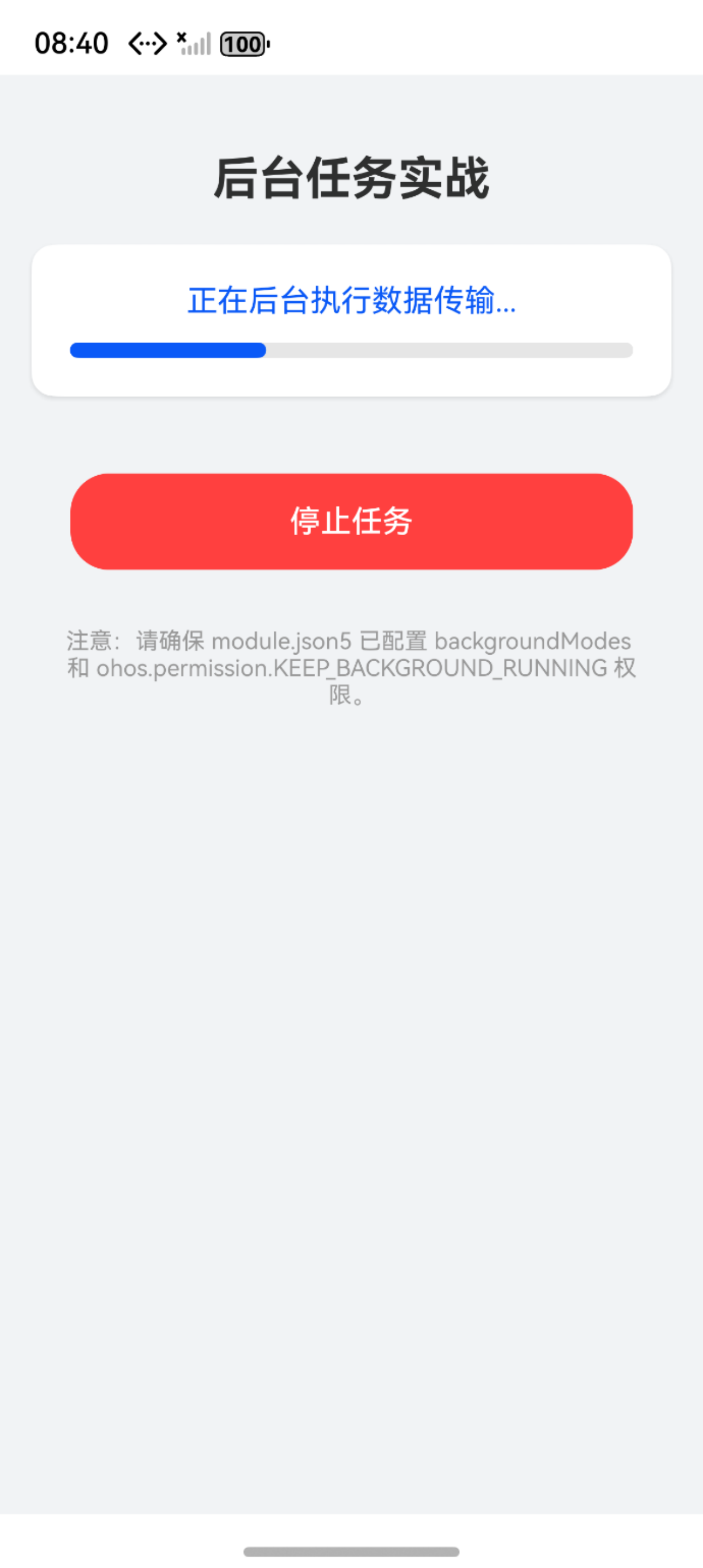
以下是一个整合了长时任务管理与界面交互的完整示例。该代码封装了一个单例管理类,演示了如何通过 WantAgent 构建通知并申请 DATA_TRANSFER 类型的长时任务。
import { backgroundTaskManager } from '@kit.BackgroundTasksKit';
import { wantAgent, WantAgent } from '@kit.AbilityKit';
import { common } from '@kit.AbilityKit';
import { promptAction } from '@kit.ArkUI';
import { BusinessError } from '@kit.BasicServicesKit';

// -------------------------------------------------------------
// 1. 后台任务管理服务封装
// -------------------------------------------------------------
class BackgroundService {
  private static instance: BackgroundService;

  private constructor() {}

  public static getInstance(): BackgroundService {
    if (!BackgroundService.instance) {
      BackgroundService.instance = new BackgroundService();
    }
    return BackgroundService.instance;
  }

  /**
   * 开启数据传输类型的长时任务
   * 必须传入 UIAbilityContext 以便获取包信息
   */
  public async startContinuousTask(context: common.UIAbilityContext) {
    try {
      // 1. 构建通知栏 WantAgent
      // 长时任务强制要求显示通知,以便用户感知
      const wantInfo: wantAgent.WantAgentInfo = {
        wants: [
          {
            bundleName: context.abilityInfo.bundleName,
            abilityName: context.abilityInfo.name
          }
        ],
        operationType: wantAgent.OperationType.START_ABILITY,
        requestCode: 0,
        wantAgentFlags: [wantAgent.WantAgentFlags.UPDATE_PRESENT_FLAG]
      };

      const agent = await wantAgent.getWantAgent(wantInfo);

      // 2. 申请长时任务
      // BackgroundMode.DATA_TRANSFER 对应 module.json5 中的 "dataTransfer"
      await backgroundTaskManager.startBackgroundRunning(
        context,
        backgroundTaskManager.BackgroundMode.DATA_TRANSFER,
        agent
      );

      console.info('[BackgroundService] 长时任务申请成功');
      promptAction.showToast({ message: '后台保活模式已开启' });

    } catch (err) {
      const error = err as BusinessError;
      console.error(`[BackgroundService] 申请失败: ${error.code} ${error.message}`);
      // 常见错误 9800003: 也就是没有在 module.json5 中声明 backgroundModes
    }
  }

  /**
   * 停止长时任务
   * 业务结束后务必调用,释放系统资源
   */
  public async stopContinuousTask(context: common.UIAbilityContext) {
    try {
      await backgroundTaskManager.stopBackgroundRunning(context);
      console.info('[BackgroundService] 长时任务已停止');
      promptAction.showToast({ message: '后台任务已结束' });
    } catch (err) {
      const error = err as BusinessError;
      console.error(`[BackgroundService] 停止失败: ${error.code}`);
    }
  }
}

// 导出单例
const bgService = BackgroundService.getInstance();

// -------------------------------------------------------------
// 2. 界面交互组件
// -------------------------------------------------------------
@Entry
@Component
struct BackgroundTaskPage {
  @State isRunning: boolean = false;
  @State progressValue: number = 0;
  private timer: number = -1;

  build() {
    Column() {
      // 标题区域
      Text('后台任务实战')
        .fontSize(24)
        .fontWeight(FontWeight.Bold)
        .margin({ top: 40, bottom: 20 })

      // 状态与进度显示
      Column({ space: 12 }) {
        Text(this.isRunning ? '正在后台执行数据传输...' : '任务空闲')
          .fontSize(16)
          .fontColor(this.isRunning ? '#0A59F7' : '#999')

        Progress({ value: this.progressValue, total: 100 })
          .color('#0A59F7')
          .style({ strokeWidth: 8 })
          .width('90%')
      }
      .padding(20)
      .backgroundColor(Color.White)
      .borderRadius(12)
      .shadow({ radius: 8, color: '#1A000000', offsetY: 4 })
      .margin({ bottom: 40 })

      // 控制按钮
      Button(this.isRunning ? '停止任务' : '开始后台长时任务')
        .width('80%')
        .height(50)
        .backgroundColor(this.isRunning ? '#FF4040' : '#0A59F7')
        .onClick(() => {
          const context = getContext(this) as common.UIAbilityContext;

          if (!this.isRunning) {
            // 1. 申请系统后台资源
            bgService.startContinuousTask(context);

            // 2. 启动模拟业务逻辑
            this.isRunning = true;
            this.timer = setInterval(() => {
              // 模拟进度更新
              if (this.progressValue < 100) {
                this.progressValue += 1;
              } else {
                this.progressValue = 0;
              }
              // 即使应用切到后台,这里的日志理论上应持续输出
              console.info(`[Task] Processing: ${this.progressValue}%`);
            }, 100);
          } else {
            // 1. 释放系统后台资源
            bgService.stopContinuousTask(context);

            // 2. 停止业务逻辑
            clearInterval(this.timer);
            this.isRunning = false;
            this.progressValue = 0;
          }
        })

      Text('注意:请确保 module.json5 已配置 backgroundModes 和 ohos.permission.KEEP_BACKGROUND_RUNNING 权限。')
        .fontSize(12)
        .fontColor('#999')
        .padding(30)
        .textAlign(TextAlign.Center)
    }
    .width('100%')
    .height('100%')
    .backgroundColor('#F1F3F5')
  }
}
五、 总结
后台任务开发的核心原则是按需申请,及时释放。
- 长时任务 (Continuous Task):适用于用户显性感知、必须立即执行且持续时间较长的场景。必须配合通知栏显示,且受限于预定义的几种模式。
- WorkScheduler:适用于非实时的、可延迟的维护性任务。它利用系统空闲资源,是功耗最优的方案。
- 代理提醒 (Reminder):适用于与时间强相关的提醒业务,完全脱离应用进程运行。
合理运用这三种机制,开发者可以在不牺牲用户体验的前提下,构建出符合系统规范、低功耗的高质量鸿蒙应用。

作为“人工智能6S店”的官方数字引擎,为AI开发者与企业提供一个覆盖软硬件全栈、一站式门户。
更多推荐



 16
16 0
0- 0



 已为社区贡献15条内容

所有评论(0)