
Flutter框架跨平台鸿蒙开发——购物满减计算器开发流程
本文介绍了使用Flutter框架开发跨平台鸿蒙购物满减计算器的完整流程。该应用支持满减、折扣和自定义规则三种优惠模式,具备智能计算最优优惠方案的功能。文章详细讲解了项目结构设计、技术栈选择(Flutter 3.10+、Dart 3.0+、HarmonyOS 3.0+)、核心计算逻辑实现(包括满减计算、折扣计算和自定义规则解析)以及UI界面设计要点。通过该教程,开发者可以掌握Flutter在鸿蒙系统
Flutter框架跨平台鸿蒙开发——购物满减计算器开发流程
🚀运行效果展示

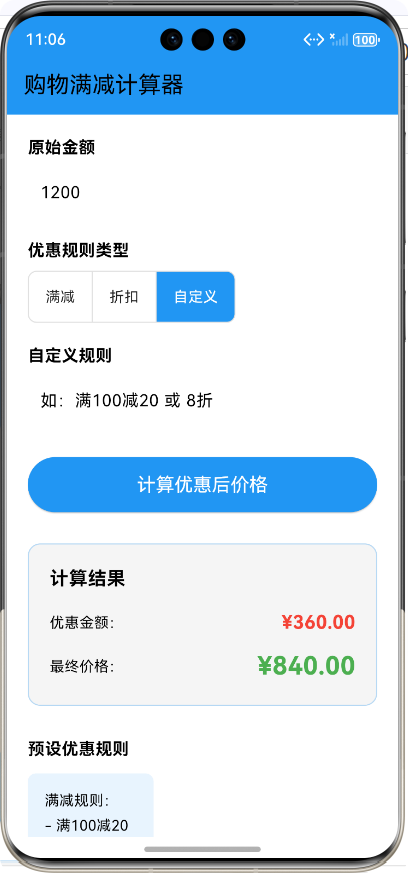
Flutter框架跨平台鸿蒙开发——购物满减计算器开发流程
📝 前言
随着移动互联网的快速发展,跨平台开发框架成为了开发者们的首选。Flutter作为Google推出的开源UI工具包,以其"一次编写,处处运行"的理念,在跨平台开发领域占据了重要地位。而华为鸿蒙系统(HarmonyOS)作为新一代分布式操作系统,也逐渐成为开发者关注的焦点。本文将详细介绍如何使用Flutter框架开发一款能够在鸿蒙系统上运行的购物满减计算器应用,帮助开发者掌握Flutter跨平台开发鸿蒙应用的核心流程和技术要点。
🎯 应用介绍
应用概述
购物满减计算器是一款帮助用户快速计算购物优惠后价格的实用工具。在电商促销活动中,商家经常会推出各种满减、折扣等优惠活动,用户需要手动计算最终价格,过程繁琐且容易出错。本应用旨在简化这一过程,通过输入原始金额和选择优惠规则,自动计算出最优优惠方案和最终价格。
功能特性
✅ 多种优惠规则支持:支持满减、折扣和自定义规则三种模式
✅ 预设规则库:内置常用满减和折扣规则,方便用户快速选择
✅ 智能计算:自动计算最优优惠方案,显示优惠金额和最终价格
✅ 自定义规则:支持输入自定义优惠规则,如"满150减30"或"7.5折"
✅ 响应式设计:适配不同屏幕尺寸,提供良好的用户体验
✅ 直观的结果展示:清晰展示优惠金额和最终价格,便于用户对比
🏗️ 开发流程
项目结构设计
技术栈选择
| 技术栈 | 版本 | 用途 |
|---|---|---|
| Flutter | 3.10+ | 跨平台UI框架 |
| Dart | 3.0+ | 编程语言 |
| HarmonyOS | 3.0+ | 目标运行系统 |
| Material Design | - | UI设计规范 |
🔧 核心功能实现
1. 项目初始化
首先,我们需要创建一个Flutter项目,并配置鸿蒙开发环境。
// 主入口文件:main.dart
import 'package:flutter/material.dart';
import 'screens/shopping_discount_calculator_screen.dart';
void main() {
runApp(const MyApp());
}
/// 应用根组件
class MyApp extends StatelessWidget {
/// 构造函数
const MyApp({super.key});
Widget build(BuildContext context) {
return MaterialApp(
title: '购物满减计算器',
theme: ThemeData(
primarySwatch: Colors.blue,
visualDensity: VisualDensity.adaptivePlatformDensity,
),
home: const ShoppingDiscountCalculatorScreen(),
debugShowCheckedModeBanner: false,
);
}
}
2. 核心计算逻辑
满减计算
/// 计算满减后的价格
/// [originalPrice] 原始价格
/// [threshold] 满减门槛
/// [discount] 优惠金额
/// 返回计算后的最终价格和优惠金额
(double, double) _calculateDiscount(double originalPrice, double threshold, double discount) {
  if (originalPrice < threshold) {
    return (originalPrice, 0.0);
  }
  // 计算可以使用几次满减
  final int times = (originalPrice / threshold).floor();
  final double totalDiscount = times * discount;
  return (originalPrice - totalDiscount, totalDiscount);
}
折扣计算
/// 计算折扣后的价格
/// [originalPrice] 原始价格
/// [discountRate] 折扣率(如0.8表示8折)
/// 返回计算后的最终价格和优惠金额
(double, double) _calculateDiscountRate(double originalPrice, double discountRate) {
  final double finalPrice = originalPrice * discountRate;
  final double discountAmount = originalPrice - finalPrice;
  return (finalPrice, discountAmount);
}
自定义规则解析
/// 解析自定义优惠规则
/// [rule] 优惠规则字符串(如"满100减20"或"8折")
/// 返回规则类型、门槛(如果是满减)和优惠值
(String, double, double)? _parseCustomRule(String rule) {
  // 处理满减规则,如"满100减20"
  final RegExp fullDiscountRegex = RegExp(r'满(\d+)减(\d+)');
  final fullDiscountMatch = fullDiscountRegex.firstMatch(rule);
  if (fullDiscountMatch != null) {
    final double threshold = double.parse(fullDiscountMatch.group(1)!);
    final double discount = double.parse(fullDiscountMatch.group(2)!);
    return ('满减', threshold, discount);
  }

  // 处理折扣规则,如"8折"
  final RegExp discountRegex = RegExp(r'(\d+(?:\.\d+)?)折');
  final discountMatch = discountRegex.firstMatch(rule);
  if (discountMatch != null) {
    final double discountRate = double.parse(discountMatch.group(1)!) / 10;
    return ('折扣', 0, discountRate);
  }

  return null;
}
3. UI界面设计
主屏幕布局
Widget build(BuildContext context) {
return Scaffold(
appBar: AppBar(
title: const Text('购物满减计算器'),
backgroundColor: Colors.blue,
),
body: Padding(
padding: const EdgeInsets.all(20.0),
child: SingleChildScrollView(
child: Column(
crossAxisAlignment: CrossAxisAlignment.stretch,
children: [
// 原始金额输入
_buildInputSection(
label: '原始金额',
controller: _originalPriceController,
hintText: '请输入商品总价',
keyboardType: TextInputType.numberWithOptions(decimal: true),
),
const SizedBox(height: 20),
// 优惠规则选择
_buildRuleSelectionSection(),
const SizedBox(height: 20),
// 自定义规则输入(仅当选择自定义时显示)
if (_selectedRule == '自定义')
_buildInputSection(
label: '自定义规则',
controller: _discountRuleController,
hintText: '如:满100减20 或 8折',
),
const SizedBox(height: 30),
// 计算按钮
ElevatedButton(
onPressed: _calculate,
style: ElevatedButton.styleFrom(
padding: const EdgeInsets.symmetric(vertical: 16),
backgroundColor: Colors.blue,
foregroundColor: Colors.white,
textStyle: const TextStyle(fontSize: 18),
),
child: const Text('计算优惠后价格'),
),
const SizedBox(height: 30),
// 结果展示
_buildResultSection(),
const SizedBox(height: 30),
// 预设规则说明
_buildPresetRulesSection(),
],
),
),
),
);
}
规则选择组件
/// 构建优惠规则选择部分
Widget _buildRuleSelectionSection() {
  return Column(
    crossAxisAlignment: CrossAxisAlignment.start,
    children: [
      const Text(
        '优惠规则类型',
        style: TextStyle(fontSize: 16, fontWeight: FontWeight.bold),
      ),
      const SizedBox(height: 8),
      ToggleButtons(
        selectedColor: Colors.white,
        fillColor: Colors.blue,
        borderRadius: BorderRadius.circular(8),
        children: const [
          Padding(
            padding: EdgeInsets.symmetric(horizontal: 16, vertical: 8),
            child: Text('满减'),
          ),
          Padding(
            padding: EdgeInsets.symmetric(horizontal: 16, vertical: 8),
            child: Text('折扣'),
          ),
          Padding(
            padding: EdgeInsets.symmetric(horizontal: 16, vertical: 8),
            child: Text('自定义'),
          ),
        ],
        isSelected: ['满减', '折扣', '自定义'].map((rule) => _selectedRule == rule).toList(),
        onPressed: (int index) {
          setState(() {
            _selectedRule = ['满减', '折扣', '自定义'][index];
          });
        },
      ),
    ],
  );
}
结果展示组件
/// 构建结果展示部分
Widget _buildResultSection() {
  return Container(
    padding: const EdgeInsets.all(20),
    decoration: BoxDecoration(
      color: Colors.grey[100],
      borderRadius: BorderRadius.circular(12),
      border: Border.all(color: Colors.blue.withAlpha((255 * 0.3).round())),
    ),
    child: Column(
      crossAxisAlignment: CrossAxisAlignment.start,
      children: [
        const Text(
          '计算结果',
          style: TextStyle(fontSize: 18, fontWeight: FontWeight.bold),
        ),
        const SizedBox(height: 16),
        Row(
          mainAxisAlignment: MainAxisAlignment.spaceBetween,
          children: [
            const Text('优惠金额:'),
            Text(
              '¥${_discountAmount.toStringAsFixed(2)}',
              style: const TextStyle(
                fontSize: 18,
                color: Colors.red,
                fontWeight: FontWeight.bold,
              ),
            ),
          ],
        ),
        const SizedBox(height: 12),
        Row(
          mainAxisAlignment: MainAxisAlignment.spaceBetween,
          children: [
            const Text('最终价格:'),
            Text(
              '¥${_finalPrice.toStringAsFixed(2)}',
              style: const TextStyle(
                fontSize: 24,
                color: Colors.green,
                fontWeight: FontWeight.bold,
              ),
            ),
          ],
        ),
      ],
    ),
  );
}
4. 优惠规则管理
// 预设的优惠规则
final List<Map<String, dynamic>> _presetRules = [
  {'name': '满100减20', 'type': '满减', 'threshold': 100, 'discount': 20},
  {'name': '满200减50', 'type': '满减', 'threshold': 200, 'discount': 50},
  {'name': '满300减80', 'type': '满减', 'threshold': 300, 'discount': 80},
  {'name': '满500减150', 'type': '满减', 'threshold': 500, 'discount': 150},
  {'name': '全场8折', 'type': '折扣', 'discount': 0.8},
  {'name': '全场7折', 'type': '折扣', 'discount': 0.7},
];
📊 计算流程
🚀 鸿蒙适配与运行
1. 配置鸿蒙开发环境
在Flutter项目中添加鸿蒙支持,需要配置以下文件:
ohos/build-profile.json5:鸿蒙项目构建配置ohos/entry/src/main/module.json5:模块配置ohos/entry/src/main/ets/EntryAbility.ets:入口能力配置
2. 运行到鸿蒙设备
# 连接鸿蒙设备或模拟器
flutter devices

# 运行应用到鸿蒙设备
flutter run
|
📝 开发经验总结
1. 设计原则
- 用户体验优先:简洁直观的界面设计,减少用户学习成本
- 功能完整性:覆盖各种优惠场景,满足用户需求
- 代码可维护性:模块化设计,便于后续功能扩展
- 性能优化:优化计算逻辑,提高应用响应速度
2. 遇到的问题与解决方案
| 问题 | 解决方案 |
|---|---|
| 自定义规则解析复杂 | 使用正则表达式进行规则匹配和解析 |
| 多种优惠规则的优先级处理 | 设计智能算法,自动选择最优优惠方案 |
| 鸿蒙系统适配 | 遵循Flutter官方鸿蒙适配指南,确保应用正常运行 |
🎉 总结
本文详细介绍了使用Flutter框架开发跨平台鸿蒙应用——购物满减计算器的完整流程。从项目初始化到核心功能实现,再到鸿蒙适配与运行,我们一步步构建了一个功能完整、用户体验良好的购物满减计算器应用。
通过本项目的开发,我们可以看到Flutter框架在跨平台开发方面的强大能力,尤其是在鸿蒙系统上的适配和运行。同时,我们也掌握了购物满减计算的核心算法和UI设计技巧。
对于开发者来说,掌握Flutter跨平台开发技术,不仅可以提高开发效率,还可以扩大应用的覆盖范围。随着鸿蒙系统的不断发展,Flutter跨平台鸿蒙开发将会成为一个重要的发展方向。
希望本文能够对正在学习Flutter跨平台开发或准备开发鸿蒙应用的开发者有所帮助,也欢迎大家在评论区分享自己的开发经验和见解。
📚 参考资料
欢迎加入开源鸿蒙跨平台社区:https://openharmonycrossplatform.csdn.net

作为“人工智能6S店”的官方数字引擎,为AI开发者与企业提供一个覆盖软硬件全栈、一站式门户。
更多推荐
 2
2 0
0- 0


 已为社区贡献6条内容

所有评论(0)