
Flutter 框架跨平台鸿蒙开发 - 植物识别助手应用开发教程
本教程实现了一个功能完整的植物识别助手应用,包含识别、展示、记录等核心功能。通过本项目可以学习到Flutter的异步操作、状态管理、UI组件设计等知识点。应用界面简洁美观,信息展示清晰,适合作为工具类应用的开发参考。欢迎加入开源鸿蒙跨平台社区:https://openharmonycrossplatform.csdn.net。
·
Flutter植物识别助手应用开发教程
项目简介
这是一个基于Flutter开发的植物识别助手应用,通过拍照或选择图片识别植物,提供详细的植物信息和养护指南。应用采用Material Design 3设计风格,界面简洁美观,功能实用。
运行效果图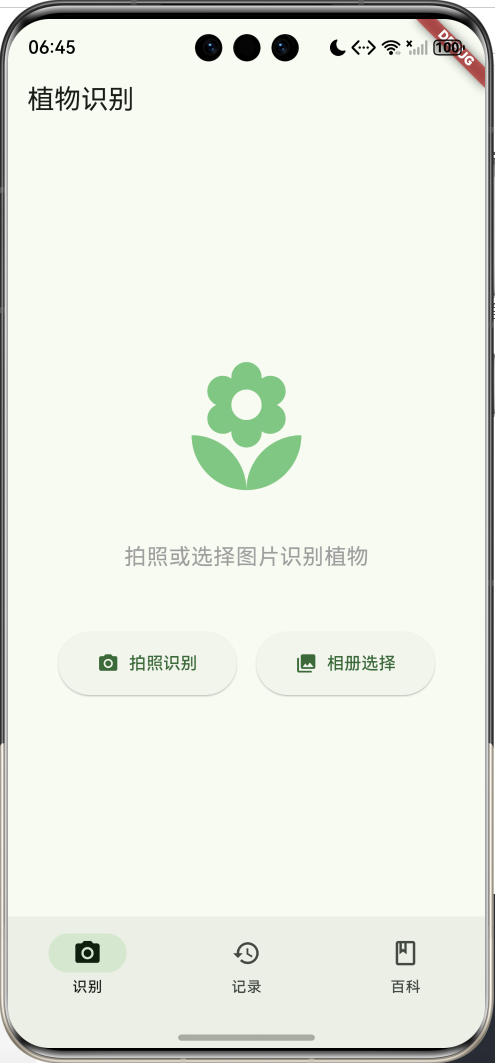
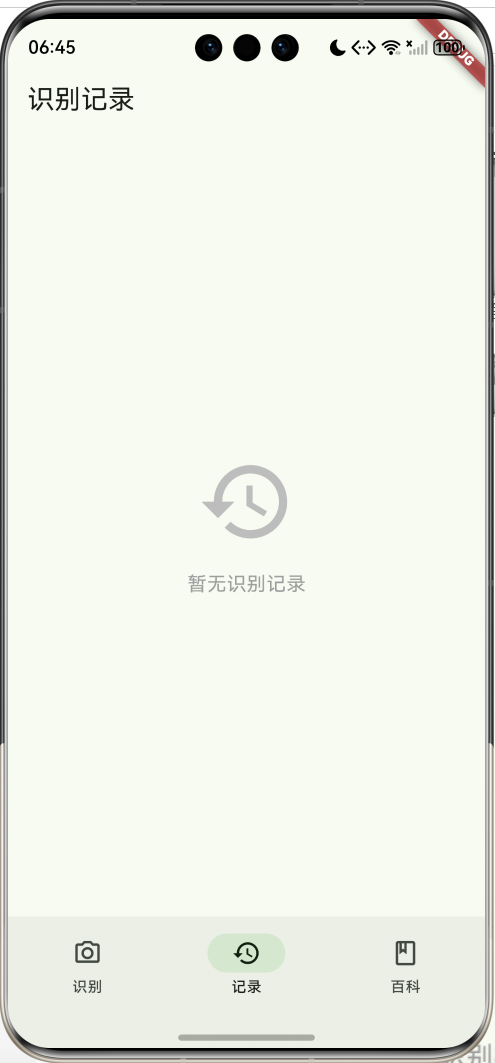
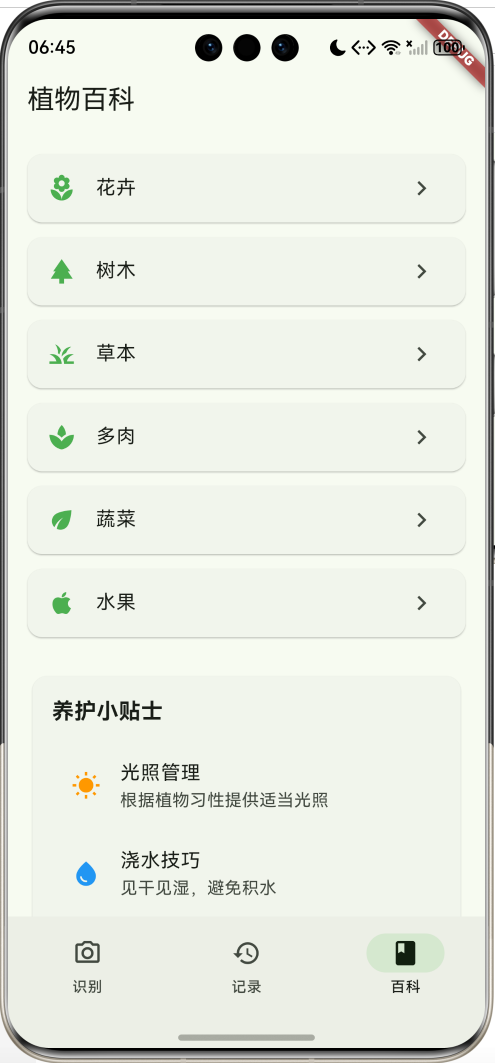
主要功能
- 📷 拍照识别植物
- 🖼️ 相册选择识别
- 📚 植物详细信息
- 🌱 养护指南
- 📝 识别记录管理
- 📖 植物百科分类
- 💡 养护技巧提示
数据模型设计
植物类别枚举
enum PlantCategory {
  flower('花卉', Icons.local_florist),
  tree('树木', Icons.park),
  grass('草本', Icons.grass),
  succulent('多肉', Icons.spa),
  vegetable('蔬菜', Icons.eco),
  fruit('水果', Icons.apple);
}
养护难度枚举
enum CareDifficulty {
  easy('容易', Colors.green),
  medium('中等', Colors.orange),
  hard('困难', Colors.red);
}
植物信息模型
class PlantInfo {
  final String name;              // 植物名称
  final String scientificName;    // 学名
  final PlantCategory category;   // 类别
  final String description;       // 描述
  final CareDifficulty careDifficulty; // 养护难度
  final String light;             // 光照需求
  final String water;             // 浇水需求
  final String temperature;       // 温度需求
  final String soil;              // 土壤需求
  final List<String> features;    // 主要特征
  final List<String> tips;        // 养护技巧
}
核心功能实现
1. 植物识别
模拟识别过程,实际应用可接入AI识别API:
void _identifyPlant(String source) async {
  setState(() {
    _isIdentifying = true;
  });

  // 模拟识别延迟
  await Future.delayed(Duration(seconds: 2));

  // 获取识别结果
  final plants = _getSamplePlants();
  final randomPlant = plants[DateTime.now().millisecond % plants.length];

  setState(() {
    _isIdentifying = false;
    _identifiedPlant = randomPlant;
  });
}
2. 识别结果展示
展示植物详细信息和养护指南:
Widget _buildResultCard() {
  return SingleChildScrollView(
    child: Column(
      children: [
        // 植物图片
        Container(
          height: 250,
          decoration: BoxDecoration(
            color: Colors.green[100],
            borderRadius: BorderRadius.circular(16),
          ),
          child: Icon(plant.category.icon, size: 120),
        ),
        // 植物名称
        Text(plant.name, style: TextStyle(fontSize: 28)),
        Text(plant.scientificName, style: TextStyle(italic)),
        // 类别和难度标签
        Row(children: [
          Chip(label: Text(plant.category.label)),
          Chip(label: Text(plant.careDifficulty.label)),
        ]),
        // 植物简介
        Card(child: Text(plant.description)),
        // 养护指南
        Card(child: Column(children: [
          _buildCareItem(Icons.wb_sunny, '光照', plant.light),
          _buildCareItem(Icons.water_drop, '浇水', plant.water),
          _buildCareItem(Icons.thermostat, '温度', plant.temperature),
          _buildCareItem(Icons.landscape, '土壤', plant.soil),
        ])),
        // 主要特征
        Card(child: Column(
          children: plant.features.map((f) =>
            Row(children: [
              Icon(Icons.check_circle, color: Colors.green),
              Text(f),
            ])
          ).toList(),
        )),
        // 养护技巧
        Card(child: Column(
          children: plant.tips.map((t) =>
            Row(children: [
              Icon(Icons.lightbulb_outline, color: Colors.orange),
              Text(t),
            ])
          ).toList(),
        )),
      ],
    ),
  );
}
3. 养护信息展示
自定义养护项组件:
Widget _buildCareItem(IconData icon, String label, String value) {
  return Padding(
    padding: EdgeInsets.only(bottom: 12),
    child: Row(
      children: [
        Icon(icon, size: 20, color: Colors.green),
        SizedBox(width: 12),
        SizedBox(
          width: 60,
          child: Text(label, style: TextStyle(fontWeight: FontWeight.bold)),
        ),
        Expanded(child: Text(value)),
      ],
    ),
  );
}
UI组件结构
页面布局
应用采用3页NavigationBar结构:
┌─────────────────────────┐
│      识别页面           │
│  - 拍照/相册按钮        │
│  - 识别进度提示         │
│  - 结果详情展示         │
└─────────────────────────┘
┌─────────────────────────┐
│      记录页面           │
│  - 历史识别记录         │
│  - 收藏管理             │
└─────────────────────────┘
┌─────────────────────────┐
│      百科页面           │
│  - 植物分类浏览         │
│  - 养护小贴士           │
└─────────────────────────┘
识别结果页面布局
┌─────────────────────────┐
│  植物图片展示区          │
├─────────────────────────┤
│  植物名称 + 学名         │
│  类别标签 + 难度标签     │
├─────────────────────────┤
│  植物简介卡片           │
├─────────────────────────┤
│  养护指南卡片           │
│  - 光照需求             │
│  - 浇水需求             │
│  - 温度需求             │
│  - 土壤需求             │
├─────────────────────────┤
│  主要特征卡片           │
├─────────────────────────┤
│  养护技巧卡片           │
├─────────────────────────┤
│  重新识别 | 保存记录     │
└─────────────────────────┘
示例植物数据
应用内置了4种常见植物的数据:
| 植物名称 | 学名 | 类别 | 难度 | 特点 |
|---|---|---|---|---|
| 绿萝 | Epipremnum aureum | 草本 | 容易 | 净化空气,易养护 |
| 多肉植物 | Succulent | 多肉 | 容易 | 耐旱,形态多样 |
| 发财树 | Pachira aquatica | 树木 | 中等 | 寓意吉祥,观赏性强 |
| 吊兰 | Chlorophytum comosum | 草本 | 容易 | 净化空气,适应性强 |
功能扩展建议
-
AI识别接入
- 集成百度AI、腾讯AI等识别API
- 支持离线识别模型
- 提高识别准确率
-
图片管理
- 使用image_picker插件
- 图片裁剪和编辑
- 相册管理功能
-
数据持久化
- 使用sqflite保存识别记录
- shared_preferences保存设置
- 云端同步功能
-
社交功能
- 分享识别结果
- 用户社区交流
- 养护经验分享
-
高级功能
- 植物生长记录
- 浇水提醒
- 病虫害诊断
- AR查看植物
部署指南
环境要求
- Flutter SDK: 3.0+
- Dart SDK: 3.0+
- 支持平台:Android、iOS、Web、HarmonyOS
依赖包(扩展功能)
dependencies:
  flutter:
    sdk: flutter
  image_picker: ^1.0.0      # 图片选择
  sqflite: ^2.3.0           # 本地数据库
  shared_preferences: ^2.2.0 # 本地存储
  http: ^1.1.0              # 网络请求
运行步骤
- 克隆项目到本地
- 安装依赖:
flutter pub get - 运行应用:
flutter run
打包发布
# Android
flutter build apk --release

# iOS
flutter build ios --release

# Web
flutter build web --release

# HarmonyOS
flutter build hap --release
技术要点
异步操作
使用async/await处理异步识别:
void _identifyPlant(String source) async {
  setState(() {
    _isIdentifying = true;
  });

  await Future.delayed(Duration(seconds: 2));

  setState(() {
    _isIdentifying = false;
    _identifiedPlant = result;
  });
}
条件渲染
根据状态显示不同UI:
Widget build(BuildContext context) {
  return _identifiedPlant == null
    ? _buildIdentifyButtons()  // 显示识别按钮
    : _buildResultCard();      // 显示识别结果
}
列表映射
使用map生成列表组件:
...plant.features.map((feature) {
  return Row(
    children: [
      Icon(Icons.check_circle),
      Text(feature),
    ],
  );
})
项目结构
lib/
└── main.dart                    # 主文件(包含所有代码)
    ├── PlantCategory           # 植物类别枚举
    ├── CareDifficulty          # 养护难度枚举
    ├── PlantInfo               # 植物信息模型
    ├── MyApp                   # 应用入口
    ├── HomePage                # 主页面(NavigationBar)
    ├── IdentifyPage            # 识别页面
    ├── RecordsPage             # 记录页面
    └── KnowledgePage           # 百科页面
植物养护知识
光照管理
- 全日照:每天6小时以上直射光(如多肉、仙人掌)
- 半日照:每天3-6小时散射光(如绿萝、吊兰)
- 耐阴:明亮散射光即可(如发财树、龟背竹)
浇水技巧
- 见干见湿:土壤表面干燥后再浇水
- 宁干勿湿:多肉植物适用
- 保持湿润:喜湿植物如绿萝
温度控制
- 热带植物:15-30℃,不耐寒
- 温带植物:5-25℃,耐寒性较强
- 多肉植物:5-30℃,耐旱不耐寒
土壤选择
- 疏松透气:大多数植物适用
- 排水良好:多肉植物需要
- 保水性强:喜湿植物需要
常见问题
1. 如何接入真实的识别API?
Future<PlantInfo> identifyPlantWithAPI(File image) async {
  // 1. 将图片转换为base64
  final bytes = await image.readAsBytes();
  final base64Image = base64Encode(bytes);

  // 2. 调用识别API
  final response = await http.post(
    Uri.parse('https://api.example.com/identify'),
    headers: {'Content-Type': 'application/json'},
    body: jsonEncode({'image': base64Image}),
  );

  // 3. 解析返回结果
  final result = jsonDecode(response.body);
  return PlantInfo.fromJson(result);
}
2. 如何保存识别记录?
// 使用sqflite保存
Future<void> saveRecord(PlantInfo plant) async {
  final db = await database;
  await db.insert('records', {
    'name': plant.name,
    'scientific_name': plant.scientificName,
    'category': plant.category.name,
    'time': DateTime.now().toIso8601String(),
  });
}
3. 如何实现图片选择?
import 'package:image_picker/image_picker.dart';

Future<File?> pickImage(ImageSource source) async {
  final picker = ImagePicker();
  final pickedFile = await picker.pickImage(source: source);

  if (pickedFile != null) {
    return File(pickedFile.path);
  }
  return null;
}
注意事项
- 识别准确性:示例使用模拟数据,实际应用需接入专业识别API
- 图片权限:需要在AndroidManifest.xml和Info.plist中配置相机和相册权限
- 数据来源:植物信息应来自权威植物数据库
- 用户体验:识别过程应提供清晰的进度提示
总结
本教程实现了一个功能完整的植物识别助手应用,包含识别、展示、记录等核心功能。通过本项目可以学习到Flutter的异步操作、状态管理、UI组件设计等知识点。应用界面简洁美观,信息展示清晰,适合作为工具类应用的开发参考。
欢迎加入开源鸿蒙跨平台社区:https://openharmonycrossplatform.csdn.net

作为“人工智能6S店”的官方数字引擎,为AI开发者与企业提供一个覆盖软硬件全栈、一站式门户。
更多推荐

 2
2 0
0- 0



 已为社区贡献14条内容

所有评论(0)