
Flutter 框架跨平台鸿蒙开发 - 随机点名器:打造课堂互动神器
/ 排除最近被点名的// 最近N次// 平衡点名次数// 小组轮流PickRule({});) {// 排除最近被点名的.toSet();.toList();// 平衡点名次数.toList();// 小组轮流.group;.toList();
Flutter随机点名器:打造课堂互动神器
项目简介
随机点名器是一款专为教师设计的课堂互动工具,通过随机算法公平选择学生回答问题或参与活动。应用支持学生名单管理、出勤记录、点名历史查询等功能,让课堂互动更加高效有趣。
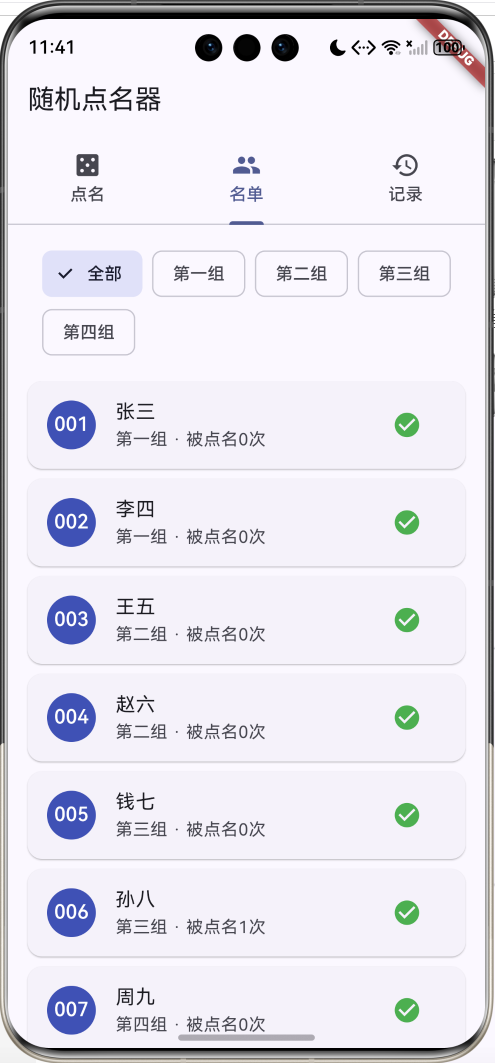
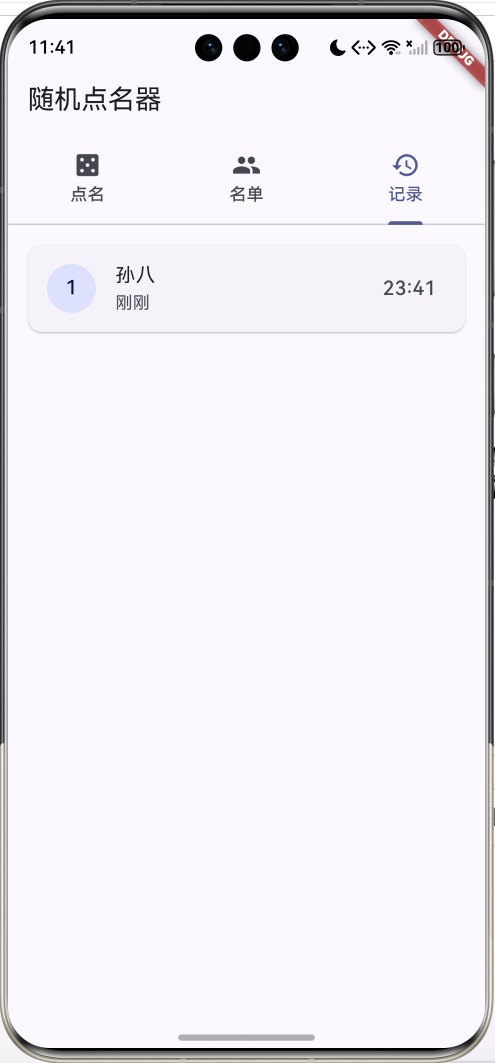
运行效果图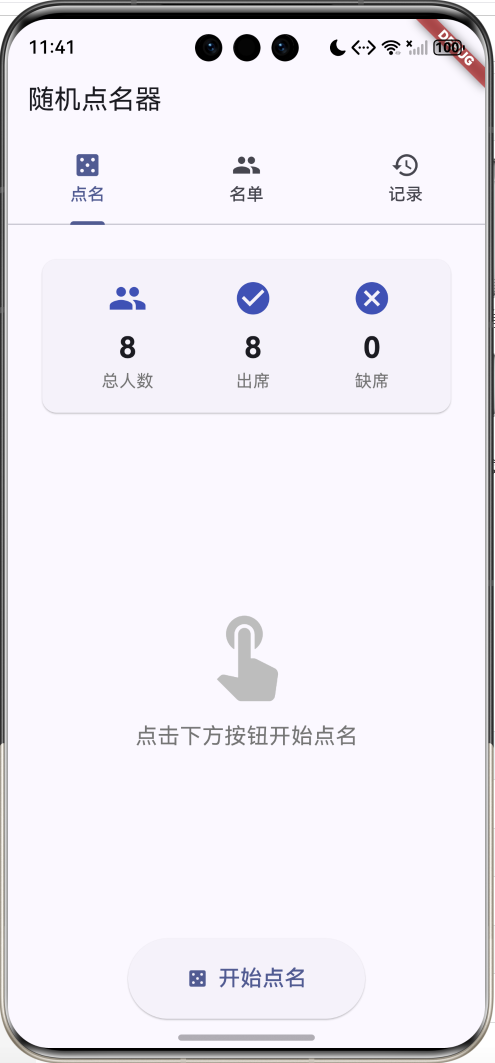
核心功能
- 随机点名:公平随机选择学生,支持动画效果
- 名单管理:添加、编辑、删除学生信息
- 出勤管理:标记学生出勤状态
- 分组管理:按小组筛选和管理学生
- 点名记录:查看历史点名记录
应用特色
| 特色 | 说明 |
|---|---|
| 公平随机 | 真随机算法,确保公平性 |
| 动画效果 | 滚动动画增加趣味性 |
| 出勤统计 | 实时显示出勤情况 |
| 分组筛选 | 支持按小组查看 |
| 点名统计 | 记录每个学生被点名次数 |
功能架构
核心功能详解
1. 随机点名功能
点名页面是应用的核心,提供公平的随机选择机制。
功能特点:
- 滚动动画效果
- 只从出勤学生中选择
- 显示学生详细信息
- 记录点名次数
- 弹性动画展示结果
随机算法实现:
void _pickRandom() {
  final presentStudents = widget.students
    .where((s) => s.isPresent)
    .toList();

  if (presentStudents.isEmpty) {
    ScaffoldMessenger.of(context).showSnackBar(
      const SnackBar(content: Text('没有可点名的学生')),
    );
    return;
  }

  setState(() => _isAnimating = true);

  // 滚动动画
  int count = 0;
  Future.doWhile(() async {
    await Future.delayed(const Duration(milliseconds: 100));
    if (count < 20) {
      setState(() {
        _currentStudent = presentStudents[
          Random().nextInt(presentStudents.length)
        ];
      });
      count++;
      return true;
    }
    return false;
  }).then((_) {
    // 最终选择
    final selected = presentStudents[
      Random().nextInt(presentStudents.length)
    ];
    setState(() {
      _currentStudent = selected;
      _isAnimating = false;
      selected.pickedCount++;
      widget.records.insert(0, PickRecord(
        studentId: selected.id,
        studentName: selected.name,
        time: DateTime.now(),
      ));
    });
    _scaleController.forward(from: 0.0);
  });
}
动画效果:
late AnimationController _scaleController;
late Animation<double> _scaleAnimation;
void initState() {
super.initState();
_scaleController = AnimationController(
duration: const Duration(milliseconds: 300),
vsync: this,
);
_scaleAnimation = Tween<double>(begin: 0.0, end: 1.0).animate(
CurvedAnimation(
parent: _scaleController,
curve: Curves.elasticOut
),
);
}
// 使用动画
ScaleTransition(
scale: _scaleAnimation,
child: Card(...),
)
统计信息展示:
Widget _buildStatItem(String label, String value, IconData icon) {
  return Column(
    children: [
      Icon(icon, size: 32, color: Colors.indigo),
      const SizedBox(height: 8),
      Text(
        value,
        style: const TextStyle(
          fontSize: 24,
          fontWeight: FontWeight.bold
        )
      ),
      Text(
        label,
        style: TextStyle(
          fontSize: 14,
          color: Colors.grey[600]
        )
      ),
    ],
  );
}
2. 学生名单管理
名单页面提供完整的学生信息管理功能。
功能特点:
- 分组筛选(全部/第一组/第二组等)
- 出勤状态切换
- 显示点名次数
- 学生信息编辑
- 删除学生
分组筛选实现:
String _selectedGroup = '全部';
final List<String> _groups = [
  '全部', '第一组', '第二组', '第三组', '第四组'
];

final filteredStudents = _selectedGroup == '全部'
  ? widget.students
  : widget.students.where((s) =>
      s.group == _selectedGroup
    ).toList();

// UI展示
Wrap(
  spacing: 8,
  children: _groups.map((group) {
    return ChoiceChip(
      label: Text(group),
      selected: _selectedGroup == group,
      onSelected: (selected) {
        if (selected) {
          setState(() => _selectedGroup = group);
        }
      },
    );
  }).toList(),
)
学生卡片:
Card(
  child: ListTile(
    leading: CircleAvatar(
      backgroundColor: student.isPresent
        ? Colors.indigo
        : Colors.grey,
      child: Text(
        student.number,
        style: const TextStyle(color: Colors.white)
      ),
    ),
    title: Text(student.name),
    subtitle: Text(
      '${student.group} · 被点名${student.pickedCount}次'
    ),
    trailing: IconButton(
      icon: Icon(
        student.isPresent
          ? Icons.check_circle
          : Icons.cancel,
        color: student.isPresent
          ? Colors.green
          : Colors.red,
      ),
      onPressed: () {
        setState(() => student.isPresent = !student.isPresent);
      },
    ),
  ),
)
3. 点名记录查询
记录页面展示所有历史点名记录。
功能特点:
- 按时间倒序排列
- 显示相对时间(刚刚/X分钟前)
- 显示具体时间
- 序号标记
时间格式化:
String _formatTime(DateTime time) {
  final now = DateTime.now();
  final diff = now.difference(time);

  if (diff.inMinutes < 1) {
    return '刚刚';
  } else if (diff.inMinutes < 60) {
    return '${diff.inMinutes}分钟前';
  } else if (diff.inHours < 24) {
    return '${diff.inHours}小时前';
  } else {
    return '${time.month}月${time.day}日';
  }
}
记录列表:
ListView.builder(
  itemCount: records.length,
  itemBuilder: (context, index) {
    final record = records[index];
    return Card(
      child: ListTile(
        leading: CircleAvatar(
          child: Text('${index + 1}'),
        ),
        title: Text(record.studentName),
        subtitle: Text(_formatTime(record.time)),
        trailing: Text(
          '${record.time.hour.toString().padLeft(2, '0')}:'
          '${record.time.minute.toString().padLeft(2, '0')}',
          style: const TextStyle(fontSize: 16),
        ),
      ),
    );
  },
)
数据模型设计
学生模型
class Student {
  String id;
  String name;
  String number;
  String group;
  bool isPresent;
  int pickedCount;

  Student({
    required this.id,
    required this.name,
    required this.number,
    this.group = '默认',
    this.isPresent = true,
    this.pickedCount = 0,
  });
}
点名记录模型
class PickRecord {
  final String studentId;
  final String studentName;
  final DateTime time;

  PickRecord({
    required this.studentId,
    required this.studentName,
    required this.time,
  });
}
界面设计要点
1. Tab导航
使用TabBar实现三个功能切换:
TabBar(
  controller: _tabController,
  tabs: const [
    Tab(icon: Icon(Icons.casino), text: '点名'),
    Tab(icon: Icon(Icons.people), text: '名单'),
    Tab(icon: Icon(Icons.history), text: '记录'),
  ],
)
2. 卡片布局
统一使用Card组件:
Card(
  elevation: 8,
  child: Container(
    width: 280,
    padding: const EdgeInsets.all(32),
    child: Column(
      children: [
        CircleAvatar(...),
        Text(student.name),
        Text(student.group),
      ],
    ),
  ),
)
3. 颜色方案
| 用途 | 颜色 | 说明 |
|---|---|---|
| 主色调 | Indigo | 专业、教育感 |
| 出勤 | Green | 正常状态 |
| 缺席 | Red | 警示状态 |
| 灰色 | Grey | 禁用状态 |
核心代码实现
状态共享
通过构造函数传递共享数据:
class HomePage extends StatefulWidget {
State<HomePage> createState() => _HomePageState();
}
class _HomePageState extends State<HomePage> {
final List<Student> _students = [...];
final List<PickRecord> _records = [];
Widget build(BuildContext context) {
return Scaffold(
body: TabBarView(
children: [
PickerPage(
students: _students,
records: _records
),
StudentListPage(students: _students),
RecordPage(records: _records),
],
),
);
}
}
空状态处理
if (records.isEmpty) {
  return Center(
    child: Column(
      mainAxisAlignment: MainAxisAlignment.center,
      children: [
        Icon(Icons.history,
          size: 80,
          color: Colors.grey[400]),
        const SizedBox(height: 16),
        Text(
          '暂无点名记录',
          style: TextStyle(
            fontSize: 18,
            color: Colors.grey[600]
          ),
        ),
      ],
    ),
  );
}
动画控制
// 开始动画
_scaleController.forward(from: 0.0);

// 重置动画
_scaleController.reset();

// 反向动画
_scaleController.reverse();
功能扩展建议
1. 批量点名
一次选择多个学生:
void _pickMultiple(int count) {
  final presentStudents = widget.students
    .where((s) => s.isPresent)
    .toList();

  if (count > presentStudents.length) {
    count = presentStudents.length;
  }

  final selected = <Student>[];
  final available = List<Student>.from(presentStudents);

  for (int i = 0; i < count; i++) {
    final index = Random().nextInt(available.length);
    selected.add(available[index]);
    available.removeAt(index);
  }

  showDialog(
    context: context,
    builder: (context) => AlertDialog(
      title: const Text('点名结果'),
      content: Column(
        mainAxisSize: MainAxisSize.min,
        children: selected.map((student) {
          return ListTile(
            leading: CircleAvatar(
              child: Text(student.number)
            ),
            title: Text(student.name),
            subtitle: Text(student.group),
          );
        }).toList(),
      ),
    ),
  );
}
2. 权重点名
根据被点名次数调整概率:
Student _pickWeighted() {
  final presentStudents = widget.students
    .where((s) => s.isPresent)
    .toList();

  // 计算权重(被点名次数越少,权重越高)
  final maxCount = presentStudents
    .map((s) => s.pickedCount)
    .reduce(max);

  final weights = presentStudents.map((s) {
    return maxCount - s.pickedCount + 1;
  }).toList();

  final totalWeight = weights.reduce((a, b) => a + b);
  final random = Random().nextInt(totalWeight);

  int sum = 0;
  for (int i = 0; i < presentStudents.length; i++) {
    sum += weights[i];
    if (random < sum) {
      return presentStudents[i];
    }
  }

  return presentStudents.last;
}
3. 数据持久化
使用SharedPreferences保存数据:
import 'package:shared_preferences/shared_preferences.dart';
import 'dart:convert';

class DataService {
  Future<void> saveStudents(List<Student> students) async {
    final prefs = await SharedPreferences.getInstance();
    final jsonList = students.map((s) => {
      'id': s.id,
      'name': s.name,
      'number': s.number,
      'group': s.group,
      'isPresent': s.isPresent,
      'pickedCount': s.pickedCount,
    }).toList();
    await prefs.setString('students', jsonEncode(jsonList));
  }

  Future<List<Student>> loadStudents() async {
    final prefs = await SharedPreferences.getInstance();
    final jsonStr = prefs.getString('students');
    if (jsonStr == null) return [];

    final jsonList = jsonDecode(jsonStr) as List;
    return jsonList.map((json) => Student(
      id: json['id'],
      name: json['name'],
      number: json['number'],
      group: json['group'],
      isPresent: json['isPresent'],
      pickedCount: json['pickedCount'],
    )).toList();
  }
}
4. 导入导出
支持Excel导入导出:
import 'package:excel/excel.dart';
import 'dart:io';

class ExcelService {
  Future<void> exportToExcel(List<Student> students) async {
    var excel = Excel.createExcel();
    Sheet sheet = excel['学生名单'];

    // 表头
    sheet.appendRow([
      '学号', '姓名', '小组', '出勤', '被点名次数'
    ]);

    // 数据
    for (var student in students) {
      sheet.appendRow([
        student.number,
        student.name,
        student.group,
        student.isPresent ? '是' : '否',
        student.pickedCount,
      ]);
    }

    // 保存文件
    final bytes = excel.encode();
    final file = File('students.xlsx');
    await file.writeAsBytes(bytes!);
  }

  Future<List<Student>> importFromExcel(File file) async {
    final bytes = await file.readAsBytes();
    final excel = Excel.decodeBytes(bytes);

    final students = <Student>[];
    final sheet = excel.tables.values.first;

    for (int i = 1; i < sheet.rows.length; i++) {
      final row = sheet.rows[i];
      students.add(Student(
        id: DateTime.now().toString() + i.toString(),
        number: row[0]?.value.toString() ?? '',
        name: row[1]?.value.toString() ?? '',
        group: row[2]?.value.toString() ?? '',
      ));
    }

    return students;
  }
}
5. 声音效果
添加点名音效:
import 'package:audioplayers/audioplayers.dart';

class SoundService {
  final AudioPlayer _player = AudioPlayer();

  Future<void> playRoll() async {
    await _player.play(AssetSource('sounds/roll.mp3'));
  }

  Future<void> playSelect() async {
    await _player.play(AssetSource('sounds/select.mp3'));
  }
}

// 使用
void _pickRandom() {
  SoundService().playRoll();
  // 滚动动画...

  // 选中后
  SoundService().playSelect();
}
6. 统计分析
添加统计分析功能:
class Statistics {
final int totalPicks;
final Map<String, int> picksByStudent;
final Map<String, int> picksByGroup;
final List<Student> mostPicked;
final List<Student> leastPicked;
Statistics({
required this.totalPicks,
required this.picksByStudent,
required this.picksByGroup,
required this.mostPicked,
required this.leastPicked,
});
}
class StatisticsService {
Statistics calculate(
List<Student> students,
List<PickRecord> records
) {
final picksByStudent = <String, int>{};
final picksByGroup = <String, int>{};
for (var record in records) {
picksByStudent[record.studentId] =
(picksByStudent[record.studentId] ?? 0) + 1;
}
for (var student in students) {
picksByGroup[student.group] =
(picksByGroup[student.group] ?? 0) + student.pickedCount;
}
final sorted = List<Student>.from(students)
..sort((a, b) => b.pickedCount.compareTo(a.pickedCount));
return Statistics(
totalPicks: records.length,
picksByStudent: picksByStudent,
picksByGroup: picksByGroup,
mostPicked: sorted.take(3).toList(),
leastPicked: sorted.reversed.take(3).toList(),
);
}
}
// 统计页面
class StatisticsPage extends StatelessWidget {
final Statistics stats;
Widget build(BuildContext context) {
return ListView(
padding: const EdgeInsets.all(16),
children: [
Card(
child: Padding(
padding: const EdgeInsets.all(16),
child: Column(
children: [
Text('总点名次数',
style: TextStyle(fontSize: 16)),
Text('${stats.totalPicks}',
style: TextStyle(
fontSize: 48,
fontWeight: FontWeight.bold
)),
],
),
),
),
const SizedBox(height: 16),
const Text('被点名最多',
style: TextStyle(
fontSize: 18,
fontWeight: FontWeight.bold
)),
...stats.mostPicked.map((s) => ListTile(
title: Text(s.name),
trailing: Text('${s.pickedCount}次'),
)),
],
);
}
}
7. 分组对抗
小组PK模式:
class GroupBattle {
final Map<String, int> scores = {};
void addPoint(String group) {
scores[group] = (scores[group] ?? 0) + 1;
}
List<MapEntry<String, int>> getRanking() {
final entries = scores.entries.toList();
entries.sort((a, b) => b.value.compareTo(a.value));
return entries;
}
}
class BattlePage extends StatefulWidget {
State<BattlePage> createState() => _BattlePageState();
}
class _BattlePageState extends State<BattlePage> {
final GroupBattle _battle = GroupBattle();
Widget build(BuildContext context) {
final ranking = _battle.getRanking();
return Column(
children: [
const Text('小组对抗',
style: TextStyle(
fontSize: 24,
fontWeight: FontWeight.bold
)),
Expanded(
child: ListView.builder(
itemCount: ranking.length,
itemBuilder: (context, index) {
final entry = ranking[index];
return Card(
child: ListTile(
leading: CircleAvatar(
child: Text('${index + 1}'),
),
title: Text(entry.key),
trailing: Row(
mainAxisSize: MainAxisSize.min,
children: [
Text(
'${entry.value}分',
style: const TextStyle(
fontSize: 20,
fontWeight: FontWeight.bold,
),
),
IconButton(
icon: const Icon(Icons.add),
onPressed: () {
setState(() {
_battle.addPoint(entry.key);
});
},
),
],
),
),
);
},
),
),
],
);
}
}
8. 自定义点名规则
设置点名规则:
class PickRule {
  bool excludeRecent;      // 排除最近被点名的
  int recentCount;         // 最近N次
  bool balancePicks;       // 平衡点名次数
  bool groupRotation;      // 小组轮流

  PickRule({
    this.excludeRecent = false,
    this.recentCount = 3,
    this.balancePicks = false,
    this.groupRotation = false,
  });
}

class RuleBasedPicker {
  Student pick(
    List<Student> students,
    List<PickRecord> records,
    PickRule rule,
  ) {
    var candidates = students.where((s) => s.isPresent).toList();

    // 排除最近被点名的
    if (rule.excludeRecent && records.isNotEmpty) {
      final recentIds = records
        .take(rule.recentCount)
        .map((r) => r.studentId)
        .toSet();
      candidates = candidates
        .where((s) => !recentIds.contains(s.id))
        .toList();
    }

    // 平衡点名次数
    if (rule.balancePicks) {
      final minCount = candidates
        .map((s) => s.pickedCount)
        .reduce(min);
      candidates = candidates
        .where((s) => s.pickedCount == minCount)
        .toList();
    }

    // 小组轮流
    if (rule.groupRotation && records.isNotEmpty) {
      final lastGroup = students
        .firstWhere((s) => s.id == records.first.studentId)
        .group;
      candidates = candidates
        .where((s) => s.group != lastGroup)
        .toList();
    }

    return candidates[Random().nextInt(candidates.length)];
  }
}
项目结构
lib/
├── main.dart                    # 应用入口
├── models/                      # 数据模型
│   ├── student.dart            # 学生模型
│   ├── pick_record.dart        # 点名记录
│   ├── pick_rule.dart          # 点名规则
│   └── statistics.dart         # 统计数据
├── pages/                       # 页面
│   ├── home_page.dart          # 主页(Tab导航)
│   ├── picker_page.dart        # 点名页面
│   ├── student_list_page.dart  # 名单页面
│   ├── record_page.dart        # 记录页面
│   ├── statistics_page.dart    # 统计页面
│   └── battle_page.dart        # 对抗页面
├── services/                    # 服务
│   ├── data_service.dart       # 数据持久化
│   ├── excel_service.dart      # Excel导入导出
│   ├── sound_service.dart      # 声音服务
│   └── statistics_service.dart # 统计服务
└── widgets/                     # 组件
    ├── student_card.dart       # 学生卡片
    ├── stat_item.dart          # 统计项
    └── pick_animation.dart     # 点名动画
使用指南
点名操作
-
开始点名
- 进入点名页面
- 点击"开始点名"按钮
- 观看滚动动画
- 查看选中结果
-
批量点名
- 点击"批量点名"按钮
- 选择点名人数
- 查看批量结果
名单管理
-
查看名单
- 切换到名单页面
- 选择分组筛选
- 查看学生信息
-
标记出勤
- 点击学生卡片右侧图标
- 绿色表示出勤
- 红色表示缺席
-
编辑学生
- 点击学生卡片
- 修改姓名、学号、小组
- 保存更改
记录查询
-
查看记录
- 切换到记录页面
- 浏览历史记录
- 查看时间和学生
-
清空记录
- 长按记录项
- 选择删除或清空
常见问题
Q1: 如何确保点名的公平性?
使用Dart的Random类生成真随机数:
import 'dart:math';

final random = Random();
final index = random.nextInt(students.length);
final selected = students[index];
Q2: 如何避免重复点名同一个学生?
使用排除规则:
final recentIds = records
  .take(5)  // 最近5次
  .map((r) => r.studentId)
  .toSet();

final candidates = students
  .where((s) => !recentIds.contains(s.id))
  .toList();
Q3: 如何实现按概率点名?
根据被点名次数调整权重:
// 被点名次数越少,权重越高
final weights = students.map((s) {
  return maxPickCount - s.pickedCount + 1;
}).toList();

// 加权随机选择
final totalWeight = weights.reduce((a, b) => a + b);
final random = Random().nextInt(totalWeight);

int sum = 0;
for (int i = 0; i < students.length; i++) {
  sum += weights[i];
  if (random < sum) {
    return students[i];
  }
}
Q4: 如何添加新学生?
void _addStudent() {
  final nameController = TextEditingController();
  final numberController = TextEditingController();

  showDialog(
    context: context,
    builder: (context) => AlertDialog(
      title: const Text('添加学生'),
      content: Column(
        mainAxisSize: MainAxisSize.min,
        children: [
          TextField(
            controller: nameController,
            decoration: const InputDecoration(
              labelText: '姓名',
            ),
          ),
          TextField(
            controller: numberController,
            decoration: const InputDecoration(
              labelText: '学号',
            ),
          ),
        ],
      ),
      actions: [
        TextButton(
          onPressed: () => Navigator.pop(context),
          child: const Text('取消'),
        ),
        FilledButton(
          onPressed: () {
            setState(() {
              _students.add(Student(
                id: DateTime.now().toString(),
                name: nameController.text,
                number: numberController.text,
                group: '默认',
              ));
            });
            Navigator.pop(context);
          },
          child: const Text('添加'),
        ),
      ],
    ),
  );
}
Q5: 如何实现点名历史导出?
import 'package:share_plus/share_plus.dart';

Future<void> exportRecords(List<PickRecord> records) async {
  final buffer = StringBuffer();
  buffer.writeln('点名记录');
  buffer.writeln('序号,姓名,时间');

  for (int i = 0; i < records.length; i++) {
    final record = records[i];
    buffer.writeln(
      '${i + 1},'
      '${record.studentName},'
      '${record.time}'
    );
  }

  await Share.share(buffer.toString());
}
性能优化
1. 列表优化
使用ListView.builder实现懒加载:
ListView.builder(
  itemCount: students.length,
  itemBuilder: (context, index) {
    return _buildStudentCard(students[index]);
  },
)
2. 动画优化
及时释放动画控制器:
void dispose() {
_scaleController.dispose();
super.dispose();
}
3. 状态管理优化
使用Provider管理全局状态:
class StudentProvider extends ChangeNotifier {
  List<Student> _students = [];

  List<Student> get students => _students;

  void addStudent(Student student) {
    _students.add(student);
    notifyListeners();
  }

  void updateStudent(Student student) {
    final index = _students.indexWhere((s) => s.id == student.id);
    if (index != -1) {
      _students[index] = student;
      notifyListeners();
    }
  }
}
总结
随机点名器是一款实用的课堂互动工具,具有以下特点:
核心优势
- 公平随机:真随机算法确保公平性
- 功能完整:名单管理、出勤记录、历史查询
- 界面友好:Material Design 3现代化设计
- 操作简单:一键点名,快速高效
技术亮点
- 动画效果:滚动动画和弹性动画
- 状态管理:合理的数据共享机制
- 分组筛选:灵活的数据过滤
- 扩展性强:易于添加新功能
应用价值
- 提高课堂互动效率
- 确保点名公平性
- 记录学生参与情况
- 辅助教学管理
通过持续优化和功能扩展,这款应用可以成为教师课堂管理的得力助手,让教学更加高效有趣。
欢迎加入开源鸿蒙跨平台社区:https://openharmonycrossplatform.csdn.net

作为“人工智能6S店”的官方数字引擎,为AI开发者与企业提供一个覆盖软硬件全栈、一站式门户。
更多推荐


 30
30 0
0- 0


 已为社区贡献30条内容

所有评论(0)