
Flutter 框架跨平台鸿蒙开发 - 倒计时秒表:打造多功能计时工具
倒计时秒表是一款集倒计时、秒表和快速计时器于一体的多功能计时应用。通过简洁直观的界面和丰富的功能,满足用户在不同场景下的计时需求,如工作专注、运动计时、烹饪提醒等。运行效果图倒计时秒表倒计时器秒表快速计时器时间设置快捷按钮圆形进度暂停/继续重置功能开始/暂停计次记录重置功能毫秒精度预设场景自定义添加一键启动场景图标倒计时器支持自定义时间设置,适用于各种需要定时提醒的场景。功能特点:时间选择器实现:
Flutter倒计时秒表:打造多功能计时工具
项目简介
倒计时秒表是一款集倒计时、秒表和快速计时器于一体的多功能计时应用。通过简洁直观的界面和丰富的功能,满足用户在不同场景下的计时需求,如工作专注、运动计时、烹饪提醒等。
运行效果图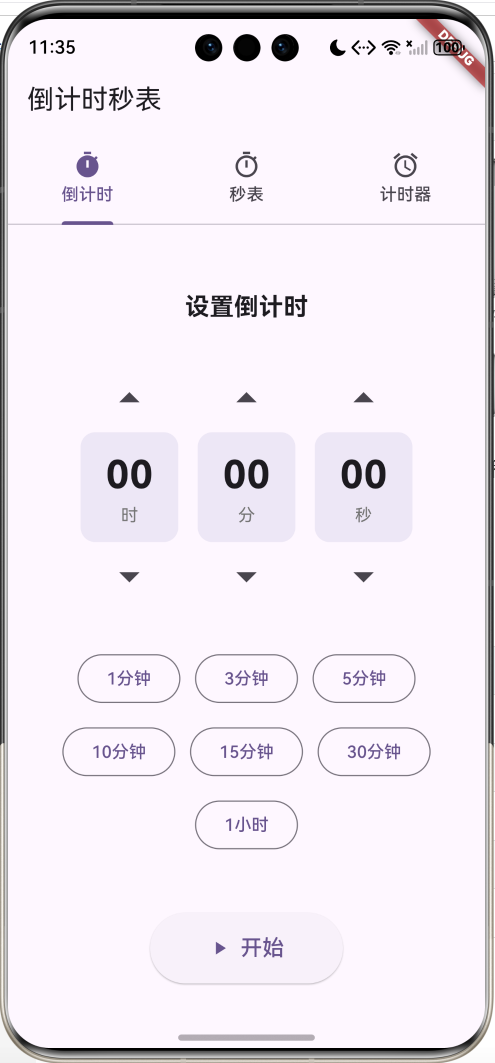
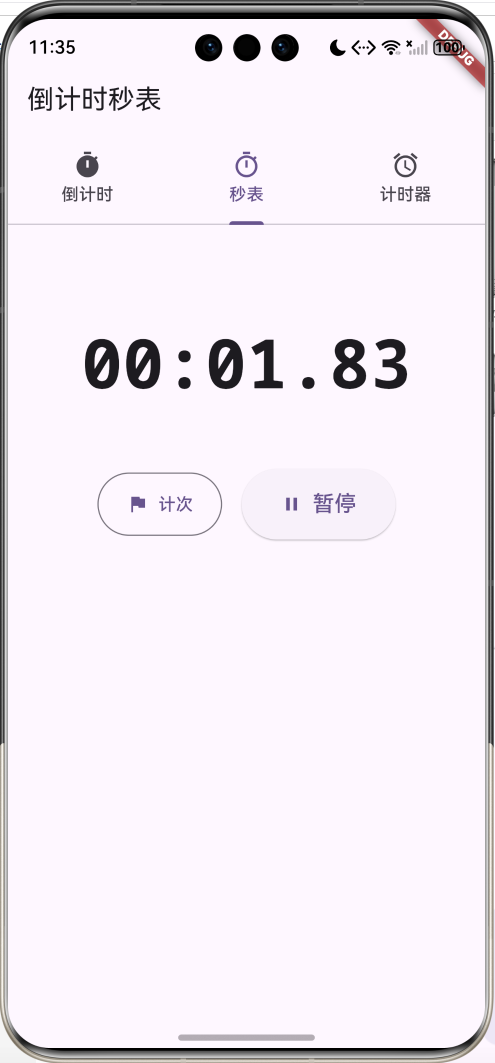
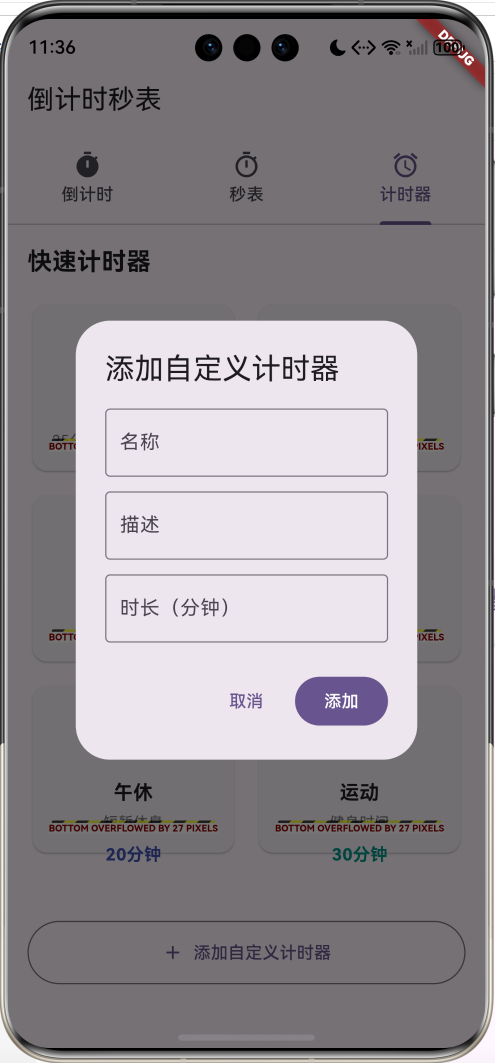
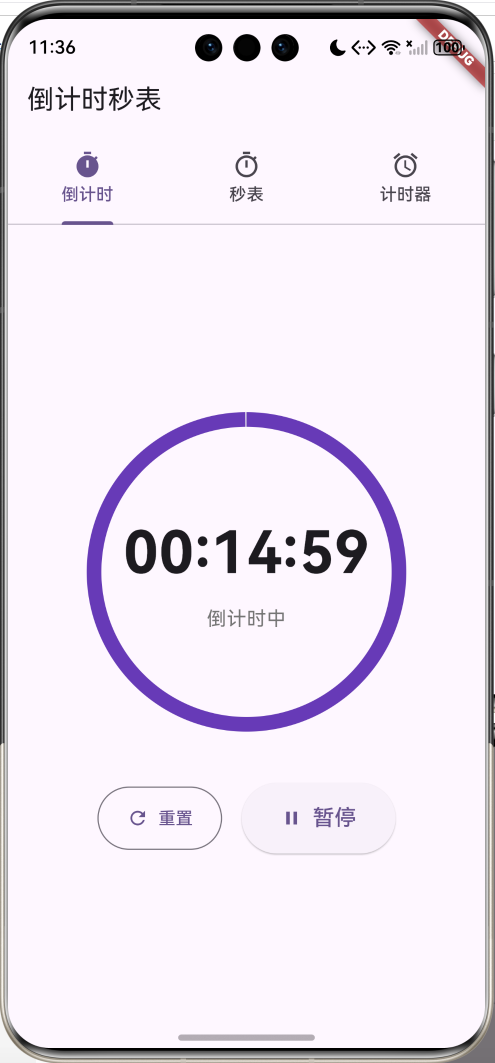
核心功能
- 倒计时器:自定义时间倒计时,支持暂停和重置
- 秒表计时:精确到10毫秒,支持计次功能
- 快速计时器:预设常用场景,一键启动
应用特色
| 特色 | 说明 |
|---|---|
| 三合一设计 | 倒计时、秒表、预设计时器 |
| 可视化进度 | 圆形进度条直观展示 |
| 快捷设置 | 常用时长一键选择 |
| 计次功能 | 秒表支持多次计次记录 |
| 场景预设 | 番茄工作法、煮蛋、泡茶等 |
功能架构
核心功能详解
1. 倒计时器
倒计时器支持自定义时间设置,适用于各种需要定时提醒的场景。
功能特点:
- 时分秒独立设置
- 上下箭头调节
- 快捷时间按钮(1分钟、3分钟、5分钟等)
- 圆形进度条显示
- 暂停/继续功能
- 时间到提醒
时间选择器实现:
Widget _buildTimePicker(String label, int value, Function(int) onChanged) {
  return Column(
    children: [
      IconButton(
        icon: const Icon(Icons.arrow_drop_up, size: 40),
        onPressed: () {
          if (label == '时' && value < 23) onChanged(value + 1);
          if (label == '分' && value < 59) onChanged(value + 1);
          if (label == '秒' && value < 59) onChanged(value + 1);
        },
      ),
      Container(
        width: 80,
        padding: const EdgeInsets.symmetric(vertical: 12),
        decoration: BoxDecoration(
          color: Colors.deepPurple[50],
          borderRadius: BorderRadius.circular(12),
        ),
        child: Column(
          children: [
            Text(
              value.toString().padLeft(2, '0'),
              style: const TextStyle(
                fontSize: 32,
                fontWeight: FontWeight.bold
              ),
            ),
            Text(label,
              style: TextStyle(
                fontSize: 14,
                color: Colors.grey[600]
              )),
          ],
        ),
      ),
      IconButton(
        icon: const Icon(Icons.arrow_drop_down, size: 40),
        onPressed: () {
          if (value > 0) onChanged(value - 1);
        },
      ),
    ],
  );
}
倒计时逻辑:
void _startCountdown() {
  setState(() {
    _totalSeconds = _hours * 3600 + _minutes * 60 + _seconds;
    _remainingSeconds = _totalSeconds;
    _isRunning = true;
  });

  _timer = Timer.periodic(const Duration(seconds: 1), (timer) {
    setState(() {
      if (_remainingSeconds > 0) {
        _remainingSeconds--;
      } else {
        _timer?.cancel();
        _isRunning = false;
        _showCompletionDialog();
      }
    });
  });
}
进度显示:
final progress = _totalSeconds > 0
  ? _remainingSeconds / _totalSeconds
  : 0.0;

CircularProgressIndicator(
  value: progress,
  strokeWidth: 12,
  backgroundColor: Colors.grey[200],
  valueColor: AlwaysStoppedAnimation<Color>(
    _isPaused ? Colors.orange : Colors.deepPurple,
  ),
)
2. 秒表功能
秒表提供精确到10毫秒的计时,支持计次记录。
功能特点:
- 10毫秒精度
- 开始/暂停/重置
- 计次功能
- 计次时间差显示
- 等宽字体显示
秒表计时实现:
void _start() {
  setState(() => _isRunning = true);
  _timer = Timer.periodic(
    const Duration(milliseconds: 10),
    (timer) {
      setState(() => _milliseconds += 10);
    }
  );
}

void _lap() {
  setState(() {
    _laps.insert(0, _milliseconds);
  });
}
时间格式化:
String _formatTime(int ms) {
  final hours = ms ~/ 3600000;
  final minutes = (ms % 3600000) ~/ 60000;
  final seconds = (ms % 60000) ~/ 1000;
  final millis = (ms % 1000) ~/ 10;

  if (hours > 0) {
    return '${hours.toString().padLeft(2, '0')}:'
           '${minutes.toString().padLeft(2, '0')}:'
           '${seconds.toString().padLeft(2, '0')}.'
           '${millis.toString().padLeft(2, '0')}';
  }
  return '${minutes.toString().padLeft(2, '0')}:'
         '${seconds.toString().padLeft(2, '0')}.'
         '${millis.toString().padLeft(2, '0')}';
}
计次记录显示:
ListView.builder(
  itemCount: _laps.length,
  itemBuilder: (context, index) {
    final lapTime = index == 0
      ? _laps[0]
      : _laps[index] - _laps[index - 1];

    return Card(
      child: ListTile(
        leading: CircleAvatar(
          child: Text('${_laps.length - index}'),
        ),
        title: Text(_formatTime(_laps[index])),
        trailing: Text(
          '+${_formatTime(lapTime)}',
          style: TextStyle(color: Colors.grey[600]),
        ),
      ),
    );
  },
)
3. 快速计时器
预设常用场景的计时器,一键启动。
预设场景:
- 番茄工作法(25分钟)
- 煮鸡蛋(6分钟)
- 泡茶(3分钟)
- 面膜(15分钟)
- 午休(20分钟)
- 运动(30分钟)
预设模型:
class TimerPreset {
  final String id;
  final String name;
  final String description;
  final int duration;      // 秒
  final IconData icon;
  final Color color;

  TimerPreset({
    required this.id,
    required this.name,
    required this.description,
    required this.duration,
    required this.icon,
    required this.color,
  });
}
预设卡片:
Widget _buildPresetCard(TimerPreset preset) {
  return Card(
    child: InkWell(
      onTap: () => _startPresetTimer(preset),
      child: Column(
        mainAxisAlignment: MainAxisAlignment.center,
        children: [
          Icon(preset.icon, size: 48, color: preset.color),
          const SizedBox(height: 12),
          Text(
            preset.name,
            style: const TextStyle(
              fontSize: 16,
              fontWeight: FontWeight.bold
            ),
          ),
          Text(
            preset.description,
            style: TextStyle(
              fontSize: 12,
              color: Colors.grey[600]
            ),
          ),
          Text(
            _formatDuration(preset.duration),
            style: TextStyle(
              fontSize: 14,
              color: preset.color,
              fontWeight: FontWeight.bold
            ),
          ),
        ],
      ),
    ),
  );
}
界面设计要点
1. Tab导航
使用TabBar实现三个功能切换:
TabBar(
  controller: _tabController,
  tabs: const [
    Tab(icon: Icon(Icons.timer), text: '倒计时'),
    Tab(icon: Icon(Icons.timer_outlined), text: '秒表'),
    Tab(icon: Icon(Icons.alarm), text: '计时器'),
  ],
)
2. 圆形进度条
视觉化展示倒计时进度:
Stack(
  alignment: Alignment.center,
  children: [
    SizedBox(
      width: 250,
      height: 250,
      child: CircularProgressIndicator(
        value: progress,
        strokeWidth: 12,
        backgroundColor: Colors.grey[200],
      ),
    ),
    Column(
      children: [
        Text(
          '00:00:00',
          style: TextStyle(
            fontSize: 48,
            fontWeight: FontWeight.bold
          ),
        ),
        Text('倒计时中'),
      ],
    ),
  ],
)
3. 按钮设计
统一的按钮样式:
// 主要操作按钮
ElevatedButton.icon(
  onPressed: _start,
  icon: const Icon(Icons.play_arrow),
  label: const Text('开始'),
  style: ElevatedButton.styleFrom(
    padding: const EdgeInsets.symmetric(
      horizontal: 32,
      vertical: 16
    ),
  ),
)

// 次要操作按钮
OutlinedButton.icon(
  onPressed: _reset,
  icon: const Icon(Icons.refresh),
  label: const Text('重置'),
)
4. 颜色方案
| 场景 | 颜色 | 说明 |
|---|---|---|
| 主色调 | Deep Purple | 专业、稳重 |
| 暂停状态 | Orange | 警示、注意 |
| 番茄工作法 | Red | 专注、热情 |
| 煮蛋 | Orange | 温暖 |
| 泡茶 | Green | 清新 |
| 面膜 | Pink | 温柔 |
| 午休 | Indigo | 宁静 |
| 运动 | Teal | 活力 |
核心代码实现
倒计时完成提醒
void _showCompletionDialog() {
  showDialog(
    context: context,
    builder: (context) => AlertDialog(
      title: const Text('倒计时结束'),
      content: const Text('时间到!'),
      actions: [
        TextButton(
          onPressed: () {
            Navigator.pop(context);
            _resetCountdown();
          },
          child: const Text('确定'),
        ),
      ],
    ),
  );
}
快捷时间按钮
Widget _buildQuickButtons() {
  return Wrap(
    spacing: 12,
    runSpacing: 12,
    alignment: WrapAlignment.center,
    children: [
      _buildQuickButton('1分钟', 0, 1, 0),
      _buildQuickButton('3分钟', 0, 3, 0),
      _buildQuickButton('5分钟', 0, 5, 0),
      _buildQuickButton('10分钟', 0, 10, 0),
      _buildQuickButton('15分钟', 0, 15, 0),
      _buildQuickButton('30分钟', 0, 30, 0),
      _buildQuickButton('1小时', 1, 0, 0),
    ],
  );
}

Widget _buildQuickButton(String label, int h, int m, int s) {
  return OutlinedButton(
    onPressed: () {
      setState(() {
        _hours = h;
        _minutes = m;
        _seconds = s;
      });
    },
    child: Text(label),
  );
}
预设计时器运行页面
class PresetTimerPage extends StatefulWidget {
final TimerPreset preset;
const PresetTimerPage({super.key, required this.preset});
State<PresetTimerPage> createState() => _PresetTimerPageState();
}
class _PresetTimerPageState extends State<PresetTimerPage> {
Timer? _timer;
late int _remainingSeconds;
bool _isPaused = false;
void initState() {
super.initState();
_remainingSeconds = widget.preset.duration;
_startTimer();
}
void _startTimer() {
setState(() => _isPaused = false);
_timer = Timer.periodic(const Duration(seconds: 1), (timer) {
if (mounted) {
setState(() {
if (_remainingSeconds > 0) {
_remainingSeconds--;
} else {
_timer?.cancel();
_showCompletionDialog();
}
});
}
});
}
Widget build(BuildContext context) {
final minutes = _remainingSeconds ~/ 60;
final seconds = _remainingSeconds % 60;
final progress = _remainingSeconds / widget.preset.duration;
return Scaffold(
appBar: AppBar(title: Text(widget.preset.name)),
body: Column(
mainAxisAlignment: MainAxisAlignment.center,
children: [
Icon(widget.preset.icon,
size: 80,
color: widget.preset.color),
const SizedBox(height: 48),
Stack(
alignment: Alignment.center,
children: [
CircularProgressIndicator(
value: progress,
strokeWidth: 12,
valueColor: AlwaysStoppedAnimation<Color>(
widget.preset.color
),
),
Text(
'${minutes.toString().padLeft(2, '0')}:'
'${seconds.toString().padLeft(2, '0')}',
style: const TextStyle(
fontSize: 56,
fontWeight: FontWeight.bold
),
),
],
),
],
),
);
}
}
功能扩展建议
1. 声音提醒
添加倒计时结束的声音提醒:
import 'package:audioplayers/audioplayers.dart';

class SoundService {
  final AudioPlayer _player = AudioPlayer();

  Future<void> playAlarm() async {
    await _player.play(AssetSource('sounds/alarm.mp3'));
  }

  Future<void> playTick() async {
    await _player.play(AssetSource('sounds/tick.mp3'));
  }

  Future<void> stop() async {
    await _player.stop();
  }
}

// 使用
void _showCompletionDialog() {
  SoundService().playAlarm();
  showDialog(...);
}
2. 振动反馈
使用vibration插件添加振动:
import 'package:vibration/vibration.dart';

class VibrationService {
  Future<void> vibrate() async {
    final hasVibrator = await Vibration.hasVibrator();
    if (hasVibrator == true) {
      Vibration.vibrate(duration: 500);
    }
  }

  Future<void> vibratePattern() async {
    // 振动模式:振动500ms,停止500ms,重复3次
    Vibration.vibrate(
      pattern: [500, 500, 500, 500, 500, 500],
    );
  }
}

// 倒计时结束时振动
void _onCountdownComplete() {
  VibrationService().vibratePattern();
  _showCompletionDialog();
}
3. 后台运行
使用flutter_background_service实现后台计时:
import 'package:flutter_background_service/flutter_background_service.dart';
class BackgroundTimerService {
Future<void> initializeService() async {
final service = FlutterBackgroundService();
await service.configure(
androidConfiguration: AndroidConfiguration(
onStart: onStart,
autoStart: false,
isForegroundMode: true,
),
iosConfiguration: IosConfiguration(
autoStart: false,
onForeground: onStart,
onBackground: onIosBackground,
),
);
}
('vm:entry-point')
static void onStart(ServiceInstance service) async {
// 后台计时逻辑
Timer.periodic(const Duration(seconds: 1), (timer) {
// 更新计时
});
}
('vm:entry-point')
static bool onIosBackground(ServiceInstance service) {
return true;
}
}
4. 数据持久化
保存用户的计时记录:
import 'package:shared_preferences/shared_preferences.dart';
import 'dart:convert';

class TimerHistory {
  final String id;
  final String type; // countdown, stopwatch, preset
  final int duration;
  final DateTime startTime;
  final DateTime? endTime;

  TimerHistory({
    required this.id,
    required this.type,
    required this.duration,
    required this.startTime,
    this.endTime,
  });

  Map<String, dynamic> toJson() => {
    'id': id,
    'type': type,
    'duration': duration,
    'startTime': startTime.toIso8601String(),
    'endTime': endTime?.toIso8601String(),
  };

  factory TimerHistory.fromJson(Map<String, dynamic> json) {
    return TimerHistory(
      id: json['id'],
      type: json['type'],
      duration: json['duration'],
      startTime: DateTime.parse(json['startTime']),
      endTime: json['endTime'] != null
        ? DateTime.parse(json['endTime'])
        : null,
    );
  }
}

class HistoryService {
  Future<void> saveHistory(TimerHistory history) async {
    final prefs = await SharedPreferences.getInstance();
    final histories = await loadHistories();
    histories.add(history);

    final jsonList = histories.map((h) => h.toJson()).toList();
    await prefs.setString('timer_histories', jsonEncode(jsonList));
  }

  Future<List<TimerHistory>> loadHistories() async {
    final prefs = await SharedPreferences.getInstance();
    final jsonStr = prefs.getString('timer_histories');
    if (jsonStr == null) return [];

    final jsonList = jsonDecode(jsonStr) as List;
    return jsonList.map((json) =>
      TimerHistory.fromJson(json)
    ).toList();
  }
}
5. 统计分析
添加使用统计功能:
class TimerStatistics {
final int totalCountdowns;
final int totalStopwatches;
final int totalPresets;
final int totalDuration; // 秒
final Map<String, int> presetUsage;
TimerStatistics({
required this.totalCountdowns,
required this.totalStopwatches,
required this.totalPresets,
required this.totalDuration,
required this.presetUsage,
});
}
class StatisticsService {
Future<TimerStatistics> getStatistics() async {
final histories = await HistoryService().loadHistories();
int countdowns = 0;
int stopwatches = 0;
int presets = 0;
int totalDuration = 0;
Map<String, int> presetUsage = {};
for (var history in histories) {
switch (history.type) {
case 'countdown':
countdowns++;
break;
case 'stopwatch':
stopwatches++;
break;
case 'preset':
presets++;
presetUsage[history.id] =
(presetUsage[history.id] ?? 0) + 1;
break;
}
totalDuration += history.duration;
}
return TimerStatistics(
totalCountdowns: countdowns,
totalStopwatches: stopwatches,
totalPresets: presets,
totalDuration: totalDuration,
presetUsage: presetUsage,
);
}
}
// 统计页面
class StatisticsPage extends StatelessWidget {
final TimerStatistics stats;
const StatisticsPage({required this.stats});
Widget build(BuildContext context) {
return Scaffold(
appBar: AppBar(title: const Text('使用统计')),
body: ListView(
padding: const EdgeInsets.all(16),
children: [
_buildStatCard('倒计时次数', '${stats.totalCountdowns}次'),
_buildStatCard('秒表次数', '${stats.totalStopwatches}次'),
_buildStatCard('预设计时', '${stats.totalPresets}次'),
_buildStatCard('总计时长',
'${(stats.totalDuration / 3600).toStringAsFixed(1)}小时'),
],
),
);
}
Widget _buildStatCard(String label, String value) {
return Card(
child: ListTile(
title: Text(label),
trailing: Text(
value,
style: const TextStyle(
fontSize: 20,
fontWeight: FontWeight.bold
),
),
),
);
}
}
6. 主题定制
支持多种主题颜色:
class ThemeService {
static const themes = {
'purple': Colors.deepPurple,
'blue': Colors.blue,
'green': Colors.green,
'orange': Colors.orange,
'pink': Colors.pink,
};
Future<void> saveTheme(String themeName) async {
final prefs = await SharedPreferences.getInstance();
await prefs.setString('theme', themeName);
}
Future<String> loadTheme() async {
final prefs = await SharedPreferences.getInstance();
return prefs.getString('theme') ?? 'purple';
}
}
// 在MaterialApp中使用
class TimerApp extends StatefulWidget {
State<TimerApp> createState() => _TimerAppState();
}
class _TimerAppState extends State<TimerApp> {
String _themeName = 'purple';
void initState() {
super.initState();
_loadTheme();
}
Future<void> _loadTheme() async {
final theme = await ThemeService().loadTheme();
setState(() => _themeName = theme);
}
Widget build(BuildContext context) {
return MaterialApp(
theme: ThemeData(
colorScheme: ColorScheme.fromSeed(
seedColor: ThemeService.themes[_themeName]!
),
useMaterial3: true,
),
home: HomePage(),
);
}
}
7. 番茄工作法增强
完整的番茄工作法实现:
class PomodoroTimer {
final int workDuration = 25 * 60; // 25分钟
final int shortBreak = 5 * 60; // 5分钟
final int longBreak = 15 * 60; // 15分钟
final int cyclesBeforeLongBreak = 4;
int currentCycle = 0;
bool isWorkTime = true;
int getNextDuration() {
if (isWorkTime) {
return workDuration;
} else {
if (currentCycle % cyclesBeforeLongBreak == 0) {
return longBreak;
} else {
return shortBreak;
}
}
}
void completeSession() {
if (isWorkTime) {
currentCycle++;
}
isWorkTime = !isWorkTime;
}
String getCurrentPhase() {
if (isWorkTime) {
return '工作时间 (${currentCycle + 1}/4)';
} else {
if (currentCycle % cyclesBeforeLongBreak == 0) {
return '长休息';
} else {
return '短休息';
}
}
}
}
// 番茄工作法页面
class PomodoroPage extends StatefulWidget {
State<PomodoroPage> createState() => _PomodoroPageState();
}
class _PomodoroPageState extends State<PomodoroPage> {
final PomodoroTimer _pomodoro = PomodoroTimer();
Timer? _timer;
late int _remainingSeconds;
bool _isRunning = false;
void initState() {
super.initState();
_remainingSeconds = _pomodoro.getNextDuration();
}
void _startTimer() {
setState(() => _isRunning = true);
_timer = Timer.periodic(const Duration(seconds: 1), (timer) {
setState(() {
if (_remainingSeconds > 0) {
_remainingSeconds--;
} else {
_timer?.cancel();
_isRunning = false;
_onSessionComplete();
}
});
});
}
void _onSessionComplete() {
_pomodoro.completeSession();
_remainingSeconds = _pomodoro.getNextDuration();
showDialog(
context: context,
builder: (context) => AlertDialog(
title: Text('${_pomodoro.getCurrentPhase()}'),
content: Text(_pomodoro.isWorkTime
? '开始工作吧!'
: '休息一下吧!'),
actions: [
TextButton(
onPressed: () {
Navigator.pop(context);
_startTimer();
},
child: const Text('开始'),
),
],
),
);
}
Widget build(BuildContext context) {
return Scaffold(
appBar: AppBar(title: const Text('番茄工作法')),
body: Center(
child: Column(
mainAxisAlignment: MainAxisAlignment.center,
children: [
Text(
_pomodoro.getCurrentPhase(),
style: const TextStyle(fontSize: 24),
),
const SizedBox(height: 32),
Text(
'${(_remainingSeconds ~/ 60).toString().padLeft(2, '0')}:'
'${(_remainingSeconds % 60).toString().padLeft(2, '0')}',
style: const TextStyle(
fontSize: 72,
fontWeight: FontWeight.bold
),
),
const SizedBox(height: 48),
ElevatedButton(
onPressed: _isRunning ? null : _startTimer,
child: const Text('开始'),
),
],
),
),
);
}
}
项目结构
lib/
├── main.dart                    # 应用入口
├── pages/                       # 页面
│   ├── home_page.dart          # 主页(Tab导航)
│   ├── countdown_page.dart     # 倒计时页面
│   ├── stopwatch_page.dart     # 秒表页面
│   ├── timer_presets_page.dart # 预设计时器
│   ├── preset_timer_page.dart  # 预设运行页面
│   ├── pomodoro_page.dart      # 番茄工作法
│   └── statistics_page.dart    # 统计页面
├── models/                      # 数据模型
│   ├── timer_preset.dart       # 预设模型
│   ├── timer_history.dart      # 历史记录
│   └── timer_statistics.dart   # 统计数据
├── services/                    # 服务
│   ├── sound_service.dart      # 声音服务
│   ├── vibration_service.dart  # 振动服务
│   ├── history_service.dart    # 历史服务
│   ├── statistics_service.dart # 统计服务
│   └── theme_service.dart      # 主题服务
└── widgets/                     # 组件
    ├── time_picker.dart        # 时间选择器
    ├── circular_timer.dart     # 圆形计时器
    └── preset_card.dart        # 预设卡片
使用指南
倒计时器使用
-
设置时间
- 点击上下箭头调节时分秒
- 或点击快捷按钮选择常用时长
-
开始倒计时
- 点击"开始"按钮
- 观察圆形进度条
-
暂停/继续
- 点击"暂停"按钮暂停
- 点击"继续"按钮恢复
-
重置
- 点击"重置"按钮清零
秒表使用
-
开始计时
- 点击"开始"按钮
-
计次
- 点击"计次"按钮记录当前时间
- 查看计次列表
-
暂停
- 点击"暂停"按钮停止
-
重置
- 暂停后点击"重置"清零
快速计时器使用
-
选择预设
- 浏览预设场景
- 点击卡片启动
-
自定义添加
- 点击"添加自定义计时器"
- 填写名称、描述、时长
- 保存使用
常见问题
Q1: 如何添加更多预设场景?
在TimerPresetsPage中添加:
_presets.add(TimerPreset(
  id: '7',
  name: '冥想',
  description: '放松身心',
  duration: 10 * 60,
  icon: Icons.self_improvement,
  color: Colors.purple,
));
Q2: 如何实现锁屏显示?
使用wakelock插件保持屏幕常亮:
import 'package:wakelock/wakelock.dart';

void _startCountdown() {
  Wakelock.enable(); // 保持屏幕常亮
  // 开始倒计时
}

void _stopCountdown() {
  Wakelock.disable(); // 允许屏幕休眠
  // 停止倒计时
}
Q3: 如何导出计时记录?
import 'package:share_plus/share_plus.dart';
import 'dart:io';
import 'package:path_provider/path_provider.dart';

Future<void> exportHistory() async {
  final histories = await HistoryService().loadHistories();
  final csv = _convertToCSV(histories);

  final directory = await getTemporaryDirectory();
  final file = File('${directory.path}/timer_history.csv');
  await file.writeAsString(csv);

  await Share.shareXFiles([XFile(file.path)]);
}

String _convertToCSV(List<TimerHistory> histories) {
  final buffer = StringBuffer();
  buffer.writeln('类型,时长,开始时间,结束时间');

  for (var history in histories) {
    buffer.writeln(
      '${history.type},'
      '${history.duration},'
      '${history.startTime},'
      '${history.endTime}'
    );
  }

  return buffer.toString();
}
Q4: 如何实现倒计时结束后自动重复?
class RepeatCountdown {
  int repeatCount = 0;
  int maxRepeats = 3;

  void onComplete() {
    if (repeatCount < maxRepeats) {
      repeatCount++;
      _startCountdown();
    } else {
      _showFinalCompletion();
    }
  }
}
Q5: 如何添加语音播报?
使用flutter_tts:
import 'package:flutter_tts/flutter_tts.dart';

class TTSService {
  final FlutterTts _tts = FlutterTts();

  Future<void> speak(String text) async {
    await _tts.setLanguage('zh-CN');
    await _tts.setPitch(1.0);
    await _tts.speak(text);
  }

  Future<void> announceTime(int seconds) async {
    final minutes = seconds ~/ 60;
    final secs = seconds % 60;

    if (minutes > 0) {
      await speak('还剩$minutes分钟');
    } else if (secs <= 10) {
      await speak('$secs');
    }
  }
}
性能优化
1. Timer优化
// 使用mounted检查避免内存泄漏
_timer = Timer.periodic(const Duration(seconds: 1), (timer) {
if (mounted) {
setState(() {
// 更新状态
});
}
});
// 及时取消Timer
void dispose() {
_timer?.cancel();
super.dispose();
}
2. 状态管理优化
使用Provider管理全局状态:
class TimerProvider extends ChangeNotifier {
  int _remainingSeconds = 0;
  bool _isRunning = false;

  int get remainingSeconds => _remainingSeconds;
  bool get isRunning => _isRunning;

  void updateTime(int seconds) {
    _remainingSeconds = seconds;
    notifyListeners();
  }

  void setRunning(bool running) {
    _isRunning = running;
    notifyListeners();
  }
}
总结
倒计时秒表是一款功能全面的计时工具应用,具有以下特点:
核心优势
- 三合一设计:倒计时、秒表、预设计时器
- 界面简洁:Material Design 3现代化设计
- 功能完整:暂停、重置、计次等
- 场景丰富:预设多种常用场景
技术亮点
- 精确计时:秒表精确到10毫秒
- 可视化进度:圆形进度条直观展示
- 状态管理:合理的状态控制
- 扩展性强:易于添加新功能
应用价值
- 提高工作效率(番茄工作法)
- 辅助日常生活(烹饪、运动)
- 时间管理工具
- 专注力训练
通过持续优化和功能扩展,这款应用可以成为用户日常生活中不可或缺的时间管理助手。
欢迎加入开源鸿蒙跨平台社区:https://openharmonycrossplatform.csdn.net

作为“人工智能6S店”的官方数字引擎,为AI开发者与企业提供一个覆盖软硬件全栈、一站式门户。
更多推荐

 14
14 0
0- 0


 已为社区贡献5条内容

所有评论(0)