
Flutter 框架跨平台鸿蒙开发 - 二手物品交易助手:打造闲置物品交易平台
二手物品交易助手是一款帮助用户买卖闲置物品的移动应用,提供商品发布、浏览、搜索、聊天沟通等完整的交易流程功能。通过简洁的界面和便捷的操作,让闲置物品快速找到新主人,实现资源的循环利用。运行效果图二手交易助手市场首页分类浏览发布商品消息中心个人中心轮播横幅快速分类商品列表搜索筛选8大分类分类商品图片上传信息填写发布确认会话列表聊天界面消息通知我的发布我的收藏交易记录账号设置首页是用户浏览商品的主要入
Flutter二手物品交易助手:打造闲置物品交易平台
项目简介
二手物品交易助手是一款帮助用户买卖闲置物品的移动应用,提供商品发布、浏览、搜索、聊天沟通等完整的交易流程功能。通过简洁的界面和便捷的操作,让闲置物品快速找到新主人,实现资源的循环利用。
运行效果图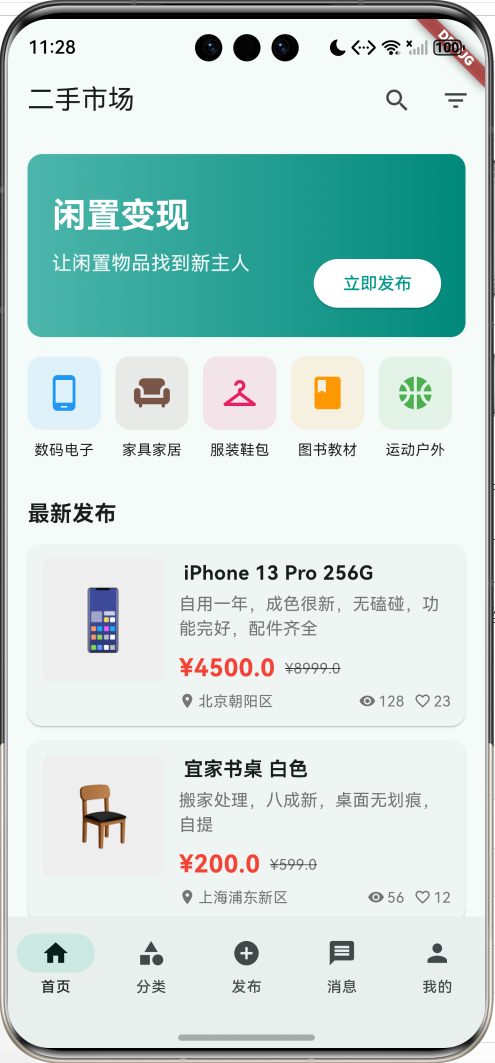
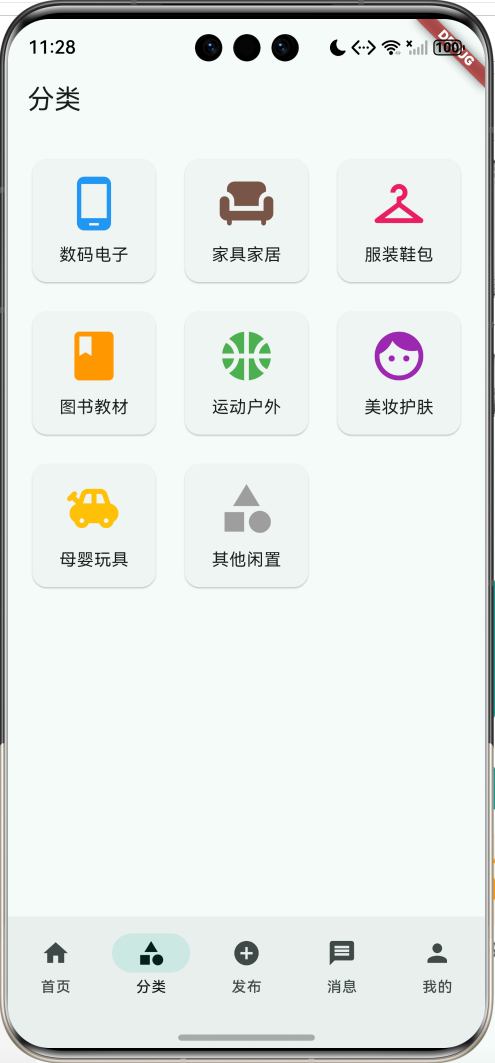
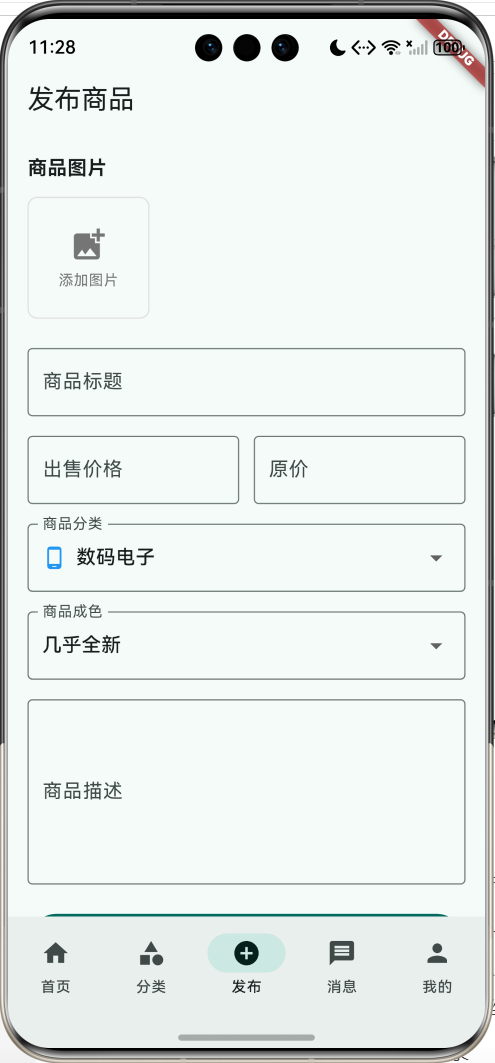
核心功能
- 商品浏览:首页展示最新发布的商品,支持分类筛选
- 商品发布:快速发布闲置物品,支持图片上传和详细描述
- 商品详情:查看商品详细信息,包括价格、成色、位置等
- 即时通讯:买卖双方在线沟通,协商交易细节
- 个人中心:管理发布、收藏、购买记录
应用特色
| 特色 | 说明 |
|---|---|
| 分类清晰 | 8大商品分类,快速定位 |
| 信息完整 | 价格、成色、位置一目了然 |
| 沟通便捷 | 内置聊天功能,实时交流 |
| 操作简单 | 发布流程简化,3步完成 |
| 界面美观 | Material Design 3设计 |
功能架构
核心功能详解
1. 市场首页
首页是用户浏览商品的主要入口,采用信息流设计。
页面组成:
- 顶部横幅:展示平台特色和快捷入口
- 快速分类:横向滚动的分类图标
- 商品列表:瀑布流展示最新商品
- 搜索筛选:支持关键词搜索和条件筛选
商品卡片信息:
- 商品图片(emoji占位)
- 商品标题
- 商品描述
- 当前价格和原价
- 所在位置
- 浏览量和收藏数
- 交易状态标签
筛选功能:
void _showFilterDialog() {
  showDialog(
    context: context,
    builder: (context) => AlertDialog(
      title: const Text('筛选条件'),
      content: Column(
        mainAxisSize: MainAxisSize.min,
        children: [
          ListTile(
            title: const Text('价格排序'),
            trailing: const Icon(Icons.arrow_forward_ios, size: 16),
            onTap: () {},
          ),
          ListTile(
            title: const Text('距离排序'),
            trailing: const Icon(Icons.arrow_forward_ios, size: 16),
            onTap: () {},
          ),
          ListTile(
            title: const Text('发布时间'),
            trailing: const Icon(Icons.arrow_forward_ios, size: 16),
            onTap: () {},
          ),
        ],
      ),
    ),
  );
}
2. 商品详情页
详情页展示商品的完整信息,提供收藏和联系功能。
页面布局:
- 图片展示区:大图展示商品照片
- 价格信息:醒目显示售价和原价
- 商品标题:清晰的商品名称
- 标签信息:成色标签和分类标签
- 商品描述:详细的文字描述
- 基本信息:发布时间、地区、浏览量
- 卖家信息:卖家昵称和信用
- 底部操作栏:联系卖家和购买按钮
时间格式化:
String _formatTime(DateTime time) {
  final now = DateTime.now();
  final diff = now.difference(time);

  if (diff.inMinutes < 60) {
    return '${diff.inMinutes}分钟前';
  } else if (diff.inHours < 24) {
    return '${diff.inHours}小时前';
  } else if (diff.inDays < 7) {
    return '${diff.inDays}天前';
  } else {
    return '${time.month}月${time.day}日';
  }
}
3. 商品发布页
发布页面简化流程,让用户快速发布商品。
发布步骤:
- 上传图片:支持多图上传(最多9张)
- 填写标题:简洁明了的商品名称
- 设置价格:出售价格和原价
- 选择分类:从8大分类中选择
- 选择成色:4种成色等级
- 商品描述:详细描述商品情况
表单验证:
void _publishItem() {
  if (_titleController.text.isEmpty) {
    ScaffoldMessenger.of(context).showSnackBar(
      const SnackBar(content: Text('请输入商品标题')),
    );
    return;
  }

  if (_priceController.text.isEmpty) {
    ScaffoldMessenger.of(context).showSnackBar(
      const SnackBar(content: Text('请输入出售价格')),
    );
    return;
  }

  // 发布成功
  ScaffoldMessenger.of(context).showSnackBar(
    const SnackBar(content: Text('发布成功!')),
  );
}
4. 即时通讯功能
内置聊天功能,买卖双方可以直接沟通。
聊天界面:
- 消息气泡(左右区分)
- 发送时间显示
- 已读/未读状态
- 输入框和发送按钮
- 附加功能按钮
消息气泡实现:
Widget _buildMessageBubble(ChatMessage message) {
  final isMe = message.senderId == 'me';
  return Padding(
    padding: const EdgeInsets.only(bottom: 16),
    child: Row(
      mainAxisAlignment: isMe
        ? MainAxisAlignment.end
        : MainAxisAlignment.start,
      children: [
        if (!isMe) ...[
          CircleAvatar(
            backgroundColor: Colors.teal,
            child: Text(widget.userName[0]),
          ),
          const SizedBox(width: 8),
        ],
        Flexible(
          child: Container(
            padding: const EdgeInsets.symmetric(
              horizontal: 16,
              vertical: 10
            ),
            decoration: BoxDecoration(
              color: isMe ? Colors.teal : Colors.grey[200],
              borderRadius: BorderRadius.circular(18),
            ),
            child: Text(
              message.content,
              style: TextStyle(
                fontSize: 15,
                color: isMe ? Colors.white : Colors.black87,
              ),
            ),
          ),
        ),
      ],
    ),
  );
}
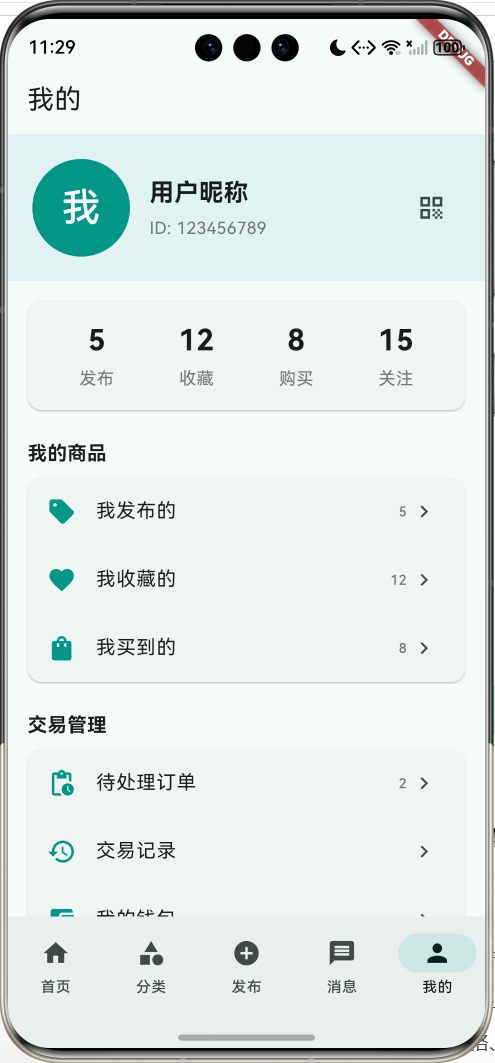
5. 个人中心
个人中心管理用户的所有交易活动。
功能模块:
- 用户信息:头像、昵称、ID
- 数据统计:发布、收藏、购买、关注数量
- 我的商品:发布的、收藏的、买到的
- 交易管理:待处理订单、交易记录、钱包
- 系统设置:地址、账号、帮助、关于
数据模型设计
商品分类枚举
enum ItemCategory {
  electronics('数码电子', Icons.phone_android, Colors.blue),
  furniture('家具家居', Icons.chair, Colors.brown),
  clothing('服装鞋包', Icons.checkroom, Colors.pink),
  books('图书教材', Icons.book, Colors.orange),
  sports('运动户外', Icons.sports_basketball, Colors.green),
  beauty('美妆护肤', Icons.face, Colors.purple),
  toys('母婴玩具', Icons.toys, Colors.amber),
  other('其他闲置', Icons.category, Colors.grey);

  final String label;
  final IconData icon;
  final Color color;
  const ItemCategory(this.label, this.icon, this.color);
}
商品状态枚举
enum ItemCondition {
  brandNew('全新未拆封'),
  likeNew('几乎全新'),
  good('轻微使用痕迹'),
  fair('明显使用痕迹');

  final String label;
  const ItemCondition(this.label);
}

enum TradeStatus {
  selling('出售中'),
  reserved('已预定'),
  sold('已售出');

  final String label;
  const TradeStatus(this.label);
}
商品数据模型
class Item {
  final String id;
  final String title;
  final String description;
  final double price;
  final double originalPrice;
  final ItemCategory category;
  final ItemCondition condition;
  final TradeStatus status;
  final List<String> images;
  final String location;
  final DateTime publishDate;
  final String sellerId;
  final String sellerName;
  final int viewCount;
  final int favoriteCount;

  Item({
    required this.id,
    required this.title,
    required this.description,
    required this.price,
    required this.originalPrice,
    required this.category,
    required this.condition,
    required this.status,
    required this.images,
    required this.location,
    required this.publishDate,
    required this.sellerId,
    required this.sellerName,
    this.viewCount = 0,
    this.favoriteCount = 0,
  });
}
聊天消息模型
class ChatMessage {
  final String id;
  final String senderId;
  final String content;
  final DateTime time;
  final bool isRead;

  ChatMessage({
    required this.id,
    required this.senderId,
    required this.content,
    required this.time,
    this.isRead = false,
  });
}
核心代码实现
商品卡片组件
Widget _buildItemCard(Item item) {
  return Card(
    margin: const EdgeInsets.only(bottom: 12),
    child: InkWell(
      onTap: () {
        Navigator.push(
          context,
          MaterialPageRoute(
            builder: (_) => ItemDetailPage(item: item)
          ),
        );
      },
      child: Padding(
        padding: const EdgeInsets.all(12),
        child: Row(
          crossAxisAlignment: CrossAxisAlignment.start,
          children: [
            // 商品图片
            Container(
              width: 100,
              height: 100,
              decoration: BoxDecoration(
                color: Colors.grey[200],
                borderRadius: BorderRadius.circular(8),
              ),
              child: Center(
                child: Text(
                  item.images.first,
                  style: const TextStyle(fontSize: 48)
                ),
              ),
            ),
            const SizedBox(width: 12),
            // 商品信息
            Expanded(
              child: Column(
                crossAxisAlignment: CrossAxisAlignment.start,
                children: [
                  // 状态标签和标题
                  Row(
                    children: [
                      if (item.status == TradeStatus.reserved)
                        _buildStatusTag('已预定', Colors.orange),
                      if (item.status == TradeStatus.sold)
                        _buildStatusTag('已售出', Colors.grey),
                      const SizedBox(width: 4),
                      Expanded(
                        child: Text(
                          item.title,
                          style: const TextStyle(
                            fontSize: 16,
                            fontWeight: FontWeight.bold
                          ),
                          maxLines: 1,
                          overflow: TextOverflow.ellipsis,
                        ),
                      ),
                    ],
                  ),
                  const SizedBox(height: 4),
                  // 商品描述
                  Text(
                    item.description,
                    style: TextStyle(
                      fontSize: 14,
                      color: Colors.grey[600]
                    ),
                    maxLines: 2,
                    overflow: TextOverflow.ellipsis,
                  ),
                  const SizedBox(height: 8),
                  // 价格信息
                  Row(
                    children: [
                      Text(
                        '¥${item.price}',
                        style: const TextStyle(
                          fontSize: 20,
                          fontWeight: FontWeight.bold,
                          color: Colors.red,
                        ),
                      ),
                      const SizedBox(width: 8),
                      Text(
                        '¥${item.originalPrice}',
                        style: TextStyle(
                          fontSize: 12,
                          color: Colors.grey[600],
                          decoration: TextDecoration.lineThrough,
                        ),
                      ),
                    ],
                  ),
                  const SizedBox(height: 4),
                  // 位置和统计信息
                  Row(
                    children: [
                      Icon(Icons.location_on,
                        size: 14, color: Colors.grey[600]),
                      const SizedBox(width: 2),
                      Text(item.location,
                        style: TextStyle(
                          fontSize: 12,
                          color: Colors.grey[600]
                        )),
                      const Spacer(),
                      Icon(Icons.visibility,
                        size: 14, color: Colors.grey[600]),
                      Text('${item.viewCount}'),
                      const SizedBox(width: 8),
                      Icon(Icons.favorite_border,
                        size: 14, color: Colors.grey[600]),
                      Text('${item.favoriteCount}'),
                    ],
                  ),
                ],
              ),
            ),
          ],
        ),
      ),
    ),
  );
}
商品详情底部操作栏
Widget _buildBottomBar() {
  return Container(
    padding: const EdgeInsets.all(16),
    decoration: BoxDecoration(
      color: Colors.white,
      boxShadow: [
        BoxShadow(
          color: Colors.black.withOpacity(0.05),
          blurRadius: 10,
          offset: const Offset(0, -5),
        ),
      ],
    ),
    child: Row(
      children: [
        OutlinedButton.icon(
          onPressed: () {},
          icon: const Icon(Icons.chat),
          label: const Text('联系卖家'),
        ),
        const SizedBox(width: 12),
        Expanded(
          child: FilledButton(
            onPressed: widget.item.status == TradeStatus.selling
              ? () {
                  ScaffoldMessenger.of(context).showSnackBar(
                    const SnackBar(content: Text('已发送购买意向')),
                  );
                }
              : null,
            child: Text(
              widget.item.status == TradeStatus.selling
                ? '我想要'
                : widget.item.status == TradeStatus.reserved
                  ? '已预定'
                  : '已售出',
            ),
          ),
        ),
      ],
    ),
  );
}
聊天输入框
Widget _buildInputBar() {
  return Container(
    padding: const EdgeInsets.all(12),
    decoration: BoxDecoration(
      color: Colors.white,
      boxShadow: [
        BoxShadow(
          color: Colors.black.withOpacity(0.05),
          blurRadius: 10,
          offset: const Offset(0, -5),
        ),
      ],
    ),
    child: Row(
      children: [
        IconButton(
          icon: const Icon(Icons.add_circle_outline),
          onPressed: () {},
        ),
        Expanded(
          child: TextField(
            controller: _messageController,
            decoration: InputDecoration(
              hintText: '输入消息...',
              border: OutlineInputBorder(
                borderRadius: BorderRadius.circular(24),
                borderSide: BorderSide.none,
              ),
              filled: true,
              fillColor: Colors.grey[100],
              contentPadding: const EdgeInsets.symmetric(
                horizontal: 16,
                vertical: 8
              ),
            ),
          ),
        ),
        const SizedBox(width: 8),
        IconButton(
          icon: const Icon(Icons.send, color: Colors.teal),
          onPressed: () {
            if (_messageController.text.isNotEmpty) {
              setState(() {
                _messages.add(ChatMessage(
                  id: DateTime.now().toString(),
                  senderId: 'me',
                  content: _messageController.text,
                  time: DateTime.now(),
                ));
                _messageController.clear();
              });
            }
          },
        ),
      ],
    ),
  );
}
界面设计要点
1. 颜色方案
| 用途 | 颜色 | 说明 |
|---|---|---|
| 主色调 | Teal | 清新、可信赖 |
| 价格 | Red | 醒目、吸引注意 |
| 数码电子 | Blue | 科技感 |
| 家具家居 | Brown | 温馨 |
| 服装鞋包 | Pink | 时尚 |
| 图书教材 | Orange | 知识 |
| 运动户外 | Green | 活力 |
| 美妆护肤 | Purple | 优雅 |
2. 布局设计
首页布局:
- 顶部横幅:150px高度,渐变背景
- 快速分类:100px高度,横向滚动
- 商品列表:卡片式布局,12px间距
详情页布局:
- 图片区域:300px高度,全屏宽度
- 内容区域:16px内边距
- 底部操作栏:固定底部,阴影效果
3. 交互设计
点击反馈:
InkWell(
  onTap: () {
    // 点击事件
  },
  child: Card(...),
)
下拉刷新:
RefreshIndicator(
  onRefresh: () async {
    await Future.delayed(const Duration(seconds: 1));
  },
  child: ListView(...),
)
功能扩展建议
1. 图片上传功能
使用image_picker实现图片选择:
import 'package:image_picker/image_picker.dart';

class ImageUploadService {
  final ImagePicker _picker = ImagePicker();

  Future<List<XFile>> pickImages() async {
    final List<XFile> images = await _picker.pickMultiImage();
    return images;
  }

  Future<XFile?> pickImageFromCamera() async {
    final XFile? image = await _picker.pickImage(
      source: ImageSource.camera,
    );
    return image;
  }
}

// 使用示例
Widget _buildImagePicker() {
  return GridView.builder(
    gridDelegate: const SliverGridDelegateWithFixedCrossAxisCount(
      crossAxisCount: 3,
      crossAxisSpacing: 8,
      mainAxisSpacing: 8,
    ),
    itemBuilder: (context, index) {
      if (index == _images.length) {
        return InkWell(
          onTap: () async {
            final images = await ImageUploadService().pickImages();
            setState(() {
              _images.addAll(images);
            });
          },
          child: Container(
            decoration: BoxDecoration(
              border: Border.all(color: Colors.grey),
              borderRadius: BorderRadius.circular(8),
            ),
            child: const Icon(Icons.add_photo_alternate),
          ),
        );
      }
      return Image.file(File(_images[index].path));
    },
  );
}
2. 地理位置功能
使用geolocator获取位置:
import 'package:geolocator/geolocator.dart';
import 'package:geocoding/geocoding.dart';

class LocationService {
  Future<String> getCurrentLocation() async {
    final permission = await Geolocator.requestPermission();
    if (permission == LocationPermission.denied) {
      return '位置权限被拒绝';
    }

    final position = await Geolocator.getCurrentPosition();
    final placemarks = await placemarkFromCoordinates(
      position.latitude,
      position.longitude,
    );

    if (placemarks.isNotEmpty) {
      final place = placemarks.first;
      return '${place.locality}${place.subLocality}';
    }

    return '未知位置';
  }

  // 计算两点距离
  double calculateDistance(
    double lat1, double lon1,
    double lat2, double lon2,
  ) {
    return Geolocator.distanceBetween(lat1, lon1, lat2, lon2) / 1000;
  }
}
3. 搜索功能
实现商品搜索:
class SearchService {
  List<Item> searchItems(List<Item> items, String keyword) {
    if (keyword.isEmpty) return items;

    return items.where((item) {
      return item.title.toLowerCase().contains(keyword.toLowerCase()) ||
             item.description.toLowerCase().contains(keyword.toLowerCase());
    }).toList();
  }

  List<Item> filterByCategory(List<Item> items, ItemCategory category) {
    return items.where((item) => item.category == category).toList();
  }

  List<Item> filterByPrice(
    List<Item> items,
    double minPrice,
    double maxPrice
  ) {
    return items.where((item) {
      return item.price >= minPrice && item.price <= maxPrice;
    }).toList();
  }

  List<Item> sortByPrice(List<Item> items, bool ascending) {
    final sorted = List<Item>.from(items);
    sorted.sort((a, b) => ascending
      ? a.price.compareTo(b.price)
      : b.price.compareTo(a.price)
    );
    return sorted;
  }
}
4. 收藏功能
实现商品收藏:
class FavoriteService {
  final Set<String> _favoriteIds = {};

  bool isFavorite(String itemId) {
    return _favoriteIds.contains(itemId);
  }

  void toggleFavorite(String itemId) {
    if (_favoriteIds.contains(itemId)) {
      _favoriteIds.remove(itemId);
    } else {
      _favoriteIds.add(itemId);
    }
  }

  List<Item> getFavoriteItems(List<Item> allItems) {
    return allItems.where((item) =>
      _favoriteIds.contains(item.id)
    ).toList();
  }

  // 持久化收藏
  Future<void> saveFavorites() async {
    final prefs = await SharedPreferences.getInstance();
    await prefs.setStringList(
      'favorites',
      _favoriteIds.toList()
    );
  }

  Future<void> loadFavorites() async {
    final prefs = await SharedPreferences.getInstance();
    final favorites = prefs.getStringList('favorites') ?? [];
    _favoriteIds.addAll(favorites);
  }
}
5. 推送通知
使用firebase_messaging实现消息推送:
import 'package:firebase_messaging/firebase_messaging.dart';

class NotificationService {
  final FirebaseMessaging _messaging = FirebaseMessaging.instance;

  Future<void> initialize() async {
    // 请求权限
    await _messaging.requestPermission(
      alert: true,
      badge: true,
      sound: true,
    );

    // 获取FCM Token
    final token = await _messaging.getToken();
    print('FCM Token: $token');

    // 监听前台消息
    FirebaseMessaging.onMessage.listen((RemoteMessage message) {
      print('收到消息: ${message.notification?.title}');
      _showLocalNotification(message);
    });

    // 监听后台消息点击
    FirebaseMessaging.onMessageOpenedApp.listen((RemoteMessage message) {
      print('点击通知: ${message.data}');
      _handleNotificationClick(message);
    });
  }

  void _showLocalNotification(RemoteMessage message) {
    // 显示本地通知
  }

  void _handleNotificationClick(RemoteMessage message) {
    // 处理通知点击
  }
}
6. 支付功能
集成支付功能(示例):
class PaymentService {
  Future<bool> createOrder({
    required String itemId,
    required double amount,
    required String buyerId,
    required String sellerId,
  }) async {
    // 创建订单
    final order = {
      'itemId': itemId,
      'amount': amount,
      'buyerId': buyerId,
      'sellerId': sellerId,
      'status': 'pending',
      'createTime': DateTime.now().toIso8601String(),
    };

    // 调用支付接口
    // final result = await paymentApi.createOrder(order);

    return true;
  }

  Future<bool> processPayment(String orderId, String paymentMethod) async {
    // 处理支付
    // 支持微信、支付宝等
    return true;
  }

  Future<void> confirmReceipt(String orderId) async {
    // 确认收货
    // 释放款项给卖家
  }
}
7. 评价系统
实现用户评价功能:
class Review {
  final String id;
  final String itemId;
  final String reviewerId;
  final String reviewerName;
  final int rating; // 1-5星
  final String content;
  final DateTime createTime;

  Review({
    required this.id,
    required this.itemId,
    required this.reviewerId,
    required this.reviewerName,
    required this.rating,
    required this.content,
    required this.createTime,
  });
}

class ReviewService {
  Future<void> addReview(Review review) async {
    // 添加评价
  }

  Future<List<Review>> getItemReviews(String itemId) async {
    // 获取商品评价
    return [];
  }

  Future<double> getAverageRating(String itemId) async {
    final reviews = await getItemReviews(itemId);
    if (reviews.isEmpty) return 0;

    final total = reviews.fold<int>(0, (sum, r) => sum + r.rating);
    return total / reviews.length;
  }
}

// 评价组件
Widget buildReviewCard(Review review) {
  return Card(
    child: Padding(
      padding: const EdgeInsets.all(16),
      child: Column(
        crossAxisAlignment: CrossAxisAlignment.start,
        children: [
          Row(
            children: [
              CircleAvatar(child: Text(review.reviewerName[0])),
              const SizedBox(width: 12),
              Expanded(
                child: Column(
                  crossAxisAlignment: CrossAxisAlignment.start,
                  children: [
                    Text(review.reviewerName,
                      style: const TextStyle(fontWeight: FontWeight.bold)),
                    Row(
                      children: List.generate(5, (index) {
                        return Icon(
                          index < review.rating
                            ? Icons.star
                            : Icons.star_border,
                          color: Colors.orange,
                          size: 16,
                        );
                      }),
                    ),
                  ],
                ),
              ),
            ],
          ),
          const SizedBox(height: 12),
          Text(review.content),
          const SizedBox(height: 8),
          Text(
            _formatTime(review.createTime),
            style: TextStyle(fontSize: 12, color: Colors.grey[600]),
          ),
        ],
      ),
    ),
  );
}
数据持久化
使用SharedPreferences
import 'package:shared_preferences/shared_preferences.dart';
import 'dart:convert';

class DataService {
  // 保存商品列表
  Future<void> saveItems(List<Item> items) async {
    final prefs = await SharedPreferences.getInstance();
    final jsonList = items.map((item) => {
      'id': item.id,
      'title': item.title,
      'description': item.description,
      'price': item.price,
      'originalPrice': item.originalPrice,
      'category': item.category.name,
      'condition': item.condition.name,
      'status': item.status.name,
      'images': item.images,
      'location': item.location,
      'publishDate': item.publishDate.toIso8601String(),
      'sellerId': item.sellerId,
      'sellerName': item.sellerName,
      'viewCount': item.viewCount,
      'favoriteCount': item.favoriteCount,
    }).toList();

    await prefs.setString('items', jsonEncode(jsonList));
  }

  // 读取商品列表
  Future<List<Item>> loadItems() async {
    final prefs = await SharedPreferences.getInstance();
    final jsonStr = prefs.getString('items');
    if (jsonStr == null) return [];

    final jsonList = jsonDecode(jsonStr) as List;
    return jsonList.map((json) => Item(
      id: json['id'],
      title: json['title'],
      description: json['description'],
      price: json['price'],
      originalPrice: json['originalPrice'],
      category: ItemCategory.values.firstWhere(
        (e) => e.name == json['category']
      ),
      condition: ItemCondition.values.firstWhere(
        (e) => e.name == json['condition']
      ),
      status: TradeStatus.values.firstWhere(
        (e) => e.name == json['status']
      ),
      images: List<String>.from(json['images']),
      location: json['location'],
      publishDate: DateTime.parse(json['publishDate']),
      sellerId: json['sellerId'],
      sellerName: json['sellerName'],
      viewCount: json['viewCount'],
      favoriteCount: json['favoriteCount'],
    )).toList();
  }
}
使用SQLite
import 'package:sqflite/sqflite.dart';
import 'package:path/path.dart';

class DatabaseService {
  static Database? _database;

  Future<Database> get database async {
    if (_database != null) return _database!;
    _database = await _initDatabase();
    return _database!;
  }

  Future<Database> _initDatabase() async {
    final dbPath = await getDatabasesPath();
    final path = join(dbPath, 'secondhand.db');

    return await openDatabase(
      path,
      version: 1,
      onCreate: (db, version) async {
        await db.execute('''
          CREATE TABLE items (
            id TEXT PRIMARY KEY,
            title TEXT,
            description TEXT,
            price REAL,
            originalPrice REAL,
            category TEXT,
            condition TEXT,
            status TEXT,
            images TEXT,
            location TEXT,
            publishDate TEXT,
            sellerId TEXT,
            sellerName TEXT,
            viewCount INTEGER,
            favoriteCount INTEGER
          )
        ''');

        await db.execute('''
          CREATE TABLE messages (
            id TEXT PRIMARY KEY,
            senderId TEXT,
            receiverId TEXT,
            content TEXT,
            time TEXT,
            isRead INTEGER
          )
        ''');
      },
    );
  }

  Future<void> insertItem(Item item) async {
    final db = await database;
    await db.insert('items', {
      'id': item.id,
      'title': item.title,
      'description': item.description,
      'price': item.price,
      'originalPrice': item.originalPrice,
      'category': item.category.name,
      'condition': item.condition.name,
      'status': item.status.name,
      'images': jsonEncode(item.images),
      'location': item.location,
      'publishDate': item.publishDate.toIso8601String(),
      'sellerId': item.sellerId,
      'sellerName': item.sellerName,
      'viewCount': item.viewCount,
      'favoriteCount': item.favoriteCount,
    });
  }

  Future<List<Item>> getItems() async {
    final db = await database;
    final maps = await db.query('items', orderBy: 'publishDate DESC');

    return maps.map((map) => Item(
      id: map['id'] as String,
      title: map['title'] as String,
      description: map['description'] as String,
      price: map['price'] as double,
      originalPrice: map['originalPrice'] as double,
      category: ItemCategory.values.firstWhere(
        (e) => e.name == map['category']
      ),
      condition: ItemCondition.values.firstWhere(
        (e) => e.name == map['condition']
      ),
      status: TradeStatus.values.firstWhere(
        (e) => e.name == map['status']
      ),
      images: List<String>.from(jsonDecode(map['images'] as String)),
      location: map['location'] as String,
      publishDate: DateTime.parse(map['publishDate'] as String),
      sellerId: map['sellerId'] as String,
      sellerName: map['sellerName'] as String,
      viewCount: map['viewCount'] as int,
      favoriteCount: map['favoriteCount'] as int,
    )).toList();
  }
}
项目结构
lib/
├── main.dart                      # 应用入口
├── models/                        # 数据模型
│   ├── item.dart                 # 商品模型
│   ├── chat_message.dart         # 消息模型
│   ├── user.dart                 # 用户模型
│   └── review.dart               # 评价模型
├── pages/                         # 页面
│   ├── home_page.dart            # 主页
│   ├── market_page.dart          # 市场首页
│   ├── category_page.dart        # 分类页面
│   ├── publish_page.dart         # 发布页面
│   ├── item_detail_page.dart    # 商品详情
│   ├── message_page.dart         # 消息列表
│   ├── chat_page.dart            # 聊天页面
│   └── profile_page.dart         # 个人中心
├── services/                      # 服务
│   ├── data_service.dart         # 数据服务
│   ├── database_service.dart     # 数据库服务
│   ├── location_service.dart     # 定位服务
│   ├── search_service.dart       # 搜索服务
│   ├── favorite_service.dart     # 收藏服务
│   ├── notification_service.dart # 通知服务
│   └── payment_service.dart      # 支付服务
└── widgets/                       # 组件
    ├── item_card.dart            # 商品卡片
    ├── message_bubble.dart       # 消息气泡
    ├── category_card.dart        # 分类卡片
    └── review_card.dart          # 评价卡片
使用指南
浏览商品
- 打开应用进入市场首页
- 浏览最新发布的商品
- 点击快速分类查看特定类别
- 使用搜索和筛选功能
发布商品
- 点击底部"发布"按钮
- 上传商品图片(最多9张)
- 填写商品信息
- 标题:简洁明了
- 价格:合理定价
- 分类:选择正确分类
- 成色:如实描述
- 描述:详细说明
- 点击"发布商品"
购买商品
- 浏览或搜索商品
- 点击商品查看详情
- 点击"联系卖家"沟通
- 协商价格和交易方式
- 线下交易或使用平台支付
聊天沟通
- 在商品详情页点击"联系卖家"
- 进入聊天界面
- 发送消息沟通
- 协商交易细节
常见问题
Q1: 如何保证交易安全?
建议采取以下措施:
- 使用平台担保交易
- 当面交易验货
- 保留聊天记录
- 谨慎转账
Q2: 如何提高商品曝光?
- 使用清晰的商品图片
- 详细准确的描述
- 合理的价格定位
- 及时回复买家咨询
Q3: 如何处理纠纷?
- 保留交易证据
- 联系平台客服
- 协商解决
- 必要时报警
Q4: 如何实现实时聊天?
可以使用WebSocket或Firebase:
import 'package:web_socket_channel/web_socket_channel.dart';

class ChatService {
  late WebSocketChannel _channel;

  void connect(String userId) {
    _channel = WebSocketChannel.connect(
      Uri.parse('wss://your-server.com/chat/$userId'),
    );

    _channel.stream.listen((message) {
      // 处理接收到的消息
      print('收到消息: $message');
    });
  }

  void sendMessage(String content) {
    _channel.sink.add(jsonEncode({
      'type': 'message',
      'content': content,
      'time': DateTime.now().toIso8601String(),
    }));
  }

  void disconnect() {
    _channel.sink.close();
  }
}
Q5: 如何实现图片压缩?
使用flutter_image_compress:
import 'package:flutter_image_compress/flutter_image_compress.dart';

Future<File?> compressImage(File file) async {
  final result = await FlutterImageCompress.compressAndGetFile(
    file.absolute.path,
    '${file.parent.path}/compressed_${file.path.split('/').last}',
    quality: 70,
    minWidth: 1024,
    minHeight: 1024,
  );

  return result;
}
性能优化
1. 图片加载优化
import 'package:cached_network_image/cached_network_image.dart';

Widget buildItemImage(String imageUrl) {
  return CachedNetworkImage(
    imageUrl: imageUrl,
    placeholder: (context, url) => const CircularProgressIndicator(),
    errorWidget: (context, url, error) => const Icon(Icons.error),
    fit: BoxFit.cover,
  );
}
2. 列表优化
ListView.builder(
  itemCount: items.length,
  itemBuilder: (context, index) {
    return _buildItemCard(items[index]);
  },
  // 添加缓存
  cacheExtent: 1000,
)
3. 状态管理优化
使用Provider管理全局状态:
import 'package:provider/provider.dart';

class ItemProvider extends ChangeNotifier {
  List<Item> _items = [];

  List<Item> get items => _items;

  void addItem(Item item) {
    _items.insert(0, item);
    notifyListeners();
  }

  void updateItem(Item item) {
    final index = _items.indexWhere((i) => i.id == item.id);
    if (index != -1) {
      _items[index] = item;
      notifyListeners();
    }
  }
}

// 使用
ChangeNotifierProvider(
  create: (_) => ItemProvider(),
  child: MyApp(),
)
总结
二手物品交易助手是一款功能完整的闲置交易平台,具有以下特点:
核心优势
- 功能完整:浏览、发布、聊天、交易全流程
- 界面友好:Material Design 3现代化设计
- 操作简单:发布流程简化,3步完成
- 扩展性强:易于添加新功能
技术亮点
- 模块化设计:代码结构清晰,易于维护
- 数据持久化:支持本地存储和数据库
- 实时通讯:内置聊天功能
- 性能优化:图片缓存、列表优化
应用价值
- 促进闲置物品流通
- 减少资源浪费
- 方便用户交易
- 创造经济价值
通过持续优化和功能扩展,这款应用可以成为用户处理闲置物品的首选平台,为构建循环经济贡献力量。
欢迎加入开源鸿蒙跨平台社区:https://openharmonycrossplatform.csdn.net

作为“人工智能6S店”的官方数字引擎,为AI开发者与企业提供一个覆盖软硬件全栈、一站式门户。
更多推荐

 16
16 0
0- 0


 已为社区贡献5条内容

所有评论(0)