
Flutter 框架跨平台鸿蒙开发 - 社区团购记账应用开发教程
本教程介绍了社区团购记账应用的开发过程,包括数据模型设计、核心功能实现、UI组件构建等。应用功能实用,界面清晰,是团购业务管理的好工具。欢迎加入开源鸿蒙跨平台社区:https://openharmonycrossplatform.csdn.net。
·
Flutter社区团购记账应用开发教程
项目简介
这是一个专为社区团购团长设计的记账管理应用,帮助团长管理订单、记录收支、统计利润。应用功能全面,操作简单,是团购业务的好帮手。
运行效果图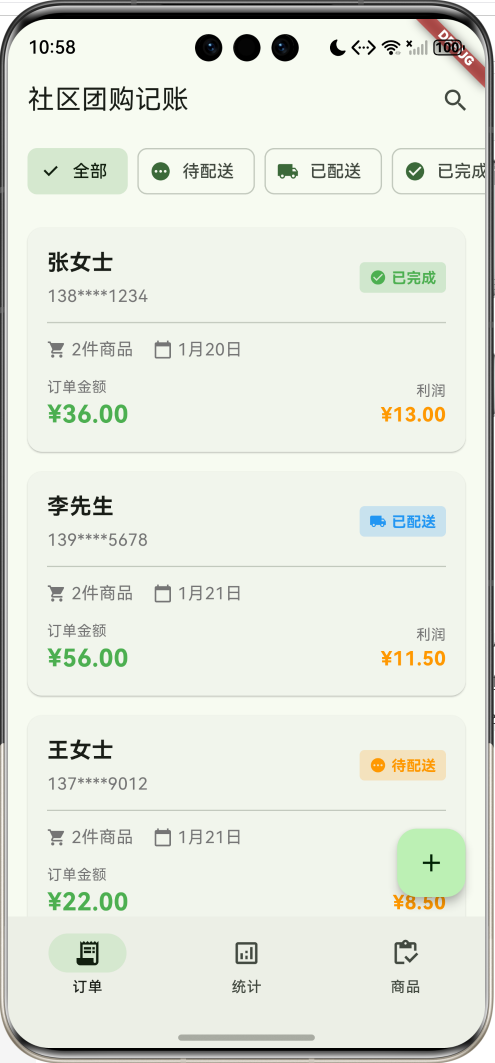
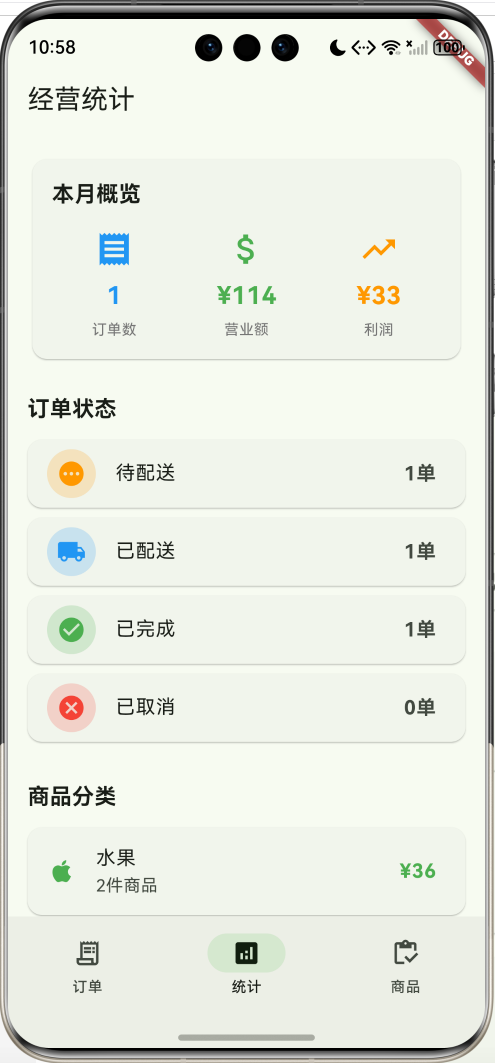
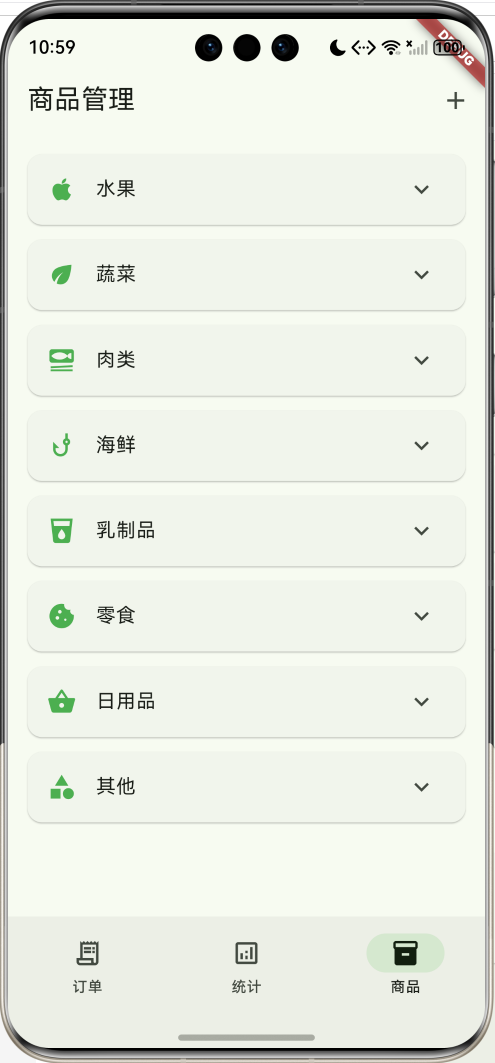
主要功能
- 📝 订单管理(创建、编辑、查看)
- 💰 收支记录(订单金额、成本、利润)
- 📊 经营统计(营业额、利润、订单数)
- 🏷️ 商品管理(分类、价格、成本)
- 📦 4种订单状态(待配送、已配送、已完成、已取消)
- 🛒 8种商品分类(水果、蔬菜、肉类、海鲜、乳制品、零食、日用品、其他)
- 📈 数据分析(订单状态分布、商品分类统计)
应用特色
- 专业记账:详细记录订单金额和成本
- 利润计算:自动计算每单利润
- 统计分析:多维度数据统计
- 状态管理:订单状态流转清晰
- 分类管理:商品分类明确
数据模型设计
1. 订单状态枚举(OrderStatus)
enum OrderStatus {
  pending('待配送', Icons.pending, Colors.orange),
  delivered('已配送', Icons.local_shipping, Colors.blue),
  completed('已完成', Icons.check_circle, Colors.green),
  cancelled('已取消', Icons.cancel, Colors.red);

  final String label;
  final IconData icon;
  final Color color;
  const OrderStatus(this.label, this.icon, this.color);
}
2. 商品分类枚举(ProductCategory)
enum ProductCategory {
  fruit('水果', Icons.apple),
  vegetable('蔬菜', Icons.eco),
  meat('肉类', Icons.set_meal),
  seafood('海鲜', Icons.phishing),
  dairy('乳制品', Icons.local_drink),
  snack('零食', Icons.cookie),
  daily('日用品', Icons.shopping_basket),
  others('其他', Icons.category);

  final String label;
  final IconData icon;
  const ProductCategory(this.label, this.icon);
}
3. 团购订单模型(GroupOrder)
class GroupOrder {
  final String id;
  final String customerName;
  final String phone;
  final List<OrderItem> items;
  final DateTime orderDate;
  OrderStatus status;
  final String note;

  double get totalAmount => items.fold(0, (sum, item) => sum + item.subtotal);
  double get totalCost => items.fold(0, (sum, item) => sum + item.totalCost);
  double get profit => totalAmount - totalCost;
}
4. 订单项模型(OrderItem)
class OrderItem {
  final String productName;
  final ProductCategory category;
  final double price;
  final double cost;
  final int quantity;
  final String unit;

  double get subtotal => price * quantity;
  double get totalCost => cost * quantity;
  double get profit => subtotal - totalCost;
}
核心功能实现
1. 订单列表展示
展示订单信息,包含客户、金额、利润等。
Widget _buildOrderCard(GroupOrder order) {
  return Card(
    child: InkWell(
      onTap: () => Navigator.push(...),
      child: Padding(
        padding: EdgeInsets.all(16),
        child: Column(
          children: [
            // 客户信息和状态
            Row(
              children: [
                Column(
                  children: [
                    Text(order.customerName),
                    Text(order.phone),
                  ],
                ),
                Container(
                  decoration: BoxDecoration(
                    color: order.status.color.withOpacity(0.2),
                  ),
                  child: Text(order.status.label),
                ),
              ],
            ),
            // 订单信息
            Row(
              children: [
                Text('${order.items.length}件商品'),
                Text('${order.orderDate}'),
              ],
            ),
            // 金额信息
            Row(
              children: [
                Column(
                  children: [
                    Text('订单金额'),
                    Text('¥${order.totalAmount}'),
                  ],
                ),
                Column(
                  children: [
                    Text('利润'),
                    Text('¥${order.profit}'),
                  ],
                ),
              ],
            ),
          ],
        ),
      ),
    ),
  );
}
2. 利润计算
自动计算订单和商品的利润。
// 订单利润
double get profit => totalAmount - totalCost;

// 商品利润
double get profit => subtotal - totalCost;
3. 统计分析
统计营业额、利润、订单数等数据。
final totalRevenue = orders.fold<double>(0, (sum, o) => sum + o.totalAmount);
final totalCost = orders.fold<double>(0, (sum, o) => sum + o.totalCost);
final totalProfit = totalRevenue - totalCost;
final completedOrders = orders.where((o) => o.status == OrderStatus.completed).length;
4. 状态更新
更新订单状态。
ElevatedButton(
  onPressed: () {
    setState(() {
      if (order.status == OrderStatus.pending) {
        order.status = OrderStatus.delivered;
      } else if (order.status == OrderStatus.delivered) {
        order.status = OrderStatus.completed;
      }
    });
  },
  child: Text('更新状态'),
)
UI组件结构
整体架构
应用采用3页NavigationBar结构:
┌─────────────────────────────────┐
│       订单页(订单列表)         │
│  ┌───────────────────────────┐  │
│  │   状态筛选栏               │  │
│  │  [全部][待配送][已配送]   │  │
│  └───────────────────────────┘  │
│  ┌───────────────────────────┐  │
│  │ 张女士  138****1234 [已完成]│
│  │ ─────────────────────────  │
│  │ 🛒 2件商品  📅 12月20日   │
│  │ 订单金额: ¥36.00          │
│  │ 利润: ¥12.00              │
│  └───────────────────────────┘  │
└─────────────────────────────────┘
┌─────────────────────────────────┐
│       统计页(经营统计)         │
│  ┌───────────────────────────┐  │
│  │   本月概览                │  │
│  │  订单数  营业额  利润     │  │
│  │    3    ¥142   ¥42       │  │
│  └───────────────────────────┘  │
│  订单状态                       │
│  [✅] 已完成    1单           │
│  [🚚] 已配送    1单           │
│  [⏳] 待配送    1单           │
│  ─────────────────────────      │
│  商品分类                       │
│  [🍎] 水果  2件  ¥36         │
│  [🥩] 肉类  1件  ¥56         │
└─────────────────────────────────┘
┌─────────────────────────────────┐
│       商品页(商品管理)         │
│  ▼ 🍎 水果                     │
│     苹果  成本:¥5/斤  ¥8/斤   │
│     香蕉  成本:¥4/斤  ¥6/斤   │
│  ▼ 🥬 蔬菜                     │
│     西红柿  成本:¥3/斤 ¥5/斤  │
└─────────────────────────────────┘
功能扩展建议
1. 客户管理
记录客户信息和购买历史。
class Customer {
  final String id;
  final String name;
  final String phone;
  final String address;
  final List<String> orderIds;
  final double totalSpent;
}
2. 库存管理
管理商品库存。
class Product {
  final String id;
  final String name;
  final ProductCategory category;
  final double price;
  final double cost;
  final int stock;
  final String unit;
}
3. 数据导出
导出订单和统计数据。
import 'package:excel/excel.dart';

Future<void> exportToExcel(List<GroupOrder> orders) async {
  var excel = Excel.createExcel();
  var sheet = excel['订单'];

  sheet.appendRow(['客户', '金额', '利润', '日期']);
  for (var order in orders) {
    sheet.appendRow([
      order.customerName,
      order.totalAmount,
      order.profit,
      order.orderDate.toString(),
    ]);
  }
}
4. 消息通知
发送订单通知给客户。
class NotificationService {
  Future<void> sendOrderNotification(GroupOrder order) async {
    // 发送短信或推送通知
  }
}
5. 财务报表
生成月度、年度财务报表。
class FinancialReport {
  final DateTime startDate;
  final DateTime endDate;
  final double totalRevenue;
  final double totalCost;
  final double totalProfit;
  final int orderCount;
}
部署指南
环境要求
- Flutter SDK: 3.0+
- Dart SDK: 3.0+
- 支持平台: Android、iOS、Web、HarmonyOS
依赖包配置
dependencies:
  flutter:
    sdk: flutter
  cupertino_icons: ^1.0.2
运行步骤
- 安装依赖
flutter pub get
- 运行应用
flutter run
- 打包发布
# Android
flutter build apk --release

# iOS
flutter build ios --release

# HarmonyOS
flutter build hap --release
技术要点
1. 计算属性
使用getter计算订单金额和利润。
2. 枚举的使用
使用增强型枚举定义订单状态和商品分类。
3. 数据聚合
使用fold方法统计总金额和利润。
4. 状态管理
使用StatefulWidget管理订单状态。
注意事项
1. 数据持久化
- 使用本地数据库存储订单
- 定期备份数据
- 支持数据恢复
2. 财务准确性
- 确保金额计算准确
- 记录每笔交易
- 定期对账
3. 用户体验
- 简化订单录入流程
- 提供快速统计
- 支持批量操作
总结
本教程介绍了社区团购记账应用的开发过程,包括数据模型设计、核心功能实现、UI组件构建等。应用功能实用,界面清晰,是团购业务管理的好工具。
欢迎加入开源鸿蒙跨平台社区:https://openharmonycrossplatform.csdn.net

作为“人工智能6S店”的官方数字引擎,为AI开发者与企业提供一个覆盖软硬件全栈、一站式门户。
更多推荐

 15
15 0
0- 0


 已为社区贡献5条内容

所有评论(0)