
鸿蒙+flutter 跨平台开发——物品过期追踪器开发实战
本文介绍了基于鸿蒙+Flutter开发的物品过期追踪器应用。该应用采用分层架构设计,使用SQLite本地数据库存储物品信息,通过响应式UI实现过期物品的智能管理。核心功能包括物品分类管理(食品/药品/化妆品等)、自动状态判断(正常/即将过期/已过期)、多维度筛选和数据统计。应用价值在于减少浪费、保障健康和提高生活效率,技术栈涵盖Flutter框架、Dart语言和HarmonyOS平台。文章详细阐述
鸿蒙+Flutter 跨平台开发——物品过期追踪器开发实战
🚀运行效果展示
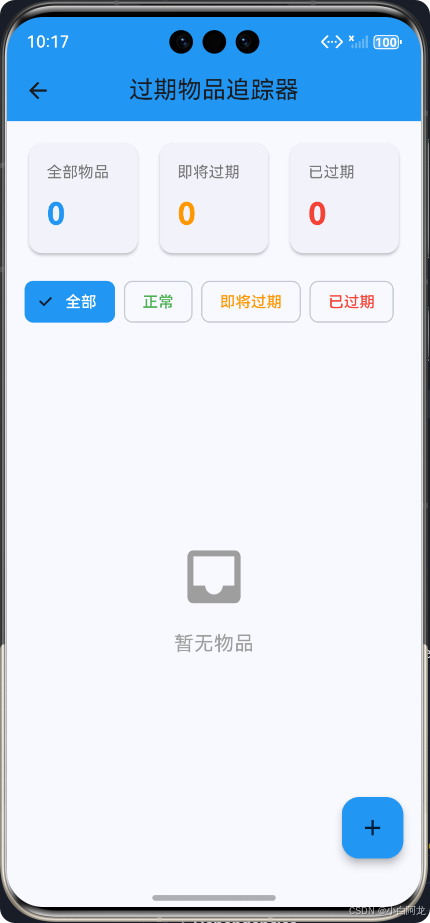
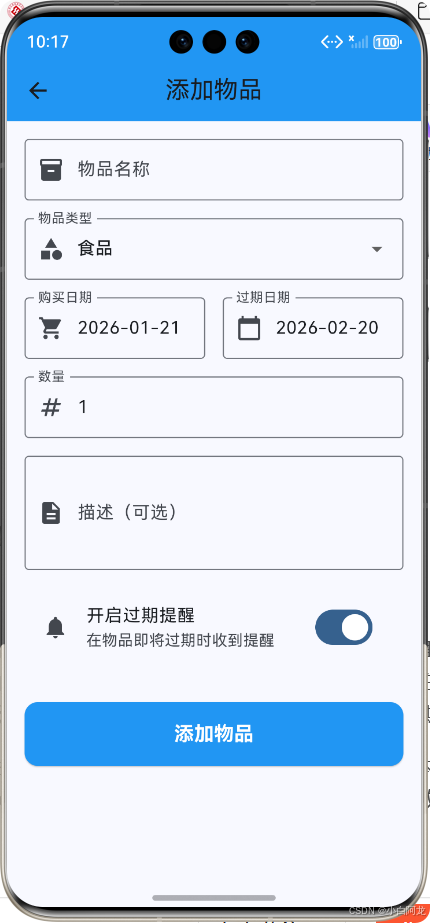
📝 前言
在快节奏的现代生活中,我们经常会遇到物品过期的问题——冰箱里的食品过期变质、药箱里的药品超过保质期、化妆品使用期限已过等。这些问题不仅造成了资源浪费,还可能对健康产生潜在威胁。为了解决这个痛点,我们决定开发一款物品过期追踪器,帮助用户高效管理家中物品的保质期。
本项目采用鸿蒙+Flutter的跨平台开发技术栈,实现了一套完整的物品过期管理系统。通过本项目,我们将深入探讨如何在鸿蒙平台上使用Flutter框架进行应用开发,包括数据模型设计、本地数据库存储、响应式UI设计等核心技术点。
🔧 技术栈
| 技术 | 版本 | 用途 |
|---|---|---|
| Flutter | 3.6.2 | 跨平台UI框架 |
| Dart | 3.6.2 | 开发语言 |
| SQLite | 2.3.3 | 本地数据库 |
| Path Provider | 2.1.4 | 文件路径管理 |
| HuaWei HarmonyOS | 3.0+ | 目标平台 |
📱 应用介绍
🌟 应用功能
物品过期追踪器是一款专注于帮助用户管理物品保质期的应用,主要功能包括:
- ✅ 物品管理:添加、编辑、删除物品信息
- ✅ 状态自动分类:根据过期日期自动分类为正常、即将过期、已过期
- ✅ 多维度筛选:支持按状态、类型筛选物品
- ✅ 直观的数据统计:展示物品总数、即将过期数、已过期数
- ✅ 清晰的视觉反馈:不同状态使用不同颜色标识
- ✅ 响应式设计:适配不同屏幕尺寸
🎯 应用价值
- 减少浪费:及时提醒用户使用即将过期的物品
- 保障健康:避免使用过期食品、药品和化妆品
- 提高生活效率:快速了解家中物品的保质期情况
- 环保节能:减少过期物品对环境的污染
🏗️ 核心功能实现
1. 系统架构设计
本项目采用分层架构设计,确保代码的可维护性和可扩展性:
- UI层:负责用户界面展示和交互
- 服务层:处理业务逻辑
- 仓库层:封装数据访问逻辑
- 数据库层:负责与SQLite数据库交互
2. 数据模型设计
2.1 物品类型枚举
/// 物品类型枚举
enum ItemType {
  /// 食品
  food,
  /// 药品
  medicine,
  /// 化妆品
  cosmetic,
  /// 其他物品
  other,
}
2.2 物品状态枚举
/// 物品状态枚举
enum ItemStatus {
  /// 正常(未过期)
  normal,
  /// 即将过期(7天内)
  soonExpire,
  /// 已过期
  expired,
}
2.3 物品模型
/// 物品模型
class Item {
  /// 物品ID
  final String id;
  /// 物品名称
  final String name;
  /// 物品类型
  final ItemType type;
  /// 购买日期
  final DateTime purchaseDate;
  /// 过期日期
  final DateTime expiryDate;
  /// 物品描述
  final String? description;
  /// 物品数量
  final int quantity;
  /// 是否开启提醒
  final bool enableReminder;
  /// 创建时间
  final DateTime createdAt;
  /// 更新时间
  final DateTime updatedAt;

  // 构造函数、toJson、fromJson等方法...

  /// 获取物品状态
  ItemStatus get status {
    final now = DateTime.now();
    final daysUntilExpiry = expiryDate.difference(now).inDays;

    if (daysUntilExpiry < 0) {
      return ItemStatus.expired;
    } else if (daysUntilExpiry <= 7) {
      return ItemStatus.soonExpire;
    } else {
      return ItemStatus.normal;
    }
  }
}
3. 数据库设计
3.1 数据库表结构
| 字段名 | 数据类型 | 约束 | 描述 |
|---|---|---|---|
| id | TEXT | PRIMARY KEY | 物品ID |
| name | TEXT | NOT NULL | 物品名称 |
| type | INTEGER | NOT NULL | 物品类型(枚举值) |
| purchaseDate | TEXT | NOT NULL | 购买日期 |
| expiryDate | TEXT | NOT NULL | 过期日期 |
| description | TEXT | 物品描述 | |
| quantity | INTEGER | NOT NULL DEFAULT 1 | 物品数量 |
| enableReminder | INTEGER | NOT NULL DEFAULT 1 | 是否开启提醒(1:是, 0:否) |
| createdAt | TEXT | NOT NULL | 创建时间 |
| updatedAt | TEXT | NOT NULL | 更新时间 |
3.2 数据库操作封装
/// 数据库助手类
class DatabaseHelper {
  /// 单例实例
  static final DatabaseHelper instance = DatabaseHelper._privateConstructor();

  /// 数据库实例
  static Database? _database;

  /// 获取数据库实例(懒加载)
  Future<Database> get database async {
    if (_database != null) return _database!;
    _database = await _initDatabase();
    return _database!;
  }

  /// 初始化数据库
  Future<Database> _initDatabase() async {
    Directory documentsDirectory = await getApplicationDocumentsDirectory();
    String path = join(documentsDirectory.path, 'expiry_tracker.db');

    return await openDatabase(
      path,
      version: databaseVersion,
      onCreate: _onCreate,
      onUpgrade: _onUpgrade,
    );
  }

  /// 其他CRUD操作方法...
}
4. UI设计与实现
4.1 主界面布局
主界面采用卡片式布局,包含三个主要部分:
- 统计卡片:展示物品总数、即将过期数、已过期数
- 筛选标签:支持按状态筛选物品
- 物品列表:以卡片形式展示物品信息
class MainScreen extends StatefulWidget {
const MainScreen({super.key});
State<MainScreen> createState() => _MainScreenState();
}
class _MainScreenState extends State<MainScreen> {
// 状态管理和业务逻辑...
Widget build(BuildContext context) {
return Scaffold(
appBar: AppBar(
title: const Text('过期物品追踪器'),
backgroundColor: Colors.blue,
centerTitle: true,
),
body: SafeArea(
child: Container(
padding: const EdgeInsets.all(16),
child: Column(
crossAxisAlignment: CrossAxisAlignment.start,
children: [
// 统计卡片
Row(
children: [
Expanded(child: _buildStatCard('全部物品', _totalCount, Colors.blue)),
const SizedBox(width: 12),
Expanded(child: _buildStatCard('即将过期', _soonExpiredCount, Colors.orange)),
const SizedBox(width: 12),
Expanded(child: _buildStatCard('已过期', _expiredCount, Colors.red)),
],
),
// 筛选标签
Padding(
padding: const EdgeInsets.only(top: 16, bottom: 12),
child: Row(
children: [
FilterChip(
label: const Text('全部'),
selected: _filterStatus == null,
onSelected: (selected) => _filterItems(selected ? null : _filterStatus),
selectedColor: Colors.blue,
),
// 其他筛选标签...
],
),
),
// 物品列表
Expanded(
child: _filteredItems.isEmpty
? Center(/* 空状态UI */)
: ListView.builder(
itemCount: _filteredItems.length,
itemBuilder: (context, index) {
final item = _filteredItems[index];
return _buildItemCard(item);
},
),
),
],
),
),
),
floatingActionButton: FloatingActionButton(
onPressed: _navigateToAddItem,
backgroundColor: Colors.blue,
child: const Icon(Icons.add),
),
);
}
// 其他辅助方法...
}
4.2 物品卡片设计
物品卡片采用清晰的信息层级设计,包含物品名称、状态标签、类型、日期信息等:
Widget _buildItemCard(Item item) {
  return Card(
    elevation: 2,
    shape: RoundedRectangleBorder(borderRadius: BorderRadius.circular(12)),
    margin: const EdgeInsets.only(bottom: 12),
    child: Padding(
      padding: const EdgeInsets.all(16),
      child: Column(
        crossAxisAlignment: CrossAxisAlignment.start,
        children: [
          // 物品名称和状态
          Row(
            mainAxisAlignment: MainAxisAlignment.spaceBetween,
            children: [
              Expanded(
                child: Text(
                  item.name,
                  style: const TextStyle(fontSize: 18, fontWeight: FontWeight.bold),
                ),
              ),
              Container(
                padding: const EdgeInsets.symmetric(horizontal: 8, vertical: 4),
                decoration: BoxDecoration(
                  color: _itemService.getItemStatusColor(item.status).withOpacity(0.2),
                  borderRadius: BorderRadius.circular(12),
                ),
                child: Text(
                  _itemService.getItemStatusName(item.status),
                  style: TextStyle(
                    fontSize: 12,
                    color: _itemService.getItemStatusColor(item.status),
                    fontWeight: FontWeight.bold,
                  ),
                ),
              ),
            ],
          ),
          // 其他物品信息...
        ],
      ),
    ),
  );
}
4.3 添加物品页面
添加物品页面采用表单布局,包含物品名称、类型、日期选择、数量等字段:
class AddItemScreen extends StatefulWidget {
const AddItemScreen({super.key});
State<AddItemScreen> createState() => _AddItemScreenState();
}
class _AddItemScreenState extends State<AddItemScreen> {
// 表单控制器和状态管理...
Widget build(BuildContext context) {
return Scaffold(
appBar: AppBar(
title: const Text('添加物品'),
backgroundColor: Colors.blue,
centerTitle: true,
),
body: SafeArea(
child: Container(
padding: const EdgeInsets.all(16),
child: Form(
key: _formKey,
child: ListView(
children: [
// 物品名称输入框
TextFormField(
controller: _nameController,
decoration: const InputDecoration(
labelText: '物品名称',
border: OutlineInputBorder(),
prefixIcon: Icon(Icons.inventory),
),
validator: (value) {
if (value == null || value.isEmpty) {
return '请输入物品名称';
}
return null;
},
),
// 其他表单字段...
// 提交按钮
ElevatedButton(
onPressed: _isSubmitting ? null : _submitForm,
style: ElevatedButton.styleFrom(
backgroundColor: Colors.blue,
foregroundColor: Colors.white,
padding: const EdgeInsets.symmetric(vertical: 16),
shape: RoundedRectangleBorder(
borderRadius: BorderRadius.circular(12),
),
),
child: _isSubmitting
? const CircularProgressIndicator(color: Colors.white)
: const Text(
'添加物品',
style: TextStyle(fontSize: 18, fontWeight: FontWeight.bold),
),
),
],
),
),
),
),
);
}
// 其他辅助方法...
}
5. 核心业务逻辑
5.1 物品状态自动计算
根据物品的过期日期和当前日期,自动计算物品状态:
ItemStatus get status {
  final now = DateTime.now();
  final daysUntilExpiry = expiryDate.difference(now).inDays;

  if (daysUntilExpiry < 0) {
    return ItemStatus.expired;
  } else if (daysUntilExpiry <= 7) {
    return ItemStatus.soonExpire;
  } else {
    return ItemStatus.normal;
  }
}
5.2 数据类型转换
处理SQLite不支持布尔类型的问题:
/// 转换为JSON
Map<String, dynamic> toJson() {
  return {
    // 其他字段...
    'enableReminder': enableReminder ? 1 : 0,
    // 其他字段...
  };
}

/// 从JSON创建Item实例
factory Item.fromJson(Map<String, dynamic> json) {
  return Item(
    // 其他字段...
    enableReminder: (json['enableReminder'] as int? ?? 1) == 1,
    // 其他字段...
  );
}
💻 关键代码展示
1. 仓库层实现
class ItemRepository {
  final DatabaseHelper _databaseHelper = DatabaseHelper.instance;

  /// 添加物品
  Future<int> addItem(Item item) async {
    final map = item.toJson();
    return await _databaseHelper.insert(map);
  }

  /// 获取所有物品
  Future<List<Item>> getAllItems() async {
    final maps = await _databaseHelper.queryAllRows();
    return maps.map((map) => Item.fromJson(map)).toList();
  }

  /// 根据状态获取物品
  Future<List<Item>> getItemsByStatus(ItemStatus status) async {
    final maps = await _databaseHelper.queryRowsByStatus(status.index);
    return maps.map((map) => Item.fromJson(map)).toList();
  }

  /// 其他仓库方法...
}
2. 服务层实现
class ItemService {
  final ItemRepository _itemRepository = ItemRepository();

  /// 添加物品
  Future<int> addItem({
    required String name,
    required ItemType type,
    required DateTime purchaseDate,
    required DateTime expiryDate,
    String? description,
    int quantity = 1,
    bool enableReminder = true,
  }) {
    final now = DateTime.now();
    final item = Item(
      id: 'item_${DateTime.now().millisecondsSinceEpoch}',
      name: name,
      type: type,
      purchaseDate: purchaseDate,
      expiryDate: expiryDate,
      description: description,
      quantity: quantity,
      enableReminder: enableReminder,
      createdAt: now,
      updatedAt: now,
    );
    return _itemRepository.addItem(item);
  }

  /// 其他服务方法...
}
3. 状态筛选逻辑
/// 筛选物品
void _filterItems(ItemStatus? status) {
  setState(() {
    _filterStatus = status;
  });
}

/// 获取筛选后的物品
List<Item> get _filteredItems {
  if (_filterStatus == null) {
    return _items;
  }
  return _items.where((item) => item.status == _filterStatus).toList();
}
📊 项目流程图
1. 物品添加流程
2. 物品状态计算流程
3. 数据访问流程
🎨 界面设计亮点
1. 视觉层次清晰
- 使用卡片式布局区分不同功能区域
- 采用不同颜色标识物品状态
- 清晰的文字层级,重要信息突出显示
2. 交互友好
- 流畅的动画效果
- 直观的操作反馈
- 便捷的添加和删除功能
3. 响应式设计
- 适配不同屏幕尺寸
- 合理的空间利用
- 良好的触控体验
📱 鸿蒙平台适配
1. 开发环境配置
- 安装华为DevEco Studio
- 配置Flutter HarmonyOS插件
- 创建HarmonyOS Flutter项目
- 配置签名和权限
2. 权限管理
在鸿蒙平台上,需要申请必要的权限:
- 文件存储权限:用于存储SQLite数据库
- 网络权限(可选):用于未来扩展云同步功能
- 通知权限(可选):用于过期提醒
3. 构建和发布
- 使用DevEco Studio构建HarmonyOS应用包(HAP)
- 配置应用信息和图标
- 提交到华为应用市场
🔍 调试与测试
1. 代码质量检查
# 运行Flutter分析器
flutter analyze

# 运行测试
flutter test

# 检查依赖
flutter pub outdated
2. 鸿蒙设备调试
- 使用华为模拟器或真机进行调试
- 查看日志输出
- 测试各种场景下的应用表现
📈 性能优化
-
数据库优化:
- 使用索引优化查询性能
- 批量操作减少数据库访问次数
- 定期清理过期数据
-
UI优化:
- 使用ListView.builder实现懒加载
- 合理使用缓存
- 减少不必要的重建
-
内存管理:
- 及时释放资源
- 避免内存泄漏
- 使用弱引用处理长生命周期对象
🎯 项目总结
通过本项目,我们掌握了:
- ✅ Flutter在鸿蒙平台上的开发流程
- ✅ 分层架构设计和实现
- ✅ SQLite数据库的使用和优化
- ✅ 响应式UI设计原则
- ✅ 状态管理和业务逻辑处理
🚀 结语
物品过期追踪器项目展示了鸿蒙+Flutter跨平台开发的强大能力。通过合理的架构设计、清晰的UI布局和完善的功能实现,我们成功打造了一款实用的物品管理工具。
在开发过程中,我们遇到了各种挑战,如数据库设计、状态管理、UI适配等,但通过团队协作和技术探索,我们都一一解决了这些问题。这个项目不仅提高了我们的技术水平,也让我们深刻理解了用户需求和产品设计的重要性。
📚 参考资料
欢迎加入开源鸿蒙跨平台社区:https://openharmonycrossplatform.csdn.net

作为“人工智能6S店”的官方数字引擎,为AI开发者与企业提供一个覆盖软硬件全栈、一站式门户。
更多推荐

 3
3 0
0- 0


 已为社区贡献29条内容

所有评论(0)