
鸿蒙+flutter 跨平台开发——汇率查询器开发实战
本文介绍了使用鸿蒙+Flutter开发跨平台汇率查询器的实战案例。项目采用三层架构设计,包含数据层、业务逻辑层和UI层,实现了实时汇率查询、货币转换、汇率变动展示等核心功能。技术栈包括Flutter 3.6.2+、Dart 3.0+、鸿蒙API 9+等,使用provider状态管理和dio网络请求。文章详细讲解了汇率数据模型、网络服务和界面布局的实现,通过模拟数据展示了货币转换计算逻辑。该项目可作
鸿蒙+flutter 跨平台开发——汇率查询器开发实战
🚀运行效果展示
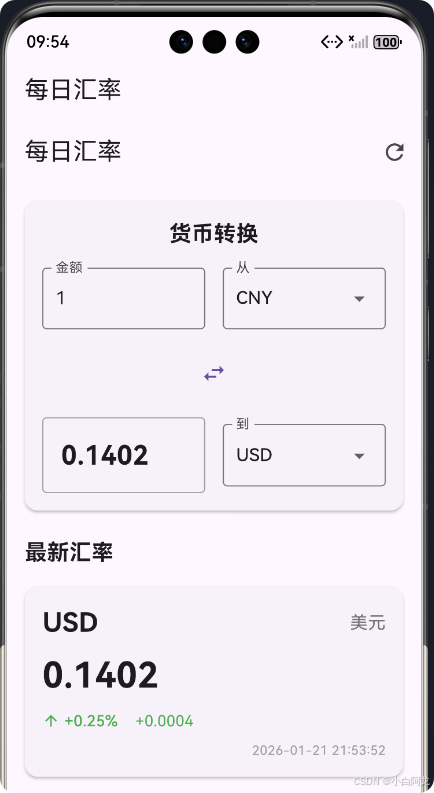
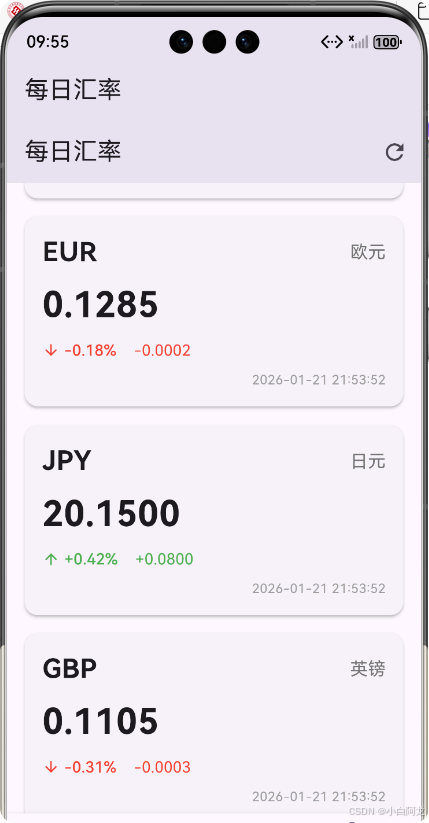
🌟 前言
随着移动互联网的快速发展,跨平台开发技术已经成为移动应用开发的重要趋势。鸿蒙系统作为华为自主研发的全场景分布式操作系统,为开发者提供了广阔的应用场景。而 Flutter 作为 Google 推出的跨平台 UI 框架,以其高性能、高保真的 UI 渲染和热重载等特性,受到了广大开发者的青睐。
本文将介绍如何使用鸿蒙+Flutter 进行跨平台开发,实现一个功能完整的汇率查询器应用。通过本实战案例,读者将学习到 Flutter 与鸿蒙系统的结合使用,以及如何实现一个具有实时汇率查询和货币转换功能的应用。
📱 项目介绍
项目概述
汇率查询器是一款帮助用户实时了解全球主要货币汇率变化的应用,支持多种货币间的快速转换。该应用采用鸿蒙+Flutter 跨平台开发技术,可同时运行在鸿蒙系统和其他移动操作系统上。
核心功能
- 🌍 实时汇率查询:展示全球主要货币对人民币的实时汇率
- 💱 货币转换:支持任意两种货币间的快速转换
- 📊 汇率变动:显示汇率的涨跌幅和变动值
- 🔄 实时更新:支持手动刷新汇率数据
- 🎨 优雅 UI:采用 Material Design 设计风格,界面简洁美观
🛠️ 技术栈
| 技术/框架 | 版本 | 用途 |
|---|---|---|
| Flutter | 3.6.2+ | 跨平台 UI 框架 |
| Dart | 3.0+ | 开发语言 |
| 鸿蒙系统 | API 9+ | 目标平台 |
| provider | 6.1.5+ | 状态管理 |
| dio | 5.9.0 | 网络请求 |
| intl | 0.19.0 | 日期时间格式化 |
🏗️ 项目架构
架构设计
本项目采用经典的三层架构设计,包括数据层、业务逻辑层和 UI 层。这种分层设计使得代码结构清晰,易于维护和扩展。
数据流程
🚀 核心功能实现
1. 汇率数据模型
汇率数据模型是应用的基础,用于存储和处理汇率信息。我们定义了两个主要的数据类:CurrencyRate 和 ExchangeRateResponse。
/// 汇率数据模型
/// 用于存储和处理货币汇率信息
class CurrencyRate {
  /// 货币代码(如:USD, EUR, CNY)
  final String code;

  /// 货币名称
  final String name;

  /// 对基准货币的汇率
  final double rate;

  /// 汇率变动百分比
  final double changePercent;

  /// 汇率变动值
  final double changeValue;

  /// 最后更新时间
  final DateTime lastUpdate;

  /// 构造函数
  CurrencyRate({
    required this.code,
    required this.name,
    required this.rate,
    required this.changePercent,
    required this.changeValue,
    required this.lastUpdate,
  });

  /// 从JSON映射创建CurrencyRate实例
  factory CurrencyRate.fromJson(Map<String, dynamic> json) {
    return CurrencyRate(
      code: json['code'] as String,
      name: json['name'] as String,
      rate: (json['rate'] as num).toDouble(),
      changePercent: (json['changePercent'] as num).toDouble(),
      changeValue: (json['changeValue'] as num).toDouble(),
      lastUpdate: DateTime.parse(json['lastUpdate'] as String),
    );
  }
}
2. 汇率网络服务
汇率网络服务负责获取和处理汇率数据,包括最新汇率、历史汇率和货币转换功能。由于是模拟环境,我们使用模拟数据来模拟 API 响应。
/// 汇率服务类
/// 用于获取和处理汇率数据
class ExchangeRateService {
  /// 基准货币代码
  static const String baseCurrency = 'CNY';

  /// 构造函数
  ExchangeRateService();

  /// 获取最新汇率数据
  /// 返回包含汇率列表的Future
  Future<List<CurrencyRate>> fetchLatestRates() async {
    try {
      // 注意:由于这是模拟环境,我们使用模拟数据
      // 实际项目中,应该调用真实的汇率API
      return _getMockRates();
    } catch (e) {
      // 如果网络请求失败,返回模拟数据作为备选
      return _getMockRates();
    }
  }

  /// 货币转换功能
  /// [amount] 要转换的金额
  /// [fromCurrency] 源货币代码
  /// [toCurrency] 目标货币代码
  /// [rates] 当前汇率列表
  /// 返回转换后的金额
  double convertCurrency({
    required double amount,
    required String fromCurrency,
    required String toCurrency,
    required List<CurrencyRate> rates,
  }) {
    // 如果源货币和目标货币相同,直接返回原金额
    if (fromCurrency == toCurrency) {
      return amount;
    }

    // 获取源货币对基准货币的汇率
    final fromRate = fromCurrency == baseCurrency
        ? 1.0
        : rates.firstWhere((rate) => rate.code == fromCurrency).rate;

    // 获取目标货币对基准货币的汇率
    final toRate = toCurrency == baseCurrency
        ? 1.0
        : rates.firstWhere((rate) => rate.code == toCurrency).rate;

    // 转换计算:amount * (toRate / fromRate)
    return amount * (toRate / fromRate);
  }

  /// 获取模拟汇率数据
  /// 用于开发和测试
  List<CurrencyRate> _getMockRates() {
    final now = DateTime.now();
    return [
      CurrencyRate(
        code: 'USD',
        name: '美元',
        rate: 0.1402,
        changePercent: 0.25,
        changeValue: 0.0004,
        lastUpdate: now,
      ),
      CurrencyRate(
        code: 'EUR',
        name: '欧元',
        rate: 0.1285,
        changePercent: -0.18,
        changeValue: -0.0002,
        lastUpdate: now,
      ),
      // 更多货币数据...
    ];
  }
}
3. 汇率显示界面
汇率显示界面是应用的核心部分,负责展示实时汇率列表和货币转换功能。
3.1 界面布局
Widget build(BuildContext context) {
return Scaffold(
appBar: AppBar(
title: const Text('每日汇率'),
actions: [
IconButton(
onPressed: _loadRates,
icon: const Icon(Icons.refresh),
tooltip: '刷新汇率',
),
],
),
body: _isLoading
? const Center(child: CircularProgressIndicator())
: _errorMessage != null
? Center(
child: Column(
mainAxisAlignment: MainAxisAlignment.center,
children: [
Text(_errorMessage!),
ElevatedButton(
onPressed: _loadRates,
child: const Text('重试'),
),
],
),
)
: SingleChildScrollView(
child: Column(
children: [
// 货币转换部分
_buildConverterSection(),
// 汇率列表标题
const Padding(
padding: EdgeInsets.symmetric(horizontal: 16, vertical: 8),
child: Align(
alignment: Alignment.centerLeft,
child: Text(
'最新汇率',
style: TextStyle(
fontSize: 20,
fontWeight: FontWeight.bold,
),
),
),
),
// 汇率列表
..._rates.map(_buildRateCard),
const SizedBox(height: 16),
],
),
),
);
}
3.2 货币转换功能
/// 构建货币转换部分
Widget _buildConverterSection() {
  return Card(
    elevation: 2,
    margin: const EdgeInsets.all(16),
    child: Padding(
      padding: const EdgeInsets.all(16),
      child: Column(
        crossAxisAlignment: CrossAxisAlignment.stretch,
        children: [
          const Text(
            '货币转换',
            style: TextStyle(
              fontSize: 20,
              fontWeight: FontWeight.bold,
            ),
            textAlign: TextAlign.center,
          ),
          const SizedBox(height: 16),
          Row(
            children: [
              Expanded(
                child: TextField(
                  controller: _amountController,
                  keyboardType: TextInputType.numberWithOptions(decimal: true),
                  onChanged: (value) => _calculateConversion(),
                  decoration: const InputDecoration(
                    labelText: '金额',
                    border: OutlineInputBorder(),
                  ),
                ),
              ),
              const SizedBox(width: 16),
              Expanded(
                child: DropdownButtonFormField<String>(
                  value: _fromCurrency,
                  onChanged: (value) {
                    if (value != null) {
                      setState(() {
                        _fromCurrency = value;
                        _calculateConversion();
                      });
                    }
                  },
                  items: [
                    'CNY',
                    ..._rates.map((rate) => rate.code),
                  ].map((currency) {
                    return DropdownMenuItem(
                      value: currency,
                      child: Text(currency),
                    );
                  }).toList(),
                  decoration: const InputDecoration(
                    labelText: '从',
                    border: OutlineInputBorder(),
                  ),
                ),
              ),
            ],
          ),
          const SizedBox(height: 16),
          Row(
            mainAxisAlignment: MainAxisAlignment.center,
            children: [
              IconButton(
                onPressed: _swapCurrencies,
                icon: const Icon(Icons.swap_horiz),
                color: Theme.of(context).primaryColor,
              ),
            ],
          ),
          const SizedBox(height: 16),
          Row(
            children: [
              Expanded(
                child: Container(
                  padding: const EdgeInsets.all(16),
                  decoration: BoxDecoration(
                    border: Border.all(color: Colors.grey),
                    borderRadius: BorderRadius.circular(4),
                  ),
                  child: Text(
                    _conversionResult.toStringAsFixed(4),
                    style: const TextStyle(
                      fontSize: 24,
                      fontWeight: FontWeight.bold,
                    ),
                  ),
                ),
              ),
              const SizedBox(width: 16),
              Expanded(
                child: DropdownButtonFormField<String>(
                  value: _toCurrency,
                  onChanged: (value) {
                    if (value != null) {
                      setState(() {
                        _toCurrency = value;
                        _calculateConversion();
                      });
                    }
                  },
                  items: [
                    'CNY',
                    ..._rates.map((rate) => rate.code),
                  ].map((currency) {
                    return DropdownMenuItem(
                      value: currency,
                      child: Text(currency),
                    );
                  }).toList(),
                  decoration: const InputDecoration(
                    labelText: '到',
                    border: OutlineInputBorder(),
                  ),
                ),
              ),
            ],
          ),
        ],
      ),
    ),
  );
}
3.3 汇率卡片
/// 构建汇率卡片
Widget _buildRateCard(CurrencyRate rate) {
  final isIncrease = rate.changePercent > 0;
  return Card(
    elevation: 2,
    margin: const EdgeInsets.symmetric(horizontal: 16, vertical: 8),
    child: Padding(
      padding: const EdgeInsets.all(16),
      child: Column(
        crossAxisAlignment: CrossAxisAlignment.start,
        children: [
          Row(
            mainAxisAlignment: MainAxisAlignment.spaceBetween,
            children: [
              Text(
                rate.code,
                style: const TextStyle(
                  fontSize: 24,
                  fontWeight: FontWeight.bold,
                ),
              ),
              Text(
                rate.name,
                style: TextStyle(
                  fontSize: 16,
                  color: Colors.grey[600],
                ),
              ),
            ],
          ),
          const SizedBox(height: 8),
          Text(
            rate.rate.toStringAsFixed(4),
            style: const TextStyle(
              fontSize: 32,
              fontWeight: FontWeight.bold,
            ),
          ),
          const SizedBox(height: 8),
          Row(
            children: [
              Icon(
                isIncrease ? Icons.arrow_upward : Icons.arrow_downward,
                color: isIncrease ? Colors.green : Colors.red,
                size: 16,
              ),
              const SizedBox(width: 4),
              Text(
                '${isIncrease ? '+' : ''}${rate.changePercent.toStringAsFixed(2)}%',
                style: TextStyle(
                  color: isIncrease ? Colors.green : Colors.red,
                  fontSize: 14,
                  fontWeight: FontWeight.w500,
                ),
              ),
              const SizedBox(width: 16),
              Text(
                '${isIncrease ? '+' : ''}${rate.changeValue.toStringAsFixed(4)}',
                style: TextStyle(
                  color: isIncrease ? Colors.green : Colors.red,
                  fontSize: 14,
                ),
              ),
            ],
          ),
          const SizedBox(height: 8),
          Align(
            alignment: Alignment.bottomRight,
            child: Text(
              DateFormat('yyyy-MM-dd HH:mm:ss').format(rate.lastUpdate),
              style: TextStyle(
                fontSize: 12,
                color: Colors.grey[500],
              ),
            ),
          ),
        ],
      ),
    ),
  );
}
4. 主应用集成
将汇率查询器集成到主应用中,通过底部导航栏进行访问。
/// 选项卡列表
final List<Widget> _screens = [
  const MultiFunctionFlipClockScreen(),
  const PrintPaperSimulatorScreen(),
  const ExchangeRateScreen(),
];

/// 选项卡标题
final List<String> _titles = [
  '多功能翻页时钟',
  '打印纸模拟器',
  '每日汇率',
];

/// 底部导航栏
BottomNavigationBar(
  currentIndex: _currentIndex,
  onTap: (index) {
    setState(() {
      _currentIndex = index;
    });
  },
  items: const [
    BottomNavigationBarItem(
      icon: Icon(Icons.access_time),
      label: '翻页时钟',
    ),
    BottomNavigationBarItem(
      icon: Icon(Icons.print),
      label: '打印纸模拟器',
    ),
    BottomNavigationBarItem(
      icon: Icon(Icons.currency_exchange),
      label: '每日汇率',
    ),
  ],
),
🤝 鸿蒙适配
1. 环境配置
要将 Flutter 应用适配到鸿蒙系统,需要进行以下环境配置:
- 安装鸿蒙 SDK 和开发工具
- 配置 Flutter 鸿蒙插件
- 修改应用配置文件
2. 适配要点
- 权限适配:鸿蒙系统对权限管理更加严格,需要在应用配置文件中声明所需权限
- UI 适配:鸿蒙系统有自己的设计规范,需要适当调整应用的 UI 风格
- 性能优化:针对鸿蒙系统的特性进行性能优化,确保应用流畅运行
- 分布式能力:充分利用鸿蒙系统的分布式能力,实现多设备协同
3. 构建和运行
使用以下命令构建鸿蒙版本的应用:
flutter build ohos
安装到鸿蒙设备:
flutter run -d ohos
📊 项目总结
功能实现
本项目成功实现了一个功能完整的汇率查询器应用,包括:
- ✅ 实时汇率查询
- ✅ 多种货币间的快速转换
- ✅ 汇率变动趋势展示
- ✅ 支持手动刷新数据
- ✅ 优雅的 UI 设计
- ✅ 良好的错误处理
📝 结语
鸿蒙+Flutter 跨平台开发为移动应用开发提供了新的思路和方向。通过本项目的实战,我们深入了解了 Flutter 与鸿蒙系统的结合使用,掌握了跨平台应用开发的核心技术和最佳实践。
随着鸿蒙系统的不断发展和完善,Flutter 与鸿蒙的结合将会越来越紧密,为开发者提供更多的可能性。我们期待看到更多基于鸿蒙+Flutter 开发的优秀应用出现。
最后,感谢您的阅读!如果您对本项目有任何建议或疑问,欢迎在评论区留言讨论。
欢迎加入开源鸿蒙跨平台社区:https://openharmonycrossplatform.csdn.net

作为“人工智能6S店”的官方数字引擎,为AI开发者与企业提供一个覆盖软硬件全栈、一站式门户。
更多推荐

 2
2 0
0- 0


 已为社区贡献29条内容

所有评论(0)