
Flutter 框架跨平台鸿蒙开发 - 旅行规划助手应用开发教程
本教程介绍了旅行规划助手应用的开发过程,包括数据模型设计、核心功能实现、UI组件构建等。应用功能全面,界面清晰,是规划旅行的实用工具。欢迎加入开源鸿蒙跨平台社区:https://openharmonycrossplatform.csdn.net。
·
Flutter旅行规划助手应用开发教程
项目简介
这是一个旅行规划助手应用,帮助用户规划和管理旅行行程。用户可以创建旅行计划、安排每日行程、管理预算、记录景点等,让旅行更加有条理。
运行效果图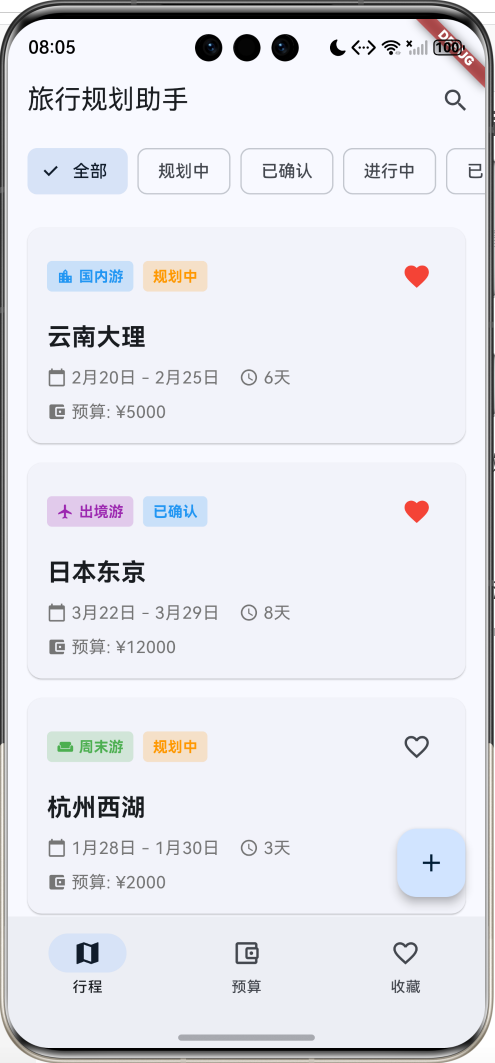
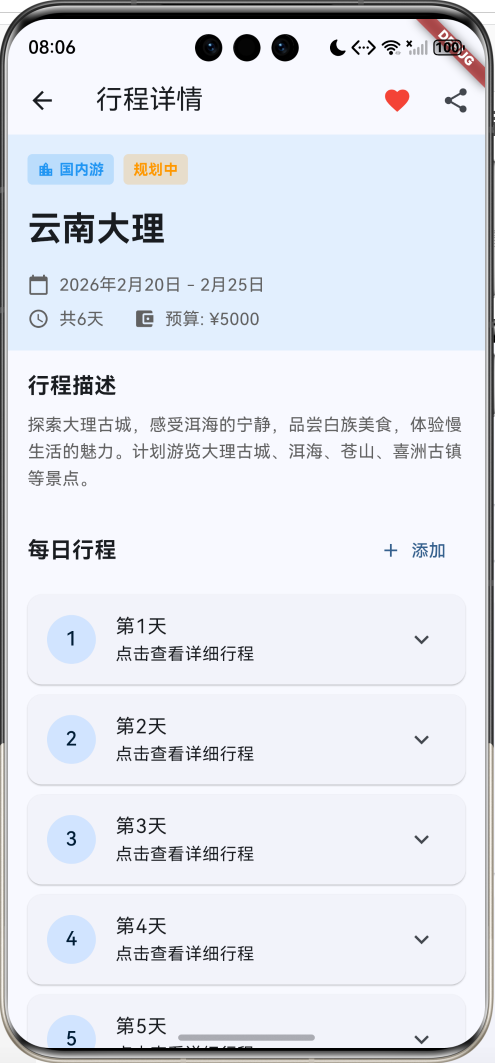
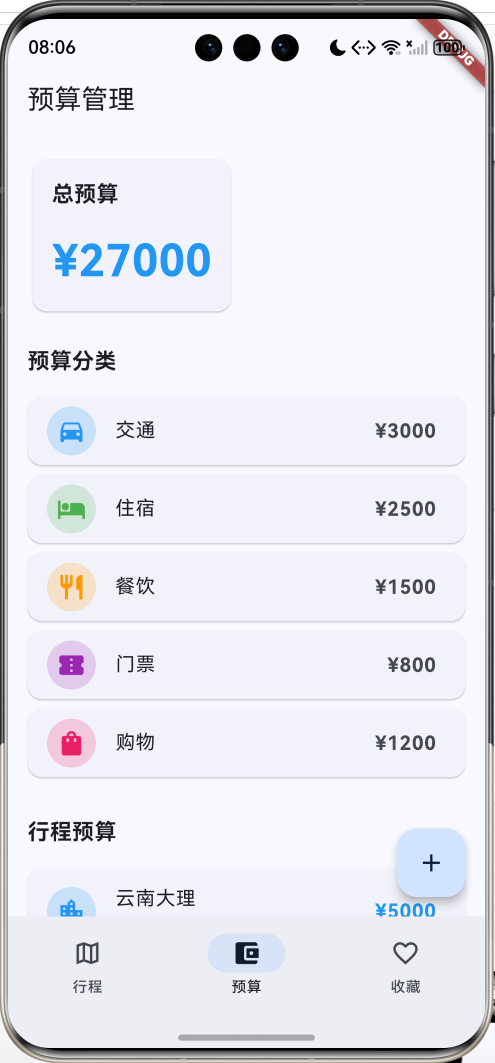
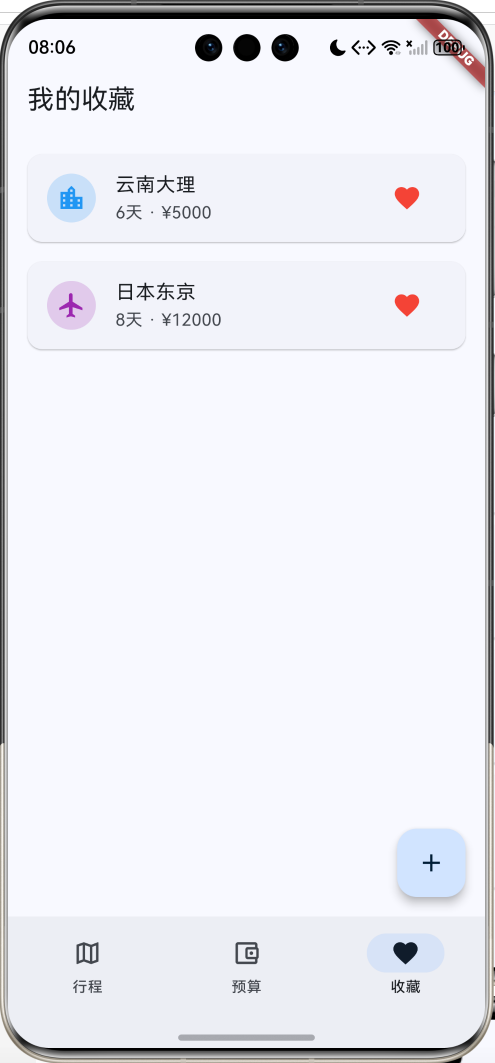
主要功能
- 🗺️ 行程管理(创建、编辑、查看)
- 📅 日期规划(开始日期、结束日期、天数)
- 💰 预算管理(总预算、分类预算)
- 📍 景点记录(景点类型、地址、费用)
- 🏷️ 4种旅行类型(国内游、出境游、周末游、长途游)
- 📊 4种行程状态(规划中、已确认、进行中、已完成)
- ⭐ 收藏功能
- 📤 分享功能
应用特色
- 分类清晰:多种旅行类型和状态
- 预算管理:详细的预算分类和统计
- 行程规划:每日行程安排
- 信息全面:目的地、日期、预算一目了然
- 界面友好:蓝色主题,清新舒适
数据模型设计
1. 旅行类型枚举(TripType)
enum TripType {
  domestic('国内游', Icons.location_city, Colors.blue),
  international('出境游', Icons.flight, Colors.purple),
  weekend('周末游', Icons.weekend, Colors.green),
  longTrip('长途游', Icons.luggage, Colors.orange);

  final String label;
  final IconData icon;
  final Color color;
  const TripType(this.label, this.icon, this.color);
}
2. 行程状态枚举(TripStatus)
enum TripStatus {
  planning('规划中', Colors.orange),
  confirmed('已确认', Colors.blue),
  ongoing('进行中', Colors.green),
  completed('已完成', Colors.grey);

  final String label;
  final Color color;
  const TripStatus(this.label, this.color);
}
3. 景点类型枚举(AttractionType)
enum AttractionType {
  scenic('自然景观', Icons.landscape),
  historical('历史古迹', Icons.account_balance),
  museum('博物馆', Icons.museum),
  shopping('购物', Icons.shopping_bag),
  food('美食', Icons.restaurant),
  entertainment('娱乐', Icons.attractions);

  final String label;
  final IconData icon;
  const AttractionType(this.label, this.icon);
}
4. 旅行计划模型(TravelPlan)
class TravelPlan {
  final String id;
  final String destination;
  final TripType type;
  final DateTime startDate;
  final DateTime endDate;
  final double budget;
  final String description;
  TripStatus status;
  final List<DayItinerary> itinerary;
  bool isFavorite;

  int get days => endDate.difference(startDate).inDays + 1;
}
5. 每日行程模型(DayItinerary)
class DayItinerary {
  final int day;
  final List<Attraction> attractions;
  final String note;
}
6. 景点模型(Attraction)
class Attraction {
  final String id;
  final String name;
  final AttractionType type;
  final String address;
  final double estimatedCost;
  final String openingHours;
  final String note;
}
核心功能实现
1. 行程列表展示
使用卡片式布局展示旅行计划。
Widget _buildTripCard(TravelPlan trip) {
  return Card(
    child: InkWell(
      onTap: () => Navigator.push(...),
      child: Padding(
        padding: EdgeInsets.all(16),
        child: Column(
          children: [
            // 类型和状态标签
            Row(
              children: [
                Container(
                  decoration: BoxDecoration(
                    color: trip.type.color.withOpacity(0.2),
                  ),
                  child: Text(trip.type.label),
                ),
                Container(
                  decoration: BoxDecoration(
                    color: trip.status.color.withOpacity(0.2),
                  ),
                  child: Text(trip.status.label),
                ),
              ],
            ),
            // 目的地
            Text(trip.destination),
            // 日期和天数
            Row(
              children: [
                Icon(Icons.calendar_today),
                Text('${trip.startDate} - ${trip.endDate}'),
                Icon(Icons.access_time),
                Text('${trip.days}天'),
              ],
            ),
            // 预算
            Row(
              children: [
                Icon(Icons.account_balance_wallet),
                Text('预算: ¥${trip.budget}'),
              ],
            ),
          ],
        ),
      ),
    ),
  );
}
2. 状态筛选
用户可以按行程状态筛选。
List<TravelPlan> get _filteredTrips {
  if (_selectedStatus == null) {
    return _trips;
  }
  return _trips.where((t) => t.status == _selectedStatus).toList();
}
3. 预算管理
展示总预算和分类预算。
Widget _buildBudgetItem(String label, double amount, IconData icon, Color color) {
  return Card(
    child: ListTile(
      leading: CircleAvatar(
        backgroundColor: color.withOpacity(0.2),
        child: Icon(icon, color: color),
      ),
      title: Text(label),
      trailing: Text('¥${amount.toStringAsFixed(0)}'),
    ),
  );
}
4. 每日行程
使用ExpansionTile展示每日行程。
ExpansionTile(
  leading: CircleAvatar(child: Text('${index + 1}')),
  title: Text('第${index + 1}天'),
  subtitle: Text('点击查看详细行程'),
  children: [
    // 行程详情
  ],
)
UI组件结构
整体架构
应用采用3页NavigationBar结构:
┌─────────────────────────────────┐
│       行程页(旅行列表)         │
│  ┌───────────────────────────┐  │
│  │   状态筛选栏               │  │
│  │  [全部][规划中][已确认]   │  │
│  └───────────────────────────┘  │
│  ┌───────────────────────────┐  │
│  │ [国内游][规划中]     [❤️] │  │
│  │ 云南大理                  │  │
│  │ 📅 5月1日-5月6日  ⏰ 6天 │  │
│  │ 💰 预算: ¥5000           │  │
│  └───────────────────────────┘  │
└─────────────────────────────────┘
┌─────────────────────────────────┐
│       预算页(预算管理)         │
│  ┌───────────────────────────┐  │
│  │   总预算                  │  │
│  │   ¥27,000                │  │
│  └───────────────────────────┘  │
│  预算分类                       │
│  [🚗] 交通    ¥3,000          │
│  [🏨] 住宿    ¥2,500          │
│  [🍴] 餐饮    ¥1,500          │
└─────────────────────────────────┘
┌─────────────────────────────────┐
│       收藏页(我的收藏)         │
│  [🗺️] 云南大理  6天 ¥5000 [❤️]│
│  [✈️] 日本东京  8天 ¥12000[❤️]│
└─────────────────────────────────┘
详情页布局
┌─────────────────────────────────┐
│  AppBar [❤️] [分享]            │
├─────────────────────────────────┤
│  ┌───────────────────────────┐  │
│  │ [国内游][规划中]          │  │
│  │ 云南大理                  │  │
│  │ 📅 2024年5月1日-5月6日   │  │
│  │ ⏰ 共6天  💰 预算:¥5000  │  │
│  └───────────────────────────┘  │
│  行程描述                       │
│  探索大理古城,感受洱海...      │
│  ─────────────────────────      │
│  每日行程              [添加]   │
│  ○ 第1天                       │
│     点击查看详细行程            │
│  ○ 第2天                       │
│     点击查看详细行程            │
└─────────────────────────────────┘
功能扩展建议
1. 地图集成
集成地图显示景点位置和路线规划。
import 'package:google_maps_flutter/google_maps_flutter.dart';
class MapPage extends StatelessWidget {
Widget build(BuildContext context) {
return GoogleMap(
initialCameraPosition: CameraPosition(
target: LatLng(25.6, 100.2),
zoom: 12,
),
markers: _buildMarkers(),
);
}
}
2. 天气查询
查询目的地天气预报。
class WeatherInfo {
  final DateTime date;
  final String weather;
  final int temperature;
  final String icon;
}
3. 费用记录
记录实际花费,对比预算。
class Expense {
  final String id;
  final String category;
  final double amount;
  final DateTime date;
  final String note;
}
4. 照片相册
记录旅行照片。
import 'package:image_picker/image_picker.dart';

Future<void> addPhoto() async {
  final picker = ImagePicker();
  final image = await picker.pickImage(source: ImageSource.camera);
}
5. 行程分享
生成行程卡片分享给好友。
import 'package:share_plus/share_plus.dart';

void shareTrip(TravelPlan trip) {
  Share.share(
    '${trip.destination}\n'
    '${trip.startDate} - ${trip.endDate}\n'
    '${trip.days}天 · ¥${trip.budget}',
  );
}
部署指南
环境要求
- Flutter SDK: 3.0+
- Dart SDK: 3.0+
- 支持平台: Android、iOS、Web、HarmonyOS
依赖包配置
dependencies:
  flutter:
    sdk: flutter
  cupertino_icons: ^1.0.2
运行步骤
- 安装依赖
flutter pub get
- 运行应用
flutter run
- 打包发布
# Android
flutter build apk --release

# iOS
flutter build ios --release

# HarmonyOS
flutter build hap --release
技术要点
1. 日期计算
计算旅行天数。
int get days => endDate.difference(startDate).inDays + 1;
2. 枚举的使用
使用增强型枚举定义旅行类型和状态。
3. ExpansionTile
使用ExpansionTile创建可展开的每日行程。
4. 状态管理
使用StatefulWidget管理行程列表和筛选状态。
注意事项
1. 数据持久化
- 使用本地数据库存储行程
- 定期备份数据
- 支持数据导入导出
2. 离线功能
- 支持离线查看行程
- 缓存地图数据
- 离线记录费用
3. 用户体验
- 简化创建流程
- 提供模板选择
- 智能推荐景点
总结
本教程介绍了旅行规划助手应用的开发过程,包括数据模型设计、核心功能实现、UI组件构建等。应用功能全面,界面清晰,是规划旅行的实用工具。
欢迎加入开源鸿蒙跨平台社区:https://openharmonycrossplatform.csdn.net

作为“人工智能6S店”的官方数字引擎,为AI开发者与企业提供一个覆盖软硬件全栈、一站式门户。
更多推荐


 0
0 0
0- 0


 已为社区贡献20条内容

所有评论(0)