
Flutter 框架跨平台鸿蒙开发 - 家庭账单共享本开发教程
expense, // 支出income, // 收入家庭账单共享本是一个简洁实用的Flutter应用,专注于家庭财务管理的核心功能。
·
Flutter家庭账单共享本开发教程
项目简介
家庭账单共享本是一款简洁实用的家庭财务管理应用,专为家庭成员间的账单记录和费用分摊而设计。应用采用Material Design 3设计语言,提供直观友好的用户界面和完整的账单管理功能。
运行效果图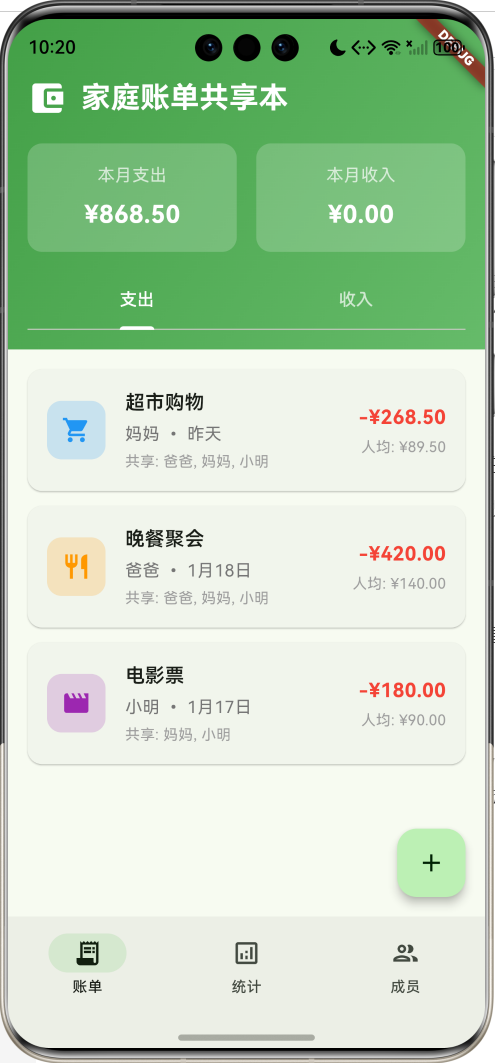
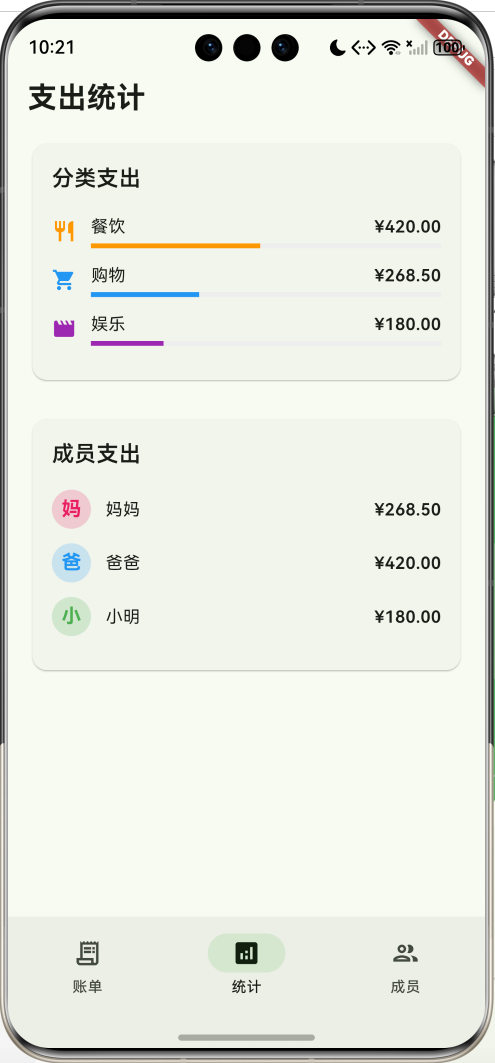
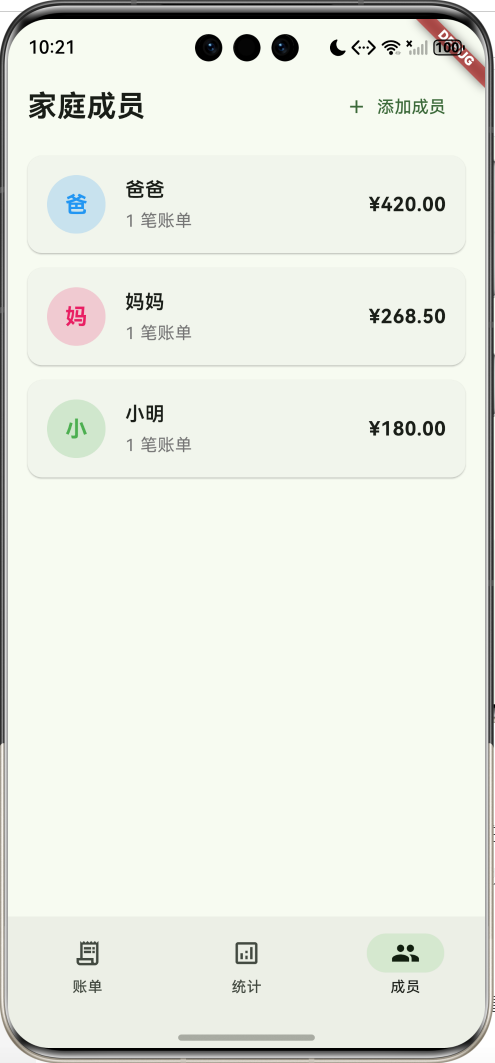
核心功能特性
- 账单记录管理:支持收入和支出两种类型的账单记录
- 分类统计分析:按分类和成员统计支出情况
- 家庭成员管理:添加和管理家庭成员信息
- 费用共享功能:支持多人分摊账单费用
- 简洁易用界面:专注核心功能,操作简单直观
技术架构特点
- 单文件架构:所有代码集中在一个文件中,便于理解和维护
- 本地数据存储:使用内存存储,重启后数据重置(可扩展为持久化存储)
- 响应式设计:适配不同屏幕尺寸
- Material Design 3:现代化的UI设计风格
项目架构设计
整体架构图
数据流架构
数据模型设计
核心数据结构
1. 账单模型(Bill)
class Bill {
  final String id;              // 唯一标识
  final String title;           // 账单标题
  final double amount;          // 金额
  final String category;        // 分类
  final String payer;           // 付款人
  final DateTime date;          // 日期
  final String description;     // 描述
  final List<String> sharedWith; // 共享成员
  final BillType type;          // 账单类型(收入/支出)
}
2. 家庭成员模型(FamilyMember)
class FamilyMember {
  final String id;              // 唯一标识
  final String name;            // 姓名
  final String avatar;          // 头像(预留)
  final Color color;            // 代表颜色
}
3. 账单分类模型(BillCategory)
class BillCategory {
  final String name;            // 分类名称
  final IconData icon;          // 图标
  final Color color;            // 颜色
}
枚举类型定义
账单类型枚举
enum BillType {
  expense,    // 支出
  income,     // 收入
}
核心功能实现
1. 主页面结构
主页面采用底部导航栏设计,包含三个主要功能模块:
Widget build(BuildContext context) {
  return Scaffold(
    body: [
      _buildBillsPage(),      // 账单页面
      _buildStatsPage(),      // 统计页面
      _buildMembersPage(),    // 成员页面
    ][_selectedIndex],
    bottomNavigationBar: NavigationBar(
      selectedIndex: _selectedIndex,
      onDestinationSelected: (index) {
        setState(() {
          _selectedIndex = index;
        });
      },
      destinations: const [
        NavigationDestination(
          icon: Icon(Icons.receipt_long_outlined),
          selectedIcon: Icon(Icons.receipt_long),
          label: '账单',
        ),
        NavigationDestination(
          icon: Icon(Icons.analytics_outlined),
          selectedIcon: Icon(Icons.analytics),
          label: '统计',
        ),
        NavigationDestination(
          icon: Icon(Icons.people_outlined),
          selectedIcon: Icon(Icons.people),
          label: '成员',
        ),
      ],
    ),
    floatingActionButton: _selectedIndex == 0
        ? FloatingActionButton(
            onPressed: _showAddBillDialog,
            child: const Icon(Icons.add),
          )
        : null,
  );
}
2. 账单页面实现
页面头部设计
Widget _buildBillsHeader() {
  final totalExpense = _bills
      .where((bill) => bill.type == BillType.expense)
      .fold(0.0, (sum, bill) => sum + bill.amount);
  final totalIncome = _bills
      .where((bill) => bill.type == BillType.income)
      .fold(0.0, (sum, bill) => sum + bill.amount);

  return Container(
    padding: const EdgeInsets.fromLTRB(16, 48, 16, 16),
    decoration: BoxDecoration(
      gradient: LinearGradient(
        colors: [Colors.green.shade600, Colors.green.shade400],
        begin: Alignment.topLeft,
        end: Alignment.bottomRight,
      ),
    ),
    child: Column(
      children: [
        // 应用标题
        Row(
          children: [
            const Icon(Icons.account_balance_wallet, color: Colors.white, size: 32),
            const SizedBox(width: 12),
            const Expanded(
              child: Text(
                '家庭账单共享本',
                style: TextStyle(
                  fontSize: 24,
                  fontWeight: FontWeight.bold,
                  color: Colors.white,
                ),
              ),
            ),
          ],
        ),
        const SizedBox(height: 20),
        // 收支统计卡片
        Row(
          children: [
            Expanded(
              child: _buildSummaryCard('本月支出', totalExpense, Colors.red.shade400),
            ),
            const SizedBox(width: 16),
            Expanded(
              child: _buildSummaryCard('本月收入', totalIncome, Colors.blue.shade400),
            ),
          ],
        ),
        const SizedBox(height: 16),
        // 收支切换标签
        TabBar(
          controller: _tabController,
          indicatorColor: Colors.white,
          labelColor: Colors.white,
          unselectedLabelColor: Colors.white70,
          tabs: const [
            Tab(text: '支出'),
            Tab(text: '收入'),
          ],
        ),
      ],
    ),
  );
}
账单列表展示
Widget _buildBillCard(Bill bill) {
  final category = _categories.firstWhere(
    (cat) => cat.name == bill.category,
    orElse: () => _categories.last,
  );

  return Card(
    margin: const EdgeInsets.only(bottom: 12),
    child: InkWell(
      onTap: () => _showBillDetails(bill),
      borderRadius: BorderRadius.circular(12),
      child: Padding(
        padding: const EdgeInsets.all(16),
        child: Row(
          children: [
            // 分类图标
            Container(
              width: 48,
              height: 48,
              decoration: BoxDecoration(
                color: category.color.withValues(alpha: 0.2),
                borderRadius: BorderRadius.circular(12),
              ),
              child: Icon(
                category.icon,
                color: category.color,
                size: 24,
              ),
            ),
            const SizedBox(width: 16),
            // 账单信息
            Expanded(
              child: Column(
                crossAxisAlignment: CrossAxisAlignment.start,
                children: [
                  Text(
                    bill.title,
                    style: const TextStyle(
                      fontSize: 16,
                      fontWeight: FontWeight.w600,
                    ),
                  ),
                  const SizedBox(height: 4),
                  Text(
                    '${bill.payer} • ${_formatDate(bill.date)}',
                    style: TextStyle(
                      fontSize: 14,
                      color: Colors.grey.shade600,
                    ),
                  ),
                  if (bill.sharedWith.isNotEmpty) ...[
                    const SizedBox(height: 4),
                    Text(
                      '共享: ${bill.sharedWith.join(', ')}',
                      style: TextStyle(
                        fontSize: 12,
                        color: Colors.grey.shade500,
                      ),
                    ),
                  ],
                ],
              ),
            ),
            // 金额显示
            Column(
              crossAxisAlignment: CrossAxisAlignment.end,
              children: [
                Text(
                  '${bill.type == BillType.expense ? '-' : '+'}¥${bill.amount.toStringAsFixed(2)}',
                  style: TextStyle(
                    fontSize: 16,
                    fontWeight: FontWeight.bold,
                    color: bill.type == BillType.expense ? Colors.red : Colors.green,
                  ),
                ),
                if (bill.sharedWith.isNotEmpty) ...[
                  const SizedBox(height: 4),
                  Text(
                    '人均: ¥${(bill.amount / bill.sharedWith.length).toStringAsFixed(2)}',
                    style: TextStyle(
                      fontSize: 12,
                      color: Colors.grey.shade500,
                    ),
                  ),
                ],
              ],
            ),
          ],
        ),
      ),
    ),
  );
}
3. 统计页面实现
分类支出统计
Widget _buildCategoryStats() {
  final categoryStats = <String, double>{};
  for (final bill in _bills.where((b) => b.type == BillType.expense)) {
    categoryStats[bill.category] = (categoryStats[bill.category] ?? 0) + bill.amount;
  }

  final sortedCategories = categoryStats.entries.toList()
    ..sort((a, b) => b.value.compareTo(a.value));

  return Card(
    child: Padding(
      padding: const EdgeInsets.all(16),
      child: Column(
        crossAxisAlignment: CrossAxisAlignment.start,
        children: [
          const Text(
            '分类支出',
            style: TextStyle(fontSize: 18, fontWeight: FontWeight.w600),
          ),
          const SizedBox(height: 16),
          ...sortedCategories.map((entry) {
            final category = _categories.firstWhere(
              (cat) => cat.name == entry.key,
              orElse: () => _categories.last,
            );
            final total = _bills
                .where((b) => b.type == BillType.expense)
                .fold(0.0, (sum, bill) => sum + bill.amount);
            final percentage = total > 0 ? (entry.value / total) * 100 : 0.0;

            return Padding(
              padding: const EdgeInsets.only(bottom: 12),
              child: Row(
                children: [
                  Icon(category.icon, color: category.color, size: 20),
                  const SizedBox(width: 12),
                  Expanded(
                    child: Column(
                      crossAxisAlignment: CrossAxisAlignment.start,
                      children: [
                        Row(
                          mainAxisAlignment: MainAxisAlignment.spaceBetween,
                          children: [
                            Text(entry.key),
                            Text(
                              '¥${entry.value.toStringAsFixed(2)}',
                              style: const TextStyle(fontWeight: FontWeight.w600),
                            ),
                          ],
                        ),
                        const SizedBox(height: 4),
                        LinearProgressIndicator(
                          value: percentage / 100,
                          backgroundColor: Colors.grey.shade200,
                          valueColor: AlwaysStoppedAnimation<Color>(category.color),
                        ),
                      ],
                    ),
                  ),
                ],
              ),
            );
          }),
        ],
      ),
    ),
  );
}
成员支出统计
Widget _buildMemberStats() {
  final memberStats = <String, double>{};
  for (final bill in _bills.where((b) => b.type == BillType.expense)) {
    memberStats[bill.payer] = (memberStats[bill.payer] ?? 0) + bill.amount;
  }

  return Card(
    child: Padding(
      padding: const EdgeInsets.all(16),
      child: Column(
        crossAxisAlignment: CrossAxisAlignment.start,
        children: [
          const Text(
            '成员支出',
            style: TextStyle(fontSize: 18, fontWeight: FontWeight.w600),
          ),
          const SizedBox(height: 16),
          ...memberStats.entries.map((entry) {
            final member = _members.firstWhere(
              (m) => m.name == entry.key,
              orElse: () => const FamilyMember(id: '', name: '未知'),
            );

            return Padding(
              padding: const EdgeInsets.only(bottom: 12),
              child: Row(
                children: [
                  CircleAvatar(
                    radius: 16,
                    backgroundColor: member.color.withValues(alpha: 0.2),
                    child: Text(
                      member.name.isNotEmpty ? member.name[0] : '?',
                      style: TextStyle(
                        color: member.color,
                        fontWeight: FontWeight.bold,
                      ),
                    ),
                  ),
                  const SizedBox(width: 12),
                  Expanded(
                    child: Text(entry.key),
                  ),
                  Text(
                    '¥${entry.value.toStringAsFixed(2)}',
                    style: const TextStyle(fontWeight: FontWeight.w600),
                  ),
                ],
              ),
            );
          }),
        ],
      ),
    ),
  );
}
4. 添加账单功能
添加账单对话框
class _AddBillDialog extends StatefulWidget {
final List<BillCategory> categories;
final List<FamilyMember> members;
final Function(Bill) onSave;
Widget build(BuildContext context) {
return AlertDialog(
title: const Text('添加账单'),
content: SizedBox(
width: 400,
child: Form(
key: _formKey,
child: SingleChildScrollView(
child: Column(
mainAxisSize: MainAxisSize.min,
children: [
// 账单类型选择
SegmentedButton<BillType>(
segments: const [
ButtonSegment(
value: BillType.expense,
label: Text('支出'),
icon: Icon(Icons.remove),
),
ButtonSegment(
value: BillType.income,
label: Text('收入'),
icon: Icon(Icons.add),
),
],
selected: {_billType},
onSelectionChanged: (Set<BillType> selection) {
setState(() {
_billType = selection.first;
});
},
),
// 标题输入
TextFormField(
controller: _titleController,
decoration: const InputDecoration(
labelText: '账单标题',
border: OutlineInputBorder(),
prefixIcon: Icon(Icons.title),
),
validator: (value) {
if (value == null || value.trim().isEmpty) {
return '请输入账单标题';
}
return null;
},
),
// 金额输入
TextFormField(
controller: _amountController,
decoration: const InputDecoration(
labelText: '金额',
border: OutlineInputBorder(),
prefixIcon: Icon(Icons.attach_money),
suffixText: '元',
),
keyboardType: TextInputType.number,
inputFormatters: [
FilteringTextInputFormatter.allow(RegExp(r'^\d+\.?\d{0,2}')),
],
validator: (value) {
if (value == null || value.trim().isEmpty) {
return '请输入金额';
}
final amount = double.tryParse(value);
if (amount == null || amount <= 0) {
return '请输入有效金额';
}
return null;
},
),
// 分类选择
DropdownButtonFormField<String>(
value: _selectedCategory.isNotEmpty ? _selectedCategory : null,
decoration: const InputDecoration(
labelText: '分类',
border: OutlineInputBorder(),
prefixIcon: Icon(Icons.category),
),
items: widget.categories.map((category) {
return DropdownMenuItem(
value: category.name,
child: Row(
children: [
Icon(category.icon, color: category.color, size: 20),
const SizedBox(width: 8),
Text(category.name),
],
),
);
}).toList(),
onChanged: (value) {
setState(() {
_selectedCategory = value ?? '';
});
},
),
// 付款人选择
DropdownButtonFormField<String>(
value: _selectedPayer.isNotEmpty ? _selectedPayer : null,
decoration: const InputDecoration(
labelText: '付款人',
border: OutlineInputBorder(),
prefixIcon: Icon(Icons.person),
),
items: widget.members.map((member) {
return DropdownMenuItem(
value: member.name,
child: Row(
children: [
CircleAvatar(
radius: 12,
backgroundColor: member.color.withValues(alpha: 0.2),
child: Text(
member.name[0],
style: TextStyle(
color: member.color,
fontSize: 12,
fontWeight: FontWeight.bold,
),
),
),
const SizedBox(width: 8),
Text(member.name),
],
),
);
}).toList(),
onChanged: (value) {
setState(() {
_selectedPayer = value ?? '';
});
},
),
// 共享成员选择
const Align(
alignment: Alignment.centerLeft,
child: Text('共享成员:', style: TextStyle(fontSize: 16)),
),
const SizedBox(height: 8),
Wrap(
spacing: 8,
children: widget.members.map((member) {
final isSelected = _selectedMembers.contains(member.name);
return FilterChip(
label: Text(member.name),
selected: isSelected,
onSelected: (selected) {
setState(() {
if (selected) {
_selectedMembers.add(member.name);
} else {
_selectedMembers.remove(member.name);
}
});
},
avatar: CircleAvatar(
radius: 12,
backgroundColor: member.color.withValues(alpha: 0.2),
child: Text(
member.name[0],
style: TextStyle(
color: member.color,
fontSize: 10,
fontWeight: FontWeight.bold,
),
),
),
);
}).toList(),
),
],
),
),
),
),
actions: [
TextButton(
onPressed: () => Navigator.pop(context),
child: const Text('取消'),
),
ElevatedButton(
onPressed: _saveBill,
child: const Text('保存'),
),
],
);
}
}
5. 成员管理功能
成员列表展示
Widget _buildMemberCard(FamilyMember member) {
  final memberBills = _bills.where((bill) => bill.payer == member.name).length;
  final memberAmount = _bills
      .where((bill) => bill.payer == member.name && bill.type == BillType.expense)
      .fold(0.0, (sum, bill) => sum + bill.amount);

  return Card(
    margin: const EdgeInsets.only(bottom: 12),
    child: Padding(
      padding: const EdgeInsets.all(16),
      child: Row(
        children: [
          CircleAvatar(
            radius: 24,
            backgroundColor: member.color.withValues(alpha: 0.2),
            child: Text(
              member.name[0],
              style: TextStyle(
                color: member.color,
                fontSize: 18,
                fontWeight: FontWeight.bold,
              ),
            ),
          ),
          const SizedBox(width: 16),
          Expanded(
            child: Column(
              crossAxisAlignment: CrossAxisAlignment.start,
              children: [
                Text(
                  member.name,
                  style: const TextStyle(
                    fontSize: 16,
                    fontWeight: FontWeight.w600,
                  ),
                ),
                const SizedBox(height: 4),
                Text(
                  '$memberBills 笔账单',
                  style: TextStyle(
                    fontSize: 14,
                    color: Colors.grey.shade600,
                  ),
                ),
              ],
            ),
          ),
          Text(
            '¥${memberAmount.toStringAsFixed(2)}',
            style: const TextStyle(
              fontSize: 16,
              fontWeight: FontWeight.bold,
            ),
          ),
        ],
      ),
    ),
  );
}
添加成员对话框
class _AddMemberDialog extends StatefulWidget {
final Function(FamilyMember) onSave;
Widget build(BuildContext context) {
return AlertDialog(
title: const Text('添加家庭成员'),
content: Column(
mainAxisSize: MainAxisSize.min,
children: [
TextField(
controller: _nameController,
decoration: const InputDecoration(
labelText: '姓名',
border: OutlineInputBorder(),
prefixIcon: Icon(Icons.person),
),
),
const SizedBox(height: 16),
const Align(
alignment: Alignment.centerLeft,
child: Text('选择颜色:', style: TextStyle(fontSize: 16)),
),
const SizedBox(height: 8),
Wrap(
spacing: 8,
children: _colors.map((color) {
return GestureDetector(
onTap: () {
setState(() {
_selectedColor = color;
});
},
child: Container(
width: 40,
height: 40,
decoration: BoxDecoration(
color: color,
shape: BoxShape.circle,
border: Border.all(
color: _selectedColor == color ? Colors.black : Colors.transparent,
width: 2,
),
),
),
);
}).toList(),
),
],
),
actions: [
TextButton(
onPressed: () => Navigator.pop(context),
child: const Text('取消'),
),
ElevatedButton(
onPressed: () {
if (_nameController.text.trim().isNotEmpty) {
final member = FamilyMember(
id: DateTime.now().millisecondsSinceEpoch.toString(),
name: _nameController.text.trim(),
color: _selectedColor,
);
widget.onSave(member);
Navigator.pop(context);
}
},
child: const Text('添加'),
),
],
);
}
}
UI组件设计
1. 导航栏设计
应用采用底部导航栏设计,提供三个主要功能模块的快速切换:
NavigationBar(
  selectedIndex: _selectedIndex,
  onDestinationSelected: (index) => setState(() => _selectedIndex = index),
  destinations: const [
    NavigationDestination(
      icon: Icon(Icons.receipt_long_outlined),
      selectedIcon: Icon(Icons.receipt_long),
      label: '账单',
    ),
    NavigationDestination(
      icon: Icon(Icons.analytics_outlined),
      selectedIcon: Icon(Icons.analytics),
      label: '统计',
    ),
    NavigationDestination(
      icon: Icon(Icons.people_outlined),
      selectedIcon: Icon(Icons.people),
      label: '成员',
    ),
  ],
)
2. 卡片组件设计
统计卡片
Widget _buildSummaryCard(String title, double amount, Color color) {
  return Container(
    padding: const EdgeInsets.all(16),
    decoration: BoxDecoration(
      color: Colors.white.withValues(alpha: 0.2),
      borderRadius: BorderRadius.circular(12),
    ),
    child: Column(
      children: [
        Text(
          title,
          style: const TextStyle(
            fontSize: 14,
            color: Colors.white70,
          ),
        ),
        const SizedBox(height: 8),
        Text(
          '¥${amount.toStringAsFixed(2)}',
          style: const TextStyle(
            fontSize: 20,
            fontWeight: FontWeight.bold,
            color: Colors.white,
          ),
        ),
      ],
    ),
  );
}
账单卡片
账单卡片采用Material Design卡片样式,包含分类图标、账单信息和金额显示:
- 分类图标:使用圆角矩形容器,背景色为分类颜色的透明版本
- 账单信息:标题、付款人、日期和共享成员信息
- 金额显示:根据收支类型显示不同颜色,支出为红色,收入为绿色
3. 表单组件设计
输入验证
TextFormField(
  controller: _titleController,
  decoration: const InputDecoration(
    labelText: '账单标题',
    border: OutlineInputBorder(),
    prefixIcon: Icon(Icons.title),
  ),
  validator: (value) {
    if (value == null || value.trim().isEmpty) {
      return '请输入账单标题';
    }
    return null;
  },
)
金额输入限制
TextFormField(
  controller: _amountController,
  keyboardType: TextInputType.number,
  inputFormatters: [
    FilteringTextInputFormatter.allow(RegExp(r'^\d+\.?\d{0,2}')),
  ],
  validator: (value) {
    if (value == null || value.trim().isEmpty) {
      return '请输入金额';
    }
    final amount = double.tryParse(value);
    if (amount == null || amount <= 0) {
      return '请输入有效金额';
    }
    return null;
  },
)
工具方法实现
1. 日期格式化
String _formatDate(DateTime date) {
  final now = DateTime.now();
  final today = DateTime(now.year, now.month, now.day);
  final billDate = DateTime(date.year, date.month, date.day);

  if (billDate == today) {
    return '今天';
  } else if (billDate == today.subtract(const Duration(days: 1))) {
    return '昨天';
  } else {
    return '${date.month}月${date.day}日';
  }
}
2. 数据统计计算
分类统计
Map<String, double> calculateCategoryStats() {
  final categoryStats = <String, double>{};
  for (final bill in _bills.where((b) => b.type == BillType.expense)) {
    categoryStats[bill.category] = (categoryStats[bill.category] ?? 0) + bill.amount;
  }
  return categoryStats;
}
成员统计
Map<String, double> calculateMemberStats() {
  final memberStats = <String, double>{};
  for (final bill in _bills.where((b) => b.type == BillType.expense)) {
    memberStats[bill.payer] = (memberStats[bill.payer] ?? 0) + bill.amount;
  }
  return memberStats;
}
3. 数据验证
表单验证
bool validateBillForm() {
  return _formKey.currentState!.validate() &&
         _selectedCategory.isNotEmpty &&
         _selectedPayer.isNotEmpty;
}
金额验证
bool isValidAmount(String value) {
  final amount = double.tryParse(value);
  return amount != null && amount > 0;
}
功能扩展建议
1. 数据持久化
本地数据库存储
// 添加依赖:sqflite
class DatabaseHelper {
  static Database? _database;

  static Future<Database> get database async {
    if (_database != null) return _database!;
    _database = await _initDatabase();
    return _database!;
  }

  static Future<Database> _initDatabase() async {
    final path = await getDatabasesPath();
    return await openDatabase(
      '$path/family_bills.db',
      version: 1,
      onCreate: _createTables,
    );
  }

  static Future<void> _createTables(Database db, int version) async {
    await db.execute('''
      CREATE TABLE bills (
        id TEXT PRIMARY KEY,
        title TEXT NOT NULL,
        amount REAL NOT NULL,
        category TEXT NOT NULL,
        payer TEXT NOT NULL,
        date TEXT NOT NULL,
        description TEXT,
        shared_with TEXT,
        type INTEGER NOT NULL
      )
    ''');

    await db.execute('''
      CREATE TABLE members (
        id TEXT PRIMARY KEY,
        name TEXT NOT NULL,
        color INTEGER NOT NULL
      )
    ''');
  }
}
2. 数据导出功能
CSV导出
// 添加依赖:csv, path_provider
class DataExporter {
  static Future<String> exportToCSV(List<Bill> bills) async {
    final List<List<dynamic>> rows = [];

    // 添加表头
    rows.add(['日期', '标题', '分类', '付款人', '金额', '类型', '共享成员', '描述']);

    // 添加数据行
    for (final bill in bills) {
      rows.add([
        bill.date.toIso8601String().split('T')[0],
        bill.title,
        bill.category,
        bill.payer,
        bill.amount,
        bill.type == BillType.expense ? '支出' : '收入',
        bill.sharedWith.join(';'),
        bill.description,
      ]);
    }

    return const ListToCsvConverter().convert(rows);
  }

  static Future<void> saveCSVFile(String csvData) async {
    final directory = await getApplicationDocumentsDirectory();
    final file = File('${directory.path}/bills_${DateTime.now().millisecondsSinceEpoch}.csv');
    await file.writeAsString(csvData);
  }
}
3. 图表可视化
支出趋势图表
// 添加依赖:fl_chart
class ExpenseChart extends StatelessWidget {
final List<Bill> bills;
const ExpenseChart({super.key, required this.bills});
Widget build(BuildContext context) {
return LineChart(
LineChartData(
gridData: FlGridData(show: true),
titlesData: FlTitlesData(
leftTitles: AxisTitles(
sideTitles: SideTitles(
showTitles: true,
getTitlesWidget: (value, meta) => Text('¥${value.toInt()}'),
),
),
bottomTitles: AxisTitles(
sideTitles: SideTitles(
showTitles: true,
getTitlesWidget: (value, meta) => Text(_formatDate(value)),
),
),
),
borderData: FlBorderData(show: true),
lineBarsData: [
LineChartBarData(
spots: _generateSpots(),
isCurved: true,
color: Colors.green,
barWidth: 3,
dotData: FlDotData(show: true),
),
],
),
);
}
List<FlSpot> _generateSpots() {
final dailyExpenses = <DateTime, double>{};
for (final bill in bills.where((b) => b.type == BillType.expense)) {
final date = DateTime(bill.date.year, bill.date.month, bill.date.day);
dailyExpenses[date] = (dailyExpenses[date] ?? 0) + bill.amount;
}
final sortedEntries = dailyExpenses.entries.toList()
..sort((a, b) => a.key.compareTo(b.key));
return sortedEntries.asMap().entries.map((entry) {
return FlSpot(entry.key.toDouble(), entry.value.value);
}).toList();
}
}
4. 预算管理
预算设置
class Budget {
  final String id;
  final String category;
  final double amount;
  final DateTime startDate;
  final DateTime endDate;
  final double spent;

  const Budget({
    required this.id,
    required this.category,
    required this.amount,
    required this.startDate,
    required this.endDate,
    this.spent = 0.0,
  });

  double get remaining => amount - spent;
  double get percentage => spent / amount;
  bool get isOverBudget => spent > amount;
}

class BudgetManager {
  static List<Budget> _budgets = [];

  static void addBudget(Budget budget) {
    _budgets.add(budget);
  }

  static List<Budget> getBudgets() {
    return _budgets;
  }

  static void updateBudgetSpent(String category, double amount) {
    for (int i = 0; i < _budgets.length; i++) {
      if (_budgets[i].category == category) {
        _budgets[i] = Budget(
          id: _budgets[i].id,
          category: _budgets[i].category,
          amount: _budgets[i].amount,
          startDate: _budgets[i].startDate,
          endDate: _budgets[i].endDate,
          spent: _budgets[i].spent + amount,
        );
        break;
      }
    }
  }
}
5. 通知提醒
预算超支提醒
// 添加依赖:flutter_local_notifications
class NotificationService {
  static final FlutterLocalNotificationsPlugin _notifications =
      FlutterLocalNotificationsPlugin();

  static Future<void> initialize() async {
    const androidSettings = AndroidInitializationSettings('@mipmap/ic_launcher');
    const iosSettings = DarwinInitializationSettings();

    const settings = InitializationSettings(
      android: androidSettings,
      iOS: iosSettings,
    );

    await _notifications.initialize(settings);
  }

  static Future<void> showBudgetAlert(String category, double amount, double budget) async {
    const androidDetails = AndroidNotificationDetails(
      'budget_alerts',
      '预算提醒',
      channelDescription: '预算超支提醒',
      importance: Importance.high,
      priority: Priority.high,
    );

    const iosDetails = DarwinNotificationDetails();

    const details = NotificationDetails(
      android: androidDetails,
      iOS: iosDetails,
    );

    await _notifications.show(
      0,
      '预算超支提醒',
      '$category 分类本月已支出 ¥${amount.toStringAsFixed(2)},超出预算 ¥${budget.toStringAsFixed(2)}',
      details,
    );
  }
}
6. 数据同步
云端同步
// 添加依赖:firebase_core, cloud_firestore
class CloudSyncService {
  static final FirebaseFirestore _firestore = FirebaseFirestore.instance;

  static Future<void> syncBills(String familyId, List<Bill> bills) async {
    final batch = _firestore.batch();

    for (final bill in bills) {
      final docRef = _firestore
          .collection('families')
          .doc(familyId)
          .collection('bills')
          .doc(bill.id);

      batch.set(docRef, {
        'title': bill.title,
        'amount': bill.amount,
        'category': bill.category,
        'payer': bill.payer,
        'date': bill.date.toIso8601String(),
        'description': bill.description,
        'sharedWith': bill.sharedWith,
        'type': bill.type.index,
      });
    }

    await batch.commit();
  }

  static Future<List<Bill>> loadBills(String familyId) async {
    final snapshot = await _firestore
        .collection('families')
        .doc(familyId)
        .collection('bills')
        .get();

    return snapshot.docs.map((doc) {
      final data = doc.data();
      return Bill(
        id: doc.id,
        title: data['title'],
        amount: data['amount'].toDouble(),
        category: data['category'],
        payer: data['payer'],
        date: DateTime.parse(data['date']),
        description: data['description'] ?? '',
        sharedWith: List<String>.from(data['sharedWith'] ?? []),
        type: BillType.values[data['type']],
      );
    }).toList();
  }
}
项目总结
家庭账单共享本是一个简洁实用的Flutter应用,专注于家庭财务管理的核心功能。通过本教程的学习,你将掌握:
技术收获
- Flutter基础应用:掌握Flutter基本组件和状态管理
- Material Design 3:现代化UI设计的实际应用
- 表单处理:输入验证、数据格式化等实用技能
- 数据统计:列表处理、数据聚合和可视化展示
- 对话框设计:模态对话框的设计和交互
业务价值
- 简单易用:专注核心功能,操作简单直观
- 实用性强:解决家庭财务管理的实际需求
- 数据清晰:直观的统计分析,帮助理财决策
- 费用分摊:支持多人共享账单,公平分摊费用
- 扩展性好:基础架构完善,便于功能扩展
开发经验
- 单文件架构:适合小型应用的快速开发
- 组件化设计:可复用的UI组件设计思路
- 数据驱动:基于数据状态的界面更新机制
- 用户体验:注重交互细节和视觉反馈
- 代码组织:清晰的代码结构和命名规范
这个家庭账单共享本应用虽然功能简单,但涵盖了Flutter开发的核心概念和实用技巧。它可以作为学习Flutter的入门项目,也可以作为实际使用的家庭理财工具。通过扩展建议中的功能,你可以将其发展为更完善的财务管理应用。
欢迎加入开源鸿蒙跨平台社区:https://openharmonycrossplatform.csdn.net

作为“人工智能6S店”的官方数字引擎,为AI开发者与企业提供一个覆盖软硬件全栈、一站式门户。
更多推荐


 7
7 0
0- 0


 已为社区贡献12条内容

所有评论(0)