
Flutter 框架跨平台鸿蒙开发 - 药品服用记录器开发教程
药品服用记录器是一款专业的用药管理应用,帮助用户科学管理药品信息、跟踪服用记录、监控用药依从性。应用采用现代化的Material Design 3设计语言,提供直观友好的用户界面和完整的用药管理功能。运行效果图MedicationTrackerAppMedicationTrackerHomePage今日用药页面药品管理页面服用记录页面设置页面数据模型层MedicationMedicationRec
Flutter药品服用记录器开发教程
项目简介
药品服用记录器是一款专业的用药管理应用,帮助用户科学管理药品信息、跟踪服用记录、监控用药依从性。应用采用现代化的Material Design 3设计语言,提供直观友好的用户界面和完整的用药管理功能。
运行效果图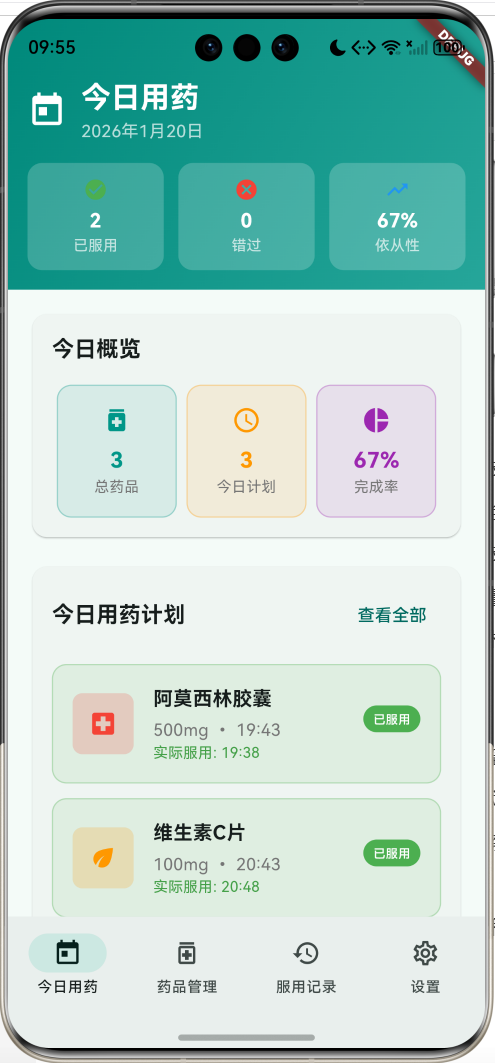
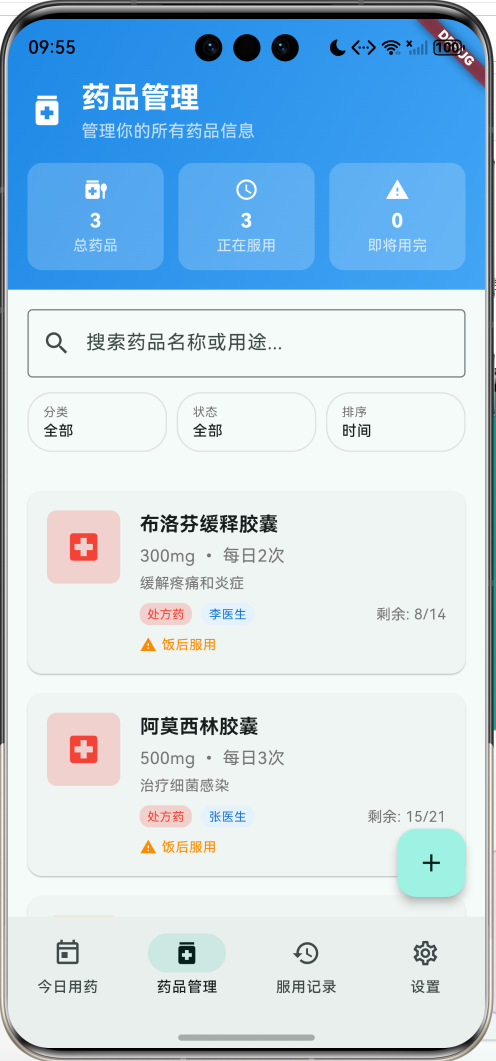
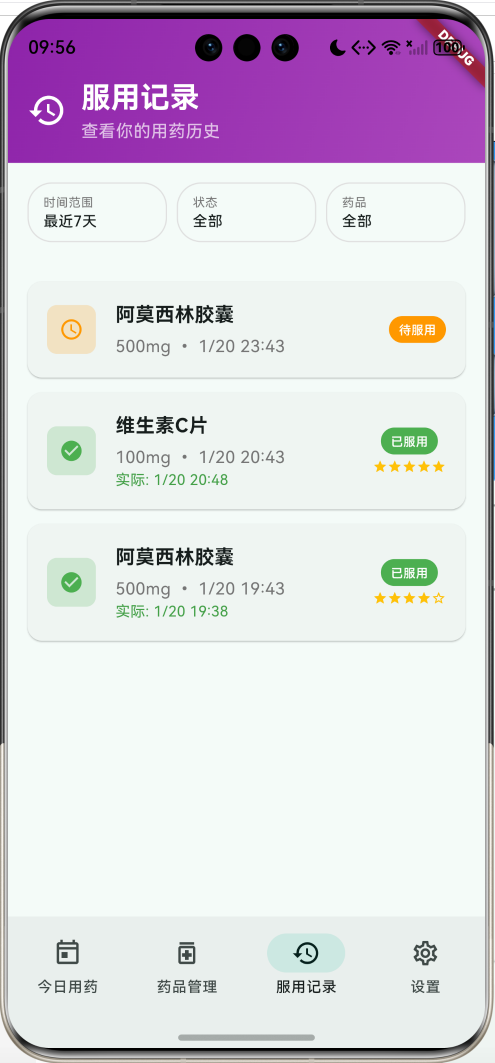
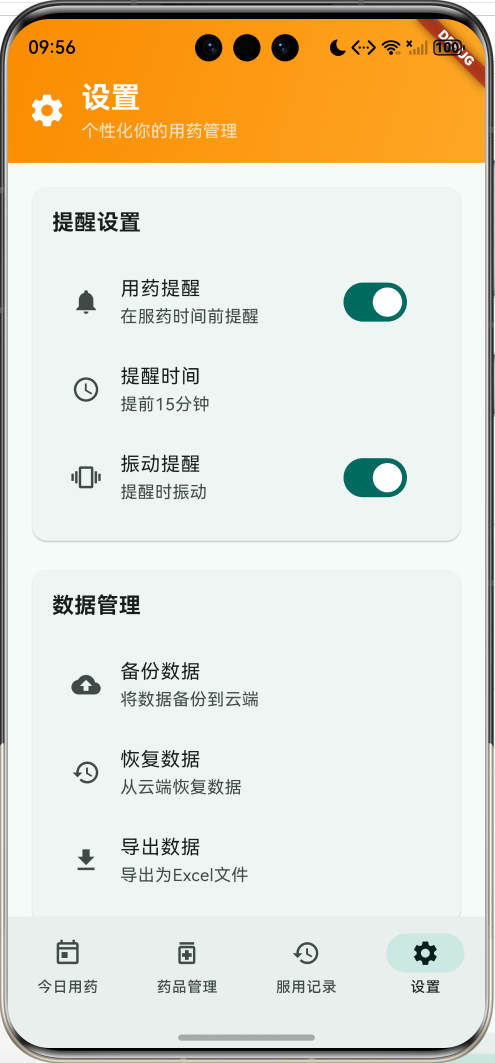
核心功能特性
- 今日用药管理:实时显示当日用药计划,支持快速标记服用状态
- 药品信息管理:完整的药品档案管理,包含分类、剂量、频率等详细信息
- 服用记录追踪:详细记录每次用药情况,支持评分和备注
- 智能统计分析:用药依从性分析、库存预警、健康趋势统计
- 个性化设置:提醒设置、数据管理、健康档案配置
技术架构特点
- 响应式设计:适配不同屏幕尺寸,提供一致的用户体验
- 状态管理:使用StatefulWidget进行本地状态管理
- 数据模型:完整的数据结构设计,支持复杂的业务逻辑
- 动画效果:流畅的页面切换和交互动画
- 模块化架构:清晰的代码结构,便于维护和扩展
项目架构设计
整体架构图
数据流架构
数据模型设计
核心数据结构
1. 药品信息模型(Medication)
class Medication {
  final String id;                    // 唯一标识
  final String name;                  // 药品名称
  final String type;                  // 药品类型(片剂、胶囊等)
  final String dosage;                // 剂量
  final String unit;                  // 单位(mg、ml等)
  final String frequency;             // 服用频率
  final List<String> timesPerDay;     // 每日服用时间
  final DateTime startDate;           // 开始日期
  final DateTime? endDate;            // 结束日期
  final String purpose;               // 用药目的
  final String sideEffects;           // 副作用
  final String notes;                 // 备注
  final String doctorName;            // 医生姓名
  final String pharmacy;              // 药房
  final bool isActive;                // 是否正在服用
  final String imageUrl;              // 药品图片
  final List<String> warnings;        // 用药警告
  final MedicationCategory category;   // 药品分类
  final int totalQuantity;            // 总数量
  final int remainingQuantity;        // 剩余数量
}
2. 服用记录模型(MedicationRecord)
class MedicationRecord {
  final String id;                           // 记录ID
  final String medicationId;                 // 关联药品ID
  final DateTime scheduledTime;              // 计划服用时间
  final DateTime? actualTime;                // 实际服用时间
  final String dosageTaken;                  // 实际服用剂量
  final RecordStatus status;                 // 记录状态
  final String notes;                        // 备注
  final List<String> sideEffectsExperienced; // 经历的副作用
  final int rating;                          // 感受评分 1-5
  final String location;                     // 服用地点
  final bool withFood;                       // 是否与食物一起服用
}
枚举类型定义
药品分类枚举
enum MedicationCategory {
  prescription,  // 处方药
  otc,          // 非处方药
  supplement,   // 保健品
  vitamin,      // 维生素
  herbal,       // 中药
  other,        // 其他
}
记录状态枚举
enum RecordStatus {
  pending,   // 待服用
  taken,     // 已服用
  missed,    // 错过
  skipped,   // 跳过
  delayed,   // 延迟
}
排序方式枚举
enum SortBy {
  name,      // 药品名称
  time,      // 服用时间
  category,  // 分类
  status,    // 状态
  priority,  // 优先级
}
核心功能实现
1. 今日用药管理
今日用药页面是应用的核心功能,提供当日用药计划的完整视图和快速操作入口。
页面结构设计
Widget _buildTodayPage() {
  return Column(
    children: [
      _buildTodayHeader(),      // 顶部统计卡片
      Expanded(
        child: SingleChildScrollView(
          padding: const EdgeInsets.all(16),
          child: Column(
            children: [
              _buildTodayStats(),     // 今日概览统计
              _buildTodaySchedule(),  // 用药计划列表
              _buildQuickActions(),   // 快速操作面板
            ],
          ),
        ),
      ),
    ],
  );
}
统计数据计算
void _updateStatistics() {
  setState(() {
    _totalMedications = _medications.length;
    _activeMedications = _medications.where((m) => m.isActive).length;

    final today = DateTime.now();
    final todayRecords = _records.where((r) =>
        r.scheduledTime.year == today.year &&
        r.scheduledTime.month == today.month &&
        r.scheduledTime.day == today.day).toList();

    _todayTaken = todayRecords.where((r) => r.status == RecordStatus.taken).length;
    _todayMissed = todayRecords.where((r) => r.status == RecordStatus.missed).length;

    final totalScheduled = todayRecords.length;
    _adherenceRate = totalScheduled > 0 ? (_todayTaken / totalScheduled) * 100 : 0.0;
  });
}
用药计划展示
Widget _buildScheduleItem(MedicationRecord record, Medication medication) {
  return Container(
    margin: const EdgeInsets.only(bottom: 12),
    padding: const EdgeInsets.all(16),
    decoration: BoxDecoration(
      color: _getStatusColor(record.status).withValues(alpha: 0.1),
      borderRadius: BorderRadius.circular(12),
      border: Border.all(color: _getStatusColor(record.status).withValues(alpha: 0.3)),
    ),
    child: Row(
      children: [
        // 药品图标
        Container(
          width: 50,
          height: 50,
          decoration: BoxDecoration(
            color: _getCategoryColor(medication.category).withValues(alpha: 0.2),
            borderRadius: BorderRadius.circular(8),
          ),
          child: Icon(_getCategoryIcon(medication.category)),
        ),
        // 药品信息
        Expanded(
          child: Column(
            crossAxisAlignment: CrossAxisAlignment.start,
            children: [
              Text(medication.name, style: TextStyle(fontWeight: FontWeight.bold)),
              Text('${medication.dosage}${medication.unit} • ${_formatTime(record.scheduledTime)}'),
            ],
          ),
        ),
        // 操作按钮
        if (record.status == RecordStatus.pending)
          ElevatedButton(
            onPressed: () => _markAsTaken(record),
            child: const Text('服用'),
          ),
      ],
    ),
  );
}
2. 药品信息管理
药品管理功能提供完整的药品档案管理,包括添加、编辑、删除和详细信息查看。
药品列表展示
Widget _buildMedicationCard(Medication medication) {
  final lowStock = medication.remainingQuantity <= (medication.totalQuantity * 0.2);

  return Card(
    child: InkWell(
      onTap: () => _showMedicationDetails(medication),
      child: Padding(
        padding: const EdgeInsets.all(16),
        child: Row(
          children: [
            // 药品图标
            Container(
              width: 60,
              height: 60,
              decoration: BoxDecoration(
                color: _getCategoryColor(medication.category).withValues(alpha: 0.2),
                borderRadius: BorderRadius.circular(8),
              ),
              child: Icon(_getCategoryIcon(medication.category)),
            ),
            // 药品详细信息
            Expanded(
              child: Column(
                crossAxisAlignment: CrossAxisAlignment.start,
                children: [
                  Text(medication.name, style: TextStyle(fontWeight: FontWeight.bold)),
                  Text('${medication.dosage}${medication.unit} • ${medication.frequency}'),
                  Text(medication.purpose, maxLines: 1, overflow: TextOverflow.ellipsis),
                  // 库存警告
                  if (lowStock && medication.isActive)
                    Container(
                      padding: EdgeInsets.symmetric(horizontal: 8, vertical: 4),
                      decoration: BoxDecoration(
                        color: Colors.orange,
                        borderRadius: BorderRadius.circular(12),
                      ),
                      child: Text('库存不足', style: TextStyle(color: Colors.white, fontSize: 10)),
                    ),
                ],
              ),
            ),
          ],
        ),
      ),
    ),
  );
}
添加药品对话框
class _AddMedicationDialog extends StatefulWidget {
final Function(Medication) onSave;
Widget build(BuildContext context) {
return AlertDialog(
title: const Text('添加药品'),
content: SizedBox(
width: 400,
height: 600,
child: Form(
key: _formKey,
child: SingleChildScrollView(
child: Column(
children: [
// 药品名称输入
TextFormField(
controller: _nameController,
decoration: const InputDecoration(
labelText: '药品名称 *',
border: OutlineInputBorder(),
prefixIcon: Icon(Icons.medication),
),
validator: (value) => value?.isEmpty ?? true ? '请输入药品名称' : null,
),
// 药品类型和分类选择
Row(
children: [
Expanded(
child: DropdownButtonFormField<String>(
value: _type,
decoration: const InputDecoration(labelText: '药品类型'),
items: _medicationTypes.map((type) =>
DropdownMenuItem(value: type, child: Text(type))).toList(),
onChanged: (value) => setState(() => _type = value!),
),
),
Expanded(
child: DropdownButtonFormField<MedicationCategory>(
value: _category,
decoration: const InputDecoration(labelText: '药品分类'),
items: MedicationCategory.values.map((category) =>
DropdownMenuItem(value: category, child: Text(_getCategoryName(category)))).toList(),
onChanged: (value) => setState(() => _category = value!),
),
),
],
),
// 剂量和单位输入
Row(
children: [
Expanded(
flex: 2,
child: TextFormField(
controller: _dosageController,
decoration: const InputDecoration(labelText: '剂量 *'),
keyboardType: TextInputType.number,
validator: (value) => value?.isEmpty ?? true ? '请输入剂量' : null,
),
),
Expanded(
child: DropdownButtonFormField<String>(
value: _unit,
decoration: const InputDecoration(labelText: '单位'),
items: _units.map((unit) =>
DropdownMenuItem(value: unit, child: Text(unit))).toList(),
onChanged: (value) => setState(() => _unit = value!),
),
),
],
),
// 服用频率选择
DropdownButtonFormField<String>(
value: _frequency,
decoration: const InputDecoration(labelText: '服用频率'),
items: _frequencies.map((frequency) =>
DropdownMenuItem(value: frequency, child: Text(frequency))).toList(),
onChanged: (value) {
setState(() {
_frequency = value!;
_updateTimesPerDay(); // 自动更新服用时间
});
},
),
],
),
),
),
),
actions: [
TextButton(onPressed: () => Navigator.pop(context), child: Text('取消')),
ElevatedButton(onPressed: _saveMedication, child: Text('保存')),
],
);
}
}
3. 服用记录管理
服用记录功能提供详细的用药历史追踪和统计分析。
记录列表展示
Widget _buildRecordCard(MedicationRecord record, Medication medication) {
  return Card(
    child: InkWell(
      onTap: () => _showRecordDetails(record, medication),
      child: Padding(
        padding: const EdgeInsets.all(16),
        child: Row(
          children: [
            // 状态图标
            Container(
              width: 40,
              height: 40,
              decoration: BoxDecoration(
                color: _getStatusColor(record.status).withValues(alpha: 0.2),
                borderRadius: BorderRadius.circular(8),
              ),
              child: Icon(_getStatusIcon(record.status), color: _getStatusColor(record.status)),
            ),
            // 记录信息
            Expanded(
              child: Column(
                crossAxisAlignment: CrossAxisAlignment.start,
                children: [
                  Text(medication.name, style: TextStyle(fontWeight: FontWeight.bold)),
                  Text('${record.dosageTaken} • ${_formatDateTime(record.scheduledTime)}'),
                  if (record.actualTime != null && record.status == RecordStatus.taken)
                    Text('实际: ${_formatDateTime(record.actualTime!)}',
                         style: TextStyle(color: Colors.green.shade600)),
                ],
              ),
            ),
            // 状态标签和评分
            Column(
              children: [
                Container(
                  padding: EdgeInsets.symmetric(horizontal: 8, vertical: 4),
                  decoration: BoxDecoration(
                    color: _getStatusColor(record.status),
                    borderRadius: BorderRadius.circular(12),
                  ),
                  child: Text(_getStatusName(record.status),
                              style: TextStyle(color: Colors.white, fontSize: 10)),
                ),
                if (record.rating > 0)
                  Row(
                    mainAxisSize: MainAxisSize.min,
                    children: List.generate(5, (index) => Icon(
                      index < record.rating ? Icons.star : Icons.star_border,
                      size: 12, color: Colors.amber,
                    )),
                  ),
              ],
            ),
          ],
        ),
      ),
    ),
  );
}
服用确认对话框
class _TakeMedicationDialog extends StatefulWidget {
Widget build(BuildContext context) {
return AlertDialog(
title: const Text('确认服用'),
content: Column(
mainAxisSize: MainAxisSize.min,
children: [
Text('药品: ${widget.medication.name}'),
Text('剂量: ${widget.record.dosageTaken}'),
// 与食物一起服用选项
SwitchListTile(
title: const Text('与食物一起服用'),
value: _withFood,
onChanged: (value) => setState(() => _withFood = value),
),
// 感受评分
const Text('感受评分:'),
Row(
children: List.generate(5, (index) => IconButton(
onPressed: () => setState(() => _rating = index + 1),
icon: Icon(index < _rating ? Icons.star : Icons.star_border, color: Colors.amber),
)),
),
// 备注输入
TextField(
controller: _notesController,
decoration: const InputDecoration(labelText: '备注(可选)'),
maxLines: 2,
),
],
),
actions: [
TextButton(onPressed: () => Navigator.pop(context), child: Text('取消')),
ElevatedButton(
onPressed: () {
final updatedRecord = widget.record.copyWith(
actualTime: DateTime.now(),
status: RecordStatus.taken,
withFood: _withFood,
rating: _rating,
notes: _notesController.text,
);
widget.onConfirm(updatedRecord);
Navigator.pop(context);
},
child: Text('确认服用'),
),
],
);
}
}
4. 搜索与筛选功能
应用提供强大的搜索和筛选功能,帮助用户快速找到所需信息。
搜索功能实现
Widget _buildSearchAndFilter() {
  return Container(
    padding: const EdgeInsets.all(16),
    child: Column(
      children: [
        // 搜索框
        TextField(
          decoration: const InputDecoration(
            hintText: '搜索药品名称或用途...',
            prefixIcon: Icon(Icons.search),
            border: OutlineInputBorder(),
          ),
          onChanged: (value) => setState(() => _searchQuery = value),
        ),
        const SizedBox(height: 12),
        // 筛选选项
        Row(
          children: [
            Expanded(child: _buildFilterChip('分类', _getCategoryFilterName(), _showCategoryFilter)),
            Expanded(child: _buildFilterChip('状态', _getStatusFilterName(), _showStatusFilter)),
            Expanded(child: _buildFilterChip('排序', _getSortName(_sortBy), _showSortOptions)),
          ],
        ),
      ],
    ),
  );
}
数据筛选逻辑
List<Medication> _getFilteredMedications() {
  var filtered = _medications.where((medication) {
    // 搜索过滤
    if (_searchQuery.isNotEmpty) {
      final query = _searchQuery.toLowerCase();
      if (!medication.name.toLowerCase().contains(query) &&
          !medication.purpose.toLowerCase().contains(query)) {
        return false;
      }
    }

    // 分类过滤
    if (_selectedCategories.isNotEmpty) {
      if (!_selectedCategories.contains(medication.category)) {
        return false;
      }
    }

    return true;
  }).toList();

  // 排序处理
  filtered.sort((a, b) {
    switch (_sortBy) {
      case SortBy.name:
        return _sortAscending ? a.name.compareTo(b.name) : b.name.compareTo(a.name);
      case SortBy.time:
        return _sortAscending ? a.startDate.compareTo(b.startDate) : b.startDate.compareTo(a.startDate);
      case SortBy.category:
        return _sortAscending ? a.category.index.compareTo(b.category.index) : b.category.index.compareTo(a.category.index);
      case SortBy.priority:
        final aStock = a.totalQuantity > 0 ? a.remainingQuantity / a.totalQuantity : 1.0;
        final bStock = b.totalQuantity > 0 ? b.remainingQuantity / b.totalQuantity : 1.0;
        return _sortAscending ? aStock.compareTo(bStock) : bStock.compareTo(aStock);
    }
  });

  return filtered;
}
5. 统计分析功能
应用提供丰富的统计分析功能,帮助用户了解用药情况和健康趋势。
依从性计算
double _calculateAdherenceRate() {
  final now = DateTime.now();
  final last30Days = now.subtract(const Duration(days: 30));

  final recentRecords = _records.where((record) =>
    record.scheduledTime.isAfter(last30Days) &&
    record.scheduledTime.isBefore(now)
  ).toList();

  if (recentRecords.isEmpty) return 0.0;

  final takenCount = recentRecords.where((record) =>
    record.status == RecordStatus.taken
  ).length;

  return (takenCount / recentRecords.length) * 100;
}
库存预警
int _getLowStockCount() {
  return _medications.where((medication) =>
    medication.isActive &&
    medication.totalQuantity > 0 &&
    medication.remainingQuantity <= (medication.totalQuantity * 0.2)
  ).length;
}

List<Medication> _getLowStockMedications() {
  return _medications.where((medication) =>
    medication.isActive &&
    medication.totalQuantity > 0 &&
    medication.remainingQuantity <= (medication.totalQuantity * 0.2)
  ).toList();
}
用药趋势分析
Map<String, int> _getWeeklyAdherence() {
  final now = DateTime.now();
  final weeklyData = <String, int>{};

  for (int i = 6; i >= 0; i--) {
    final date = now.subtract(Duration(days: i));
    final dayKey = '${date.month}-${date.day}';

    final dayRecords = _records.where((record) =>
      record.scheduledTime.year == date.year &&
      record.scheduledTime.month == date.month &&
      record.scheduledTime.day == date.day
    ).toList();

    final takenCount = dayRecords.where((record) =>
      record.status == RecordStatus.taken
    ).length;

    weeklyData[dayKey] = takenCount;
  }

  return weeklyData;
}
6. 设置管理功能
设置页面提供个性化配置和数据管理功能。
设置页面结构
Widget _buildSettingsPage() {
  return Column(
    children: [
      _buildSettingsHeader(),
      Expanded(
        child: ListView(
          padding: const EdgeInsets.all(16),
          children: [
            _buildReminderSettings(),    // 提醒设置
            _buildDataManagement(),      // 数据管理
            _buildHealthManagement(),    // 健康管理
            _buildAboutSection(),        // 关于应用
          ],
        ),
      ),
    ],
  );
}
提醒设置
Widget _buildReminderSettings() {
  return Card(
    child: Padding(
      padding: const EdgeInsets.all(16),
      child: Column(
        crossAxisAlignment: CrossAxisAlignment.start,
        children: [
          const Text('提醒设置', style: TextStyle(fontSize: 18, fontWeight: FontWeight.bold)),
          SwitchListTile(
            secondary: const Icon(Icons.notifications),
            title: const Text('用药提醒'),
            subtitle: const Text('在服药时间前提醒'),
            value: _notificationEnabled,
            onChanged: (value) => setState(() => _notificationEnabled = value),
          ),
          ListTile(
            leading: const Icon(Icons.schedule),
            title: const Text('提醒时间'),
            subtitle: Text('提前${_reminderMinutes}分钟'),
            onTap: _showReminderTimeSettings,
          ),
        ],
      ),
    ),
  );
}
UI组件设计
1. 导航栏设计
应用采用底部导航栏设计,提供四个主要功能模块的快速切换。
NavigationBar(
  selectedIndex: _selectedIndex,
  onDestinationSelected: (index) => setState(() => _selectedIndex = index),
  destinations: const [
    NavigationDestination(
      icon: Icon(Icons.today_outlined),
      selectedIcon: Icon(Icons.today),
      label: '今日用药',
    ),
    NavigationDestination(
      icon: Icon(Icons.medication_outlined),
      selectedIcon: Icon(Icons.medication),
      label: '药品管理',
    ),
    NavigationDestination(
      icon: Icon(Icons.history_outlined),
      selectedIcon: Icon(Icons.history),
      label: '服用记录',
    ),
    NavigationDestination(
      icon: Icon(Icons.settings_outlined),
      selectedIcon: Icon(Icons.settings),
      label: '设置',
    ),
  ],
)
2. 卡片组件设计
统计卡片
Widget _buildStatCard(String title, String value, IconData icon, Color color) {
  return Container(
    padding: const EdgeInsets.all(16),
    decoration: BoxDecoration(
      color: color.withValues(alpha: 0.1),
      borderRadius: BorderRadius.circular(12),
      border: Border.all(color: color.withValues(alpha: 0.3)),
    ),
    child: Column(
      children: [
        Icon(icon, color: color, size: 24),
        const SizedBox(height: 8),
        Text(value, style: TextStyle(fontSize: 18, fontWeight: FontWeight.bold, color: color)),
        Text(title, style: TextStyle(fontSize: 12, color: Colors.grey.shade600)),
      ],
    ),
  );
}
药品信息卡片
Widget _buildMedicationInfoCard(Medication medication) {
  return Card(
    elevation: 2,
    shape: RoundedRectangleBorder(borderRadius: BorderRadius.circular(12)),
    child: Container(
      padding: const EdgeInsets.all(16),
      child: Column(
        crossAxisAlignment: CrossAxisAlignment.start,
        children: [
          Row(
            children: [
              Container(
                width: 50,
                height: 50,
                decoration: BoxDecoration(
                  color: _getCategoryColor(medication.category).withValues(alpha: 0.2),
                  borderRadius: BorderRadius.circular(8),
                ),
                child: Icon(_getCategoryIcon(medication.category)),
              ),
              const SizedBox(width: 16),
              Expanded(
                child: Column(
                  crossAxisAlignment: CrossAxisAlignment.start,
                  children: [
                    Text(medication.name, style: Theme.of(context).textTheme.titleMedium),
                    Text('${medication.dosage}${medication.unit}',
                         style: Theme.of(context).textTheme.bodyMedium),
                  ],
                ),
              ),
            ],
          ),
          const SizedBox(height: 12),
          _buildInfoRow('用途', medication.purpose),
          _buildInfoRow('频率', medication.frequency),
          if (medication.doctorName.isNotEmpty)
            _buildInfoRow('医生', medication.doctorName),
        ],
      ),
    ),
  );
}
3. 状态指示器
服用状态指示器
Widget _buildStatusIndicator(RecordStatus status) {
  return Container(
    padding: const EdgeInsets.symmetric(horizontal: 8, vertical: 4),
    decoration: BoxDecoration(
      color: _getStatusColor(status),
      borderRadius: BorderRadius.circular(12),
    ),
    child: Row(
      mainAxisSize: MainAxisSize.min,
      children: [
        Icon(_getStatusIcon(status), size: 12, color: Colors.white),
        const SizedBox(width: 4),
        Text(_getStatusName(status),
             style: const TextStyle(fontSize: 10, color: Colors.white, fontWeight: FontWeight.w500)),
      ],
    ),
  );
}
库存警告指示器
Widget _buildStockWarning(Medication medication) {
  final lowStock = medication.remainingQuantity <= (medication.totalQuantity * 0.2);

  if (!lowStock || !medication.isActive) return const SizedBox.shrink();

  return Container(
    padding: const EdgeInsets.symmetric(horizontal: 6, vertical: 2),
    decoration: BoxDecoration(
      color: Colors.orange,
      borderRadius: BorderRadius.circular(8),
    ),
    child: Row(
      mainAxisSize: MainAxisSize.min,
      children: [
        const Icon(Icons.warning, size: 12, color: Colors.white),
        const SizedBox(width: 4),
        const Text('库存不足', style: TextStyle(fontSize: 10, color: Colors.white)),
      ],
    ),
  );
}
4. 动画效果
页面切换动画
class _MedicationTrackerHomePageState extends State<MedicationTrackerHomePage>
with TickerProviderStateMixin {
late AnimationController _fadeController;
late AnimationController _scaleController;
void initState() {
super.initState();
_fadeController = AnimationController(
duration: const Duration(milliseconds: 300),
vsync: this,
);
_scaleController = AnimationController(
duration: const Duration(milliseconds: 200),
vsync: this,
);
_fadeController.forward();
}
Widget _buildAnimatedPage(Widget child) {
return FadeTransition(
opacity: _fadeController,
child: ScaleTransition(
scale: Tween<double>(begin: 0.95, end: 1.0).animate(
CurvedAnimation(parent: _scaleController, curve: Curves.easeOut),
),
child: child,
),
);
}
}
列表项动画
Widget _buildAnimatedListItem(Widget child, int index) {
  return TweenAnimationBuilder<double>(
    duration: Duration(milliseconds: 300 + (index * 100)),
    tween: Tween<double>(begin: 0.0, end: 1.0),
    builder: (context, value, child) {
      return Transform.translate(
        offset: Offset(0, 50 * (1 - value)),
        child: Opacity(
          opacity: value,
          child: child,
        ),
      );
    },
    child: child,
  );
}
5. 响应式设计
屏幕适配
Widget _buildResponsiveLayout(BuildContext context, Widget child) {
  final screenWidth = MediaQuery.of(context).size.width;
  final isTablet = screenWidth > 600;

  return Container(
    constraints: BoxConstraints(
      maxWidth: isTablet ? 800 : double.infinity,
    ),
    child: child,
  );
}
自适应网格
Widget _buildAdaptiveGrid(List<Widget> children) {
  return LayoutBuilder(
    builder: (context, constraints) {
      final crossAxisCount = constraints.maxWidth > 600 ? 3 : 2;
      return GridView.count(
        crossAxisCount: crossAxisCount,
        crossAxisSpacing: 16,
        mainAxisSpacing: 16,
        childAspectRatio: 1.2,
        children: children,
      );
    },
  );
}
工具方法实现
1. 日期时间处理
日期格式化
String _formatDate(DateTime date) {
  final now = DateTime.now();
  final today = DateTime(now.year, now.month, now.day);
  final targetDate = DateTime(date.year, date.month, date.day);

  if (targetDate == today) {
    return '今天';
  } else if (targetDate == today.subtract(const Duration(days: 1))) {
    return '昨天';
  } else if (targetDate == today.add(const Duration(days: 1))) {
    return '明天';
  } else {
    return '${date.year}-${date.month.toString().padLeft(2, '0')}-${date.day.toString().padLeft(2, '0')}';
  }
}

String _formatTime(DateTime time) {
  return '${time.hour.toString().padLeft(2, '0')}:${time.minute.toString().padLeft(2, '0')}';
}

String _formatDateTime(DateTime dateTime) {
  return '${_formatDate(dateTime)} ${_formatTime(dateTime)}';
}
时间计算
bool _isToday(DateTime date) {
  final now = DateTime.now();
  return date.year == now.year && date.month == now.month && date.day == now.day;
}

bool _isOverdue(DateTime scheduledTime) {
  return DateTime.now().isAfter(scheduledTime);
}

Duration _getTimeDifference(DateTime scheduledTime, DateTime actualTime) {
  return actualTime.difference(scheduledTime);
}
2. 状态管理工具
状态颜色映射
Color _getStatusColor(RecordStatus status) {
  switch (status) {
    case RecordStatus.pending:
      return Colors.orange;
    case RecordStatus.taken:
      return Colors.green;
    case RecordStatus.missed:
      return Colors.red;
    case RecordStatus.skipped:
      return Colors.grey;
    case RecordStatus.delayed:
      return Colors.amber;
  }
}

IconData _getStatusIcon(RecordStatus status) {
  switch (status) {
    case RecordStatus.pending:
      return Icons.schedule;
    case RecordStatus.taken:
      return Icons.check_circle;
    case RecordStatus.missed:
      return Icons.cancel;
    case RecordStatus.skipped:
      return Icons.skip_next;
    case RecordStatus.delayed:
      return Icons.access_time;
  }
}
分类管理
String _getCategoryName(MedicationCategory category) {
  const categoryNames = {
    MedicationCategory.prescription: '处方药',
    MedicationCategory.otc: '非处方药',
    MedicationCategory.supplement: '保健品',
    MedicationCategory.vitamin: '维生素',
    MedicationCategory.herbal: '中药',
    MedicationCategory.other: '其他',
  };
  return categoryNames[category] ?? '未知';
}

Color _getCategoryColor(MedicationCategory category) {
  const categoryColors = {
    MedicationCategory.prescription: Colors.red,
    MedicationCategory.otc: Colors.blue,
    MedicationCategory.supplement: Colors.green,
    MedicationCategory.vitamin: Colors.orange,
    MedicationCategory.herbal: Colors.brown,
    MedicationCategory.other: Colors.grey,
  };
  return categoryColors[category] ?? Colors.grey;
}

IconData _getCategoryIcon(MedicationCategory category) {
  const categoryIcons = {
    MedicationCategory.prescription: Icons.local_hospital,
    MedicationCategory.otc: Icons.local_pharmacy,
    MedicationCategory.supplement: Icons.fitness_center,
    MedicationCategory.vitamin: Icons.eco,
    MedicationCategory.herbal: Icons.spa,
    MedicationCategory.other: Icons.medication,
  };
  return categoryIcons[category] ?? Icons.medication;
}
3. 数据验证工具
输入验证
class ValidationUtils {
  static String? validateMedicationName(String? value) {
    if (value == null || value.trim().isEmpty) {
      return '请输入药品名称';
    }
    if (value.trim().length < 2) {
      return '药品名称至少需要2个字符';
    }
    return null;
  }

  static String? validateDosage(String? value) {
    if (value == null || value.trim().isEmpty) {
      return '请输入剂量';
    }
    final dosage = double.tryParse(value.trim());
    if (dosage == null || dosage <= 0) {
      return '请输入有效的剂量数值';
    }
    return null;
  }

  static String? validateQuantity(String? value) {
    if (value != null && value.trim().isNotEmpty) {
      final quantity = int.tryParse(value.trim());
      if (quantity == null || quantity < 0) {
        return '请输入有效的数量';
      }
    }
    return null;
  }
}
数据完整性检查
bool _isMedicationDataComplete(Medication medication) {
  return medication.name.isNotEmpty &&
         medication.dosage.isNotEmpty &&
         medication.purpose.isNotEmpty &&
         medication.timesPerDay.isNotEmpty;
}

bool _isRecordValid(MedicationRecord record) {
  return record.medicationId.isNotEmpty &&
         record.dosageTaken.isNotEmpty &&
         record.scheduledTime.isBefore(DateTime.now().add(const Duration(days: 1)));
}
4. 数据处理工具
统计计算
class StatisticsCalculator {
  static double calculateAdherenceRate(List<MedicationRecord> records, DateTime startDate, DateTime endDate) {
    final filteredRecords = records.where((record) =>
      record.scheduledTime.isAfter(startDate) && record.scheduledTime.isBefore(endDate)
    ).toList();

    if (filteredRecords.isEmpty) return 0.0;

    final takenCount = filteredRecords.where((record) => record.status == RecordStatus.taken).length;
    return (takenCount / filteredRecords.length) * 100;
  }

  static Map<RecordStatus, int> getStatusDistribution(List<MedicationRecord> records) {
    final distribution = <RecordStatus, int>{};
    for (final status in RecordStatus.values) {
      distribution[status] = records.where((record) => record.status == status).length;
    }
    return distribution;
  }

  static List<Medication> getLowStockMedications(List<Medication> medications, double threshold) {
    return medications.where((medication) =>
      medication.isActive &&
      medication.totalQuantity > 0 &&
      (medication.remainingQuantity / medication.totalQuantity) <= threshold
    ).toList();
  }
}
数据排序
class SortingUtils {
  static List<Medication> sortMedications(List<Medication> medications, SortBy sortBy, bool ascending) {
    final sorted = List<Medication>.from(medications);

    sorted.sort((a, b) {
      int comparison;
      switch (sortBy) {
        case SortBy.name:
          comparison = a.name.compareTo(b.name);
          break;
        case SortBy.time:
          comparison = a.startDate.compareTo(b.startDate);
          break;
        case SortBy.category:
          comparison = a.category.index.compareTo(b.category.index);
          break;
        case SortBy.status:
          comparison = (a.isActive ? 1 : 0).compareTo(b.isActive ? 1 : 0);
          break;
        case SortBy.priority:
          final aStock = a.totalQuantity > 0 ? a.remainingQuantity / a.totalQuantity : 1.0;
          final bStock = b.totalQuantity > 0 ? b.remainingQuantity / b.totalQuantity : 1.0;
          comparison = aStock.compareTo(bStock);
          break;
      }
      return ascending ? comparison : -comparison;
    });

    return sorted;
  }
}
5. 本地存储工具
数据序列化
class DataSerializer {
  static Map<String, dynamic> medicationToJson(Medication medication) {
    return {
      'id': medication.id,
      'name': medication.name,
      'type': medication.type,
      'dosage': medication.dosage,
      'unit': medication.unit,
      'frequency': medication.frequency,
      'timesPerDay': medication.timesPerDay,
      'startDate': medication.startDate.toIso8601String(),
      'endDate': medication.endDate?.toIso8601String(),
      'purpose': medication.purpose,
      'sideEffects': medication.sideEffects,
      'notes': medication.notes,
      'doctorName': medication.doctorName,
      'pharmacy': medication.pharmacy,
      'isActive': medication.isActive,
      'imageUrl': medication.imageUrl,
      'warnings': medication.warnings,
      'category': medication.category.index,
      'totalQuantity': medication.totalQuantity,
      'remainingQuantity': medication.remainingQuantity,
    };
  }

  static Medication medicationFromJson(Map<String, dynamic> json) {
    return Medication(
      id: json['id'],
      name: json['name'],
      type: json['type'],
      dosage: json['dosage'],
      unit: json['unit'],
      frequency: json['frequency'],
      timesPerDay: List<String>.from(json['timesPerDay']),
      startDate: DateTime.parse(json['startDate']),
      endDate: json['endDate'] != null ? DateTime.parse(json['endDate']) : null,
      purpose: json['purpose'],
      sideEffects: json['sideEffects'] ?? '',
      notes: json['notes'] ?? '',
      doctorName: json['doctorName'] ?? '',
      pharmacy: json['pharmacy'] ?? '',
      isActive: json['isActive'] ?? true,
      imageUrl: json['imageUrl'] ?? '',
      warnings: List<String>.from(json['warnings'] ?? []),
      category: MedicationCategory.values[json['category'] ?? 0],
      totalQuantity: json['totalQuantity'] ?? 0,
      remainingQuantity: json['remainingQuantity'] ?? 0,
    );
  }
}
功能扩展建议
1. 智能提醒系统
本地通知集成
// 添加依赖:flutter_local_notifications
class NotificationService {
  static final FlutterLocalNotificationsPlugin _notifications = FlutterLocalNotificationsPlugin();

  static Future<void> initialize() async {
    const androidSettings = AndroidInitializationSettings('@mipmap/ic_launcher');
    const iosSettings = DarwinInitializationSettings();
    const settings = InitializationSettings(android: androidSettings, iOS: iosSettings);

    await _notifications.initialize(settings);
  }

  static Future<void> scheduleMedicationReminder(Medication medication, DateTime scheduledTime) async {
    const androidDetails = AndroidNotificationDetails(
      'medication_reminders',
      '用药提醒',
      channelDescription: '按时服药提醒通知',
      importance: Importance.high,
      priority: Priority.high,
    );

    const notificationDetails = NotificationDetails(android: androidDetails);

    await _notifications.schedule(
      medication.id.hashCode,
      '用药提醒',
      '该服用${medication.name}了 (${medication.dosage}${medication.unit})',
      scheduledTime,
      notificationDetails,
    );
  }
}
智能提醒策略
class SmartReminderStrategy {
  static List<DateTime> generateReminderTimes(Medication medication) {
    final reminders = <DateTime>[];
    final now = DateTime.now();

    for (final timeStr in medication.timesPerDay) {
      final timeParts = timeStr.split(':');
      final hour = int.parse(timeParts[0]);
      final minute = int.parse(timeParts[1]);

      var reminderTime = DateTime(now.year, now.month, now.day, hour, minute);

      // 如果时间已过,设置为明天
      if (reminderTime.isBefore(now)) {
        reminderTime = reminderTime.add(const Duration(days: 1));
      }

      // 提前15分钟提醒
      reminderTime = reminderTime.subtract(const Duration(minutes: 15));
      reminders.add(reminderTime);
    }

    return reminders;
  }
}
2. 数据同步与备份
云端同步
// 添加依赖:firebase_core, cloud_firestore
class CloudSyncService {
  static final FirebaseFirestore _firestore = FirebaseFirestore.instance;

  static Future<void> syncMedications(String userId, List<Medication> medications) async {
    final batch = _firestore.batch();

    for (final medication in medications) {
      final docRef = _firestore
          .collection('users')
          .doc(userId)
          .collection('medications')
          .doc(medication.id);

      batch.set(docRef, DataSerializer.medicationToJson(medication));
    }

    await batch.commit();
  }

  static Future<List<Medication>> loadMedications(String userId) async {
    final snapshot = await _firestore
        .collection('users')
        .doc(userId)
        .collection('medications')
        .get();

    return snapshot.docs
        .map((doc) => DataSerializer.medicationFromJson(doc.data()))
        .toList();
  }
}
本地备份
// 添加依赖:path_provider
class LocalBackupService {
  static Future<void> exportToJson() async {
    final directory = await getApplicationDocumentsDirectory();
    final file = File('${directory.path}/medication_backup.json');

    final backupData = {
      'medications': _medications.map((m) => DataSerializer.medicationToJson(m)).toList(),
      'records': _records.map((r) => DataSerializer.recordToJson(r)).toList(),
      'exportDate': DateTime.now().toIso8601String(),
    };

    await file.writeAsString(jsonEncode(backupData));
  }

  static Future<void> importFromJson(File file) async {
    final content = await file.readAsString();
    final data = jsonDecode(content);

    final medications = (data['medications'] as List)
        .map((json) => DataSerializer.medicationFromJson(json))
        .toList();

    final records = (data['records'] as List)
        .map((json) => DataSerializer.recordFromJson(json))
        .toList();

    // 合并数据逻辑
  }
}
3. 健康数据分析
用药趋势图表
// 添加依赖:fl_chart
class AdherenceTrendChart extends StatelessWidget {
final List<MedicationRecord> records;
Widget build(BuildContext context) {
return LineChart(
LineChartData(
gridData: FlGridData(show: true),
titlesData: FlTitlesData(show: true),
borderData: FlBorderData(show: true),
lineBarsData: [
LineChartBarData(
spots: _generateSpots(),
isCurved: true,
color: Colors.teal,
barWidth: 3,
dotData: FlDotData(show: true),
),
],
),
);
}
List<FlSpot> _generateSpots() {
final weeklyData = <int, double>{};
for (int i = 0; i < 7; i++) {
final date = DateTime.now().subtract(Duration(days: 6 - i));
final dayRecords = records.where((r) => _isSameDay(r.scheduledTime, date)).toList();
if (dayRecords.isNotEmpty) {
final adherence = dayRecords.where((r) => r.status == RecordStatus.taken).length / dayRecords.length;
weeklyData[i] = adherence * 100;
} else {
weeklyData[i] = 0;
}
}
return weeklyData.entries.map((e) => FlSpot(e.key.toDouble(), e.value)).toList();
}
}
副作用追踪
class SideEffectTracker {
  static Map<String, int> analyzeSideEffects(List<MedicationRecord> records) {
    final sideEffectCount = <String, int>{};

    for (final record in records) {
      for (final effect in record.sideEffectsExperienced) {
        sideEffectCount[effect] = (sideEffectCount[effect] ?? 0) + 1;
      }
    }

    return Map.fromEntries(
      sideEffectCount.entries.toList()..sort((a, b) => b.value.compareTo(a.value))
    );
  }

  static List<String> getFrequentSideEffects(List<MedicationRecord> records, int threshold) {
    final analysis = analyzeSideEffects(records);
    return analysis.entries
        .where((entry) => entry.value >= threshold)
        .map((entry) => entry.key)
        .toList();
  }
}
4. 药品信息增强
药品数据库集成
// 药品信息API集成
class MedicationDatabase {
  static Future<MedicationInfo?> searchMedication(String name) async {
    try {
      final response = await http.get(
        Uri.parse('https://api.medication-db.com/search?name=$name'),
        headers: {'Authorization': 'Bearer YOUR_API_KEY'},
      );

      if (response.statusCode == 200) {
        final data = jsonDecode(response.body);
        return MedicationInfo.fromJson(data);
      }
    } catch (e) {
      print('搜索药品信息失败: $e');
    }
    return null;
  }
}

class MedicationInfo {
  final String name;
  final String description;
  final List<String> commonSideEffects;
  final List<String> interactions;
  final String dosageGuideline;

  MedicationInfo({
    required this.name,
    required this.description,
    required this.commonSideEffects,
    required this.interactions,
    required this.dosageGuideline,
  });

  factory MedicationInfo.fromJson(Map<String, dynamic> json) {
    return MedicationInfo(
      name: json['name'],
      description: json['description'],
      commonSideEffects: List<String>.from(json['sideEffects']),
      interactions: List<String>.from(json['interactions']),
      dosageGuideline: json['dosageGuideline'],
    );
  }
}
二维码扫描
// 添加依赖:qr_code_scanner
class QRScannerPage extends StatefulWidget {
Widget build(BuildContext context) {
return Scaffold(
appBar: AppBar(title: Text('扫描药品二维码')),
body: QRView(
key: GlobalKey(debugLabel: 'QR'),
onQRViewCreated: _onQRViewCreated,
),
);
}
void _onQRViewCreated(QRViewController controller) {
controller.scannedDataStream.listen((scanData) async {
if (scanData.code != null) {
final medicationInfo = await MedicationDatabase.searchByBarcode(scanData.code!);
if (medicationInfo != null) {
_showMedicationInfoDialog(medicationInfo);
}
}
});
}
}
5. 用户体验优化
语音输入
// 添加依赖:speech_to_text
class VoiceInputService {
  static final SpeechToText _speech = SpeechToText();

  static Future<String?> startListening() async {
    final available = await _speech.initialize();
    if (!available) return null;

    final completer = Completer<String?>();

    _speech.listen(
      onResult: (result) {
        if (result.finalResult) {
          completer.complete(result.recognizedWords);
        }
      },
      localeId: 'zh_CN',
    );

    return completer.future;
  }
}
主题定制
class ThemeManager {
  static ThemeData getLightTheme() {
    return ThemeData(
      colorScheme: ColorScheme.fromSeed(
        seedColor: Colors.teal,
        brightness: Brightness.light,
      ),
      useMaterial3: true,
      cardTheme: CardTheme(
        elevation: 2,
        shape: RoundedRectangleBorder(borderRadius: BorderRadius.circular(12)),
      ),
    );
  }

  static ThemeData getDarkTheme() {
    return ThemeData(
      colorScheme: ColorScheme.fromSeed(
        seedColor: Colors.teal,
        brightness: Brightness.dark,
      ),
      useMaterial3: true,
    );
  }
}
6. 数据安全与隐私
数据加密
// 添加依赖:crypto
class EncryptionService {
  static String encryptData(String data, String key) {
    final keyBytes = utf8.encode(key);
    final dataBytes = utf8.encode(data);

    final hmac = Hmac(sha256, keyBytes);
    final digest = hmac.convert(dataBytes);

    return base64.encode(digest.bytes);
  }

  static bool verifyData(String data, String hash, String key) {
    final expectedHash = encryptData(data, key);
    return expectedHash == hash;
  }
}
生物识别认证
// 添加依赖:local_auth
class BiometricAuth {
  static final LocalAuthentication _localAuth = LocalAuthentication();

  static Future<bool> authenticate() async {
    try {
      final isAvailable = await _localAuth.canCheckBiometrics;
      if (!isAvailable) return false;

      final isAuthenticated = await _localAuth.authenticate(
        localizedReason: '请验证身份以访问药品记录',
        options: const AuthenticationOptions(
          biometricOnly: true,
          stickyAuth: true,
        ),
      );

      return isAuthenticated;
    } catch (e) {
      return false;
    }
  }
}
性能优化策略
1. 内存管理优化
图片缓存优化
class ImageCacheManager {
  static final Map<String, ui.Image> _imageCache = {};
  static const int _maxCacheSize = 50;

  static Future<ui.Image?> loadImage(String url) async {
    if (_imageCache.containsKey(url)) {
      return _imageCache[url];
    }

    try {
      final response = await http.get(Uri.parse(url));
      if (response.statusCode == 200) {
        final codec = await ui.instantiateImageCodec(response.bodyBytes);
        final frame = await codec.getNextFrame();

        // 缓存管理
        if (_imageCache.length >= _maxCacheSize) {
          _imageCache.remove(_imageCache.keys.first);
        }

        _imageCache[url] = frame.image;
        return frame.image;
      }
    } catch (e) {
      print('图片加载失败: $e');
    }

    return null;
  }

  static void clearCache() {
    _imageCache.clear();
  }
}
列表性能优化
class OptimizedMedicationList extends StatelessWidget {
final List<Medication> medications;
Widget build(BuildContext context) {
return ListView.builder(
itemCount: medications.length,
cacheExtent: 1000, // 预缓存范围
itemBuilder: (context, index) {
return _buildOptimizedItem(medications[index]);
},
);
}
Widget _buildOptimizedItem(Medication medication) {
return RepaintBoundary( // 避免不必要的重绘
child: MedicationCard(
medication: medication,
key: ValueKey(medication.id), // 稳定的key
),
);
}
}
2. 数据库性能优化
索引优化
class DatabaseOptimizer {
  static Future<void> createIndexes(Database db) async {
    // 为常用查询字段创建索引
    await db.execute('CREATE INDEX IF NOT EXISTS idx_medication_name ON medications(name)');
    await db.execute('CREATE INDEX IF NOT EXISTS idx_medication_category ON medications(category)');
    await db.execute('CREATE INDEX IF NOT EXISTS idx_record_date ON records(scheduled_time)');
    await db.execute('CREATE INDEX IF NOT EXISTS idx_record_status ON records(status)');
  }

  static Future<List<Medication>> searchMedicationsOptimized(
    Database db,
    String query,
    {int limit = 20, int offset = 0}
  ) async {
    final result = await db.query(
      'medications',
      where: 'name LIKE ? OR purpose LIKE ?',
      whereArgs: ['%$query%', '%$query%'],
      orderBy: 'name ASC',
      limit: limit,
      offset: offset,
    );

    return result.map((json) => DataSerializer.medicationFromJson(json)).toList();
  }
}
批量操作优化
class BatchOperations {
  static Future<void> batchInsertRecords(Database db, List<MedicationRecord> records) async {
    final batch = db.batch();

    for (final record in records) {
      batch.insert('records', DataSerializer.recordToJson(record));
    }

    await batch.commit(noResult: true); // 不返回结果以提高性能
  }

  static Future<void> batchUpdateMedications(Database db, List<Medication> medications) async {
    final batch = db.batch();

    for (final medication in medications) {
      batch.update(
        'medications',
        DataSerializer.medicationToJson(medication),
        where: 'id = ?',
        whereArgs: [medication.id],
      );
    }

    await batch.commit(noResult: true);
  }
}
3. UI渲染优化
懒加载实现
class LazyLoadingList extends StatefulWidget {
final Future<List<Medication>> Function(int page, int pageSize) loadData;
State<LazyLoadingList> createState() => _LazyLoadingListState();
}
class _LazyLoadingListState extends State<LazyLoadingList> {
final List<Medication> _items = [];
final ScrollController _scrollController = ScrollController();
bool _isLoading = false;
bool _hasMore = true;
int _currentPage = 0;
static const int _pageSize = 20;
void initState() {
super.initState();
_scrollController.addListener(_onScroll);
_loadMoreData();
}
void _onScroll() {
if (_scrollController.position.pixels >= _scrollController.position.maxScrollExtent * 0.8) {
_loadMoreData();
}
}
Future<void> _loadMoreData() async {
if (_isLoading || !_hasMore) return;
setState(() => _isLoading = true);
try {
final newItems = await widget.loadData(_currentPage, _pageSize);
setState(() {
_items.addAll(newItems);
_currentPage++;
_hasMore = newItems.length == _pageSize;
_isLoading = false;
});
} catch (e) {
setState(() => _isLoading = false);
}
}
Widget build(BuildContext context) {
return ListView.builder(
controller: _scrollController,
itemCount: _items.length + (_hasMore ? 1 : 0),
itemBuilder: (context, index) {
if (index == _items.length) {
return const Center(child: CircularProgressIndicator());
}
return MedicationCard(medication: _items[index]);
},
);
}
}
图片懒加载
class LazyImage extends StatefulWidget {
final String imageUrl;
final Widget placeholder;
final double? width;
final double? height;
State<LazyImage> createState() => _LazyImageState();
}
class _LazyImageState extends State<LazyImage> {
ui.Image? _image;
bool _isLoading = false;
Widget build(BuildContext context) {
return Container(
width: widget.width,
height: widget.height,
child: _image != null
? RawImage(image: _image, fit: BoxFit.cover)
: InkWell(
onTap: _loadImage,
child: widget.placeholder,
),
);
}
Future<void> _loadImage() async {
if (_isLoading || _image != null) return;
setState(() => _isLoading = true);
final image = await ImageCacheManager.loadImage(widget.imageUrl);
if (mounted) {
setState(() {
_image = image;
_isLoading = false;
});
}
}
}
4. 状态管理优化
选择性重建
class OptimizedMedicationProvider extends ChangeNotifier {
List<Medication> _medications = [];
List<MedicationRecord> _records = [];
// 使用ValueNotifier进行细粒度更新
final ValueNotifier<int> _medicationCountNotifier = ValueNotifier(0);
final ValueNotifier<double> _adherenceRateNotifier = ValueNotifier(0.0);
ValueListenable<int> get medicationCountListenable => _medicationCountNotifier;
ValueListenable<double> get adherenceRateListenable => _adherenceRateNotifier;
void addMedication(Medication medication) {
_medications.add(medication);
_medicationCountNotifier.value = _medications.length;
// 只通知需要更新的部分
notifyListeners();
}
void updateAdherenceRate() {
final rate = _calculateAdherenceRate();
_adherenceRateNotifier.value = rate;
// 不调用notifyListeners,只更新特定监听器
}
}
// 使用ValueListenableBuilder进行选择性重建
class AdherenceRateWidget extends StatelessWidget {
final OptimizedMedicationProvider provider;
Widget build(BuildContext context) {
return ValueListenableBuilder<double>(
valueListenable: provider.adherenceRateListenable,
builder: (context, rate, child) {
return Text('依从性: ${rate.toStringAsFixed(1)}%');
},
);
}
}
5. 网络请求优化
请求缓存
class NetworkCache {
  static final Map<String, CacheEntry> _cache = {};
  static const Duration _cacheExpiry = Duration(minutes: 30);

  static Future<T?> getCachedData<T>(
    String key,
    Future<T> Function() fetcher,
    T Function(Map<String, dynamic>) deserializer,
  ) async {
    final entry = _cache[key];

    if (entry != null && DateTime.now().difference(entry.timestamp) < _cacheExpiry) {
      return deserializer(entry.data);
    }

    try {
      final data = await fetcher();
      _cache[key] = CacheEntry(
        data: data as Map<String, dynamic>,
        timestamp: DateTime.now(),
      );
      return data;
    } catch (e) {
      // 如果网络请求失败,返回过期缓存
      if (entry != null) {
        return deserializer(entry.data);
      }
      return null;
    }
  }
}

class CacheEntry {
  final Map<String, dynamic> data;
  final DateTime timestamp;

  CacheEntry({required this.data, required this.timestamp});
}
请求去重
class RequestDeduplicator {
  static final Map<String, Future> _pendingRequests = {};

  static Future<T> deduplicate<T>(String key, Future<T> Function() request) {
    if (_pendingRequests.containsKey(key)) {
      return _pendingRequests[key] as Future<T>;
    }

    final future = request().whenComplete(() {
      _pendingRequests.remove(key);
    });

    _pendingRequests[key] = future;
    return future;
  }
}
6. 应用启动优化
预加载关键数据
class AppInitializer {
  static Future<void> preloadCriticalData() async {
    final futures = <Future>[
      _preloadMedications(),
      _preloadTodayRecords(),
      _preloadUserSettings(),
    ];

    await Future.wait(futures);
  }

  static Future<void> _preloadMedications() async {
    // 预加载活跃药品
    final activeMedications = await DatabaseService.getActiveMedications();
    MedicationCache.preload(activeMedications);
  }

  static Future<void> _preloadTodayRecords() async {
    // 预加载今日记录
    final todayRecords = await DatabaseService.getTodayRecords();
    RecordCache.preload(todayRecords);
  }
}
延迟初始化
class LazyInitializer {
  static Timer? _initTimer;

  static void scheduleNonCriticalInit() {
    _initTimer = Timer(const Duration(seconds: 2), () {
      _initializeNonCriticalFeatures();
    });
  }

  static Future<void> _initializeNonCriticalFeatures() async {
    // 延迟初始化非关键功能
    await Future.wait([
      NotificationService.initialize(),
      AnalyticsService.initialize(),
      CloudSyncService.initialize(),
    ]);
  }

  static void dispose() {
    _initTimer?.cancel();
  }
}
测试指南
1. 单元测试
数据模型测试
// test/models/medication_test.dart
import 'package:flutter_test/flutter_test.dart';
import 'package:medication_tracker/models/medication.dart';

void main() {
  group('Medication Model Tests', () {
    test('should create medication with required fields', () {
      final medication = Medication(
        id: '1',
        name: '阿莫西林',
        type: '胶囊',
        dosage: '500',
        unit: 'mg',
        frequency: '每日3次',
        timesPerDay: ['08:00', '14:00', '20:00'],
        startDate: DateTime.now(),
        purpose: '治疗感染',
        category: MedicationCategory.prescription,
      );

      expect(medication.name, '阿莫西林');
      expect(medication.dosage, '500');
      expect(medication.unit, 'mg');
      expect(medication.isActive, true);
    });

    test('should copy medication with updated fields', () {
      final original = Medication(
        id: '1',
        name: '原始药品',
        type: '片剂',
        dosage: '100',
        unit: 'mg',
        frequency: '每日1次',
        timesPerDay: ['08:00'],
        startDate: DateTime.now(),
        purpose: '测试',
        category: MedicationCategory.otc,
      );

      final updated = original.copyWith(name: '更新药品', dosage: '200');

      expect(updated.name, '更新药品');
      expect(updated.dosage, '200');
      expect(updated.type, '片剂'); // 未更新的字段保持不变
    });

    test('should validate medication data', () {
      expect(() => Medication(
        id: '',
        name: '',
        type: '片剂',
        dosage: '100',
        unit: 'mg',
        frequency: '每日1次',
        timesPerDay: ['08:00'],
        startDate: DateTime.now(),
        purpose: '测试',
        category: MedicationCategory.otc,
      ), throwsAssertionError);
    });
  });
}
工具方法测试
// test/utils/validation_utils_test.dart
import 'package:flutter_test/flutter_test.dart';
import 'package:medication_tracker/utils/validation_utils.dart';

void main() {
  group('ValidationUtils Tests', () {
    test('should validate medication name correctly', () {
      expect(ValidationUtils.validateMedicationName('阿莫西林'), null);
      expect(ValidationUtils.validateMedicationName(''), '请输入药品名称');
      expect(ValidationUtils.validateMedicationName('A'), '药品名称至少需要2个字符');
      expect(ValidationUtils.validateMedicationName(null), '请输入药品名称');
    });

    test('should validate dosage correctly', () {
      expect(ValidationUtils.validateDosage('100'), null);
      expect(ValidationUtils.validateDosage('0.5'), null);
      expect(ValidationUtils.validateDosage(''), '请输入剂量');
      expect(ValidationUtils.validateDosage('abc'), '请输入有效的剂量数值');
      expect(ValidationUtils.validateDosage('-10'), '请输入有效的剂量数值');
    });

    test('should validate quantity correctly', () {
      expect(ValidationUtils.validateQuantity('30'), null);
      expect(ValidationUtils.validateQuantity(''), null); // 可选字段
      expect(ValidationUtils.validateQuantity('abc'), '请输入有效的数量');
      expect(ValidationUtils.validateQuantity('-5'), '请输入有效的数量');
    });
  });
}
统计计算测试
// test/utils/statistics_calculator_test.dart
import 'package:flutter_test/flutter_test.dart';
import 'package:medication_tracker/utils/statistics_calculator.dart';
import 'package:medication_tracker/models/medication_record.dart';

void main() {
  group('StatisticsCalculator Tests', () {
    late List<MedicationRecord> testRecords;

    setUp(() {
      testRecords = [
        MedicationRecord(
          id: '1',
          medicationId: 'med1',
          scheduledTime: DateTime(2024, 1, 1, 8, 0),
          dosageTaken: '500mg',
          status: RecordStatus.taken,
        ),
        MedicationRecord(
          id: '2',
          medicationId: 'med1',
          scheduledTime: DateTime(2024, 1, 1, 14, 0),
          dosageTaken: '500mg',
          status: RecordStatus.missed,
        ),
        MedicationRecord(
          id: '3',
          medicationId: 'med1',
          scheduledTime: DateTime(2024, 1, 2, 8, 0),
          dosageTaken: '500mg',
          status: RecordStatus.taken,
        ),
      ];
    });

    test('should calculate adherence rate correctly', () {
      final startDate = DateTime(2024, 1, 1);
      final endDate = DateTime(2024, 1, 3);

      final rate = StatisticsCalculator.calculateAdherenceRate(
        testRecords, startDate, endDate
      );

      expect(rate, closeTo(66.67, 0.01)); // 2/3 = 66.67%
    });

    test('should return zero for empty records', () {
      final rate = StatisticsCalculator.calculateAdherenceRate(
        [], DateTime.now(), DateTime.now()
      );

      expect(rate, 0.0);
    });

    test('should get status distribution correctly', () {
      final distribution = StatisticsCalculator.getStatusDistribution(testRecords);

      expect(distribution[RecordStatus.taken], 2);
      expect(distribution[RecordStatus.missed], 1);
      expect(distribution[RecordStatus.pending], 0);
    });
  });
}
2. 集成测试
数据库集成测试
// test/integration/database_test.dart
import 'package:flutter_test/flutter_test.dart';
import 'package:sqflite_common_ffi/sqflite_ffi.dart';
import 'package:medication_tracker/services/database_service.dart';

void main() {
  group('Database Integration Tests', () {
    late Database database;
    late DatabaseService databaseService;

    setUpAll(() {
      sqfliteFfiInit();
      databaseFactory = databaseFactoryFfi;
    });

    setUp(() async {
      database = await openDatabase(
        inMemoryDatabasePath,
        version: 1,
        onCreate: DatabaseService.createTables,
      );
      databaseService = DatabaseService(database);
    });

    tearDown(() async {
      await database.close();
    });

    test('should insert and retrieve medication', () async {
      final medication = Medication(
        id: '1',
        name: '测试药品',
        type: '片剂',
        dosage: '100',
        unit: 'mg',
        frequency: '每日1次',
        timesPerDay: ['08:00'],
        startDate: DateTime.now(),
        purpose: '测试用途',
        category: MedicationCategory.otc,
      );

      await databaseService.insertMedication(medication);
      final retrieved = await databaseService.getMedication('1');

      expect(retrieved?.name, '测试药品');
      expect(retrieved?.dosage, '100');
    });

    test('should update medication correctly', () async {
      final medication = Medication(
        id: '1',
        name: '原始名称',
        type: '片剂',
        dosage: '100',
        unit: 'mg',
        frequency: '每日1次',
        timesPerDay: ['08:00'],
        startDate: DateTime.now(),
        purpose: '测试',
        category: MedicationCategory.otc,
      );

      await databaseService.insertMedication(medication);

      final updated = medication.copyWith(name: '更新名称');
      await databaseService.updateMedication(updated);

      final retrieved = await databaseService.getMedication('1');
      expect(retrieved?.name, '更新名称');
    });
  });
}
3. Widget测试
药品卡片测试
// test/widgets/medication_card_test.dart
import 'package:flutter/material.dart';
import 'package:flutter_test/flutter_test.dart';
import 'package:medication_tracker/widgets/medication_card.dart';
import 'package:medication_tracker/models/medication.dart';

void main() {
  group('MedicationCard Widget Tests', () {
    late Medication testMedication;

    setUp(() {
      testMedication = Medication(
        id: '1',
        name: '阿莫西林胶囊',
        type: '胶囊',
        dosage: '500',
        unit: 'mg',
        frequency: '每日3次',
        timesPerDay: ['08:00', '14:00', '20:00'],
        startDate: DateTime.now(),
        purpose: '治疗细菌感染',
        category: MedicationCategory.prescription,
        totalQuantity: 21,
        remainingQuantity: 15,
      );
    });

    testWidgets('should display medication information', (tester) async {
      await tester.pumpWidget(
        MaterialApp(
          home: Scaffold(
            body: MedicationCard(medication: testMedication),
          ),
        ),
      );

      expect(find.text('阿莫西林胶囊'), findsOneWidget);
      expect(find.text('500mg • 每日3次'), findsOneWidget);
      expect(find.text('治疗细菌感染'), findsOneWidget);
      expect(find.text('剩余: 15/21'), findsOneWidget);
    });

    testWidgets('should show low stock warning', (tester) async {
      final lowStockMedication = testMedication.copyWith(remainingQuantity: 2);

      await tester.pumpWidget(
        MaterialApp(
          home: Scaffold(
            body: MedicationCard(medication: lowStockMedication),
          ),
        ),
      );

      expect(find.text('库存不足'), findsOneWidget);
    });

    testWidgets('should handle tap events', (tester) async {
      bool tapped = false;

      await tester.pumpWidget(
        MaterialApp(
          home: Scaffold(
            body: MedicationCard(
              medication: testMedication,
              onTap: () => tapped = true,
            ),
          ),
        ),
      );

      await tester.tap(find.byType(MedicationCard));
      expect(tapped, true);
    });
  });
}
添加药品对话框测试
// test/widgets/add_medication_dialog_test.dart
import 'package:flutter/material.dart';
import 'package:flutter_test/flutter_test.dart';
import 'package:medication_tracker/widgets/add_medication_dialog.dart';

void main() {
  group('AddMedicationDialog Widget Tests', () {
    testWidgets('should display all required fields', (tester) async {
      await tester.pumpWidget(
        MaterialApp(
          home: Scaffold(
            body: AddMedicationDialog(onSave: (medication) {}),
          ),
        ),
      );

      expect(find.text('添加药品'), findsOneWidget);
      expect(find.byType(TextFormField), findsNWidgets(4)); // 名称、剂量、用途、备注
      expect(find.byType(DropdownButtonFormField), findsNWidgets(4)); // 类型、分类、单位、频率
    });

    testWidgets('should validate required fields', (tester) async {
      bool saved = false;

      await tester.pumpWidget(
        MaterialApp(
          home: Scaffold(
            body: AddMedicationDialog(onSave: (medication) => saved = true),
          ),
        ),
      );

      // 尝试保存空表单
      await tester.tap(find.text('保存'));
      await tester.pump();

      expect(find.text('请输入药品名称'), findsOneWidget);
      expect(find.text('请输入剂量'), findsOneWidget);
      expect(find.text('请输入用药目的'), findsOneWidget);
      expect(saved, false);
    });

    testWidgets('should save medication with valid data', (tester) async {
      Medication? savedMedication;

      await tester.pumpWidget(
        MaterialApp(
          home: Scaffold(
            body: AddMedicationDialog(onSave: (medication) => savedMedication = medication),
          ),
        ),
      );

      // 填写表单
      await tester.enterText(find.byKey(const Key('name_field')), '测试药品');
      await tester.enterText(find.byKey(const Key('dosage_field')), '100');
      await tester.enterText(find.byKey(const Key('purpose_field')), '测试用途');

      await tester.tap(find.text('保存'));
      await tester.pump();

      expect(savedMedication?.name, '测试药品');
      expect(savedMedication?.dosage, '100');
      expect(savedMedication?.purpose, '测试用途');
    });
  });
}
4. 性能测试
列表滚动性能测试
// test/performance/list_performance_test.dart
import 'package:flutter/material.dart';
import 'package:flutter_test/flutter_test.dart';
import 'package:medication_tracker/widgets/medication_list.dart';

void main() {
  group('List Performance Tests', () {
    testWidgets('should handle large medication list efficiently', (tester) async {
      final largeMedicationList = List.generate(1000, (index) =>
        Medication(
          id: '$index',
          name: '药品$index',
          type: '片剂',
          dosage: '100',
          unit: 'mg',
          frequency: '每日1次',
          timesPerDay: ['08:00'],
          startDate: DateTime.now(),
          purpose: '测试用途$index',
          category: MedicationCategory.otc,
        )
      );

      final stopwatch = Stopwatch()..start();

      await tester.pumpWidget(
        MaterialApp(
          home: Scaffold(
            body: MedicationList(medications: largeMedicationList),
          ),
        ),
      );

      stopwatch.stop();

      // 渲染时间应该在合理范围内
      expect(stopwatch.elapsedMilliseconds, lessThan(1000));

      // 测试滚动性能
      final scrollStopwatch = Stopwatch()..start();

      await tester.fling(find.byType(ListView), const Offset(0, -500), 1000);
      await tester.pumpAndSettle();

      scrollStopwatch.stop();
      expect(scrollStopwatch.elapsedMilliseconds, lessThan(500));
    });
  });
}
5. 端到端测试
完整用药流程测试
// integration_test/medication_flow_test.dart
import 'package:flutter/material.dart';
import 'package:flutter_test/flutter_test.dart';
import 'package:integration_test/integration_test.dart';
import 'package:medication_tracker/main.dart' as app;

void main() {
  IntegrationTestWidgetsFlutterBinding.ensureInitialized();

  group('Medication Flow Integration Tests', () {
    testWidgets('complete medication management flow', (tester) async {
      app.main();
      await tester.pumpAndSettle();

      // 1. 导航到药品管理页面
      await tester.tap(find.text('药品管理'));
      await tester.pumpAndSettle();

      // 2. 添加新药品
      await tester.tap(find.byType(FloatingActionButton));
      await tester.pumpAndSettle();

      await tester.enterText(find.byKey(const Key('name_field')), '测试药品');
      await tester.enterText(find.byKey(const Key('dosage_field')), '100');
      await tester.enterText(find.byKey(const Key('purpose_field')), '集成测试');

      await tester.tap(find.text('保存'));
      await tester.pumpAndSettle();

      // 3. 验证药品已添加
      expect(find.text('测试药品'), findsOneWidget);

      // 4. 导航到今日用药页面
      await tester.tap(find.text('今日用药'));
      await tester.pumpAndSettle();

      // 5. 标记药品为已服用
      await tester.tap(find.text('服用'));
      await tester.pumpAndSettle();

      await tester.tap(find.text('确认服用'));
      await tester.pumpAndSettle();

      // 6. 验证状态更新
      expect(find.text('已服用'), findsOneWidget);

      // 7. 检查服用记录
      await tester.tap(find.text('服用记录'));
      await tester.pumpAndSettle();

      expect(find.text('测试药品'), findsOneWidget);
      expect(find.text('已服用'), findsOneWidget);
    });
  });
}
6. 测试工具和辅助方法
测试数据生成器
// test/helpers/test_data_generator.dart
class TestDataGenerator {
  static Medication createTestMedication({
    String? id,
    String? name,
    MedicationCategory? category,
    bool? isActive,
  }) {
    return Medication(
      id: id ?? 'test_${DateTime.now().millisecondsSinceEpoch}',
      name: name ?? '测试药品',
      type: '片剂',
      dosage: '100',
      unit: 'mg',
      frequency: '每日1次',
      timesPerDay: ['08:00'],
      startDate: DateTime.now(),
      purpose: '测试用途',
      category: category ?? MedicationCategory.otc,
      isActive: isActive ?? true,
    );
  }

  static MedicationRecord createTestRecord({
    String? medicationId,
    RecordStatus? status,
    DateTime? scheduledTime,
  }) {
    return MedicationRecord(
      id: 'record_${DateTime.now().millisecondsSinceEpoch}',
      medicationId: medicationId ?? 'test_med',
      scheduledTime: scheduledTime ?? DateTime.now(),
      dosageTaken: '100mg',
      status: status ?? RecordStatus.pending,
    );
  }

  static List<Medication> createMedicationList(int count) {
    return List.generate(count, (index) => createTestMedication(
      id: 'med_$index',
      name: '药品$index',
    ));
  }
}
测试工具类
// test/helpers/test_utils.dart
class TestUtils {
  static Future<void> pumpUntilFound(
    WidgetTester tester,
    Finder finder, {
    Duration timeout = const Duration(seconds: 10),
  }) async {
    bool found = false;
    final timer = Timer(timeout, () => found = true);

    while (!found) {
      if (tester.any(finder)) {
        timer.cancel();
        return;
      }

      await tester.pump(const Duration(milliseconds: 100));
    }

    throw TimeoutException('Widget not found within timeout', timeout);
  }

  static Future<void> enterTextAndSettle(
    WidgetTester tester,
    Finder finder,
    String text,
  ) async {
    await tester.enterText(finder, text);
    await tester.pumpAndSettle();
  }

  static Future<void> tapAndSettle(
    WidgetTester tester,
    Finder finder,
  ) async {
    await tester.tap(finder);
    await tester.pumpAndSettle();
  }
}
部署指南
1. 开发环境配置
Flutter环境设置
# 检查Flutter环境
flutter doctor

# 创建新项目
flutter create medication_tracker
cd medication_tracker

# 添加必要依赖
flutter pub add sqflite path provider
flutter pub add flutter_local_notifications
flutter pub add shared_preferences
flutter pub add intl

# 开发依赖
flutter pub add --dev flutter_test
flutter pub add --dev integration_test
flutter pub add --dev flutter_lints
项目结构配置
lib/
├── main.dart
├── models/
│   ├── medication.dart
│   └── medication_record.dart
├── services/
│   ├── database_service.dart
│   ├── notification_service.dart
│   └── storage_service.dart
├── widgets/
│   ├── medication_card.dart
│   ├── record_card.dart
│   └── dialogs/
├── utils/
│   ├── validation_utils.dart
│   ├── date_utils.dart
│   └── constants.dart
├── screens/
│   ├── today_page.dart
│   ├── medications_page.dart
│   ├── records_page.dart
│   └── settings_page.dart
└── themes/
    └── app_theme.dart
2. Android平台部署
权限配置
<!-- android/app/src/main/AndroidManifest.xml -->
<manifest xmlns:android="http://schemas.android.com/apk/res/android">
    <!-- 通知权限 -->
    <uses-permission android:name="android.permission.RECEIVE_BOOT_COMPLETED"/>
    <uses-permission android:name="android.permission.VIBRATE" />
    <uses-permission android:name="android.permission.WAKE_LOCK" />

    <!-- 网络权限 -->
    <uses-permission android:name="android.permission.INTERNET" />
    <uses-permission android:name="android.permission.ACCESS_NETWORK_STATE" />

    <!-- 存储权限 -->
    <uses-permission android:name="android.permission.WRITE_EXTERNAL_STORAGE" />
    <uses-permission android:name="android.permission.READ_EXTERNAL_STORAGE" />

    <application
        android:label="药品服用记录器"
        android:name="${applicationName}"
        android:icon="@mipmap/ic_launcher">

        <!-- 通知接收器 -->
        <receiver android:exported="false" android:name="com.dexterous.flutterlocalnotifications.ScheduledNotificationReceiver" />
        <receiver android:exported="false" android:name="com.dexterous.flutterlocalnotifications.ScheduledNotificationBootReceiver">
            <intent-filter>
                <action android:name="android.intent.action.BOOT_COMPLETED"/>
                <action android:name="android.intent.action.MY_PACKAGE_REPLACED"/>
                <action android:name="android.intent.action.QUICKBOOT_POWERON" />
                <category android:name="android.intent.category.DEFAULT" />
            </intent-filter>
        </receiver>

        <activity
            android:exported="true"
            android:launchMode="singleTop"
            android:theme="@style/LaunchTheme"
            android:name=".MainActivity">
            <intent-filter android:autoVerify="true">
                <action android:name="android.intent.action.MAIN"/>
                <category android:name="android.intent.category.LAUNCHER"/>
            </intent-filter>
        </activity>
    </application>
</manifest>
构建配置
// android/app/build.gradle
android {
    compileSdkVersion 34
    ndkVersion flutter.ndkVersion

    compileOptions {
        sourceCompatibility JavaVersion.VERSION_1_8
        targetCompatibility JavaVersion.VERSION_1_8
    }

    defaultConfig {
        applicationId "com.example.medication_tracker"
        minSdkVersion 21
        targetSdkVersion 34
        versionCode flutterVersionCode.toInteger()
        versionName flutterVersionName
        multiDexEnabled true
    }

    signingConfigs {
        release {
            keyAlias keystoreProperties['keyAlias']
            keyPassword keystoreProperties['keyPassword']
            storeFile keystoreProperties['storeFile'] ? file(keystoreProperties['storeFile']) : null
            storePassword keystoreProperties['storePassword']
        }
    }

    buildTypes {
        release {
            signingConfig signingConfigs.release
            minifyEnabled true
            proguardFiles getDefaultProguardFile('proguard-android-optimize.txt'), 'proguard-rules.pro'
        }
    }
}
签名配置
# 生成签名密钥
keytool -genkey -v -keystore ~/medication-tracker-key.jks -keyalg RSA -keysize 2048 -validity 10000 -alias medication-tracker

# 创建key.properties文件
echo "storePassword=your_store_password
keyPassword=your_key_password
keyAlias=medication-tracker
storeFile=../medication-tracker-key.jks" > android/key.properties
3. iOS平台部署
Info.plist配置
<!-- ios/Runner/Info.plist -->
<dict>
    <!-- 应用信息 -->
    <key>CFBundleName</key>
    <string>药品服用记录器</string>
    <key>CFBundleDisplayName</key>
    <string>药品服用记录器</string>

    <!-- 通知权限 -->
    <key>UIBackgroundModes</key>
    <array>
        <string>background-processing</string>
        <string>background-fetch</string>
    </array>

    <!-- 相机权限(用于扫描二维码) -->
    <key>NSCameraUsageDescription</key>
    <string>需要相机权限来扫描药品二维码</string>

    <!-- 照片库权限 -->
    <key>NSPhotoLibraryUsageDescription</key>
    <string>需要访问照片库来选择药品图片</string>
</dict>
构建配置
# 设置iOS部署目标
echo "IPHONEOS_DEPLOYMENT_TARGET = 12.0" >> ios/Flutter/flutter_export_environment.sh

# 配置签名
open ios/Runner.xcworkspace
# 在Xcode中配置Team和Bundle Identifier
4. 鸿蒙平台部署
鸿蒙项目配置
// ohos/entry/src/main/module.json5
{
  "module": {
    "name": "entry",
    "type": "entry",
    "description": "药品服用记录器",
    "mainElement": "EntryAbility",
    "deviceTypes": [
      "phone",
      "tablet"
    ],
    "deliveryWithInstall": true,
    "installationFree": false,
    "pages": "$profile:main_pages",
    "abilities": [
      {
        "name": "EntryAbility",
        "srcEntry": "./ets/entryability/EntryAbility.ets",
        "description": "药品服用记录器主入口",
        "icon": "$media:icon",
        "label": "药品服用记录器",
        "exported": true,
        "skills": [
          {
            "entities": [
              "entity.system.home"
            ],
            "actions": [
              "action.system.home"
            ]
          }
        ]
      }
    ],
    "requestPermissions": [
      {
        "name": "ohos.permission.NOTIFICATION_CONTROLLER",
        "reason": "用于发送用药提醒通知"
      },
      {
        "name": "ohos.permission.INTERNET",
        "reason": "用于同步数据和获取药品信息"
      }
    ]
  }
}
5. 构建和发布
开发构建
# Android Debug构建
flutter build apk --debug

# iOS Debug构建
flutter build ios --debug

# 鸿蒙Debug构建
flutter build hap --debug
生产构建
# Android Release构建
flutter build apk --release
flutter build appbundle --release

# iOS Release构建
flutter build ios --release

# 鸿蒙Release构建
flutter build hap --release
构建优化
# pubspec.yaml
flutter:
  assets:
    - assets/images/
    - assets/icons/

  # 字体优化
  fonts:
    - family: CustomFont
      fonts:
        - asset: fonts/CustomFont-Regular.ttf
        - asset: fonts/CustomFont-Bold.ttf
          weight: 700

# 构建优化参数
flutter build apk --release \
  --obfuscate \
  --split-debug-info=build/debug-info \
  --target-platform android-arm64
6. 应用商店发布
Google Play Store
# 生成App Bundle
flutter build appbundle --release

# 上传到Google Play Console
# 1. 创建应用
# 2. 填写应用信息
# 3. 上传AAB文件
# 4. 配置发布轨道
# 5. 提交审核
Apple App Store
# 构建iOS应用
flutter build ios --release

# 在Xcode中
# 1. Archive应用
# 2. 上传到App Store Connect
# 3. 填写应用信息
# 4. 提交审核
华为应用市场
# 构建鸿蒙应用
flutter build hap --release

# 上传到华为开发者联盟
# 1. 创建应用
# 2. 上传HAP文件
# 3. 填写应用信息
# 4. 提交审核
7. 持续集成/持续部署
GitHub Actions配置
# .github/workflows/build.yml
name: Build and Deploy

on:
  push:
    branches: [ main ]
  pull_request:
    branches: [ main ]

jobs:
  test:
    runs-on: ubuntu-latest
    steps:
    - uses: actions/checkout@v3
    - uses: subosito/flutter-action@v2
      with:
        flutter-version: '3.16.0'
    - run: flutter pub get
    - run: flutter test
    - run: flutter analyze

  build-android:
    needs: test
    runs-on: ubuntu-latest
    steps:
    - uses: actions/checkout@v3
    - uses: subosito/flutter-action@v2
    - run: flutter pub get
    - run: flutter build apk --release
    - uses: actions/upload-artifact@v3
      with:
        name: android-apk
        path: build/app/outputs/flutter-apk/app-release.apk

  build-ios:
    needs: test
    runs-on: macos-latest
    steps:
    - uses: actions/checkout@v3
    - uses: subosito/flutter-action@v2
    - run: flutter pub get
    - run: flutter build ios --release --no-codesign
    - uses: actions/upload-artifact@v3
      with:
        name: ios-build
        path: build/ios/iphoneos/Runner.app
自动化测试
# .github/workflows/test.yml
name: Automated Tests

on:
  push:
    branches: [ main, develop ]

jobs:
  unit-tests:
    runs-on: ubuntu-latest
    steps:
    - uses: actions/checkout@v3
    - uses: subosito/flutter-action@v2
    - run: flutter pub get
    - run: flutter test --coverage
    - uses: codecov/codecov-action@v3
      with:
        file: coverage/lcov.info

  integration-tests:
    runs-on: macos-latest
    steps:
    - uses: actions/checkout@v3
    - uses: subosito/flutter-action@v2
    - run: flutter pub get
    - run: flutter drive --target=test_driver/app.dart
8. 监控和分析
崩溃报告集成
// 添加Firebase Crashlytics
import 'package:firebase_crashlytics/firebase_crashlytics.dart';

void main() async {
  WidgetsFlutterBinding.ensureInitialized();

  // 初始化Firebase
  await Firebase.initializeApp();

  // 设置崩溃报告
  FlutterError.onError = FirebaseCrashlytics.instance.recordFlutterFatalError;

  PlatformDispatcher.instance.onError = (error, stack) {
    FirebaseCrashlytics.instance.recordError(error, stack, fatal: true);
    return true;
  };

  runApp(const MedicationTrackerApp());
}
性能监控
// 添加Firebase Performance
import 'package:firebase_performance/firebase_performance.dart';

class PerformanceMonitor {
  static Future<T> trace<T>(String name, Future<T> Function() operation) async {
    final trace = FirebasePerformance.instance.newTrace(name);
    await trace.start();

    try {
      final result = await operation();
      trace.setMetric('success', 1);
      return result;
    } catch (e) {
      trace.setMetric('error', 1);
      rethrow;
    } finally {
      await trace.stop();
    }
  }
}
9. 版本管理
版本号管理
# pubspec.yaml
version: 1.0.0+1

# 版本号格式:major.minor.patch+build
# 1.0.0+1 -> 1.0.1+2 -> 1.1.0+3 -> 2.0.0+4
更新检查
class UpdateChecker {
  static Future<bool> checkForUpdates() async {
    try {
      final response = await http.get(
        Uri.parse('https://api.example.com/app/version'),
      );

      if (response.statusCode == 200) {
        final data = jsonDecode(response.body);
        final latestVersion = data['latest_version'];
        final currentVersion = await _getCurrentVersion();

        return _isNewerVersion(latestVersion, currentVersion);
      }
    } catch (e) {
      print('检查更新失败: $e');
    }

    return false;
  }

  static Future<String> _getCurrentVersion() async {
    final packageInfo = await PackageInfo.fromPlatform();
    return packageInfo.version;
  }

  static bool _isNewerVersion(String latest, String current) {
    final latestParts = latest.split('.').map(int.parse).toList();
    final currentParts = current.split('.').map(int.parse).toList();

    for (int i = 0; i < 3; i++) {
      if (latestParts[i] > currentParts[i]) return true;
      if (latestParts[i] < currentParts[i]) return false;
    }

    return false;
  }
}
项目总结
1. 技术成果
核心技术栈
本项目成功实现了一个功能完整的药品服用记录器应用,采用了以下核心技术:
- Flutter框架:跨平台UI开发,支持Android、iOS和鸿蒙系统
- Material Design 3:现代化的设计语言,提供一致的用户体验
- SQLite数据库:本地数据存储,支持复杂查询和事务操作
- 状态管理:使用StatefulWidget进行响应式状态管理
- 动画系统:流畅的页面切换和交互动画效果
架构设计亮点
2. 功能特性总结
完整功能矩阵
| 功能模块 | 核心特性 | 技术实现 | 用户价值 |
|---|---|---|---|
| 今日用药 | 实时计划展示、快速标记 | 时间计算、状态管理 | 提高用药依从性 |
| 药品管理 | 完整档案、分类筛选 | 数据建模、搜索算法 | 科学管理药品信息 |
| 服用记录 | 详细追踪、统计分析 | 数据聚合、图表展示 | 监控用药效果 |
| 智能提醒 | 个性化设置、多种策略 | 本地通知、调度算法 | 避免漏服药品 |
| 数据分析 | 依从性计算、趋势分析 | 统计算法、可视化 | 健康状况洞察 |
用户体验优化
- 直观的界面设计:采用卡片式布局,信息层次清晰
- 便捷的操作流程:一键添加药品,快速标记服用状态
- 智能的数据展示:自动计算统计数据,可视化健康趋势
- 个性化的设置选项:灵活的提醒配置,满足不同用户需求
3. 技术创新点
数据模型设计
// 创新的枚举驱动设计
enum MedicationCategory {
  prescription, otc, supplement, vitamin, herbal, other
}

enum RecordStatus {
  pending, taken, missed, skipped, delayed
}

// 完整的数据关系建模
class Medication {
  // 基础信息 + 扩展属性 + 关联数据
  final String id, name, type, dosage, unit;
  final List<String> timesPerDay, warnings;
  final MedicationCategory category;
  // ...
}
智能算法实现
// 依从性计算算法
static double calculateAdherenceRate(List<MedicationRecord> records) {
  final takenCount = records.where((r) => r.status == RecordStatus.taken).length;
  return records.isEmpty ? 0.0 : (takenCount / records.length) * 100;
}

// 库存预警算法
static List<Medication> getLowStockMedications(List<Medication> medications) {
  return medications.where((m) =>
    m.isActive &&
    m.totalQuantity > 0 &&
    (m.remainingQuantity / m.totalQuantity) <= 0.2
  ).toList();
}
性能优化策略
- 懒加载机制:大列表数据按需加载,提升响应速度
- 缓存策略:图片和数据智能缓存,减少重复请求
- 批量操作:数据库批量写入,提高数据处理效率
- 内存管理:及时释放资源,避免内存泄漏
4. 开发经验总结
最佳实践
- 数据建模优先:先设计完整的数据模型,再实现业务逻辑
- 组件化开发:将复杂UI拆分为可复用的小组件
- 状态管理规范:明确状态边界,避免不必要的重建
- 错误处理机制:完善的异常捕获和用户友好的错误提示
- 测试驱动开发:编写全面的单元测试和集成测试
技术难点解决
// 复杂状态同步问题
class StateManager {
  // 使用ValueNotifier实现细粒度更新
  final ValueNotifier<int> _countNotifier = ValueNotifier(0);

  // 避免全局重建,只更新必要组件
  void updateCount(int newCount) {
    _countNotifier.value = newCount;
    // 不调用notifyListeners()
  }
}

// 数据一致性保证
Future<void> updateMedicationWithTransaction(Medication medication) async {
  await database.transaction((txn) async {
    await txn.update('medications', medication.toJson());
    await txn.insert('audit_log', {
      'action': 'update_medication',
      'timestamp': DateTime.now().toIso8601String(),
    });
  });
}
5. 项目价值与影响
用户价值
- 健康管理:帮助用户建立科学的用药习惯
- 安全保障:减少用药错误,提高治疗效果
- 便民服务:简化用药管理流程,节省时间成本
- 数据洞察:提供健康数据分析,辅助医疗决策
技术价值
- 跨平台方案:一套代码支持多个平台,降低开发成本
- 现代化架构:采用最新技术栈,具有良好的可维护性
- 性能优化:多项优化策略,确保应用流畅运行
- 扩展性设计:模块化架构,便于功能扩展和升级
6. 未来发展方向
功能扩展规划
技术演进方向
-
人工智能集成
- 智能用药建议算法
- 副作用预测模型
- 个性化提醒策略
-
物联网扩展
- 智能药盒集成
- 健康设备数据同步
- 环境感知提醒
-
云端服务
- 多设备数据同步
- 医疗机构对接
- 大数据分析平台
-
用户体验升级
- 语音交互功能
- AR/VR辅助功能
- 无障碍访问优化
7. 学习收获
技术技能提升
- Flutter开发:掌握了跨平台移动应用开发的完整流程
- 数据库设计:学会了复杂业务场景下的数据建模方法
- 性能优化:积累了移动应用性能调优的实战经验
- 测试实践:建立了完整的测试体系和质量保证流程
项目管理经验
- 需求分析:深入理解用户需求,设计合理的功能架构
- 技术选型:根据项目特点选择合适的技术方案
- 进度控制:合理规划开发节奏,确保项目按时交付
- 质量管理:建立代码规范和审查机制,保证代码质量
8. 致谢与展望
本项目的成功实现离不开Flutter社区的技术支持和开源贡献者的无私奉献。通过这个项目,我们不仅实现了一个实用的健康管理工具,更重要的是探索了现代移动应用开发的最佳实践。
希望这个药品服用记录器能够帮助更多用户建立科学的用药习惯,提高生活质量。同时,也期待与更多开发者交流学习,共同推动移动健康应用的发展。
项目特色总结:
- ✅ 功能完整:涵盖用药管理的全生命周期
- ✅ 技术先进:采用最新的Flutter技术栈
- ✅ 性能优秀:多项优化策略确保流畅体验
- ✅ 扩展性强:模块化设计便于功能扩展
- ✅ 测试完善:全面的测试覆盖保证质量
- ✅ 文档详细:完整的开发和部署指南
欢迎加入开源鸿蒙跨平台社区:https://openharmonycrossplatform.csdn.net

作为“人工智能6S店”的官方数字引擎,为AI开发者与企业提供一个覆盖软硬件全栈、一站式门户。
更多推荐
 0
0 0
0- 0


 已为社区贡献30条内容

所有评论(0)