
在React Native中开发鸿组件(这里指的是鸿蒙(HarmonyOS)组件),你需要了解鸿蒙开发的基础以及如何在React Native项目中集成鸿蒙应用。鸿蒙OS是由华为开发的一个分布式操作
本文摘要: React Native集成鸿蒙组件开发指南 鸿蒙开发基础 需掌握DevEco Studio开发环境 熟悉HarmonyOS SDK和Java/Kotlin开发语言 React Native集成方案 WebView方案:通过react-native-webview加载鸿蒙应用 Native Modules:创建桥接模块连接原生功能 Deep Linking:利用链接传递数据实现交互 植
在React Native中开发鸿组件(这里指的是鸿蒙(HarmonyOS)组件),你需要了解鸿蒙开发的基础以及如何在React Native项目中集成鸿蒙应用。鸿蒙OS是由华为开发的一个分布式操作系统,主要用于其智能设备,如手机、平板、智能手表等。
- 了解鸿蒙开发基础
首先,你需要熟悉鸿蒙OS的开发环境设置和基本开发流程。这包括:
- 开发工具:使用DevEco Studio作为开发IDE。
- SDK:下载并安装HarmonyOS SDK。
- 语言与框架:主要使用Java/Kotlin进行应用开发,但也可以通过C/C++扩展功能。
- 在React Native中集成鸿蒙应用
React Native本身主要用于Harmony和Harmony平台的开发,但你可以通过以下几种方式将鸿蒙应用集成到React Native项目中:
A. 使用WebView
一种简单的方法是使用WebView来加载鸿蒙应用的网页版或通过一个WebView桥接本地代码与鸿蒙应用。
-
在React Native中添加WebView:
npm install react-native-webview -
使用WebView加载鸿蒙应用的URL:
import React from 'react';
import { WebView } from 'react-native-webview';

const HarmonyApp = () => {
  return (
    <WebView
      source={{ uri: 'https://your-harmony-app-url.com' }}
      style={{ flex: 1 }}
    />
  );
};

export default HarmonyApp;
B. 使用Native Modules
创建一个Native Module来桥接React Native和鸿蒙原生应用。
-
在DevEco Studio中创建一个鸿蒙应用。
-
开发Native Module:创建一个Java/Kotlin模块,在其中实现与鸿蒙应用交互的逻辑。
-
在React Native中调用Native Module:使用
react-native-bridge或其他桥接库来调用鸿蒙原生模块。例如,使用
react-native-bridge:npm install react-native-bridge然后在JavaScript中调用:
import { NativeModules } from 'react-native';
const { HarmonyModule } = NativeModules;
C. 使用Deep Linking或Intent传递数据
如果你的鸿蒙应用支持Deep Linking或Intent传递数据,你可以在React Native中处理这些链接或Intent,并据此与鸿蒙应用交互。
- 职业发展规划和开发代码详情
对于职业发展规划,你可以考虑以下步骤:
- 学习鸿蒙开发:深入学习鸿蒙OS的APIs和开发工具。
- 实践项目:在项目中实践鸿蒙应用的开发与集成。
- 优化集成方案:不断优化React Native与鸿蒙应用的集成方案,提高用户体验和性能。
- 持续学习:关注鸿蒙OS的最新动态和更新,持续学习新技术和新特性。
- 分享和交流:参与开源项目,分享你的经验,与其他开发者交流。
通过这些步骤,你可以有效地在React Native项目中开发并集成鸿蒙组件,同时规划你的职业发展路径。
开发一个名为“植物养护智能助手”的React Native应用,涉及到多个技术层面,包括前端UI设计、后端数据处理以及可能的硬件接口(例如传感器数据采集)。下面,我将提供一个基本的开发指南和代码示例,帮助你开始这个项目。
- 环境准备
首先,确保你的开发环境已经安装了Node.js和React Native。你可以通过以下步骤安装React Native环境:
安装Node.js (如果尚未安装)
安装React Native CLI
npm install -g react-native-cli

创建一个新的React Native项目
react-native init PlantCareAssistant

进入项目目录
cd PlantCareAssistant
- 安装依赖
为了简化开发,可以使用一些现成的库来帮助处理植物养护相关的功能,例如使用react-native-vector-icons来添加图标、react-native-camera来处理图像识别等。
安装图标库
npm install react-native-vector-icons

安装相机库(可选,根据需求)
npm install react-native-camera
- 项目结构规划
创建一个基本的项目结构,例如:
PlantCareAssistant/
|-- Harmony/
|-- Harmony/
|-- src/
    |-- components/
    |-- screens/
        |-- HomeScreen.js
        |-- CareTipsScreen.js
    |-- App.js
|-- package.json
- 开发界面组件
HomeScreen.js
import React from 'react';
import { View, Text, StyleSheet, Button } from 'react-native';
import Icon from 'react-native-vector-icons/FontAwesome'; // 假设使用FontAwesome图标库

const HomeScreen = ({ navigation }) => {
  return (
    <View style={styles.container}>
      <Text style={styles.title}>植物养护智能助手</Text>
      <Button title="查看养护建议" onPress={() => navigation.navigate('CareTips')} />
      <Icon name="leaf" size={50} color="green" /> {/* 显示一个叶子图标 */}
    </View>
  );
};

const styles = StyleSheet.create({
  container: {
    flex: 1,
    justifyContent: 'center',
    alignItems: 'center',
  },
  title: {
    fontSize: 24,
    marginBottom: 20,
  },
});

export default HomeScreen;
CareTipsScreen.js
import React from 'react';
import { View, Text, StyleSheet } from 'react-native';
import Icon from 'react-native-vector-icons/FontAwesome'; // 使用相同图标库

const CareTipsScreen = () => {
  return (
    <View style={styles.container}>
      <Text style={styles.title}>养护建议</Text>
      <Text>请每天给植物浇水。</Text> {/* 示例文本 */}
      <Icon name="info-circle" size={30} color="blue" /> {/* 信息图标 */}
    </View>
  );
};

const styles = StyleSheet.create({
  container: {
    flex: 1,
    justifyContent: 'center',
    alignItems: 'center',
  },
  title: {
    fontSize: 24,
    marginBottom: 20,
  },
});
export default CareTipsScreen;
- 导航设置(使用React Navigation)
安装React Navigation:
npm install @react-navigation/native @react-navigation/stack react-native-screens react-native-safe-area-context @react-navigation/native-stack @react-navigation/stack @react-navigation/bottom-tabs @react-navigation/material-top-tabs @react-navigation/material-bottom-tabs @react-navigation/drawer @react-navigation/elements @react-navigation/routers @react-navigation/web react-native-tab-view react-native-pager-view react-native-reanimated react-native-gesture-handler react-native-screens react-native-safe-area-context react-native-svg expo @expo/vector-icons expo-linear-gradient expo-constants expo-linking --save` 确保所有依赖都正确安装。`npm install`。`npx pod-install
真实演示案例代码:
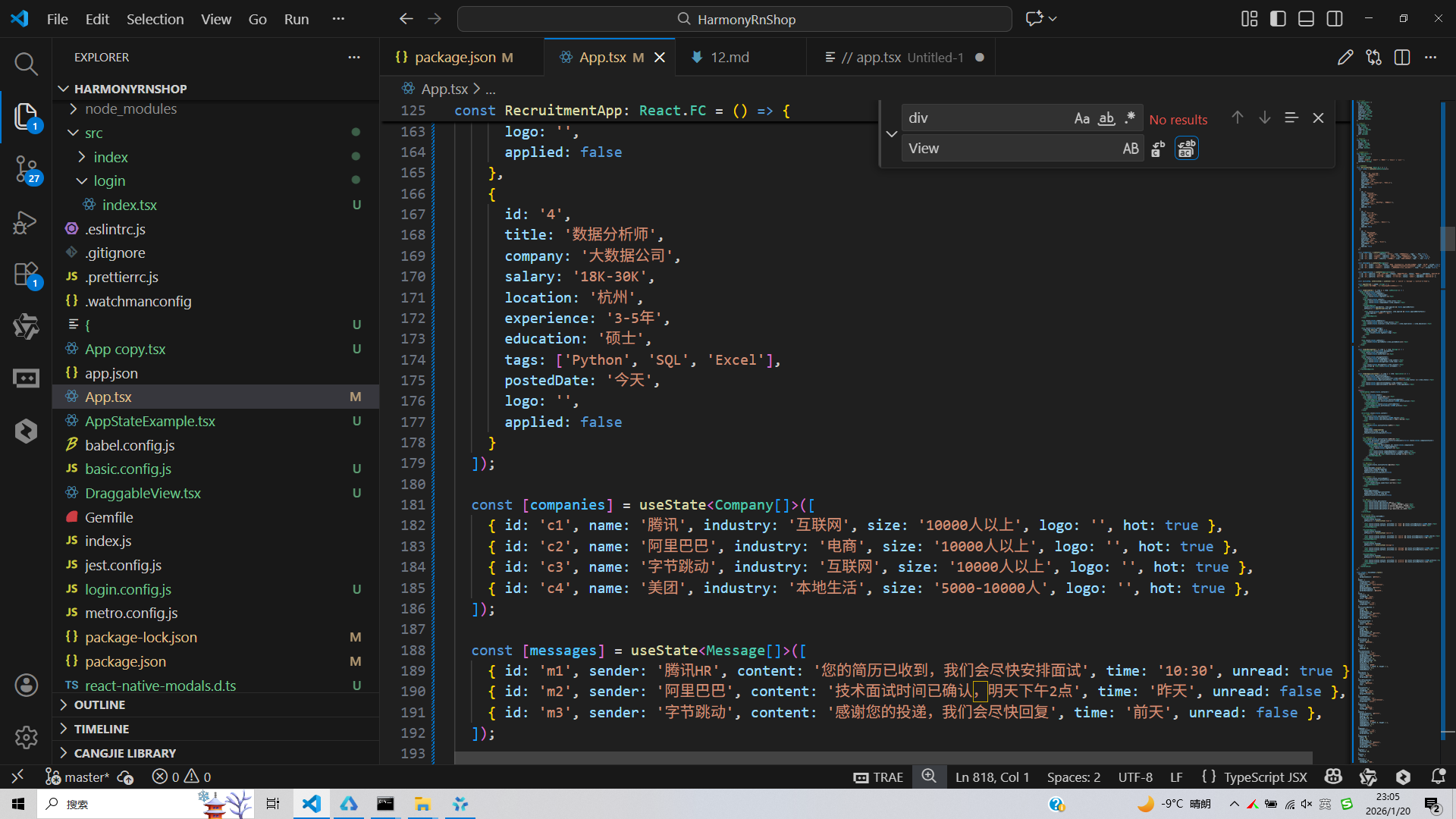
// app.tsx
import React, { useState } from 'react';
import { SafeAreaView, View, Text, StyleSheet, TouchableOpacity, ScrollView, Dimensions, Alert, FlatList } from 'react-native';

// 图标库
const ICONS = {
  home: '🏠',
  search: '🔍',
  job: '💼',
  company: '🏢',
  resume: '📄',
  chat: '💬',
  notification: '🔔',
  profile: '👤',
};

const { width } = Dimensions.get('window');

// 职位类型
type JobPosition = {
  id: string;
  title: string;
  company: string;
  salary: string;
  location: string;
  experience: string;
  education: string;
  tags: string[];
  postedDate: string;
  logo: string;
  applied: boolean;
};

// 公司类型
type Company = {
  id: string;
  name: string;
  industry: string;
  size: string;
  logo: string;
  hot: boolean;
};

// 消息类型
type Message = {
  id: string;
  sender: string;
  content: string;
  time: string;
  unread: boolean;
};

// 我的投递类型
type Application = {
  id: string;
  jobTitle: string;
  company: string;
  status: '已投递' | '已查看' | '面试中' | '已录用' | '未通过';
  applyDate: string;
};

// 主页面组件
const RecruitmentApp: React.FC = () => {
  const [jobs] = useState<JobPosition[]>([
    {
      id: '1',
      title: '前端开发工程师',
      company: '科技有限公司',
      salary: '15K-25K',
      location: '北京',
      experience: '3-5年',
      education: '本科',
      tags: ['React', 'TypeScript', 'Node.js'],
      postedDate: '2天前',
      logo: '',
      applied: false
    },
    {
      id: '2',
      title: '产品经理',
      company: '互联网公司',
      salary: '20K-35K',
      location: '上海',
      experience: '5-10年',
      education: '本科',
      tags: ['产品设计', '数据分析', '团队协作'],
      postedDate: '1天前',
      logo: '',
      applied: true
    },
    {
      id: '3',
      title: 'UI设计师',
      company: '设计工作室',
      salary: '12K-18K',
      location: '深圳',
      experience: '2-4年',
      education: '大专',
      tags: ['Figma', 'Sketch', '交互设计'],
      postedDate: '3天前',
      logo: '',
      applied: false
    },
    {
      id: '4',
      title: '数据分析师',
      company: '大数据公司',
      salary: '18K-30K',
      location: '杭州',
      experience: '3-5年',
      education: '硕士',
      tags: ['Python', 'SQL', 'Excel'],
      postedDate: '今天',
      logo: '',
      applied: false
    }
  ]);

  const [companies] = useState<Company[]>([
    { id: 'c1', name: '腾讯', industry: '互联网', size: '10000人以上', logo: '', hot: true },
    { id: 'c2', name: '阿里巴巴', industry: '电商', size: '10000人以上', logo: '', hot: true },
    { id: 'c3', name: '字节跳动', industry: '互联网', size: '10000人以上', logo: '', hot: true },
    { id: 'c4', name: '美团', industry: '本地生活', size: '5000-10000人', logo: '', hot: true },
  ]);

  const [messages] = useState<Message[]>([
    { id: 'm1', sender: '腾讯HR', content: '您的简历已收到,我们会尽快安排面试', time: '10:30', unread: true },
    { id: 'm2', sender: '阿里巴巴', content: '技术面试时间已确认,明天下午2点', time: '昨天', unread: false },
    { id: 'm3', sender: '字节跳动', content: '感谢您的投递,我们会尽快回复', time: '前天', unread: false },
  ]);

  const [applications] = useState<Application[]>([
    { id: 'a1', jobTitle: '前端开发工程师', company: '科技有限公司', status: '面试中', applyDate: '2023-05-10' },
    { id: 'a2', jobTitle: '产品经理', company: '互联网公司', status: '已查看', applyDate: '2023-05-12' },
    { id: 'a3', jobTitle: 'UI设计师', company: '设计工作室', status: '已投递', applyDate: '2023-05-14' },
  ]);

  const [activeTab, setActiveTab] = useState<'home' | 'search' | 'message' | 'profile'>('home');

  const applyForJob = (jobId: string) => {
    Alert.alert('投递成功', '职位申请已提交,等待企业回复');
  };

  const renderJobItem = ({ item }: { item: JobPosition }) => (
    <View style={styles.jobCard}>
      <View style={styles.jobHeader}>
        <View style={styles.companyLogo}>
          <Text style={styles.logoText}>🏢</Text>
        </div>
        <View style={styles.jobInfo}>
          <Text style={styles.jobTitle}>{item.title}</Text>
          <Text style={styles.companyName}>{item.company}</Text>
        </div>
        <TouchableOpacity
          style={[styles.applyButton, item.applied && styles.appliedButton]}
          onPress={() => applyForJob(item.id)}
        >
          <Text style={[styles.applyButtonText, item.applied && styles.appliedButtonText]}>
            {item.applied ? '已投递' : '投递'}
          </Text>
        </TouchableOpacity>
      </div>

      <View style={styles.jobDetails}>
        <Text style={styles.salary}>{item.salary}</Text>
        <Text style={styles.location}>{item.location} | {item.experience} | {item.education}</Text>
      </div>

      <View style={styles.jobTags}>
        {item.tags.map((tag, index) => (
          <View key={index} style={styles.tag}>
            <Text style={styles.tagText}>{tag}</Text>
          </View>
        ))}
      </div>

      <View style={styles.jobFooter}>
        <Text style={styles.postedDate}>{item.postedDate}发布</Text>
      </div>
    </View>
  );

  const renderMessageItem = ({ item }: { item: Message }) => (
    <TouchableOpacity style={styles.messageItem}>
      <View style={styles.messageAvatar}>
        <Text style={styles.avatarText}>👤</Text>
      </div>
      <View style={styles.messageContent}>
        <View style={styles.messageHeader}>
          <Text style={styles.senderName}>{item.sender}</Text>
          <Text style={styles.messageTime}>{item.time}</Text>
        </div>
        <Text style={styles.messageText}>{item.content}</Text>
        {item.unread && <View style={styles.unreadDot} />}
      </div>
    </TouchableOpacity>
  );

  const renderApplicationItem = ({ item }: { item: Application }) => (
    <View style={styles.applicationItem}>
      <View style={styles.applicationHeader}>
        <Text style={styles.applicationJobTitle}>{item.jobTitle}</Text>
        <Text style={[styles.applicationStatus, styles[`status_${item.status}`]]}>{item.status}</Text>
      </div>
      <Text style={styles.applicationCompany}>{item.company}</Text>
      <Text style={styles.applicationDate}>投递时间: {item.applyDate}</Text>
    </View>
  );

  return (
    <SafeAreaView style={styles.container}>
      {/* 头部 */}
      <View style={styles.header}>
        <Text style={styles.title}>求职招聘</Text>
        <View style={styles.headerActions}>
          <TouchableOpacity style={styles.notificationButton}>
            <Text style={styles.notificationIcon}>{ICONS.notification}</Text>
          </TouchableOpacity>
          <TouchableOpacity style={styles.profileButton}>
            <Text style={styles.profileIcon}>{ICONS.profile}</Text>
          </TouchableOpacity>
        </div>
      </View>

      <ScrollView style={styles.content}>
        {/* 搜索框 */}
        <View style={styles.searchContainer}>
          <Text style={styles.searchIcon}>{ICONS.search}</Text>
          <Text style={styles.searchPlaceholder}>搜索职位或公司</Text>
        </div>

        {/* 热门职位 */}
        <Text style={styles.sectionTitle}>热门职位</Text>
        <FlatList
          data={jobs}
          renderItem={renderJobItem}
          keyExtractor={item => item.id}
          showsVerticalScrollIndicator={false}
        />

        {/* 热门公司 */}
        <Text style={styles.sectionTitle}>热门公司</Text>
        <ScrollView horizontal showsHorizontalScrollIndicator={false} style={styles.companyContainer}>
          <View style={styles.companyList}>
            {companies.map(company => (
              <TouchableOpacity key={company.id} style={styles.companyCard}>
                <View style={styles.companyLogoSmall}>
                  <Text style={styles.logoText}>🏢</Text>
                </div>
                <Text style={styles.companyNameSmall}>{company.name}</Text>
                <Text style={styles.companyIndustry}>{company.industry}</Text>
                {company.hot && <Text style={styles.hotTag}>🔥 热招</Text>}
              </TouchableOpacity>
            ))}
          </View>
        </ScrollView>

        {/* 最近消息 */}
        <Text style={styles.sectionTitle}>最近消息</Text>
        <FlatList
          data={messages.slice(0, 2)}
          renderItem={renderMessageItem}
          keyExtractor={item => item.id}
          showsVerticalScrollIndicator={false}
        />

        {/* 我的投递 */}
        <View style={styles.sectionHeader}>
          <Text style={styles.sectionTitle}>我的投递</Text>
          <TouchableOpacity>
            <Text style={styles.seeAllText}>查看全部</Text>
          </TouchableOpacity>
        </View>

        <FlatList
          data={applications}
          renderItem={renderApplicationItem}
          keyExtractor={item => item.id}
          showsVerticalScrollIndicator={false}
        />

        {/* 求职建议 */}
        <View style={styles.adviceCard}>
          <Text style={styles.adviceTitle}>求职建议</Text>
          <Text style={styles.adviceText}>• 简历要突出重点技能和经验</Text>
          <Text style={styles.adviceText}>• 针对不同岗位定制简历内容</Text>
          <Text style={styles.adviceText}>• 准备常见面试问题的标准答案</Text>
          <Text style={styles.adviceText}>• 提前了解公司背景和文化</Text>
        </div>
      </ScrollView>

      {/* 底部导航 */}
      <View style={styles.bottomNav}>
        <TouchableOpacity
          style={styles.navItem}
          onPress={() => setActiveTab('home')}
        >
          <Text style={[styles.navIcon, activeTab === 'home' && styles.activeNavIcon]}>{ICONS.home}</Text>
          <Text style={[styles.navText, activeTab === 'home' && styles.activeNavText]}>首页</Text>
        </TouchableOpacity>

        <TouchableOpacity
          style={styles.navItem}
          onPress={() => setActiveTab('search')}
        >
          <Text style={[styles.navIcon, activeTab === 'search' && styles.activeNavIcon]}>{ICONS.search}</Text>
          <Text style={[styles.navText, activeTab === 'search' && styles.activeNavText]}>搜索</Text>
        </TouchableOpacity>

        <TouchableOpacity
          style={styles.navItem}
          onPress={() => setActiveTab('message')}
        >
          <Text style={[styles.navIcon, activeTab === 'message' && styles.activeNavIcon]}>{ICONS.chat}</Text>
          <Text style={[styles.navText, activeTab === 'message' && styles.activeNavText]}>消息</Text>
        </TouchableOpacity>

        <TouchableOpacity
          style={styles.navItem}
          onPress={() => setActiveTab('profile')}
        >
          <Text style={[styles.navIcon, activeTab === 'profile' && styles.activeNavIcon]}>{ICONS.profile}</Text>
          <Text style={[styles.navText, activeTab === 'profile' && styles.activeNavText]}>我的</Text>
        </TouchableOpacity>
      </View>
    </SafeAreaView>
  );
};

const styles = StyleSheet.create({
  container: {
    flex: 1,
    backgroundColor: '#f8fafc',
  },
  header: {
    flexDirection: 'row',
    alignItems: 'center',
    justifyContent: 'space-between',
    padding: 20,
    backgroundColor: '#ffffff',
    borderBottomWidth: 1,
    borderBottomColor: '#e2e8f0',
  },
  title: {
    fontSize: 20,
    fontWeight: 'bold',
    color: '#1e293b',
  },
  headerActions: {
    flexDirection: 'row',
    alignItems: 'center',
  },
  notificationButton: {
    width: 36,
    height: 36,
    borderRadius: 18,
    backgroundColor: '#f1f5f9',
    alignItems: 'center',
    justifyContent: 'center',
    marginRight: 12,
  },
  notificationIcon: {
    fontSize: 18,
    color: '#64748b',
  },
  profileButton: {
    width: 36,
    height: 36,
    borderRadius: 18,
    backgroundColor: '#f1f5f9',
    alignItems: 'center',
    justifyContent: 'center',
  },
  profileIcon: {
    fontSize: 18,
    color: '#64748b',
  },
  content: {
    flex: 1,
    padding: 16,
  },
  searchContainer: {
    flexDirection: 'row',
    alignItems: 'center',
    backgroundColor: '#ffffff',
    borderRadius: 20,
    paddingVertical: 12,
    paddingHorizontal: 16,
    marginBottom: 16,
    elevation: 1,
    shadowColor: '#000',
    shadowOffset: { width: 0, height: 1 },
    shadowOpacity: 0.1,
    shadowRadius: 2,
  },
  searchIcon: {
    fontSize: 18,
    color: '#64748b',
    marginRight: 12,
  },
  searchPlaceholder: {
    fontSize: 14,
    color: '#94a3b8',
    flex: 1,
  },
  sectionTitle: {
    fontSize: 18,
    fontWeight: 'bold',
    color: '#1e293b',
    marginVertical: 12,
  },
  sectionHeader: {
    flexDirection: 'row',
    justifyContent: 'space-between',
    alignItems: 'center',
  },
  seeAllText: {
    fontSize: 14,
    color: '#3b82f6',
    fontWeight: '500',
  },
  jobCard: {
    backgroundColor: '#ffffff',
    borderRadius: 12,
    padding: 16,
    marginBottom: 12,
    elevation: 1,
    shadowColor: '#000',
    shadowOffset: { width: 0, height: 1 },
    shadowOpacity: 0.1,
    shadowRadius: 2,
  },
  jobHeader: {
    flexDirection: 'row',
    alignItems: 'center',
    marginBottom: 12,
  },
  companyLogo: {
    width: 40,
    height: 40,
    borderRadius: 8,
    backgroundColor: '#dbeafe',
    alignItems: 'center',
    justifyContent: 'center',
    marginRight: 12,
  },
  logoText: {
    fontSize: 20,
  },
  jobInfo: {
    flex: 1,
  },
  jobTitle: {
    fontSize: 16,
    fontWeight: '600',
    color: '#1e293b',
    marginBottom: 4,
  },
  companyName: {
    fontSize: 14,
    color: '#64748b',
  },
  applyButton: {
    backgroundColor: '#3b82f6',
    paddingHorizontal: 16,
    paddingVertical: 8,
    borderRadius: 20,
  },
  appliedButton: {
    backgroundColor: '#cbd5e1',
  },
  applyButtonText: {
    color: '#ffffff',
    fontWeight: '500',
  },
  appliedButtonText: {
    color: '#64748b',
  },
  jobDetails: {
    marginBottom: 12,
  },
  salary: {
    fontSize: 18,
    fontWeight: 'bold',
    color: '#ef4444',
    marginBottom: 4,
  },
  location: {
    fontSize: 12,
    color: '#64748b',
  },
  jobTags: {
    flexDirection: 'row',
    flexWrap: 'wrap',
    marginBottom: 12,
  },
  tag: {
    backgroundColor: '#f1f5f9',
    paddingHorizontal: 8,
    paddingVertical: 4,
    borderRadius: 12,
    marginRight: 8,
    marginBottom: 4,
  },
  tagText: {
    fontSize: 12,
    color: '#64748b',
  },
  jobFooter: {
    flexDirection: 'row',
    justifyContent: 'space-between',
    alignItems: 'center',
  },
  postedDate: {
    fontSize: 12,
    color: '#94a3b8',
  },
  companyContainer: {
    marginBottom: 16,
  },
  companyList: {
    flexDirection: 'row',
  },
  companyCard: {
    backgroundColor: '#ffffff',
    borderRadius: 12,
    padding: 16,
    marginRight: 12,
    width: 140,
    alignItems: 'center',
    elevation: 1,
    shadowColor: '#000',
    shadowOffset: { width: 0, height: 1 },
    shadowOpacity: 0.1,
    shadowRadius: 2,
  },
  companyLogoSmall: {
    width: 40,
    height: 40,
    borderRadius: 8,
    backgroundColor: '#fef3c7',
    alignItems: 'center',
    justifyContent: 'center',
    marginBottom: 8,
  },
  companyNameSmall: {
    fontSize: 14,
    fontWeight: '500',
    color: '#1e293b',
    marginBottom: 4,
  },
  companyIndustry: {
    fontSize: 12,
    color: '#64748b',
    marginBottom: 4,
  },
  hotTag: {
    fontSize: 10,
    color: '#ffffff',
    backgroundColor: '#f59e0b',
    paddingHorizontal: 6,
    paddingVertical: 2,
    borderRadius: 10,
  },
  messageItem: {
    backgroundColor: '#ffffff',
    borderRadius: 12,
    padding: 16,
    flexDirection: 'row',
    alignItems: 'center',
    marginBottom: 12,
    elevation: 1,
    shadowColor: '#000',
    shadowOffset: { width: 0, height: 1 },
    shadowOpacity: 0.1,
    shadowRadius: 2,
  },
  messageAvatar: {
    width: 40,
    height: 40,
    borderRadius: 20,
    backgroundColor: '#dbeafe',
    alignItems: 'center',
    justifyContent: 'center',
    marginRight: 12,
  },
  avatarText: {
    fontSize: 20,
  },
  messageContent: {
    flex: 1,
  },
  messageHeader: {
    flexDirection: 'row',
    justifyContent: 'space-between',
    marginBottom: 4,
  },
  senderName: {
    fontSize: 14,
    fontWeight: '500',
    color: '#1e293b',
  },
  messageTime: {
    fontSize: 12,
    color: '#94a3b8',
  },
  messageText: {
    fontSize: 14,
    color: '#64748b',
    lineHeight: 18,
  },
  unreadDot: {
    width: 8,
    height: 8,
    borderRadius: 4,
    backgroundColor: '#3b82f6',
    position: 'absolute',
    top: 0,
    right: 0,
  },
  applicationItem: {
    backgroundColor: '#ffffff',
    borderRadius: 12,
    padding: 16,
    marginBottom: 12,
    elevation: 1,
    shadowColor: '#000',
    shadowOffset: { width: 0, height: 1 },
    shadowOpacity: 0.1,
    shadowRadius: 2,
  },
  applicationHeader: {
    flexDirection: 'row',
    justifyContent: 'space-between',
    alignItems: 'center',
    marginBottom: 4,
  },
  applicationJobTitle: {
    fontSize: 16,
    fontWeight: '600',
    color: '#1e293b',
    flex: 1,
  },
  applicationStatus: {
    fontSize: 12,
    fontWeight: '500',
    paddingVertical: 4,
    paddingHorizontal: 8,
    borderRadius: 12,
  },
  status_已投递: {
    backgroundColor: '#dbeafe',
    color: '#3b82f6',
  },
  status_已查看: {
    backgroundColor: '#fef3c7',
    color: '#f59e0b',
  },
  status_面试中: {
    backgroundColor: '#d1fae5',
    color: '#10b981',
  },
  status_已录用: {
    backgroundColor: '#ddd6fe',
    color: '#8b5cf6',
  },
  status_未通过: {
    backgroundColor: '#fee2e2',
    color: '#ef4444',
  },
  applicationCompany: {
    fontSize: 14,
    color: '#64748b',
    marginBottom: 4,
  },
  applicationDate: {
    fontSize: 12,
    color: '#94a3b8',
  },
  adviceCard: {
    backgroundColor: '#ffffff',
    borderRadius: 12,
    padding: 16,
    marginTop: 16,
    marginBottom: 16,
  },
  adviceTitle: {
    fontSize: 16,
    fontWeight: 'bold',
    color: '#1e293b',
    marginBottom: 12,
  },
  adviceText: {
    fontSize: 12,
    color: '#64748b',
    lineHeight: 18,
    marginBottom: 6,
  },
  bottomNav: {
    flexDirection: 'row',
    justifyContent: 'space-around',
    backgroundColor: '#ffffff',
    borderTopWidth: 1,
    borderTopColor: '#e2e8f0',
    paddingVertical: 12,
  },
  navItem: {
    alignItems: 'center',
    flex: 1,
  },
  navIcon: {
    fontSize: 20,
    color: '#94a3b8',
    marginBottom: 4,
  },
  activeNavIcon: {
    color: '#3b82f6',
  },
  navText: {
    fontSize: 12,
    color: '#94a3b8',
  },
  activeNavText: {
    color: '#3b82f6',
    fontWeight: '500',
  },
});

export default RecruitmentApp;
打包
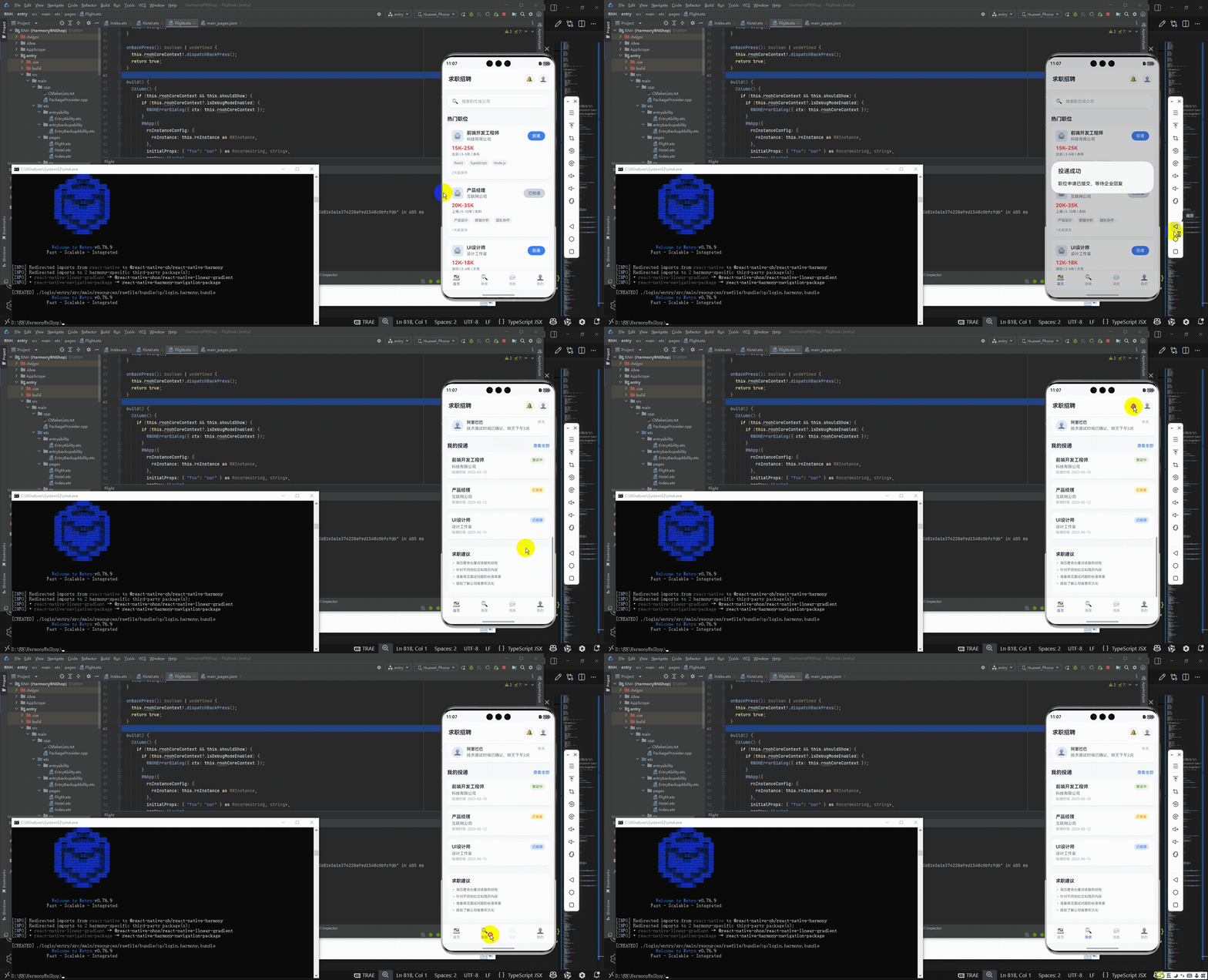
接下来通过打包命令npn run harmony将reactNative的代码打包成为bundle,这样可以进行在开源鸿蒙OpenHarmony中进行使用。

打包之后再将打包后的鸿蒙OpenHarmony文件拷贝到鸿蒙的DevEco-Studio工程目录去:

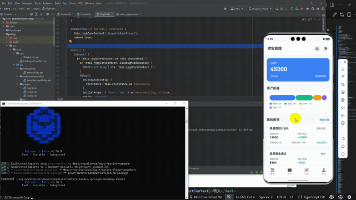
最后运行效果图如下显示:
欢迎大家加入开源鸿蒙跨平台开发者社区,一起共建开源鸿蒙跨平台生态。

作为“人工智能6S店”的官方数字引擎,为AI开发者与企业提供一个覆盖软硬件全栈、一站式门户。
更多推荐
 11
11 0
0- 0


 已为社区贡献2条内容

所有评论(0)