
React Native集成鸿蒙组件开发指南 摘要:本文介绍了在React Native中开发鸿蒙(HarmonyOS)组件的关键步骤。首先需要掌握鸿蒙开发基础,包括DevEco Studio IDE
在React Native中开发鸿组件(这里指的是鸿蒙(HarmonyOS)组件),你需要了解鸿蒙开发的基础以及如何在React Native项目中集成鸿蒙应用。鸿蒙OS是由华为开发的一个分布式操作系统,主要用于其智能设备,如手机、平板、智能手表等。
- 了解鸿蒙开发基础
首先,你需要熟悉鸿蒙OS的开发环境设置和基本开发流程。这包括:
- 开发工具:使用DevEco Studio作为开发IDE。
- SDK:下载并安装HarmonyOS SDK。
- 语言与框架:主要使用Java/Kotlin进行应用开发,但也可以通过C/C++扩展功能。
- 在React Native中集成鸿蒙应用
React Native本身主要用于Harmony和Harmony平台的开发,但你可以通过以下几种方式将鸿蒙应用集成到React Native项目中:
A. 使用WebView
一种简单的方法是使用WebView来加载鸿蒙应用的网页版或通过一个WebView桥接本地代码与鸿蒙应用。
-
在React Native中添加WebView:
npm install react-native-webview -
使用WebView加载鸿蒙应用的URL:
import React from 'react';
import { WebView } from 'react-native-webview';

const HarmonyApp = () => {
  return (
    <WebView
      source={{ uri: 'https://your-harmony-app-url.com' }}
      style={{ flex: 1 }}
    />
  );
};

export default HarmonyApp;
B. 使用Native Modules
创建一个Native Module来桥接React Native和鸿蒙原生应用。
-
在DevEco Studio中创建一个鸿蒙应用。
-
开发Native Module:创建一个Java/Kotlin模块,在其中实现与鸿蒙应用交互的逻辑。
-
在React Native中调用Native Module:使用
react-native-bridge或其他桥接库来调用鸿蒙原生模块。例如,使用
react-native-bridge:npm install react-native-bridge然后在JavaScript中调用:
import { NativeModules } from 'react-native';
const { HarmonyModule } = NativeModules;
C. 使用Deep Linking或Intent传递数据
如果你的鸿蒙应用支持Deep Linking或Intent传递数据,你可以在React Native中处理这些链接或Intent,并据此与鸿蒙应用交互。
- 职业发展规划和开发代码详情
对于职业发展规划,你可以考虑以下步骤:
- 学习鸿蒙开发:深入学习鸿蒙OS的APIs和开发工具。
- 实践项目:在项目中实践鸿蒙应用的开发与集成。
- 优化集成方案:不断优化React Native与鸿蒙应用的集成方案,提高用户体验和性能。
- 持续学习:关注鸿蒙OS的最新动态和更新,持续学习新技术和新特性。
- 分享和交流:参与开源项目,分享你的经验,与其他开发者交流。
通过这些步骤,你可以有效地在React Native项目中开发并集成鸿蒙组件,同时规划你的职业发展路径。
开发一个名为“植物养护智能助手”的React Native应用,涉及到多个技术层面,包括前端UI设计、后端数据处理以及可能的硬件接口(例如传感器数据采集)。下面,我将提供一个基本的开发指南和代码示例,帮助你开始这个项目。
- 环境准备
首先,确保你的开发环境已经安装了Node.js和React Native。你可以通过以下步骤安装React Native环境:
安装Node.js (如果尚未安装)
安装React Native CLI
npm install -g react-native-cli

创建一个新的React Native项目
react-native init PlantCareAssistant

进入项目目录
cd PlantCareAssistant
- 安装依赖
为了简化开发,可以使用一些现成的库来帮助处理植物养护相关的功能,例如使用react-native-vector-icons来添加图标、react-native-camera来处理图像识别等。
安装图标库
npm install react-native-vector-icons

安装相机库(可选,根据需求)
npm install react-native-camera
- 项目结构规划
创建一个基本的项目结构,例如:
PlantCareAssistant/
|-- Harmony/
|-- Harmony/
|-- src/
    |-- components/
    |-- screens/
        |-- HomeScreen.js
        |-- CareTipsScreen.js
    |-- App.js
|-- package.json
- 开发界面组件
HomeScreen.js
import React from 'react';
import { View, Text, StyleSheet, Button } from 'react-native';
import Icon from 'react-native-vector-icons/FontAwesome'; // 假设使用FontAwesome图标库

const HomeScreen = ({ navigation }) => {
  return (
    <View style={styles.container}>
      <Text style={styles.title}>植物养护智能助手</Text>
      <Button title="查看养护建议" onPress={() => navigation.navigate('CareTips')} />
      <Icon name="leaf" size={50} color="green" /> {/* 显示一个叶子图标 */}
    </View>
  );
};

const styles = StyleSheet.create({
  container: {
    flex: 1,
    justifyContent: 'center',
    alignItems: 'center',
  },
  title: {
    fontSize: 24,
    marginBottom: 20,
  },
});

export default HomeScreen;
CareTipsScreen.js
import React from 'react';
import { View, Text, StyleSheet } from 'react-native';
import Icon from 'react-native-vector-icons/FontAwesome'; // 使用相同图标库

const CareTipsScreen = () => {
  return (
    <View style={styles.container}>
      <Text style={styles.title}>养护建议</Text>
      <Text>请每天给植物浇水。</Text> {/* 示例文本 */}
      <Icon name="info-circle" size={30} color="blue" /> {/* 信息图标 */}
    </View>
  );
};

const styles = StyleSheet.create({
  container: {
    flex: 1,
    justifyContent: 'center',
    alignItems: 'center',
  },
  title: {
    fontSize: 24,
    marginBottom: 20,
  },
});
export default CareTipsScreen;
- 导航设置(使用React Navigation)
安装React Navigation:
npm install @react-navigation/native @react-navigation/stack react-native-screens react-native-safe-area-context @react-navigation/native-stack @react-navigation/stack @react-navigation/bottom-tabs @react-navigation/material-top-tabs @react-navigation/material-bottom-tabs @react-navigation/drawer @react-navigation/elements @react-navigation/routers @react-navigation/web react-native-tab-view react-native-pager-view react-native-reanimated react-native-gesture-handler react-native-screens react-native-safe-area-context react-native-svg expo @expo/vector-icons expo-linear-gradient expo-constants expo-linking --save` 确保所有依赖都正确安装。`npm install`。`npx pod-install
真实演示案例代码:
// app.tsx
import React, { useState } from 'react';
import { SafeAreaView, View, Text, StyleSheet, TouchableOpacity, ScrollView, Dimensions, Alert, FlatList } from 'react-native';

// 图标库
const ICONS = {
  home: '🏠',
  portfolio: '💼',
  invest: '📈',
  bank: '🏦',
  chart: '📊',
  calculator: '🔢',
  settings: '⚙️',
  profile: '👤',
};

const { width } = Dimensions.get('window');

// 投资产品类型
type InvestmentProduct = {
  id: string;
  name: string;
  type: string;
  currentValue: number;
  investedAmount: number;
  profit: number;
  profitRate: number;
  riskLevel: '低' | '中' | '高';
  daysHeld: number;
};

// 收益记录类型
type ProfitRecord = {
  id: string;
  date: string;
  amount: number;
  type: '收益' | '投资' | '赎回';
};

// 资产配置类型
type AssetAllocation = {
  id: string;
  name: string;
  percentage: number;
  value: number;
  color: string;
};

// 用户类型
type User = {
  id: string;
  name: string;
  avatar: string;
  totalAssets: number;
  monthlyProfit: number;
};

// 主页面组件
const FinanceApp: React.FC = () => {
  const [investments] = useState<InvestmentProduct[]>([
    {
      id: '1',
      name: '稳健理财计划A',
      type: '理财产品',
      currentValue: 12500,
      investedAmount: 10000,
      profit: 2500,
      profitRate: 25.0,
      riskLevel: '低',
      daysHeld: 90
    },
    {
      id: '2',
      name: '股票基金组合',
      type: '基金',
      currentValue: 8500,
      investedAmount: 8000,
      profit: 500,
      profitRate: 6.25,
      riskLevel: '中',
      daysHeld: 45
    },
    {
      id: '3',
      name: '债券投资',
      type: '债券',
      currentValue: 5000,
      investedAmount: 5000,
      profit: 150,
      profitRate: 3.0,
      riskLevel: '低',
      daysHeld: 180
    },
    {
      id: '4',
      name: '科技股投资',
      type: '股票',
      currentValue: 15000,
      investedAmount: 12000,
      profit: 3000,
      profitRate: 25.0,
      riskLevel: '高',
      daysHeld: 30
    }
  ]);

  const [profitRecords] = useState<ProfitRecord[]>([
    { id: 'p1', date: '2023-05-15', amount: 250.50, type: '收益' },
    { id: 'p2', date: '2023-05-14', amount: 120.30, type: '收益' },
    { id: 'p3', date: '2023-05-10', amount: 500.00, type: '投资' },
    { id: 'p4', date: '2023-05-08', amount: 89.20, type: '收益' },
    { id: 'p5', date: '2023-05-05', amount: 150.75, type: '收益' },
  ]);

  const [assetAllocations] = useState<AssetAllocation[]>([
    { id: 'a1', name: '股票', percentage: 45, value: 20000, color: '#3b82f6' },
    { id: 'a2', name: '基金', percentage: 30, value: 13000, color: '#10b981' },
    { id: 'a3', name: '债券', percentage: 15, value: 6500, color: '#f59e0b' },
    { id: 'a4', name: '现金', percentage: 10, value: 4500, color: '#8b5cf6' },
  ]);

  const [user] = useState<User>({
    id: 'u1',
    name: '张三',
    avatar: '',
    totalAssets: 45000,
    monthlyProfit: 1250.75
  });

  const [activeTab, setActiveTab] = useState<'home' | 'portfolio' | 'invest' | 'profile'>('home');

  const formatCurrency = (value: number): string => {
    return value.toLocaleString('zh-CN', {
      style: 'currency',
      currency: 'CNY',
      minimumFractionDigits: 2
    });
  };

  const formatPercent = (value: number): string => {
    return `${value >= 0 ? '+' : ''}${value.toFixed(2)}%`;
  };

  const renderInvestmentItem = ({ item }: { item: InvestmentProduct }) => (
    <View style={styles.investmentCard}>
      <View style={styles.investmentHeader}>
        <Text style={styles.investmentName}>{item.name}</Text>
        <Text style={styles.investmentType}>{item.type}</Text>
      </div>

      <View style={styles.investmentValues}>
        <View style={styles.valueItem}>
          <Text style={styles.valueLabel}>当前价值</Text>
          <Text style={styles.valueAmount}>{formatCurrency(item.currentValue)}</Text>
        </div>
        <View style={styles.valueItem}>
          <Text style={styles.valueLabel}>累计收益</Text>
          <Text style={[styles.valueAmount, item.profit >= 0 ? styles.positive : styles.negative]}>
            {item.profit >= 0 ? '+' : ''}{formatCurrency(item.profit)}
          </Text>
        </div>
      </div>

      <View style={styles.investmentFooter}>
        <Text style={styles.riskLevel}>风险等级: {item.riskLevel}</Text>
        <Text style={styles.daysHeld}>持有天数: {item.daysHeld}天</Text>
        <Text style={[styles.profitRate, item.profitRate >= 0 ? styles.positive : styles.negative]}>
          {formatPercent(item.profitRate)}
        </Text>
      </div>
    </View>
  );

  const renderProfitRecord = ({ item }: { item: ProfitRecord }) => (
    <View style={styles.recordItem}>
      <View style={styles.recordLeft}>
        <Text style={styles.recordDate}>{item.date}</Text>
        <Text style={styles.recordType}>{item.type}</Text>
      </div>
      <Text style={[styles.recordAmount, item.type === '收益' ? styles.positive : styles.negative]}>
        {item.type === '收益' ? '+' : ''}{formatCurrency(item.amount)}
      </Text>
    </View>
  );

  return (
    <SafeAreaView style={styles.container}>
      {/* 头部 */}
      <View style={styles.header}>
        <Text style={styles.title}>财富管理</Text>
        <View style={styles.headerActions}>
          <TouchableOpacity style={styles.chartButton}>
            <Text style={styles.chartIcon}>{ICONS.chart}</Text>
          </TouchableOpacity>
          <TouchableOpacity style={styles.settingsButton}>
            <Text style={styles.settingsIcon}>{ICONS.settings}</Text>
          </TouchableOpacity>
        </div>
      </View>

      <ScrollView style={styles.content}>
        {/* 总资产卡片 */}
        <View style={styles.assetCard}>
          <Text style={styles.assetLabel}>总资产</Text>
          <Text style={styles.totalAsset}>{formatCurrency(user.totalAssets)}</Text>
          <View style={styles.monthlyProfitContainer}>
            <Text style={styles.monthlyProfitLabel}>月收益</Text>
            <Text style={styles.monthlyProfitAmount}>{formatCurrency(user.monthlyProfit)}</Text>
          </div>
        </View>

        {/* 资产配置图表 */}
        <Text style={styles.sectionTitle}>资产配置</Text>
        <View style={styles.allocationChart}>
          <View style={styles.chartContainer}>
            {assetAllocations.map((asset, index) => (
              <View
                key={asset.id}
                style={[styles.chartSegment, {
                  width: `${asset.percentage}%`,
                  backgroundColor: asset.color,
                  marginLeft: index === 0 ? 0 : 2
                }]}
              />
            ))}
          </div>
          <View style={styles.legendContainer}>
            {assetAllocations.map(asset => (
              <View key={asset.id} style={styles.legendItem}>
                <View style={[styles.legendColor, { backgroundColor: asset.color }]} />
                <Text style={styles.legendText}>{asset.name} {asset.percentage}%</Text>
              </View>
            ))}
          </div>
        </View>

        {/* 投资产品 */}
        <View style={styles.sectionHeader}>
          <Text style={styles.sectionTitle}>我的投资</Text>
          <TouchableOpacity>
            <Text style={styles.seeAllText}>查看全部</Text>
          </TouchableOpacity>
        </View>

        <FlatList
          data={investments.slice(0, 2)}
          renderItem={renderInvestmentItem}
          keyExtractor={item => item.id}
          showsVerticalScrollIndicator={false}
        />

        {/* 收益记录 */}
        <View style={styles.sectionHeader}>
          <Text style={styles.sectionTitle}>收益记录</Text>
          <TouchableOpacity>
            <Text style={styles.seeAllText}>查看全部</Text>
          </TouchableOpacity>
        </View>

        <FlatList
          data={profitRecords}
          renderItem={renderProfitRecord}
          keyExtractor={item => item.id}
          showsVerticalScrollIndicator={false}
        />

        {/* 理财建议 */}
        <View style={styles.adviceCard}>
          <Text style={styles.adviceTitle}>理财建议</Text>
          <Text style={styles.adviceText}>• 分散投资降低风险,建议配置不同类型的资产</Text>
          <Text style={styles.adviceText}>• 定期评估投资组合,适时调整策略</Text>
          <Text style={styles.adviceText}>• 长期投资通常比短期投机收益更稳定</Text>
          <Text style={styles.adviceText}>• 根据风险承受能力选择合适的投资产品</Text>
        </div>

        {/* 快速操作 */}
        <View style={styles.quickActions}>
          <TouchableOpacity style={styles.quickActionItem}>
            <Text style={styles.quickActionIcon}>{ICONS.invest}</Text>
            <Text style={styles.quickActionText}>投资</Text>
          </TouchableOpacity>
          <TouchableOpacity style={styles.quickActionItem}>
            <Text style={styles.quickActionIcon}>{ICONS.bank}</Text>
            <Text style={styles.quickActionText}>转入</Text>
          </TouchableOpacity>
          <TouchableOpacity style={styles.quickActionItem}>
            <Text style={styles.quickActionIcon}>{ICONS.portfolio}</Text>
            <Text style={styles.quickActionText}>持仓</Text>
          </TouchableOpacity>
          <TouchableOpacity style={styles.quickActionItem}>
            <Text style={styles.quickActionIcon}>{ICONS.calculator}</Text>
            <Text style={styles.quickActionText}>计算器</Text>
          </TouchableOpacity>
        </View>
      </ScrollView>

      {/* 底部导航 */}
      <View style={styles.bottomNav}>
        <TouchableOpacity
          style={styles.navItem}
          onPress={() => setActiveTab('home')}
        >
          <Text style={[styles.navIcon, activeTab === 'home' && styles.activeNavIcon]}>{ICONS.home}</Text>
          <Text style={[styles.navText, activeTab === 'home' && styles.activeNavText]}>首页</Text>
        </TouchableOpacity>

        <TouchableOpacity
          style={styles.navItem}
          onPress={() => setActiveTab('portfolio')}
        >
          <Text style={[styles.navIcon, activeTab === 'portfolio' && styles.activeNavIcon]}>{ICONS.portfolio}</Text>
          <Text style={[styles.navText, activeTab === 'portfolio' && styles.activeNavText]}>持仓</Text>
        </TouchableOpacity>

        <TouchableOpacity
          style={styles.navItem}
          onPress={() => setActiveTab('invest')}
        >
          <Text style={[styles.navIcon, activeTab === 'invest' && styles.activeNavIcon]}>{ICONS.invest}</Text>
          <Text style={[styles.navText, activeTab === 'invest' && styles.activeNavText]}>投资</Text>
        </TouchableOpacity>

        <TouchableOpacity
          style={styles.navItem}
          onPress={() => setActiveTab('profile')}
        >
          <Text style={[styles.navIcon, activeTab === 'profile' && styles.activeNavIcon]}>{ICONS.profile}</Text>
          <Text style={[styles.navText, activeTab === 'profile' && styles.activeNavText]}>我的</Text>
        </TouchableOpacity>
      </View>
    </SafeAreaView>
  );
};

const styles = StyleSheet.create({
  container: {
    flex: 1,
    backgroundColor: '#f8fafc',
  },
  header: {
    flexDirection: 'row',
    alignItems: 'center',
    justifyContent: 'space-between',
    padding: 20,
    backgroundColor: '#ffffff',
    borderBottomWidth: 1,
    borderBottomColor: '#e2e8f0',
  },
  title: {
    fontSize: 20,
    fontWeight: 'bold',
    color: '#1e293b',
  },
  headerActions: {
    flexDirection: 'row',
    alignItems: 'center',
  },
  chartButton: {
    width: 36,
    height: 36,
    borderRadius: 18,
    backgroundColor: '#f1f5f9',
    alignItems: 'center',
    justifyContent: 'center',
    marginRight: 12,
  },
  chartIcon: {
    fontSize: 18,
    color: '#64748b',
  },
  settingsButton: {
    width: 36,
    height: 36,
    borderRadius: 18,
    backgroundColor: '#f1f5f9',
    alignItems: 'center',
    justifyContent: 'center',
  },
  settingsIcon: {
    fontSize: 18,
    color: '#64748b',
  },
  content: {
    flex: 1,
    padding: 16,
  },
  assetCard: {
    backgroundColor: '#3b82f6',
    borderRadius: 16,
    padding: 20,
    marginBottom: 16,
  },
  assetLabel: {
    fontSize: 14,
    color: '#e0f2fe',
    marginBottom: 8,
  },
  totalAsset: {
    fontSize: 32,
    fontWeight: 'bold',
    color: '#ffffff',
    marginBottom: 12,
  },
  monthlyProfitContainer: {
    flexDirection: 'row',
    justifyContent: 'space-between',
    alignItems: 'center',
  },
  monthlyProfitLabel: {
    fontSize: 14,
    color: '#bae6fd',
  },
  monthlyProfitAmount: {
    fontSize: 16,
    fontWeight: 'bold',
    color: '#ffffff',
  },
  sectionTitle: {
    fontSize: 18,
    fontWeight: 'bold',
    color: '#1e293b',
    marginVertical: 12,
  },
  sectionHeader: {
    flexDirection: 'row',
    justifyContent: 'space-between',
    alignItems: 'center',
  },
  seeAllText: {
    fontSize: 14,
    color: '#3b82f6',
    fontWeight: '500',
  },
  allocationChart: {
    backgroundColor: '#ffffff',
    borderRadius: 12,
    padding: 16,
    marginBottom: 16,
  },
  chartContainer: {
    flexDirection: 'row',
    height: 30,
    borderRadius: 15,
    overflow: 'hidden',
    marginBottom: 12,
  },
  chartSegment: {
    height: '100%',
    borderRadius: 15,
  },
  legendContainer: {
    flexDirection: 'row',
    flexWrap: 'wrap',
  },
  legendItem: {
    flexDirection: 'row',
    alignItems: 'center',
    marginRight: 16,
    marginBottom: 8,
  },
  legendColor: {
    width: 12,
    height: 12,
    borderRadius: 6,
    marginRight: 6,
  },
  legendText: {
    fontSize: 12,
    color: '#64748b',
  },
  investmentCard: {
    backgroundColor: '#ffffff',
    borderRadius: 12,
    padding: 16,
    marginBottom: 12,
    elevation: 1,
    shadowColor: '#000',
    shadowOffset: { width: 0, height: 1 },
    shadowOpacity: 0.1,
    shadowRadius: 2,
  },
  investmentHeader: {
    flexDirection: 'row',
    justifyContent: 'space-between',
    alignItems: 'center',
    marginBottom: 12,
  },
  investmentName: {
    fontSize: 16,
    fontWeight: '600',
    color: '#1e293b',
    flex: 1,
  },
  investmentType: {
    fontSize: 12,
    color: '#64748b',
    backgroundColor: '#f1f5f9',
    paddingHorizontal: 8,
    paddingVertical: 4,
    borderRadius: 12,
  },
  investmentValues: {
    flexDirection: 'row',
    justifyContent: 'space-between',
    marginBottom: 12,
  },
  valueItem: {
    flex: 1,
  },
  valueLabel: {
    fontSize: 12,
    color: '#64748b',
    marginBottom: 4,
  },
  valueAmount: {
    fontSize: 16,
    fontWeight: 'bold',
    color: '#1e293b',
  },
  positive: {
    color: '#10b981',
  },
  negative: {
    color: '#ef4444',
  },
  investmentFooter: {
    flexDirection: 'row',
    justifyContent: 'space-between',
    alignItems: 'center',
  },
  riskLevel: {
    fontSize: 12,
    color: '#64748b',
  },
  daysHeld: {
    fontSize: 12,
    color: '#64748b',
  },
  profitRate: {
    fontSize: 14,
    fontWeight: 'bold',
  },
  recordItem: {
    backgroundColor: '#ffffff',
    borderRadius: 12,
    padding: 16,
    flexDirection: 'row',
    justifyContent: 'space-between',
    alignItems: 'center',
    marginBottom: 12,
    elevation: 1,
    shadowColor: '#000',
    shadowOffset: { width: 0, height: 1 },
    shadowOpacity: 0.1,
    shadowRadius: 2,
  },
  recordLeft: {
    flex: 1,
  },
  recordDate: {
    fontSize: 14,
    color: '#1e293b',
    marginBottom: 4,
  },
  recordType: {
    fontSize: 12,
    color: '#64748b',
  },
  recordAmount: {
    fontSize: 16,
    fontWeight: 'bold',
  },
  adviceCard: {
    backgroundColor: '#ffffff',
    borderRadius: 12,
    padding: 16,
    marginTop: 16,
    marginBottom: 16,
  },
  adviceTitle: {
    fontSize: 16,
    fontWeight: 'bold',
    color: '#1e293b',
    marginBottom: 12,
  },
  adviceText: {
    fontSize: 12,
    color: '#64748b',
    lineHeight: 18,
    marginBottom: 6,
  },
  quickActions: {
    flexDirection: 'row',
    justifyContent: 'space-between',
    marginBottom: 16,
  },
  quickActionItem: {
    alignItems: 'center',
    flex: 1,
    marginHorizontal: 8,
  },
  quickActionIcon: {
    fontSize: 24,
    marginBottom: 6,
  },
  quickActionText: {
    fontSize: 12,
    color: '#1e293b',
  },
  bottomNav: {
    flexDirection: 'row',
    justifyContent: 'space-around',
    backgroundColor: '#ffffff',
    borderTopWidth: 1,
    borderTopColor: '#e2e8f0',
    paddingVertical: 12,
  },
  navItem: {
    alignItems: 'center',
    flex: 1,
  },
  navIcon: {
    fontSize: 20,
    color: '#94a3b8',
    marginBottom: 4,
  },
  activeNavIcon: {
    color: '#3b82f6',
  },
  navText: {
    fontSize: 12,
    color: '#94a3b8',
  },
  activeNavText: {
    color: '#3b82f6',
    fontWeight: '500',
  },
});

export default FinanceApp;
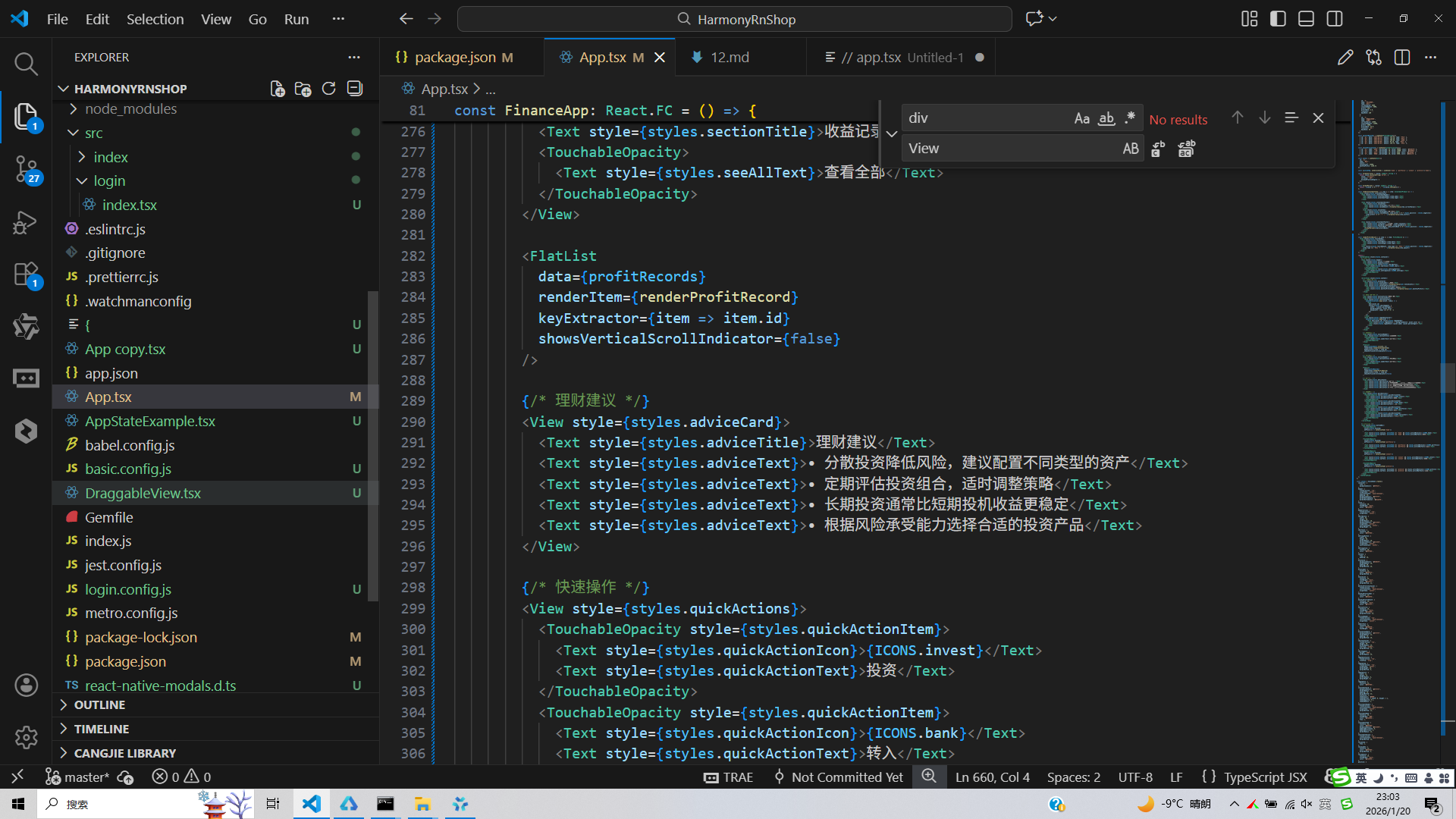
打包
接下来通过打包命令npn run harmony将reactNative的代码打包成为bundle,这样可以进行在开源鸿蒙OpenHarmony中进行使用。

打包之后再将打包后的鸿蒙OpenHarmony文件拷贝到鸿蒙的DevEco-Studio工程目录去:

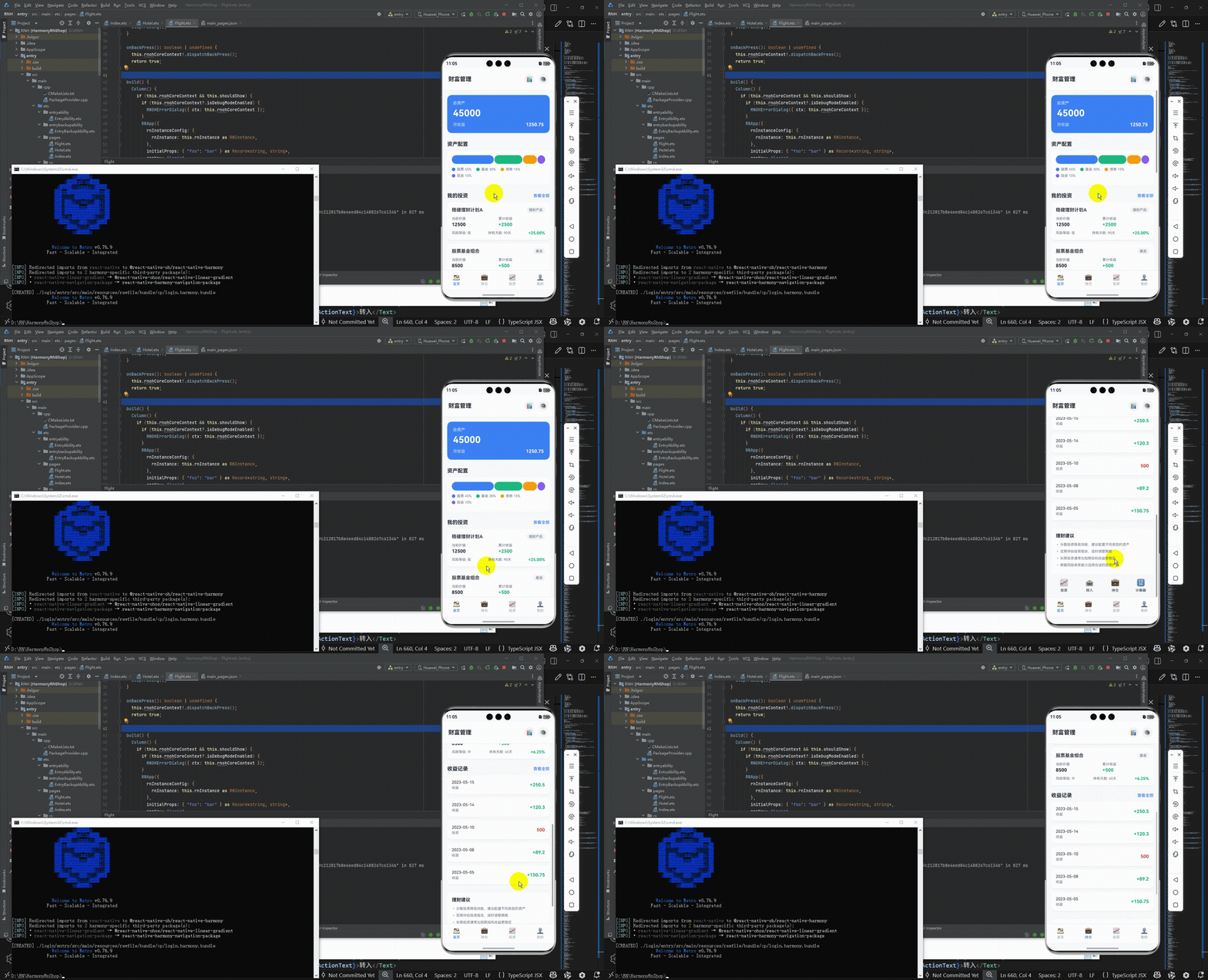
最后运行效果图如下显示:
欢迎大家加入开源鸿蒙跨平台开发者社区,一起共建开源鸿蒙跨平台生态。

作为“人工智能6S店”的官方数字引擎,为AI开发者与企业提供一个覆盖软硬件全栈、一站式门户。
更多推荐



 11
11 0
0- 0


 已为社区贡献53条内容

所有评论(0)