
Flutter 框架跨平台鸿蒙开发 - 水电费缴纳记录本应用开发教程
水电费缴纳记录本是一款帮助用户记录和管理家庭水电费等各类公用事业费用的Flutter应用。通过简洁实用的界面,用户可以轻松记录每次缴费的详细信息,并通过统计分析功能了解家庭费用支出情况和趋势。运行效果图配置类BillTypeConfigPaymentMethodConfig数据模型BillRecordBillType枚举PaymentMethod枚举UtilityBillAppUtilityBil
·
Flutter水电费缴纳记录本应用开发教程
项目简介
水电费缴纳记录本是一款帮助用户记录和管理家庭水电费等各类公用事业费用的Flutter应用。通过简洁实用的界面,用户可以轻松记录每次缴费的详细信息,并通过统计分析功能了解家庭费用支出情况和趋势。
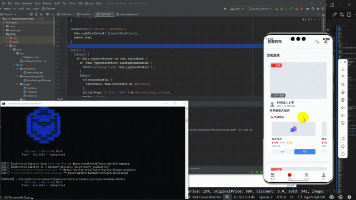
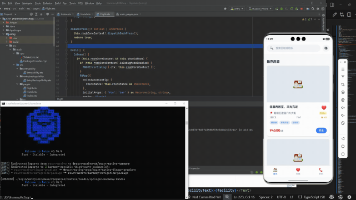
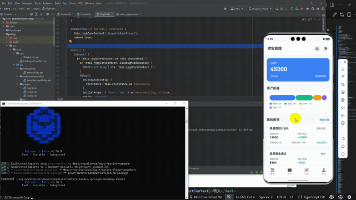
运行效果图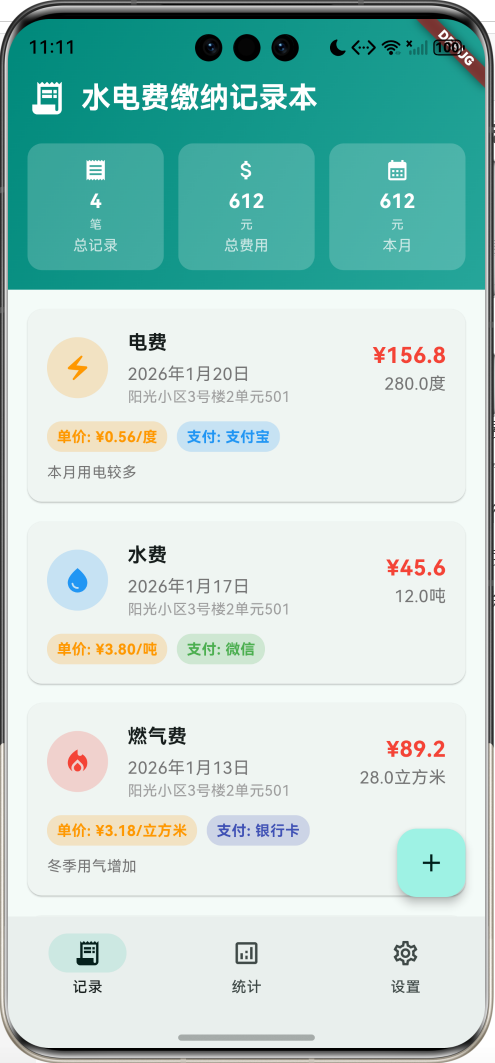
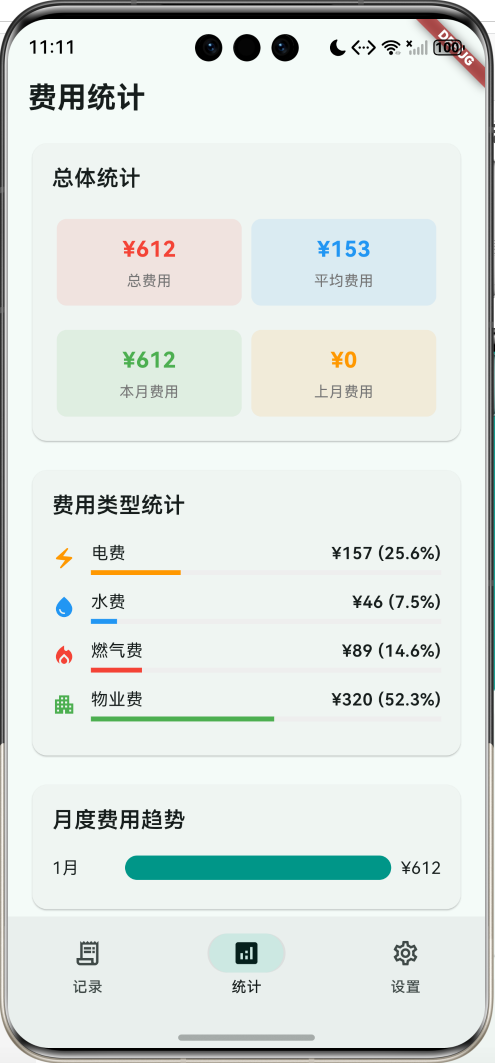
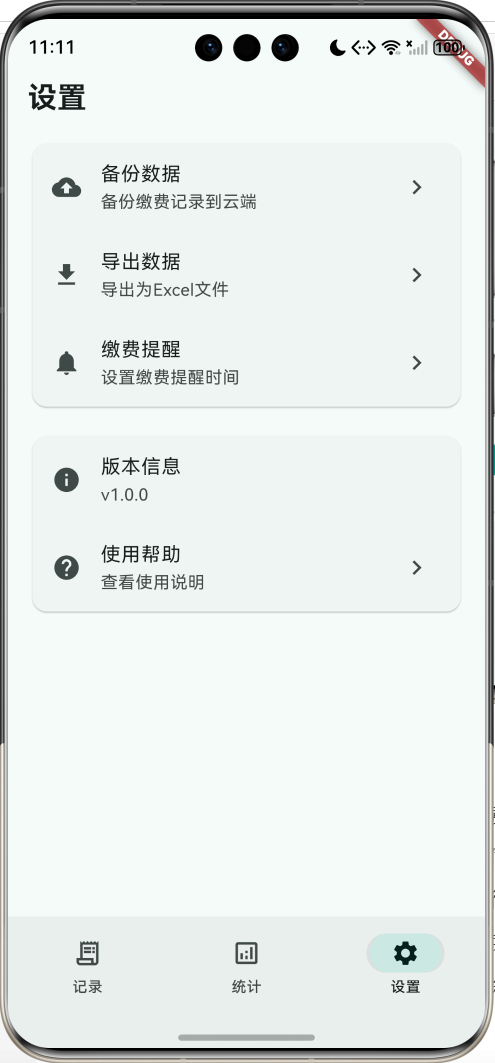
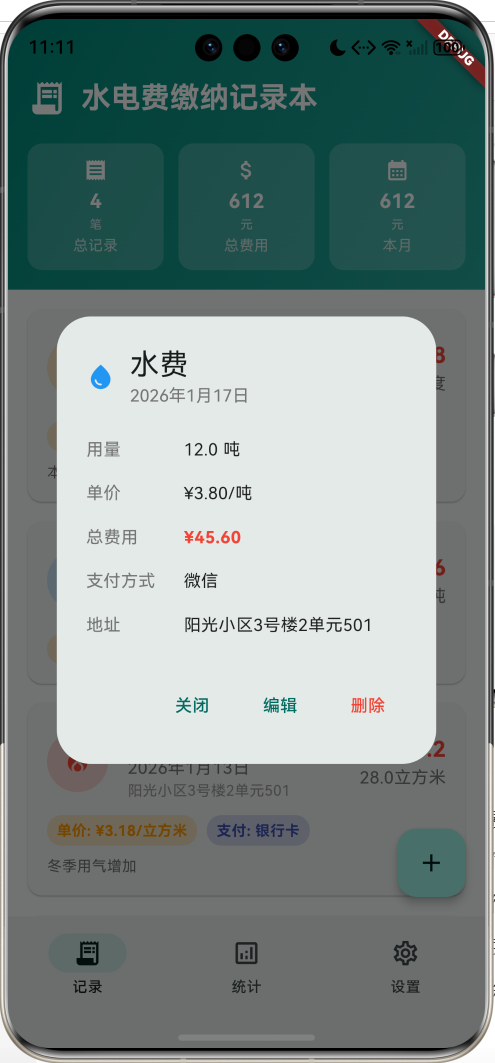
核心功能
- 多类型费用记录:支持水费、电费、燃气费、暖气费、物业费
- 详细信息记录:用量、单价、总费用、支付方式、地址、备注
- 多种支付方式:现金、支付宝、微信、银行卡、网上缴费
- 统计分析功能:总体统计、类型统计、月度趋势、支付方式统计
- 完整CRUD操作:添加、查看、编辑、删除记录
技术特点
- 单文件架构,代码简洁易维护
- Material Design 3设计风格
- 响应式布局设计
- 实时计算和数据验证
- 丰富的图标和颜色配置
架构设计
整体架构
页面结构
应用采用底部导航栏设计,包含三个主要页面:
- 记录页面:缴费记录的查看和管理
- 统计页面:费用统计和趋势分析
- 设置页面:应用配置和数据管理
数据模型设计
BillRecord(缴费记录)
class BillRecord {
  final String id;              // 唯一标识
  final DateTime date;          // 缴费日期
  final BillType type;          // 费用类型
  final double amount;          // 总费用
  final double usage;           // 用量
  final double unitPrice;       // 单价
  final String address;         // 地址
  final String notes;           // 备注
  final PaymentMethod paymentMethod; // 支付方式
}
枚举类型定义
BillType(费用类型)
enum BillType {
  water,      // 水费
  electricity, // 电费
  gas,        // 燃气费
  heating,    // 暖气费
  property,   // 物业费
}
PaymentMethod(支付方式)
enum PaymentMethod {
  cash,       // 现金
  alipay,     // 支付宝
  wechat,     // 微信
  bankCard,   // 银行卡
  online,     // 网上缴费
}
配置类设计
BillTypeConfig(费用类型配置)
class BillTypeConfig {
  final String name;     // 类型名称
  final String unit;     // 计量单位
  final IconData icon;   // 图标
  final Color color;     // 主题颜色
}
配置映射:
- 水费:💧 蓝色,单位:吨
- 电费:⚡ 橙色,单位:度
- 燃气费:🔥 红色,单位:立方米
- 暖气费:🌡️ 深橙色,单位:平方米
- 物业费:🏢 绿色,单位:平方米
PaymentMethodConfig(支付方式配置)
class PaymentMethodConfig {
  final String name;     // 支付方式名称
  final IconData icon;   // 图标
  final Color color;     // 主题颜色
}
核心功能实现
1. 记录页面实现
页面头部设计
Widget _buildRecordsHeader() {
  final totalRecords = _billRecords.length;
  final totalAmount = _billRecords.fold(0.0, (sum, record) => sum + record.amount);
  final thisMonthAmount = _billRecords
      .where((record) => record.date.month == DateTime.now().month)
      .fold(0.0, (sum, record) => sum + record.amount);

  return Container(
    padding: const EdgeInsets.fromLTRB(16, 48, 16, 16),
    decoration: BoxDecoration(
      gradient: LinearGradient(
        colors: [Colors.teal.shade600, Colors.teal.shade400],
        begin: Alignment.topLeft,
        end: Alignment.bottomRight,
      ),
    ),
    child: Column(
      children: [
        // 应用标题
        Row(
          children: [
            const Icon(Icons.receipt_long, color: Colors.white, size: 32),
            const SizedBox(width: 12),
            const Expanded(
              child: Text(
                '水电费缴纳记录本',
                style: TextStyle(fontSize: 24, fontWeight: FontWeight.bold, color: Colors.white),
              ),
            ),
          ],
        ),
        const SizedBox(height: 20),
        // 统计卡片
        Row(
          children: [
            Expanded(child: _buildSummaryCard('总记录', '$totalRecords', '笔', Icons.receipt)),
            const SizedBox(width: 12),
            Expanded(child: _buildSummaryCard('总费用', '${totalAmount.toStringAsFixed(0)}', '元', Icons.attach_money)),
            const SizedBox(width: 12),
            Expanded(child: _buildSummaryCard('本月', '${thisMonthAmount.toStringAsFixed(0)}', '元', Icons.calendar_month)),
          ],
        ),
      ],
    ),
  );
}
记录卡片设计
Widget _buildRecordCard(BillRecord record) {
  final typeConfig = _billTypeConfigs[record.type]!;
  final paymentConfig = _paymentMethodConfigs[record.paymentMethod]!;

  return Card(
    margin: const EdgeInsets.only(bottom: 16),
    child: InkWell(
      onTap: () => _showRecordDetails(record),
      child: Padding(
        padding: const EdgeInsets.all(16),
        child: Column(
          crossAxisAlignment: CrossAxisAlignment.start,
          children: [
            // 头部信息
            Row(
              children: [
                Container(
                  width: 50,
                  height: 50,
                  decoration: BoxDecoration(
                    color: typeConfig.color.withValues(alpha: 0.2),
                    borderRadius: BorderRadius.circular(25),
                  ),
                  child: Icon(typeConfig.icon, color: typeConfig.color, size: 24),
                ),
                const SizedBox(width: 16),
                Expanded(
                  child: Column(
                    crossAxisAlignment: CrossAxisAlignment.start,
                    children: [
                      Text(typeConfig.name, style: const TextStyle(fontSize: 16, fontWeight: FontWeight.bold)),
                      Text(record.dateString),
                      if (record.address.isNotEmpty) Text(record.address, maxLines: 1, overflow: TextOverflow.ellipsis),
                    ],
                  ),
                ),
                Column(
                  crossAxisAlignment: CrossAxisAlignment.end,
                  children: [
                    Text('¥${record.amount.toStringAsFixed(1)}',
                      style: const TextStyle(fontSize: 18, fontWeight: FontWeight.bold, color: Colors.red)),
                    Text('${record.usage.toStringAsFixed(1)}${typeConfig.unit}'),
                  ],
                ),
              ],
            ),
            const SizedBox(height: 12),
            // 详细信息标签
            Row(
              children: [
                _buildInfoChip('单价', '¥${record.unitPrice.toStringAsFixed(2)}/${typeConfig.unit}', Colors.orange),
                const SizedBox(width: 8),
                _buildInfoChip('支付', paymentConfig.name, paymentConfig.color),
              ],
            ),
            if (record.notes.isNotEmpty) ...[
              const SizedBox(height: 8),
              Text(record.notes, style: TextStyle(fontSize: 12, color: Colors.grey.shade600)),
            ],
          ],
        ),
      ),
    ),
  );
}
2. 添加记录对话框
表单设计
Widget build(BuildContext context) {
  return AlertDialog(
    title: const Text('添加缴费记录'),
    content: SizedBox(
      width: 400,
      height: 500,
      child: Form(
        key: _formKey,
        child: SingleChildScrollView(
          child: Column(
            children: [
              // 日期选择
              ListTile(
                leading: const Icon(Icons.calendar_today),
                title: const Text('缴费日期'),
                subtitle: Text('${_selectedDate.year}年${_selectedDate.month}月${_selectedDate.day}日'),
                onTap: () async {
                  final date = await showDatePicker(
                    context: context,
                    initialDate: _selectedDate,
                    firstDate: DateTime(2020),
                    lastDate: DateTime.now(),
                  );
                  if (date != null) {
                    setState(() => _selectedDate = date);
                  }
                },
              ),
              // 费用类型选择
              DropdownButtonFormField<BillType>(
                value: _selectedType,
                decoration: const InputDecoration(
                  labelText: '费用类型',
                  border: OutlineInputBorder(),
                  prefixIcon: Icon(Icons.category),
                ),
                items: widget.billTypeConfigs.entries.map((entry) {
                  return DropdownMenuItem(
                    value: entry.key,
                    child: Row(
                      children: [
                        Icon(entry.value.icon, color: entry.value.color, size: 20),
                        const SizedBox(width: 8),
                        Text(entry.value.name),
                      ],
                    ),
                  );
                }).toList(),
                onChanged: (value) => setState(() => _selectedType = value!),
              ),
              // 用量输入
              TextFormField(
                controller: _usageController,
                decoration: InputDecoration(
                  labelText: '用量 (${widget.billTypeConfigs[_selectedType]!.unit})',
                  border: const OutlineInputBorder(),
                  prefixIcon: const Icon(Icons.straighten),
                ),
                keyboardType: TextInputType.number,
                onChanged: (_) => _calculateTotalAmount(),
                validator: (value) => value?.isEmpty == true ? '请输入用量' : null,
              ),
              // 单价输入
              TextFormField(
                controller: _unitPriceController,
                decoration: InputDecoration(
                  labelText: '单价 (元/${widget.billTypeConfigs[_selectedType]!.unit})',
                  border: const OutlineInputBorder(),
                  prefixIcon: const Icon(Icons.attach_money),
                ),
                keyboardType: TextInputType.number,
                onChanged: (_) => _calculateTotalAmount(),
                validator: (value) => value?.isEmpty == true ? '请输入单价' : null,
              ),
              // 总费用显示
              Container(
                width: double.infinity,
                padding: const EdgeInsets.all(16),
                decoration: BoxDecoration(
                  color: Colors.teal.withValues(alpha: 0.1),
                  borderRadius: BorderRadius.circular(8),
                ),
                child: Text(
                  '总费用: ¥${_totalAmount.toStringAsFixed(2)}',
                  style: const TextStyle(fontSize: 18, fontWeight: FontWeight.bold, color: Colors.teal),
                  textAlign: TextAlign.center,
                ),
              ),
            ],
          ),
        ),
      ),
    ),
  );
}
实时计算功能
void _calculateTotalAmount() {
  final usage = double.tryParse(_usageController.text) ?? 0;
  final unitPrice = double.tryParse(_unitPriceController.text) ?? 0;
  setState(() {
    _totalAmount = usage * unitPrice;
  });
}
3. 统计分析功能
总体统计
Widget _buildOverallStats() {
  if (_billRecords.isEmpty) {
    return const Card(child: Padding(padding: EdgeInsets.all(16), child: Text('暂无数据')));
  }

  final totalAmount = _billRecords.fold(0.0, (sum, record) => sum + record.amount);
  final avgAmount = totalAmount / _billRecords.length;
  final thisMonthAmount = _billRecords
      .where((record) => record.date.month == DateTime.now().month)
      .fold(0.0, (sum, record) => sum + record.amount);
  final lastMonthAmount = _billRecords
      .where((record) => record.date.month == DateTime.now().month - 1)
      .fold(0.0, (sum, record) => sum + record.amount);

  return Card(
    child: Padding(
      padding: const EdgeInsets.all(16),
      child: Column(
        crossAxisAlignment: CrossAxisAlignment.start,
        children: [
          const Text('总体统计', style: TextStyle(fontSize: 18, fontWeight: FontWeight.w600)),
          const SizedBox(height: 16),
          Row(
            children: [
              Expanded(child: _buildStatItem('总费用', '¥${totalAmount.toStringAsFixed(0)}', Colors.red)),
              Expanded(child: _buildStatItem('平均费用', '¥${avgAmount.toStringAsFixed(0)}', Colors.blue)),
            ],
          ),
          const SizedBox(height: 12),
          Row(
            children: [
              Expanded(child: _buildStatItem('本月费用', '¥${thisMonthAmount.toStringAsFixed(0)}', Colors.green)),
              Expanded(child: _buildStatItem('上月费用', '¥${lastMonthAmount.toStringAsFixed(0)}', Colors.orange)),
            ],
          ),
        ],
      ),
    ),
  );
}
费用类型统计
Widget _buildTypeStats() {
  final typeStats = <BillType, double>{};
  for (final record in _billRecords) {
    typeStats[record.type] = (typeStats[record.type] ?? 0) + record.amount;
  }

  return Card(
    child: Padding(
      padding: const EdgeInsets.all(16),
      child: Column(
        crossAxisAlignment: CrossAxisAlignment.start,
        children: [
          const Text('费用类型统计', style: TextStyle(fontSize: 18, fontWeight: FontWeight.w600)),
          const SizedBox(height: 16),
          ...typeStats.entries.map((entry) {
            final config = _billTypeConfigs[entry.key]!;
            final percentage = _billRecords.isNotEmpty
                ? (entry.value / _billRecords.fold(0.0, (sum, record) => sum + record.amount)) * 100
                : 0.0;

            return Padding(
              padding: const EdgeInsets.only(bottom: 12),
              child: Row(
                children: [
                  Icon(config.icon, color: config.color, size: 20),
                  const SizedBox(width: 12),
                  Expanded(
                    child: Column(
                      crossAxisAlignment: CrossAxisAlignment.start,
                      children: [
                        Row(
                          mainAxisAlignment: MainAxisAlignment.spaceBetween,
                          children: [
                            Text(config.name),
                            Text('¥${entry.value.toStringAsFixed(0)} (${percentage.toStringAsFixed(1)}%)'),
                          ],
                        ),
                        const SizedBox(height: 4),
                        LinearProgressIndicator(
                          value: percentage / 100,
                          backgroundColor: Colors.grey.shade200,
                          valueColor: AlwaysStoppedAnimation<Color>(config.color),
                        ),
                      ],
                    ),
                  ),
                ],
              ),
            );
          }),
        ],
      ),
    ),
  );
}
月度趋势统计
Widget _buildMonthlyStats() {
  final monthlyStats = <int, double>{};

  for (final record in _billRecords) {
    final month = record.date.month;
    monthlyStats[month] = (monthlyStats[month] ?? 0) + record.amount;
  }

  return Card(
    child: Padding(
      padding: const EdgeInsets.all(16),
      child: Column(
        crossAxisAlignment: CrossAxisAlignment.start,
        children: [
          const Text('月度费用趋势', style: TextStyle(fontSize: 18, fontWeight: FontWeight.w600)),
          const SizedBox(height: 16),
          ...monthlyStats.entries.map((entry) {
            return Padding(
              padding: const EdgeInsets.only(bottom: 8),
              child: Row(
                children: [
                  SizedBox(width: 60, child: Text('${entry.key}月')),
                  Expanded(
                    child: Container(
                      height: 20,
                      decoration: BoxDecoration(
                        color: Colors.teal.withValues(alpha: 0.2),
                        borderRadius: BorderRadius.circular(10),
                      ),
                      child: FractionallySizedBox(
                        widthFactor: entry.value / (monthlyStats.values.isNotEmpty
                          ? monthlyStats.values.reduce((a, b) => a > b ? a : b)
                          : 1),
                        child: Container(
                          decoration: BoxDecoration(
                            color: Colors.teal,
                            borderRadius: BorderRadius.circular(10),
                          ),
                        ),
                      ),
                    ),
                  ),
                  const SizedBox(width: 8),
                  Text('¥${entry.value.toStringAsFixed(0)}'),
                ],
              ),
            );
          }),
        ],
      ),
    ),
  );
}
支付方式统计
Widget _buildPaymentStats() {
  final paymentStats = <PaymentMethod, int>{};
  for (final record in _billRecords) {
    paymentStats[record.paymentMethod] = (paymentStats[record.paymentMethod] ?? 0) + 1;
  }

  return Card(
    child: Padding(
      padding: const EdgeInsets.all(16),
      child: Column(
        crossAxisAlignment: CrossAxisAlignment.start,
        children: [
          const Text('支付方式统计', style: TextStyle(fontSize: 18, fontWeight: FontWeight.w600)),
          const SizedBox(height: 16),
          ...paymentStats.entries.map((entry) {
            final config = _paymentMethodConfigs[entry.key]!;
            return Padding(
              padding: const EdgeInsets.only(bottom: 8),
              child: Row(
                children: [
                  Icon(config.icon, color: config.color, size: 20),
                  const SizedBox(width: 12),
                  Expanded(child: Text(config.name)),
                  Container(
                    padding: const EdgeInsets.symmetric(horizontal: 8, vertical: 4),
                    decoration: BoxDecoration(
                      color: config.color.withValues(alpha: 0.2),
                      borderRadius: BorderRadius.circular(12),
                    ),
                    child: Text(
                      '${entry.value}次',
                      style: TextStyle(fontSize: 12, fontWeight: FontWeight.bold, color: config.color),
                    ),
                  ),
                ],
              ),
            );
          }),
        ],
      ),
    ),
  );
}
UI组件设计
1. 统计卡片组件
Widget _buildSummaryCard(String title, String value, String unit, IconData icon) {
  return Container(
    padding: const EdgeInsets.all(12),
    decoration: BoxDecoration(
      color: Colors.white.withValues(alpha: 0.2),
      borderRadius: BorderRadius.circular(12),
    ),
    child: Column(
      children: [
        Icon(icon, color: Colors.white, size: 20),
        const SizedBox(height: 4),
        Text(value, style: const TextStyle(fontSize: 16, fontWeight: FontWeight.bold, color: Colors.white)),
        Text(unit, style: const TextStyle(fontSize: 10, color: Colors.white70)),
        const SizedBox(height: 2),
        Text(title, style: const TextStyle(fontSize: 12, color: Colors.white70)),
      ],
    ),
  );
}
2. 信息标签组件
Widget _buildInfoChip(String label, String value, Color color) {
  return Container(
    padding: const EdgeInsets.symmetric(horizontal: 8, vertical: 4),
    decoration: BoxDecoration(
      color: color.withValues(alpha: 0.2),
      borderRadius: BorderRadius.circular(12),
    ),
    child: Text(
      '$label: $value',
      style: TextStyle(
        fontSize: 12,
        color: color,
        fontWeight: FontWeight.bold,
      ),
    ),
  );
}
3. 统计项组件
Widget _buildStatItem(String title, String value, Color color) {
  return Container(
    padding: const EdgeInsets.all(12),
    margin: const EdgeInsets.all(4),
    decoration: BoxDecoration(
      color: color.withValues(alpha: 0.1),
      borderRadius: BorderRadius.circular(8),
    ),
    child: Column(
      children: [
        Text(value, style: TextStyle(fontSize: 18, fontWeight: FontWeight.bold, color: color)),
        const SizedBox(height: 4),
        Text(title, style: TextStyle(fontSize: 12, color: Colors.grey.shade600)),
      ],
    ),
  );
}
对话框组件实现
1. 记录详情对话框
class _RecordDetailsDialog extends StatelessWidget {
final BillRecord record;
final Map<BillType, BillTypeConfig> billTypeConfigs;
final Map<PaymentMethod, PaymentMethodConfig> paymentMethodConfigs;
final Function(BillRecord) onEdit;
final VoidCallback onDelete;
Widget build(BuildContext context) {
final typeConfig = billTypeConfigs[record.type]!;
final paymentConfig = paymentMethodConfigs[record.paymentMethod]!;
return AlertDialog(
title: Row(
children: [
Icon(typeConfig.icon, color: typeConfig.color),
const SizedBox(width: 12),
Expanded(
child: Column(
crossAxisAlignment: CrossAxisAlignment.start,
children: [
Text(typeConfig.name),
Text(record.dateString, style: TextStyle(fontSize: 14, color: Colors.grey.shade600)),
],
),
),
],
),
content: SizedBox(
width: 300,
child: Column(
mainAxisSize: MainAxisSize.min,
children: [
_buildDetailRow('用量', '${record.usage.toStringAsFixed(1)} ${typeConfig.unit}'),
_buildDetailRow('单价', '¥${record.unitPrice.toStringAsFixed(2)}/${typeConfig.unit}'),
_buildDetailRow('总费用', '¥${record.amount.toStringAsFixed(2)}', isHighlight: true),
_buildDetailRow('支付方式', paymentConfig.name),
if (record.address.isNotEmpty) _buildDetailRow('地址', record.address),
if (record.notes.isNotEmpty) _buildDetailRow('备注', record.notes),
],
),
),
actions: [
TextButton(onPressed: () => Navigator.pop(context), child: const Text('关闭')),
TextButton(onPressed: () => _showEditDialog(context), child: const Text('编辑')),
TextButton(
onPressed: () => _showDeleteConfirmation(context),
style: TextButton.styleFrom(foregroundColor: Colors.red),
child: const Text('删除'),
),
],
);
}
Widget _buildDetailRow(String label, String value, {bool isHighlight = false}) {
return Padding(
padding: const EdgeInsets.symmetric(vertical: 8),
child: Row(
crossAxisAlignment: CrossAxisAlignment.start,
children: [
SizedBox(
width: 80,
child: Text(label, style: TextStyle(fontSize: 14, color: Colors.grey.shade600)),
),
Expanded(
child: Text(
value,
style: TextStyle(
fontSize: 14,
fontWeight: isHighlight ? FontWeight.bold : FontWeight.normal,
color: isHighlight ? Colors.red : Colors.black87,
),
),
),
],
),
);
}
}
2. 编辑记录对话框
编辑对话框复用添加对话框的UI结构,但需要预填充现有数据:
class _EditRecordDialog extends StatefulWidget {
final BillRecord record;
final Map<BillType, BillTypeConfig> billTypeConfigs;
final Map<PaymentMethod, PaymentMethodConfig> paymentMethodConfigs;
final Function(BillRecord) onSave;
State<_EditRecordDialog> createState() => _EditRecordDialogState();
}
class _EditRecordDialogState extends State<_EditRecordDialog> {
void initState() {
super.initState();
// 预填充现有数据
_usageController = TextEditingController(text: widget.record.usage.toString());
_unitPriceController = TextEditingController(text: widget.record.unitPrice.toString());
_addressController = TextEditingController(text: widget.record.address);
_notesController = TextEditingController(text: widget.record.notes);
_selectedDate = widget.record.date;
_selectedType = widget.record.type;
_selectedPaymentMethod = widget.record.paymentMethod;
_totalAmount = widget.record.amount;
}
void _saveRecord() {
if (_formKey.currentState!.validate()) {
final editedRecord = widget.record.copyWith(
date: _selectedDate,
type: _selectedType,
amount: _totalAmount,
usage: double.parse(_usageController.text),
unitPrice: double.parse(_unitPriceController.text),
address: _addressController.text.trim(),
notes: _notesController.text.trim(),
paymentMethod: _selectedPaymentMethod,
);
widget.onSave(editedRecord);
Navigator.pop(context);
}
}
}
核心算法实现
1. 费用计算算法
class BillCalculator {
  static double calculateTotalAmount(double usage, double unitPrice) {
    return usage * unitPrice;
  }

  static double calculateAverageAmount(List<BillRecord> records) {
    if (records.isEmpty) return 0.0;
    final totalAmount = records.fold(0.0, (sum, record) => sum + record.amount);
    return totalAmount / records.length;
  }

  static Map<BillType, double> calculateTypeStats(List<BillRecord> records) {
    final typeStats = <BillType, double>{};
    for (final record in records) {
      typeStats[record.type] = (typeStats[record.type] ?? 0) + record.amount;
    }
    return typeStats;
  }

  static Map<int, double> calculateMonthlyStats(List<BillRecord> records) {
    final monthlyStats = <int, double>{};
    for (final record in records) {
      final month = record.date.month;
      monthlyStats[month] = (monthlyStats[month] ?? 0) + record.amount;
    }
    return monthlyStats;
  }
}
2. 数据验证算法
class BillValidator {
  static String? validateUsage(String? value) {
    if (value == null || value.isEmpty) {
      return '请输入用量';
    }

    final usage = double.tryParse(value);
    if (usage == null) {
      return '请输入有效的数字';
    }

    if (usage <= 0) {
      return '用量必须大于0';
    }

    if (usage > 10000) {
      return '用量不能超过10000';
    }

    return null;
  }

  static String? validateUnitPrice(String? value) {
    if (value == null || value.isEmpty) {
      return '请输入单价';
    }

    final price = double.tryParse(value);
    if (price == null) {
      return '请输入有效的数字';
    }

    if (price <= 0) {
      return '单价必须大于0';
    }

    if (price > 100) {
      return '单价不能超过100元';
    }

    return null;
  }

  static bool isValidDate(DateTime date) {
    final now = DateTime.now();
    return date.isBefore(now.add(const Duration(days: 1))) &&
           date.isAfter(DateTime(2020));
  }
}
3. 数据筛选算法
class BillFilter {
  static List<BillRecord> filterByType(List<BillRecord> records, BillType type) {
    return records.where((record) => record.type == type).toList();
  }

  static List<BillRecord> filterByMonth(List<BillRecord> records, int month) {
    return records.where((record) => record.date.month == month).toList();
  }

  static List<BillRecord> filterByPaymentMethod(List<BillRecord> records, PaymentMethod method) {
    return records.where((record) => record.paymentMethod == method).toList();
  }

  static List<BillRecord> filterByDateRange(List<BillRecord> records, DateTime start, DateTime end) {
    return records.where((record) =>
      record.date.isAfter(start.subtract(const Duration(days: 1))) &&
      record.date.isBefore(end.add(const Duration(days: 1)))
    ).toList();
  }

  static List<BillRecord> sortByDate(List<BillRecord> records, {bool ascending = false}) {
    final sortedRecords = List<BillRecord>.from(records);
    sortedRecords.sort((a, b) => ascending
      ? a.date.compareTo(b.date)
      : b.date.compareTo(a.date));
    return sortedRecords;
  }

  static List<BillRecord> sortByAmount(List<BillRecord> records, {bool ascending = false}) {
    final sortedRecords = List<BillRecord>.from(records);
    sortedRecords.sort((a, b) => ascending
      ? a.amount.compareTo(b.amount)
      : b.amount.compareTo(a.amount));
    return sortedRecords;
  }
}
功能扩展建议
1. 数据持久化
import 'package:shared_preferences/shared_preferences.dart';
import 'dart:convert';

class BillDataManager {
  static const String _recordsKey = 'bill_records';

  static Future<void> saveRecords(List<BillRecord> records) async {
    final prefs = await SharedPreferences.getInstance();
    final jsonList = records.map((record) => record.toJson()).toList();
    await prefs.setString(_recordsKey, jsonEncode(jsonList));
  }

  static Future<List<BillRecord>> loadRecords() async {
    final prefs = await SharedPreferences.getInstance();
    final jsonString = prefs.getString(_recordsKey);
    if (jsonString != null) {
      final jsonList = jsonDecode(jsonString) as List;
      return jsonList.map((json) => BillRecord.fromJson(json)).toList();
    }
    return [];
  }

  static Future<void> exportToCSV(List<BillRecord> records) async {
    final csv = const ListToCsvConverter().convert([
      ['日期', '类型', '用量', '单价', '总费用', '支付方式', '地址', '备注'],
      ...records.map((record) => [
        record.dateString,
        _getBillTypeName(record.type),
        record.usage,
        record.unitPrice,
        record.amount,
        _getPaymentMethodName(record.paymentMethod),
        record.address,
        record.notes,
      ]),
    ]);

    final directory = await getApplicationDocumentsDirectory();
    final file = File('${directory.path}/bill_records_export.csv');
    await file.writeAsString(csv);
  }
}
2. 缴费提醒功能
class BillReminder {
  static Future<void> scheduleMonthlyReminder() async {
    final flutterLocalNotificationsPlugin = FlutterLocalNotificationsPlugin();

    // 每月1号提醒缴费
    await flutterLocalNotificationsPlugin.zonedSchedule(
      0,
      '缴费提醒',
      '该缴纳本月的水电费了!',
      _nextInstanceOfMonthly(),
      const NotificationDetails(
        android: AndroidNotificationDetails(
          'bill_reminder',
          '缴费提醒',
          channelDescription: '提醒用户缴纳水电费',
        ),
      ),
      androidAllowWhileIdle: true,
      uiLocalNotificationDateInterpretation: UILocalNotificationDateInterpretation.absoluteTime,
      matchDateTimeComponents: DateTimeComponents.dayOfMonthAndTime,
    );
  }

  static Future<void> checkOverdueBills(List<BillRecord> records) async {
    final now = DateTime.now();
    final lastMonth = DateTime(now.year, now.month - 1);

    final lastMonthRecords = records.where((record) =>
      record.date.year == lastMonth.year && record.date.month == lastMonth.month).toList();

    if (lastMonthRecords.isEmpty) {
      await _showNotification(
        '缴费提醒',
        '您还没有记录上个月的缴费信息',
      );
    }
  }
}
3. 预算管理功能
class BudgetManager {
  static const String _budgetKey = 'monthly_budget';

  static Future<void> setMonthlyBudget(double budget) async {
    final prefs = await SharedPreferences.getInstance();
    await prefs.setDouble(_budgetKey, budget);
  }

  static Future<double> getMonthlyBudget() async {
    final prefs = await SharedPreferences.getInstance();
    return prefs.getDouble(_budgetKey) ?? 0.0;
  }

  static Future<Map<String, dynamic>> getBudgetStatus(List<BillRecord> records) async {
    final budget = await getMonthlyBudget();
    if (budget <= 0) return {};

    final now = DateTime.now();
    final thisMonthAmount = records
        .where((record) => record.date.month == now.month && record.date.year == now.year)
        .fold(0.0, (sum, record) => sum + record.amount);

    final remaining = budget - thisMonthAmount;
    final percentage = (thisMonthAmount / budget) * 100;

    return {
      'budget': budget,
      'spent': thisMonthAmount,
      'remaining': remaining,
      'percentage': percentage,
      'isOverBudget': remaining < 0,
    };
  }

  static Future<void> checkBudgetAlert(List<BillRecord> records) async {
    final status = await getBudgetStatus(records);
    if (status.isEmpty) return;

    final percentage = status['percentage'] as double;

    if (percentage >= 90) {
      await _showNotification(
        '预算警告',
        '本月费用已超过预算的${percentage.toStringAsFixed(0)}%',
      );
    } else if (percentage >= 80) {
      await _showNotification(
        '预算提醒',
        '本月费用已达到预算的${percentage.toStringAsFixed(0)}%',
      );
    }
  }
}
4. 数据分析功能
class BillAnalyzer {
  static Map<String, dynamic> analyzeConsumptionTrends(List<BillRecord> records) {
    if (records.length < 2) return {};

    final sortedRecords = List<BillRecord>.from(records)
      ..sort((a, b) => a.date.compareTo(b.date));

    final trends = <BillType, String>{};

    for (final type in BillType.values) {
      final typeRecords = sortedRecords.where((r) => r.type == type).toList();
      if (typeRecords.length >= 2) {
        final recent = typeRecords.takeLast(3).toList();
        final earlier = typeRecords.take(typeRecords.length - 3).toList();

        if (recent.isNotEmpty && earlier.isNotEmpty) {
          final recentAvg = recent.fold(0.0, (sum, r) => sum + r.usage) / recent.length;
          final earlierAvg = earlier.fold(0.0, (sum, r) => sum + r.usage) / earlier.length;

          if (recentAvg > earlierAvg * 1.1) {
            trends[type] = '上升';
          } else if (recentAvg < earlierAvg * 0.9) {
            trends[type] = '下降';
          } else {
            trends[type] = '稳定';
          }
        }
      }
    }

    return {
      'trends': trends,
      'suggestions': _generateSuggestions(trends),
    };
  }

  static List<String> _generateSuggestions(Map<BillType, String> trends) {
    final suggestions = <String>[];

    trends.forEach((type, trend) {
      switch (type) {
        case BillType.electricity:
          if (trend == '上升') {
            suggestions.add('电费上升,建议检查用电设备,合理使用空调和电器');
          }
          break;
        case BillType.water:
          if (trend == '上升') {
            suggestions.add('水费上升,建议检查是否有漏水,节约用水');
          }
          break;
        case BillType.gas:
          if (trend == '上升') {
            suggestions.add('燃气费上升,建议检查燃气设备,注意节约用气');
          }
          break;
        default:
          break;
      }
    });

    return suggestions;
  }
}
性能优化策略
1. 列表优化
// 使用ListView.builder进行懒加载
Widget _buildRecordsList() {
final sortedRecords = List<BillRecord>.from(_billRecords)
..sort((a, b) => b.date.compareTo(a.date));
return ListView.builder(
padding: const EdgeInsets.all(16),
itemCount: sortedRecords.length,
itemBuilder: (context, index) {
final record = sortedRecords[index];
return _buildRecordCard(record);
},
);
}
// 使用AutomaticKeepAliveClientMixin保持页面状态
class _UtilityBillHomePageState extends State<UtilityBillHomePage>
with AutomaticKeepAliveClientMixin {
bool get wantKeepAlive => true;
Widget build(BuildContext context) {
super.build(context); // 必须调用
return Scaffold(/* ... */);
}
}
2. 计算优化
class BillCalculationCache {
  static final Map<String, double> _totalAmountCache = {};
  static final Map<String, Map<String, dynamic>> _statsCache = {};

  static double? getCachedTotalAmount(String key) {
    return _totalAmountCache[key];
  }

  static void setCachedTotalAmount(String key, double amount) {
    _totalAmountCache[key] = amount;
  }

  static void clearCache() {
    _totalAmountCache.clear();
    _statsCache.clear();
  }

  static Map<String, dynamic>? getCachedStats(String key) {
    return _statsCache[key];
  }

  static void setCachedStats(String key, Map<String, dynamic> stats) {
    _statsCache[key] = stats;
  }
}
测试指南
1. 单元测试
// test/bill_record_test.dart
import 'package:flutter_test/flutter_test.dart';
import 'package:utility_bill/models/bill_record.dart';

void main() {
  group('BillRecord', () {
    test('should create bill record with required fields', () {
      final record = BillRecord(
        id: '1',
        date: DateTime.now(),
        type: BillType.electricity,
        amount: 100.0,
        usage: 200,
        unitPrice: 0.5,
      );

      expect(record.id, '1');
      expect(record.type, BillType.electricity);
      expect(record.amount, 100.0);
      expect(record.usage, 200);
      expect(record.unitPrice, 0.5);
    });

    test('should calculate total amount correctly', () {
      final usage = 200.0;
      final unitPrice = 0.56;
      final expectedAmount = usage * unitPrice;

      expect(expectedAmount, 112.0);
    });

    test('should copy with new values', () {
      final original = BillRecord(
        id: '1',
        date: DateTime.now(),
        type: BillType.electricity,
        amount: 100.0,
        usage: 200,
        unitPrice: 0.5,
        notes: 'Original',
      );

      final copied = original.copyWith(notes: 'Updated');

      expect(copied.notes, 'Updated');
      expect(copied.id, original.id);
      expect(copied.type, original.type);
    });
  });
}
2. Widget测试
// test/widget_test.dart
import 'package:flutter/material.dart';
import 'package:flutter_test/flutter_test.dart';
import 'package:utility_bill/main.dart';

void main() {
  group('UtilityBillApp', () {
    testWidgets('should display navigation bar with 3 tabs', (WidgetTester tester) async {
      await tester.pumpWidget(const UtilityBillApp());

      expect(find.byType(NavigationBar), findsOneWidget);
      expect(find.text('记录'), findsOneWidget);
      expect(find.text('统计'), findsOneWidget);
      expect(find.text('设置'), findsOneWidget);
    });

    testWidgets('should show add button on records page', (WidgetTester tester) async {
      await tester.pumpWidget(const UtilityBillApp());

      expect(find.byType(FloatingActionButton), findsOneWidget);
    });

    testWidgets('should open add record dialog when FAB is tapped', (WidgetTester tester) async {
      await tester.pumpWidget(const UtilityBillApp());

      await tester.tap(find.byType(FloatingActionButton));
      await tester.pumpAndSettle();

      expect(find.text('添加缴费记录'), findsOneWidget);
    });
  });
}
部署指南
1. Android部署
# android/app/build.gradle
android {
    compileSdkVersion 34

    defaultConfig {
        applicationId "com.example.utility_bill"
        minSdkVersion 21
        targetSdkVersion 34
        versionCode 1
        versionName "1.0.0"
    }

    buildTypes {
        release {
            signingConfig signingConfigs.release
            minifyEnabled true
            proguardFiles getDefaultProguardFile('proguard-android.txt'), 'proguard-rules.pro'
        }
    }
}
2. iOS部署
<!-- ios/Runner/Info.plist -->
<key>CFBundleDisplayName</key>
<string>水电费缴纳记录本</string>
<key>CFBundleIdentifier</key>
<string>com.example.utilityBill</string>
<key>CFBundleVersion</key>
<string>1.0.0</string>
3. 构建命令
# 构建Android APK
flutter build apk --release

# 构建Android App Bundle
flutter build appbundle --release

# 构建iOS
flutter build ios --release
项目总结
水电费缴纳记录本应用通过Flutter框架实现了一个功能实用、界面简洁的家庭费用管理工具。应用具有以下特点:
技术亮点
- 简洁架构:单文件实现,代码结构清晰易懂
- 多类型支持:支持水电气暖物业等多种费用类型
- 实时计算:自动计算总费用,减少输入错误
- 丰富统计:多维度统计分析,帮助了解费用趋势
- 用户友好:直观的界面设计和便捷的操作流程
功能完整性
- ✅ 多类型费用记录
- ✅ 实时费用计算
- ✅ 多维度统计分析
- ✅ 完整CRUD操作
- ✅ 支付方式管理
- ✅ 数据可视化展示
应用价值
- 实用性强:解决家庭费用记录和管理需求
- 操作简单:界面直观,操作便捷
- 统计全面:多角度分析,帮助控制家庭开支
- 扩展性好:支持多种功能扩展和定制
通过本教程的学习,开发者可以快速掌握Flutter应用开发的实用技能,并创建出满足实际需求的生活工具应用。
欢迎加入开源鸿蒙跨平台社区:https://openharmonycrossplatform.csdn.net

作为“人工智能6S店”的官方数字引擎,为AI开发者与企业提供一个覆盖软硬件全栈、一站式门户。
更多推荐
 0
0 0
0- 0


 已为社区贡献5条内容

所有评论(0)