
Flutter 框架跨平台鸿蒙开发 - 字符计数工具应用开发教程
这个字符计数工具应用展示了Flutter在文本分析应用开发中的强大能力。通过智能的分析算法、直观的数据可视化和丰富的功能特性,为用户提供了完整的文本分析解决方案。
Flutter字符计数工具应用开发教程
项目简介
这是一款功能强大的字符计数工具应用,为用户提供全面的文本分析功能。应用采用Material Design 3设计风格,支持实时字符统计、词频分析、文本构成分析、历史记录管理等功能,界面简洁美观,操作便捷高效,是写作、编辑、学习等场景的理想工具。
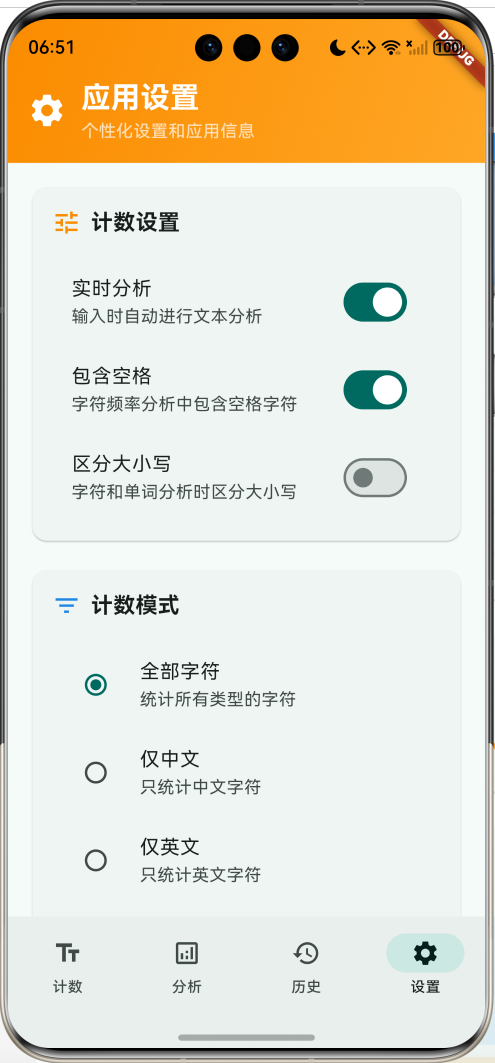
运行效果图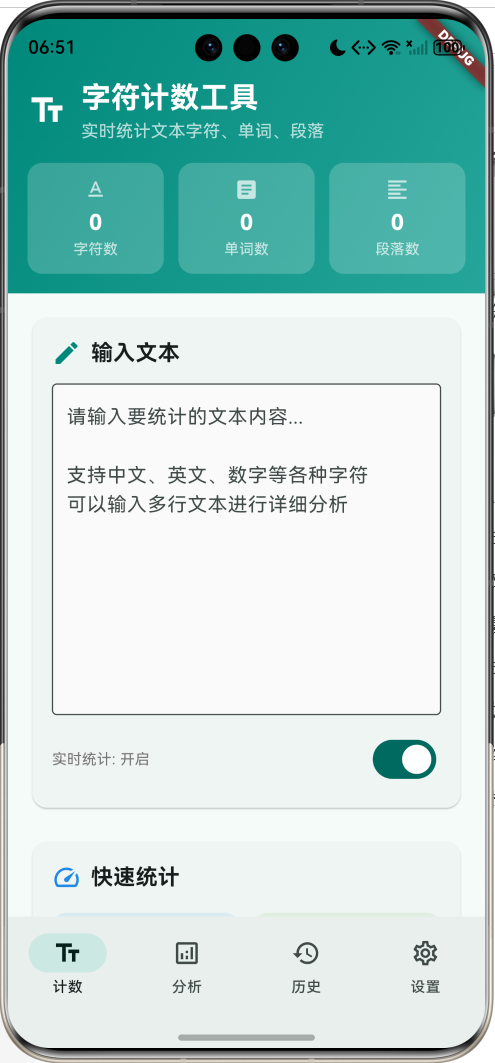
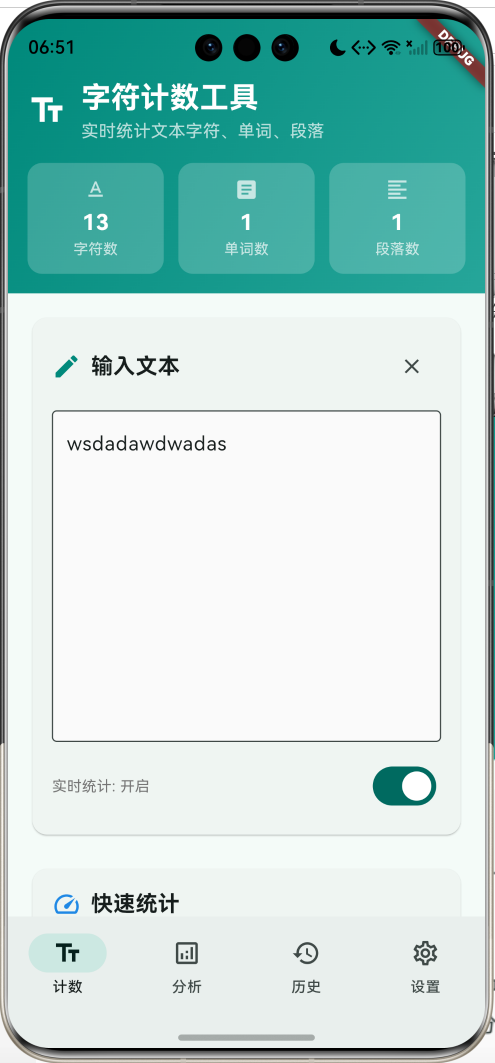
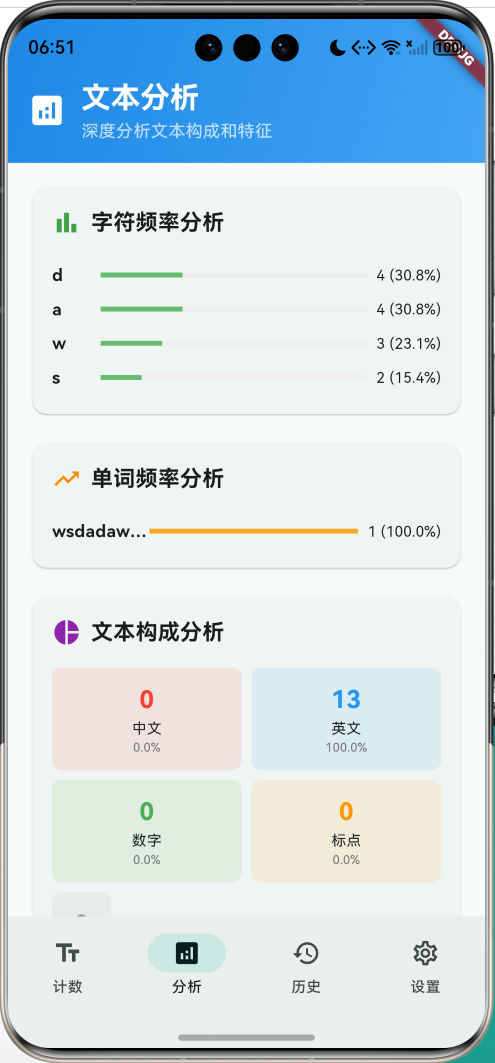
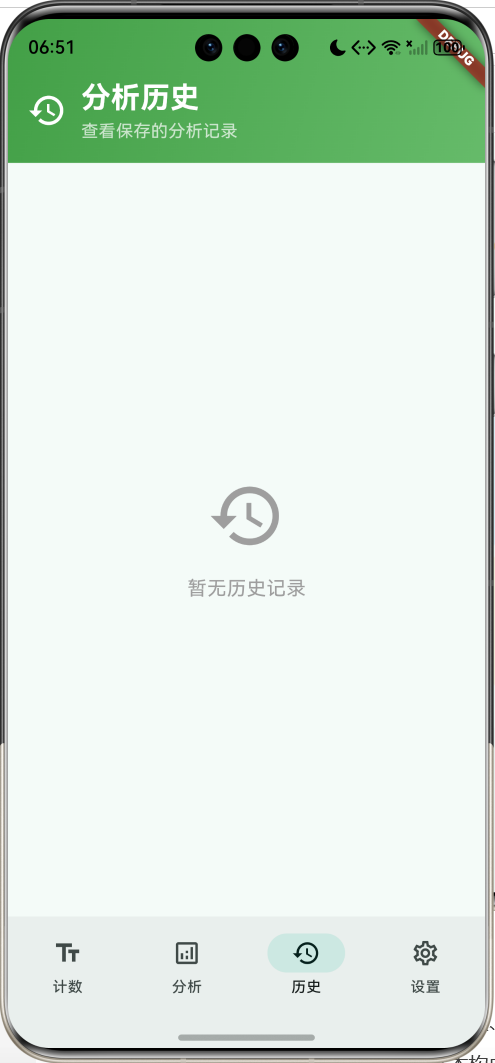
核心特性
- 实时统计:支持字符数、单词数、句子数、段落数等多维度统计
- 深度分析:字符频率、单词频率、文本构成等详细分析
- 多种模式:支持全部字符、仅中文、仅英文、仅数字等计数模式
- 历史记录:保存分析结果,支持查看和恢复历史文本
- 可视化图表:直观展示频率分析和文本构成
- 灵活设置:实时分析、大小写敏感、空格处理等个性化选项
- 数据导出:支持复制统计信息和分享分析结果
- 智能识别:自动识别中文、英文、数字、标点符号等
- 精美界面:渐变设计和流畅动画效果
技术栈
- Flutter 3.x
- Material Design 3
- 动画控制器(AnimationController)
- 正则表达式处理
- 文本分析算法
- 数据可视化
项目架构
数据模型设计
TextAnalysis(文本分析模型)
class TextAnalysis {
  final String text;                          // 原始文本
  final int characters;                       // 总字符数
  final int charactersNoSpaces;               // 无空格字符数
  final int words;                           // 单词数
  final int sentences;                       // 句子数
  final int paragraphs;                      // 段落数
  final int lines;                           // 行数
  final Map<String, int> characterFrequency; // 字符频率
  final Map<String, int> wordFrequency;      // 单词频率
  final DateTime timestamp;                  // 分析时间
}
设计要点:
- text存储原始文本用于恢复和显示
- 多维度统计数据满足不同分析需求
- 频率分析数据支持可视化展示
- timestamp用于历史记录排序
AnalysisHistory(分析历史模型)
class AnalysisHistory {
  final String title;                        // 记录标题
  final TextAnalysis analysis;               // 分析结果
  final DateTime timestamp;                  // 保存时间
}
统计维度配置
| 统计类型 | 说明 | 计算方式 | 用途 |
|---|---|---|---|
| 字符数 | 总字符数量 | text.length | 基础统计 |
| 无空格字符 | 去除空格后字符数 | 正则替换空格 | 净内容统计 |
| 单词数 | 单词数量 | 按空格分割 | 词汇量统计 |
| 句子数 | 句子数量 | 按标点分割 | 语句统计 |
| 段落数 | 段落数量 | 按双换行分割 | 结构统计 |
| 行数 | 行数 | 按换行符分割 | 格式统计 |
分析模式配置
| 模式 | 范围 | 正则表达式 | 应用场景 |
|---|---|---|---|
| 全部字符 | 所有字符 | 无过滤 | 通用统计 |
| 仅中文 | 中文字符 | [\u4e00-\u9fa5] | 中文文档 |
| 仅英文 | 英文字符 | [a-zA-Z] | 英文文档 |
| 仅数字 | 数字字符 | [0-9] | 数据统计 |
核心功能实现
1. 文本输入与实时分析
实现支持多行输入和实时分析的文本输入区域。
Widget _buildTextInputSection() {
  return Card(
    child: Padding(
      padding: const EdgeInsets.all(16),
      child: Column(
        crossAxisAlignment: CrossAxisAlignment.start,
        children: [
          Row(
            children: [
              Icon(Icons.edit, color: Colors.teal.shade600),
              const SizedBox(width: 8),
              const Text(
                '输入文本',
                style: TextStyle(fontSize: 18, fontWeight: FontWeight.bold),
              ),
              const Spacer(),
              if (_textController.text.isNotEmpty)
                IconButton(
                  onPressed: () {
                    _textController.clear();
                    _performAnalysis();
                  },
                  icon: const Icon(Icons.clear, size: 20),
                ),
            ],
          ),
          const SizedBox(height: 12),
          TextField(
            controller: _textController,
            maxLines: 10,
            decoration: InputDecoration(
              hintText: '请输入要统计的文本内容...\n\n支持中文、英文、数字等各种字符\n可以输入多行文本进行详细分析',
              border: const OutlineInputBorder(),
              filled: true,
              fillColor: Colors.grey.shade50,
            ),
          ),
          const SizedBox(height: 12),
          Row(
            children: [
              Expanded(
                child: Text(
                  '实时统计: ${_realTimeAnalysis ? "开启" : "关闭"}',
                  style: TextStyle(
                    fontSize: 12,
                    color: Colors.grey.shade600,
                  ),
                ),
              ),
              Switch(
                value: _realTimeAnalysis,
                onChanged: (value) {
                  setState(() {
                    _realTimeAnalysis = value;
                    if (value) {
                      _performAnalysis();
                    }
                  });
                },
              ),
            ],
          ),
        ],
      ),
    ),
  );
}
输入特性:
- 多行支持:支持长文本和多段落输入
- 实时分析:可选择输入时自动分析
- 快速清空:提供一键清空功能
- 视觉反馈:清晰的界面提示和状态显示
2. 核心分析算法
实现全面的文本分析功能,包括各种统计维度。
void _performAnalysis() {
  final text = _textController.text;

  // 基础统计
  final characters = text.length;
  final charactersNoSpaces = text.replaceAll(RegExp(r'\s'), '').length;
  final lines = text.isEmpty ? 0 : text.split('\n').length;
  final paragraphs = text.isEmpty ? 0 : text.split(RegExp(r'\n\s*\n')).where((p) => p.trim().isNotEmpty).length;

  // 单词统计
  final words = _countWords(text);

  // 句子统计
  final sentences = _countSentences(text);

  // 字符频率统计
  final characterFrequency = _analyzeCharacterFrequency(text);

  // 单词频率统计
  final wordFrequency = _analyzeWordFrequency(text);

  setState(() {
    _currentAnalysis = TextAnalysis(
      text: text,
      characters: characters,
      charactersNoSpaces: charactersNoSpaces,
      words: words,
      sentences: sentences,
      paragraphs: paragraphs,
      lines: lines,
      characterFrequency: characterFrequency,
      wordFrequency: wordFrequency,
      timestamp: DateTime.now(),
    );
  });

  _fadeController.forward().then((_) => _fadeController.reverse());
}
分析流程:
- 获取输入文本
- 计算基础统计数据
- 执行高级分析算法
- 更新界面显示
- 播放动画反馈
3. 智能单词统计
根据不同模式和语言特点进行智能单词统计。
int _countWords(String text) {
  if (text.isEmpty) return 0;

  // 根据计数模式过滤文本
  String filteredText = text;
  switch (_countMode) {
    case 'chinese':
      filteredText = text.replaceAll(RegExp(r'[^\u4e00-\u9fa5]'), ' ');
      break;
    case 'english':
      filteredText = text.replaceAll(RegExp(r'[^a-zA-Z\s]'), ' ');
      break;
    case 'numbers':
      filteredText = text.replaceAll(RegExp(r'[^0-9\s]'), ' ');
      break;
  }

  // 分割单词
  final words = filteredText.trim().split(RegExp(r'\s+'));
  return words.where((word) => word.isNotEmpty).length;
}

int _countSentences(String text) {
  if (text.isEmpty) return 0;

  final sentences = text.split(RegExp(r'[.!?。!?]+'));
  return sentences.where((sentence) => sentence.trim().isNotEmpty).length;
}
统计特点:
- 模式过滤:根据选择的计数模式过滤字符
- 智能分割:使用正则表达式准确分割单词
- 多语言支持:支持中英文混合文本统计
- 标点处理:正确处理各种标点符号
4. 字符频率分析
分析文本中各字符的出现频率并可视化展示。
Map<String, int> _analyzeCharacterFrequency(String text) {
  final frequency = <String, int>{};

  for (final char in text.split('')) {
    if (!_includeSpaces && char.trim().isEmpty) continue;

    final key = _caseSensitive ? char : char.toLowerCase();
    frequency[key] = (frequency[key] ?? 0) + 1;
  }

  return frequency;
}

Widget _buildCharacterFrequencyChart() {
  if (_currentAnalysis == null || _currentAnalysis!.characterFrequency.isEmpty) {
    return const SizedBox.shrink();
  }

  final sortedChars = _currentAnalysis!.characterFrequency.entries.toList()
    ..sort((a, b) => b.value.compareTo(a.value));

  final topChars = sortedChars.take(10).toList();

  return Card(
    child: Padding(
      padding: const EdgeInsets.all(16),
      child: Column(
        crossAxisAlignment: CrossAxisAlignment.start,
        children: [
          Row(
            children: [
              Icon(Icons.bar_chart, color: Colors.green.shade600),
              const SizedBox(width: 8),
              const Text('字符频率分析', style: TextStyle(fontSize: 18, fontWeight: FontWeight.bold)),
            ],
          ),
          const SizedBox(height: 16),
          ...topChars.map((entry) {
            final char = entry.key == ' ' ? '空格' : entry.key;
            final count = entry.value;
            final percentage = count / _currentAnalysis!.characters;

            return Padding(
              padding: const EdgeInsets.symmetric(vertical: 4),
              child: Row(
                children: [
                  SizedBox(
                    width: 40,
                    child: Text(
                      char,
                      style: const TextStyle(fontWeight: FontWeight.bold),
                      overflow: TextOverflow.ellipsis,
                    ),
                  ),
                  Expanded(
                    child: LinearProgressIndicator(
                      value: percentage,
                      backgroundColor: Colors.grey.shade200,
                      valueColor: AlwaysStoppedAnimation(Colors.green.shade400),
                    ),
                  ),
                  const SizedBox(width: 8),
                  Text(
                    '$count (${(percentage * 100).toStringAsFixed(1)}%)',
                    style: const TextStyle(fontSize: 12),
                  ),
                ],
              ),
            );
          }),
        ],
      ),
    ),
  );
}
频率分析特点:
- 排序显示:按频率从高到低排序
- 百分比计算:显示每个字符的占比
- 可视化展示:使用进度条直观显示频率
- 设置支持:支持大小写敏感和空格处理设置
5. 单词频率分析
分析文本中单词的使用频率,帮助了解词汇分布。
Map<String, int> _analyzeWordFrequency(String text) {
  final frequency = <String, int>{};

  if (text.isEmpty) return frequency;

  final words = text.toLowerCase().split(RegExp(r'\W+'));

  for (final word in words) {
    if (word.isNotEmpty) {
      frequency[word] = (frequency[word] ?? 0) + 1;
    }
  }

  return frequency;
}

Widget _buildWordFrequencyChart() {
  if (_currentAnalysis == null || _currentAnalysis!.wordFrequency.isEmpty) {
    return const SizedBox.shrink();
  }

  final sortedWords = _currentAnalysis!.wordFrequency.entries.toList()
    ..sort((a, b) => b.value.compareTo(a.value));

  final topWords = sortedWords.take(10).toList();

  return Card(
    child: Padding(
      padding: const EdgeInsets.all(16),
      child: Column(
        crossAxisAlignment: CrossAxisAlignment.start,
        children: [
          Row(
            children: [
              Icon(Icons.trending_up, color: Colors.orange.shade600),
              const SizedBox(width: 8),
              const Text('单词频率分析', style: TextStyle(fontSize: 18, fontWeight: FontWeight.bold)),
            ],
          ),
          const SizedBox(height: 16),
          ...topWords.map((entry) {
            final word = entry.key;
            final count = entry.value;
            final percentage = count / _currentAnalysis!.words;

            return Padding(
              padding: const EdgeInsets.symmetric(vertical: 4),
              child: Row(
                children: [
                  SizedBox(
                    width: 80,
                    child: Text(
                      word,
                      style: const TextStyle(fontWeight: FontWeight.bold),
                      overflow: TextOverflow.ellipsis,
                    ),
                  ),
                  Expanded(
                    child: LinearProgressIndicator(
                      value: percentage,
                      backgroundColor: Colors.grey.shade200,
                      valueColor: AlwaysStoppedAnimation(Colors.orange.shade400),
                    ),
                  ),
                  const SizedBox(width: 8),
                  Text(
                    '$count (${(percentage * 100).toStringAsFixed(1)}%)',
                    style: const TextStyle(fontSize: 12),
                  ),
                ],
              ),
            );
          }),
        ],
      ),
    ),
  );
}
单词分析特点:
- 词汇统计:统计每个单词的出现次数
- 频率排序:按使用频率排序显示
- 占比计算:计算单词在总词汇中的占比
- 高频词识别:快速识别文本中的高频词汇
6. 文本构成分析
分析文本的字符类型构成,包括中文、英文、数字等。
Widget _buildTextComposition() {
  if (_currentAnalysis == null) return const SizedBox.shrink();

  final text = _currentAnalysis!.text;
  final chineseCount = RegExp(r'[\u4e00-\u9fa5]').allMatches(text).length;
  final englishCount = RegExp(r'[a-zA-Z]').allMatches(text).length;
  final numberCount = RegExp(r'[0-9]').allMatches(text).length;
  final punctuationCount = RegExp(r'[^\w\s\u4e00-\u9fa5]').allMatches(text).length;
  final spaceCount = RegExp(r'\s').allMatches(text).length;

  return Card(
    child: Padding(
      padding: const EdgeInsets.all(16),
      child: Column(
        crossAxisAlignment: CrossAxisAlignment.start,
        children: [
          Row(
            children: [
              Icon(Icons.pie_chart, color: Colors.purple.shade600),
              const SizedBox(width: 8),
              const Text('文本构成分析', style: TextStyle(fontSize: 18, fontWeight: FontWeight.bold)),
            ],
          ),
          const SizedBox(height: 16),
          Row(
            children: [
              Expanded(
                child: _buildCompositionCard('中文', chineseCount, Colors.red),
              ),
              const SizedBox(width: 8),
              Expanded(
                child: _buildCompositionCard('英文', englishCount, Colors.blue),
              ),
            ],
          ),
          const SizedBox(height: 8),
          Row(
            children: [
              Expanded(
                child: _buildCompositionCard('数字', numberCount, Colors.green),
              ),
              const SizedBox(width: 8),
              Expanded(
                child: _buildCompositionCard('标点', punctuationCount, Colors.orange),
              ),
            ],
          ),
          const SizedBox(height: 8),
          _buildCompositionCard('空格', spaceCount, Colors.grey),
        ],
      ),
    ),
  );
}

Widget _buildCompositionCard(String label, int count, Color color) {
  final total = _currentAnalysis?.characters ?? 1;
  final percentage = total > 0 ? (count / total * 100) : 0.0;

  return Container(
    padding: const EdgeInsets.all(12),
    decoration: BoxDecoration(
      color: color.withValues(alpha: 0.1),
      borderRadius: BorderRadius.circular(8),
    ),
    child: Column(
      children: [
        Text(
          '$count',
          style: TextStyle(
            fontSize: 20,
            fontWeight: FontWeight.bold,
            color: color,
          ),
        ),
        Text(
          label,
          style: const TextStyle(fontSize: 12),
        ),
        Text(
          '${percentage.toStringAsFixed(1)}%',
          style: TextStyle(
            fontSize: 10,
            color: Colors.grey.shade600,
          ),
        ),
      ],
    ),
  );
}
构成分析特点:
- 分类统计:按字符类型分类统计
- 正则匹配:使用正则表达式精确识别字符类型
- 百分比显示:显示各类型字符的占比
- 卡片展示:使用彩色卡片直观展示构成
7. 详细统计信息
提供文本的详细统计信息和衍生指标。
Widget _buildDetailedStats() {
  if (_currentAnalysis == null) return const SizedBox.shrink();

  return Card(
    child: Padding(
      padding: const EdgeInsets.all(16),
      child: Column(
        crossAxisAlignment: CrossAxisAlignment.start,
        children: [
          Row(
            children: [
              Icon(Icons.info, color: Colors.indigo.shade600),
              const SizedBox(width: 8),
              const Text(
                '详细信息',
                style: TextStyle(fontSize: 18, fontWeight: FontWeight.bold),
              ),
            ],
          ),
          const SizedBox(height: 16),
          _buildDetailRow('行数', '${_currentAnalysis!.lines}', Icons.format_list_numbered),
          _buildDetailRow('段落数', '${_currentAnalysis!.paragraphs}', Icons.format_align_left),
          _buildDetailRow('平均每行字符', _getAverageCharsPerLine(), Icons.straighten),
          _buildDetailRow('平均单词长度', _getAverageWordLength(), Icons.text_rotation_none),
          if (_currentAnalysis!.text.isNotEmpty) ...[
            const Divider(),
            _buildDetailRow('最长单词', _getLongestWord(), Icons.trending_up),
            _buildDetailRow('最短单词', _getShortestWord(), Icons.trending_down),
          ],
        ],
      ),
    ),
  );
}

// 获取平均每行字符数
String _getAverageCharsPerLine() {
  if (_currentAnalysis == null || _currentAnalysis!.lines == 0) return '0';

  final average = _currentAnalysis!.characters / _currentAnalysis!.lines;
  return average.toStringAsFixed(1);
}

// 获取平均单词长度
String _getAverageWordLength() {
  if (_currentAnalysis == null || _currentAnalysis!.words == 0) return '0';

  final totalChars = _currentAnalysis!.charactersNoSpaces;
  final average = totalChars / _currentAnalysis!.words;
  return average.toStringAsFixed(1);
}

// 获取最长单词
String _getLongestWord() {
  if (_currentAnalysis == null || _currentAnalysis!.text.isEmpty) return '-';

  final words = _currentAnalysis!.text.split(RegExp(r'\W+'));
  if (words.isEmpty) return '-';

  String longest = '';
  for (final word in words) {
    if (word.length > longest.length) {
      longest = word;
    }
  }

  return longest.isEmpty ? '-' : '$longest (${longest.length})';
}

// 获取最短单词
String _getShortestWord() {
  if (_currentAnalysis == null || _currentAnalysis!.text.isEmpty) return '-';

  final words = _currentAnalysis!.text.split(RegExp(r'\W+'));
  final validWords = words.where((word) => word.isNotEmpty).toList();
  if (validWords.isEmpty) return '-';

  String shortest = validWords.first;
  for (final word in validWords) {
    if (word.length < shortest.length) {
      shortest = word;
    }
  }

  return '$shortest (${shortest.length})';
}
详细统计特点:
- 衍生指标:计算平均值、最值等衍生统计
- 智能分析:自动识别最长最短单词
- 格式化显示:合理的数值格式化和单位显示
- 条件显示:根据文本内容动态显示相关信息
8. 历史记录管理
保存和管理分析历史,支持恢复和删除操作。
void _saveToHistory() {
  if (_currentAnalysis == null) return;

  showDialog(
    context: context,
    builder: (context) {
      final titleController = TextEditingController();
      return AlertDialog(
        title: const Text('保存分析结果'),
        content: TextField(
          controller: titleController,
          decoration: const InputDecoration(
            labelText: '标题',
            hintText: '为这次分析起个名字',
          ),
        ),
        actions: [
          TextButton(
            onPressed: () => Navigator.pop(context),
            child: const Text('取消'),
          ),
          ElevatedButton(
            onPressed: () {
              final title = titleController.text.trim();
              if (title.isNotEmpty) {
                setState(() {
                  _analysisHistory.insert(0, AnalysisHistory(
                    title: title,
                    analysis: _currentAnalysis!,
                    timestamp: DateTime.now(),
                  ));

                  // 限制历史记录数量
                  if (_analysisHistory.length > 50) {
                    _analysisHistory.removeLast();
                  }
                });

                Navigator.pop(context);
                ScaffoldMessenger.of(context).showSnackBar(
                  const SnackBar(content: Text('分析结果已保存')),
                );
              }
            },
            child: const Text('保存'),
          ),
        ],
      );
    },
  );
}

Widget _buildHistoryItem(AnalysisHistory history, int index) {
  return Card(
    margin: const EdgeInsets.only(bottom: 12),
    child: Padding(
      padding: const EdgeInsets.all(16),
      child: Column(
        crossAxisAlignment: CrossAxisAlignment.start,
        children: [
          Row(
            children: [
              Expanded(
                child: Text(
                  history.title,
                  style: const TextStyle(
                    fontSize: 18,
                    fontWeight: FontWeight.bold,
                  ),
                ),
              ),
              Text(
                _formatTime(history.timestamp),
                style: TextStyle(
                  fontSize: 12,
                  color: Colors.grey.shade600,
                ),
              ),
            ],
          ),
          const SizedBox(height: 12),
          Row(
            children: [
              Expanded(
                child: _buildHistoryStatItem('字符', '${history.analysis.characters}', Icons.text_format),
              ),
              Expanded(
                child: _buildHistoryStatItem('单词', '${history.analysis.words}', Icons.article),
              ),
              Expanded(
                child: _buildHistoryStatItem('段落', '${history.analysis.paragraphs}', Icons.format_align_left),
              ),
            ],
          ),
          const SizedBox(height: 12),
          Container(
            padding: const EdgeInsets.all(8),
            decoration: BoxDecoration(
              color: Colors.grey.shade50,
              borderRadius: BorderRadius.circular(8),
            ),
            child: Text(
              history.analysis.text.length > 100
                  ? '${history.analysis.text.substring(0, 100)}...'
                  : history.analysis.text,
              style: const TextStyle(fontSize: 12),
              maxLines: 3,
              overflow: TextOverflow.ellipsis,
            ),
          ),
          const SizedBox(height: 8),
          Row(
            mainAxisAlignment: MainAxisAlignment.end,
            children: [
              TextButton.icon(
                onPressed: () {
                  _textController.text = history.analysis.text;
                  setState(() {
                    _selectedIndex = 0;
                    _currentAnalysis = history.analysis;
                  });
                },
                icon: const Icon(Icons.restore, size: 16),
                label: const Text('恢复'),
              ),
              TextButton.icon(
                onPressed: () {
                  setState(() {
                    _analysisHistory.removeAt(index);
                  });
                },
                icon: const Icon(Icons.delete, size: 16),
                label: const Text('删除'),
              ),
            ],
          ),
        ],
      ),
    ),
  );
}
历史管理特点:
- 自定义标题:用户可为每次分析设置标题
- 完整保存:保存完整的分析结果和原始文本
- 快速恢复:一键恢复历史文本和分析结果
- 数量限制:自动限制历史记录数量防止内存溢出
9. 数据导出功能
支持复制统计信息,方便用户分享和使用分析结果。
void _copyStats() {
  if (_currentAnalysis == null) return;

  final stats = '''
文本统计信息
=============
总字符数: ${_currentAnalysis!.characters}
无空格字符数: ${_currentAnalysis!.charactersNoSpaces}
单词数: ${_currentAnalysis!.words}
句子数: ${_currentAnalysis!.sentences}
段落数: ${_currentAnalysis!.paragraphs}
行数: ${_currentAnalysis!.lines}
平均每行字符数: ${_getAverageCharsPerLine()}
平均单词长度: ${_getAverageWordLength()}
最长单词: ${_getLongestWord()}
最短单词: ${_getShortestWord()}

统计时间: ${DateTime.now().toString()}
''';

  Clipboard.setData(ClipboardData(text: stats));
  ScaffoldMessenger.of(context).showSnackBar(
    const SnackBar(content: Text('统计信息已复制到剪贴板')),
  );
}
导出特点:
- 格式化输出:结构化的统计信息格式
- 完整数据:包含所有主要统计指标
- 时间戳:记录统计时间
- 剪贴板操作:直接复制到系统剪贴板
10. 个性化设置
提供丰富的设置选项,满足不同用户的需求。
Widget _buildSettingsPage() {
  return Column(
    children: [
      _buildSettingsHeader(),
      Expanded(
        child: ListView(
          padding: const EdgeInsets.all(16),
          children: [
            Card(
              child: Padding(
                padding: const EdgeInsets.all(16),
                child: Column(
                  crossAxisAlignment: CrossAxisAlignment.start,
                  children: [
                    Row(
                      children: [
                        Icon(Icons.tune, color: Colors.orange.shade600),
                        const SizedBox(width: 8),
                        const Text('计数设置', style: TextStyle(fontSize: 18, fontWeight: FontWeight.bold)),
                      ],
                    ),
                    const SizedBox(height: 16),
                    SwitchListTile(
                      title: const Text('实时分析'),
                      subtitle: const Text('输入时自动进行文本分析'),
                      value: _realTimeAnalysis,
                      onChanged: (value) {
                        setState(() {
                          _realTimeAnalysis = value;
                          if (value) {
                            _performAnalysis();
                          }
                        });
                      },
                    ),
                    SwitchListTile(
                      title: const Text('包含空格'),
                      subtitle: const Text('字符频率分析中包含空格字符'),
                      value: _includeSpaces,
                      onChanged: (value) {
                        setState(() {
                          _includeSpaces = value;
                          _performAnalysis();
                        });
                      },
                    ),
                    SwitchListTile(
                      title: const Text('区分大小写'),
                      subtitle: const Text('字符和单词分析时区分大小写'),
                      value: _caseSensitive,
                      onChanged: (value) {
                        setState(() {
                          _caseSensitive = value;
                          _performAnalysis();
                        });
                      },
                    ),
                  ],
                ),
              ),
            ),
            const SizedBox(height: 16),
            Card(
              child: Padding(
                padding: const EdgeInsets.all(16),
                child: Column(
                  crossAxisAlignment: CrossAxisAlignment.start,
                  children: [
                    Row(
                      children: [
                        Icon(Icons.filter_list, color: Colors.blue.shade600),
                        const SizedBox(width: 8),
                        const Text('计数模式', style: TextStyle(fontSize: 18, fontWeight: FontWeight.bold)),
                      ],
                    ),
                    const SizedBox(height: 16),
                    RadioListTile<String>(
                      title: const Text('全部字符'),
                      subtitle: const Text('统计所有类型的字符'),
                      value: 'all',
                      groupValue: _countMode,
                      onChanged: (value) {
                        setState(() {
                          _countMode = value!;
                          _performAnalysis();
                        });
                      },
                    ),
                    RadioListTile<String>(
                      title: const Text('仅中文'),
                      subtitle: const Text('只统计中文字符'),
                      value: 'chinese',
                      groupValue: _countMode,
                      onChanged: (value) {
                        setState(() {
                          _countMode = value!;
                          _performAnalysis();
                        });
                      },
                    ),
                    RadioListTile<String>(
                      title: const Text('仅英文'),
                      subtitle: const Text('只统计英文字符'),
                      value: 'english',
                      groupValue: _countMode,
                      onChanged: (value) {
                        setState(() {
                          _countMode = value!;
                          _performAnalysis();
                        });
                      },
                    ),
                    RadioListTile<String>(
                      title: const Text('仅数字'),
                      subtitle: const Text('只统计数字字符'),
                      value: 'numbers',
                      groupValue: _countMode,
                      onChanged: (value) {
                        setState(() {
                          _countMode = value!;
                          _performAnalysis();
                        });
                      },
                    ),
                  ],
                ),
              ),
            ),
          ],
        ),
      ),
    ],
  );
}
设置特点:
- 实时分析开关:控制是否自动分析
- 空格处理选项:选择是否包含空格
- 大小写敏感:控制字符分析的大小写处理
- 计数模式选择:支持不同语言类型的专门统计
UI组件设计
1. 渐变头部组件
Widget _buildCounterHeader() {
  return Container(
    padding: const EdgeInsets.fromLTRB(16, 48, 16, 16),
    decoration: BoxDecoration(
      gradient: LinearGradient(
        colors: [Colors.teal.shade600, Colors.teal.shade400],
        begin: Alignment.topLeft,
        end: Alignment.bottomRight,
      ),
    ),
    child: Column(
      children: [
        Row(
          children: [
            const Icon(Icons.text_fields, color: Colors.white, size: 32),
            const SizedBox(width: 12),
            const Expanded(
              child: Column(
                crossAxisAlignment: CrossAxisAlignment.start,
                children: [
                  Text(
                    '字符计数工具',
                    style: TextStyle(
                      fontSize: 24,
                      fontWeight: FontWeight.bold,
                      color: Colors.white,
                    ),
                  ),
                  Text(
                    '实时统计文本字符、单词、段落',
                    style: TextStyle(
                      fontSize: 14,
                      color: Colors.white70,
                    ),
                  ),
                ],
              ),
            ),
          ],
        ),
        const SizedBox(height: 16),
        Row(
          children: [
            Expanded(
              child: _buildHeaderCard(
                '字符数',
                '${_currentAnalysis?.characters ?? 0}',
                Icons.text_format,
              ),
            ),
            const SizedBox(width: 12),
            Expanded(
              child: _buildHeaderCard(
                '单词数',
                '${_currentAnalysis?.words ?? 0}',
                Icons.article,
              ),
            ),
            const SizedBox(width: 12),
            Expanded(
              child: _buildHeaderCard(
                '段落数',
                '${_currentAnalysis?.paragraphs ?? 0}',
                Icons.format_align_left,
              ),
            ),
          ],
        ),
      ],
    ),
  );
}
2. 统计卡片组件
Widget _buildStatCard(String label, String value, IconData icon, Color color) {
  return Container(
    padding: const EdgeInsets.all(12),
    decoration: BoxDecoration(
      color: color.withValues(alpha: 0.1),
      borderRadius: BorderRadius.circular(12),
    ),
    child: Column(
      children: [
        Icon(icon, color: color, size: 24),
        const SizedBox(height: 8),
        Text(
          value,
          style: TextStyle(
            fontSize: 20,
            fontWeight: FontWeight.bold,
            color: color,
          ),
        ),
        Text(
          label,
          style: TextStyle(
            fontSize: 12,
            color: Colors.grey.shade600,
          ),
        ),
      ],
    ),
  );
}
3. 频率分析图表
Widget _buildFrequencyBar(String item, int count, double percentage, Color color) {
  return Padding(
    padding: const EdgeInsets.symmetric(vertical: 4),
    child: Row(
      children: [
        SizedBox(
          width: 60,
          child: Text(
            item,
            style: const TextStyle(fontWeight: FontWeight.bold),
            overflow: TextOverflow.ellipsis,
          ),
        ),
        Expanded(
          child: LinearProgressIndicator(
            value: percentage,
            backgroundColor: Colors.grey.shade200,
            valueColor: AlwaysStoppedAnimation(color),
          ),
        ),
        const SizedBox(width: 8),
        Text(
          '$count (${(percentage * 100).toStringAsFixed(1)}%)',
          style: const TextStyle(fontSize: 12),
        ),
      ],
    ),
  );
}
4. NavigationBar底部导航
NavigationBar(
  selectedIndex: _selectedIndex,
  onDestinationSelected: (index) {
    setState(() {
      _selectedIndex = index;
    });
  },
  destinations: const [
    NavigationDestination(
      icon: Icon(Icons.text_fields_outlined),
      selectedIcon: Icon(Icons.text_fields),
      label: '计数',
    ),
    NavigationDestination(
      icon: Icon(Icons.analytics_outlined),
      selectedIcon: Icon(Icons.analytics),
      label: '分析',
    ),
    NavigationDestination(
      icon: Icon(Icons.history_outlined),
      selectedIcon: Icon(Icons.history),
      label: '历史',
    ),
    NavigationDestination(
      icon: Icon(Icons.settings_outlined),
      selectedIcon: Icon(Icons.settings),
      label: '设置',
    ),
  ],
)
功能扩展建议
1. 文档格式分析
class DocumentAnalyzer {
  // 分析文档格式
  Map<String, dynamic> analyzeDocumentFormat(String text) {
    return {
      'hasTitle': _detectTitle(text),
      'hasHeaders': _detectHeaders(text),
      'hasList': _detectLists(text),
      'hasLinks': _detectLinks(text),
      'hasEmails': _detectEmails(text),
      'hasPhones': _detectPhones(text),
      'readingTime': _calculateReadingTime(text),
      'complexity': _calculateComplexity(text),
    };
  }

  // 检测标题
  bool _detectTitle(String text) {
    return RegExp(r'^.{1,100}$', multiLine: true).hasMatch(text);
  }

  // 检测标题层级
  List<String> _detectHeaders(String text) {
    final headers = <String>[];
    final lines = text.split('\n');

    for (final line in lines) {
      if (RegExp(r'^#{1,6}\s+').hasMatch(line)) {
        headers.add(line.trim());
      }
    }

    return headers;
  }

  // 计算阅读时间
  int _calculateReadingTime(String text) {
    final words = text.split(RegExp(r'\s+')).length;
    return (words / 200).ceil(); // 假设每分钟200词
  }

  // 计算文本复杂度
  double _calculateComplexity(String text) {
    final sentences = text.split(RegExp(r'[.!?]')).length;
    final words = text.split(RegExp(r'\s+')).length;
    final avgWordsPerSentence = words / sentences;

    // 简单的复杂度评分
    if (avgWordsPerSentence < 10) return 1.0; // 简单
    if (avgWordsPerSentence < 20) return 2.0; // 中等
    return 3.0; // 复杂
  }

  // 文档格式分析界面
  Widget buildDocumentAnalysis() {
    return Card(
      child: Column(
        children: [
          const Text('文档格式分析', style: TextStyle(fontSize: 18, fontWeight: FontWeight.bold)),
          ListTile(
            leading: const Icon(Icons.title),
            title: const Text('标题检测'),
            trailing: _hasTitle ? const Icon(Icons.check, color: Colors.green) : const Icon(Icons.close, color: Colors.red),
          ),
          ListTile(
            leading: const Icon(Icons.format_list_bulleted),
            title: const Text('列表检测'),
            trailing: _hasList ? const Icon(Icons.check, color: Colors.green) : const Icon(Icons.close, color: Colors.red),
          ),
          ListTile(
            leading: const Icon(Icons.schedule),
            title: const Text('预计阅读时间'),
            trailing: Text('${_readingTime}分钟'),
          ),
          ListTile(
            leading: const Icon(Icons.assessment),
            title: const Text('文本复杂度'),
            trailing: _buildComplexityIndicator(_complexity),
          ),
        ],
      ),
    );
  }
}
2. 语言检测功能
class LanguageDetector {
  // 检测文本语言
  Map<String, double> detectLanguages(String text) {
    final languages = <String, double>{};

    // 中文检测
    final chineseMatches = RegExp(r'[\u4e00-\u9fa5]').allMatches(text).length;
    languages['中文'] = chineseMatches / text.length;

    // 英文检测
    final englishMatches = RegExp(r'[a-zA-Z]').allMatches(text).length;
    languages['英文'] = englishMatches / text.length;

    // 日文检测
    final japaneseMatches = RegExp(r'[\u3040-\u309f\u30a0-\u30ff]').allMatches(text).length;
    languages['日文'] = japaneseMatches / text.length;

    // 韩文检测
    final koreanMatches = RegExp(r'[\uac00-\ud7af]').allMatches(text).length;
    languages['韩文'] = koreanMatches / text.length;

    return languages;
  }

  // 语言分布图表
  Widget buildLanguageChart(Map<String, double> languages) {
    return Card(
      child: Column(
        children: [
          const Text('语言分布', style: TextStyle(fontSize: 18, fontWeight: FontWeight.bold)),
          ...languages.entries.where((e) => e.value > 0.01).map((entry) {
            return ListTile(
              title: Text(entry.key),
              trailing: Text('${(entry.value * 100).toStringAsFixed(1)}%'),
              subtitle: LinearProgressIndicator(
                value: entry.value,
                backgroundColor: Colors.grey.shade200,
              ),
            );
          }),
        ],
      ),
    );
  }
}
3. 文本质量评估
class TextQualityAnalyzer {
  // 评估文本质量
  Map<String, dynamic> analyzeQuality(String text) {
    return {
      'readability': _calculateReadability(text),
      'diversity': _calculateDiversity(text),
      'coherence': _calculateCoherence(text),
      'grammar': _checkGrammar(text),
      'suggestions': _generateSuggestions(text),
    };
  }

  // 计算可读性
  double _calculateReadability(String text) {
    final sentences = text.split(RegExp(r'[.!?]')).length;
    final words = text.split(RegExp(r'\s+')).length;
    final syllables = _countSyllables(text);

    // Flesch Reading Ease公式
    final score = 206.835 - (1.015 * words / sentences) - (84.6 * syllables / words);
    return score.clamp(0, 100) / 100;
  }

  // 计算词汇多样性
  double _calculateDiversity(String text) {
    final words = text.toLowerCase().split(RegExp(r'\W+'));
    final uniqueWords = words.toSet();
    return uniqueWords.length / words.length;
  }

  // 生成改进建议
  List<String> _generateSuggestions(String text) {
    final suggestions = <String>[];

    final sentences = text.split(RegExp(r'[.!?]'));
    final avgSentenceLength = text.split(RegExp(r'\s+')).length / sentences.length;

    if (avgSentenceLength > 25) {
      suggestions.add('句子过长,建议拆分为更短的句子');
    }

    if (_calculateDiversity(text) < 0.5) {
      suggestions.add('词汇重复度较高,建议使用更多样的词汇');
    }

    return suggestions;
  }

  // 质量评估界面
  Widget buildQualityAssessment() {
    return Card(
      child: Column(
        children: [
          const Text('文本质量评估', style: TextStyle(fontSize: 18, fontWeight: FontWeight.bold)),
          _buildQualityItem('可读性', _readability, Icons.visibility),
          _buildQualityItem('词汇多样性', _diversity, Icons.shuffle),
          _buildQualityItem('连贯性', _coherence, Icons.link),
          if (_suggestions.isNotEmpty) ...[
            const Divider(),
            const Text('改进建议', style: TextStyle(fontWeight: FontWeight.bold)),
            ..._suggestions.map((suggestion) => ListTile(
              leading: const Icon(Icons.lightbulb, color: Colors.orange),
              title: Text(suggestion, style: const TextStyle(fontSize: 14)),
            )),
          ],
        ],
      ),
    );
  }
}
4. 批量文件分析
class BatchAnalyzer {
  // 批量分析文件
  Future<List<FileAnalysis>> analyzeBatchFiles(List<File> files) async {
    final results = <FileAnalysis>[];

    for (final file in files) {
      try {
        final content = await file.readAsString();
        final analysis = _performTextAnalysis(content);

        results.add(FileAnalysis(
          fileName: file.path.split('/').last,
          filePath: file.path,
          fileSize: await file.length(),
          analysis: analysis,
          timestamp: DateTime.now(),
        ));
      } catch (e) {
        results.add(FileAnalysis(
          fileName: file.path.split('/').last,
          filePath: file.path,
          fileSize: 0,
          analysis: null,
          error: e.toString(),
          timestamp: DateTime.now(),
        ));
      }
    }

    return results;
  }

  // 批量分析界面
  Widget buildBatchAnalyzer() {
    return Column(
      children: [
        ElevatedButton.icon(
          onPressed: _selectFiles,
          icon: const Icon(Icons.folder_open),
          label: const Text('选择文件'),
        ),
        const SizedBox(height: 16),
        if (_selectedFiles.isNotEmpty) ...[
          Text('已选择 ${_selectedFiles.length} 个文件'),
          const SizedBox(height: 8),
          ElevatedButton.icon(
            onPressed: _startBatchAnalysis,
            icon: const Icon(Icons.play_arrow),
            label: const Text('开始分析'),
          ),
        ],
        const SizedBox(height: 16),
        Expanded(
          child: ListView.builder(
            itemCount: _batchResults.length,
            itemBuilder: (context, index) {
              final result = _batchResults[index];
              return Card(
                child: ListTile(
                  leading: Icon(
                    result.error != null ? Icons.error : Icons.check_circle,
                    color: result.error != null ? Colors.red : Colors.green,
                  ),
                  title: Text(result.fileName),
                  subtitle: result.error != null
                      ? Text(result.error!, style: const TextStyle(color: Colors.red))
                      : Text('${result.analysis?.characters ?? 0} 字符'),
                  trailing: result.analysis != null
                      ? IconButton(
                          icon: const Icon(Icons.info),
                          onPressed: () => _showAnalysisDetails(result.analysis!),
                        )
                      : null,
                ),
              );
            },
          ),
        ),
      ],
    );
  }
}

class FileAnalysis {
  final String fileName;
  final String filePath;
  final int fileSize;
  final TextAnalysis? analysis;
  final String? error;
  final DateTime timestamp;

  FileAnalysis({
    required this.fileName,
    required this.filePath,
    required this.fileSize,
    this.analysis,
    this.error,
    required this.timestamp,
  });
}
5. 文本对比功能
class TextComparator {
  // 对比两个文本
  TextComparison compareTexts(String text1, String text2) {
    return TextComparison(
      text1: text1,
      text2: text2,
      similarity: _calculateSimilarity(text1, text2),
      differences: _findDifferences(text1, text2),
      commonWords: _findCommonWords(text1, text2),
      uniqueWords1: _findUniqueWords(text1, text2),
      uniqueWords2: _findUniqueWords(text2, text1),
      timestamp: DateTime.now(),
    );
  }

  // 计算相似度
  double _calculateSimilarity(String text1, String text2) {
    final words1 = text1.toLowerCase().split(RegExp(r'\W+'));
    final words2 = text2.toLowerCase().split(RegExp(r'\W+'));

    final set1 = words1.toSet();
    final set2 = words2.toSet();

    final intersection = set1.intersection(set2);
    final union = set1.union(set2);

    return intersection.length / union.length;
  }

  // 查找差异
  List<TextDifference> _findDifferences(String text1, String text2) {
    final differences = <TextDifference>[];
    final lines1 = text1.split('\n');
    final lines2 = text2.split('\n');

    final maxLines = math.max(lines1.length, lines2.length);

    for (int i = 0; i < maxLines; i++) {
      final line1 = i < lines1.length ? lines1[i] : '';
      final line2 = i < lines2.length ? lines2[i] : '';

      if (line1 != line2) {
        differences.add(TextDifference(
          lineNumber: i + 1,
          text1: line1,
          text2: line2,
          type: _getDifferenceType(line1, line2),
        ));
      }
    }

    return differences;
  }

  // 文本对比界面
  Widget buildTextComparator() {
    return Column(
      children: [
        Row(
          children: [
            Expanded(
              child: TextField(
                controller: _text1Controller,
                maxLines: 10,
                decoration: const InputDecoration(
                  labelText: '文本1',
                  border: OutlineInputBorder(),
                ),
              ),
            ),
            const SizedBox(width: 16),
            Expanded(
              child: TextField(
                controller: _text2Controller,
                maxLines: 10,
                decoration: const InputDecoration(
                  labelText: '文本2',
                  border: OutlineInputBorder(),
                ),
              ),
            ),
          ],
        ),
        const SizedBox(height: 16),
        ElevatedButton.icon(
          onPressed: _compareTexts,
          icon: const Icon(Icons.compare),
          label: const Text('对比文本'),
        ),
        const SizedBox(height: 16),
        if (_comparison != null) ...[
          Card(
            child: Padding(
              padding: const EdgeInsets.all(16),
              child: Column(
                children: [
                  Text('相似度: ${(_comparison!.similarity * 100).toStringAsFixed(1)}%'),
                  const SizedBox(height: 8),
                  LinearProgressIndicator(
                    value: _comparison!.similarity,
                    backgroundColor: Colors.grey.shade200,
                    valueColor: const AlwaysStoppedAnimation(Colors.blue),
                  ),
                ],
              ),
            ),
          ),
          const SizedBox(height: 16),
          Expanded(
            child: ListView.builder(
              itemCount: _comparison!.differences.length,
              itemBuilder: (context, index) {
                final diff = _comparison!.differences[index];
                return Card(
                  child: ListTile(
                    leading: Icon(_getDifferenceIcon(diff.type)),
                    title: Text('第${diff.lineNumber}行'),
                    subtitle: Column(
                      crossAxisAlignment: CrossAxisAlignment.start,
                      children: [
                        if (diff.text1.isNotEmpty)
                          Text('- ${diff.text1}', style: const TextStyle(color: Colors.red)),
                        if (diff.text2.isNotEmpty)
                          Text('+ ${diff.text2}', style: const TextStyle(color: Colors.green)),
                      ],
                    ),
                  ),
                );
              },
            ),
          ),
        ],
      ],
    );
  }
}
6. 导出报告功能
class ReportGenerator {
  // 生成详细报告
  Future<void> generateDetailedReport(TextAnalysis analysis) async {
    final pdf = pw.Document();

    pdf.addPage(
      pw.Page(
        build: (pw.Context context) {
          return pw.Column(
            crossAxisAlignment: pw.CrossAxisAlignment.start,
            children: [
              pw.Text('文本分析报告', style: pw.TextStyle(fontSize: 24, fontWeight: pw.FontWeight.bold)),
              pw.SizedBox(height: 20),
              pw.Text('生成时间: ${DateTime.now().toString()}'),
              pw.SizedBox(height: 20),

              // 基础统计
              pw.Text('基础统计', style: pw.TextStyle(fontSize: 18, fontWeight: pw.FontWeight.bold)),
              pw.Table(
                children: [
                  pw.TableRow(children: [
                    pw.Text('总字符数'), pw.Text('${analysis.characters}'),
                  ]),
                  pw.TableRow(children: [
                    pw.Text('无空格字符数'), pw.Text('${analysis.charactersNoSpaces}'),
                  ]),
                  pw.TableRow(children: [
                    pw.Text('单词数'), pw.Text('${analysis.words}'),
                  ]),
                  pw.TableRow(children: [
                    pw.Text('句子数'), pw.Text('${analysis.sentences}'),
                  ]),
                  pw.TableRow(children: [
                    pw.Text('段落数'), pw.Text('${analysis.paragraphs}'),
                  ]),
                  pw.TableRow(children: [
                    pw.Text('行数'), pw.Text('${analysis.lines}'),
                  ]),
                ],
              ),

              pw.SizedBox(height: 20),

              // 频率分析
              pw.Text('字符频率分析', style: pw.TextStyle(fontSize: 18, fontWeight: pw.FontWeight.bold)),
              ...analysis.characterFrequency.entries.take(10).map((entry) {
                final percentage = entry.value / analysis.characters * 100;
                return pw.Text('${entry.key}: ${entry.value} (${percentage.toStringAsFixed(1)}%)');
              }),
            ],
          );
        },
      ),
    );

    final bytes = await pdf.save();
    final directory = await getApplicationDocumentsDirectory();
    final file = File('${directory.path}/text_analysis_report.pdf');
    await file.writeAsBytes(bytes);

    await Share.shareFiles([file.path], text: '文本分析报告');
  }

  // 生成CSV报告
  Future<void> generateCSVReport(List<TextAnalysis> analyses) async {
    final csv = StringBuffer();

    // CSV头部
    csv.writeln('时间,字符数,无空格字符数,单词数,句子数,段落数,行数');

    // 数据行
    for (final analysis in analyses) {
      csv.writeln('${analysis.timestamp},${analysis.characters},${analysis.charactersNoSpaces},${analysis.words},${analysis.sentences},${analysis.paragraphs},${analysis.lines}');
    }

    final directory = await getApplicationDocumentsDirectory();
    final file = File('${directory.path}/text_analysis_data.csv');
    await file.writeAsString(csv.toString());

    await Share.shareFiles([file.path], text: '文本分析数据');
  }
}
7. 智能建议系统
class SmartSuggestionSystem {
  // 生成智能建议
  List<TextSuggestion> generateSuggestions(TextAnalysis analysis) {
    final suggestions = <TextSuggestion>[];

    // 长度建议
    if (analysis.characters < 100) {
      suggestions.add(TextSuggestion(
        type: SuggestionType.length,
        title: '文本较短',
        description: '考虑添加更多内容来丰富文本',
        priority: Priority.low,
      ));
    } else if (analysis.characters > 5000) {
      suggestions.add(TextSuggestion(
        type: SuggestionType.length,
        title: '文本较长',
        description: '考虑分段或分章节来提高可读性',
        priority: Priority.medium,
      ));
    }

    // 句子长度建议
    final avgSentenceLength = analysis.characters / analysis.sentences;
    if (avgSentenceLength > 100) {
      suggestions.add(TextSuggestion(
        type: SuggestionType.structure,
        title: '句子过长',
        description: '平均句子长度${avgSentenceLength.toStringAsFixed(1)}字符,建议拆分长句',
        priority: Priority.high,
      ));
    }

    // 段落建议
    if (analysis.paragraphs == 1 && analysis.lines > 10) {
      suggestions.add(TextSuggestion(
        type: SuggestionType.structure,
        title: '缺少段落分隔',
        description: '建议将长文本分成多个段落',
        priority: Priority.medium,
      ));
    }

    // 词汇多样性建议
    final uniqueWords = analysis.wordFrequency.keys.length;
    final totalWords = analysis.words;
    final diversity = uniqueWords / totalWords;

    if (diversity < 0.3) {
      suggestions.add(TextSuggestion(
        type: SuggestionType.vocabulary,
        title: '词汇重复度高',
        description: '词汇多样性${(diversity * 100).toStringAsFixed(1)}%,建议使用更多样的词汇',
        priority: Priority.medium,
      ));
    }

    return suggestions;
  }

  // 建议展示界面
  Widget buildSuggestionsPanel(List<TextSuggestion> suggestions) {
    return Card(
      child: Column(
        children: [
          const Text('智能建议', style: TextStyle(fontSize: 18, fontWeight: FontWeight.bold)),
          if (suggestions.isEmpty)
            const Padding(
              padding: EdgeInsets.all(16),
              child: Text('文本质量良好,暂无建议'),
            )
          else
            ...suggestions.map((suggestion) => ListTile(
              leading: Icon(
                _getSuggestionIcon(suggestion.type),
                color: _getPriorityColor(suggestion.priority),
              ),
              title: Text(suggestion.title),
              subtitle: Text(suggestion.description),
              trailing: Chip(
                label: Text(_getPriorityText(suggestion.priority)),
                backgroundColor: _getPriorityColor(suggestion.priority).withValues(alpha: 0.1),
              ),
            )),
        ],
      ),
    );
  }
}

class TextSuggestion {
  final SuggestionType type;
  final String title;
  final String description;
  final Priority priority;

  TextSuggestion({
    required this.type,
    required this.title,
    required this.description,
    required this.priority,
  });
}

enum SuggestionType { length, structure, vocabulary, grammar, style }
enum Priority { low, medium, high }
8. 实时协作功能
class CollaborativeAnalysis {
  // 实时同步分析结果
  Stream<TextAnalysis> syncAnalysis(String documentId) {
    return FirebaseFirestore.instance
        .collection('analyses')
        .doc(documentId)
        .snapshots()
        .map((snapshot) => TextAnalysis.fromMap(snapshot.data()!));
  }

  // 分享分析结果
  Future<String> shareAnalysis(TextAnalysis analysis) async {
    final docRef = await FirebaseFirestore.instance
        .collection('shared_analyses')
        .add(analysis.toMap());

    return docRef.id;
  }

  // 协作界面
  Widget buildCollaborationPanel() {
    return Column(
      children: [
        ElevatedButton.icon(
          onPressed: _shareCurrentAnalysis,
          icon: const Icon(Icons.share),
          label: const Text('分享分析结果'),
        ),
        const SizedBox(height: 16),
        TextField(
          decoration: const InputDecoration(
            labelText: '输入分享ID',
            hintText: '输入他人分享的分析ID',
          ),
          onSubmitted: _loadSharedAnalysis,
        ),
        const SizedBox(height: 16),
        StreamBuilder<List<TextAnalysis>>(
          stream: _getCollaborativeAnalyses(),
          builder: (context, snapshot) {
            if (!snapshot.hasData) {
              return const CircularProgressIndicator();
            }

            return ListView.builder(
              shrinkWrap: true,
              itemCount: snapshot.data!.length,
              itemBuilder: (context, index) {
                final analysis = snapshot.data![index];
                return Card(
                  child: ListTile(
                    title: Text('协作分析 ${index + 1}'),
                    subtitle: Text('${analysis.characters} 字符'),
                    trailing: IconButton(
                      icon: const Icon(Icons.visibility),
                      onPressed: () => _viewCollaborativeAnalysis(analysis),
                    ),
                  ),
                );
              },
            );
          },
        ),
      ],
    );
  }
}
性能优化建议
1. 文本分析优化
class OptimizedTextAnalyzer {
  // 使用Isolate进行大文本分析
  Future<TextAnalysis> analyzeInIsolate(String text) async {
    return await compute(_performAnalysisIsolate, text);
  }

  static TextAnalysis _performAnalysisIsolate(String text) {
    // 在独立线程中执行分析
    return TextAnalysis(
      text: text,
      characters: text.length,
      charactersNoSpaces: text.replaceAll(RegExp(r'\s'), '').length,
      words: _countWordsOptimized(text),
      sentences: _countSentencesOptimized(text),
      paragraphs: _countParagraphsOptimized(text),
      lines: text.split('\n').length,
      characterFrequency: _analyzeCharacterFrequencyOptimized(text),
      wordFrequency: _analyzeWordFrequencyOptimized(text),
      timestamp: DateTime.now(),
    );
  }

  // 优化的单词统计
  static int _countWordsOptimized(String text) {
    if (text.isEmpty) return 0;

    int count = 0;
    bool inWord = false;

    for (int i = 0; i < text.length; i++) {
      final char = text.codeUnitAt(i);
      final isWordChar = (char >= 65 && char <= 90) || // A-Z
                        (char >= 97 && char <= 122) || // a-z
                        (char >= 48 && char <= 57) ||  // 0-9
                        (char >= 0x4e00 && char <= 0x9fa5); // 中文

      if (isWordChar && !inWord) {
        count++;
        inWord = true;
      } else if (!isWordChar) {
        inWord = false;
      }
    }

    return count;
  }

  // 缓存分析结果
  static final Map<String, TextAnalysis> _analysisCache = {};

  TextAnalysis getCachedAnalysis(String text) {
    final hash = text.hashCode.toString();

    if (_analysisCache.containsKey(hash)) {
      return _analysisCache[hash]!;
    }

    final analysis = _performAnalysis(text);

    // 限制缓存大小
    if (_analysisCache.length > 100) {
      _analysisCache.clear();
    }

    _analysisCache[hash] = analysis;
    return analysis;
  }
}
2. UI性能优化
class PerformanceOptimizations {
  // 使用RepaintBoundary优化重绘
  Widget buildOptimizedChart() {
    return RepaintBoundary(
      child: CustomPaint(
        painter: FrequencyChartPainter(_frequencyData),
        size: const Size(300, 200),
      ),
    );
  }

  // 延迟加载历史记录
  Widget buildLazyHistoryList() {
    return LazyLoadScrollView(
      onEndOfPage: _loadMoreHistory,
      child: ListView.builder(
        itemCount: _displayedHistoryCount,
        itemBuilder: (context, index) {
          return RepaintBoundary(
            child: _buildHistoryItem(_analysisHistory[index], index),
          );
        },
      ),
    );
  }

  // 防抖处理
  Timer? _debounceTimer;

  void _onTextChangedDebounced() {
    _debounceTimer?.cancel();
    _debounceTimer = Timer(const Duration(milliseconds: 500), () {
      _performAnalysis();
    });
  }
}
3. 内存管理
class MemoryManager {
// 限制历史记录数量
static const int maxHistorySize = 100;
void addToHistory(AnalysisHistory history) {
_analysisHistory.insert(0, history);
if (_analysisHistory.length > maxHistorySize) {
_analysisHistory.removeRange(maxHistorySize, _analysisHistory.length);
}
}
// 清理资源
void dispose() {
_textController.dispose();
_fadeController.dispose();
_debounceTimer?.cancel();
_analysisCache.clear();
super.dispose();
}
}
测试建议
1. 单元测试
// test/text_analysis_test.dart
import 'package:flutter_test/flutter_test.dart';
import 'package:character_counter/analyzer.dart';

void main() {
  group('Text Analysis Tests', () {
    test('should count characters correctly', () {
      final analyzer = TextAnalyzer();
      final result = analyzer.analyzeText('Hello World');

      expect(result.characters, equals(11));
      expect(result.charactersNoSpaces, equals(10));
      expect(result.words, equals(2));
    });

    test('should handle empty text', () {
      final analyzer = TextAnalyzer();
      final result = analyzer.analyzeText('');

      expect(result.characters, equals(0));
      expect(result.words, equals(0));
      expect(result.sentences, equals(0));
    });

    test('should count Chinese characters', () {
      final analyzer = TextAnalyzer();
      final result = analyzer.analyzeText('你好世界');

      expect(result.characters, equals(4));
      expect(result.words, equals(4)); // 中文按字符计算
    });
  });
}
2. Widget测试
// test/widget_test.dart
import 'package:flutter/material.dart';
import 'package:flutter_test/flutter_test.dart';
import 'package:character_counter/main.dart';

void main() {
  group('Character Counter Widget Tests', () {
    testWidgets('should display counter interface', (WidgetTester tester) async {
      await tester.pumpWidget(const CharacterCounterApp());

      expect(find.text('字符计数工具'), findsOneWidget);
      expect(find.byType(TextField), findsOneWidget);
      expect(find.byType(NavigationBar), findsOneWidget);
    });

    testWidgets('should update stats on text input', (WidgetTester tester) async {
      await tester.pumpWidget(const CharacterCounterApp());

      await tester.enterText(find.byType(TextField), 'Hello World');
      await tester.pumpAndSettle();

      expect(find.text('11'), findsOneWidget); // 字符数
      expect(find.text('2'), findsOneWidget);  // 单词数
    });
  });
}
部署指南
1. Android部署
# 构建APK
flutter build apk --release

# 构建App Bundle
flutter build appbundle --release
2. iOS部署
# 构建iOS应用
flutter build ios --release
3. 应用图标配置
# pubspec.yaml
dev_dependencies:
  flutter_launcher_icons: ^0.13.1

flutter_icons:
  android: true
  ios: true
  image_path: "assets/icon/counter_icon.png"
  adaptive_icon_background: "#009688"
  adaptive_icon_foreground: "assets/icon/foreground.png"
项目总结
这个字符计数工具应用展示了Flutter在文本分析应用开发中的强大能力。通过智能的分析算法、直观的数据可视化和丰富的功能特性,为用户提供了完整的文本分析解决方案。
技术亮点
- 全面的文本分析:多维度统计和深度分析功能
- 实时分析体验:输入即分析的流畅体验
- 可视化数据展示:直观的图表和统计展示
- 智能模式切换:支持不同语言和字符类型的专门分析
- 完善的历史管理:保存、恢复、导出等完整功能
学习价值
- 文本处理和正则表达式的高级应用
- 数据可视化和图表展示技巧
- 性能优化和内存管理最佳实践
- 用户体验设计的完整实现
- 工具类应用的功能设计思路
这个项目为Flutter开发者提供了一个完整的文本分析工具开发案例,涵盖了算法实现、数据处理、界面设计、性能优化等多个方面,是学习Flutter应用开发的优秀参考。
欢迎加入开源鸿蒙跨平台社区:https://openharmonycrossplatform.csdn.net

作为“人工智能6S店”的官方数字引擎,为AI开发者与企业提供一个覆盖软硬件全栈、一站式门户。
更多推荐

 12
12 0
0- 0



 已为社区贡献10条内容

所有评论(0)