
Flutter 框架跨平台鸿蒙开发 - 大写数字转换器应用开发教程
/ 添加自定义映射// 应用自定义规则});// 自定义规则编辑器// 添加规则Row(Expanded(labelText: '原文本',),),),Expanded(labelText: '替换为',),),),},),],),// 规则列表Expanded(${entrykey// 添加自定义映射 void addCustomMapping(String from , String to)
Flutter大写数字转换器应用开发教程
项目简介
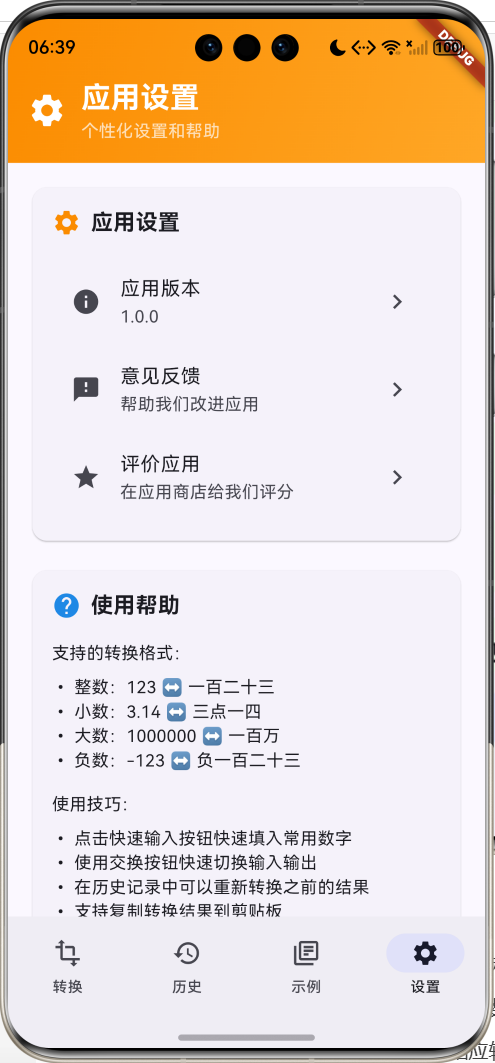
这是一款功能完整的大写数字转换器应用,为用户提供阿拉伯数字与中文大写数字之间的双向转换功能。应用采用Material Design 3设计风格,支持整数、小数、负数转换,提供转换历史记录、示例学习、个性化设置等功能,界面简洁美观,操作便捷高效。
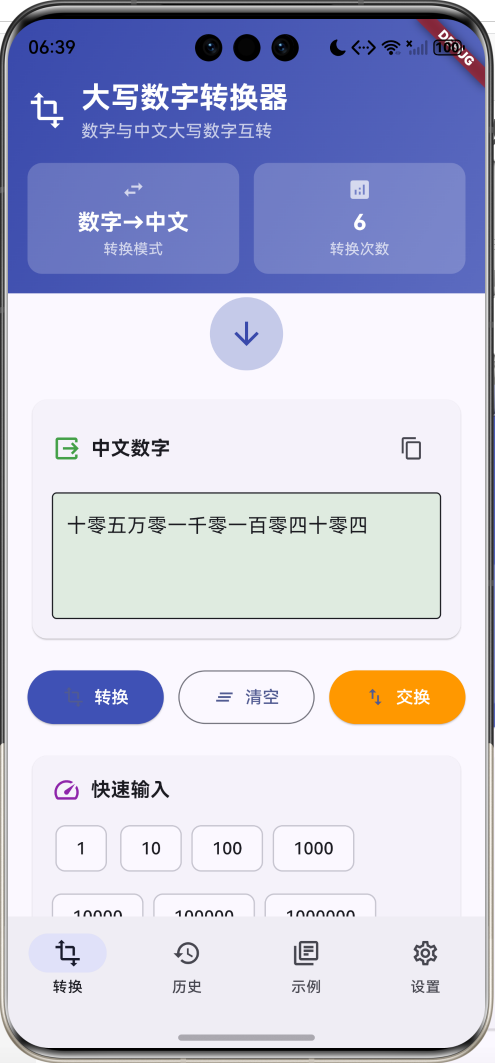
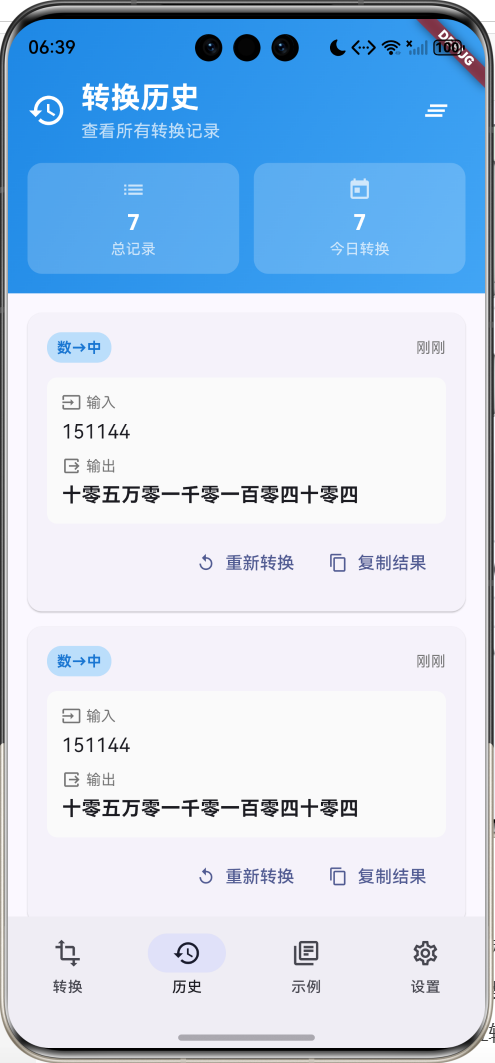
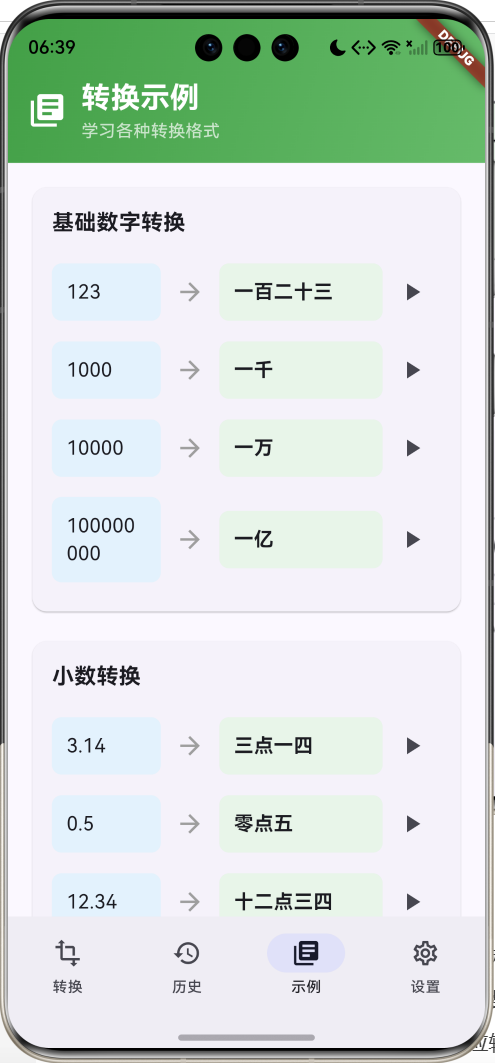
运行效果图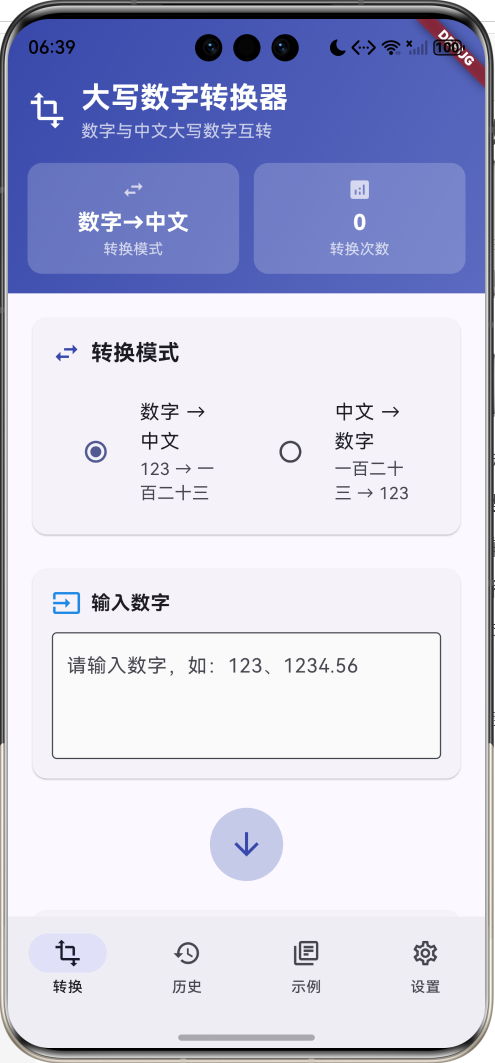
核心特性
- 双向转换:支持数字转中文和中文转数字两种模式
- 多格式支持:支持整数、小数、负数、大数等各种格式
- 智能识别:自动识别输入格式并进行相应转换
- 转换历史:记录所有转换操作,支持查看和重用
- 示例学习:提供丰富的转换示例供用户学习
- 快速输入:常用数字快速输入按钮
- 结果操作:支持复制、交换、清空等便捷操作
- 实时转换:输入即转换,无需手动触发
- 精美界面:渐变设计和流畅动画效果
技术栈
- Flutter 3.x
- Material Design 3
- 动画控制器(AnimationController)
- 剪贴板操作(Clipboard)
- 正则表达式处理
- 数据持久化
项目架构
数据模型设计
ConversionHistory(转换历史模型)
class ConversionHistory {
  final String input;                // 输入内容
  final String output;               // 输出结果
  final String type;                 // 转换类型
  final DateTime timestamp;          // 转换时间
}
设计要点:
- input和output存储转换的输入输出
- type区分转换方向(number_to_chinese/chinese_to_number)
- timestamp用于历史记录排序和统计
转换类型配置
| 转换模式 | 输入格式 | 输出格式 | 示例 |
|---|---|---|---|
| 数字→中文 | 阿拉伯数字 | 中文大写 | 123 → 一百二十三 |
| 中文→数字 | 中文大写 | 阿拉伯数字 | 一百二十三 → 123 |
支持的数字格式
| 格式类型 | 范围 | 示例 | 说明 |
|---|---|---|---|
| 整数 | 0-999999999999 | 123 | 基础整数转换 |
| 小数 | 支持4位小数 | 3.14 | 小数点后转换 |
| 负数 | 支持负号 | -123 | 负数标识 |
| 大数 | 支持万、亿 | 12345678 | 大数单位处理 |
核心功能实现
1. 转换模式选择器
实现数字转中文和中文转数字两种模式的切换。
Widget _buildModeSelector() {
  return Card(
    child: Padding(
      padding: const EdgeInsets.all(16),
      child: Column(
        crossAxisAlignment: CrossAxisAlignment.start,
        children: [
          Row(
            children: [
              Icon(Icons.swap_horiz, color: Colors.indigo.shade600),
              const SizedBox(width: 8),
              const Text(
                '转换模式',
                style: TextStyle(fontSize: 18, fontWeight: FontWeight.bold),
              ),
            ],
          ),
          const SizedBox(height: 16),
          Row(
            children: [
              Expanded(
                child: RadioListTile<String>(
                  title: const Text('数字 → 中文'),
                  subtitle: const Text('123 → 一百二十三'),
                  value: 'number_to_chinese',
                  groupValue: _conversionMode,
                  onChanged: (value) {
                    setState(() {
                      _conversionMode = value!;
                      _inputController.clear();
                      _outputController.clear();
                    });
                  },
                ),
              ),
              Expanded(
                child: RadioListTile<String>(
                  title: const Text('中文 → 数字'),
                  subtitle: const Text('一百二十三 → 123'),
                  value: 'chinese_to_number',
                  groupValue: _conversionMode,
                  onChanged: (value) {
                    setState(() {
                      _conversionMode = value!;
                      _inputController.clear();
                      _outputController.clear();
                    });
                  },
                ),
              ),
            ],
          ),
        ],
      ),
    ),
  );
}
设计要点:
- 使用RadioListTile提供清晰的选择界面
- 切换模式时自动清空输入输出
- 显示转换示例帮助用户理解
2. 输入输出区域
提供用户友好的输入输出界面,支持不同的键盘类型和输入验证。
Widget _buildInputSection() {
  return Card(
    child: Padding(
      padding: const EdgeInsets.all(16),
      child: Column(
        crossAxisAlignment: CrossAxisAlignment.start,
        children: [
          Row(
            children: [
              Icon(Icons.input, color: Colors.blue.shade600),
              const SizedBox(width: 8),
              Text(
                _conversionMode == 'number_to_chinese' ? '输入数字' : '输入中文数字',
                style: const TextStyle(fontSize: 16, fontWeight: FontWeight.bold),
              ),
              const Spacer(),
              if (_inputController.text.isNotEmpty)
                IconButton(
                  onPressed: () {
                    _inputController.clear();
                    _outputController.clear();
                  },
                  icon: const Icon(Icons.clear, size: 20),
                ),
            ],
          ),
          const SizedBox(height: 12),
          TextField(
            controller: _inputController,
            maxLines: 3,
            keyboardType: _conversionMode == 'number_to_chinese'
                ? TextInputType.number
                : TextInputType.text,
            inputFormatters: _conversionMode == 'number_to_chinese'
                ? [FilteringTextInputFormatter.allow(RegExp(r'[0-9.]'))]
                : null,
            decoration: InputDecoration(
              hintText: _conversionMode == 'number_to_chinese'
                  ? '请输入数字,如:123、1234.56'
                  : '请输入中文数字,如:一百二十三',
              border: const OutlineInputBorder(),
              filled: true,
              fillColor: Colors.grey.shade50,
            ),
          ),
        ],
      ),
    ),
  );
}
输入验证特性:
- 数字模式:只允许输入数字和小数点
- 中文模式:允许输入所有字符
- 实时清空:提供快速清空按钮
- 多行支持:支持长文本输入
3. 核心转换算法
实现数字与中文之间的双向转换逻辑。
// 数字转中文的核心算法
String _numberToChinese(String numberStr) {
  final number = double.tryParse(numberStr);
  if (number == null) throw Exception('Invalid number');

  if (number == 0) return '零';

  final isNegative = number < 0;
  final absNumber = number.abs();

  String result = '';

  // 处理整数部分
  final intPart = absNumber.floor();
  if (intPart > 0) {
    result += _convertIntegerPart(intPart);
  }

  // 处理小数部分
  final decimalPart = absNumber - intPart;
  if (decimalPart > 0) {
    result += _convertDecimalPart(decimalPart);
  }

  if (isNegative) {
    result = '负$result';
  }

  return result;
}
算法特点:
- 分段处理:分别处理整数和小数部分
- 负数支持:正确处理负数标识
- 零值处理:特殊处理零值情况
- 精度控制:合理控制小数精度
4. 整数部分转换
处理复杂的中文数字单位和零的插入规则。
String _convertIntegerPart(int number) {
  if (number == 0) return '';

  final digits = number.toString().split('').map(int.parse).toList();
  final length = digits.length;
  String result = '';
  bool needZero = false;

  for (int i = 0; i < length; i++) {
    final digit = digits[i];
    final position = length - i - 1;

    if (digit == 0) {
      if (position == 4 || position == 8) {
        // 万位或亿位为0时,仍需要添加单位
        if (result.isNotEmpty && !result.endsWith('万') && !result.endsWith('亿')) {
          if (position == 8) result += '亿';
          if (position == 4) result += '万';
        }
      } else if (needZero && i < length - 1) {
        result += '零';
        needZero = false;
      }
    } else {
      if (needZero) {
        result += '零';
        needZero = false;
      }

      result += _chineseNumbers[digit.toString()]!;

      // 添加单位
      if (position == 8) result += '亿';
      else if (position == 7) result += '千';
      else if (position == 6) result += '百';
      else if (position == 5) result += '十';
      else if (position == 4) result += '万';
      else if (position == 3) result += '千';
      else if (position == 2) result += '百';
      else if (position == 1) result += '十';

      needZero = true;
    }
  }

  // 处理"一十"的特殊情况
  if (result.startsWith('一十')) {
    result = result.substring(1);
  }

  return result;
}
转换规则:
- 单位处理:正确添加十、百、千、万、亿单位
- 零的插入:按照中文数字规则插入"零"
- 特殊情况:处理"一十"简化为"十"的情况
- 万亿处理:正确处理跨万、亿的数字
5. 中文转数字算法
解析中文数字并转换为阿拉伯数字。
String _chineseToNumber(String chineseStr) {
  if (chineseStr.isEmpty) throw Exception('Empty input');

  // 处理负数
  bool isNegative = false;
  String input = chineseStr;
  if (input.startsWith('负')) {
    isNegative = true;
    input = input.substring(1);
  }

  // 处理小数点
  final parts = input.split('点');
  if (parts.length > 2) throw Exception('Invalid format');

  double result = 0;

  // 转换整数部分
  if (parts[0].isNotEmpty && parts[0] != '零') {
    result += _parseIntegerPart(parts[0]);
  }

  // 转换小数部分
  if (parts.length == 2) {
    result += _parseDecimalPart(parts[1]);
  }

  if (isNegative) {
    result = -result;
  }

  // 格式化输出
  if (result == result.toInt()) {
    return result.toInt().toString();
  } else {
    return result.toString();
  }
}
解析特点:
- 负数识别:正确识别和处理"负"字
- 小数分离:按"点"分离整数和小数部分
- 格式输出:整数时不显示小数点
- 异常处理:对无效输入进行异常处理
6. 快速输入功能
提供常用数字的快速输入按钮,提高用户体验。
Widget _buildQuickNumbers() {
  final quickNumbers = [
    '1', '10', '100', '1000', '10000', '100000',
    '1000000', '10000000', '100000000', '1000000000'
  ];

  return Card(
    child: Padding(
      padding: const EdgeInsets.all(16),
      child: Column(
        crossAxisAlignment: CrossAxisAlignment.start,
        children: [
          Row(
            children: [
              Icon(Icons.speed, color: Colors.purple.shade600),
              const SizedBox(width: 8),
              const Text(
                '快速输入',
                style: TextStyle(fontSize: 16, fontWeight: FontWeight.bold),
              ),
            ],
          ),
          const SizedBox(height: 12),
          Wrap(
            spacing: 8,
            runSpacing: 8,
            children: quickNumbers.map((number) {
              return ActionChip(
                label: Text(number),
                onPressed: () {
                  _inputController.text = number;
                  _performConversion();
                },
              );
            }).toList(),
          ),
        ],
      ),
    ),
  );
}
快速输入设计:
- 常用数字:提供1到10亿的常用数字
- 一键输入:点击即可填入并自动转换
- 响应式布局:使用Wrap自适应屏幕宽度
- 视觉反馈:使用ActionChip提供点击反馈
7. 操作按钮组
提供转换、清空、交换等便捷操作。
Widget _buildActionButtons() {
  return Row(
    children: [
      Expanded(
        child: ElevatedButton.icon(
          onPressed: _performConversion,
          icon: const Icon(Icons.transform),
          label: const Text('转换'),
          style: ElevatedButton.styleFrom(
            backgroundColor: Colors.indigo,
            foregroundColor: Colors.white,
            padding: const EdgeInsets.symmetric(vertical: 12),
          ),
        ),
      ),
      const SizedBox(width: 12),
      Expanded(
        child: OutlinedButton.icon(
          onPressed: _clearAll,
          icon: const Icon(Icons.clear_all),
          label: const Text('清空'),
          style: OutlinedButton.styleFrom(
            padding: const EdgeInsets.symmetric(vertical: 12),
          ),
        ),
      ),
      const SizedBox(width: 12),
      Expanded(
        child: ElevatedButton.icon(
          onPressed: _swapInputOutput,
          icon: const Icon(Icons.swap_vert),
          label: const Text('交换'),
          style: ElevatedButton.styleFrom(
            backgroundColor: Colors.orange,
            foregroundColor: Colors.white,
            padding: const EdgeInsets.symmetric(vertical: 12),
          ),
        ),
      ),
    ],
  );
}
按钮功能:
- 转换按钮:手动触发转换(实际上是实时转换)
- 清空按钮:清空输入和输出内容
- 交换按钮:交换输入输出并切换转换模式
8. 转换历史管理
记录和管理所有转换操作的历史记录。
Widget _buildHistoryItem(ConversionHistory history, int index) {
  final isNumberToChinese = history.type == 'number_to_chinese';

  return Card(
    margin: const EdgeInsets.only(bottom: 12),
    child: Padding(
      padding: const EdgeInsets.all(16),
      child: Column(
        crossAxisAlignment: CrossAxisAlignment.start,
        children: [
          Row(
            children: [
              Container(
                padding: const EdgeInsets.symmetric(horizontal: 8, vertical: 4),
                decoration: BoxDecoration(
                  color: isNumberToChinese ? Colors.blue.shade100 : Colors.green.shade100,
                  borderRadius: BorderRadius.circular(12),
                ),
                child: Text(
                  isNumberToChinese ? '数→中' : '中→数',
                  style: TextStyle(
                    fontSize: 12,
                    color: isNumberToChinese ? Colors.blue.shade700 : Colors.green.shade700,
                    fontWeight: FontWeight.bold,
                  ),
                ),
              ),
              const Spacer(),
              Text(
                _formatTime(history.timestamp),
                style: TextStyle(fontSize: 12, color: Colors.grey.shade600),
              ),
            ],
          ),
          const SizedBox(height: 12),
          Container(
            padding: const EdgeInsets.all(12),
            decoration: BoxDecoration(
              color: Colors.grey.shade50,
              borderRadius: BorderRadius.circular(8),
            ),
            child: Column(
              crossAxisAlignment: CrossAxisAlignment.start,
              children: [
                Row(
                  children: [
                    Icon(Icons.input, size: 16, color: Colors.grey.shade600),
                    const SizedBox(width: 4),
                    Text('输入', style: TextStyle(fontSize: 12, color: Colors.grey.shade600)),
                  ],
                ),
                const SizedBox(height: 4),
                Text(history.input, style: const TextStyle(fontSize: 16)),
                const SizedBox(height: 8),
                Row(
                  children: [
                    Icon(Icons.output, size: 16, color: Colors.grey.shade600),
                    const SizedBox(width: 4),
                    Text('输出', style: TextStyle(fontSize: 12, color: Colors.grey.shade600)),
                  ],
                ),
                const SizedBox(height: 4),
                Text(history.output, style: const TextStyle(fontSize: 16, fontWeight: FontWeight.bold)),
              ],
            ),
          ),
          const SizedBox(height: 8),
          Row(
            mainAxisAlignment: MainAxisAlignment.end,
            children: [
              TextButton.icon(
                onPressed: () {
                  _inputController.text = history.input;
                  setState(() {
                    _conversionMode = history.type;
                    _selectedIndex = 0;
                  });
                  _performConversion();
                },
                icon: const Icon(Icons.replay, size: 16),
                label: const Text('重新转换'),
              ),
              TextButton.icon(
                onPressed: () {
                  Clipboard.setData(ClipboardData(text: history.output));
                  ScaffoldMessenger.of(context).showSnackBar(
                    const SnackBar(content: Text('已复制到剪贴板')),
                  );
                },
                icon: const Icon(Icons.copy, size: 16),
                label: const Text('复制结果'),
              ),
            ],
          ),
        ],
      ),
    ),
  );
}
历史记录特性:
- 类型标识:清晰标识转换方向
- 时间显示:智能显示相对时间
- 重用功能:支持重新转换历史记录
- 复制功能:快速复制转换结果
9. 示例学习页面
提供丰富的转换示例帮助用户学习和理解。
Widget _buildExampleSection(String title, List<Map<String, String>> examples) {
  return Card(
    child: Padding(
      padding: const EdgeInsets.all(16),
      child: Column(
        crossAxisAlignment: CrossAxisAlignment.start,
        children: [
          Text(
            title,
            style: const TextStyle(fontSize: 18, fontWeight: FontWeight.bold),
          ),
          const SizedBox(height: 12),
          ...examples.map((example) {
            return Padding(
              padding: const EdgeInsets.symmetric(vertical: 8),
              child: Row(
                children: [
                  Expanded(
                    flex: 2,
                    child: Container(
                      padding: const EdgeInsets.all(12),
                      decoration: BoxDecoration(
                        color: Colors.blue.shade50,
                        borderRadius: BorderRadius.circular(8),
                      ),
                      child: Text(
                        example['input']!,
                        style: const TextStyle(fontSize: 16),
                      ),
                    ),
                  ),
                  const Padding(
                    padding: EdgeInsets.symmetric(horizontal: 12),
                    child: Icon(Icons.arrow_forward, color: Colors.grey),
                  ),
                  Expanded(
                    flex: 3,
                    child: Container(
                      padding: const EdgeInsets.all(12),
                      decoration: BoxDecoration(
                        color: Colors.green.shade50,
                        borderRadius: BorderRadius.circular(8),
                      ),
                      child: Text(
                        example['output']!,
                        style: const TextStyle(fontSize: 16, fontWeight: FontWeight.bold),
                      ),
                    ),
                  ),
                  IconButton(
                    onPressed: () {
                      _inputController.text = example['input']!;
                      setState(() {
                        _selectedIndex = 0;
                      });
                      _performConversion();
                    },
                    icon: const Icon(Icons.play_arrow),
                  ),
                ],
              ),
            );
          }),
        ],
      ),
    ),
  );
}
示例分类:
- 基础数字:简单的整数转换示例
- 小数转换:小数点数字的转换规则
- 复杂数字:大数和特殊格式的转换
- 中文转数字:反向转换的示例
10. 动画效果实现
添加转换时的动画效果,提升用户体验。
void initState() {
super.initState();
_fadeController = AnimationController(
duration: const Duration(milliseconds: 300),
vsync: this,
);
_fadeAnimation = Tween<double>(begin: 0.0, end: 1.0).animate(
CurvedAnimation(parent: _fadeController, curve: Curves.easeInOut),
);
_inputController.addListener(_onInputChanged);
}
Widget _buildConversionArrow() {
return AnimatedBuilder(
animation: _fadeAnimation,
builder: (context, child) {
return Container(
width: 60,
height: 60,
decoration: BoxDecoration(
color: Colors.indigo.shade100,
shape: BoxShape.circle,
),
child: Icon(
Icons.arrow_downward,
color: Colors.indigo.shade600,
size: 30,
),
);
},
);
}
动画特点:
- 淡入淡出:转换时的淡入淡出效果
- 实时响应:输入变化时的实时动画
- 流畅过渡:使用缓动曲线提供流畅体验
UI组件设计
1. 渐变头部组件
Widget _buildConverterHeader() {
  return Container(
    padding: const EdgeInsets.fromLTRB(16, 48, 16, 16),
    decoration: BoxDecoration(
      gradient: LinearGradient(
        colors: [Colors.indigo.shade600, Colors.indigo.shade400],
        begin: Alignment.topLeft,
        end: Alignment.bottomRight,
      ),
    ),
    child: Column(
      children: [
        Row(
          children: [
            const Icon(Icons.transform, color: Colors.white, size: 32),
            const SizedBox(width: 12),
            const Expanded(
              child: Column(
                crossAxisAlignment: CrossAxisAlignment.start,
                children: [
                  Text(
                    '大写数字转换器',
                    style: TextStyle(
                      fontSize: 24,
                      fontWeight: FontWeight.bold,
                      color: Colors.white,
                    ),
                  ),
                  Text(
                    '数字与中文大写数字互转',
                    style: TextStyle(
                      fontSize: 14,
                      color: Colors.white70,
                    ),
                  ),
                ],
              ),
            ),
          ],
        ),
        const SizedBox(height: 16),
        Row(
          children: [
            Expanded(
              child: _buildHeaderCard(
                '转换模式',
                _conversionMode == 'number_to_chinese' ? '数字→中文' : '中文→数字',
                Icons.swap_horiz,
              ),
            ),
            const SizedBox(width: 12),
            Expanded(
              child: _buildHeaderCard(
                '转换次数',
                '${_conversionHistory.length}',
                Icons.analytics,
              ),
            ),
          ],
        ),
      ],
    ),
  );
}
2. 信息卡片组件
Widget _buildHeaderCard(String title, String value, IconData icon) {
  return Container(
    padding: const EdgeInsets.all(12),
    decoration: BoxDecoration(
      color: Colors.white.withValues(alpha: 0.2),
      borderRadius: BorderRadius.circular(12),
    ),
    child: Column(
      children: [
        Icon(icon, color: Colors.white70, size: 20),
        const SizedBox(height: 4),
        Text(
          value,
          style: const TextStyle(
            fontSize: 18,
            fontWeight: FontWeight.bold,
            color: Colors.white,
          ),
        ),
        Text(
          title,
          style: const TextStyle(
            fontSize: 12,
            color: Colors.white70,
          ),
        ),
      ],
    ),
  );
}
3. NavigationBar底部导航
NavigationBar(
  selectedIndex: _selectedIndex,
  onDestinationSelected: (index) {
    setState(() {
      _selectedIndex = index;
    });
  },
  destinations: const [
    NavigationDestination(
      icon: Icon(Icons.transform_outlined),
      selectedIcon: Icon(Icons.transform),
      label: '转换',
    ),
    NavigationDestination(
      icon: Icon(Icons.history_outlined),
      selectedIcon: Icon(Icons.history),
      label: '历史',
    ),
    NavigationDestination(
      icon: Icon(Icons.library_books_outlined),
      selectedIcon: Icon(Icons.library_books),
      label: '示例',
    ),
    NavigationDestination(
      icon: Icon(Icons.settings_outlined),
      selectedIcon: Icon(Icons.settings),
      label: '设置',
    ),
  ],
)
4. 输入验证组件
class NumberInputFormatter extends TextInputFormatter {
TextEditingValue formatEditUpdate(
TextEditingValue oldValue,
TextEditingValue newValue,
) {
// 只允许数字、小数点和负号
final regExp = RegExp(r'^-?[0-9]*\.?[0-9]*$');
if (regExp.hasMatch(newValue.text)) {
return newValue;
}
return oldValue;
}
}
功能扩展建议
1. 财务大写转换
class FinancialConverter {
  static const Map<String, String> _financialNumbers = {
    '0': '零', '1': '壹', '2': '贰', '3': '叁', '4': '肆',
    '5': '伍', '6': '陆', '7': '柒', '8': '捌', '9': '玖',
  };

  static const Map<String, String> _financialUnits = {
    '1': '', '10': '拾', '100': '佰', '1000': '仟',
    '10000': '万', '100000000': '亿',
  };

  // 转换为财务大写
  String convertToFinancial(String numberStr) {
    final number = double.tryParse(numberStr);
    if (number == null) throw Exception('Invalid number');

    String result = _convertWithFinancialChars(number);

    // 添加货币单位
    if (result.contains('点')) {
      final parts = result.split('点');
      result = '${parts[0]}元';
      if (parts.length > 1) {
        final decimal = parts[1];
        if (decimal.length >= 1) {
          result += '${decimal[0]}角';
        }
        if (decimal.length >= 2) {
          result += '${decimal[1]}分';
        }
      }
    } else {
      result += '元整';
    }

    return result;
  }

  // 财务大写设置页面
  Widget buildFinancialSettings() {
    return Card(
      child: Column(
        children: [
          SwitchListTile(
            title: const Text('启用财务大写'),
            subtitle: const Text('使用壹贰叁等财务专用字符'),
            value: _useFinancialFormat,
            onChanged: (value) {
              setState(() {
                _useFinancialFormat = value;
              });
            },
          ),
          SwitchListTile(
            title: const Text('添加货币单位'),
            subtitle: const Text('自动添加元角分单位'),
            value: _addCurrencyUnit,
            onChanged: (value) {
              setState(() {
                _addCurrencyUnit = value;
              });
            },
          ),
        ],
      ),
    );
  }
}
2. 语音输入输出
class VoiceConverter {
  late SpeechToText _speechToText;
  late FlutterTts _flutterTts;

  // 初始化语音服务
  void initializeVoice() async {
    _speechToText = SpeechToText();
    _flutterTts = FlutterTts();

    await _speechToText.initialize();
    await _flutterTts.setLanguage('zh-CN');
  }

  // 语音输入
  void startListening() async {
    if (await _speechToText.hasPermission) {
      await _speechToText.listen(
        onResult: (result) {
          _inputController.text = result.recognizedWords;
          _performConversion();
        },
      );
    }
  }

  // 语音播报
  void speakResult(String text) async {
    await _flutterTts.speak(text);
  }

  // 语音控制界面
  Widget buildVoiceControls() {
    return Row(
      mainAxisAlignment: MainAxisAlignment.spaceEvenly,
      children: [
        FloatingActionButton(
          onPressed: startListening,
          child: Icon(_speechToText.isListening ? Icons.mic : Icons.mic_none),
        ),
        FloatingActionButton(
          onPressed: () => speakResult(_outputController.text),
          child: const Icon(Icons.volume_up),
        ),
      ],
    );
  }
}
3. 批量转换功能
class BatchConverter {
  // 批量转换数据模型
  class BatchItem {
    String input;
    String output;
    bool isValid;
    String? error;

    BatchItem({
      required this.input,
      this.output = '',
      this.isValid = true,
      this.error,
    });
  }

  List<BatchItem> _batchItems = [];

  // 添加批量转换项
  void addBatchItem(String input) {
    _batchItems.add(BatchItem(input: input));
  }

  // 执行批量转换
  void performBatchConversion() {
    for (var item in _batchItems) {
      try {
        if (_conversionMode == 'number_to_chinese') {
          item.output = _numberToChinese(item.input);
        } else {
          item.output = _chineseToNumber(item.input);
        }
        item.isValid = true;
        item.error = null;
      } catch (e) {
        item.isValid = false;
        item.error = e.toString();
        item.output = '';
      }
    }
    setState(() {});
  }

  // 批量转换界面
  Widget buildBatchConverter() {
    return Column(
      children: [
        // 输入区域
        TextField(
          maxLines: 10,
          decoration: const InputDecoration(
            hintText: '每行输入一个数字或中文数字',
            border: OutlineInputBorder(),
          ),
          onChanged: (text) {
            final lines = text.split('\n').where((line) => line.trim().isNotEmpty);
            _batchItems = lines.map((line) => BatchItem(input: line.trim())).toList();
          },
        ),

        const SizedBox(height: 16),

        // 转换按钮
        ElevatedButton(
          onPressed: performBatchConversion,
          child: const Text('批量转换'),
        ),

        const SizedBox(height: 16),

        // 结果列表
        Expanded(
          child: ListView.builder(
            itemCount: _batchItems.length,
            itemBuilder: (context, index) {
              final item = _batchItems[index];
              return Card(
                child: ListTile(
                  leading: Icon(
                    item.isValid ? Icons.check_circle : Icons.error,
                    color: item.isValid ? Colors.green : Colors.red,
                  ),
                  title: Text(item.input),
                  subtitle: item.isValid
                      ? Text(item.output, style: const TextStyle(fontWeight: FontWeight.bold))
                      : Text(item.error ?? '转换失败', style: const TextStyle(color: Colors.red)),
                  trailing: item.isValid
                      ? IconButton(
                          icon: const Icon(Icons.copy),
                          onPressed: () {
                            Clipboard.setData(ClipboardData(text: item.output));
                          },
                        )
                      : null,
                ),
              );
            },
          ),
        ),
      ],
    );
  }

  // 导出批量结果
  void exportBatchResults() async {
    final results = _batchItems.map((item) {
      return '${item.input} -> ${item.output}';
    }).join('\n');

    await Share.share(results, subject: '批量转换结果');
  }
}
4. 自定义转换规则
class CustomRules {
  Map<String, String> _customMappings = {};

  // 添加自定义映射
  void addCustomMapping(String from, String to) {
    _customMappings[from] = to;
  }

  // 应用自定义规则
  String applyCustomRules(String input) {
    String result = input;

    _customMappings.forEach((from, to) {
      result = result.replaceAll(from, to);
    });

    return result;
  }

  // 自定义规则编辑器
  Widget buildRuleEditor() {
    return Column(
      children: [
        // 添加规则
        Row(
          children: [
            Expanded(
              child: TextField(
                controller: _fromController,
                decoration: const InputDecoration(
                  labelText: '原文本',
                  border: OutlineInputBorder(),
                ),
              ),
            ),
            const SizedBox(width: 8),
            const Icon(Icons.arrow_forward),
            const SizedBox(width: 8),
            Expanded(
              child: TextField(
                controller: _toController,
                decoration: const InputDecoration(
                  labelText: '替换为',
                  border: OutlineInputBorder(),
                ),
              ),
            ),
            IconButton(
              onPressed: () {
                addCustomMapping(_fromController.text, _toController.text);
                _fromController.clear();
                _toController.clear();
              },
              icon: const Icon(Icons.add),
            ),
          ],
        ),

        const SizedBox(height: 16),

        // 规则列表
        Expanded(
          child: ListView.builder(
            itemCount: _customMappings.length,
            itemBuilder: (context, index) {
              final entry = _customMappings.entries.elementAt(index);
              return Card(
                child: ListTile(
                  title: Text('${entry.key} → ${entry.value}'),
                  trailing: IconButton(
                    icon: const Icon(Icons.delete),
                    onPressed: () {
                      setState(() {
                        _customMappings.remove(entry.key);
                      });
                    },
                  ),
                ),
              );
            },
          ),
        ),
      ],
    );
  }
}
5. 数据统计分析
class ConversionAnalytics {
  // 统计数据
  Map<String, int> _conversionStats = {
    'number_to_chinese': 0,
    'chinese_to_number': 0,
  };

  Map<String, int> _numberRangeStats = {
    '1-10': 0,
    '11-100': 0,
    '101-1000': 0,
    '1001-10000': 0,
    '10000+': 0,
  };

  // 更新统计
  void updateStats(ConversionHistory history) {
    _conversionStats[history.type] = (_conversionStats[history.type] ?? 0) + 1;

    if (history.type == 'number_to_chinese') {
      final number = double.tryParse(history.input);
      if (number != null) {
        final absNumber = number.abs();
        if (absNumber <= 10) {
          _numberRangeStats['1-10'] = (_numberRangeStats['1-10'] ?? 0) + 1;
        } else if (absNumber <= 100) {
          _numberRangeStats['11-100'] = (_numberRangeStats['11-100'] ?? 0) + 1;
        } else if (absNumber <= 1000) {
          _numberRangeStats['101-1000'] = (_numberRangeStats['101-1000'] ?? 0) + 1;
        } else if (absNumber <= 10000) {
          _numberRangeStats['1001-10000'] = (_numberRangeStats['1001-10000'] ?? 0) + 1;
        } else {
          _numberRangeStats['10000+'] = (_numberRangeStats['10000+'] ?? 0) + 1;
        }
      }
    }
  }

  // 统计图表
  Widget buildStatsChart() {
    return Card(
      child: Padding(
        padding: const EdgeInsets.all(16),
        child: Column(
          crossAxisAlignment: CrossAxisAlignment.start,
          children: [
            const Text('转换统计', style: TextStyle(fontSize: 18, fontWeight: FontWeight.bold)),
            const SizedBox(height: 16),

            // 转换类型统计
            Row(
              children: [
                Expanded(
                  child: _buildStatItem(
                    '数字→中文',
                    '${_conversionStats['number_to_chinese']}',
                    Colors.blue,
                  ),
                ),
                Expanded(
                  child: _buildStatItem(
                    '中文→数字',
                    '${_conversionStats['chinese_to_number']}',
                    Colors.green,
                  ),
                ),
              ],
            ),

            const SizedBox(height: 16),

            // 数字范围统计
            const Text('数字范围分布', style: TextStyle(fontSize: 16, fontWeight: FontWeight.bold)),
            const SizedBox(height: 8),
            ..._numberRangeStats.entries.map((entry) {
              final total = _numberRangeStats.values.fold(0, (sum, value) => sum + value);
              final percentage = total > 0 ? entry.value / total : 0.0;

              return Padding(
                padding: const EdgeInsets.symmetric(vertical: 4),
                child: Row(
                  children: [
                    SizedBox(
                      width: 80,
                      child: Text(entry.key, style: const TextStyle(fontSize: 12)),
                    ),
                    Expanded(
                      child: LinearProgressIndicator(
                        value: percentage,
                        backgroundColor: Colors.grey.shade200,
                        valueColor: const AlwaysStoppedAnimation(Colors.orange),
                      ),
                    ),
                    const SizedBox(width: 8),
                    Text('${entry.value}', style: const TextStyle(fontSize: 12)),
                  ],
                ),
              );
            }),
          ],
        ),
      ),
    );
  }

  Widget _buildStatItem(String label, String value, Color color) {
    return Container(
      padding: const EdgeInsets.all(12),
      decoration: BoxDecoration(
        color: color.withValues(alpha: 0.1),
        borderRadius: BorderRadius.circular(8),
      ),
      child: Column(
        children: [
          Text(
            value,
            style: TextStyle(
              fontSize: 24,
              fontWeight: FontWeight.bold,
              color: color,
            ),
          ),
          Text(
            label,
            style: TextStyle(
              fontSize: 12,
              color: Colors.grey.shade600,
            ),
          ),
        ],
      ),
    );
  }
}
6. 主题定制功能
class ThemeCustomizer {
  // 预设主题
  static const List<ThemeData> presetThemes = [
    // 默认主题
    ThemeData(
      colorScheme: ColorScheme.fromSeed(seedColor: Colors.indigo),
      useMaterial3: true,
    ),
    // 绿色主题
    ThemeData(
      colorScheme: ColorScheme.fromSeed(seedColor: Colors.green),
      useMaterial3: true,
    ),
    // 橙色主题
    ThemeData(
      colorScheme: ColorScheme.fromSeed(seedColor: Colors.orange),
      useMaterial3: true,
    ),
  ];

  // 主题选择器
  Widget buildThemeSelector() {
    return Card(
      child: Padding(
        padding: const EdgeInsets.all(16),
        child: Column(
          crossAxisAlignment: CrossAxisAlignment.start,
          children: [
            const Text('主题选择', style: TextStyle(fontSize: 18, fontWeight: FontWeight.bold)),
            const SizedBox(height: 16),
            Wrap(
              spacing: 12,
              children: presetThemes.asMap().entries.map((entry) {
                final index = entry.key;
                final theme = entry.value;
                final isSelected = index == _selectedThemeIndex;

                return GestureDetector(
                  onTap: () {
                    setState(() {
                      _selectedThemeIndex = index;
                    });
                  },
                  child: Container(
                    width: 60,
                    height: 60,
                    decoration: BoxDecoration(
                      color: theme.colorScheme.primary,
                      borderRadius: BorderRadius.circular(30),
                      border: isSelected
                          ? Border.all(color: Colors.black, width: 3)
                          : null,
                    ),
                    child: isSelected
                        ? const Icon(Icons.check, color: Colors.white)
                        : null,
                  ),
                );
              }).toList(),
            ),
          ],
        ),
      ),
    );
  }

  // 自定义颜色
  Widget buildColorCustomizer() {
    return Card(
      child: Padding(
        padding: const EdgeInsets.all(16),
        child: Column(
          crossAxisAlignment: CrossAxisAlignment.start,
          children: [
            const Text('自定义颜色', style: TextStyle(fontSize: 18, fontWeight: FontWeight.bold)),
            const SizedBox(height: 16),
            ListTile(
              title: const Text('主色调'),
              trailing: Container(
                width: 40,
                height: 40,
                decoration: BoxDecoration(
                  color: _customPrimaryColor,
                  borderRadius: BorderRadius.circular(20),
                ),
              ),
              onTap: () => _showColorPicker('primary'),
            ),
            ListTile(
              title: const Text('强调色'),
              trailing: Container(
                width: 40,
                height: 40,
                decoration: BoxDecoration(
                  color: _customAccentColor,
                  borderRadius: BorderRadius.circular(20),
                ),
              ),
              onTap: () => _showColorPicker('accent'),
            ),
          ],
        ),
      ),
    );
  }
}
7. 数据导入导出
class DataManager {
  // 导出转换历史
  Future<void> exportHistory() async {
    final data = {
      'version': '1.0',
      'exportDate': DateTime.now().toIso8601String(),
      'conversionHistory': _conversionHistory.map((h) => {
        'input': h.input,
        'output': h.output,
        'type': h.type,
        'timestamp': h.timestamp.toIso8601String(),
      }).toList(),
    };

    final jsonString = jsonEncode(data);

    // 保存到文件
    final directory = await getApplicationDocumentsDirectory();
    final file = File('${directory.path}/conversion_history.json');
    await file.writeAsString(jsonString);

    // 分享文件
    await Share.shareFiles([file.path], text: '转换历史数据');
  }

  // 导入转换历史
  Future<void> importHistory() async {
    try {
      final result = await FilePicker.platform.pickFiles(
        type: FileType.custom,
        allowedExtensions: ['json'],
      );

      if (result != null && result.files.single.path != null) {
        final file = File(result.files.single.path!);
        final jsonString = await file.readAsString();
        final data = jsonDecode(jsonString);

        final importedHistory = (data['conversionHistory'] as List)
            .map((item) => ConversionHistory(
                  input: item['input'],
                  output: item['output'],
                  type: item['type'],
                  timestamp: DateTime.parse(item['timestamp']),
                ))
            .toList();

        setState(() {
          _conversionHistory.addAll(importedHistory);
        });

        ScaffoldMessenger.of(context).showSnackBar(
          SnackBar(content: Text('成功导入${importedHistory.length}条记录')),
        );
      }
    } catch (e) {
      ScaffoldMessenger.of(context).showSnackBar(
        const SnackBar(content: Text('导入失败,请检查文件格式')),
      );
    }
  }

  // 生成PDF报告
  Future<void> generatePDFReport() async {
    final pdf = pw.Document();

    pdf.addPage(
      pw.Page(
        build: (pw.Context context) {
          return pw.Column(
            crossAxisAlignment: pw.CrossAxisAlignment.start,
            children: [
              pw.Text('数字转换报告', style: pw.TextStyle(fontSize: 24, fontWeight: pw.FontWeight.bold)),
              pw.SizedBox(height: 20),
              pw.Text('生成时间: ${DateTime.now().toString()}'),
              pw.SizedBox(height: 20),

              // 统计信息
              pw.Text('转换统计', style: pw.TextStyle(fontSize: 18, fontWeight: pw.FontWeight.bold)),
              pw.Text('总转换次数: ${_conversionHistory.length}'),
              pw.Text('数字→中文: ${_conversionHistory.where((h) => h.type == 'number_to_chinese').length}'),
              pw.Text('中文→数字: ${_conversionHistory.where((h) => h.type == 'chinese_to_number').length}'),

              pw.SizedBox(height: 20),

              // 最近转换记录
              pw.Text('最近转换记录', style: pw.TextStyle(fontSize: 18, fontWeight: pw.FontWeight.bold)),
              ...._conversionHistory.take(10).map((history) {
                return pw.Text('${history.input} → ${history.output} (${history.type})');
              }),
            ],
          );
        },
      ),
    );

    final bytes = await pdf.save();
    final directory = await getApplicationDocumentsDirectory();
    final file = File('${directory.path}/conversion_report.pdf');
    await file.writeAsBytes(bytes);

    await Share.shareFiles([file.path], text: '转换报告');
  }
}
8. 快捷方式和手势
class ShortcutsManager {
  // 键盘快捷键
  Widget buildShortcuts(Widget child) {
    return Shortcuts(
      shortcuts: {
        LogicalKeySet(LogicalKeyboardKey.control, LogicalKeyboardKey.keyC): const CopyIntent(),
        LogicalKeySet(LogicalKeyboardKey.control, LogicalKeyboardKey.keyV): const PasteIntent(),
        LogicalKeySet(LogicalKeyboardKey.control, LogicalKeyboardKey.keyA): const SelectAllIntent(),
        LogicalKeySet(LogicalKeyboardKey.escape): const ClearIntent(),
        LogicalKeySet(LogicalKeyboardKey.enter): const ConvertIntent(),
      },
      child: Actions(
        actions: {
          CopyIntent: CallbackAction<CopyIntent>(
            onInvoke: (intent) => _copyOutput(),
          ),
          PasteIntent: CallbackAction<PasteIntent>(
            onInvoke: (intent) => _pasteFromClipboard(),
          ),
          SelectAllIntent: CallbackAction<SelectAllIntent>(
            onInvoke: (intent) => _selectAllInput(),
          ),
          ClearIntent: CallbackAction<ClearIntent>(
            onInvoke: (intent) => _clearAll(),
          ),
          ConvertIntent: CallbackAction<ConvertIntent>(
            onInvoke: (intent) => _performConversion(),
          ),
        },
        child: child,
      ),
    );
  }

  // 手势识别
  Widget buildGestureDetector(Widget child) {
    return GestureDetector(
      onDoubleTap: _clearAll,
      onLongPress: _swapInputOutput,
      child: child,
    );
  }

  // 快捷键帮助
  Widget buildShortcutHelp() {
    return Card(
      child: Padding(
        padding: const EdgeInsets.all(16),
        child: Column(
          crossAxisAlignment: CrossAxisAlignment.start,
          children: [
            const Text('快捷键', style: TextStyle(fontSize: 18, fontWeight: FontWeight.bold)),
            const SizedBox(height: 16),
            _buildShortcutItem('Ctrl + C', '复制结果'),
            _buildShortcutItem('Ctrl + V', '粘贴输入'),
            _buildShortcutItem('Ctrl + A', '全选输入'),
            _buildShortcutItem('Esc', '清空内容'),
            _buildShortcutItem('Enter', '执行转换'),
            const SizedBox(height: 16),
            const Text('手势操作', style: TextStyle(fontSize: 16, fontWeight: FontWeight.bold)),
            const SizedBox(height: 8),
            _buildShortcutItem('双击', '清空内容'),
            _buildShortcutItem('长按', '交换输入输出'),
          ],
        ),
      ),
    );
  }

  Widget _buildShortcutItem(String shortcut, String description) {
    return Padding(
      padding: const EdgeInsets.symmetric(vertical: 4),
      child: Row(
        children: [
          Container(
            padding: const EdgeInsets.symmetric(horizontal: 8, vertical: 4),
            decoration: BoxDecoration(
              color: Colors.grey.shade200,
              borderRadius: BorderRadius.circular(4),
            ),
            child: Text(shortcut, style: const TextStyle(fontFamily: 'monospace')),
          ),
          const SizedBox(width: 12),
          Text(description),
        ],
      ),
    );
  }
}

// 自定义Intent类
class CopyIntent extends Intent {}
class PasteIntent extends Intent {}
class SelectAllIntent extends Intent {}
class ClearIntent extends Intent {}
class ConvertIntent extends Intent {}
性能优化建议
1. 转换算法优化
class OptimizedConverter {
  // 缓存转换结果
  static final Map<String, String> _conversionCache = {};

  String cachedConversion(String input, String mode) {
    final cacheKey = '$mode:$input';

    if (_conversionCache.containsKey(cacheKey)) {
      return _conversionCache[cacheKey]!;
    }

    String result;
    if (mode == 'number_to_chinese') {
      result = _numberToChinese(input);
    } else {
      result = _chineseToNumber(input);
    }

    // 限制缓存大小
    if (_conversionCache.length > 1000) {
      _conversionCache.clear();
    }

    _conversionCache[cacheKey] = result;
    return result;
  }

  // 异步转换
  Future<String> asyncConversion(String input, String mode) async {
    return await compute(_performConversionIsolate, {
      'input': input,
      'mode': mode,
    });
  }

  // 在独立Isolate中执行转换
  static String _performConversionIsolate(Map<String, String> params) {
    final input = params['input']!;
    final mode = params['mode']!;

    if (mode == 'number_to_chinese') {
      return _numberToChineseStatic(input);
    } else {
      return _chineseToNumberStatic(input);
    }
  }
}
2. UI性能优化
class PerformanceOptimizations {
  // 使用RepaintBoundary减少重绘
  Widget buildOptimizedList() {
    return ListView.builder(
      itemCount: _conversionHistory.length,
      itemBuilder: (context, index) {
        return RepaintBoundary(
          child: _buildHistoryItem(_conversionHistory[index], index),
        );
      },
    );
  }

  // 延迟加载历史记录
  Widget buildLazyHistoryList() {
    return LazyLoadScrollView(
      onEndOfPage: _loadMoreHistory,
      child: ListView.builder(
        itemCount: _displayedHistoryCount,
        itemBuilder: (context, index) {
          if (index < _conversionHistory.length) {
            return _buildHistoryItem(_conversionHistory[index], index);
          } else {
            return const Center(child: CircularProgressIndicator());
          }
        },
      ),
    );
  }

  // 防抖输入处理
  Timer? _debounceTimer;

  void _onInputChangedDebounced(String value) {
    _debounceTimer?.cancel();
    _debounceTimer = Timer(const Duration(milliseconds: 300), () {
      _performConversion();
    });
  }
}
3. 内存管理
class MemoryManager {
// 限制历史记录数量
static const int maxHistorySize = 500;
void addToHistory(ConversionHistory history) {
_conversionHistory.insert(0, history);
if (_conversionHistory.length > maxHistorySize) {
_conversionHistory.removeRange(maxHistorySize, _conversionHistory.length);
}
}
// 清理资源
void dispose() {
_inputController.dispose();
_outputController.dispose();
_fadeController.dispose();
_debounceTimer?.cancel();
_conversionCache.clear();
super.dispose();
}
// 内存使用监控
void monitorMemoryUsage() {
Timer.periodic(const Duration(minutes: 1), (timer) {
final memoryUsage = ProcessInfo.currentRss;
if (memoryUsage > 100 * 1024 * 1024) { // 100MB
_clearCache();
}
});
}
}
测试建议
1. 单元测试
// test/conversion_test.dart
import 'package:flutter_test/flutter_test.dart';
import 'package:number_converter/converter.dart';

void main() {
  group('Number Conversion Tests', () {
    test('should convert basic numbers correctly', () {
      expect(numberToChinese('123'), equals('一百二十三'));
      expect(numberToChinese('1000'), equals('一千'));
      expect(numberToChinese('10000'), equals('一万'));
    });

    test('should handle decimal numbers', () {
      expect(numberToChinese('3.14'), equals('三点一四'));
      expect(numberToChinese('0.5'), equals('零点五'));
    });

    test('should handle negative numbers', () {
      expect(numberToChinese('-123'), equals('负一百二十三'));
    });

    test('should convert Chinese to numbers', () {
      expect(chineseToNumber('一百二十三'), equals('123'));
      expect(chineseToNumber('三点一四'), equals('3.14'));
    });

    test('should handle edge cases', () {
      expect(numberToChinese('0'), equals('零'));
      expect(numberToChinese('10'), equals('十'));
      expect(numberToChinese('11'), equals('十一'));
    });
  });

  group('Conversion History Tests', () {
    test('should add history correctly', () {
      final history = ConversionHistory(
        input: '123',
        output: '一百二十三',
        type: 'number_to_chinese',
        timestamp: DateTime.now(),
      );

      expect(history.input, equals('123'));
      expect(history.output, equals('一百二十三'));
      expect(history.type, equals('number_to_chinese'));
    });
  });
}
2. Widget测试
// test/widget_test.dart
import 'package:flutter/material.dart';
import 'package:flutter_test/flutter_test.dart';
import 'package:number_converter/main.dart';

void main() {
  group('Number Converter Widget Tests', () {
    testWidgets('should display converter interface', (WidgetTester tester) async {
      await tester.pumpWidget(const NumberConverterApp());

      expect(find.text('大写数字转换器'), findsOneWidget);
      expect(find.text('转换模式'), findsOneWidget);
      expect(find.byType(NavigationBar), findsOneWidget);
    });

    testWidgets('should perform conversion on input', (WidgetTester tester) async {
      await tester.pumpWidget(const NumberConverterApp());

      // 输入数字
      await tester.enterText(find.byType(TextField).first, '123');
      await tester.pumpAndSettle();

      // 验证转换结果
      expect(find.text('一百二十三'), findsOneWidget);
    });

    testWidgets('should switch conversion mode', (WidgetTester tester) async {
      await tester.pumpWidget(const NumberConverterApp());

      // 切换到中文转数字模式
      await tester.tap(find.text('中文 → 数字'));
      await tester.pumpAndSettle();

      // 输入中文数字
      await tester.enterText(find.byType(TextField).first, '一百二十三');
      await tester.pumpAndSettle();

      // 验证转换结果
      expect(find.text('123'), findsOneWidget);
    });

    testWidgets('should clear input and output', (WidgetTester tester) async {
      await tester.pumpWidget(const NumberConverterApp());

      // 输入数字
      await tester.enterText(find.byType(TextField).first, '123');
      await tester.pumpAndSettle();

      // 点击清空按钮
      await tester.tap(find.text('清空'));
      await tester.pumpAndSettle();

      // 验证输入输出已清空
      expect(find.text('123'), findsNothing);
      expect(find.text('一百二十三'), findsNothing);
    });
  });
}
3. 集成测试
// integration_test/app_test.dart
import 'package:flutter/material.dart';
import 'package:flutter_test/flutter_test.dart';
import 'package:integration_test/integration_test.dart';
import 'package:number_converter/main.dart' as app;

void main() {
  IntegrationTestWidgetsFlutterBinding.ensureInitialized();

  group('Number Converter Integration Tests', () {
    testWidgets('complete conversion workflow', (WidgetTester tester) async {
      app.main();
      await tester.pumpAndSettle();

      // 测试数字转中文
      await tester.enterText(find.byType(TextField).first, '12345');
      await tester.pumpAndSettle();
      expect(find.text('一万二千三百四十五'), findsOneWidget);

      // 测试交换功能
      await tester.tap(find.text('交换'));
      await tester.pumpAndSettle();
      expect(find.text('12345'), findsOneWidget);

      // 测试历史记录
      await tester.tap(find.text('历史'));
      await tester.pumpAndSettle();
      expect(find.text('12345'), findsOneWidget);
      expect(find.text('一万二千三百四十五'), findsOneWidget);

      // 测试示例页面
      await tester.tap(find.text('示例'));
      await tester.pumpAndSettle();
      expect(find.text('转换示例'), findsOneWidget);

      // 测试设置页面
      await tester.tap(find.text('设置'));
      await tester.pumpAndSettle();
      expect(find.text('应用设置'), findsOneWidget);
    });
  });
}
部署指南
1. Android部署
# 构建APK
flutter build apk --release

# 构建App Bundle(推荐用于Google Play)
flutter build appbundle --release

# 签名配置(android/app/build.gradle)
android {
    signingConfigs {
        release {
            keyAlias keystoreProperties['keyAlias']
            keyPassword keystoreProperties['keyPassword']
            storeFile keystoreProperties['storeFile'] ? file(keystoreProperties['storeFile']) : null
            storePassword keystoreProperties['storePassword']
        }
    }
    buildTypes {
        release {
            signingConfig signingConfigs.release
        }
    }
}
2. iOS部署
# 构建iOS应用
flutter build ios --release

# Xcode配置
# 1. 设置Bundle Identifier
# 2. 配置签名证书
# 3. 设置部署目标版本
3. 应用图标和启动页
# pubspec.yaml
dev_dependencies:
  flutter_launcher_icons: ^0.13.1
  flutter_native_splash: ^2.3.10

flutter_icons:
  android: true
  ios: true
  image_path: "assets/icon/app_icon.png"
  adaptive_icon_background: "#3F51B5"
  adaptive_icon_foreground: "assets/icon/foreground.png"

flutter_native_splash:
  color: "#3F51B5"
  image: "assets/splash/splash_logo.png"
  android_12:
    image: "assets/splash/splash_logo.png"
    color: "#3F51B5"
4. 应用商店优化
# 应用描述优化
name: 大写数字转换器
description: 专业的数字与中文大写数字转换工具,支持双向转换、历史记录、批量处理等功能。

# 关键词优化
keywords:
  - 数字转换
  - 大写数字
  - 中文数字
  - 财务工具
  - 数字工具
项目总结
这个大写数字转换器应用展示了Flutter在工具类应用开发中的强大能力。通过智能的转换算法、友好的用户界面和丰富的功能特性,为用户提供了完整的数字转换解决方案。
技术亮点
- 智能转换算法:支持复杂的中文数字转换规则
- 双向转换支持:数字与中文之间的无缝转换
- 实时转换体验:输入即转换的流畅体验
- 丰富的功能特性:历史记录、示例学习、快速输入
- 优雅的界面设计:Material Design 3风格
学习价值
- 复杂算法的Flutter实现
- 文本处理和正则表达式应用
- 用户体验设计的最佳实践
- 数据持久化和状态管理
- 工具类应用的完整开发流程
这个项目为Flutter开发者提供了一个完整的工具类应用开发案例,涵盖了算法实现、界面设计、用户体验等多个方面,是学习Flutter应用开发的优秀参考。
欢迎加入开源鸿蒙跨平台社区:https://openharmonycrossplatform.csdn.net

作为“人工智能6S店”的官方数字引擎,为AI开发者与企业提供一个覆盖软硬件全栈、一站式门户。
更多推荐

 12
12 0
0- 0



 已为社区贡献29条内容

所有评论(0)