
Flutter 框架跨平台鸿蒙开发 - 每日食谱推荐应用开发教程
这个每日食谱推荐应用展示了Flutter在美食类应用开发中的强大能力。通过合理的数据建模、智能的算法设计和精美的UI实现,为用户提供了完整的食谱管理和营养规划解决方案。
·
Flutter每日食谱推荐应用开发教程
项目简介
这是一款功能完整的每日食谱推荐应用,为用户提供个性化的营养搭配和美食推荐。应用采用Material Design 3设计风格,支持今日菜单、本周规划、食谱浏览、收藏管理等功能,界面清新美观,操作简便流畅。
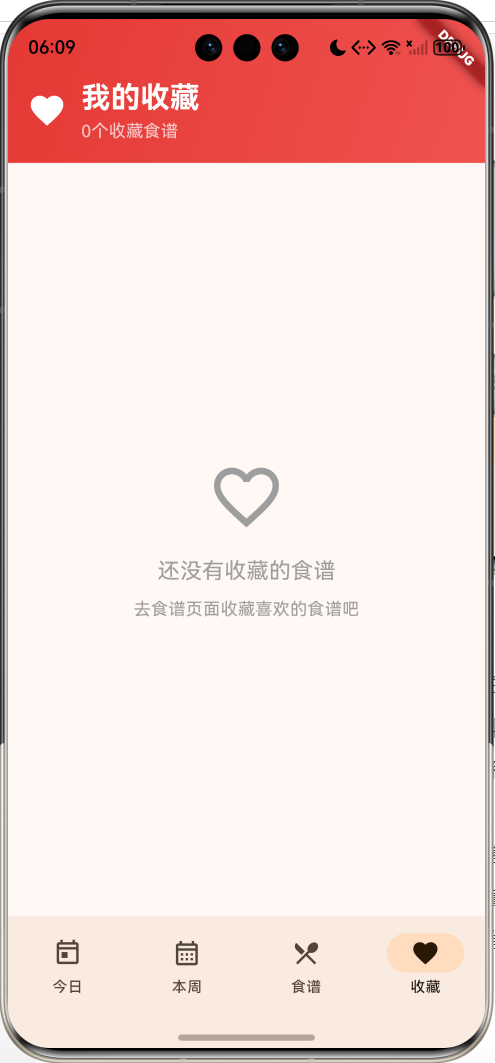
运行效果图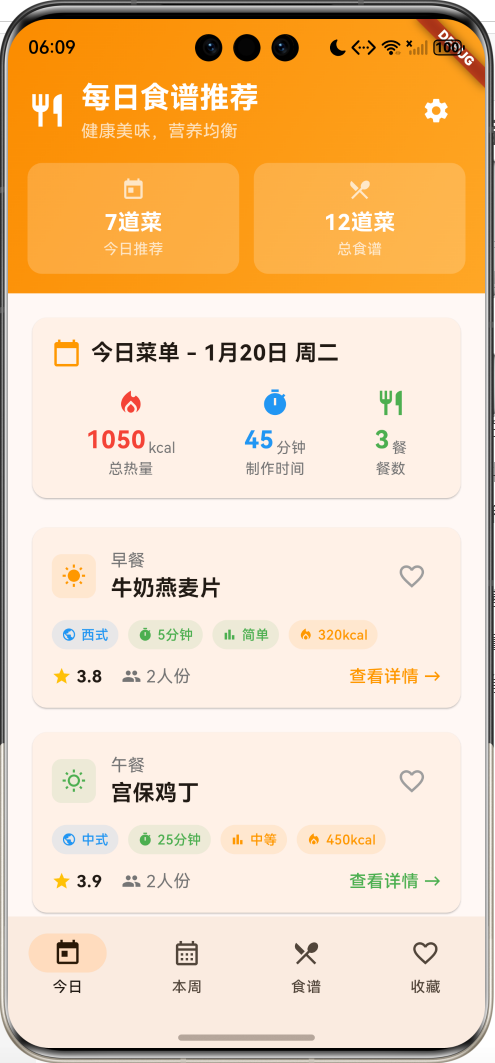
核心特性
- 智能推荐:基于营养均衡的每日菜单自动生成
- 本周规划:7天完整菜单规划,营养搭配科学合理
- 食谱大全:丰富的食谱库,支持分类浏览和搜索
- 收藏管理:个人收藏夹,保存喜爱的食谱
- 详细信息:完整的制作步骤、食材清单、营养成分
- 偏好设置:个性化饮食偏好和目标热量设置
- 快捷操作:一键收藏、开始制作等便捷功能
- 营养统计:每日营养成分统计和热量计算
- 渐变设计:温暖的橙色渐变UI设计
技术栈
- Flutter 3.x
- Material Design 3
- 状态管理(setState)
- 数据建模与算法
- 随机数生成
项目架构
数据模型设计
Recipe(食谱模型)
class Recipe {
  final int id;                      // 食谱ID
  final String name;                 // 食谱名称
  final String category;             // 分类(早餐、午餐、晚餐、小食)
  final String cuisine;              // 菜系(中式、西式等)
  final int cookingTime;             // 制作时间(分钟)
  final String difficulty;           // 难度等级(easy/medium/hard)
  final int servings;                // 适合人数
  final List<String> ingredients;    // 食材清单
  final List<String> steps;          // 制作步骤
  final String image;                // 图片标识
  final double rating;               // 评分(1-5星)
  final int calories;                // 热量(kcal)
  final Map<String, double> nutrition; // 营养成分
  final List<String> tags;           // 标签
  bool isFavorite;                   // 是否收藏

  String get difficultyText;         // 难度中文显示
  Color get difficultyColor;         // 难度颜色
}
设计要点:
- ID用于唯一标识和排序
- category支持四大餐类分类
- difficulty使用枚举值便于处理
- nutrition使用Map存储多种营养成分
- isFavorite支持动态修改收藏状态
DailyMenu(每日菜单模型)
class DailyMenu {
  final DateTime date;               // 日期
  final Recipe breakfast;            // 早餐食谱
  final Recipe lunch;                // 午餐食谱
  final Recipe dinner;               // 晚餐食谱
  final Recipe? snack;               // 小食食谱(可选)

  int get totalCalories;             // 总热量
  int get totalCookingTime;          // 总制作时间
}
菜单生成算法:
- 随机选择不同分类的食谱
- 确保营养搭配均衡
- 控制总热量在合理范围
- 小食随机添加增加变化
UserPreferences(用户偏好模型)
class UserPreferences {
  final List<String> dietaryRestrictions; // 饮食限制
  final List<String> allergies;           // 过敏信息
  final List<String> preferredCuisines;   // 偏好菜系
  final List<String> dislikedIngredients; // 不喜欢的食材
  final int targetCalories;               // 目标热量
  final String activityLevel;             // 活动水平
}
食谱分类体系
| 分类 | 特点 | 热量范围 | 制作时间 |
|---|---|---|---|
| 早餐 | 营养丰富,易消化 | 250-400kcal | 5-20分钟 |
| 午餐 | 营养均衡,饱腹感强 | 400-700kcal | 20-60分钟 |
| 晚餐 | 清淡易消化 | 150-350kcal | 10-30分钟 |
| 小食 | 补充能量,便携 | 100-250kcal | 1-10分钟 |
核心功能实现
1. 食谱数据生成
使用静态数据和随机算法生成丰富的食谱库。
static List<Recipe> _generateRecipes() {
  final random = Random(42); // 固定种子确保一致性
  final recipes = <Recipe>[];

  final recipeData = [
    // 早餐类
    {
      'name': '小米粥配咸菜',
      'category': '早餐',
      'cuisine': '中式',
      'time': 20,
      'difficulty': 'easy',
      'calories': 280,
      'ingredients': ['小米', '水', '咸菜', '花生米'],
      'tags': ['清淡', '养胃', '传统'],
    },
    // ... 更多食谱数据
  ];

  for (int i = 0; i < recipeData.length; i++) {
    final data = recipeData[i];
    recipes.add(Recipe(
      id: i + 1,
      name: data['name'] as String,
      category: data['category'] as String,
      cuisine: data['cuisine'] as String,
      cookingTime: data['time'] as int,
      difficulty: data['difficulty'] as String,
      servings: random.nextInt(3) + 2, // 2-4人份
      ingredients: List<String>.from(data['ingredients'] as List),
      steps: _generateSteps(data['name'] as String),
      image: '🍽️',
      rating: (random.nextDouble() * 2 + 3).clamp(3.0, 5.0), // 3-5星
      calories: data['calories'] as int,
      nutrition: _generateNutrition(random),
      tags: List<String>.from(data['tags'] as List),
    ));
  }

  return recipes;
}
数据生成特点:
- 使用固定随机种子确保数据一致性
- 动态生成人份数、评分等变化数据
- 自动生成营养成分和制作步骤
- 支持多种菜系和难度等级
2. 制作步骤智能生成
根据食谱名称智能生成制作步骤。
static List<String> _generateSteps(String recipeName) {
  if (recipeName.contains('粥')) {
    return [
      '将小米洗净,用清水浸泡30分钟',
      '锅中加水烧开,放入小米',
      '转小火慢煮20分钟,期间搅拌防止粘锅',
      '煮至粥稠米烂即可,配咸菜食用',
    ];
  } else if (recipeName.contains('三明治')) {
    return [
      '面包片烤至微黄',
      '平底锅刷油,煎蛋至半熟',
      '生菜洗净,番茄切片',
      '依次叠放面包、生菜、煎蛋、番茄',
      '盖上另一片面包,对角切开',
    ];
  } else if (recipeName.contains('宫保鸡丁')) {
    return [
      '鸡胸肉切丁,用料酒、生抽腌制15分钟',
      '热锅下油,爆炒花生米盛起',
      '下鸡丁炒至变色',
      '加入干辣椒、葱蒜爆香',
      '调入生抽、老抽炒匀',
      '最后加入花生米翻炒即可',
    ];
  } else {
    return [
      '准备所需食材',
      '按照传统做法处理食材',
      '掌握火候和调味',
      '装盘即可享用',
    ];
  }
}
3. 营养成分计算
自动生成合理的营养成分数据。
static Map<String, double> _generateNutrition(Random random) {
  return {
    'protein': (random.nextDouble() * 30 + 5).roundToDouble(),    // 蛋白质 5-35g
    'carbs': (random.nextDouble() * 50 + 10).roundToDouble(),     // 碳水化合物 10-60g
    'fat': (random.nextDouble() * 20 + 2).roundToDouble(),        // 脂肪 2-22g
    'fiber': (random.nextDouble() * 10 + 1).roundToDouble(),      // 纤维 1-11g
  };
}
4. 每周菜单生成
智能生成7天完整菜单,确保营养均衡。
void _generateWeeklyMenus() {
  final random = Random(42);
  final today = DateTime.now();

  for (int i = 0; i < 7; i++) {
    final date = today.add(Duration(days: i));

    // 按分类筛选食谱
    final breakfastRecipes = _recipes.where((r) => r.category == '早餐').toList();
    final lunchRecipes = _recipes.where((r) => r.category == '午餐').toList();
    final dinnerRecipes = _recipes.where((r) => r.category == '晚餐').toList();
    final snackRecipes = _recipes.where((r) => r.category == '小食').toList();

    final menu = DailyMenu(
      date: date,
      breakfast: breakfastRecipes[random.nextInt(breakfastRecipes.length)],
      lunch: lunchRecipes[random.nextInt(lunchRecipes.length)],
      dinner: dinnerRecipes[random.nextInt(dinnerRecipes.length)],
      snack: random.nextBool() ? snackRecipes[random.nextInt(snackRecipes.length)] : null,
    );

    _weeklyMenus.add(menu);
  }
}
菜单生成算法:
- 每日确保三餐齐全
- 小食随机添加增加变化
- 使用固定种子保证可重现性
- 自动计算总热量和制作时间
5. 今日页面实现
展示当日推荐菜单和营养统计。
Widget _buildTodayPage() {
  final todayMenu = _weeklyMenus.isNotEmpty ? _weeklyMenus.first : null;

  return Column(
    children: [
      _buildHeader(), // 渐变头部
      if (todayMenu != null) ...[
        Expanded(
          child: SingleChildScrollView(
            padding: const EdgeInsets.all(16),
            child: Column(
              children: [
                _buildTodayOverview(todayMenu),      // 今日概览
                const SizedBox(height: 16),
                _buildMealSection('早餐', todayMenu.breakfast, Icons.wb_sunny, Colors.orange),
                const SizedBox(height: 12),
                _buildMealSection('午餐', todayMenu.lunch, Icons.wb_sunny_outlined, Colors.green),
                const SizedBox(height: 12),
                _buildMealSection('晚餐', todayMenu.dinner, Icons.nightlight, Colors.indigo),
                if (todayMenu.snack != null) ...[
                  const SizedBox(height: 12),
                  _buildMealSection('小食', todayMenu.snack!, Icons.local_cafe, Colors.brown),
                ],
                const SizedBox(height: 16),
                _buildNutritionSummary(todayMenu),   // 营养统计
              ],
            ),
          ),
        ),
      ] else
        const Expanded(
          child: Center(child: Text('正在生成今日菜单...')),
        ),
    ],
  );
}
6. 今日概览卡片
显示当日菜单的关键统计信息。
Widget _buildTodayOverview(DailyMenu menu) {
  return Card(
    child: Padding(
      padding: const EdgeInsets.all(16),
      child: Column(
        crossAxisAlignment: CrossAxisAlignment.start,
        children: [
          Row(
            children: [
              const Icon(Icons.calendar_today, color: Colors.orange),
              const SizedBox(width: 8),
              Text(
                '今日菜单 - ${_formatDate(menu.date)}',
                style: const TextStyle(fontSize: 18, fontWeight: FontWeight.bold),
              ),
            ],
          ),
          const SizedBox(height: 16),
          Row(
            mainAxisAlignment: MainAxisAlignment.spaceAround,
            children: [
              _buildOverviewItem('总热量', '${menu.totalCalories}', 'kcal',
                  Icons.local_fire_department, Colors.red),
              _buildOverviewItem('制作时间', '${menu.totalCookingTime}', '分钟',
                  Icons.timer, Colors.blue),
              _buildOverviewItem('餐数', '${menu.snack != null ? 4 : 3}', '餐',
                  Icons.restaurant, Colors.green),
            ],
          ),
        ],
      ),
    ),
  );
}
7. 餐食卡片设计
每个餐食的详细信息展示卡片。
Widget _buildMealSection(String mealType, Recipe recipe, IconData icon, Color color) {
  return Card(
    child: InkWell(
      onTap: () => _showRecipeDetail(recipe),
      borderRadius: BorderRadius.circular(12),
      child: Padding(
        padding: const EdgeInsets.all(16),
        child: Column(
          crossAxisAlignment: CrossAxisAlignment.start,
          children: [
            Row(
              children: [
                Container(
                  padding: const EdgeInsets.all(8),
                  decoration: BoxDecoration(
                    color: color.withValues(alpha: 0.1),
                    borderRadius: BorderRadius.circular(8),
                  ),
                  child: Icon(icon, color: color, size: 20),
                ),
                const SizedBox(width: 12),
                Expanded(
                  child: Column(
                    crossAxisAlignment: CrossAxisAlignment.start,
                    children: [
                      Text(mealType, style: TextStyle(fontSize: 14, color: Colors.grey.shade600)),
                      Text(recipe.name, style: const TextStyle(fontSize: 18, fontWeight: FontWeight.bold)),
                    ],
                  ),
                ),
                IconButton(
                  onPressed: () => _toggleFavorite(recipe),
                  icon: Icon(
                    recipe.isFavorite ? Icons.favorite : Icons.favorite_border,
                    color: recipe.isFavorite ? Colors.red : Colors.grey,
                  ),
                ),
              ],
            ),
            const SizedBox(height: 12),
            // 标签行
            Row(
              children: [
                _buildRecipeTag(recipe.cuisine, Icons.public, Colors.blue),
                const SizedBox(width: 8),
                _buildRecipeTag('${recipe.cookingTime}分钟', Icons.timer, Colors.green),
                const SizedBox(width: 8),
                _buildRecipeTag(recipe.difficultyText, Icons.bar_chart, recipe.difficultyColor),
                const SizedBox(width: 8),
                _buildRecipeTag('${recipe.calories}kcal', Icons.local_fire_department, Colors.orange),
              ],
            ),
            const SizedBox(height: 12),
            // 评分和人份信息
            Row(
              children: [
                Icon(Icons.star, color: Colors.amber, size: 16),
                const SizedBox(width: 4),
                Text(recipe.rating.toStringAsFixed(1), style: const TextStyle(fontWeight: FontWeight.bold)),
                const SizedBox(width: 16),
                Icon(Icons.people, color: Colors.grey.shade600, size: 16),
                const SizedBox(width: 4),
                Text('${recipe.servings}人份', style: TextStyle(color: Colors.grey.shade600)),
                const Spacer(),
                Text('查看详情 →', style: TextStyle(color: color, fontWeight: FontWeight.w500)),
              ],
            ),
          ],
        ),
      ),
    ),
  );
}
8. 营养成分统计
计算并展示每日营养摄入统计。
Widget _buildNutritionSummary(DailyMenu menu) {
  final totalNutrition = <String, double>{
    'protein': 0, 'carbs': 0, 'fat': 0, 'fiber': 0,
  };

  // 累加所有餐食的营养成分
  for (final recipe in [menu.breakfast, menu.lunch, menu.dinner]) {
    totalNutrition['protein'] = totalNutrition['protein']! + recipe.nutrition['protein']!;
    totalNutrition['carbs'] = totalNutrition['carbs']! + recipe.nutrition['carbs']!;
    totalNutrition['fat'] = totalNutrition['fat']! + recipe.nutrition['fat']!;
    totalNutrition['fiber'] = totalNutrition['fiber']! + recipe.nutrition['fiber']!;
  }

  if (menu.snack != null) {
    totalNutrition['protein'] = totalNutrition['protein']! + menu.snack!.nutrition['protein']!;
    totalNutrition['carbs'] = totalNutrition['carbs']! + menu.snack!.nutrition['carbs']!;
    totalNutrition['fat'] = totalNutrition['fat']! + menu.snack!.nutrition['fat']!;
    totalNutrition['fiber'] = totalNutrition['fiber']! + menu.snack!.nutrition['fiber']!;
  }

  return Card(
    child: Padding(
      padding: const EdgeInsets.all(16),
      child: Column(
        crossAxisAlignment: CrossAxisAlignment.start,
        children: [
          Row(
            children: [
              const Icon(Icons.analytics, color: Colors.green),
              const SizedBox(width: 8),
              const Text('营养成分', style: TextStyle(fontSize: 18, fontWeight: FontWeight.bold)),
            ],
          ),
          const SizedBox(height: 16),
          Row(
            mainAxisAlignment: MainAxisAlignment.spaceAround,
            children: [
              _buildNutritionItem('蛋白质', totalNutrition['protein']!, 'g', Colors.red),
              _buildNutritionItem('碳水', totalNutrition['carbs']!, 'g', Colors.blue),
              _buildNutritionItem('脂肪', totalNutrition['fat']!, 'g', Colors.orange),
              _buildNutritionItem('纤维', totalNutrition['fiber']!, 'g', Colors.green),
            ],
          ),
        ],
      ),
    ),
  );
}
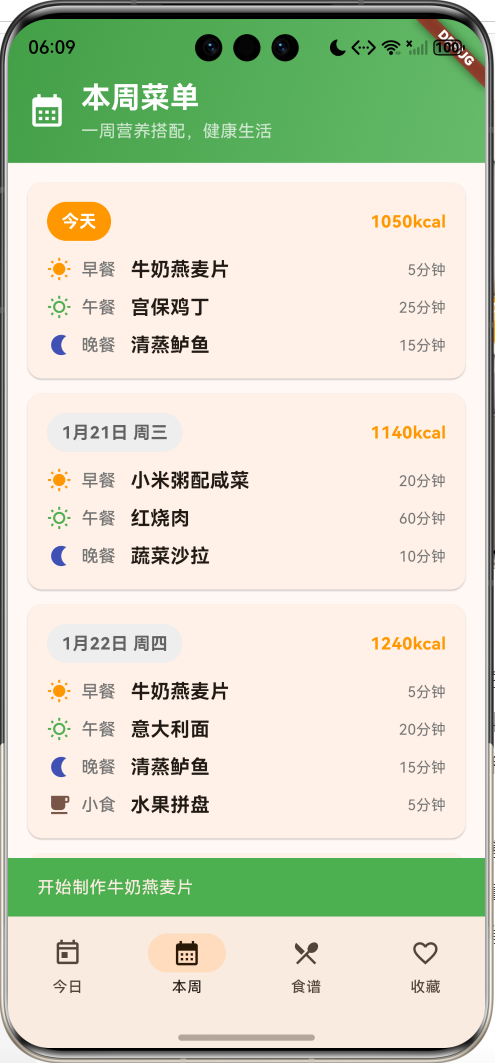
9. 本周菜单页面
展示7天完整菜单规划,支持快速浏览。
Widget _buildWeeklyPage() {
  return Column(
    children: [
      // 绿色渐变头部
      Container(
        padding: const EdgeInsets.fromLTRB(16, 48, 16, 16),
        decoration: BoxDecoration(
          gradient: LinearGradient(
            colors: [Colors.green.shade600, Colors.green.shade400],
            begin: Alignment.topLeft,
            end: Alignment.bottomRight,
          ),
        ),
        child: Row(
          children: [
            const Icon(Icons.calendar_month, color: Colors.white, size: 32),
            const SizedBox(width: 12),
            const Expanded(
              child: Column(
                crossAxisAlignment: CrossAxisAlignment.start,
                children: [
                  Text('本周菜单', style: TextStyle(fontSize: 24, fontWeight: FontWeight.bold, color: Colors.white)),
                  Text('一周营养搭配,健康生活', style: TextStyle(fontSize: 14, color: Colors.white70)),
                ],
              ),
            ),
          ],
        ),
      ),
      // 菜单列表
      Expanded(
        child: ListView.builder(
          padding: const EdgeInsets.all(16),
          itemCount: _weeklyMenus.length,
          itemBuilder: (context, index) {
            final menu = _weeklyMenus[index];
            final isToday = index == 0;

            return Card(
              margin: const EdgeInsets.only(bottom: 12),
              child: Padding(
                padding: const EdgeInsets.all(16),
                child: Column(
                  crossAxisAlignment: CrossAxisAlignment.start,
                  children: [
                    Row(
                      children: [
                        Container(
                          padding: const EdgeInsets.symmetric(horizontal: 12, vertical: 6),
                          decoration: BoxDecoration(
                            color: isToday ? Colors.orange : Colors.grey.shade200,
                            borderRadius: BorderRadius.circular(16),
                          ),
                          child: Text(
                            isToday ? '今天' : _formatDate(menu.date),
                            style: TextStyle(
                              color: isToday ? Colors.white : Colors.grey.shade700,
                              fontWeight: FontWeight.bold,
                            ),
                          ),
                        ),
                        const Spacer(),
                        Text('${menu.totalCalories}kcal',
                             style: const TextStyle(fontWeight: FontWeight.bold, color: Colors.orange)),
                      ],
                    ),
                    const SizedBox(height: 12),
                    _buildWeeklyMealRow('早餐', menu.breakfast, Icons.wb_sunny, Colors.orange),
                    const SizedBox(height: 8),
                    _buildWeeklyMealRow('午餐', menu.lunch, Icons.wb_sunny_outlined, Colors.green),
                    const SizedBox(height: 8),
                    _buildWeeklyMealRow('晚餐', menu.dinner, Icons.nightlight, Colors.indigo),
                    if (menu.snack != null) ...[
                      const SizedBox(height: 8),
                      _buildWeeklyMealRow('小食', menu.snack!, Icons.local_cafe, Colors.brown),
                    ],
                  ],
                ),
              ),
            );
          },
        ),
      ),
    ],
  );
}
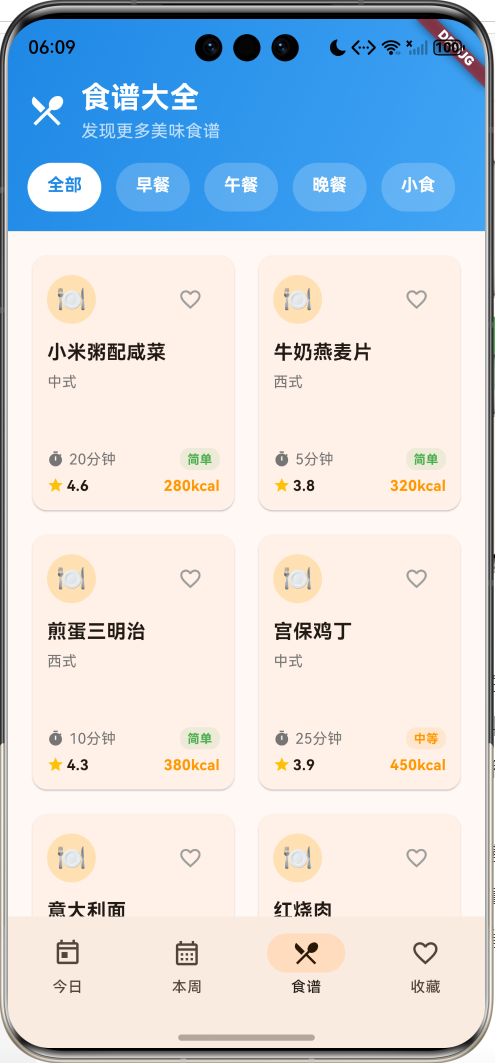
10. 食谱浏览页面
支持分类筛选的食谱网格浏览。
Widget _buildRecipesPage() {
  final categories = ['全部', '早餐', '午餐', '晚餐', '小食'];
  String selectedCategory = '全部';

  return StatefulBuilder(
    builder: (context, setPageState) {
      final filteredRecipes = selectedCategory == '全部'
          ? _recipes
          : _recipes.where((r) => r.category == selectedCategory).toList();

      return Column(
        children: [
          // 蓝色渐变头部
          Container(
            padding: const EdgeInsets.fromLTRB(16, 48, 16, 16),
            decoration: BoxDecoration(
              gradient: LinearGradient(
                colors: [Colors.blue.shade600, Colors.blue.shade400],
                begin: Alignment.topLeft,
                end: Alignment.bottomRight,
              ),
            ),
            child: Column(
              children: [
                Row(
                  children: [
                    const Icon(Icons.restaurant_menu, color: Colors.white, size: 32),
                    const SizedBox(width: 12),
                    const Expanded(
                      child: Column(
                        crossAxisAlignment: CrossAxisAlignment.start,
                        children: [
                          Text('食谱大全', style: TextStyle(fontSize: 24, fontWeight: FontWeight.bold, color: Colors.white)),
                          Text('发现更多美味食谱', style: TextStyle(fontSize: 14, color: Colors.white70)),
                        ],
                      ),
                    ),
                  ],
                ),
                const SizedBox(height: 16),
                // 分类筛选器
                SizedBox(
                  height: 40,
                  child: ListView.builder(
                    scrollDirection: Axis.horizontal,
                    itemCount: categories.length,
                    itemBuilder: (context, index) {
                      final category = categories[index];
                      final isSelected = category == selectedCategory;

                      return GestureDetector(
                        onTap: () { setPageState(() { selectedCategory = category; }); },
                        child: Container(
                          margin: const EdgeInsets.only(right: 12),
                          padding: const EdgeInsets.symmetric(horizontal: 16, vertical: 8),
                          decoration: BoxDecoration(
                            color: isSelected ? Colors.white : Colors.white.withValues(alpha: 0.2),
                            borderRadius: BorderRadius.circular(20),
                          ),
                          child: Text(
                            category,
                            style: TextStyle(
                              color: isSelected ? Colors.blue.shade600 : Colors.white,
                              fontWeight: FontWeight.bold,
                            ),
                          ),
                        ),
                      );
                    },
                  ),
                ),
              ],
            ),
          ),
          // 食谱网格
          Expanded(
            child: GridView.builder(
              padding: const EdgeInsets.all(16),
              gridDelegate: const SliverGridDelegateWithFixedCrossAxisCount(
                crossAxisCount: 2,
                childAspectRatio: 0.8,
                crossAxisSpacing: 12,
                mainAxisSpacing: 12,
              ),
              itemCount: filteredRecipes.length,
              itemBuilder: (context, index) {
                final recipe = filteredRecipes[index];
                return _buildRecipeCard(recipe);
              },
            ),
          ),
        ],
      );
    },
  );
}
11. 收藏页面实现
管理用户收藏的食谱,支持空状态展示。
Widget _buildFavoritesPage() {
  final favoriteRecipes = _recipes.where((r) => r.isFavorite).toList();

  return Column(
    children: [
      // 红色渐变头部
      Container(
        padding: const EdgeInsets.fromLTRB(16, 48, 16, 16),
        decoration: BoxDecoration(
          gradient: LinearGradient(
            colors: [Colors.red.shade600, Colors.red.shade400],
            begin: Alignment.topLeft,
            end: Alignment.bottomRight,
          ),
        ),
        child: Row(
          children: [
            const Icon(Icons.favorite, color: Colors.white, size: 32),
            const SizedBox(width: 12),
            Expanded(
              child: Column(
                crossAxisAlignment: CrossAxisAlignment.start,
                children: [
                  const Text('我的收藏', style: TextStyle(fontSize: 24, fontWeight: FontWeight.bold, color: Colors.white)),
                  Text('${favoriteRecipes.length}个收藏食谱', style: const TextStyle(fontSize: 14, color: Colors.white70)),
                ],
              ),
            ),
          ],
        ),
      ),
      // 收藏列表或空状态
      Expanded(
        child: favoriteRecipes.isEmpty
            ? const Center(
                child: Column(
                  mainAxisAlignment: MainAxisAlignment.center,
                  children: [
                    Icon(Icons.favorite_border, size: 64, color: Colors.grey),
                    SizedBox(height: 16),
                    Text('还没有收藏的食谱', style: TextStyle(fontSize: 18, color: Colors.grey)),
                    SizedBox(height: 8),
                    Text('去食谱页面收藏喜欢的食谱吧', style: TextStyle(fontSize: 14, color: Colors.grey)),
                  ],
                ),
              )
            : ListView.builder(
                padding: const EdgeInsets.all(16),
                itemCount: favoriteRecipes.length,
                itemBuilder: (context, index) {
                  final recipe = favoriteRecipes[index];
                  return _buildFavoriteRecipeCard(recipe);
                },
              ),
      ),
    ],
  );
}
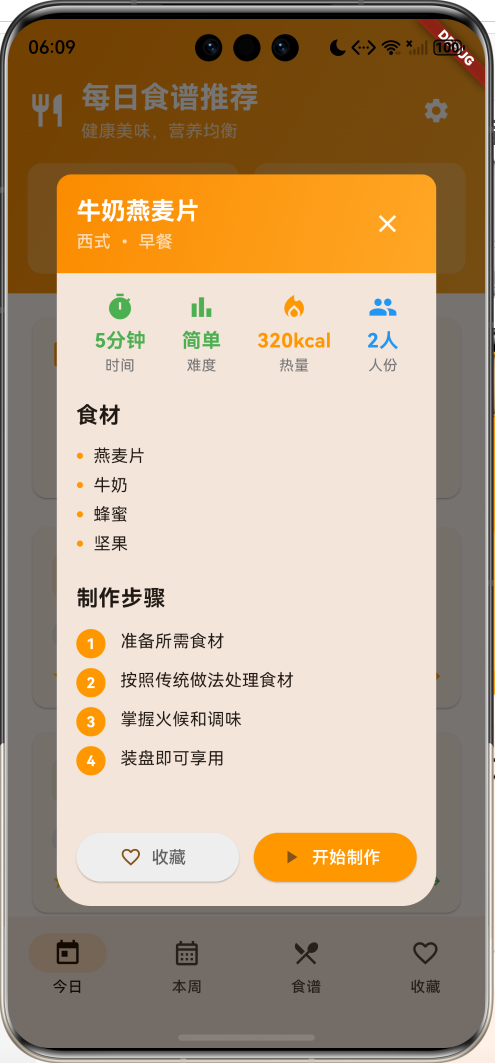
12. 食谱详情对话框
完整的食谱详情展示,包含制作步骤和营养信息。
void _showRecipeDetail(Recipe recipe) {
  showDialog(
    context: context,
    builder: (context) {
      return Dialog(
        child: Container(
          constraints: const BoxConstraints(maxHeight: 600),
          child: Column(
            children: [
              // 橙色渐变头部
              Container(
                padding: const EdgeInsets.all(16),
                decoration: BoxDecoration(
                  gradient: LinearGradient(
                    colors: [Colors.orange.shade600, Colors.orange.shade400],
                    begin: Alignment.topLeft,
                    end: Alignment.bottomRight,
                  ),
                  borderRadius: const BorderRadius.vertical(top: Radius.circular(12)),
                ),
                child: Row(
                  children: [
                    Expanded(
                      child: Column(
                        crossAxisAlignment: CrossAxisAlignment.start,
                        children: [
                          Text(recipe.name, style: const TextStyle(fontSize: 20, fontWeight: FontWeight.bold, color: Colors.white)),
                          Text('${recipe.cuisine} • ${recipe.category}', style: const TextStyle(fontSize: 14, color: Colors.white70)),
                        ],
                      ),
                    ),
                    IconButton(
                      onPressed: () => Navigator.pop(context),
                      icon: const Icon(Icons.close, color: Colors.white),
                    ),
                  ],
                ),
              ),
              // 详情内容
              Expanded(
                child: SingleChildScrollView(
                  padding: const EdgeInsets.all(16),
                  child: Column(
                    crossAxisAlignment: CrossAxisAlignment.start,
                    children: [
                      // 基本信息
                      Row(
                        mainAxisAlignment: MainAxisAlignment.spaceAround,
                        children: [
                          _buildDetailItem('时间', '${recipe.cookingTime}分钟', Icons.timer, Colors.green),
                          _buildDetailItem('难度', recipe.difficultyText, Icons.bar_chart, recipe.difficultyColor),
                          _buildDetailItem('热量', '${recipe.calories}kcal', Icons.local_fire_department, Colors.orange),
                          _buildDetailItem('人份', '${recipe.servings}人', Icons.people, Colors.blue),
                        ],
                      ),
                      const SizedBox(height: 20),
                      // 食材清单
                      const Text('食材', style: TextStyle(fontSize: 18, fontWeight: FontWeight.bold)),
                      const SizedBox(height: 8),
                      ...recipe.ingredients.map((ingredient) {
                        return Padding(
                          padding: const EdgeInsets.symmetric(vertical: 2),
                          child: Row(
                            children: [
                              const Icon(Icons.circle, size: 6, color: Colors.orange),
                              const SizedBox(width: 8),
                              Text(ingredient),
                            ],
                          ),
                        );
                      }),
                      const SizedBox(height: 20),
                      // 制作步骤
                      const Text('制作步骤', style: TextStyle(fontSize: 18, fontWeight: FontWeight.bold)),
                      const SizedBox(height: 8),
                      ...recipe.steps.asMap().entries.map((entry) {
                        final index = entry.key;
                        final step = entry.value;
                        return Padding(
                          padding: const EdgeInsets.symmetric(vertical: 4),
                          child: Row(
                            crossAxisAlignment: CrossAxisAlignment.start,
                            children: [
                              Container(
                                width: 24, height: 24,
                                decoration: BoxDecoration(color: Colors.orange, borderRadius: BorderRadius.circular(12)),
                                child: Center(
                                  child: Text('${index + 1}', style: const TextStyle(color: Colors.white, fontSize: 12, fontWeight: FontWeight.bold)),
                                ),
                              ),
                              const SizedBox(width: 12),
                              Expanded(child: Text(step)),
                            ],
                          ),
                        );
                      }),
                      const SizedBox(height: 20),
                      // 营养成分
                      const Text('营养成分', style: TextStyle(fontSize: 18, fontWeight: FontWeight.bold)),
                      const SizedBox(height: 8),
                      Row(
                        mainAxisAlignment: MainAxisAlignment.spaceAround,
                        children: [
                          _buildNutritionItem('蛋白质', recipe.nutrition['protein']!, 'g', Colors.red),
                          _buildNutritionItem('碳水', recipe.nutrition['carbs']!, 'g', Colors.blue),
                          _buildNutritionItem('脂肪', recipe.nutrition['fat']!, 'g', Colors.orange),
                          _buildNutritionItem('纤维', recipe.nutrition['fiber']!, 'g', Colors.green),
                        ],
                      ),
                    ],
                  ),
                ),
              ),
              // 底部操作按钮
              Container(
                padding: const EdgeInsets.all(16),
                child: Row(
                  children: [
                    Expanded(
                      child: ElevatedButton.icon(
                        onPressed: () => _toggleFavorite(recipe),
                        icon: Icon(recipe.isFavorite ? Icons.favorite : Icons.favorite_border),
                        label: Text(recipe.isFavorite ? '已收藏' : '收藏'),
                        style: ElevatedButton.styleFrom(
                          backgroundColor: recipe.isFavorite ? Colors.red : Colors.grey.shade200,
                          foregroundColor: recipe.isFavorite ? Colors.white : Colors.grey.shade700,
                        ),
                      ),
                    ),
                    const SizedBox(width: 12),
                    Expanded(
                      child: ElevatedButton.icon(
                        onPressed: () {
                          Navigator.pop(context);
                          ScaffoldMessenger.of(context).showSnackBar(
                            SnackBar(content: Text('开始制作${recipe.name}'), backgroundColor: Colors.green),
                          );
                        },
                        icon: const Icon(Icons.play_arrow),
                        label: const Text('开始制作'),
                        style: ElevatedButton.styleFrom(backgroundColor: Colors.orange, foregroundColor: Colors.white),
                      ),
                    ),
                  ],
                ),
              ),
            ],
          ),
        ),
      );
    },
  );
}
13. 收藏功能实现
支持动态切换收藏状态,带有即时反馈。
void _toggleFavorite(Recipe recipe) {
  setState(() {
    recipe.isFavorite = !recipe.isFavorite;
  });

  ScaffoldMessenger.of(context).showSnackBar(
    SnackBar(
      content: Text(recipe.isFavorite ? '已添加到收藏' : '已从收藏中移除'),
      backgroundColor: recipe.isFavorite ? Colors.green : Colors.grey,
    ),
  );
}
14. 偏好设置对话框
用户个性化设置界面,支持饮食偏好和目标热量。
void _showPreferencesDialog() {
  showDialog(
    context: context,
    builder: (context) {
      return AlertDialog(
        title: const Text('偏好设置'),
        content: SingleChildScrollView(
          child: Column(
            crossAxisAlignment: CrossAxisAlignment.start,
            mainAxisSize: MainAxisSize.min,
            children: [
              // 饮食偏好
              const Text('饮食偏好', style: TextStyle(fontSize: 16, fontWeight: FontWeight.bold)),
              const SizedBox(height: 8),
              Wrap(
                spacing: 8,
                children: ['素食', '低脂', '低糖', '高蛋白'].map((pref) {
                  return FilterChip(
                    label: Text(pref),
                    selected: _userPreferences.dietaryRestrictions.contains(pref),
                    onSelected: (selected) {
                      // 这里可以实现偏好设置的逻辑
                    },
                  );
                }).toList(),
              ),
              const SizedBox(height: 16),
              // 菜系偏好
              const Text('菜系偏好', style: TextStyle(fontSize: 16, fontWeight: FontWeight.bold)),
              const SizedBox(height: 8),
              Wrap(
                spacing: 8,
                children: ['中式', '西式', '日式', '韩式', '泰式'].map((cuisine) {
                  return FilterChip(
                    label: Text(cuisine),
                    selected: _userPreferences.preferredCuisines.contains(cuisine),
                    onSelected: (selected) {
                      // 这里可以实现菜系偏好设置的逻辑
                    },
                  );
                }).toList(),
              ),
              const SizedBox(height: 16),
              // 目标热量
              Text('目标热量:${_userPreferences.targetCalories}kcal/天',
                   style: const TextStyle(fontSize: 16, fontWeight: FontWeight.bold)),
              Slider(
                value: _userPreferences.targetCalories.toDouble(),
                min: 1200, max: 3000, divisions: 18,
                label: '${_userPreferences.targetCalories}kcal',
                onChanged: (value) {
                  // 这里可以实现热量目标设置的逻辑
                },
              ),
            ],
          ),
        ),
        actions: [
          TextButton(onPressed: () => Navigator.pop(context), child: const Text('取消')),
          ElevatedButton(
            onPressed: () {
              Navigator.pop(context);
              ScaffoldMessenger.of(context).showSnackBar(
                const SnackBar(content: Text('偏好设置已保存'), backgroundColor: Colors.green),
              );
            },
            child: const Text('保存'),
          ),
        ],
      );
    },
  );
}
UI组件设计
1. 渐变头部组件
Widget _buildHeader() {
  return Container(
    padding: const EdgeInsets.fromLTRB(16, 48, 16, 16),
    decoration: BoxDecoration(
      gradient: LinearGradient(
        colors: [Colors.orange.shade600, Colors.orange.shade400],
        begin: Alignment.topLeft,
        end: Alignment.bottomRight,
      ),
    ),
    child: Column(
      crossAxisAlignment: CrossAxisAlignment.start,
      children: [
        Row(
          children: [
            const Icon(Icons.restaurant, color: Colors.white, size: 32),
            const SizedBox(width: 12),
            const Expanded(
              child: Column(
                crossAxisAlignment: CrossAxisAlignment.start,
                children: [
                  Text('每日食谱推荐', style: TextStyle(fontSize: 24, fontWeight: FontWeight.bold, color: Colors.white)),
                  Text('健康美味,营养均衡', style: TextStyle(fontSize: 14, color: Colors.white70)),
                ],
              ),
            ),
            IconButton(onPressed: _showPreferencesDialog, icon: const Icon(Icons.settings, color: Colors.white)),
          ],
        ),
        const SizedBox(height: 16),
        Row(
          children: [
            Expanded(child: _buildHeaderCard('今日推荐', '${_weeklyMenus.length}道菜', Icons.today)),
            const SizedBox(width: 12),
            Expanded(child: _buildHeaderCard('总食谱', '${_recipes.length}道菜', Icons.restaurant_menu)),
          ],
        ),
      ],
    ),
  );
}
2. 标签组件
Widget _buildRecipeTag(String text, IconData icon, Color color) {
  return Container(
    padding: const EdgeInsets.symmetric(horizontal: 8, vertical: 4),
    decoration: BoxDecoration(
      color: color.withValues(alpha: 0.1),
      borderRadius: BorderRadius.circular(12),
    ),
    child: Row(
      mainAxisSize: MainAxisSize.min,
      children: [
        Icon(icon, size: 12, color: color),
        const SizedBox(width: 4),
        Text(text, style: TextStyle(fontSize: 11, color: color, fontWeight: FontWeight.w500)),
      ],
    ),
  );
}
3. 营养成分圆形指示器
Widget _buildNutritionItem(String label, double value, String unit, Color color) {
  return Column(
    children: [
      Container(
        width: 60, height: 60,
        decoration: BoxDecoration(color: color.withValues(alpha: 0.1), shape: BoxShape.circle),
        child: Center(
          child: Text(value.toStringAsFixed(0),
                     style: TextStyle(fontSize: 18, fontWeight: FontWeight.bold, color: color)),
        ),
      ),
      const SizedBox(height: 4),
      Text('$label($unit)', style: TextStyle(fontSize: 12, color: Colors.grey.shade600)),
    ],
  );
}
4. NavigationBar底部导航
NavigationBar(
  selectedIndex: _selectedIndex,
  onDestinationSelected: (index) { setState(() { _selectedIndex = index; }); },
  destinations: const [
    NavigationDestination(icon: Icon(Icons.today_outlined), selectedIcon: Icon(Icons.today), label: '今日'),
    NavigationDestination(icon: Icon(Icons.calendar_month_outlined), selectedIcon: Icon(Icons.calendar_month), label: '本周'),
    NavigationDestination(icon: Icon(Icons.restaurant_menu_outlined), selectedIcon: Icon(Icons.restaurant_menu), label: '食谱'),
    NavigationDestination(icon: Icon(Icons.favorite_outline), selectedIcon: Icon(Icons.favorite), label: '收藏'),
  ],
)
功能扩展建议
1. 智能推荐算法优化
class SmartRecommendationEngine {
  // 基于用户偏好的智能推荐
  List<Recipe> getPersonalizedRecommendations(UserPreferences preferences, List<Recipe> recipes) {
    return recipes.where((recipe) {
      // 过滤过敏食材
      if (preferences.allergies.any((allergy) => recipe.ingredients.contains(allergy))) {
        return false;
      }

      // 匹配偏好菜系
      if (preferences.preferredCuisines.isNotEmpty &&
          !preferences.preferredCuisines.contains(recipe.cuisine)) {
        return false;
      }

      // 热量范围匹配
      final targetCaloriesPerMeal = preferences.targetCalories / 3;
      if (recipe.calories > targetCaloriesPerMeal * 1.5) {
        return false;
      }

      return true;
    }).toList();
  }

  // 营养均衡评分
  double calculateNutritionScore(DailyMenu menu) {
    final totalCalories = menu.totalCalories;
    final proteinRatio = menu.breakfast.nutrition['protein']! / totalCalories;
    final carbsRatio = menu.lunch.nutrition['carbs']! / totalCalories;
    final fatRatio = menu.dinner.nutrition['fat']! / totalCalories;

    // 理想营养比例:蛋白质15-20%,碳水化合物45-65%,脂肪20-35%
    double score = 100.0;
    if (proteinRatio < 0.15 || proteinRatio > 0.20) score -= 20;
    if (carbsRatio < 0.45 || carbsRatio > 0.65) score -= 20;
    if (fatRatio < 0.20 || fatRatio > 0.35) score -= 20;

    return score.clamp(0, 100);
  }
}
2. 购物清单生成
class ShoppingListGenerator {
  Map<String, double> generateShoppingList(List<Recipe> recipes, int servings) {
    final shoppingList = <String, double>{};

    for (final recipe in recipes) {
      final multiplier = servings / recipe.servings;

      for (final ingredient in recipe.ingredients) {
        // 解析食材和分量(简化版本)
        final parts = ingredient.split(' ');
        if (parts.length >= 2) {
          final amount = double.tryParse(parts[0]) ?? 1.0;
          final item = parts.sublist(1).join(' ');

          shoppingList[item] = (shoppingList[item] ?? 0) + (amount * multiplier);
        } else {
          shoppingList[ingredient] = (shoppingList[ingredient] ?? 0) + 1;
        }
      }
    }

    return shoppingList;
  }

  Widget buildShoppingListDialog(Map<String, double> shoppingList) {
    return AlertDialog(
      title: const Text('购物清单'),
      content: SingleChildScrollView(
        child: Column(
          children: shoppingList.entries.map((entry) {
            return CheckboxListTile(
              title: Text(entry.key),
              subtitle: Text('${entry.value.toStringAsFixed(1)}份'),
              value: false,
              onChanged: (value) {
                // 实现购买状态切换
              },
            );
          }).toList(),
        ),
      ),
      actions: [
        TextButton(onPressed: () {}, child: const Text('分享')),
        ElevatedButton(onPressed: () {}, child: const Text('确定')),
      ],
    );
  }
}
3. 制作计时器功能
class CookingTimer extends StatefulWidget {
final Recipe recipe;
const CookingTimer({super.key, required this.recipe});
State<CookingTimer> createState() => _CookingTimerState();
}
class _CookingTimerState extends State<CookingTimer> with TickerProviderStateMixin {
late AnimationController _controller;
int _currentStep = 0;
int _remainingTime = 0;
Timer? _timer;
void initState() {
super.initState();
_controller = AnimationController(vsync: this, duration: const Duration(seconds: 1));
_remainingTime = widget.recipe.cookingTime * 60; // 转换为秒
}
void _startTimer() {
_timer = Timer.periodic(const Duration(seconds: 1), (timer) {
setState(() {
if (_remainingTime > 0) {
_remainingTime--;
_controller.value = 1 - (_remainingTime / (widget.recipe.cookingTime * 60));
} else {
_timer?.cancel();
_showCompletionDialog();
}
});
});
}
void _showCompletionDialog() {
showDialog(
context: context,
builder: (context) => AlertDialog(
title: const Text('制作完成!'),
content: Text('${widget.recipe.name}已经制作完成,请享用美食!'),
actions: [
ElevatedButton(
onPressed: () {
Navigator.pop(context);
Navigator.pop(context);
},
child: const Text('完成'),
),
],
),
);
}
Widget build(BuildContext context) {
return Scaffold(
appBar: AppBar(title: Text('制作${widget.recipe.name}')),
body: Column(
children: [
// 圆形进度指示器
Container(
width: 200, height: 200,
child: CircularProgressIndicator(
value: _controller.value,
strokeWidth: 8,
backgroundColor: Colors.grey.shade300,
),
),
Text('${(_remainingTime ~/ 60).toString().padLeft(2, '0')}:${(_remainingTime % 60).toString().padLeft(2, '0')}'),
// 步骤列表
Expanded(
child: ListView.builder(
itemCount: widget.recipe.steps.length,
itemBuilder: (context, index) {
final isCompleted = index < _currentStep;
final isCurrent = index == _currentStep;
return ListTile(
leading: CircleAvatar(
backgroundColor: isCompleted ? Colors.green : (isCurrent ? Colors.orange : Colors.grey),
child: Icon(isCompleted ? Icons.check : Icons.circle),
),
title: Text(widget.recipe.steps[index]),
onTap: () { setState(() { _currentStep = index; }); },
);
},
),
),
// 控制按钮
Row(
mainAxisAlignment: MainAxisAlignment.spaceEvenly,
children: [
ElevatedButton(onPressed: _timer?.isActive == true ? null : _startTimer, child: const Text('开始')),
ElevatedButton(onPressed: () { _timer?.cancel(); }, child: const Text('暂停')),
ElevatedButton(onPressed: () { setState(() { _currentStep++; }); }, child: const Text('下一步')),
],
),
],
),
);
}
}
4. 食谱评价系统
class RecipeRatingSystem {
  void showRatingDialog(Recipe recipe, BuildContext context) {
    double rating = 0;
    String comment = '';

    showDialog(
      context: context,
      builder: (context) => StatefulBuilder(
        builder: (context, setState) => AlertDialog(
          title: Text('评价${recipe.name}'),
          content: Column(
            mainAxisSize: MainAxisSize.min,
            children: [
              // 星级评分
              Row(
                mainAxisAlignment: MainAxisAlignment.center,
                children: List.generate(5, (index) {
                  return IconButton(
                    onPressed: () { setState(() { rating = index + 1.0; }); },
                    icon: Icon(
                      index < rating ? Icons.star : Icons.star_border,
                      color: Colors.amber,
                      size: 32,
                    ),
                  );
                }),
              ),

              // 评论输入
              TextField(
                maxLines: 3,
                decoration: const InputDecoration(
                  labelText: '分享你的制作心得',
                  hintText: '味道如何?制作过程顺利吗?',
                ),
                onChanged: (value) { comment = value; },
              ),

              // 标签选择
              Wrap(
                spacing: 8,
                children: ['美味', '简单', '营养', '创新', '经典'].map((tag) {
                  return FilterChip(
                    label: Text(tag),
                    selected: false,
                    onSelected: (selected) {
                      // 实现标签选择逻辑
                    },
                  );
                }).toList(),
              ),
            ],
          ),
          actions: [
            TextButton(onPressed: () => Navigator.pop(context), child: const Text('取消')),
            ElevatedButton(
              onPressed: rating > 0 ? () {
                // 提交评价
                _submitRating(recipe, rating, comment);
                Navigator.pop(context);
              } : null,
              child: const Text('提交'),
            ),
          ],
        ),
      ),
    );
  }

  void _submitRating(Recipe recipe, double rating, String comment) {
    // 这里可以实现评价提交逻辑
    // 例如更新本地数据或发送到服务器
  }
}
5. 营养分析报告
class NutritionAnalyzer {
  Widget buildWeeklyNutritionReport(List<DailyMenu> weeklyMenus) {
    final weeklyNutrition = _calculateWeeklyNutrition(weeklyMenus);

    return Card(
      child: Padding(
        padding: const EdgeInsets.all(16),
        child: Column(
          crossAxisAlignment: CrossAxisAlignment.start,
          children: [
            const Text('本周营养分析', style: TextStyle(fontSize: 18, fontWeight: FontWeight.bold)),
            const SizedBox(height: 16),

            // 营养摄入趋势图
            Container(
              height: 200,
              child: LineChart(
                LineChartData(
                  gridData: FlGridData(show: true),
                  titlesData: FlTitlesData(show: true),
                  borderData: FlBorderData(show: true),
                  lineBarsData: [
                    LineChartBarData(
                      spots: weeklyNutrition['calories']!.asMap().entries.map((e) {
                        return FlSpot(e.key.toDouble(), e.value);
                      }).toList(),
                      isCurved: true,
                      color: Colors.orange,
                    ),
                  ],
                ),
              ),
            ),

            // 营养建议
            Container(
              padding: const EdgeInsets.all(12),
              decoration: BoxDecoration(
                color: Colors.blue.shade50,
                borderRadius: BorderRadius.circular(8),
              ),
              child: Column(
                crossAxisAlignment: CrossAxisAlignment.start,
                children: [
                  const Text('营养建议', style: TextStyle(fontWeight: FontWeight.bold)),
                  const SizedBox(height: 8),
                  ...weeklyNutrition['suggestions']!.map((suggestion) {
                    return Row(
                      children: [
                        const Icon(Icons.lightbulb, size: 16, color: Colors.orange),
                        const SizedBox(width: 8),
                        Expanded(child: Text(suggestion)),
                      ],
                    );
                  }),
                ],
              ),
            ),
          ],
        ),
      ),
    );
  }

  Map<String, List<dynamic>> _calculateWeeklyNutrition(List<DailyMenu> weeklyMenus) {
    final calories = <double>[];
    final suggestions = <String>[];

    for (final menu in weeklyMenus) {
      calories.add(menu.totalCalories.toDouble());
    }

    final avgCalories = calories.reduce((a, b) => a + b) / calories.length;

    if (avgCalories < 1800) {
      suggestions.add('本周平均热量偏低,建议增加健康脂肪摄入');
    } else if (avgCalories > 2500) {
      suggestions.add('本周平均热量偏高,建议增加运动或减少高热量食物');
    }

    suggestions.add('建议每天摄入5种不同颜色的蔬果');
    suggestions.add('保持充足的水分摄入,每天8杯水');

    return {
      'calories': calories,
      'suggestions': suggestions,
    };
  }
}
6. 社交分享功能
class SocialShareManager {
  void shareRecipe(Recipe recipe, BuildContext context) {
    showModalBottomSheet(
      context: context,
      builder: (context) => Container(
        padding: const EdgeInsets.all(16),
        child: Column(
          mainAxisSize: MainAxisSize.min,
          children: [
            const Text('分享食谱', style: TextStyle(fontSize: 18, fontWeight: FontWeight.bold)),
            const SizedBox(height: 16),

            Row(
              mainAxisAlignment: MainAxisAlignment.spaceEvenly,
              children: [
                _buildShareOption('微信', Icons.wechat, Colors.green, () => _shareToWeChat(recipe)),
                _buildShareOption('朋友圈', Icons.group, Colors.blue, () => _shareToMoments(recipe)),
                _buildShareOption('微博', Icons.public, Colors.red, () => _shareToWeibo(recipe)),
                _buildShareOption('复制链接', Icons.link, Colors.grey, () => _copyLink(recipe)),
              ],
            ),

            const SizedBox(height: 16),

            // 生成分享图片
            ElevatedButton.icon(
              onPressed: () => _generateShareImage(recipe),
              icon: const Icon(Icons.image),
              label: const Text('生成分享图片'),
            ),
          ],
        ),
      ),
    );
  }

  Widget _buildShareOption(String label, IconData icon, Color color, VoidCallback onTap) {
    return GestureDetector(
      onTap: onTap,
      child: Column(
        children: [
          Container(
            width: 60, height: 60,
            decoration: BoxDecoration(color: color.withValues(alpha: 0.1), shape: BoxShape.circle),
            child: Icon(icon, color: color, size: 30),
          ),
          const SizedBox(height: 8),
          Text(label, style: const TextStyle(fontSize: 12)),
        ],
      ),
    );
  }

  void _shareToWeChat(Recipe recipe) {
    // 实现微信分享
    final shareText = '推荐一道美味食谱:${recipe.name}\n制作时间:${recipe.cookingTime}分钟\n热量:${recipe.calories}kcal\n快来试试吧!';
    // Share.share(shareText);
  }

  void _generateShareImage(Recipe recipe) {
    // 实现分享图片生成
    // 可以使用 flutter/painting 库生成包含食谱信息的精美图片
  }
}
7. 离线数据存储
class LocalStorageManager {
  static const String _recipesKey = 'saved_recipes';
  static const String _favoritesKey = 'favorite_recipes';
  static const String _preferencesKey = 'user_preferences';

  // 保存食谱数据
  Future<void> saveRecipes(List<Recipe> recipes) async {
    final prefs = await SharedPreferences.getInstance();
    final recipesJson = recipes.map((r) => r.toJson()).toList();
    await prefs.setString(_recipesKey, jsonEncode(recipesJson));
  }

  // 加载食谱数据
  Future<List<Recipe>> loadRecipes() async {
    final prefs = await SharedPreferences.getInstance();
    final recipesString = prefs.getString(_recipesKey);

    if (recipesString != null) {
      final recipesJson = jsonDecode(recipesString) as List;
      return recipesJson.map((json) => Recipe.fromJson(json)).toList();
    }

    return [];
  }

  // 保存收藏状态
  Future<void> saveFavorites(List<int> favoriteIds) async {
    final prefs = await SharedPreferences.getInstance();
    await prefs.setStringList(_favoritesKey, favoriteIds.map((id) => id.toString()).toList());
  }

  // 加载收藏状态
  Future<List<int>> loadFavorites() async {
    final prefs = await SharedPreferences.getInstance();
    final favoriteStrings = prefs.getStringList(_favoritesKey) ?? [];
    return favoriteStrings.map((str) => int.parse(str)).toList();
  }

  // 保存用户偏好
  Future<void> savePreferences(UserPreferences preferences) async {
    final prefs = await SharedPreferences.getInstance();
    await prefs.setString(_preferencesKey, jsonEncode(preferences.toJson()));
  }

  // 加载用户偏好
  Future<UserPreferences?> loadPreferences() async {
    final prefs = await SharedPreferences.getInstance();
    final preferencesString = prefs.getString(_preferencesKey);

    if (preferencesString != null) {
      final preferencesJson = jsonDecode(preferencesString);
      return UserPreferences.fromJson(preferencesJson);
    }

    return null;
  }
}
8. 搜索和筛选功能
class RecipeSearchManager {
  List<Recipe> searchRecipes(List<Recipe> recipes, String query, {
    String? category,
    String? cuisine,
    String? difficulty,
    int? maxCookingTime,
    int? maxCalories,
  }) {
    return recipes.where((recipe) {
      // 文本搜索
      if (query.isNotEmpty) {
        final searchText = query.toLowerCase();
        if (!recipe.name.toLowerCase().contains(searchText) &&
            !recipe.ingredients.any((ingredient) => ingredient.toLowerCase().contains(searchText)) &&
            !recipe.tags.any((tag) => tag.toLowerCase().contains(searchText))) {
          return false;
        }
      }

      // 分类筛选
      if (category != null && category != '全部' && recipe.category != category) {
        return false;
      }

      // 菜系筛选
      if (cuisine != null && cuisine != '全部' && recipe.cuisine != cuisine) {
        return false;
      }

      // 难度筛选
      if (difficulty != null && difficulty != '全部' && recipe.difficulty != difficulty) {
        return false;
      }

      // 制作时间筛选
      if (maxCookingTime != null && recipe.cookingTime > maxCookingTime) {
        return false;
      }

      // 热量筛选
      if (maxCalories != null && recipe.calories > maxCalories) {
        return false;
      }

      return true;
    }).toList();
  }

  Widget buildSearchBar(Function(String) onSearch) {
    return Container(
      padding: const EdgeInsets.symmetric(horizontal: 16),
      child: TextField(
        decoration: InputDecoration(
          hintText: '搜索食谱、食材或标签',
          prefixIcon: const Icon(Icons.search),
          border: OutlineInputBorder(borderRadius: BorderRadius.circular(25)),
          filled: true,
          fillColor: Colors.grey.shade100,
        ),
        onChanged: onSearch,
      ),
    );
  }

  Widget buildFilterChips(Function(String, String) onFilterChanged) {
    return SingleChildScrollView(
      scrollDirection: Axis.horizontal,
      padding: const EdgeInsets.symmetric(horizontal: 16),
      child: Row(
        children: [
          _buildFilterChip('分类', ['全部', '早餐', '午餐', '晚餐', '小食'], onFilterChanged),
          const SizedBox(width: 8),
          _buildFilterChip('菜系', ['全部', '中式', '西式', '日式', '韩式'], onFilterChanged),
          const SizedBox(width: 8),
          _buildFilterChip('难度', ['全部', 'easy', 'medium', 'hard'], onFilterChanged),
        ],
      ),
    );
  }

  Widget _buildFilterChip(String label, List<String> options, Function(String, String) onChanged) {
    return PopupMenuButton<String>(
      child: Chip(
        label: Text(label),
        avatar: const Icon(Icons.filter_list, size: 18),
      ),
      itemBuilder: (context) {
        return options.map((option) {
          return PopupMenuItem<String>(
            value: option,
            child: Text(option),
          );
        }).toList();
      },
      onSelected: (value) { onChanged(label, value); },
    );
  }
}
性能优化建议
1. 图片缓存优化
class ImageCacheManager {
  static final Map<String, ImageProvider> _cache = {};

  static ImageProvider getCachedImage(String imageUrl) {
    if (_cache.containsKey(imageUrl)) {
      return _cache[imageUrl]!;
    }

    final imageProvider = NetworkImage(imageUrl);
    _cache[imageUrl] = imageProvider;

    // 限制缓存大小
    if (_cache.length > 100) {
      final firstKey = _cache.keys.first;
      _cache.remove(firstKey);
    }

    return imageProvider;
  }

  static void clearCache() {
    _cache.clear();
  }
}
2. 列表性能优化
class OptimizedRecipeList extends StatelessWidget {
final List<Recipe> recipes;
const OptimizedRecipeList({super.key, required this.recipes});
Widget build(BuildContext context) {
return ListView.builder(
itemCount: recipes.length,
// 使用 itemExtent 提高滚动性能
itemExtent: 120,
// 缓存范围优化
cacheExtent: 1000,
itemBuilder: (context, index) {
final recipe = recipes[index];
// 使用 RepaintBoundary 减少重绘
return RepaintBoundary(
child: RecipeListItem(recipe: recipe),
);
},
);
}
}
class RecipeListItem extends StatelessWidget {
final Recipe recipe;
const RecipeListItem({super.key, required this.recipe});
Widget build(BuildContext context) {
return Card(
child: ListTile(
leading: Hero(
tag: 'recipe_${recipe.id}',
child: CircleAvatar(
backgroundImage: ImageCacheManager.getCachedImage(recipe.image),
),
),
title: Text(recipe.name),
subtitle: Text('${recipe.cookingTime}分钟 • ${recipe.calories}kcal'),
trailing: IconButton(
onPressed: () {
// 使用防抖避免重复点击
_debounceToggleFavorite(recipe);
},
icon: Icon(
recipe.isFavorite ? Icons.favorite : Icons.favorite_border,
color: recipe.isFavorite ? Colors.red : Colors.grey,
),
),
),
);
}
Timer? _debounceTimer;
void _debounceToggleFavorite(Recipe recipe) {
_debounceTimer?.cancel();
_debounceTimer = Timer(const Duration(milliseconds: 300), () {
// 执行收藏切换逻辑
});
}
}
3. 状态管理优化
class RecipeStateManager extends ChangeNotifier {
  List<Recipe> _recipes = [];
  List<Recipe> _filteredRecipes = [];
  String _searchQuery = '';
  Map<String, String> _filters = {};

  List<Recipe> get recipes => _filteredRecipes;

  void updateRecipes(List<Recipe> recipes) {
    _recipes = recipes;
    _applyFilters();
  }

  void updateSearch(String query) {
    _searchQuery = query;
    _applyFilters();
  }

  void updateFilter(String key, String value) {
    _filters[key] = value;
    _applyFilters();
  }

  void _applyFilters() {
    _filteredRecipes = _recipes.where((recipe) {
      // 应用搜索和筛选逻辑
      if (_searchQuery.isNotEmpty && !recipe.name.toLowerCase().contains(_searchQuery.toLowerCase())) {
        return false;
      }

      for (final filter in _filters.entries) {
        if (filter.value != '全部' && !_matchesFilter(recipe, filter.key, filter.value)) {
          return false;
        }
      }

      return true;
    }).toList();

    notifyListeners();
  }

  bool _matchesFilter(Recipe recipe, String filterKey, String filterValue) {
    switch (filterKey) {
      case '分类':
        return recipe.category == filterValue;
      case '菜系':
        return recipe.cuisine == filterValue;
      case '难度':
        return recipe.difficulty == filterValue;
      default:
        return true;
    }
  }
}
测试建议
1. 单元测试
// test/recipe_test.dart
import 'package:flutter_test/flutter_test.dart';
import 'package:recipe_app/models/recipe.dart';

void main() {
  group('Recipe Model Tests', () {
    test('should calculate difficulty text correctly', () {
      final recipe = Recipe(
        id: 1,
        name: 'Test Recipe',
        category: '早餐',
        cuisine: '中式',
        cookingTime: 30,
        difficulty: 'easy',
        servings: 2,
        ingredients: ['食材1', '食材2'],
        steps: ['步骤1', '步骤2'],
        image: '🍽️',
        rating: 4.5,
        calories: 300,
        nutrition: {'protein': 15.0, 'carbs': 45.0, 'fat': 10.0, 'fiber': 5.0},
        tags: ['标签1'],
      );

      expect(recipe.difficultyText, equals('简单'));
    });

    test('should return correct difficulty color', () {
      final easyRecipe = Recipe(/* ... */ difficulty: 'easy');
      final mediumRecipe = Recipe(/* ... */ difficulty: 'medium');
      final hardRecipe = Recipe(/* ... */ difficulty: 'hard');

      expect(easyRecipe.difficultyColor, equals(Colors.green));
      expect(mediumRecipe.difficultyColor, equals(Colors.orange));
      expect(hardRecipe.difficultyColor, equals(Colors.red));
    });
  });

  group('DailyMenu Tests', () {
    test('should calculate total calories correctly', () {
      final breakfast = Recipe(/* ... */ calories: 300);
      final lunch = Recipe(/* ... */ calories: 500);
      final dinner = Recipe(/* ... */ calories: 400);
      final snack = Recipe(/* ... */ calories: 150);

      final menu = DailyMenu(
        date: DateTime.now(),
        breakfast: breakfast,
        lunch: lunch,
        dinner: dinner,
        snack: snack,
      );

      expect(menu.totalCalories, equals(1350));
    });
  });
}
2. Widget测试
// test/widget_test.dart
import 'package:flutter/material.dart';
import 'package:flutter_test/flutter_test.dart';
import 'package:recipe_app/main.dart';

void main() {
  group('Recipe App Widget Tests', () {
    testWidgets('should display navigation bar with 4 tabs', (WidgetTester tester) async {
      await tester.pumpWidget(const RecipeApp());

      expect(find.byType(NavigationBar), findsOneWidget);
      expect(find.text('今日'), findsOneWidget);
      expect(find.text('本周'), findsOneWidget);
      expect(find.text('食谱'), findsOneWidget);
      expect(find.text('收藏'), findsOneWidget);
    });

    testWidgets('should navigate between tabs correctly', (WidgetTester tester) async {
      await tester.pumpWidget(const RecipeApp());

      // 点击食谱标签
      await tester.tap(find.text('食谱'));
      await tester.pumpAndSettle();

      expect(find.text('食谱大全'), findsOneWidget);

      // 点击收藏标签
      await tester.tap(find.text('收藏'));
      await tester.pumpAndSettle();

      expect(find.text('我的收藏'), findsOneWidget);
    });

    testWidgets('should show recipe detail dialog when recipe is tapped', (WidgetTester tester) async {
      await tester.pumpWidget(const RecipeApp());

      // 等待数据加载
      await tester.pumpAndSettle();

      // 查找并点击第一个食谱卡片
      final recipeCard = find.byType(Card).first;
      await tester.tap(recipeCard);
      await tester.pumpAndSettle();

      // 验证详情对话框显示
      expect(find.byType(Dialog), findsOneWidget);
      expect(find.text('食材'), findsOneWidget);
      expect(find.text('制作步骤'), findsOneWidget);
    });
  });
}
3. 集成测试
// integration_test/app_test.dart
import 'package:flutter/material.dart';
import 'package:flutter_test/flutter_test.dart';
import 'package:integration_test/integration_test.dart';
import 'package:recipe_app/main.dart' as app;

void main() {
  IntegrationTestWidgetsFlutterBinding.ensureInitialized();

  group('Recipe App Integration Tests', () {
    testWidgets('complete user flow test', (WidgetTester tester) async {
      app.main();
      await tester.pumpAndSettle();

      // 1. 验证应用启动
      expect(find.text('每日食谱推荐'), findsOneWidget);

      // 2. 浏览今日菜单
      expect(find.text('今日菜单'), findsOneWidget);

      // 3. 切换到食谱页面
      await tester.tap(find.text('食谱'));
      await tester.pumpAndSettle();

      // 4. 筛选早餐食谱
      await tester.tap(find.text('早餐'));
      await tester.pumpAndSettle();

      // 5. 查看食谱详情
      final firstRecipe = find.byType(Card).first;
      await tester.tap(firstRecipe);
      await tester.pumpAndSettle();

      // 6. 收藏食谱
      await tester.tap(find.text('收藏'));
      await tester.pumpAndSettle();

      // 7. 关闭详情对话框
      await tester.tap(find.byIcon(Icons.close));
      await tester.pumpAndSettle();

      // 8. 切换到收藏页面
      await tester.tap(find.text('收藏'));
      await tester.pumpAndSettle();

      // 9. 验证收藏成功
      expect(find.byType(Card), findsAtLeastNWidgets(1));
    });
  });
}
部署指南
1. Android部署
# 构建APK
flutter build apk --release

# 构建App Bundle(推荐用于Google Play)
flutter build appbundle --release

# 安装到设备
flutter install
2. iOS部署
# 构建iOS应用
flutter build ios --release

# 使用Xcode打开项目进行签名和发布
open ios/Runner.xcworkspace
3. Web部署
# 构建Web应用
flutter build web --release

# 部署到Firebase Hosting
firebase deploy --only hosting
4. 应用图标和启动页
# pubspec.yaml
dev_dependencies:
  flutter_launcher_icons: ^0.13.1
  flutter_native_splash: ^2.3.2

flutter_icons:
  android: true
  ios: true
  image_path: "assets/icon/app_icon.png"
  adaptive_icon_background: "#FF6B35"
  adaptive_icon_foreground: "assets/icon/app_icon_foreground.png"

flutter_native_splash:
  color: "#FF6B35"
  image: "assets/splash/splash_logo.png"
  android_12:
    image: "assets/splash/splash_logo_android12.png"
    color: "#FF6B35"
项目总结
这个每日食谱推荐应用展示了Flutter在美食类应用开发中的强大能力。通过合理的数据建模、智能的算法设计和精美的UI实现,为用户提供了完整的食谱管理和营养规划解决方案。
技术亮点
- 智能推荐算法:基于营养均衡的菜单生成
- 丰富的UI组件:渐变设计、卡片布局、标签系统
- 完整的功能闭环:浏览、收藏、详情、设置
- 良好的用户体验:流畅的导航、即时反馈、空状态处理
- 可扩展的架构:模块化设计、清晰的数据模型
学习价值
- Material Design 3的实际应用
- 复杂数据结构的建模和处理
- 算法在移动应用中的应用
- 用户体验设计的最佳实践
- Flutter性能优化技巧
这个项目为Flutter开发者提供了一个完整的实战案例,涵盖了从基础UI到高级功能的各个方面,是学习Flutter应用开发的优秀参考。
欢迎加入开源鸿蒙跨平台社区:https://openharmonycrossplatform.csdn.net

作为“人工智能6S店”的官方数字引擎,为AI开发者与企业提供一个覆盖软硬件全栈、一站式门户。
更多推荐


 7
7 0
0- 0



 已为社区贡献29条内容

所有评论(0)