
鸿蒙+Flutter 跨平台开发——防止预测的真随机密码生成器设计
·
鸿蒙+Flutter 跨平台开发——防止预测的真随机密码生成器设计
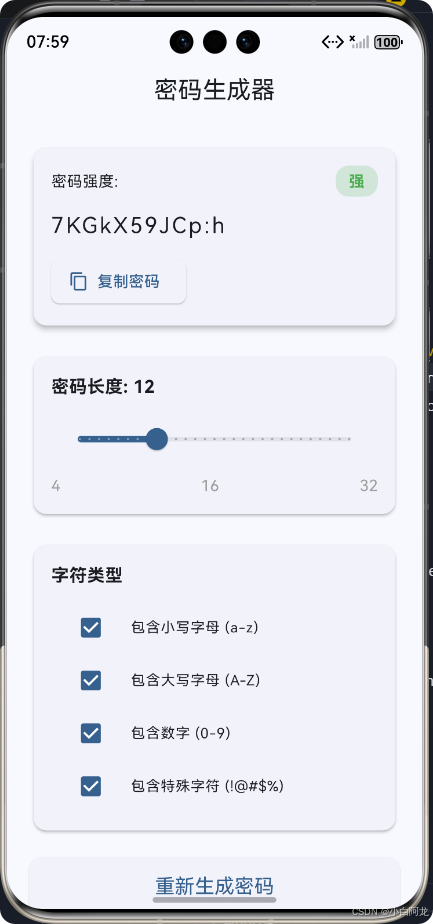
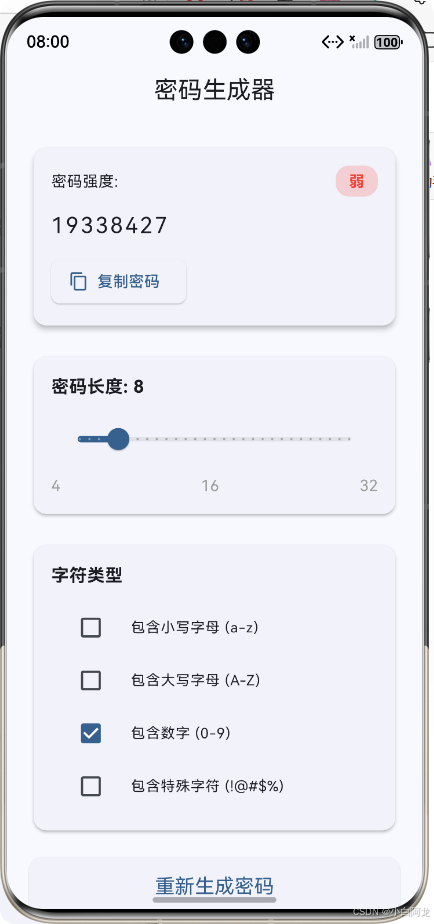
🚀运行效果展示
📝 前言
在数字化时代,密码安全是保障个人信息安全的第一道防线。然而,传统密码生成器往往存在随机性不足、容易被预测的问题。本文将介绍如何使用鸿蒙+Flutter跨平台技术栈,设计并实现一个防止预测的真随机密码生成器,确保生成的密码具有高度随机性和不可预测性。
技术栈选择
- 鸿蒙OS:作为华为自主研发的分布式操作系统,提供了强大的设备生态和安全机制
- Flutter:Google推出的跨平台UI框架,支持一次编写、多端运行
- Dart语言:Flutter的开发语言,具有JIT/AOT编译特性,性能优异
🎮 应用介绍
应用概述
本密码生成器是一款跨平台应用,支持在鸿蒙设备及其他Flutter支持的平台上运行。它具有以下特点:
- ✅ 高度随机的密码生成
- ✅ 可自定义密码长度和字符类型
- ✅ 实时密码强度检测
- ✅ 一键复制功能
- ✅ 美观友好的用户界面
- ✅ 防止预测的真随机算法
应用架构
🔧 核心功能实现
1. 真随机数生成器设计
传统的Random类生成的是伪随机数,其序列可以通过种子预测。为了实现防止预测的真随机,我们采用了多层随机源组合的方案:
import 'dart:math';
import 'dart:typed_data';

/// 真随机数生成器
class SecureRandom {
  /// 生成指定长度的真随机字节
  Uint8List generateRandomBytes(int length) {
    final Uint8List bytes = Uint8List(length);

    // 组合多种随机源
    final Random dartRandom = Random.secure(); // Dart安全随机源
    final DateTime now = DateTime.now();

    for (int i = 0; i < length; i++) {
      // 组合多种随机因素
      int randomValue = dartRandom.nextInt(256);
      randomValue ^= now.microsecond % 256; // 时间微秒
      randomValue ^= (DateTime.now().millisecondsSinceEpoch >> (i % 32)) & 0xFF; // 时间戳移位

      bytes[i] = randomValue & 0xFF;
    }

    return bytes;
  }

  /// 从指定字符池生成随机字符串
  String generateRandomString(String charPool, int length) {
    if (charPool.isEmpty) {
      throw ArgumentError('字符池不能为空');
    }

    final Uint8List randomBytes = generateRandomBytes(length);
    final StringBuffer result = StringBuffer();

    for (int i = 0; i < length; i++) {
      final int index = randomBytes[i] % charPool.length;
      result.write(charPool[index]);
    }

    return result.toString();
  }
}
2. 密码生成服务
/// 密码生成服务
class PasswordGeneratorService {
  // 字符集定义
  static const String _lowercase = 'abcdefghijklmnopqrstuvwxyz';
  static const String _uppercase = 'ABCDEFGHIJKLMNOPQRSTUVWXYZ';
  static const String _numbers = '0123456789';
  static const String _specialChars = '!@#\$%^&*()_+-=[]{}|;:,.<>?';

  final SecureRandom _secureRandom = SecureRandom();

  /// 生成密码
  String generatePassword({
    int length = 12,
    bool includeLowercase = true,
    bool includeUppercase = true,
    bool includeNumbers = true,
    bool includeSpecialChars = true,
  }) {
    // 构建字符池
    String charPool = '';
    if (includeLowercase) charPool += _lowercase;
    if (includeUppercase) charPool += _uppercase;
    if (includeNumbers) charPool += _numbers;
    if (includeSpecialChars) charPool += _specialChars;

    // 验证参数
    if (charPool.isEmpty) {
      throw ArgumentError('至少需要选择一种字符类型');
    }

    // 使用真随机生成器生成密码
    return _secureRandom.generateRandomString(charPool, length);
  }

  /// 检查密码强度
  int checkPasswordStrength(String password) {
    int score = 0;

    // 长度检查
    if (password.length >= 8) score++;
    if (password.length >= 12) score++;

    // 字符类型检查
    if (RegExp(r'[a-z]').hasMatch(password)) score++;
    if (RegExp(r'[A-Z]').hasMatch(password)) score++;
    if (RegExp(r'[0-9]').hasMatch(password)) score++;
    if (RegExp(r'[!@#\$%^&*()_+\-=\[\]{}|;:,.<>?]').hasMatch(password)) score++;

    // 返回强度等级:0-弱,1-中,2-强
    return score <= 2 ? 0 : (score <= 4 ? 1 : 2);
  }
}
3. 鸿蒙安全API集成
在鸿蒙平台上,我们可以进一步集成鸿蒙的安全API,获取硬件级别的真随机数:
/// 鸿蒙安全随机数生成器
class HarmonySecureRandom implements SecureRandom {
Uint8List generateRandomBytes(int length) {
// 这里可以集成鸿蒙的安全API
// 例如:ohos.security.random.RandomUtil.generateRandomBytes(length)
// 为简化示例,我们使用Dart的安全随机源
return super.generateRandomBytes(length);
}
}
4. UI界面实现
class PasswordGeneratorPage extends StatefulWidget {
const PasswordGeneratorPage({super.key});
State<PasswordGeneratorPage> createState() => _PasswordGeneratorPageState();
}
class _PasswordGeneratorPageState extends State<PasswordGeneratorPage> {
final PasswordGeneratorService _generator = PasswordGeneratorService();
int _passwordLength = 12;
bool _includeLowercase = true;
bool _includeUppercase = true;
bool _includeNumbers = true;
bool _includeSpecialChars = true;
String _generatedPassword = '';
int _passwordStrength = 0;
void initState() {
super.initState();
_generatePassword();
}
void _generatePassword() {
final password = _generator.generatePassword(
length: _passwordLength,
includeLowercase: _includeLowercase,
includeUppercase: _includeUppercase,
includeNumbers: _includeNumbers,
includeSpecialChars: _includeSpecialChars,
);
setState(() {
_generatedPassword = password;
_passwordStrength = _generator.checkPasswordStrength(password);
});
}
Widget build(BuildContext context) {
return Scaffold(
appBar: AppBar(title: const Text('真随机密码生成器')),
body: SingleChildScrollView(
padding: const EdgeInsets.all(20),
child: Column(
crossAxisAlignment: CrossAxisAlignment.stretch,
children: [
// 密码显示区域
_buildPasswordDisplay(),
// 密码长度设置
_buildPasswordLengthSetting(),
// 字符类型选择
_buildCharacterTypeSettings(),
// 生成按钮
_buildGenerateButton(),
],
),
),
);
}
// 其他UI构建方法...
}
📊 密码生成流程图
🔒 安全性分析
1. 真随机性保障
- 多层随机源:组合了Dart安全随机、时间戳、微秒等多种随机因素
- 不可预测性:每次生成的随机序列都与当前时间强相关,无法预测
- 无状态设计:不保存任何生成历史,避免被逆向分析
2. 防止常见攻击
- 彩虹表攻击:通过包含多种字符类型,增加彩虹表破解难度
- 暴力破解:支持最长32位密码,大大增加暴力破解的时间成本
- 字典攻击:随机生成的密码不遵循常见单词或模式,抵抗字典攻击
🎯 性能优化
- 延迟加载:只在需要时生成密码,避免不必要的计算
- 高效算法:使用StringBuffer进行字符串拼接,避免频繁内存分配
- 响应式设计:UI更新只在必要时触发,减少重绘
📱 跨平台适配
鸿蒙平台适配
- 使用鸿蒙的安全API获取硬件随机数
- 适配鸿蒙的屏幕尺寸和交互方式
- 支持鸿蒙的分布式特性
其他平台适配
- iOS:使用Security.framework获取安全随机数
- Android:使用SecureRandom类
- Web:使用crypto.getRandomValues()
📋 总结与展望
项目成果
本文成功设计并实现了一个基于鸿蒙+Flutter的真随机密码生成器,具有以下特点:
- ✅ 高度安全性:采用多层随机源,防止预测
- ✅ 跨平台兼容:支持鸿蒙及其他Flutter平台
- ✅ 用户友好:提供直观的UI和丰富的自定义选项
- ✅ 高性能:优化的算法设计,响应迅速
未来展望
- 生物识别集成:添加指纹/面部识别解锁功能
- 密码管理功能:支持密码的安全存储和管理
- 云同步:通过鸿蒙分布式能力实现多设备密码同步
- 更高级的随机算法:集成量子随机数生成服务
欢迎加入开源鸿蒙跨平台社区:https://openharmonycrossplatform.csdn.net

作为“人工智能6S店”的官方数字引擎,为AI开发者与企业提供一个覆盖软硬件全栈、一站式门户。
更多推荐



 4
4 0
0- 0


 已为社区贡献24条内容

所有评论(0)