
Flutter 框架跨平台鸿蒙开发 - 打字练习应用开发教程
title: const Text('自定义文本'),hintText: '输入要练习的文本',),),actions: [child: const Text('取消'),),},child: const Text('开始'),),],),Flutter文本处理和渲染实时输入监听和反馈RichText高级用法性能优化技巧数据统计和可视化用户体验设计这个应用不仅能帮助用户提高打字技能,还展示了Flu
·
Flutter打字练习应用开发教程
项目简介
打字练习是一款专业的打字训练应用,帮助用户提高打字速度和准确率。应用支持英文、中文、数字、符号等多种练习模式,提供实时反馈和详细的统计分析功能。
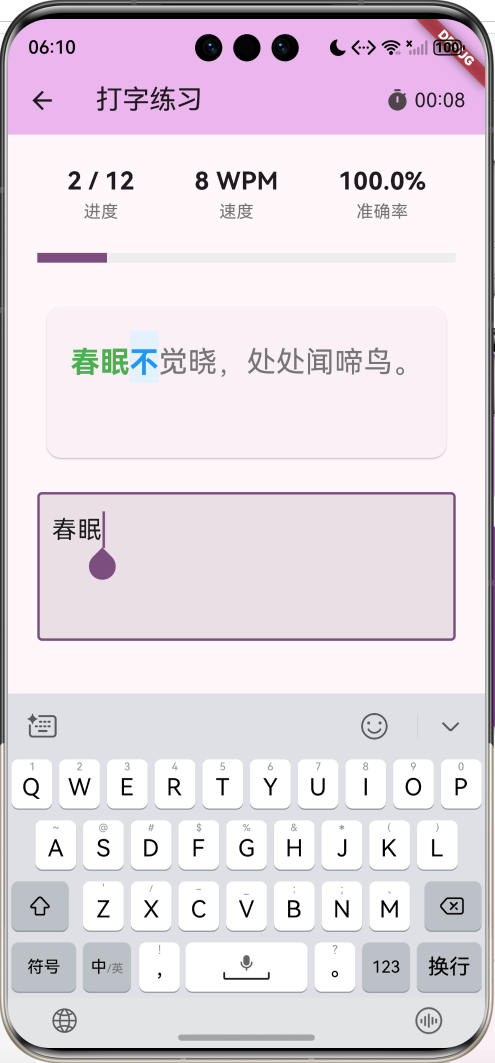
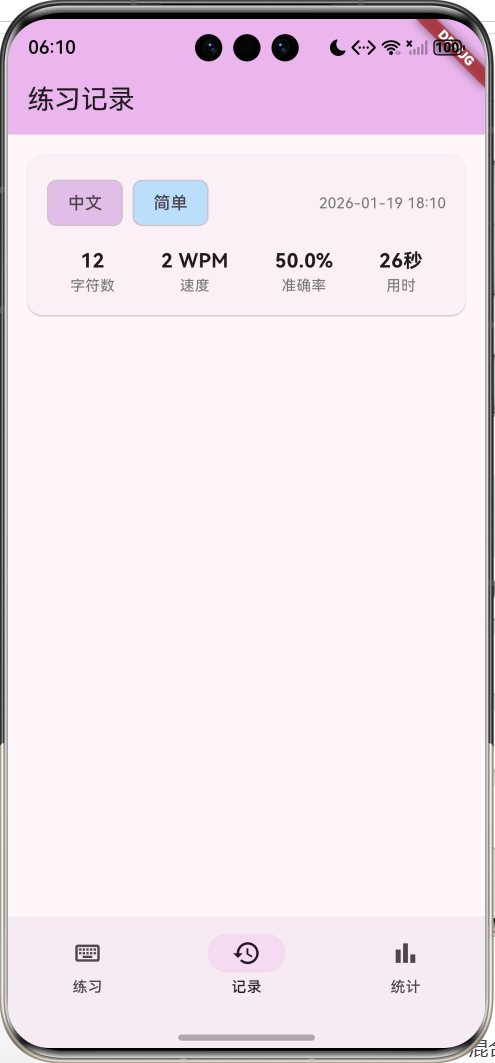
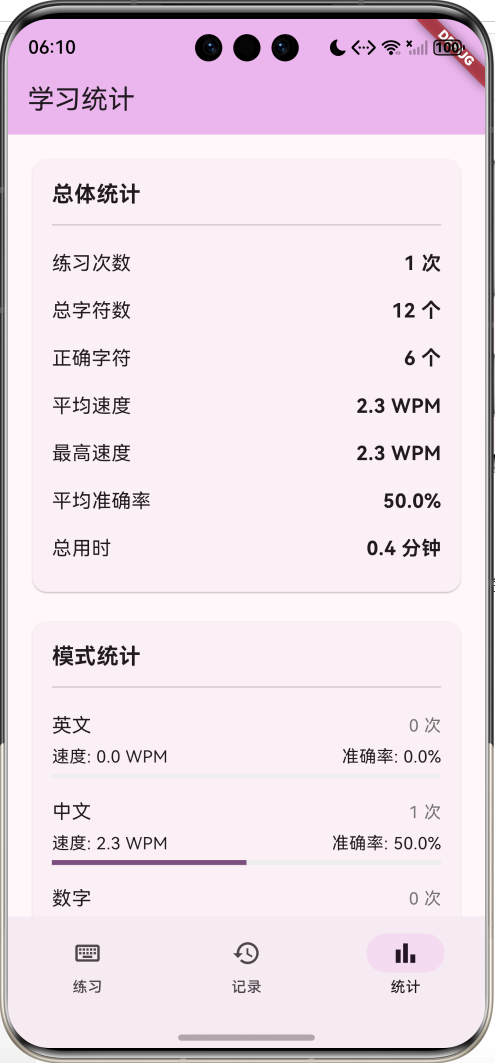
运行效果图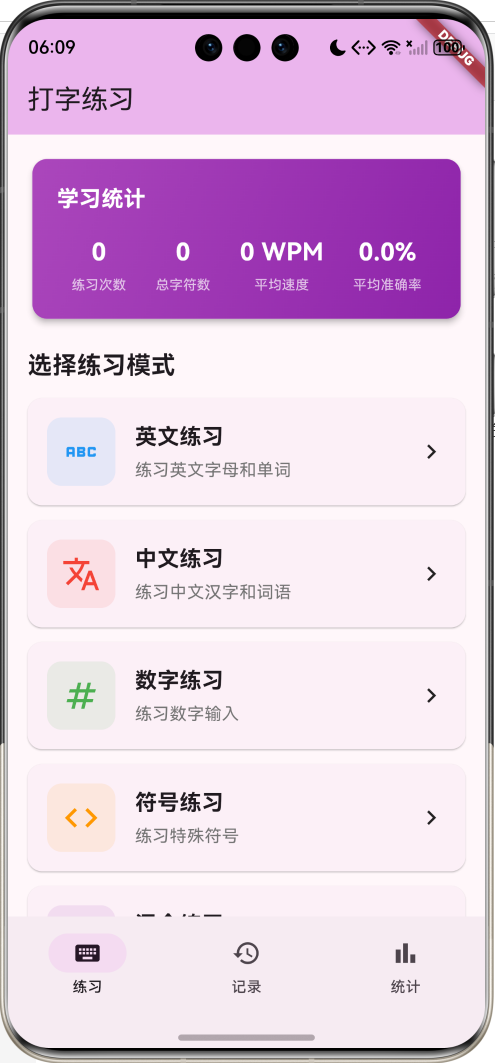
核心特性
- 多种模式:英文、中文、数字、符号、混合练习
- 三档难度:简单、中等、困难
- 实时反馈:彩色标注正确/错误字符
- 速度测试:WPM(每分钟字数)计算
- 准确率统计:实时显示打字准确率
- 练习记录:保存每次练习的详细数据
- 进步曲线:可视化展示学习进度
- 数据持久化:本地保存练习记录
技术栈
- Flutter 3.x
- Material Design 3
- SharedPreferences(数据持久化)
- Timer(计时功能)
- RichText(文本高亮显示)
数据模型设计
练习模式枚举
enum PracticeMode {
  english,    // 英文
  chinese,    // 中文
  number,     // 数字
  symbol,     // 符号
  mixed,      // 混合
}
难度级别枚举
enum DifficultyLevel {
  easy,       // 简单
  medium,     // 中等
  hard,       // 困难
}
打字记录模型
class TypingRecord {
  final DateTime date;                // 练习日期
  final PracticeMode mode;            // 练习模式
  final DifficultyLevel difficulty;   // 难度级别
  final int totalChars;               // 总字符数
  final int correctChars;             // 正确字符数
  final int timeSpent;                // 用时(秒)
  final double wpm;                   // 每分钟字数

  double get accuracy => totalChars > 0
      ? (correctChars / totalChars * 100)
      : 0;
}
核心功能实现
1. 文本生成
根据模式和难度生成练习文本:
英文文本生成
String _generateEnglishText() {
  final words = [
    'the', 'be', 'to', 'of', 'and', 'a', 'in', 'that', 'have', 'I',
    // ... 更多常用单词
  ];

  final random = Random();
  final length = widget.difficulty == DifficultyLevel.easy
      ? 10
      : widget.difficulty == DifficultyLevel.medium
          ? 20
          : 30;

  final selectedWords = List.generate(
    length,
    (_) => words[random.nextInt(words.length)],
  );

  return selectedWords.join(' ');
}
中文文本生成
String _generateChineseText() {
  final texts = {
    DifficultyLevel.easy: [
      '春眠不觉晓,处处闻啼鸟。',
      '床前明月光,疑是地上霜。',
      // ... 更多简单诗句
    ],
    DifficultyLevel.medium: [
      '人生得意须尽欢,莫使金樽空对月。',
      // ... 更多中等难度文本
    ],
    DifficultyLevel.hard: [
      '明月几时有?把酒问青天。不知天上宫阙,今夕是何年。',
      // ... 更多困难文本
    ],
  };

  final textList = texts[widget.difficulty]!;
  return textList[Random().nextInt(textList.length)];
}
数字和符号生成
String _generateNumberText() {
  final random = Random();
  final length = widget.difficulty == DifficultyLevel.easy ? 20 : 40;
  return List.generate(length, (_) => random.nextInt(10).toString()).join(' ');
}

String _generateSymbolText() {
  final symbols = ['!', '@', '#', '\$', '%', '^', '&', '*', '(', ')'];
  final random = Random();
  final length = widget.difficulty == DifficultyLevel.easy ? 15 : 25;
  return List.generate(length, (_) => symbols[random.nextInt(symbols.length)]).join(' ');
}
2. 实时输入监听
监听用户输入并实时反馈:
void _onInputChanged() {
  if (!isStarted && _inputController.text.isNotEmpty) {
    setState(() {
      isStarted = true;
    });
    _startTimer();
  }

  setState(() {
    currentInput = _inputController.text;
    currentIndex = currentInput.length;

    // 计算正确字符数
    correctChars = 0;
    for (int i = 0; i < currentInput.length && i < targetText.length; i++) {
      if (currentInput[i] == targetText[i]) {
        correctChars++;
      }
    }

    totalTypedChars = currentInput.length;

    // 检查是否完成
    if (currentInput.length >= targetText.length) {
      _finishPractice();
    }
  });
}
3. 文本高亮显示
使用RichText实现彩色标注:
List<TextSpan> _buildTextSpans() {
  final spans = <TextSpan>[];

  for (int i = 0; i < targetText.length; i++) {
    Color color;
    FontWeight weight = FontWeight.normal;

    if (i < currentInput.length) {
      if (currentInput[i] == targetText[i]) {
        color = Colors.green;  // 正确:绿色
        weight = FontWeight.bold;
      } else {
        color = Colors.red;    // 错误:红色
        weight = FontWeight.bold;
      }
    } else if (i == currentInput.length) {
      color = Colors.blue;     // 当前位置:蓝色
      weight = FontWeight.bold;
    } else {
      color = Colors.grey.shade600;  // 未输入:灰色
    }

    spans.add(TextSpan(
      text: targetText[i],
      style: TextStyle(
        color: color,
        fontWeight: weight,
        backgroundColor: i == currentInput.length ? Colors.blue.shade50 : null,
      ),
    ));
  }

  return spans;
}
4. WPM计算
计算每分钟字数(Words Per Minute):
void _finishPractice() {
  _timer?.cancel();

  // 计算WPM
  final minutes = elapsedSeconds / 60;
  final words = targetText.split(' ').length;
  final wpm = minutes > 0 ? (words / minutes).toDouble() : 0.0;

  final record = TypingRecord(
    date: DateTime.now(),
    mode: widget.mode,
    difficulty: widget.difficulty,
    totalChars: targetText.length,
    correctChars: correctChars,
    timeSpent: elapsedSeconds,
    wpm: wpm,
  );
}
5. 数据持久化
使用SharedPreferences保存记录:
Future<void> _loadRecords() async {
  final prefs = await SharedPreferences.getInstance();
  final recordsData = prefs.getStringList('typing_records') ?? [];
  setState(() {
    records = recordsData
        .map((json) => TypingRecord.fromJson(jsonDecode(json)))
        .toList();
  });
}

Future<void> _saveRecords() async {
  final prefs = await SharedPreferences.getInstance();
  final recordsData = records.map((r) => jsonEncode(r.toJson())).toList();
  await prefs.setStringList('typing_records', recordsData);
}
UI组件设计
1. 统计卡片
显示学习概览:
Widget _buildStatsCard() {
  final totalPractices = records.length;
  final avgWpm = records.isEmpty
      ? 0.0
      : records.fold<double>(0, (sum, r) => sum + r.wpm) / records.length;

  return Card(
    child: Container(
      decoration: BoxDecoration(
        gradient: LinearGradient(
          colors: [Colors.purple.shade400, Colors.purple.shade600],
        ),
      ),
      child: Column(
        children: [
          const Text('学习统计'),
          Row(
            children: [
              _buildStatItem('练习次数', '$totalPractices'),
              _buildStatItem('平均速度', '${avgWpm.toStringAsFixed(0)} WPM'),
            ],
          ),
        ],
      ),
    ),
  );
}
2. 练习页面
实时显示打字进度:
Widget build(BuildContext context) {
  return Scaffold(
    body: Column(
      children: [
        // 进度显示
        Row(
          children: [
            _buildProgressItem('进度', '$currentIndex / ${targetText.length}'),
            _buildProgressItem('速度', '${_calculateCurrentWpm()} WPM'),
            _buildProgressItem('准确率', '${_calculateAccuracy()}%'),
          ],
        ),

        // 进度条
        LinearProgressIndicator(
          value: currentIndex / targetText.length,
        ),

        // 目标文本(彩色标注)
        RichText(
          text: TextSpan(
            style: TextStyle(fontSize: 24),
            children: _buildTextSpans(),
          ),
        ),

        // 输入框
        TextField(
          controller: _inputController,
          focusNode: _focusNode,
          enabled: !isFinished,
        ),
      ],
    ),
  );
}
3. 进步曲线
可视化展示学习进度:
Widget _buildProgressChart() {
  final recentRecords = records.take(10).toList().reversed.toList();

  return SizedBox(
    height: 200,
    child: ListView.builder(
      scrollDirection: Axis.horizontal,
      itemCount: recentRecords.length,
      itemBuilder: (context, index) {
        final record = recentRecords[index];
        final maxWpm = recentRecords.map((r) => r.wpm).reduce((a, b) => a > b ? a : b);
        final height = (record.wpm / maxWpm * 150).clamp(20.0, 150.0);

        return Column(
          children: [
            Text('${record.wpm.toStringAsFixed(0)}'),
            Container(
              width: 30,
              height: height,
              decoration: BoxDecoration(
                color: Colors.purple,
                borderRadius: BorderRadius.circular(4),
              ),
            ),
            Text('${index + 1}'),
          ],
        );
      },
    ),
  );
}
应用架构
页面结构
数据流
功能扩展建议
1. 盲打模式
隐藏输入内容,训练盲打:
class BlindTypingMode extends StatefulWidget {
State<BlindTypingMode> createState() => _BlindTypingModeState();
}
class _BlindTypingModeState extends State<BlindTypingMode> {
bool showInput = false;
Widget build(BuildContext context) {
return TextField(
obscureText: !showInput, // 隐藏输入
decoration: InputDecoration(
suffixIcon: IconButton(
icon: Icon(showInput ? Icons.visibility : Icons.visibility_off),
onPressed: () {
setState(() {
showInput = !showInput;
});
},
),
),
);
}
}
2. 键盘热力图
显示按键使用频率:
class KeyboardHeatmap extends StatelessWidget {
final Map<String, int> keyPressCount;
Widget build(BuildContext context) {
final maxCount = keyPressCount.values.isEmpty
? 1
: keyPressCount.values.reduce((a, b) => a > b ? a : b);
return GridView.builder(
gridDelegate: SliverGridDelegateWithFixedCrossAxisCount(
crossAxisCount: 10,
),
itemCount: 26,
itemBuilder: (context, index) {
final key = String.fromCharCode(65 + index); // A-Z
final count = keyPressCount[key] ?? 0;
final intensity = count / maxCount;
return Container(
margin: EdgeInsets.all(2),
decoration: BoxDecoration(
color: Colors.red.withOpacity(intensity),
borderRadius: BorderRadius.circular(4),
),
child: Center(child: Text(key)),
);
},
);
}
}
3. 自定义文本
允许用户输入自定义练习文本:
Future<void> _showCustomTextDialog() async {
  final controller = TextEditingController();

  await showDialog(
    context: context,
    builder: (context) => AlertDialog(
      title: const Text('自定义文本'),
      content: TextField(
        controller: controller,
        maxLines: 5,
        decoration: InputDecoration(
          hintText: '输入要练习的文本',
          border: OutlineInputBorder(),
        ),
      ),
      actions: [
        TextButton(
          onPressed: () => Navigator.pop(context),
          child: const Text('取消'),
        ),
        TextButton(
          onPressed: () {
            if (controller.text.isNotEmpty) {
              Navigator.pop(context);
              _startCustomPractice(controller.text);
            }
          },
          child: const Text('开始'),
        ),
      ],
    ),
  );
}
4. 文章导入
从文件导入练习文本:
// 使用 file_picker 包
import 'package:file_picker/file_picker.dart';

Future<void> _importTextFile() async {
  final result = await FilePicker.platform.pickFiles(
    type: FileType.custom,
    allowedExtensions: ['txt'],
  );

  if (result != null) {
    final file = File(result.files.single.path!);
    final content = await file.readAsString();

    setState(() {
      targetText = content;
    });
  }
}
5. 多人竞赛
添加多人对战模式:
class MultiplayerMode extends StatefulWidget {
State<MultiplayerMode> createState() => _MultiplayerModeState();
}
class _MultiplayerModeState extends State<MultiplayerMode> {
Map<String, PlayerProgress> players = {};
Widget build(BuildContext context) {
return Column(
children: [
// 玩家进度列表
...players.entries.map((entry) {
return ListTile(
leading: CircleAvatar(child: Text(entry.key[0])),
title: Text(entry.key),
trailing: Text('${entry.value.progress}%'),
subtitle: LinearProgressIndicator(
value: entry.value.progress / 100,
),
);
}),
],
);
}
}
class PlayerProgress {
final int progress;
final int wpm;
final double accuracy;
PlayerProgress({
required this.progress,
required this.wpm,
required this.accuracy,
});
}
6. 声音反馈
添加按键音效:
// 使用 audioplayers 包
import 'package:audioplayers/audioplayers.dart';

class SoundFeedback {
  final AudioPlayer _player = AudioPlayer();

  Future<void> playKeySound(bool isCorrect) async {
    final sound = isCorrect ? 'correct.mp3' : 'wrong.mp3';
    await _player.play(AssetSource(sound));
  }

  Future<void> playFinishSound() async {
    await _player.play(AssetSource('finish.mp3'));
  }
}
7. 成就系统
添加打字成就:
enum TypingAchievement {
  firstPractice,      // 首次练习
  speed50,            // 速度达到50 WPM
  speed100,           // 速度达到100 WPM
  accuracy95,         // 准确率95%
  accuracy100,        // 准确率100%
  practice10,         // 练习10次
  practice100,        // 练习100次
  marathon,           // 连续练习30分钟
}

void _checkAchievements(TypingRecord record) {
  if (record.wpm >= 50) {
    _unlockAchievement(TypingAchievement.speed50);
  }
  if (record.wpm >= 100) {
    _unlockAchievement(TypingAchievement.speed100);
  }
  if (record.accuracy >= 95) {
    _unlockAchievement(TypingAchievement.accuracy95);
  }
  if (record.accuracy == 100) {
    _unlockAchievement(TypingAchievement.accuracy100);
  }
}
8. 每日挑战
每日更新挑战文本:
class DailyChallenge {
  static String getDailyText() {
    final today = DateTime.now();
    final seed = today.year * 10000 + today.month * 100 + today.day;
    final random = Random(seed);

    final texts = [
      '今日挑战文本1',
      '今日挑战文本2',
      // ... 更多文本
    ];

    return texts[random.nextInt(texts.length)];
  }

  static bool hasCompletedToday(List<TypingRecord> records) {
    final today = DateTime.now();
    return records.any((r) =>
      r.date.year == today.year &&
      r.date.month == today.month &&
      r.date.day == today.day
    );
  }
}
9. 错误分析
分析常见错误:
class ErrorAnalysis {
  Map<String, int> errorCount = {};

  void recordError(String expected, String actual) {
    final key = '$expected->$actual';
    errorCount[key] = (errorCount[key] ?? 0) + 1;
  }

  List<MapEntry<String, int>> getTopErrors(int count) {
    final sorted = errorCount.entries.toList()
      ..sort((a, b) => b.value.compareTo(a.value));
    return sorted.take(count).toList();
  }

  Widget buildErrorReport() {
    final topErrors = getTopErrors(10);

    return Card(
      child: Column(
        children: [
          const Text('常见错误', style: TextStyle(fontSize: 18)),
          ...topErrors.map((entry) {
            final parts = entry.key.split('->');
            return ListTile(
              title: Text('${parts[0]} 误输入为 ${parts[1]}'),
              trailing: Text('${entry.value} 次'),
            );
          }),
        ],
      ),
    );
  }
}
10. 导出报告
生成PDF练习报告:
// 使用 pdf 包
import 'package:pdf/pdf.dart';
import 'package:pdf/widgets.dart' as pw;
import 'package:printing/printing.dart';

Future<void> exportReport(List<TypingRecord> records) async {
  final pdf = pw.Document();

  pdf.addPage(
    pw.Page(
      build: (context) {
        return pw.Column(
          crossAxisAlignment: pw.CrossAxisAlignment.start,
          children: [
            pw.Text('打字练习报告', style: pw.TextStyle(fontSize: 24)),
            pw.SizedBox(height: 20),
            pw.Text('总练习次数: ${records.length}'),
            pw.Text('平均速度: ${_calculateAvgWpm(records)} WPM'),
            pw.Text('平均准确率: ${_calculateAvgAccuracy(records)}%'),
            pw.SizedBox(height: 20),
            pw.Text('练习记录:', style: pw.TextStyle(fontSize: 18)),
            ...records.map((r) {
              return pw.Text(
                '${_formatDate(r.date)} - ${r.wpm.toStringAsFixed(1)} WPM - ${r.accuracy.toStringAsFixed(1)}%'
              );
            }),
          ],
        );
      },
    ),
  );

  await Printing.layoutPdf(
    onLayout: (format) async => pdf.save(),
  );
}
性能优化建议
1. 文本渲染优化
使用CustomPainter优化大文本渲染:
class TextHighlightPainter extends CustomPainter {
final String text;
final String input;
TextHighlightPainter({required this.text, required this.input});
void paint(Canvas canvas, Size size) {
final textPainter = TextPainter(
textDirection: TextDirection.ltr,
);
for (int i = 0; i < text.length; i++) {
final color = i < input.length
? (input[i] == text[i] ? Colors.green : Colors.red)
: Colors.grey;
textPainter.text = TextSpan(
text: text[i],
style: TextStyle(color: color, fontSize: 24),
);
textPainter.layout();
textPainter.paint(canvas, Offset(i * 15.0, 0));
}
}
bool shouldRepaint(covariant CustomPainter oldDelegate) => true;
}
2. 输入防抖
避免频繁更新UI:
Timer? _debounceTimer;

void _onInputChangedDebounced() {
  _debounceTimer?.cancel();
  _debounceTimer = Timer(const Duration(milliseconds: 50), () {
    _onInputChanged();
  });
}
3. 使用Isolate处理统计
将复杂计算移到后台线程:
Future<Map<String, dynamic>> _calculateStatsInBackground(
  List<TypingRecord> records,
) async {
  return await compute(_calculateStats, records);
}

Map<String, dynamic> _calculateStats(List<TypingRecord> records) {
  // 复杂的统计计算
  return {
    'avgWpm': records.fold<double>(0, (sum, r) => sum + r.wpm) / records.length,
    'avgAccuracy': records.fold<double>(0, (sum, r) => sum + r.accuracy) / records.length,
    // ... 更多统计
  };
}
测试建议
1. 单元测试
测试WPM计算:
import 'package:flutter_test/flutter_test.dart';

void main() {
  group('WPM Calculation Tests', () {
    test('Calculate WPM correctly', () {
      final words = 20;
      final seconds = 60;
      final wpm = (words / (seconds / 60)).toDouble();

      expect(wpm, 20.0);
    });

    test('Accuracy calculation', () {
      final total = 100;
      final correct = 95;
      final accuracy = (correct / total * 100);

      expect(accuracy, 95.0);
    });
  });
}
2. Widget测试
测试输入监听:
testWidgets('Input listener works', (WidgetTester tester) async {
  await tester.pumpWidget(
    MaterialApp(
      home: TypingPracticePage(
        mode: PracticeMode.english,
        difficulty: DifficultyLevel.easy,
        onComplete: (_) {},
      ),
    ),
  );

  final textField = find.byType(TextField);
  expect(textField, findsOneWidget);

  await tester.enterText(textField, 'test');
  await tester.pump();

  // 验证输入被正确处理
});
部署发布
1. 应用图标
dev_dependencies:
  flutter_launcher_icons: ^0.13.1

flutter_launcher_icons:
  android: true
  ios: true
  image_path: "assets/icon.png"
2. 版本管理
version: 1.0.0+1
3. 打包
# Android
flutter build apk --release
flutter build appbundle --release

# iOS
flutter build ios --release
项目总结
通过开发这个打字练习应用,你将掌握:
- Flutter文本处理和渲染
- 实时输入监听和反馈
- RichText高级用法
- 性能优化技巧
- 数据统计和可视化
- 用户体验设计
这个应用不仅能帮助用户提高打字技能,还展示了Flutter在教育类应用开发中的强大能力。继续扩展功能,让打字练习变得更有趣!
欢迎加入开源鸿蒙跨平台社区:https://openharmonycrossplatform.csdn.net

作为“人工智能6S店”的官方数字引擎,为AI开发者与企业提供一个覆盖软硬件全栈、一站式门户。
更多推荐

 16
16 0
0- 0



 已为社区贡献24条内容

所有评论(0)