
Flutter 框架跨平台鸿蒙开发 - 白噪音助眠应用开发指南
状态管理- Map管理多声音播放状态定时器- Timer实现倒计时和自动停止自定义绘制- CustomPainter绘制波浪动画动画系统- AnimationController实现循环动画UI设计- 深色主题和渐变效果白噪音是改善睡眠质量的有效工具,通过Flutter实现不仅能学习多媒体应用开发,还能帮助用户获得更好的休息。🌙欢迎加入开源鸿蒙跨平台社区:https://openharmonyc
·
Flutter实战:白噪音助眠应用开发指南
前言
白噪音助眠应用是一款帮助用户放松和改善睡眠质量的健康类应用。这个项目涵盖了音频控制、定时器管理、自定义绘制、动画效果等核心技术,是学习Flutter多媒体应用开发的优秀案例。
效果预览
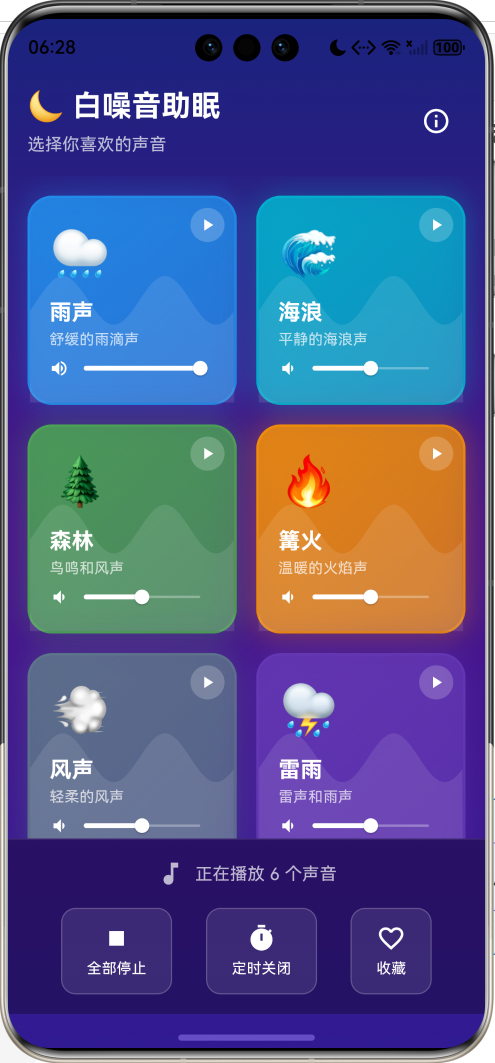
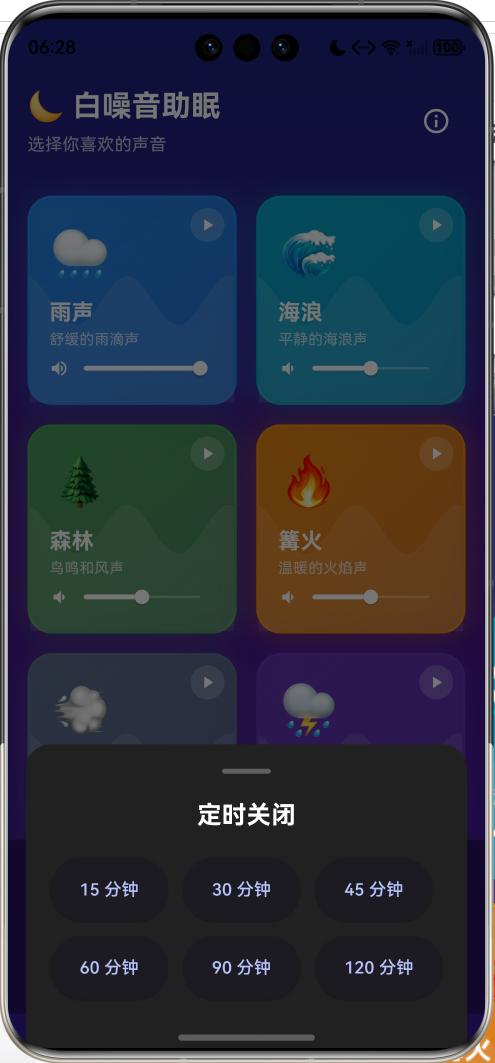
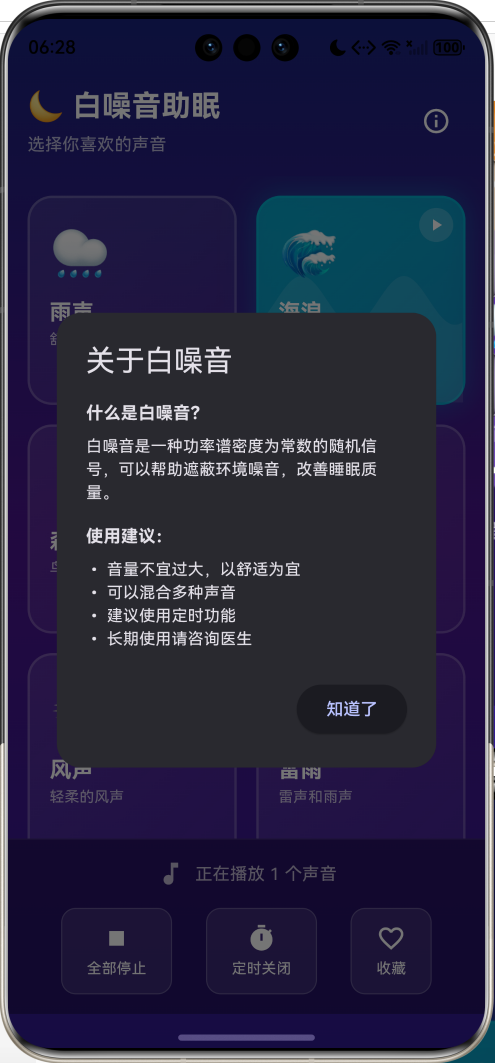
应用特性:
- 12种预设声音(自然声音+噪音)
- 多声音混合播放
- 独立音量控制
- 定时关闭功能
- 波浪动画效果
- 深色主题设计
技术架构
核心数据结构
声音类型模型
class SoundType {
  final String id;
  final String name;
  final String emoji;
  final Color color;
  final String description;

  const SoundType({
    required this.id,
    required this.name,
    required this.emoji,
    required this.color,
    required this.description,
  });
}
预设声音库
class SoundPresets {
  static const List<SoundType> sounds = [
    SoundType(
      id: 'rain',
      name: '雨声',
      emoji: '🌧️',
      color: Colors.blue,
      description: '舒缓的雨滴声',
    ),
    // ... 更多声音
  ];
}
声音分类:
- 自然声音:雨声、海浪、森林、篝火、风声、雷雨、溪流、夜晚
- 噪音类型:白噪音、粉噪音、褐噪音、风扇
状态管理
播放状态
// 每个声音的播放状态
final Map<String, bool> _playingStates = {};

// 每个声音的音量
final Map<String, double> _volumes = {};

// 初始化
for (var sound in SoundPresets.sounds) {
  _volumes[sound.id] = 0.5;
  _playingStates[sound.id] = false;
}
切换播放
void _toggleSound(String soundId) {
  setState(() {
    _playingStates[soundId] = !(_playingStates[soundId] ?? false);
  });
}
音量控制
void _updateVolume(String soundId, double volume) {
  setState(() {
    _volumes[soundId] = volume;
  });
}
定时器系统
倒计时实现
void _startTimer(int minutes) {
  _countdownTimer?.cancel();
  setState(() {
    _remainingSeconds = minutes * 60;
  });

  _countdownTimer = Timer.periodic(const Duration(seconds: 1), (timer) {
    setState(() {
      _remainingSeconds--;
    });

    if (_remainingSeconds <= 0) {
      timer.cancel();
      _stopAllSounds();
      _showTimerCompleteDialog();
    }
  });
}
时间格式化
String _formatTime(int seconds) {
  final minutes = seconds ~/ 60;
  final secs = seconds % 60;
  return '${minutes.toString().padLeft(2, '0')}:${secs.toString().padLeft(2, '0')}';
}
取消定时
void _cancelTimer() {
  _countdownTimer?.cancel();
  setState(() {
    _remainingSeconds = 0;
  });
}
声音卡片设计
卡片布局
Widget _buildSoundCard(SoundType sound) {
  final isPlaying = _playingStates[sound.id] ?? false;
  final volume = _volumes[sound.id] ?? 0.5;

  return GestureDetector(
    onTap: () => _toggleSound(sound.id),
    child: AnimatedContainer(
      duration: const Duration(milliseconds: 300),
      decoration: BoxDecoration(
        gradient: LinearGradient(
          colors: isPlaying
              ? [
                  sound.color.withValues(alpha: 0.8),
                  sound.color.withValues(alpha: 0.6),
                ]
              : [
                  Colors.white.withValues(alpha: 0.1),
                  Colors.white.withValues(alpha: 0.05),
                ],
        ),
        borderRadius: BorderRadius.circular(20),
        border: Border.all(
          color: isPlaying
              ? sound.color.withValues(alpha: 0.5)
              : Colors.white.withValues(alpha: 0.2),
          width: 2,
        ),
        boxShadow: isPlaying
            ? [
                BoxShadow(
                  color: sound.color.withValues(alpha: 0.3),
                  blurRadius: 20,
                  spreadRadius: 2,
                ),
              ]
            : null,
      ),
      child: _buildCardContent(sound, isPlaying, volume),
    ),
  );
}
状态视觉反馈
播放状态的视觉变化:
- 未播放:半透明白色背景
- 播放中:声音主题色渐变背景 + 发光效果
波浪动画
CustomPainter实现
class WavePainter extends CustomPainter {
final double progress;
final Color color;
WavePainter({required this.progress, required this.color});
void paint(Canvas canvas, Size size) {
final paint = Paint()
..color = color
..style = PaintingStyle.fill;
final path = Path();
final waveHeight = 20.0;
final waveLength = size.width / 2;
for (double x = 0; x <= size.width; x++) {
final y = size.height / 2 +
waveHeight * sin((x / waveLength * 2 * pi) + (progress * 2 * pi));
if (x == 0) {
path.moveTo(x, y);
} else {
path.lineTo(x, y);
}
}
path.lineTo(size.width, size.height);
path.lineTo(0, size.height);
path.close();
canvas.drawPath(path, paint);
}
bool shouldRepaint(WavePainter oldDelegate) => true;
}
正弦波公式
y=A⋅sin(2πxλ+ϕ)+y0y = A \cdot \sin\left(\frac{2\pi x}{\lambda} + \phi\right) + y_0y=A⋅sin(λ2πx+ϕ)+y0
其中:
- AAA = 波幅(waveHeight)
- λ\lambdaλ = 波长(waveLength)
- ϕ\phiϕ = 相位(progress * 2π)
- y0y_0y0 = 中心线(size.height / 2)
动画循环
late AnimationController _waveController;

_waveController = AnimationController(
  vsync: this,
  duration: const Duration(seconds: 3),
)..repeat();

// 使用
AnimatedBuilder(
  animation: _waveController,
  builder: (context, child) {
    return CustomPaint(
      painter: WavePainter(
        progress: _waveController.value,
        color: Colors.white.withValues(alpha: 0.1),
      ),
      size: Size.infinite,
    );
  },
)
音量滑块
滑块设计
Row(
  children: [
    Icon(
      volume > 0.5
          ? Icons.volume_up
          : volume > 0
              ? Icons.volume_down
              : Icons.volume_mute,
      color: Colors.white,
      size: 16,
    ),
    Expanded(
      child: SliderTheme(
        data: SliderThemeData(
          trackHeight: 2,
          thumbShape: const RoundSliderThumbShape(enabledThumbRadius: 6),
          overlayShape: const RoundSliderOverlayShape(overlayRadius: 12),
        ),
        child: Slider(
          value: volume,
          onChanged: (value) => _updateVolume(sound.id, value),
          activeColor: Colors.white,
          inactiveColor: Colors.white.withValues(alpha: 0.3),
        ),
      ),
    ),
  ],
)
音量图标动态切换
| 音量范围 | 图标 |
|---|---|
| 0 | volume_mute |
| 0-0.5 | volume_down |
| 0.5-1.0 | volume_up |
网格布局
GridView配置
GridView.builder(
  padding: const EdgeInsets.all(16),
  gridDelegate: const SliverGridDelegateWithFixedCrossAxisCount(
    crossAxisCount: 2,        // 2列
    mainAxisSpacing: 16,      // 垂直间距
    crossAxisSpacing: 16,     // 水平间距
    childAspectRatio: 1,      // 宽高比1:1
  ),
  itemCount: SoundPresets.sounds.length,
  itemBuilder: (context, index) {
    return _buildSoundCard(SoundPresets.sounds[index]);
  },
)
底部控制栏
控制按钮
Widget _buildControlButton({
  required IconData icon,
  required String label,
  required VoidCallback? onPressed,
}) {
  return Opacity(
    opacity: onPressed != null ? 1.0 : 0.5,
    child: InkWell(
      onTap: onPressed,
      child: Container(
        padding: const EdgeInsets.symmetric(horizontal: 20, vertical: 12),
        decoration: BoxDecoration(
          color: Colors.white.withValues(alpha: 0.1),
          borderRadius: BorderRadius.circular(12),
          border: Border.all(color: Colors.white.withValues(alpha: 0.2)),
        ),
        child: Column(
          children: [
            Icon(icon, color: Colors.white),
            Text(label, style: TextStyle(color: Colors.white)),
          ],
        ),
      ),
    ),
  );
}
功能按钮
- 全部停止 - 停止所有正在播放的声音
- 定时关闭 - 设置自动停止时间
- 收藏 - 保存当前声音组合(待实现)
定时选择器
ModalBottomSheet
void _showTimerDialog() {
  showModalBottomSheet(
    context: context,
    backgroundColor: Colors.transparent,
    builder: (context) {
      return Container(
        decoration: BoxDecoration(
          color: Colors.grey.shade900,
          borderRadius: const BorderRadius.vertical(top: Radius.circular(20)),
        ),
        child: Column(
          mainAxisSize: MainAxisSize.min,
          children: [
            const Text('定时关闭'),
            Wrap(
              spacing: 12,
              runSpacing: 12,
              children: [15, 30, 45, 60, 90, 120].map((minutes) {
                return ElevatedButton(
                  onPressed: () {
                    Navigator.pop(context);
                    _startTimer(minutes);
                  },
                  child: Text('$minutes 分钟'),
                );
              }).toList(),
            ),
          ],
        ),
      );
    },
  );
}
预设时间选项:15、30、45、60、90、120分钟
白噪音科普
噪音类型
频谱特性
| 类型 | 频谱特性 | 听感 | 适用场景 |
|---|---|---|---|
| 白噪音 | 平坦 | 类似电视雪花 | 遮蔽噪音 |
| 粉噪音 | 1/f | 更柔和自然 | 助眠放松 |
| 褐噪音 | 1/f² | 深沉低频 | 深度睡眠 |
使用建议
void _showInfoDialog() {
  showDialog(
    context: context,
    builder: (context) => AlertDialog(
      title: const Text('关于白噪音'),
      content: const Column(
        crossAxisAlignment: CrossAxisAlignment.start,
        children: [
          Text('使用建议:'),
          Text('• 音量不宜过大,以舒适为宜'),
          Text('• 可以混合多种声音'),
          Text('• 建议使用定时功能'),
          Text('• 长期使用请咨询医生'),
        ],
      ),
    ),
  );
}
扩展思路
真实音频集成(扩展)
使用audioplayers包
import 'package:audioplayers/audioplayers.dart';

class AudioManager {
  final Map<String, AudioPlayer> _players = {};

  Future<void> play(String soundId, String assetPath) async {
    final player = _players[soundId] ?? AudioPlayer();
    _players[soundId] = player;

    await player.setReleaseMode(ReleaseMode.loop);
    await player.play(AssetSource(assetPath));
  }

  Future<void> setVolume(String soundId, double volume) async {
    await _players[soundId]?.setVolume(volume);
  }

  Future<void> stop(String soundId) async {
    await _players[soundId]?.stop();
  }

  void dispose() {
    for (var player in _players.values) {
      player.dispose();
    }
  }
}
音频资源
flutter:
  assets:
    - assets/sounds/rain.mp3
    - assets/sounds/ocean.mp3
    - assets/sounds/forest.mp3
    # ...
性能优化
1. 动画优化
bool shouldRepaint(WavePainter oldDelegate) => true;
只在播放时绘制波浪动画,未播放时不渲染。
2. 状态管理
// 使用Map管理多个状态
final Map<String, bool> _playingStates = {};
final Map<String, double> _volumes = {};
3. 资源清理
void dispose() {
_waveController.dispose();
_countdownTimer?.cancel();
super.dispose();
}
总结
这个白噪音助眠应用实现了完整的音频控制功能,核心技术点包括:
- 状态管理 - Map管理多声音播放状态
- 定时器 - Timer实现倒计时和自动停止
- 自定义绘制 - CustomPainter绘制波浪动画
- 动画系统 - AnimationController实现循环动画
- UI设计 - 深色主题和渐变效果
白噪音是改善睡眠质量的有效工具,通过Flutter实现不仅能学习多媒体应用开发,还能帮助用户获得更好的休息。🌙
欢迎加入开源鸿蒙跨平台社区:https://openharmonycrossplatform.csdn.net

作为“人工智能6S店”的官方数字引擎,为AI开发者与企业提供一个覆盖软硬件全栈、一站式门户。
更多推荐
 6
6 0
0- 0



 已为社区贡献19条内容

所有评论(0)