
React Native鸿蒙跨平台强调 useNativeDriver 的正确使用:位移、缩放、透明度可走原生驱动,颜色和尺寸动画需要谨慎或改用布局/状态驱动
React Native与鸿蒙跨端适配技术解析 本文以好友推荐算法应用为例,探讨React Native与鸿蒙(OpenHarmony/ArkUI)跨端适配的工程技术方案。该系统采用多维度用户画像数据模型,包含用户基础属性、社交关系、兴趣匹配和算法指标等关键维度,在跨端场景下保持数据结构一致性。 核心架构设计体现在算法指标可视化系统和推荐卡片交互系统。算法指标组件实现动态颜色编码机制,根据评分百分
面向 React Native 与鸿蒙(OpenHarmony/ArkUI)跨端适配的工程实践,采用净水机管理(WaterPurifierApp)这一类仪表盘/列表/弹窗组合的页面形态作为典型场景进行技术解读与方法论提炼。文中不使用编号列表,并尽量避免涉及样式细节。
React Native × 鸿蒙跨端的工程化解读:以“净水机管理”场景为例
在净水机管理场景中,页面通常由三类结构构成:用于承载硬件状态的概览区(如水质、温度、流量的实时状态);用于显示可维护部件的卡片区(滤芯寿命、剩余天数的进度与告警);用于触发操作的功能入口区(清洗、定时、节能、设置等)。这三者在 React Native 下是组件化分层的天然载体,而在鸿蒙端需要通过 ArkUI 能力桥接和交互语义统一,才能获得稳定一致的体验。
数据建模是跨端一致性的第一步。以滤芯为例,模型包含 id、name、installedDate、lifeSpan、remainingDays 与 status 等字段,React 端以 TypeScript 类型保障字段完备;鸿蒙端保持相同的协议结构可以降低桥接层复杂度。寿命与剩余的关系是派生值的常见来源,通过 useMemo 派生进度百分比与颜色区间,而不是在渲染过程中即时运算,既明确依赖也避免重算与抖动。在状态推导上,统一用“不可变更新 + 函数式更新”来处理交互,比如“更换滤芯”操作直接基于 id 计算新的 remainingDays/status,不在组件内散落多个分支条件,这能让鸿蒙桥接侧仅同步一次结果,减少跨端消息杂讯。
列表与虚拟化是页面性能的生命线。仪表盘型页面常把概览区置顶,后接卡片列表与功能入口。React Native 的 FlatList 适合作为统一列表容器,借由 ListHeaderComponent 承载概览区,把各类卡片做成独立渲染单元,通过 keyExtractor、getItemLayout(在尺寸可预测时)与 onEndReached 实现纵向扩展。鸿蒙端的滚动物理与 RN 不完全相同,建议将滚动阈值调优、节流与防抖放在 RN 层实现,避免频繁跨端发送滚动事件,并在 ArkUI 侧做轻量透传,从而维持列表响应的一致性。
弹窗与操作语义是跨端易分叉的区域。许多页面用 Alert 作为占位交互来提示“清洗过滤器”、“设置定时”、“查看详情”等操作。RN 的 Alert 适合快速验证流程,但在鸿蒙端建议统一为 Modal/Portal 形态,承载更丰富的内容与操作按钮,并与返回手势、焦点管理(例如输入框)、无障碍属性保持一致。一个实用做法是抽象出“对话框服务”,在 RN 端提供 API,而鸿蒙桥接层实现 ArkUI 对话框,业务仅关心“显示某类对话框 + 传递参数 + 回调结果”。
动画与状态反馈决定交互的品质。进度条、告警标识、切换开关、卡片点击反馈等都容易使用 Animated 实现。需要强调 useNativeDriver 的正确使用:位移、缩放、透明度可走原生驱动,颜色和尺寸动画需要谨慎或改用布局/状态驱动。对于开关类组件,避免在每次渲染时 new Animated.Value,改用 useRef 持有并在 effect 中同步,确保在鸿蒙侧的原生动画通道不会重复初始化。动画时序建议统一封装在“动画助手”中,跨端仅暴露语义化 API,例如“播放告警闪烁”、“卡片点击回弹”,把底层差异留在桥接层。
输入治理是任何带表单或设置项页面的关键点。RN 的 TextInput 在中文 IME 下存在合成态与最终提交的差异,鸿蒙端同样需要正确处理 compositionStart/compositionEnd 语义,避免在中间态就触发校验或提交。一个稳妥的约束是对输入采用“双缓冲”:合成态更新 UI,提交态更新业务状态;在设置项里,开关、选择器和按钮使用统一的“多态设置条目组件”,让“开关型、下拉选择型、跳转按钮型”行为在 RN 与 ArkUI 上表现一致。
文件、分享与导出能力常出现在“智能洞察”或“报告页”场景。RN 端可以使用平台能力或第三方库完成导出与分享,而鸿蒙端需通过 Ability 或系统服务桥接,本质是两个通道的统一协议。建议把“导出数据的内容描述与 MIME 类型”抽象为协议对象,桥接层按协议调用具体平台能力,这样无论从列表导出还是从卡片导出,调用方式都保持一致,不会出现端上行为差异。
React Native好友推荐算法系统与鸿蒙跨端适配技术深度解析
概述
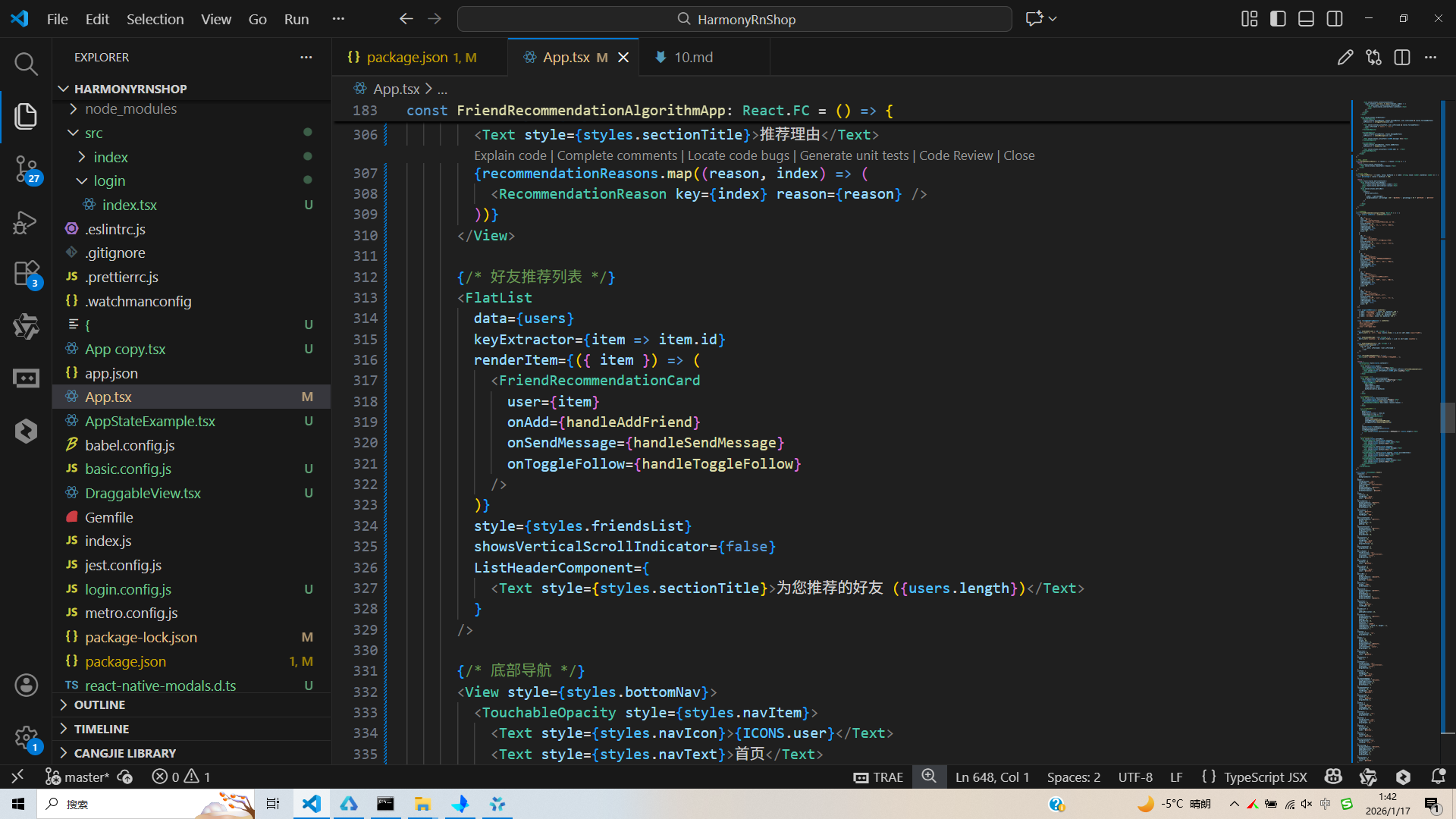
本文分析的是一个基于React Native构建的好友推荐算法应用,集成了推荐算法可视化、用户匹配展示、社交互动操作等核心功能。该应用采用了多维度用户画像、动态评分系统和精细的交互设计,展现了推荐算法类应用的典型技术架构。在鸿蒙OS的跨端适配场景中,这种涉及复杂数据计算和个性化展示的应用具有重要的技术参考价值。
核心架构设计深度解析
多维度用户画像数据模型
应用定义了完整的用户推荐数据结构:
type User = {
  id: string;
  name: string;
  username: string;
  bio: string;
  mutualFriends: number;
  interests: string[];
  compatibility: number; // 0-100
  isRecommended: boolean;
  isFollowed: boolean;
  score: number; // 算法评分
};
这种数据结构设计体现了推荐算法的核心维度:基础属性(姓名、简介)、社交关系(共同好友数)、兴趣匹配(兴趣标签数组)、算法指标(匹配度、评分)和状态标记(是否推荐、是否关注)。每个字段都服务于推荐逻辑的计算和展示。
在鸿蒙ArkUI体系中,接口定义保持了相同的结构:
interface User {
  id: string;
  name: string;
  username: string;
  bio: string;
  mutualFriends: number;
  interests: string[];
  compatibility: number;
  isRecommended: boolean;
  isFollowed: boolean;
  score: number;
}
算法指标可视化系统
AlgorithmMetric组件实现了动态的算法指标展示:
const AlgorithmMetric = ({ label, value, maxValue }: { label: string; value: number; maxValue: number }) => {
  const percentage = (value / maxValue) * 100;

  return (
    <View style={styles.metricContainer}>
      <View style={styles.metricHeader}>
        <Text style={styles.metricLabel}>{label}</Text>
        <Text style={styles.metricValue}>{value}</Text>
      </View>
      <View style={styles.metricBar}>
        <View
          style={[
            styles.metricFill,
            {
              width: `${percentage}%`,
              backgroundColor: percentage > 80 ? '#10b981' : percentage > 50 ? '#f59e0b' : '#ef4444'
            }
          ]}
        />
      </View>
    </View>
  );
};
这种可视化设计采用了动态颜色编码机制:绿色表示优秀(>80%)、黄色表示良好(50-80%)、红色表示需要改进(<50%)。百分比计算确保了进度条与数值的精确对应,颜色阈值提供了直观的性能反馈。
鸿蒙的实现需要将样式逻辑转换为声明式结构:
@Component
struct AlgorithmMetric {
  @Prop label: string;
  @Prop value: number;
  @Prop maxValue: number;

  get percentage(): number {
    return (this.value / this.maxValue) * 100;
  }

  get barColor(): Color {
    if (this.percentage > 80) return Color.Green;
    if (this.percentage > 50) return Color.Yellow;
    return Color.Red;
  }

  build() {
    Column() {
      Row() {
        Text(this.label)
        Text(this.value.toString())
      }

      Stack() {
        Column()
          .width('100%')
          .height(8)
          .backgroundColor('#e2e8f0')

        Column()
          .width(`${this.percentage}%`)
          .height(8)
          .backgroundColor(this.barColor)
      }
    }
  }
}
推荐卡片交互系统
FriendRecommendationCard组件实现了多维度的用户展示和:
操作const FriendRecommendationCard = ({ user, onAdd, onSendMessage, onToggleFollow }) => {
  return (
    <View style={styles.friendCard}>
      <View style={styles.userInfo}>
        <View style={styles.avatar}>
          <Text style={styles.avatarText}>{ICONS.user}</Text>
        </View>
        <View style={styles.userDetails}>
          <View style={styles.userHeader}>
            <Text style={styles.userName}>{user.name}</Text>
            {user.isRecommended && (
              <View style={styles.recommendedBadge}>
                <Text style={styles.recommendedText}>{ICONS.crown} 推荐</Text>
              </View>
            )}
          </View>
          <Text style={styles.userUsername}>@{user.username}</Text>

          <View style={styles.userStats}>
            <View style={styles.statItem}>
              <Text>{ICONS.user}</Text>
              <Text>{user.mutualFriends} 共同好友</Text>
            </View>
            <View style={styles.statItem}>
              <Text>{ICONS.star}</Text>
              <Text>{user.compatibility}% 匹配度</Text>
            </View>
          </View>

          <View style={styles.interestsContainer}>
            {user.interests.slice(0, 3).map((interest, index) => (
              <View key={index} style={styles.interestTag}>
                <Text style={styles.interestText}>{interest}</Text>
              </View>
            ))}
          </View>
        </View>
      </View>

      <View style={styles.cardActions}>
        <TouchableOpacity
          style={[styles.actionButton, user.isFollowed && styles.followedButton]}
          onPress={() => onToggleFollow(user.id)}
        >
          <Text>{user.isFollowed ? '已关注' : '关注'}</Text>
        </TouchableOpacity>

        <TouchableOpacity style={styles.messageButton} onPress={() => onSendMessage(user.id)}>
          <Text>{ICONS.message} 消息</Text>
        </TouchableOpacity>

        <TouchableOpacity style={styles.addButton} onPress={() => onAdd(user.id)}>
          <Text>{ICONS.add} 添加</Text>
        </TouchableOpacity>
      </View>
    </View>
  );
};
这种设计体现了信息分层和操作分离的原则。头像和基本信息位于上层,统计数据和兴趣标签位于中层,操作按钮位于底部。条件样式(followedButton)提供了状态反馈,slice(0,3)限制了兴趣标签的显示数量。
鸿蒙的实现需要适配其布局系统:
@Component
struct FriendRecommendationCard {
  @Prop user: User;
  @Event onAdd: (id: string) => void;
  @Event onToggleFollow: (id: string) => void;

  build() {
    Column() {
      Row() {
        // 头像
        Column() { Text('👤') }

        // 用户详情
        Column() {
          Row() {
            Text(this.user.name)
            if (this.user.isRecommended) {
              Text('👑 推荐')
            }
          }

          Text(`@${this.user.username}`)

          Row() {
            Text(`${this.user.mutualFriends} 共同好友`)
            Text(`${this.user.compatibility}% 匹配度`)
          }

          // 兴趣标签
          Row() {
            ForEach(this.user.interests.slice(0, 3), (interest: string) => {
              Text(interest)
            })
          }
        }
      }

      // 操作按钮
      Row() {
        Button(this.user.isFollowed ? '已关注' : '关注')
          .onClick(() => this.onToggleFollow(this.user.id))

        Button('消息').onClick(() => this.onSendMessage(this.user.id))
        Button('添加').onClick(() => this.onAdd(this.user.id))
      }
    }
  }
}
跨端适配技术方案
组件映射策略
| React Native组件 | 鸿蒙ArkUI组件 | 关键适配点 |
|---|---|---|
| FlatList | List | 列表实现和性能优化 |
| TouchableOpacity | Button | 交互反馈机制不同 |
| ScrollView | Scroll | 滚动行为一致 |
| View | Column/Row/Stack | 布局系统转换 |
样式系统转换
// React Native
metricFill: {
  width: `${percentage}%`,
  backgroundColor: percentage > 80 ? '#10b981' : '#f59e0b'
},

// 鸿蒙
Column()
  .width(`${percentage}%`)
  .backgroundColor(percentage > 80 ? Color.Green : Color.Yellow)
状态管理迁移
// React Native
const [users, setUsers] = useState<User[]>([]);
const [algorithmMetrics, setAlgorithmMetrics] = useState([]);

// 鸿蒙
@State users: User[] = [];
@State algorithmMetrics: Metric[] = [];
性能优化与最佳实践
列表渲染优化
使用keyExtractor提升列表性能:
<FlatList
  data={users}
  keyExtractor={item => item.id}
  renderItem={({ item }) => <FriendRecommendationCard user={item} />}
/>
条件渲染优化
限制数组显示数量避免过度渲染:
// 限制兴趣标签显示
{user.interests.slice(0, 3).map((interest, index) => (
  <View key={index} style={styles.interestTag}>
    <Text>{interest}</Text>
  </View>
))}
实际代码:
// app.tsx
import React, { useState } from 'react';
import { SafeAreaView, View, Text, StyleSheet, TouchableOpacity, ScrollView, Dimensions, Alert, FlatList } from 'react-native';

// 图标库
const ICONS = {
  user: '👤',
  add: '➕',
  heart: '❤️',
  message: '💬',
  star: '⭐',
  shield: '🛡️',
  crown: '👑',
  gift: '🎁',
};

const { width } = Dimensions.get('window');

// 用户类型
type User = {
  id: string;
  name: string;
  username: string;
  bio: string;
  mutualFriends: number;
  interests: string[];
  compatibility: number; // 0-100
  isRecommended: boolean;
  isFollowed: boolean;
  score: number; // 算法评分
};

// 推荐好友卡片组件
const FriendRecommendationCard = ({
  user,
  onAdd,
  onSendMessage,
  onToggleFollow
}: {
  user: User;
  onAdd: (id: string) => void;
  onSendMessage: (id: string) => void;
  onToggleFollow: (id: string) => void;
}) => {
  return (
    <View style={styles.friendCard}>
      <View style={styles.userInfo}>
        <View style={styles.avatar}>
          <Text style={styles.avatarText}>{ICONS.user}</Text>
        </View>
        <View style={styles.userDetails}>
          <View style={styles.userHeader}>
            <Text style={styles.userName}>{user.name}</Text>
            {user.isRecommended && (
              <View style={styles.recommendedBadge}>
                <Text style={styles.recommendedText}>{ICONS.crown} 推荐</Text>
              </View>
            )}
          </View>
          <Text style={styles.userUsername}>@{user.username}</Text>
          <Text style={styles.userBio} numberOfLines={2}>{user.bio}</Text>

          <View style={styles.userStats}>
            <View style={styles.statItem}>
              <Text style={styles.statIcon}>{ICONS.user}</Text>
              <Text style={styles.statText}>{user.mutualFriends} 共同好友</Text>
            </View>
            <View style={styles.statItem}>
              <Text style={styles.statIcon}>{ICONS.star}</Text>
              <Text style={styles.statText}>{user.compatibility}% 匹配度</Text>
            </View>
          </View>

          <View style={styles.interestsContainer}>
            {user.interests.slice(0, 3).map((interest, index) => (
              <View key={index} style={styles.interestTag}>
                <Text style={styles.interestText}>{interest}</Text>
              </View>
            ))}
          </View>
        </View>
      </View>

      <View style={styles.cardActions}>
        <TouchableOpacity
          style={[styles.actionButton, styles.followButton, user.isFollowed && styles.followedButton]}
          onPress={() => onToggleFollow(user.id)}
        >
          <Text style={[styles.actionText, user.isFollowed && styles.followedText]}>
            {user.isFollowed ? '已关注' : '关注'}
          </Text>
        </TouchableOpacity>

        <TouchableOpacity
          style={[styles.actionButton, styles.messageButton]}
          onPress={() => onSendMessage(user.id)}
        >
          <Text style={styles.actionText}>{ICONS.message} 消息</Text>
        </TouchableOpacity>

        <TouchableOpacity
          style={[styles.actionButton, styles.addButton]}
          onPress={() => onAdd(user.id)}
        >
          <Text style={styles.actionText}>{ICONS.add} 添加</Text>
        </TouchableOpacity>
      </View>
    </View>
  );
};

// 推荐原因组件
const RecommendationReason = ({ reason }: { reason: string }) => {
  return (
    <View style={styles.reasonCard}>
      <Text style={styles.reasonText}>{reason}</Text>
    </View>
  );
};

// 算法指标组件
const AlgorithmMetric = ({ label, value, maxValue }: { label: string; value: number; maxValue: number }) => {
  const percentage = (value / maxValue) * 100;

  return (
    <View style={styles.metricContainer}>
      <View style={styles.metricHeader}>
        <Text style={styles.metricLabel}>{label}</Text>
        <Text style={styles.metricValue}>{value}</Text>
      </View>
      <View style={styles.metricBar}>
        <View
          style={[
            styles.metricFill,
            {
              width: `${percentage}%`,
              backgroundColor: percentage > 80 ? '#10b981' : percentage > 50 ? '#f59e0b' : '#ef4444'
            }
          ]}
        />
      </View>
    </View>
  );
};

// 主页面组件
const FriendRecommendationAlgorithmApp: React.FC = () => {
  const [users, setUsers] = useState<User[]>([
    {
      id: '1',
      name: '张小明',
      username: 'zhangxiaoming',
      bio: '喜欢摄影和旅行,经常分享美丽的风景照片',
      mutualFriends: 12,
      interests: ['摄影', '旅行', '美食', '户外'],
      compatibility: 92,
      isRecommended: true,
      isFollowed: false,
      score: 95
    },
    {
      id: '2',
      name: '李小红',
      username: 'lixiaohong',
      bio: '健身爱好者,专注于健康生活方式分享',
      mutualFriends: 8,
      interests: ['健身', '营养', '瑜伽', '健康'],
      compatibility: 87,
      isRecommended: true,
      isFollowed: true,
      score: 88
    },
    {
      id: '3',
      name: '王大伟',
      username: 'wangdawei',
      bio: '科技极客,热衷于探索最新的科技产品',
      mutualFriends: 5,
      interests: ['科技', '编程', '游戏', '数码'],
      compatibility: 78,
      isRecommended: false,
      isFollowed: false,
      score: 75
    },
    {
      id: '4',
      name: '陈美丽',
      username: 'chenmeili',
      bio: '美食博主,擅长制作各种美味佳肴',
      mutualFriends: 15,
      interests: ['美食', '烘焙', '烹饪', '生活'],
      compatibility: 95,
      isRecommended: true,
      isFollowed: false,
      score: 97
    },
    {
      id: '5',
      name: '刘小华',
      username: 'liuxiaohua',
      bio: '音乐爱好者,喜欢吉他和创作',
      mutualFriends: 3,
      interests: ['音乐', '吉他', '创作', '演出'],
      compatibility: 72,
      isRecommended: false,
      isFollowed: false,
      score: 70
    }
  ]);

  const [algorithmMetrics] = useState([
    { label: '共同兴趣匹配', value: 85, maxValue: 100 },
    { label: '社交圈重叠', value: 78, maxValue: 100 },
    { label: '活跃度相似', value: 92, maxValue: 100 },
    { label: '互动频率', value: 88, maxValue: 100 }
  ]);

  const [recommendationReasons] = useState([
    '你们都喜欢摄影和户外活动',
    '有12位共同好友推荐',
    '活跃时间高度重合',
    '兴趣标签匹配度高达92%'
  ]);

  const handleAddFriend = (id: string) => {
    Alert.alert('添加好友', `已向 ${users.find(u => u.id === id)?.name} 发送好友请求`);
  };

  const handleSendMessage = (id: string) => {
    Alert.alert('发送消息', `向 ${users.find(u => u.id === id)?.name} 发送消息`);
  };

  const handleToggleFollow = (id: string) => {
    setUsers(users.map(user =>
      user.id === id
        ? { ...user, isFollowed: !user.isFollowed }
        : user
    ));
  };

  const refreshRecommendations = () => {
    Alert.alert('刷新推荐', '正在为您重新计算推荐列表...');
  };

  return (
    <SafeAreaView style={styles.container}>
      {/* 头部 */}
      <View style={styles.header}>
        <Text style={styles.title}>好友推荐</Text>
        <TouchableOpacity style={styles.refreshButton} onPress={refreshRecommendations}>
          <Text style={styles.refreshText}>{ICONS.gift} 刷新推荐</Text>
        </TouchableOpacity>
      </View>

      {/* 算法指标 */}
      <View style={styles.metricsContainer}>
        <Text style={styles.sectionTitle}>推荐算法指标</Text>
        {algorithmMetrics.map((metric, index) => (
          <AlgorithmMetric
            key={index}
            label={metric.label}
            value={metric.value}
            maxValue={metric.maxValue}
          />
        ))}
      </View>

      {/* 推荐理由 */}
      <View style={styles.reasonsContainer}>
        <Text style={styles.sectionTitle}>推荐理由</Text>
        {recommendationReasons.map((reason, index) => (
          <RecommendationReason key={index} reason={reason} />
        ))}
      </View>

      {/* 好友推荐列表 */}
      <FlatList
        data={users}
        keyExtractor={item => item.id}
        renderItem={({ item }) => (
          <FriendRecommendationCard
            user={item}
            onAdd={handleAddFriend}
            onSendMessage={handleSendMessage}
            onToggleFollow={handleToggleFollow}
          />
        )}
        style={styles.friendsList}
        showsVerticalScrollIndicator={false}
        ListHeaderComponent={
          <Text style={styles.sectionTitle}>为您推荐的好友 ({users.length})</Text>
        }
      />

      {/* 底部导航 */}
      <View style={styles.bottomNav}>
        <TouchableOpacity style={styles.navItem}>
          <Text style={styles.navIcon}>{ICONS.user}</Text>
          <Text style={styles.navText}>首页</Text>
        </TouchableOpacity>
        <TouchableOpacity style={styles.navItem}>
          <Text style={styles.navIcon}>{ICONS.message}</Text>
          <Text style={styles.navText}>消息</Text>
        </TouchableOpacity>
        <TouchableOpacity style={[styles.navItem, styles.activeNavItem]}>
          <Text style={styles.navIcon}>{ICONS.star}</Text>
          <Text style={styles.navText}>推荐</Text>
        </TouchableOpacity>
        <TouchableOpacity style={styles.navItem}>
          <Text style={styles.navIcon}>{ICONS.shield}</Text>
          <Text style={styles.navText}>隐私</Text>
        </TouchableOpacity>
      </View>
    </SafeAreaView>
  );
};

const styles = StyleSheet.create({
  container: {
    flex: 1,
    backgroundColor: '#f8fafc',
  },
  header: {
    flexDirection: 'row',
    alignItems: 'center',
    justifyContent: 'space-between',
    padding: 20,
    backgroundColor: '#ffffff',
    borderBottomWidth: 1,
    borderBottomColor: '#e2e8f0',
  },
  title: {
    fontSize: 20,
    fontWeight: 'bold',
    color: '#1e293b',
  },
  refreshButton: {
    backgroundColor: '#3b82f6',
    paddingHorizontal: 16,
    paddingVertical: 8,
    borderRadius: 20,
  },
  refreshText: {
    color: '#ffffff',
    fontSize: 14,
    fontWeight: '500',
  },
  metricsContainer: {
    backgroundColor: '#ffffff',
    margin: 16,
    borderRadius: 12,
    padding: 16,
  },
  reasonsContainer: {
    backgroundColor: '#ffffff',
    marginHorizontal: 16,
    borderRadius: 12,
    padding: 16,
    marginBottom: 16,
  },
  sectionTitle: {
    fontSize: 18,
    fontWeight: 'bold',
    color: '#1e293b',
    marginVertical: 12,
  },
  metricContainer: {
    marginBottom: 12,
  },
  metricHeader: {
    flexDirection: 'row',
    justifyContent: 'space-between',
    alignItems: 'center',
    marginBottom: 6,
  },
  metricLabel: {
    fontSize: 14,
    color: '#1e293b',
  },
  metricValue: {
    fontSize: 14,
    fontWeight: 'bold',
    color: '#1e293b',
  },
  metricBar: {
    height: 8,
    backgroundColor: '#e2e8f0',
    borderRadius: 4,
    overflow: 'hidden',
  },
  metricFill: {
    height: '100%',
    borderRadius: 4,
  },
  reasonCard: {
    backgroundColor: '#f0f9ff',
    padding: 12,
    borderRadius: 8,
    marginBottom: 8,
    borderLeftWidth: 4,
    borderLeftColor: '#3b82f6',
  },
  reasonText: {
    fontSize: 14,
    color: '#1e40af',
    lineHeight: 20,
  },
  friendsList: {
    flex: 1,
    paddingHorizontal: 16,
  },
  friendCard: {
    backgroundColor: '#ffffff',
    borderRadius: 12,
    padding: 16,
    marginBottom: 16,
    elevation: 1,
    shadowColor: '#000',
    shadowOffset: { width: 0, height: 1 },
    shadowOpacity: 0.1,
    shadowRadius: 2,
  },
  userInfo: {
    flexDirection: 'row',
    marginBottom: 16,
  },
  avatar: {
    width: 50,
    height: 50,
    borderRadius: 25,
    backgroundColor: '#dbeafe',
    alignItems: 'center',
    justifyContent: 'center',
    marginRight: 12,
  },
  avatarText: {
    fontSize: 20,
    color: '#3b82f6',
  },
  userDetails: {
    flex: 1,
  },
  userHeader: {
    flexDirection: 'row',
    justifyContent: 'space-between',
    alignItems: 'center',
    marginBottom: 4,
  },
  userName: {
    fontSize: 16,
    fontWeight: 'bold',
    color: '#1e293b',
  },
  recommendedBadge: {
    backgroundColor: '#fcd34d',
    paddingHorizontal: 8,
    paddingVertical: 4,
    borderRadius: 12,
  },
  recommendedText: {
    fontSize: 10,
    fontWeight: 'bold',
    color: '#92400e',
  },
  userUsername: {
    fontSize: 12,
    color: '#64748b',
    marginBottom: 8,
  },
  userBio: {
    fontSize: 14,
    color: '#334155',
    lineHeight: 20,
    marginBottom: 12,
  },
  userStats: {
    flexDirection: 'row',
    marginBottom: 12,
  },
  statItem: {
    flexDirection: 'row',
    alignItems: 'center',
    marginRight: 16,
  },
  statIcon: {
    fontSize: 14,
    marginRight: 4,
    color: '#64748b',
  },
  statText: {
    fontSize: 12,
    color: '#64748b',
  },
  interestsContainer: {
    flexDirection: 'row',
    flexWrap: 'wrap',
  },
  interestTag: {
    backgroundColor: '#f1f5f9',
    paddingHorizontal: 8,
    paddingVertical: 4,
    borderRadius: 12,
    marginRight: 8,
    marginBottom: 4,
  },
  interestText: {
    fontSize: 12,
    color: '#475569',
  },
  cardActions: {
    flexDirection: 'row',
    justifyContent: 'space-between',
  },
  actionButton: {
    flex: 1,
    padding: 10,
    borderRadius: 8,
    alignItems: 'center',
    marginHorizontal: 4,
  },
  followButton: {
    backgroundColor: '#f1f5f9',
  },
  followedButton: {
    backgroundColor: '#dcfce7',
  },
  messageButton: {
    backgroundColor: '#e0f2fe',
  },
  addButton: {
    backgroundColor: '#3b82f6',
  },
  actionText: {
    fontSize: 12,
    fontWeight: '500',
    color: '#64748b',
  },
  followedText: {
    color: '#16a34a',
  },
  bottomNav: {
    flexDirection: 'row',
    justifyContent: 'space-around',
    backgroundColor: '#ffffff',
    borderTopWidth: 1,
    borderTopColor: '#e2e8f0',
    paddingVertical: 12,
  },
  navItem: {
    alignItems: 'center',
    flex: 1,
  },
  activeNavItem: {
    paddingBottom: 2,
    borderBottomWidth: 2,
    borderBottomColor: '#3b82f6',
  },
  navIcon: {
    fontSize: 20,
    color: '#94a3b8',
    marginBottom: 4,
  },
  activeNavIcon: {
    color: '#3b82f6',
  },
  navText: {
    fontSize: 12,
    color: '#94a3b8',
  },
  activeNavText: {
    color: '#3b82f6',
    fontWeight: '500',
  },
});

export default FriendRecommendationAlgorithmApp;
打包
接下来通过打包命令npn run harmony将reactNative的代码打包成为bundle,这样可以进行在开源鸿蒙OpenHarmony中进行使用。

打包之后再将打包后的鸿蒙OpenHarmony文件拷贝到鸿蒙的DevEco-Studio工程目录去:

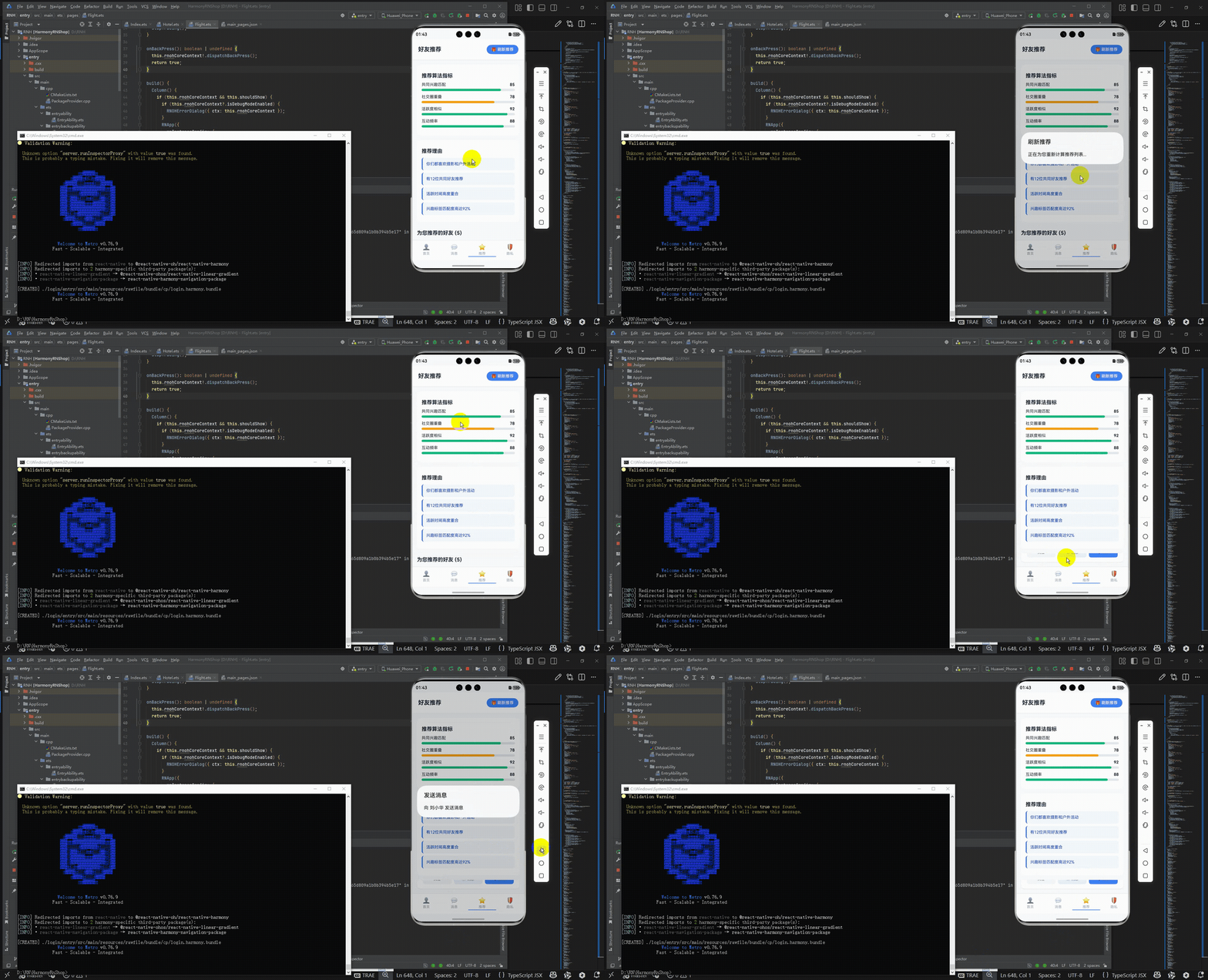
最后运行效果图如下显示:
欢迎大家加入开源鸿蒙跨平台开发者社区,一起共建开源鸿蒙跨平台生态。

作为“人工智能6S店”的官方数字引擎,为AI开发者与企业提供一个覆盖软硬件全栈、一站式门户。
更多推荐

 21
21 0
0- 0


 已为社区贡献3条内容

所有评论(0)