
Flutter 框架跨平台鸿蒙开发 - 喝水提醒应用开发指南
定时提醒- 使用Timer实现定时检查和通知数据持久化- SharedPreferences存储记录和设置自定义绘制- CustomPainter绘制水波动画动画系统- 多个AnimationController协同工作交互设计- 快捷添加、滑动删除等便捷操作通过这个项目,可以学习到实用应用开发的完整流程,从数据管理到UI设计,从动画效果到用户体验,是Flutter开发的优秀实践案例。欢迎加入开源
·
Flutter实战:喝水提醒应用开发指南
前言
喝水提醒是一款实用的健康类应用,帮助用户养成良好的饮水习惯。这个项目涵盖了定时提醒、数据持久化、自定义绘制、动画效果等核心技术,是学习Flutter实用应用开发的优秀案例。
效果预览

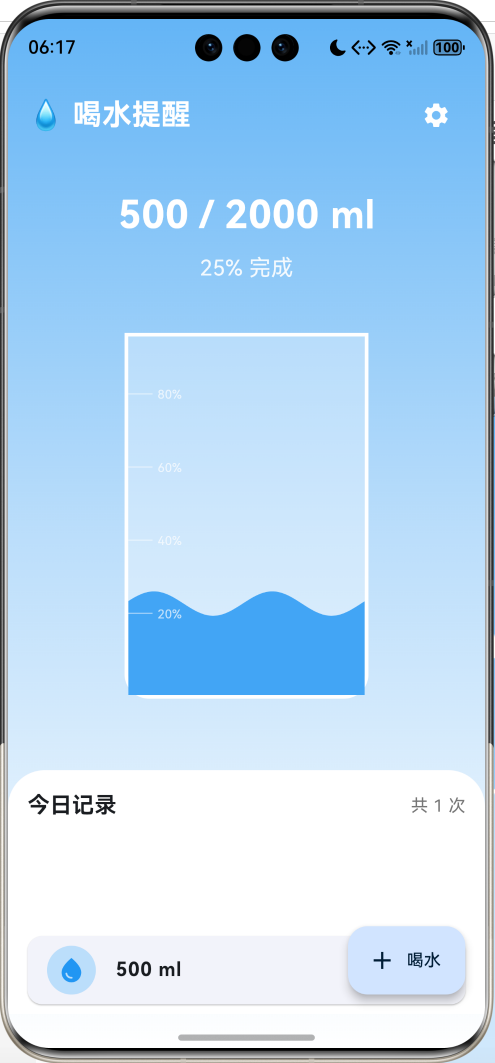
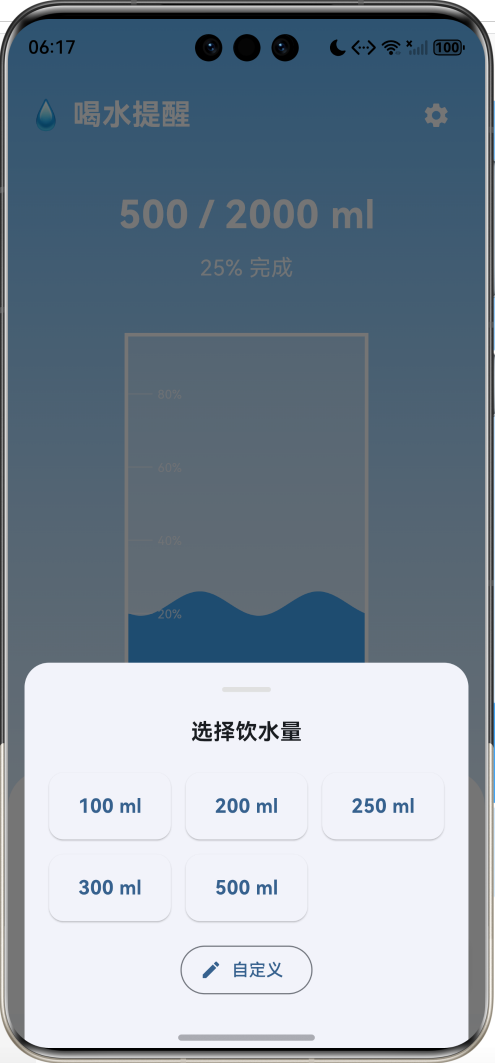
应用特性:
- 每日饮水目标设置
- 定时提醒功能
- 水杯动画和水波效果
- 饮水记录管理
- 数据本地持久化
- 快捷添加和自定义容量
技术架构
核心数据结构
饮水记录模型
class WaterRecord {
  final DateTime time;
  final int amount; // 毫升

  WaterRecord({required this.time, required this.amount});

  Map<String, dynamic> toJson() => {
        'time': time.toIso8601String(),
        'amount': amount,
      };

  factory WaterRecord.fromJson(Map<String, dynamic> json) => WaterRecord(
        time: DateTime.parse(json['time']),
        amount: json['amount'],
      );
}
应用状态
// 设置
int _dailyGoal = 2000;           // 每日目标(毫升)
int _reminderInterval = 60;      // 提醒间隔(分钟)
bool _reminderEnabled = false;   // 是否启用提醒

// 今日数据
List<WaterRecord> _todayRecords = [];
int _todayTotal = 0;

// 提醒
Timer? _reminderTimer;
DateTime? _nextReminderTime;
数据持久化
SharedPreferences存储
Future<void> _saveRecords() async {
  final prefs = await SharedPreferences.getInstance();
  final recordsJson = jsonEncode(
    _todayRecords.map((e) => e.toJson()).toList()
  );
  await prefs.setString('records', recordsJson);
}

Future<void> _loadTodayRecords() async {
  final prefs = await SharedPreferences.getInstance();
  final recordsJson = prefs.getString('records');

  if (recordsJson != null) {
    final List<dynamic> list = jsonDecode(recordsJson);
    final allRecords = list.map((e) => WaterRecord.fromJson(e)).toList();

    // 只保留今天的记录
    final today = DateTime.now();
    _todayRecords = allRecords.where((record) {
      return record.time.year == today.year &&
          record.time.month == today.month &&
          record.time.day == today.day;
    }).toList();

    _todayTotal = _todayRecords.fold(0, (sum, record) => sum + record.amount);
  }
}
设置存储
Future<void> _saveSettings() async {
  final prefs = await SharedPreferences.getInstance();
  await prefs.setInt('dailyGoal', _dailyGoal);
  await prefs.setInt('reminderInterval', _reminderInterval);
  await prefs.setBool('reminderEnabled', _reminderEnabled);
}
定时提醒系统
提醒逻辑
实现代码
void _startReminder() {
  _reminderTimer?.cancel();

  _lastReminderTime = DateTime.now();
  _nextReminderTime = _lastReminderTime!.add(
    Duration(minutes: _reminderInterval)
  );

  _reminderTimer = Timer.periodic(const Duration(seconds: 1), (timer) {
    final now = DateTime.now();
    if (now.isAfter(_nextReminderTime!)) {
      _showReminder();
      _nextReminderTime = now.add(Duration(minutes: _reminderInterval));
    }
    setState(() {});
  });
}

void _showReminder() {
  showDialog(
    context: context,
    builder: (context) => AlertDialog(
      title: const Row(
        children: [
          Text('💧 '),
          Text('该喝水啦!'),
        ],
      ),
      content: Column(
        mainAxisSize: MainAxisSize.min,
        children: [
          const Text('记得补充水分哦~'),
          Text('今日已喝: $_todayTotal ml'),
          Text('目标: $_dailyGoal ml'),
        ],
      ),
      actions: [
        TextButton(
          onPressed: () => Navigator.pop(context),
          child: const Text('稍后'),
        ),
        ElevatedButton(
          onPressed: () {
            Navigator.pop(context);
            _showAddWaterDialog();
          },
          child: const Text('去喝水'),
        ),
      ],
    ),
  );
}
倒计时显示
String _getTimeUntilReminder() {
  if (!_reminderEnabled || _nextReminderTime == null) return '';

  final now = DateTime.now();
  final diff = _nextReminderTime!.difference(now);

  if (diff.isNegative) return '即将提醒';

  final minutes = diff.inMinutes;
  final seconds = diff.inSeconds % 60;

  return '$minutes:${seconds.toString().padLeft(2, '0')}';
}
水波动画
CustomPainter实现
class WavePainter extends CustomPainter {
final double progress;
final Color color;
WavePainter({required this.progress, required this.color});
void paint(Canvas canvas, Size size) {
final paint = Paint()
..color = color
..style = PaintingStyle.fill;
final path = Path();
final waveHeight = 10.0;
final waveLength = size.width / 2;
path.moveTo(0, size.height);
// 绘制正弦波
for (double x = 0; x <= size.width; x++) {
final y = waveHeight * sin(
(x / waveLength * 2 * pi) + (progress * 2 * pi)
);
path.lineTo(x, y);
}
path.lineTo(size.width, size.height);
path.close();
canvas.drawPath(path, paint);
}
bool shouldRepaint(WavePainter oldDelegate) => true;
}
正弦波公式
y=A⋅sin(2πxλ+ϕ)y = A \cdot \sin\left(\frac{2\pi x}{\lambda} + \phi\right)y=A⋅sin(λ2πx+ϕ)
其中:
- AAA = 波幅(waveHeight)
- λ\lambdaλ = 波长(waveLength)
- ϕ\phiϕ = 相位(progress * 2π)
动画控制
late AnimationController _waveController;

_waveController = AnimationController(
  vsync: this,
  duration: const Duration(seconds: 2),
)..repeat();

// 使用
AnimatedBuilder(
  animation: _waveController,
  builder: (context, child) {
    return CustomPainter(
      painter: WavePainter(
        progress: _waveController.value,
        color: Colors.blue.shade400,
      ),
      size: const Size(200, 300),
    );
  },
)
水杯可视化
水杯结构
Container(
  width: 200,
  height: 300,
  decoration: BoxDecoration(
    color: Colors.white.withValues(alpha: 0.3),
    borderRadius: const BorderRadius.only(
      bottomLeft: Radius.circular(20),
      bottomRight: Radius.circular(20),
    ),
    border: Border.all(color: Colors.white, width: 3),
  ),
  child: Stack(
    children: [
      // 水波(底部对齐)
      Align(
        alignment: Alignment.bottomCenter,
        child: AnimatedContainer(
          duration: const Duration(milliseconds: 500),
          height: 300 * progress,
          child: WaveAnimation(),
        ),
      ),
      // 刻度线
      ...List.generate(5, (i) {
        final percent = (i + 1) * 20;
        return Positioned(
          bottom: 300 * (percent / 100),
          child: ScaleMark(percent: percent),
        );
      }),
    ],
  ),
)
进度计算
final progress = (_todayTotal / _dailyGoal).clamp(0.0, 1.0);
使用 clamp 确保进度在0-1之间,防止溢出。
添加饮水功能
快捷按钮
final List<int> _quickAmounts = [100, 200, 250, 300, 500];

void _showAddWaterDialog() {
  showModalBottomSheet(
    context: context,
    builder: (context) {
      return Column(
        mainAxisSize: MainAxisSize.min,
        children: [
          const Text('选择饮水量'),
          Wrap(
            spacing: 12,
            runSpacing: 12,
            children: _quickAmounts.map((amount) {
              return ElevatedButton(
                onPressed: () {
                  Navigator.pop(context);
                  _addWater(amount);
                },
                child: Text('$amount ml'),
              );
            }).toList(),
          ),
          OutlinedButton(
            onPressed: _showCustomAmountDialog,
            child: const Text('自定义'),
          ),
        ],
      );
    },
  );
}
添加记录
void _addWater(int amount) {
  setState(() {
    _todayRecords.add(WaterRecord(time: DateTime.now(), amount: amount));
    _todayTotal += amount;
  });

  _saveRecords();
  _addController.forward().then((_) => _addController.reverse());

  // 重置提醒计时
  if (_reminderEnabled) {
    _startReminder();
  }

  // 检查是否达成目标
  if (_todayTotal >= _dailyGoal) {
    _showCongratulations();
  }
}
记录管理
列表显示
ListView.builder(
  itemCount: _todayRecords.length,
  reverse: true,  // 最新记录在上
  itemBuilder: (context, index) {
    final record = _todayRecords[_todayRecords.length - 1 - index];
    return Dismissible(
      key: Key(record.time.toString()),
      direction: DismissDirection.endToStart,
      background: Container(
        alignment: Alignment.centerRight,
        color: Colors.red,
        child: const Icon(Icons.delete, color: Colors.white),
      ),
      onDismissed: (_) => _deleteRecord(index),
      child: ListTile(
        leading: const Icon(Icons.water_drop),
        title: Text('${record.amount} ml'),
        trailing: Text(_formatTime(record.time)),
      ),
    );
  },
)
滑动删除
使用 Dismissible 实现滑动删除功能:
direction: DismissDirection.endToStart- 只能从右向左滑background- 滑动时显示的背景onDismissed- 删除回调
设置界面
滑块设置
// 每日目标
Row(
  children: [
    Expanded(
      child: Slider(
        value: tempGoal.toDouble(),
        min: 1000,
        max: 5000,
        divisions: 40,
        label: '$tempGoal ml',
        onChanged: (value) {
          setState(() => tempGoal = value.toInt());
        },
      ),
    ),
    Text('$tempGoal ml'),
  ],
)

// 提醒间隔
Slider(
  value: tempInterval.toDouble(),
  min: 15,
  max: 180,
  divisions: 11,
  label: '$tempInterval 分钟',
  onChanged: (value) {
    setState(() => tempInterval = value.toInt());
  },
)
开关设置
SwitchListTile(
  title: const Text('启用提醒'),
  value: tempEnabled,
  onChanged: (value) {
    setState(() => tempEnabled = value);
  },
)
动画效果
添加水动画
late AnimationController _addController;

_addController = AnimationController(
  vsync: this,
  duration: const Duration(milliseconds: 300),
);

// 触发动画
_addController.forward().then((_) => _addController.reverse());

// 应用到水杯
AnimatedBuilder(
  animation: _addController,
  builder: (context, child) {
    return Transform.scale(
      scale: 1.0 + (_addController.value * 0.1),
      child: waterCupWidget,
    );
  },
)
水位变化动画
AnimatedContainer(
  duration: const Duration(milliseconds: 500),
  height: 300 * progress,
  child: WaveAnimation(),
)
健康建议
推荐饮水量
| 人群 | 每日推荐量 |
|---|---|
| 成年男性 | 2500-3000 ml |
| 成年女性 | 2000-2500 ml |
| 儿童 | 1500-2000 ml |
| 老年人 | 1500-2000 ml |
饮水时机
渲染错误: Mermaid 渲染失败: Parse error on line 3: ...itle 一天的饮水时间表 06:30 : 起床后 : 200-300m ----------------------^ Expecting 'EOF', 'SPACE', 'NEWLINE', 'title', 'acc_title', 'acc_descr', 'acc_descr_multiline_value', 'section', 'period', 'event', got 'INVALID'
扩展思路
性能优化
1. 定时器管理
void dispose() {
_waveController.dispose();
_addController.dispose();
_reminderTimer?.cancel(); // 取消定时器
super.dispose();
}
2. 数据过滤
// 只保留今天的记录,避免数据过多
_todayRecords = allRecords.where((record) {
  return record.time.year == today.year &&
      record.time.month == today.month &&
      record.time.day == today.day;
}).toList();
3. 动画优化
// 使用 shouldRepaint 控制重绘
bool shouldRepaint(WavePainter oldDelegate) => true;
总结
这个喝水提醒应用实现了完整的健康管理功能,核心技术点包括:
- 定时提醒 - 使用Timer实现定时检查和通知
- 数据持久化 - SharedPreferences存储记录和设置
- 自定义绘制 - CustomPainter绘制水波动画
- 动画系统 - 多个AnimationController协同工作
- 交互设计 - 快捷添加、滑动删除等便捷操作
通过这个项目,可以学习到实用应用开发的完整流程,从数据管理到UI设计,从动画效果到用户体验,是Flutter开发的优秀实践案例。
欢迎加入开源鸿蒙跨平台社区:https://openharmonycrossplatform.csdn.net

作为“人工智能6S店”的官方数字引擎,为AI开发者与企业提供一个覆盖软硬件全栈、一站式门户。
更多推荐
 6
6 0
0- 0



 已为社区贡献14条内容

所有评论(0)