
鸿蒙+flutter 跨平台开发——随机抽卡小游戏开发
本文介绍了使用Flutter框架开发跨平台随机抽卡小游戏的方法,重点展示其兼容鸿蒙OS的实现。游戏包含四种稀有度卡牌(普通60%、稀有30%、史诗8%、传奇2%),支持单抽和十连抽功能(十连保底稀有以上)。通过模块化设计实现了卡牌系统、抽卡机制和收藏系统,采用工厂模式生成卡牌数据,组件化展示UI。项目充分发挥Flutter的跨平台优势,同时考虑鸿蒙OS的设计风格,具有良好的扩展性和性能优化空间,为
目录
一、引言
随着移动应用开发的快速发展,跨平台开发框架越来越受到开发者的青睐。Flutter作为Google推出的跨平台UI框架,以其高性能、热重载和丰富的组件库,成为了跨平台开发的热门选择。而鸿蒙OS作为华为推出的分布式操作系统,也在不断发展壮大。本文将介绍如何使用Flutter开发一款兼容鸿蒙OS的随机抽卡小游戏,展示跨平台开发的优势和实现方式。
二、游戏规则说明
1. 卡牌稀有度
游戏包含四种稀有度的卡牌:
- 普通 :灰色边框,出现概率60%
- 稀有 :蓝色边框,出现概率30%
- 史诗 :紫色边框,出现概率8%
- 传奇 :橙色边框,出现概率2%
2. 抽卡规则
- 单抽 :消耗1次抽卡机会,获得1张随机卡牌
- 十连抽 :消耗10次抽卡机会,获得10张随机卡牌,至少包含1张稀有或以上品质的卡牌
3. 收藏系统
- 所有抽到的卡牌自动加入收藏夹
- 可以在收藏夹中查看所有卡牌
4. 游戏目标
- 收集不同稀有度的卡牌
- 体验抽卡的乐趣
三、项目结构设计
1. 核心类设计
- CardRarity :卡牌稀有度枚举
- Card :卡牌数据模型
- GachaPool :抽卡池管理类
- GachaGame :游戏主界面
- CardWidget :卡牌展示组件
2. 项目目录结构
flutter_harmony_text_demo/
├── lib/
│   └── main.dart          # 主程序入口
├── ohos/                  # 鸿蒙平台相关代码
├── pubspec.yaml           # 依赖配置
└── README.md              # 项目说明
四、核心功能实现
1. 卡牌数据模型
/// 卡牌稀有度枚举
enum CardRarity {
  common,  // 普通
  rare,    // 稀有
  epic,    // 史诗
  legendary, // 传奇
}

/// 卡牌类
class Card {
  final String id;
  final String name;
  final CardRarity rarity;
  final String description;
  final String imageUrl;

  Card({
    required this.id,
    required this.name,
    required this.rarity,
    required this.description,
    required this.imageUrl,
  });

  /// 创建随机卡牌
  factory Card.random() {
    final random = Random();
    final rarityValues = CardRarity.values;
    final rarity = rarityValues[random.nextInt(rarityValues.length)];
    final name = '${getRarityName(rarity)}卡牌${random.nextInt(100)}';
    final description = '这是一张${getRarityName(rarity)}级别的卡牌,拥有强大的能力。';

    // 使用颜色作为图片占位符
    final color = getRarityColor(rarity);
    final imageUrl = 'color://${color.value}';

    return Card(
      id: 'card_${random.nextInt(1000)}',
      name: name,
      rarity: rarity,
      description: description,
      imageUrl: imageUrl,
    );
  }
}
2.抽奖卡池的实现
/// 抽卡池类
class GachaPool {
  final Map<CardRarity, double> rarityProbabilities = {
    CardRarity.common: 0.6,    // 60% 普通
    CardRarity.rare: 0.3,      // 30% 稀有
    CardRarity.epic: 0.08,     // 8% 史诗
    CardRarity.legendary: 0.02, // 2% 传奇
  };

  final Random _random = Random();

  /// 抽取一张卡牌
  Card drawCard() {
    final double roll = _random.nextDouble();
    double cumulativeProbability = 0.0;

    for (var entry in rarityProbabilities.entries) {
      cumulativeProbability += entry.value;
      if (roll <= cumulativeProbability) {
        return Card.random();
      }
    }

    return Card.random(); // 默认返回随机卡牌
  }

  /// 十连抽
  List<Card> drawTenCards() {
    return List.generate(10, (_) => drawCard());
  }
}
3.游戏主页面
/// 抽卡游戏主页面
class GachaGame extends StatefulWidget {
  const GachaGame({super.key});

  @override
  State<GachaGame> createState() => _GachaGameState();
}

class _GachaGameState extends State<GachaGame> {
  final GachaPool _gachaPool = GachaPool();
  List<Card> _drawnCards = [];
  List<Card> _collection = [];
  bool _isDrawing = false;
  int _drawCount = 0;

  // 省略build方法...

  /// 单抽
  Future<void> _drawSingleCard() async {
    setState(() {
      _isDrawing = true;
    });

    // 模拟抽卡动画延迟
    await Future.delayed(const Duration(seconds: 1));

    setState(() {
      final card = _gachaPool.drawCard();
      _drawnCards = [card];
      _collection.add(card);
      _drawCount++;
      _isDrawing = false;
    });
  }

  /// 十连抽
  Future<void> _drawTenCards() async {
    setState(() {
      _isDrawing = true;
    });

    // 模拟抽卡动画延迟
    await Future.delayed(const Duration(seconds: 2));

    setState(() {
      final cards = _gachaPool.drawTenCards();
      _drawnCards = cards;
      _collection.addAll(cards);
      _drawCount += 10;
      _isDrawing = false;
    });
  }

  /// 显示收藏夹
  void _showCollection() {
    // 省略实现...
  }
}
4.卡牌展示组件
/// 卡牌组件
class CardWidget extends StatelessWidget {
  final Card card;
  final bool isSmall;

  const CardWidget({Key? key, required this.card, this.isSmall = false}) : super(key: key);

  @override
  Widget build(BuildContext context) {
    final cardColor = getRarityColor(card.rarity);
    final fontSize = isSmall ? 12.0 : 16.0;
    final imageSize = isSmall ? 80.0 : 120.0;

    return Container(
      decoration: BoxDecoration(
        color: Colors.white,
        borderRadius: BorderRadius.circular(12.0),
        boxShadow: [
          BoxShadow(
            color: Colors.black.withOpacity(0.1),
            blurRadius: 8,
            offset: const Offset(0, 4),
          ),
        ],
        border: Border.all(
          color: cardColor,
          width: 2.0,
        ),
      ),
      child: Column(
        crossAxisAlignment: CrossAxisAlignment.stretch,
        children: [
          // 卡牌图片
          Expanded(
            child: Container(
              color: cardColor.withOpacity(0.1),
              child: Center(
                child: Icon(
                  Icons.star,
                  size: imageSize,
                  color: cardColor,
                ),
              ),
            ),
          ),

          // 卡牌信息
          Padding(
            padding: const EdgeInsets.all(8.0),
            child: Column(
              crossAxisAlignment: CrossAxisAlignment.center,
              children: [
                Text(
                  card.name,
                  style: TextStyle(
                    fontSize: fontSize,
                    fontWeight: FontWeight.bold,
                    color: cardColor,
                  ),
                  textAlign: TextAlign.center,
                  maxLines: 1,
                  overflow: TextOverflow.ellipsis,
                ),
                const SizedBox(height: 4.0),
                Text(
                  getRarityName(card.rarity),
                  style: TextStyle(
                    fontSize: fontSize * 0.8,
                    color: Colors.grey,
                  ),
                  textAlign: TextAlign.center,
                ),
              ],
            ),
          ),
        ],
      ),
    );
  }
}
五、运行效果展示
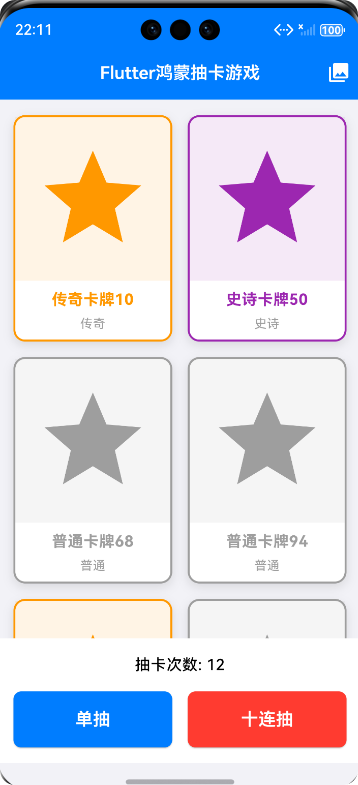
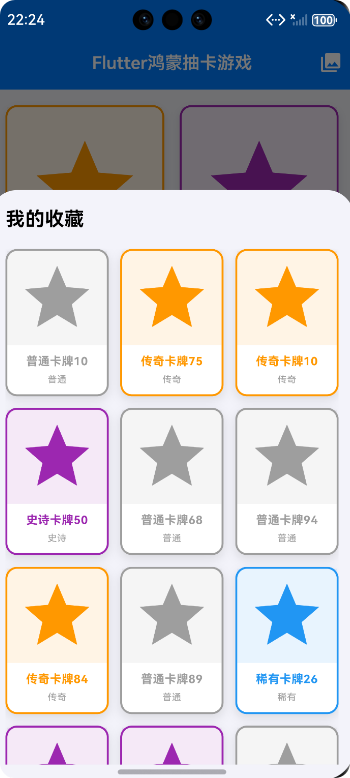
六、扩展性设计
1. 卡牌扩展
- 使用工厂模式生成卡牌,便于添加新的卡牌类型
- 卡牌数据与UI分离,修改卡牌属性不影响UI展示
- 支持从外部数据源加载卡牌数据
2. 功能扩展
- 模块化设计,便于添加新功能(如卡牌升级、合成系统)
- 预留扩展接口,支持未来添加社交分享、排行榜等功能
- 状态管理设计支持复杂功能扩展
3. 平台扩展
- 基于Flutter的跨平台特性,便于移植到更多平台
- 主题配置支持不同平台的设计风格适配
七、性能优化考虑
1. 组件复用
- 复用CardWidget组件展示不同卡牌
- 使用GridView.builder实现卡牌列表的懒加载
2. 内存管理
- 避免内存泄漏,及时释放资源
- 合理使用const构造函数,减少不必要的重建
- 优化图片资源加载(当前使用颜色占位符,可扩展为图片缓存)
3. 动画性能
- 使用Flutter内置动画,确保流畅性能
- 避免过度动画,影响游戏体验
- 合理设置动画时长,平衡视觉效果和性能
八、总结
本抽卡游戏采用了清晰的架构设计和模块化开发方式,确保了代码的可维护性和扩展性。通过Flutter框架实现了跨平台支持,并融合了鸿蒙OS的设计风格。核心功能包括卡牌系统、抽卡机制和收藏系统,提供了流畅的游戏体验。
这个设计思路可以作为中小型Flutter游戏开发的参考,展示了如何将跨平台技术与特定平台设计风格相结合,实现高质量的移动应用开发。
欢迎加入开源鸿蒙跨平台社区:https://openharmonycrossplatform.csdn.net

作为“人工智能6S店”的官方数字引擎,为AI开发者与企业提供一个覆盖软硬件全栈、一站式门户。
更多推荐

 7
7 0
0- 0


 已为社区贡献8条内容

所有评论(0)