
鸿蒙PC使用ffmpeg+electron实现视频中音频的提取
本文介绍了在鸿蒙PC环境下使用Electron和FFmpeg实现视频音频提取的方案。重点解决了两个关键问题:输出路径访问错误和音频质量异常,提出了分层架构设计,将系统差异隔离到桥接层。详细阐述了两种输出目录适配方案:Electron dialog方案和鸿蒙File Picker方案,并提供了ArkTS实现文件选择器的代码示例。该方案充分考虑了鸿蒙PC环境的特殊约束,如文件系统权限、工具链限制等,通
鸿蒙PC使用ffmpeg+electron实现视频中音频的提取
本文记录一次在 HarmonyOS NEXT(鸿蒙PC)环境中,用 Electron + FFmpeg(NAPI 原生模块)实现“从视频中提取音频并写出 WAV”的适配思路,以及两个典型问题的排错过程:
avio_open failed: No such file or directory(输出路径/目录问题)- 生成 WAV “音量很小、噪音严重”(重采样/声道布局与混音问题)
同时给出目录选择(输出到指定目录)的适配方式:Electron dialog 链路与鸿蒙 File Picker(DocumentViewPicker)链路。
1. 功能目标与约束
目标能力分三块:
- 选择输入视频文件(鸿蒙侧通过 Picker 选择文件,并在 JS 侧读取为
ArrayBuffer) - 选择输出目录(用户指定)
- FFmpeg 解码音频 → 重采样/格式转换 → 写 WAV 文件
鸿蒙PC的关键约束(最容易踩坑):
- 不能假设存在 Linux 常见目录(例如
/tmp的可用性与权限) - 文件系统有沙箱与权限模型,输出路径必须是可写且存在的目录
- 编译工具链对 C++ 控制流与作用域检查更严格(
goto cleanup很容易触发“跳转绕过初始化”错误)
2. 分层架构:把系统差异隔离到“桥接层”
为了降低适配成本,将逻辑拆分成三层:
- 渲染层(Electron:renderer.js):交互与业务编排,持有输入
ArrayBuffer、输出目录路径,调用decodeAudioToWavFromBuffer - 桥接层(Electron:main.js + preload.js):提供“目录选择”等系统交互能力,并通过 IPC 暴露给渲染层
- 原生层(C++:ffmpeg_addon.cc):只负责“解码/重采样/写 WAV”,不掺 UI、不掺权限弹窗
另外一条“系统文件选择”链路在鸿蒙侧可用 ArkTS 实现(File Picker + JS 绑定),它属于系统能力接入层,不在 Electron 三进程内。
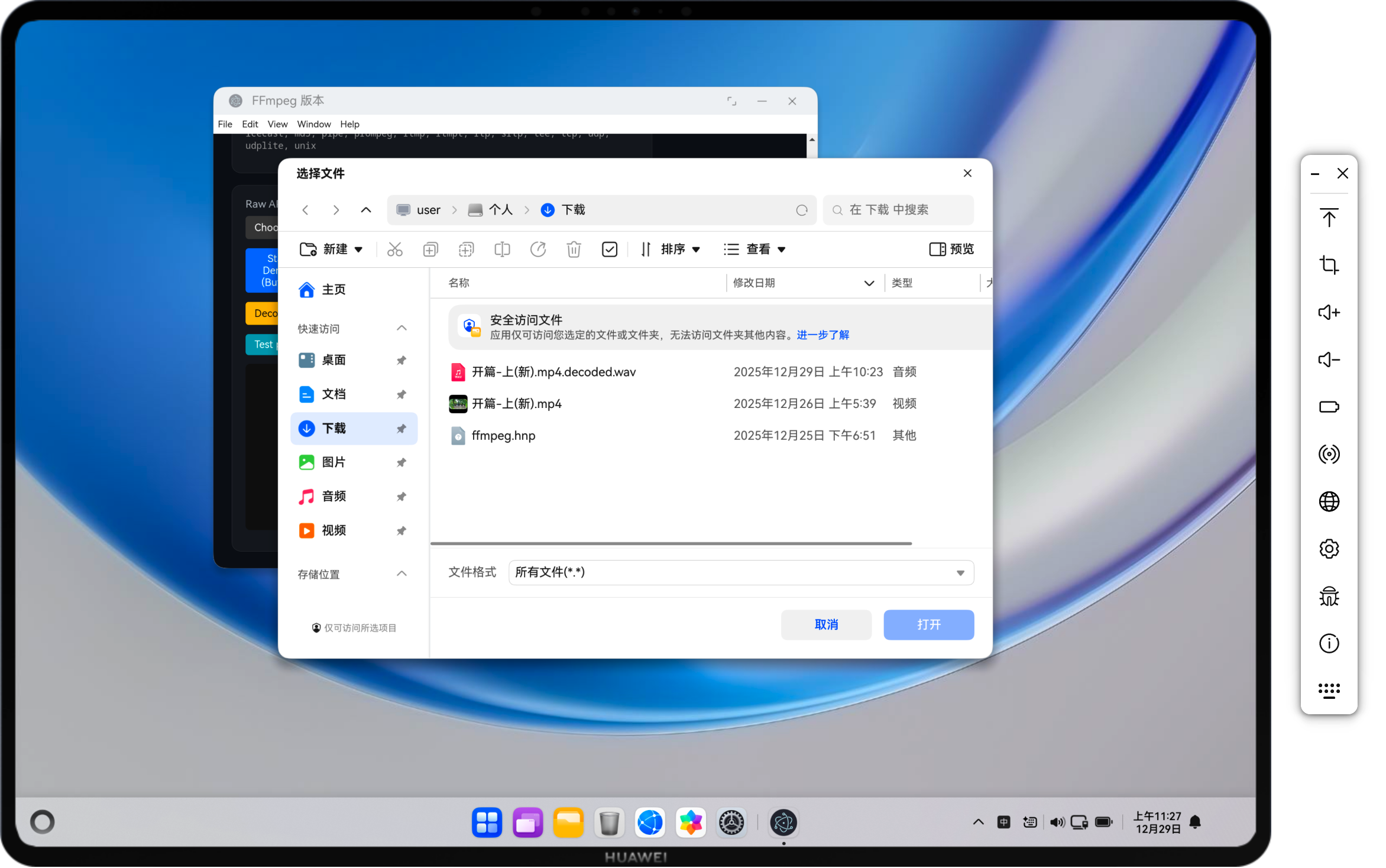
3. 选择输入文件:鸿蒙仅支持 Picker(DocumentViewPicker)
在鸿蒙环境中,文件选择应走系统能力模型:只能使用 Picker(DocumentViewPicker)。
思路:
- ArkTS 侧调用
picker.DocumentViewPicker().select(...)选择文件 - 可按后缀过滤(
fileSuffixFilters),并支持多选 - 结果做 uri → path 归一化后回传 JS(字符串化 JSON)
关键代码:
实现归属:ArkTS(鸿蒙侧 File Picker)
showDocumentViewPicker(params: SelectFileDialogParams, callback: (path: string) => void) {
  let DocumentSelectOptions = new picker.DocumentSelectOptions();
  if (params.multi_files) {
    DocumentSelectOptions.maxSelectNumber = FilePickerAdapter.MAX_SELECT_NUMBER;
  }
  const context = this.ctxAdapter.getContext();
  let allFileDescription = context.resourceManager.getStringSync(this.allFIleDescriptionId);
  if (params.extensions.length > 0) {
    DocumentSelectOptions.fileSuffixFilters = this.getFilterArray(params.extensions, params.descriptions);
    if (params.include_all_files) {
      DocumentSelectOptions.fileSuffixFilters.push(allFileDescription + "|.*");
    }
  } else {
    DocumentSelectOptions.fileSuffixFilters = [allFileDescription + "|.*"];
  }
  let documentPicker = new picker.DocumentViewPicker();
  documentPicker.select(DocumentSelectOptions).then((selectResult) => {
    selectResult = this.dirFilter(selectResult);
    callback(JSON.stringify(selectResult));
  }).catch((err: Error) => {
    callback('');
    LogUtil.error(TAG, `select failed with err: ${JSON.stringify(err)}`);
  });
}
实现归属:ArkTS(鸿蒙侧 JS 绑定)
export class FilePickerAdapterBind {
  static bind() {
    JsBindingUtils.bindFunction("FilePickerAdapter.ShowDocumentViewPicker", showDocumentViewPicker);
  }
}
4. 输出到指定目录:两种适配路线
4.1 路线 A:使用 Electron dialog(链路短、易验证)
实现方式:
- 在主进程注册 IPC:
ffmpeg:selectOutputDirectory - 调用
dialog.showOpenDialog({ properties: ['openDirectory'] })获取目录 - preload 暴露
selectOutputDirectory()到window.ffmpeg - 渲染层将目录与文件名拼成输出文件路径,然后传给原生层
decodeAudioToWavFromBuffer(buffer, outputPath)
关键代码:
主进程 IPC(目录选择):
实现归属:Electron(主进程)
ipcMain.handle('ffmpeg:selectOutputDirectory', async () => {
  const win = BrowserWindow.getFocusedWindow() || mainWindow || undefined;
  const result = await dialog.showOpenDialog(win, { properties: ['openDirectory'] });
  if (!result || result.canceled || !Array.isArray(result.filePaths) || result.filePaths.length === 0) {
    return '';
  }
  const selected = result.filePaths[0];
  return typeof selected === 'string' ? selected : String(selected ?? '');
});
preload 暴露(让渲染层可调用):
实现归属:Electron(preload)
const { contextBridge, ipcRenderer } = require('electron');

const api = {
  selectOutputDirectory: () => ipcRenderer.invoke('ffmpeg:selectOutputDirectory'),
};

try {
  contextBridge.exposeInMainWorld('ffmpeg', api);
} catch (e) {
  globalThis.ffmpeg = api;
}
渲染层调用(选目录 + 拼接输出路径 + 调原生层):
实现归属:Electron(渲染进程)
async function selectOutputDirectory() {
  if (!window.ffmpeg || typeof window.ffmpeg.selectOutputDirectory !== 'function') {
    log('Error: selectOutputDirectory API not available');
    return;
  }
  const dir = await withTimeout(window.ffmpeg.selectOutputDirectory(), 30000, 'selectOutputDirectory');
  if (!dir) {
    log('Output directory selection canceled');
    return;
  }
  selectedOutputDir = String(dir);
  const el = document.getElementById('output-dir');
  if (el) el.textContent = selectedOutputDir;
  log(`Output directory: ${selectedOutputDir}`);
}

async function testDecodeResampleWriteWav() {
  if (!selectedFileBuffer) {
    log('Error: No file buffer loaded');
    return;
  }
  if (!window.ffmpeg || typeof window.ffmpeg.decodeAudioToWavFromBuffer !== 'function') {
    log('Error: decodeAudioToWavFromBuffer API not available');
    return;
  }

  let outputPath = selectedFilePath ? `${selectedFilePath}.decoded.wav` : 'decoded_output.wav';
  if (selectedOutputDir) {
    const dir = String(selectedOutputDir).replace(/\/+$/, '');
    const baseName = selectedFileName ? String(selectedFileName) : 'decoded_output';
    outputPath = `${dir}/${baseName}.decoded.wav`;
  }

  const result = await withTimeout(
    window.ffmpeg.decodeAudioToWavFromBuffer(selectedFileBuffer, outputPath),
    60000,
    'decodeAudioToWavFromBuffer'
  );
  log(`Done. outputPath=${result.outputPath || outputPath}`);
}
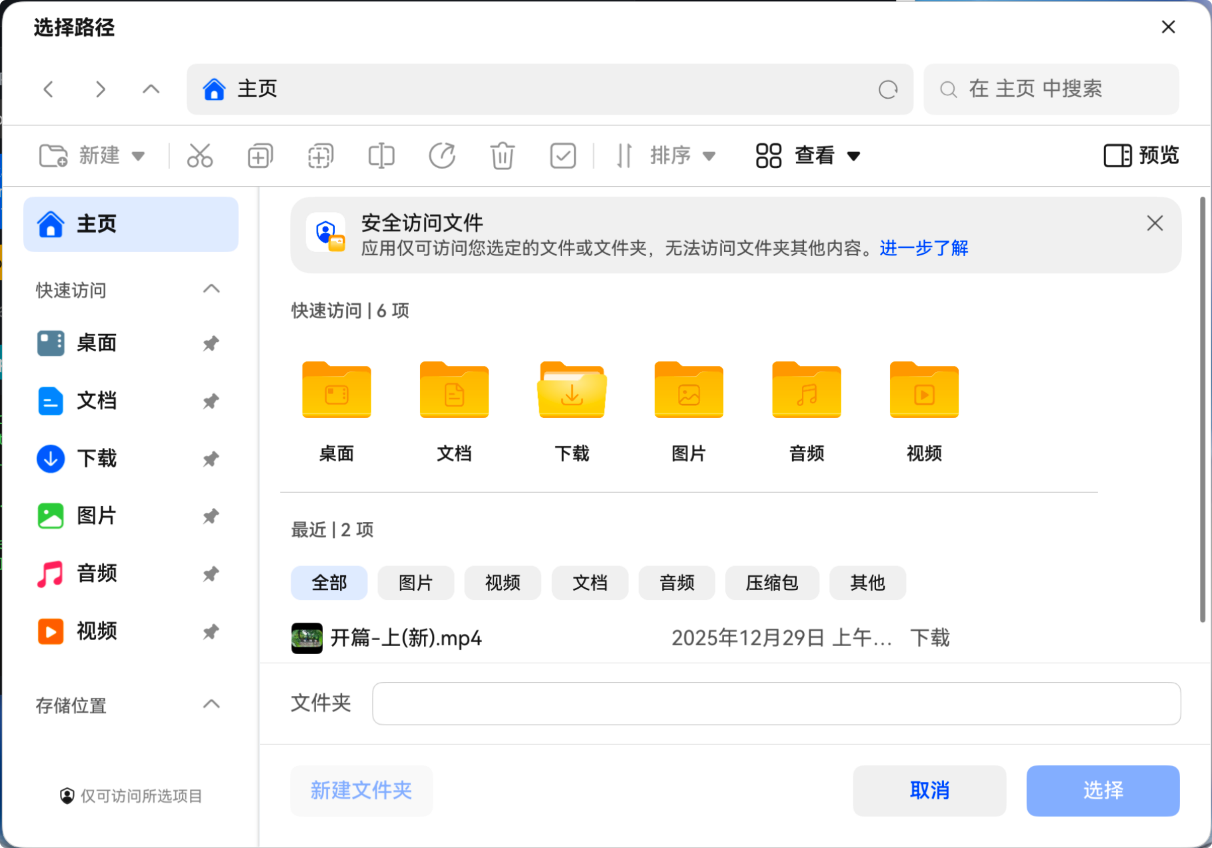
4.2 路线 B:使用鸿蒙 File Picker(DocumentViewPicker,符合系统能力模型)
如果需要完全对齐鸿蒙的文件选择能力,推荐按项目已有 Adapter 模式接入:
- ArkTS 侧使用
picker.DocumentViewPicker()并设置selectMode = FOLDER - 拿到结果后可选择做
fileAccessPersist,并将 uri 转换为系统路径 - 通过
JsBindingUtils.bindFunction暴露到 JS
关键代码(项目现有实现):
ArkTS 侧目录选择(Folder 模式 + 可选 fileAccessPersist):
实现归属:ArkTS(鸿蒙侧 File Picker)
showDirDocumentViewPicker(file_access_persist: boolean, callback: (path: string) => void) {
  let DocumentSelectOptions = new picker.DocumentSelectOptions();
  DocumentSelectOptions.selectMode = picker.DocumentSelectMode.FOLDER;
  let documentPicker = new picker.DocumentViewPicker();
  documentPicker.select(DocumentSelectOptions)
    .then((selectResult) => {
      try {
        if (file_access_persist && selectResult.length !== 0) {
          this.permissionManagerAdapter.fileAccessPersist(selectResult);
        }
        selectResult = this.dirFilter(selectResult);
        callback(JSON.stringify(selectResult));
      } catch (err) {
        callback('');
        LogUtil.error(TAG, `select Foloder failed with err: ${JSON.stringify(err)}`);
      }
    }).catch((err: Error) => {
      callback('');
      LogUtil.error(TAG, `select failed with err: ${JSON.stringify(err)}`);
    });
}
绑定到 JS(让 Web 侧可调用):
实现归属:ArkTS(鸿蒙侧 JS 绑定)
export class FilePickerAdapterBind {
  static bind() {
    JsBindingUtils.bindFunction("FilePickerAdapter.ShowDirDocumentViewPicker", showDirDocumentViewPicker);
  }
}
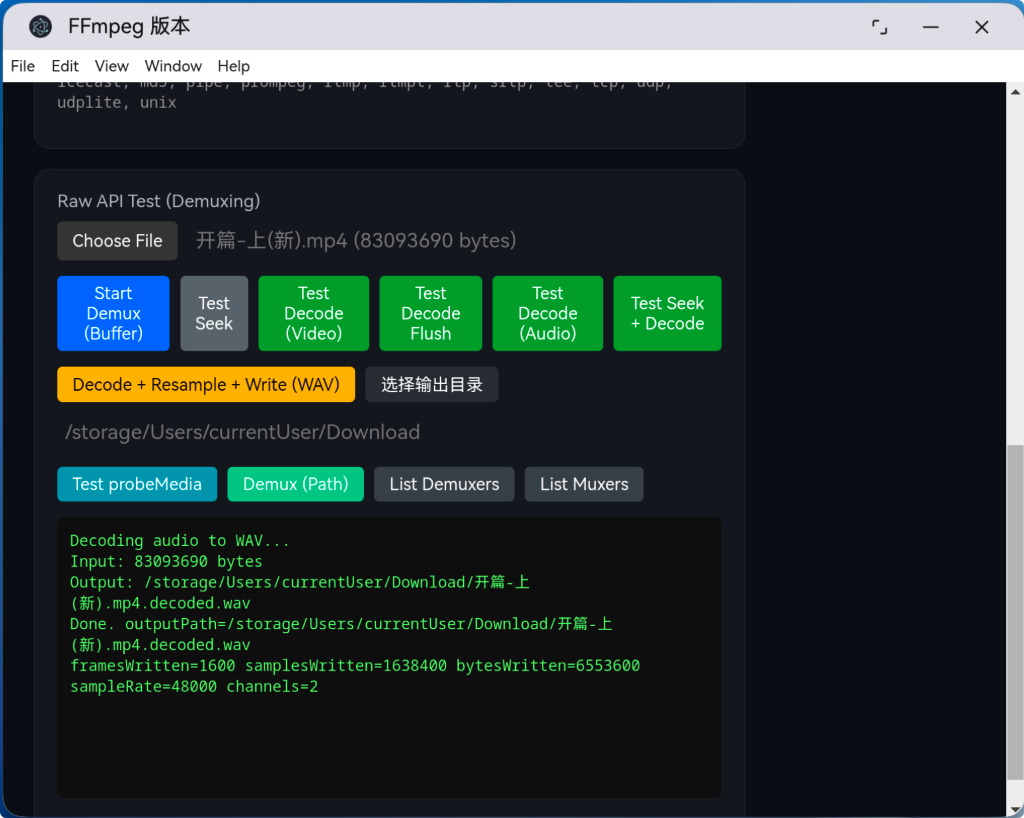
5. 典型报错 1:avio_open failed: No such file or directory 怎么排?
5.1 现象
点击“Decode + Resample + Write (WAV)”后,原生层抛错:
avio_open failed: No such file or directory- 或者输出文件写到了一个不可写目录(例如尝试
/tmp/...)
5.2 根因
这类问题绝大多数不是 FFmpeg 解码失败,而是“输出路径不可用”:
- 目录不存在(比如传入了一个没有创建的路径)
- 目录不可写(沙箱权限、系统目录不可写)
- 只给了相对路径/文件名,当前工作目录不可控
5.3 排错策略
让错误信息“可见化”,输出:
- FFmpeg 返回码的字符串(
AvErrorToString) - 所有尝试过的候选路径列表
项目实现做法是在写 WAV 前构造候选路径并循环 avio_open:
实现归属:C++(N-API 原生模块 / FFmpeg 写文件)
std::vector<std::string> candidates;
candidates.push_back(outputPath);
if (!outputPath.empty()) {
  std::string base = PathBasename(outputPath);
  if (outputPath.find('/') == std::string::npos) {
    std::vector<std::string> dirs;
    dirs.push_back("/data/storage/el2/base/files");
    dirs.push_back("/data/storage/el2/base/cache");
    dirs.push_back("/data/storage/el1/base/files");
    dirs.push_back("/data/storage/el1/base/cache");
    dirs.push_back("/data/local/tmp");
    dirs.push_back("/tmp");
    for (const auto& d : dirs) {
      if (EnsureDirExists(d)) {
        candidates.push_back(JoinPath(d, outputPath));
      }
    }
  } else if (!base.empty()) {
    std::vector<std::string> dirs;
    dirs.push_back("/data/storage/el2/base/files");
    dirs.push_back("/data/storage/el2/base/cache");
    dirs.push_back("/data/storage/el1/base/files");
    dirs.push_back("/data/storage/el1/base/cache");
    dirs.push_back("/data/local/tmp");
    dirs.push_back("/tmp");
    for (const auto& d : dirs) {
      if (EnsureDirExists(d)) {
        candidates.push_back(JoinPath(d, base));
      }
    }
  }
}

int lastRet = AVERROR(EACCES);
for (const auto& p : candidates) {
  if (p.empty()) continue;
  if (outFmt->pb) {
    avio_closep(&outFmt->pb);
  }
  int r = avio_open(&outFmt->pb, p.c_str(), AVIO_FLAG_WRITE);
  lastRet = r;
  if (r >= 0) {
    outputPathUsed = p;
    break;
  }
}
if (!outFmt->pb) {
  std::ostringstream oss;
  oss << "avio_open failed: " << AvErrorToString(lastRet) << " tried=";
  for (size_t i = 0; i < candidates.size(); i++) {
    if (i) oss << ",";
    oss << candidates[i];
  }
  napi_throw_error(env, "ERR_AVIO_OPEN", oss.str().c_str());
  goto cleanup;
}
这样一旦失败,就能直接看出“到底是哪个目录不可用”,而不是停留在猜测层。
6. 典型报错 2:ninja: build stopped: subcommand failed / goto cleanup 跳转绕过初始化
6.1 现象
构建时出现类似信息:
error: cannot jump from this goto statement to its labelnote: jump bypasses variable initialization- 最终
ninja: build stopped: subcommand failed
对应日志一般会包含类似信息:
error: cannot jump from this goto statement to its labelnote: jump bypasses variable initialization
6.2 根因
C++ 中 goto cleanup; 如果跳过了某些变量的初始化(尤其是带初始化表达式或更复杂生命周期的对象),在更严格的编译设置下会被直接判错。
6.3 解决思路
两条常用解法:
- 将可能被
goto跨越的变量提前声明到函数开头(只声明,或初始化为安全默认值) - 通过更明确的作用域结构,把会
goto的代码与变量初始化隔离,避免跨作用域跳转
7. 生成 WAV “音量很小、噪音严重”的原因与修复
7.1 现象
同一段视频,提取出的 WAV 相比原视频:
- 听感音量明显更小
- 噪音/底噪更明显
7.2 根因分析
最常见的组合原因是“强制重采样 + 强制混音”:
- 强制输出为 44100Hz + 2 声道,会对多声道/非 44.1k 输入进行 downmix 与重采样
downmix 常见效果是整体电平衰减,导致“声音小”;电平下降后,量化噪声/底噪相对更明显,听感“噪音重”。 - 输入声道布局如果为
AV_CHANNEL_ORDER_UNSPEC,直接拿来做重采样/混音可能产生不稳定的映射矩阵,进一步影响音质。
7.3 修复策略
核心原则:尽量不做不必要的变换。
本次修复点:
- 输出采样率保持输入采样率:
outRate = decCtx->sample_rate - 输出声道布局保持输入声道布局(不再强制 2 声道)
- 输入布局为
UNSPEC时补全默认布局,避免映射异常 - 重采样器质量参数调整,关闭抖动以降低噪感
- 补全 WAV 头关键参数
block_align
对应实现:
输入布局补全 + 输出参数尽量贴近输入:
实现归属:C++(N-API 原生模块 / 重采样输出参数)
if (decCtx->ch_layout.nb_channels <= 0) {
  av_channel_layout_default(&decCtx->ch_layout, 2);
} else if (decCtx->ch_layout.order == AV_CHANNEL_ORDER_UNSPEC) {
  AVChannelLayout fixed;
  av_channel_layout_uninit(&fixed);
  av_channel_layout_default(&fixed, decCtx->ch_layout.nb_channels);
  av_channel_layout_uninit(&decCtx->ch_layout);
  decCtx->ch_layout = fixed;
}

outRate = decCtx->sample_rate;
outFmtSample = AV_SAMPLE_FMT_S16;
av_channel_layout_copy(&out_ch_layout, &decCtx->ch_layout);
av_channel_layout_copy(&in_ch_layout, &decCtx->ch_layout);
swr 参数(降低不必要噪感):
实现归属:C++(N-API 原生模块 / swresample 参数)
av_opt_set_int(swr, "dither_method", SWR_DITHER_NONE, 0);
av_opt_set_int(swr, "filter_size", 32, 0);
av_opt_set_int(swr, "phase_shift", 10, 0);
av_opt_set_int(swr, "linear_interp", 1, 0);
av_opt_set_double(swr, "cutoff", 0.97, 0);
WAV 头关键字段(block_align):
实现归属:C++(N-API 原生模块 / WAV 头参数)
outStream->codecpar->bits_per_coded_sample = 16;
outStream->codecpar->block_align = out_ch_layout.nb_channels * av_get_bytes_per_sample(outFmtSample);
outStream->codecpar->bit_rate = (int64_t)outRate * out_ch_layout.nb_channels * 16;
8. 一套可复用的排错方法论
遇到“鸿蒙适配问题”时,优先按以下顺序推进:
- 先判层:UI/桥接/原生哪个层的锅
- 路径/权限通常在桥接层
- 音质/采样率/声道通常在原生层
- 再最小化复现:固定输入 buffer + 固定输出目录,排除 UI 干扰
- 把不可见变可见:对
avio_open这类失败,必须打印“错误码 + 尝试路径列表”
这样可以把“猜测排错”变成“证据排错”,效率会高很多。

作为“人工智能6S店”的官方数字引擎,为AI开发者与企业提供一个覆盖软硬件全栈、一站式门户。
更多推荐

 16
16 0
0- 0


 已为社区贡献4条内容

所有评论(0)