
【江鸟中原】鸿蒙应用开发——转盘
鸿蒙应用转盘
·
这是一个基于HarmonyOS ArkUI框架开发的多功能转盘应用,用户可以通过它创建、管理多个个性化转盘,用于抽奖、决策、游戏等多种场景。
技术栈
-
开发框架:ArkUI (HarmonyOS)
-
编程语言:ArkTS (TypeScript的超集)
-
开发工具:DevEco Studio
-
目标平台:HarmonyOS设备(手机、平板等)
二、核心功能详解
1. 多转盘管理系统 🔄
| 功能 | 描述 | 用户场景 |
|---|---|---|
| 创建转盘 | 用户可以创建无限个转盘,每个转盘独立管理 | 老师创建不同班级的抽奖转盘 |
| 切换转盘 | 一键在不同转盘间切换 | 家庭抽奖、公司团建快速切换 |
| 重命名转盘 | 自定义转盘名称 | 将"转盘1"改为"年会抽奖" |
| 删除转盘 | 删除不需要的转盘 | 清理过期活动转盘 |
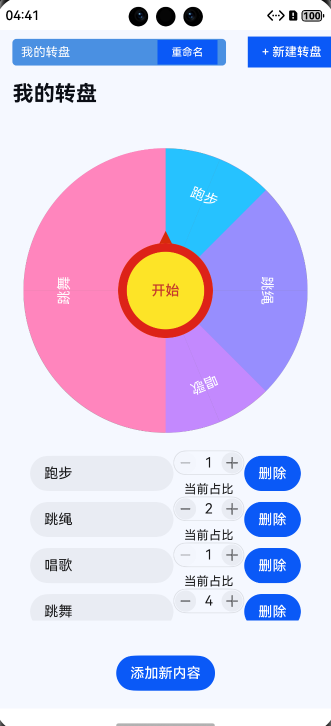
界面展示:
text
[我的转盘] [班级抽奖] [年会抽奖] [+新建转盘]
      ↑          ↑         ↑
  点击切换    点击切换   点击切换
2. 转盘内容编辑 ✏️
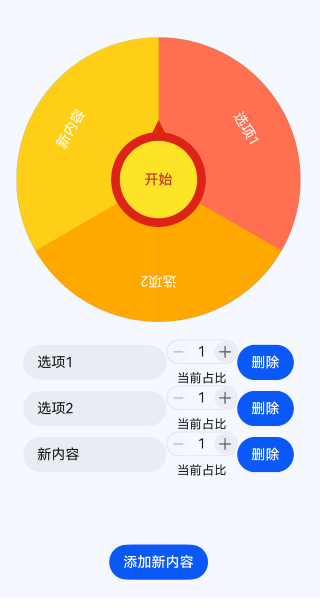
4. 可视化界面 🎨
| 组件 | 功能 | 设计特点 |
|---|---|---|
| 扇形绘制 | 绘制各种角度的扇形 | 根据比例自动计算角度 |
| 颜色系统 | 自动配色,美观协调 | 预定义色板,避免颜色冲突 |
| 指针设计 | 醒目的三角指针 | 始终指向当前选中项 |
| 响应式布局 | 适配不同屏幕尺寸 | 使用lpx单位自动适配 |
| 阴影效果 | 3D立体感转盘 | 提升视觉层次 |
|
功能 |
描述 | 用户场景 | ||||||||||||||||||
|---|---|---|---|---|---|---|---|---|---|---|---|---|---|---|---|---|---|---|---|---|
| 添加选项 | 动态添加转盘格子 | 抽奖活动增加奖品选项 | ||||||||||||||||||
| 删除选项 | 删除不需要的格子 | 移除已抽完的奖品 | ||||||||||||||||||
| 修改标题 | 实时编辑选项名称 | "一等奖"改为"iPhone 15" | ||||||||||||||||||
| 调整比例 | 设置选项出现概率 | 让特等奖概率更低 | ||||||||||||||||||
| 颜色管理 | 自动分配美观颜色 | 每个扇形不同颜色区分
3. 智能转盘旋转 🎯
|
本文章和项目参考dandad,,鸿蒙NEXT开发案例:转盘 | 华为开发者联盟,但笔者考虑到单转盘过于单调添加了转盘保存和命名等因素,并对项目进行一定重构,原链接为笔者提供灵感特此感谢,侵权可删。
表明出处可转载修改。有项目具体开发教程如需要可联系笔者或关注笔者。
完整代码如下:
import { CounterComponent, CounterType } from '@kit.ArkUI'; // 导入计数器组件和计数器类型

// 定义扇形组件
@Component
struct Sector {
  @Prop radius: number; // 扇形的半径
  @Prop angle: number; // 扇形的角度
  @Prop color: string; // 扇形的颜色

  // 创建扇形路径的函数
  createSectorPath(radius: number, angle: number): string {
    const centerX = radius / 2; // 计算扇形中心的X坐标
    const centerY = radius / 2; // 计算扇形中心的Y坐标
    const startX = centerX; // 扇形起始点的X坐标
    const startY = centerY - radius; // 扇形起始点的Y坐标
    const halfAngle = angle / 4; // 计算半个角度

    // 计算扇形结束点1的坐标
    const endX1 = centerX + radius * Math.cos((halfAngle * Math.PI) / 180);
    const endY1 = centerY - radius * Math.sin((halfAngle * Math.PI) / 180);

    // 计算扇形结束点2的坐标
    const endX2 = centerX + radius * Math.cos((-halfAngle * Math.PI) / 180);
    const endY2 = centerY - radius * Math.sin((-halfAngle * Math.PI) / 180);

    // 判断是否为大弧
    const largeArcFlag = angle / 2 > 180 ? 1 : 0;
    const sweepFlag = 1; // 设置弧线方向为顺时针

    // 生成SVG路径命令
    const pathCommands =
      `M${startX} ${startY} A${radius} ${radius} 0 ${largeArcFlag} ${sweepFlag} ${endX1} ${endY1} L${centerX} ${centerY} L${endX2} ${endY2} A${radius} ${radius} 0 ${largeArcFlag} ${1 -
        sweepFlag} ${startX} ${startY} Z`;
    return pathCommands; // 返回路径命令
  }

  // 构建扇形组件
  build() {
    Stack() {
      // 创建第一个扇形路径
      Path()
        .width(`${this.radius}px`) // 设置宽度为半径
        .height(`${this.radius}px`) // 设置高度为半径
        .commands(this.createSectorPath(this.radius, this.angle)) // 设置路径命令
        .fillOpacity(1) // 设置填充透明度
        .fill(this.color) // 设置填充颜色
        .strokeWidth(0) // 设置边框宽度为0
        .rotate({ angle: this.angle / 4 - 90 }); // 旋转扇形

      // 创建第二个扇形路径
      Path()
        .width(`${this.radius}px`) // 设置宽度为半径
        .height(`${this.radius}px`) // 设置高度为半径
        .commands(this.createSectorPath(this.radius, this.angle)) // 设置路径命令
        .fillOpacity(1) // 设置填充透明度
        .fill(this.color) // 设置填充颜色
        .strokeWidth(0) // 设置边框宽度为0
        .rotate({ angle: 180 - (this.angle / 4 - 90) }); // 旋转扇形
    }
  }
}

// 定义单元格类
@ObservedV2
class Cell {
  @Trace angle: number = 0; // 扇形的角度
  @Trace title: string; // 当前格子的标题
  @Trace color: string; // 背景颜色
  @Trace rotate: number = 0; // 在转盘要旋转的角度
  angleStart: number = 0; // 轮盘所在区间的起始
  angleEnd: number = 0; // 轮盘所在区间的结束
  proportion: number = 0; // 所占比例

  // 构造函数
  constructor(proportion: number, title: string, color: string) {
    this.proportion = proportion; // 设置比例
    this.title = title; // 设置标题
    this.color = color; // 设置颜色
  }
}

// 定义转盘数据类
@ObservedV2
class WheelData {
  @Trace name: string; // 转盘名称
  @Trace cells: Cell[] = []; // 存储单元格的数组
  @Trace currentAngle: number = 0; // 当前转盘的角度
  @Trace selectedName: string = ""; // 选中的名称
  isAnimating: boolean = false; // 动画状态

  // 构造函数
  constructor(name: string) {
    this.name = name;
  }
}

// 定义转盘组件
@Entry
@Component
struct Wheel {
  @State wheels: WheelData[] = []; // 存储所有转盘的数组
  @State currentWheelIndex: number = 0; // 当前选中的转盘索引
  @State showCreateDialog: boolean = false; // 显示创建转盘对话框
  @State newWheelName: string = ""; // 新转盘名称
  @State showRenameDialog: boolean = false; // 显示重命名对话框
  @State renameText: string = ""; // 重命名文本
  @State wheelWidth: number = 600; // 转盘的宽度
  colorIndex: number = 0; // 颜色索引
  colorPalette: string[] = [ // 颜色调色板
    "#26c2ff",
    "#978efe",
    "#c389fe",
    "#ff85bd",
    "#ff7051",
    "#fea800",
    "#ffcf18",
    "#a9c92a"
  ];

  // 获取当前转盘
  private getCurrentWheel(): WheelData | null {
    return this.wheels.length > 0 && this.currentWheelIndex >= 0 && this.currentWheelIndex < this.wheels.length
      ? this.wheels[this.currentWheelIndex]
      : null;
  }

  // 组件即将出现时调用
  aboutToAppear(): void {
    // 创建默认转盘
    const defaultWheel = new WheelData("我的转盘");
    defaultWheel.cells.push(new Cell(1, "跑步", this.colorPalette[this.colorIndex++ % this.colorPalette.length]));
    defaultWheel.cells.push(new Cell(2, "跳绳", this.colorPalette[this.colorIndex++ % this.colorPalette.length]));
    defaultWheel.cells.push(new Cell(1, "唱歌", this.colorPalette[this.colorIndex++ % this.colorPalette.length]));
    defaultWheel.cells.push(new Cell(4, "跳舞", this.colorPalette[this.colorIndex++ % this.colorPalette.length]));
    this.wheels.push(defaultWheel);
    this.calculateAngles(defaultWheel);
  }

  // 计算每个单元格的角度
  private calculateAngles(wheel: WheelData) {
    if (!wheel || wheel.cells.length === 0) {
      return;
    }
    // 根据比例计算总比例
    const totalProportion = wheel.cells.reduce((sum, cell) => sum + cell.proportion, 0);
    wheel.cells.forEach(cell => {
      cell.angle = (cell.proportion * 360) / totalProportion; // 计算每个单元格的角度
    });

    let cumulativeAngle = 0; // 累计角度
    wheel.cells.forEach(cell => {
      cell.angleStart = cumulativeAngle; // 设置起始角度
      cumulativeAngle += cell.angle; // 更新累计角度
      cell.angleEnd = cumulativeAngle; // 设置结束角度
      cell.rotate = cumulativeAngle - (cell.angle / 2); // 计算旋转角度
    });
  }

  // 创建新转盘
  private createNewWheel(name: string) {
    if (name.trim().length === 0) {
      return;
    }
    const newWheel = new WheelData(name.trim());
    // 添加默认单元格
    newWheel.cells.push(new Cell(1, "选项1", this.colorPalette[this.colorIndex++ % this.colorPalette.length]));
    newWheel.cells.push(new Cell(1, "选项2", this.colorPalette[this.colorIndex++ % this.colorPalette.length]));
    this.wheels.push(newWheel);
    this.currentWheelIndex = this.wheels.length - 1;
    this.calculateAngles(newWheel);
    this.showCreateDialog = false;
    this.newWheelName = "";
  }

  // 删除转盘
  private deleteWheel(index: number) {
    if (this.wheels.length > 1) {
      this.wheels.splice(index, 1);
      if (this.currentWheelIndex >= this.wheels.length) {
        this.currentWheelIndex = this.wheels.length - 1;
      }
      if (this.currentWheelIndex < 0) {
        this.currentWheelIndex = 0;
      }
    }
  }

  // 重命名转盘
  private renameWheel(index: number, newName: string) {
    if (newName.trim().length > 0 && index >= 0 && index < this.wheels.length) {
      this.wheels[index].name = newName.trim();
      this.showRenameDialog = false;
      this.renameText = "";
    }
  }

  // 构建转盘组件
  build() {
    Stack() {
      Column() {
      // 转盘列表和切换区域
      Row() {
        // 转盘选择器
        if (this.wheels.length > 0) {
          Scroll() {
            Row() {
              ForEach(this.wheels, (wheel: WheelData, index: number) => {
                Row() {
                  Text(wheel.name)
                    .fontSize(14)
                    .fontColor(this.currentWheelIndex === index ? "#ffffff" : "#333333")
                    .maxLines(1)
                    .textOverflow({ overflow: TextOverflow.Ellipsis })
                    .layoutWeight(1)
                    .constraintSize({ maxWidth: 150 })

                  if (this.currentWheelIndex === index) {
                    Button('重命名')
                      .type(ButtonType.Normal)
                      .fontSize(12)
                      .constraintSize({ minWidth: 60 })
                      .height(28)
                      .margin({ left: 5 })
                      .onClick(() => {
                        this.renameText = wheel.name;
                        this.showRenameDialog = true;
                      })

                    if (this.wheels.length > 1) {
                      Button('删除')
                        .type(ButtonType.Normal)
                        .fontSize(12)
                        .constraintSize({ minWidth: 50 })
                        .height(28)
                        .margin({ left: 5 })
                        .backgroundColor('#FF4444')
                        .onClick(() => {
                          this.deleteWheel(index);
                        })
                    }
                  }
                }
                .padding({ left: 10, right: 10, top: 5, bottom: 5 })
                .borderRadius(5)
                .backgroundColor(this.currentWheelIndex === index ? "#4a90e2" : "#e0e0e0")
                .margin({ right: 5 })
                .onClick(() => {
                  this.currentWheelIndex = index;
                })
              })
            }
            .padding({ left: 10, right: 10 })
          }
          .scrollable(ScrollDirection.Horizontal)
          .scrollBar(BarState.Auto)
        }

        // 创建新转盘按钮
        Button('+ 新建转盘')
          .type(ButtonType.Normal)
          .fontSize(14)
          .width(100)
          .height(35)
          .margin({ left: 10 })
          .onClick(() => {
            this.newWheelName = "";
            this.showCreateDialog = true;
          })
      }
      .width('100%')
      .height(50)
      .padding({ left: 10, right: 10, top: 10, bottom: 10 })
      .justifyContent(FlexAlign.Start)

      // 转盘名称显示(可编辑)
      if (this.getCurrentWheel()) {
        Row() {
          Text(this.getCurrentWheel()!.name)
            .fontSize(24)
            .fontWeight(FontWeight.Bold)
            .fontColor("#0b0e15")
            .layoutWeight(1)
        }
        .width('100%')
        .height(44)
        .padding({ left: 20, right: 20 })
        .justifyContent(FlexAlign.Center)
      }

      // 显示当前状态
      if (this.getCurrentWheel()) {
        Text(this.getCurrentWheel()!.isAnimating ? '旋转中' : `${this.getCurrentWheel()!.selectedName}`)
          .fontSize(20)
          .fontColor("#0b0e15")
          .height(40)
      }

      if (this.getCurrentWheel()) {
        Stack() {
          Stack() {
            // 遍历每个单元格并绘制扇形
            ForEach(this.getCurrentWheel()!.cells, (cell: Cell) => {
              Stack() {
                Sector({ radius: lpx2px(this.wheelWidth) / 2, angle: cell.angle, color: cell.color }); // 创建扇形
                Text(cell.title).fontColor(Color.White).margin({ bottom: `${this.wheelWidth / 1.4}lpx` }); // 显示单元格标题
              }.width('100%').height('100%').rotate({ angle: cell.rotate }); // 设置宽度和高度,并旋转
            });
          }
          .borderRadius('50%') // 设置圆角
          .backgroundColor(Color.Gray) // 设置背景颜色
          .width(`${this.wheelWidth}lpx`) // 设置转盘宽度
          .height(`${this.wheelWidth}lpx`) // 设置转盘高度
          .rotate({ angle: this.getCurrentWheel()!.currentAngle }); // 旋转转盘

        // 创建指针
        Polygon({ width: 20, height: 10 })
          .points([[0, 0], [10, -20], [20, 0]]) // 设置指针的点
          .fill("#d72b0b") // 设置指针颜色
          .height(20) // 设置指针高度
          .margin({ bottom: '140lpx' }); // 设置指针底部边距

          // 创建开始按钮
          Button('开始')
            .fontColor("#c53a2c") // 设置按钮字体颜色
            .borderWidth(10) // 设置按钮边框宽度
            .borderColor("#dd2218") // 设置按钮边框颜色
            .backgroundColor("#fde427") // 设置按钮背景颜色
            .width('200lpx') // 设置按钮宽度
            .height('200lpx') // 设置按钮高度
            .borderRadius('50%') // 设置按钮为圆形
            .clickEffect({ level: ClickEffectLevel.LIGHT }) // 设置点击效果
            .onClick(() => { // 点击按钮时的回调函数
              const currentWheel = this.getCurrentWheel();
              if (!currentWheel || currentWheel.isAnimating) { // 如果正在动画中,返回
                return;
              }
              currentWheel.selectedName = ""; // 清空选中的名称
              currentWheel.isAnimating = true; // 设置动画状态为正在动画
              animateTo({ // 开始动画
                duration: 5000, // 动画持续时间为5000毫秒
                curve: Curve.EaseInOut, // 动画曲线为缓入缓出
                onFinish: () => { // 动画完成后的回调
                  currentWheel.currentAngle %= 360; // 保持当前角度在0到360之间
                  for (const cell of currentWheel.cells) { // 遍历每个单元格
                    // 检查当前角度是否在单元格的角度范围内
                    if (360 - currentWheel.currentAngle >= cell.angleStart && 360 - currentWheel.currentAngle <= cell.angleEnd) {
                      currentWheel.selectedName = cell.title; // 设置选中的名称为当前单元格的标题
                      break; // 找到后退出循环
                    }
                  }
                  currentWheel.isAnimating = false; // 设置动画状态为未动画
                },
              }, () => { // 动画进行中的回调
                currentWheel.currentAngle += (360 * 5 + Math.floor(Math.random() * 360)); // 更新当前角度,增加随机旋转
              });
            });
        }
      }

      // 创建滚动区域
      if (this.getCurrentWheel()) {
        Scroll() {
          Column() {
            // 遍历每个单元格,创建输入框和计数器
            ForEach(this.getCurrentWheel()!.cells, (item: Cell, index: number) => {
              Row() {
                // 创建文本输入框,显示单元格标题
                TextInput({ text: item.title })
                  .layoutWeight(1) // 设置输入框占据剩余空间
                  .onChange((value) => { // 输入框内容变化时的回调
                    item.title = value; // 更新单元格标题
                  });
                // 创建计数器组件
                CounterComponent({
                  options: {
                    type: CounterType.COMPACT, // 设置计数器类型为紧凑型
                    numberOptions: {
                      label: `当前占比`, // 设置计数器标签
                      value: item.proportion, // 设置计数器初始值
                      min: 1, // 设置最小值
                      max: 100, // 设置最大值
                      step: 1, // 设置步长
                      onChange: (value: number) => { // 计数器值变化时的回调
                        item.proportion = value; // 更新单元格的比例
                        this.calculateAngles(this.getCurrentWheel()!); // 重新计算角度
                      }
                    }
                  }
                });
                // 创建删除按钮
                Button('删除').onClick(() => {
                  const currentWheel = this.getCurrentWheel();
                  if (currentWheel && currentWheel.cells.length > 1) {
                    currentWheel.cells.splice(index, 1); // 从单元格数组中删除当前单元格
                    this.calculateAngles(currentWheel); // 重新计算角度
                  }
                });
              }.width('100%').justifyContent(FlexAlign.SpaceBetween) // 设置行的宽度和内容对齐方式
              .padding({ left: 40, right: 40 }); // 设置左右内边距
            });
          }.layoutWeight(1); // 设置滚动区域占据剩余空间
        }.layoutWeight(1) // 设置滚动区域占据剩余空间
        .margin({ top: 20, bottom: 20 }) // 设置上下外边距
        .align(Alignment.Top); // 设置对齐方式为顶部对齐

        // 创建添加新内容按钮
        Button('添加新内容').onClick(() => {
          const currentWheel = this.getCurrentWheel();
          if (currentWheel) {
            // 向单元格数组中添加新单元格
            currentWheel.cells.push(new Cell(1, "新内容", this.colorPalette[this.colorIndex++ % this.colorPalette.length]));
            this.calculateAngles(currentWheel); // 重新计算角度
          }
        }).margin({ top: 20, bottom: 20 }); // 设置按钮的上下外边距
      }
      }
      .height('100%') // 设置组件高度为100%
      .width('100%') // 设置组件宽度为100%
      .backgroundColor("#f5f8ff"); // 设置组件背景颜色

      // 创建转盘对话框 - 使用Stack覆盖显示
      if (this.showCreateDialog) {
        Stack() {
          // 背景遮罩层
          Column()
            .width('100%')
            .height('100%')
            .backgroundColor('rgba(0, 0, 0, 0.5)')
            .onClick(() => {
              // 点击背景关闭对话框
              this.showCreateDialog = false;
              this.newWheelName = "";
            })

          // 对话框内容
          Column() {
            Text('创建新转盘')
              .fontSize(18)
              .fontWeight(FontWeight.Bold)
              .margin({ bottom: 20 })

            TextInput({ placeholder: '请输入转盘名称', text: this.newWheelName })
              .width('100%')
              .height(40)
              .onChange((value: string) => {
                this.newWheelName = value;
              })

            Row() {
              Button('取消')
                .layoutWeight(1)
                .margin({ right: 10 })
                .onClick(() => {
                  this.showCreateDialog = false;
                  this.newWheelName = "";
                })

              Button('创建')
                .layoutWeight(1)
                .backgroundColor('#4a90e2')
                .onClick(() => {
                  this.createNewWheel(this.newWheelName);
                })
            }
            .width('100%')
            .margin({ top: 20 })
          }
          .width('80%')
          .padding(20)
          .backgroundColor('#ffffff')
          .borderRadius(10)
          .shadow({ radius: 10, color: '#000000', offsetX: 0, offsetY: 5 })
        }
        .width('100%')
        .height('100%')
        .alignContent(Alignment.Center)
      }

      // 重命名对话框 - 使用Stack覆盖显示
      if (this.showRenameDialog) {
        Stack() {
          // 背景遮罩层
          Column()
            .width('100%')
            .height('100%')
            .backgroundColor('rgba(0, 0, 0, 0.5)')
            .onClick(() => {
              // 点击背景关闭对话框
              this.showRenameDialog = false;
              this.renameText = "";
            })

          // 对话框内容
          Column() {
            Text('重命名转盘')
              .fontSize(18)
              .fontWeight(FontWeight.Bold)
              .margin({ bottom: 20 })

            TextInput({ placeholder: '请输入新名称', text: this.renameText })
              .width('100%')
              .height(40)
              .onChange((value: string) => {
                this.renameText = value;
              })

            Row() {
              Button('取消')
                .layoutWeight(1)
                .margin({ right: 10 })
                .onClick(() => {
                  this.showRenameDialog = false;
                  this.renameText = "";
                })

              Button('确定')
                .layoutWeight(1)
                .backgroundColor('#4a90e2')
                .onClick(() => {
                  this.renameWheel(this.currentWheelIndex, this.renameText);
                })
            }
            .width('100%')
            .margin({ top: 20 })
          }
          .width('80%')
          .padding(20)
          .backgroundColor('#ffffff')
          .borderRadius(10)
          .shadow({ radius: 10, color: '#000000', offsetX: 0, offsetY: 5 })
        }
        .width('100%')
        .height('100%')
        .alignContent(Alignment.Center)
      }
    }
    .width('100%')
    .height('100%')
  }
}
作为“人工智能6S店”的官方数字引擎,为AI开发者与企业提供一个覆盖软硬件全栈、一站式门户。
更多推荐

 13
13 0
0- 0


 已为社区贡献1条内容

所有评论(0)