
旅行记录应用全文搜索 - Cordova & OpenHarmony 混合开发实战
本文介绍了开源鸿蒙跨平台开发中的全文搜索功能实现方案。该功能支持在旅行记录的多字段(目的地、描述、标签)中进行关键词搜索,并提供高效的搜索算法和原生层优化。技术实现包括三个核心步骤:1)建立和维护数据库搜索索引;2)展示和排序搜索结果;3)通过原生层实现搜索优化和缓存。文章详细展示了Web端的HTML结构和JavaScript实现代码,包括执行搜索、搜索算法和相关度计算等核心功能模块。该方案通过权
欢迎大家加入开源鸿蒙跨平台开发者社区,一起共建开源鸿蒙跨平台生态。
📌 概述
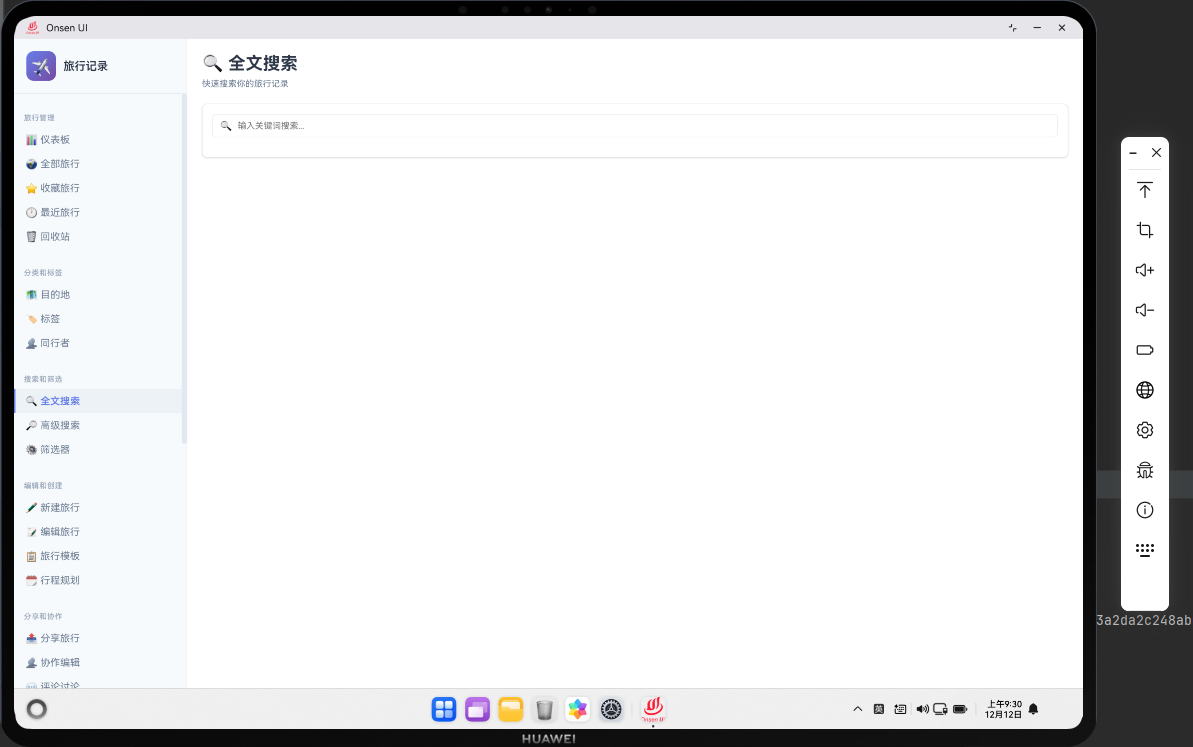
全文搜索功能允许用户通过关键词快速查找旅行记录。搜索功能支持在旅行的多个字段中进行搜索,如目的地、描述、标签等。全文搜索提供了快速访问特定旅行的便利。在 Cordova 与 OpenHarmony 的混合开发框架中,全文搜索需要实现高效的搜索算法和原生层的索引优化。
🔗 完整流程
第一步:搜索索引建立与维护
全文搜索需要在数据库中建立搜索索引,提高搜索效率。索引可以包括旅行的目的地、描述、标签等字段。当旅行数据更新时,需要同时更新搜索索引。
搜索索引的维护需要考虑性能问题,避免频繁的索引重建。
第二步:搜索结果展示与排序
搜索页面需要展示搜索结果的列表。搜索结果可以按相关度、日期等进行排序。用户可以点击搜索结果查看旅行详情。
搜索功能还需要提供搜索历史和热门搜索词的展示,提升用户体验。
第三步:原生层搜索优化与缓存
OpenHarmony 原生层可以实现搜索结果的缓存,避免重复搜索。原生层还可以实现搜索的自动完成功能,提供搜索建议。
🔧 Web 代码实现
全文搜索页面 HTML 结构
<div id="search-page" class="page">
    <div class="page-header">
        <h1>全文搜索</h1>
    </div>

    <div class="search-container">
        <div class="search-box">
            <input type="text" id="searchInput" placeholder="搜索旅行..."
                   class="search-input" onkeyup="handleSearch()">
            <button class="btn-search" onclick="performSearch()">🔍</button>
        </div>

        <div class="search-suggestions" id="searchSuggestions" style="display: none;">
            <!-- 搜索建议动态加载 -->
        </div>

        <div class="search-results" id="searchResults">
            <!-- 搜索结果动态加载 -->
        </div>

        <div class="search-history" id="searchHistory">
            <h3>搜索历史</h3>
            <div class="history-items" id="historyItems">
                <!-- 搜索历史动态加载 -->
            </div>
        </div>
    </div>
</div>
HTML 结构包含搜索输入框、搜索建议、搜索结果和搜索历史。
执行搜索函数
let searchHistory = [];

async function performSearch() {
    const query = document.getElementById('searchInput').value.trim();

    if (!query) {
        showToast('请输入搜索关键词');
        return;
    }

    try {
        // 添加到搜索历史
        if (!searchHistory.includes(query)) {
            searchHistory.unshift(query);
            if (searchHistory.length > 10) {
                searchHistory.pop();
            }
            saveSearchHistory();
        }

        // 从数据库查询所有旅行
        const allTrips = await db.getAllTrips();

        // 执行搜索
        const results = searchTrips(allTrips, query);

        // 渲染搜索结果
        renderSearchResults(results);

        // 隐藏搜索建议
        document.getElementById('searchSuggestions').style.display = 'none';

        // 通知原生层
        if (window.cordova) {
            cordova.exec(
                (result) => console.log('Search performed:', result),
                (error) => console.error('Search error:', error),
                'SearchPlugin',
                'onSearchPerformed',
                [{ query: query, resultCount: results.length, timestamp: Date.now() }]
            );
        }
    } catch (error) {
        console.error('Error performing search:', error);
        showToast('搜索失败');
    }
}
执行搜索函数将搜索词添加到搜索历史,然后执行搜索操作。performSearch 函数是全文搜索的核心执行函数。函数首先获取搜索框中的输入值,并进行验证。然后将搜索词添加到搜索历史中,最多保留 10 条历史记录。这样用户可以快速重复之前的搜索。接着从数据库获取所有旅行数据,调用 searchTrips 函数执行搜索操作。搜索完成后,函数渲染搜索结果,隐藏搜索建议,并通过 Cordova 插件通知原生层进行相应的处理。通过这个函数,用户可以快速找到想要的旅行记录。
搜索算法函数
function searchTrips(trips, query) {
    const lowerQuery = query.toLowerCase();

    return trips.filter(trip => {
        // 在多个字段中搜索
        const destination = (trip.destination || '').toLowerCase();
        const description = (trip.description || '').toLowerCase();
        const tags = (trip.tags || []).map(t => t.toLowerCase()).join(' ');

        // 计算相关度分数
        let score = 0;

        if (destination.includes(lowerQuery)) {
            score += 10; // 目的地匹配权重最高
        }
        if (description.includes(lowerQuery)) {
            score += 5;
        }
        if (tags.includes(lowerQuery)) {
            score += 3;
        }

        return score > 0;
    }).sort((a, b) => {
        // 按相关度排序
        const aScore = calculateRelevance(a, query);
        const bScore = calculateRelevance(b, query);
        return bScore - aScore;
    });
}
搜索算法函数在多个字段中搜索关键词,并计算相关度分数进行排序。searchTrips 函数实现了全文搜索的核心算法。函数首先将搜索关键词转换为小写,以支持不区分大小写的搜索。然后使用 filter 方法遍历所有旅行,在多个字段中搜索关键词,包括目的地、描述和标签。为了提高搜索结果的质量,函数为不同字段的匹配分配不同的权重:目的地匹配权重最高(10 分),描述匹配权重中等(5 分),标签匹配权重较低(3 分)。这样可以确保最相关的搜索结果显示在最前面。最后使用 sort 方法按相关度分数进行排序,使得最相关的旅行显示在最前面。这种设计提供了高质量的搜索结果。
相关度计算函数
function calculateRelevance(trip, query) {
    const lowerQuery = query.toLowerCase();
    let score = 0;

    // 目的地匹配
    if (trip.destination && trip.destination.toLowerCase().includes(lowerQuery)) {
        score += 10;
    }

    // 描述匹配
    if (trip.description && trip.description.toLowerCase().includes(lowerQuery)) {
        score += 5;
    }

    // 标签匹配
    if (trip.tags) {
        trip.tags.forEach(tag => {
            if (tag.toLowerCase().includes(lowerQuery)) {
                score += 3;
            }
        });
    }

    return score;
}
相关度计算函数为不同字段的匹配分配不同的权重。calculateRelevance 函数计算每个旅行与搜索关键词的相关度分数。函数遍历旅行的多个字段,检查是否包含搜索关键词。对于每个匹配,函数根据字段的重要性分配相应的分数。目的地是最重要的字段,因为用户通常按目的地搜索旅行,所以分配最高的权重(10 分)。描述字段次之(5 分),因为描述可能包含关键信息。标签字段权重最低(3 分),因为标签通常是辅助信息。通过这种加权方式,可以确保搜索结果按相关度排序,最相关的旅行显示在最前面。这种设计提高了搜索的准确性和用户体验。
搜索建议函数
async function showSearchSuggestions() {
    const query = document.getElementById('searchInput').value.trim();

    if (!query) {
        document.getElementById('searchSuggestions').style.display = 'none';
        return;
    }

    try {
        // 获取所有旅行
        const allTrips = await db.getAllTrips();

        // 收集建议
        const suggestions = new Set();
        const lowerQuery = query.toLowerCase();

        allTrips.forEach(trip => {
            if (trip.destination && trip.destination.toLowerCase().includes(lowerQuery)) {
                suggestions.add(trip.destination);
            }
        });

        // 渲染建议
        const container = document.getElementById('searchSuggestions');
        container.innerHTML = '';

        Array.from(suggestions).slice(0, 5).forEach(suggestion => {
            const item = document.createElement('div');
            item.className = 'suggestion-item';
            item.textContent = suggestion;
            item.onclick = () => {
                document.getElementById('searchInput').value = suggestion;
                performSearch();
            };
            container.appendChild(item);
        });

        container.style.display = suggestions.size > 0 ? 'block' : 'none';
    } catch (error) {
        console.error('Error showing suggestions:', error);
    }
}
搜索建议函数根据用户输入提供搜索建议,提升用户体验。showSearchSuggestions 函数实现了搜索自动完成功能。当用户在搜索框中输入内容时,函数会根据输入的关键词提供搜索建议。函数首先获取搜索框中的输入值,然后从数据库获取所有旅行。接着遍历所有旅行,收集与输入关键词匹配的目的地。使用 Set 数据结构可以自动去重,避免重复的建议。最后渲染建议列表,最多显示 5 条建议。用户可以点击建议项快速执行搜索。这个功能大大提高了搜索的效率,用户不需要完整输入搜索词就可以看到相关的建议。
搜索结果渲染函数
function renderSearchResults(results) {
    const container = document.getElementById('searchResults');
    container.innerHTML = '';

    if (results.length === 0) {
        container.innerHTML = '<p class="no-results">未找到匹配的旅行</p>';
        return;
    }

    results.forEach(trip => {
        const resultElement = document.createElement('div');
        resultElement.className = 'search-result-item';
        resultElement.innerHTML = `
            <div class="result-header">
                <h3>${trip.destination}</h3>
                <span class="result-date">${formatDate(trip.startDate)}</span>
            </div>
            <div class="result-body">
                <p class="result-description">${trip.description || '暂无描述'}</p>
            </div>
            <div class="result-footer">
                <button class="btn-small" onclick="navigateTo('trip-detail', ${trip.id})">
                    查看详情
                </button>
            </div>
        `;
        container.appendChild(resultElement);
    });
}
搜索结果渲染函数展示搜索结果列表。renderSearchResults 函数负责将搜索结果渲染到页面上。函数首先清空结果容器,然后检查是否有搜索结果。如果没有结果,显示"未找到匹配的旅行"的提示信息。如果有结果,遍历结果数组,为每个旅行创建一个结果卡片。每个卡片包含旅行的目的地、开始日期、描述和查看详情按钮。这种设计提供了清晰的搜索结果展示,用户可以快速浏览搜索结果并选择感兴趣的旅行。
🔌 OpenHarmony 原生代码实现
搜索缓存插件
// SearchPlugin.ets
import { BusinessError } from '@ohos.base';

export class SearchPlugin {
    private searchCache: Map<string, any> = new Map();
    private cacheExpireTime: number = 5 * 60 * 1000; // 5分钟过期

    // 处理搜索事件
    onSearchPerformed(args: any, callback: Function): void {
        try {
            const query = args[0].query;
            const resultCount = args[0].resultCount;
            const timestamp = args[0].timestamp;

            // 缓存搜索结果
            this.searchCache.set(query, {
                resultCount: resultCount,
                timestamp: timestamp
            });

            console.log(`[Search] Query: "${query}", Results: ${resultCount}`);

            callback({ success: true, message: '搜索已缓存' });
        } catch (error) {
            callback({ success: false, error: error.message });
        }
    }

    // 获取搜索缓存
    getSearchCache(args: any, callback: Function): void {
        try {
            const query = args[0].query;
            const cacheEntry = this.searchCache.get(query);

            if (cacheEntry && Date.now() - cacheEntry.timestamp < this.cacheExpireTime) {
                callback({ success: true, data: cacheEntry });
            } else {
                callback({ success: false, data: null });
            }
        } catch (error) {
            callback({ success: false, error: error.message });
        }
    }
}
搜索缓存插件在原生层缓存搜索结果,提高搜索性能。SearchPlugin 是 OpenHarmony 原生层的搜索管理插件,负责处理与搜索相关的原生操作。插件维护了一个搜索缓存 Map,用于存储最近执行的搜索查询和结果数量。缓存设置了 5 分钟的过期时间,确保缓存数据的新鲜度。onSearchPerformed 方法处理搜索事件,当用户执行搜索时,将搜索查询和结果数量缓存起来。getSearchCache 方法提供了获取缓存数据的接口,检查缓存是否存在且未过期。通过这个插件,Web 层可以充分利用原生层的缓存机制,避免重复的搜索操作,提高搜索性能。
📝 总结
全文搜索功能展示了如何在 Cordova 与 OpenHarmony 框架中实现一个高效的搜索系统。Web 层负责搜索 UI 和搜索算法,原生层负责缓存管理。通过搜索建议和搜索历史,提升了用户体验。

作为“人工智能6S店”的官方数字引擎,为AI开发者与企业提供一个覆盖软硬件全栈、一站式门户。
更多推荐

 11
11 0
0- 0


 已为社区贡献8条内容

所有评论(0)