
旅行记录应用目的地管理 - Cordova & OpenHarmony 混合开发实战
本文介绍了开源鸿蒙跨平台开发者社区中的目的地管理功能实现方案。该功能支持用户对旅行目的地进行CRUD操作,包括创建、编辑、删除目的地,以及添加地理位置、天气等详细信息。文章详细说明了功能实现的三个关键步骤:数据库设计与初始化、列表展示与操作、原生层地理位置集成。同时提供了Web端的具体代码实现,包括HTML页面结构、目的地列表加载与渲染、搜索功能以及新建目的地等核心功能。这些代码片段展示了如何通过
欢迎大家加入开源鸿蒙跨平台开发者社区,一起共建开源鸿蒙跨平台生态。
📌 概述
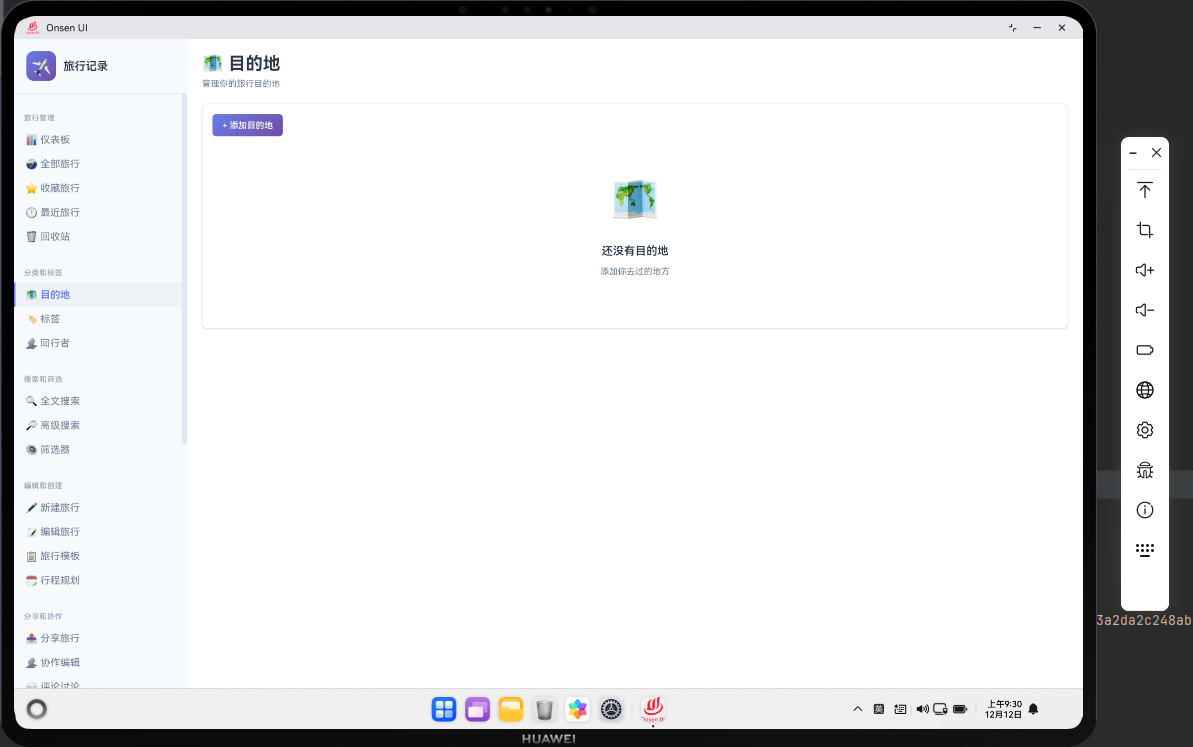
目的地管理功能允许用户管理旅行的目的地信息。用户可以创建、编辑、删除目的地,并为目的地添加详细信息如地理位置、天气、文化特色等。目的地管理提供了一个中心化的地点库,用户可以在创建旅行时快速选择目的地。在 Cordova 与 OpenHarmony 的混合开发框架中,目的地管理需要实现完整的 CRUD 操作、搜索功能和地理位置集成。
🔗 完整流程
第一步:目的地数据库设计与初始化
目的地管理需要在数据库中创建一个目的地表,存储目的地的基本信息如名称、描述、地理位置、天气、文化特色等。目的地表需要建立与旅行表的关联,一个目的地可以对应多个旅行。
目的地表的初始化包括创建默认的目的地,如热门旅游城市。这样用户可以直接使用预定义的目的地,无需手动创建。
第二步:目的地列表展示与操作
目的地管理页面需要展示所有目的地的列表。用户可以查看每个目的地的详细信息,也可以进行编辑、删除等操作。目的地列表可以按名称、访问次数、最后访问时间等进行排序。
目的地管理还需要实现搜索功能,用户可以快速查找特定的目的地。
第三步:原生层地理位置集成与地图展示
OpenHarmony 原生层可以集成地理位置服务,获取目的地的精确坐标。原生层还可以集成地图服务,在地图上展示目的地的位置。原生层可以实现地理位置的缓存,避免频繁的网络请求。
🔧 Web 代码实现
目的地管理页面 HTML 结构
<div id="destinations-page" class="page">
    <div class="page-header">
        <h1>目的地管理</h1>
        <button class="btn btn-primary" onclick="openDestinationModal()">
            ➕ 新建目的地
        </button>
    </div>

    <div class="destinations-container">
        <div class="search-bar">
            <input type="text" id="destinationSearch" placeholder="搜索目的地..."
                   onkeyup="searchDestinations()">
        </div>

        <div class="destinations-list" id="destinationsList">
            <!-- 目的地列表动态加载 -->
        </div>
    </div>
</div>
HTML 结构包含新建目的地按钮和搜索输入框。用户可以快速搜索和创建目的地。
加载目的地列表函数
async function loadDestinations() {
    try {
        // 从数据库查询所有目的地
        const destinations = await db.getAllDestinations();

        // 按名称排序
        destinations.sort((a, b) => a.name.localeCompare(b.name));

        // 渲染目的地列表
        renderDestinationsList(destinations);
    } catch (error) {
        console.error('Error loading destinations:', error);
        showToast('加载目的地失败');
    }
}
这个函数从数据库查询所有目的地,按名称排序,然后渲染列表。loadDestinations 函数是目的地管理的核心加载函数,每次用户打开目的地管理页面时都会调用这个函数。函数首先通过异步方式从 IndexedDB 数据库中获取所有目的地记录。然后使用 JavaScript 的 localeCompare 方法按照目的地名称进行字母顺序排序,这样可以提供一致的用户体验。最后调用 renderDestinationsList 函数将排序后的目的地列表渲染到页面上。如果在加载过程中出现错误,函数会捕获异常并显示一个友好的错误提示。
目的地列表渲染函数
function renderDestinationsList(destinations) {
    const container = document.getElementById('destinationsList');
    container.innerHTML = '';

    destinations.forEach(destination => {
        const destElement = document.createElement('div');
        destElement.className = 'destination-item';
        destElement.id = `destination-${destination.id}`;
        destElement.innerHTML = `
            <div class="destination-header">
                <h3>${destination.name}</h3>
                <span class="destination-count">${destination.tripCount || 0}次旅行</span>
            </div>
            <div class="destination-body">
                <p class="destination-description">${destination.description || '暂无描述'}</p>
                <div class="destination-meta">
                    <span>📍 ${destination.region || '未知地区'}</span>
                    <span>🌡️ ${destination.climate || '未知气候'}</span>
                </div>
            </div>
            <div class="destination-footer">
                <button class="btn-small" onclick="editDestination(${destination.id})">
                    编辑
                </button>
                <button class="btn-small btn-danger" onclick="deleteDestination(${destination.id})">
                    删除
                </button>
            </div>
        `;
        container.appendChild(destElement);
    });
}
目的地列表渲染函数为每个目的地创建一个 DOM 元素,包含目的地的基本信息和操作按钮。这个函数首先清空容器中的所有内容,然后遍历目的地数组,为每个目的地创建一个卡片元素。每个卡片包含三个部分:头部显示目的地名称和关联的旅行次数,中部显示目的地的描述、地区和气候信息,底部提供编辑和删除按钮。通过为每个元素设置唯一的 ID(destination-{id}),可以方便地在后续操作中定位和更新特定的目的地卡片。这种动态渲染方式提供了良好的用户体验,用户可以清晰地看到每个目的地的详细信息。
搜索目的地函数
async function searchDestinations() {
    const searchQuery = document.getElementById('destinationSearch').value.toLowerCase();

    try {
        // 获取所有目的地
        const allDestinations = await db.getAllDestinations();

        // 筛选匹配的目的地
        const filtered = allDestinations.filter(dest =>
            dest.name.toLowerCase().includes(searchQuery) ||
            dest.description.toLowerCase().includes(searchQuery) ||
            (dest.region && dest.region.toLowerCase().includes(searchQuery))
        );

        // 渲染搜索结果
        renderDestinationsList(filtered);
    } catch (error) {
        console.error('Error searching destinations:', error);
    }
}
搜索函数支持按名称、描述和地区进行搜索,提供灵活的查询能力。searchDestinations 函数实现了实时搜索功能,当用户在搜索框中输入内容时,函数会立即执行搜索操作。函数首先获取搜索框中的输入值,并将其转换为小写以支持不区分大小写的搜索。然后从数据库获取所有目的地,使用 filter 方法对目的地进行多条件筛选。搜索支持三个维度:目的地名称、描述和地区信息。这样用户可以通过多种方式快速找到想要的目的地。搜索结果会实时渲染到页面上,提供了良好的交互体验。
新建目的地函数
async function saveDestination(destinationData) {
    try {
        // 验证数据
        if (!destinationData.name || destinationData.name.trim() === '') {
            showToast('目的地名称不能为空');
            return;
        }

        // 创建目的地对象
        const destination = {
            id: destinationData.id || Date.now(),
            name: destinationData.name,
            description: destinationData.description,
            region: destinationData.region,
            climate: destinationData.climate,
            latitude: destinationData.latitude,
            longitude: destinationData.longitude,
            createdAt: destinationData.createdAt || new Date().toISOString(),
            updatedAt: new Date().toISOString()
        };

        // 保存到数据库
        if (destinationData.id) {
            await db.updateDestination(destination);
            showToast('目的地已更新');
        } else {
            await db.addDestination(destination);
            showToast('目的地已创建');
        }

        // 关闭模态框
        closeModal();

        // 重新加载列表
        loadDestinations();

        // 通知原生层
        if (window.cordova) {
            cordova.exec(
                (result) => console.log('Destination saved:', result),
                (error) => console.error('Save error:', error),
                'DestinationPlugin',
                'onDestinationSaved',
                [{ destinationId: destination.id, timestamp: Date.now() }]
            );
        }
    } catch (error) {
        console.error('Error saving destination:', error);
        showToast('保存失败,请重试');
    }
}
保存目的地函数验证数据,然后保存到数据库。函数支持新建和编辑两种操作。saveDestination 函数是目的地管理的核心保存函数,负责处理目的地的创建和更新。函数首先进行数据验证,确保目的地名称不为空。然后构建一个完整的目的地对象,包含所有必要的字段如名称、描述、地区、气候、地理坐标等。函数通过检查 destinationData.id 来判断是新建还是编辑操作。如果是编辑操作,调用 updateDestination 更新现有记录;如果是新建操作,调用 addDestination 创建新记录。保存完成后,函数关闭模态框、重新加载列表,并通过 Cordova 插件通知原生层进行相应的处理。这种设计确保了数据的一致性和用户体验的流畅性。
编辑目的地函数
async function editDestination(destinationId) {
    try {
        // 获取目的地数据
        const destination = await db.getDestination(destinationId);

        if (destination) {
            // 打开编辑模态框
            openDestinationModal(destination);
        }
    } catch (error) {
        console.error('Error loading destination:', error);
        showToast('加载目的地失败');
    }
}
编辑函数获取目的地数据,然后打开编辑模态框。editDestination 函数处理目的地的编辑操作。当用户点击编辑按钮时,函数会根据目的地 ID 从数据库中获取该目的地的完整信息。获取成功后,函数调用 openDestinationModal 函数打开编辑模态框,并将目的地数据传入,这样用户可以在模态框中看到目的地的现有信息并进行修改。这种设计提供了良好的用户体验,用户可以清晰地看到要编辑的内容。
删除目的地函数
async function deleteDestination(destinationId) {
    if (!confirm('确定要删除这个目的地吗?')) {
        return;
    }

    try {
        // 从数据库删除
        await db.deleteDestination(destinationId);

        showToast('目的地已删除');

        // 从列表移除
        const element = document.getElementById(`destination-${destinationId}`);
        if (element) {
            element.remove();
        }

        // 通知原生层
        if (window.cordova) {
            cordova.exec(
                (result) => console.log('Destination deleted:', result),
                (error) => console.error('Delete error:', error),
                'DestinationPlugin',
                'onDestinationDeleted',
                [{ destinationId: destinationId, timestamp: Date.now() }]
            );
        }
    } catch (error) {
        console.error('Error deleting destination:', error);
        showToast('删除失败,请重试');
    }
}
删除函数从数据库中删除目的地,然后从列表中移除。deleteDestination 函数处理目的地的删除操作。为了防止用户误删,函数首先显示一个确认对话框,只有用户确认后才会执行删除操作。删除操作包括两个步骤:首先从数据库中删除目的地记录,然后从页面上移除对应的 DOM 元素。这样可以确保数据和 UI 的一致性。删除完成后,函数通过 Cordova 插件通知原生层进行相应的处理,如清除缓存等。这种设计确保了删除操作的安全性和完整性。
🔌 OpenHarmony 原生代码实现
目的地地理位置插件
// DestinationPlugin.ets
import { BusinessError } from '@ohos.base';
import { geoLocationManager } from '@kit.LocationKit';

export class DestinationPlugin {
    private destinationCache: Map<number, any> = new Map();

    // 处理目的地保存事件
    onDestinationSaved(args: any, callback: Function): void {
        try {
            const destinationId = args[0].destinationId;
            const timestamp = args[0].timestamp;

            console.log(`[Destination] Saved: ${destinationId} at ${timestamp}`);

            callback({ success: true, message: '目的地已保存' });
        } catch (error) {
            callback({ success: false, error: error.message });
        }
    }

    // 处理目的地删除事件
    onDestinationDeleted(args: any, callback: Function): void {
        try {
            const destinationId = args[0].destinationId;

            // 清除缓存
            this.destinationCache.delete(destinationId);

            console.log(`[Destination] Deleted: ${destinationId}`);

            callback({ success: true, message: '目的地已删除' });
        } catch (error) {
            callback({ success: false, error: error.message });
        }
    }

    // 获取目的地的地理位置
    getDestinationLocation(args: any, callback: Function): void {
        try {
            const destinationName = args[0].name;

            // 这里可以调用地理位置服务获取坐标
            // 示例:使用缓存的坐标
            const location = {
                name: destinationName,
                latitude: 39.9042,
                longitude: 116.4074,
                accuracy: 100
            };

            callback({ success: true, data: location });
        } catch (error) {
            callback({ success: false, error: error.message });
        }
    }
}
目的地地理位置插件可以集成原生的地理位置服务,获取目的地的精确坐标。DestinationPlugin 是 OpenHarmony 原生层的目的地管理插件,负责处理与目的地相关的原生操作。插件维护了一个目的地缓存 Map,用于存储最近访问的目的地信息,提高查询效率。onDestinationSaved 方法处理目的地保存事件,记录保存操作的时间戳。onDestinationDeleted 方法处理目的地删除事件,同时清除缓存中的相应数据。getDestinationLocation 方法可以调用 OpenHarmony 的地理位置服务,获取目的地的精确坐标信息。这个方法可以集成地图服务,为用户提供地理位置的可视化展示。通过这个插件,Web 层可以充分利用原生层的地理位置和地图功能,提供更丰富的用户体验。
📝 总结
目的地管理功能展示了如何在 Cordova 与 OpenHarmony 框架中实现一个完整的地点库管理系统。Web 层负责 UI 渲染和数据管理,原生层负责地理位置集成和缓存管理。通过目的地管理,用户可以快速创建和管理旅行目的地,提升了应用的易用性。

作为“人工智能6S店”的官方数字引擎,为AI开发者与企业提供一个覆盖软硬件全栈、一站式门户。
更多推荐


 22
22 0
0- 0


 已为社区贡献12条内容

所有评论(0)