
福报记录模块 Cordova 与 OpenHarmony 混合开发实战
本文介绍了开源鸿蒙跨平台开发者社区中的福报记录模块实现方案。该模块采用Cordova框架与OpenHarmony原生能力结合的方式,构建了一个完整的福报记录系统。文章详细阐述了三个核心流程:用户交互流程(包含表单填写、验证和保存)、数据验证与处理(前端与原生层双重验证)、数据存储与同步(本地SQLite数据库和云端同步)。同时提供了Web端的HTML表单代码和CSS样式实现,展示了响应式布局、表单
欢迎大家加入开源鸿蒙跨平台开发者社区,一起共建开源鸿蒙跨平台生态。
📌 概述
福报记录模块是应用的核心功能,允许用户记录日常的福报行为、积累福报值、添加备注和分类。这个模块涉及表单验证、数据存储、UI 反馈等多个方面。通过 Cordova 框架与 OpenHarmony 原生能力的结合,实现了一个功能完整、用户体验良好的记录系统。
🔗 完整流程
第一部分:用户交互流程
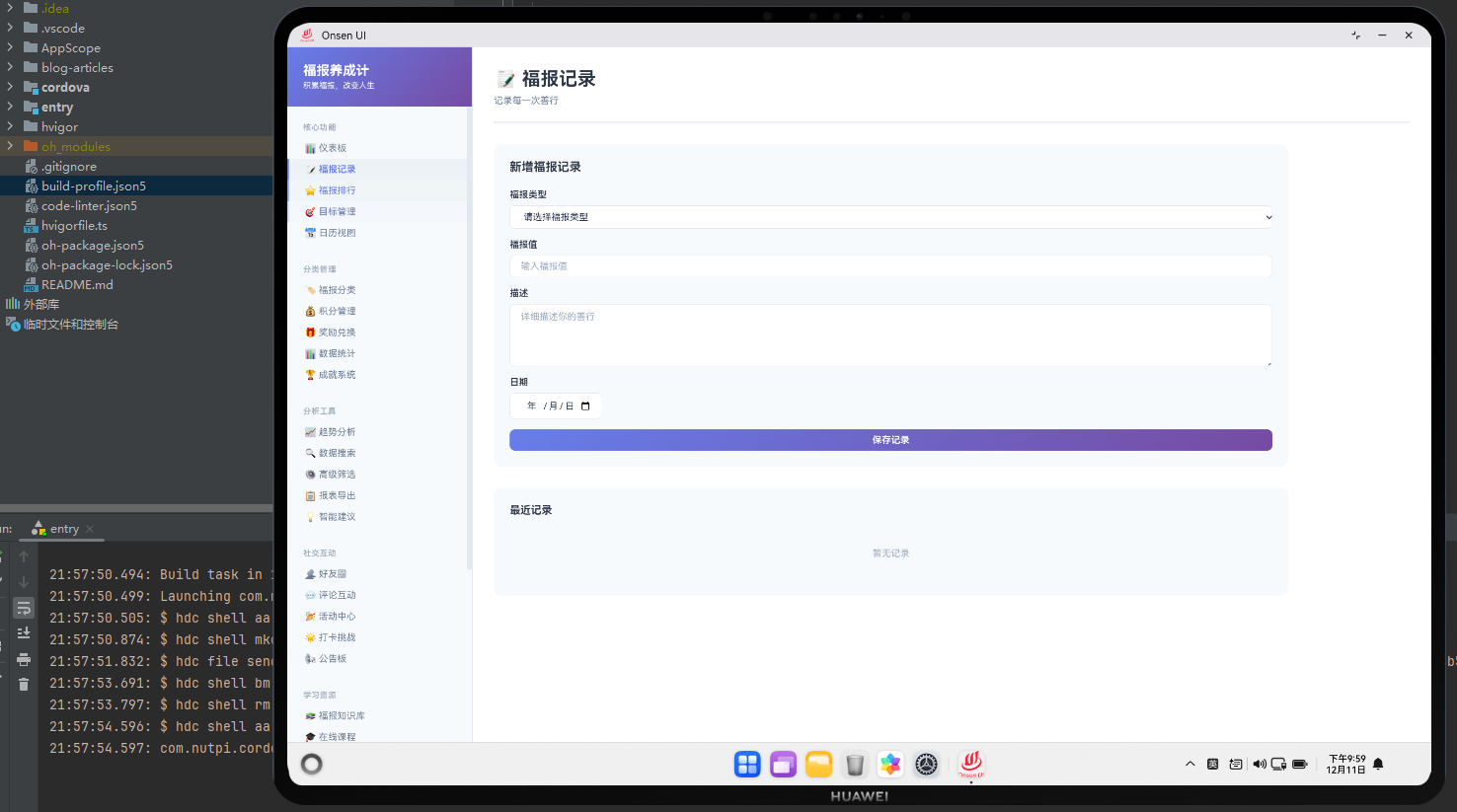
用户进入福报记录页面,看到一个表单界面,包含福报描述、金额、分类、日期等字段。用户填写表单后,点击"保存"按钮。前端进行表单验证,确保数据的完整性和合法性。验证通过后,通过 Cordova 插件调用原生方法,将数据保存到本地数据库。原生层返回保存结果,前端显示成功提示,并清空表单或返回列表页面。
第二部分:数据验证与处理
表单验证包括必填字段检查、数据格式验证、金额范围检查等。前端进行初步验证,提供即时的用户反馈。原生层进行二次验证,确保数据的安全性和一致性。验证失败时,返回详细的错误信息,前端显示给用户。
第三部分:数据存储与同步
数据通过 Cordova 插件传递到原生层,原生层将数据保存到 SQLite 数据库。同时,原生层更新相关的统计数据,如总福报数、分类统计等。如果启用了云同步功能,原生层会将数据上传到服务器。整个过程是异步的,不阻塞 UI 线程。
🔧 Web 代码实现
福报记录表单 HTML
<div class="record-container">
  <div class="record-header">
    <h1 class="record-title">记录福报</h1>
    <p class="record-subtitle">记录你的每一个善举</p>
  </div>

  <form class="record-form" id="recordForm">
    <div class="form-group">
      <label for="description" class="form-label">福报描述</label>
      <textarea
        id="description"
        class="form-control"
        placeholder="描述你的福报行为..."
        rows="4"
        required
      ></textarea>
      <span class="form-error" id="descriptionError"></span>
    </div>

    <div class="form-row">
      <div class="form-group">
        <label for="amount" class="form-label">福报值</label>
        <input
          type="number"
          id="amount"
          class="form-control"
          placeholder="输入福报值"
          min="1"
          max="1000"
          required
        />
        <span class="form-error" id="amountError"></span>
      </div>

      <div class="form-group">
        <label for="category" class="form-label">分类</label>
        <select id="category" class="form-control" required>
          <option value="">选择分类</option>
          <option value="charity">慈善捐赠</option>
          <option value="help">帮助他人</option>
          <option value="volunteer">志愿服务</option>
          <option value="study">学习进步</option>
          <option value="health">健康运动</option>
          <option value="other">其他</option>
        </select>
        <span class="form-error" id="categoryError"></span>
      </div>
    </div>

    <div class="form-group">
      <label for="date" class="form-label">日期</label>
      <input
        type="date"
        id="date"
        class="form-control"
        required
      />
      <span class="form-error" id="dateError"></span>
    </div>

    <div class="form-group">
      <label for="tags" class="form-label">标签</label>
      <input
        type="text"
        id="tags"
        class="form-control"
        placeholder="输入标签,用逗号分隔"
      />
    </div>

    <div class="form-actions">
      <button type="submit" class="btn btn-primary">
        <span class="btn-icon">💾</span>
        <span class="btn-text">保存记录</span>
      </button>
      <button type="reset" class="btn btn-secondary">
        <span class="btn-icon">🔄</span>
        <span class="btn-text">清空表单</span>
      </button>
    </div>
  </form>

  <div class="form-tips">
    <h3 class="tips-title">💡 记录提示</h3>
    <ul class="tips-list">
      <li>记录越详细,分析越准确</li>
      <li>福报值范围:1-1000</li>
      <li>支持添加多个标签</li>
      <li>可以记录过去的福报行为</li>
    </ul>
  </div>
</div>
表单使用语义化的 HTML 元素,包含所有必要的输入字段。每个字段都有错误提示区域,用于显示验证错误。表单采用分组布局,提高可读性。提示部分提供用户指导。
福报记录表单样式
.record-container {
  max-width: 600px;
  margin: 0 auto;
  padding: 20px;
  background: white;
  border-radius: 12px;
}

.record-header {
  text-align: center;
  margin-bottom: 30px;
}

.record-title {
  font-size: 28px;
  font-weight: bold;
  color: #333;
  margin: 0 0 10px 0;
}

.record-subtitle {
  font-size: 14px;
  color: #999;
  margin: 0;
}

.record-form {
  margin-bottom: 30px;
}

.form-group {
  margin-bottom: 20px;
}

.form-label {
  display: block;
  font-size: 14px;
  font-weight: bold;
  color: #333;
  margin-bottom: 8px;
}

.form-control {
  width: 100%;
  padding: 12px;
  font-size: 14px;
  border: 1px solid #ddd;
  border-radius: 6px;
  transition: border-color 0.3s ease;
  box-sizing: border-box;
}

.form-control:focus {
  outline: none;
  border-color: #667eea;
  box-shadow: 0 0 0 3px rgba(102, 126, 234, 0.1);
}

.form-control.error {
  border-color: #f56c6c;
}

.form-error {
  display: block;
  font-size: 12px;
  color: #f56c6c;
  margin-top: 4px;
  min-height: 16px;
}

.form-row {
  display: grid;
  grid-template-columns: 1fr 1fr;
  gap: 15px;
}

.form-actions {
  display: flex;
  gap: 10px;
  justify-content: center;
  margin-top: 30px;
}

.btn {
  flex: 1;
  max-width: 200px;
  padding: 12px 24px;
  border: none;
  border-radius: 6px;
  font-size: 14px;
  font-weight: bold;
  cursor: pointer;
  display: flex;
  align-items: center;
  justify-content: center;
  gap: 8px;
  transition: all 0.3s ease;
}

.btn-primary {
  background: linear-gradient(135deg, #667eea 0%, #764ba2 100%);
  color: white;
}

.btn-primary:hover {
  transform: translateY(-2px);
  box-shadow: 0 6px 16px rgba(102, 126, 234, 0.4);
}

.btn-secondary {
  background: #f0f0f0;
  color: #333;
}

.btn-secondary:hover {
  background: #e0e0e0;
}

.form-tips {
  background: #f5f7fa;
  border-left: 4px solid #667eea;
  padding: 15px;
  border-radius: 6px;
}

.tips-title {
  font-size: 14px;
  font-weight: bold;
  color: #333;
  margin: 0 0 10px 0;
}

.tips-list {
  list-style: none;
  padding: 0;
  margin: 0;
}

.tips-list li {
  font-size: 12px;
  color: #666;
  padding: 4px 0;
}

.tips-list li:before {
  content: "✓ ";
  color: #67c23a;
  font-weight: bold;
  margin-right: 6px;
}
CSS 样式使用现代的设计模式,包括渐变背景、阴影效果、过渡动画。表单控件在获得焦点时显示蓝色边框和阴影,提供清晰的交互反馈。错误状态显示红色边框。响应式布局在小屏幕上自动调整。
福报记录 JavaScript 逻辑
class RecordModule {
  constructor() {
    this.form = document.getElementById('recordForm');
    this.init();
  }

  init() {
    this.setupEventListeners();
    this.setDefaultDate();
  }

  setupEventListeners() {
    this.form.addEventListener('submit', (e) => this.handleSubmit(e));

    // 实时验证
    document.getElementById('description').addEventListener('blur',
      () => this.validateDescription());
    document.getElementById('amount').addEventListener('blur',
      () => this.validateAmount());
    document.getElementById('category').addEventListener('change',
      () => this.validateCategory());
  }

  setDefaultDate() {
    const today = new Date().toISOString().split('T')[0];
    document.getElementById('date').value = today;
  }

  handleSubmit(e) {
    e.preventDefault();

    // 验证所有字段
    if (!this.validateForm()) {
      return;
    }

    // 收集表单数据
    const formData = {
      description: document.getElementById('description').value,
      amount: parseInt(document.getElementById('amount').value),
      category: document.getElementById('category').value,
      date: document.getElementById('date').value,
      tags: document.getElementById('tags').value.split(',').map(t => t.trim())
    };

    // 调用原生插件保存数据
    this.saveRecord(formData);
  }

  validateForm() {
    let isValid = true;

    isValid &= this.validateDescription();
    isValid &= this.validateAmount();
    isValid &= this.validateCategory();

    return isValid;
  }

  validateDescription() {
    const description = document.getElementById('description').value.trim();
    const error = document.getElementById('descriptionError');

    if (!description) {
      error.textContent = '请输入福报描述';
      return false;
    }

    if (description.length < 5) {
      error.textContent = '描述至少需要5个字符';
      return false;
    }

    if (description.length > 500) {
      error.textContent = '描述不能超过500个字符';
      return false;
    }

    error.textContent = '';
    return true;
  }

  validateAmount() {
    const amount = parseInt(document.getElementById('amount').value);
    const error = document.getElementById('amountError');

    if (!amount) {
      error.textContent = '请输入福报值';
      return false;
    }

    if (amount < 1 || amount > 1000) {
      error.textContent = '福报值范围:1-1000';
      return false;
    }

    error.textContent = '';
    return true;
  }

  validateCategory() {
    const category = document.getElementById('category').value;
    const error = document.getElementById('categoryError');

    if (!category) {
      error.textContent = '请选择分类';
      return false;
    }

    error.textContent = '';
    return true;
  }

  saveRecord(formData) {
    // 显示加载状态
    this.showLoading('保存中...');

    // 调用原生插件
    cordova.exec(
      (result) => {
        this.hideLoading();
        this.showSuccess('记录保存成功!');
        this.form.reset();
        this.setDefaultDate();
      },
      (error) => {
        this.hideLoading();
        this.showError('保存失败:' + error);
      },
      'RecordPlugin',
      'saveRecord',
      [formData]
    );
  }

  showLoading(message) {
    // 显示加载提示
    const toast = document.createElement('div');
    toast.className = 'toast toast-loading';
    toast.innerHTML = `<span class="spinner"></span> ${message}`;
    document.body.appendChild(toast);
  }

  hideLoading() {
    const toast = document.querySelector('.toast-loading');
    if (toast) toast.remove();
  }

  showSuccess(message) {
    this.showToast(message, 'success');
  }

  showError(message) {
    this.showToast(message, 'error');
  }

  showToast(message, type) {
    const toast = document.createElement('div');
    toast.className = `toast toast-${type}`;
    toast.textContent = message;
    document.body.appendChild(toast);

    setTimeout(() => {
      toast.classList.add('show');
    }, 10);

    setTimeout(() => {
      toast.classList.remove('show');
      setTimeout(() => toast.remove(), 300);
    }, 3000);
  }
}

// 初始化记录模块
const recordModule = new RecordModule();
JavaScript 代码实现了完整的表单验证逻辑。实时验证提供即时反馈。通过 Cordova 插件调用原生方法保存数据。Toast 提示提供用户反馈。
🔌 原生代码实现
OpenHarmony 记录插件
// RecordPlugin.ets
import { rpc } from '@kit.IPCKit';

export class RecordPlugin {
  private context: Context;

  constructor(context: Context) {
    this.context = context;
  }

  // 保存福报记录
  saveRecord(recordData: any, callback: (success: boolean, message: string) => void): void {
    try {
      // 验证数据
      this.validateRecordData(recordData);

      // 保存到数据库
      const recordId = this.insertRecord(recordData);

      // 更新统计数据
      this.updateStatistics(recordData);

      // 触发同步(如果启用)
      this.syncToCloud(recordId, recordData);

      callback(true, '记录保存成功');
    } catch (error) {
      console.error('保存记录失败:', error);
      callback(false, error.message);
    }
  }

  private validateRecordData(data: any): void {
    if (!data.description || data.description.trim().length === 0) {
      throw new Error('福报描述不能为空');
    }

    if (!Number.isInteger(data.amount) || data.amount < 1 || data.amount > 1000) {
      throw new Error('福报值必须是1-1000之间的整数');
    }

    if (!data.category || data.category.trim().length === 0) {
      throw new Error('分类不能为空');
    }

    if (!data.date || !this.isValidDate(data.date)) {
      throw new Error('日期格式不正确');
    }
  }

  private isValidDate(dateStr: string): boolean {
    const date = new Date(dateStr);
    return date instanceof Date && !isNaN(date.getTime());
  }

  private insertRecord(data: any): number {
    const db = this.getDatabase();

    const sql = `
      INSERT INTO blessings (
        description, amount, category, date, tags, created_at, updated_at
      ) VALUES (?, ?, ?, ?, ?, ?, ?)
    `;

    const params = [
      data.description,
      data.amount,
      data.category,
      data.date,
      JSON.stringify(data.tags || []),
      Date.now(),
      Date.now()
    ];

    return db.insert('blessings', params);
  }

  private updateStatistics(data: any): void {
    const db = this.getDatabase();
    const userId = this.getUserId();

    // 更新用户总福报数
    db.execute(`
      UPDATE users
      SET total_blessings = total_blessings + ?
      WHERE id = ?
    `, [data.amount, userId]);

    // 更新分类统计
    db.execute(`
      INSERT INTO category_stats (user_id, category, total, count)
      VALUES (?, ?, ?, 1)
      ON CONFLICT(user_id, category) DO UPDATE SET
        total = total + ?,
        count = count + 1
    `, [userId, data.category, data.amount, data.amount]);
  }

  private syncToCloud(recordId: number, data: any): void {
    // 检查是否启用云同步
    const syncEnabled = this.isSyncEnabled();
    if (!syncEnabled) return;

    // 异步上传到服务器
    this.uploadToServer({
      id: recordId,
      ...data,
      userId: this.getUserId()
    });
  }

  private uploadToServer(data: any): void {
    // 异步上传逻辑
    // 实现细节省略
  }

  private isSyncEnabled(): boolean {
    // 检查用户设置
    // 实现细节省略
    return false;
  }

  private getDatabase(): any {
    // 获取数据库实例
    // 实现细节省略
    return null;
  }

  private getUserId(): string {
    // 获取当前用户ID
    // 实现细节省略
    return '';
  }
}
原生代码实现了数据验证、数据库插入、统计更新等功能。验证确保数据的合法性。数据库操作使用参数化查询防止注入。统计更新保持数据一致性。
Cordova 插件调用
// 在 Web 层调用原生插件
cordova.exec(
  function(success, message) {
    if (success) {
      console.log('记录保存成功:', message);
    } else {
      console.error('保存失败:', message);
    }
  },
  function(error) {
    console.error('插件调用失败:', error);
  },
  'RecordPlugin',
  'saveRecord',
  [recordData]
);
📝 总结
福报记录模块展示了完整的表单处理流程。前端提供友好的表单界面和实时验证,原生层提供数据安全存储和统计更新。通过 Cordova 插件机制实现了 Web-Native 的无缝集成。关键技术包括:表单验证、异步数据保存、数据库事务、统计更新、错误处理等。这些技术的综合应用,为用户提供了一个高效、安全的记录体验。

作为“人工智能6S店”的官方数字引擎,为AI开发者与企业提供一个覆盖软硬件全栈、一站式门户。
更多推荐


 8
8 0
0- 0


 已为社区贡献1条内容

所有评论(0)