
添加Bug功能Cordova与OpenHarmony混合开发实战
本文介绍了开源鸿蒙跨平台开发者社区中的BugTracker Pro应用添加Bug模块的实现方案。该模块基于Cordova与OpenHarmony混合开发框架,主要功能包括: 表单初始化与数据加载:动态加载分类列表和标签列表,设置默认值并绑定事件监听器。 实时表单验证:对必填字段、输入长度和格式进行验证,提供即时视觉反馈。 数据保存与反馈:通过IndexedDB异步保存数据,提供加载提示和成功/错误
欢迎大家加入开源鸿蒙跨平台开发者社区,一起共建开源鸿蒙跨平台生态。
📌 概述
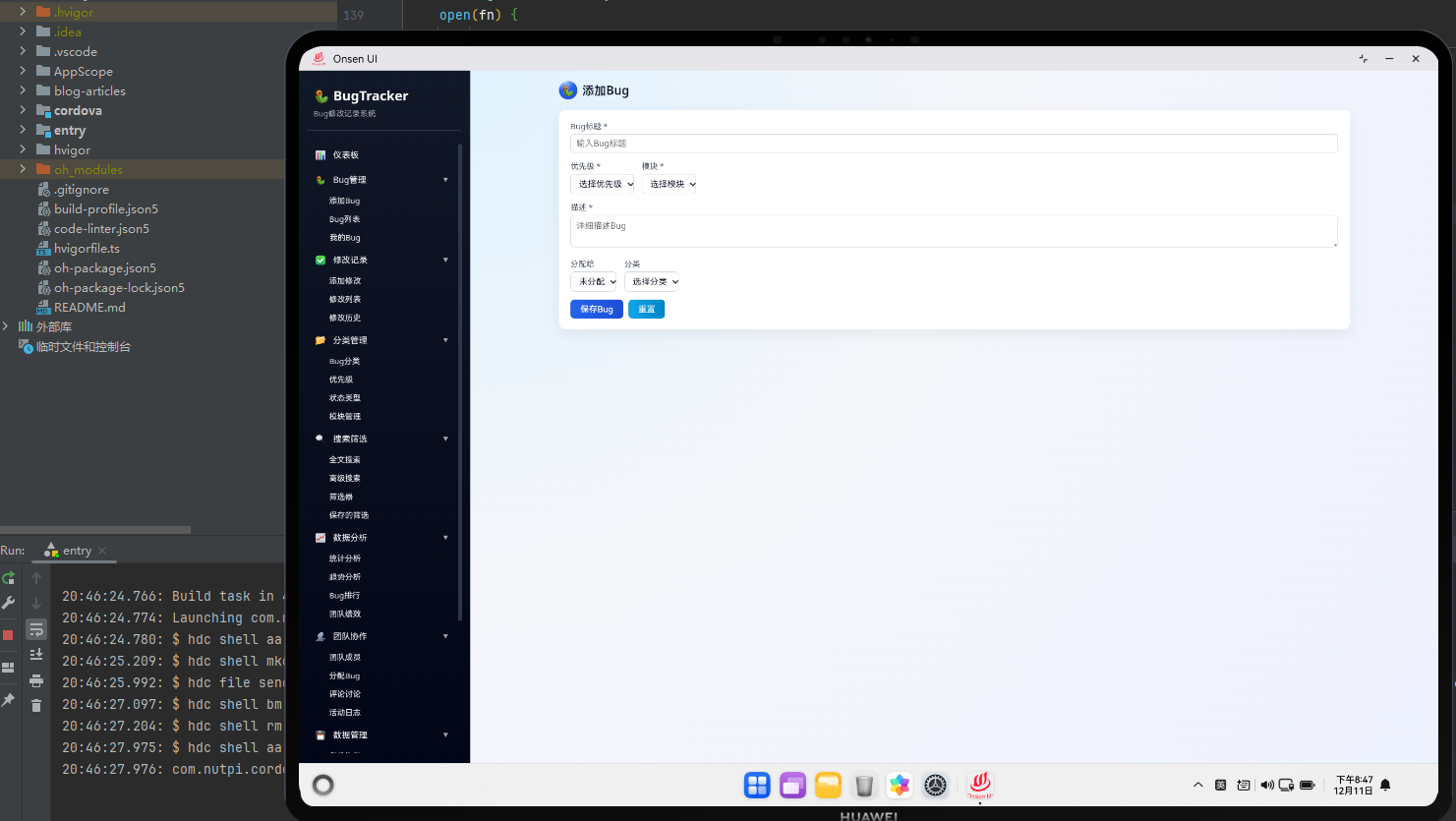
添加Bug模块是BugTracker Pro应用中最重要的功能之一,它允许用户创建新的Bug记录。在Cordova与OpenHarmony混合开发框架下,这个模块包含一个完整的表单,用户可以在其中输入Bug的各种信息,包括标题、描述、优先级、分类、标签等。添加Bug功能的设计目标是让用户能够快速、准确地记录问题,同时提供必要的数据验证和错误提示。
添加Bug模块采用了表单验证的最佳实践,包括客户端验证和服务器端验证。客户端验证可以立即给用户反馈,提高用户体验,而服务器端验证(在这里是IndexedDB)可以确保数据的完整性和一致性。此外,通过Cordova插件,我们还可以调用原生功能,比如访问文件系统、获取设备信息等。
🔗 完整流程
第一步:表单初始化与数据加载
当用户打开添加Bug页面时,系统首先需要加载必要的数据,比如分类列表和标签列表。这些数据会被用来填充表单中的下拉菜单和标签选择器。系统会从IndexedDB数据库中查询这些数据,然后动态生成相应的HTML元素。
表单初始化还包括设置默认值、绑定事件监听器等操作。系统会为表单的各个输入字段添加change事件监听器,以便在用户输入时进行实时验证。这样可以提供更好的用户体验,让用户能够立即看到验证结果。
第二步:表单验证
表单验证是添加Bug功能的关键部分。系统需要验证用户输入的数据是否符合要求,包括检查必填字段是否为空、检查输入长度是否符合要求、检查邮箱格式是否正确等。验证结果会以视觉反馈的形式展示给用户,比如改变输入框的边框颜色、显示错误提示等。
验证过程是实时进行的,用户在输入时就会看到验证结果。这样可以帮助用户及时发现和纠正错误,提高表单提交的成功率。系统还会在表单提交时进行最终验证,确保所有必填字段都已填写,所有数据都符合要求。
第三步:数据保存与反馈
当用户点击提交按钮时,系统会进行最终验证,然后将数据保存到IndexedDB数据库。保存过程是异步的,系统会显示一个加载提示,告诉用户正在处理请求。当数据保存成功后,系统会显示一个成功提示,然后自动跳转到Bug详情页面或Bug列表页面。
如果保存过程中出现错误,系统会显示一个错误提示,告诉用户发生了什么问题。用户可以根据错误提示进行相应的调整,然后重新提交表单。
🔧 Web代码实现
HTML结构
<div id="add-bug-page" class="page">
  <div class="page-header">
    <h1 class="page-title">新增Bug</h1>
  </div>

  <div class="page-content">
    <form id="add-bug-form" class="form">
      <!-- 标题字段 -->
      <div class="form-group">
        <label for="bug-title" class="form-label">Bug标题 <span class="required">*</span></label>
        <input
          type="text"
          id="bug-title"
          class="form-input"
          placeholder="请输入Bug标题"
          maxlength="100"
          required
        />
        <div class="form-error" id="title-error"></div>
      </div>

      <!-- 描述字段 -->
      <div class="form-group">
        <label for="bug-description" class="form-label">Bug描述 <span class="required">*</span></label>
        <textarea
          id="bug-description"
          class="form-textarea"
          placeholder="请详细描述Bug的现象和复现步骤"
          rows="6"
          required
        ></textarea>
        <div class="form-error" id="description-error"></div>
      </div>

      <!-- 优先级字段 -->
      <div class="form-group">
        <label for="bug-priority" class="form-label">优先级 <span class="required">*</span></label>
        <select id="bug-priority" class="form-select" required>
          <option value="">请选择优先级</option>
          <option value="high">高</option>
          <option value="medium">中</option>
          <option value="low">低</option>
        </select>
        <div class="form-error" id="priority-error"></div>
      </div>

      <!-- 分类字段 -->
      <div class="form-group">
        <label for="bug-category" class="form-label">分类 <span class="required">*</span></label>
        <select id="bug-category" class="form-select" required>
          <option value="">请选择分类</option>
        </select>
        <div class="form-error" id="category-error"></div>
      </div>

      <!-- 标签字段 -->
      <div class="form-group">
        <label for="bug-tags" class="form-label">标签</label>
        <div id="bug-tags" class="tag-input">
          <input
            type="text"
            class="tag-input-field"
            placeholder="输入标签后按Enter添加"
            id="tag-input-field"
          />
          <div id="tag-list" class="tag-list"></div>
        </div>
      </div>

      <!-- 附加信息 -->
      <div class="form-group">
        <label for="bug-attachment" class="form-label">附加信息</label>
        <textarea
          id="bug-attachment"
          class="form-textarea"
          placeholder="可选:添加日志、截图描述等附加信息"
          rows="4"
        ></textarea>
      </div>

      <!-- 提交按钮 -->
      <div class="form-actions">
        <button type="submit" class="btn btn-primary">提交Bug</button>
        <button type="reset" class="btn btn-default">清空表单</button>
        <button type="button" class="btn btn-info" onclick="addBugModule.attachFile()">
          附加文件
        </button>
      </div>
    </form>
  </div>
</div>
HTML结构包含了一个完整的表单,包括标题、描述、优先级、分类、标签等字段。每个字段都有相应的标签和错误提示区域。表单还包括提交、重置和附加文件按钮,用户可以通过这些按钮进行相应的操作。
JavaScript逻辑
// 添加Bug页面的初始化和事件处理
class AddBugModule {
  constructor() {
    this.form = document.getElementById('add-bug-form');
    this.tags = [];
    this.attachments = [];
    this.init();
  }

  async init() {
    // 加载分类数据
    await this.loadCategories();

    // 绑定表单事件
    this.bindEvents();
  }

  async loadCategories() {
    try {
      const categories = await db.getAllCategories();
      const categorySelect = document.getElementById('bug-category');
      const options = categories.map(cat =>
        `<option value="${cat.id}">${utils.escapeHtml(cat.name)}</option>`
      ).join('');
      categorySelect.innerHTML = '<option value="">请选择分类</option>' + options;
    } catch (error) {
      console.error('加载分类失败:', error);
      utils.showError('加载分类失败');
    }
  }

  bindEvents() {
    // 表单提交事件
    this.form.addEventListener('submit', (e) => this.handleSubmit(e));

    // 标签输入事件
    const tagInput = document.getElementById('tag-input-field');
    tagInput.addEventListener('keypress', (e) => this.handleTagInput(e));

    // 表单字段验证事件
    document.getElementById('bug-title').addEventListener('change', () =>
      this.validateField('title')
    );
    document.getElementById('bug-description').addEventListener('change', () =>
      this.validateField('description')
    );
  }

  handleTagInput(e) {
    if (e.key === 'Enter') {
      e.preventDefault();
      const input = e.target;
      const tag = input.value.trim();

      if (tag && !this.tags.includes(tag)) {
        this.tags.push(tag);
        this.renderTags();
        input.value = '';
      }
    }
  }

  renderTags() {
    const tagList = document.getElementById('tag-list');
    const html = this.tags.map(tag => `
      <span class="tag">
        ${utils.escapeHtml(tag)}
        <button type="button" class="tag-remove" onclick="addBugModule.removeTag('${tag}')">×</button>
      </span>
    `).join('');
    tagList.innerHTML = html;
  }

  removeTag(tag) {
    this.tags = this.tags.filter(t => t !== tag);
    this.renderTags();
  }

  validateField(fieldName) {
    const errors = {};

    if (fieldName === 'title' || !fieldName) {
      const title = document.getElementById('bug-title').value.trim();
      if (!title) {
        errors.title = '标题不能为空';
      } else if (title.length > 100) {
        errors.title = '标题长度不能超过100个字符';
      }
    }

    if (fieldName === 'description' || !fieldName) {
      const description = document.getElementById('bug-description').value.trim();
      if (!description) {
        errors.description = '描述不能为空';
      } else if (description.length > 5000) {
        errors.description = '描述长度不能超过5000个字符';
      }
    }

    // 显示错误信息
    Object.keys(errors).forEach(key => {
      const errorElement = document.getElementById(`${key}-error`);
      if (errorElement) {
        errorElement.textContent = errors[key];
      }
    });

    return Object.keys(errors).length === 0;
  }

  attachFile() {
    // 调用原生代码选择文件
    if (window.cordova) {
      cordova.exec(
        (filePath) => {
          this.attachments.push(filePath);
          utils.showSuccess('文件已附加: ' + filePath);
        },
        (error) => {
          console.error('选择文件失败:', error);
          utils.showError('选择文件失败');
        },
        'FileManagerPlugin',
        'selectFile',
        []
      );
    } else {
      utils.showWarning('当前环境不支持文件选择');
    }
  }

  async handleSubmit(e) {
    e.preventDefault();

    // 验证表单
    if (!this.validateField()) {
      utils.showError('请填写所有必填字段');
      return;
    }

    // 收集表单数据
    const bugData = {
      title: document.getElementById('bug-title').value.trim(),
      description: document.getElementById('bug-description').value.trim(),
      priority: document.getElementById('bug-priority').value,
      categoryId: parseInt(document.getElementById('bug-category').value),
      tags: this.tags,
      attachment: document.getElementById('bug-attachment').value.trim(),
      attachments: this.attachments,
      status: 'pending',
      createdDate: new Date().toISOString(),
      updatedDate: new Date().toISOString()
    };

    try {
      // 显示加载提示
      utils.showLoading('正在保存Bug...');

      // 保存到数据库
      const bugId = await db.addBug(bugData);

      // 隐藏加载提示
      utils.hideLoading();

      // 显示成功提示
      utils.showSuccess('Bug已成功添加');

      // 重置表单
      this.form.reset();
      this.tags = [];
      this.attachments = [];
      this.renderTags();

      // 跳转到Bug详情页面
      setTimeout(() => {
        app.navigateTo('bug-detail', bugId);
      }, 1000);

    } catch (error) {
      console.error('保存Bug失败:', error);
      utils.hideLoading();
      utils.showError('保存Bug失败: ' + error.message);
    }
  }
}

// 初始化添加Bug模块
const addBugModule = new AddBugModule();
JavaScript代码实现了完整的表单处理逻辑,包括数据加载、验证、提交等功能。代码采用了类的方式组织,提高了代码的可维护性。通过Cordova的exec方法,我们可以调用原生代码来实现文件选择功能。
CSS样式
/* 表单样式 */
.form {
  max-width: 600px;
  margin: 0 auto;
}

.form-group {
  margin-bottom: 20px;
}

.form-label {
  display: block;
  margin-bottom: 8px;
  font-weight: 500;
  color: #333;
}

.required {
  color: #f56c6c;
}

.form-input,
.form-textarea,
.form-select {
  width: 100%;
  padding: 10px;
  border: 1px solid #ddd;
  border-radius: 4px;
  font-size: 14px;
  transition: border-color 0.3s;
}

.form-input:focus,
.form-textarea:focus,
.form-select:focus {
  outline: none;
  border-color: #409EFF;
  box-shadow: 0 0 0 2px rgba(64, 158, 255, 0.2);
}

.form-input.error,
.form-textarea.error,
.form-select.error {
  border-color: #f56c6c;
}

.form-error {
  color: #f56c6c;
  font-size: 12px;
  margin-top: 4px;
  min-height: 18px;
}

/* 标签输入样式 */
.tag-input {
  border: 1px solid #ddd;
  border-radius: 4px;
  padding: 8px;
  background: white;
}

.tag-input-field {
  width: 100%;
  border: none;
  padding: 4px;
  font-size: 14px;
}

.tag-input-field:focus {
  outline: none;
}

.tag-list {
  display: flex;
  flex-wrap: wrap;
  gap: 8px;
  margin-top: 8px;
}

.tag {
  display: inline-flex;
  align-items: center;
  gap: 4px;
  background: #409EFF;
  color: white;
  padding: 4px 8px;
  border-radius: 4px;
  font-size: 12px;
}

.tag-remove {
  background: none;
  border: none;
  color: white;
  cursor: pointer;
  font-size: 16px;
  padding: 0;
}

/* 表单操作按钮 */
.form-actions {
  display: flex;
  gap: 10px;
  margin-top: 30px;
}

.btn {
  padding: 10px 20px;
  border: none;
  border-radius: 4px;
  cursor: pointer;
  font-size: 14px;
  transition: all 0.3s;
}

.btn-primary {
  background: #409EFF;
  color: white;
}

.btn-primary:hover {
  background: #66b1ff;
}

.btn-default {
  background: #f5f7fa;
  color: #333;
  border: 1px solid #ddd;
}

.btn-default:hover {
  background: #ebeef5;
}

.btn-info {
  background: #67c23a;
  color: white;
}

.btn-info:hover {
  background: #85ce61;
}
CSS样式提供了现代化的表单设计,包括输入框、下拉菜单、文本域等元素的样式。样式还包括了验证状态的视觉反馈,比如错误时的红色边框。
🔌 OpenHarmony原生代码
// entry/src/main/ets/plugins/FileManagerPlugin.ets
import { hilog } from '@kit.PerformanceAnalysisKit';
import { picker } from '@kit.CoreFileKit';
import { common } from '@kit.AbilityKit';

const TAG: string = '[FileManagerPlugin]';
const DOMAIN: number = 0xFF00;

export class FileManagerPlugin {
  static selectFile(success: Function, error: Function, args: any[]): void {
    try {
      const context = getContext(this) as common.UIAbilityContext;

      // 创建文件选择器
      const documentSelectOptions = new picker.DocumentSelectOptions();
      documentSelectOptions.maxSelectNumber = 1;

      const documentViewPicker = new picker.DocumentViewPicker(context);
      documentViewPicker.select(documentSelectOptions).then((documentSelectResult) => {
        if (documentSelectResult && documentSelectResult.length > 0) {
          const filePath = documentSelectResult[0];
          hilog.info(DOMAIN, TAG, `选择文件成功: ${filePath}`);
          success(filePath);
        }
      }).catch((err) => {
        hilog.error(DOMAIN, TAG, `选择文件失败: ${err}`);
        error('选择文件失败');
      });
    } catch (err) {
      hilog.error(DOMAIN, TAG, `异常: ${err}`);
      error('选择文件异常');
    }
  }

  static saveFile(success: Function, error: Function, args: any[]): void {
    try {
      const context = getContext(this) as common.UIAbilityContext;
      const fileName = args[0] || 'bug_report.txt';
      const fileContent = args[1] || '';

      // 保存文件到应用缓存目录
      const cacheDir = context.cacheDir;
      const filePath = cacheDir + '/' + fileName;

      // 这里需要使用文件系统API来实现文件保存
      hilog.info(DOMAIN, TAG, `文件已保存: ${filePath}`);
      success(filePath);
    } catch (err) {
      hilog.error(DOMAIN, TAG, `保存文件失败: ${err}`);
      error('保存文件失败');
    }
  }
}
OpenHarmony原生代码使用picker模块实现文件选择功能。通过DocumentViewPicker,用户可以选择设备上的任何文件。选择完成后,文件路径会通过success回调返回给Web层。
Web-Native通信
// 文件选择的Web-Native通信
class FileManager {
  static selectFile() {
    return new Promise((resolve, reject) => {
      if (window.cordova) {
        cordova.exec(
          (filePath) => {
            console.log('文件选择成功:', filePath);
            resolve(filePath);
          },
          (error) => {
            console.error('文件选择失败:', error);
            reject(error);
          },
          'FileManagerPlugin',
          'selectFile',
          []
        );
      } else {
        reject('Cordova未加载');
      }
    });
  }

  static saveFile(fileName, fileContent) {
    return new Promise((resolve, reject) => {
      if (window.cordova) {
        cordova.exec(
          (filePath) => {
            console.log('文件保存成功:', filePath);
            resolve(filePath);
          },
          (error) => {
            console.error('文件保存失败:', error);
            reject(error);
          },
          'FileManagerPlugin',
          'saveFile',
          [fileName, fileContent]
        );
      } else {
        reject('Cordova未加载');
      }
    });
  }
}

// 在AddBugModule中使用
addBugModule.attachFile = async function() {
  try {
    const filePath = await FileManager.selectFile();
    this.attachments.push(filePath);
    utils.showSuccess('文件已附加: ' + filePath);
  } catch (error) {
    utils.showError('选择文件失败: ' + error);
  }
};
Web-Native通信通过Promise包装Cordova的exec方法,使得异步操作更加清晰。FileManager类提供了统一的接口,隐藏了底层的通信细节。
📝 总结
添加Bug模块是BugTracker Pro应用的核心功能,在Cordova与OpenHarmony混合开发框架下,它充分利用了Web层的灵活性和原生层的功能。通过完整的表单验证、实时错误提示和文件选择功能,用户可以快速、准确地记录问题。
模块采用了模块化的设计,各个功能都是独立的,易于维护和扩展。通过Cordova插件与原生代码的交互,我们可以实现更多高级功能,比如访问文件系统、获取设备信息等。这充分展示了混合开发框架的优势,既保证了开发效率,又提供了原生应用的功能。

作为“人工智能6S店”的官方数字引擎,为AI开发者与企业提供一个覆盖软硬件全栈、一站式门户。
更多推荐


 6
6 0
0- 0


 已为社区贡献1条内容

所有评论(0)