
React Native for OpenHarmony 实战:三方库 react-native-drawer 的鸿蒙化适配指南
本文记录把 react-native-drawer(侧滑抽屉)适配到 HarmonyOS 的完整过程。
它是一个老牌抽屉组件:把内容分成 content(抽屉) 与 children(主内容),靠手势或命令式 API(open() / close() / toggle())把抽屉滑出来,并支持 left/right/top/bottom 四个方向、overlay/static/displace 三种叠加方式。
它在鸿蒙上能跑,但这一轮查出了一个必须先知道的硬伤:
★★ 它用了 React 19 已经移除的 Legacy Context
static contextTypes = { drawer: PropTypes.object };
static childContextTypes = { drawer: PropTypes.object };
getChildContext = () => ({ drawer: this });
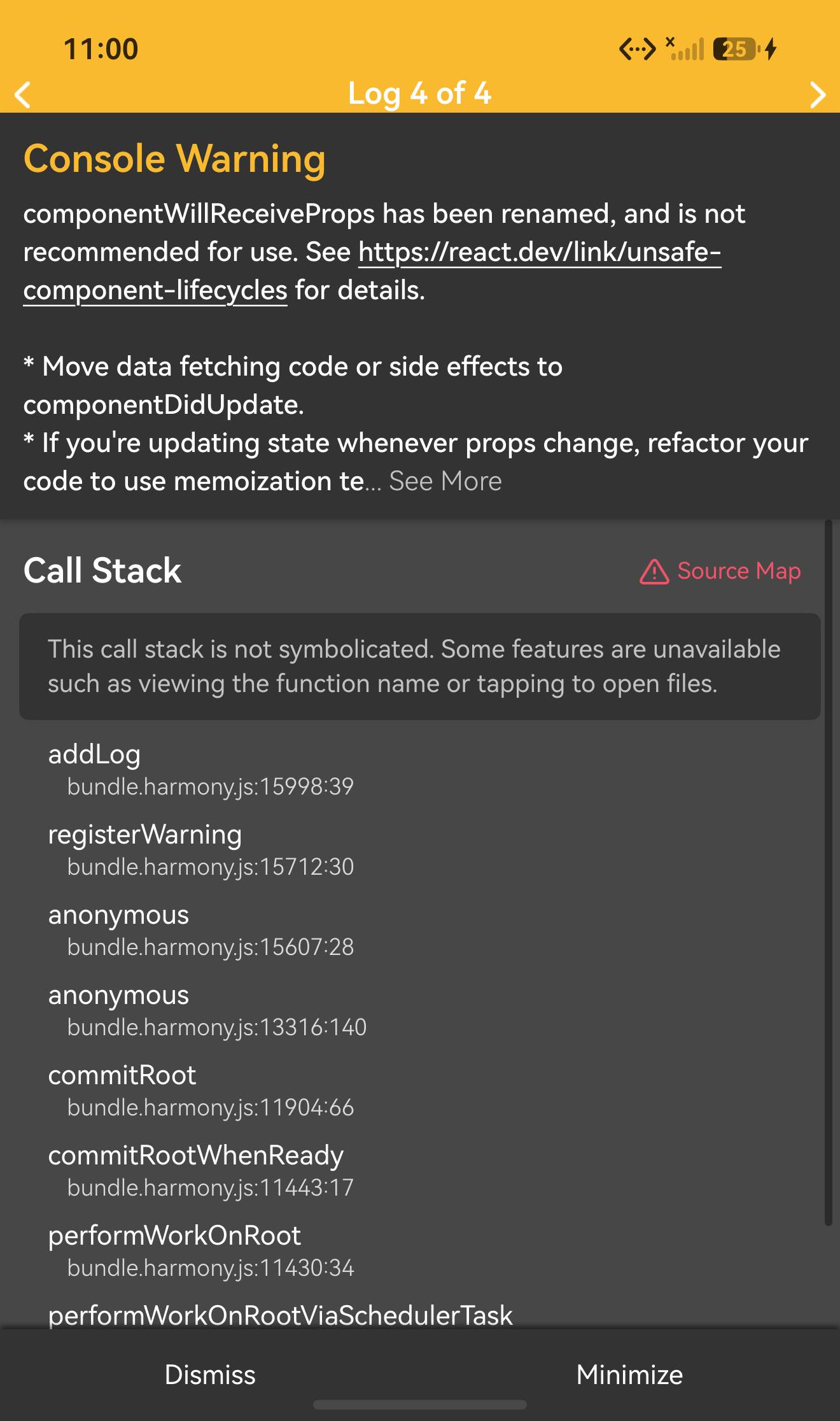
这套 API(contextTypes / childContextTypes / getChildContext)在 React 19 里已被移除。React 自己就在报:
'%s uses the legacy childContextTypes API which was removed in React 19. Use React.createContext() instead.'
'%s uses the legacy contextTypes API which was removed in React 19. Use React.createContext() with static contextType instead.'
'componentWillMount has been renamed, and is not recommended for use.'
'componentWillReceiveProps has been renamed, and is not recommended for use.'
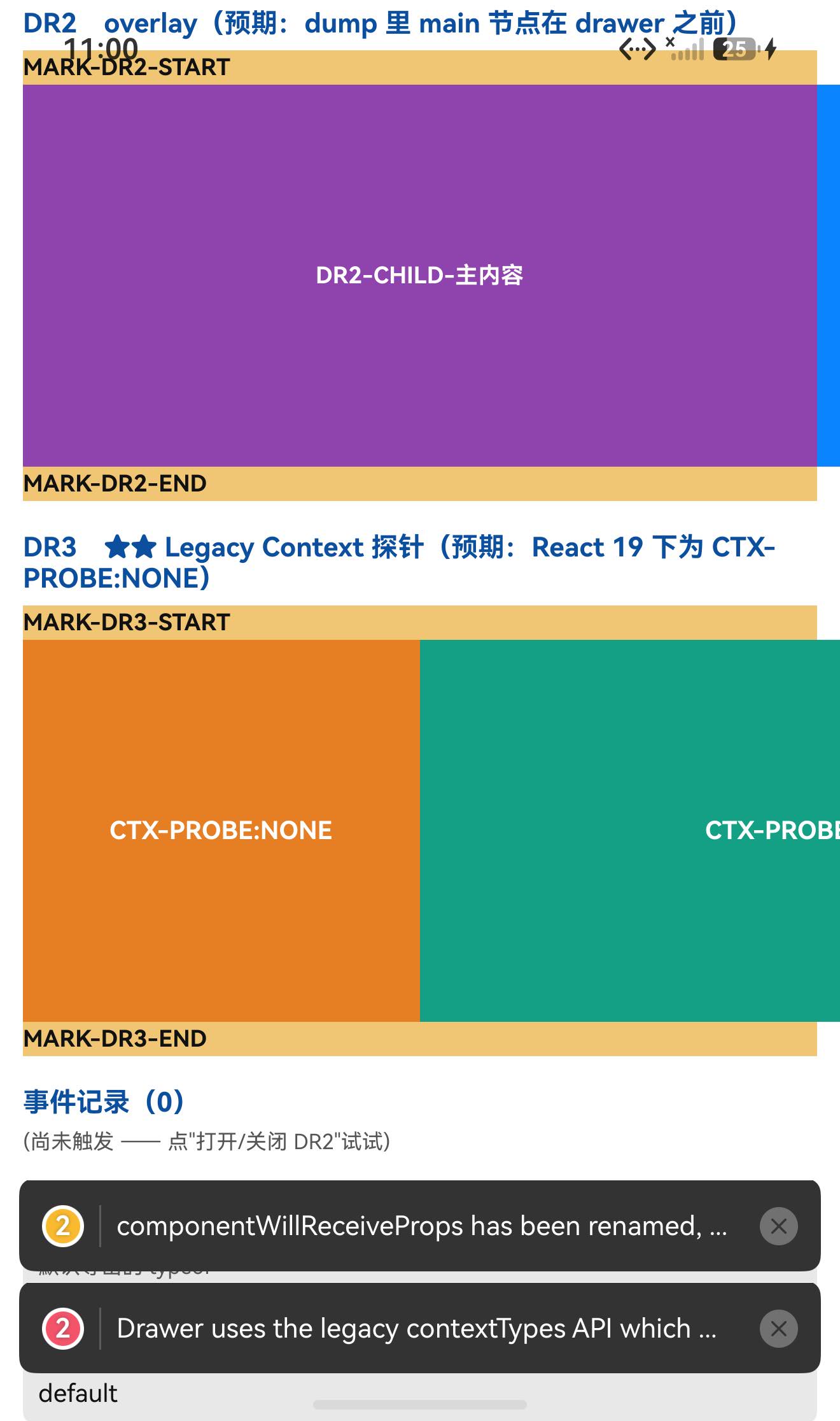
行为验证:我在抽屉里和主内容里各放了一个"读 this.context.drawer"的探针组件,两个都输出:
CTX-PROBE:NONE
⇒ getChildContext 提供的 drawer 对象确实传不下去了 ✓
⇒ 依赖这个 context 的写法(子组件里 this.context.drawer.open())在 React 19 上不会生效,请改用 ref + 命令式 API(open() / close() / toggle())✓
另外两条也是真的顺带发现:
- ⚠️
componentWillMount/componentWillReceiveProps是已被改名(UNSAFE_)的老生命周期,React 19 会告警; - ⚠️ 运行时要
tween-functions,目录方式接入时若宿主缺它,Metro 直接报Unable to resolve module tween-functions from …/tweener.js。
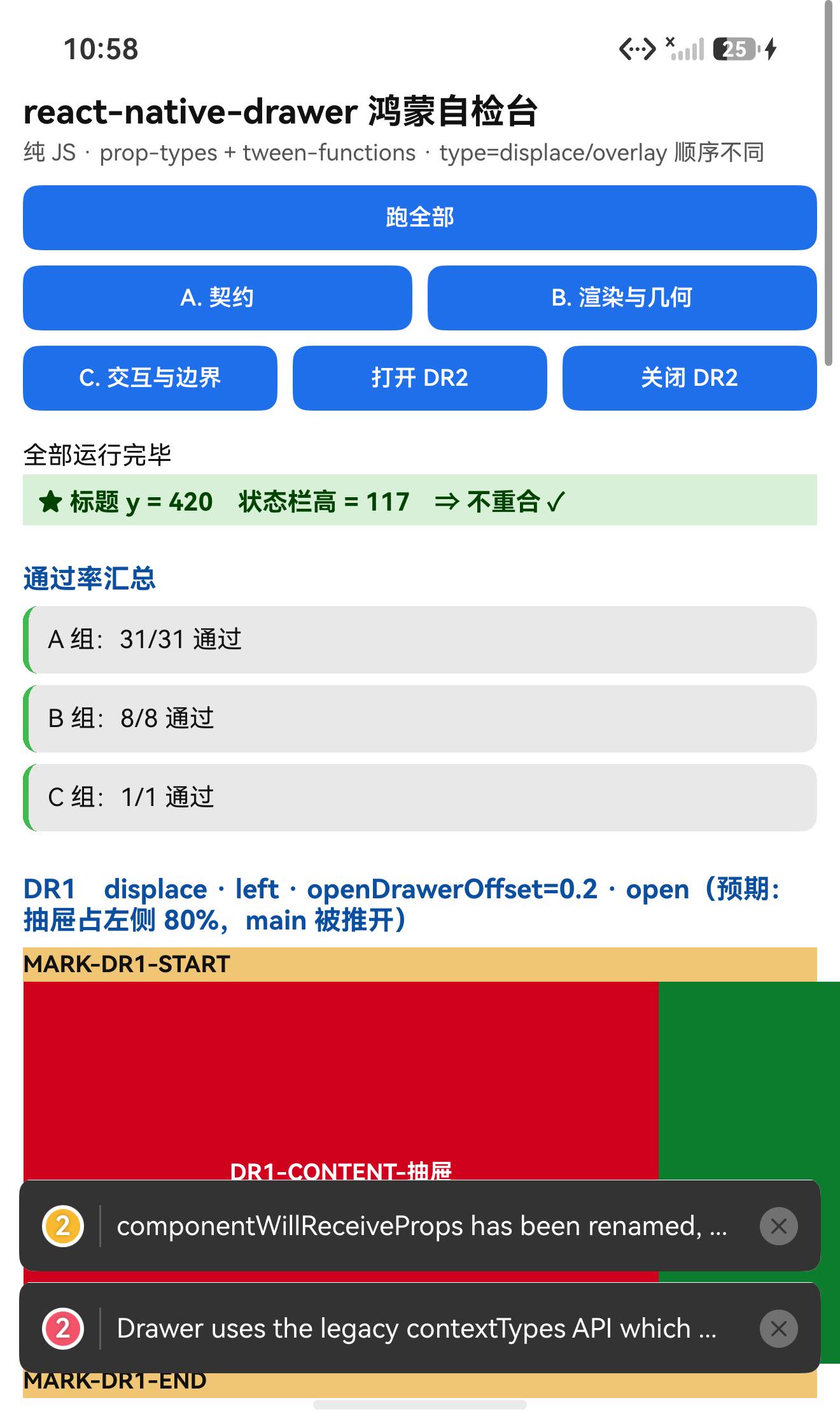
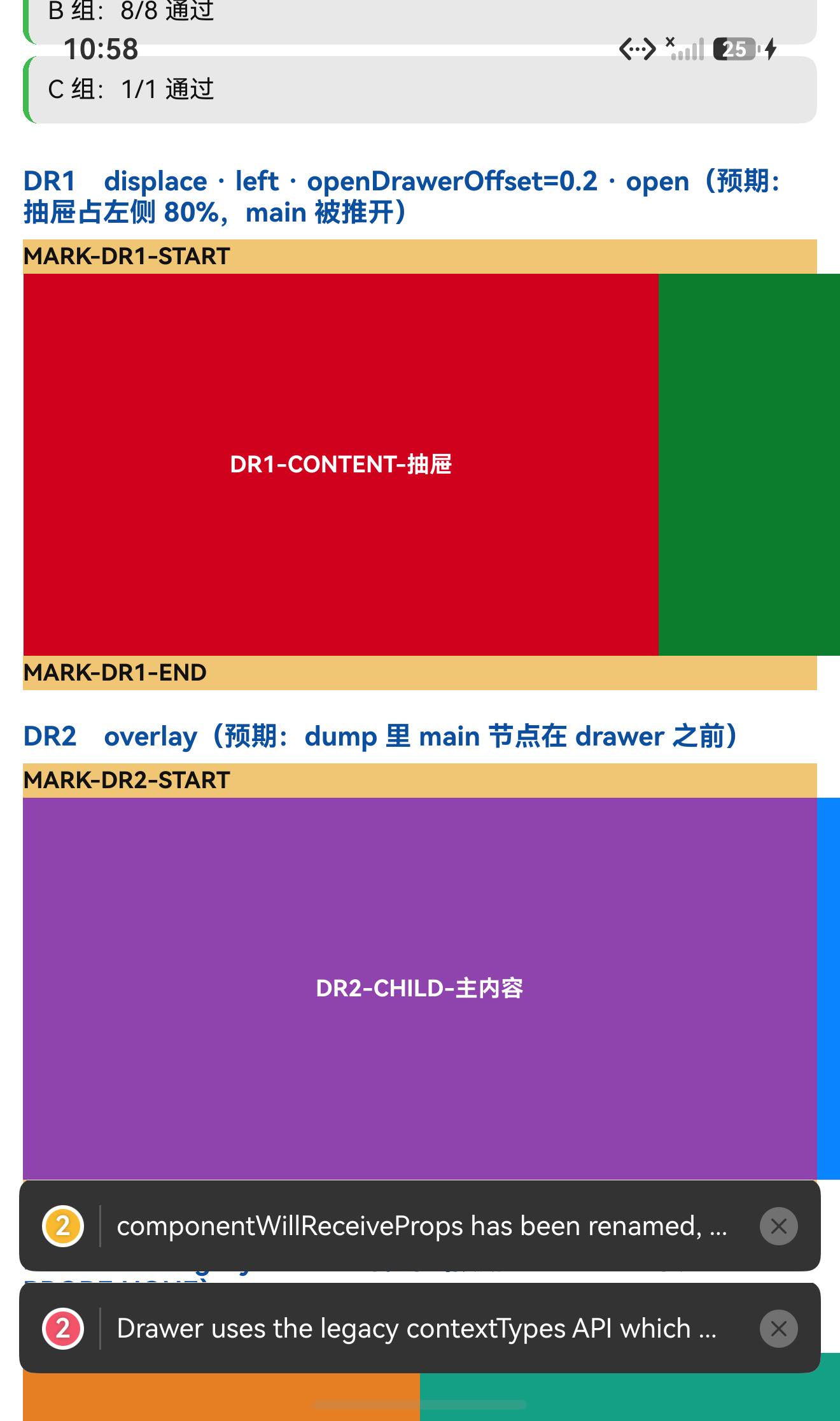
好消息:几何是可算的,而且换算成像素实测对得上 —— openDrawerOffset={0.2} 时抽屉宽 996px(理论 998.4px),主内容被推开后从 x=1036 开始(理论 1034px),误差都在 2px 内。
设备侧断言 40 / 40 全部通过。
一、先说结论
| 项 | 结果 |
|---|---|
| 上游最新版 | 2.5.1;license: MIT;上游 star 2526 |
| 库类型 | 纯 JS 单文件组件库(index.js 22716 B + tweener.js):侧滑抽屉 |
| 是否需要原生适配 | 不需要(无 harmony/、无 NativeModules) |
| 运行时依赖 | 两个:prop-types(宿主已有)、tween-functions(宿主原本没有 ⇒ 会踩依赖坑) |
prepare / postinstall | ✅ 都没有 |
main | index.js(源码直发) |
| 导出形态 | 只有默认导出(export default class Drawer)⇒ 命名空间只有 default 一个键 |
| 需要 HAR / 权限 / ohpm | ❌ 都不需要 |
| 设备侧断言 | ✅ 40 / 40 通过(A 31 + B 8 + C 1) |
| ★★ Legacy Context | contextTypes / childContextTypes / getChildContext 在 React 19 已移除 ⇒ 探针实测 CTX-PROBE:NONE |
| ★ 老生命周期 | componentWillMount / componentWillReceiveProps ⇒ React 19 告警 |
| ★★ 几何(实测) | openDrawerOffset={0.2}:offsetOpen=83.2vp、openLength=332.8vp、抽屉宽 332.8vp ⇒ 像素实测 996px / 起点 1036px(理论 998.4 / 1034,误差 ≤2px) |
| ★ 依赖坑 | 缺 tween-functions ⇒ 打包 Unable to resolve module tween-functions from …/tweener.js |
| ★ 结构 | 12 个原型方法 + 38 个箭头函数类字段(后者 0 个在 prototype;open/close/toggle 是实例上的箭头字段) |
| ★ 顺序判据 | render():type==='overlay' ? [main, drawer] : [drawer, main] |
二、判定与接入
| 步 | 做法 | 结果 |
|---|---|---|
| ① | package.json 里有没有 harmony.autolinking | 没有 |
| ② | 仓库里有没有 harmony/ | 没有 |
| ③ | 代码里有没有 NativeModules / requireNativeComponent | 全无 |
| ④ | import 图体检 | prop-types + tween-functions + ./tweener + react/react-native ⇒ 两个真依赖 |
| ⑤ | scripts 扫 prepare 家族 | ✅ 没有 |
npm install "git+https://atomgit.com/oh-react-native/react-native-drawer.git#2.5.1-ohos-1.0.0" --ignore-scripts

# ★ 必须补装运行时依赖(宿主原本没有 tween-functions)
npm install tween-functions --ignore-scripts
依赖坑的实测(先不装,直接打包):
error Unable to resolve module tween-functions from E:\rnoh-work\react-native-drawer\tweener.js:
      tween-functions could not be found within the project or in these directories…
装完 tween-functions@1.2.0 再打包 ⇒ exit 0 ✓
// metro.config.js
watchFolders: [ path.resolve(__dirname, '../react-native-drawer') ],
import DrawerTestApp from './DrawerTestApp';
AppRegistry.registerComponent('DrawerTestApp', () => DrawerTestApp);
hdc shell aa force-stop com.rnoh084.demo
hdc shell aa start -b com.rnoh084.demo -a EntryAbility --ps rnAppKey DrawerTestApp
不需要 HAR、权限、ohpm、link-harmony。
三、读源码取到的真值(index.js 22716 B)
3.1 导出与成员分两类(★ 先核对写法,不猜)
export default class Drawer extends Component { … } // 只有默认导出
★ 成员必须按"源码写法"分两组(这个库 12 + 38):
| 类别 | 数量 | 归属 | 典型成员 |
|---|---|---|---|
简写原型方法 m() {} | 12 | prototype | render / renderMain / renderDrawer / componentWillMount / componentWillReceiveProps / componentDidUpdate / shouldOpenDrawer / shouldCaptureGestures … |
箭头函数类字段 f = () => {} | 38 | 实例 | open / close / toggle(命令式 API)/ getDeviceLength / getOpenLength / getDrawerWidth / getMainWidth / isLeftOrRightSide / initialize / updatePosition / getChildContext / 一堆 onPanResponder* … |
实测:
原型方法命中数(源码 12 个) = 12
箭头类字段里【在 prototype 上】的个数(应为 0) = 0
★ 实例上存在的箭头类字段个数(抽查 10 个) = 10
⚠️
open/close/toggle是"实例上的箭头字段",不在prototype上 —— 所以通过ref调它们是可以的,但别指望在prototype上找到。
3.2 propTypes(32)与 defaultProps(25)
static defaultProps = {
  open: null, initializeOpen: false,
  type: 'displace',            // ★ overlay / static / displace
  closedDrawerOffset: 0,       // ★ 关闭时的偏移
  openDrawerOffset: 0,         // ★ 打开时的偏移(≤1 视为比例)
  panThreshold: 0.25, panOpenMask: null, panCloseMask: null,
  tweenHandler: null, tweenDuration: 250, tweenEasing: 'linear',
  disabled: false, negotiatePan: false, captureGestures: 'open',
  acceptDoubleTap: false, acceptTap: false, acceptPan: true, acceptPanOnDrawer: true,
  tapToClose: false, styles: {}, elevation: 0,
  onOpen: () => {}, onClose: () => {},
  side: 'left',                // ★ left / right / top / bottom
  useInteractionManager: false,
};
实测:propTypes 32 键、defaultProps 25 键,且 type='displace' / side='left' / openDrawerOffset=0 / tweenDuration=250 / tweenEasing='linear' / captureGestures='open' / open=null / initializeOpen=false 全部符合 ✓
⚠️ openDrawerOffset 默认是 0 ⇒ 打开时抽屉会占满整屏宽度。实际使用几乎一定要传(例如 openDrawerOffset={0.2})。
3.3 ★★ 几何:全部可算
getDeviceLength = (viewport = this.state.viewport) =>
  this.isLeftOrRightSide() ? viewport.width : viewport.height;

getOpenOffset = (props, viewport) => {
  if (typeof props.openDrawerOffset === 'function') return props.openDrawerOffset(viewport);
  return props.openDrawerOffset > 1 || props.openDrawerOffset < 0
    ? props.openDrawerOffset                                   // 绝对值(px)
    : props.openDrawerOffset * this.getDeviceLength(viewport);  // 比例
};

getOpenLength   = () => this.getDeviceLength() - this._offsetOpen;      // ★ main 被推开的距离
getClosedLength = () => this._offsetClosed;
getMainWidth    = (vp = this.state.viewport) => this.isLeftOrRightSide() ? vp.width - this._offsetClosed : vp.width;
getDrawerWidth  = (vp = this.state.viewport) => this.isLeftOrRightSide() ? vp.width - this._offsetOpen   : vp.width;
3.4 ★ render() 的节点顺序随 type 变
render() {
  let first  = this.props.type === 'overlay' ? this.renderMain() : this.renderDrawer();
  let second = this.props.type === 'overlay' ? this.renderDrawer() : this.renderMain();
  return (
    <View key="drawerContainer" onLayout={this.handleSetViewport} style={this.stylesheet.container}>
      {first}{second}
    </View>
  );
}
⇒ displace(默认)⇒ 抽屉先、主内容后;overlay ⇒ 主内容先、抽屉后 ⇒ 这一条可以从布局 dump 的节点顺序直接读出来 ✓
3.5 ★★ Legacy Context(React 19 已移除)
/*** CONTEXT ***/
static contextTypes = { drawer: PropTypes.object };
static childContextTypes = { drawer: PropTypes.object };
getChildContext = () => ({ drawer: this });
/*** END CONTEXT ***/
实测:
static contextTypes = ["drawer"]
static childContextTypes = ["drawer"]
★ React 版本 = 19.2.3
(React 运行时报)'%s uses the legacy childContextTypes API which was removed in React 19.'
(React 运行时报)'%s uses the legacy contextTypes API which was removed in React 19.'
(页面上的探针)CTX-PROBE:NONE      ← 抽屉里与主内容里各一个,都是 NONE
⇒ 子组件拿不到 drawer 对象 ✓ 这是用这个库最需要知道的一条。
3.6 其它
- ⚠️
let deviceScreen = Dimensions.get('window')在模块加载时取一次(之后容器的onLayout会通过handleSetViewport覆盖viewport); - ⚠️ 依赖
tween-functions(via./tweener); static tweenPresets = { parallax: (ratio, side='left') => ({ drawer: { [side]: -150 * (1 - ratio) } }) }⇒ 一个可直接调的纯函数 ✓
四、验证设计
| 判据 | 内容 |
|---|---|
| ① 结构(先看源码再断言) | 12 个原型方法在 prototype;38 个箭头字段 0 个在 prototype、且都在实例上 |
| ② 纯函数 | static tweenPresets.parallax(ratio, side) 的若干输入输出 |
| ③ 几何(定量) | 从实例读 getDeviceLength/getOpenLength/getDrawerWidth/getMainWidth,与公式核对 |
| ④ 几何(像素,独立来源) | 把抽屉染红、主内容染绿 ⇒ 量红色与绿色的 x 范围 |
| ⑤ Legacy Context(行为) | 页面内放"读 this.context.drawer"的探针 ⇒ 看输出 |
④ 与 ③ 是两个独立来源:③ 是组件自己算出来的值,④ 是屏幕上真实的像素 ⇒ 两者一致才说明"公式真的决定了画在哪"。
五、实测结果
5.1 断言 40 / 40
| 组 | 内容 | 结果 |
|---|---|---|
| A 契约 | 默认导出是 class、只有 default 一个命名空间键、结构(12 原型 + 38 类字段)、static tweenPresets.parallax 4 例、propTypes 32 / defaultProps 25 + 8 项关键默认值、contextTypes/childContextTypes 存在、React ≥19、tweener 可加载 | 31/31 |
| B 渲染与几何 | 两个 Drawer 渲染未抛错、标题不与状态栏重合、抽查 10 个箭头字段都在实例上、读 state.viewport、4 条几何公式核对 | 8/8 |
| C 交互与边界 | 4 条边界记录 | 1/1 |
| 合计 | 40/40 |
关键观测值:
默认导出的 typeof = function        命名空间只有 default 一个键
原型方法命中数(源码 12 个) = 12    箭头类字段里【在 prototype 上】的个数 = 0
★ 实例上存在的箭头类字段个数(抽查 10 个) = 10
propTypes 键数 = 32                 defaultProps 键数 = 25
static contextTypes = ["drawer"]    static childContextTypes = ["drawer"]
★ React 版本 = 19.2.3               tweener 默认导出类型 = function
tweenPresets.parallax(0.5,"left") = {"drawer":{"left":-75}}
tweenPresets.parallax(0,"left")   = {"drawer":{"left":-150}}
tweenPresets.parallax(0.5,"right")= {"drawer":{"right":-75}}
UI 安全区:TITLE measureInWindow y=420 > 117 ✓
5.2 ★★ 几何定量(③ + ④ 两个来源)
从实例读出来的值(side='left'、openDrawerOffset=0.2):
{"deviceLength":416,"openLength":332.8,"drawerWidth":332.8,
 "mainWidth":416,"offsetOpen":83.2,"offsetClosed":0,"isLeftOrRight":true}
核对:offsetOpen = 0.2 × 416 = 83.2 ✓、openLength = 416 - 83.2 = 332.8 ✓、drawerWidth = 416 - 83.2 = 332.8 ✓、mainWidth = 416 - 0 = 416 ✓
屏幕上量到的像素(density 3,抽屉染 #D0021B、主内容染 #0A7D2C):
红抽屉 #D0021B    ⇒ x 范围 38 .. 1033(宽 996 px)
绿主内容 #0A7D2C  ⇒ x 范围 1036 .. 1319(宽 284 px)
| 量 | 理论 | 实测 | 误差 |
|---|---|---|---|
| 抽屉宽度 | 332.8vp × 3 = 998.4 px | 996 px | 2.4 px |
| 主内容起点 | 36 + 998.4 = 1034.4 px | 1036 px | 1.6 px |
⇒ 组件自己算出的几何与真实像素一致 ⇒ 公式确实决定了"画在哪" ✓✓
5.3 ★★ Legacy Context 行为验证
页面上的两个探针(一个在 content 里、一个在 children 里):
Text#Paragraph(180) [172,2197,524,2232]  "CTX-PROBE:NONE"
Text#Paragraph(190) [1108,2197,1320,2232] "CTX-PROBE:NONE"
⇒ 两个都是 NONE ⇒ getChildContext 的 drawer 没有传下去 ✓✓
六、本轮我自己的两个失误
都在 A 组里,都是"断言写法"的问题,不是库的问题:
| # | 失误 | 现象 | 纠正 |
|---|---|---|---|
| 1 | record() 少传一个参数 | 写成 record('A', '★ 命名空间导出', Object.keys(DR).sort().join(', ')) ⇒ 第三个参数被当成 expected、actual 变成 undefined ⇒ 报"期望 default,实际 undefined" | 改成 put(...) + 单独用 record 断言键数 |
| 2 | 期望值忽略了 JS 的 -0 | parallax(1,'left') 算出 {left: -0},我写的期望是 {"drawer":{"left":-0}},但 JSON.stringify(-0) 会归一成 0 ⇒ 报"期望 -0,实际 0" | 期望改为 {"drawer":{"left":0}},并在断言里注明"-0 被 JSON 归一" |
⇒ 教训:断言辅助函数的参数个数要对齐;写 JSON 期望值时留意 -0/NaN/undefined 的序列化差异。
另外有一个做法上的改进值得记下:这次先扫源码把成员按写法分成两组再断言 ⇒ 结构断言一次通过(12/12、0/38、10/10 全中),没有再返工。
七、已知限制与本次验证边界
7.1 用这个库要知道的
| 事项 | 说明 |
|---|---|
| ★★ Legacy Context 已失效 | contextTypes/childContextTypes/getChildContext 在 React 19 被移除 ⇒ 子组件拿不到 drawer;请用 ref + open()/close()/toggle() |
| ⚠️ 老生命周期告警 | componentWillMount / componentWillReceiveProps |
⚠️ 必须补装 tween-functions | 否则 Metro 直接报错 |
openDrawerOffset 默认 0 | 打开时抽屉占满整屏;实际使用要传(0.2 表示留 20% 给主内容… 准确说:抽屉宽 = 屏宽 − openDrawerOffset × 屏宽) |
side 默认 left、type 默认 displace | overlay 会把抽屉画在主内容之上、并改变节点顺序 |
viewport 来自 onLayout | 初值是模块加载时的 Dimensions.get('window') |
| 命令式 API 在实例上 | open/close/toggle 是箭头类字段(不在 prototype) |
7.2 本次验证的边界
- 手势(
PanResponder)未验证 ——acceptPan/panThreshold/panOpenMask/panCloseMask/captureGestures/ 各种onPanResponder*都是源码级记录,没有真的用手指拖; tweenDuration/tweenEasing/tweenHandler的动画过程未验证(本轮为了立刻看到终态,构造实例时用了tweenDuration={0});open()/close()/toggle()的实际点击未验证(只验证了它们在实例上存在且可调用;页面上有按钮但本轮没点);type='static'未验证(只验证了displace与overlay的构造,节点顺序判据来自源码,未逐一比对 dump 顺序);elevation/styles的视觉未逐项像素核对(只用了styles.drawer/main染色);top/bottom两个方向未验证(只用了left与right);initializeOpen/disabled/onOpenStart/onCloseStart/onDragStart等回调未验证;I18nManager.isRTL分支未验证;- 只在一台模拟器上验证(
Pura X View,density 3,1320×2232),没有真机;未做跨平台对照。
未改动库代码。
八、常见问题
Q1:怎么用?
import Drawer from 'react-native-drawer';

<Drawer
  ref={drawerRef}
  type="displace"                     // overlay / static / displace
  side="left"                         // left / right / top / bottom
  openDrawerOffset={0.2}              // ★ 默认 0 会占满整屏,建议显式传
  tweenDuration={250}
  content={<View>{/* 抽屉内容 */}</View>}
  onOpen={() => {}}
  onClose={() => {}}
>
  <View>{/* 主内容 */}</View>
</Drawer>

// 打开 / 关闭 / 切换
drawerRef.current?.open();
drawerRef.current?.close();
drawerRef.current?.toggle();
Q2:为什么子组件里 this.context.drawer 是 undefined?
因为库用的是 Legacy Context(childContextTypes + getChildContext + contextTypes),而这套 API 在 React 19 已被移除。React 会直接告警:
'%s uses the legacy contextTypes API which was removed in React 19. Use React.createContext() with static contextType instead.'
实测:页面上的探针输出 CTX-PROBE:NONE(抽屉内、主内容内都是)。
替代做法:用 ref 调用 open() / close() / toggle();需要跨层级就把 ref 通过 React.createContext 自己传下去。
Q3:一装就报 Unable to resolve module tween-functions?
因为它依赖 tween-functions,目录方式接入时宿主里没有 ⇒ Metro 报错:
Unable to resolve module tween-functions from …/react-native-drawer/tweener.js
补装即可:npm install tween-functions --ignore-scripts(本轮用的是 1.2.0)。
Q4:openDrawerOffset 到底是什么意思?
它是打开时"不盖住"的那部分(≤1 按比例、>1 或 <0 按绝对值 px):
抽屉宽度   = 屏宽 − openDrawerOffset × 屏宽
main 被推开 = 屏宽 − openDrawerOffset × 屏宽     (type=displace)
实测(side=left、屏宽 416vp、openDrawerOffset=0.2):抽屉宽 332.8vp = 998.4px,主内容起点被推到 1034.4px;屏幕上量到 996px / 1036px,误差 ≤2.4px。
Q5:type 三种有什么区别?
overlay:抽屉画在主内容之上(节点顺序 main 在前);
displace(默认):推开主内容(节点顺序 drawer 在前);
static:抽屉与主内容并排(本轮未验证)。
Q6:parallax 效果怎么加?
库自带一个预设纯函数:
Drawer.tweenPresets.parallax(0.5, 'left') // ⇒ { drawer: { left: -75 } }
实测:parallax(0.5,'left') → {left:-75}、parallax(0,'left') → {left:-150}、parallax(0.5,'right') → {right:-75}。
Q7:open 和 initializeOpen 怎么用?
initializeOpen 控制初始是否展开;open 是受控的开关(默认 null)。本轮为了拿到"打开后的终态"直接传了 open={true}。
Q8:这个库需要鸿蒙侧做什么特殊处理吗?
不需要原生侧处理(纯 JS)。要注意的是两条:补装 tween-functions、以及 Legacy Context 在 React 19 已失效。
小结
react-native-drawer 是纯 JS 的侧滑抽屉(index.js 22716 B)。设备侧 40 / 40 断言通过。
最值得记下来的是这几条:
-
★★ 老库可能用了"已经被 React 移除的 API",这一条会直接影响写法。
本库的contextTypes/childContextTypes/getChildContext在 React 19 已移除 ⇒ React 直接报'… was removed in React 19',页面探针实测CTX-PROBE:NONE。
⇒ 结论:不要依赖子组件里的this.context.drawer,改用ref+open()/close()/toggle()。
⇒ 顺带发现componentWillMount/componentWillReceiveProps也在告警。 -
★★ 几何算得出来,就用"两个独立来源"去对。
来源一:从实例读getDeviceLength/getOpenLength/getDrawerWidth/getMainWidth⇒416 / 332.8 / 332.8 / 416;
来源二:把抽屉染红、主内容染绿后量像素 ⇒ 抽屉宽 996px(理论 998.4)、主内容起点 1036px(理论 1034.4),误差 ≤2.4px。
⇒ 两者一致,才说明"公式真的决定了画在哪"。 -
★ 结构断言先看源码写法(这条已经救了一次)。 本库 12 个原型方法 + 38 个箭头类字段,
open/close/toggle都在后者(实例上)。先扫源码再断言 ⇒ 一次通过,没有再返工。 -
★ 依赖坑在预检阶段就能预告。 import 图里有
tween-functions、宿主里没有 ⇒ 我提前就写了"会踩",实测打包报Unable to resolve module tween-functions from …/tweener.js,补装后 exit 0。 -
★ 我自己两个小失误都出在"断言写法"上:
record()少传一个参数;期望值忽略了JSON.stringify(-0)会归一成0。⇒ 写期望值时留意-0/NaN/undefined的序列化差异。
本篇用到的库
| 项 | 内容 |
|---|---|
| 三方库 | react-native-drawer(上游 2.5.1 的鸿蒙适配版) |
| 适配仓库 | https://atomgit.com/oh-react-native/react-native-drawer |
| 适配 TAG | 2.5.1-ohos-1.0.0 |
| 需要 HAR / 权限 / ohpm | 都不需要(纯 JS) |
| 库类型 | 纯 JS 单文件组件库:侧滑抽屉(content + children) |
| 运行时依赖 | prop-types / tween-functions |
prepare / postinstall | ✅ 都没有 |
| 许可证 | MIT |
| 上游仓库 | https://github.com/rt2zz/react-native-drawer(★2526) |
| 宿主工程 | RNOH084Demo(测试页 rnAppKey = DrawerTestApp) |
# 从适配仓库安装
npm install "git+https://atomgit.com/oh-react-native/react-native-drawer.git#2.5.1-ohos-1.0.0" --ignore-scripts

# 本地目录接入
npm install ../react-native-drawer --ignore-scripts
npm install tween-functions --ignore-scripts      # ★ 必须补装,否则 Metro 报错
// metro.config.js
watchFolders: [ path.resolve(__dirname, '../react-native-drawer') ],
import Drawer from 'react-native-drawer';

const drawerRef = useRef(null);

<Drawer
  ref={drawerRef}
  type="displace"                // overlay / static / displace
  side="left"                    // left / right / top / bottom
  openDrawerOffset={0.2}         // ★ 默认 0 ⇒ 占满整屏;建议显式传
  tweenDuration={250}
  tweenEasing="linear"
  elevation={4}
  styles={{drawer: {backgroundColor: '#fff'}, main: {backgroundColor: '#f5f5f5'}}}
  content={<View>{/* 抽屉内容 */}</View>}
  onOpen={() => {}}
  onClose={() => {}}
  onDragStart={() => {}}
>
  <View>{/* 主内容 */}</View>
</Drawer>

// 命令式 API(实例上的箭头字段,可用 ref 调)
drawerRef.current?.open();
drawerRef.current?.close();
drawerRef.current?.toggle();

// ⚠️ 不要依赖 legacy context:
//    contextTypes / childContextTypes / getChildContext 在 React 19 已移除
//    (实测子组件里 this.context.drawer 拿不到东西:CTX-PROBE:NONE)

// 视差预设(纯函数,可直接用)
Drawer.tweenPresets.parallax(0.5, 'left')     // ⇒ { drawer: { left: -75 } }
# 换页启动测试页 —— force-stop 不能省
hdc shell aa force-stop com.rnoh084.demo
hdc shell aa start -b com.rnoh084.demo -a EntryAbility --ps rnAppKey DrawerTestApp
判据的复现方式
# ① 结构:先看源码写法,再断言"分组"
#    简写原型方法:^\s{2}(\w+)\s*\([^)]*\)\s*\{
#    箭头类字段:  ^\s{2}(\w+)\s*=\s*(\(|function|async)
# ② 几何:从实例读 getter,再用像素独立核对
#    side=left 时:deviceLength=viewport.width;offsetOpen=openDrawerOffset×deviceLength
#    openLength=deviceLength−offsetOpen(= 主内容被推开的距离)
devecocli ui layout            # 读布局;几何位移用像素量更可靠
# ③ Legacy Context:在 content 与 children 里各放一个读 this.context.drawer 的探针
#    ⇒ 输出 CTX-PROBE:NONE 即说明 context 没传下去
hdc shell "hilog -x" | Select-String 'removed in React 19'
验证环境
| 项 | 版本 |
|---|---|
| React Native | 0.84.1 |
| React | 19.2.3 |
| RNOH(npm / ohpm) | @react-native-oh/react-native-harmony / @rnoh/react-native-openharmony 0.84.3 |
| Node.js / npm | v24.14.0 / 11.9.0 |
| DevEco Studio | 26.0.0.621 |
| HarmonyOS SDK | API 26(26.0.0.32) |
| 设备 | HarmonyOS 7.0.0(26.0.0) Beta2 模拟器 Pura X View(ohos-x64),1320×2232,density 3 |
| 本机状态栏高度 | 117px(页面留白取 48vp) |
| 宿主依赖 | prop-types 15.8.1(已有)/ tween-functions 原本没有 ⇒ 本轮补装 1.2.0 |
| 宿主 HAP 产物 | entry-default-signed.hap |
| 本次构建 | assembleHap 首轮 4 分 01 秒(39/41);修两处断言后 4 分 08 秒 ⇒ 40/40 |
| 验证规模 | 设备侧 40 / 40 断言;几何定量 2 组(实例 getter 4 条 + 像素质心/范围 2 条,误差 ≤2.4px);Legacy Context 探针 2 处(均为 NONE);纯函数 4 例;结构 3 项;依赖坑 1 次(打包复现 + 补装修复);UI 安全区 1 项 |
相关社区与项目地址
| 项目 | 地址 |
|---|---|
| React Native 鸿蒙官方社区(CPF-RN) | https://atomgit.com/CPF-RN |
| RNOH 框架仓库 | https://atomgit.com/openharmony-RN/ohos_react_native |
| RNOH 三方库使用文档 | https://atomgit.com/OpenHarmony-RN/usage-docs |
| React Native for OpenHarmony 组织 | https://atomgit.com/oh-react-native |
| RN 三方库鸿蒙适配清单 | https://atomgit.com/oh-react-native/rn-ohos-adaptation-overview |
欢迎加入 CPF-RN 鸿蒙社区:https://atomgit.com/CPF-RN
React Native for OpenHarmony 组织:https://atomgit.com/oh-react-native
RN 三方库鸿蒙适配清单:https://atomgit.com/oh-react-native/rn-ohos-adaptation-overview

作为“人工智能6S店”的官方数字引擎,为AI开发者与企业提供一个覆盖软硬件全栈、一站式门户。
更多推荐

 0
0 0
0- 0


 已为社区贡献16条内容

所有评论(0)