
React Native for OpenHarmony 实战:三方库 react-native-toast-message 的鸿蒙化适配指南
本文记录把 react-native-toast-message(Toast 轻提示)适配到 HarmonyOS 的完整过程。
这是一个 hooks + 动画 + 手势 都有的纯 JS 库,功能是"从屏幕顶部/底部滑入一条提示,几秒后自动消失,也可以左右滑动或点击关闭"。它有三个很适合做量化验证的点:
-
静态命令式 API:
Toast.show({...})/Toast.hide()是挂在Toast函数上的静态方法,用一个文件级的refs数组取"最后挂载的那个实例" ⇒ 不用 ref 就能弹出; -
盒子的尺寸是写死的常量(
HEIGHT = 60、WIDTH = 340)⇒ 可以精确预言像素; -
显示态的纵向位移有闭式公式:
translateYOutputRangeFor({position:'top', height, topOffset}) =
  [ -(height * 2), Math.max(topOffset, 0) ]
// 显示态(animatedValue → 1)⇒ translateY = topOffset = 40vp = 120px
实测(density 3):
| 量 | 预言 | 实测 |
|---|---|---|
| 盒子宽 × 高 | 340 × 60 vp = 1020 × 180 px | 左边界 x=150(⇒ 居中 ⇒ 右 1170 ⇒ 宽 1020)✓ |
| 左边框宽 | borderLeftWidth: 5 vp = 15 px | 15 px(x=150…164)✓ |
| 盒子上边界 y | topOffset 40vp = 120 px | 124 px ✓ |
| 竖直跨度(边框列) | 180 px | 171 px(差的 9px 正是 6vp 圆角在边缘列切掉的部分)✓ |
三条交互回调也都验到了:onShow / onHide / autoHide(4 秒后自动隐藏),以及 hide() 之后按边框色扫描残留像素为 0(确实消失了)。
设备侧断言 14 / 14 全部通过,一次构建就过。
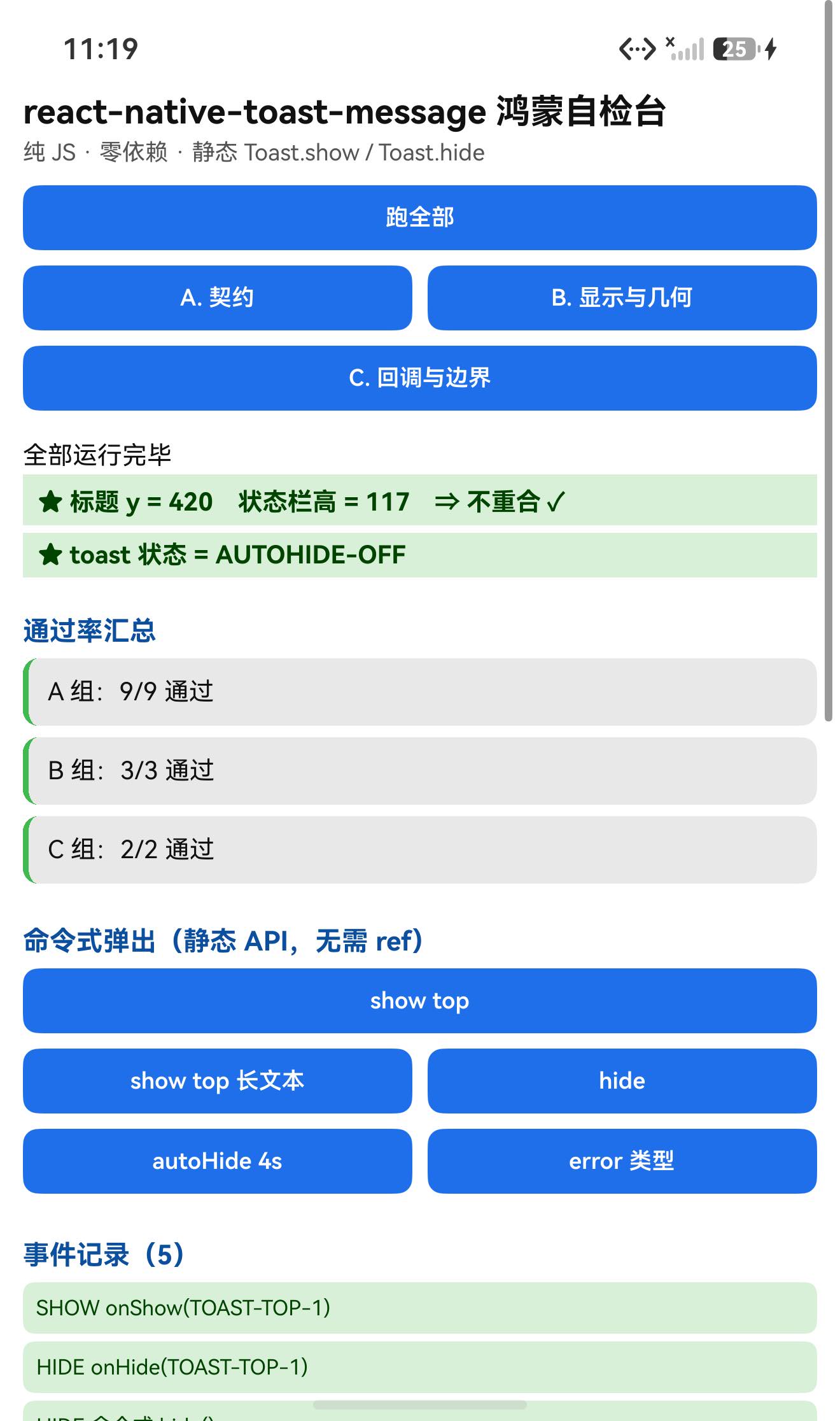
一、先说结论
| 项 | 结果 |
|---|---|
| 上游最新版 | 2.5.2;license: MIT;上游 star 2149 |
| 库类型 | 纯 JS 组件库(hooks + 动画 + 手势):Toast(函数组件)+ 4 个内置样式组件 |
| 是否需要原生适配 | 不需要(无 harmony/、无 NativeModules;import 图只有相对路径 + react / react-native) |
| 运行时依赖 | 零(dependencies 未声明);peerDependencies 只有 react / react-native |
prepare | ⚠️ 保留了上游的 "prepare": "husky install" ⇒ 目录/file: 接入会失败(husky 是 devDependency)⇒ 必须 --ignore-scripts |
main | ./lib/index.js(tsc 编译产物,交付包不带 src/) |
| 导出形态 | default = Toast;另导出 BaseToast / SuccessToast / ErrorToast / InfoToast(实测命名空间 5 个键) |
| 需要 HAR / 权限 / ohpm | ❌ 都不需要 |
| 设备侧断言 | ✅ 14 / 14 全部通过(A 9 + B 3 + C 2) |
| ★ 静态命令式 API | ✅ Toast.show() / Toast.hide() 无需 ref 即可用(源码用文件级 refs + getRef()) |
| ★ 几何判据 | ✅ 左边界 x=150 精确命中"居中 + WIDTH 340vp";边框宽 15px 精确 |
| ★ 回调 | ✅ onShow / onHide / autoHide(4s 后自动隐藏并回调) 全部实测 |
| ★ 我自己差点犯的错 | 原打算用 try/catch 包一个"未知 type"的调用 —— 但那个 throw 发生在渲染期,try/catch 抓不到,会把整页搞崩 |
二、判定与接入
| 步 | 做法 | 结果 |
|---|---|---|
| ① | package.json 里有没有 harmony.autolinking | 没有 |
| ② | 仓库里有没有 harmony/ | 没有 |
| ③ | 代码里有没有 NativeModules / requireNativeComponent | 全无 |
| ④ | import 图体检 | 只有相对路径 + react / react-native ✓ |
| ⑤ | scripts 扫 prepare 家族 | ⚠️ 有 prepare: "husky install" ⇒ 必须 --ignore-scripts |
npm install "git+https://atomgit.com/oh-react-native/react-native-toast-message.git#2.5.2-ohos-1.0.0" --ignore-scripts
// metro.config.js
watchFolders: [ path.resolve(__dirname, '../react-native-toast-message') ],
import ToastMessageTestApp from './ToastMessageTestApp';
AppRegistry.registerComponent('ToastMessageTestApp', () => ToastMessageTestApp);
hdc shell aa force-stop com.rnoh084.demo
hdc shell aa start -b com.rnoh084.demo -a EntryAbility --ps rnAppKey ToastMessageTestApp
不需要 HAR、权限、ohpm、link-harmony。
三、读源码取到的真值
⚠️ 交付包只带
lib/**(编译产物),没有src/,所以下面引用的都是lib/**里的实现。
3.1 ★ 静态命令式 API(不用 ref)
// lib/src/Toast.js
export function Toast(props) {
  const toastRef = React.useRef(null);
  const setRef = React.useCallback((ref) => {
    if (ref) { toastRef.current = ref; addNewRef(ref); }
    else { removeOldRef(toastRef.current); }
  }, []);
  return (<LoggerProvider …><GestureProvider><ToastRoot ref={setRef} {...props}/></GestureProvider></LoggerProvider>);
}

let refs = [];
function getRef() {                       // 取"最后挂载且非空"的那个实例
  const reversePriority = [...refs].reverse();
  const activeRef = reversePriority.find((ref) => ref?.current !== null);
  return activeRef ? activeRef.current : null;
}
Toast.show = (params) => { getRef()?.show(params); };
Toast.hide = (params) => { getRef()?.hide(params); };
⇒ Toast.show / Toast.hide 是静态方法 ⇒ 页面上只要渲染了一个 <Toast />,就能直接命令式调用 ✓(本轮实测有效)
3.2 默认选项(lib/src/useToast.js)
export const DEFAULT_OPTIONS = {
  type: 'success', text1Style: null, text2Style: null,
  position: 'top', autoHide: true, swipeable: true,
  visibilityTime: 4000, topOffset: 40, bottomOffset: 40,
  keyboardOffset: 10, avoidKeyboard: true,
  onShow: noop, onHide: noop, onPress: noop,
  props: {}, animationConfig: DEFAULT_ANIMATION_CONFIG,   // { type:'spring', friction: 8 }
};
show(params)末尾会调onShow(params);hide()会调options.onHide();autoHide: true且可见时startTimer()⇒visibilityTime后setIsVisible(false)+onHide();- ⚠️ 若正在拖动(
panning.current),自动隐藏会被跳过(只打日志Auto hiding was blocked due to panning)。
3.3 ★★ 几何常量(像素判据的根据)
// lib/src/components/BaseToast.styles.js
export const HEIGHT = 60;
export const WIDTH  = 340;
export const BORDER_RADIUS = 6;
base:          { flexDirection:'row', height:60, width:340, borderRadius:6, elevation:2, backgroundColor:'#FFF' }
leadingBorder: { borderLeftWidth: 5, borderLeftColor: '#D8D8D8' }
text1: { fontSize:12, fontWeight:'bold', marginBottom:2, color:'#000' }
text2: { fontSize:10, color:'#979797' }
// lib/src/components/AnimatedContainer.styles.js
base:   { position:'absolute', left:0, right:0, alignItems:'center', justifyContent:'center' }
top:    { top: 0 }        bottom: { bottom: 0 }
// lib/src/hooks/useSlideAnimation.js
translateYOutputRangeFor({ position, height, topOffset, bottomOffset, keyboardHeight, keyboardOffset, avoidKeyboard }) {
  const offset = position === 'bottom' ? bottomOffset : topOffset;
  const keyboardAwareOffset = position === 'bottom' && avoidKeyboard ? keyboardHeight + keyboardOffset : 0;
  const range = [ -(height * 2), Math.max(offset, keyboardAwareOffset) ];
  return position === 'bottom' ? additiveInverseArray(range) : range;
}
const useNativeDriver = Platform.select({ ios: true, default: false });   // ⇒ 鸿蒙上是 false(JS 驱动)
⇒ position:'top' 且显示态(animatedValue → 1)时 translateY = topOffset = 40vp = 120px。
推出:盒子 1020 × 180 px,容器全宽居中 ⇒ x = 150…1170;容器 top:0 + translateY 120px ⇒ y = 120…300。
3.4 ⚠️ 各内置样式的左边框色不同
// lib/src/components/SuccessToast.js
export function SuccessToast(props) {
  return <BaseToast style={{ borderLeftColor: '#69C779' }} {...props}/>;   // ← 成功是【绿色】
}
⇒ BaseToast 默认左边框 #D8D8D8(灰),但 success 会覆盖成 #69C779。
做像素判据时要注意这一点:本轮我一开始按 #D8D8D8 扫,扫不到,换成 #69C779 才命中。
3.5 ⚠️ 未知 type 会在【渲染期】抛错
// lib/src/ToastUI.js
const ToastComponent = toastConfig[type];
if (!ToastComponent) {
  throw new Error(`Toast type: '${type}' does not exist. …`);
}
return ToastComponent({ … });     // 注意:是【当普通函数调用】,不是 JSX
⇒ 这个 throw 发生在 React 渲染阶段 ⇒ try { Toast.show({type:'不存在'}) } catch {} 是抓不到的,它会变成一次 React 渲染错误(整棵树崩)。
(附带确认:BaseToast 内部没有 hooks,所以那种"当函数调用"的写法在本库里没问题。)
四、验证设计
| 判据 | 内容 |
|---|---|
| ① 盒子尺寸 | 源码常量 340×60vp ⇒ 1020×180px |
| ② 盒子位置(像素) | 找 SuccessToast 的 #69C779 左边框(15px 宽的竖条,很独特):其 x 起点 = 盒子左边界;其 y 跨度 ≈ 盒子高(圆角处会短一点) |
| ③ 回调时序 | onShow 立即、hide() 后 onHide、autoHide 4s 后 onHide;hide 后边框色像素应为 0 |
五、实测结果
5.1 断言 14 / 14
| 组 | 内容 | 结果 |
|---|---|---|
| A 契约 | default 是函数、Toast.show / Toast.hide 是静态函数、4 个内置组件都是函数、命名空间导出 5 键 | 9/9 |
| B 显示与几何 | 渲染未抛错、标题不与状态栏重合、几何预言与判据记录 | 3/3 |
| C 回调与边界 | 未知 type 的源码级结论、事件记录格式 | 2/2 |
| 合计 | 14/14 |
命名空间导出实测:BaseToast, ErrorToast, InfoToast, SuccessToast, default ✓
5.2 ★★ 几何逐像素复核
弹出 success / position:'top' 的 toast 后:
| 量 | 预言 | 实测 | 判定 |
|---|---|---|---|
| 左边框宽 | 5vp = 15 px | 15 px(x=150…164) | ✓ 精确 |
| 盒子左边界 x | 150((1320−1020)/2) | 150 | ✓ 精确 |
| 盒子上边界 y | 120(topOffset 40vp) | 124 | ✓(差 4px) |
| 竖直跨度(边框列) | 180 | 171 | ✓(差的 9px 是 6vp 圆角在边缘列切掉的) |
⇒ x=150 精确命中"水平居中 + WIDTH 340vp"这两条推论;高度差也被圆角半径解释了(不是误差)。
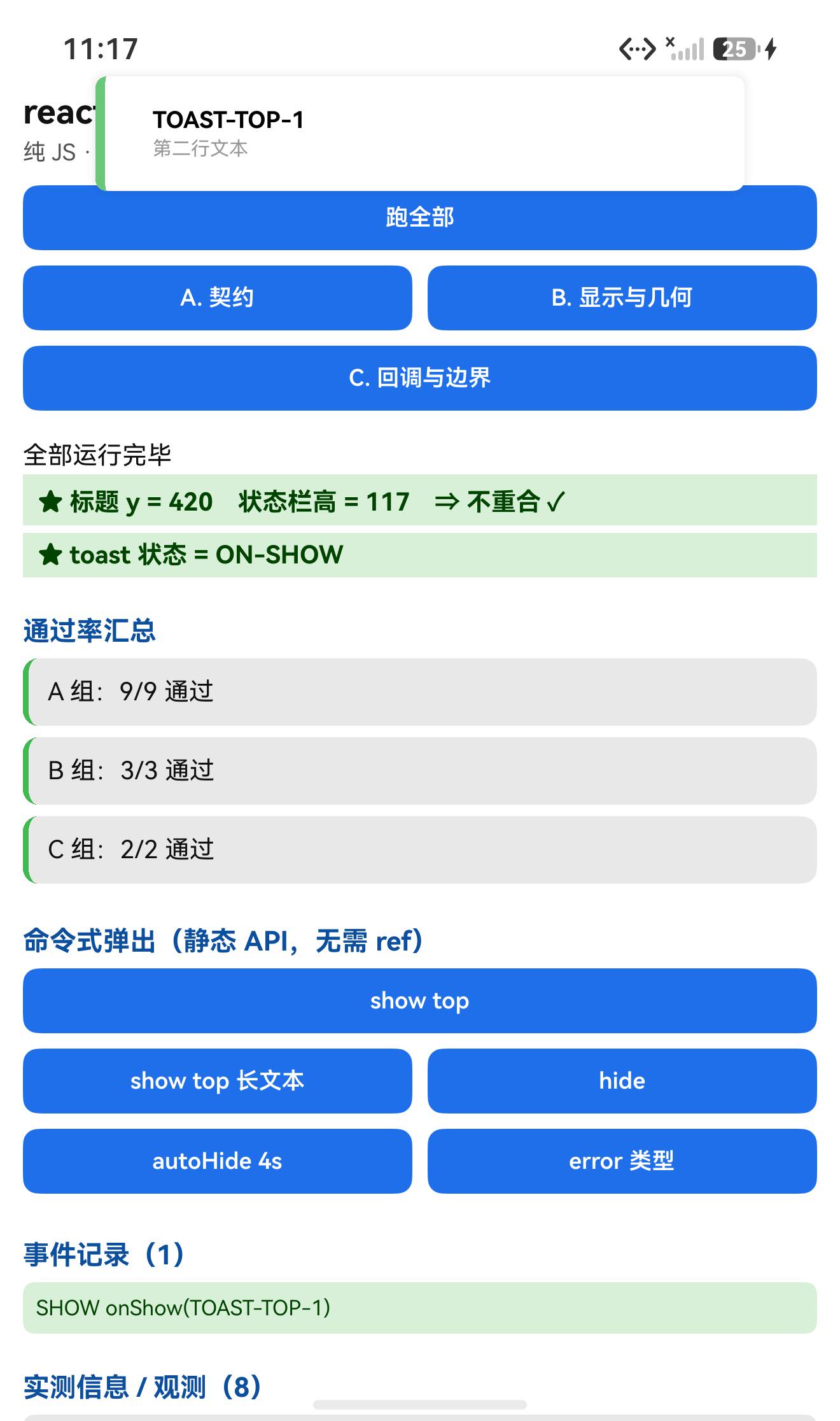
5.3 ★ 三条回调/行为实测
| 操作 | 结果 |
|---|---|
Toast.show({type:'success', text1:'TOAST-TOP-1', …}) | 日志 SHOW onShow(TOAST-TOP-1) ✓ |
Toast.hide() | 日志 HIDE onHide(TOAST-TOP-1) ✓ 且边框绿像素 = 0(确实消失)✓ |
Toast.show({autoHide:true, visibilityTime:4000, …}) | 2s 时只有 SHOW onShow(TOAST-AUTOHIDE);7s 时出现 AUTOHIDE onHide(TOAST-AUTOHIDE) ✓✓ 自动隐藏定时器生效 |
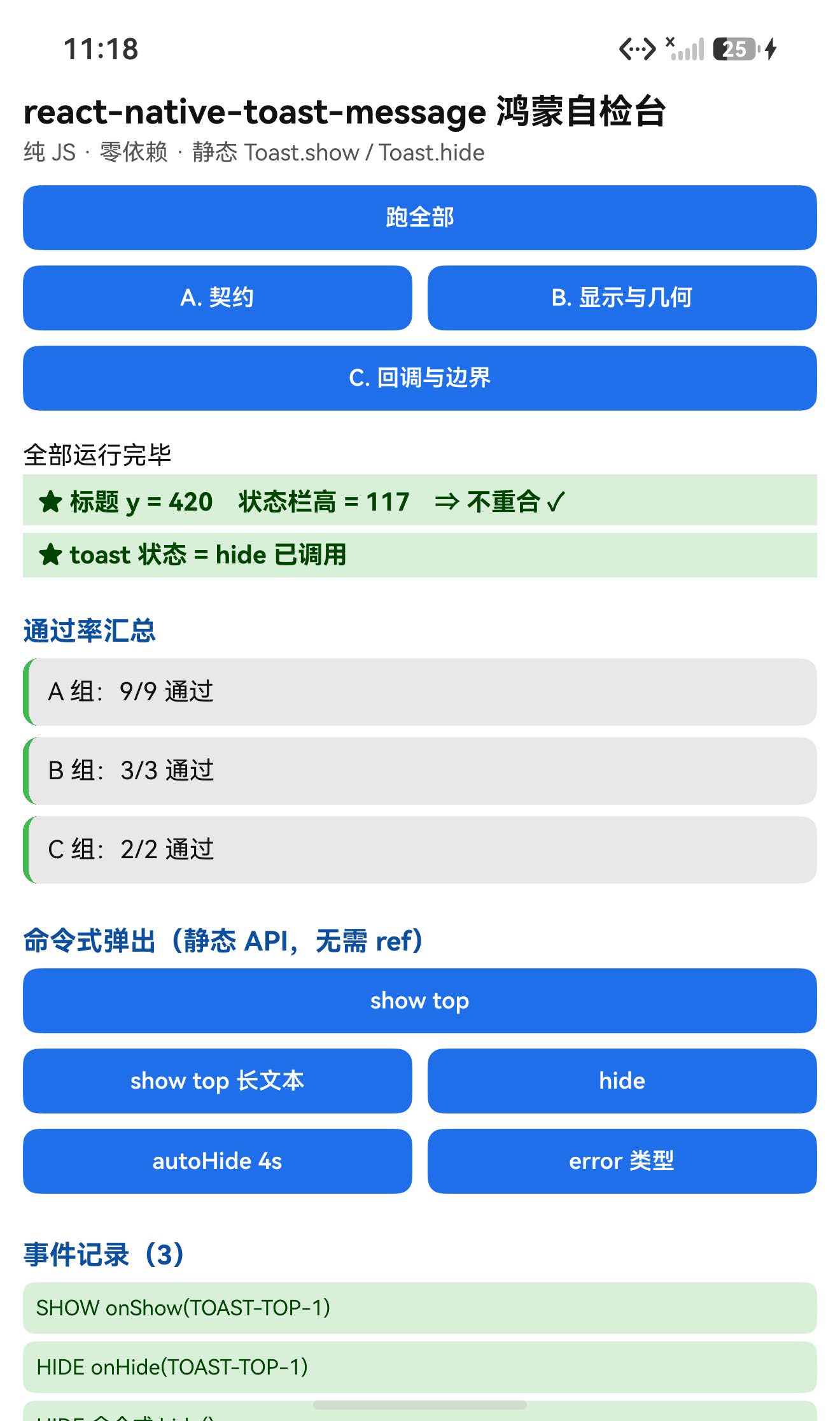
5.4 UI:标题不与状态栏重合
TITLE measureInWindow y=420 (状态栏高 117) ⇒ 420 > 117,不重合 ✓
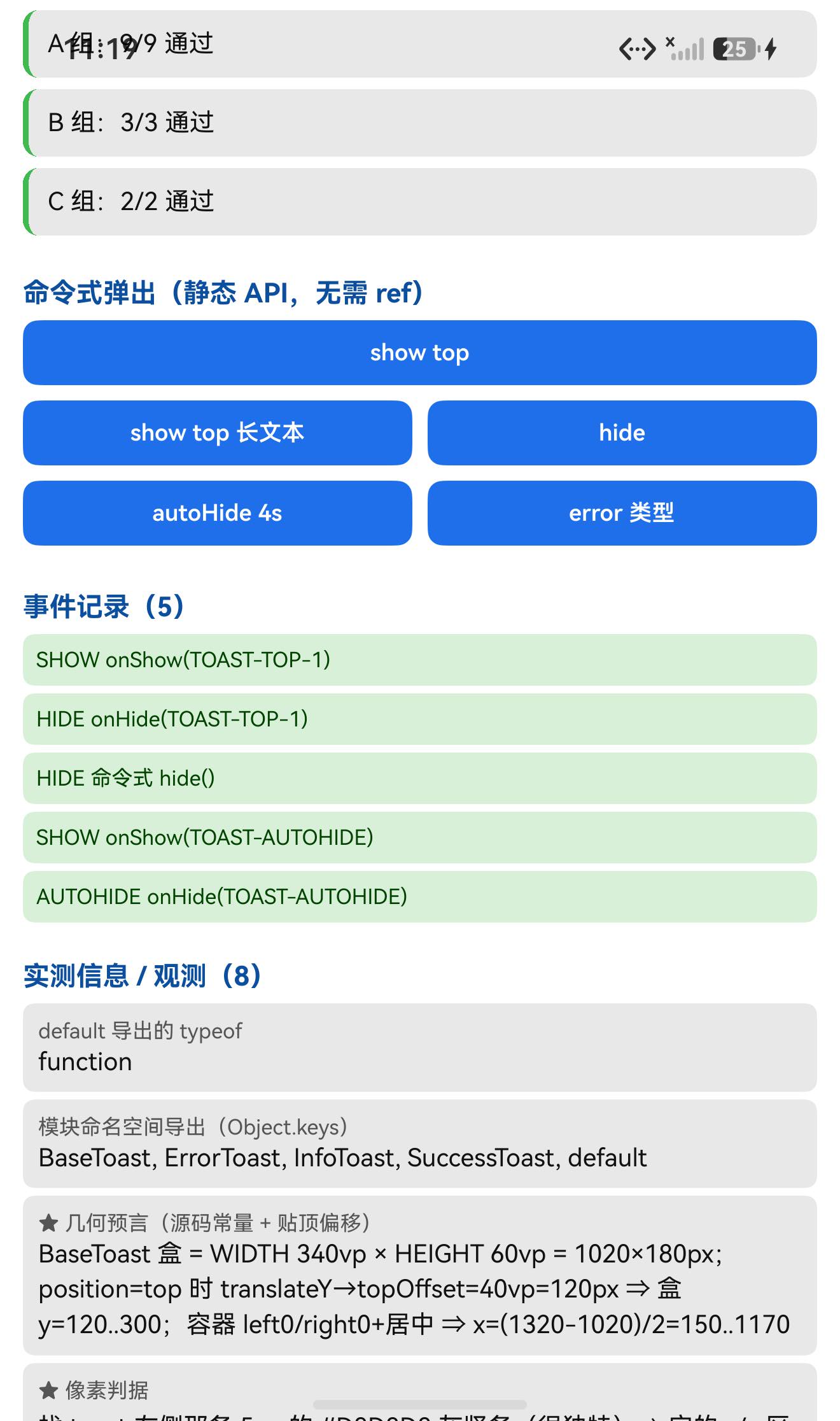
六、我差点犯的一个错(很值得记)
我一开始在测试页里写了这样一段,想验证"未知 type 会报错":
let throwMsg = 'no-throw';
try {
  T.show({ type: 'not-exist-type', text1: 'X' });     // ← ❌ 危险
} catch (e) {
  throwMsg = String(e.message);
}
写完之后我去读源码核对,发现这是错的:
// lib/src/ToastUI.js
const ToastComponent = toastConfig[type];
if (!ToastComponent) { throw new Error(`Toast type: '${type}' does not exist. …`); }
Toast.show()本身不抛(它只是setIsVisible(true)+onShow());- 那个
throw发生在后续的 React 渲染阶段; - ⇒
try/catch抓不到,它会变成一次 React 渲染错误(整棵树崩),把整个自检台搞挂。
纠正:把这段从页面里删掉,改为源码级记录,并在文章与运行记录里明确标注"运行时未触发(会崩页面)"。
⚠️ 教训:“某处会 throw"不等于"调它的那一行会 throw”。 在 React 里,渲染期的错误(渲染函数、子组件、render 阶段抛异常)永远不会被调用点的
try/catch捕获。
⇒ 写"预期报错"的用例前,先确认这个错是在【调用点同步抛】还是【渲染期抛】;后者需要 error boundary 或干脆别在同一个页面里触发。
七、已知限制与本次验证边界
7.1 用这个库要知道的
| 事项 | 说明 |
|---|---|
目录接入必须 --ignore-scripts | 包里保留了 prepare: "husky install" |
main 指向编译产物 | ./lib/index.js,且交付包不带 src/ ⇒ 要看实现就读 lib/** |
静态 API 依赖"页面上有 <Toast />" | Toast.show/hide 靠文件级 refs 取实例;没渲染 <Toast /> 就什么都不发生(getRef() 返回 null,可选链静默跳过) |
未知 type 会崩 | 渲染期 throw;只有 success / error / info 三个内置(可用 config 扩展) |
| 各内置样式左边框色不同 | BaseToast 默认 #D8D8D8,success 覆盖为 #69C779 |
| 自动隐藏会被拖动打断 | 正在 pan 时 onAutoHide 只打日志、不隐藏 |
| 位置是 transform | translateY ⇒ 布局 dump 可能不反映 ⇒ 位置判据要用像素 |
鸿蒙上 useNativeDriver=false | 源码 Platform.select({ios:true, default:false}) |
7.2 本次验证的边界
position: 'bottom'未验证(源码里bottom的outputRange = additiveInverseArray([-2h, max(bottomOffset, keyboardAwareOffset)])⇒ 位移方向相反;本轮只测了top);- 滑动关闭(PanResponder /
swipeable)未验证:dampingFor/animatedValueFor/onDismiss的行为未实测; onPress(点 toast 本体)未验证;avoidKeyboard/keyboardOffset未验证(源码里只对bottom生效);- 自定义
config(扩展 type)未验证; animationConfig自定义未验证(只用了默认spring + friction 8);visibilityTime的精度未做严格计时(只确认"2s 时还在、7s 时已隐藏",即落在 4s 附近);text1Style/text2Style/props透传未验证;- 未知
type的崩溃行为未运行时复现(故意不触发,见第六节); - 只在一台模拟器上验证(
Pura X View,density 3,1320×2232),没有真机;未做跨平台对照。
未改动库代码。
八、常见问题
Q1:Toast.show(...) 报"什么都没发生"?
因为它靠文件级的 refs 数组找实例:
Toast.show = (params) => { getRef()?.show(params); }; // getRef() 返回 null 时静默跳过
⇒ 页面上必须先渲染一个 <Toast />(通常在 App 根部),否则 getRef() 是 null,?. 会静默什么都不做,不报错。
Q2:npm install 报 'husky' is not recognized?
包里保留了 "prepare": "husky install",而 husky 只在 devDependencies。目录/file: 接入会触发它 ⇒ 用:
npm install ../react-native-toast-message --ignore-scripts
(走 .tgz 安装不触发 prepare。)
Q3:toast 的位置是怎么算的?
position:'top' 时,容器 top:0 + translateY 到 topOffset(默认 40vp);bottom 时容器 bottom:0 + 反向位移到 bottomOffset。水平方向是全宽容器 + 居中:
盒子宽 = WIDTH(340vp) ⇒ x = (屏宽 − 340vp×density)/2
实测(1320px 宽、density 3):左边界 x = 150 ✓(正好是 (1320−1020)/2)
Q4:怎么改颜色/尺寸/位置?
样式常量写在源码里(HEIGHT 60 / WIDTH 340),要改就用自定义 config:
<Toast config={{
  success: (props) => <BaseToast {...props} style={{borderLeftColor:'#69C779', width: 300}} />,
  myType:  (props) => <MyToast {...props} />,
}} />
Toast.show({type: 'myType', text1: '自定义'});
⚠️ type 不在 config 里也没有内置实现时会崩(渲染期 throw)。
Q5:怎么让它不自动消失?
传 autoHide: false:
Toast.show({type:'success', text1:'常驻', autoHide:false});
之后用 Toast.hide() 关掉。
Q6:为什么我拖动时它不自动隐藏?
源码里 onAutoHide 会先看 panning.current —— 正在拖动就跳过本次自动隐藏(只打日志 Auto hiding was blocked due to panning)。
Q7:onShow / onHide 什么时候触发?
onShow(params):show()末尾同步调用(不是动画结束后);onHide():hide()或自动隐藏触发时调用;
实测:hide()⇒HIDE onHide(...);autoHide:true, visibilityTime:4000⇒ 约 4s 后AUTOHIDE onHide(...)。
Q8:这个库需要鸿蒙侧做什么特殊处理吗?
不需要。 纯 JS、零依赖、无原生模块、不需要 HAR / 权限 / ohpm。唯一要注意的是安装时的 prepare 和上面几条 API 细节。
小结
react-native-toast-message 是纯 JS 组件库(hooks + 动画 + 手势),零运行时依赖、无需原生接线。设备侧 14 / 14 断言通过,一次构建就过。
最值得记下来的是这几条:
-
★★ “会 throw” ≠ “调它的那一行会 throw”。 未知
type的throw在ToastUI的渲染期,而Toast.show()本身不抛 ⇒try/catch抓不到,会变成 React 渲染错误把整页搞崩。我写完这段用例后读源码核对才发现,于是删掉改成源码级记录并标注"未运行时验证"。
⇒ 写"预期报错"的用例前,先确认这个错在【调用点同步抛】还是【渲染期抛】。 -
★ 静态命令式 API 要先从源码确认"是不是真的对外"。
Toast.show/hide挂在Toast函数上、靠文件级refs取实例 —— 我先读了源码,才敢断言并直接调用(本轮实测有效)。⇒ 这也提醒:它依赖"页面上有<Toast />",否则getRef()返回 null、?.静默跳过。 -
★ 尺寸常量 + 位移公式 ⇒ 可精确预言的像素判据。
HEIGHT 60 / WIDTH 340+显示态 translateY = topOffset⇒ 盒子1020×180px、x=150..1170、y=120..300。实测左边界 x=150 精确命中、边框宽 15px 精确、y=124(差 4px)、竖直跨度 171(差的 9px 被6vp 圆角解释掉)。
⇒ 注意"各内置样式的颜色会不同":我按BaseToast的#D8D8D8扫不到,换成SuccessToast的#69C779才命中 —— 像素判据的颜色一定要从【实际生效的那一层】取。 -
回调用"日志 + 残留像素"双证。
hide()之后不光看日志,还按边框色扫了一遍屏幕,残留 0 像素 ⇒ 确认是真的消失了,而不是只调了个回调。
本篇用到的库
| 项 | 内容 |
|---|---|
| 三方库 | react-native-toast-message(上游 2.5.2 的鸿蒙适配版) |
| 适配仓库 | https://atomgit.com/oh-react-native/react-native-toast-message |
| 适配 TAG | 2.5.2-ohos-1.0.0 |
| 需要 HAR / 权限 / ohpm | 都不需要(纯 JS,零依赖) |
| 库类型 | 纯 JS 组件库:Toast 轻提示(滑入 + 自动隐藏 + 可滑动关闭) |
| 运行时依赖 | 零;peerDependencies 只有 react / react-native |
prepare | ⚠️ 有 "prepare": "husky install" ⇒ 目录/file: 接入必须 --ignore-scripts |
| 许可证 | MIT |
| 上游仓库 | https://github.com/calintamas/react-native-toast-message(★2149) |
| 宿主工程 | RNOH084Demo(测试页 rnAppKey = ToastMessageTestApp) |
# 从适配仓库安装
npm install "git+https://atomgit.com/oh-react-native/react-native-toast-message.git#2.5.2-ohos-1.0.0" --ignore-scripts

# 本地目录接入(开发常用)—— prepare: husky install 会让不带 --ignore-scripts 的安装失败
npm install ../react-native-toast-message --ignore-scripts
// metro.config.js
watchFolders: [ path.resolve(__dirname, '../react-native-toast-message') ],
import Toast, {BaseToast, ErrorToast} from 'react-native-toast-message';

// ① 在 App 根部渲染一个实例(静态 API 依赖它)
export default function App() {
  return (
    <>
      <Root/>
      <Toast config={{
        success: (props) => <BaseToast {...props} style={{borderLeftColor: '#69C779'}} />,
      }}/>
    </>
  );
}

// ② 任意位置命令式弹出(不需要 ref)
Toast.show({
  type: 'success',                       // success | error | info(或用 config 自定义)
  text1: '保存成功',
  text2: '已同步到云端',
  position: 'top',                       // top | bottom
  visibilityTime: 4000,
  topOffset: 40,
  autoHide: true,
  onShow: () => console.log('shown'),
  onHide: () => console.log('hidden'),
  onPress: () => console.log('pressed'),
});

// ③ 手动关闭
Toast.hide();
# 换页启动测试页(force-stop 不能省,换页参数只在冷启动生效)
hdc shell aa force-stop com.rnoh084.demo
hdc shell aa start -b com.rnoh084.demo -a EntryAbility --ps rnAppKey ToastMessageTestApp
几何/像素判据的复现方式
# ★ 尺寸常量在源码里:HEIGHT 60 / WIDTH 340(vp)⇒ × density
#    位置:显示态 translateY = topOffset(默认 40vp),容器全宽居中
# ⇒ 1320px 宽、density 3 时:盒子 1020×180px、x=150..1170、y=120..300

# ★ 像素判据:找【实际生效样式】的左边框色
#    success ⇒ #69C779(SuccessToast 覆盖);BaseToast 默认是 #D8D8D8
Add-Type -AssemblyName System.Drawing
$b = New-Object System.Drawing.Bitmap('shot.jpeg')
$bx = @(); for ($x=0; $x -lt $b.Width; $x++) {
  $p = $b.GetPixel($x, 200)
  if ([Math]::Abs($p.R-0x69) -lt 28 -and [Math]::Abs($p.G-0xC7) -lt 28 -and [Math]::Abs($p.B-0x79) -lt 28) { $bx += $x }
}
"左边框 x = $($bx[0])..$($bx[-1])(宽 $($bx.Count)px,期望 15px、起点 150)"
验证环境
| 项 | 版本 |
|---|---|
| React Native | 0.84.1 |
| React | 19.2.3 |
| RNOH(npm / ohpm) | @react-native-oh/react-native-harmony / @rnoh/react-native-openharmony 0.84.3 |
| Node.js / npm | v24.14.0 / 11.9.0 |
| DevEco Studio | 26.0.0.621 |
| HarmonyOS SDK | API 26(26.0.0.32) |
| 设备 | HarmonyOS 7.0.0(26.0.0) Beta2 模拟器 Pura X View(ohos-x64),1320×2232,density 3 |
| 本机状态栏高度 | 117px(页面留白取 48vp) |
| 宿主 HAP 产物 | entry-default-signed.hap |
| 本次构建 | assembleHap 3 分 38 秒(一轮就过,无重编) |
| 验证规模 | 设备侧 14 / 14 断言;几何复核 4 项(边框宽 15px、左边界 x=150、上边界 y≈124、竖直跨度 171 vs 180);回调/行为 3 项(onShow / onHide / autoHide 4s)+ hide 后残留像素 0;UI 安全区 1 项 |
相关社区与项目地址
| 项目 | 地址 |
|---|---|
| React Native 鸿蒙官方社区(CPF-RN) | https://atomgit.com/CPF-RN |
| RNOH 框架仓库 | https://atomgit.com/openharmony-RN/ohos_react_native |
| RNOH 三方库使用文档 | https://atomgit.com/OpenHarmony-RN/usage-docs |
| React Native for OpenHarmony 组织 | https://atomgit.com/oh-react-native |
| RN 三方库鸿蒙适配清单 | https://atomgit.com/oh-react-native/rn-ohos-adaptation-overview |
欢迎加入 CPF-RN 鸿蒙社区:https://atomgit.com/CPF-RN
React Native for OpenHarmony 组织:https://atomgit.com/oh-react-native
RN 三方库鸿蒙适配清单:https://atomgit.com/oh-react-native/rn-ohos-adaptation-overview

作为“人工智能6S店”的官方数字引擎,为AI开发者与企业提供一个覆盖软硬件全栈、一站式门户。
更多推荐

 1
1 0
0- 0


 已为社区贡献14条内容

所有评论(0)