
kotlin-retry 接入鸿蒙后,怎样确认它真的会停止重试
一个失败提示背后可能还有任务在等待。按钮再次可点,未必代表上一次请求已经结束;页面关掉,也未必代表后台没有下一次重试。接入重试库时,成功分支只是其中一种情况,次数上限、异常筛选和取消是否生效,同样需要留下能复查的记录。
这次用 kotlin-retry 的 2.0.2 核心模块做一组鸿蒙实验。失败来自本地可控函数,调用次数与失败原因都能重复设置。这样可以先检查重试规则,后续再把真实网络请求放进来;本次结果没有包含外部服务器超时或网络断开测试。
1. 第 4 次调用为什么成功
第一个场景把前三次调用设为失败,第四次返回结果。时间线应出现三段等待,分别为 400、800、1600 毫秒,随后显示第四次成功。等待值由库的指数退避策略给出,页面只是读取当前记录。
MatePad Edge arm64 真机和 x86_64 模拟器都完成了这组实验,最终显示执行次数四、第四次请求成功。下面两段分别是真机与模拟器的连续录制,也包含后续失败和取消场景。
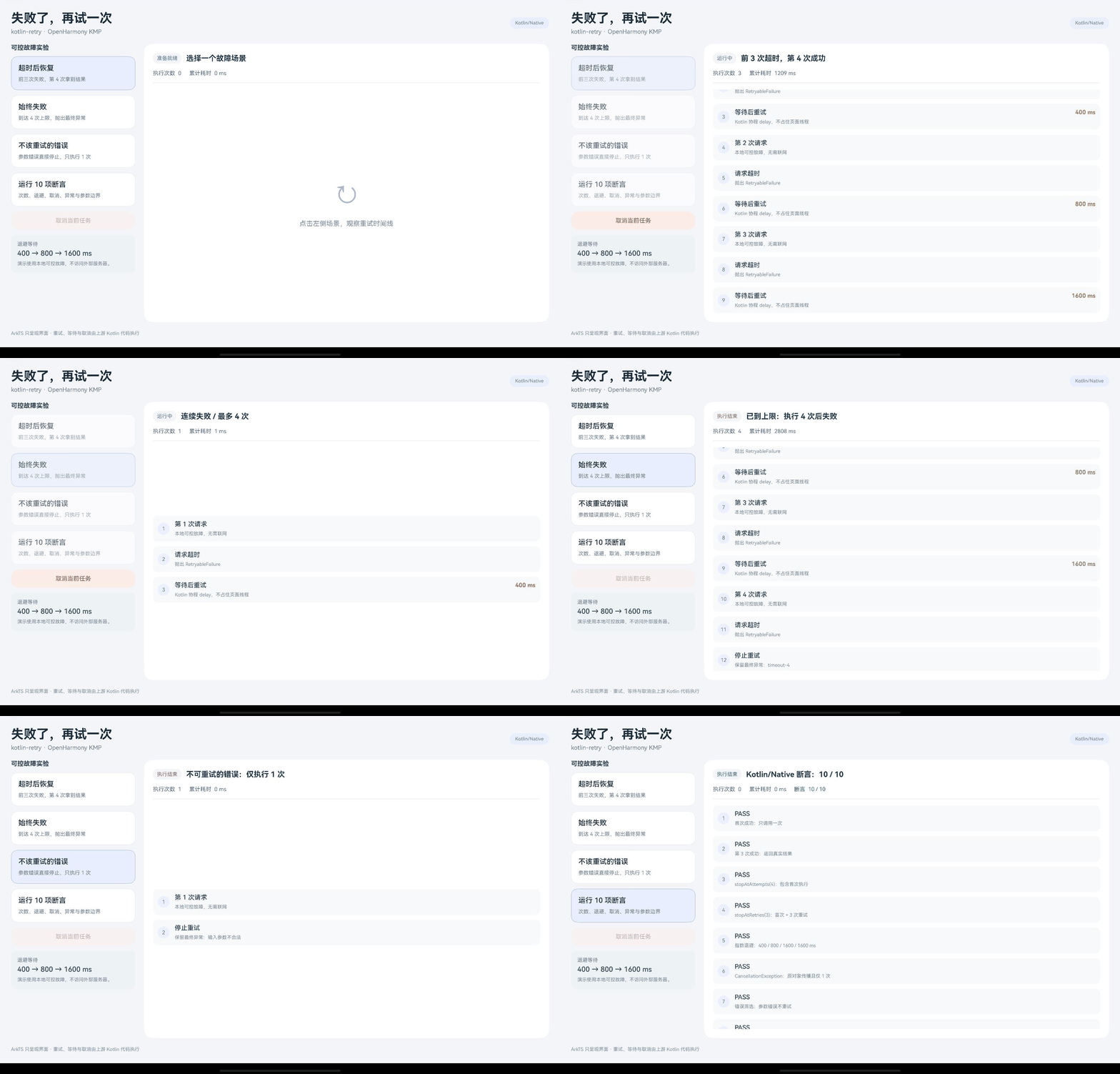
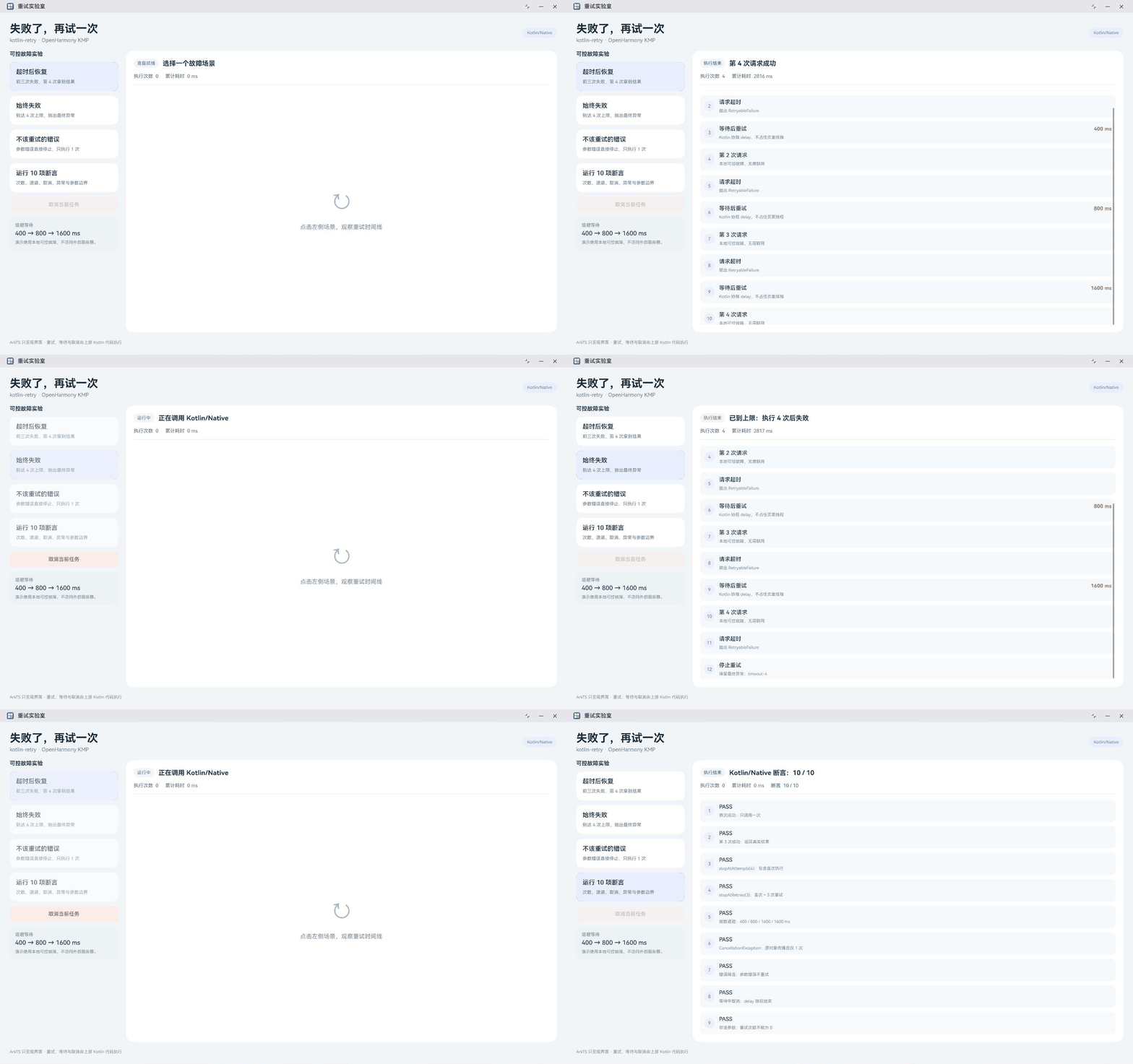
这里把“次数”先说清楚:stopAtAttempts(4) 包含首次调用,总共最多四次;stopAtRetries(3) 是首次调用加三次重试。两个策略在这个例子里得到相同总次数,但参数含义不同。若界面允许用户填写“重试次数”,就不能未经转换直接传给总次数策略。
2. 一直失败,就停在第 4 次
第二个场景让每次调用都失败。预期仍然是四次,到达上限后带着最终异常结束,时间线不会出现第五次。它可以检查停止策略是否与退避一起生效:等待时间有上限,只限制一段等待;调用次数有上限,才限制还会执行几次。
在设备端,这个场景显示“已到上限:执行 4 次后失败”。断言还核对了最后抛出的错误来自第四次调用。只看到失败提示还不够,保留末次异常可以让业务日志解释失败发生在哪次尝试,避免把所有情况都压成一句“请求失败”。
策略组合写在 Kotlin 入口中。基础规则由指数退避、四次上限和异常筛选组成,外层观察器把等待指令记录到时间线,再原样交回原库执行。观察器负责展示,停止条件仍由组合后的策略决定。
3. 参数错了,等多久都没用
第三个场景直接抛出 IllegalArgumentException,执行次数应为一。这个错误并不会因为等待几百毫秒就变成正确输入,因此 continueIf 只放行示例里的 RetryableFailure。真机和模拟器都显示参数错误只执行一次。
示例用自定义异常区分可重试失败,实际业务要按接口含义设计分类。例如读取失败是否暂时可恢复,应由业务层给出判断;库并不了解一个错误码意味着输入不合法还是服务暂时不可用。
当前版本还有一个容易写错的接口:RetryAfter 是创建指令的函数,返回 RetryInstruction 值类。观察等待应判断指令没有停止且 delayMillis 大于零,不能把 RetryAfter 当成类型去匹配。下面是实际编入原生库的完整 Kotlin 入口,也包含取消与十项断言。
@file:OptIn(kotlinx.cinterop.ExperimentalForeignApi::class, kotlin.experimental.ExperimentalNativeApi::class, kotlin.concurrent.atomics.ExperimentalAtomicApi::class)

package harmony.retry

import com.github.michaelbull.retry.retry
import com.github.michaelbull.retry.policy.*
import com.github.michaelbull.retry.attempt.firstAttempt
import com.github.michaelbull.retry.instruction.*
import kotlinx.cinterop.*
import kotlinx.coroutines.*
import kotlin.concurrent.atomics.AtomicReference
import kotlin.native.CName
import kotlin.time.TimeSource

private val snapshot = AtomicReference("{\"status\":\"idle\",\"title\":\"等待开始\",\"attempts\":0,\"elapsed\":0,\"passed\":0,\"events\":[]}")
private val runningJob = AtomicReference<Job?>(null)

private fun quote(value: String): String = "\"" + value.replace("\\", "\\\\").replace("\"", "\\\"").replace("\n", "\\n") + "\""
private fun publish(status: String, title: String, attempts: Int, elapsed: Long, events: List<String>, passed: Int = 0) {
    snapshot.store("{\"status\":${quote(status)},\"title\":${quote(title)},\"attempts\":$attempts,\"elapsed\":$elapsed,\"passed\":$passed,\"events\":[${events.joinToString(",")}]}" )
}
private fun event(attempt: Int, label: String, detail: String, wait: Long = 0): String =
    "{\"attempt\":$attempt,\"label\":${quote(label)},\"detail\":${quote(detail)},\"wait\":$wait}"

/** Copies into a C buffer owned by this bridge. The NAPI caller must call retryRelease. */
private fun cString(value: String): CPointer<ByteVar> {
    val bytes = value.encodeToByteArray()
    val result = nativeHeap.allocArray<ByteVar>(bytes.size + 1)
    bytes.forEachIndexed { i, b -> result[i] = b }
    result[bytes.size] = 0
    return result
}

@CName("retrySnapshot")
fun retrySnapshot(): CPointer<ByteVar> = cString(snapshot.load())

@CName("retryRelease")
fun retryRelease(value: CPointer<ByteVar>?) { if (value != null) nativeHeap.free(value) }

@CName("retryCancel")
fun retryCancel(): Int {
    val job = runningJob.load() ?: return 0
    job.cancel(CancellationException("用户取消"))
    return 1
}

/** Runs on napi_async_work, never the ArkUI main thread. */
@CName("retryRun")
fun retryRun(mode: Int): CPointer<ByteVar> {
    if (mode == 4) return cString(runChecks())
    val mark = TimeSource.Monotonic.markNow()
    val events = mutableListOf<String>()
    var attempts = 0
    val title = when (mode) { 2 -> "连续失败 / 最多 4 次"; 3 -> "参数错误 / 不重试"; else -> "前 3 次超时,第 4 次成功" }
    publish("running", title, 0, 0, events)
    try {
        runBlocking {
            runningJob.store(coroutineContext.job)
            val basePolicy = binaryExponentialBackoff<Throwable>(400, 1600) + stopAtAttempts(4) + continueIf { (failure) -> failure is RetryableFailure }
            val observe = RetryPolicy<Throwable> { failure ->
                val instruction = basePolicy(failure)
                if (instruction != StopRetrying && instruction.delayMillis > 0) {
                    events += event(attempts, "等待后重试", "Kotlin 协程 delay,不占住页面线程", instruction.delayMillis)
                    publish("running", title, attempts, mark.elapsedNow().inWholeMilliseconds, events)
                }
                instruction
            }
            val response = retry(observe) {
                attempts++
                events += event(attempts, "第 $attempts 次请求", "本地可控故障,无需联网")
                publish("running", title, attempts, mark.elapsedNow().inWholeMilliseconds, events)
                if (mode == 3) throw IllegalArgumentException("输入参数不合法")
                if (mode == 2 || attempts <= 3) {
                    events += event(attempts, "请求超时", "抛出 RetryableFailure")
                    throw RetryableFailure("timeout-$attempts")
                }
                "请求完成"
            }
            events += event(attempts, "成功", response)
            publish("success", "第 $attempts 次请求成功", attempts, mark.elapsedNow().inWholeMilliseconds, events)
        }
    } catch (cancelled: CancellationException) {
        events += event(attempts, "已取消", "CancellationException 向外传播,不会进入下一次重试")
        publish("cancelled", "操作已取消", attempts, mark.elapsedNow().inWholeMilliseconds, events)
    } catch (failure: Throwable) {
        events += event(attempts, "停止重试", "保留最终异常:${failure.message}")
        publish("failed", if (mode == 3) "不可重试的错误:仅执行 1 次" else "已到上限:执行 4 次后失败", attempts, mark.elapsedNow().inWholeMilliseconds, events)
    } finally {
        runningJob.store(null)
    }
    return cString(snapshot.load())
}

private class RetryableFailure(message: String): RuntimeException(message)

/** Deterministic assertions exercise upstream Kotlin sources, not ArkTS equivalents. */
private fun runChecks(): String {
    val rows = mutableListOf<String>()
    var passed = 0
    fun verify(name: String, block: () -> Unit) {
        try { block(); passed++; rows += event(passed, "PASS", name) }
        catch (e: Throwable) { rows += event(0, "FAIL", "$name: ${e.message}") }
    }
    verify("首次成功:只调用一次") {
        runBlocking { var n = 0; val answer = retry(stopAtAttempts(4)) { n++; 42 }; check(answer == 42 && n == 1) }
    }
    verify("第 3 次成功:返回真实结果") {
        runBlocking { var n = 0; val answer = retry(stopAtAttempts(4)) { n++; if (n < 3) throw RetryableFailure("$n"); "OK" }; check(answer == "OK" && n == 3) }
    }
    verify("stopAtAttempts(4):包含首次执行") {
        runBlocking { var n = 0; var last = ""; try { retry(stopAtAttempts(4)) { n++; throw RetryableFailure("failure-$n") } } catch(e: RetryableFailure) { last = e.message ?: "" }; check(n == 4 && last == "failure-4") }
    }
    verify("stopAtRetries(3):首次 + 3 次重试") {
        runBlocking { var n = 0; try { retry(stopAtRetries(3)) { n++; throw RetryableFailure("failed") } } catch (_: RetryableFailure) {}; check(n == 4) }
    }
    verify("指数退避:400 / 800 / 1600 / 1600 ms") {
        val attempt = firstAttempt(); val policy = binaryExponentialBackoff<Throwable>(400, 1600)
        val values = (0..3).map { val instruction = policy(attempt.failedWith(RetryableFailure("x"))); attempt.retryAfter(instruction.delayMillis); instruction.delayMillis }
        check(values == listOf(400L, 800L, 1600L, 1600L))
    }
    verify("CancellationException:原对象传播且仅 1 次") {
        runBlocking { var n = 0; val original = CancellationException("cancel"); var caught: Throwable? = null; try { retry(stopAtAttempts(4)) { n++; throw original } } catch(e: CancellationException) { caught = e }; check(n == 1 && caught === original) }
    }
    verify("错误筛选:参数错误不重试") {
        runBlocking { var n = 0; try { retry(continueIf<Throwable> { (failure) -> failure is RetryableFailure } + stopAtAttempts(4)) { n++; throw IllegalArgumentException("bad input") } } catch(_: IllegalArgumentException) {}; check(n == 1) }
    }
    verify("等待中取消:delay 提前结束") {
        runBlocking { var n = 0; val child = launch { retry(constantDelay<Throwable>(10000) + stopAtAttempts(4)) { n++; throw RetryableFailure("timeout") } }; delay(30); child.cancelAndJoin(); check(n == 1 && child.isCancelled) }
    }
    verify("非法参数:重试次数不能为 0") { var caught = false; try { stopAtAttempts<Throwable>(0) } catch(_: IllegalArgumentException) { caught = true }; check(caught) }
    verify("非法参数:退避下限必须为正") { var caught = false; try { binaryExponentialBackoff<Throwable>(0, 1600) } catch(_: IllegalArgumentException) { caught = true }; check(caught) }
    publish(if (passed == 10) "success" else "failed", "Kotlin/Native 断言:$passed / 10", 0, 0, rows, passed)
    return snapshot.load()
}
4. 等待中的任务也能取消
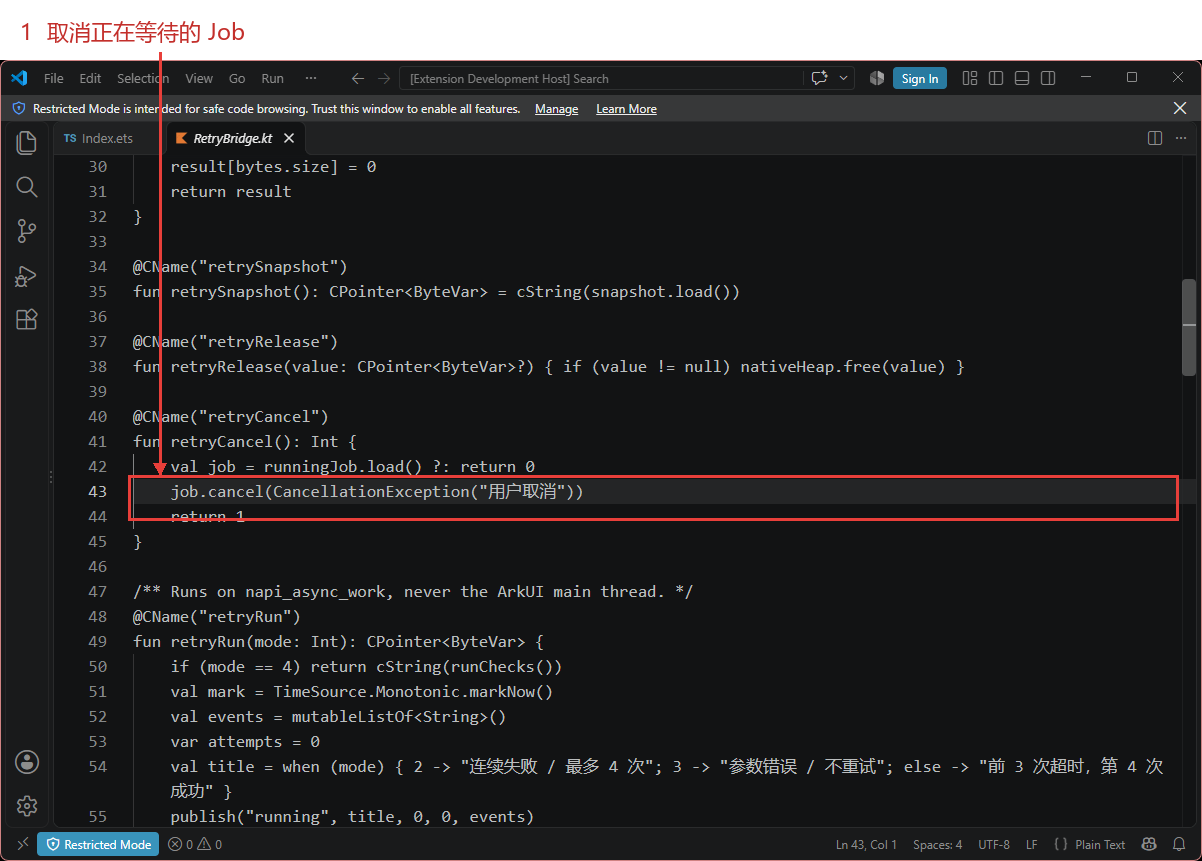
再启动一次会重试的任务,在等待时按“取消当前任务”。这是独立的一次取消操作,期待的是当前 delay 提前结束,并且没有下一次尝试。两台设备都得到“操作已取消”,设备端断言也验证了子协程取消后调用次数保持为一。
执行入口把当前协程 Job 放进 AtomicReference,取消入口取出 Job 并调用 cancel。kotlin-retry 会把 CancellationException 向外传播,入口再把取消状态放进快照。这条路径需要贯通:如果业务层先吞掉取消异常,再将它转换成普通可重试错误,取消语义就会被破坏。
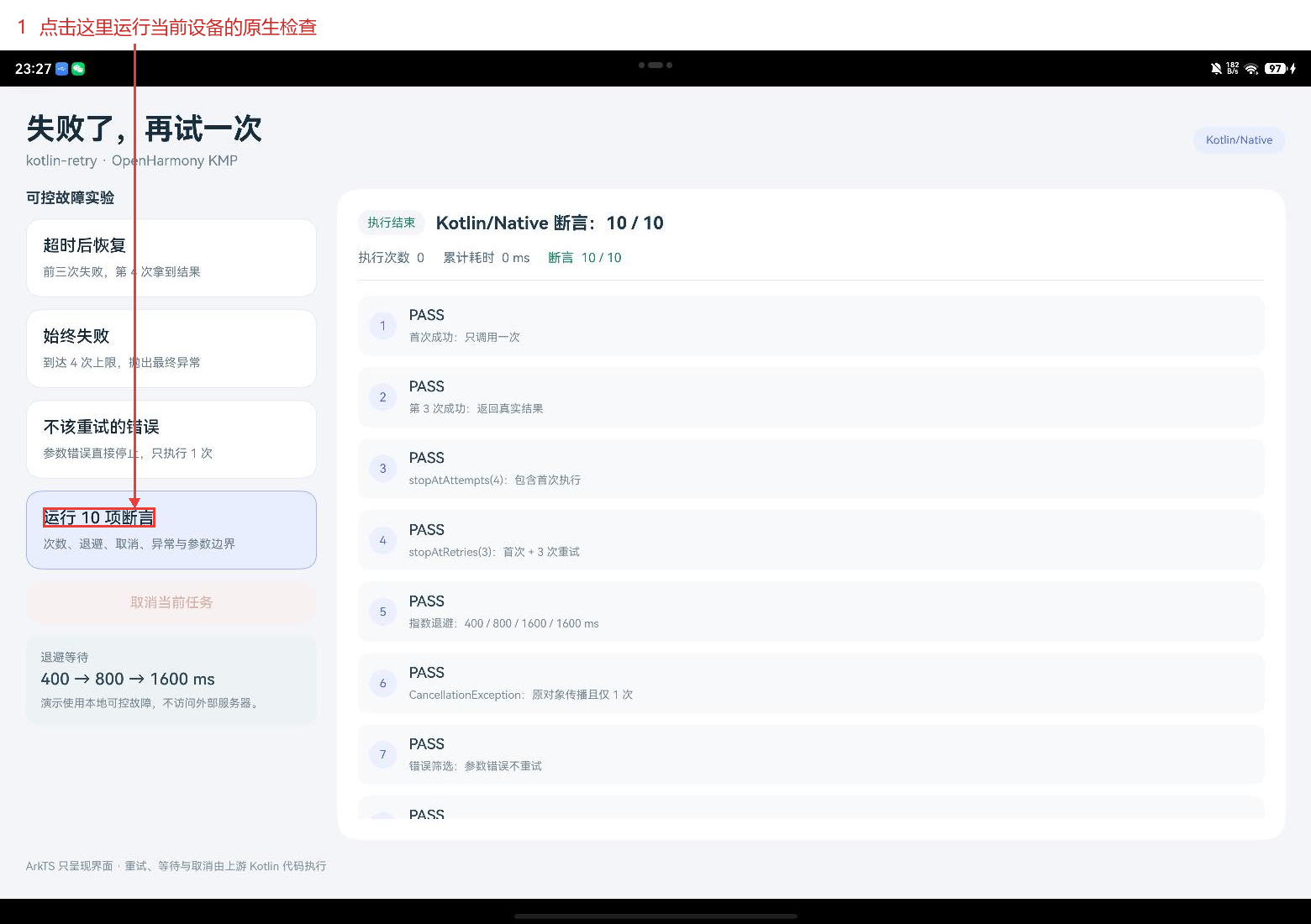
任务完成后,finally 清除正在运行的 Job。没有任务时取消入口返回零;已经结束的任务不会因按下取消而再次启动。页面退出也调用同一入口,并关闭状态轮询。按钮取消和退出页面各有入口时,更容易漏掉其中一种等待状态。
5. 一次取消请求经过了哪些代码
等待期间能操作按钮,首先依赖桥接层把执行放到后台。example/harmony 的 retry_napi.cpp 使用 napi_async_work 调度 retryRun,完成后将结果交给 Promise。页面线程可以继续轮询快照和调用取消,不会停在包含等待的 runBlocking 中。
桥接层还有 busy 标记,用于拒绝同一示例中的并发任务。Kotlin 通过 AtomicReference 发布不可变的快照字符串,页面不直接读取正在修改的事件列表。导出的 C 字符串由原生堆分配,C++ 复制结果后调用 retryRelease,执行和读取快照都遵循同一释放规则。
#include <napi/native_api.h>
#include <hilog/log.h>
#include <atomic>
#include <string>

extern "C" char* retryRun(int mode);
extern "C" char* retrySnapshot();
extern "C" void retryRelease(char* value);
extern "C" int retryCancel();

namespace {
std::atomic<bool> busy{false};
struct RetryWork { napi_async_work work{}; napi_deferred deferred{}; int mode{1}; std::string result; };
napi_value ToString(napi_env env, const std::string& text) {
    napi_value value{};
    napi_create_string_utf8(env, text.c_str(), text.size(), &value);
    return value;
}
std::string CopyAndFree(char* data) {
    if (!data) return "{}";
    std::string result(data);
    retryRelease(data);
    return result;
}
void Execute(napi_env, void* data) {
    auto* item = static_cast<RetryWork*>(data);
    item->result = CopyAndFree(retryRun(item->mode));
    OH_LOG_Print(LOG_APP, LOG_INFO, 0xD004201, "RetryLab", "%{public}s", item->result.c_str());
}
void Complete(napi_env env, napi_status status, void* data) {
    auto* item = static_cast<RetryWork*>(data);
    if (status == napi_ok) napi_resolve_deferred(env, item->deferred, ToString(env, item->result));
    else napi_reject_deferred(env, item->deferred, ToString(env, "Native async work failed"));
    busy.store(false);
    napi_delete_async_work(env, item->work);
    delete item;
}
napi_value Run(napi_env env, napi_callback_info info) {
    if (busy.exchange(true)) {
        napi_throw_error(env, nullptr, "A retry job is already running");
        return nullptr;
    }
    size_t argc = 1; napi_value argv[1]{};
    napi_get_cb_info(env, info, &argc, argv, nullptr, nullptr);
    auto* item = new RetryWork;
    if (argc) napi_get_value_int32(env, argv[0], &item->mode);
    napi_value promise{}, name = ToString(env, "KotlinRetryWork");
    napi_create_promise(env, &item->deferred, &promise);
    if (napi_create_async_work(env, nullptr, name, Execute, Complete, item, &item->work) != napi_ok ||
        napi_queue_async_work(env, item->work) != napi_ok) {
        busy.store(false);
        napi_reject_deferred(env, item->deferred, ToString(env, "Unable to queue native work"));
        if (item->work) napi_delete_async_work(env, item->work);
        delete item;
    }
    return promise;
}
napi_value Snapshot(napi_env env, napi_callback_info) { return ToString(env, CopyAndFree(retrySnapshot())); }
napi_value Cancel(napi_env env, napi_callback_info) {
    napi_value value{}; napi_create_int32(env, retryCancel(), &value); return value;
}
napi_value Init(napi_env env, napi_value exports) {
    napi_property_descriptor methods[] = {
        {"run", nullptr, Run, nullptr, nullptr, nullptr, napi_default, nullptr},
        {"snapshot", nullptr, Snapshot, nullptr, nullptr, nullptr, napi_default, nullptr},
        {"cancel", nullptr, Cancel, nullptr, nullptr, nullptr, napi_default, nullptr}
    };
    napi_define_properties(env, exports, 3, methods);
    return exports;
}
napi_module module = {1, 0, nullptr, Init, "retrybridge", nullptr, {0}};
}
extern "C" __attribute__((constructor)) void RegisterRetry() { napi_module_register(&module); }
界面的 start 等待 Promise,同时每 120 毫秒读取一次快照。Promise 结束后关闭轮询,解除按钮的忙碌状态。轮询间隔影响展示更新频率,重试等待和调用次数依然由 Kotlin 控制。下面的页面代码与录制中使用的版本一致。
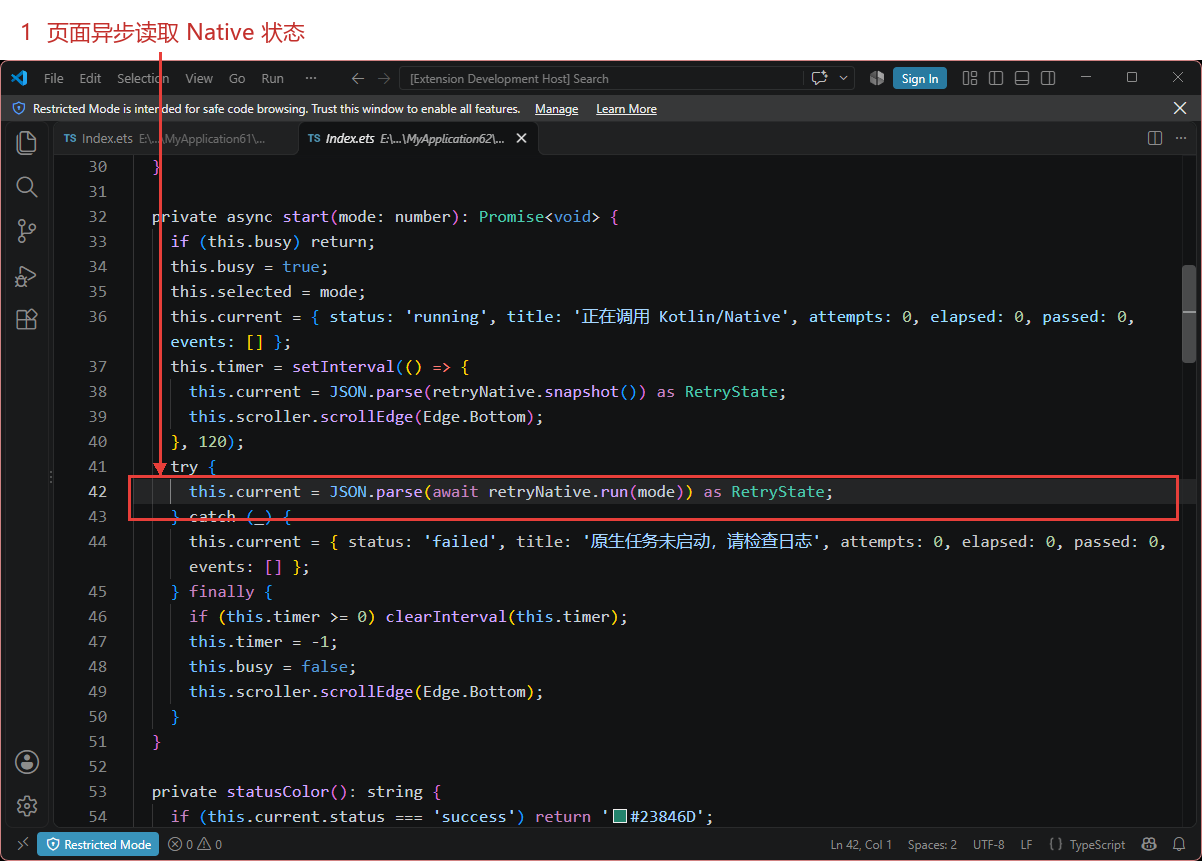
import retryNative from 'libretrybridge.so';

interface RetryEvent {
  attempt: number;
  label: string;
  detail: string;
  wait: number;
}
interface RetryState {
  status: string;
  title: string;
  attempts: number;
  elapsed: number;
  passed: number;
  events: RetryEvent[];
}

@Entry
@Component
struct Index {
  @State current: RetryState = { status: 'idle', title: '选择一个故障场景', attempts: 0, elapsed: 0, passed: 0, events: [] };
  @State busy: boolean = false;
  @State selected: number = 1;
  private timer: number = -1;
  private scroller: Scroller = new Scroller();

  aboutToDisappear(): void {
    retryNative.cancel();
    if (this.timer >= 0) clearInterval(this.timer);
  }

  private async start(mode: number): Promise<void> {
    if (this.busy) return;
    this.busy = true;
    this.selected = mode;
    this.current = { status: 'running', title: '正在调用 Kotlin/Native', attempts: 0, elapsed: 0, passed: 0, events: [] };
    this.timer = setInterval(() => {
      this.current = JSON.parse(retryNative.snapshot()) as RetryState;
      this.scroller.scrollEdge(Edge.Bottom);
    }, 120);
    try {
      this.current = JSON.parse(await retryNative.run(mode)) as RetryState;
    } catch (_) {
      this.current = { status: 'failed', title: '原生任务未启动,请检查日志', attempts: 0, elapsed: 0, passed: 0, events: [] };
    } finally {
      if (this.timer >= 0) clearInterval(this.timer);
      this.timer = -1;
      this.busy = false;
      this.scroller.scrollEdge(Edge.Bottom);
    }
  }

  private statusColor(): string {
    if (this.current.status === 'success') return '#23846D';
    if (this.current.status === 'failed') return '#B84F4D';
    if (this.current.status === 'cancelled') return '#927C48';
    return '#526AD4';
  }

  @Builder
  scenario(mode: number, label: string, hint: string) {
    Column({ space: 7 }) {
      Text(label).fontSize(18).fontWeight(FontWeight.Medium).fontColor('#172B3B')
      Text(hint).fontSize(13).fontColor('#6B7D8B').lineHeight(20)
    }
    .alignItems(HorizontalAlign.Start)
    .width('100%').padding(18).borderRadius(16)
    .backgroundColor(this.selected === mode ? '#E9EEFF' : '#FFFFFF')
    .border({ width: 1, color: this.selected === mode ? '#A6B4EF' : '#E3EAF0' })
    .opacity(this.busy ? 0.65 : 1)
    .onClick(() => { this.start(mode); })
  }

  build() {
    Column({ space: 22 }) {
      Row() {
        Column({ space: 6 }) {
          Text('失败了,再试一次').fontSize(32).fontWeight(FontWeight.Bold).fontColor('#182D3D')
          Text('kotlin-retry · OpenHarmony KMP').fontSize(15).fontColor('#6C7E8C')
        }.alignItems(HorizontalAlign.Start)
        Blank()
        Text('Kotlin/Native').fontSize(12).fontColor('#536BCB').padding({ left: 14, right: 14, top: 8, bottom: 8 })
          .backgroundColor('#E9EEFF').borderRadius(20)
      }.width('100%')

      Row({ space: 22 }) {
        Column({ space: 13 }) {
          Text('可控故障实验').fontSize(16).fontWeight(FontWeight.Bold).fontColor('#283F50').width('100%')
          this.scenario(1, '超时后恢复', '前三次失败,第 4 次拿到结果')
          this.scenario(2, '始终失败', '到达 4 次上限,抛出最终异常')
          this.scenario(3, '不该重试的错误', '参数错误直接停止,只执行 1 次')
          this.scenario(4, '运行 10 项断言', '次数、退避、取消、异常与参数边界')
          Button('取消当前任务').fontSize(15).fontColor('#A8563E').backgroundColor('#FBEDE7')
            .width('100%').height(46).enabled(this.busy)
            .onClick(() => { retryNative.cancel(); })
          Column({ space: 5 }) {
            Text('退避等待').fontSize(13).fontColor('#71818D')
            Text('400 → 800 → 1600 ms').fontSize(18).fontWeight(FontWeight.Medium).fontColor('#304858')
            Text('演示使用本地可控故障,不访问外部服务器。').fontSize(12).fontColor('#7A8994').lineHeight(19)
          }.alignItems(HorizontalAlign.Start).padding(16).width('100%').backgroundColor('#EDF2F5').borderRadius(14)
        }.width(315).alignItems(HorizontalAlign.Start)

        Column({ space: 16 }) {
          Row({ space: 12 }) {
            Text(this.busy ? '运行中' : this.current.status === 'idle' ? '准备就绪' : '执行结束')
              .fontSize(13).fontColor(this.statusColor()).padding({ left: 10, right: 10, top: 6, bottom: 6 })
              .backgroundColor('#F2F5F8').borderRadius(12)
            Text(this.current.title).fontSize(19).fontWeight(FontWeight.Bold).fontColor('#203A4D')
          }.width('100%')
          Row({ space: 20 }) {
            Text('执行次数  ' + this.current.attempts.toString()).fontSize(14).fontColor('#5B7081')
            Text('累计耗时  ' + this.current.elapsed.toString() + ' ms').fontSize(14).fontColor('#5B7081')
            if (this.current.passed > 0) {
              Text('断言  ' + this.current.passed.toString() + ' / 10').fontSize(14).fontColor('#23846D')
            }
          }.width('100%')
          Divider().color('#E5ECF1')
          Scroll(this.scroller) {
            Column({ space: 12 }) {
              if (this.current.events.length === 0) {
                Column({ space: 12 }) {
                  Text('↻').fontSize(68).fontColor('#A7B6CF')
                  Text('点击左侧场景,观察重试时间线').fontSize(17).fontColor('#7C8D9B')
                }.width('100%').height(285).justifyContent(FlexAlign.Center)
              }
              ForEach(this.current.events, (item: RetryEvent, index: number) => {
                Row({ space: 13 }) {
                  Text((index + 1).toString()).fontSize(13).fontColor('#536BCB')
                    .width(30).height(30).textAlign(TextAlign.Center).backgroundColor('#ECF0FE').borderRadius(15)
                  Column({ space: 4 }) {
                    Row() {
                      Text(item.label).fontSize(16).fontWeight(FontWeight.Medium).fontColor('#2C4355')
                      Blank()
                      if (item.wait > 0) {
                        Text(item.wait.toString() + ' ms').fontSize(15).fontWeight(FontWeight.Bold).fontColor('#B28435')
                      }
                    }.width('100%')
                    Text(item.detail).fontSize(12).fontColor('#7C8A95').lineHeight(19)
                  }.layoutWeight(1).alignItems(HorizontalAlign.Start)
                }.width('100%').padding(12).backgroundColor('#F7F9FB').borderRadius(12)
              }, (_: RetryEvent, index: number) => index.toString())
            }.width('100%').alignItems(HorizontalAlign.Start)
          }.width('100%').layoutWeight(1).scrollBar(BarState.Auto)
        }.layoutWeight(1).height('100%').padding(23).backgroundColor('#FFFFFF').borderRadius(22)
      }.layoutWeight(1).alignItems(VerticalAlign.Top).width('100%')
      Text('ArkTS 只呈现界面 · 重试、等待与取消由上游 Kotlin 代码执行')
        .fontSize(12).fontColor('#82919C').width('100%')
    }.padding(28).width('100%').height('100%').backgroundColor('#F2F5F8')
  }
}
6. 鸿蒙构建的几个接入点
环境安装直接参考 CPF-KMP-CMP 官方快速开始。本次编译器为鸿蒙 Kotlin/Native 2.2.21-1.1.0,协程使用 1.10.2-1.1.0-02,atomicfu 为 0.31.0-1.1.0-02。应用用 DevEco Studio 6.1.1.300 与 API 24 SDK 构建,两台实测设备也是 API 24,尚未验证 API 26。
原库的重试与策略源码继续放在 kotlin-retry/src/commonMain。新增 harmony/build.gradle.kts 配置 ohosArm64、ohosX64 和鸿蒙依赖;harmony/src/RetryBridge.kt 补执行、快照、取消、释放入口;原仓 example/harmony 留下 NAPI、CMake、类型声明和页面。每处新增文件都能在上述四组实验的调用链中找到用途。
plugins { kotlin("multiplatform") version "2.2.21-1.1.0" }
kotlin {
    listOf(ohosArm64(), ohosX64()).forEach { target -> target.binaries.sharedLib { baseName = "retry" } }
    sourceSets {
        commonMain {
            kotlin.srcDir("../kotlin-retry/src/commonMain/kotlin")
            dependencies {
                implementation("org.jetbrains.kotlinx:kotlinx-coroutines-core:1.10.2-1.1.0-02")
                implementation("org.jetbrains.kotlinx:atomicfu:0.31.0-1.1.0-02")
            }
        }
        val ohosMain by creating { dependsOn(commonMain.get()); kotlin.srcDir("src") }
        getByName("ohosArm64Main").dependsOn(ohosMain)
        getByName("ohosX64Main").dependsOn(ohosMain)
        commonTest { kotlin.srcDir("../kotlin-retry/src/commonTest/kotlin"); dependencies { implementation(kotlin("test")) } }
    }
}
实际双架构编译由 harmony/build-native.py 执行。共享源码需要通过 -Xmulti-platform 与 -Xcommon-sources 标明身份,否则 JvmInline 这类可选平台注解会按普通 Native 文件处理。脚本使用参数文件传递源码列表和参数,避免 Windows 启动脚本把长参数拆开。
示例使用 kotlin-retry 核心模块。kotlin-retry-result 依赖 kotlin-result,这次没有接入。双架构产物通过 konanc 命令行构建,Gradle 发布任务尚未测试。
7. 实测记录以及接入前要补的条件
两台设备都返回 10/10 原生断言通过。覆盖首次成功、第三次成功、总执行与重试次数、退避封顶、原取消异常对象传播、错误筛选、等待中取消,以及非法次数和退避参数。加上四组交互记录,成功、耗尽、不可重试和主动取消都有对应预期。
接入业务时,还有两项条件需要另行补齐。第一是幂等性:重试一次读取和重试一次创建订单,业务后果不同,后者需要请求标识与去重规则。第二是整体时间预算:最多四次并不能限制一次请求要等多久,网络调用自身的超时和整个操作的截止时间应一起设计。
这一轮适配把上游核心代码接到了鸿蒙双架构应用,也把停止和取消变成了可复查的实验。后续增加真实请求、抖动策略或后台切换时,可以沿用“失败条件、预期次数、结束状态”这份记录方式。策略定义继续参考 kotlin-retry 上游文档,平台依赖与构建资料见 CPF-KMP-CMP。
项目源码:harmonyos-crossplatform-libs。本文示例位于 libraries/kotlin-retry,构建步骤见 适配说明。这个是没问题的。然后

作为“人工智能6S店”的官方数字引擎,为AI开发者与企业提供一个覆盖软硬件全栈、一站式门户。
更多推荐

 0
0 0
0- 0


 已为社区贡献26条内容

所有评论(0)