
【重磅】Flutter 鸿蒙3.44版本-鸿蒙PC平台多窗口功能
准备开拓鸿蒙PC市场的应用开发者有福了~今天带大家抢先体验基于Flutter鸿蒙3.44版本,鸿蒙PC平台上的多窗口功能!
一、先了解下Flutter上游多窗口现状
Flutter上游官方定位:3.44 与 Canonical 合作推出了桌面多窗口支持的预览版,标志着 Flutter 桌面应用能力进一步完善,但还没到生产可用的成熟度。
划重点: 也就是说上游的Flutter 3.44 的桌面多窗口是预览版,不是正式稳定功能,目前以 Windows 平台的体验相对最好,macOS 和 Linux 还有不少待解决的边界问题。
再划重点: 我个人认为这个点是Flutter 鸿蒙赶超上游的机会,毕竟鸿蒙PC生态完全自主可控的,CPF-Flutter的各位加油!
二、Flutter鸿蒙上的多窗口怎么理解?
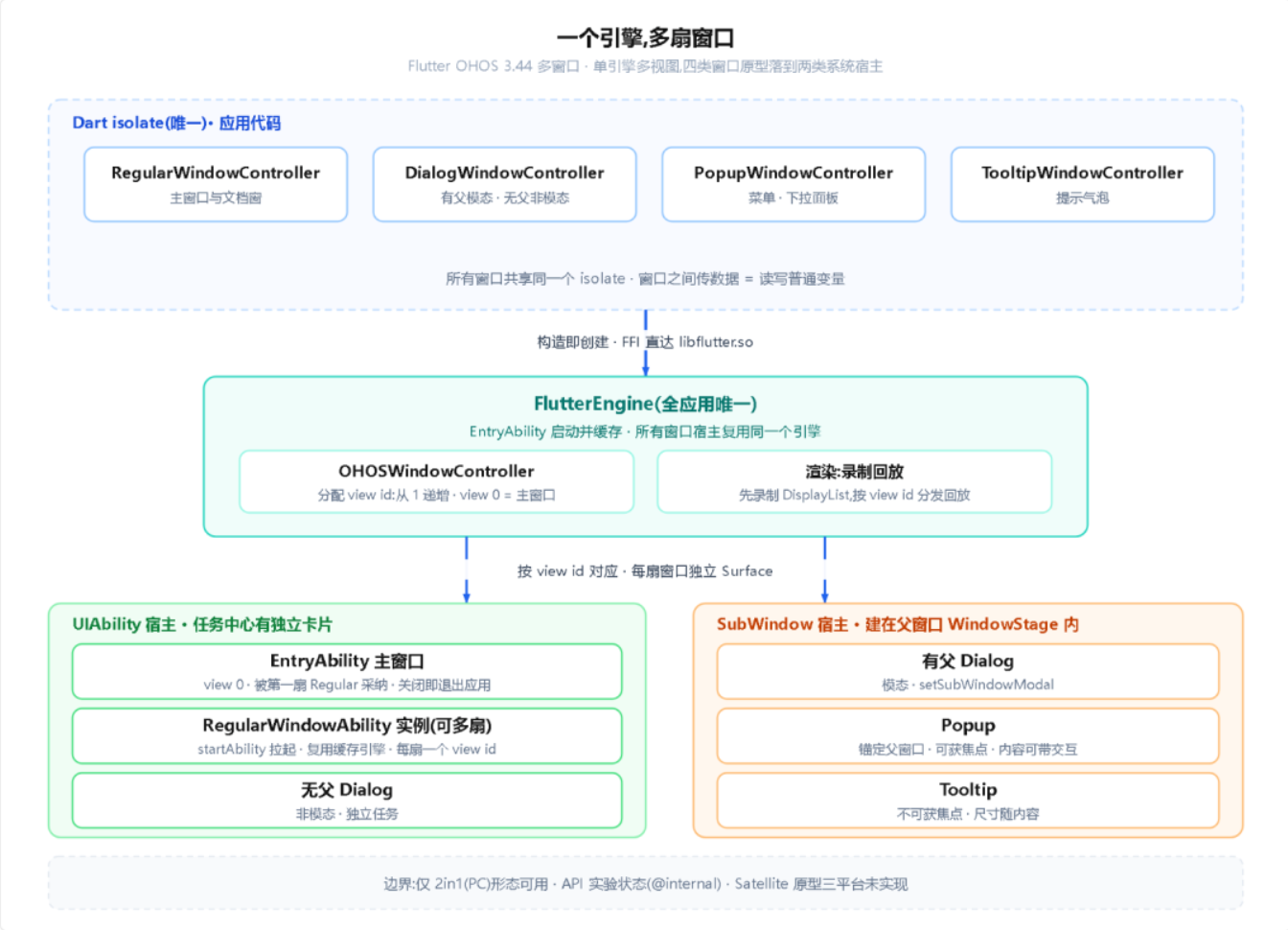
Flutter 的默认模型是一个应用一个窗口,Android 和 iOS 至今如此;在Flutter鸿蒙3.44版本前也一样,大概原理是:EntryAbility 拉起主窗口,所有页面都在这一个窗口里切换。而鸿蒙PC桌面上常见的主窗口加子窗口、悬浮工具窗、多文档并排,按这套方案是不可行的。
在Flutter 鸿蒙3.44上,鸿蒙 PC 上的 Flutter 应用可以同时打开多扇系统级窗口。「系统级」的意思是每扇窗口在任务中心有自己的卡片,能分别拖拽、缩放,是窗口管理器眼里的独立窗口,和原生应用的窗口同级!这套能力由 PR !1834 合入(86 个文件,新增 7533 行,oh-3.44.9-dev 分支),随版本发布。
对开发者,有两个关键点决定了使用体验:
所有窗口共用一个引擎、一个 Dart isolate。 窗口之间共享数据不需要任何通信机制,直接用普通变量;全局状态天然只有一份。
Dart API 与上游桌面端完全同一套。 上游 Flutter 的实验性桌面多窗口(Windows 实现 2025 年 9 月合入)定义了窗口抽象,Flutter鸿蒙这次是给同一套抽象补平台后端,接口层面可以直接对照。
注意点:当前能力只在 2in1(PC)形态可用;API 标着 @internal 实验状态,现阶段用于试验阶段,暂时不进生产应用和 pub.dev 包。
三、鸿蒙PC上运行效果
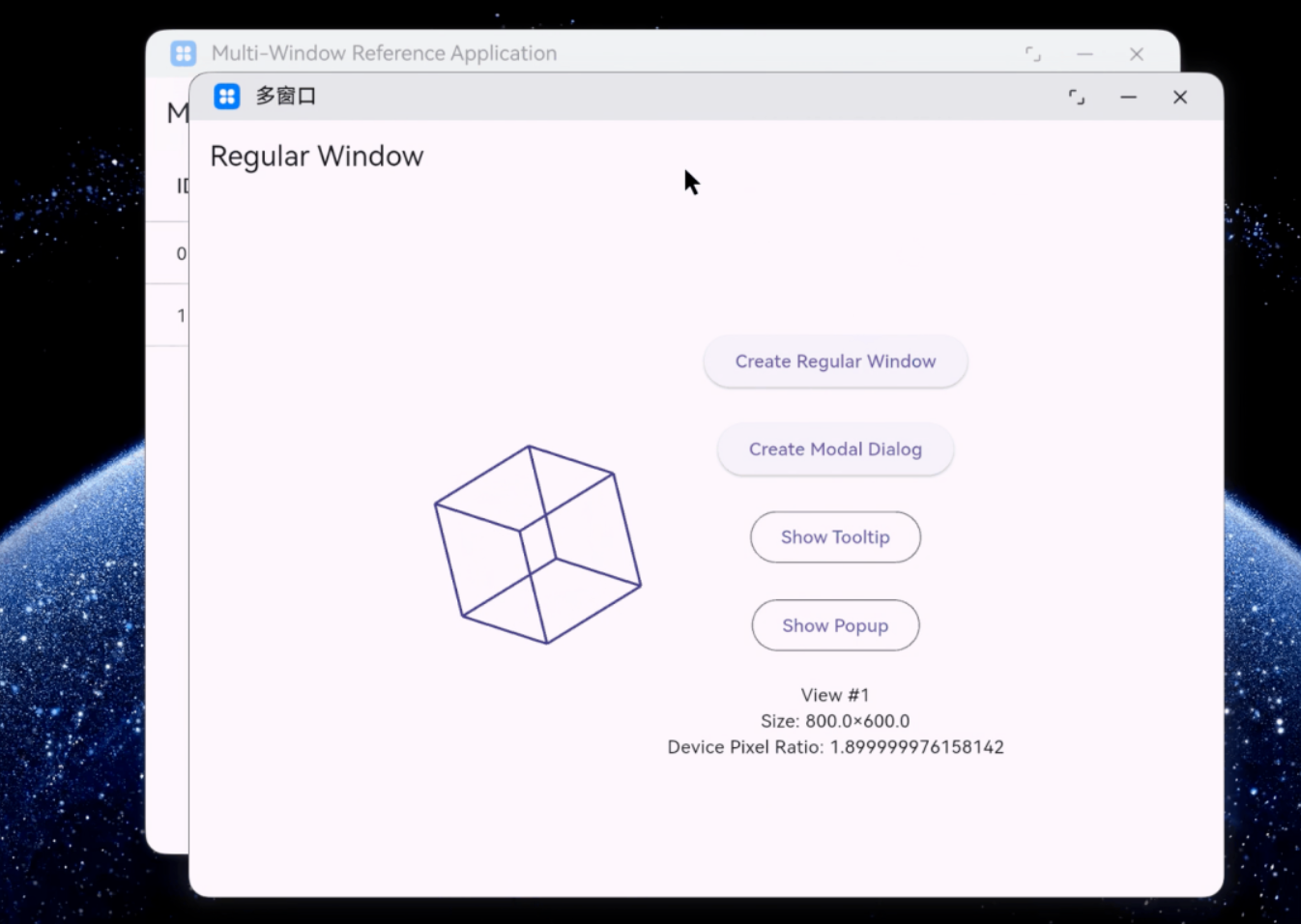
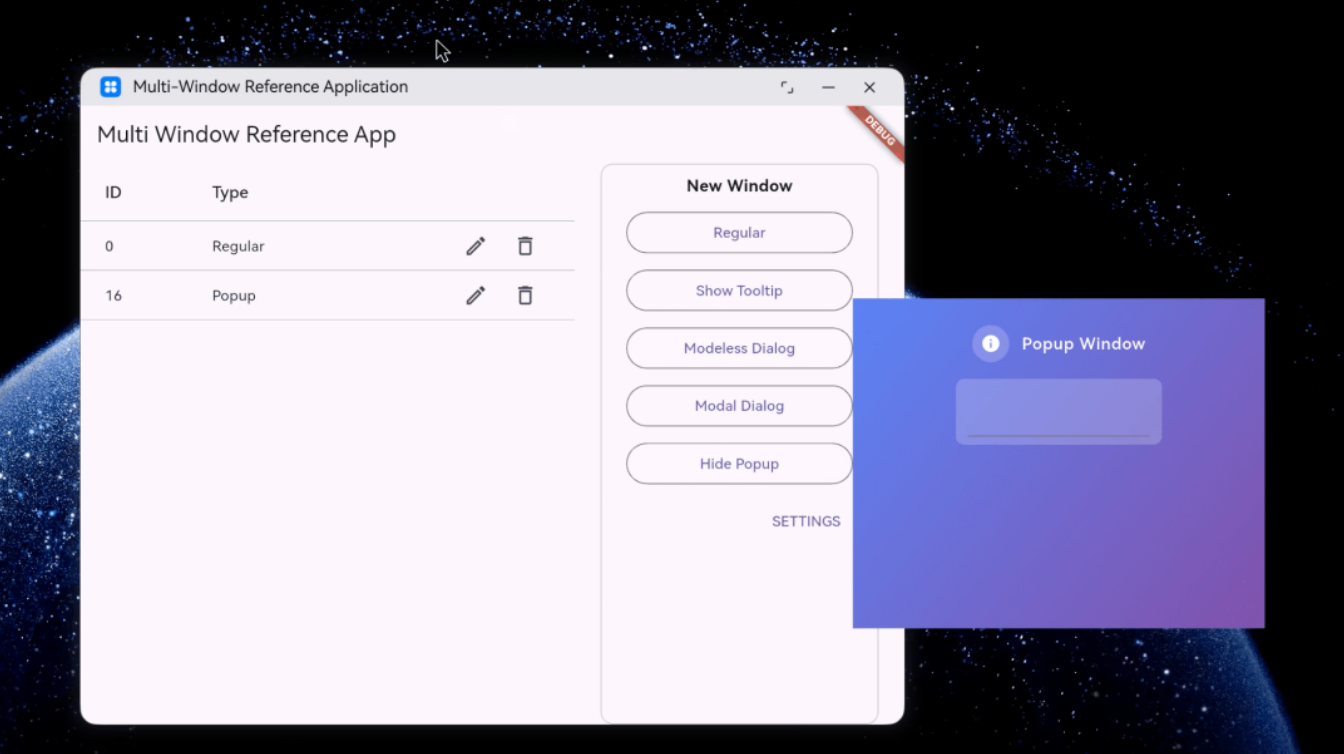
想自己尝试的,可以直接去CPF-Flutter官方获取到演示代码:
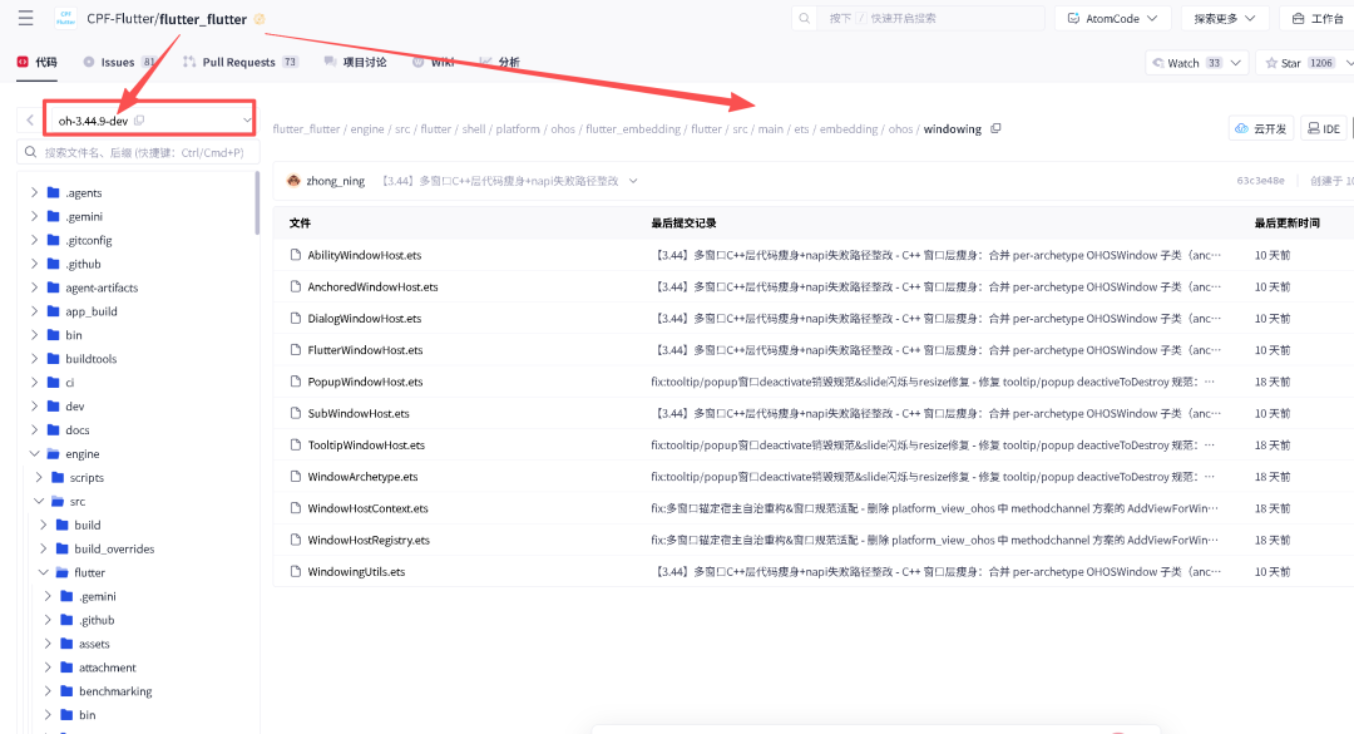
其中核心布局代码如下:
import window from '@ohos.window';
import UIAbility from '@ohos.app.ability.UIAbility';
import Log from '../../../util/Log';
import { common, Want } from '@kit.AbilityKit';
import { WindowArchetype } from './WindowArchetype';
import { WindowHostContext } from './WindowHostContext';
import { FlutterWindowHost } from './FlutterWindowHost';
const TAG = 'AbilityWindowHost'
/** @ohos.window symbol newer than the API-12 typedef this embedding
 * compiles against (@since 14). A direct reference breaks SDK-12 builds,
 * so probe at runtime. Extends Window so the cast below type-checks under
 * strict ArkTS (which forbids non-overlapping casts). */
interface TitleButtonApi extends window.Window {
  setWindowTitleButtonVisible(isMaximizeButtonVisible: boolean,
                              isMinimizeButtonVisible: boolean,
                              isCloseButtonVisible?: boolean): void;
}
export enum AbilityHostMode {
  /** The FIRST top-level window ADOPTS the EntryAbility's pre-created main
   * window + implicit view 0 instead of spawning a sibling UIAbility. */
  ADOPTED,
  /** A separate UIAbility instance (RegularWindowAbility) is launched. */
  SPAWNED,
}
/**
 * UIAbility-backed host (Regular / modeless Dialog): own task-center card.
 * The launched ability registers its FlutterView / viewToAbility entry
 * itself (onWindowStageCreate); this host drives creation and teardown.
 */
export class AbilityWindowHost extends FlutterWindowHost {
  private readonly mode: AbilityHostMode;
  private readonly requestId: number;
  constructor(ctx: WindowHostContext,
              viewId: number,
              mode: AbilityHostMode,
              requestId: number,
              width: number,
              height: number,
              title: string,
              archetype: WindowArchetype = WindowArchetype.REGULAR) {
    super(ctx, viewId, 0, archetype, width, height, title);
    this.mode = mode;
    this.requestId = requestId;
  }
  attach(): void {
    if (this.mode === AbilityHostMode.ADOPTED) {
      this.attachAdopted();
    } else {
      this.attachSpawned();
    }
  }
  /** True when this host ADOPTED the EntryAbility's main window (implicit
   * view 0) instead of spawning a UIAbility — cascade close must skip it:
   * the dying ability's own teardown already covers that window. */
  isAdopted(): boolean {
    return this.mode === AbilityHostMode.ADOPTED;
  }
  private attachAdopted(): void {
    const mainId = this.ctx.mainFlutterViewId();
    const mainAbility = mainId ? this.ctx.getViewAbility(mainId) : undefined;
    if (!mainAbility) {
      Log.e(TAG, `bindEntryAbilityToView: no main ability registered yet` +
        ` (EntryAbility onWindowStageCreate not done?) — cannot adopt`);
      return;
    }
    const windowStage = this.ctx.windowStageOf(mainAbility);
    if (!windowStage) {
      Log.e(TAG, `bindEntryAbilityToView: no windowStage for main ability`);
      return;
    }
    const mainWin = windowStage.getMainWindowSync();
    if (this.requestedWidth > 0 && this.requestedHeight > 0) {
      // Content-size semantics via resizeToContent: compensate the 2in1
      // decoration so the drawable area equals the requested size.
      try {
        const dpr = this.ctx.densityPixels();
        this.resizeToContent(mainWin,
          Math.round(this.requestedWidth * dpr), Math.round(this.requestedHeight * dpr),
          'bindEntryAbilityToView');
      } catch (e) {
        Log.w(TAG, `bindEntryAbilityToView: resize failed: ${JSON.stringify(e)}`);
      }
    }
  }
  /**
   * SPAWN: launch a separate RegularWindowAbility (own task-center card);
   * same process + cached engine keeps single-engine multi-view. The
   * ability parses these want.parameters in onCreate.
   */
  private attachSpawned(): void {
    const mainId = this.ctx.mainFlutterViewId();
    const mainAbility = mainId ? this.ctx.getViewAbility(mainId) : undefined;
    const ctx: common.UIAbilityContext | undefined =
      mainAbility?.context as common.UIAbilityContext;
    if (!ctx) {
      Log.e(TAG, `createRegularAbilityWindow: no launch context for viewId=${this.viewId}` +
        ` (main ability not registered yet?)`);
      this.failAttach('attachSpawned: no launch context');
      return;
    }
    const bundleName = ctx.abilityInfo?.bundleName;
    if (!bundleName) {
      Log.e(TAG, `createRegularAbilityWindow: cannot resolve bundleName`);
      this.failAttach('attachSpawned: no bundleName');
      return;
    }
    const want: Want = {
      bundleName: bundleName,
      abilityName: this.ctx.regularWindowAbilityName(),
      parameters: {
        'instanceKey': String(this.requestId),
        'flutter_view_id': String(this.viewId),
        'flutter_window_request_id': String(this.requestId),
        'flutter_preferred_width': String(this.requestedWidth),
        'flutter_preferred_height': String(this.requestedHeight),
        'flutter_window_title': this.title,
      } as Record<string, string>,
    };
    ctx.startAbility(want).catch((err: Error) => {
      Log.e(TAG, `createRegularAbilityWindow: startAbility FAILED viewId=${this.viewId}:`
        + ` ${JSON.stringify(err)}`);
      this.failAttach('attachSpawned: startAbility rejected');
    });
  }
  decorateTitleButtons(): void {
    if (this.isAdopted() || this.archetype !== WindowArchetype.DIALOG) {
      return;
    }
    const win = this.resolveWindow();
    if (!win) {
      Log.w(TAG, `decorateTitleButtons: no window for viewId=${this.viewIdStr}`);
      return;
    }
    const api = win as TitleButtonApi;
    if (typeof api.setWindowTitleButtonVisible !== 'function') {
      Log.w(TAG, `decorateTitleButtons: setWindowTitleButtonVisible` +
        ` unavailable (API 14+) for viewId=${this.viewIdStr}; maximize stays`);
      return;
    }
    try {
      api.setWindowTitleButtonVisible(false, true, true);
    } catch (e) {
      Log.w(TAG, `decorateTitleButtons: setWindowTitleButtonVisible failed` +
        ` for ${this.viewIdStr}: ${JSON.stringify(e)}`);
    }
  }
  /** View 0 is keyed by its "oh_flutter_<n>" XComponent id, NOT "0" —
   * resolve via the main view id; spawned abilities use the decimal id. */
  resolveWindow(): window.Window | null {
    let ability: UIAbility | undefined;
    if (this.viewId === 0) {
      const mainId = this.ctx.mainFlutterViewId();
      ability = mainId ? this.ctx.getViewAbility(mainId) : undefined;
    } else {
      ability = this.ctx.getViewAbility(this.viewIdStr);
    }
    if (ability) {
      const stage = this.ctx.windowStageOf(ability);
      if (stage) {
        try {
          return stage.getMainWindowSync();
        } catch (e) {
          Log.w(TAG, `resolveWindow: getMainWindowSync failed viewId=${this.viewId}: ${JSON.stringify(e)}`);
        }
      }
    }
    return null;
  }
  /** Runtime Dart SetTitle (C++ push via napi "setWindowTitle"): applies to
   * the hosting ability's main window. SPAWNED windows may resolve before
   * their ability registers (attach races onWindowStageCreate) — the push is
   * dropped then, same as the other window setters. */
  setWindowTitle(title?: string): void {
    if (title === undefined) {
      return;
    }
    const win = this.resolveWindow();
    if (!win) {
      Log.w(TAG, `setWindowTitle: no window for viewId=${this.viewIdStr}`);
      return;
    }
    win.setWindowTitle(title).catch((e: Object) => {
      Log.w(TAG, `setWindowTitle failed viewId=${this.viewId}: ${JSON.stringify(e)}`);
    });
  }
  /** Terminate the hosting UIAbility (else a blank shell lingers). The
   * adopted view 0 never comes down this path — its lifecycle is the
   * EntryAbility's. */
  protected closeHost(): void {
    this.terminateHostAbility('destroyWindowHost');
  }
  protected closeHostForCascade(parentAbility: UIAbility): void {
    this.terminateHostAbility('cascadeCloseChildren', parentAbility);
  }
  private terminateHostAbility(where: string, notThisAbility?: UIAbility): void {
    const ability = this.ctx.getViewAbility(this.viewIdStr);
    if (ability && ability !== notThisAbility) {
      try {
        (ability.context as common.UIAbilityContext)
          .terminateSelf()
          .catch((e: Error) => {
            Log.w(TAG, `${where}: terminateSelf failed for ${this.viewIdStr}: ${JSON.stringify(e)}`);
          });
      } catch (e) {
        Log.w(TAG, `${where}: terminateSelf threw for ${this.viewIdStr}: ${JSON.stringify(e)}`);
      }
    } else {
      Log.w(TAG, `${where}: no host ability for ${this.viewIdStr} (already closed?)`);
    }
  }
}
四:开发者怎么用
从零到开出第一窗口,大致分为六步:前三步在 Dart 侧,后三步在宿主工程。代码出自 3.44 自带的 examples/multiple_windows 示例,可以直接照抄。
第 1 步,开 flag。 windowing 属于实验特性,默认关闭:isWindowingEnabled 读的是编译期常量,跑应用时加一个 dart-define:
flutter run --dart-define=FLUTTER_ENABLED_FEATURE_FLAGS=windowing
第 2 步,import 内部 API。 这批 API 全部标着 @internal,没有从 widgets.dart 导出,只能走内部实现路径,并注掉 implementation_imports 告警:
// ignore_for_file: implementation_imports

import 'package:flutter/src/widgets/_window.dart';
第 3 步,写主窗口。 示例 main.dart 的骨架如下,重点看构造控制器那一行:
void main() {

  WidgetsFlutterBinding.ensureInitialized();

  runWidget(MultiWindowApp());

}

final controller = RegularWindowController(

  preferredSize: const Size(800, 600),

  title: 'Multi-Window Reference Application',

); // 构造即创建,返回后窗口已存在
第 4 步,开子窗口。 再构造一个 RegularWindowController,就是一扇新的 Regular 窗口:工厂走到 WindowingOwnerOHOS,一次 FFI 调用分配新的 view id,Dart 从 PlatformDispatcher.views 里找到对应的 FlutterView,把内容挂上去。
第 5 步,配宿主工程,总共三处。 Dart 侧只负责「要一个窗口」,真实窗口要宿主工程配合。
第一处,module.json5 的声明:
"deviceTypes": ["2in1"], // 只支持 PC 形态

"abilities": [

  { "name": "EntryAbility", /* 主窗口,metadata 里声明初始尺寸 */ },

  { "name": "RegularWindowAbility", "launchType": "specified" } // 每扇新 Regular 窗口都是它的实例
每扇新 Regular 窗口都是 RegularWindowAbility 的一个实例,由 startAbility 拉起,窗口参数(view id、期望尺寸、标题)放在 Want 里传过去。
第二处,让引擎只启动一次:EntryAbility 的 configureFlutterEngine 把引擎放进缓存,后续每个 RegularWindowAbility 实例凭同一个 id 取这同一个引擎:
configureFlutterEngine(flutterEngine: FlutterEngine) {

  super.configureFlutterEngine(flutterEngine)

  FlutterEngineCache.getInstance().put(

    FlutterAbilityLaunchConfigs.MULTI_WINDOW_ENGINE_CACHE_ID, flutterEngine);

}
第三处,RegularWindowAbility 靠四个覆写把「独立窗口」变成「共享引擎的一个视图」:
(1)getCachedEngineId 返回缓存 id;
(2)shouldDestroyEngineWithHost 返回 false,窗口关了引擎不销毁;
(3)另两个生命周期覆写返回 false,由主窗口统一管生命周期。
(4)同一 HAP 的所有 UIAbility 共享一个进程,引擎不会重复启动。
第 6 步,处理关窗与退出。
五、注意点
| 注意事项 | 现状 |
|---|---|
| API 稳定性 | @internal 实验状态,补丁版本可能改接口;不进生产应用与 pub.dev 包 |
| 设备形态 | 仅 2in1,运行时按 OH_GetDeviceType 探测;手机和平板抛 UnsupportedError,行为与 Android 一致 |
| Satellite 窗口 | 上游第五种原型,三平台均未实现,构造抛 UnimplementedError |
| 窗口标题 | native 侧缓存上限 512 字节,超长截断;主窗口 setWindowTitle 需要 API 15 以上,且只在自由窗口模式生效 |
| 窗口状态查询 | isMaximized 这类状态是 Dart 侧镜像,记录最后一次设置的值;焦点状态例外,由 ArkTS 宿主推送 |
| 尺寸单位 | resize 收物理像素,preferredSize 是逻辑像素,中间乘 DPR |
当"水果duo”以只剩下一个动效可以吹嘘的时候,鸿蒙必雄起~
期待Flutter鸿蒙3.44 的如约而至!小伙伴们加油~
小伙伴们记得点赞+关注
关注 CPF-Flutter 社区
“AI再牛,技术不能丢”

作为“人工智能6S店”的官方数字引擎,为AI开发者与企业提供一个覆盖软硬件全栈、一站式门户。
更多推荐
 1
1 0
0- 0



 已为社区贡献12条内容

所有评论(0)